Playwright testing: Automation SOP for faster CI feedback using AI
Boost your CI pipeline with AI-powered Playwright automation. This guide explains how to create a smart Standard Operating Procedure (SOP) for faster, more reliable test feedback.
You push your code, CI runs your Playwright tests, and suddenly the build is red. Is it a real bug, flaky test, or a selector gone wrong? Stop wasting hours diagnosing pointless failures.
This guide gives you clear, proven Playwright automation practices: use stable selectors, avoid hard waits, and always capture traces and screenshots for fast debugging.CI set-up tweaks like parallel execution, caching, and artifact reporting deliver faster, cleaner results.
AI joins the workflow, not to replace you, but to auto-label failures and group similar issues, so you focus on real problems instead of chasing false positives. Accelerate your CI feedback and ship quality code, every time.
What makes a good Playwright automation SOP?
A good Playwright SOP doesn’t try to do everything; it just makes sure your tests behave the same way every time you run them. No weird flakes, no chasing false positives.
When something breaks, you should be able to figure out what, why, and how to fix it without spending half your day in trace logs.
Playwright actually gives you a solid foundation for that. It supports Chromium, Firefox, and WebKit, and it doesn’t take much setup to get consistent runs across them.
The debugging tools (like traces and screenshots) are built-in and genuinely helpful, not just box-ticking features.
One of the reasons it works well for automation SOPs is how it handles test isolation. Each test can spin up its own browser context, so you're not leaking state between runs.
Add to that a test runner that’s pretty configurable, and you’ve got the building blocks for something maintainable.
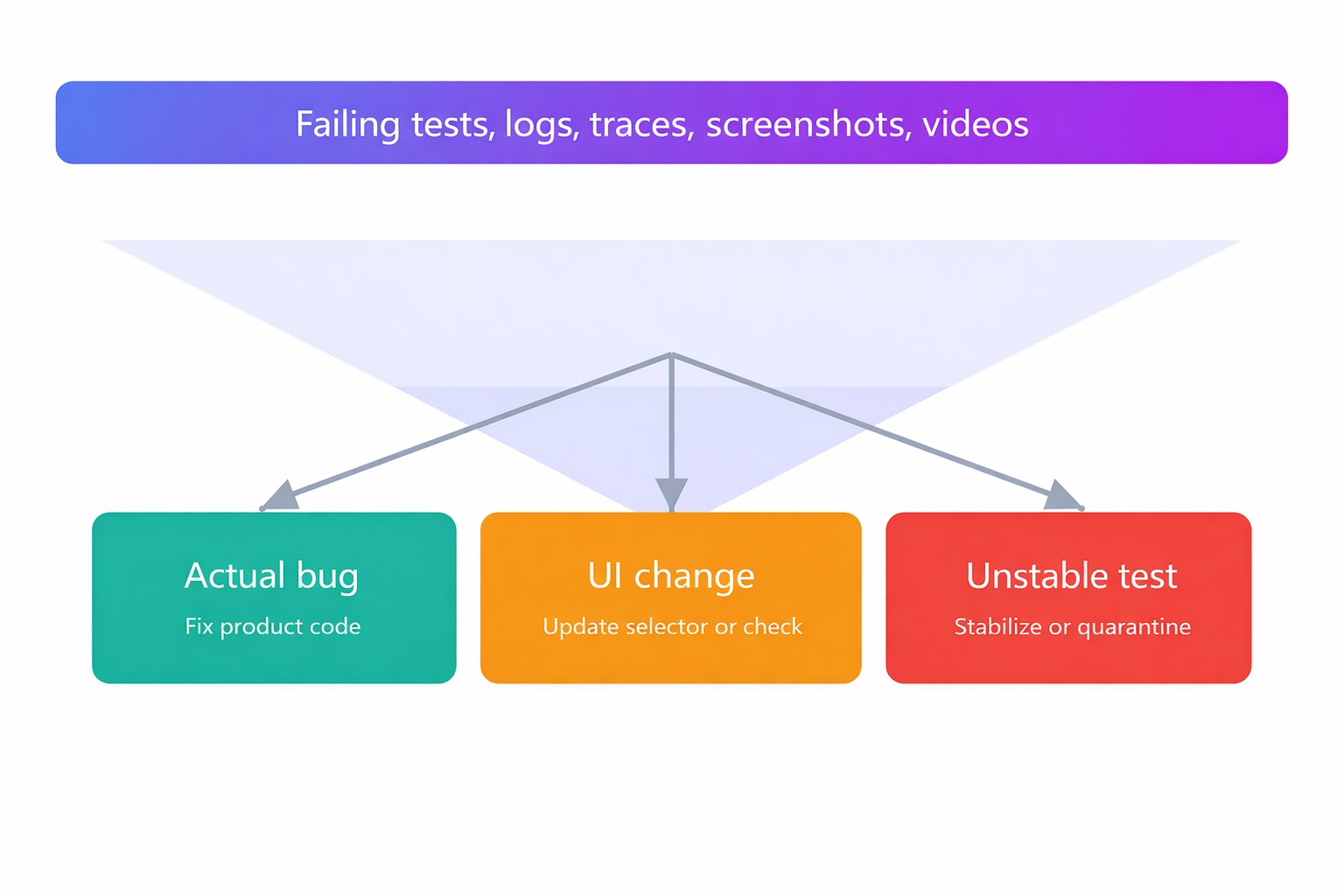
In real use, the best SOPs I’ve seen usually boil down to four things:
- Tests that behave consistently. They should pass or fail for a reason, not at random.
- Clean test data. No leftover state between runs.
- Evidence by default. If something fails, you should already have traces, logs, and screenshots don’t make people re-run it to see what broke.
- One config to rule them all. Keep your setup consistent between local, CI, and staging. No surprises.
That’s it. Keep it boring, keep it reliable. That’s how you win at test automation.
Pillar 1: Deterministic tests you can trust
Flaky tests waste the most time, so the SOP starts at the selector and wait level.
Selector rules (human-readable first):
- Prefer role- and label-based locators. Use getByRole, getByLabel, or stable data-testid attributes. These align to how users and accessibility tools perceive the UI, and are first-class in Playwright locators. Playwright leverages the real browser input pipeline to simulate genuine user interactions, ensuring selectors and actions reflect actual user behavior.
- Avoid positional CSS like nth-child or fragile chains. If there’s no better choice, pair with a strong attribute filter.
Waits and assertions (no fixed sleeps):
Rely on Playwright’s auto-waiting and web-first assertions instead of waitForTimeout. Use await expect(locator).toBeVisible() and similar matchers; Playwright retries until conditions are met, which reduces flakiness. Playwright's auto-wait feature is specifically designed to prevent flaky tests flaky tests auto wait ensures elements are ready before actions, minimizing test flakiness.
Timeout policy (one truth):
Define global action/test timeouts in config once. Override locally only for known slow calls and document why. See Playwright’s test configuration guidance.
Retries with intent:
Allow limited CI retries to filter transient issues. Playwright supports retries in config and CLI; set reasonable values rather than unlimited attempts.
Pillar 2: Clean data and predictable network
Most “random” failures are dirty data or brittle third-party calls.
- Seed idempotent data per test. Use fixtures or a reset API so each test starts fresh.
- Mock fragile externals. When a third-party API is slow or rate-limited, stub with page.route or browserContext.route. Keep your own backend live for true end-to-end confidence. Playwright can also be used for API testing, allowing teams to perform API testing alongside UI automation for comprehensive coverage.
- Reset between tests. Each test should run in isolation with no leftovers from the previous one. That means clearing cookies, local storage, or resetting any app state that could leak across the runs.
Relying on another test to “set things up” is a recipe for flaky failures. If you're testing authenticated flows, you can save the login state once and reuse it in your test setup.
It avoids redundant logins while still keeping tests clean and separate.
For advanced scenarios, you may need to interact with test frames, such as iframes or shadow DOMs, to ensure complete test coverage.
Pillar 3: Evidence on every test failure by default
A failed test without artifacts forces guesswork. The SOP requires automatic capture:
- Traces: trace: ‘on-first-retry’ gives step-by-step diagnostics only when a failure persists. You can capture execution trace for deeper debugging. Trace Viewer is purpose-built for CI debugging and can be opened locally or in the browser. Execution logs provide detailed records of test runs, including steps executed and errors encountered, and are essential for debugging.
- Video: video: 'retain-on-failure' saves the proof you need while keeping storage lean. A test execution screencast provides a visual record of the test run.
- Screenshots: screenshot: 'only-on-failure' makes the final UI state obvious.
Pillar 4: One config, predictable everywhere
Configuration drift creates phantom bugs.
- Centralize defaults in the main configuration file, playwright.config.ts: retries, workers, timeouts, reporters, artifact rules. Teams should also configure test retry strategy here to reduce flaky tests and improve reliability by capturing execution traces, videos, and screenshots for debugging.
- Differentiate local vs CI with process.env.CI (e.g., 0 retries locally, 2 in CI).
- Pin browsers using the official Playwright Docker image or --with-deps install to keep environments identical across laptops and CI.
How to get faster CI feedback without extra noise
Fast feedback is parallel by design and complete by default. Streamlined testing processes ensure that each shard completes efficiently, every artifact is uploaded promptly, and CI feedback becomes faster and more reliable.
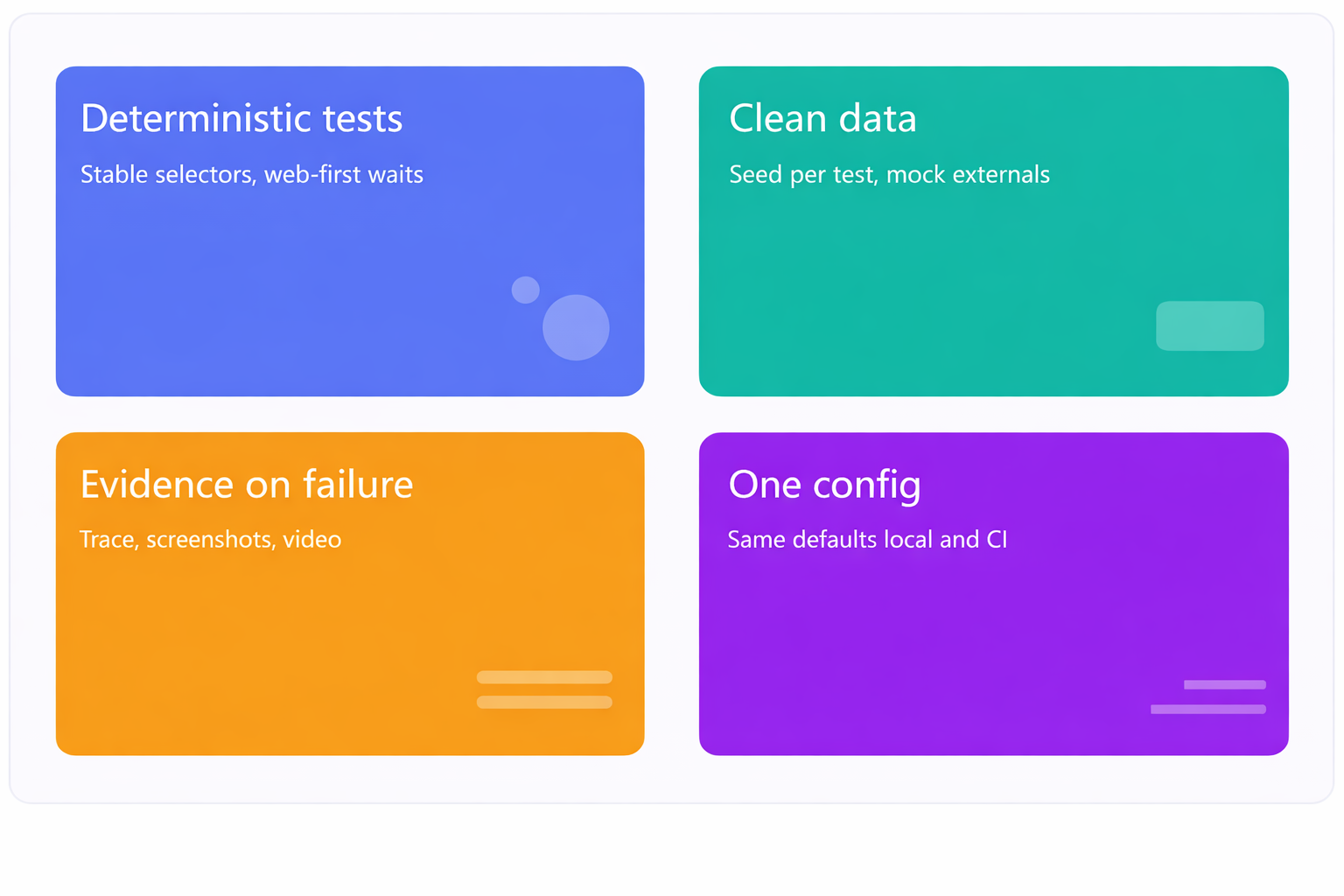
You want every shard to finish, every artifact uploaded, and one place where AI groups failures into real bugs, UI changes, or unstable tests. Then you decide in minutes, not hours.
Parallel test execution and sharding that actually help
- Right-size workers per machine based on vCPU/RAM. Start with 2–4 and tune. Playwright runs tests in parallel across workers.
Playwright leverages fast execution browser contexts for efficient parallel test runs, enabling rapid creation of isolated environments for each test. - Shard across machines for wall-clock reduction. If your test suite is starting to take a while, sharding can seriously cut down your wall-clock time.
Playwright supports this with the --shard=X/Y flag, letting you split your tests across multiple machines or runners. On GitHub Actions, this works great with a matrix setup it’s built right in.
That said, parallelism only works if your tests are truly independent. Make sure each one runs in isolation, no shared state, no weird side effects.
The easiest way to guarantee that? Spin up a fresh browser context for every test. That gives each test its own clean environment, like its own little sandbox.
Keep test order stable. Tag tests (e.g., @smoke, @critical) and avoid reshuffling the entire suite for experiments.
CI matrix and fail policy that maximize signal
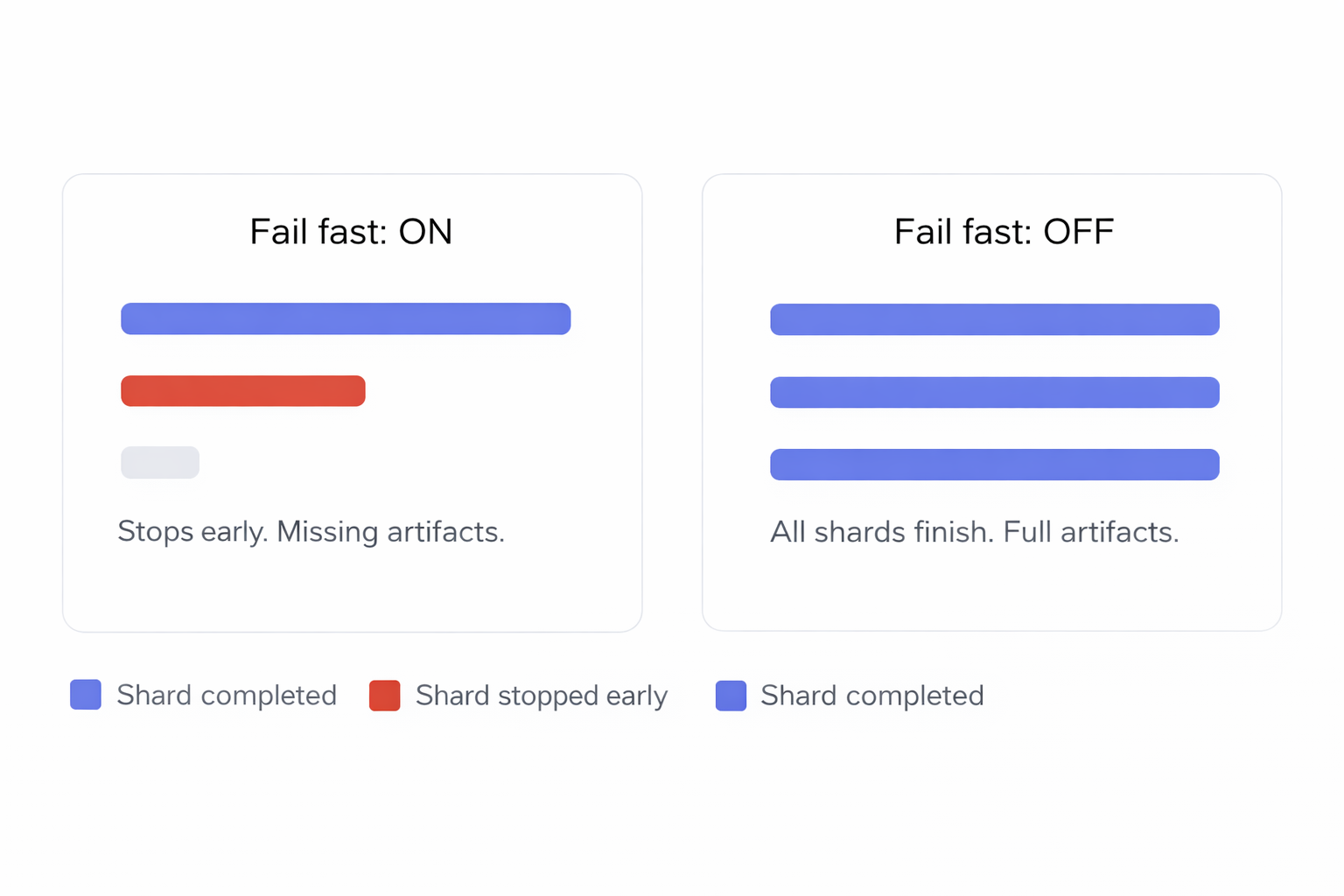
Matrix-based sharding. Represent each shard as a matrix row and run all of them. GitHub Actions supports sharding and merging HTML reports; Playwright documents this pattern.
Disable fail-fast. Let every shard finish to collect complete artifacts and failure coverage in a single run. This is critical for triage.
Predictable artifact names. Name bundles as playwright-artifacts-1, -2, -3 for each shard so anyone can fetch the right set quickly.
Caching and containers to shrink setup time
- Cache Node modules and Playwright browsers.
- Use the official image or npx playwright install --with-deps to avoid “works on my machine” issues.
- Pin Node and Playwright versions to avoid heisenbugs from drift.
The SOP you can copy: patterns, config, CI YAML, and AI triage
This is where the ideas turn into something real, actual code and habits you can drop into your workflow.
Start with a simple step: set up Playwright, write a basic test, and make sure it runs. That first green check tells you your setup’s working.
From there, keep tests small and focused. Each one should cover a single scenario. Clean code is easier to debug, review, and scale later.
Use a config file to set defaults like timeouts, retries, reporters, whatever your suite needs. Organize your tests so they’re easy to run and manage.
For CI, GitHub Actions makes it easy to sharding tests using a matrix setup and the --shard=X/Y flag. Upload traces and screenshots when things fail it saves a ton of time.
Once that’s working, you can layer on AI triage to group failures and point out the likely root cause. Less digging through logs, more fixing.
Stable Playwright patterns you must adopt
- Selectors: prefer roles, labels, and data-testid.
- Waits: remove fixed sleeps; use web-first assertions.
- Retries: retries: process.env.CI ? 2 : 0 (tuned from Playwright’s retries feature).
- Artifacts: trace: 'on-first-retry', video: 'retain-on-failure', screenshot: 'only-on-failure'.
- Data: idempotent seeding; mock only truly external dependencies.
import { defineConfig, devices } from '@playwright/test';
export default defineConfig({
  timeout: 30_000,
  retries: process.env.CI ? 2 : 0,
  workers: process.env.CI ? 3 : undefined,
  use: {
    trace: 'on-first-retry',
    video: 'retain-on-failure',
    screenshot: 'only-on-failure',
    baseURL: process.env.BASE_URL || 'http://localhost:3000',
  },
  reporter: [
    ['json', { outputFile: 'playwright-report/report.json' }],
    ['html', { outputFolder: 'playwright-report', open: 'never' }],
  ],
  projects: [
    { name: 'chromium', use: { ...devices['Desktop Chrome'] } },
    { name: 'firefox',  use: { ...devices['Desktop Firefox'] } },
    { name: 'webkit',   use: { ...devices['Desktop Safari'] } },
  ],
});
This ensures fast, full test isolation and enables reusing authentication states across tests, improving test stability and efficiency.
Why this works:
- Retries and artifacts are CI-aware.
- Reporters generate a machine-readable JSON plus a human-friendly HTML report.
- Projects cover Chromium/Firefox/WebKit in one runner. (Playwright’s multi-browser support is built-in.)
CI YAML template with comments
name: e2e
on:
  pull_request:
  push:
    branches: [main]
jobs:
  tests:
    runs-on: ubuntu-latest
    strategy:
      fail-fast: false
      matrix:
        shardIndex: [1, 2, 3]   # three machines
        shardTotal: [3]       # workers per machine
    steps:
      - uses: actions/checkout@v4
      - name: Setup Node 20 with cache
        uses: actions/setup-node@v4
        with:
          node-version: '20'
          cache: 'npm'
      - run: npm ci
      - name: Install Playwright browsers
        run: npx playwright install --with-deps
      - name: Run shard ${{ matrix.shard }}
        run: npx playwright test --shard=${{ matrix.shardIndex }}/${{ matrix.shardTotal }}
      - name: Upload artifacts for shard ${{ matrix.shardIndex }}
        uses: actions/upload-artifact@v4
        with:
          name: playwright-artifacts-${{ matrix.shardIndex }}
          path: |
            playwright-report/**
            test-results/**
This mirrors Playwright’s documented CI flow and sharding support.
AI-assisted triage that cuts time to decision
- Even with perfect parallelism, triage is often the slowest part. Route artifacts to an AI-aware test reporting hub so people see grouped, labeled failures and the right owner in one place.
- Upload artifacts on every run. Include the HTML report folder, JSON report, trace files, screenshots, and videos. Playwright provides built-in reporters and a documented way to collect and open reports.
- Use AI to classify failures. The labels that matter are: Actual Bug (fix product code), UI Change (update selector or assertion), and Unstable Test (stabilize or quarantine).
- Link runs to PRs. Show branch and pull request context so reviewers see pass, fail, and unstable counts before opening code.
- Bundle evidence for one-click review. From the PR, open the failing test with error text, steps, screenshots, console, and the trace viewer for faster Playwright debugging. Traces are first-class and can be inspected locally or in the browser.
Where TestDino fits. TestDino consumes standard Playwright reporting output and artifacts, then groups similar failures and applies Actual Bug, UI Change, or Unstable labels with confidence scores. It shows PR health at a glance and provides prefilled Jira or Linear tickets from the same view (see Integrations and AI Insights in TestDino docs).
Playwright reporting and evidence: practical notes
Built-in reporters. Use JSON for machine processing and HTML for human review. Configure multiple reporters in reporter: [...]. Trace policy. Prefer on-first-retry on CI per Playwright guidance. Running traces for all tests is heavy; use --trace on only during local debugging. Trace usage. Open trace.zip with npx playwright show-trace or trace.playwright.dev. Network mocking. Use page.route or browserContext.route for predictable responses to third-party calls while keeping your own services live
Visual and mobile coverage within this SOP
Reporting discipline. Publish visual diffs and mobile project results through the same artifact flow. This keeps Playwright reporting consistent across cross-browser and device runs.
Best CI settings for Playwright: quick checklist
Projects: Chromium, Firefox, WebKit. Retries: 2 on CI, 0 locally. Workers: tune per machine; monitor saturation. Shards: start with 3 machines; expand based on runtime. Artifacts: JSON + HTML + traces on first retry + screenshots/videos on failure. Caching: Node modules and browsers. Containers: official image or --with-deps install. Secrets: pull from CI secret store. Branch rules and PR checks: fail only on true blockers; quarantine unstable tests behind a clear tag and ownership rule.
Reporting metrics every engineering team should track
Pass rate by environment and branch. New failure rate to detect regressions early. Unstable share across attempts and runs to monitor noise. Retry volume and success percentage to expose masked instability. Average run time and time saved week over week. Slowest tests and slowest specs to target performance work. Top error variants and top affected tests for focused triage. Shard distribution balance and worker utilization to keep CI efficient.
Future of Playwright: Trends and What’s Next
Strong browser support. It keeps pace with Chromium, Firefox, and WebKit so tests reflect real user conditions. Richer APIs. Expect new helpers for automation, debugging, and cross-browser coverage that reduce boilerplate and make tests easier to maintain. Growing ecosystem. Adoption is rising, which leads to more integrations, tools, and community tips that make complex apps easier to test. Clear documentation and active community. This helps teams learn quickly and apply best practices with confidence.
Conclusion
FAQs

Vishwas Tiwari
AI/ML Developer