How Long Should E2E Tests Take? Performance Data from Real Teams
If your E2E suite takes 47 minutes, that’s not “normal”, it’s a release bottleneck. Here’s how to score your CI speed, see what healthy teams look like, and cut time without guessing.
Your E2E test suite takes 47 minutes to run. Is that normal?
Nobody on your team knows. The tests have been getting slower for months, but nobody can point to the moment it happened or the tests that caused it. Meanwhile, PRs queue up, engineers context-switch while they wait, and releases slip by half a day because someone has to rerun a flaky build.
This article gives you three things: a way to score your current CI/CD pipeline speed, a breakdown of what "normal" looks like based on data from millions of real workflows, and a decision framework for cutting total CI time without guessing where to start.
The goal isn't faster tests. It's a measurable time budget, a way to find what's burning it, and a system to keep it from creeping back.
Score Your Suite: A 60-Second Self-Check
Before reading any benchmarks, answer four questions about your E2E suite:
| Question | Your Number | Green | Yellow | Red |
|---|---|---|---|---|
| Total CI time for E2E tests (minutes) | ___ | Under 10 | 10-30 | Over 30 |
| Suite size (test count) | ___ | Under 100 | 100-500 | Over 500 |
| Parallelism (number of CI workers) | ___ | 4+ | 2-3 | 1 |
| Flake rate (% of runs needing reruns) | ___ | Under 3% | 3-10% | Over 10% |
What your zone means:
Mostly green: Your suite is in good shape. Focus on keeping it there. Set alerts for when the duration creeps above your budget.
Mostly yellow: You have room to improve, and it's worth the investment. A 10-minute reduction in CI time pays back 30+ minutes of developer wait time per PR (including context-switch recovery). Prioritize based on the largest bucket, using the time budget model below.
Mostly red: Your test suite is actively slowing down releases. Engineers are likely ignoring failures or merging without waiting for CI to complete. This is costing you real shipping velocity. Read the rest of this article with urgency.
Note: These thresholds come from CircleCI's benchmark data across 28 million workflows and DORA research on elite-performing teams. They're not arbitrary. Teams that hit 5-10 minute workflow durations with 90%+ success rates consistently ship faster and recover from failures in under an hour.
The Time Budget Model: Where Your Minutes Actually Go
Most teams only measure one thing: how long the tests take to run. That's like budgeting for a road trip by only counting miles, ignoring gas stops, traffic, and the wrong turn you'll take in New Jersey.
Here's the real model:
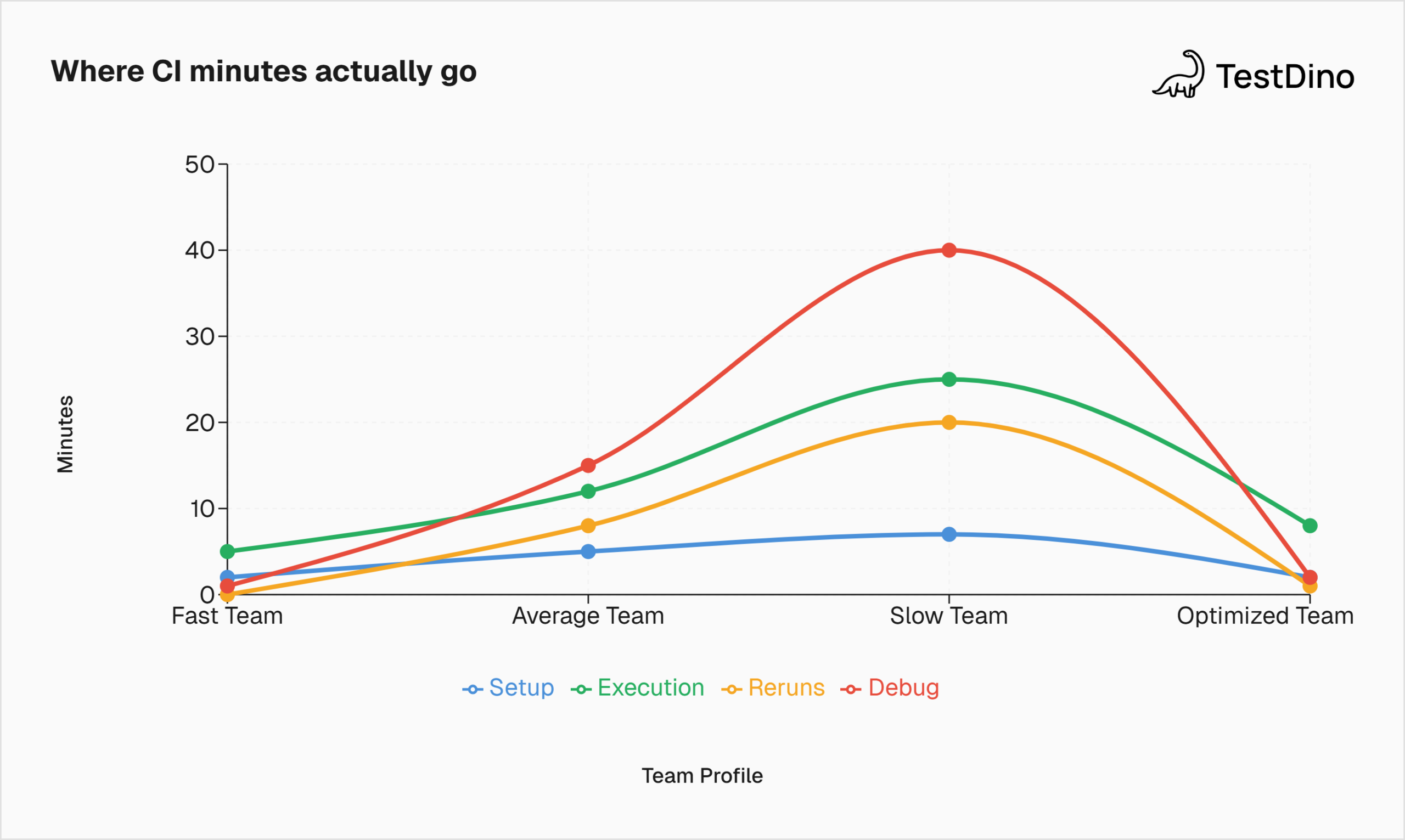
Total CI time = Setup + Execution + Reruns + Debug
Each component eats time differently, and each has a different fix.
Setup time includes dependency installation, Docker container startup, browser downloads, and environment provisioning. For teams using containerized CI, this alone can add 5-7 minutes before the first test even runs.
Execution time is what most people think of as "test time." The time the actual tests take from the first click to the last assertion.
Rerun time is the hidden tax. When a flaky test fails, the pipeline either reruns automatically or a developer manually triggers a retry. Each rerun repeats the full execution cycle, sometimes the setup too.
Debug time happens after CI finishes. An engineer sees a red build, opens the logs, tries to figure out what failed and why. This is the most expensive component because it pulls a developer out of feature work and into investigation mode.

Tip: Track all four components separately, not just execution time. If you only optimize execution but your flake rate is 15%, you'll save 2 minutes on test speed and lose 20 minutes to reruns and debugging. The net effect is negative.
What "Normal" Looks Like: Benchmarks from Real Teams
Here's what the data says about E2E test execution time across real engineering organizations. Each benchmark below pairs a number with its meaning and what to do about it.
Benchmark 1: Total Workflow Duration
The CircleCI 2026 State of Software Delivery analyzed 28 million workflows across 22,000 organizations. Their recommended benchmark for workflow duration is 5-10 minutes.
| Percentile | Workflow Duration | What It Means |
|---|---|---|
| Top 5% | Under 2 minutes | Elite. Highly parallelized, minimal setup, tight test suite |
| Top 25% | 3-5 minutes | Strong. Tests are fast and focused on critical paths |
| Median | ~11-12 minutes | Average. Room to optimize but not blocking releases |
| Bottom 25% | 20-30+ minutes | Slow. Engineers context-switch during builds, PRs queue |
| Bottom 10% | 45+ minutes | Critical. Suite is a release bottleneck |
What to do if you're above 20 minutes: Don't start by rewriting tests. First, figure out which of the four budget components (setup, execution, reruns, debug) is the largest. That tells you where to cut.
Benchmark 2: Individual Test Duration
A single E2E test should run between 5 seconds and 2 minutes. Anything longer usually means the test is doing too much.
| Test Type | Expected Duration | Common Cause if Slow |
|---|---|---|
| Simple flow (login, page load) | 5-15 seconds | Hard-coded waits instead of auto-wait |
| Medium flow (search, filter, form) | 15-45 seconds | Unnecessary full-page reloads |
| Complex flow (checkout, multi-step) | 45-120 seconds | No API shortcuts for setup/teardown |
| Over 2 minutes | Fix it | The test is doing too many things. Split it |
Fastest lever: Replace sleep() and hard waits with framework-native waiting. Playwright's auto-wait and Cypress's retry-ability handle this automatically. For Selenium, use explicit WebDriverWait with conditions, not Thread.sleep().
Benchmark 3: Parallelization Impact
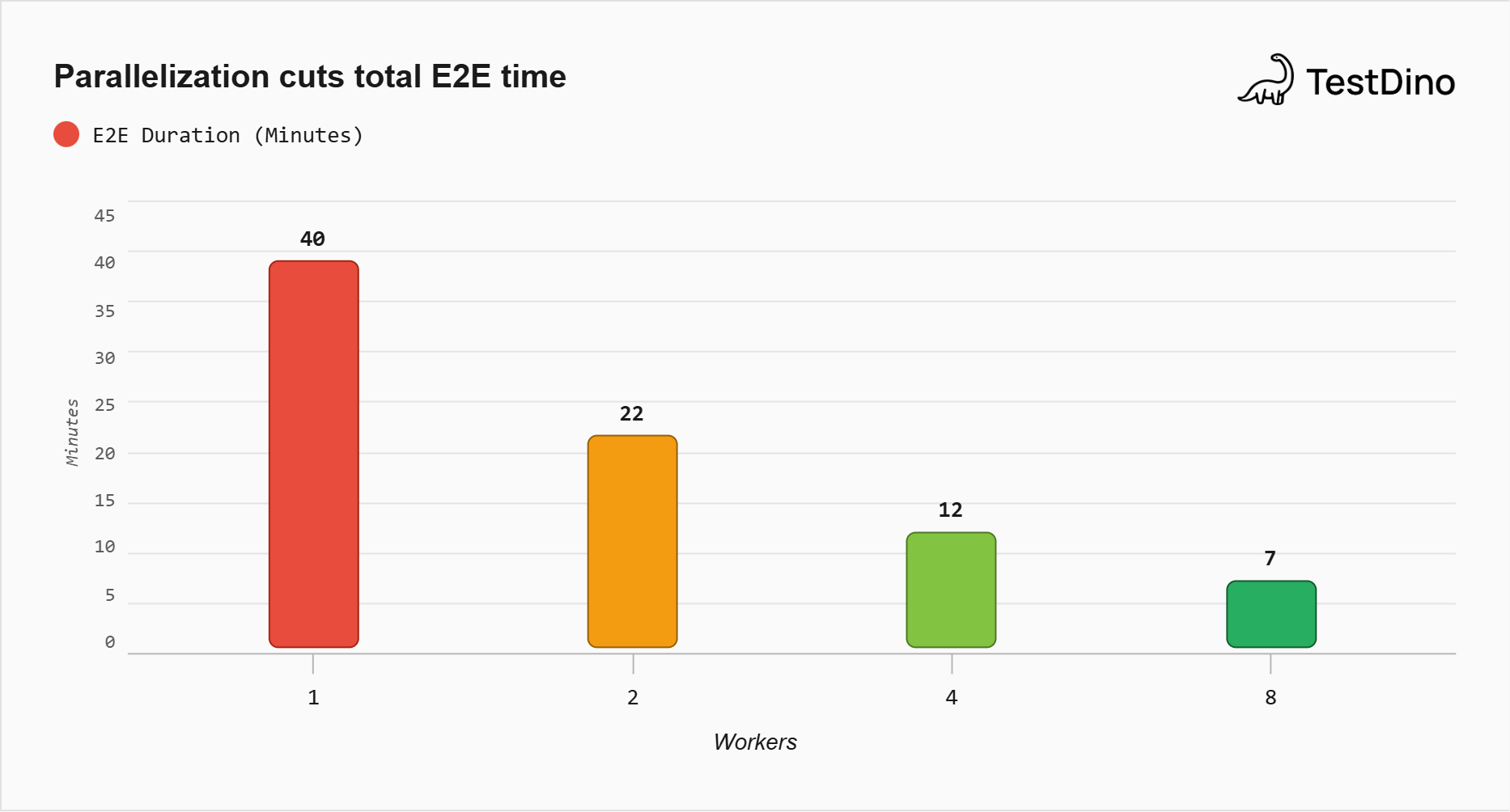
Running tests in parallel is the single biggest lever for reducing total E2E execution time.
| Workers | Suite of 200 tests (serial baseline: 40 min) | Reduction |
|---|---|---|
| 1 | 40 minutes | - |
| 2 | ~22 minutes | 45% |
| 4 | ~12 minutes | 70% |
| 8 | ~7 minutes | 82% |
These are rough estimates assuming an even test distribution. In practice, results vary based on how well tests are split. If your longest test takes 3 minutes and all others take 30 seconds, 4 workers won't help much because one worker is bottlenecked.
What to do: Use duration-based sharding, not random splitting. Assign the longest tests first, then fill the remaining capacity. Playwright supports this natively with --shard and fullyParallel mode.
Benchmark 4: Recovery Time
When a build fails, how fast can your team get back to green?
CircleCI's 2026 data shows the median team takes 72 minutes to recover from a failed workflow, up 13% year over year. The top 5% recover in 1 minute 36 seconds. That's a 45x difference.
The math is brutal. A team pushing 5 changes per day with a 70% success rate (the current industry median for the main branch) experiences 1.5 failures per day. At 72 minutes recovery each, that's nearly 2 hours lost daily to getting back to green. Scale that across a year, and it equals roughly 250 hours of blocked deployments.
Fastest lever: Better failure diagnostics. If your engineer can see why a test failed in 30 seconds instead of 10 minutes of log-reading, your recovery time drops immediately.
Benchmark 5: Success Rate
Your main branch success rate should be above 90%. The current industry median has dropped to 70.8%, the lowest in five years, largely due to AI-generated code volume outpacing validation.
That means 3 out of 10 merges to main are failing. If even a third of those failures are flaky (not real bugs), your team is spending significant time chasing ghosts.
The Hidden Tax: Reruns and Flakiness
This is the section where the real cost lives.
Setup time you can cache. Execution time you can parallelize. But reruns are pure waste, and they're growing. The Bitrise Mobile Insights report found that the probability of hitting a flaky test rose from 10% in 2022 to 26% in 2025.
Here's what flakiness costs at scale:
Google's research found that flaky tests account for 4.56% of all test failures, costing over 2% of total coding time. For a team of 50 engineers, that's a full person-year lost annually. Atlassian reported that 15% of their Jira backend build failures came from flaky tests, costing over 150,000 hours of developer time per year. A separate five-year industrial study found that dealing with flaky tests consumed at least 2.5% of productive developer time.
The pattern is consistent: speed gains don't stick if flake rate stays high. You can cut your execution time in half, but if 10% of runs still need a rerun, you've just made the wasted cycle happen twice as fast.
Tip: Track flakiness by individual test, not just as a suite-wide percentage. A 5% flake rate might mean 5 tests that flake constantly, or 250 tests that flake rarely. The fix is completely different.
How TestDino Shows You Exactly Where Flakiness Lives
This is where most teams get stuck. You know you have flaky tests. You don't know which ones, how often they flake, or whether it's getting better or worse.
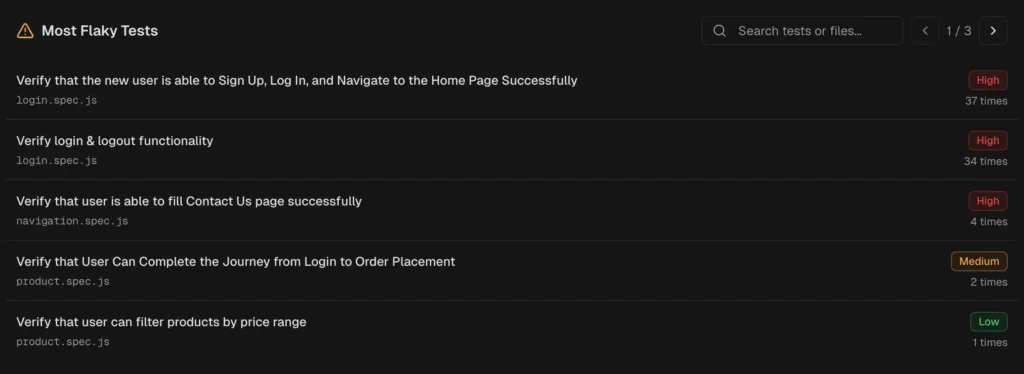
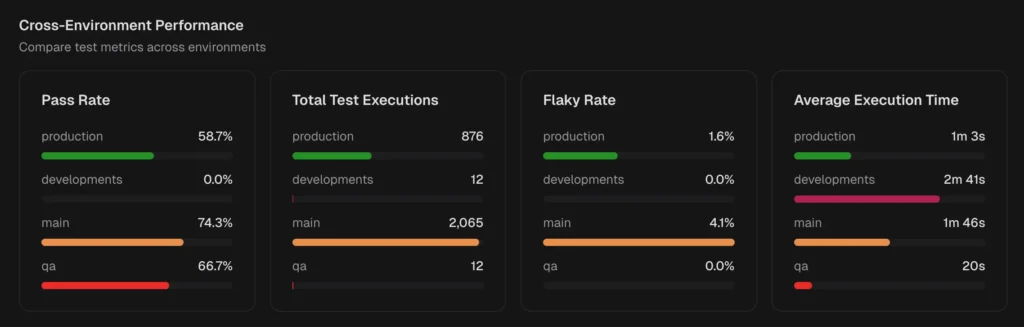
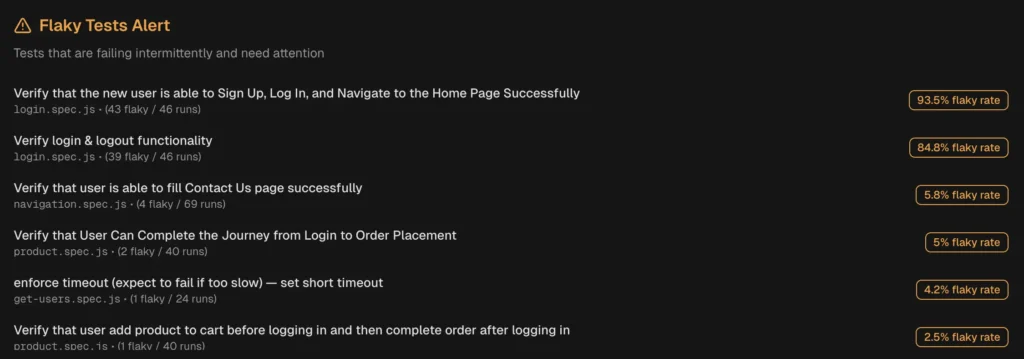
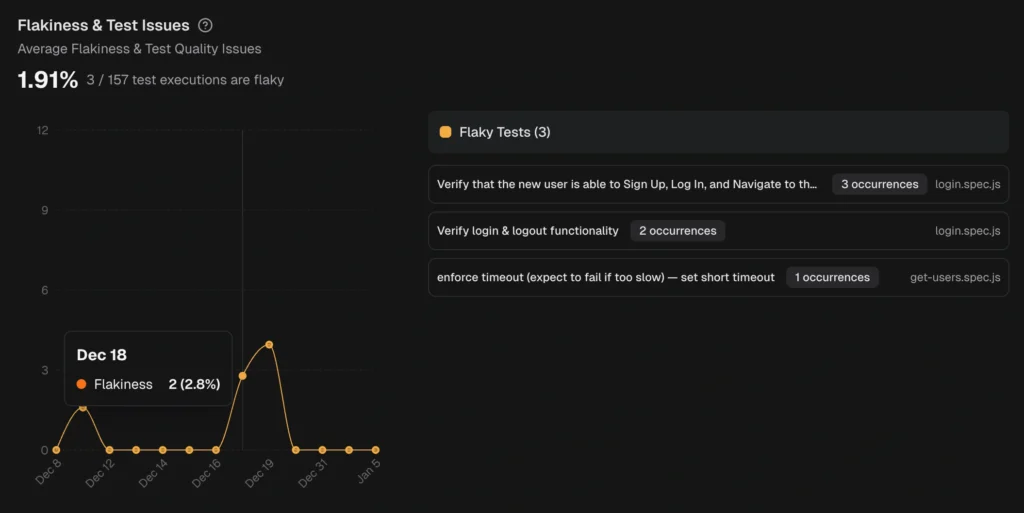
TestDino tracks flakiness at the individual test level across every CI run. Instead of a single pass/fail signal, you get a stability score per test that factors in how often it flips between passing and failing over the last 30, 60, or 90 days.
Here's what that looks like in practice:
| What you need to see | Where TestDino shows it |
|---|---|
| Which tests flake the most | QA Dashboard ranks tests by flaky rate percentage with direct links to the latest run |
| Who owns the flaky tests | Developer Dashboard filters flaky tests by author so ownership is clear |
| Is flakiness trending up or down | Analytics Summary charts flaky rate over time. A rising line means your suite is getting less stable |
| What kind of flakiness is it | Each test is classified by root cause: Timing Related, Environment Dependent, Network Dependent, or Assertion Intermittent |
| Which environments cause flakes | Cross-Environment Comparison shows flaky rate per environment side by side |
| Should flaky tests block CI | CI Check modes: Strict (flaky = failure) for production branches, Neutral (flaky excluded) for development |
The difference between "we have flaky tests" and "test X flakes 23% of the time on Chrome Linux runners in staging" is the difference between a vague concern and a fix you can ship this sprint.
The Decision Checklist: If This, Then That
You've scored your suite. You've seen the benchmarks. Now pick the right fix based on where your time is going.
If setup dominates (over 30% of total CI time):
-
Cache dependency installs between runs (npm, pip, browsers)
-
Use pre-built Docker images with browsers already installed
-
Move to faster CI runners (GitHub Actions large runners, CircleCI resource classes)
If execution dominates (tests themselves are slow):
-
Find the 10 slowest tests and optimize them first (80/20 rule)
-
Replace hard waits with framework-native auto-waiting
-
Use API calls instead of UI clicks for test setup
-
Parallelize with duration-based sharding
-
Split into smoke (every PR) and full regression (nightly)
If reruns dominate (high flake rate eating CI cycles):
-
Identify the top 10 flakiest tests and fix or quarantine them
-
-
Track flake rate per test using TestDino's flaky test detection
-
-
Add retry logic carefully: retries mask the problem, visibility fixes it
-
Mock external API dependencies that cause timing failures
If debug dominates (engineers spend too long figuring out failures):
-
Add Playwright Trace Viewer or equivalent for full execution recordings
-
Use AI-powered failure classification to triage failures before a human looks
-
Post failure summaries to PRs automatically using GitHub integration
Tip: Pick one bucket. The biggest one. Fix that first. Don't try to optimize all four simultaneously. Teams that spread effort across setup, execution, flakiness, and debugging at the same time make slow progress on all of them and fast progress on none.
Setting a Time Budget That Sticks
A benchmark is useful once. A budget is useful forever.
Step 1: Measure your baseline. Run your E2E suite 10 times. Record setup, execution, reruns, and total wall clock time separately.
Step 2: Set a target. Based on the benchmarks above, 10-15 minutes total CI time is achievable for most teams with parallelization and basic optimization.
Step 3: Create an alert. Fire a CI notification when the total E2E duration exceeds your budget by 20%. This catches the creep before it becomes a crisis.
Step 4: Review monthly. Test suites grow. Without regular review, a 10-minute suite becomes 30 minutes in 6 months. TestDino's test case history shows duration trends per test, making it easy to spot which new tests are breaking your budget.
Conclusion
Your E2E suite doesn't need to be fast in the abstract. It needs to fit within a time budget that keeps your team shipping.
That budget has four components: setup, execution, reruns, and debug. Most teams only measure one. The others are where the real time goes.
Measure all four. Fix the biggest. Keep watching.
FAQs

Jashn Jain
Developer Advocate