Playwright Assertions: A Guide to expect() and Test Automation
Playwright assertions use expect() to verify app behavior, with auto-retries that keep tests reliable even when the UI updates asynchronously.
Playwright assertions are pass/fail checks made with expect(). They verify what your app did and what it was supposed to do. They validate UI state, page navigation, API responses, and data values after each action.
This guide explains how that works, when retries happen automatically, and when you should use a different assertion type.
Why Assertions matter in test automation
Assertions make tests trustworthy because they verify outcomes, not just actions. A click on "Save" only matters if the test also checks a success toast, a disabled submit button state, a redirect, or persisted data.
They also improve maintenance. When an assertion fails, the failure message tells you which expectation broke. That makes triage faster, especially when the run is reviewed later in CI or in a centralized report such as Playwright reporting workflow.

Tip: Place assertions close to the action they validate. This keeps logs readable and makes failure diagnosis much faster.
How Assertions prevent bugs from reaching production
Most automation bugs reach production because tests verify too little or verify the wrong thing. A page may load, but the CTA can still be disabled, an error can be hidden, or stale content can remain on screen.
Good assertions close that gap by checking UI state, navigation state, and data state in the same flow.
For example, a checkout test should not stop at a redirect. It should verify the order confirmation text, the URL, and the API response or rendered summary. That pattern is one reason Playwright suites remain reliable when they scale, especially when paired with observability and triage practices like those discussed in the Playwright reporting gap.
How Playwright uses the expect() function
In Playwright, you call expect(actual) and then choose a matcher such as toBeVisible() or toEqual().
import { test, expect } from"@playwright/test";
test("shows confirmation after save", async ({ page }) => {
    await page.goto("/settings");
    await page.getByRole("button", { name: "Save" }).click();
    await expect(page.getByTestId("toast")).toHaveText("Saved");
});
The important part is matcher behavior. When the matcher is web-first, Playwright retries until the condition passes or the assertion times out. That built-in retry model is a major reason Playwright assertions handle timing changes better than one-shot checks.
Types of Assertions in Playwright
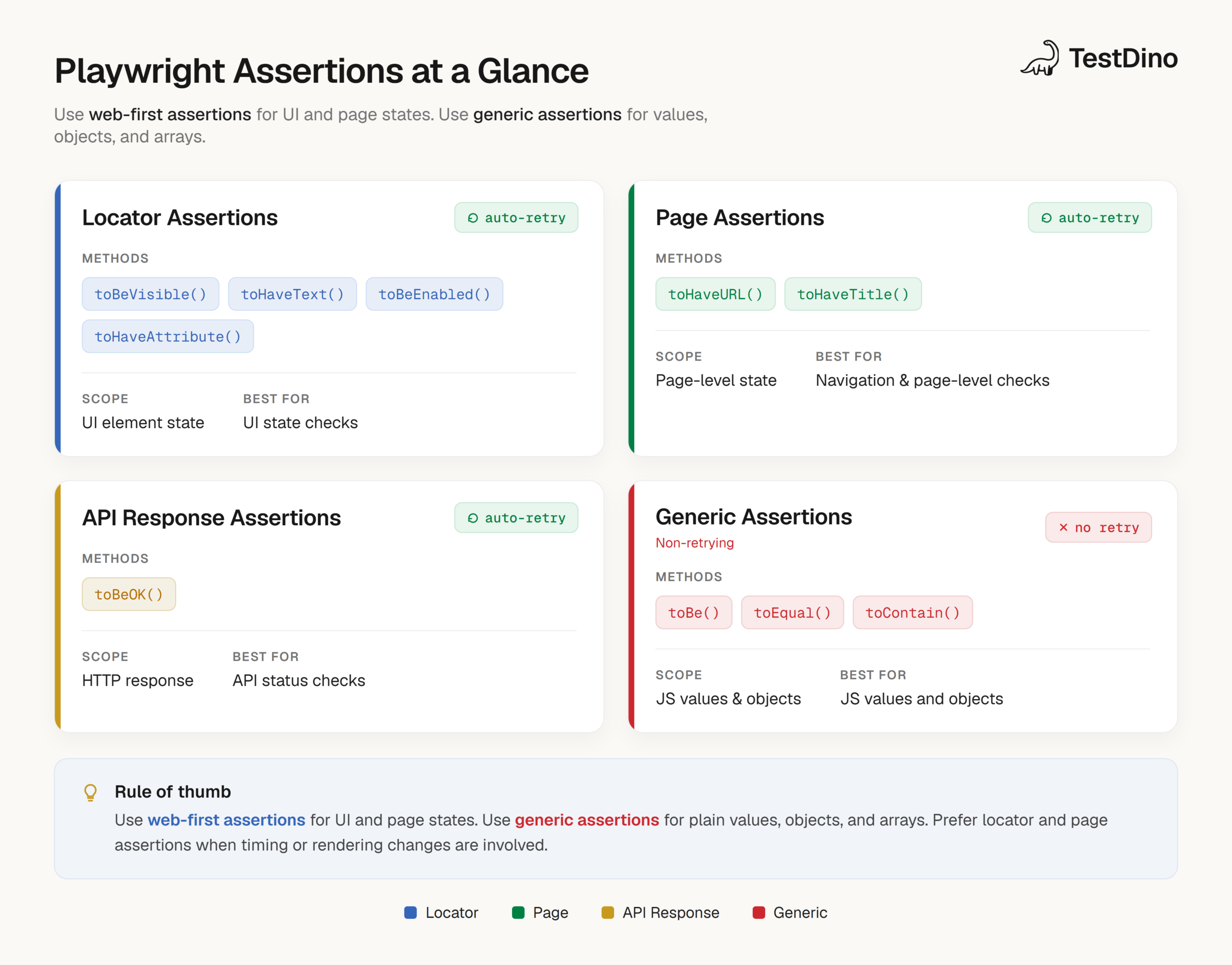
In practice, Playwright assertions fall into four groups.
- Web-first locator, page, and response assertions for dynamic application state.
- Non-retrying generic assertions for plain values, arrays, and objects.
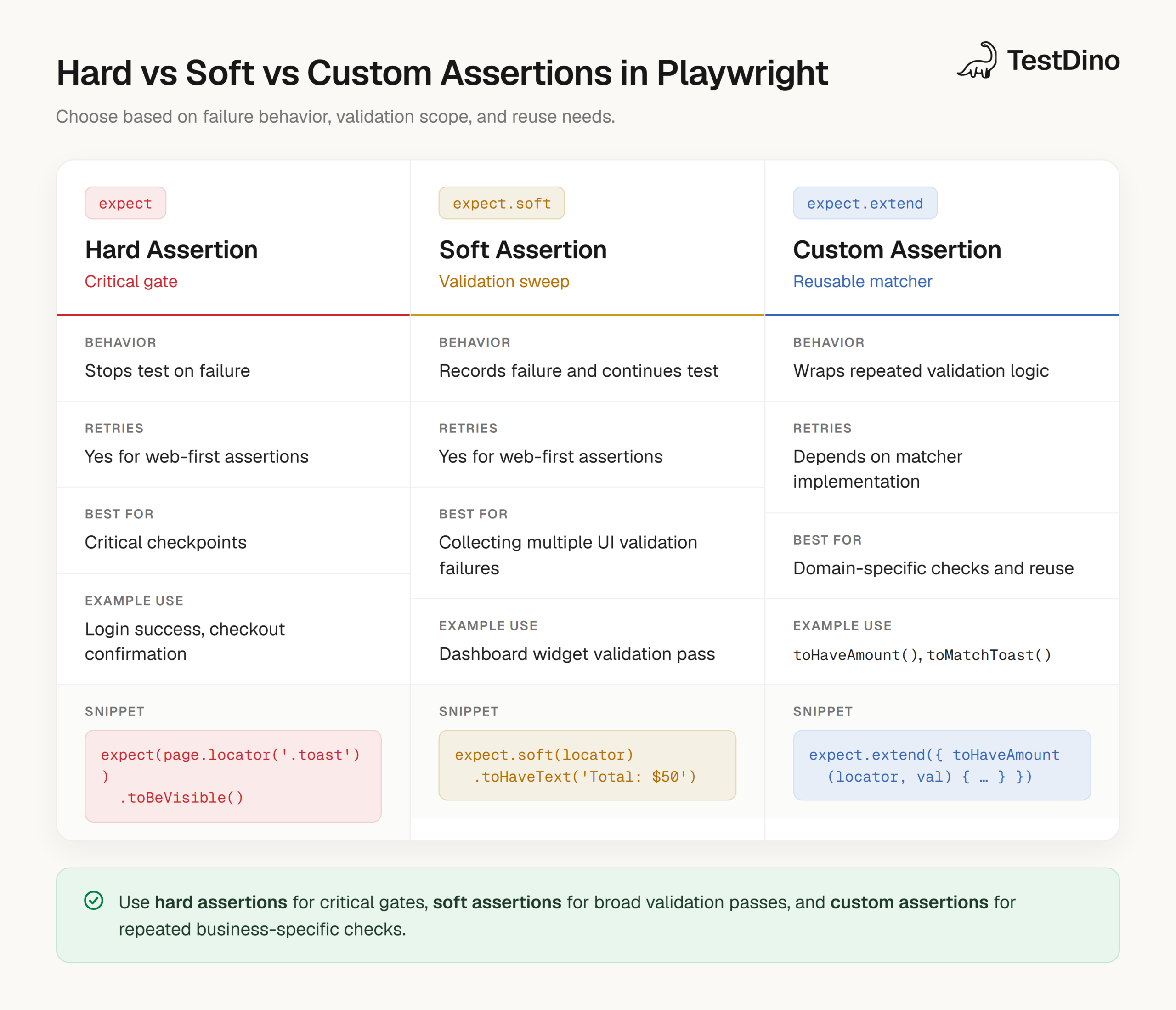
- Soft assertions using expect.soft() when you want to collect multiple failures in one run.
- Custom assertions with expect.extend() for repeated domain-specific checks.
Note: Soft assertions and Playwright-specific assertion reporting behavior rely on the Playwright test runner. If you switch to another assertion library directly, the behavior will differ.
Setting up your first Playwright assertion
You only need the Playwright test runner package and a test file.
import { test, expect } from"@playwright/test";
test("homepage title", async ({ page }) => {
    await page.goto("https://example.com");
    await expect(page).toHaveTitle(/Example/i);
});
If you are setting up the project for the first time, the Playwright CLI is a useful reference for common commands and workflows around running, debugging, and reporting tests.
For assertion learning, start with locator and page assertions first because they cover most E2E scenarios.
How Playwright assertions work under the hood
Understanding the assertion model helps you choose the right matcher and avoid flaky checks.
The expect() function and matcher architecture
expect() is the entry point. The matcher you attach determines whether Playwright performs an immediate check or a retrying check.
For example, await expect(locator).toHaveText(...) is asynchronous and retries, while expect(value).toEqual(...) runs immediately because the value already exists in memory. The same API remains consistent when you switch to expect.soft(...) or add your own matcher with expect.extend(...).
That consistency is why teams can standardize assertion style across UI tests, API checks, and helper utilities without changing the mental model every time.
Auto-Retrying vs. Non-Retrying: the decision rule
Use a simple rule in day-to-day work. If the value comes from the UI and can change after rendering, use a web-first assertion. If the value is already computed in test code and should be stable now, use a generic assertion.
// UI state can change after rendering
await expect(page.getByRole("status")).toHaveText("Ready");
// In memory value is already resolved
const total = subtotal + tax;
expect(total).toBe(108);
Tip: Avoid reading UI text with textContent() and then asserting with toBe() unless you explicitly want a one-shot check. In most UI cases, toHaveText() is safer and clearer.
Default timeout and polling behavior
Playwright retries web-first assertions until they pass or hit the assertion timeout. The default assertion timeout is commonly configured at 5 seconds, and you can override it globally or per assertion.
import { defineConfig } from"@playwright/test";
export default defineConfig({
    expect: {
    timeout: 10_000,
    },
});
Playwright also supports expect.poll() and expect.toPass() for cases where you need retry behavior that does not map cleanly to a built-in locator or page matcher.
Those patterns are covered later in this guide, and they become especially useful in CI workflows where status propagation is delayed.
Auto-Retrying (Web-First) Assertions: complete reference
Web-first assertions are the core of reliable Playwright E2E tests. They wait for the expected state instead of forcing you to guess timing with hard waits.
What is a web-first assertion?
Web-first assertions are Playwright matchers that automatically retry until the expected condition becomes true or the assertion timeout expires.
1. Element state assertions (toBeVisible, toBeEnabled, toBeChecked, etc.)
Element state assertions validate whether an element is visible, hidden, enabled, disabled, checked, or focused.
They are ideal for transitions and asynchronous UI updates because Playwright keeps re-checking the locator while the page settles.
await expect(page.getByRole("button", { name: "Submit" })).toBeEnabled();
await expect(page.getByLabel("Terms")).toBeChecked();
await expect(page.getByTestId("spinner")).toBeHidden();
await expect(page.getByRole("dialog")).toBeVisible();| Assertion | Best Use | Example |
|---|---|---|
| toBeVisible() | Confirm rendered UI is visible to the user | Toast, modal, inline validation |
| toBeHidden() | Confirm UI element disappears or stays hidden | Loading spinner after fetch |
| toBeEnabled() | Confirm control is interactable | Submit button after form completion |
| toBeDisabled() | Confirm action is blocked until prerequisites are met | Checkout before address entry |
| toBeChecked() | Confirm checkbox or radio state | Terms accepted |
| toBeFocused() | Confirm focus management | Dialog autofocus and keyboard flows |
2. Content and value assertions (toHaveText, toContainText, toHaveValue)
These assertions verify displayed content and input values. They are often the most important checks in a business flow because they confirm the application state really changed.
await expect(page.getByRole("heading", { level: 1 })).toHaveText("Orders");
await expect(page.getByTestId("toast")).toContainText("created");
await expect(page.getByLabel("Email")).toHaveValue("user@example.com");
Use toHaveText() when the text should match exactly. Use toContainText() when a stable substring is enough, such as a status prefix, generated ID fragment, or timestamped message.
Note: For list UIs, you can pass arrays to toHaveText() and toContainText() to validate ordering and content together.
3. Attribute and style assertions (toHaveAttribute, toHaveClass, toHaveCSS)
Use attribute and style assertions when behavior is represented through aria-* attributes, class changes, or CSS values.
const menuButton = page.getByRole("button", { name: "Menu" });
await expect(menuButton).toHaveAttribute("aria-expanded", "true");
await expect(menuButton).toHaveClass(/is-open/);
await expect(menuButton).toHaveCSS("display", "block");
Prefer semantic assertions first when possible. CSS assertions are useful, but they can be more brittle than role, name, and state checks.
4. Accessibility assertions (toHaveRole, toHaveAccessibleName, toHaveAccessibleDescription)
Accessibility assertions validate semantics that assistive technologies depend on. They also push your locator strategy toward stable, user-facing signals.
const saveButton = page.getByTestId("save-btn");
await expect(saveButton).toHaveRole("button");
await expect(saveButton).toHaveAccessibleName("Save changes");
await expect(saveButton).toHaveAccessibleDescription(/updates your profile/i);
If your team is adding a11y checks to the same suite, the Playwright accessibility guide pairs well with this section because it shows how to integrate continuous accessibility checks into CI without splitting tooling.
5. Structural and visual assertions (toHaveCount, toHaveScreenshot, toMatchAriaSnapshot)
Structural and visual assertions help when you need to validate list size, pixel-level output, or ARIA snapshots for semantic regression checks.
await expect(page.getByRole("listitem")).toHaveCount(3);
await expect(page).toHaveScreenshot("checkout-page.png");
await expect(page.getByRole("navigation")).toMatchAriaSnapshot(`
    - navigation "Primary"
    - link "Home"
    - link "Pricing"
`);| Assertion | Good For | Risk If Overused |
|---|---|---|
| toHaveCount() | Stable collection size checks | Weak coverage if content correctness is never asserted |
| toHaveScreenshot() | Visual regression checks | Noisy baselines if environments are not standardized |
| toMatchAriaSnapshot() | Accessibility structure regression checks | Snapshot churn if semantics change frequently without review |
New in 1.60: expect(page).toMatchAriaSnapshot() now works on a whole Page, not just a Locator. Asserting expect(page).toMatchAriaSnapshot(...) is equivalent to asserting against page.locator('body'), which makes full-page accessibility-structure checks a one-liner. For a deeper look at the snapshot workflow, see Playwright visual testing.
6. Page-level assertions (toHaveTitle, toHaveURL)
Page assertions validate route changes, redirects, and page metadata. They are especially useful after login, checkout, and deep-link flows.
await expect(page).toHaveURL(/\/dashboard$/);
await expect(page).toHaveTitle(/Dashboard/);
A route assertion plus a visible UI assertion is a stronger pattern than either one alone.
7. API response assertions (toBeOK)
Playwright includes response assertions that are useful in API tests and hybrid UI plus API flows.
const response = await page.request.get("/api/profile");
await expect(response).toBeOK();
For deeper validation, combine response assertions with generic assertions on parsed JSON.
const data = await response.json();
expect(data.user.role).toBe("admin");
expect(data.user.permissions).toContain("profile:read");
Non-Retrying (Generic) Assertions: when and how to use them
Generic assertions run immediately and are best for values already available in memory. They should not replace web-first assertions for dynamic UI checks.
1. Generic matchers reference (toBe, toEqual, toContain, toMatch, toThrow)
Generic matchers are ideal for numbers, booleans, arrays, strings, objects, and synchronous error checks.
expect(statusCode).toBe(200);
expect(user).toEqual({ id: 1, name: "Asha" });
expect(tags).toContain("smoke");
expect(message).toMatch(/success/i);
expect(() => JSON.parse("{")).toThrow();| Matcher | What It Checks | Typical Use |
|---|---|---|
| toBe() | Strict equality | Status code, boolean flags, exact strings |
| toEqual() | Deep equality | Objects, arrays, parsed API payloads |
| toContain() | Substring or item presence | Tags, IDs, messages, labels |
| toMatch() | Regex match | Dynamic text, formatted IDs, URLs |
| toThrow() | Error throwing behavior | Utility functions and validators |
2. Asymmetric matchers (expect.any, expect.objectContaining, expect.stringMatching)
Asymmetric matchers help when exact values are unstable but the structure and key properties matter.
expect(apiResult).toEqual(
expect.objectContaining({
    id: expect.any(Number),
    email: expect.stringMatching(/@example\.com$/),
    profile: expect.objectContaining({
    status: "active",
    }),
  }),
);
This approach is especially helpful for APIs that include generated IDs, timestamps, or optional metadata fields.
Tip: Use asymmetric matchers for payload contracts and exact equality only when every field matters to the behavior under test.
When to use non-retrying over auto-retrying assertions
Choose a non-retrying assertion when the value is already resolved and stable, such as a computed total, parsed API data, or output from a helper function. Choose a web-first assertion when the source is the page and the state can still change after your action.
A common anti-pattern is to read UI text into a variable and then assert with toBe(). That bypasses Playwright's retry model and creates avoidable race conditions.
Negating assertions with .not
.not works with both web-first and generic assertions and preserves the matcher's retry behavior.
await expect(page.getByRole("alert")).not.toBeVisible();
await expect(page).not.toHaveURL(/\/login$/);
expect(user.roles).not.toContain("banned");
Negated assertions are useful, but they become stronger when paired with a positive check that proves the correct state appeared. Instead of only asserting that an error message is absent, also assert that a success message or next page state is visible.
Note: A negated locator assertion like not.toBeVisible() still retries until the negated condition becomes true or the timeout expires.
Soft Assertions: Collecting failures without stopping
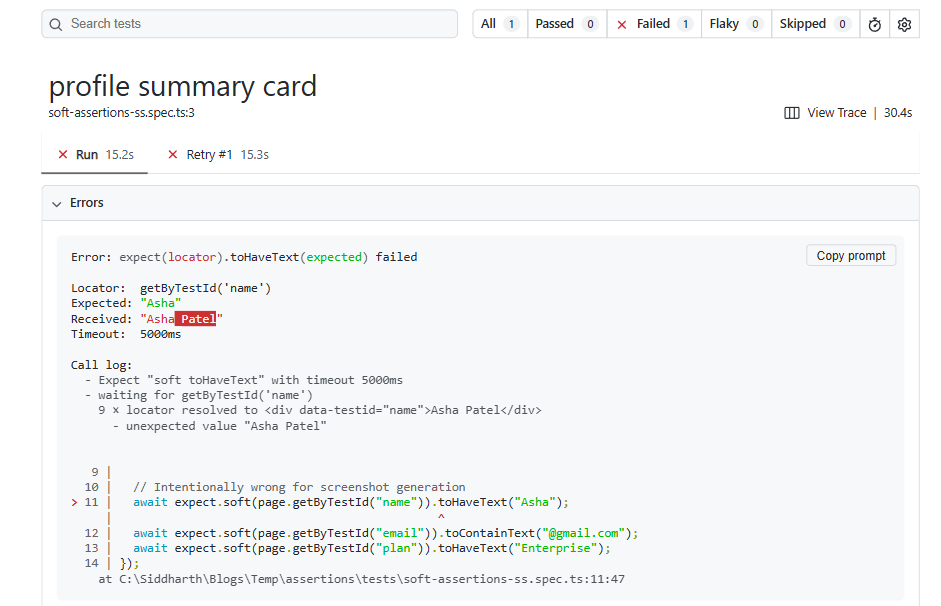
Soft assertions let a test continue after an assertion fails while still marking the test run as failed. They are useful when you want one run to report multiple independent UI mismatches.
1. Using expect.soft() for multi-check tests
Use expect.soft() for summary pages, dashboards, and read-only screens where multiple checks can fail independently and each failure adds diagnostic value.
import { test, expect } from"@playwright/test";
test("profile summary card", async ({ page }) => {
    await page.goto("/profile");
    await expect.soft(page.getByTestId("name")).toHaveText("Asha Patel");
    await expect.soft(page.getByTestId("email")).toContainText("@example.com");
    await expect.soft(page.getByTestId("plan")).toHaveText("Pro");
});
When teams review failures in CI, collecting several mismatches in one run can save reruns. That benefit compounds when traces and screenshots are centralized in a tool like TestDino instead of spread across raw artifacts.
2. Early exit with test.info().errors
Soft assertions do not mean "continue no matter what." If a later step is destructive or expensive, you can stop after collecting the first set of validation errors.
import { test, expect } from"@playwright/test";
test("validate summary before submit", async ({ page }) => {
    await expect.soft(page.getByTestId("subtotal")).toHaveText("$100");
    await expect.soft(page.getByTestId("tax")).toHaveText("$8");
    expect(test.info().errors).toHaveLength(0);
    await page.getByRole("button", { name: "Place order" }).click();
});
This pattern is useful in checkout, billing, and permission flows where an incorrect precondition should block the rest of the test.
3. Global soft mode with expect.configure()
You can create a pre-configured expect instance with soft: true, a custom timeout, or both. This is useful for validation helpers and audit-style test modules.
import { expect as baseExpect } from"@playwright/test";
const softExpect = baseExpect.configure({ soft: true });
const slowExpect = baseExpect.configure({ timeout: 10_000 });
await softExpect(page.getByTestId("status")).toHaveText("Ready");
await slowExpect(page.getByRole("heading")).toHaveText("Dashboard");
Use global soft mode carefully. It works well for focused helpers, but using it everywhere can hide critical failures that should stop a test immediately.
Custom expect messages for better debugging
Custom messages make failure reports more useful in CI logs because they describe the business expectation, not just the matcher failure.
await expect(
    page.getByRole("heading", { name: "Account" }),
    ("Account header should be visible after login").toBeVisible();
You can also attach messages to soft assertions:
await expect
  .soft(page.getByTestId("quota"), "Quota badge should render for paid users")
  .toContainText("Remaining");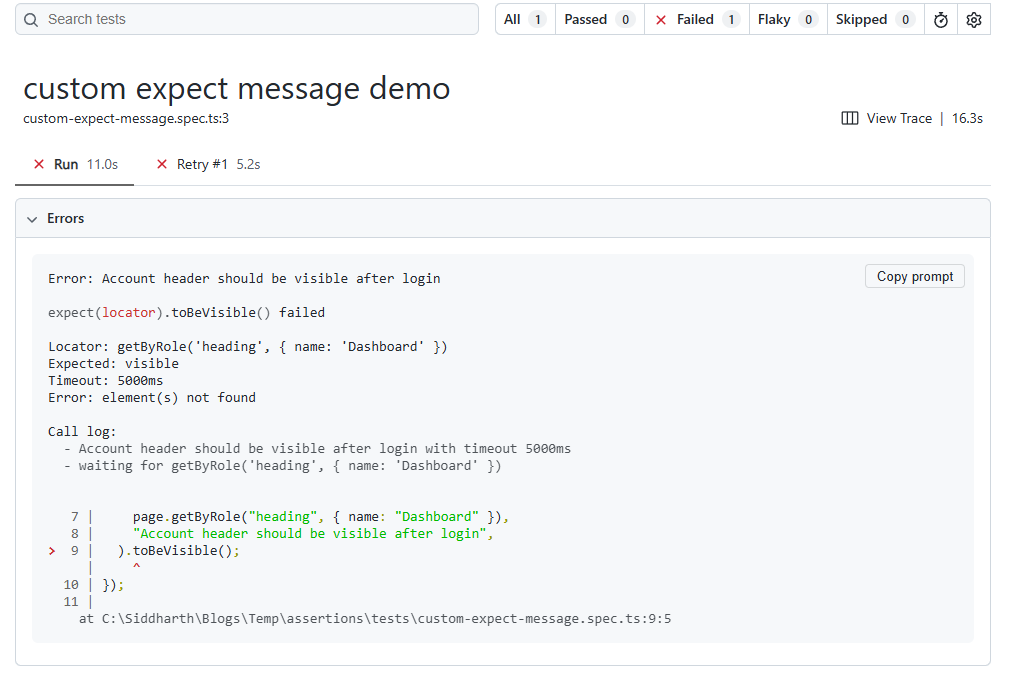
This is especially helpful when your organization reviews failures centrally through Playwright reports or a platform like TestDino, because it reduces ambiguity for teammates who did not write the test.
Tip: Use custom messages for high-value checks such as login, checkout, permissions, and data integrity gates. Too many messages create noise.
Advanced retry patterns: expect.poll, expect.toPass, and expect.configure
When a built-in locator or page matcher does not fit the problem, Playwright provides advanced retry APIs for custom async conditions and grouped assertion blocks.
1. expect.poll: Polling custom async conditions
expect.poll() repeatedly evaluates a function and applies a matcher to its returned value. It is a strong fit for eventual consistency, back-end status changes, and jobs that finish asynchronously.
await expect.poll(
    async () => {
      const response = await page.request.get("/api/job/123");
      const data = await response.json();
      return data.state;
    },
  {
      message: "Job should eventually complete",
      timeout: 15_000,
    },
  )
  .toBe("completed");
This is often better than manual loops or hard waits because the retry intent is explicit and the failure message is clearer.
2. expect.toPass: Retrying assertion blocks
expect.toPass() retries an entire block until all assertions inside it pass. Use it when several checks must be evaluated together.
await expect(async () => {
    const response = await page.request.get("/api/user/42");
    expect(response.status()).toBe(200);
    const body = await response.json();
    expect(body.active).toBe(true);
    expect(body.roles).toContain("admin");
}).toPass({ timeout: 20_000 });
Reserve toPass() for grouped conditions and non-standard retry logic. If a locator or page assertion already exists, it is usually the simpler and more maintainable option.
The inner-timeout trap (and how to avoid it)
A common mistake is wrapping slow UI checks inside toPass() while leaving a much smaller timeout inside the retried block. The inner timeout fails repeatedly and consumes the outer retry window.
await expect(async () => {
await expect(page.getByTestId("status")).toHaveText("Ready", {
timeout: 5_000,
  });
}).toPass({ timeout: 30_000 });
If the UI regularly needs more than five seconds, this block will keep failing even though the outer timeout is larger. A better approach is to align the inner and outer timeouts and keep the retried block narrow.
await expect(async () => {
await expect(page.getByTestId("status")).toHaveText("Ready", {
timeout: 15_000,
  });
}).toPass({ timeout: 20_000 });
Note: Treat expect.toPass() as a separate retry tool and configure its timeout explicitly. Do not assume it behaves exactly like standard assertion timeout settings.
3. expect.configure: Pre-configured expect instances
expect.configure() helps teams create consistent assertion styles for different contexts, such as slower environments, audit validations, or soft assertion sweeps.
import { expect as baseExpect } from"@playwright/test";
exportconst uiExpect = baseExpect.configure({ timeout: 8_000 });
exportconst auditExpect = baseExpect.configure({ soft: true, timeout: 5_000 });
This pattern reduces option repetition and makes test intent easier to scan during reviews.
Custom Assertions with expect.extend()
Custom assertions are valuable when the same domain-specific validation shows up in many tests. They improve readability and reduce duplicated assertion logic.
Building a custom matcher (full implementation)
The example below adds a custom matcher that checks a data-amount attribute.
import { expect as baseExpect } from"@playwright/test";
import type { Locator } from"@playwright/test";
export const expect = baseExpect.extend({
    async toHaveAmount(locator: Locator, expected: number) {
    await baseExpect(locator).toHaveAttribute("data-amount", String(expected));
    return {
      pass: true,
      message: () => `Expected locator not to have amount ${expected}`,
      };
    },
});
Usage in a test:
await expect(page.getByTestId("cart-total")).toHaveAmount(4);For production use, make the matcher more robust by handling this.isNot, surfacing the received value, and returning richer failure messages. If your team shares helpers across many specs, storing custom matchers in a common utilities package and reviewing failures in TestDino's reporting views can make matcher adoption much smoother.
TypeScript types for custom matchers
To get type safety and autocomplete, declare your custom matcher in Playwright's matcher interfaces.
declareglobal {
namespace PlaywrightTest {
interface Matchers<R> {
    toHaveAmount(expected: number): R;
    }
  }
}
Keep the declaration near the matcher module or in a shared global.d.ts file used by your test project.
Combining matchers with mergeExpects
If you split custom matchers across modules, Playwright supports combining them with mergeExpects.
import { mergeExpects } from"@playwright/test";
import { expect as dbExpect } from"./db-expect";
import { expect as a11yExpect } from"./a11y-expect";
export const expect = mergeExpects(dbExpect, a11yExpect);| Approach | Best For | Tradeoff |
|---|---|---|
| Inline generic assertions | One-off checks | Repeated logic across files |
| Helper functions | Reusable workflows | Less natural assertion syntax |
| expect.extend() | Reusable domain-specific matchers | Requires type maintenance and shared documentation |
Debugging failed assertions with Trace Viewer
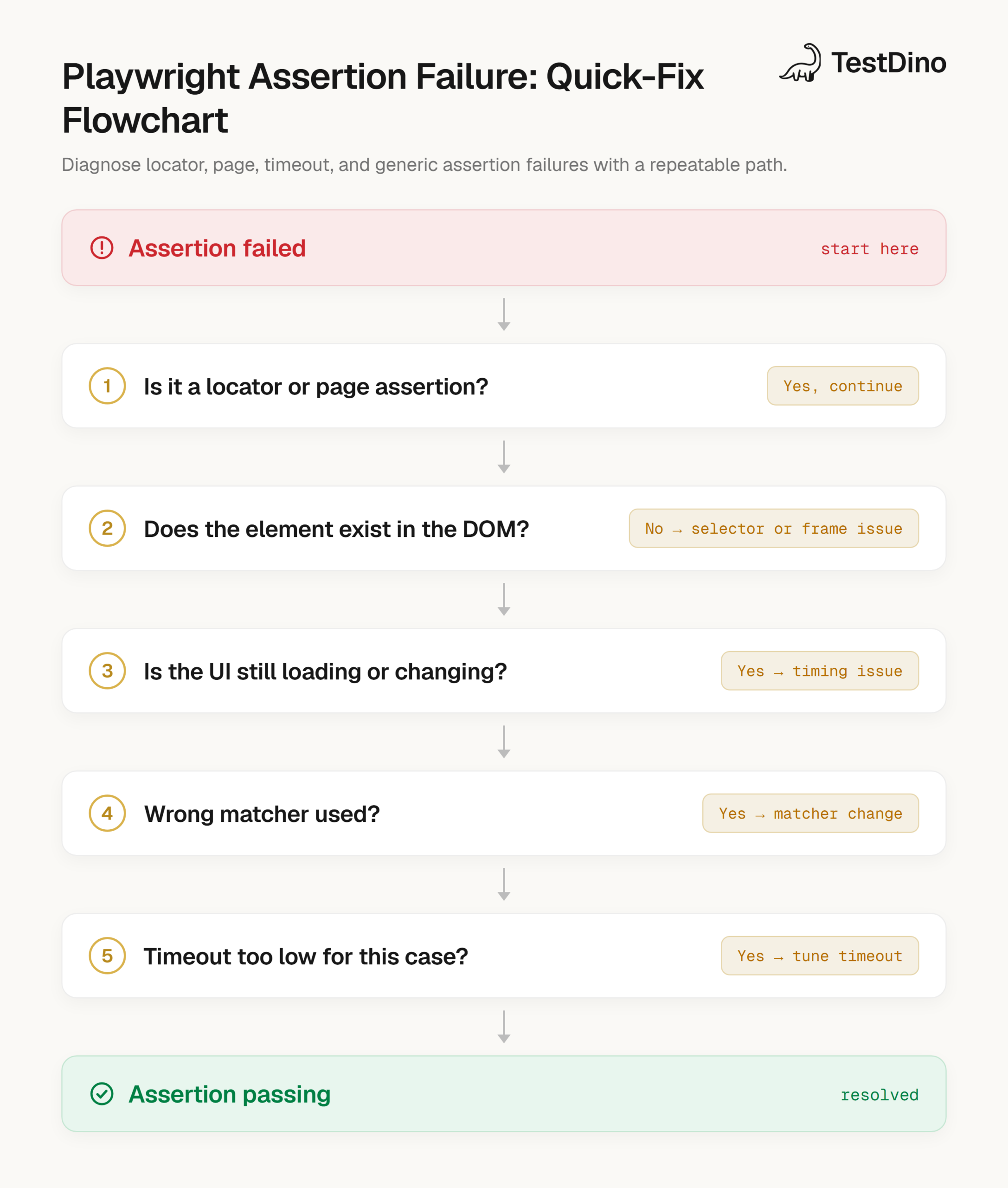
Good assertions reduce flake, but fast debugging is what keeps teams moving. When an assertion fails, traces, screenshots, and retry artifacts tell you whether the issue is a selector problem, timing issue, or a real product regression.
Reading assertion error output
Playwright assertion errors usually include the matcher name, timeout, locator or subject details, and the expected versus received value. In many cases, the call log also shows what Playwright retried before failing.
Read the locator and timeout first. Many failures are caused by a poor locator, the wrong matcher, or a stale expectation. They are not always "slow CI" issues.
Inspecting DOM state at the moment of failure
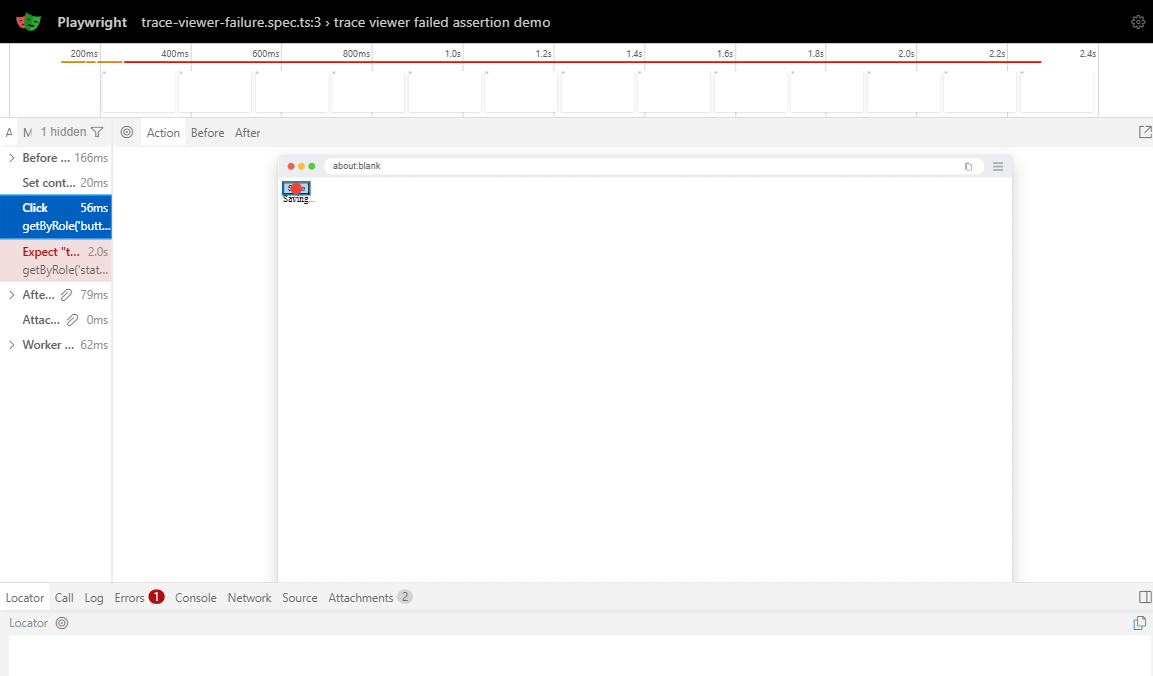
Use Playwright Trace Viewer to inspect the DOM state at the exact failure moment. This is the fastest way to understand transient UI problems, overlays, delayed renders, and race conditions that do not reproduce locally every time.
A practical triage sequence is simple. Open the trace, jump to the failed assertion step, inspect the locator target and DOM snapshot, check console and network around that point, then decide whether the fix is the locator, matcher, timeout, or test flow.
If your team wants a centralized workflow for this, the TestDino Trace Viewer docs and the TestDino Playwright debugging guide are good references.
Configuring trace capture on retries
A practical CI setup is to record traces on the first retry so you get debugging artifacts when they matter, without recording every run.
import { defineConfig } from"@playwright/test";
export default defineConfig({
retries: 1,
   use: {
      trace: "on-first-retry",
     },
});
This setup works well when combined with a reporting system that keeps retry artifacts connected to the failed test. The test automation reporting guide and the TestDino automated reports guide show why that connection matters as suites grow.
Playwright Assertions vs. Cypress: a migration cheat sheet
Both frameworks support retry-aware assertions, but the mental model and test structure feel different. Understanding that difference helps teams migrate without creating fragile translations.
Architectural difference: chaining vs separation
In Cypress, assertions are commonly chained into command chains like cy.get(...).should(...), while in Playwright you usually separate actions and assertions, then use await expect(locator)... for retrying checks.
// Playwright
await page.getByRole("button", { name: "Save" }).click();
await expect(page.getByTestId("toast")).toContainText("Saved");
// Cypress
cy.contains("button", "Save").click();
cy.get('[data-testid="toast"]').should("contain", "Saved");
That difference changes debugging style and test composition. If you are comparing frameworks at a broader level than assertions alone, the Playwright vs Cypress comparison and the framework adoption trends analysis provide useful context for engineering leaders.
Assertion mapping table
| Intent | Playwright | Cypress | Migration Note |
|---|---|---|---|
| Element visible | await expect(locator).toBeVisible() | cy.get(sel).should('be.visible') | Both retry, but Playwright uses explicit matcher APIs |
| Exact text | await expect(locator).toHaveText('Done') | cy.get(sel).should('have.text', 'Done') | Prefer exact text when output is deterministic |
| Contains text | await expect(locator).toContainText('Done') | cy.get(sel).should('contain', 'Done') | Good for partial text and dynamic values |
| URL check | await expect(page).toHaveURL(/dashboard/) | cy.url().should('include', 'dashboard') | Playwright page matcher reads well in E2E flows |
| Object comparison | expect(obj).toEqual(...) | expect(obj).to.deep.equal(...) | Same concept, different matcher syntax |
| Custom retry logic | expect.poll(), expect.toPass() | .should(callback) patterns | Playwright offers dedicated retry APIs for advanced cases |
Common mistakes and how to avoid them
Most assertion failures come from a small set of repeated mistakes. Fixing these patterns usually improves reliability faster than adding more waits or retries.
Missing await on async assertions
Web-first assertions are asynchronous. If you forget await, the test can continue before the assertion completes and produce misleading failures.
// Incorrect
expect(page.getByTestId("status")).toHaveText("Ready");
// Correct
await expect(page.getByTestId("status")).toHaveText("Ready");
Using one-shot checks for dynamic content
This pattern looks valid but is fragile for dynamic UI:
const text = await page.getByTestId("status").textContent();
expect(text).toBe("Ready");
Use a web-first assertion instead so Playwright can retry while the UI updates:
await expect(page.getByTestId("status")).toHaveText("Ready");Substring matching without exact: true
When labels are similar, broad locators can target the wrong element and make an otherwise correct assertion fail.
await page.getByRole("button", { name: "Save", exact: true }).click();
await expect(
 page.getByRole("heading", { name: "Saved", exact: true }),
).toBeVisible();
The problem is often locator precision, not the assertion itself.
Overusing toPass for simple checks
expect.toPass() is powerful, but it should not be your first response to flaky UI checks. Improve locator quality first, then use a web-first matcher, then tune the assertion timeout. Reach for expect.poll() or expect.toPass() only when the built-in locator or page matcher is not a good fit.
Hard waits instead of web-first assertions
Hard waits slow tests and hide timing problems because they guess instead of verifying.
// Avoid
await page.waitForTimeout(3000);
await expect(page.getByTestId("status")).toHaveText("Ready");
Prefer direct assertions and let Playwright wait for the actual condition:
await expect(page.getByTestId("status")).toHaveText("Ready", { timeout: 3000 });Note: Hard waits can mask root causes in CI. Web-first assertions preserve intent and usually produce better failure output for triage. For the patterns behind most timing failures, see fixing Playwright flaky tests.
What's new for assertions in Playwright 1.60
A few recent additions are worth folding into your assertion strategy. All three landed in Playwright 1.60.
- expect(page).toMatchAriaSnapshot() works on a Page. Previously limited to a Locator, you can now snapshot a full page's accessibility tree in one assertion (equivalent to page.locator('body')).
- pseudo option in toHaveCSS(). await expect(locator).toHaveCSS('content', '"★"', { pseudo: '::before' }) reads computed styles from ::before or ::after, so you can assert on icon fonts and generated content that was previously hard to reach.
- errorContext on assertion failures. When an expect() matcher fails, testInfo.errors now carries an errorContext with the aria snapshot of the receiver at the moment it failed, giving you page structure in the failure record without re-running.
These do not change how you write everyday assertions. They mostly reduce the work in accessibility checks and post-failure debugging.
Conclusion
Choosing the right Playwright assertion is mostly one decision: does the value come from the live page, or is it already resolved in your test? Web-first matchers retry for the page; generic matchers run once for in-memory values. Layer expect.soft() when you want every mismatch in one run, and reach for expect.poll or expect.toPass only when no built-in matcher fits. Get that mental model right and most flaky-assertion problems disappear before they start.
FAQs

Dhruv Rai
Product & Growth Engineer