Playwright Sharding: Complete Guide to Parallel Test Execution
Speed up Playwright test runs by splitting tests into shards and running them in parallel across machines or CI. Learn how sharding works and when to use it effectively.
As your Playwright test suite grows, end-to-end tests often become the slowest part of your Playwright CI/CD pipeline. What once finished in minutes can slowly creep toward 20 or 30 minutes, delaying feedback on every pull request.
You can increase Playwright workers to run multiple browser tests at the same time, and that usually helps at first. But a single machine has limits. If you overload it then tests start failing randomly instead of finishing faster.
That’s where Playwright sharding becomes useful.
Workers: Run multiple workers on a single machine, dividing your tests across parallel processes that share the same CPU.
Sharding: Split your suite across several machines in your Cl environment for distributed execution.
In this blog, you’ll learn:
- What Playwright sharding is and when it helps
- How sharding actually works (file-level vs test-level)
- How it compares to workers
- How to run shards locally and in CI using a GitHub Actions matrix
- How to merge shard reports into one clean HTML report
What is Playwright sharding?
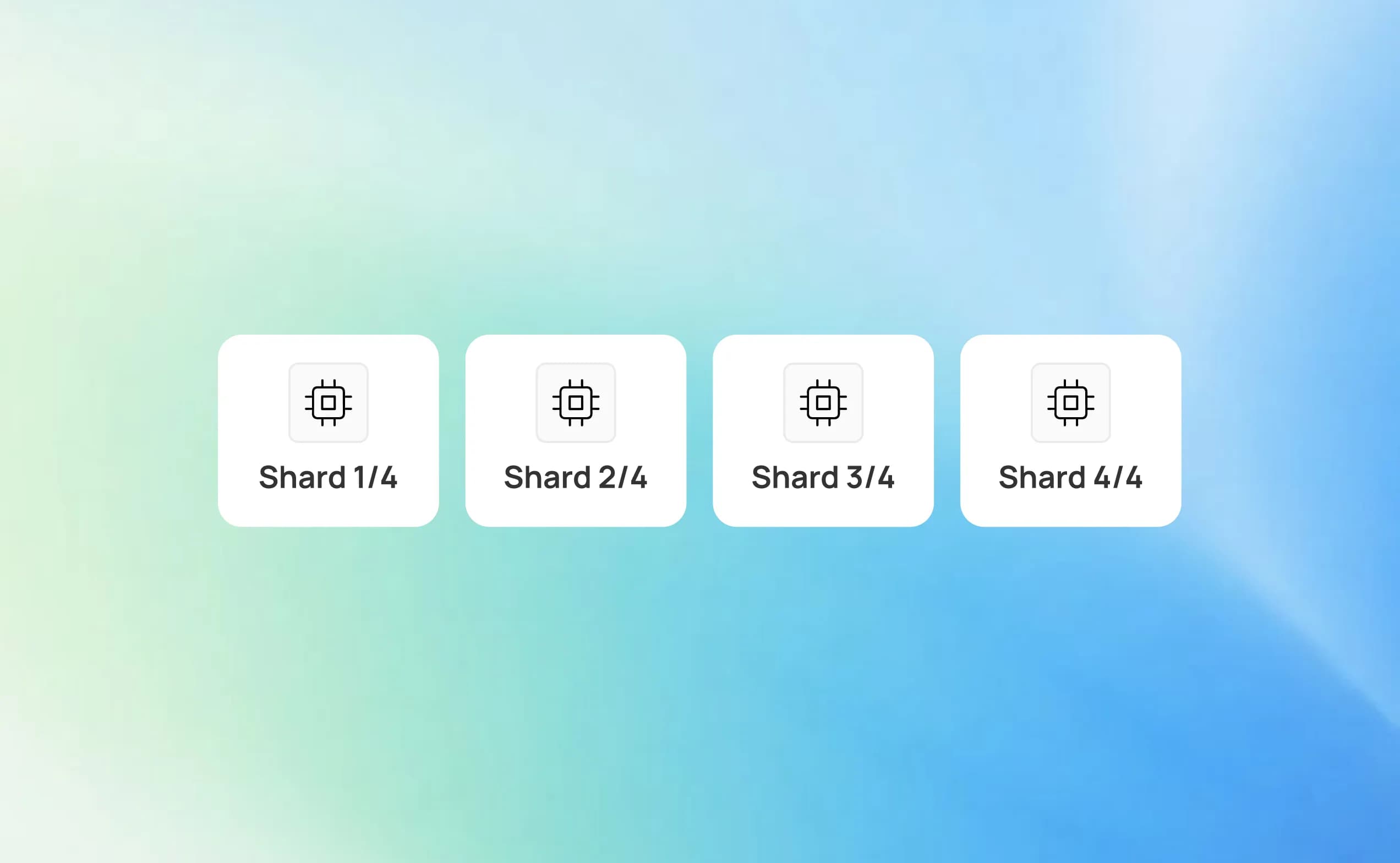
Playwright sharding is a feature that lets you split one logical test run into multiple smaller parts, called “shards”.
Now tests can run in parallel across different machines or CI jobs rather than a single runner executing the entire suite. Each shard runs a unique subset of tests, helping large suites finish much faster.
You define how many shards exist in total and which shard a specific runner should execute. Playwright then ensures that every test is assigned to exactly one shard, with no overlap between them.
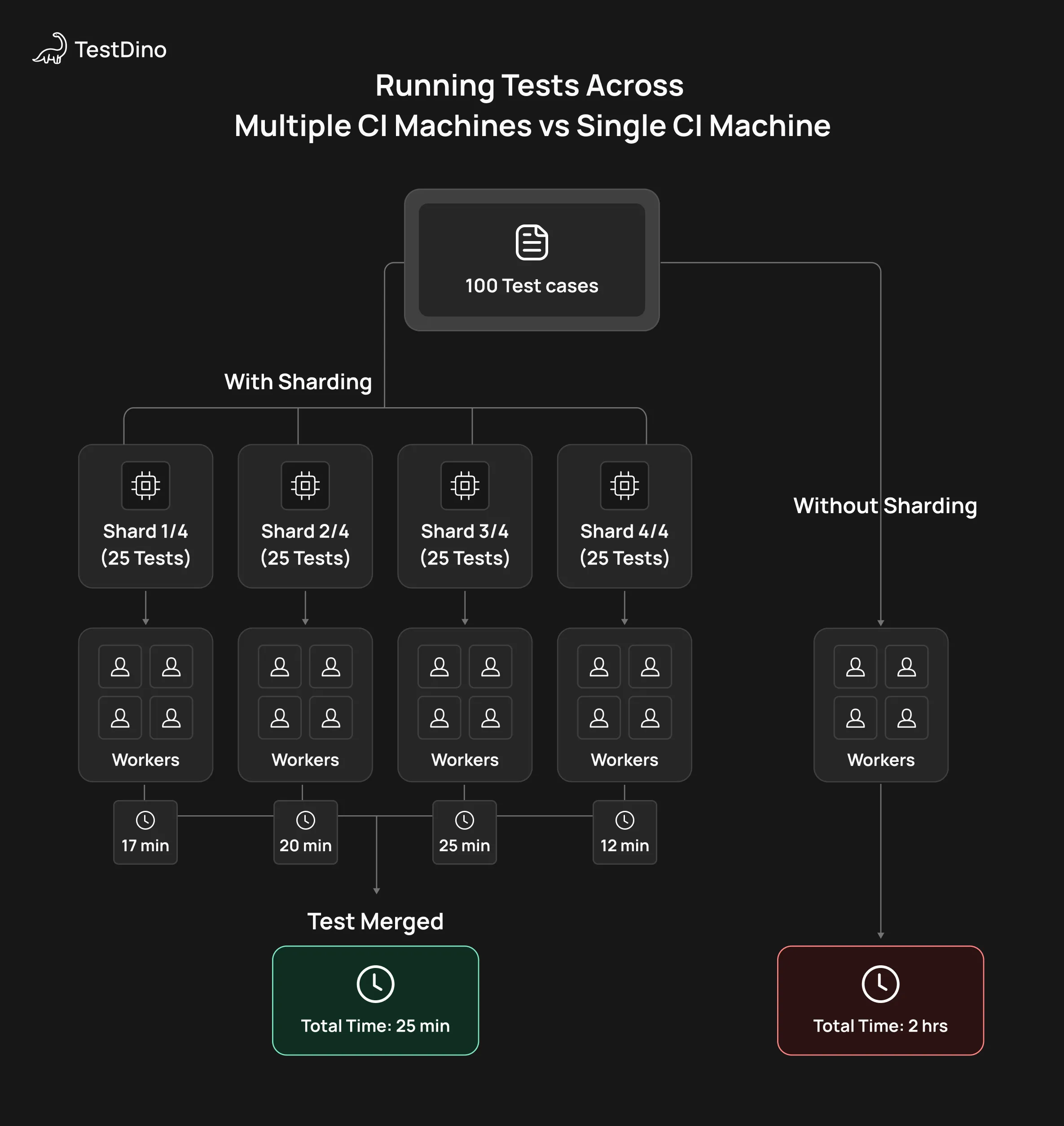
Playwright Sharding Running Tests Across Multiple CI Machines vs Single CI Machine
How does Playwright sharding work?
Under the hood, Playwright first builds a deterministic, sorted list of tests.
When you pass --shard=X/Y, the runner partitions that list into Y equal (or near-equal) segments and executes only segment X on that machine.
Example for implementation of shards in CLI:
# Run only shard 1 out of 4
npx playwright test --shard=1/4

# Run only shard 2 out of 4
npx playwright test --shard=2/4

# Run only shard 3 out of 4
npx playwright test --shard=3/4

# Run only shard 4 out of 4
npx playwright test --shard=4/4
Key properties:
- Deterministic ordering
The same suite with the same filters and config will always produce the same test order, so shards are stable across runs.
- No test duplication
Each test is assigned to exactly one shard for a given run, so tests are never executed more than once.
- Independent environments
Each shard is a separate Playwright process with its own workers, browsers, and environment variables, usually mapped to a separate CI job or agent.
Sharding is most powerful when your main bottleneck is the total suite runtime in CI, and you have already maxed out the parallelism of a single machine.
Sharding vs Workers in Playwright
When teams start optimizing Playwright test performance, workers are usually the first lever they pull, and for good reason.
Workers let you run tests in parallel on a single machine, making full use of available CPU cores. For example, if a test suite takes 40 minutes with one worker, moving to 4 workers might cut it down to 12-15 minutes on the same agent.
However, this approach has limits. Once CPU and memory are saturated, adding more workers often leads to diminishing returns or worse, flaky tests.
That’s where sharding comes in. Instead of pushing one machine harder, sharding spreads the test suite across multiple machines or CI jobs, allowing true horizontal scaling.
Think of it like this:
- Workers help you go faster on one box
- Shards help you go faster by adding more boxes
In real terms, a suite that still takes 15-20 minutes with 6-8 workers on one machine can often drop to 5-7 minutes by splitting it into 4 shards running in parallel across 4 CI agents.
How workers and sharding differ in practice
- Workers run multiple tests at the same time inside a single Playwright process
- Shards run separate Playwright processes, each handling a slice of the test suite
- Workers are limited by machine resources
- Shards scale with how many CI agents you can run in parallel
Quick comparison: Workers vs Sharding
| Aspect | Workers | Sharding |
|---|---|---|
| Scope | Single machine | Multiple machines / CI jobs |
| How it’s configured | workers in playwright.config.ts | --shard=X/Y CLI flag |
| Scaling type | Vertical (CPU cores) | Horizontal (CI agents) |
| Practical limit | CPU & memory | Number of available runners |
| Typical speedup | 2x–8x speedup (CPU-bound) | 2x–Nx speedup depending on the number of agents |
When should you use workers?
Use workers when:
- Your suite is small to medium-sized
- Tests finish within 5–10 minutes on one agent
- You want the simplest setup with minimal CI orchestration
- Workers are the fastest win and should almost always be tuned first.
When should you use sharding?
Sharding makes sense when:
- Even with tuned workers, runs still take 15–30+ minutes
- Increasing workers causes flakiness or resource contention
- You already have parallel CI capacity (GitHub Actions, self-hosted runners)
- You want predictable runtimes by controlling shard size
 Quick Note
The sweet spot: workers × shards
Combine both for maximum speed:
- Workers (4-8) to max out each machine's cores
- Sharding to split across multiple machines
Turn a 60-min job into 8 parallel 7-min jobs.
Playwright Sharding setup and example
Before jumping into CI-level sharding, it’s important to get your local setup right. A clean local configuration ensures that once you scale out to multiple machines, you don’t run into flaky failures or uneven shard behavior.
Think of this phase as laying a strong foundation before adding CI complexity.
1. Make sure your test suite is parallel-safe
Sharding assumes your tests can run out of order and in parallel, even on completely different machines. If tests depend on shared state or execution order, sharding will surface those issues very quickly.
At a minimum, you should:
- Avoid global mutable state shared across tests
- Prefer Playwright fixtures over custom globals or singletons
- Move one-time setup tasks (like DB migrations or seeding) into CI steps, not test code
If a small group of tests truly must run in sequence, you can explicitly mark them as serial:
import { test } from '@playwright/test';

test.describe.configure({ mode: 'serial' });

test('step one', async ({ page }) => {
  // ...
});

test('step two', async ({ page }) => {
  // ...
});
These tests will still belong to a shard, but they’ll execute in order within that shard, keeping the rest of the suite fully parallel.
2. Configure a reasonable workers count
Workers control how many tests are run in parallel inside one machine. When sharding, each shard is its own Playwright process, so workers apply per shard.
A common and safe setup looks like this:
import { defineConfig } from '@playwright/test';

export default defineConfig({
  workers: process.env.CI ? 4 : undefined,
});
This setup:
- Uses automatic worker detection locally
- Caps workers on CI to avoid CPU and memory overload
In practice, 2-8 workers per agent works well for most teams. You can tune this based on browser type, test complexity, and available resources.
3. Validate sharding locally before CI
Even though sharding is mainly used in CI, running shards locally is one of the best sanity checks you can do.
Example: Simulate four shards locally
npx playwright test --shard=1/4
npx playwright test --shard=2/4
npx playwright test --shard=3/4
npx playwright test --shard=4/4
Running these commands individually helps you confirm that:
- Every shard passes on its own
- No shard depends on execution order or shared files
- Runtime is reasonably balanced across shards
If one shard consistently takes much longer, that’s usually a sign of large or slow spec files that should be split.
Once all shards pass locally and behave consistently, you’re ready to map them directly to CI jobs with confidence.
Running playwright shards locally and in CI
Once your tests run correctly with sharding locally, the next natural step is wiring shards into CI. This is where GitHub Actions really shines, because its matrix strategy maps almost perfectly to how Playwright shards work.
Instead of one long-running Playwright job, you create multiple parallel jobs. Each job runs the same workflow but executes a different shard of the test suite. Together, these jobs represent one logical test run, just much faster.
Basic idea: one shard = one matrix job
- The matrix creates multiple jobs (for example, 4).
- Each job gets a unique shard index.
- Every job runs Playwright with --shard=index/total.
If your full suite takes 20 minutes on a single agent, running 4 shards in parallel often brings it down to 5–6 minutes, assuming the suite is reasonably balanced.
Example: 4-shard GitHub Actions workflow
name: Playwright Tests

on:
  push:
    branches: [ main ]
  pull_request:

jobs:
  playwright:
    runs-on: ubuntu-latest
    strategy:
      fail-fast: false
      matrix:
        shard_index: [1, 2, 3, 4]  # 4 parallel shards

    env:
      CI: true
      PLAYWRIGHT_SHARD_INDEX: ${{ matrix.shard_index }}
      PLAYWRIGHT_SHARD_TOTAL: 4

    steps:
      - uses: actions/checkout@v4
      - name: Setup Node
        uses: actions/setup-node@v4
        with:
          node-version: 20

      - name: Install dependencies
        run: npm ci

      - name: Install Playwright browsers
        run: npx playwright install --with-deps

      - name: Run Playwright shard
        run: |
          npx playwright test \
            --shard=${PLAYWRIGHT_SHARD_INDEX}/${PLAYWRIGHT_SHARD_TOTAL}
Why this setup works well
- The sweet spot: workers × shardsIn most mature setups, the best results come from combining both:
- Use workers (for example, 4-8) to fully utilize each machine
- Use sharding to split the suite across multiple machines
This approach turns one long “mega job” into several smaller, faster jobs running in parallel, making CI feedback quicker and more reliable.matrix.shard_index creates one job per shard automatically
- Each job runs only its slice of the test suite
- fail-fast: false ensures one failing shard doesn’t cancel others, so you keep logs, traces, and screenshots from every shard
From a CI perspective, this turns one “mega job” into several smaller, predictable jobs that finish around the same time.
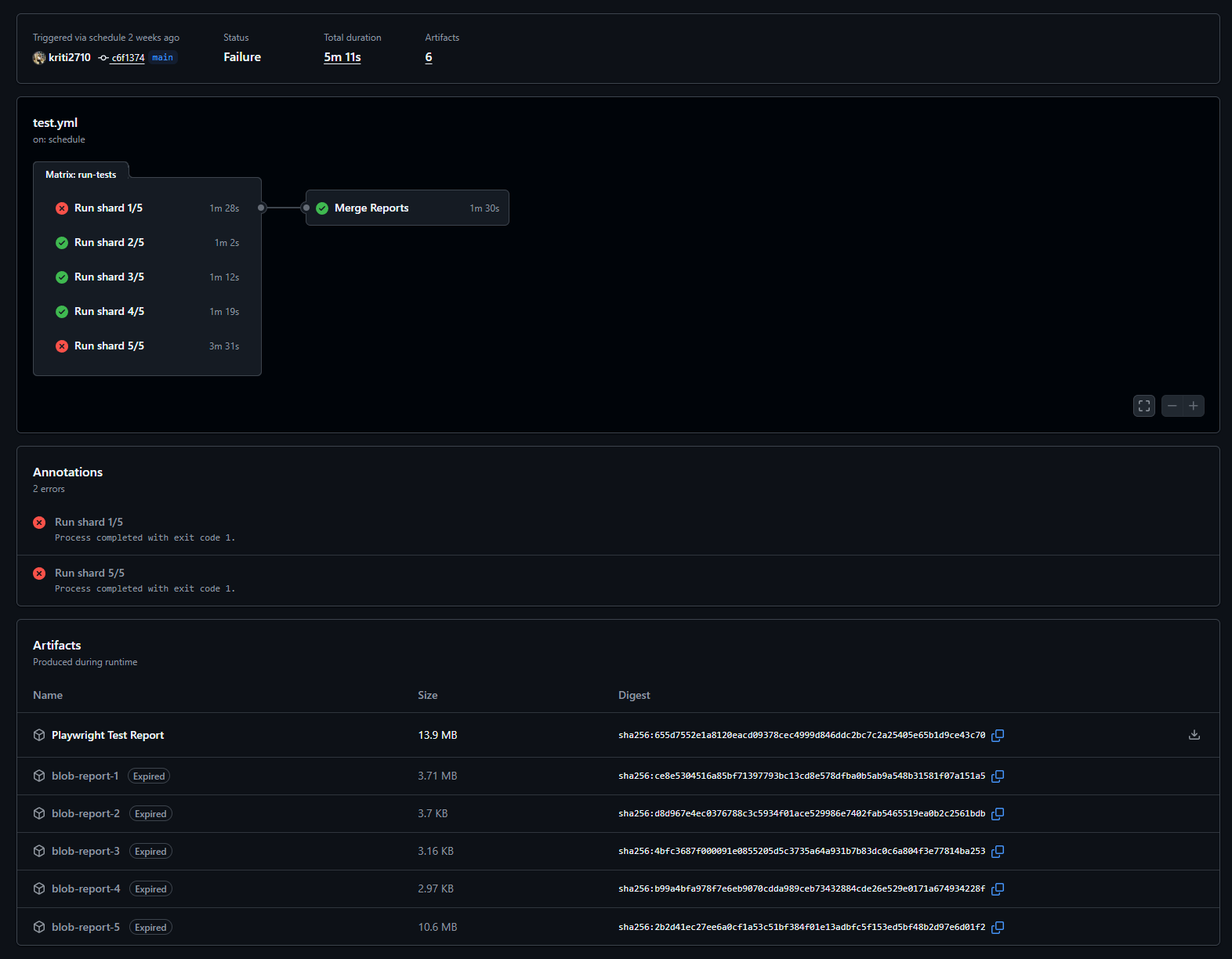
Collecting reports from multiple shards
By default, each shard produces its own reports. To make debugging easier, it’s best to keep shard artifacts separate and upload them individually.
Important clarification about --output
- --output does NOT control the HTML report location
- --output only controls test artifacts:
- Screenshots
- Videos
- Traces
- The HTML report is always written to playwright-report/
- Unless explicitly changed via reporter configuration
- Unless explicitly changed via reporter configuration
- name: Run Playwright shard

  run: |

    npx playwright test \

      --shard=${PLAYWRIGHT_SHARD_INDEX}/${PLAYWRIGHT_SHARD_TOTAL} \

      --reporter=html,blob \

      --output=test-results/shard-${PLAYWRIGHT_SHARD_INDEX}

- name: Upload shard report

  uses: actions/upload-artifact@v4

  if: always()

  with:

    name: shard-${{ matrix.shard_index }}-report

    path: |

    playwright-report

    test-results/shard-${{ matrix.shard_index }}
Blob reports and merging
- Blob reports do not merge automatically
- GitHub Actions does not combine them for you
- To generate a single unified report, you must explicitly run:
npx playwright merge-reports
This step is required before producing one combined HTML report from all shards.
This approach:
- Keeps artifacts isolated per shard
- Makes it easy to inspect failures
- Works well with external dashboards after blob reports are explicitly merged
Best practices for reliable playwright sharding
1. Balance shards using real runtime data
- Playwright splits shards by test count, not execution time
- Start with a small number of shards and measure how long each takes
- Split large or slow spec files if one shard consistently runs longer
- Increase shard count only after runtimes are reasonably balanced
2. Combine sharding with smart test filtering
- Not all shards need to run the full test suite
- Common patterns:
- Smoke tests on every push
- Full suite on merges to the main branch
- Use tags or --grep to group related tests:
npx playwright test --grep=@smoke --shard=1/4
3. Isolate shared resources per shard
- Each shard is a full Playwright run with its own browsers and workers
- Shared databases, APIs, or queues can cause conflicts and flakiness
- Prefer shard-specific resources when possible:
const shardIndex = process.env.PLAYWRIGHT_SHARD_INDEX ?? '1';

const dbName = `test_db_shard_${shardIndex}`;
- Ensure all environment variables and secrets are available in every shard
3. Debug failures shard by shard
- Identify the failing shard from CI logs
- Re-run only that shard locally using the same --shard=X/Y value
- Use shard-specific traces, screenshots, and videos for faster debugging
- Higher concurrency may reveal race conditions earlier, which improves test quality
Conclusion
Playwright sharding helps reduce test execution time by splitting large test suites across multiple machines or CI jobs. Instead of relying on a single runner, tests run in parallel, making CI pipelines faster and more predictable.
- Workers scale vertically by maximizing CPU usage within a single machine
- Sharding scales horizontally by distributing tests across multiple machines or CI jobs
- Using both together helps avoid resource bottlenecks and reduces flaky test runs
Setting up sharding the right way is just as important as using the --shard flag. When applied correctly, Playwright sharding saves time, shortens feedback loops, and keeps test pipelines efficient as test suites continue to grow.
Tools like TestDino can complement this by providing clear, consolidated reporting of test results, helping teams stay on top of their pipeline’s health.
FAQs

Pratik Patel
Co-founder