Playwright Test Execution History Across Runs and CI
Playwright test execution history transforms isolated CI runs into long-term quality insights by tracking flaky tests, performance trends, and stability across builds, branches, and environments.
Playwright tests run constantly in CI, but without proper tracking, each execution exists in isolation.
Valuable signals disappear the moment the pipeline completes.
Playwright test execution history changes this by preserving results across runs, branches, and environments.
Think of a single Playwright run as a snapshot, while execution history is a time-lapse showing how reliability evolves over weeks and months.
This gap creates reactive workflows.
As a result, most teams lose critical context because native reporters focus on immediate debugging rather than long-term analysis.
Flaky tests pass through retries, performance degrades gradually, and every failure becomes a new investigation.
Historical tracking solves these problems by providing answers that single runs cannot.
It shows whether a test is consistently broken or intermittently unstable. It reveals when slowdowns begin and which commit introduces instability.
What is Playwright Test Execution History?
Playwright test execution history is a centralized long-term record of test results and metadata collected across multiple runs, branches, and environments.
It exists to show how tests behave over time, not just what happened in the latest execution.
In contrast, Playwright’s native reporting is optimized for immediate debugging, not historical analysis.
A single HTML report tells you what failed now, but it does not tell you whether the same test failed last week, only fails on one branch, or has been getting slower in the previous 20 builds.
Repeating failure patterns is always a product or test stability problem.
True execution history expands the scope from this run to every run that matters.
What historical tracking actually captures
It collects a variety of data over time, but the real value comes when you look at the long-term trends.
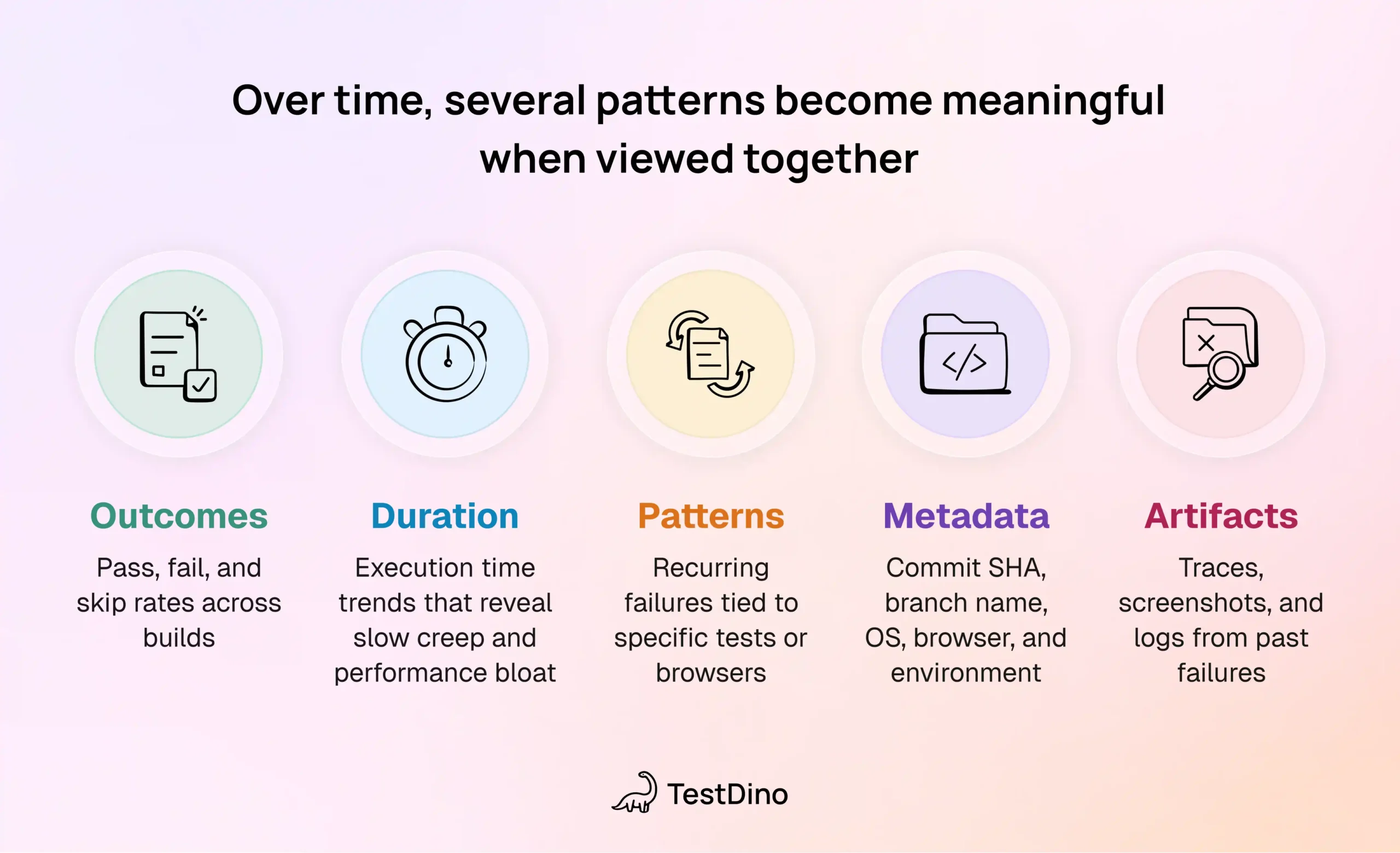
Over time, several patterns become meaningful when viewed together:
- Outcomes: pass, fail, and skip rates across builds
- Duration: execution time trends that reveal slow creep and performance bloat
- Patterns: recurring failures tied to specific tests or browsers
- Metadata: commit SHA, branch name, OS, browser, and environment
- Artifacts: traces, screenshots, and logs from past failures
This allows teams to compare stability between commits, branches, and even environments
Why do native Playwright reporters fail here?
The built-in reporters in Playwright Test are intentionally scoped to a single execution.
According to the official documentation, reporters like the HTML reporter focus on presenting results for the current run and do not provide cross-run aggregation, trend analysis, or long-term retention by default.
Once a new CI pipeline starts:
- Previous results are overwritten or discarded
- Historical context is lost unless manually archived
- Trend-based questions cannot be answered
This is not a configuration gap. It is a design boundary.
Storing and analyzing historical data goes beyond the intended scope of built-in reporters. This gap is exactly why it’s important to rethink how we handle our test data.
Why Track Playwright Test Results over time?
Tracking Playwright test results over time turns test automation from a pass–fail gate into a system for continuous quality insight.
Modern CI pipelines run tests dozens or hundreds of times per week.
Each run produces data, but a single run barely tells the full story.
Because of this, only aggregated results reveal whether failures are random, systemic, or tied to specific changes in product or environment.
Why historical tracking matters in practice
Historical tracking transforms test results into actionable insights by uncovering long-term patterns like flaky tests and gradual performance slowdowns.
When teams track results across runs, several problems become easier to solve.
- Separating flaky tests from real bugs
A test that fails intermittently without code changes looks like a real regression in a single run. But with history, it reveals a clear pass–fail pattern that signals instability rather than a product issue. - Tracking performance trends
By monitoring test durations over time, you can catch gradual slowdowns that are easy to miss in a single run. - Fast-tracking root cause analysis
Instead of guessing, history shows you exactly when a test started failing and which commit likely caused it.
In teams using Playwright Test at scale, this historical layer becomes the difference between reactive and preventive quality engineering.
TestDino: Purpose-Built Historical Tracking for Playwright
TestDino is a platform designed specifically to store, analyze, and operationalize Playwright test execution history across every CI run.
The core idea is not replacing Playwright but extending it with a persistent analytical layer.
Instead of relying on transient CI artifacts, TestDino ingests execution data from Playwright runs and stores it in a structured, searchable model.
This ensures test results remain available even when pipelines are rerun, branches are deleted, or CI logs expire.
1. Comprehensive test execution history
Every test run is stored as an actionable record rather than a disposable report.
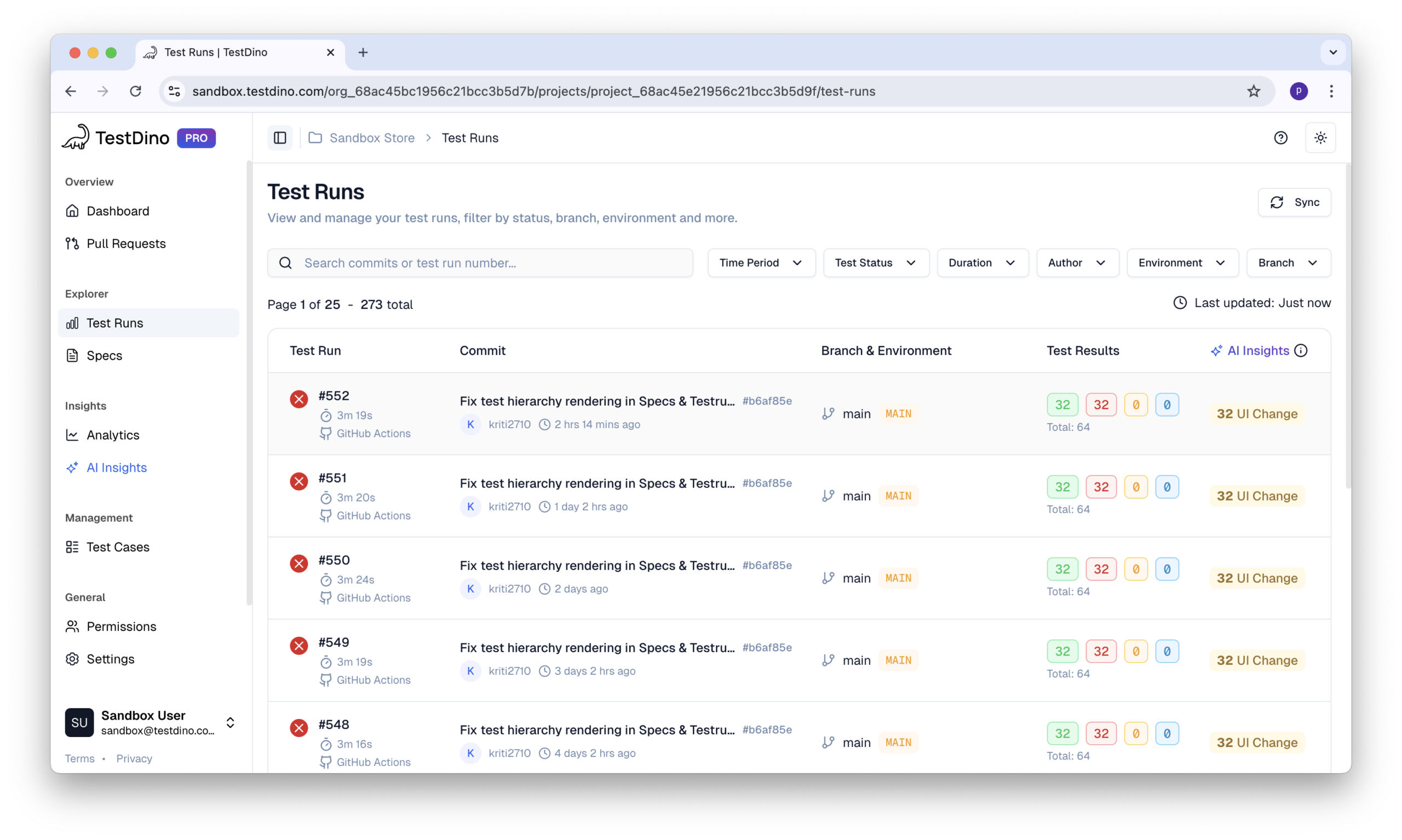
TestDino provides:
- Execution history tables with timestamp, status, duration, and retries
- Trend graphs showing stability and performance across runs
- Side-by-side comparison of up to 10 tests
- Direct links to CI builds from each execution
This bridges the gap between high-level trends and low-level debugging.
2. Flaky test detection and tracking
Flakiness is treated as a measurable property, not a subjective label.
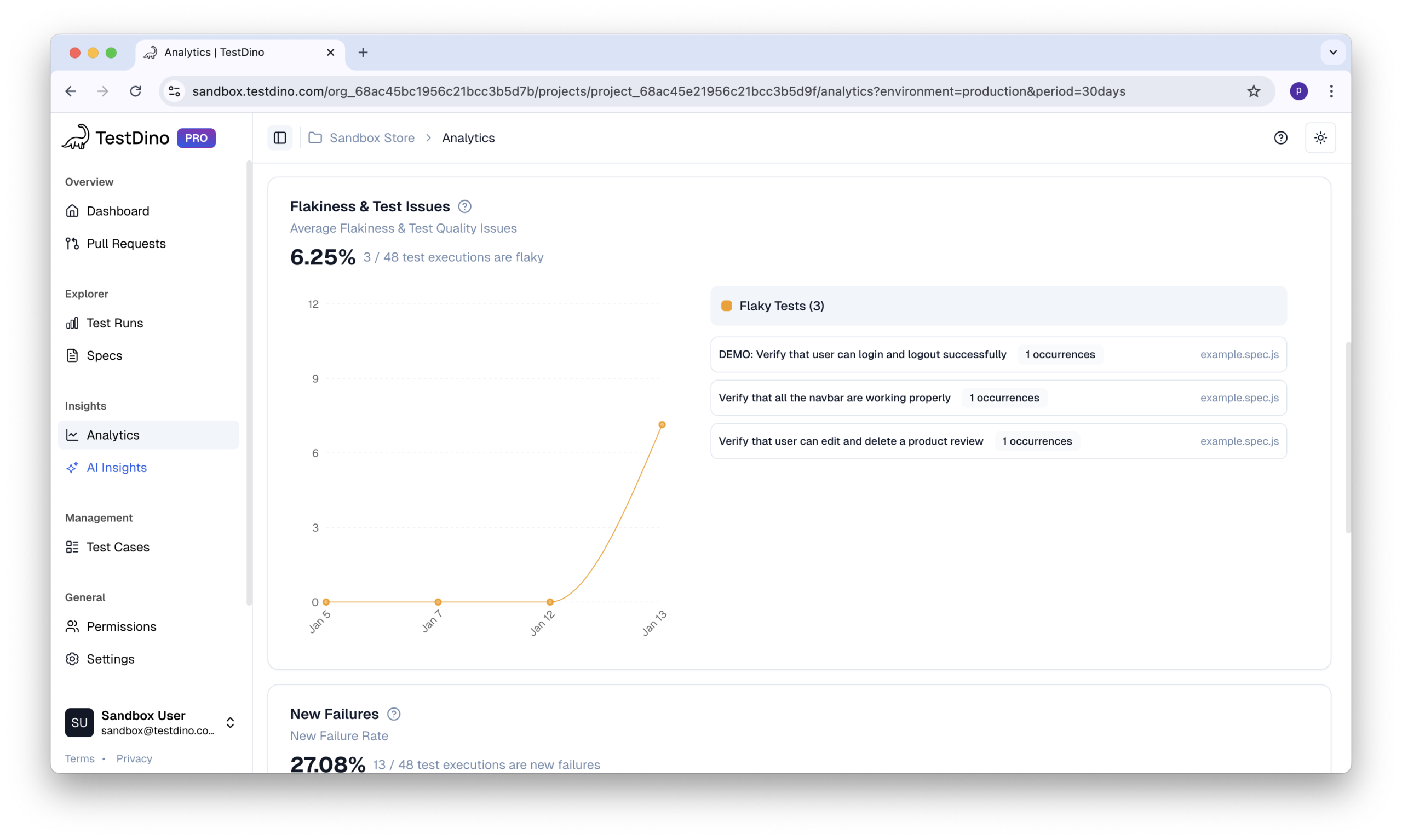
TestDino calculates:
- Automatic stability scores using the formula
(Flaky Runs ÷ Total Runs) × 100 - Flaky test highlights backed by historical failure evidence
- Early regression detection, identifying when stability drops before failures become widespread
The stability score does not diagnose the root cause, but it reliably flags instability that deserves investigation.
This replaces guesswork with quantified reliability signals.
3. AI-powered historical analysis
Manual analysis fails at scale, but TestDino automates this by grouping failures and identifying patterns across your entire Playwright history.
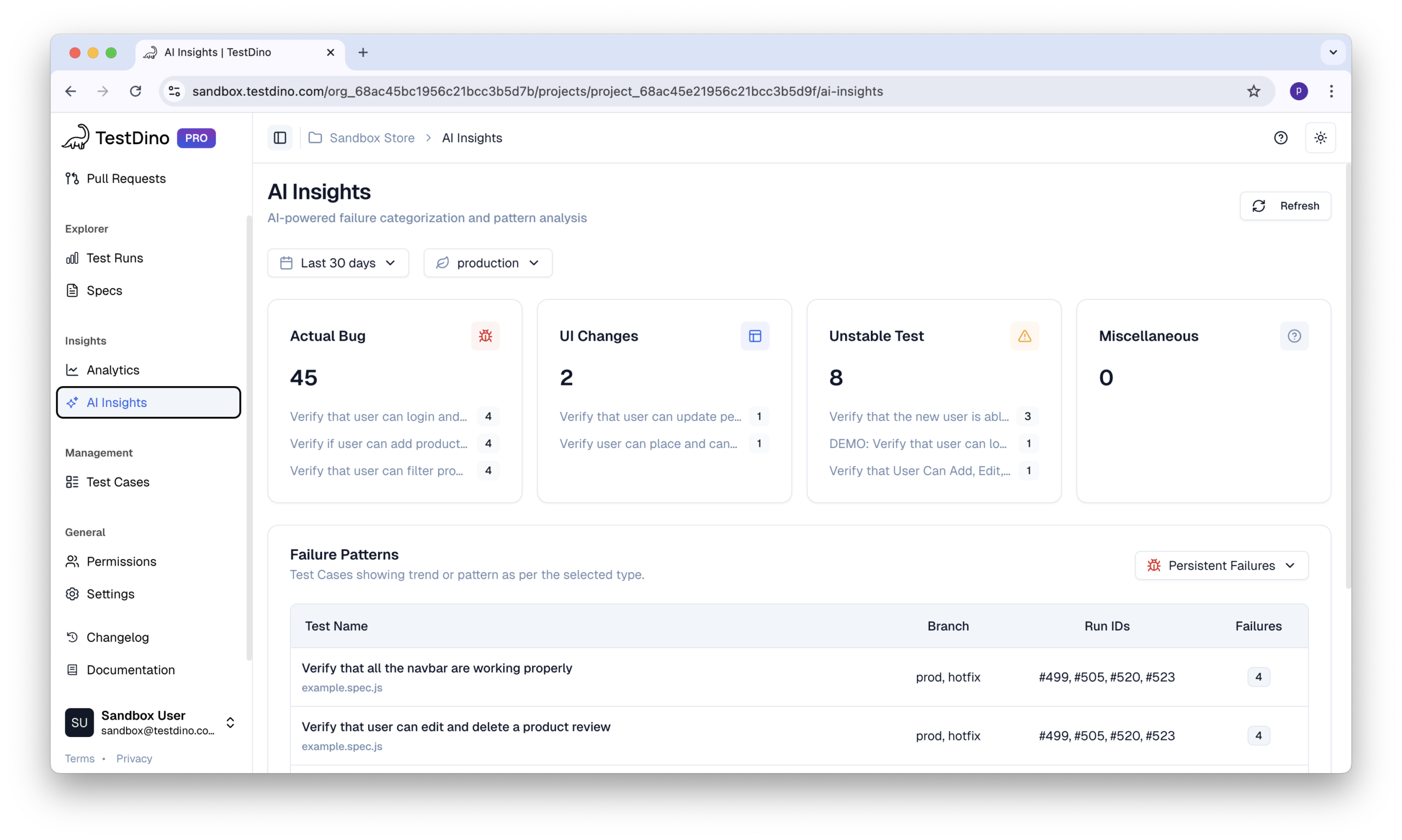
TestDino applies AI to historical data for:
- Failure classification into Bug, UI Change, Flaky, or Miscellaneous
- Error grouping, so teams fix root causes once instead of repeatedly
This shifts teams from reactive triage to proactive quality insights.
The result is a Playwright workflow where history actively improves quality, speed, and confidence rather than sitting unused in archives.
Once historical data is visible, teams can evaluate stability without digging through CI logs.
Analyzing Historical Test Data for Actionable Insights
Collecting Playwright data is a start, but quality improves when you actually analyze it.
Moving from reactive debugging to preventive maintenance requires making decisions based on evidence.
Key metrics that actually matter
Not all metrics are useful. The following indicators consistently produce actionable insights when tracked across runs.
1. Stability scores
Stability is best measured as a percentage of successful executions over total runs. A consistently declining score signals emerging instability even if the latest run is green.
2. Flaky test frequency
Flaky tests rarely fail every time. Historical frequency exposes tests that pass and fail without code changes, allowing teams to fix or quarantine them before they erode CI trust.
3. Duration trends and performance regression
Execution time trends reveal slow creep long before pipelines become painful. A gradual increase often points to accumulating inefficiencies, while sudden spikes usually correlate with recent code or infrastructure changes.
4. Failure clustering patterns
Grouping failures by error message, browser, or test area highlights shared root causes instead of treating each failure in isolation.
Pattern recognition for root cause analysis
The goal is to turn accumulated executions into signals that guide stability, performance, and maintenance decisions.
Key insights teams consistently extract from historical analysis include:
- Stability scores: Tracking pass rates over total runs reveals declining reliability even when the latest build is green.
- Flaky frequency: Repeated pass–fail behavior across runs exposes instability that single executions cannot show.
- Duration trends: Gradual slowdowns and sudden spikes highlight performance regressions early.
- Failure clustering: Grouping errors by message, browser, or area surfaces shared root causes.
When patterns are analyzed correctly, historical test data becomes a decision-making input that improves performance, reduces CI issues, and keeps Playwright suites healthy over time.
Best Practices for Test History Management
Conclusion
Playwright tells you what happened in the last run.
Test history tells you how your suite has behaved over dozens or hundreds of runs, and that difference is where most debugging time is won or lost.
When teams rely only on transient HTML reports and ad‑hoc artifact downloads, they are forced into reactive debugging: each failure is a fresh investigation, flaky tests slip through via retries, and slow performance creeps up unnoticed.
Instead of reacting to isolated failures, teams gain a long-term view of stability, performance, and risk.
This perspective leads to better prioritization, faster debugging, and more confident releases.
Whether you use a specialized platform like TestDino or build your own aggregation pipeline, the core principle is the same: preserve context and analyze trends.
Test results only become valuable when they are remembered, compared, and understood over time.
The real value of test history emerges when trends are visible before failures block releases.
FAQs
No, if managed correctly. Retain aggregated metrics long term and selectively store artifacts like traces only for failures or recent runs.
No. Historical tracking is read-only analysis and does not impact execution time when ingestion happens asynchronously after CI completion.
Yes. Even small suites benefit from spotting flaky tests early and avoiding wasted debugging time caused by inconsistent CI failures.
It provides evidence of recent stability trends, helping teams decide whether a green build is truly reliable or masking underlying instability.
Yes. Centralized history allows QA, developers, and managers to reference the same evidence instead of relying on screenshots or CI logs.

Pratik Patel
Co-founder