Playwright Test Management: Organize, Track, and Scale Tests
AI-native Playwright test management guide to organize, track, and scale tests with CI visibility, flaky test detection, and actionable QA insights.
In the early days of software testing, “test management” meant opening spreadsheets, static documents, and manual updates.
Then came the cloud platforms. TestRail, PractiTest, Zephyr - Fancier spreadsheets, really. More filters, better access controls, team management features.
But the core problem stayed the same: someone still had to maintain all those test cases. And you know how that goes. Teams start strong, documenting everything. 6 months later? Those cases are outdated, nobody wants to update them, and the gap between manual test cases and automated tests keeps growing.
Here's the thing: traditional test management tools weren't built for Playwright test management. They don't understand your CI pipeline. They can't tell you why a test failed or whether it's flaky. They're just storage systems with extra steps.
Modern automation and AI workflows demand more. Faster feedback. Smarter analysis. MCP server integrations. Actual integration with how developers work today.
That's where AI-native tools come in. They're not just storing your test data, they're actively analyzing it. Finding patterns. Flagging problems before you waste hours debugging.
In this article, we’ll explore how test management has evolved, why the shift toward AI-powered systems is inevitable, and what it means for the future of Playwright teams.
What is test management? (and why it evolved)
Test management is the process of organizing all testing activities in one place, from test cases and execution history to requirements coverage and quality metrics.
A good platform provides a single source of truth for QA, helping teams answer:
- What tests exist?
- When were they last run?
- Which requirements do they cover?
Why legacy approaches fell short
In the past, many QA teams relied on Excel sheets or disconnected tools. This led to limited visibility, stale documentation, and manual effort to keep tests updated.
As teams scaled, spreadsheets became “cumbersome, error-prone, and inefficient,” creating a gap between developers and QA where bugs, versions, and expectations often misaligned.
The modern reality: Testing at the speed of dev
Today’s rapid release cycles demand faster, smarter test management. Modern solutions focus on three key areas:
Speed and agility
Frameworks like Playwright enable automated tests to run in minutes. With AI-assisted tools and Playwright’s code generator, teams can quickly create and update tests as new features are built.
Automatic sync
Modern platforms integrate with tools like JIRA and code repositories, updating linked tests automatically whenever features change, eliminating manual tracking.
AI intelligence
AI-native tools go beyond storing data; they analyze test patterns, detect flaky tests, and flag coverage gaps automatically, improving reliability and focus.
The rise of AI testing agents
AI assistants now help developers generate Playwright tests from natural language prompts, turning hours of scripting into seconds. This bridges development and QA, ensuring tests evolve as fast as the code itself.
In short: Test management has evolved from a static repository into an intelligent, AI-driven quality partner.
Why Playwright demands modern test management
Playwright brings unmatched speed, coverage, and developer experience, but those same strengths demand modern, AI-native test management to keep pace.
Key reasons:
- High speed & broad coverage
- Runs fast across Chromium, Firefox, and WebKit using one API.
- Generates massive test results and artifacts (videos, traces, screenshots).
- Modern tools automatically capture and link artifacts to test cases for quick debugging, but spreadsheets can’t keep up.
- Built for CI/CD
- Playwright integrates directly into pipelines (GitHub Actions, Azure, etc.).
- Every pull request can trigger hundreds of tests.
- Teams need live dashboards and one-click trace access, not manual reports or email updates.
- The dual documentation problem
- Playwright tests are code, yet many teams also document them elsewhere.
- This creates two sources of truth and outdated records.
- Modern systems sync with code repositories, auto-linking requirement IDs and test metadata to keep everything consistent.
- Preserving context
- Playwright produces traces, logs, and screenshots for every run.
- Legacy tools reduce these to “pass/fail.”
- Modern platforms preserve full context, letting teams jump directly to trace files or commits when investigating failures.
- Developer-First integration
- Playwright’s ecosystem thrives in VS Code and CLI environments.
- Tools like TestDino extend this workflow, syncing tests automatically and integrating Playwright artifacts seamlessly into one dashboard.
In short: Playwright’s speed, CI integration, and code-first nature demand modern, AI-driven test management, transforming rapid test execution into clear, actionable insights.
From reactive to proactive: The AI-native shift
Traditional test management was reactive, built on a CRUD model: create test cases, update results, and log bugs after failures. It relied heavily on humans to notice flakiness, coverage gaps, or trends. You only learned something was wrong after a failure or missed requirement.
AI-native test management flips this model, turning the system into an active, intelligent participant in quality. Instead of waiting for input, it analyzes data, predicts risks, and even takes action.
Key shifts in the AI-native era
- Flakiness detection & Self-healing
- AI tracks execution history to flag flaky tests automatically.
- Platforms like QMetry assign a “Flaky Score,” while SmartBear notes that detecting flaky patterns early saves massive time and CI stability.
- Some systems even quarantine or retry flaky tests automatically, reducing noise and false alarms.
- Predictive gap analysis
- Instead of manually mapping test coverage, AI analyzes code changes and analytics to highlight untested areas.
- It proactively suggests where to add tests, e.g., “Module X has changed often but lacks coverage.”
- This shifts QA from reacting to bugs to preventing them before release.
- Intelligent prioritization
- AI evaluates failures by impact and risk, not just quantity.
- It clusters related defects and flags critical ones first (like failed login tests).
- As PractiTest explains, this kind of pattern-based defect analysis keeps teams focused on what truly matters.
- MCP servers – The AI bridge
- Playwright’s Model Context Protocol (MCP) lets AI agents interact with live browsers.
- AI can analyze coverage, then generate and run new tests automatically through Playwright MCP.
- This creates a self-improving test suite, where AI continuously strengthens coverage without manual effort.
The outcome: Proactive, data-driven quality
AI-native test management doesn’t replace humans; it augments them.
It detects flaky tests, coverage gaps, and performance regressions before they become production issues.
Instead of static reports, teams get actionable insights like:
“5 flaky tests (introduced in commit X), 2 untested requirements, and 1 performance regression, shall I open bugs?”
This shift gives agile teams:
- Faster release cycles
- Fewer manual checks
- Smarter, data-driven decisions
AI-native systems turn test management from a reactive logbook into a proactive quality partner, one that learns, predicts, and assists.
Requirements traceability: Bridging tests to business needs
A hallmark of mature test management is requirements traceability, mapping every test case back to a specific requirement, user story, or business goal (and vice versa). In the AI-native era, this capability is faster, automated, and continuously updated.
What traceability really means
Bi-directional traceability works both ways:
- From a requirement to its validating tests (forward traceability)
- From a test back to the requirement it covers (backward traceability)
Historically, teams used manual traceability matrices (RTMs), often in Excel, to map this relationship. It worked, but was tedious and prone to human error.
Modern test management platforms now auto-generate and maintain these matrices using integrations with tools like JIRA or requirement tags in code.
As QA experts explain, traceability isn’t bureaucracy; it’s proof that testing aligns with what users and stakeholders actually need.
How modern traceability adds value
- Visual mapping & coverage gaps
Modern tools show every requirement and whether it’s tested, passed, or has missing coverage. If a requirement has no linked tests, it’s flagged immediately.
Platforms like TestDino visualize these gaps, while AI can even suggest likely tests for uncovered requirements, preventing bugs before release.
- Real-time execution status
Traceability reports now include live execution data. For example:
Out of 100 requirements, 95 have passed tests, 3 are failing, and 2 remain untested. For managers, this directly ties quality to business commitments, a level of visibility that older systems couldn’t provide.
- Dynamic impact analysis
When a requirement changes, modern systems instantly highlight affected test cases. If a new story is added with no tests linked, it’s flagged automatically. Platforms like TestRail note that this “impact view” helps teams react to change early, not after regressions appear.
- Audit trail & compliance
In industries like healthcare or finance, traceability is mandatory. Modern tools maintain audit-ready logs showing when requirements were added, which tests validate them, and how results evolved over time. AI can even auto-check compliance, ensuring every “must-have” requirement has at least one active test.
- Business alignment
Traceability keeps testing focused on real value. If a test isn’t tied to a requirement, it’s questioned; if a requirement lacks a test, it’s addressed. This ensures QA effort supports customer needs and strategic goals, not just checklists.
AI-Native traceability in action
Setting up traceability today is simple: tag tests with requirement IDs or integrate with tools like JIRA. The system handles the rest.
Tools such as TestDino offer a live requirements traceability dashboard:
- Click a requirement to view its linked tests and results
- Jump directly into Playwright trace logs for failing cases
It’s a fast, visual way to answer the question:
“Are we testing what truly matters to our users?”
In short: Requirements traceability connects testing to business value, and in the AI-native era, it’s automated, dynamic, and always up to date.
Integrating with project management tools (JIRA, Azure DevOps)
Testing doesn’t happen in isolation; it’s part of a larger ecosystem that includes project management and DevOps tools. Platforms like JIRA, Azure DevOps, and GitHub Issues track stories, bugs, and features. Modern test management integrates directly with these systems, creating a bi-directional link between development and QA.
JIRA integration
JIRA is the cornerstone for tracking user stories and defects. A modern test management platform lets you:
- Link test cases to JIRA issues or epics
- View results directly in JIRA (e.g., “5 linked tests - all passed ✅”)
If a test fails, the system can automatically create a JIRA bug with logs and Playwright traces attached. Tools like TestDino, Zephyr, and Xray bring test visibility right into the developer’s workflow, reducing duplicate updates and keeping QA aligned with dev progress.
From story to test
Well-integrated systems connect requirements to automated tests. In JIRA or Azure DevOps, you can open a story and instantly see its linked Playwright tests and results.
This simplifies impact analysis, answering questions like:
“Which tests validate this feature?” or “What needs re-testing this sprint?”
Tools such as TestDino or TestRail generate clear coverage reports, showing which requirements are tested, failing, or missing.
Azure devOps & CI/CD sync
For teams using Azure DevOps, integration links test runs, work items, and pipelines.
When a bug in ADO is marked “fixed,” the system can trigger related tests automatically to confirm resolution.
In CI/CD pipelines, integrations bring test visibility into pull requests, blocking merges if Playwright tests fail and displaying results like “48 passed / 2 failed.”
This makes testing a quality gate in the workflow, not an afterthought.
Collaboration & Alerts
Modern platforms also connect with Slack or Teams. If a critical Playwright test fails, a message can alert the team instantly with direct links to the JIRA ticket, test run, and trace.
This real-time visibility ensures that code changes, test results, and fixes stay in sync.
In short: Integrating test management with JIRA, Azure DevOps, and CI/CD pipelines keeps testing aligned with development. It reduces context switching, increases visibility, and makes quality a shared responsibility across teams.
Eleven critical features of modern Playwright test management
Modern Playwright test management platforms go far beyond simple test tracking.
Here are 11 essential features every high-performing team should look for and why they matter.
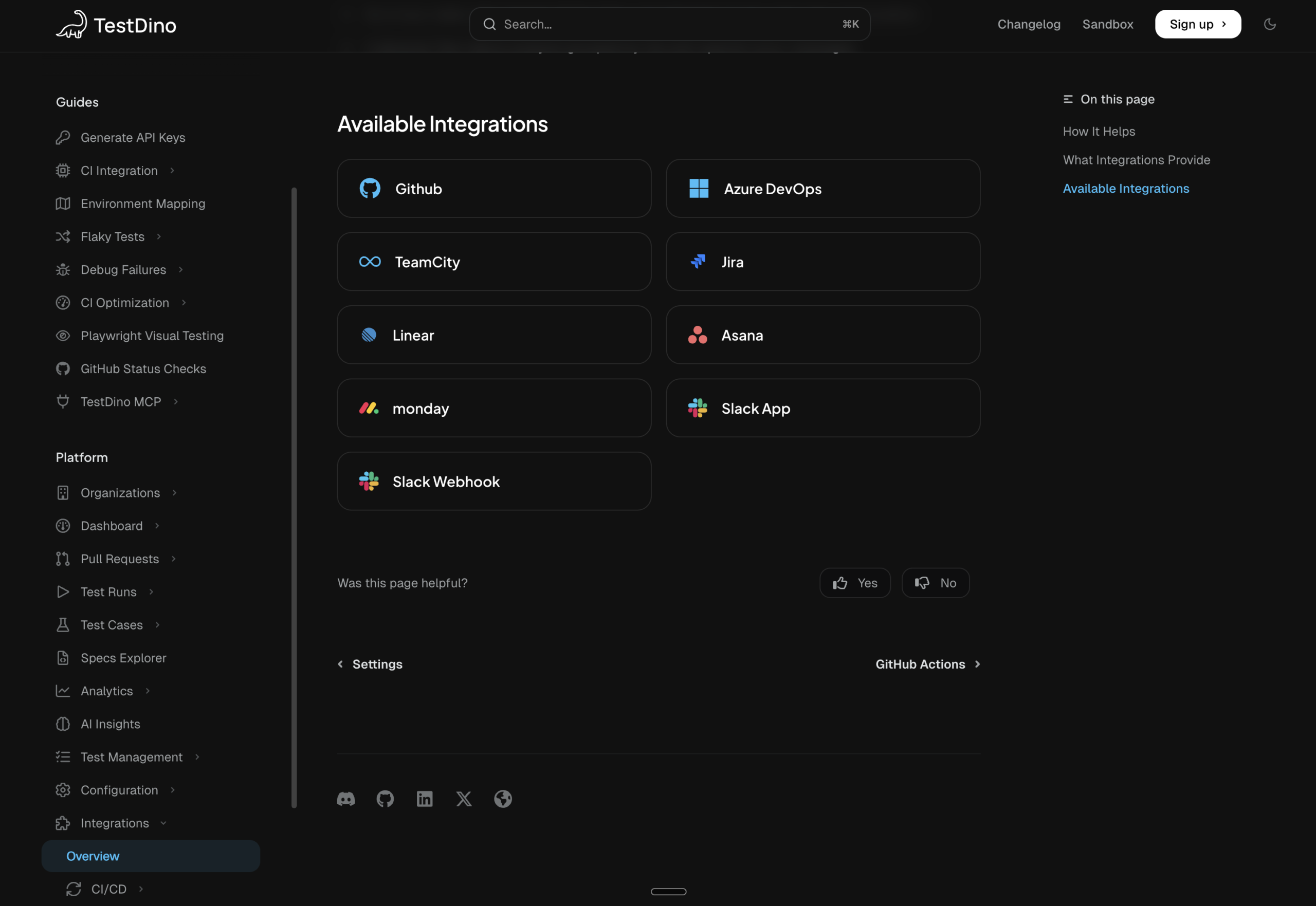
1. Project management tool integrations
Native integrations with JIRA, Linear, Monday, Slack, Azure DevOps, and GitHub sync user stories, test results, and defects.
Why it matters: Keeps QA and development aligned, everyone sees up-to-date quality status in the tools they already use, without duplicate updates.
How TestDino supports it:
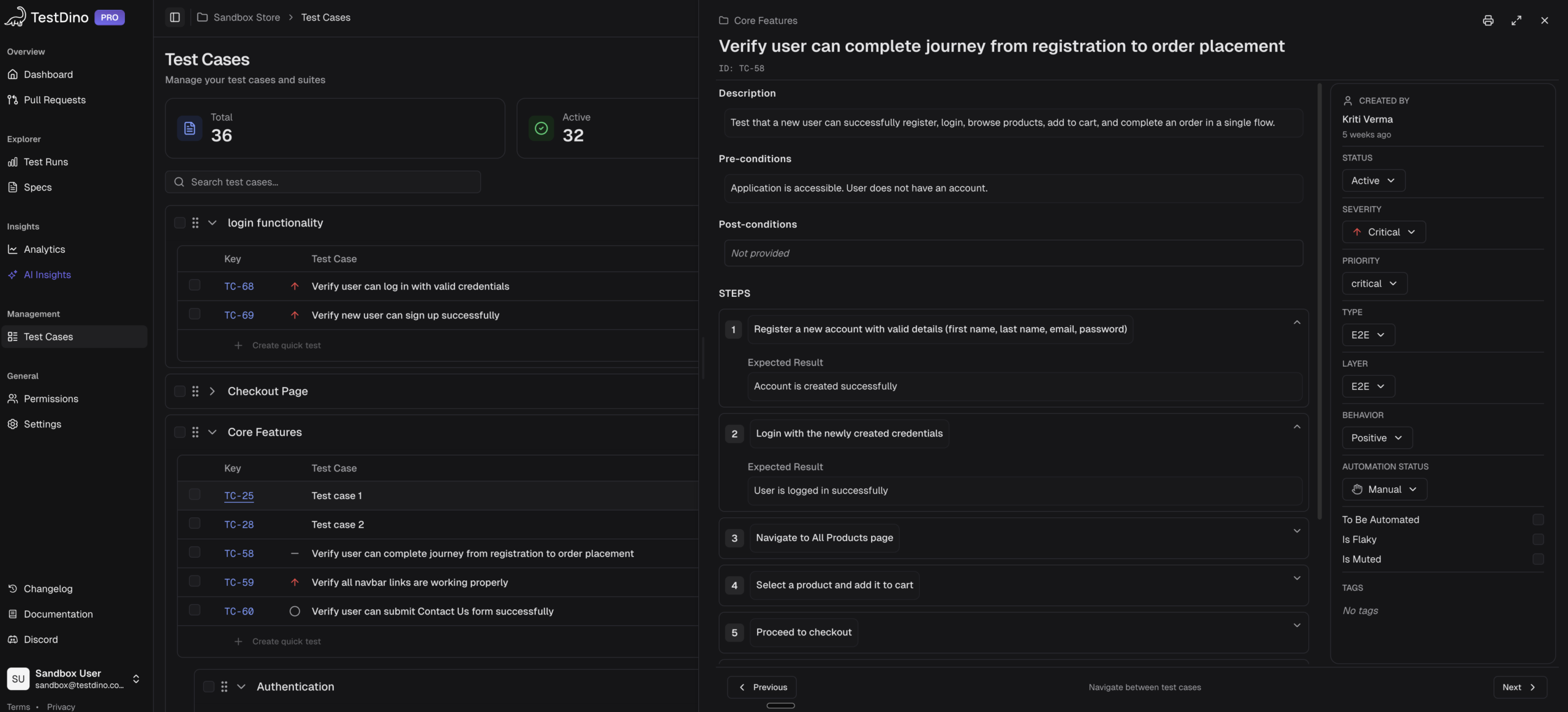
2. Unified system of record
A centralized platform combines all manual and automated test data across projects.
Why it matters: Eliminates scattered spreadsheets and conflicting reports. Everyone works from one source of truth, ensuring trust, consistency, and reliable analytics.
How TestDino supports it:
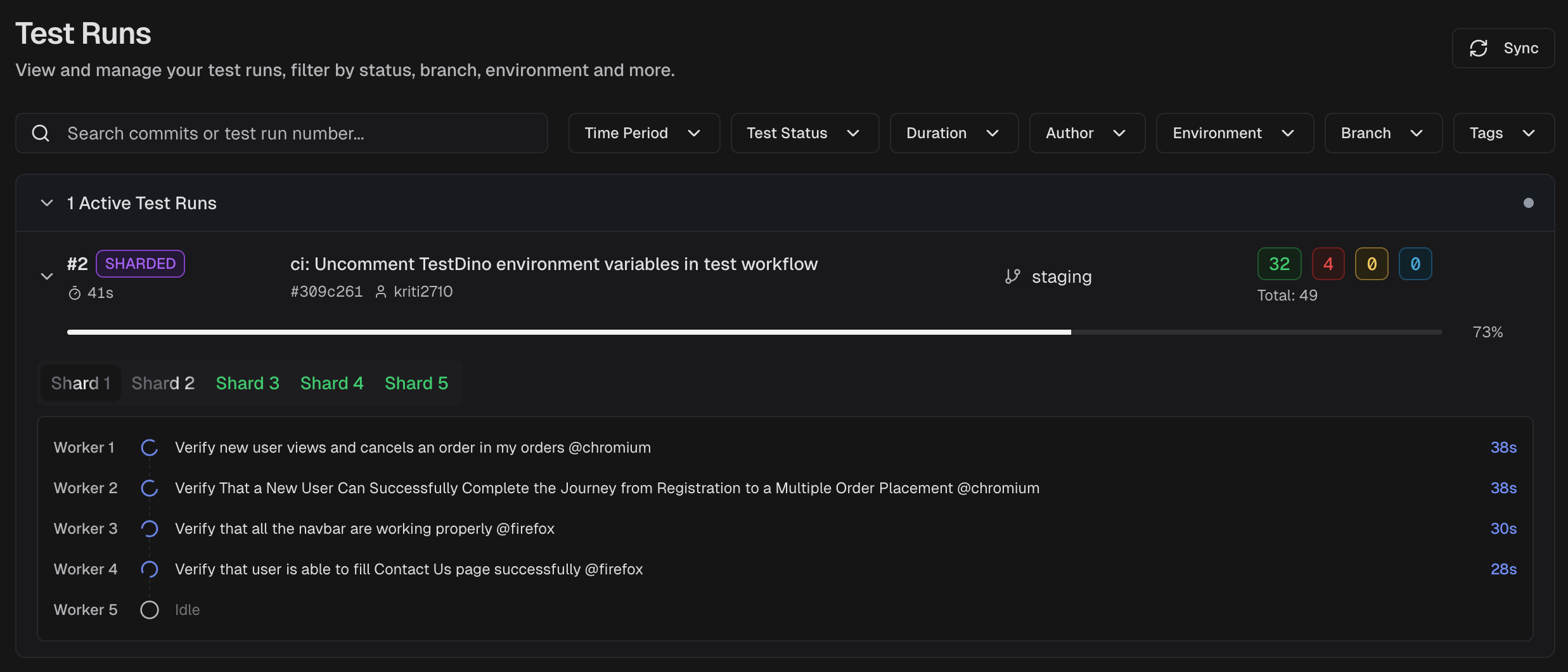
3. Real-time execution visibility & reporting
Live dashboards display test progress as Playwright runs execute, including browser, environment, and commit data.
Why it matters: Provides instant feedback so teams can spot failures early and fix them within the same cycle, accelerating release readiness.
How TestDino supports it:
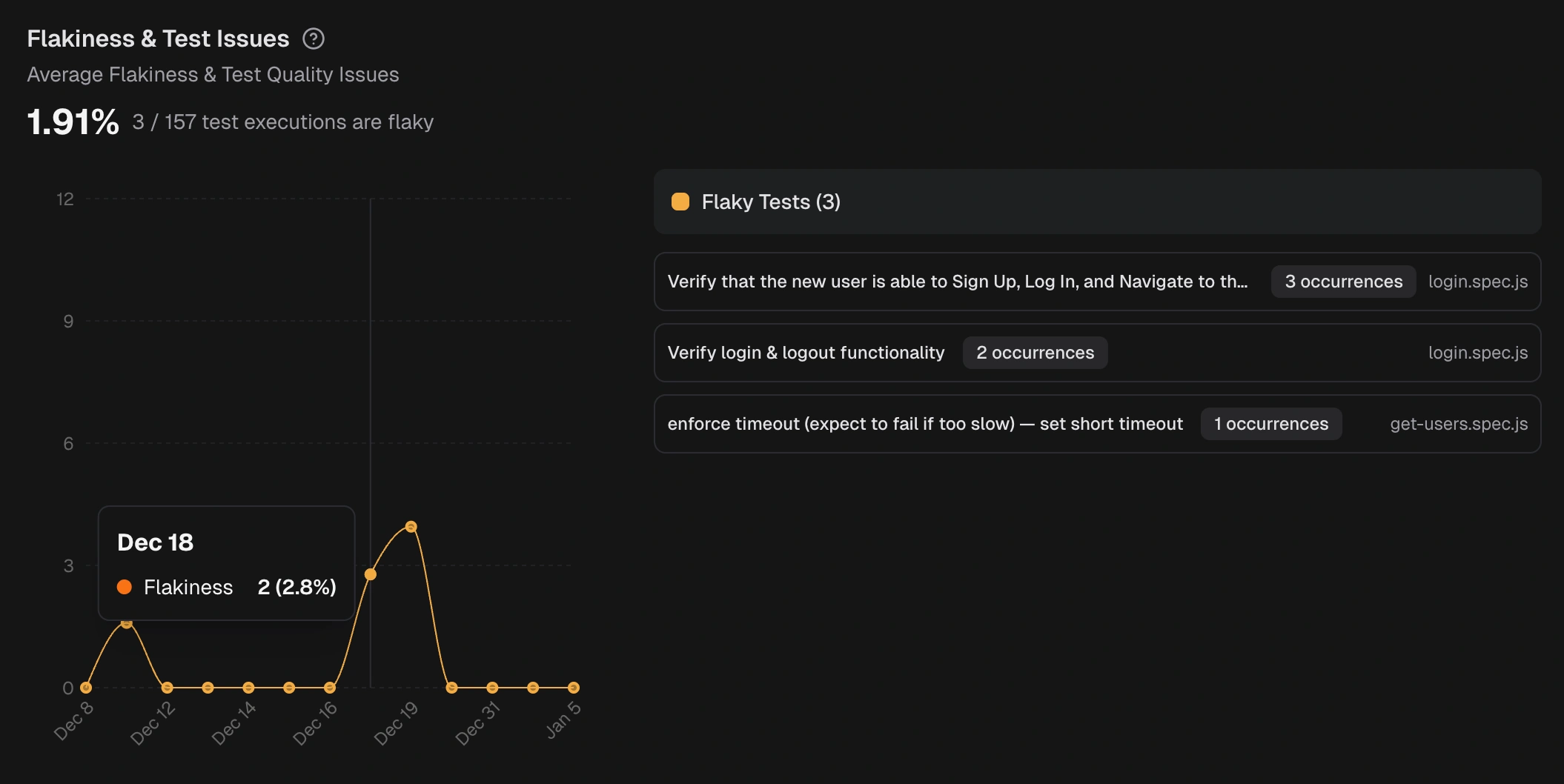
4. Intelligent flakiness detection
AI detects flaky tests automatically by analyzing execution history and patterns. And filter according to different environments(QA, Stage, Production etc.)
Why it matters: Saves countless hours wasted on false failures, boosting suite stability and developer trust in test results.
How TestDino supports it:
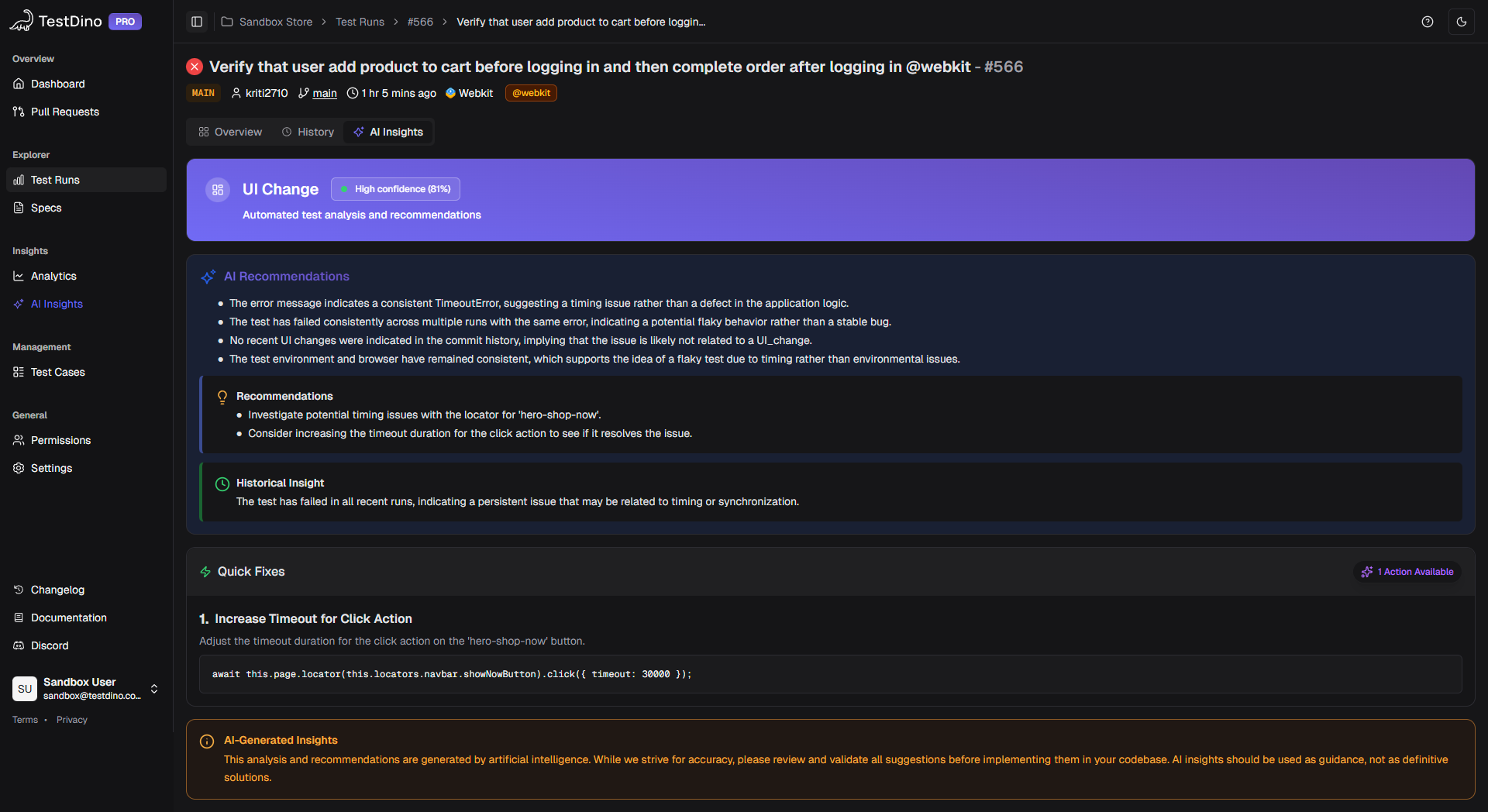
5. Test coverage gap detection
It should highlight untested areas by analyzing code changes and usage data.
Why it matters: Helps teams add missing tests proactively strengthening coverage before issues reach production.
How TestDino supports it:
6. AI-assisted manual test cases generation & maintenance
Using natural language AI can create or update test titles, test steps automatically. This is game-changing because doing this manually takes so much time, and teams usually don't update test cases because of it. But if test management provides MCP server, this can be done with a single prompt.
Why it matters: Cuts test creation time dramatically and reduces maintenance as UI or logic changes keep pace with rapid development cycles.
How TestDino supports it: Using TestDino MCP You can create, update your manual test cases as well as get the historical test run analysis with various prompts.
7. Seamless trace integration
Playwright artifacts (traces, screenshots, videos) are linked directly to test results.
Why it matters: Developers can replay failures instantly through Playwright Trace Viewer, turning red test results into actionable debugging insights.
How TestDino supports it:
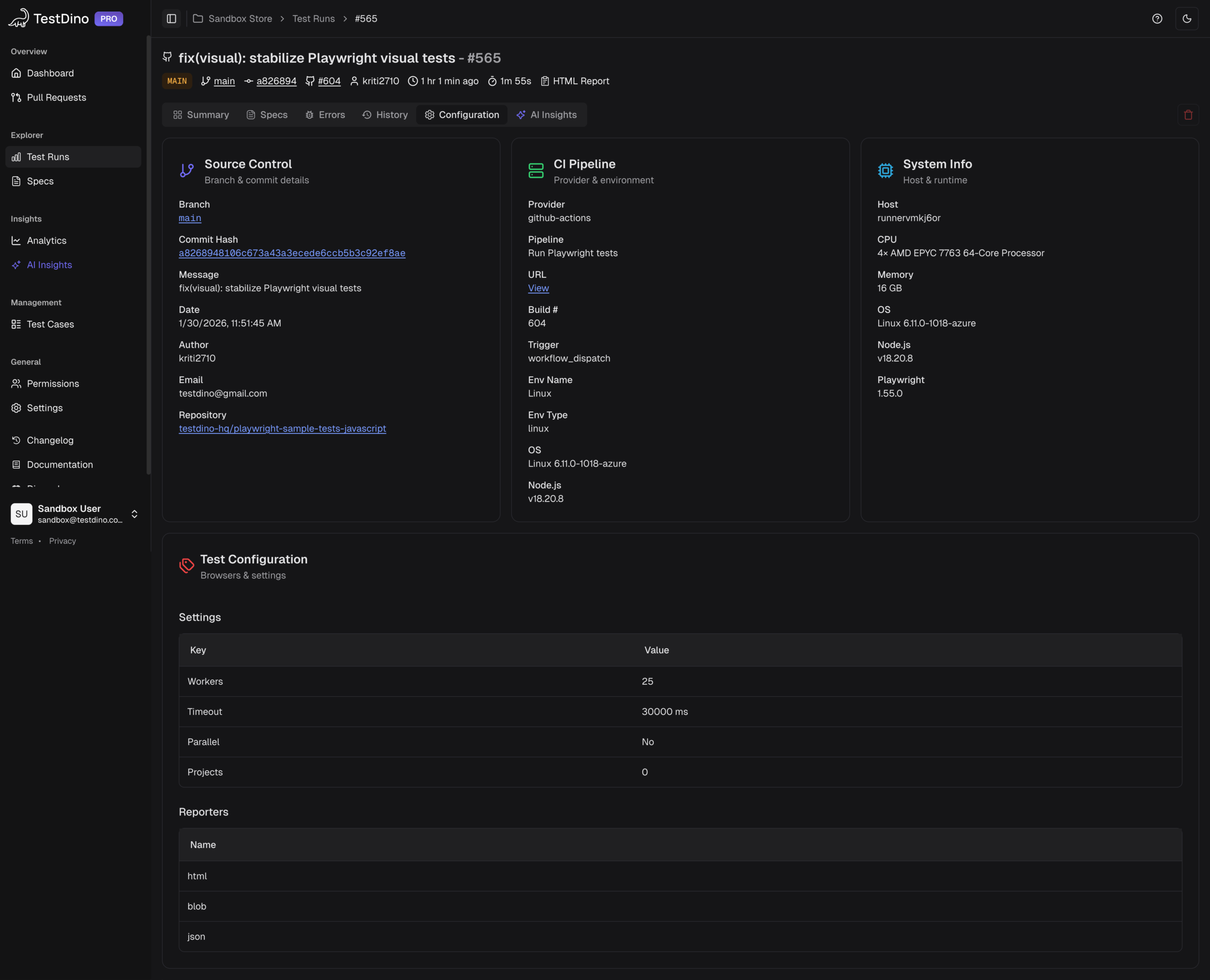
8. Context preservation & querying
Every test run stores metadata like environment, commit ID, and browser.
Why it matters: Enables quick queries such as “show all failing tests on Chrome this week,” uncovering trends and aiding faster root-cause analysis.
How TestDino supports it:
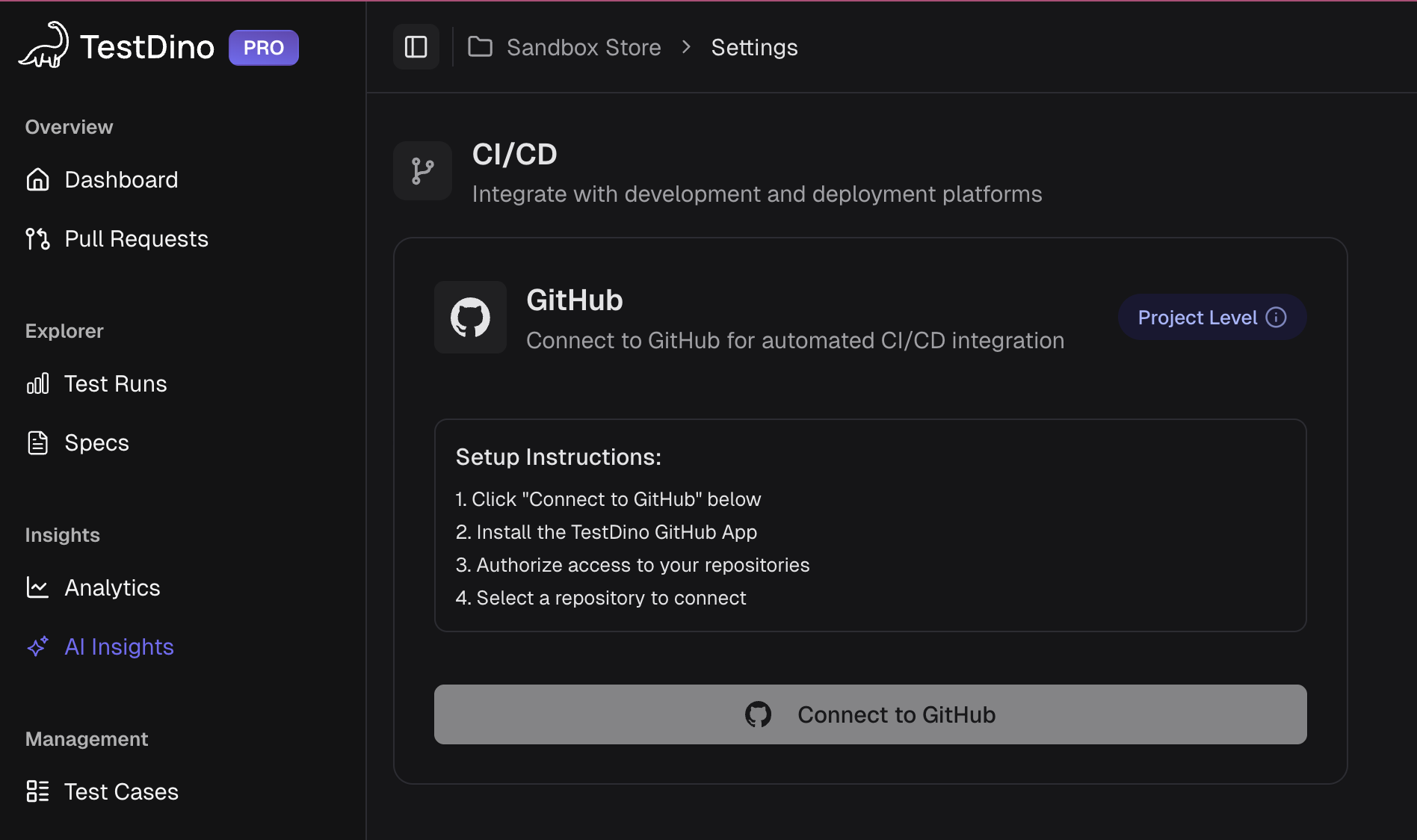
9. CI/CD pipeline integration
Native connections to GitHub Actions, Azure Pipelines, or Jenkins automatically sync test results and enforce quality gates.
Why it matters: Makes testing a core part of continuous delivery, ensuring every code change is validated before merge or deployment.
How TestDino supports it:
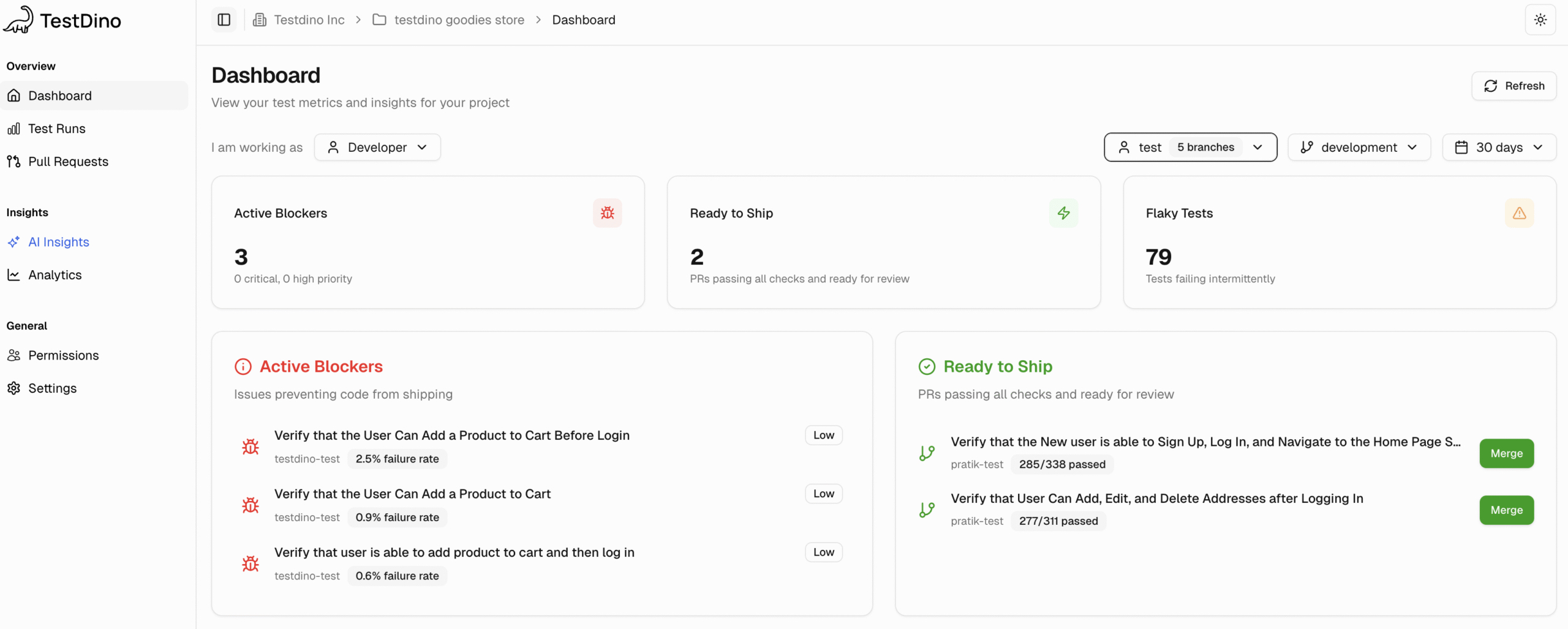
10. Dashboards
Custom dashboards visualize pass rates, flakiness, and coverage in real time, with smart alerts for anomalies.
Why it matters: Keeps managers and engineers informed at a glance, helping teams track trends and maintain quality stability over time.
How TestDino supports it:
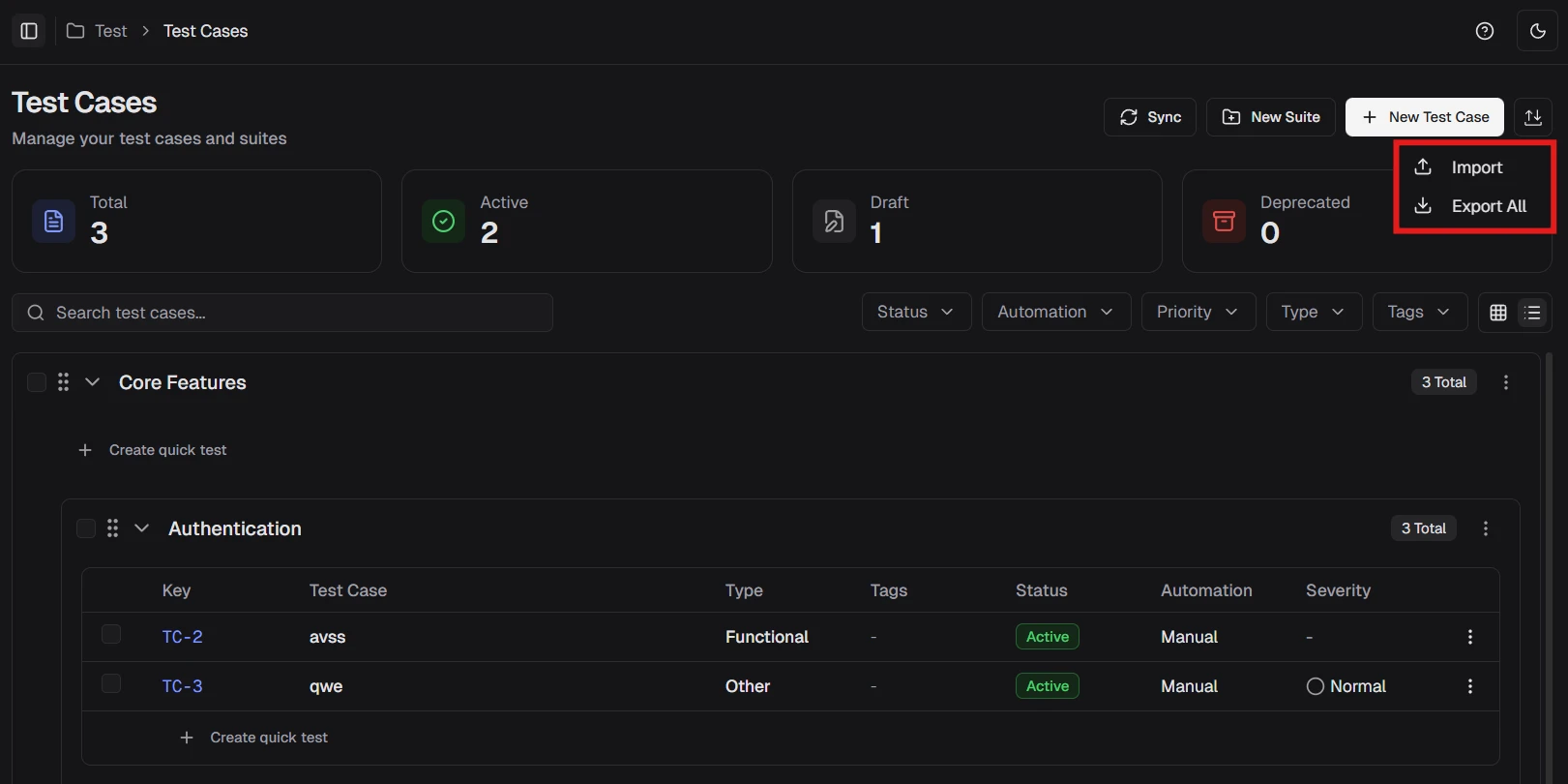
11. Import/Export for test cases migrations (of course!)
Import and export let teams move test cases between tools or projects fast. It helps reuse work, back up data, and keep tests in sync across systems.
Why it matters: Builds accountability and trust. In regulated industries, this ensures complete visibility for audits and compliance checks in minutes.
How TestDino supports it:
Modern Playwright test management tools like TestDino, PractiTest, and Allure TestOps are converging around these capabilities.
They integrate tightly, leverage AI for intelligence, and serve as a single source of truth for quality. If your current process lacks many of these, it’s probably time to upgrade your test management stack.
Real-world workflow: How modern teams test
Modern Playwright teams combine AI, automation, and integration to move from slow manual cycles to real-time, intelligent testing.
1. Fast test creation
Instead of scripting tests line by line, developers use AI prompts and Playwright Codegen to generate tests in minutes. Each test links automatically to its JIRA requirement and appears in the test management system with no manual entry.
2. Instant feedback in CI/CD
When a pull request opens, CI runs only the impacted Playwright tests. Results stream live to the dashboard and PR check. If one fails, the developer views the Playwright trace, fixes it, and re-runs. The JIRA story updates to “Done” automatically once all tests pass.
3. Smart analysis & alerts
Nightly runs aggregate all results. The system flags flaky or browser-specific failures, links them to commits, and alerts the team in Slack with trace details and AI-suggested root causes.
4. Continuous improvement
AI identifies coverage gaps (like missing edge cases) and recommends new tests. QA adds them instantly, boosting coverage and stability. Reports and dashboards update in real time.
Result
Testing becomes proactive, connected, and fast, no spreadsheets, no waiting, no guesswork. Teams fix issues the same day they appear and deliver quality continuously.
The business case for smart test management
Adopting an AI-native Playwright test management platform isn’t just a technical choice, it’s a strategic business move.
Here’s how modern test management drives ROI, productivity, and long-term value.
1️. Velocity
- Problem: Traditional QA often slows down delivery cycles.
- Solution: AI-generated and self-healing tests keep pace with development, eliminating bottlenecks.
- Impact: Teams shift from bi-weekly releases to continuous deployment, with Playwright tests running automatically on every commit.
Faster testing = faster delivery = faster customer value.
2️. Quality
- Problem: Bugs often slip into production due to limited visibility.
- Solution: Real-time flakiness detection and coverage analysis flag issues before users ever notice.
- Impact: Fewer escaped defects and higher user trust quality become predictable and measurable.
Result: Stronger reliability, happier customers, and reduced firefighting.
3️. Efficiency
- Problem: Manual debugging and test maintenance drain team time.
- Solution: Context-rich data, traces, and AI-assisted maintenance reduce repetitive work.
- Impact: Debugging time drops by up to 50%, and smaller QA teams manage larger suites.
Result: Leaner operations and lower labor costs with higher productivity.
4️. Confidence
- Problem: Teams often guess whether releases are ready.
- Solution: Live dashboards show real-time coverage and test health (“98% of stories tested, all critical flows green”).
- Impact: Decisions are based on transparent metrics, not uncertainty.
Result: Faster approvals, fewer delays, and stronger trust in every release.
5️. Cost
- Problem: Inefficient pipelines and escaped bugs increase expenses.
- Solution: Smart automation runs only impacted tests, cutting CI time and rework costs.
- Impact: Reduced infrastructure spend and fewer emergency hotfixes.
Result: Direct savings and higher ROI quality without scaling headcount.
6️. Culture
- Problem: Testing is often seen as a bottleneck, not a shared responsibility.
- Solution: Shared dashboards unite developers, QA, and managers around one view of quality.
- Impact: Fosters collaboration, early issue detection, and pride in delivering stable software.
Result: A proactive, quality-first culture that improves morale and retention.
Modern Playwright test management transforms testing from a cost center into a competitive advantage. Teams deliver faster, with higher confidence, better collaboration, and measurable ROI.
Conclusion
Software quality now moves at the speed of development, and so must test management. In the Playwright era, tests are code, execution is fast, and intelligence must be continuous, not manual.
AI-native platforms turn raw Playwright data traces, logs, and results into instant insights. They detect flaky tests, create bugs automatically, and surface real-time metrics that guide release decisions. The result: less busywork, faster feedback, and stronger confidence in every build.
For teams still relying on outdated tools, the cost is clear: slower releases, more bugs, and missed opportunities. Smart, AI-driven test management isn’t optional anymore; it’s the backbone of high-performing software teams. The future of testing is here, fast, intelligent, and seamlessly integrated.
FAQs

Pratik Patel
Co-founder