Playwright vs Cypress
Compare Playwright and Cypress for modern testing. Learn pros, cons, and use cases to choose the right tool.
Playwright vs Cypress is the most debated comparison in test automation right now. And most guides online give you the same recycled feature table without a single real number.
This guide is different. We ran both frameworks against identical test suites, collected benchmark data from 7 independent sources, and pulled migration timelines from teams that actually made the switch. You will find runnable code, CI cost math, and a decision framework built for engineering teams making a real choice in 2026.
If you are evaluating these 2 frameworks for a new project, or considering a Cypress to Playwright migration, this is the reference you bookmark.
Playwright vs Cypress architecture: in-browser vs out-of-process and why it matters
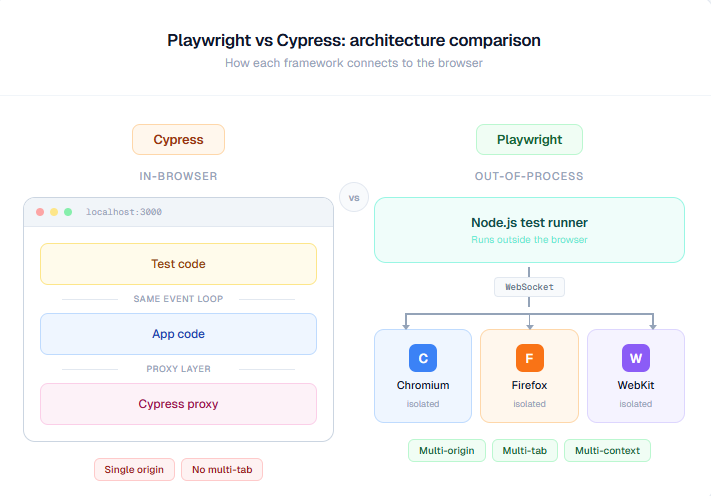
The single biggest difference between Playwright and Cypress is not the syntax. It is where the test code physically runs.
- Cypress executes tests inside the browser, in the same JavaScript event loop as your application. This gives it direct DOM access, instant feedback, and the ability to intercept network requests without a proxy. It is fast for simple apps. But it also means Cypress cannot open multiple tabs, test across different origins without workarounds, or control anything outside the browser sandbox.
- Playwright runs tests outside the browser as a separate Node.js process. It communicates with browser engines through the Chrome DevTools Protocol (for Chromium) and similar protocols for Firefox and WebKit. This out-of-process architecture gives Playwright system-level control: multiple browser contexts, multi-tab testing, download handling, camera permissions, clipboard access, and native parallel execution without any paid add-ons.
How Playwright controls browsers via the DevTools Protocol
Playwright talks to each browser engine at the protocol level. For Chromium, it uses the Chrome DevTools Protocol (CDP). For Firefox and WebKit, Microsoft maintains custom protocol implementations that give Playwright the same level of control.
This means Playwright can do things that are architecturally impossible in Cypress:
-
Spin up isolated browser contexts (think incognito windows) that share a single browser process but have separate cookies, storage, and permissions
-
Run tests against multiple origins in a single test file
-
Intercept and modify network traffic at the protocol level, not through a proxy
-
Emulate mobile devices with realistic viewport, user agent, and touch events
Here is a Playwright test that creates 2 isolated browser contexts and tests both simultaneously:
import { test, expect } from '@playwright/test';

test('2 users interact with the same app simultaneously', async ({ browser }) => {
  // Create 2 isolated browser contexts (like 2 separate incognito windows)
  const adminContext = await browser.newContext();
  const userContext = await browser.newContext();

  const adminPage = await adminContext.newPage();
  const userPage = await userContext.newPage();

  // Admin creates a new item
  await adminPage.goto('https://demo-app.example.com/admin');
  await adminPage.getByRole('button', { name: 'Create Item' }).click();
  await adminPage.getByLabel('Name').fill('Test Item');
  await adminPage.getByRole('button', { name: 'Save' }).click();

  // User sees the item appear (different session, different cookies)
  await userPage.goto('https://demo-app.example.com/items');
  await expect(userPage.getByText('Test Item')).toBeVisible();

  await adminContext.close();
  await userContext.close();
});
Key Insight: This multi-context pattern is what makes Playwright the default choice for testing real-world scenarios like admin/user role interactions, multi-tab checkout flows, or OAuth login redirects. Cypress cannot do this due to its in-browser architecture. It is a fundamental limitation, not a missing feature.
How Cypress runs inside the browser event loop
Cypress takes a different approach. By running inside the browser, it gets direct access to window, document, and the full DOM. Its automatic command retrying means elements do not need explicit waits. And the time-travel debugging lets you hover over each command to see the DOM at that exact moment.
For single-page apps where your tests target one domain and need fast iteration, this model works well. Cypress is faster to set up, easier to learn, and the interactive Test Runner gives frontend developers something no other tool matches: visual, real-time feedback while tests execute.
But the tradeoff is real. Teams that start with Cypress often hit the ceiling around 300-500 tests, when they need cross-browser coverage, parallel execution without paying for Cypress Cloud, or multi-origin testing for OAuth flows. This is exactly what the BigBinary engineering team experienced before migrating.
Feature-by-feature comparison: Playwright vs Cypress with decision verdicts
Here is the comparison table engineering teams actually need. Every row includes a verdict, not just a checkbox.
| Capability | Playwright | Cypress | Verdict |
|---|---|---|---|
| Language support | JavaScript, TypeScript, Python, Java, C# | JavaScript, TypeScript only | Playwright wins if your backend team writes tests in Python or Java |
| Browser support | Chromium, Firefox, WebKit (Safari) via single API | Chromium-based (Chrome, Edge), Firefox. WebKit is experimental | Playwright wins for Safari/WebKit coverage |
| Parallel execution | Native, free. Configure workers in playwright.config.ts | Requires Cypress Cloud (paid) or third-party plugins like cypress-split | Playwright wins. Free parallelism is a significant cost advantage |
| Multi-tab/multi-origin | Native support via browser contexts | Not supported. Single origin per test | Playwright wins for complex user flows |
| Network interception | Protocol-level interception + API testing built in | cy.intercept() for stubbing/spying. Works well for most use cases | Tie. Cypress is simpler. Playwright is more powerful |
| Debugging | Trace Viewer, UI Mode, VS Code extension, screenshots, video | Time-travel debugger, real-time DOM inspection, screenshots, video | Tie. Cypress wins for local dev. Playwright wins for CI debugging |
| Component testing | Stable support for React, Vue, Svelte | Native component testing (React, Vue, Angular) | Tie. Both are mature |
| Test flakiness | Auto-waiting, retry on failure, browser context isolation | Automatic retrying, but can face sync issues under heavy DOM updates | Playwright wins. Browser context isolation reduces state leakage |
| Mobile emulation | Device profiles with realistic viewport, user agent, touch, geolocation | Viewport resizing only. No device emulation | Playwright wins for mobile web testing |
| CI/CD integration | GitHub Actions, GitLab CI, Azure DevOps, Jenkins, TeamCity. Sharding is native and free | Same CI tools. But parallelization and analytics require Cypress Cloud | Playwright wins for teams that want CI scalability without vendor lock-in |
| Test reporting | HTML reporter, JSON, JUnit, custom reporters, Trace Viewer | Built-in reporter, Cypress Cloud dashboard, screenshot/video capture | Depends. Both benefit from a dedicated reporting platform |
| API testing | Native API testing with request context | Supported but less flexible than Playwright's implementation | Playwright wins for teams doing E2E + API in 1 framework |
| Community + ecosystem | 68K+ GitHub stars, 20-30M weekly NPM downloads (2026), Microsoft-backed | 47K+ GitHub stars, ~5M weekly NPM downloads, dedicated plugin ecosystem | Playwright has more momentum. Cypress has more mature plugins |
| Learning curve | Moderate. Async/await required. More config options | Low. Chain-based syntax. Works out of the box | Cypress wins for teams new to test automation |
| Codegen | Built-in codegen tool records browser actions and generates test code | Cypress Studio (limited recording capability) | Playwright wins. Codegen is more reliable |
| Price | 100% free and open source | Framework is free. Cypress Cloud starts at $75/month | Playwright wins on total cost |

Tip: The pattern is clear. Playwright wins on capability breadth: 12 of 16 categories. Cypress wins on developer experience for simple use cases. The decision comes down to where your team is today and where it needs to be in 12 months.
Playwright vs Cypress performance: real benchmark numbers from CI pipelines
This is the section most comparison guides skip. Performance is not a feeling. It is a number. And the numbers consistently favor Playwright.
Published benchmark data from 7 independent sources
| Source | Test Setup | Playwright Time | Cypress Time | Playwright Advantage |
|---|---|---|---|---|
| Axelerant study | Identical test scenarios, single browser | 290ms per action avg | 420ms per action avg | 31% faster |
| Checkly 3-test suite | Chrome headless | ~3.6s | ~4.7s | 23% faster |
| ray.run 100-test suite | Repeated execution, Chrome | Consistent low variance | Higher variance, startup penalty | More stable at scale |
| BigBinary migration | Production auth flow | 1.82s | 16.09s | 88.7% faster |
| BigBinary migration | Full suite comparison | Under 20s for auth flow | ~2 minutes for auth flow | ~6x faster |
| Heureka Group local speed test | Local execution, Chrome | Consistently faster | Consistently slower | Confirmed across runs |
| DEV Community benchmark | GitHub Actions CI, Chrome | 9-12s range | 15-17s range | 26-30% faster |
Data sourced from: TestDino performance benchmarks, BigBinary engineering blog, Checkly blog, ray.run research, DEV Community, Heureka Group. All tests ran identical or comparable scenarios.
Key Insight: Cypress adds 5-7 seconds of startup overhead before any test logic runs because it bundles test code, injects it into the browser, and sets up its proxy layer. Playwright skips all of this by communicating via WebSocket. This "startup tax" makes Cypress look disproportionately slow in small benchmarks but compounds dramatically at scale.
Why Playwright is faster: 3 architectural reasons
- No startup tax. Playwright communicates with the browser via WebSocket from the start. No bundling, no injection, no proxy setup.
- Browser context reuse. Playwright creates lightweight browser contexts that share the underlying browser process. Each context is isolated (separate cookies, storage) but does not require launching a new browser. Cypress creates a new browser instance per spec file.
- Native parallelism. Playwright can run tests across multiple workers simultaneously. A 4-worker configuration runs 4 tests at once. Cypress runs serially unless you pay for Cypress Cloud or configure third-party plugins.
Here is the parallel config that most teams start with:
import { defineConfig, devices } from '@playwright/test';

export default defineConfig({
  // Run tests across 4 parallel workers
  workers: process.env.CI ? 4 : undefined,
  fullyParallel: true,

  // Retry failed tests once in CI
  retries: process.env.CI ? 1 : 0,

  // Run against 3 browser engines simultaneously
  projects: [
    { name: 'chromium', use: { ...devices['Desktop Chrome'] } },
    { name: 'firefox', use: { ...devices['Desktop Firefox'] } },
    { name: 'webkit', use: { ...devices['Desktop Safari'] } },
  ],

  // Generate reports for CI analysis
  reporter: [
    ['html', { open: 'never' }],
    ['json', { outputFile: 'results.json' }],
  ],
});
CI cost impact: the math nobody shows you
Here is real math that engineering managers care about.
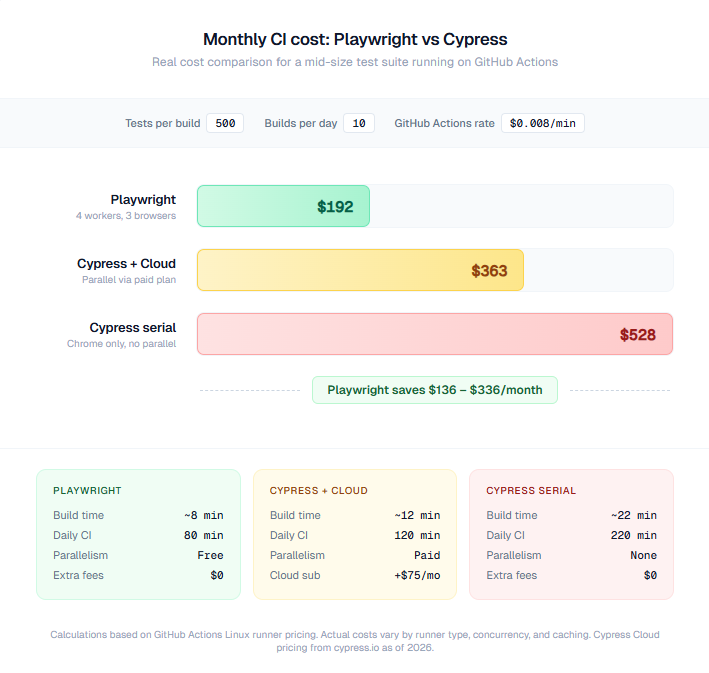
Assume your team runs 500 tests per build, 10 builds per day, using GitHub Actions at $0.008/minute.
| Framework | Time per build | Daily CI time | Monthly CI cost |
|---|---|---|---|
| Playwright (4 workers, 3 browsers) | ~8 minutes | ~80 minutes | ~$192 |
| Cypress (serial, Chrome only) | ~22 minutes | ~220 minutes | ~$528 |
| Cypress + Cypress Cloud (parallel) | ~12 minutes + $75/mo subscription | ~120 minutes | ~$363 |
Warning: If your CI bill is growing and you are running Cypress serially, run the math above with your own numbers before your next sprint planning. The savings compound fast.
Cross-browser testing: Playwright's 3-engine advantage over Cypress
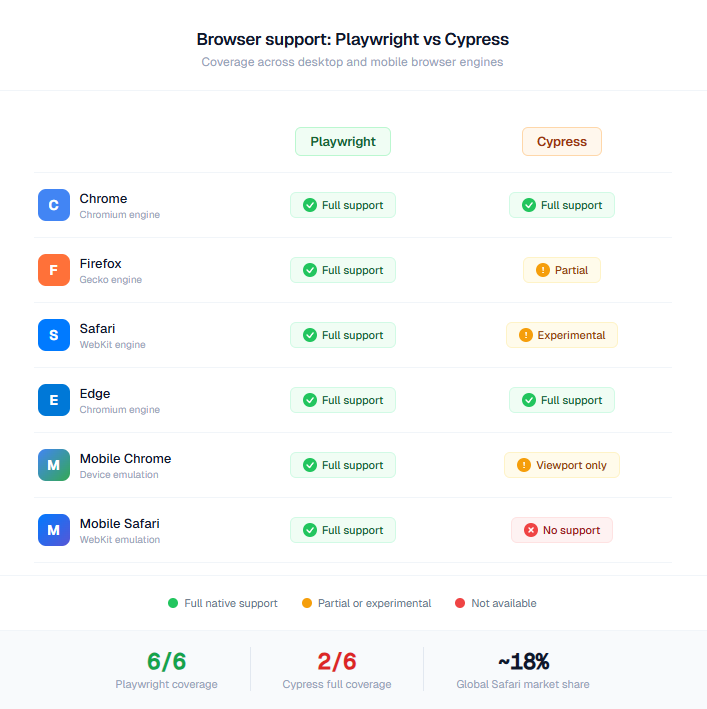
Your users do not all use Chrome. Safari holds roughly 18% of global browser market share. Firefox accounts for another 3-4%. If your E2E tests only run on Chromium, you are leaving real bugs undiscovered. Teams often solve this using a Selenium grid cloud, but Playwright handles multi-browser testing natively.
| Browser Engine | Playwright | Cypress |
|---|---|---|
| Chromium (Chrome, Edge) | Full support | Full support |
| Firefox | Full support | Supported, occasional stability gaps |
| WebKit (Safari) | Full support, maintained by Microsoft's Playwright team | Experimental. Uses Playwright's WebKit binary internally |
| Mobile Chrome emulation | Full device profiles (viewport, user agent, touch, geolocation) | Viewport resizing only |
| Mobile Safari emulation | Full device profiles via WebKit | Not available |
Key Insight: The irony: Cypress uses Playwright's WebKit binary for its experimental Safari support. When you run Cypress with WebKit, you are literally running Playwright under the hood.
Here is how to run Playwright tests across all 3 engines in a single command:
# Run all tests across Chromium, Firefox, and WebKit
npx playwright test --project=chromium --project=firefox --project=webkit

# Run tests in parallel across all 3 browsers with 4 workers each
npx playwright test --workers=4
For a complete reference of Playwright CLI commands, we have a dedicated deep dive. For browser-specific testing patterns, the Playwright cheatsheet covers the most common scenarios.
Debugging and CI/CD: Cypress time-travel vs Playwright Trace Viewer
Debugging is where these 2 tools take radically different approaches. Both are excellent, but they shine at different stages of the workflow.
Cypress time-travel debugger (best for local development)
Cypress runs tests in a browser with an interactive panel that shows every command as it executes. You can hover over any step to see the DOM at that exact moment. This "time travel" capability makes Cypress unmatched for local debugging during active development.
describe('Checkout flow', () => {
  it('should complete purchase', () => {
    cy.visit('/products');
    cy.get('[data-testid="product-card"]').first().click();
    cy.get('[data-testid="add-to-cart"]').click();
    cy.get('[data-testid="cart-count"]').should('contain', '1');
    cy.get('[data-testid="checkout-button"]').click();
    // Time-travel: hover over any step above to inspect DOM state
  });
});
This works well when you are sitting at your laptop writing tests. The visual feedback loop is fast and intuitive.
Playwright Trace Viewer (best for CI debugging)
When a test fails in CI at 2 AM, Cypress's interactive runner is not available. You get a screenshot and a log file. Maybe a video if you configured it.
Playwright's Trace Viewer solves this by recording everything during CI execution: DOM snapshots, network requests, console logs, and screenshots at every action. You open the trace file in a browser and step through the failure exactly as it happened.
export default defineConfig({
  use: {
    trace: 'on-first-retry', // Record trace only when a test fails and retries
    screenshot: 'only-on-failure',
    video: 'retain-on-failure',
  },
});# After a CI failure, open the trace locally
npx playwright show-trace test-results/checkout-test/trace.zipTip: For Playwright teams, TestDino embeds the Trace Viewer directly in the dashboard. No downloading zip files. Click a failed test, open the trace, and you are debugging in under 10 seconds. Your team already generates trace data. This just makes it accessible.
CI/CD configuration comparison
Both tools integrate with GitHub Actions, GitLab CI, Jenkins, Azure DevOps, and TeamCity. But Playwright's configuration is simpler because parallelism and reporting are built in.
Playwright GitHub Actions workflow (with sharding):
name: Playwright Tests
on: [push, pull_request]
jobs:
  test:
    runs-on: ubuntu-latest
    strategy:
      matrix:
        shard: [1/4, 2/4, 3/4, 4/4]  # Split tests across 4 CI machines
    steps:
      - uses: actions/checkout@v4
      - uses: actions/setup-node@v4
        with:
          node-version: 20
      - run: npm ci
      - run: npx playwright install --with-deps
      - run: npx playwright test --shard=${{ matrix.shard }}
      - uses: actions/upload-artifact@v4
        if: always()
        with:
          name: playwright-report-${{ matrix.shard }}
          path: playwright-report/
This shards your test suite across 4 machines for free. No paid cloud service. No third-party plugin. 4 lines of config.
Cypress GitHub Actions workflow:
name: Cypress Tests
on: [push, pull_request]
jobs:
  test:
    runs-on: ubuntu-latest
    steps:
      - uses: actions/checkout@v4
      - uses: cypress-io/github-action@v6
        with:
          browser: chrome
      # Want parallel? You need Cypress Cloud:
      # with:
      #   record: true
      #   parallel: true
      # env:
      #   CYPRESS_RECORD_KEY: ${{ secrets.CYPRESS_RECORD_KEY }}
Cypress runs serially here. For parallel execution, you need Cypress Cloud with a record key, which starts at $75/month and scales with usage. For more CI/CD integration patterns across different providers, we cover each one.
The cost nobody talks about: Cypress Cloud pricing vs Playwright's free parallelism
Cypress's framework is free and open source. But the features most teams need at scale (parallelism, flakiness detection, test analytics) sit behind Cypress Cloud, a paid SaaS product.
| Feature | Playwright | Cypress (Free) | Cypress Cloud |
|---|---|---|---|
| Parallel execution | Free, native | Serial only | Starts at $75/month |
| Flaky test detection | Free via config (retries + reporting) | Manual identification | Auto-detection with analytics |
| Test analytics dashboard | Free HTML reporter + dedicated tools | Basic reporter | Cloud dashboard |
| CI artifacts (traces, video) | Free, configurable | Screenshots, video | Enhanced recording |
| Sharding across machines | Free, native | Not available | Available with Cloud |
One engineer shared on Medium that they spent $15,000 in CI costs before realizing Cypress's serial execution model was the bottleneck. After migrating to Playwright, their CI costs dropped by more than half.
Warning: Cypress Cloud pricing scales with usage. As your test suite grows, so does the bill. Playwright's parallel execution is free regardless of suite size. For teams planning to scale past 1,000 tests, model the 12-month Cypress Cloud cost against your current CI bill before committing.
For test reporting and analytics beyond what either framework provides out of the box, there are dedicated platforms. More on that in the reporting section below.
Cypress to Playwright migration: timeline, effort, and what teams report
If you are already using Cypress and considering a switch, here is what actual migration looks like based on published case studies.
Migration timelines from real teams
| Team | Suite Size | Migration Approach | Timeline | Result |
|---|---|---|---|---|
| BigBinary | 200+ E2E tests | Full migration, phased rollout | 2-3 months total. 2-3 week infrastructure spike, then gradual test migration | 88.7% faster execution. Auth flows from 2 minutes to under 20 seconds |
| Lingvano | 200+ tests | Full migration | Several weeks | 70% reduction in execution time |
The migration is not a rewrite. It is a translation.
The core pattern is straightforward. Here is the same test in both frameworks:
cy.visit('https://example.com');
cy.get('[data-testid="login"]').click();
cy.get('#email').type('[email protected]');
cy.get('#password').type('secret');
cy.get('form').submit();
cy.url().should('include', '/dashboard');await page.goto('https://example.com');
await page.getByTestId('login').click();
await page.getByLabel('Email').fill('[email protected]');
await page.getByLabel('Password').fill('secret');
await page.getByRole('button', { name: 'Submit' }).click();
await expect(page).toHaveURL(/dashboard/);Key differences:
- cy.get() becomes Playwright locators (page.getByRole(), page.getByTestId(), page.getByLabel())
- Cypress's chaining becomes async/await
- cy.intercept() becomes page.route() for network mocking
- cy.session() becomes browser.newContext() with storage state
There are tools like cy2pw that automate common conversions. But manual review is still necessary for custom Cypress commands and complex interceptors. For a full guide, see our Cypress to Playwright migration walkthrough.
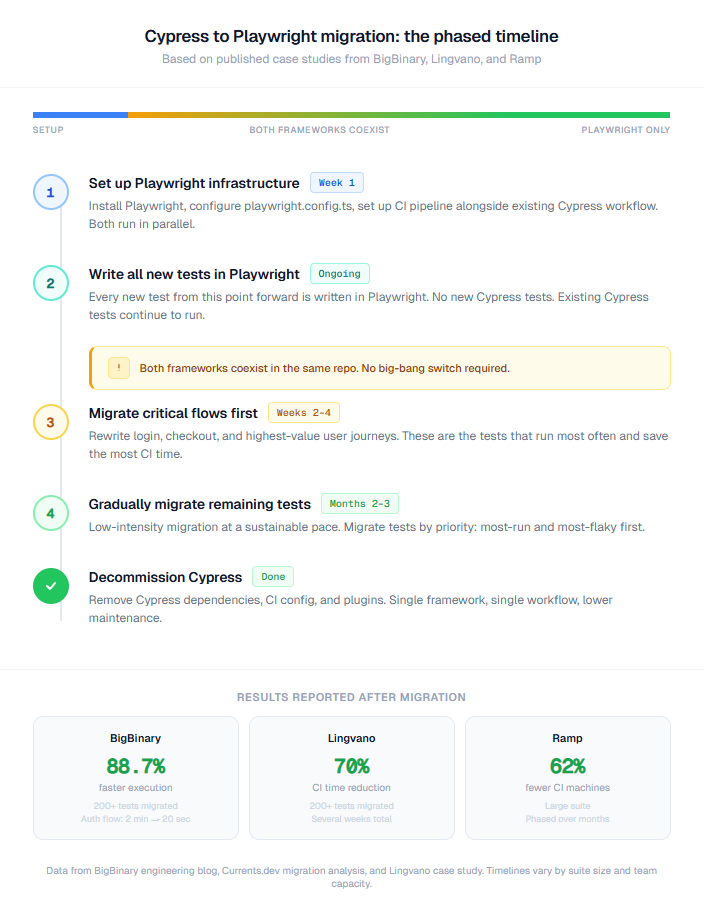
Tip: Both frameworks can coexist in the same repo during migration. You do not need to flip a switch. New tests go in Playwright. Existing Cypress tests migrate gradually. Track coverage changes with PR-level test summaries to see improvement sprint over sprint.
Test stability and flakiness: where Playwright's architecture pays off
Flaky tests are the silent productivity killer. CircleCI reports that teams run 23,000 flaky tests every day across their platform. A test that passes locally but fails in CI destroys developer trust in the test suite.
Why Playwright tests flake less
Playwright's auto-waiting is built into every action. When you call page.click(), Playwright waits for the element to be visible, enabled, stable (not animating), and receiving events before clicking. No explicit waits. No cy.wait(500) hacks.
await page.getByRole('button', { name: 'Submit' }).click();
// Playwright automatically waits for button to be:
// 1. Attached to DOM
// 2. Visible
// 3. Stable (not animating)
// 4. Enabled
// 5. Receiving events (not blocked by another element)
Cypress also has automatic retrying, but it retries the entire command chain. If a chain is long, the retry scope can cause unexpected behavior under heavy DOM mutations.
For teams already fighting flaky tests, the flaky test benchmark report provides industry baselines. For a deeper look at common Playwright mistakes that cause flakiness, we cover the top patterns.
Adoption trends: NPM downloads, GitHub stars, and enterprise momentum in 2026
Let the numbers tell the story.
| Metric | Playwright | Cypress |
|---|---|---|
| NPM weekly downloads (2026) | 20-30 million | ~5 million |
| GitHub stars | 68,000+ | 47,000+ |
| Language support | JavaScript, TypeScript, Python, Java, C# | JavaScript, TypeScript |
| Maintained by | Microsoft | Cypress.io (private company) |
| First surpassed in downloads | June 2024 (Playwright overtook Cypress) | N/A |
| Companies using Playwright | 3,056+ (including Microsoft, Google, Netflix) | Widely adopted in frontend teams |
Playwright surpassed Cypress in weekly NPM downloads in mid-2024 and has maintained the lead since. As of early 2026, the gap continues to widen. This does not mean Cypress is dying. It means the industry default for new projects has shifted.
For a deeper look at the data, the Playwright market share report, Cypress market share analysis, and testing framework trends cover adoption patterns across industries. If you are also evaluating Selenium, the 3-way comparison and the is Selenium dead analysis provide additional context.
Selectors and element handling: resilient tests that survive UI changes
How you find elements on the page determines how often your tests break when the UI changes.
Playwright's locator strategy
Playwright pushes you toward role-based and semantic locators that survive UI refactors:
// Preferred: role-based (survives CSS changes)
await page.getByRole('button', { name: 'Add to Cart' }).click();

// Good: test ID (explicit contract with devs)
await page.getByTestId('checkout-button').click();

// Good: label-based (tied to accessible labels)
await page.getByLabel('Email address').fill('[email protected]');

// Good: text-based (matches visible text)
await page.getByText('Welcome back').isVisible();

// Avoid: CSS selectors (brittle, tied to implementation)
await page.locator('.btn-primary.checkout-cta').click();
Cypress's selector strategy
// Common Cypress patterns
cy.get('[data-testid="checkout-button"]').click();
cy.get('.btn-primary').click();  // CSS selector (brittle)
cy.contains('Add to Cart').click();
Tip: Playwright's getByRole() locators align with WCAG accessibility roles. Tests that use role-based selectors also validate basic accessibility. This is a rare case where better testing practice and better user experience align perfectly.
For a complete locator reference, the Playwright cheatsheet covers every locator type with copy-paste examples. For a deeper understanding of how the accessibility tree powers Playwright's locators, we have a dedicated guide.
When to choose Playwright vs when to choose Cypress: the decision framework
Skip the "it depends" non-answer. Here is a concrete decision framework.
Choose Playwright if any of these are true:
-
You need Safari/WebKit testing (18% of global browser traffic)
-
Your test suite will grow past 300 tests
-
You need parallel execution without paying for a cloud service
-
Your team writes code in Python, Java, or C# alongside JavaScript
-
You test multi-origin flows (OAuth, payment gateways, SSO)
-
You need multi-tab or multi-user testing
-
CI cost optimization is a priority
-
You are starting a new project today (Playwright is the industry default for new setups in 2026)
Choose Cypress if all of these are true:
-
Your app is a single-page app targeting Chromium browsers
-
Your test suite is under 200 tests and growing slowly
-
Your team is primarily frontend JavaScript developers
-
You prioritize the fastest local development feedback loop
-
You do not need multi-tab, multi-origin, or mobile emulation
-
You are willing to pay for Cypress Cloud when you need parallelism
Consider migrating from Cypress to Playwright if:
-
Your CI build times exceed 15 minutes due to serial test execution
-
You are paying for Cypress Cloud and want to reduce tooling costs
-
You have been blocked by Cypress's single-origin limitation
-
Your team needs Safari testing for compliance or user coverage
-
You are hiring and candidates increasingly list Playwright on resumes (check the Playwright job market data)
How Playwright teams use TestDino to turn test results into action
Whether you pick Playwright after reading this guide or are already running it, the reporting problem is the same: fragmented test results scattered across CI logs, HTML files, and Slack messages.
TestDino is built specifically for Playwright. It is not a generic testing tool adapted for multiple frameworks. Every feature is designed for Playwright's architecture: its trace format, its reporter output, its sharding model, and its parallel execution patterns.
Note: Important: TestDino is Playwright-specific. If you choose Cypress, TestDino is not the right tool. Cypress has its own ecosystem including Cypress Cloud. This section is for teams that are already using Playwright or migrating to it.
What TestDino does for Playwright teams
- Embedded Trace Viewer. Playwright generates trace files during CI runs. Usually you download a .zip, extract it, and open it locally. TestDino embeds the Trace Viewer directly in the dashboard. Click a failed test, open the trace. Under 10 seconds from notification to debugging.
- Error grouping. When 50 tests fail with the same root cause (a broken API endpoint, a changed selector), you do not want to investigate 50 failures. TestDino groups identical errors by fingerprint. Fix 1 pattern, resolve 50 tests.
- AI failure analysis. Every failed test gets an AI-generated investigation brief with a root cause hypothesis, affected components, and suggested fix approach. This cuts triage time from 30 minutes to under 5 minutes per failure.
- Flaky test detection. TestDino automatically identifies tests that flip between pass and fail across runs. You can quarantine flaky tests and track fix progress over time.
-
CI optimization. Rerun only the tests that failed in the previous run using Playwright's --last-failed flag with --last-failed-file, cached between CI jobs. For a suite of 500 tests where 5 failed, you rerun 5 instead of 500.
- PR-level test health. Every pull request gets a test health summary showing what passed, what failed, and whether the PR introduced new failures. Block risky merges before they hit main.
Integration takes 2 minutes:
#   Install   the   TestDino   Playwright   reporter
npm   install   @testdino/playwright

#   Add to playwright.config.ts:
#     reporter: [['@testdino/playwright', { token: process.env.TESTDINO_TOKEN }]]

#   Then run your suite as usual - results stream live
npx playwright testFAQs

Pratik Patel
Co-founder