Why QA needs AI-assisted root cause analysis
Root cause analysis with AI helps teams spot failures fast, reduce flakiness, and speed up debugging for more reliable, efficient releases.

Test automation finds problems fast. But finding why it failed? That's slow.
Reviewing logs, checking screenshots, and replaying videos. Then open a Playwright trace file. Hours pass just to determine the root cause of a single failure.
This manual root cause analysis process is a bottleneck in modern CI/CD pipelines.
There's a better way now. Machine Learning and Artificial Intelligence are changing the game.
This guide explains why effective root cause analysis is non-negotiable in today's QA and how AI makes it faster, smarter, and more effective.
Understanding Root Cause Analysis in Software Testing
Let's start with the basics. In software testing, it's crucial to take the time to understand the root causes behind failures, rather than just addressing surface-level symptoms.
What is Root Cause Analysis in Software Testing?
Root Cause Analysis (RCA) isn't just about finding a cause; it's about finding the fundamental reason why a problem happened.
Think of it like a doctor treating a persistent cough. They could just prescribe cough syrup (fixing the symptom). Alternatively, they could run tests to determine if it's caused by allergies, an infection, or another underlying issue (identifying the root cause). RCA aims for the latter.
Core principles of good RCA:
-
It's systematic: Follow a clear process, rather than just guessing.
-
It's fact-based: Use real data such as logs, errors, and historical records, rather than assumptions.
-
It focuses on improvement, not blame: Identify flaws in the system or process, rather than pointing fingers.
The difference between symptoms and root causes:
A symptom is what you see on the surface. In testing, this refers to a failed test, an error message ("Element not found," "503 Service Unavailable"), or an app crash. Automation is great at catching symptoms.
A root cause is the deep-down reason why the symptom occurred. That "503 error" symptom? The root cause might be a downstream service crashing because its security certificate has expired. RCA traces this chain back to the origin.
Why fixing symptoms isn't enough:
Patching symptoms may feel productive, but it can be dangerous. This leads to:
-
Wasted Time
-
Lost Trust
-
Bigger Risks
1. The Traditional RCA Challenge
For decades, engineering teams have relied on proven, structured methods for root cause analysis. These techniques are valuable because they move teams beyond merely fixing symptoms to identifying and solving underlying problems.
There are many techniques available for root cause analysis, including change analysis, Six Sigma, and total quality management, each offering systematic approaches to process improvement and problem-solving:
-
The 5 Whys: A technique where you repeatedly ask "Why?" to drill down from a symptom (like a failed test) through its chain of causes until you reach the origin.
-
Fishbone Diagrams: Also known as the Ishikawa diagram, this visual tool helps teams brainstorm and organize potential root causes of a problem into categories such as People, Processes, Tools, and Environment.
-
Failure Mode and Effects Analysis (FMEA): A proactive method to identify potential failures and their impacts before they happen, allowing teams to prioritize and prevent the highest-risk issues.
-
Pareto Analysis: This approach utilizes the 80/20 rule to identify the "critical few" causes that account for the majority of failures, thereby focusing effort where it matters most.
These established methods are powerful for structured problem-solving. However, the sheer speed and scale of modern software development introduce new challenges when applied manually.
1. Time-intensive investigation processes
Manual root cause analysis is slow. The process usually includes:
- Find application logs.
- Look at infrastructure metrics.
- Consider looking into distributed traces.
- Check recent code commits.
2. Human error and bias in manual analysis
People are bound to make mistakes. We sometimes see patterns where none exist. We favor evidence that confirms our first guess (confirmation bias). We remember recent failures more clearly (availability bias). With tons of data, it's easy to miss the real signal or jump to the wrong conclusion.
<<< Infographic>>> The complexity of modern CI/CD environments
2. Common Causes of Test Failures
When tests fail, the symptoms usually fall into a few common buckets:
-
Assertion Failures & Element Not Found: Your test expected one thing but got another, or it couldn't find a button or field.
-
Timeout Issues & Network Problems: These are often symptoms of deeper performance or dependency issues, which lead to missed deadlines.
-
Environment Drift & Configuration Issues: Differences in OS versions, libraries, feature flags, or secrets between environments are common culprits.
-
Flaky Tests & Timing Failures: Race conditions, waiting issues, tests interfering with each other, and unstable test data.
Analyzing these test failure patterns can help identify the organizational issues that require attention.
3. Core Principles of Effective RCA
Effective root cause analysis (RCA) is built on a foundation of core principles that ensure the process is both thorough and actionable.
- A clearly defined problem: Without a precise problem statement, the analysis can easily go off track.
- Gather all relevant data: This means collecting logs, error reports, test results, and any other empirical evidence that can inform the analysis process.
- Identifying causal factors: Rather than stopping at the first answer, effective root cause analysis digs deeper to uncover all the causal factors that contributed to the issue.
- The ultimate goal: Determine the actual root cause, so that corrective actions can be implemented to prevent recurrence.
By adhering to these core principles, organizations can ensure their root cause analysis is both effective and trusted by stakeholders.
TestDino's AI-driven RCA Framework
Let's examine how this works in practice using a real tool: TestDino 👉 A Playwright reporting and Management platform designed for Playwright tests, utilizing AI to accelerate root cause analysis.
1. Metrics TestDino Collects for Comprehensive Root Cause Analysis
Good AI needs good data.
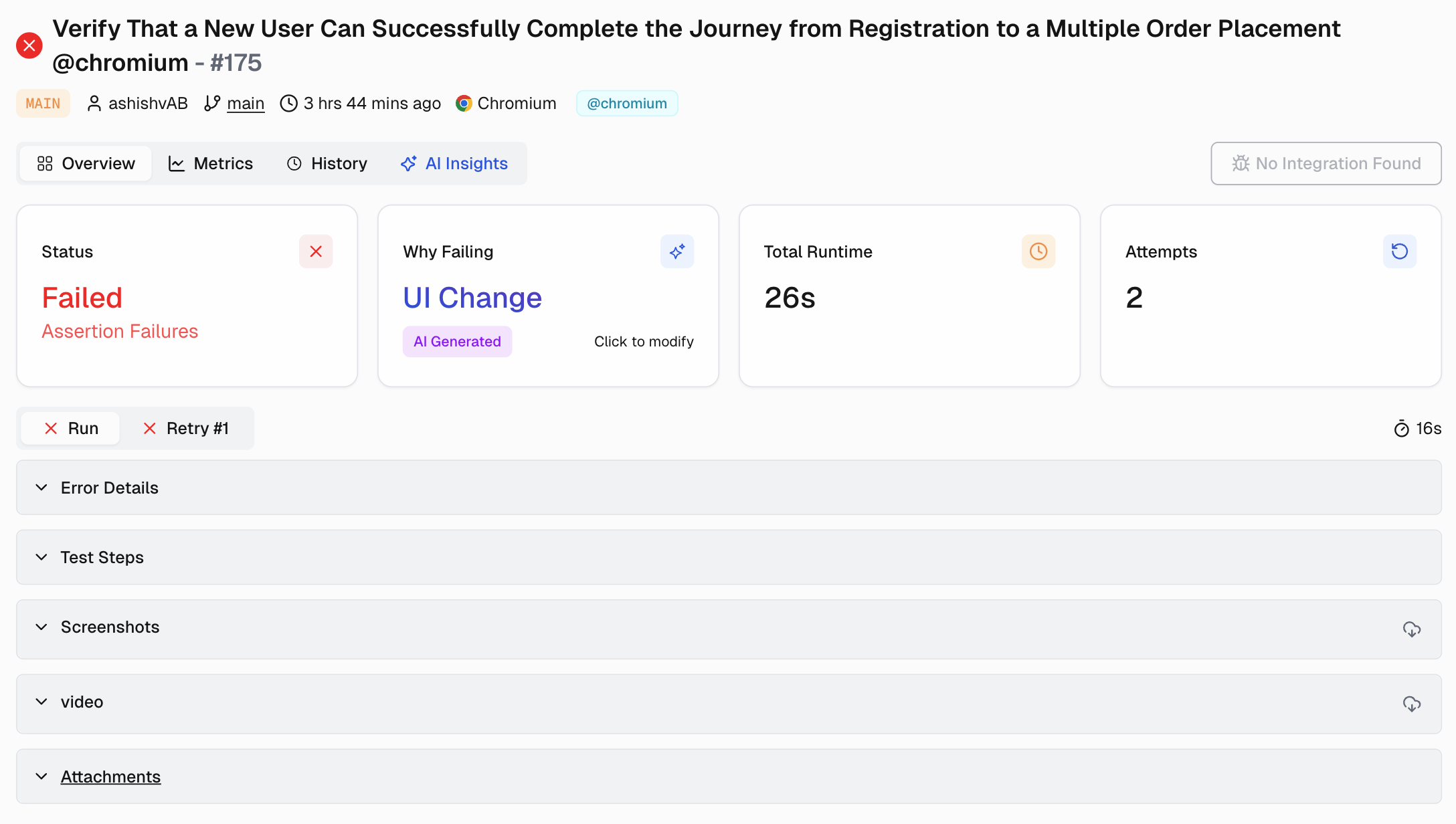
TestDino automatically collects a rich set of information from your Playwright runs:
-
Execution Artifacts: The raw technical data.
-
Visual Evidence: Screenshots and full video recordings for UI failures.
-
Playwright Traces: The super-detailed trace files Playwright creates (trace.zip), allowing step-by-step debugging with DOM snapshots. You can open these directly from TestDino.
-
Code & Environment Context: Where and when did this happen? Git data, Environment details, Configuration info.
2. How TestDino Processes Test Data
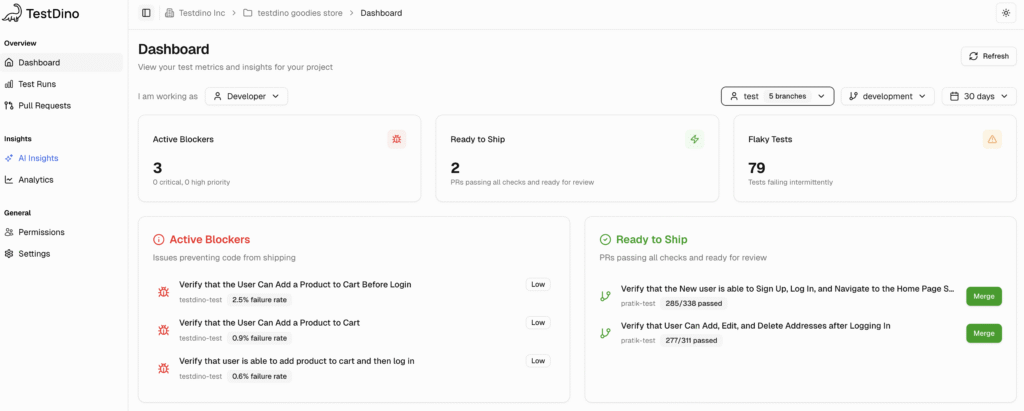
Raw data isn't enough. TestDino turns it into useful insights:
-
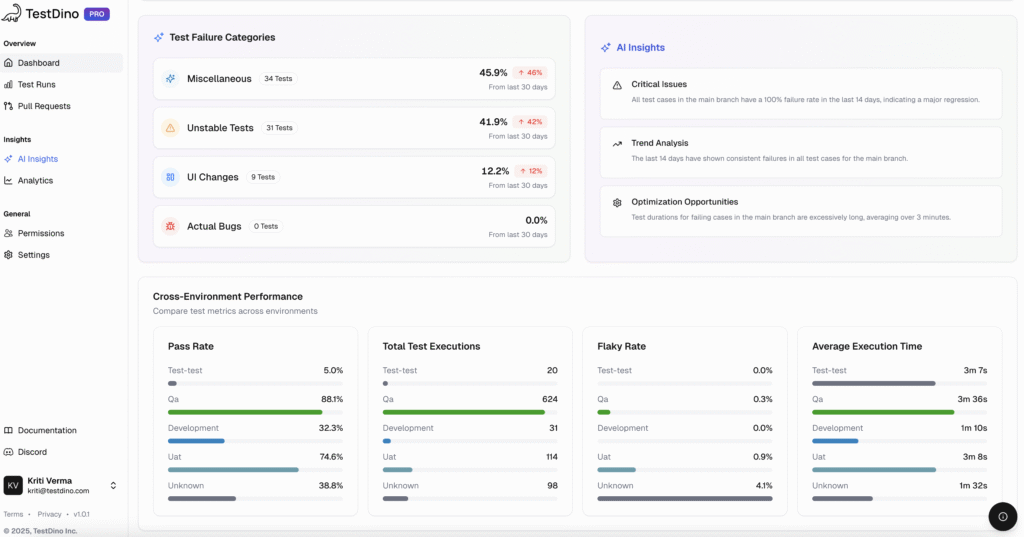
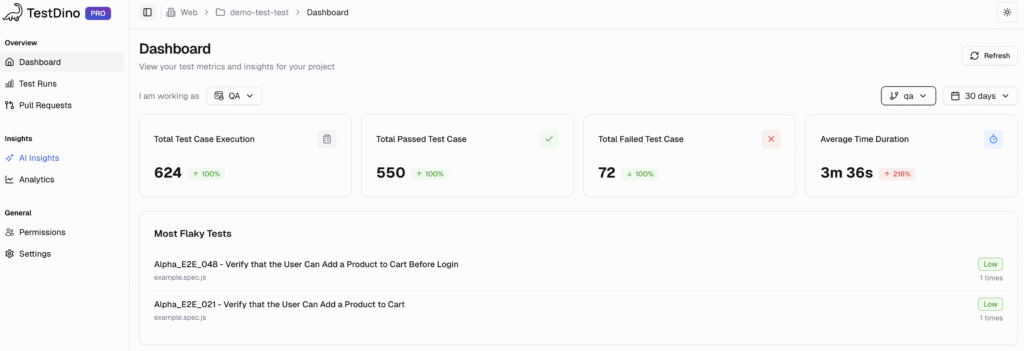
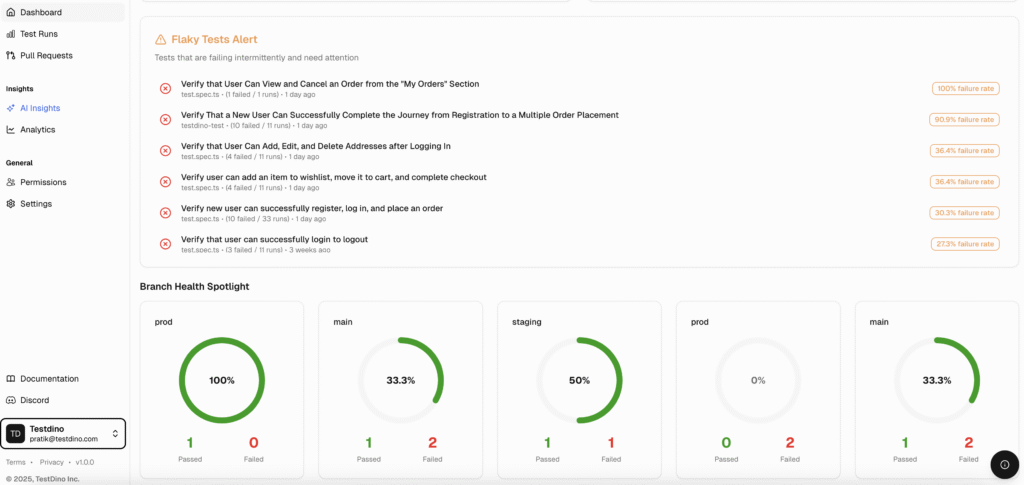
Dashboards: Role-specific views (QA, Dev, Manager) display trends, including pass/fail rates, durations, failure types over time, and quick health checks
-
Cross-Run Pattern Detection: Analyzes runs to find patterns, such as emerging and persistent failures.
-
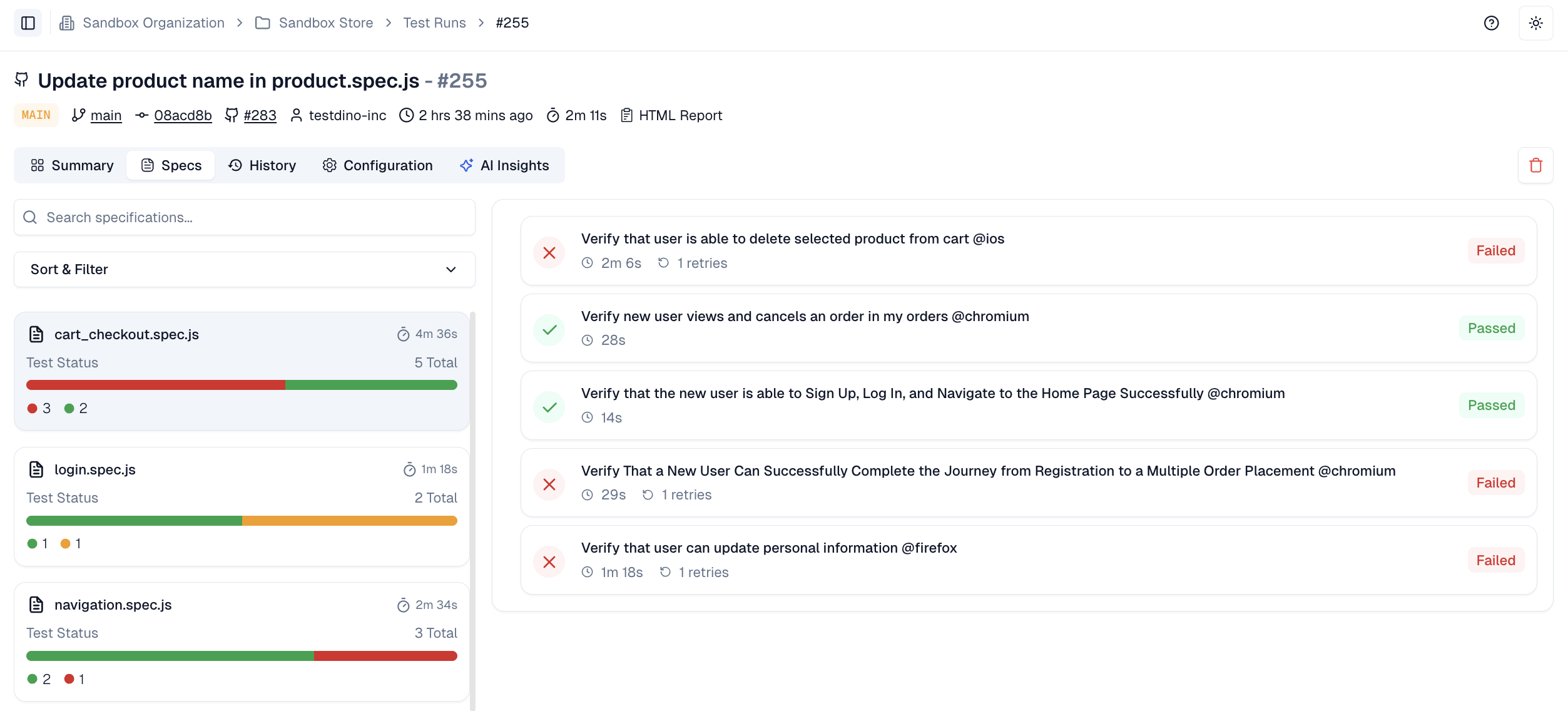
Failure Rate and Flaky Rate Tracking: Key metrics for spec files are calculated and displayed prominently to quantify stability.
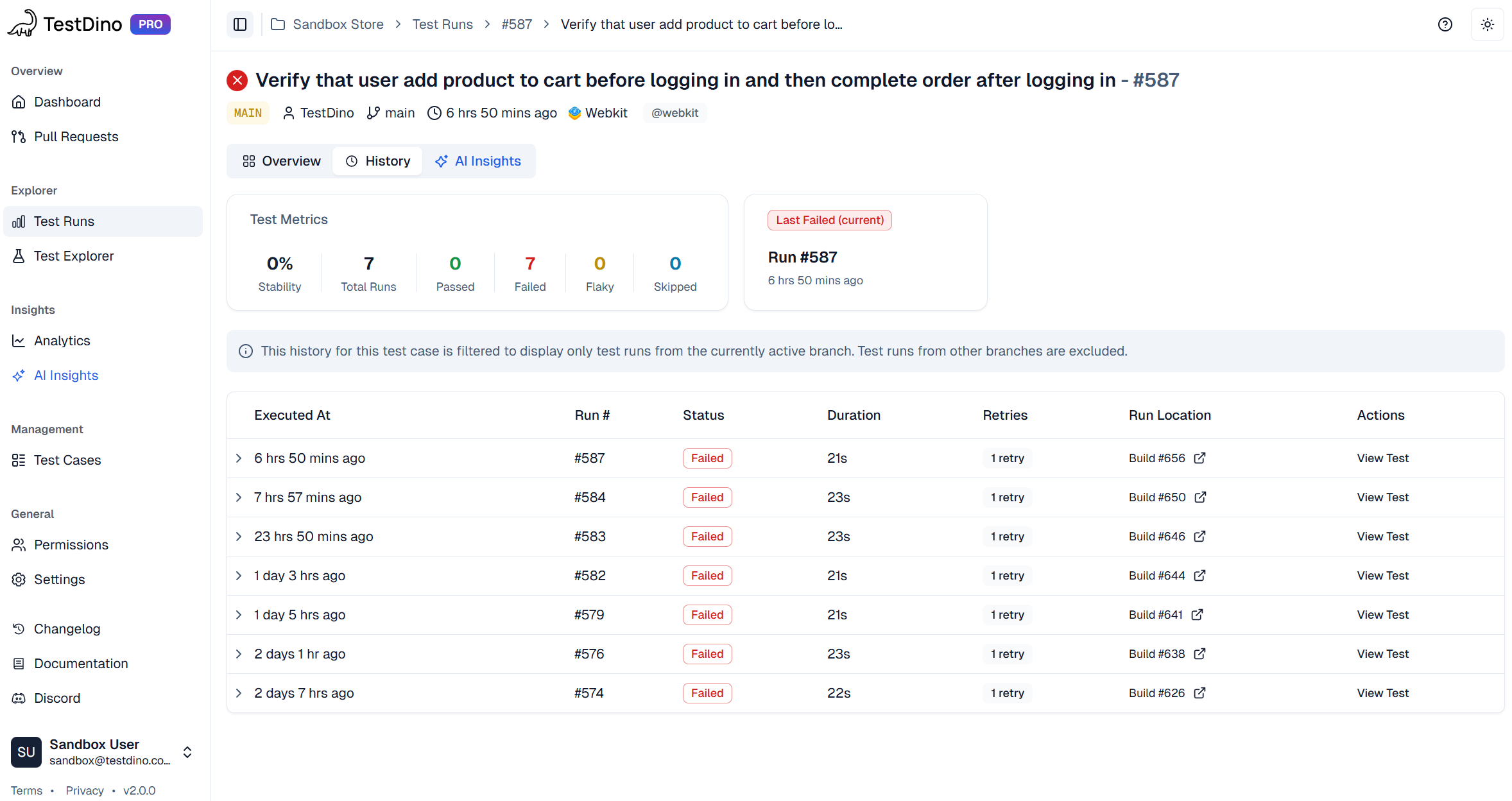
- Historical Context: Every test case has a full history. See when it started failing, how often it occurs, and if it's getting slower.
- Environment-Specific Analysis: Filter results by environment (staging vs. prod) or branch. Crucial for finding environment-related bugs.
3. AI-Driven Failure Categorization
TestDino automatically analyzes each failure and assigns it a category. Additionally, TestDino helps identify potential root causes for each failure by analyzing patterns and validating possible causes through data analysis.
| Category | Symptoms | Likely Root Cause | Recommended Action & Owner |
|---|---|---|---|
| Actual Bug | Consistent assertion failure, same stack trace repeatedly. | Logic error in application code. | Fix code (Developer). |
| UI Change | Element not found, selector timeout after UI change. | UI element locator (ID, class, text) changed. | Update test selectors/assertions (QA/SDET). |
| Unstable Test | Intermittent pass/fail on the same commit. | Timing issues, race conditions, bad data, and environment instability. | Stabilize test (QA/SDET). |
| Miscellaneous | Many unrelated tests fail; CI errors; config issues. | CI/CD pipeline issues, environment config drift, and infrastructure problems. | Fix environment/pipeline (DevOps/SRE). |
TestDino provides a confidence score for each category (e.g., "Actual Bug - 92% confidence") and allows you to provide feedback if a category is incorrect. This feedback enables the AI to learn and become smarter over time.
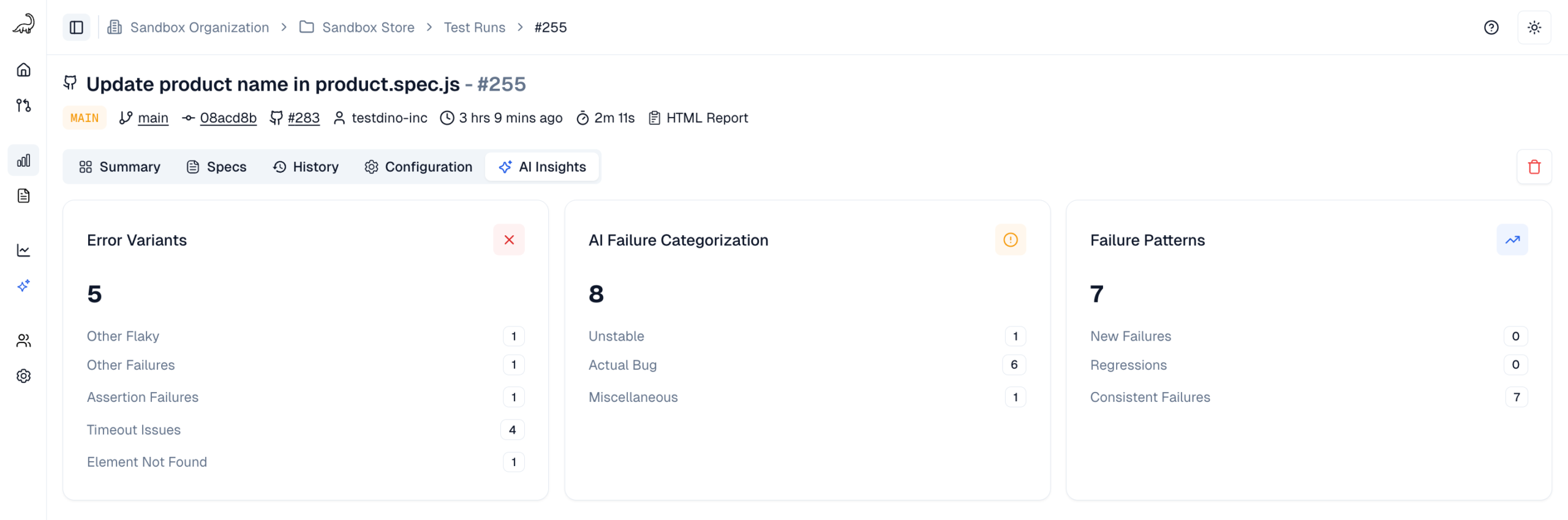
4. AI Insights and Recommendations
TestDino goes beyond just categories:
-
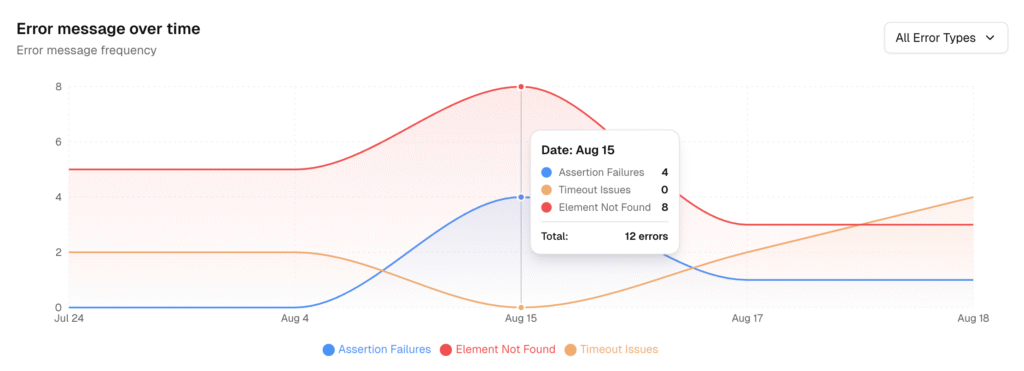
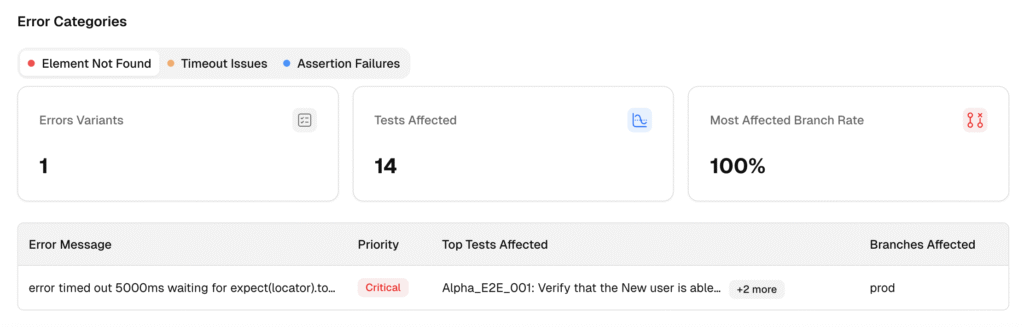
Error Variant Grouping: Groups different failures that share the same underlying error message or stack trace pattern. One root cause might be breaking 10 different tests; this shows you it's really just one problem.
-
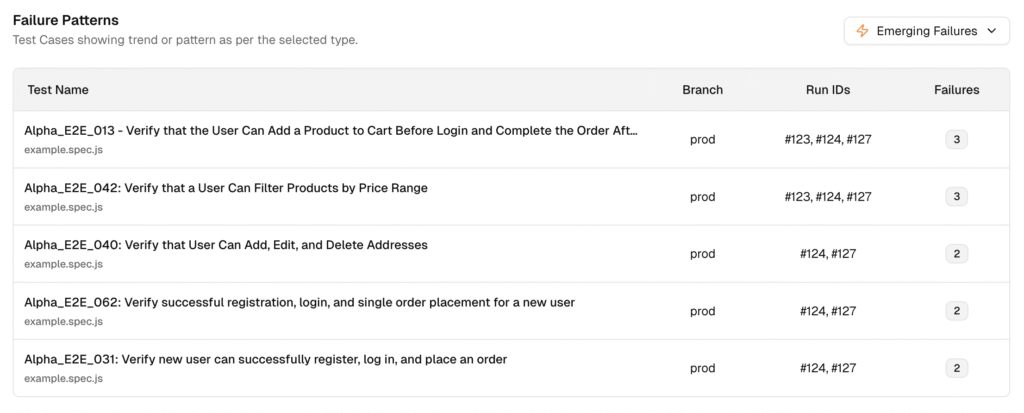
Failure Pattern Analysis: Highlights when failures are happening:
-
Emerging Failures: Started failing recently. Catch regressions fast.
-
Persistent Failures: Failing for a long time. Needs serious attention.

-
Test-to-Code Mapping & Commit Correlation: Directly links a failed run to the specific Git commit and Pull Request. Narrows down the search immediately.
-
Actionable Next Steps: Suggests concrete fixes. For a UI change, suggest a better selector. For a flaky test, add a specific wait condition.
-
Root Cause Summaries with Evidence: Provides a clear summary ("Likely cause: Selector changed in commit abc123") with direct links to the proof: the logs, the trace file, the video, the commit diff. Verify the AI's conclusion instantly.
Practical RCA Workflow for Playwright Tests
Using a tool like TestDino changes how you approach debugging. It becomes less guesswork and more structured. Here's a typical workflow:
Step 1: Automatic Test Run Streaming & Analysis
-
Configure Playwright: Add the @testdino/playwright reporter to your playwright.config.js after installing it with npm install @testdino/playwright..
-
Set your token in CI: Expose TESTDINO_TOKEN as a secret and run npx playwright test as usual. Results stream during the run, so there is no upload step.
-
AI Analysis Starts: TestDino processes results as they arrive. Initial AI categories appear while the run is still going.
Step 2: Reviewing AI Insights Dashboard
-
Scan Categories: Check the TestDino Dashboard or AI Insights page. What's the mix of failure types? Any spikes?
-
Identify Priorities: Focus on high-confidence "Actual Bugs". Note any rising trends in other categories.
-
Filter Your View: Narrow down by environment (e.g., staging), branch (feature/login-v2), or time (Last 24 hours).
Step 3: Deep Dive into Failed Tests
-
Open a Failed Test: Click on a high-priority failure.
-
Review Evidence: Check the error message, steps, screenshots, console logs, and video. Often, the cause is obvious here.
-
Use the Trace Viewer: For tricky issues, open the linked Playwright Trace. Step through the actions, inspect the DOM, and check network calls. This is your most powerful debugging tool.
-
Check Visual Comparisons: If it's a visual test (toHaveScreenshot), use the side-by-side diff viewer.
Step 4: Correlating Failures to Code Changes
Connect the failure to the code change that caused it.
-
Trace to Commit: TestDino displays the Git commit hash associated with the test run.
-
Link to Pull Request: The Pull Requests view shows test status per PR. Catch regressions before merge. Developers see AI insights right on their PR.
-
Use Branch Mapping: If you've mapped branches to environments (e.g., develop -> staging), you get extra context for filtering and analysis.
-
Analyze Commit Diffs: Click from TestDino to the commit or PR in GitHub/GitLab. Review the exact code changes ("diff"). Often, the root cause is obvious once you see the changed lines.
Step 5: Root Cause Corrective Action (RCCA)
Time to fix it.
-
Implement Fixes: Use the AI's suggestions as a starting point. If it flags a changed selector, update it. If it points to a commit, review the code associated with it.
-
Create Tickets: For bigger issues, use the Jira, Linear, or Asana integration. TestDino pre-fills the ticket with failure details, AI analysis, and links to evidence. Saves tons of time.
-
Verify Fixes: Push your code fix. CI runs again. Check TestDino to confirm the test now passes. The history chart should show the fix.
Step 6: Root Cause Preventive Action (RCPA)
This is the most important step for long-term quality. Don't just fix this bug; prevent the next one from happening.
-
Stabilize Tests: If tests are flaky, apply best practices, such as implementing better waits, test isolation, and mocking dependencies.
-
Improve Environment: If it were an environment issue, strengthen your infrastructure-as-code or configuration management.
-
Update Standards: Your team may need to establish more effective coding standards for selectors or handling async operations.
-
Track Progress: Use TestDino Analytics to watch your Flaky Rate and Failure Rate trends. Are your preventive actions working?
Key RCA Metrics to Track
You can't improve what you don't measure. Tracking root-cause analysis metrics helps determine whether your process is improving and proves the value of your efforts.
1. What RCA Metrics Should I Track?
Focus on metrics that show speed, effectiveness, and efficiency.
| Metric | Description | What it indicates | Goal |
|---|---|---|---|
| MTTR | Average time from failure detection to fix deployment. | Overall efficiency of response, debug, and deploy. High MTTR = bottlenecks. | Decrease |
| Repeat Failure Rate | % of failures recurring after a supposed fix. | RCA effectiveness. High rate = fixing symptoms, not root causes. | Decrease |
| Failure Rate Trend | Overall % of failed tests (daily/weekly). | General stability. Spikes often mean regressions. | Decrease |
| Flaky Rate | % of test runs with inconsistent pass/fail results. | Test suite reliability/noise level. High rate = low trust, wasted CI. | Decrease |
| Defect Containment Rate | % of bugs caught before production release. | QA process effectiveness at preventing customer impact. | Increase |
| Test-to-Fix Cycle Time | Average time from CI failure notification to developer merging the fix. | Developers' workflow efficiency for fixing test failures. | Decrease |
| Error Variant Count | Number of unique error types detected. | Complexity of failure modes. An increase in new variants signals issues. | Stabilize |
Use TestDino Analytics to monitor these trends. Seeing MTTR, Flaky Rate, and repeat failures decrease proves your effective root cause analysis process is paying off.
2. Using TestDino Analytics for RCA Metrics
TestDino's Analytics dashboards help track these metrics visually:
-
Summary Dashboards: Show overall Failure Rate Trend and Flaky Rate. Get the big picture fast. See test reporting metrics to track.
-
Test Case Metrics: Drill down into individual tests. Track their pass/fail history to spot Repeat Failures. Identify the slowest tests for optimization.
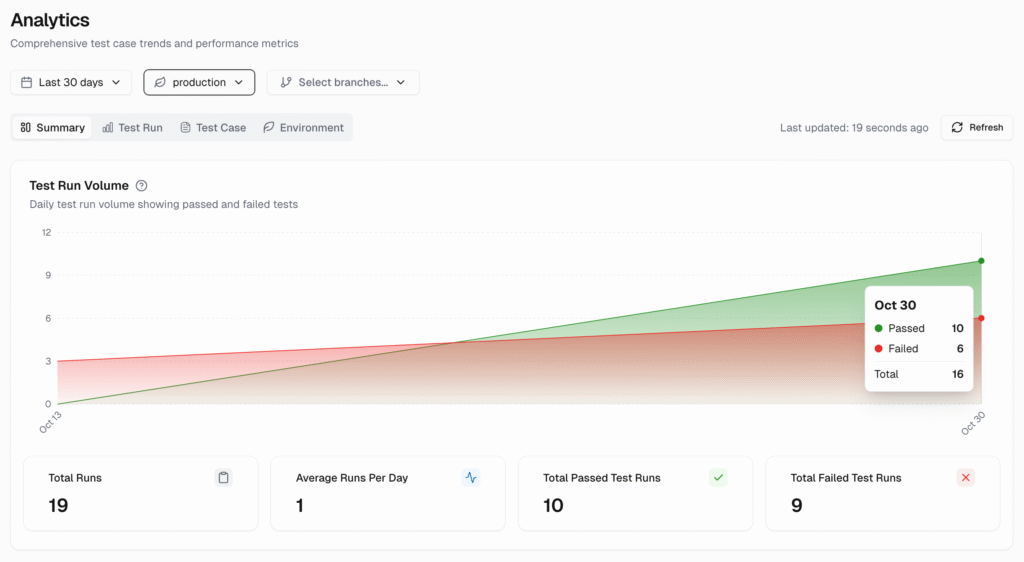
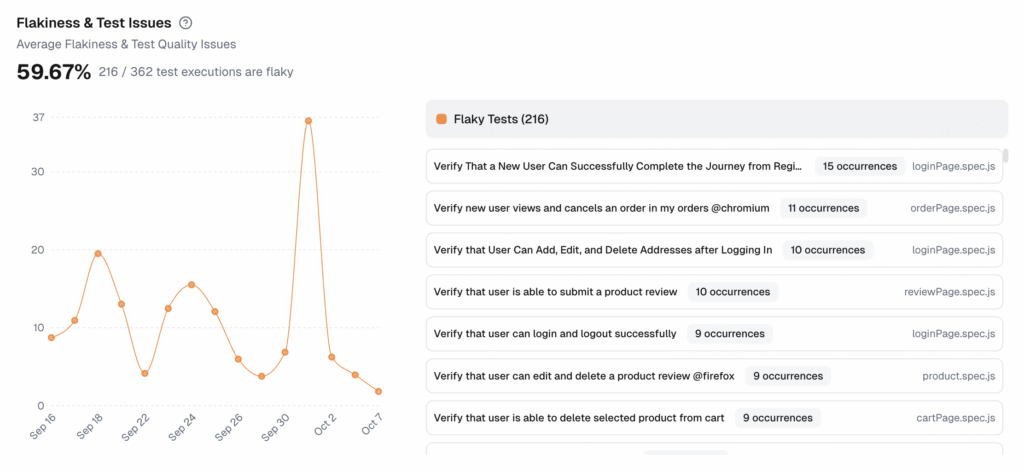
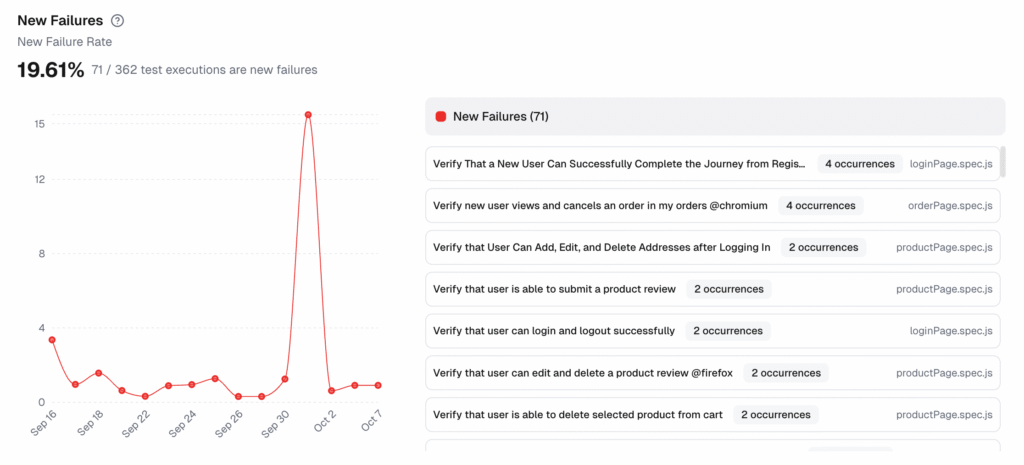
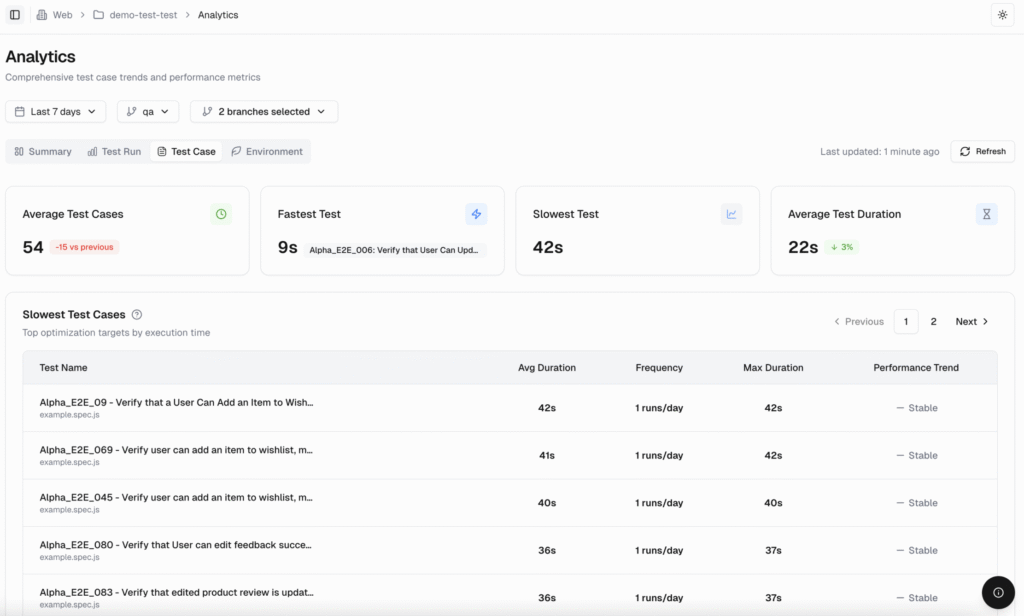
Use the trend charts to track progress. Show stakeholders clear graphs: MTTR and Flaky Rate decreasing. Prove your process improvement efforts are working.
The Business Case for AI-Powered RCA
Fixing bugs isn't just a technical task; it's a major business cost. Slow or wrong root cause analysis hits the bottom line hard.
1. The Cost of Ineffective Root Cause Analysis
When finding the root cause takes too long, the costs add up quickly.
-
Slow Delivery (High MTTR): Mean Time to Resolution (MTTR) refers to the time it takes to resolve a failure, from detection to deployment. Long RCA means high MTTR. This blocks releases, slows down how often you can deploy, and lets competitors beat you to market.
-
Skyrocketing Fix Costs: A bug found in production can cost 100 times as much to fix as one caught early in the design phase. Bad RCA lets underlying issues persist, increasing the likelihood of production bugs.
-
Unhappy Customers & Damaged Reputation: Production bugs frustrate users. 88% are less likely to return after a bad app experience. Major outages can cost millions and damage your brand for years to come.
| Aspect | Traditional RCA | AI-Powered RCA |
|---|---|---|
| Data Analysis | Manual review of separate logs, traces, etc. | Automated correlation of many data sources. |
| Speed (MTTR) | Hours to days. | Minutes. |
| Scalability | Limited by team size. | Easily handles huge data volumes. |
| Accuracy & Bias | Prone to human error and bias. | Data-driven, consistent. |
| Focus | Reactive (after failure). | Proactive & Predictive (preventing failures). |
| Cost | High ongoing operational cost (people time). | Higher initial tool cost, lower long-term cost. |
2. How AI Accelerates RCA in CI/CD Pipelines
AI changes root cause analysis from a slow, manual process into a fast, automated one.
1. Real-time failure categorization and pattern detection
As soon as tests finish, AI algorithms analyze failures. They instantly classify them: "Product Bug," "Environment Issue," "UI Change," "Flaky Test." They group similar errors using pattern detection. This initial triage happens in seconds, separating critical signals from noise.
2. Automated correlation of logs, traces, and commits
This is AI's superpower. It automatically connects the dots between logs, metrics, traces, and code changes that happened around the same time. AI leverages advanced analysis methods and RCA tools to automate the process, making root cause analysis faster and more reliable.
Modern tools utilize context IDs (such as trace IDs) to link all elements related to a single test execution. By integrating with Git, AI can often pinpoint the commit that caused the failure directly. This eliminates the hours spent manually correlating data.
3. Predictive insights for preventing future failures
AI doesn't just react; it learns. By analyzing historical failure data, code changes, and production incidents, machine learning models can predict future problems.
They might flag code areas prone to bugs or tests showing early signs of flakiness. This lets QA shift left, focusing tests proactively on high-risk areas.
4. Reducing false positives and test noise
Flaky tests kill productivity. AI excels at spotting them. By analyzing pass/fail history, AI learns which tests are unreliable. It can flag them, suppress noisy alerts, or give them a low confidence score.
This ensures that developers are only paged for high-confidence failures that are likely real regressions.
3. Measurable Benefits of AI-Assisted RCA
Using AI for root cause analysis delivers real results:
-
Drastically Lower MTTR: Teams report reductions in debugging time. Investigations drop from hours to minutes. Most issues get diagnosed in under 5 minutes.
-
Fewer Repeat Bugs: Accurate root cause analysis means fixes stay in place. You stop wasting time on bugs that keep coming back. Repeat failure rates can drop below 5%.
-
Faster Releases: Less time spent debugging means CI pipelines run smoothly and efficiently. Features get to market quicker.
-
Improved Test Suite Reliability: By tackling flakiness, AI helps build trust in your automation suite. Developers can code more confidently when they trust the tests.
When Manual RCA is Still Necessary
AI is amazing, but it's not magic. Sometimes, you still need human brainpower.
1. Limitations of AI-Assisted RCA
-
It's a totally new failure type: AI learns from past data. Brand new problems might confuse it.
-
The bug is in complex business logic: AI understands code errors, but not necessarily domain-specific business rules.
-
The issue lies within a third-party system: AI can not access the internal services (such as a payment gateway). It knows the call failed, but not why inside the black box.
-
The test evidence is poor: If logs are missing or error messages are vague ("Something went wrong"), AI has little to work with. Garbage in, garbage out.
2. Hybrid Approach: AI + Human Expertise
The best approach combines AI's speed with human smarts.
-
AI First: Let the AI do the heavy lifting – data gathering, correlation, initial hypothesis. Use its insights as your starting point.
-
Human Validation: Engineers review the AI's findings to ensure accuracy. Does it make sense? Apply domain knowledge. Investigate edge cases or where the AI is uncertain.
-
Feedback Loop: Tell the tool when it's wrong! Use TestDino's feedback feature to correct misclassifications. This trains the AI to get better.
3. Building an Effective RCA Culture
Tools are only part of the solution. You need the right team culture.
-
Train Your Team: Teach everyone RCA principles and how to use the tools effectively.
-
Practice Blameless Retrospectives: The goal is to fix systems, not blame people. Create a safe space where engineers can report issues openly. Honesty is key to good data.
-
Focus on Prevention (RCPA): Don't stop at just fixing the bug. Prioritize the preventive actions that stop whole classes of bugs from recurring.
Conclusion: From Reactive Debugging to Proactive Quality
Debugging failing tests manually is slow, costly, and doesn't scale in modern CI/CD. We keep fixing the symptoms, but the real problems linger.
Adopting AI-RCA isn't just installing a tool; it's starting a journey towards continuous improvement. Utilize the data to refine your processes, stabilize your tests, and cultivate a culture cantered on proactive quality.
Stop drowning in debug logs. Start using AI to identify and resolve real problems more quickly. That's how modern QA teams ship faster and with confidence.
Ready to cut your debugging time? Start a free trial of TestDino and see AI root cause analysis in action today.
FAQs

Dhruv Rai
Product & Growth Engineer