Test Failure Analysis: 10 Reasons Why Software Tests Fail
Learn why software tests fail and how test failure analysis helps you fix flaky tests, stabilize CI/CD pipelines, reduce defect leakage, and ship reliable releases.
Every engineering team has seen a red build alert minutes before a release. Not every team knows what to do next.
This is where Test failure analysis becomes more than debugging; it becomes a core practice in modern software testing and quality assurance.
When software tests fail, the root cause can be one of many things. It may be a flaky test, bad test data, or an environment mismatch. It may also be a real bug hidden deep in the code.
Without a clear test failure analysis process, teams pay for it. Releases slip, more bugs reach users, and the test pipeline stops being trusted.
This guide shows you how to do Test failure analysis step by step. You will learn the most common reasons software tests fail. You will also learn proven ways to make tests more reliable, cut costs, and ship better software.
What is a test failure?
A test failure occurs when the actual outcome of a test case does not match the expected result defined during test design.
In software testing and test automation, this means one thing. The system did not act the way you expected under a given set of conditions.
Tests can fail for many reasons. It could be a real bug, a wrong assertion, bad test data, or an environment mismatch. The first step in Test failure analysis is simple. Find out if the failure comes from a real bug or from the test itself.
In modern CI/CD pipelines , a failed test is an early warning. It tells you the release may not be safe to ship.
Without proper test failure analysis, teams get stuck with flaky tests , late releases, and automated tests they cannot trust.
What is test failure analysis?
Test failure analysis is the step-by-step process of looking into failed tests. You find the root cause of each failure and decide how to fix it.
It goes beyond noticing that a test failed. It asks why. Was it a real bug, a flaky test, bad test data, a timing problem, or an environment mismatch?
This matters most in CI/CD pipelines like GitHub Actions or Jenkins. There, test failure analysis is what keeps your test automation reliable.
Instead of rerunning failed tests and hoping, teams look at the evidence. They sort each failure by type and stop the same problem from coming back.
A good test failure analysis process usually means you review:
-
Execution logs
-
Stack traces
-
Screenshots and trace files
-
Network activity logs
-
Test observability dashboards
-
Environment configuration details
Good Test failure analysis turns failed test data into clear next steps. Tests get more reliable, fewer bugs slip through, and software quality goes up.
Why is test failure analysis important?
Ignoring a failed test may seem minor at first. Over time, it adds up. More bugs reach users, releases get shaky, and technical debt grows across the testing lifecycle.
Strong Test failure analysis cuts mean time to resolution (MTTR). It also makes automated test reliability better and keeps quality high.
1. Impact on Software Quality
When teams do Test failure analysis in a set way, they catch bugs before they reach production. This includes both feature bugs and integration bugs. The result is a more stable system and a better user experience.
Key impacts on software quality include:
-
Early identification of application defects
-
Reduced defect leakage during regression testing Higher confidence in automated test coverage
-
Elimination of flaky tests and unstable test scripts
-
Stronger alignment between expected and actual behavior
Consistent failure investigation ensures that automated testing reflects real-world application behavior and supports long-term quality improvement.
2. Cost of Late Defect Detection
A bug found in production costs far more to fix than one found during testing. Test failure analysis lowers that cost. You debug early, find the root cause, and stop the bug from coming back.
Major cost-related advantages include:
-
Reduced rework and refactoring effort
-
Fewer urgent hotfix deployments
-
Lower downtime-related financial impact
-
Decreased customer support escalation
-
More efficient allocation of development resources
A stronger test failure analysis process means less money at risk and a team that keeps moving fast.
3. Influence on Release Cycles
Flaky tests, environment mismatches, and shaky pipelines slow down releases. They also make each deploy feel like a gamble. With disciplined Test failure analysis, teams remove that instability and keep CI/CD workflows smooth.
Release cycle improvements include:
-
Faster root cause identification
-
Reduced pipeline interruptions
-
Improved regression suite consistency
-
Greater deployment confidence
-
Shorter feedback loops for developers
The best engineering teams treat every failed test as a quality signal. For them, test failure analysis is a planned part of how they ship software, not an afterthought.
What are the benefits of test failure analysis?
Test failure analysis pays for itself. Engineers waste less time, and software quality goes up in ways you can measure.
When teams look into every failed test the same way, automated tests become more reliable and CI/CD pipelines become more stable.
1. Faster Debugging and Resolution
Structured test failure analysis takes the guesswork out of debugging. You use execution logs, stack traces, and other artifacts to find the root cause fast. That shortens debugging time and improves mean time to resolution (MTTR).
-
Reduced time spent rerunning failed test cases
-
Clear separation of flaky tests from genuine software defects
-
Faster stabilization of regression suites
-
Improved CI/CD pipeline reliability
-
Better visibility into synchronization and timing issues
2. Improved Test Reliability
Regular test failure analysis helps you remove flaky tests and unstable scripts. These are the tests that make people stop trusting automation. Reliable tests give you more confidence in regression results and more accurate testing overall.
-
Reduced intermittent software test failures
-
Higher confidence in CI results
-
Improved test coverage validation
-
Stronger alignment between test cases and business requirements
-
More dependable automated testing outcomes
3. Better Resource Allocation
When you sort failures by type, you can fix the high-impact bugs first. You stop wasting time on low-risk or repeat issues. Sprint planning, defect management, and team output all improve.
-
Clear prioritization of critical path failures
-
Reduced redundant debugging efforts
-
Better collaboration between QA and development teams
-
More efficient use of engineering resources
-
Improved focus on high-severity software defects
4. Enhanced Product Stability
Test failure analysis helps you spot failure patterns that keep coming back. Once you fix the pattern, the same issue stops resurfacing. Over time, fewer bugs reach users and release cycles become more predictable.
-
Fewer production incidents
-
Reduced regression instability
-
Stronger CI/CD workflow consistency
-
Increased release confidence
-
Improved long-term software reliability
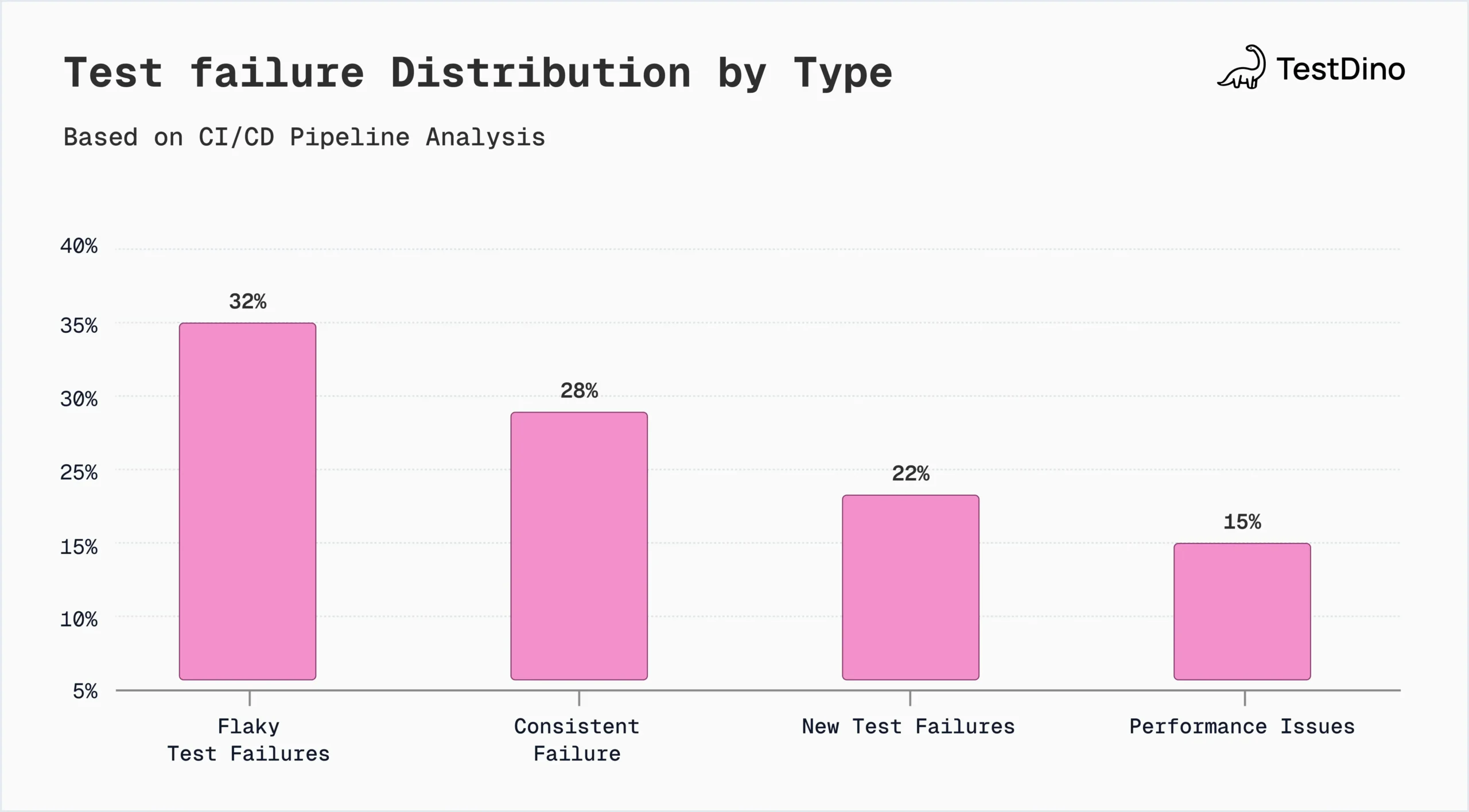
Types of test failures
Knowing the different types of failure helps you diagnose faster and makes your Test failure analysis workflow stronger.
Each type of software test failure needs its own debugging approach. That is how you keep automated tests reliable and CI/CD pipelines stable.
| Failure Type | Typical Symptoms | Primary Owner | Debug Strategy |
|---|---|---|---|
| Flaky | • Passes/fails randomly • Timing issues • Race conditions |
QA + Dev | • Isolate & retry • Check waits/timeouts • Review failure logs |
| Consistent | • Fails every run • Reproducible error • Same stack trace |
Dev Team | • Check recent changes • Verify assertions • Debug locally |
| New | • Fails after code/env change • Feature-related • Baseline mismatch |
Dev (Author) | • Compare with baseline • Review recent commits • Verify test setup |
| Performance | • Slow execution • Timeouts • Resource-heavy |
Dev + DevOps | • Profile performance • Check resources • Optimize queries/waits |
1. Flaky Test Failures
Flaky tests pass and fail intermittently without any changes to the underlying codebase, making them one of the most frustrating issues in test automation.
Common causes are timing issues, race conditions, bad test data, environment mismatches, and slow networks.
To reduce flaky test failures, teams should:
-
Implement proper synchronization and wait strategies
-
Avoid hard-coded delays in test scripts
-
Isolate test data and eliminate shared state
-
Stabilize external dependencies through mocking
-
Monitor parallel execution conflicts
Removing flaky tests is a must. It makes automated tests more reliable and gives you more trust in regression results.
2. Consistent Test Failures
Consistent test failures happen every time under the same conditions. That makes them easier to reproduce.
These failures often point to a real bug, a wrong assertion, or a business rule check that is out of date.
Common causes include:
-
Real application bugs in new or existing features
-
Incorrect expected values in test assertions
-
Broken API integrations
-
Invalid or outdated test data
-
Configuration mismatches between environments
In Test failure analysis, consistent failures usually come first. They are repeatable, and they have a direct impact on how the product works.
3. New Test Failures
New test failures show up after a refactor, a new feature, a dependency update, or an infrastructure change. Regression testing is how you catch them before deployment.
Typical triggers include:
-
Recent code changes affecting shared components
-
Updates to third-party libraries or APIs
-
Modifications in the database schema
-
Changes in environment variables or configurations
-
UI changes that break existing selectors
Root cause analysis helps you sort each new failure fast. Either the behavior changed on purpose, or you have a regression.
4. Performance-Related Failures
Performance failures happen when the system gets slower than your limits allow. During test runs, they show up as timeouts, slow API responses, memory leaks, or fights over shared resources.
Common performance-related causes include:
-
Increased CPU or memory usage
-
Database query inefficiencies
-
Network bottlenecks
-
Improper caching configurations
-
Scalability limitations under load
Watch system metrics like CPU usage, memory use, and API latency. They help you spot performance problems early and make your test failure analysis more proactive.
Once you know these failure types, you debug faster and see fewer repeat problems. You also keep your testing standards high.
10 common reasons for test failures
tanding the root causes beh
Below are the most common reasons explained in a clear and practical way to help engineering and QA teams diagnose failures faster.
1. Incorrect Test Assertions
When test assertions do not reflect the current business logic or expected behavior, they produce false failures that confuse teams. Even small mismatches between expected and actual results can lead to misleading regression outcomes.
-
Assertions are written based on outdated feature requirements that have since changed.
-
Expected values are hardcoded and not updated after UI or API modifications.
-
Validation logic does not properly handle edge cases or optional fields.
-
Negative test cases are incorrectly structured, causing false negatives.
-
Assertions check UI text or attributes that are dynamically generated and inconsistent.
2. Software Defects or Bugs
Real bugs in the app are one of the most direct causes of failed tests. These failures usually mean a feature is broken and needs a fix right away.
-
Incorrect business logic implementation leading to wrong outputs.
-
API endpoints are returning incorrect status codes or malformed responses.
-
Database constraints or schema mismatches are causing transaction errors.
-
Broken integrations between microservices.
-
Recently introduced features conflict with existing functionality.
3. Flaky or Unstable Test Scripts
Flaky tests fail at random, and that makes them very harmful to trust in automation. They lower confidence in CI/CD pipelines and waste debugging time.
-
Missing or improper wait strategies are causing race conditions.
-
Use of unstable or overly complex element selectors.
-
Dependence on real-time data or external services without proper isolation.
-
Parallel test execution is interfering with shared resources.
-
Inconsistent handling of asynchronous UI updates or API responses.
4. Unstable or Outdated Test Data
Test data is a key part of automated testing. When the data is unstable, tests fail in random ways. Without control over your data, regression testing cannot be trusted.
-
Expired authentication credentials or session tokens.
-
Missing mandatory input values in datasets.
-
Data collisions caused by shared databases across parallel tests.
-
Lack of cleanup processes after test execution.
-
Hardcoded test data that no longer aligns with system updates.
5. Environment Configuration Mismatches
When dev, staging, and production do not match, tests behave in odd ways. Even a small config difference can cause the same software test failures again and again.
-
Different browser versions produce varied rendering behavior.
-
Mismatched dependency versions between local and CI environments.
-
Missing environment variables required for application startup.
-
Inconsistent database connection strings.
-
Time zone or localization differences affecting test outputs.
6. Changes in Dependencies or Third-Party Services
Modern apps lean on outside APIs and libraries. When those get updated, things can break. Without version pinning and mocking, these changes can take down a stable test suite.
-
API contract modifications that alter response formats.
-
Deprecated methods in updated third-party libraries.
-
Temporary outages in payment gateways or authentication services.
-
Version conflicts between framework updates and plugins.
-
Security patches changing request validation rules.
7. Timing and Synchronization Issues
Modern web and mobile apps do a lot of work in the background. If a test checks a result too early, it fails. Good wait and sync logic is a must for accurate automated testing.
-
UI elements load after the test attempts interaction.
-
Delayed background API calls are not fully completed.
-
Insufficient timeout configurations.
-
Animation or transition delays are interfering with UI validation.
-
Improper handling of dynamic content rendering.
8. Inadequate Test Coverage
Thin regression coverage lets hidden bugs show up late in the release cycle. Full coverage checks both the normal paths and the edge cases.
-
Critical user workflows are not included in automation suites.
-
Edge cases and boundary values were not tested thoroughly.
-
Lack of integration tests across dependent modules.
-
Missing negative testing scenarios.
-
Failure to update test coverage after feature additions.
9. Parallel Execution Conflicts
Running tests in parallel is faster. But it can cause tests to clash over data and shared resources. Without isolation, parallel runs give unstable results.
-
Shared user accounts are causing authentication conflicts.
-
Simultaneous database writes create record collisions.
-
Session reuse across tests is causing unexpected behavior.
-
Competing background processes are consuming shared system resources.
-
Improper cleanup between test runs affects subsequent executions.
10. Poor Test Maintenance and Refactoring
Test automation is not a one-time job. As the app changes, the tests need to change too. Test scripts that get ignored slowly turn unreliable and fail more often.
-
Outdated UI selectors after frontend redesigns.
-
Deprecated framework methods not replaced in scripts.
-
Hardcoded configurations are not updated after infrastructure changes.
-
Duplicate or redundant test cases increase maintenance complexity.
-
Lack of regular review and optimization of regression suites.
Knowing these causes makes your Test failure analysis stronger and your regression suite more stable. It keeps automated testing as a help to the team, not a drag on it.
Who needs to analyze test failures?
Test failure analysis is not the job of one role. It is shared across agile and DevOps teams.
Each person brings their own technical or business view. Together, they make sure every failed test gets looked into and fixed.
1. Developers
Developers are central to test failure analysis. They know the app's architecture, logic, and dependencies. That knowledge helps them tell a real bug from an integration issue or a bad implementation. in Test failure an
-
Debug failing assertions and review stack traces to identify code-level defects.
-
Analyze recent commits to determine whether new changes introduced regressions.
-
Fix logic errors, API contract mismatches, or data validation issues.
-
Refactor unstable components to prevent recurring software test failures.
-
Improve code quality through better exception handling and validation logic.
When developers take part in Test failure analysis, fewer bugs reach users and the system stays stable over time.
2. QA Engineers
QA engineers own the health of the test automation framework. They make sure each failed test is sorted correctly. They also catch flaky tests before those tests hurt the CI/CD pipeline.
-
Validate whether failures are caused by incorrect test logic or actual defects.
-
Maintain regression suites and update test cases after feature changes.
-
Monitor flaky test ratios and remove unstable automation scripts.
-
Improve synchronization strategies to reduce timing-related failures.
-
Ensure proper test data management and environment consistency.
By looking into failures in a set way, QA engineers make automated tests more reliable and keep quality standards high.
3. Product Managers
Product managers look at test failures through a business lens. They make sure bug fixes line up with what customers expect and what the release needs.
-
Assess the severity and business risk of reported failures.
-
Prioritize defect resolution based on feature importance and user impact.
-
Balance quality improvements with release timelines and delivery goals.
-
Communicate failure risks to stakeholders and leadership teams.
-
Make informed decisions about hotfixes versus scheduled releases.
With them involved, Test failure analysis feeds into product planning instead of staying a purely technical task.
4. Business Analysts
Business analysts check failed tests against the written requirements and acceptance criteria. They help confirm whether the failure is a real gap from what the business expects.
-
Verify that functional requirements are correctly implemented.
-
Review acceptance criteria for accuracy and completeness.
-
Clarify requirement ambiguities that may cause incorrect test assertions.
-
Validate edge-case scenarios affecting user workflows.
-
Ensure alignment between development output and business objectives.
Their view of the requirements helps the team fix software test failures the right way. The final product then meets both technical and business needs.
How test failure analysis supports defect management
Strong Test failure analysis makes defect management better. Every failed test gets looked into, sorted, and written up the right way.
It makes bugs easier to trace, easier to rank, and easier to prevent across the whole development lifecycle.
1. Defect Detection and Reporting
-
Automated test failures trigger issue creation in tools like Jira or Azure DevOps.
-
Execution logs, screenshots, and trace artifacts are attached for better context.
-
Each defect is linked to specific builds, commits, and regression test cases.
-
Failure history is tracked across releases for better trend analysis.
-
Clear documentation reduces miscommunication between QA and development teams.
2. Root Cause Prevention
-
Recurring flaky tests are identified and permanently stabilized.
-
Repeated configuration mismatches are standardized across environments.
-
Frequently failing modules are prioritized for refactoring.
-
Root causes are documented in internal knowledge bases.
-
Preventive guidelines are created to reduce future regression risks.
3. Prioritization and Verification
-
Critical path failures are resolved before low-impact issues.
-
High-severity defects are escalated based on business risk.
-
Regression failures are validated against acceptance criteria.
-
Fixes are verified through structured retesting.
-
Release readiness is confirmed only after all major failures are cleared.
Tie your digging into reporting, prevention, and ranking. Then Test failure analysis becomes a core part of how you manage bugs. It also drives software quality over the long run.
Best practices for test failure analysis
Following Test failure analysis best practices makes automated tests more reliable and improves software quality. The table below sums up the key practices in a few words each.
| Best Practice | Why It Is Important |
|---|---|
| Categorize failures immediately | Helps quickly separate real defects from flaky tests or environment issues. |
| Maintain deterministic test design | Reduces intermittent failures caused by poor synchronization. |
| Standardize test environments | Prevents failures due to configuration mismatches. |
| Use version-controlled test data | Ensures consistent and repeatable test execution. |
| Monitor failure trends | Identifies recurring issues early. |
| Isolate tests in parallel execution | Prevents shared resource conflicts. |
| Store detailed failure artifacts | Speeds up debugging and root cause analysis. |
| Refactor test suites regularly | Keeps automation stable as the application evolves. |
| Integrate analysis into CI/CD | Ensures failures are resolved before deployment. |
| Document root causes | Prevents repeated defects and improves team knowledge. |
Conclusion
Test failures are not roadblocks. They are useful signals. They point to gaps in code quality, test design, environment setup, or test data. With structured Test failure analysis, teams turn failed tests into clear next steps. That makes automated testing more reliable and software quality better.
Find the root cause every time and remove flaky tests. Fewer bugs will reach users, and your CI/CD pipeline will settle down. Over time, disciplined test failure analysis means faster releases, lower costs, and stronger software.
FAQs

Dhruv Rai
Product & Growth Engineer