Test Management Tools Adoption and Pricing Index 2026
Most vendors hide pricing behind contact sales. This 2026 index compares 15+ test management tools based on real per-user pricing, free tiers, deployment models, and adoption signals from public review data. Use the budget bands and shortlist method to pick Jira add-ons or standalone tools that fit your team.
You need a test management tool. So you search for one.
You find 50 listicles. Every vendor wrote one. And every vendor ranked themselves #1.
The pricing? "Contact sales."
This is the problem. The test management tools market hit $1.13 billion in 2024. It's projected to reach $3.92 billion by 2032 at a 16.78% CAGR.
That's a lot of money flowing into tools where you don't even know the price upfront!
So we built the index nobody else publishes. We collected per-seat pricing across 15+ test management tools, mapped them against G2 review data, and tracked which tools are gaining or losing adoption.
Whether you're comparing tools for your team, evaluating automation testing tools alongside them, or building a budget case for your test analytics stack, this is the data.
What is a test management tool?
It's a software that helps QA teams create, organize, execute, and track test cases across manual and automated testing workflows. It typically includes a test case repository, test run planning, execution tracking, and reporting.
What the test management tools market looks like in 2026
The market is big. And getting bigger. But the numbers depend on who you ask.
| Source | Market size (2024-2025) | Projected size | CAGR | Year |
|---|---|---|---|---|
| Market Research Future | $1.13B (2024) | $3.92B | 16.78% | 2032 |
| SkyQuest Technology | $1.31B (2024) | $4.44B | 16.49% | 2032 |
| Mordor Intelligence | $1.27B (2025) | $3.26B | 20.80% | 2030 |
| Market Growth Reports | $2.77B (2026) | $4.86B | 7.0% | 2035 |
The spread is wide because each firm defines the market differently. Some include test automation platforms. Others count only pure test case management tools. The takeaway is simple: every analyst agrees this market is growing at double-digit rates.
Three forces are driving this growth:
- Agile and DevOps adoption. 85% of development teams now use agile methodologies. Shorter sprint cycles mean tighter test management integration is no longer optional.
- SaaS dominance. 65% of test management purchases are cloud-based. On-premise installations are fading fast, especially for teams with fewer than 100 users.
- AI integration. The World Quality Report 2025-26 found that the use of synthetic data in testing surged from 14% to 25% in a single year. Meanwhile, 58% of organizations still cite challenges adopting AI-powered tools.
Note: The broader software testing market ($55-60B in 2025) includes services, consulting, and infrastructure. The test management tools segment ($1-3B depending on definition) is a subset. Don't confuse the two when building your budget case.
The pricing index: What test management tools actually cost
This is the table you came here for.
We collected pricing from vendor websites, Capterra, G2, and the BrowserStack pricing comparison as of February 2026.
| Tool | Entry price (per user/mo) | 10-user annual cost | Free tier? | Deployment |
|---|---|---|---|---|
| Xray | ~$1/user (starts $10/mo for 10) | ~$120 | Jira Cloud add-on | |
| Zephyr Squad | ~$1/user (starts $10/mo for 10) | ~$120 | Jira Cloud add-on | |
| TestDino | Flat-rate plans: Free / $49/mo / $99/mo | $588-$1,188 | Yes (free forever, 1 user) | Cloud |
| TestFiesta | $10/user | $1,200 | Cloud | |
| Kualitee | $15/user | $1,800 | Yes (3 users) | Cloud |
| Tuskr | ~$10/user (after free tier) | ~$1,200 | Yes (5 users) | Cloud |
| Qase | $20/user (Plus) | $2,400 | Yes (3 users) | Cloud |
| TestCollab | $29/user | $3,480 | Cloud | |
| TestRail | $34-40/user (Professional) | $4,080-$4,800 | Cloud / Server | |
| BrowserStack TM | ~$10/user ($99/mo team) | $1,188 | Yes (free tier) | Cloud |
| Testmo | ~$10/user ($99/mo for 10) | $1,188 | Cloud | |
| PractiTest | $49/user (Team) | $5,880 | Cloud | |
| SpiraTest | ~$44/user ($131/mo for 3) | $5,232 | Cloud / On-prem | |
| Zephyr Enterprise | ~$50/user (est.) | ~$6,000 | Cloud / On-prem | |
| Tricentis qTest | Not public (est. $50-100+) | Not public | Cloud / On-prem | |
| OpenText ALM | Not public | Not public | On-prem |
A few patterns jump out immediately.
Jira-native add-ons are the cheapest entry point. Xray and Zephyr Squad both start at roughly $10/month for small teams (up to 10 Jira users). For teams already paying for Jira, adding test management costs less than a single TestRail seat.
The mid-range cluster is $20 - $50/user. Qase ($20), TestCollab ($29), and TestRail ($34-40) sit here. This is where most standalone tools compete. The difference often comes down to UI polish, API depth, and how well integrations actually work.
Enterprise tools hide pricing for a reason. Tricentis qTest, OpenText ALM, and Zephyr Enterprise don't publish prices. Based on the ITQLick TCO analysis, enterprise tools typically run $50-100+ per user per month, plus implementation costs that can double the first-year spend.
TestDino uses a different pricing model entirely. Instead of per-seat pricing, it charges a flat monthly rate based on test execution volume. The Community plan is free forever for a single user with 5,000 test executions per month. The Pro plan is $49/month for up to 5 users (roughly $10/user), and the Team plan is $99/month for up to 30 users, dropping to about $3.30/user at full capacity.
Annual billing saves 20%. For a 10-user team, you're looking at $468-$748/year depending on plan, which puts TestDino in the budget tier on cost while offering mid-range to premium features like AI failure classification, Playwright-native trace viewer, test case management, and flaky test detection. Enterprise plans are custom.
See TestDino's full pricing breakdown for the complete feature comparison across plans.

Tip: When comparing prices, normalize to the same team size. A tool that costs $10/month for 10 users often drops to $5-8/user at 50 users due to volume discounts. The table above uses entry-level pricing for 10 users. Your actual cost may be lower at scale. Flat-rate tools like TestDino charge by plan tier, so your effective per-user cost drops as you add teammates.
Pricing bands: where your budget fits
Not all teams need the same tier. Here's how the market segments by price:
| Band | Price range | Tools in this band | What you typically get |
|---|---|---|---|
| Free / Open source | $0 | TestLink, Kualitee (3 users), Qase (3 users), Tuskr (5 users), BrowserStack TM | Basic test case management. Limited integrations. No AI. Manual reporting. |
| Budget ($1-15/user) | $1-15/mo | Xray, Zephyr Squad, TestFiesta, Kualitee, Tuskr, BrowserStack TM, Testmo | Solid core features. Jira integration. Basic reporting. Limited customization. |
| Mid-range ($20-40/user) | $20-40/mo | Qase, TestCollab, TestRail | Full-featured standalone platforms. Strong APIs. Multiple integrations. Customizable workflows. |
| Premium ($49+/user) | $49+/mo | PractiTest, SpiraTest, Zephyr Enterprise | Advanced reporting, compliance features, audit trails, enterprise SSO, priority support. |
| Enterprise (contact sales) | $50-100+/mo | Tricentis qTest, OpenText ALM | Cross-project management, regulated industry compliance, dedicated support, and on-prem deployment. |
Here's where the real capability jumps happen:
- Free to Budget: You get structured test runs, basic CI integration, and team collaboration. This is the jump most small teams should make.
- Budget to Mid-range: Adds API depth, automation framework integration, and dashboard customization. For teams running Playwright in CI/CD pipelines, this tier matters because you need API-driven result imports.
- Mid-range to Premium: You're mostly paying for enterprise features like SSO, audit logs, compliance reporting, and priority support. Required for regulated industries (finance, healthcare, automotive).
Important tip for small teams: Start with a free tier or budget tool. Most teams don't need premium features on day one. Migrate up when you hit a real limitation, not a theoretical one.
How to actually pick the right tool for your team
Most "how to choose" guides list 15 features and tell you to compare them all. Real teams have constraints and limited time for evaluation.
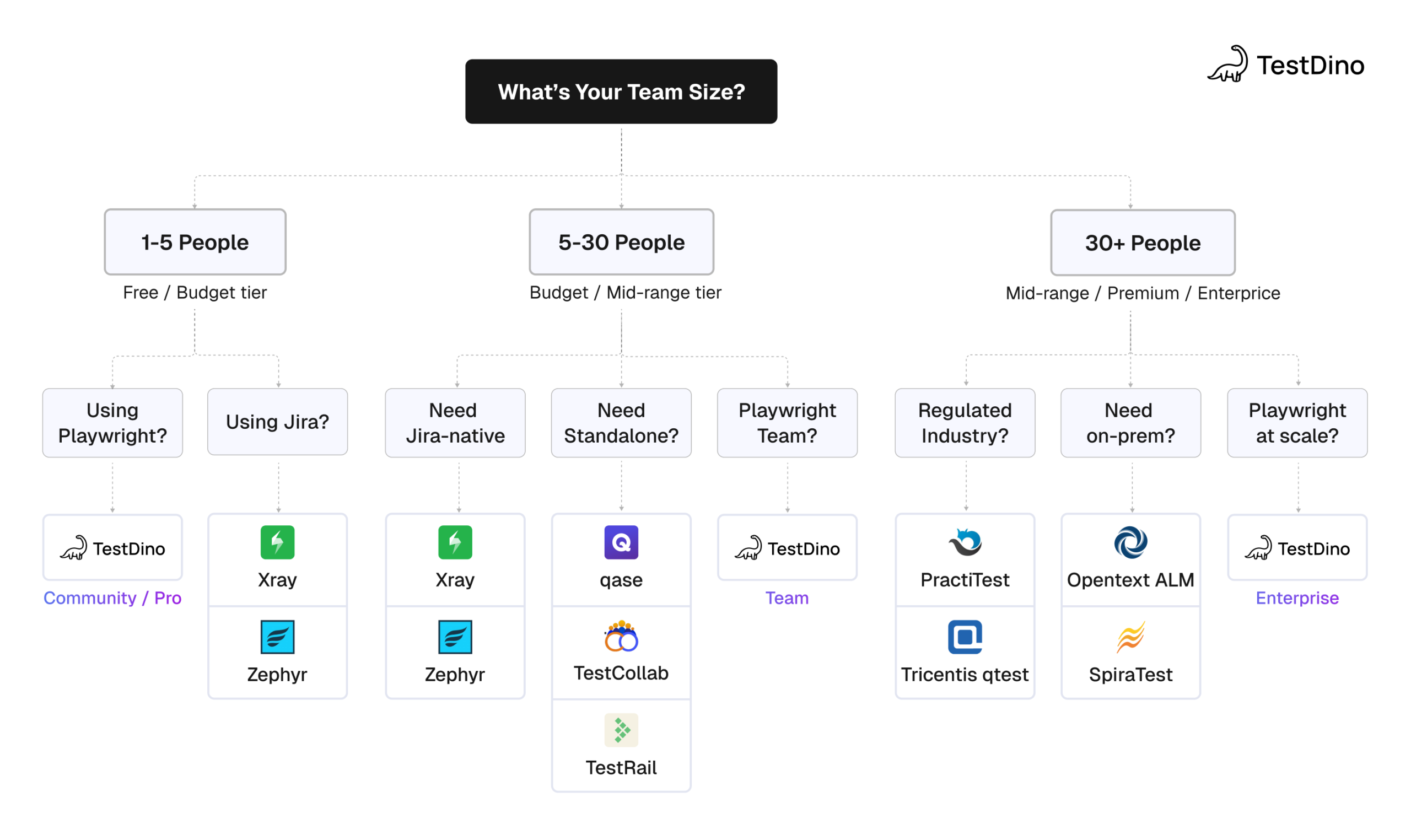
Start with 3 questions:
- What's your team size?
This eliminates half the market immediately. A 5-person team has no business paying PractiTest prices. A 50-person enterprise team can't run on free tiers. - Are you already in Jira?
If yes, Jira-native add-ons are the fastest path to "good enough." If no, or if Jira's limitations frustrate you, go standalone. - What testing framework do you use?
This matters more than most buyers realize. A tool that says "supports Playwright" via JUnit XML import gives you pass/fail results. A tool with native Playwright integration provides traces, screenshots, retry data, and debugging context.
| Team profile | Recommended band | Start here | Why |
|---|---|---|---|
| Solo dev/side project | Free | TestDino Community, Qase Free, Tuskr Free | Zero cost. Basic test case tracking is enough. |
| Startup (3-10 engineers) | Budget ($1-15) | TestDino Pro, Xray, BrowserStack TM | Low cost, fast setup, covers core needs. |
| Mid-size team (10-30) | Mid-range ($20-40) | Qase Plus, TestCollab, TestDino Team | API depth, dashboards, & multi-project support. |
| Enterprise (50+) | Premium / Enterprise | TestRail, PractiTest, Tricentis qTest, TestDino Enterprise | SSO, audit logs, compliance, dedicated support. |
| Playwright-heavy team (any size) | Depends on team size | TestDino (any plan) | Playwright-native reporting + test management in one platform. |
The 5-minute shortlist method
1. Filter by budget band first.
If you're a startup with 8 engineers, look at Free and Budget ($1-15/user). If you're a mid-size team with 30 people, look at Mid-range ($20-40/user). Don't waste time evaluating tools you can't afford.
2. Next, check integration depth.
Open the docs page for each tool in your framework. Look for a dedicated reporter or SDK, not just "import JUnit XML." For Playwright teams, check whether the tool preserves trace files and screenshot context. Most don't.
3. Then try the free tier or trial.
Every tool on our pricing table offers either a free plan or a 14-day trial. Don't spend six weeks reading reviews. Sign up, import 20 test cases, run a test cycle, and see if the UX works for your team. The tool that feels easiest to use daily is usually the right choice.
Tip: The biggest mistake teams make is over-buying. A QA lead evaluates tools, falls in love with enterprise features they don't need yet, and pushes for a $49/user tool when a $10/user tool covers 90% of their needs. Start cheap. Upgrade when you hit a real wall.
Adoption signals: G2 review data and what it tells you
G2 review counts aren't perfect. But they're the best public proxy for adoption momentum. A tool that gains reviews faster than its competitors gains users.
Based on G2's test management category data and the G2 Fall 2025 Grid Report:
| Tool | G2 rating (approx.) | Market position | Notable signal |
|---|---|---|---|
| Qase | 4.5+ | High satisfaction, growing | Strong review velocity. Modern UX is consistently praised. |
| BrowserStack | 4.5+ | Leader quadrant | High volume from cross-browser users. TM is a newer product. |
| TestRail | 4.3-4.4 | Established leader | Large total review count. Recent reviews cite dated UI. |
| Xray | 4.4+ | Jira-native leader | Growth tied to Atlassian ecosystem. 10,000+ company claims. |
| Zephyr | 4.0-4.2 | Jira-native, mixed reviews | Squad reviews score higher than Enterprise. |
| PractiTest | 4.3+ | Enterprise niche | Smaller review volume. Strong in regulated industries. |
| Testmo | 4.4+ | Rising mid-market | Newer entrant. Clean UX praised. |
| TestCollab | 4.5+ | Rising mid-market | Recent feature expansion. AI copilot features added. |
| TestDino | 4.8+ | Playwright-native reporting + test management | Highest-rated among Playwright-focused tools. Built-in test case management alongside AI-driven reporting. |
Two patterns matter here.
The highest-rated tools aren't the most expensive. Qase ($20/user) and TestCollab ($29/user) score as well or better than TestRail ($34-40/user) and PractiTest ($49/user) on G2. Price and satisfaction don't correlate in this market.
Jira-native tools have large install bases but more mixed reviews. The common complaint: they work great for basic test management in Jira, but hit a wall when teams need standalone reporting, cross-tool analytics, or framework-specific features.
For teams that need test reporting alongside test management, combining a test case tool with a dedicated reporting layer fills the gap that most standalone tools leave open.
TestDino stands out. It combines test case creation and editing with dedicated test reporting in a single platform, so you don't need to stitch together a test management tool and a separate reporting layer.
Jira-native vs standalone: The integration question
This is the first decision most teams make. Do you add test management in Jira, or use a separate tool that integrates with Jira?
| Factor | Jira-native (Xray, Zephyr) | Standalone (TestRail, Qase, PractiTest) |
|---|---|---|
| Setup complexity | Low. Install from Marketplace. | Medium. Requires API config and field mapping. |
| Per-user cost | Low ($1-10/user for small teams) | Higher ($20-49/user) |
| Test case UX | Constrained by Jira's issue UI | Purpose-built for test management |
| Reporting depth | Limited to Jira dashboards + basic add-on reports | Dedicated dashboards, custom reports, analytics |
| Automation support | Varies. Usually, JUnit/TestNG imports only. | Broader. Often includes Playwright, Cypress, Selenium APIs. |
| Scaling beyond Jira | Difficult. Tightly coupled. | Easier. Tool-agnostic by design. |
| Vendor lock-in | Tied to Atlassian ecosystem | Independent. Can switch issue trackers. |
The decision comes down to team size and workflow complexity.
Choose Jira-native if: Your team is under 20 people, everyone lives in Jira, and your testing workflow is straightforward. Create cases, execute, and log defects.
Choose standalone if: You need deep test analytics, custom reporting, multi-framework automation support, or you want to avoid Atlassian lock-in.
Choose TestDino if: You're a Playwright team that wants test case management and test reporting in one place.
TestDino's test management features are built specifically for Playwright. You keep the full trace context that generic JUnit importers strip out.
For teams migrating from another tool, TestDino supports direct import from TestRail and CSV with automatic field mapping and suite hierarchy preservation.
AI features in test management tools: Real or marketing
AI is the buzzword every vendor wants to claim. But the data shows a real split between adopters and laggards.
The PractiTest State of Testing 2026 report found:
-
76.8% of testing professionals have adopted AI in some form
-
Teams using dedicated test management tools have an 83.1% AI adoption rate
-
The "Professionalism Premium" shows 13.5% higher AI adoption rates in structured teams
The Katalon State of Quality 2025 survey of 1,400 QA professionals found:
-
72% use AI for test generation and script optimization
-
61% are actively exploring AI-driven testing tools
-
82% still use manual testing daily alongside automation
Not all "AI features" are equal, though. Here's what's real vs what's marketing:
| AI capability | Tools with real implementation | Status |
|---|---|---|
| AI test case generation from requirements | TestCollab (QA Copilot), Qase, BrowserStack, Katalon | Production-ready. Generates draft test cases from PRDs or user stories. |
| MCP server for IDE-based test management | TestDino, TestRail, Qase | TestDino's MCP server lets you create, update, and organize test cases from your IDE with a single prompt. TestRail and Qase MCP servers have similar goals but limited scope. |
| AI-powered defect prediction | PractiTest, Tricentis | Early stage. Predicts which code areas are likely to have defects. |
| AI test prioritization | BrowserStack, Tricentis | Growing. Ranks tests by failure likelihood to optimize CI runs. |
| Smart test maintenance/ self-healing | Limited. Some tools claim it. | Mostly marketing. True self-healing locators are still rare in test management tools. |
Tip: Ask vendors for a demo of AI features with your own data. "AI-powered" in marketing copy often means a ChatGPT wrapper that generates test case titles. Real AI test generation produces structured, executable test cases with steps, expected results, and data parameters.
For Playwright teams, AI test generation tools that understand Playwright's API and selector model produce much better results than generic AI generators writing framework-agnostic descriptions.
Common buying mistakes (and how to avoid them)
After analyzing pricing, reviews, and integration data across 15+ tools, the same patterns keep showing up.
Mistake 1: Buying for features you'll "eventually" need.
A 10-person team doesn't need enterprise SSO on day one. They don't need audit trails or SCIM provisioning. They need a place to store test cases and a way to view results. Most teams are earlier in their maturity curve than they think.
Start with a tool that covers your current workflow. Upgrade when you actually hit the ceiling.
Mistake 2: Ignoring the per-seat cost at scale.
A tool that costs $29/user looks fine for a 5-person team ($1,740/year). At 30 people, that's $10,440/year. At 50, it's $17,400. Most vendors don't offer volume discounts until you ask.
Before committing, calculate your 12-month and 24-month costs at your projected team size. Flat-rate tools like TestDino ($99/month for up to 30 users) look increasingly attractive as teams grow.
Mistake 3: Treating test management and test reporting as the same thing.
Test management is about organizing test cases, planning runs, and tracking execution. Test reporting involves analyzing results, identifying patterns, classifying failures, and debugging.
Most test management tools include basic reporting: pass rates, execution summaries, maybe a trend chart. But they don't do flaky test detection. They don't classify failures by root cause. They don't preserve Playwright traces for debugging.
If you're running Playwright at any serious scale, you need both layers. Pick a tool that does both.
Mistake 4: Choosing based on Jira Marketplace ranking.
Xray and Zephyr dominate Jira Marketplace install counts. Partly because they're convenient (one-click install) and partly because Jira is already there. But install count doesn't mean best fit.
The G2 data tells a different story. Standalone tools like Qase (4.5+) and TestCollab (4.5+) score equal to or higher than Jira-native add-ons on satisfaction.
The common complaint about Jira-native tools: they work for basic tracking but hit walls when teams need standalone reporting, cross-framework support, or Playwright-specific features.
Mistake 5: Not testing the tool with your actual workflow.
Reading comparison articles (including this one) is research, not evaluation.
The only way to know if a tool fits your team is to run a real test cycle with it. Import 20 test cases. Execute a test run. Check the reporting. See if the CI integration actually works.
Every tool on our pricing table offers a free plan or trial. Use them.
Framework and CI/CD integration coverage
This is the section automation engineers care about most. Which tools actually work with your testing stack?
| Tool | Playwright support | CI/CD support | REST API |
|---|---|---|---|
| TestRail | JUnit XML import (basic pass/fail only) | Jenkins, GitHub Actions, GitLab CI | |
| Qase | Framework-specific reporter (richer data) | Jenkins, GitHub Actions, GitLab CI | |
| Xray | JUnit XML import | Jenkins, CI import for GitHub/GitLab | |
| Zephyr | JUnit XML import | Jenkins, CI import for GitLab | |
| PractiTest | API/import | Via API for all CI platforms | |
| BrowserStack Test Management | Native SDK (full execution context) | Jenkins, GitHub Actions, GitLab CI | |
| TestCollab | File import | Jenkins, Webhooks for GitHub/GitLab | |
| Testmo | CLI/import | Jenkins, GitHub Actions, GitLab CI | |
| TestDino | Playwright-native CLI | Jenkins, GitHub Actions, GitLab CI, CircleCI |
The critical distinction here:
"JUnit import" means the tool ingests generic XML results. You get a pass/fail status and error messages. You don't get Playwright traces, screenshots, video recordings, or retry-level detail.
"Framework reporter" (like Qase) means a framework-specific package sends richer data.
"Native SDK" (like BrowserStack) means the tool's SDK wraps the test framework and captures the full execution context.
For teams running Playwright, the JUnit import approach works for basic tracking but misses the most valuable debugging data. This is exactly where combining a test management tool with a dedicated Playwright reporting layer makes sense.
TestDino provides Playwright-native test reporting with real-time streaming, trace viewer integration, and failure classification, preserving every detail from your runs. It pairs with any test case management tool. You manage cases in TestRail or Qase. You analyze results in TestDino.
For larger Playwright suites, the organizing test cases at scale guide covers structuring tests across multiple projects and teams using TestDino's built-in test case structure.
What to consider when choosing a test management tool
Skip the generic "features to look for" advice. Here's a decision framework based on the data above.
1. Start with team size and budget band.
A 5-person team may not need PractiTest at $49/user.
Start in the Budget or Free tier. A 50-person enterprise team likely needs Mid-range or Premium for SSO, audit logs, and advanced test quality metrics.
2. Decide on Jira-native vs standalone early.
This determines your shortlist.
- If Jira is your source of truth and you want minimal setup, evaluate Xray and Zephyr first.
- If you need standalone reporting and multi-framework support, look at Qase, TestRail, or TestCollab.
3. Check the automation framework support carefully.
Don't just ask "Does it support Playwright?" Ask how.
- JUnit XML import is the minimum. Framework-specific reporters provide richer data.
- Native SDK integration provides the most detail.
4. Evaluate AI features with skepticism.
Request a demo using your actual requirements or user stories.
If the "AI-generated" test cases are just bullet-point summaries, it's not saving you meaningful time.
5. Think about your reporting stack separately.
Test management tools manage test cases. Test reporting tools manage test results.
For Playwright teams, the reporting layer matters more than most realize. Features such as flaky test detection, root cause analysis, and PR-level test health live in the reporting layer, not the test case management tool.
6. Plan for migration from day one.
Before you commit, check:
- Can you easily export your data?
- Does the tool support CSV export?
- If you're locked in and need to switch later, what's the exit path?
Tools that make it easy to import and export your test cases respect your data.
FAQs

Jashn Jain
Developer Advocate