Microsoft Playwright Testing Alternative

Microsoft Playwright Testing vs TestDino

See how TestDino goes beyond Microsoft Playwright Testing with AI-powered reporting, detailed analytics, and faster debugging in one place.

No credit card required

Microsoft Playwright Testing Preview Alternatives, Microsoft Playwright Testing Preview Review, Microsoft Playwright Testing Preview Comparison, Microsoft Playwright Testing Preview vs TestDino YT
All product names and logos are trademarks of their respective owners. They are used here for identification and comparison purposes only

Why Choose TestDino Over MS Playwright Testing

Microsoft Playwright Testing runs and scales Playwright tests in the cloud but mainly shows results. TestDino goes further using AI, it analyzes failures, explains why they happen, and helps teams debug faster within their CI/CD workflow.

Capability
TestDino MS Playwright Testing
TestDino TestDino
Getting Started ▼
Onboarding Time ✗ ✓ Quick setup via one-step CI
Setup Complexity ✗ Wire CI and add the @azure/microsoft-playwright-testing reporter ✓ Simple, no custom reporter
Testing Framework Support ✗ Playwright-only (Azure managed) ✓ Supports Playwright now, expanding to other test frameworks soon
AI & Failure Insights ▼
AI Failure Classification ✗ ✓ Classifies failures
Confidence Score with AI ✗ ✓
Root Cause Analysis ✗ Artifacts to speed up troubleshooting ✓
Test Runs & Summaries ▼
Test Run Summary ✗ ✓
Flakiness Detection ✗ ✓
Test Cases ▼
Trace Viewer ✗ ✓
Visual comparison ✗ ✓
Analytics & Trends ▼
Cross-Environment Analysis ✗ No env rollup page ✓
Historical Trend Analysis ✗ Focus is per-run ✓
Branch and PR Analytics ✗ ✓
Performance Analytics ✗ No dedicated analytics section ✓
Dashboards & UX ▼
Role-Based Dashboards ✗ Only One portal view ✓
Data Visualisation (UI/UX) ✗ Dashboards ✓
Integrations & Alerts ▼
CI/CD Integration ✗ ✓
Bug Tracking (Jira, Linear) ✗ ✓
Notifications and Alerts (Slack) ✗ ✓
Pricing & Value ▼
Free Tier ✗ Billed when reporter enabled ✓
Enterprise Ready ✗ Service is Preview & retiring ✓
Learn More Try TestDino for FREE

MS Playwright Testing

Microsoft Playwright Testing’s testing platform provides cloud-hosted environments to run Playwright tests at scale. It focuses mainly on test execution and infrastructure management within the Azure ecosystem. While it offers speed and scale, Microsoft’s solution provides limited analytics and failure insights for QA teams.

TestDino

TestDino is an AI-driven test reporting and analytics platform built to simplify debugging, analysis, and QA reporting. While it integrates deeply with Playwright today, it’s designed to support multiple test frameworks going forward making it a flexible Microsoft alternative for modern testing teams. TestDino is framework-agnostic by design, offering extensible support beyond Playwright to fit diverse QA pipelines.

MS Playwright Testing vs TestDino: Feature Comparison

See how TestDino and Microsoft Playwright Testing compare across dashboards, analytics, and AI-driven insights for QA and development teams.

1. Dashboard

MS Playwright Testing
  • MS Playwright Testing offers a CI-integrated dashboard that provides a unified view of test results and artifacts for faster troubleshooting. However, these dashboards are often generic and require custom setup to provide team-specific views.
TestDino

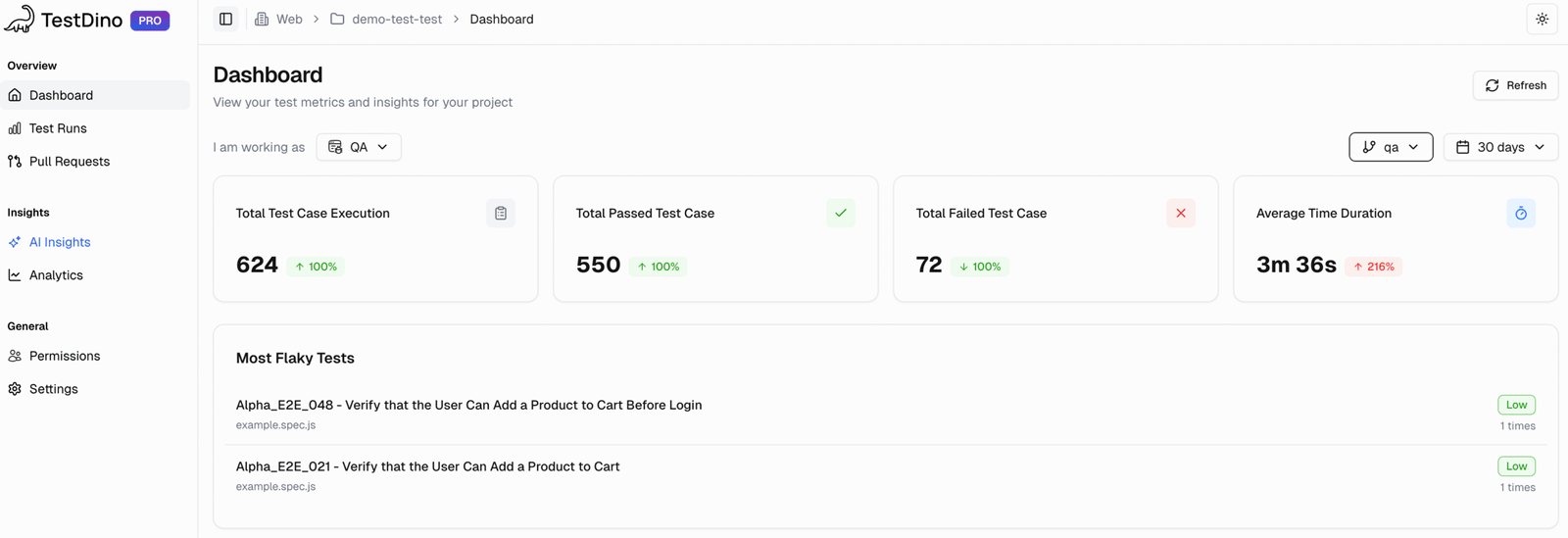
TestDino centralizes quality insights through a dashboard designed for each role’s unique needs.

QA Dashboard: Powered by AI, it distinguishes flaky tests from real failures, reducing noise in triage.
Developer Dashboard: Identifies active blockers and shows branch health for faster development feedback.
Manager Dashboard: Monitors overall test coverage, stability trends, and release readiness in one view.
TestDino Dashboard

TestDino: Dashboard

2. Test Run Insights

MS Playwright Testing
  • MS Playwright Testing service is focused on abstracting the complexity of test infrastructure, but test run insights are limited to what Playwright's native reporting provides. It helps with a consolidated view but doesn't add a layer of intelligence to the results themselves.
TestDino

The Test Runs tab unifies all your test executions into one intelligent workspace.

It integrates contextual information status, branch, environment, and AI insights so teams can immediately understand what went wrong.
Key views within a Test Run:
Summary: Groups failures and flaky tests by underlying cause to accelerate debugging.
Specs: Provides a per-file breakdown with each spec’s status, test counts, total duration, and drill-down into individual tests.
History: Tracks long-term patterns in performance and reliability.
Configuration: Shows complete execution parameters to spot inconsistencies.
AI Insights: AI automatically clusters related issues and surfaces key failure themes.
TestDino Test Runs

TestDino: Test Runs

3. Pull Request View

MS Playwright Testing
  • MS Playwright Testing integrates with CI/CD pipelines, creating a PR-focused view requires manual configuration and custom dashboards. MS Playwright Testing primary purpose is test execution, not a developer-centric workflow.
TestDino

TestDino’s Pull Request view ensures developers have full visibility into their PR test behavior.

It gathers all runs and retries into one structured overview, categorizing outcomes into passed, failed, flaky, and skipped making it simple to see how each change performs and fix problems efficiently without leaving the review context.
TestDino Pull Request Dashboard

TestDino: Pull Request

4. AI Insights

MS Playwright Testing
  • MS Playwright Testing AI capabilities are generally focused on the broader Azure ecosystem, such as performance optimization and scaling. It does not provide the same level of granular, test-specific AI insights for debugging that TestDino does.
TestDino

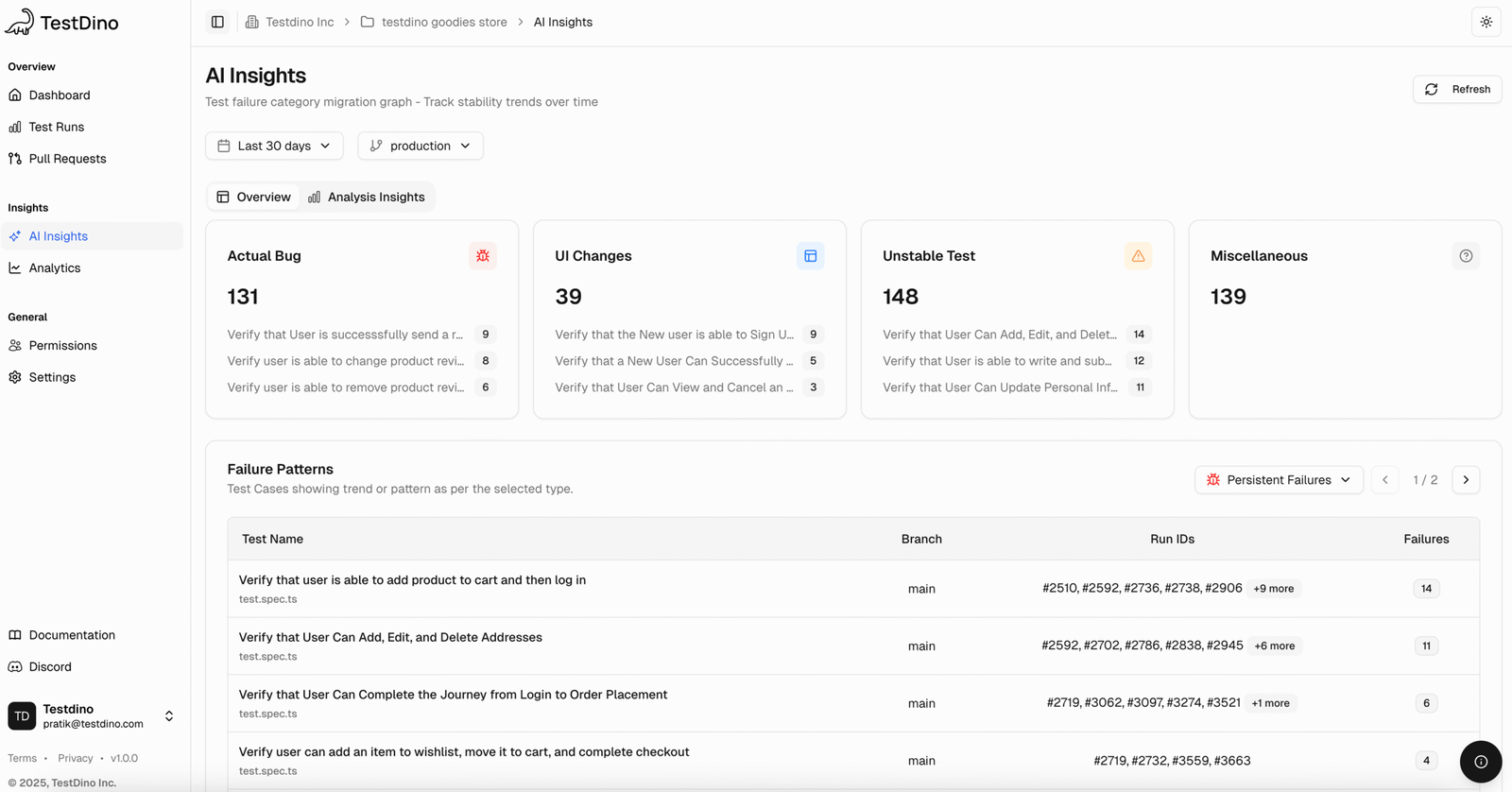
TestDino’s robust AI engine reviews thousands of executions to uncover hidden failure trends, including:

Persistent Failures: recurring, high-impact problems.
Emerging Failures: recently introduced regressions.
Its Analysis Insights view enhances visibility by tracking the evolution of error messages, identifying new error surges, and mapping their effects on specific branches and tests.
TestDino AI Insight Persistent Failures

TestDino: AI Insights Persistent Failures

Get AI Insights at your fingertips

Logo

5. Analytics

MS Playwright Testing

MS Playwright Testing’s testing solution provides basic analytics through Azure tools but focuses more on execution metrics than QA insights.

1. Test Run Metrics • Total test duration tracking • Parallel browser usage monitoring • Billing time across parallel test executions
2. Diagnostic Logs • Activity logs for test run events • Resource logs capturing errors, execution details, and browser interactions
3. CI/CD Integration • Integration with GitHub Actions, Azure Pipelines, and other CI tools • Automated test execution reporting
4. Performance & Reliability Insights • Tracks pass/fail status for test runs • Monitors flaky tests • Basic code coverage metrics • Identifies environment-specific failures (via Azure logs)
TestDino

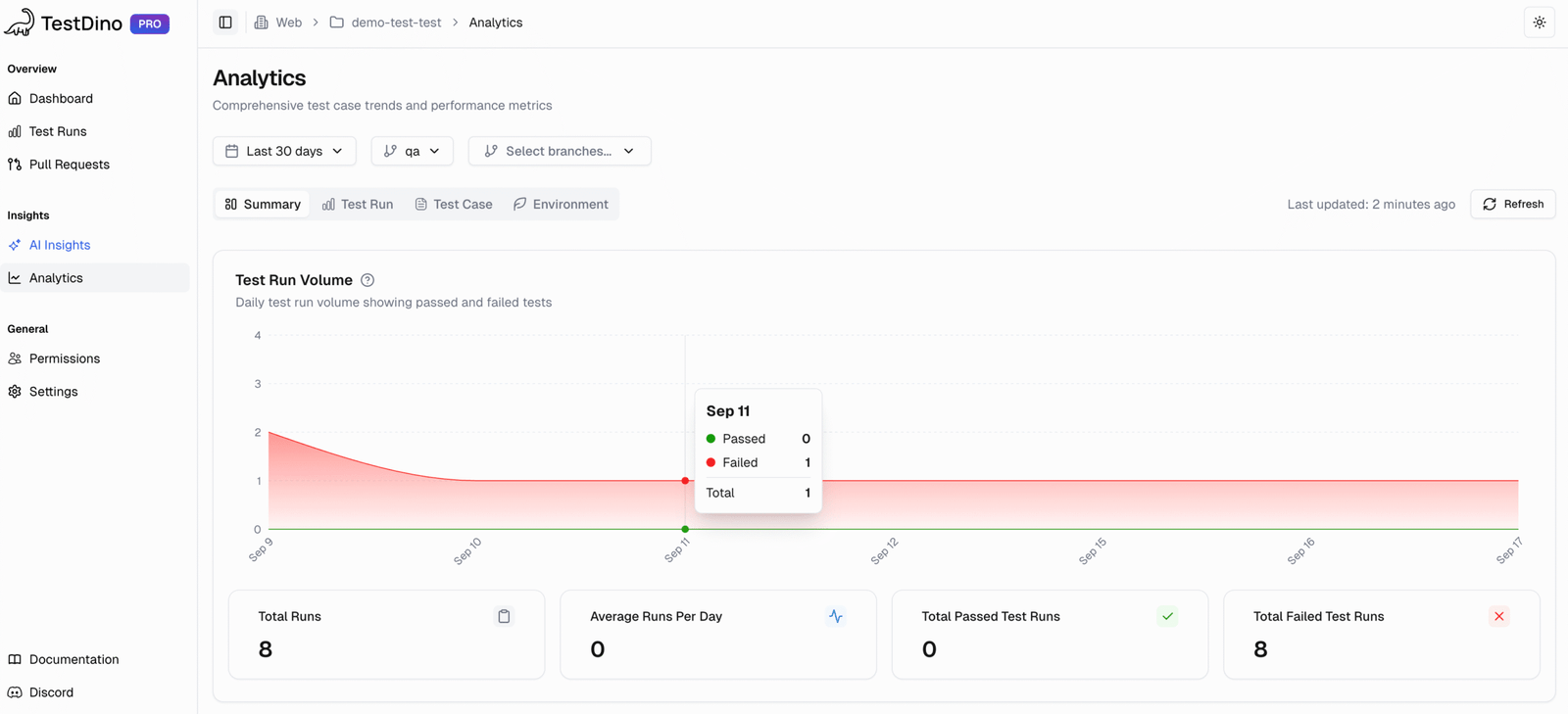
TestDino structures analytics into four well-defined categories, providing actionable insights rather than a long, cluttered list. Our approach ensures users can easily interpret data, segmented into Summary, Test Run, Test Case, and Environment.

1. Summary
  • Track daily test execution and results.
  • Monitor flaky tests to reduce noise.
  • Newly iDetect new failures to catch regressions early.ntroduced test failures
  • Analyze retries to find unstable tests.
2. Test Run
  • Measure pipeline speed via average and fastest runs.
  • Track total time saved and efficiency gains.
  • Compare run times across branches.
  • Analyze daily trends for slowdowns.
3. Test Case
  • Identify slow tests for improvement.
  • Compare pass/fail history to track stability.
  • Check suite efficiency by performance groups.
  • Track new tests to monitor coverage growth.
4. Environment
  • Compare pass rates to detect unstable environments.
  • Track trends to catch post-deployment issues.
  • Analyze tests by branch and OS.
  • Use run volume to separate real trends from noise.
TestDino Analytics | Test Runs Volume

TestDino Analytics: Test Runs Volume

MS Playwright Testing vs TestDino: Key Differences

Microsoft Playwright Testing scales test runs well within Azure, but it’s mainly for execution. TestDino goes further as a test intelligence platform, giving AI-driven insights to fix issues faster and improve reliability.

Category

Microsoft Playwright Testing

TestDino

Setup & Cost

  • Usage-based pricing (per test minute)
  • Requires an Azure subscription
  • Can be expensive as usage scales
  • Setup involves Azure workspace configuration
  • Transparent, user-based pricing
  • Simple, one-step setup for CI/CD
  • No hosting or maintenance needed
  • Cost-efficient for scaling test teams

Intelligence & Debugging

  • Focus on scaling and parallelization
  • Provides a basic dashboard for artifacts
  • Limited AI insights for debugging
  • No confidence scoring
  • AI-driven root cause analysis with confidence scores
  • Dedicated flaky test detection and tracking
  • Predictive insights & MTTR tracking
  • Persistent & emerging failure tracking

Analytics & Observability

  • Dashboard for consolidated test results
  • Tracks basic pass/fail trends
  • Integrated with Azure ecosystem
  • Ready-to-use dashboards for QA, Devs, and Managers
  • Summary, Test Run, Test Case, Environment views
  • Branch & PR-level insights
  • Cross-environment stability comparisons

Integrations & Adaptability

  • CI/CD integrations with Azure DevOps
  • APIs Requires manual setup for external CI toolsand webhooks supported
  • Playwright-native focus with one-step integration
  • Direct PR mapping
  • Rich API + webhooks
  • Lightweight for pipelines

Support & Scalability

  • Scales with large enterprises within Azure
  • Support depends on your Azure support plan
  • Community and Microsoft documentation
  • 24/7 dedicated support
  • Direct Slack channel for teams
  • Built for scaling automation teams
  • AI-driven improvements

Unique Strengths

Microsoft’s Playwright Testing is strong in test execution and scaling, but TestDino’s AI-first design makes it a complete Microsoft alternative for test reporting, analytics, and debugging.

Microsoft Playwright Testing Preview Alternatives, Microsoft Playwright Testing Preview Review, Microsoft Playwright Testing Preview Comparison, Microsoft Playwright Testing Preview vs TestDino Logo MS Playwright Testing

  • icon
    High Parallelization
    Distributes tests across a large number of cloud-hosted browsers to drastically reduce test suite completion time.
  • icon
    Fully Managed Service
    Abstracts the complexity of managing test infrastructure, freeing up teams from maintenance overhead.
  • icon
    Azure Integration
    A seamless fit for teams already invested in the Microsoft and Azure ecosystem.

TestDino Head Logo TestDino

  • icon
    AI-Powered Failure Analysis
    TestDino automatically identifies failures, distinguishing real bugs from flaky or UI-related changes. Teams can triage and debug faster.
  • icon
    Role-Based Dashboard
    Dashboards adapt to each role, showing QA Engineers, Developers, and Managers the most useful metrics and insights.
  • icon
    Persistent Historical Analytics
    Historical test data is analyzed over time without complex CI/CD configuration, providing reliable quality insights.
  • icon
    Purpose-Built for Playwright
    With deep Playwright integration, TestDino delivers workflows and insights optimized for modern web testing teams.

Which pricing fits your team

Compare Microsoft Playwright Testing pricing with TestDino’s transparent plans. Choose the smarter Microsoft alternative that offers more reporting power and no hidden usage costs.

Microsoft Playwright Testing Preview Alternatives, Microsoft Playwright Testing Preview Review, Microsoft Playwright Testing Preview Comparison, Microsoft Playwright Testing Preview vs TestDino Logo

MS Playwright Testing

Usage-based (Pay-as-you-go)

Variable, based on test minutes and results.

$3.50 / 1,000 test results

Prices may vary. Check official website.

Included Features

  • Hosted browsers
  • CI-integrated dashboard
  • Reporting & artifacts
  • 100 free test minutes and 1,000 test results for 30 days.
TestDino Head Logo

TestDino

Pro Plan

For dev teams shipping to production

$39 /month

Prices may vary. Check pricing page.

Everything in Community, plus:

  • 25,000 test executions/month
  • Up to 5 users
  • 90-day data retention
  • Trends Analysis
  • Custom alerts & notifications
  • Slack integration
  • Email support
  • AI-powered failure detection
  • AI Insights at dashboard
  • 14-day free trial
Try TestDino for FREE

FAQs

TestDino goes beyond Microsoft Playwright Testing by offering AI-driven insights, automatic failure grouping, and flaky test detection. It centralizes results, trends, and environment data into one dashboard, helping teams debug faster and report with clarity.

Stop wasting time on
flaky tests broken builds re-run roulette false failures

Start for Free