How to Reduce Test Maintenance in Playwright: Best Practices
Spending more time fixing tests than writing new ones? This guide covers the exact causes of high test maintenance in Playwright and walks you through proven practices: stable locators, the page object model, auto-waiting, API mocking, and CI/CD stability.
A single UI class change deployed to staging breaks a dozen end-to-end tests and blocks the release pipeline.
It's a familiar pattern: the suite grows, and maintaining tests starts eating more time than writing new ones.
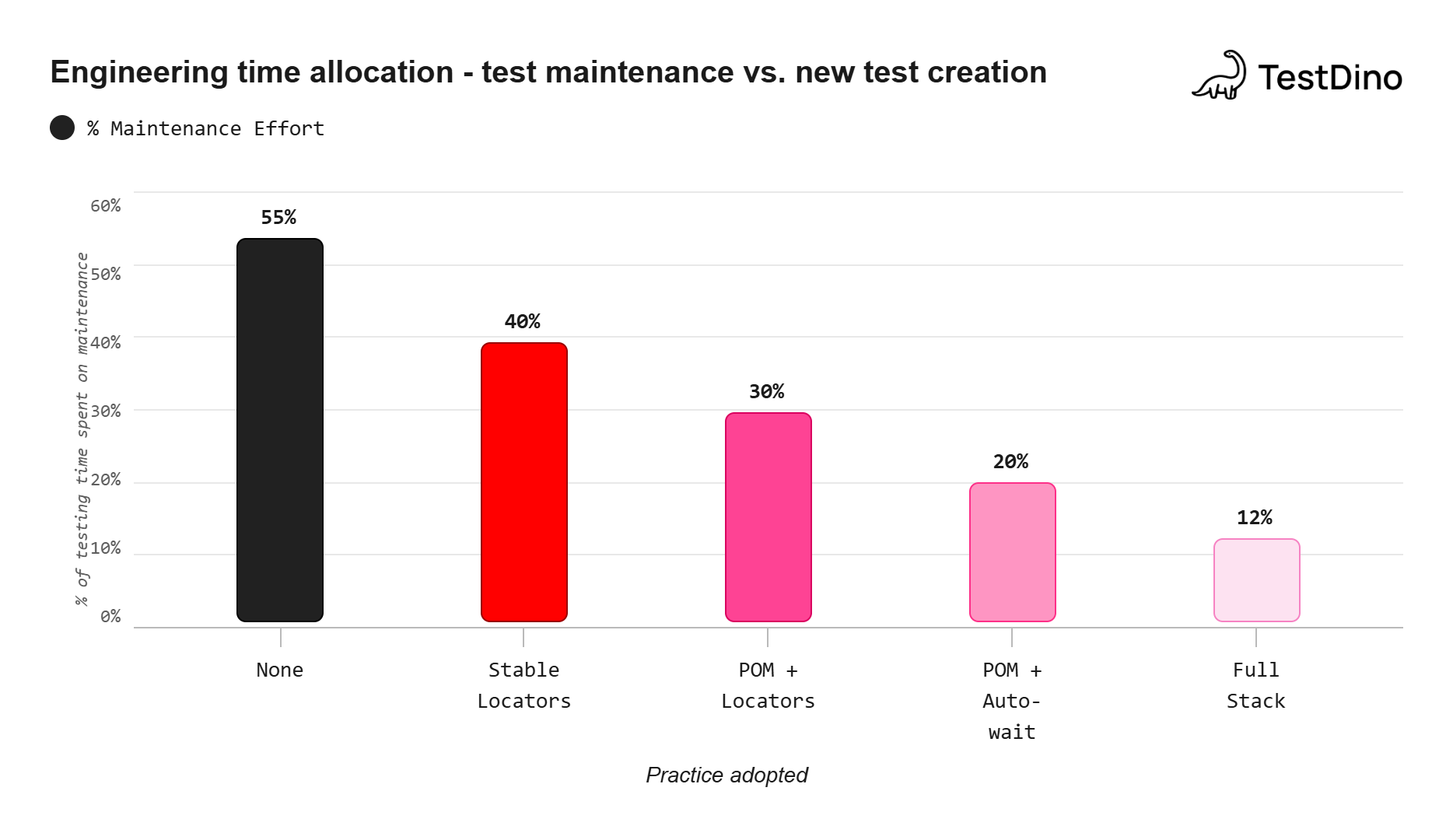
QA teams report that up to 50% of total testing time goes into maintaining existing scripts rather than expanding coverage. Every relocated button, every renamed CSS class becomes another ticket in the backlog.
This guide breaks down why test maintenance in Playwright climbs so fast and gives you seven concrete practices to cut it, from stable locators and page object model to API mocking and CI stability patterns.
What are the most common causes of high test maintenance in Playwright?
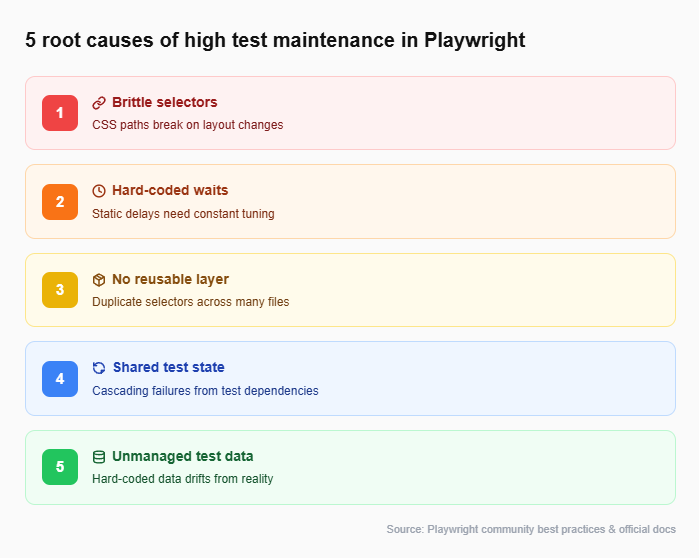
Before you can fix a problem, you need to name it. Test maintenance in Playwright typically spirals because of five overlapping issues. Here is each one, why it happens, and how it compounds over time.
- Brittle selectors tied to layout or styling
Selectors like .btn-primary > span:nth-child(2) are completely valid CSS. They also break the moment a designer swaps the button order or wraps it in a new container. Any selector anchored to visual structure instead of semantic meaning is a maintenance liability. - Hard-coded timeouts scattered across scripts
When a test flakes, the quickest fix is await page.waitForTimeout(3000). It works once. Then the server slows down, or CI runners get congested, and 3 seconds is not enough anymore. Either way, the timeout needs manual tuning, and that multiplies with every occurrence. - No reusable abstraction layer
When twenty tests each contain their own selectors and login sequences, a single change in the login flow means updating twenty files. Without a shared layer (page objects, helper functions, or fixtures), the maintenance burden grows linearly with the number of tests. - Unmanaged test data and environment drift
Hard-coded test data breaks when databases reset. Environments that differ between local machines and CI runners produce "works on my machine" failures. Without seed datasets, deterministic factories, or environment-locked configs, your suite drifts away from reality.
Now that we know what causes the problem, the rest of this guide walks through each fix in order. We will start with the most impactful change (your selectors) and layer on additional practices as we go.
How does the Playwright locator API help reduce test maintenance?
The first and highest-impact fix for test maintenance in Playwright is switching away from CSS and XPath selectors. The Playwright locator API was built specifically for this. Instead of pointing at DOM structure, locators target the way a real user perceives the page: roles, labels, text, and placeholders.
The recommended locator priority
Playwright's official docs suggest using locators in this order:
-
getByRole() - matches ARIA roles like button, link, textbox.
-
getByLabel() - matches form controls by their visible label.
-
getByPlaceholder() - matches inputs by placeholder text.
-
getByText() - matches elements by visible text.
-
getByAltText() - matches images by alt text.
-
getByTitle() - matches by title attribute.
-
getByTestId() - matches data-testid attributes.
Here is the difference in practice.
Brittle selector (high maintenance):
// Breaks if the div wrapper is removed or class name changes
await page.click("div.header-nav > ul > li:nth-child(3) > a");
Stable locator (low maintenance):
// Survives design changes as long as the link text stays the same
await page.getByRole("link", { name: "Pricing" }).click();
The second approach survives layout changes, class renames, and even full redesigns, because "Pricing" is a user-facing concept, not a structural detail.

Tip: Start with getByRole() for every new locator. Fall back to getByTestId() only when semantic selectors genuinely do not work (e.g., a canvas element or an icon button without text). This hierarchy keeps your locator strategy as resilient as possible.
| Locator type | Resilience to UI changes | When to use |
|---|---|---|
| getByRole() | Very high | Buttons, links, headings, form inputs |
| getByLabel() | High | Form fields with visible labels |
| getByTestId() | High (static attribute) | Dynamic UIs, icon-only elements, custom components |
| CSS / XPath | Low | Legacy projects or deeply nested shadow DOM |
With stable locators in place, the next problem to solve is duplicated logic. If the same selector appears in 20 test files, even a good getByRole() call creates maintenance when someone renames the button text. That is where the Page Object Model comes in.
Using the page object model to reduce test maintenance in Playwright
The Page Object Model (POM) takes the stable locators from the previous section and wraps them into reusable classes. Each class represents one page or component. When the UI changes, you update that one file. Every test that touches it stays green automatically.
Folder structure:
tests/
├── pages/
│   ├── LoginPage.ts
│   ├── DashboardPage.ts
│   └── SettingsPage.ts
├── specs/
│   ├── login.spec.ts
│   └── dashboard.spec.ts
└── playwright.config.ts
Example page object:
import { Page } from"@playwright/test";
export class LoginPage {
    constructor(private page: Page) {}
     // Locators defined once, reused everywhere
    private emailInput = () => this.page.getByLabel("Email");
    private passwordInput = () => this.page.getByLabel("Password");
    private submitButton = () =>
        this.page.getByRole("button", { name: "Log in" });
    async login(email: string, password: string) {
        await this.emailInput().fill(email);
        await this.passwordInput().fill(password);
        await this.submitButton().click();
     }
}
Example test using the page object:
import { test, expect } from"@playwright/test";
import { LoginPage } from"../pages/LoginPage";
test("successful login redirects to dashboard", async ({ page }) => {
    await page.goto("/login");
    const loginPage = newLoginPage(page);
    await loginPage.login("[email protected]", "securePass");
    await expect(page).toHaveURL("/dashboard");
});
If the design team renames the "Log in" button to "Sign in", you change one line inside LoginPage.ts. Zero test files need editing.
Note: You can use Playwright's codegen to record an interaction flow and then refactor the output into page objects. This gives you accurate locators instantly while keeping your architecture clean.
Stable locators and page objects handle the "what to click" problem. But even the best selector is useless if your test fails because it tried to click before the page finished loading. That is the timing problem, and it is our next target.
Eliminate flaky waits to lower test maintenance in Playwright
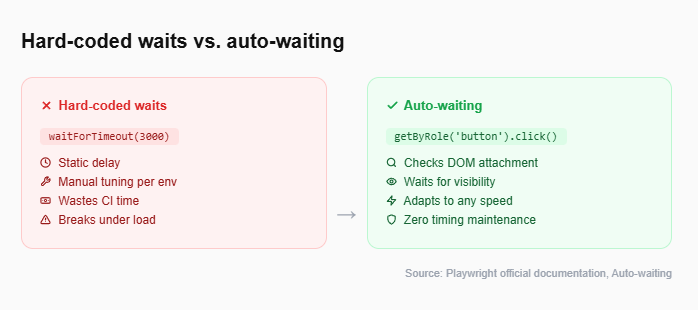
Hard-coded waits (page.waitForTimeout()) are one of the top contributors to flaky test behavior. Playwright's auto-waiting engine solves this without any extra code.
How auto-waiting works
When you call an action like .click(), .fill(), or .check(), Playwright automatically:
-
Waits for the element to be attached to the DOM.
-
Waits for the element to be visible.
-
Waits for the element to be stable (no animations in progress).
-
Waits for the element to receive events (not obscured).
-
Waits for the element to be enabled.
All of this happens behind the scenes. You do not write a single wait statement.
Anti-pattern vs. recommended approach:
// Anti-pattern: brittle, wastes time, still flakes under load
await page.waitForTimeout(5000);
await page.click("#submit-btn");

// Recommended: auto-waiting handles everything
await page.getByRole("button", { name: "Submit" }).click();
For assertions, Playwright offers web-first assertions through expect(). These also retry automatically until the condition is met or the timeout expires.
// Retries for up to 5 seconds (default) until the text appears
await expect(page.getByText("Order confirmed")).toBeVisible();
This approach pairs naturally with the Playwright assertions API and eliminates an entire class of maintenance triggers: the "bump the timeout" commit.
With timing solved, the next source of flakiness is external. Tests that share state with each other, or that depend on live third-party APIs, create failures that have nothing to do with your application.
Test isolation and mocking external APIs
Playwright creates a fresh BrowserContext for every test by default. This means each test gets:
-
Its own cookies, local storage, and session storage.
-
Its own network state.
-
No leftover data from previous tests.
The key is to not break this by reusing contexts across tests.
Mocking external APIs
For tests that hit third-party services (payment gateways, email providers, analytics endpoints), Playwright's route() API lets you intercept network requests and return controlled responses.
await page.route("**/api/payments", (route) => {
    route.fulfill({
    status: 200,
    body: JSON.stringify({ success: true, transactionId: "mock-123" }),
   });
});
This removes network variability entirely. The deep dive into Playwright network mocking covers advanced patterns like HAR replay and conditional routing.
Reuse authentication state efficiently
Instead of logging in through the UI for every test, save the authentication state once and reuse it.
const storageState = "playwright/.auth/user.json";
    await page.goto("/login");
    await page.getByLabel("Email").fill("[email protected]");
    await page.getByLabel("Password").fill("password");
    await page.getByRole("button", { name: "Log in" }).click();
    await page.context().storageState({ path: storageState });
Then reference that state in playwright.config.ts:
use: {
   storageState: 'playwright/.auth/user.json',
},
This saves login time across every test and eliminates the login flow as a source of flaky failures.
Managing test data to prevent drift
Hard-coded test data is another hidden maintenance cost. Here are three practices that keep it under control:
-
Use seed datasets. Load a known data snapshot before each test run so tests always start from the same baseline.
-
Generate data with factories. Libraries like Faker produce unique, realistic data for each run, avoiding conflicts with stale records.
-
Clean up after each test. Use afterEach() hooks to delete created records so one test does not pollute the next.
At this point, your tests have stable selectors, a clean abstraction layer, automatic waits, isolated state, and managed data. The last place maintenance hides is in your CI/CD pipeline.
Stabilize your CI/CD pipeline for reliable test runs
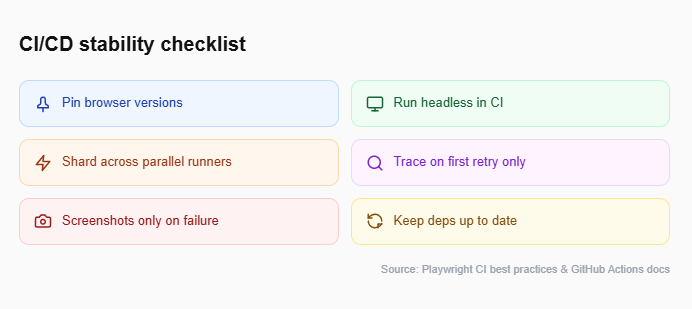
A test suite that passes locally but fails in CI is one of the most frustrating maintenance burdens. The root cause is usually environmental drift: different browser versions, missing dependencies, or resource-constrained runners. Here are the key practices to lock it down.
1. Pin browser versions
Use playwright install --with-deps in your CI configuration to ensure the exact browser binaries your tests expect. Do not rely on the pre-installed browser on the runner.
2. Run in headless mode
Headless execution uses fewer resources and avoids display-related inconsistencies. This is Playwright's default in CI environments.
3. Use sharding for large suites
Playwright supports --shard=1/4 to split test files across parallel CI runners. This reduces wall-clock time without introducing test dependencies.
4. Capture traces on first retry
Configure retries: 1 with trace: 'on-first-retry' so you get a full trace file for debugging when a test flakes, without the overhead of tracing every successful run.
5. Keep dependencies up to date
Outdated Playwright versions, browser drivers, and Node.js runtimes cause compatibility issues that look like flaky tests. Run npx playwright install after every Playwright version bump to keep browser binaries in sync.
export default defineConfig({
    retries: process.env.CI ? 1 : 0,
      use: {
          trace: "on-first-retry",
          screenshot: "only-on-failure",
        },
});
The Playwright CI/CD integrations guide walks through GitHub Actions, Jenkins, and GitLab CI setups with tested configuration files.
Tip: If you are using Playwright annotations like test.slow() or test.fixme(), make sure they are CI-aware. A test tagged fixme in development should not silently skip in production CI without being tracked.
Use Trace Viewer and UI Mode for fast debugging
When a CI test does fail, Playwright's Trace Viewer lets you step through the entire execution: DOM snapshots, network requests, console logs, and screenshots at every action. Enabling trace: 'on-first-retry' captures all of this automatically. You can open the trace locally with npx playwright show-trace trace.zip and pinpoint the exact moment the test diverged from expectations.
Everything covered so far is manual work your team does once and benefits from forever. But there is a growing set of tools that can automate parts of test maintenance itself.
How AI tools are reducing Playwright test maintenance in 2025
The newest frontier in reducing test maintenance in Playwright is AI-assisted test generation and repair. Two developments in particular are changing how teams approach this.
1. TestDino
TestDino provides AI-driven failure analysis designed specifically for end-to-end testing frameworks like Playwright. Instead of just showing you a broken test, TestDino's AI agent instantly analyzes the Playwright trace, DOM snapshots, and error logs to identify the exact root cause of the failure.
What makes it highly relevant to maintenance is how it stops flaky patterns from compounding. When an element selector breaks or a timing issue causes a failure, TestDino categorizes the flake and flags exactly what needs to be fixed. It shifts your team away from manually debugging traces for hours toward simply reviewing the AI's diagnosis and applying the fix.
2. Playwright MCP (Model Context Protocol)
Playwright MCP exposes browser actions through a standardized protocol that AI agents in your IDE can call. You can prompt an AI assistant to generate a test, and it will run against a real browser to verify the output before handing it to you.
The practical benefit: AI drafts the initial test, and you refine it. This cuts authoring time and produces tests that already follow auto-waiting and locator best practices.
For teams already exploring AI test generation tools, combining these with a solid POM structure gives you the best of both worlds: fast drafting with architectural discipline.
Note: AI tools are evolving rapidly. As of early 2025, they work best for generating initial test drafts and diagnosing flaky patterns. The human review step before merging AI-generated tests into your suite is still essential for maintaining quality and intent.
TestDino's flaky test benchmark report provides detailed data on flake rates, root causes, and cost implications across real teams. It can help you measure where your suite stands before and after adopting these practices.
Conclusion
Test maintenance in Playwright does not have to consume half your team's time. The practices covered in this guide target specific root causes: brittle selectors, hard-coded waits, duplicated logic, shared state, unmanaged data, and environmental drift.
Start with the locator API. Move selectors from CSS paths to getByRole() and getByLabel(). Then wrap those locators in page objects so changes propagate from one file instead of many. Remove every waitForTimeout() in favor of Playwright's auto-waiting. Mock unstable APIs, isolate test state, manage your test data, and lock down your CI configuration.
Each practice stacks on the previous one. Teams that adopt stable locators, POM, auto-waiting, test isolation, and CI optimization together have reported cutting maintenance time from over 50% down to roughly 12% of their total testing effort.
The path forward is clear. Pick one practice from this guide, apply it to your current suite this week, and measure the difference.
FAQs
Modern AI tools like OctoMind focus on continuous test maintenance by automatically adapting selectors to UI changes. Instead of just recording basic flows, they generate auto-healing scripts that adapt as the application evolves. Furthermore, tools like Playwright MCP enable developers to generate and repair tests directly inside their IDE.

Ayush Mania
Forward Development Engineer