Best Test Automation Tools in 2026: The Complete Comparison for QA Teams
Not sure which test automation tools actually deliver? This guide compares 12 tools so your QA team picks the right one.




Every engineering team ships faster than it did a year ago. CI/CD pipelines run on every commit, feature flags flip in production, and users expect zero downtime. That velocity puts enormous pressure on QA teams to catch regressions before customers do.
The core pain point has not changed: there are too many automated testing tools on the market, and picking the wrong one means months of migration work later. We have seen teams invest six months into a framework only to discover it cannot handle their CI/CD integrations or breaks silently during parallel runs.
This guide breaks down 12 of the best test automation tools available in 2026. Each one is evaluated on criteria that actually matter in production: language support, community health, CI compatibility, and real maintenance cost.
What is test automation and why does it matter in 2026
Test automation is the practice of using software tools and scripts to execute predefined test cases against an application, compare actual results to expected results, and report pass/fail status without manual intervention.
Manual testing still has a role in exploratory work and usability research. But for regression suites, smoke tests, and API validations that run on every commit, manual execution simply cannot keep up with modern release velocity.
The global test automation market is valued at approximately 24.25 billion dollars in 2026 according to Fortune Business Insights, with that figure exceeding $34 billion when broader service categories are included (per The Business Research Company). The growth is driven by three forces:
-
CI/CD adoption: teams that deploy daily or hourly need automated gates
-
AI integration: self-healing locators, auto-generated tests, and intelligent failure triage are moving from experimental to production-ready
-
Shift-left testing: catching the cost of bugs early in development rather than in staging or production
The bottom line is simple. If your team is still debating whether to automate, you are already behind. The real question is which automated regression testing tool fits your stack, your team, and your release cadence.
How we evaluated these tools
Every tool in this guide was assessed against the same set of criteria we use when evaluating test automation platforms for our own workflows. No tool received a free pass because of name recognition or marketing budget.
Here is what we looked at:
-
Language and ecosystem support: does the tool support the languages your team already uses?
-
Browser and platform coverage: can it handle Chrome, Firefox, Safari, mobile, and API layers?
-
CI/CD compatibility: does it plug into GitHub Actions, Jenkins, GitLab CI, or Azure DevOps without custom hacks?
-
Community health: GitHub stars, npm downloads, frequency of releases, and responsiveness on issues
-
Stability and flakiness: does the tool produce flaky tests under real-world conditions, or does it handle dynamic UIs gracefully?
-
Maintenance cost: how much effort does it take to keep tests green as the application changes?
-
Reporting and observability: does the tool provide actionable failure data, or just pass/fail counts?
-
Pricing: is it free, freemium, or enterprise-licensed?
Note: Every tool listed here was evaluated using publicly available documentation, GitHub repositories, and npm registry data as of April 2026. Performance claims are based on published benchmarks, not vendor marketing materials.
Best test automation tools at a glance
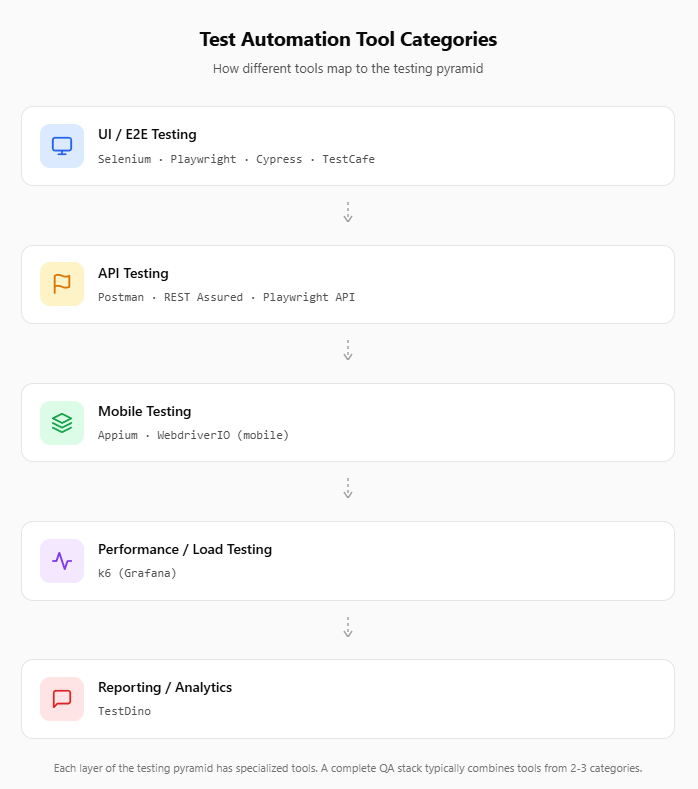
Before diving into each tool, here is a quick comparison table. This covers the 12 QA automation tools we evaluated, organized by primary use case.
| Tool | Type | Languages | Open source | Best for | GitHub stars |
|---|---|---|---|---|---|
| Selenium | Web UI | Java, Python, C#, JS, Ruby | Yes | Enterprise, polyglot teams | ~29K |
| Playwright | Web UI | JS/TS, Python, Java, C# | Yes | Modern cross-browser E2E | ~80K |
| Cypress | Web UI | JS/TS | Yes (core) | Frontend-heavy JS teams | ~49.6K |
| WebdriverIO | Web/Mobile | JS/TS | Yes | Node.js teams, extensibility | ~9.2K |
| Appium | Mobile | Java, Python, JS, C#, Ruby | Yes | iOS/Android native and hybrid | ~21.3K |
| TestCafe | Web UI | JS/TS | Yes | No-driver browser testing | ~9.8K |
| Robot Framework | Multi-purpose | Python (keyword-driven) | Yes | BDD, mixed-skill teams | ~9.8K |
| Katalon Studio | All-in-one | Groovy, low-code | Freemium | Unified Web/Mobile/API | N/A |
| Postman | API | JS (scripts) | Freemium | API testing and monitoring | N/A |
| REST Assured | API | Java | Yes | Java-based API automation | ~6.9K |
| k6 | Performance | JS/TS | Yes | Load and performance testing | ~30.4K |
| TestDino | Reporting/Execution | Framework-agnostic | Freemium | AI-powered test analytics | N/A |
The testing framework adoption trends over the past five years show a clear pattern: Playwright's npm downloads have surpassed Cypress, while Selenium remains deeply entrenched in enterprise Java shops.
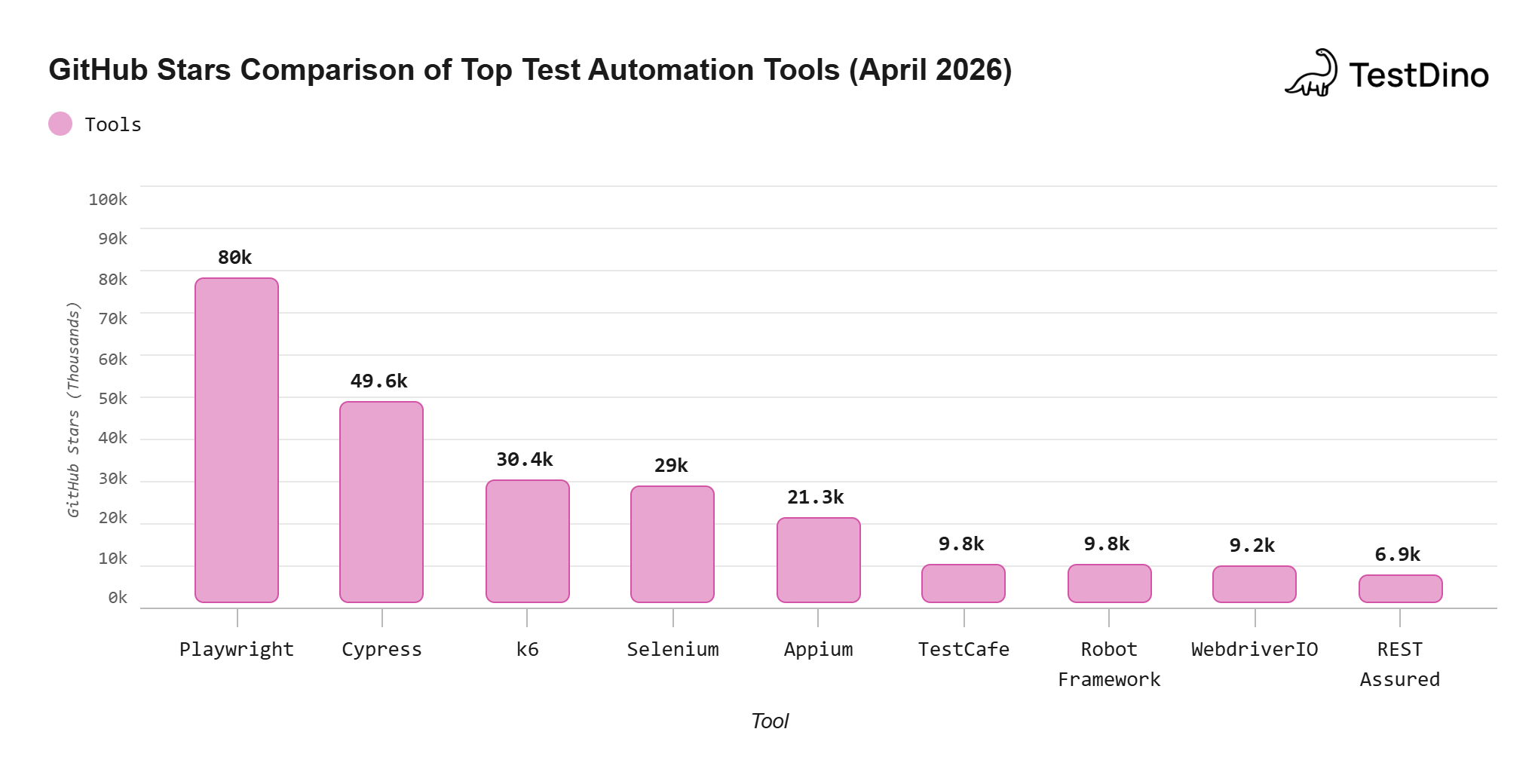
Source: GitHub repositories, April 2026. Note: GitHub stars reflect developer interest and community engagement, not necessarily production adoption rates.

Detailed breakdown of the 12 best test automation tools
Selenium: the veteran open source standard
Selenium has been the backbone of web test automation since 2004. It is the most widely adopted open source test automation framework in the world, and its WebDriver protocol became a W3C standard.
Quick start: pip install selenium (Python) or add org.seleniumhq.selenium:selenium-java to your Maven POM.
Key strengths
-
Supports five major languages: Java, Python, C#, JavaScript, and Ruby
-
The WebDriver protocol is browser-agnostic and OS-agnostic
-
Selenium Grid enables distributed parallel execution across machines
-
Selenium 4 introduced the BiDi protocol, narrowing the gap with modern tools
Where it struggles
-
Requires explicit waits, which increases test fragility
-
No built-in test runner; teams must integrate TestNG, JUnit, or pytest separately
-
Higher test maintenance overhead compared to newer frameworks
Despite newer alternatives gaining momentum, the Selenium market share data shows it remains deeply embedded in enterprise environments. It is not going anywhere soon.
Pricing: Free and open source.
WebDriver driver = new ChromeDriver();

driver.get("https://example.com/login");

driver.findElement(By.id("username")).sendKeys("testuser");

driver.findElement(By.id("password")).sendKeys("password123");

driver.findElement(By.id("login-btn")).click();

assertEquals("Dashboard", driver.getTitle());

driver.quit();
Playwright: the modern cross-browser powerhouse
Playwright, created by Microsoft, has quickly become one of the most adopted software test automation tools for modern web applications. With over 80,000 GitHub stars and 34 million weekly npm downloads as of April 2026, it leads npm adoption.
Quick start: npm init playwright@latest
Key strengths
-
Native cross-browser support: Chromium, Firefox, and WebKit (Safari's engine)
-
Built-in auto-waiting eliminates the need for manual sleep or retry logic
-
First-class support for network interception, multi-tab handling, and iframes
-
Built-in test runner with parallel execution, HTML reports, and trace viewer
-
Supports JS/TS, Python, Java, and C#
Where it struggles
-
Narrower mobile testing support compared to Appium (emulation only, no real devices)
-
Steeper initial setup for teams coming from manual testing backgrounds
The Playwright test automation guide covers setup, selectors, and CI integration in depth. For teams considering a switch, the Selenium to Playwright migration path is well-documented.
Pricing: Free and open source.
import { test, expect } from '@playwright/test';
test('user can log in', async ({ page }) => {
  await page.goto('https://example.com/login');
  await page.fill('#username', 'testuser');
  await page.fill('#password', 'password123');
  await page.click('#login-btn');
  await expect(page).toHaveTitle('Dashboard');
});
Cypress: the developer-first automation framework
Cypress carved out its niche by prioritizing developer experience above everything else. It runs directly inside the browser, which gives it access to the application's DOM, network layer, and local storage in real time.
Quick start: npm install cypress --save-dev
Key strengths
-
Time-travel debugging: every command is snapshotted so you can hover over each step and see exactly what happened
-
Automatic waiting and retry-ability built into every command
-
Real-time reloading during test development
-
Extensive plugin ecosystem
Where it struggles
-
Limited to JavaScript/TypeScript only
-
No native multi-tab or multi-window support (architectural limitation)
-
Cross-browser coverage is narrower: Chromium, Firefox, and Edge only (no WebKit/Safari)
-
Commercial features (parallelization dashboard, analytics) sit behind a paid tier
The Cypress market share remains strong, especially among frontend-heavy React and Vue.js teams. However, the performance benchmarks of Playwright, Cypress, and Selenium show trade-offs worth examining before committing.
Pricing: Open source core. Cypress Cloud (paid) for parallelization, analytics, and team features.
describe('Login', () => {
  it('should log in successfully', () => {
    cy.visit('https://example.com/login');
    cy.get('#username').type('testuser');
    cy.get('#password').type('password123');
    cy.get('#login-btn').click();
    cy.title().should('eq', 'Dashboard');
  });
});
WebdriverIO: flexible automation for Node.js teams
WebdriverIO is a mature, plugin-driven framework built on top of the WebDriver protocol with optional Chrome DevTools Protocol support. It's the go-to choice for Node.js teams that need maximum flexibility.
Key strengths
-
Supports both WebDriver and DevTools protocols
-
Massive plugin ecosystem for reporting, visual regression, and cloud integrations
-
Built-in mobile support via Appium integration
-
Async/await syntax throughout
Where it struggles
-
Smaller community compared to Playwright or Cypress
-
Configuration can be complex for first-time users
-
Documentation, while comprehensive, feels spread across too many plugins
Pricing: Free and open source.
Appium: the go-to tool for mobile test automation
When your test plan includes native iOS and Android apps, Appium is the standard. It uses the WebDriver protocol, so teams familiar with Selenium can pick it up quickly.
Key strengths
- Supports native, hybrid, and mobile web applications
-
Cross-platform: one API for both iOS and Android
-
Language-agnostic: works with Java, Python, JS, C#, and Ruby
-
Active community with over 21,000 GitHub stars
The Appium market share data confirms it remains the dominant player in mobile test automation despite newer entrants.
Where it struggles
-
Test execution is slower than web-only frameworks
-
Setup complexity, especially around Xcode and Android SDK configuration
-
Flakiness on real devices requires careful session management
Pricing: Free and open source.
TestCafe: no-driver browser testing made simple
TestCafe takes a different architectural approach. Instead of using WebDriver or CDP, it injects test scripts directly into the browser. This means no browser drivers to install or manage.
Key strengths
-
Zero dependency on browser drivers
-
Built-in parallel execution and automatic waiting
-
Simple setup: just npm install testcafe and run
-
Cross-browser support including remote testing on mobile browsers
Where it struggles
-
Smaller community and ecosystem compared to Playwright or Cypress
-
Limited extensibility compared to WebdriverIO
-
Fewer enterprise integrations
Pricing: Free and open source (DevExpress maintains it).
Robot Framework: keyword-driven testing for enterprise teams
Robot Framework uses a keyword-driven approach where tests read almost like plain English. This makes it popular in organizations where non-developers contribute to test authoring.
Key strengths
-
Human-readable test syntax lowers the barrier for non-technical team members
-
Extensive library ecosystem: SeleniumLibrary, Browser (Playwright), REST, Database, and more
-
Strong fit for acceptance testing and BDD workflows
-
Excellent, detailed HTML test reports out of the box
Where it struggles
-
Slower execution compared to code-first frameworks
-
Debugging keyword-driven failures is less intuitive than stepping through code
-
Python dependency can be a barrier for Java-centric shops
Pricing: Free and open source.
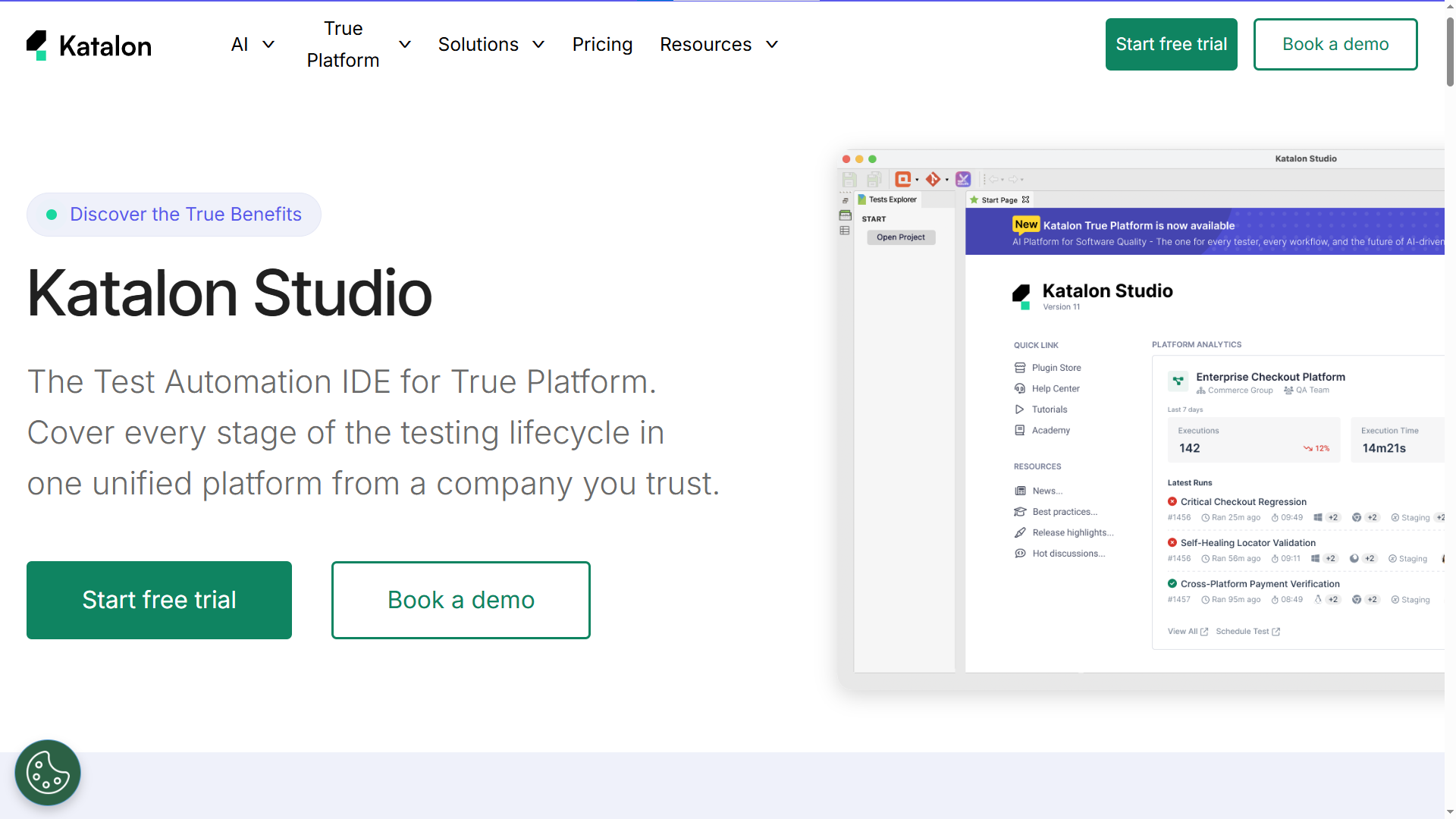
Katalon Studio: the all-in-one automation platform
Katalon merges low-code record-and-playback workflows with full scripting capabilities in Groovy. It covers web, mobile, API, and desktop testing from a single IDE.
Key strengths
-
Unified platform for web, mobile, API, and desktop testing
-
Record-and-playback makes it accessible for manual testers transitioning to automation
-
Built-in reporting and analytics (Katalon TestOps)
-
Integration with Jira, Git, Slack, and CI/CD tools
Where it struggles
-
Advanced features require a paid license
-
Groovy scripting can feel limiting compared to mainstream languages
-
Closed-source nature means less community-driven innovation
Pricing: Free tier available. Paid plans start at approximately $175/month per user for Katalon Platform.
Postman: API testing beyond manual requests
Postman is used by over 30 million developers worldwide (per Postman's public reporting), primarily for API development. But its testing capabilities have grown significantly with the addition of performance testing, MCP server support, and pipeline-native validation.
Key strengths
-
Collections serve as the single source of truth for documentation, testing, and examples
-
Built-in performance testing engine for load and latency metrics
-
MCP server allows AI coding agents to access and run API collections
-
Environment-scoped variables let you run the same suite across dev, staging, and production
-
Postman CLI integrates into CI/CD pipelines
The API testing statistics show that API-layer testing is growing at twice the rate of UI testing across enterprise teams.
Where it struggles
-
The free tier has monthly run limits
-
Complex chained request flows can become hard to maintain
-
Not designed for UI testing
Pricing: Free tier. Paid plans start at $14/month per user.
REST Assured: API automation for Java teams
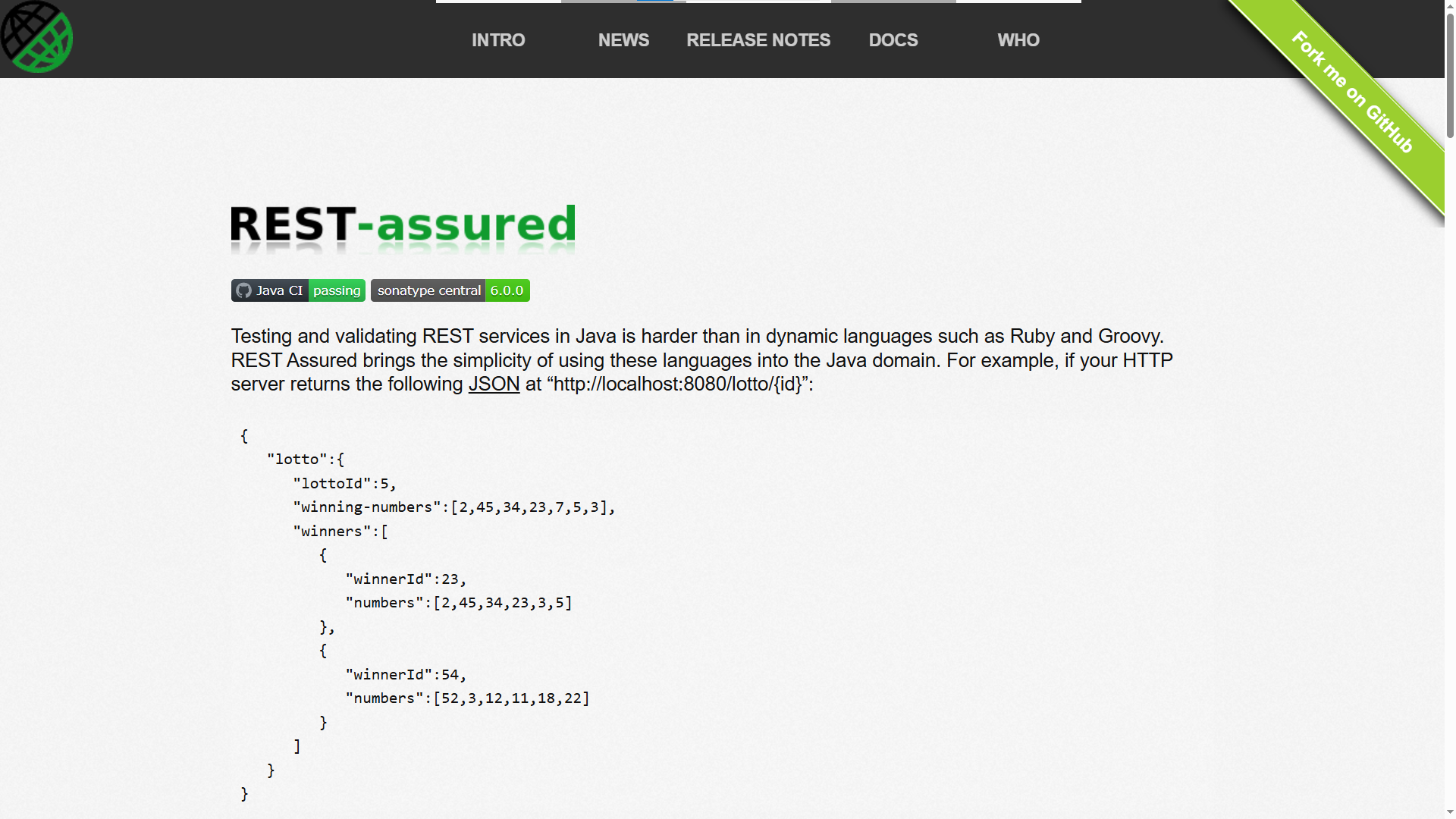
If your backend is Java and your test framework is JUnit or TestNG, REST Assured fits naturally into the stack. Version 6.0.0 shipped in December 2025 with Java 17+ baseline, Jackson 3 support, and Groovy 5.x.
Key strengths
-
Fluent, readable API: given().when().then() syntax
-
Deep integration with Java test runners (JUnit 5, TestNG)
-
Request and response specification reuse across tests
-
JSON and XML schema validation built in
Where it struggles
-
Java-only; no support for Python, JavaScript, or C# teams
-
No GUI; purely code-based
-
Requires manual setup for reporting (usually paired with Allure or ExtentReports)
Pricing: Free and open source.
given()
  .baseUri("https://api.example.com")
  .header("Authorization", "Bearer token123")
.when()
  .get("/users")
.then()
  .statusCode(200)
  .body("users.size()", greaterThan(0));
k6: performance and load testing at scale
k6 (now Grafana k6) is a developer-friendly load testing tool where tests are written in JavaScript. The engine is built in Go, which means it can simulate thousands of virtual users on standard hardware.
Key strengths
-
Tests are JavaScript files, making them easy to version control and review
-
Supports HTTP/1.1, HTTP/2, WebSockets, gRPC, and browser-level testing
-
Thresholds let you codify SLOs directly in scripts (e.g., p95 latency under 500ms)
-
Deep integration with Grafana for visualization and trend analysis
-
Over 30,000 GitHub stars and an active community
Where it struggles
-
Not a functional testing tool; it is purpose-built for performance
-
Browser-level testing via k6 browser API is still maturing
-
Grafana Cloud k6 (for distributed cloud runs) is paid
Pricing: Open source for CLI and local runs. Grafana Cloud k6 pricing varies by usage.
import http from 'k6/http';
import { check } from 'k6';
export const options = {
  vus: 100,
  duration: '30s',
  thresholds: {
    http_req_duration: ['p(95)<500'],
  },
};
export default function () {
  const res = http.get('https://api.example.com/health');
  check(res, { 'status is 200': (r) => r.status === 200 });
}
TestDino: AI-powered test execution and reporting
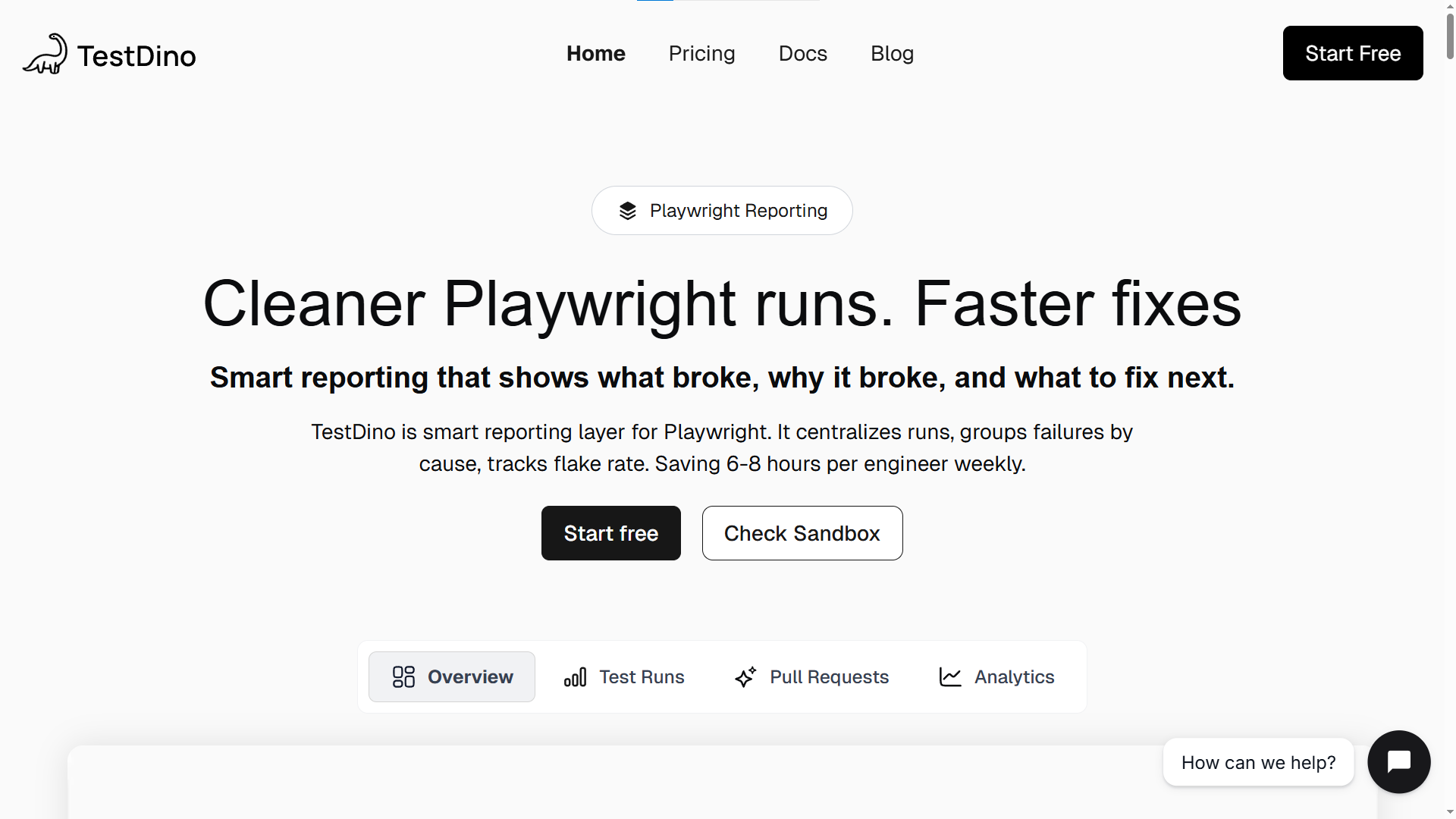
Once your tests are running across frameworks and pipelines, the next challenge is understanding the results. TestDino connects to your existing test automation setup (Playwright, Cypress, Selenium, or any framework) and provides a unified reporting and analytics layer.
Key strengths
-
Framework-agnostic: works with Playwright, Cypress, Selenium, and other runners
-
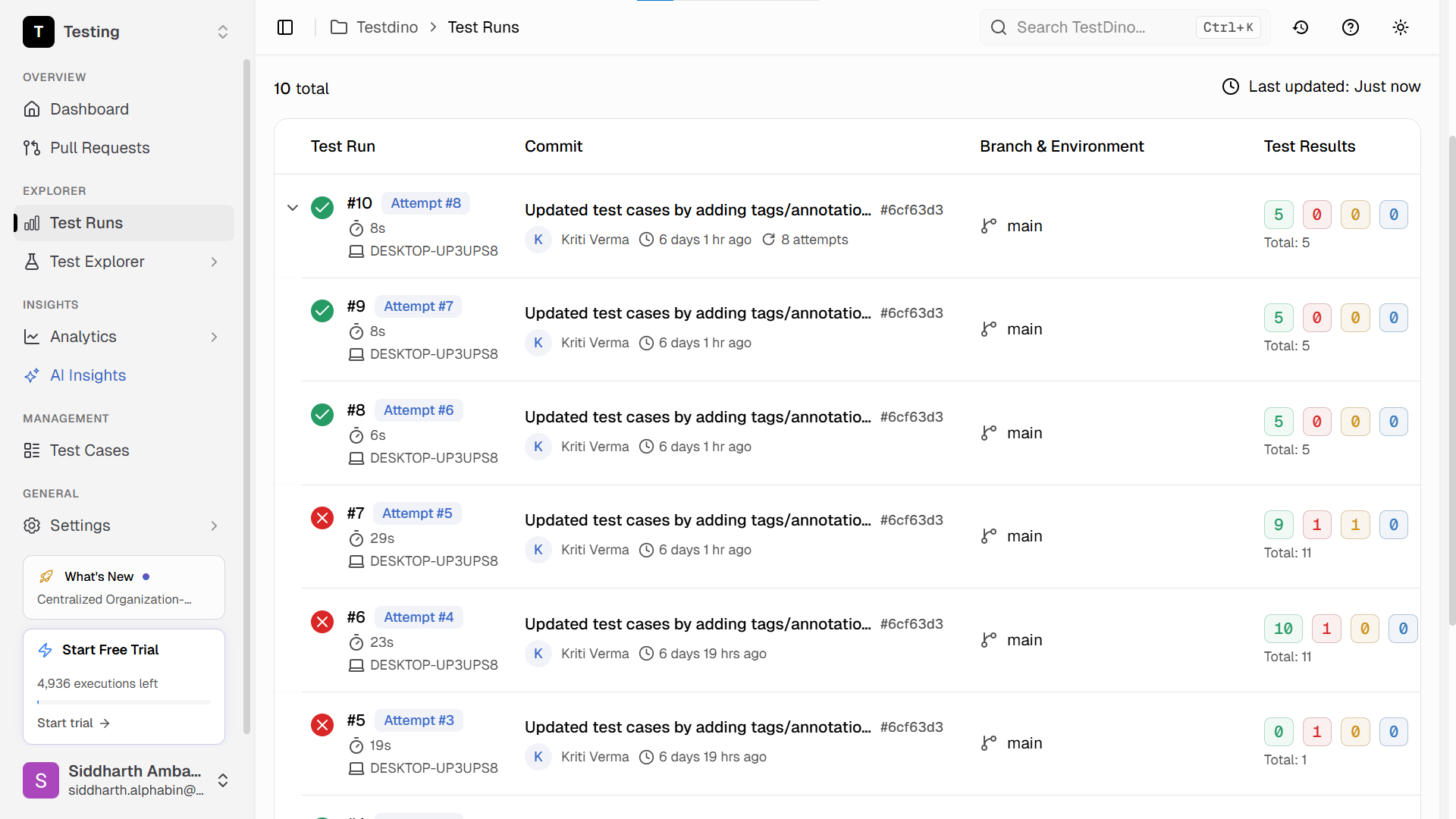
AI-powered failure triage: groups related failures and identifies root causes
-
Flaky test detection with historical trend analysis
-
Real-time dashboards for test health across branches and pipelines
-
Integrates with GitHub Actions, Jenkins, GitLab CI, and more
For teams already producing test automation analytics data, TestDino adds the observability layer that raw HTML reports lack.
Where it struggles
-
Not a test execution framework; it complements one rather than replacing it
Pricing: Free tier available. Paid plans scale with team size and test volume.
How to choose the right test automation tool for your team
Picking the right tool is less about finding "the best" and more about finding the best fit for your context. In our experience, teams that skip this step end up migrating within 18 months. Here are the five questions to ask:
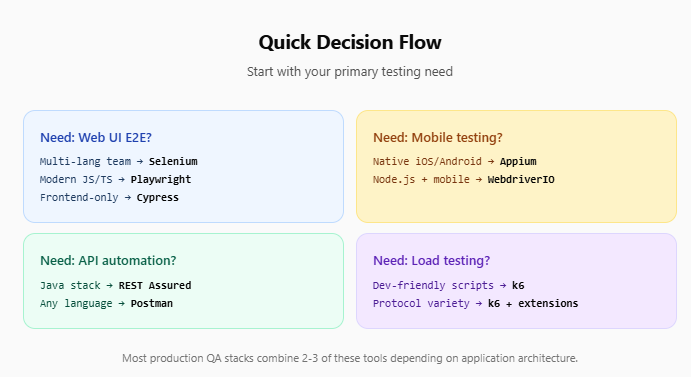
What are you testing?
-
Web UI only → Playwright, Cypress, or Selenium
-
Mobile native → Appium
-
APIs → Postman or REST Assured
-
Performance → k6
What languages does your team use?
-
Java-heavy → Selenium + REST Assured
-
JavaScript/TypeScript → Playwright or Cypress
-
Python → Playwright (Python) or Robot Framework
-
Multiple languages → Selenium
How important is cross-browser coverage?
Teams that need Safari/WebKit coverage should prioritize Playwright. Cypress and TestCafe do not support WebKit natively. A deeper look at browser compatibility issues across browsers reveals why this matters.
What does your CI/CD pipeline look like?
Every tool on this list can run in CI. But some integrate more cleanly than others. Playwright and Cypress have first-party GitHub Actions support for CI/CD test automation. Selenium requires more configuration for parallel execution in CI.
What is your reporting strategy?
Raw test results are not enough for most teams. You need trend analysis, failure grouping, and flaky test detection. This is where dedicated reporting tools like TestDino add value on top of your test runner.

Tip: Start with a proof-of-concept. Pick your top two candidates, write the same 10 tests in both, run them in CI for two weeks, and compare stability, speed, and maintenance effort. That data will tell you more than any blog post.
The following table maps each tool to its strongest use case:
| Use case | Recommended tools | Why |
|---|---|---|
| Modern web E2E (greenfield) | Playwright | Auto-waiting, cross-browser, built-in runner |
| Frontend-heavy JS apps | Cypress | DX-first, time-travel debugging |
| Enterprise Java shops | Selenium + TestNG | Language flexibility, mature ecosystem |
| Mobile native apps | Appium | Cross-platform, WebDriver protocol |
| API-layer automation | Postman or REST Assured | Purpose-built for API workflows |
| Performance / load testing | k6 | JS scripts, Go engine, Grafana integration |
| Non-technical test authors | Robot Framework or Katalon | Keyword-driven / low-code |
| Test reporting and analytics | TestDino | AI failure triage, flaky detection, dashboards |
Open source vs commercial: what the trade-offs really look like
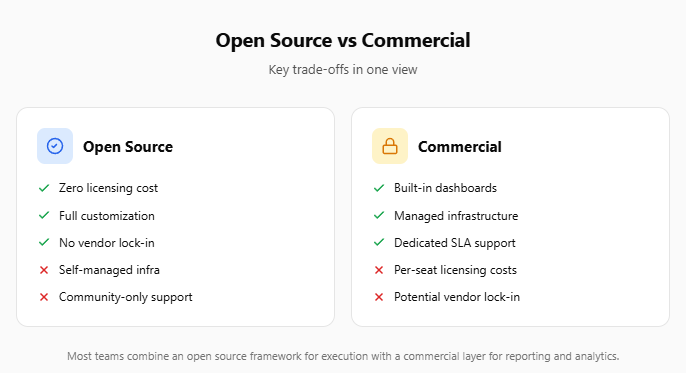
The choice between open source test automation frameworks and commercial test automation platforms is not binary. Most teams end up using a mix.
Open source advantages
-
No licensing costs
-
Full control over source code and customization
-
Community-driven innovation and transparency
-
No vendor lock-in
Open source challenges
-
You own the infrastructure: CI runners, browser management, parallel execution setup
-
Reporting, analytics, and dashboards require additional tooling
-
Support comes from community forums, not dedicated SLAs
Commercial advantages
-
Faster setup with out-of-the-box integrations
-
Professional support and SLAs
-
Built-in dashboards, analytics, and team management
-
Managed infrastructure for parallel execution and cloud testing
Commercial challenges
-
Licensing costs scale with team size
-
Risk of vendor lock-in on proprietary APIs or formats
-
Less flexibility for custom workflows
Note: Many teams use open source frameworks (Playwright, Selenium) for test execution while pairing them with commercial or freemium platforms (TestDino, Cypress Cloud) for reporting, analytics, and collaboration. This hybrid approach gives you the best of both.
The test generation strategies landscape is also evolving. AI-driven tools now generate test code on top of open source frameworks, blurring the line between "open source" and "commercial" even further.
The Playwright AI ecosystem is a clear example. AI agents generate, self-heal, and maintain Playwright tests with minimal human input. This is where we expect the biggest shift in the next 12 months.
Final verdict: our top pick by team type
There is no single "best" test automation tool. The right choice depends on your team's language, your application type, and your test data management tools.
| Team type | Primary tool | Complement with |
|---|---|---|
| Modern JS/TS web team | Playwright | k6 (performance), TestDino (reporting) |
| Frontend-focused React/Vue team | Cypress | Postman (API), TestDino (analytics) |
| Enterprise Java organization | Selenium + REST Assured | Robot Framework (BDD), Allure (reporting) |
| Mobile-first product team | Appium | Playwright (web), Postman (API) |
| Full-stack startup (small team) | Playwright | Postman (API), k6 (load testing) |
| Non-technical QA team | Katalon Studio | Postman (API), TestDino (reporting) |
The best test automation tools are the ones that stay green in CI, not the ones with the most features on a comparison page. Pick a tool your team can maintain, run a two-week proof of concept, and let the results decide.
FAQs
Table of content
Flaky tests killing your velocity?
TestDino auto-detects flakiness, categorizes root causes, tracks patterns over time.
Follow Us