Playwright + Claude Code: Build a 4-Agent QA Pipeline (2026)

Learn how to build a 4-agent Playwright AI pipeline using Claude Code to automate test generation, execution, and debugging.

Looking for Smart Playwright Reporter?

Your team is shipping faster than QA can write tests. AI coding agents like Claude Code accelerate feature work, but they don't close the coverage gap, so the backlog grows and manual QA becomes the bottleneck.

The natural next step is AI test automation, but most tools today make the problem worse instead of solving it. Single-prompt generators ship brittle scripts that break on the next deploy because they see the DOM, not your product rules.

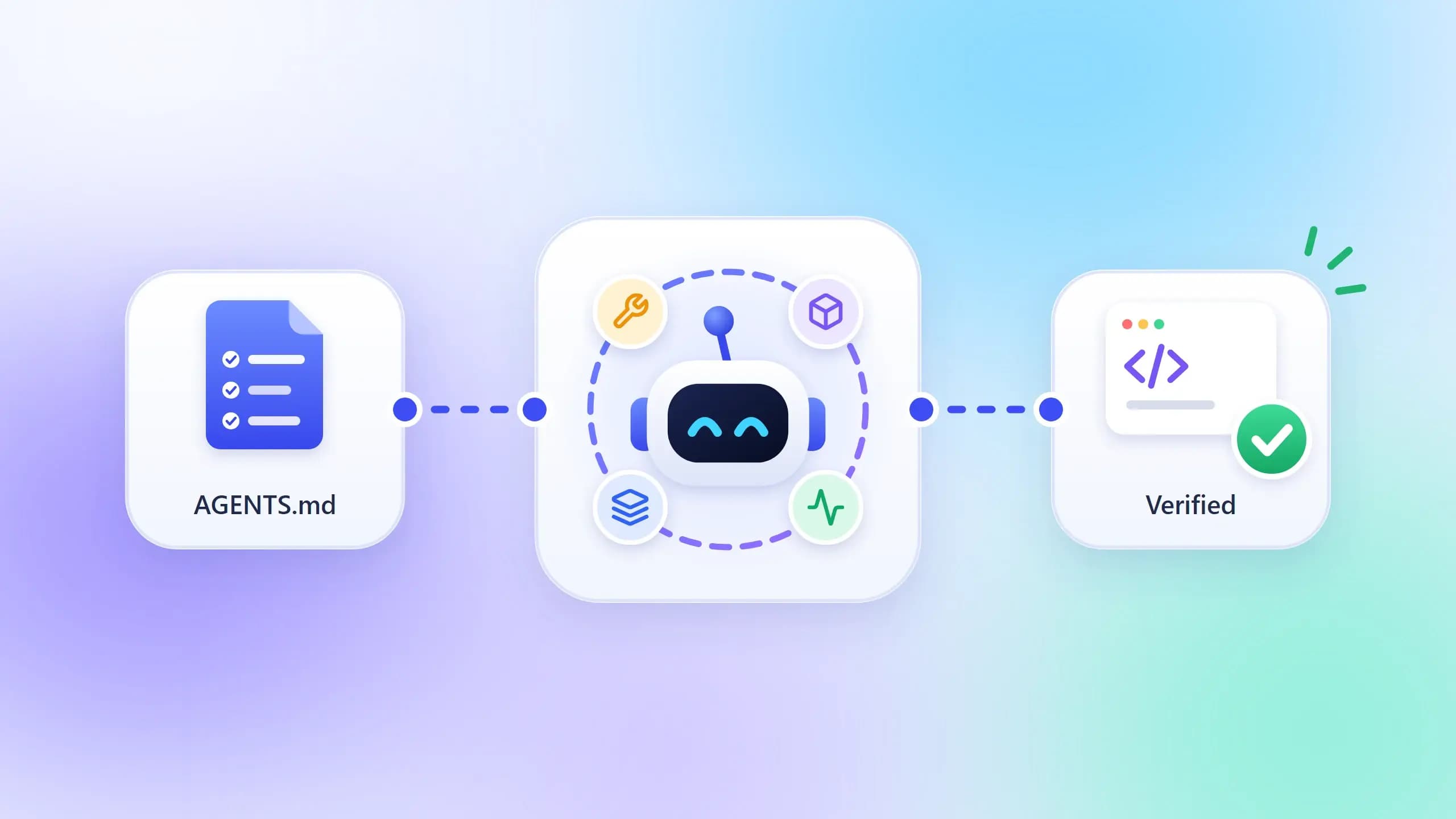
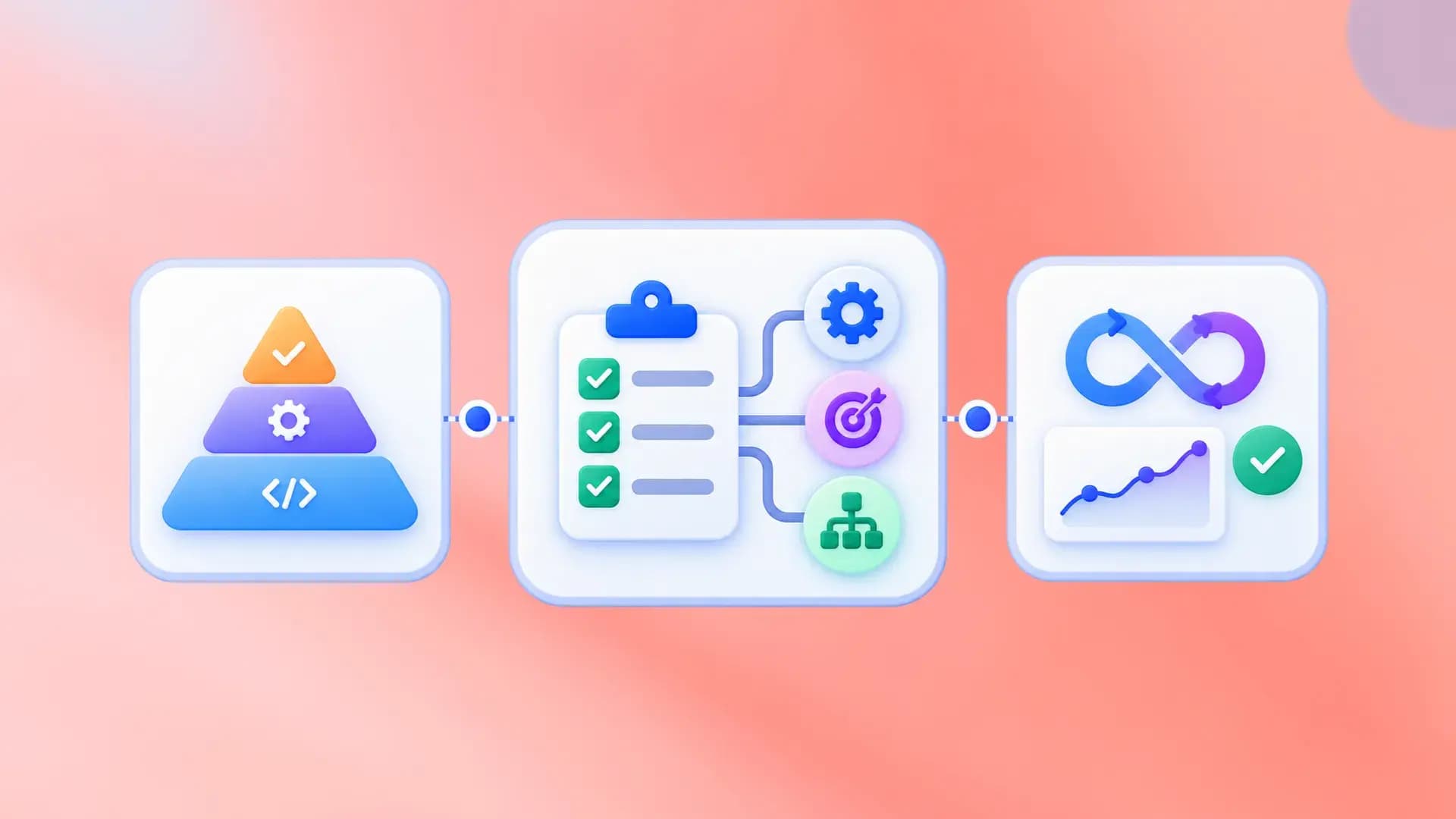
Agentic QA splits the work: exploration, test-case design, automation, and maintenance each get a focused pass, with structured handoffs between them.

We built a four-agent Claude Code pipeline and ran it on TestDino. A 20-line prompt became three page objects and a full spec in about 15 minutes (including quick human nudges when the agent looped).

Peers are tackling the same problem in other shapes: OpenObserve's 8-agent setup (380→700+ tests), Microsoft's Azure DevOps MCP story (significant time savings reported). Below is our version.

TL;DR
  • 4 agents, each with one job: Exploration → Test Case Generation → Automation → Maintenance.
  • What makes it work:app.context.md for product context + per-feature JSDoc in page objects + Playwright Skills for pattern enforcement. The agents understand your app, not just the DOM.

  • Test cases before code. A human reviews the coverage plan before a single line of automation gets written.
  • Playwright CLI over MCP. Lower token usage, cleaner context. Full comparison here.
  • Agents propose, humans approve. No auto-applied fixes. Ever.

Playwright codegen, built-in agents, MCP vs CLI, and AI test generation compared

There are several ways to write Playwright tests with AI, from record-and-replay to fully agentic pipelines. Playwright ships built-in tools for each stage (codegen, agents, MCP, CLI), and understanding what each one does (and doesn't do) is the fastest way to see where a custom pipeline adds value.

Playwright codegen: record-and-replay

npx playwright codegen has been around since Playwright's early days. You run it, a browser opens, you click through your app, and Playwright records every action as a ready-to-run test file. It's the fastest way to get a working script for a simple flow, and if you haven't tried it, start there.

But codegen records exactly what you did, nothing more: it won't add negative cases, boundary checks, or permission variations. It captures one happy path at a time, outputs a flat script with no Page Object Model structure, and if the UI changes, you re-record from scratch. There's no understanding of your app's business rules, no test case planning, and no maintenance strategy. For a login form or a three-step checkout, that's fine. For anything with conditional logic, multiple user roles, or workflows that cross browser and CLI boundaries, you'll outgrow it quickly.

Playwright Agents: plan, generate, heal

Playwright ships with three built-in Playwright Agents: Planner (explores your app, writes a test plan), Generator (converts plans to test files), and Healer (fixes failing tests automatically).

If you haven't tried them yet, you should, and they work out of the box with GitHub Copilot, Claude Code, or Cursor's agent mode, and once you run npx playwright init-agents and pick your integration, you're generating tests within minutes. For straightforward UI flows like login pages, form submissions, and basic navigation, the built-in agents handle the job well.

But they're designed for general-purpose test generation: they read the accessibility tree, not your product docs, permission model, or business rules, and the Healer auto-applies fixes, which can silently mask real bugs instead of surfacing them for your team to evaluate.

Playwright MCP vs CLI: which one feeds the agents

There's one more choice before you build: how does the agent talk to the browser? Playwright offers two paths, MCP (Model Context Protocol) and CLI, and they trade off differently.

MCP pushes rich browser state (accessibility snapshots, console logs, network events) directly into the model's context. That's powerful for exploratory debugging, but every snapshot costs tokens, and long sessions can fill the context window before the agent finishes its task.

CLI writes artifacts to disk (traces, screenshots, JSON reports) so the model reads only the slices it needs. Lower token usage, cleaner context, easier to cache between runs.

We standardize on CLI for this pipeline because the agents already get product context from app.context.md and JSDoc; they don't need a live accessibility snapshot on every turn. For the full breakdown, including when MCP is the better choice, see our Playwright CLI vs MCP deep-dive.

Where our 4-agent pipeline fits in

Capability playwright codegen Playwright Agents 4-agent pipeline
Test generation method Records user actions AI reads accessibility tree AI reads docs, codebase, and live app
Business logic awareness None None app.context.md + JSDoc blocks
Test case review before code No No Yes (human checkpoint)
Multi-role / multi-user tests Manual re-recording per role Limited Built-in (storageState per user)
Maintenance approach Re-record Auto-heal (silent) Human-gated fix proposals
Cost Free Free + AI provider Free + Claude Code subscription

Our pipeline extends the same concepts in three specific ways:

A test case review layer where the agent proposes what to test, you review and approve the coverage plan, and only then does code get written; whereas both codegen and Playwright Agents skip straight to code with no human checkpoint.

Embedded app context so your agents read app.context.md and JSDoc blocks containing routes, permissions, and business rules, not just what's visible in the UI.

Maintenance with a human gate so that when tests break, the Maintenance Agent diagnoses the failure and shows you a diff rather than touching anything without your approval.

If you've used codegen or Playwright's agents and want more control over what gets tested and how failures get handled, that's what this pipeline adds.

The 4-agent Playwright test generation pipeline

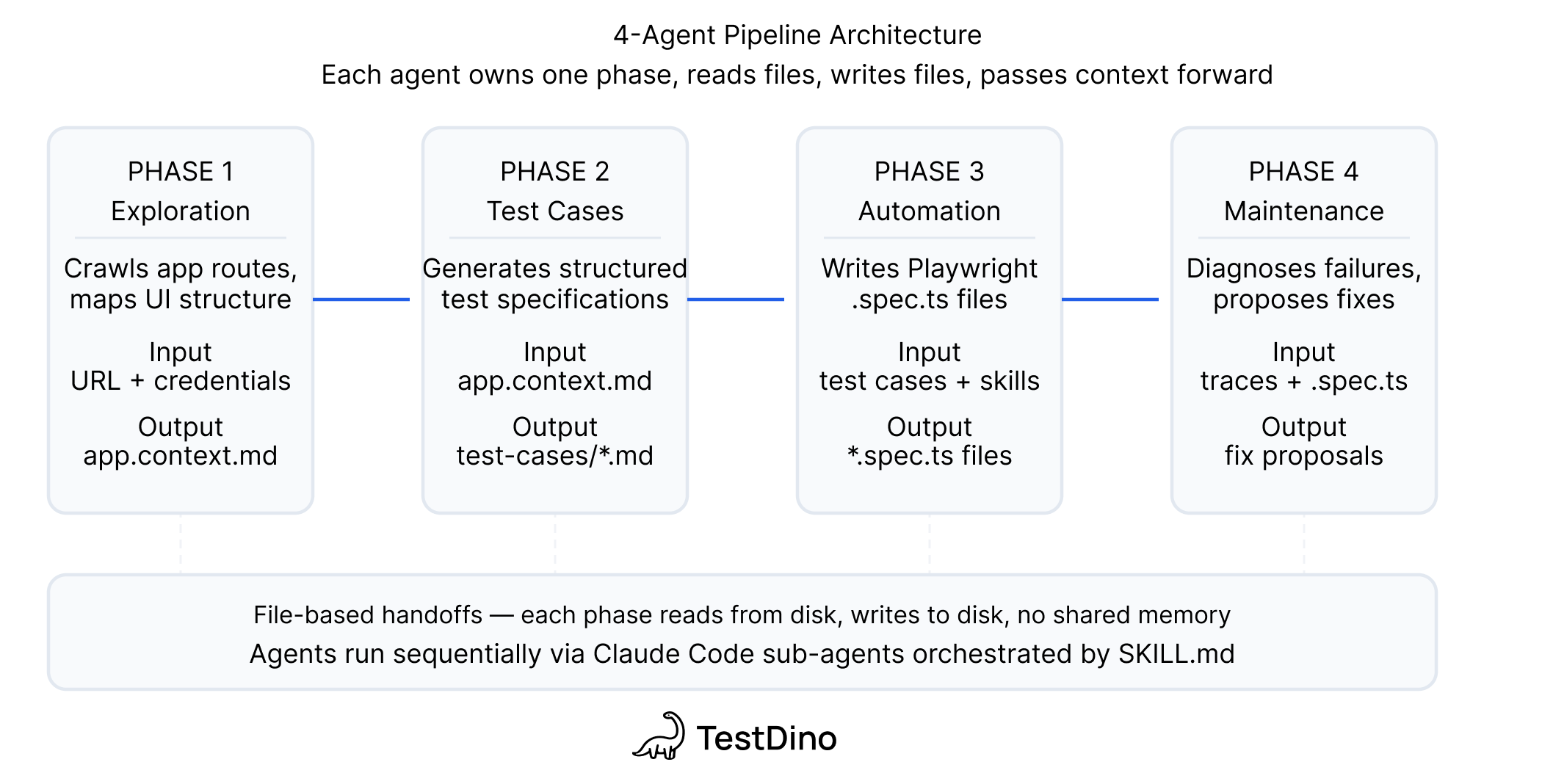
The pipeline has four agents, each responsible for one job, each passing structured output to the next through files on disk with no shared memory and no API calls between them. Each agent also feeds back into the pipeline's living documentation: the Exploration Agent creates and updates app.context.md with product context it discovers, adds detailed JSDoc blocks to every page object it touches, and the TestDino Playwright Skills enforce consistent patterns (locator strategy, auth handling, Page Object Model structure) across all generated code.

Agent Job Input Output
Exploration Understand the app Docs + live app via Playwright CLI + codebase Updated app.context.md + per-feature JSDoc in page objects
Test Case Generation Decide what to test Page object context + JSDoc + existing manual test cases Per-feature test case files with steps, preconditions, expected results
Automation Write the Playwright scripts Test case files + live app + Playwright Skills Page objects + spec files + test results
Maintenance Diagnose and fix failures Failing test output + page objects + TestDino reports Fix proposals or bug reports

4-Agent Pipeline Architecture

Note: Each agent runs as a standard Claude Code session. The "intelligence" isn't in the model; it's in the context you provide. Without app.context.md, JSDoc, and Playwright Skills, you get generic scripts. With them, you get tests that match your product's actual behavior.

Tip: If you're using Playwright's built-in agents alongside this pipeline, give the Planner a seed.spec.ts file that handles global setup (auth, cookies, base URL). Playwright's Planner agent performs significantly better with a seed test because it doesn't waste tokens rediscovering how to log in on every run. In our pipeline, the Exploration Agent's app.context.md and storageState setup serve the same purpose: they front-load the boilerplate so the downstream agents can focus on the actual test logic.

What the Claude Code agents actually read

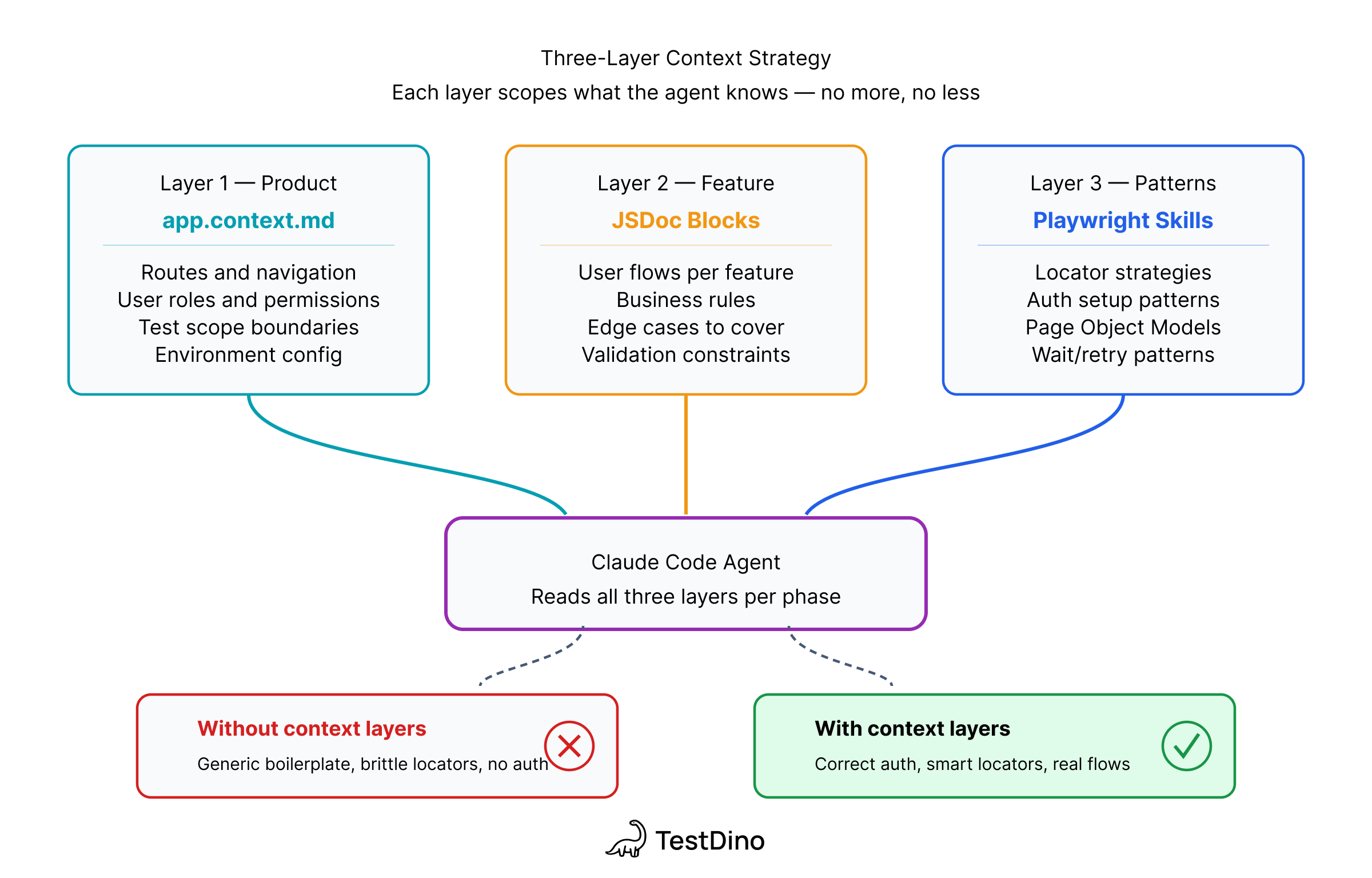
The agents are standard Claude Code, and the differentiator is what you feed them. Every agent gets context from three sources that most AI testing setups skip entirely.

3 Layer Context Strategy

app.context.md is your product context: what the app does, who owns what, and what's in scope versus what isn't, so the agent knows it's working with a test reporting platform that has 4 user roles before it writes a single selector. The Exploration Agent creates this file on its first run and updates it whenever the app's structure changes (routes, roles, features, known limitations), so subsequent agents always start with a current picture.

Per-feature JSDoc blocks sit at the top of each page object and contain routes, user flows, permission rules, and known edge cases, which means that when the Automation Agent reads api-keys.page.ts, it already knows the token is clipboard-only and that only Owner or Admin roles can create keys. The Exploration Agent populates these as it discovers each feature, adding details like form behavior, conditional logic, and server-side validations that the accessibility tree won't reveal.

TestDino Playwright Skills are curated markdown guides that load into the agent's context and enforce production-ready patterns like getByRole and getByTestId locators instead of CSS selectors, proper storageState auth handling, auto-waiting assertions, and Page Object Model structure. Without the Skill loaded, Claude generates valid Playwright code; with it loaded, Claude generates code that follows the same conventions your team would write by hand.

tests/app.context.md

tests/app.context.md
# tests/app.context.md - example for TestDino
## What this app does
TestDino is a Playwright-focused test reporting platform.
Teams upload results; TestDino classifies failures with AI,
detects flaky tests, and groups errors by root cause.
- Core workflows: upload test runs, view AI failure classification,
  triage flaky tests, manage API tokens, configure projects
- User roles: Owner, Admin, Member, Viewer
- Auth: email/password at /auth/login
- Scope: authentication, dashboard, test run viewer, API tokens,
  member invitations, permission enforcement
- NOT in scope: billing/Stripe, Google OAuth

tests/pages/api-keys.page.ts

tests/pages/api-keys.page.ts
// tests/pages/api-keys.page.ts - JSDoc block (abbreviated)
/**
 * @feature API Keys Management
 * @route /org_.../projects/.../settings?tab=api
 * @flows
 *   - Create key: "Generate Key" → dialog → "Create API Key"
 *     → token displayed on screen → copy to clipboard
 *   - Rotate key: row action → dialog → "Rotate API Key"
 *     → token copied directly to clipboard (not shown in UI)
 * @rules
 *   - Only Owner and Admin can create/rotate/delete
 *   - Token prefix: trx_ (use for regex matching)
 *   - Create: token visible in response dialog
 *   - Rotate: token clipboard-only, use API interception
 */
export class ApiKeysPage { ... }

Tip: The JSDoc captures what the DOM won't show you: clipboard behavior, permission rules, server-side validation. If the agent can discover something from the accessibility tree on its own, you don't need to document it, so the best approach is to start minimal and add detail only where the agent gets stuck.

Why 4 agents instead of 1 for AI test automation

Single Agent vs Multi Agent

Context windows are finite, and a single agent holding docs, DOM snapshots, test cases, scripts, and failure traces will either lose information mid-session or burn tokens on context it doesn't need right now, so four agents means each one gets a focused context window with only the information relevant to its job.

This also gives you a practical benefit: if the UI changed but business logic stayed the same, you can skip exploration and re-run automation, and if you're adding a new feature to existing pages, you can run only the Test Case and Automation agents without repeating the whole pipeline.

There's a design principle at work here too. Anthropic's engineering team found that agents confidently praise their own work, even when the output is mediocre, and their recommendation is to separate the agent doing the work from the agent evaluating it, which is exactly what our pipeline does, where the Automation Agent writes tests, the Maintenance Agent evaluates failures, and a human makes the final call on both.

Tip: Research on multi-agent test generation (AgentCoder, 2024) confirms that separating code generation from test validation improves accuracy, with multi-agent setups outperforming single-agent approaches across benchmarks. The same principle drives our pipeline.

How handoffs work

Every handoff is a file on disk: the Exploration Agent writes app.context.md and JSDoc blocks, the Test Case Agent reads those and writes structured test case documents, the Automation Agent reads the test cases and writes .spec.ts files, and the Maintenance Agent reads failing test output alongside the page objects to produce fix proposals.

There's no shared memory and no orchestrator: you can stop between any two phases to review the output, edit it, and resume whenever you're ready, even in a different terminal session on a different day, because the files themselves are the API.

Playwright test generation AI: how it works in practice

We tested the pipeline on TestDino itself: log in, navigate to a project, create or rotate an API key, upload a test report via CLI, and verify the uploaded data in the UI.

This workflow is a hard test for any AI agent because it crosses browser and CLI boundaries, involves conditional logic (create a key if one doesn't exist, rotate it if it does), and requires two different token-capture strategies depending on the path: creation displays the token on screen, while rotation copies it directly to the clipboard without showing it in the UI.

Example 1: Playwright tests for an API key workflow

Here's the full prompt we gave the Automation Agent: 20 lines, no selectors, no step-by-step blueprints, no code snippets:

automation-prompt.txt
Write a Playwright test suite for this workflow. Use Page Object Model.
App: https://app.testdino.com
Login: [credentials from env vars]
All tests run serially. Token from test 2 must be available to test 3.
Test 1: Happy path login
Test 2: Create or rotate an API key named "e2e-test"
- If "e2e-test" does not exist: create it, capture token
- If it exists: rotate it, capture new token
- Token is only shown once after create/rotate
Test 3: Upload test report and verify in TestDino
- Upload: npx tdpw upload ./playwright-report --token=<TOKEN>
  --environment="staging" --tag="e2e-pipeline" --json
- Verify test case names, pass/fail counts in UI

The agent explored the live app using Playwright CLI, discovered selectors from the accessibility tree, and generated 3 page objects (login.page.ts, api-keys.page.ts, test-run.page.ts), 1 spec file with test.describe.serial(), and auth setup using storageState.

The hardest part of this test was token capture, because the two journeys work differently. During key creation, the token is generated and displayed on screen in the response dialog, so the agent reads it directly from the visible UI. During key rotation, the token isn't displayed anywhere; the app copies it directly to the clipboard and shows a "Copied!" toast notification. The agent handled creation without trouble, but for rotation it needed a different approach and solved it with API response interception using the promise-first pattern, registering a listener before the click and extracting the token from the response body:

api-keys.page.ts
async rotateKey(namestring): Promise<string> {
  // Find the key row and trigger rotation
  const row = this.page.getByRole('row', { name });
  await row.getByRole('button', { name'Rotate' }).click();
  await expect(this.rotateDialog).toBeVisible();
  // Register listener BEFORE confirming rotation
  const responsePromise = this.page.waitForResponse(
    (resp) => resp.url().includes('/api-key')
      && resp.request().method() === 'PUT',
  );
  await this.confirmRotateButton.click();
  const response = await responsePromise;
  const body = await response.json();
  return body.data.token;
}

Note: The creation flow also uses the page.waitForResponse pattern even though the token is visible, because reading from the API response is more reliable than parsing dialog text that might change with UI updates. Both paths share the same interception structure with only the HTTP method differing (POST for create, PUT for rotate).

Example 2: What happens when you throw a large refactor at the pipeline

We also tried the pipeline on something substantially bigger: writing RBAC (Role-Based Access Control) permission tests from scratch for a feature branch that moved permissions from project-level to organization-level inheritance across 207 file changes, covering 4 roles (Owner, Admin, Member, Viewer) and 8 serial tests.

The result was mixed. Around 40% of the tests required significant back-and-forth with the agent: manual corrections to permission logic and handholding through multi-user session handoffs. Even when we divided the work into phases (one role at a time, one feature area at a time), the agent spent significantly more time and tokens trying to figure out which of the 207 changed files were actually relevant to the tests it was writing. It could not properly plan the mapping between code changes and test coverage on its own and needed manual intervention to point it at the right files.

The lesson: automate tests alongside development, not after a massive refactor. When the diff is small and focused, the agent can reason about what changed and what to test. When it is staring at 200+ file changes across a cross-cutting concern like permissions, it tries to stay token-efficient by guessing at permission rules and test boundaries instead of reading every file, which means it spends significantly more time debugging incorrect assumptions than it would have spent reading the code properly. The better approach is to write tests for each feature area as it lands, while the change set is still small enough for the agent to handle without guessing.

Where Claude Code got stuck and what it cost

Not everything worked on the first try, and every place the agent looped was a place where the answer wasn't in the DOM or the codebase but in someone's head. Runs used Claude Code's default workspace model; token counts are relative (fresh vs. cached context, CLI vs. MCP), not a dollar estimate.

Stuck point Root cause What we told the agent
Rotation token not in UI Clipboard-only on rotate path "The token isn't rendered; intercept the API response instead"
Over-reading files Model reads full files, not sections No prompt fix; restructured files to be smaller and focused
Create vs. rotate confusion Ambiguous conditional check "Check whether the key name already exists in the table"
Wrong CLI flags Non-standard tdpw syntax Pasted the exact npx tdpw upload command with all flags
Token sharing across tests Serial test data dependency "Use test.describe.serial() and write the token to a shared fixture"

Standard Playwright patterns like login, form fill, navigation, and assertions worked on the first try, while non-obvious patterns needed a sentence or two of human guidance.

Two token figures worth noting from the API key run:

  • Session total: 110k of the 200k context window (55%). This is the rolling conversation size at one snapshot.
  • Single file read: 137.9k tokens (69%). One tool call that read a large file. This isn't a separate session total; it's the cost of a single read operation against the same 200k limit, which is why the percentage looks higher than the session figure.

The costliest loop was the clipboard token on the rotation path: the agent tried reading visible text, scanning for a modal, and re-clicking the rotate button across three attempts before we added one sentence of guidance, after which it solved the problem immediately.

Caching exploration results like app.context.md and page objects with JSDoc, then skipping phases you don't need, cuts token usage roughly in half on subsequent runs, bringing total wall-clock time to about 15 minutes including human interventions compared to one to two hours writing the same tests by hand.

Results upload to TestDino with npx tdpw upload, which shows pass/fail trends across runs, flags flaky tests, and classifies failures as code bugs, UI changes, or unstable tests.

What we learned about AI test automation

These lessons come from our own experimental runs combined with patterns that Redditors, Anthropic's engineering team, and academic researchers have documented independently. The overlap gives us confidence these aren't one-off flukes.

1. Non-standard workflows need precise instructions.

  • Custom CLIs, clipboard-only patterns, conditional logic: if it's not a standard Playwright pattern, tell the agent how it works.
  • You don't need step-by-step selectors (a 20-line prompt worked for us), but you need to flag the non-obvious behaviors.
  • Anthropic's own guidance on writing tools for agents confirms this: agents perform best when tool descriptions are specific and edge cases are documented upfront.

2. Put feature context in page object JSDoc, not separate files.

  • The agent already reads the page object when automating or fixing tests, so a JSDoc block at the top means zero extra file reads and zero wasted context. Update the JSDoc whenever the feature changes; if the agent encounters behavior the JSDoc doesn't describe, that's your signal to add it.

3. Test cases before code prevents wasted automation.

  • Anthropic calls this a "sprint contract": agree on what "done" looks like before writing code. Our Test Case Agent produces structured cases organized by feature, and a human reviews the plan before the Automation Agent spends tokens writing code. TestForge (Jain & Le Goues, 2025) validated this approach, showing feedback-driven generation outperforms single-shot generation.
  • If you already have manual test cases in a test management platform, feed them to the Test Case Generation Agent so it knows what's already covered and focuses on gaps instead of duplicating coverage. TestDino's MCP server supports this out of the box.

4. Expect one to two fix iterations per complex test.

The login test passed immediately, but the API key test needed two rounds of fixes for table parsing and token capture, each taking only minutes, because the value isn't zero-iteration perfection but rather that the entire fix cycle takes minutes instead of hours.

When debugging AI-generated failures, use Playwright's Trace Viewer to see exactly where the test diverged from expected behavior, then send the trace context to the agent for a targeted fix.

5. Use delta mode after the first run.

  • Run git diff main --name-only and feed only the changed files to the Exploration Agent so it updates affected page objects. Full pipeline on day one, incremental updates on every branch after.

AI test automation workflow: what works well (CRUD, forms, login, navigation) vs what struggles (canvas, iframes, WebSocket, animations) with Playwright agents

6. No silent auto-fixes: humans merge the diff.

  • There are no silent auto-fixes. If a button disappeared because of a real bug and an auto-fixer silently switches to a different element, the test "passes" while the actual bug goes undetected.
  • This isn't theoretical; an AI agent recently made news for writing Playwright tests that secretly patched the application at runtime so they would pass. The whole point of a human gate is to prevent exactly that.
  • Research on AI agent evaluation shows that building in mechanisms to intercept or override the agent's decisions is essential for high-stakes automation.

7. Keep the Playwright Skill file slim.

  • Our Skill consumed just 713 tokens (under 1% of context). Load only the Skill packs relevant to the current phase; full-file README dumps waste thousands of tokens on content the agent never references.

8. Before merging any AI-generated test, run this checklist.

  • No CSS/XPath selectors; use getByRole, getByLabel, getByText, getByTestId only
  • No hardcoded waits like page.waitForTimeout(); use auto-waiting assertions instead
  • No leftover page.pause() or console.log statements
  • No hardcoded credentials; pull from environment variables
  • No tests that depend on previous test data without cleanup
  • Run the suite with --repeat-each=3 to catch flaky behavior before it reaches CI

9. Know where agents work well and where they don't.

  • Works well: CRUD apps, form-heavy workflows, predictable UI patterns, and anything Playwright can target with semantic locators like getByRole and getByText. These are the cases where AI-generated Playwright tests deliver the most value.
  • Struggles with: canvas-based UIs, heavy CSS animations, third-party iframes (Stripe, reCAPTCHA), and real-time WebSocket content that changes without user interaction.
  • Selector rot (when UI changes break test locators) is still the #1 maintenance headache, and while agents can fix broken Playwright tests faster than humans for simple selector changes, they can't reason about whether the UI change was intentional.

10. Document your system boundaries upfront.

  • If your app depends on microservices, third-party APIs, or custom CLIs, the agent won't infer how they work from the UI alone. Our npx tdpw upload command tripped the agent up because the flags aren't standard Playwright, so it needed the exact syntax pasted into the prompt.
    • The same applies to any non-obvious dependency: if your tests need a running backend, a seeded database, a mock server for a payment provider, or a specific Docker Compose setup, document it in app.context.md or the agent will waste tokens discovering it by trial and error.
    • Rule of thumb: if a new developer on your team would need to ask someone how to set it up, the agent needs to be told too.

Build your own Playwright AI testing pipeline

Below is the project scaffold and the thinking behind it, so you can build a similar pipeline for your own app. For an example of how we structure the skill files themselves, see our Playwright Skills walkthrough.

Project scaffold: copy this and you're ready to run:

terminal
your-project/
├── .claude/
│   └── skills/                        # The "Brain"
│       ├── SKILL.md                   # Router: detects phase from user intent
│       └── references/
│           ├── 01-exploration.md        # Phase 1: docs + live app + codebase
│           ├── 02-test-cases.md         # Phase 2: structured test cases per feature
│           ├── 03-automation.md         # Phase 3: convert to Playwright scripts
│           └── 04-maintenance.md        # Phase 4: diagnose and fix failures
├── tests/
│   ├── context/                       # app.context.md & API maps
│   │   └── app.context.md
│   ├── cases/                         # Structured test cases (Phase 2 output)
│   ├── pages/                         # Page objects with JSDoc (Phase 1 + 3 output)
│   ├── e2e/                           # Final Playwright .spec.ts files
│   └── results/                       # Failure artifacts for the Maintenance Agent
│       ├── last-run.json              # JSON test results (--reporter=json)
│       └── traces/                    # Extracted trace logs

Add these to your playwright.config.ts so failure artifacts land where the Maintenance Agent can find them automatically:

playwright.config.ts
import { defineConfig } from "@playwright/test";
export default defineConfig({
  outputDir"./tests/results",
  reporter: [
    ["html"],
    ["json", { outputFile"./tests/results/last-run.json" }],
  ],
  use: { trace"retain-on-failure" },
});

After a failed run, extract the trace so the agent can read it as text:

terminal
npx playwright show-trace --json tests/results/traces/*.zip > tests/results/traces/failure-log.json

Because tests/results/ is inside the project scaffold, the Maintenance Agent automatically picks up last-run.json (which tests failed, with error messages and stack traces) and failure-log.json (the full trace timeline) when you ask it to diagnose failures. No manual copy-pasting, no describing the error in your own words.

For CI/CD failures, local files aren't enough: your test results live on a remote server, not in the project directory. Use a test reporting platform that your agent can query directly:

  • TestDino provides an MCP server that the Maintenance Agent can call to fetch failure logs, error traces, and flaky test history from CI runs. Instead of downloading artifacts manually, the agent queries TestDino's MCP for the exact failure context it needs.
  • Currents and Allure Report aggregate CI test results with history, categorization, and trend tracking, giving you a centralized view of what's failing across branches and environments.

The pattern is the same regardless of which platform you use: CI runs upload results to the reporting tool, and the Maintenance Agent fetches what it needs from there instead of relying on local artifacts that don't exist after a remote pipeline run.

Checklist for building your own:

  1. Start with a SKILL.md router. Route user intent to the correct phase ("explore" → Phase 1, "fix failing test" → Phase 4). Keep it under 120 lines; ours is 114 lines and consumes just 713 tokens.
  2. Write an app.context.md for your product. What the app does, core workflows, user roles, auth method, what's in scope and what's not. Keep it to 30-40 lines.
  3. Build JSDoc blocks into your page objects. Use @feature, @route, @rules, @flows, @notes. Focus on what the DOM won't reveal. Start minimal, add detail where the agent gets stuck.
  4. Keep each reference file focused on one phase. A monolithic "do everything" file wastes tokens on context the agent doesn't need for the current task.
  5. Add cross-phase rules. Always confirm before acting, never auto-commit, don't guess (verify by clicking), ask about auth early, and never propose automated fixes without human review.
  6. Include framework-specific gotchas. Next.js hidden route announcer <div role="alert">, Radix/shadcn portal rendering, dynamic URL predicate functions. These save the agent from rediscovering known issues.

Tip: Develop skill files iteratively: work through a testing task with the agent, notice where it gets stuck, and add the guidance it needed to the relevant reference file. After 3-4 sessions, your skill files will cover most common pitfalls.

Token-saving tips: once your pipeline is running, these keep costs down:

  • Diff-only context: Instead of feeding the full codebase, run git diff main...HEAD > temp_diff.txt and tell the agent: "Focus only on changes in this diff." This is especially useful for the Exploration Agent on feature branches.
  • Structured results over raw logs: The JSON reporter + trace extraction above gives the agent exactly what it needs in a parseable format. Raw terminal output or HTML reports waste tokens on formatting the agent can't use efficiently.

Conclusion

The pipeline works well for focused features where the agent has clear context: a 20-line prompt produced a working API key test suite in about 15 minutes. But it struggles with large, cross-cutting changes. Our RBAC experiment showed that even with phased runs, the agent spends more time guessing and debugging than it saves when the diff is too big to reason about.

The practical takeaway: automate tests alongside development, not after. Run the pipeline on each feature area as it lands, while the change set is small and the context is clear. Build up your app.context.md and JSDoc blocks iteratively, adding detail where the agent gets stuck. After 3-4 iterations, the context layer covers most non-obvious behavior and every subsequent run gets faster.

The scaffold, prompts, and patterns in this post are enough to get your first suite running. Once it is, upload results with npx tdpw upload and use TestDino to track what's passing, what's flaky, and where the AI-generated tests are actually catching bugs.

Start tracking AI-generated test results
Upload your first Playwright run with npx tdpw upload and see what's passing, what's flaky, and where the pipeline is catching real bugs.
Try TestDino Free CTA Graphic

FAQs

What is agentic QA testing?
Specialized agents split exploration, test cases, automation, and maintenance instead of one monolithic prompt. See the 4-agent pipeline for the full architecture.
Can AI replace QA engineers?
No, and the teams that tried learned this the hard way. Agents handle the repetitive parts (generating test cases, writing Playwright scripts, proposing fixes), while humans make the judgment calls about business logic, edge cases, and risk.
What's the difference between Playwright MCP and CLI?
MCP pushes rich browser state into context; CLI writes artifacts to disk so the model reads slices. We standardize on CLI for this pipeline; details in the CLI vs MCP section and our Playwright CLI deep-dive.
How accurate are AI-generated Playwright tests?
Standard patterns (login, forms, navigation) pass on the first attempt. Every failure in our experiments was in a non-obvious pattern (clipboard behavior, conditional logic, CLI syntax) that needed a sentence or two of human guidance. Research from Monteiro et al. (2025) found Claude achieved a 70.1% success rate without structured app context; with it, first-run accuracy improves significantly.
Should I use Playwright codegen or Playwright Agents?
Codegen for fast linear recordings; Agents or a custom pipeline for permissions, branching logic, or browser+CLI flows (often both).
Are AI-generated Playwright tests flaky?
Less than you'd expect. Agents default to semantic locators (getByRole, getByText) that survive UI refactors better than CSS selectors. The main risks are race conditions and hardcoded waits, which the Playwright Skills enforce against. Run --repeat-each=3 to catch flaky behavior before CI, and feed Trace Viewer output to the Maintenance Agent for targeted fixes.
Does this pipeline work in CI/CD?
The pipeline generates tests locally with human review between stages, but the tests themselves are standard Playwright specs that run anywhere Playwright runs: GitHub Actions, GitLab CI, Jenkins. When CI tests fail, upload results to a test reporting platform like TestDino with npx tdpw upload so the Maintenance Agent can query failures directly instead of parsing raw CI logs.
Pratik Patel

Founder & CEO

Pratik Patel is the founder of TestDino, a Playwright-focused observability and CI optimization platform that helps engineering and QA teams gain clear visibility into automated test results, flaky failures, and CI pipeline health. With 12+ years of QA automation experience, he has worked closely with startups and enterprise organizations to build and scale high-performing QA teams, including companies such as Scotts Miracle-Gro, Avenue One, and Huma.

Pratik is an active contributor to the open-source community and a member of the Test Tribe community. He previously authored Make the Move to Automation with Appium and supported lot of QA engineers with practical tools, consulting, and educational resources, and he regularly writes about modern testing practices, Playwright, and developer productivity.

Get started fast

Step-by-step guides, real-world examples, and proven strategies to maximize your test reporting success