Top 10 Playwright Alternatives You Should Know in 2026
Can’t use Playwright for every scenario? Here are 10 tested alternatives with honest pros, cons, and side-by-side comparisons for 2026.

Looking for the best Playwright alternatives in 2026? You are not alone. Playwright dominates browser automation, but it cannot cover every testing scenario - native mobile apps, codeless workflows, and polyglot enterprise stacks all sit outside its reach. That is exactly why Playwright alternatives exist.
This guide compares 10 proven Playwright alternatives head-to-head. For each tool you get real pros, cons, language support, and the exact use case where it beats Playwright. Whether you need native mobile testing, plain-English test authoring, or a framework your Java team can adopt tomorrow, one of these Playwright alternatives will fit.
Why teams explore Playwright alternatives in 2026
Playwright is a strong framework. It has 85,000+ GitHub stars, handles cross-browser testing across Chromium, Firefox, and WebKit, and ships with built-in auto-waiting.
But "strong" does not mean "universal." Here are the situations where teams genuinely need a different tool.
Native mobile testing is not covered: Playwright emulates mobile viewports. It does not automate native iOS or Android apps. If your product is a mobile app, you need Appium or Maestro.
Your team does not use JavaScript or TypeScript: While Playwright supports Python, Java, and C#, its richest ecosystem (plugins, community examples, AI integrations) lives in the JS/TS world. Enterprise teams using Ruby, Go, or other languages sometimes find Selenium a smoother fit.
You want codeless test creation: Not every QA team writes code. Platforms like testRigor and Virtuoso let manual testers contribute to automation without learning a programming language.
A Playwright alternative is any testing framework or platform that replaces or supplements Playwright for end-to-end testing, browser automation, or cross-browser validation in your CI/CD pipeline.
Quick comparison: 10 best Playwright alternatives
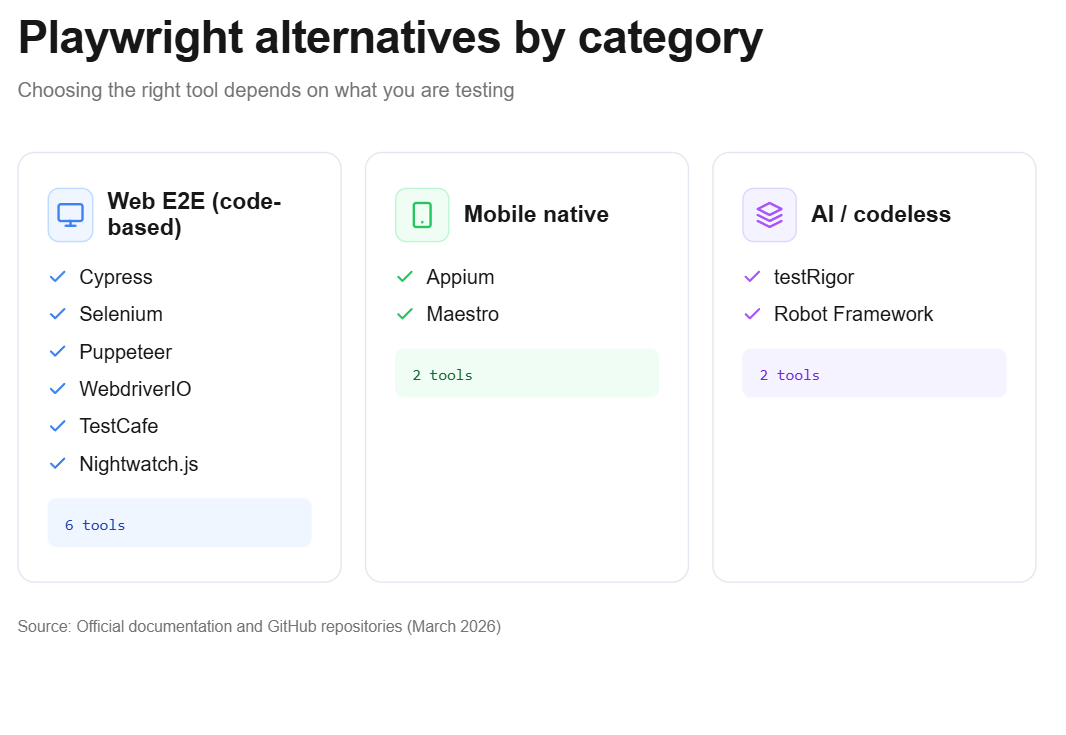
Before diving into each tool, here is a side-by-side overview. This table covers the core differentiators that matter during evaluation.
| Tool | Best For | Language Support | GitHub Stars | Open Source? |
|---|---|---|---|---|
| Cypress | Frontend-heavy JS teams | JS/TS | ~49.6K | Yes (MIT) |
| Selenium | Enterprise, polyglot stacks | Java, Python, C#, JS, Ruby, Kotlin | ~34.2K | Yes (Apache 2.0) |
| Puppeteer | Chrome-focused automation | JS/TS | ~94K | Yes (Apache 2.0) |
| WebdriverIO | Unified web + mobile JS testing | JS/TS | ~9.8K | Yes (MIT) |
| TestCafe | Predictable regression testing | JS/TS | ~9.9K | Yes (MIT) |
| Nightwatch.js | Selenium teams wanting simpler API | JS/TS | ~11.3K | Yes (MIT) |
| Appium | Native mobile app testing | Java, Python, JS, C#, Ruby | ~19K | Yes (Apache 2.0) |
| Maestro | Fast mobile UI smoke tests | YAML | ~7.5K | Yes (Apache 2.0) |
| testRigor | Codeless, plain-English testing | Plain English | N/A (SaaS) | |
| Robot Framework | Keyword-driven, low-code teams | Python (keyword syntax) | ~10.5K | Yes (Apache 2.0) |

Tip: GitHub stars reflect community interest, not production reliability. A tool with 9K stars can outperform one with 90K in the right context. Always evaluate against your actual CI/CD environment and team expertise.
Detailed breakdown of each Playwright alternative
1. Cypress
Cypress runs tests inside the browser. That architectural choice gives it real-time reloading, time-travel debugging, and a developer experience that many frontend engineers prefer.
Pros
-
Excellent debugging with DOM snapshots at every step
-
First-class TypeScript support out of the box
-
Strong plugin ecosystem (cypress-axe, cypress-visual-regression)
Cons
-
Cannot automate multi-tab or cross-origin scenarios
-
Parallel execution requires a paid Cypress Cloud subscription
-
WebKit/Safari testing is not natively supported
Best for: Frontend teams already deep in the JavaScript ecosystem who prioritize debugging speed over cross-browser coverage.
2. Selenium
Selenium is the oldest open-source browser automation framework, and according to Selenium market share data, it still powers millions of enterprise test suites globally.
Pros
-
Supports the widest range of languages (Java, Python, C#, Ruby, Kotlin, JS)
-
Selenium Grid enables distributed execution at scale
-
Selenium 4's BiDi protocol support has improved speed
Cons
-
Historically higher flakiness due to the WebDriver protocol's HTTP layer
-
Requires more boilerplate setup compared to modern frameworks
-
No built-in auto-waiting; explicit waits are manual
Best for: Large enterprises with polyglot engineering teams, legacy application stacks, or existing Selenium Grid infrastructure.
3. Puppeteer
Puppeteer gives you direct access to Chrome DevTools Protocol (CDP). It was built by the Chrome team at Google, and that tight integration makes it excellent for tasks that go beyond E2E testing.
For a deeper comparison, see Puppeteer vs Playwright.
Pros
-
Deep control over Chrome internals (network interception, performance profiling, PDF generation)
-
94K GitHub stars reflect a massive community
-
Lightweight setup for Chrome-only workflows
Cons
-
Does not support Firefox or WebKit natively for testing
-
No built-in test runner or assertion library
-
Not designed for multi-browser E2E suites
Best for: Teams that need Chrome-specific automation like scraping, performance auditing, or screenshot generation.
4. WebdriverIO
WebdriverIO is a JavaScript-based automation framework that wraps both WebDriver and DevTools protocols. Its biggest strength is versatility.
Pros
-
Supports web (via Selenium or DevTools) and mobile (via Appium) under a single API
-
Rich plugin architecture with reporters, services, and visual testing integrations
-
Supports both synchronous and asynchronous execution
Cons
-
Configuration can be complex for beginners
-
Smaller community than Cypress or Selenium
-
Slower adoption of newer protocol features
Best for: JavaScript shops that need a single framework for both web and mobile test automation.
5. TestCafe
TestCafe uses a URL-rewriting proxy to inject test scripts into pages. This means it works without WebDriver or browser-specific binaries.
Pros
-
Zero-dependency setup (no browser drivers to install)
-
Built-in auto-waiting and smart assertion retry mechanism
-
Consistent, predictable test execution
Cons
-
Proxy architecture can cause issues with complex SPAs or WebSocket connections
-
Smaller community and plugin ecosystem compared to Cypress or Playwright
-
DevExpress (the maintainer) has reduced update frequency
Best for: Teams that need stable regression testing without browser driver management complexity.
Note: TestCafe's proxy-based architecture means it does not rely on WebDriver or CDP. This makes it more stable across browser updates but limits its ability to access browser-level APIs that Playwright and Puppeteer expose.
6. Nightwatch.js
Nightwatch started as a simple Selenium wrapper and has evolved into a more full-featured testing framework. It added native component testing and integrations with modern front-end frameworks.
Pros
-
Familiar API for teams with Selenium experience
-
Built-in component testing for React, Vue, and Angular
-
Clean, readable syntax with a fluent assertion API
Cons
-
Relies on WebDriver protocol (inherits its flakiness potential)
-
Slower execution compared to CDP-based tools
-
Community adoption has declined relative to Playwright and Cypress
Best for: Teams transitioning from Selenium who want a gentler learning curve within the same architectural model.
7. Appium
Appium is the industry standard for native and hybrid mobile app testing. Unlike Playwright's viewport emulation, Appium connects to actual device drivers (XCUITest for iOS, UiAutomator2 for Android).
Pros
-
True native mobile automation (system dialogs, biometrics, push notifications)
-
Supports cross-platform testing (iOS and Android) from a single codebase
-
Integrates with device clouds like BrowserStack and Sauce Labs
Cons
-
Complex setup with multiple dependencies
-
Test execution is slower than web-based frameworks
-
Higher maintenance burden as mobile OS versions update
Best for: Any team building native iOS or Android apps that need real device interaction.
8. Maestro
Maestro is the new kid on the block for mobile testing. It replaces complex Appium configurations with YAML-based test scripts that are readable by anyone.
Pros
-
Tests are written in YAML, not code
-
Built-in flakiness handling and retry logic
-
Fast setup with minimal configuration
Cons
-
Limited support for complex conditional logic or data manipulation
-
Primarily focused on mobile (web support is still maturing)
-
Smaller enterprise adoption compared to Appium
Best for: Mobile teams that want fast smoke tests and happy-path coverage without the Appium learning curve.
9. testRigor
testRigor lets you write tests in plain English. "Click on the login button" is literally how a test step looks. It handles web, mobile, and API testing from a single platform.
Pros
-
Non-technical team members can create and maintain tests
-
AI-powered self-healing that adapts to UI changes
-
Supports web, mobile (native/hybrid), and API testing
Cons
-
Proprietary platform (no open-source option)
-
Custom pricing makes it hard to evaluate cost upfront
-
Less control over execution details compared to coded frameworks
Best for: Organizations where manual testers or product managers need to contribute to automation without learning to code.
10. Robot Framework
Robot Framework uses a keyword-driven approach that makes tests look like structured English. Its extensibility through Python and Java libraries gives it surprising depth.
Pros
-
Keyword-driven syntax is readable by non-developers
-
Highly extensible with Python (SeleniumLibrary, BrowserLibrary)
-
Strong presence in embedded systems and IoT testing
-
Active open-source community
Cons
-
Execution speed is slower than native frameworks
-
Debugging experience is less polished than Cypress or Playwright
-
Requires understanding of keyword abstraction layers
Best for: Teams with diverse technical backgrounds who need readability and extensibility, especially in industries like automotive, healthcare, or IoT.
How to pick the best Playwright alternatives for your stack
Picking from available Playwright alternatives is not about features alone. It is about constraints.
Ask these questions before switching:
-
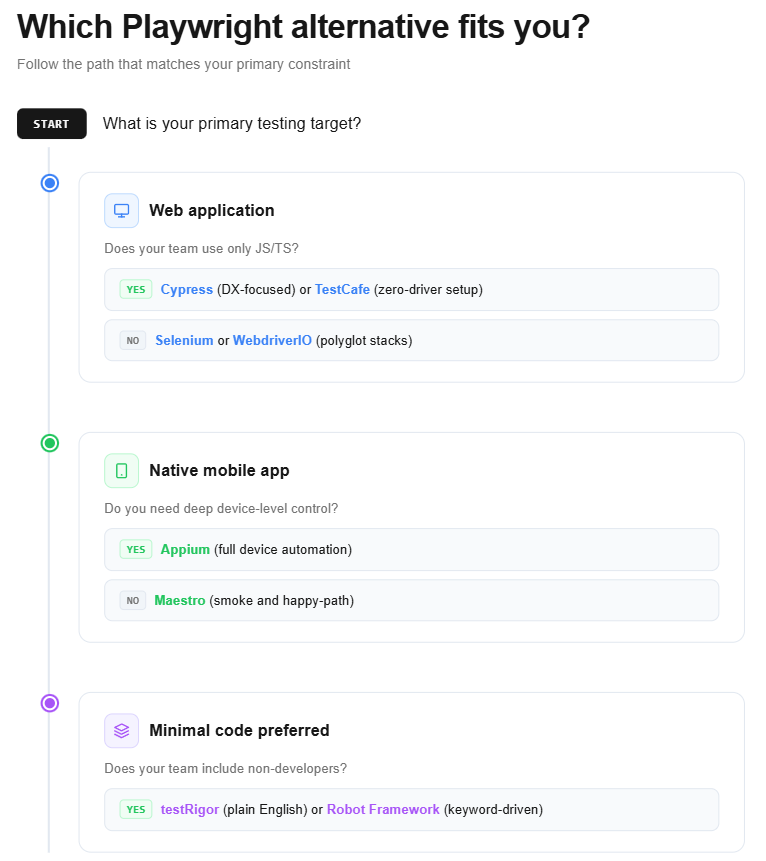
What platforms do you test? Web-only teams can stay in the Cypress/Selenium/Playwright ecosystem. Native mobile requires Appium or Maestro.
-
What languages does your team use? If your backend is Java and your QA writes Java, Selenium is a natural fit. If everyone writes TypeScript, Cypress or WebdriverIO work better.
-
How much maintenance can you afford? Flaky tests are a tax on every team. Tools with built-in auto-waiting and self-healing reduce that burden.
-
Do non-engineers need access? If product managers or manual testers should build tests, look at testRigor or Robot Framework.
-
What does your CI/CD pipeline look like? Some tools integrate more cleanly with GitHub Actions, Jenkins, or GitLab CI.
Tip: Do not choose a framework based on blog hype. Run a 2-week proof-of-concept with your actual application. Test it against your slowest page, your most complex user flow, and your CI environment. That gives you real data.
Playwright vs Cypress vs Selenium
These three tools dominate the testing framework market. Here is how they compare across the dimensions that matter most.
| Dimension | Playwright | Cypress | Selenium |
|---|---|---|---|
| Architecture | CDP/BiDi (direct) | In-browser (event loop) | WebDriver (HTTP) |
| Auto-waiting | Built-in | Built-in | Manual (explicit waits) |
| Multi-tab support | |||
| Browser engines | Chromium, Firefox, WebKit | Chromium-based | All major browsers |
| Parallel execution | Built-in (workers) | Paid (Cypress Cloud) | Selenium Grid |
| Language support | JS/TS, Python, Java, C# | JS/TS only | All major languages |
| Debugging | Trace Viewer, video, screenshots | Time-travel, DOM snapshots | Basic logging, screenshots |
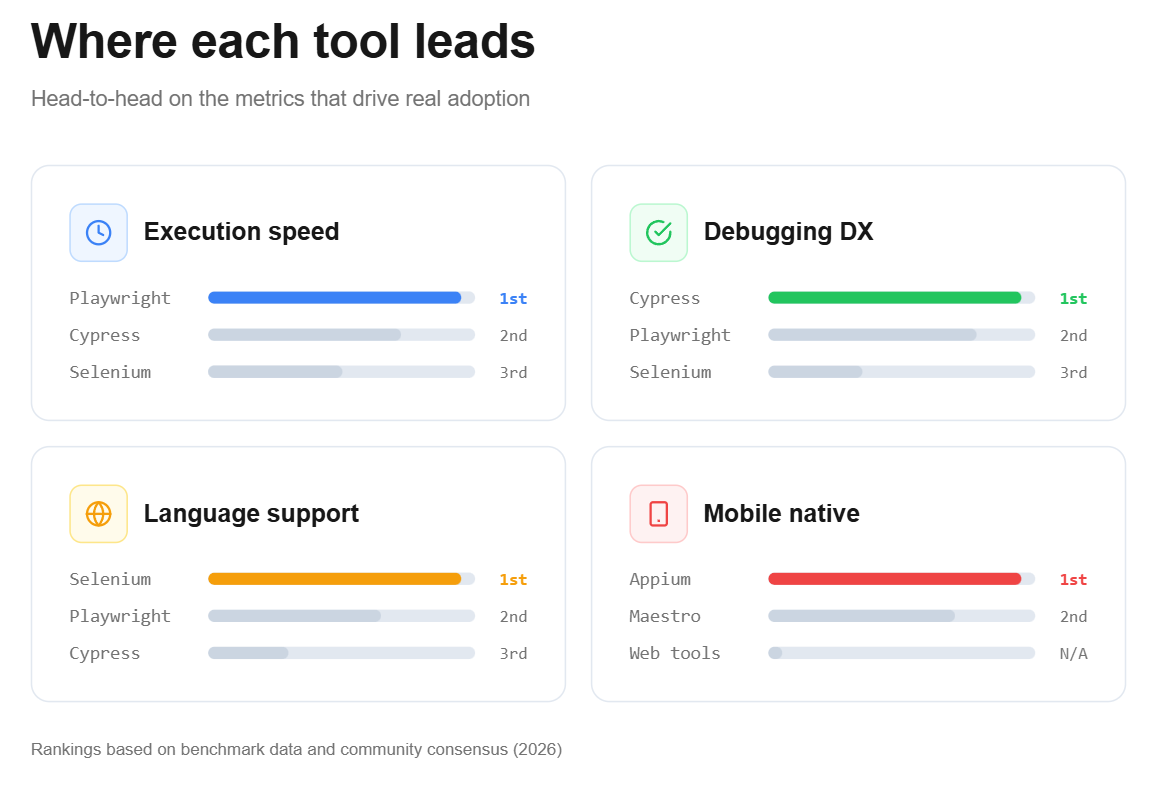
According to performance benchmarks of Playwright, Cypress, and Selenium, Playwright consistently shows the lowest execution times in parallel E2E suites. But benchmarks only tell part of the story. Cypress's time-travel debugging saves hours during test authoring, and Selenium's broad compatibility remains unmatched in regulated industries.
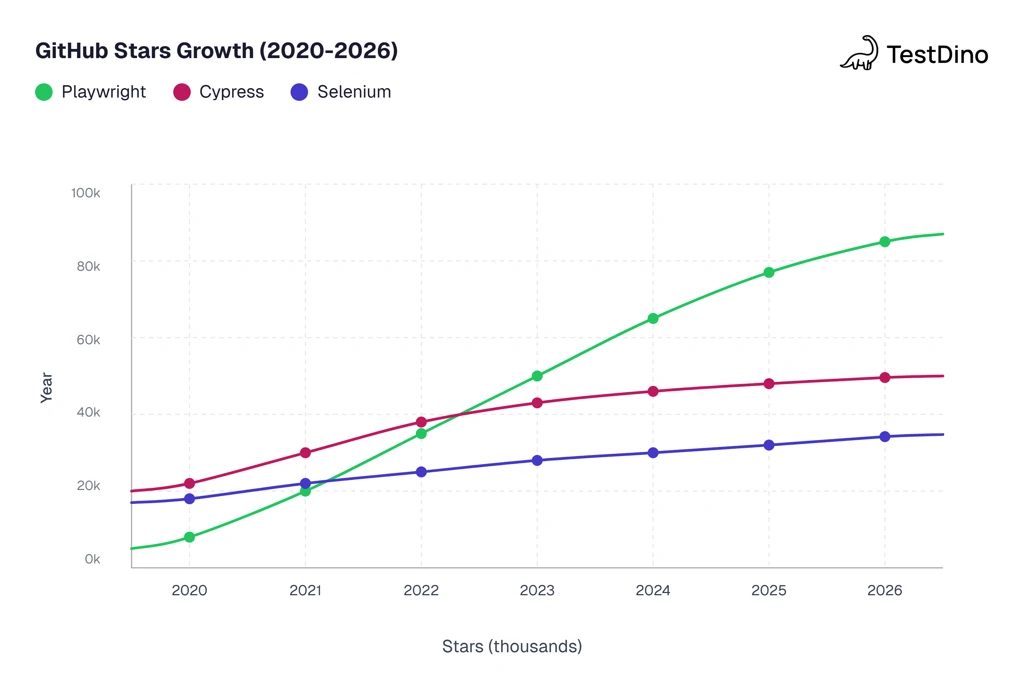
Source: GitHub star history via star-history.com (March 2026)
Where Playwright still wins
Playwright is not the tool you should abandon without reason. Understanding Playwright architecture explains why it leads in several areas.
Playwright wins at
-
Cross-browser testing with native WebKit support (the only OSS framework that covers Safari's engine)
-
Auto-waiting that eliminates most timing-related flakiness
-
Built-in trace viewer for debugging failed CI runs
-
Free parallel execution without paid cloud services
Playwright does not cover
-
Native mobile app automation (iOS/Android device-level interactions)
-
Codeless test creation for non-developer team members
-
Legacy browser support (IE11 and older)
-
Keyword-driven testing for teams that prefer readable, non-code test specs
What to watch for when switching to Playwright alternatives
Switching from Playwright to one of these Playwright alternatives is a significant engineering investment. Based on how teams using Playwright E2E testing typically evaluate migrations, here are the pitfalls to avoid.
Do not rewrite everything at once. Run your new framework in parallel on a small subset of critical flows. Keep the existing suite running until the new one proves itself over at least 2 sprint cycles.
Measure flaky test rates before and after. Flakiness is the single biggest cost driver in test maintenance. If your new framework does not reduce it, the migration is not worth the effort.
Check CI integration depth. Does the tool produce JUnit XML reports? Does it integrate with your existing reporting stack? TestDino, for example, supports AI-powered failure analysis for Playwright and Cypress suites, helping teams classify failures automatically.
Account for the learning curve. A tool that looks simple in a demo may have hidden complexity. Playwright best practices took teams months to standardize. The same will happen with any new tool.
Verify the test reporting pipeline. No matter which framework you pick, you need clear dashboards that show pass rates, flaky trends, and failure root causes across every CI run.
Conclusion: choosing from the best Playwright alternatives
Playwright is a leading E2E tool for good reason. Its speed, auto-waiting, and cross-browser coverage make it the default choice for most modern web projects.
But defaults are not universal solutions. Mobile-native testing, polyglot enterprise stacks, and codeless automation are real requirements that Playwright does not cover alone.
The 10 Playwright alternatives in this guide each solve a specific gap. Cypress excels at frontend debugging. Selenium handles enterprise diversity. Appium owns native mobile. testRigor removes the coding barrier entirely.
The right approach for most teams is not to pick one tool and force it everywhere. It is to match each tool to the constraint it handles best, and then make sure your test analytics give you visibility across all of them.
Test smart. Pick the tools that fit your reality.
FAQs

Jashn Jain
Product & Growth Engineer