Playwright Fixtures: The Complete Guide to Setup, Scope & Custom Test Helpers
Playwright fixtures are the backbone of reusable, maintainable test setup. This guide covers built-in fixtures, custom creation, scoping, and teardown.
Playwright fixtures are the mechanism that powers every { page } argument you have ever written in a test. They handle setup, provide resources through dependency injection, and clean up automatically when a test ends.
If you have been copy-pasting beforeEach blocks across files, fixtures are the structured alternative that scales.
The real pain starts when a single change in login flow means updating 40 different hook blocks. Or when a shared database connection is left open, causing flaky tests that pass locally but fail in CI with no clear reason.
This guide breaks down Playwright test fixtures from the ground up. You will learn what built-in fixtures do, how to build custom ones, how scoping controls their lifecycle, and which patterns keep large Playwright e2e test suites clean and fast.
Prerequisites: This guide targets Playwright v1.50 and later. All examples use TypeScript with @playwright/test. Run npm init playwright@latest to scaffold a new project if you are starting from scratch.
What are Playwright fixtures?
If you have used the { page } argument inside a Playwright test, you have already used a fixture. That one line tells the test runner to launch a fresh browser page, hand it to your test, and close it when the test ends.
Here is the simplest example:
import { test, expect } from '@playwright/test';
test('homepage loads', async ({ page }) => {
  await page.goto('https://example.com');
  await expect(page).toHaveTitle(/Example/);
});
The page variable is not created manually. Playwright's built-in fixture system spins it up, isolates it from other tests, and destroys it afterward. No setup block. No teardown block. Everything is encapsulated.
This pattern scales to any resource you need: database connections, API clients, authenticated sessions, or page object models. You define the logic once in a fixture, and every test that destructures that argument receives a fresh, isolated instance.
Note: Fixtures are lazy. If a test does not request a fixture by name, that fixture never runs. This keeps execution fast because only the exact dependencies for a given test are initialized.
Built-in fixtures every Playwright test already uses
Playwright ships with pre-configured fixtures that cover the most common testing needs. You do not need to install or import anything extra to use them.
Here is the complete list of built-in Playwright fixtures you will interact with regularly:
| Fixture | Type | What it provides |
|---|---|---|
| page | Test-scoped | An isolated Page instance for browser interactions. Created from a fresh BrowserContext per test. |
| context | Test-scoped | A BrowserContext instance. Useful when you need multiple pages or custom context settings. |
| browser | Worker-scoped | A shared Browser instance. Reused across tests in the same worker to avoid re-launching the browser. |
| browserName | Worker-scoped | A string (chromium, firefox, or webkit) indicating the current browser engine. |
| request | Test-scoped | An APIRequestContext for making HTTP requests without a browser. |
The page fixture is the one you will use in nearly every test. It handles launching a browser context, creating a page, and tearing everything down.
The browser fixture is worker-scoped, meaning it is created once per worker process. Playwright reuses it across multiple tests to save the overhead of launching a new browser. When you run tests with Playwright parallel execution, each worker gets its own browser instance.
The request fixture gives you a standalone HTTP client. It is useful for API setup tasks like creating test data before a UI test, or for dedicated API testing scenarios.

Tip: You can customize any built-in fixture through playwright.config.ts. Setting baseURL, viewport, or storageState modifies how the page and context fixtures behave without touching a single test file.
Why fixtures beat beforeEach hooks
If you are coming from Selenium or Cypress, you are used to writing beforeEach and afterEach blocks. They work, but they introduce structural problems as your test suite grows.
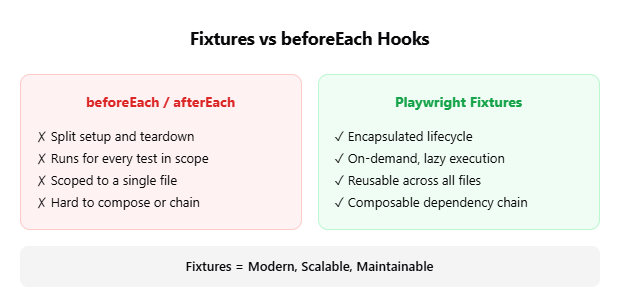
The Playwright documentation lists specific advantages that fixtures have over hooks. Here they are, with practical context:
- Encapsulation: With hooks, your setup lives in beforeEach and your cleanup lives in afterEach. That is two separate places for one logical concern. A fixture keeps both together in a single function, giving you exactly one place to update.
- On-demand execution: A beforeEach hook runs for every test in the file. Fixtures are lazy. If a test does not de-structure the fixture, it never executes. This matters when you have a file with 20 tests but only 3 need a database connection.
- Cross-file reusability: You cannot share a beforeEach across files without extracting it into a helper and calling it manually. Fixtures, once defined, work across your entire project through a single import.
- Composability: Fixtures can depend on other fixtures, forming a dependency chain. A todoPage fixture can depend on page, which depends on context, which depends on browser. The runner resolves the entire chain automatically.
- Flexible grouping: With hooks, you often wrap tests in test.describe blocks purely for setup reasons. Fixtures free you to group tests by their actual purpose instead.
In practice, teams that migrate from hook-heavy suites to fixtures report fewer test-ordering bugs and faster onboarding for new contributors. When test setup is declarative rather than procedural, there is less to trace through during debugging.
Here is a concrete before/after comparison. First, the hooks approach:
import { test } from '@playwright/test';
import { TodoPage } from './todo-page';
test.describe('todo tests', () => {
  let todoPage;
  test.beforeEach(async ({ page }) => {
    todoPage = new TodoPage(page);
    await todoPage.goto();
    await todoPage.addToDo('item1');
  });
  test.afterEach(async () => {
    await todoPage.removeAll();
  });
  test('should add an item', async () => {
    await todoPage.addToDo('my item');
  });
});
Now the same thing with a fixture:
import { test as base } from '@playwright/test';
import { TodoPage } from './todo-page';
export const test = base.extend<{ todoPage: TodoPage }>({
  todoPage: async ({ page }, use) => {
    const todoPage = new TodoPage(page);
    await todoPage.goto();
    await todoPage.addToDo('item1');
    await use(todoPage);
    await todoPage.removeAll();
  },
});
export { expect } from '@playwright/test';import { test } from './fixtures';
test('should add an item', async ({ todoPage }) => {
await todoPage.addToDo('my item');
});The fixture version is shorter, reusable in any file, and keeps setup and teardown together. As your suite grows to hundreds of tests, this difference compounds.
How to create custom Playwright fixtures
Import convention
All custom fixture examples below follow the same import pattern: import { test as base } from '@playwright/test';. This renames the default test object so you can extend it without shadowing the original.
Creating a custom fixture follows a three-step process:
- Define the TypeScript type for your fixture
- Extend the base test object with test.extend()
- Import your custom test in spec files
Here is a Playwright fixture example that creates an adminPage for tests that need an authenticated admin session:
import { test as base, Page } from '@playwright/test';
type AdminFixtures = {
  adminPage: Page;
};
export const test = base.extend<AdminFixtures>({
  adminPage: async ({ browser }, use) => {
    // Setup: create a new context with stored auth state
    const context = await browser.newContext({
      storageState: 'auth/admin.json',
    });
    const page = await context.newPage();
    await page.goto('/admin/dashboard');
    // Hand the page to the test
    await use(page);
    // Teardown: close the context
    await context.close();
  },
});
export { expect } from '@playwright/test';
Now any test file can use it:
import { test, expect } from './admin-fixtures';
test('admin can view user list', async ({ adminPage }) => {
  await adminPage.click('text=Users');
  await expect(adminPage.locator('table')).toBeVisible();
});
Tip: Custom fixture names must start with a letter or underscore and can only contain letters, numbers, and underscores. Names like admin-page (with a hyphen) will cause a runtime error.
You can also combine multiple fixtures into a single extended test object. This is the recommended approach for larger projects that use the page object model pattern:
import { test as base } from '@playwright/test';
import { TodoPage } from './pages/todo-page';
import { SettingsPage } from './pages/settings-page';
type MyFixtures = {
  todoPage: TodoPage;
  settingsPage: SettingsPage;
};
export const test = base.extend<MyFixtures>({
  todoPage: async ({ page }, use) => {
    const todoPage = new TodoPage(page);
    await todoPage.goto();
    await use(todoPage);
  },
  settingsPage: async ({ page }, use) => {
    await use(new SettingsPage(page));
  },
});
export { expect } from '@playwright/test';
Each test destructures only the fixtures it needs. If a test only needs settingsPage, the todoPage fixture never runs.
Overriding built-in fixtures
You can also override Playwright's own fixtures. A common pattern is overriding page to automatically navigate to your app's base URL:
import { test as base } from '@playwright/test';
export const test = base.extend({
  page: async ({ baseURL, page }, use) => {
    await page.goto(baseURL);
    await use(page);
  },
});
This pairs well with using Playwright locators effectively, since every test starts on the correct page without repeating goto() calls.
Fixture scope: test, worker, and auto
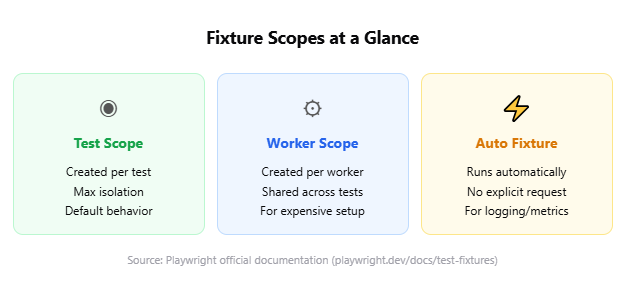
Playwright fixture scope controls when a fixture is created and when it is destroyed. Getting this right is key to balancing test isolation with execution speed.
Test scope (default)
This is the default. The fixture is created fresh before each test and destroyed after each test. Use it for anything that needs complete isolation.
import { test as base, Page } from '@playwright/test';
export const test = base.extend<{ freshPage: Page }>({
  freshPage: async ({ browser }, use) => {
    const context = await browser.newContext();
    const page = await context.newPage();
    await use(page);
    await context.close();
  },
});
The page and context built-in fixtures are both test-scoped. That is why every test gets a clean browser state with no cookies, local storage, or session data from previous tests.
Worker scope
Worker-scoped fixtures are created once per worker process and shared by all tests that worker runs. Use them for expensive operations like database connections, spinning up a test server, or creating auth tokens.
import { test as base } from '@playwright/test';
type Account = {
  username: string;
  password: string;
};
export const test = base.extend<{}, { account: Account }>({
  account: [async ({ browser }, use, workerInfo) => {
    const username = 'user' + workerInfo.workerIndex;
    const password = 'securepass123';
    // Create account once per worker
    const page = await browser.newPage();
    await page.goto('/signup');
    await page.getByLabel('User Name').fill(username);
    await page.getByLabel('Password').fill(password);
    await page.getByText('Sign up').click();
    await page.close();
    await use({ username, password });
  }, { scope: 'worker' }],
});
Note: Worker-scoped fixtures get their own timeout, independent of the test timeout. If you run 4 parallel workers, the fixture is instantiated 4 times (once per worker). It is not a global singleton.
When you are optimizing Playwright workers for faster CI, worker-scoped fixtures are one of the most effective levers. They eliminate redundant setup by sharing expensive resources across tests within the same process.
A practical rule of thumb: if a fixture setup takes more than 2 seconds and the resource is stateless or read-only, it belongs in worker scope. If it is mutable or test-specific, keep it in test scope regardless of the cost.
Auto fixtures
Auto fixtures run for every test, even if the test does not explicitly request them. They are defined with { auto: true } and are useful for cross-cutting concerns like logging, performance tracking, or attaching debug artifacts on failure.
import { test as base } from '@playwright/test';
export const test = base.extend<{ saveLogs: void }>({
  saveLogs: [async ({}, use, testInfo) => {
    const logs: string[] = [];
    console.log = (...args) => logs.push(args.join(' '));
    await use();
    if (testInfo.status !== testInfo.expectedStatus) {
      const logFile = testInfo.outputPath('logs.txt');
      await require('fs').promises.writeFile(logFile, logs.join('\n'));
      testInfo.attachments.push({
        name: 'logs',
        contentType: 'text/plain',
        path: logFile,
      });
    }
  }, { auto: true }],
});
This pattern is invaluable for debugging Playwright flaky tests. When a test fails, the logs are automatically attached to the report without any manual intervention.
One common mistake with auto fixtures is making them too expensive. Every auto fixture runs on every test, so even 200ms of unnecessary setup multiplies into minutes of wasted CI time across a large suite.
When not to use fixtures
Fixtures are not always the right tool. If your setup is trivial, file-specific, and unlikely to be reused elsewhere, a simple test.beforeEach is perfectly fine. Over-engineering a fixture for a 2-line goto call adds abstraction without value. The decision point is reuse: if three or more files need the same setup, extract it. If only one file does, a hook works fine.
Fixture setup and teardown patterns
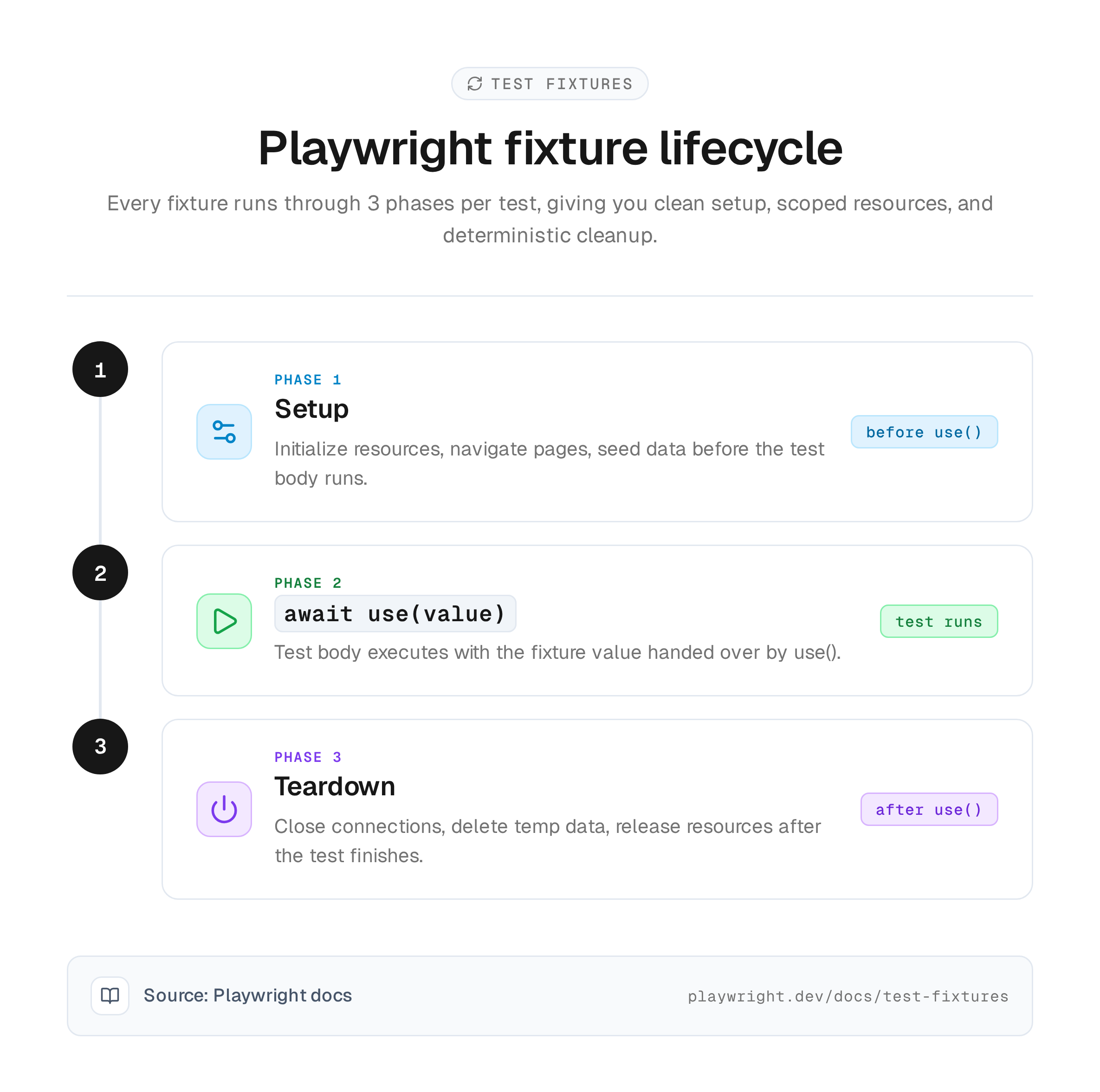
Playwright fixture setup and teardown are separated by the await use() call. Everything before it runs before the test. Everything after it runs after the test, regardless of whether the test passed or failed.
Pattern 1: database seeding and cleanup
import { test as base } from '@playwright/test';
import { createTestUser, deleteTestUser } from './db-helpers';
export const test = base.extend<{ testUser: { id: string; email: string } }>({
  testUser: async ({}, use) => {
    // Setup: create a user in the database
    const user = await createTestUser({
      email: `test-${Date.now()}@example.com`,
    });
    await use(user);
    // Teardown: remove the user (runs even if test fails)
    await deleteTestUser(user.id);
  },
});
Pattern 2: authenticated page with storage state
If you are testing an app that requires login, you can use Playwright's storage state mechanism inside a fixture:
import { test as base, Page } from '@playwright/test';
export const test = base.extend<{ loggedInPage: Page }>({
  loggedInPage: async ({ browser }, use) => {
    const context = await browser.newContext({
      storageState: './auth/user-session.json',
    });
    const page = await context.newPage();
    await use(page);
    await context.close();
  },
});
Pattern 3: fixture timeout for slow operations
Fixtures share the test timeout by default. If you have a fixture that performs a genuinely slow operation (like provisioning a cloud resource), you can give it its own timeout:
import { test as base } from '@playwright/test';
export const test = base.extend<{ cloudResource: string }>({
  cloudResource: [async ({}, use) => {
    const resource = await provisionResource(); // takes 30+ seconds
    await use(resource.url);
    await deprovisionResource(resource.id);
  }, { timeout: 60000 }],
});
Tip: If your fixture consistently hits timeout, it is a signal to move it to worker scope. A 30-second setup that runs once per worker is far better than a 30-second setup multiplied by every test.
Understanding the Playwright architecture helps you make better decisions about which resources to share and which to isolate.
Advanced fixture patterns for real projects
Merging fixtures from multiple modules
Large projects often have fixtures spread across different modules. Playwright v1.39+ provides mergeTests to combine them:
import { mergeTests } from '@playwright/test';
import { test as dbTest } from './db-fixtures';
import { test as authTest } from './auth-fixtures';
export const test = mergeTests(dbTest, authTest);import { test } from './merged-fixtures';
test('user can update profile', async ({ loggedInPage, testUser }) => {
await loggedInPage.goto(`/profile/${testUser.id}`);
// Both fixtures are available
});This approach helps you keep fixtures modular. Each team or feature area can own its own fixture file, and they compose cleanly at the test level. It pairs well with the test generation strategies that modern teams use to scale coverage.
Parameterized fixtures with options
Fixtures can accept configuration through the option flag, making them configurable per project in playwright.config.ts:
import { test as base } from '@playwright/test';
import { TodoPage } from './todo-page';
export type MyOptions = {
  defaultItem: string;
};
export const test = base.extend<MyOptions & { todoPage: TodoPage }>({
  defaultItem: ['Something nice', { option: true }],
  todoPage: async ({ page, defaultItem }, use) => {
    const todoPage = new TodoPage(page);
    await todoPage.goto();
    await todoPage.addToDo(defaultItem);
    await use(todoPage);
    await todoPage.removeAll();
  },
});import { defineConfig } from '@playwright/test';
import type { MyOptions } from './configurable-fixtures';
export default defineConfig<MyOptions>({
projects: [
{
name: 'shopping',
use: { defaultItem: 'Buy milk' },
},
{
name: 'wellbeing',
use: { defaultItem: 'Exercise!' },
},
],
});This is how you run the same tests against different configurations without duplicating code. The Playwright CLI lets you target specific projects with npx playwright test --project=shopping.
Box fixtures for clean reports
When you have helper fixtures that run frequently but are not interesting to see in reports, you can "box" them. This feature was introduced in Playwright v1.49:
import { test as base } from '@playwright/test';
export const test = base.extend({
  helperFixture: [async ({}, use) => {
    // Setup common data that every test needs
    await seedCommonData();
    await use();
    await cleanupCommonData();
  }, { box: true, auto: true }],
});
Boxed fixtures are hidden from the UI Mode, Trace Viewer, and test reports. This keeps your reports focused on the fixtures that matter for debugging. When reviewing results in a Playwright observability platform, boxed fixtures reduce visual noise significantly.
Common fixture mistakes and how to avoid them
Even experienced testers run into fixture pitfalls. These are the ones that cause the most CI failures and the most hours of debugging.
Forgetting to call await use()
Every fixture must call await use(value) exactly once. If you forget, the test will hang indefinitely until the timeout kills it. The error message is usually just "Test timeout of 30000ms exceeded" with no mention of the root cause.
// WRONG: missing use()
todoPage: async ({ page }, use) => {
  const todoPage = new TodoPage(page);
  await todoPage.goto();
  // Test never receives the fixture, hangs forever
},
Mutating shared state in worker-scoped fixtures
Worker-scoped fixtures are shared across tests. If a test modifies the fixture's state, it can leak into the next test, causing intermittent failures.
// RISKY: shared mutable state
account: [async ({}, use) => {
  const account = { balance: 100 };
  await use(account);
}, { scope: 'worker' }],
If one test changes account.balance to 0, the next test sees the modified value. Either reset state after each test or keep worker fixtures read-only. This is one of the most frequent sources of flaky tests in production codebases. The fix is straightforward: treat worker-scoped fixtures as immutable configuration, not mutable state.
Using test-scoped fixtures in worker-scoped ones
A worker-scoped fixture cannot depend on a test-scoped fixture. The scopes are incompatible because worker fixtures outlive individual tests. Playwright will throw a clear error at startup.
// WRONG: worker fixture depending on test fixture
myWorkerFixture: [async ({ page }, use) => {
  // ERROR: 'page' is test-scoped, this fixture is worker-scoped
  await use(page);
}, { scope: 'worker' }],
Not typing your fixtures
Skipping TypeScript types for fixtures means you lose autocompletion and compile-time safety. Always define an interface:
import { test as base, Page, APIRequestContext } from '@playwright/test';
type MyFixtures = {
  adminPage: Page;
  apiClient: APIRequestContext;
};
export const test = base.extend<MyFixtures>({
  // TypeScript will enforce correct return types
});
Following Playwright annotations conventions alongside proper fixture typing creates a test suite that is both self-documenting and maintainable.
Execution order reference
Understanding fixture execution order prevents subtle bugs. Here is the standard sequence for a test that uses both auto and manual fixtures:
| Step | What happens |
|---|---|
| 1 | Auto worker fixtures set up (e.g., logging, metrics) |
| 2 | beforeAll hooks run |
| 3 | Auto test fixtures set up |
| 4 | Manual test fixtures set up (only those requested by the test) |
| 5 | beforeEach hooks run |
| 6 | Test body executes |
| 7 | afterEach hooks run |
| 8 | Manual test fixtures torn down (reverse order) |
| 9 | Auto test fixtures torn down |
| 10 | afterAll hooks run |
| 11 | Worker fixtures torn down when worker shuts down |
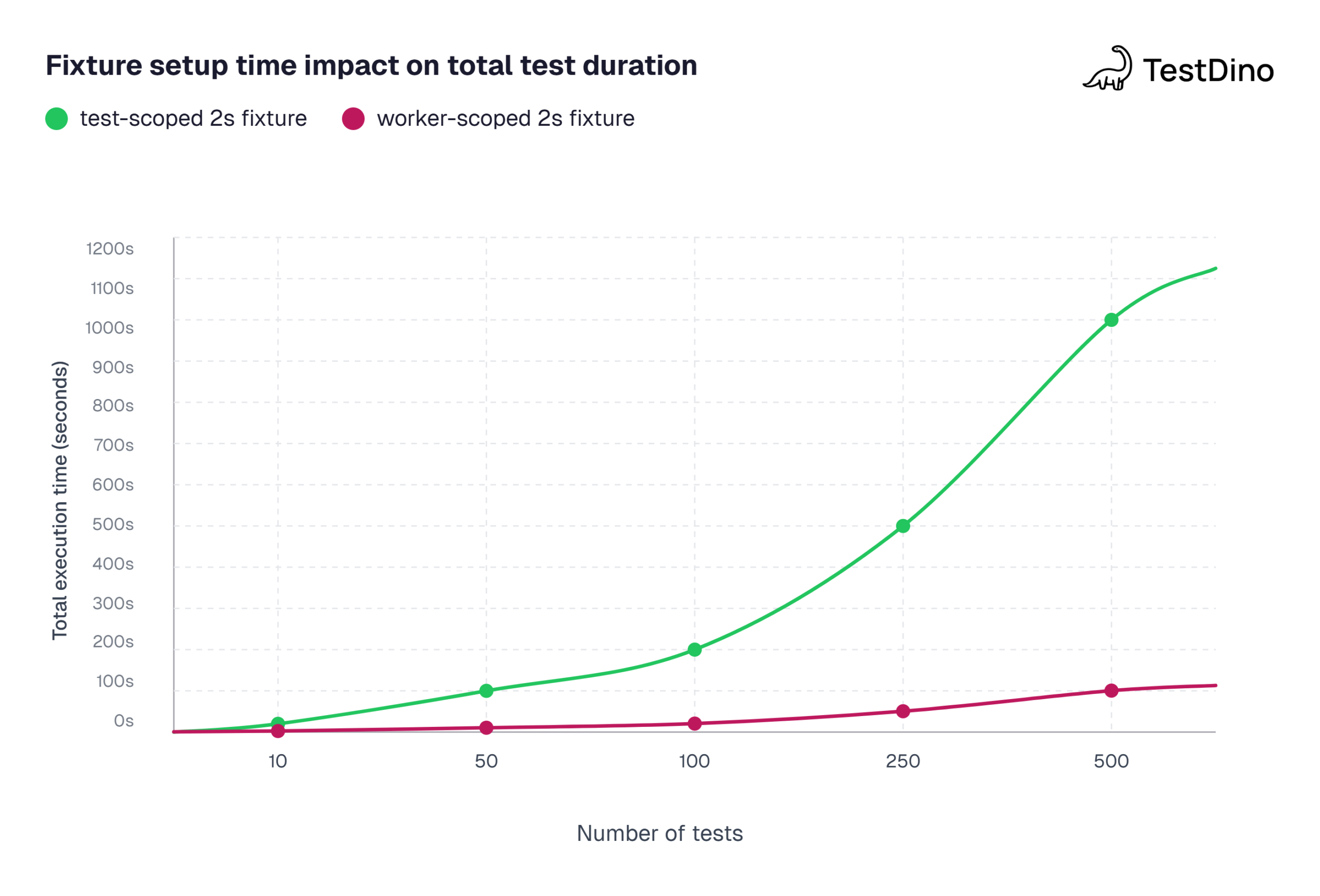
Source: Calculated based on a 2-second fixture setup with Playwright default parallelism (half CPU cores). Worker-scoped amortizes the 2s setup across all tests per worker.
Conclusion
Playwright fixtures are the foundation of a maintainable, scalable test architecture. By moving setup and teardown into self-contained, composable units, you eliminate the structural problems that hooks create as test suites grow.
Start with the built-in fixtures. Learn how page, context, and browser work under the hood. Then create custom Playwright fixtures for your page objects, authentication flows, and test data. Use test scope for isolation and worker scope for performance. Add auto fixtures for observability.
The goal is a test suite where adding a new test means writing the test logic and nothing else. Fixtures handle the rest.
Next steps to take:
- Create a fixtures.ts file in your project root and define your first custom fixture using test.extend()
- Audit your existing beforeEach blocks and convert any that appear in multiple files into shared fixtures
- Run your suite with Playwright's trace viewer enabled to observe fixture setup/teardown timing
When your fixture architecture is solid, every other part of your testing workflow benefits. Your Playwright best practices become easier to follow, your CI runs get faster, and debugging failures takes minutes instead of hours.
FAQs

Ayush Mania
Forward Development Engineer