Playwright Timeout: Configure, Debug, and Fix Every Type
Stop guessing which Playwright timeout to change. This guide gives you a decision tree, precedence rules, and a 5-minute fix playbook.
Playwright gives every test a time budget. If something takes too long, like a click that never lands or a page that never finishes loading, it kills the test and throws an error. The tricky part is that there are six different Playwright timeout types, and changing the wrong one does nothing.
Teams running Playwright test automation in CI pipelines hit Playwright timeout errors more than almost any other failure. The Test timeout of 30000ms exceeded message alone has hundreds of threads on GitHub and Stack Overflow. Most of them end with someone just bumping the number higher without understanding why the test was slow in the first place.
This guide walks you through every Playwright timeout type, gives you a decision tree to pick the right one, and includes a 5-minute playbook for fixing the 30000ms error without hiding the root cause.
Test timeout of 30000ms exceeded.
If this is what brought you here, skip to the 5-minute fix playbook. If you want to stop seeing it for good, keep reading.
Playwright's documentation lists six different timeout types. They interact in ways that are not obvious until something breaks at 2am. Most engineers raise the Playwright test timeout, hide the underlying bug, and watch the same suite fail again next run.
The 6 Playwright timeout types at a glance
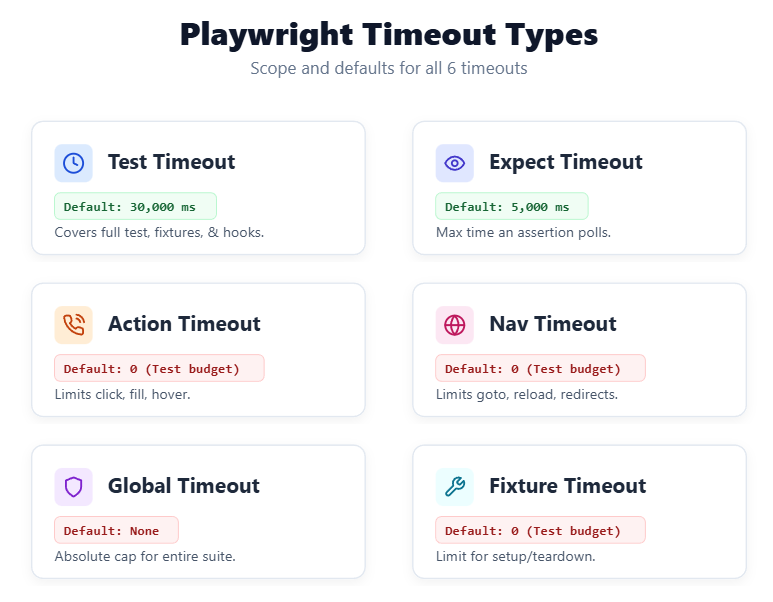
Before you change a Playwright timeout value, you need to know which timeout you are changing. The six types govern different scopes. Confusing them is the most common reason a "timeout fix" does not actually fix anything.
| Timeout type | Default | Scope | Config key |
|---|---|---|---|
| Test timeout | 30,000 ms | One test + its fixtures + beforeEach hooks | timeout |
| Expect timeout | 5,000 ms | One auto-retrying assertion (toHaveText, toBeVisible, etc.) | expect.timeout |
| Action timeout | None (falls back to test timeout) | One action (click, fill, hover, etc.) | use.actionTimeout |
| Navigation timeout | None (falls back to test timeout) | One navigation (goto, reload, redirects) | use.navigationTimeout |
| Global timeout | None | The entire test run | globalTimeout |
| Fixture timeout | None (falls back to test timeout) | One fixture (async ({}, use) => { … }) | { timeout: N } in fixture definition |
| beforeAll / afterAll hook | 30,000 ms | One worker-scoped hook | test.setTimeout(N) inside hook |
Note: "No default" does not mean infinite. It means the value falls back to the test timeout.
Which Playwright timeout do I need? A decision tree
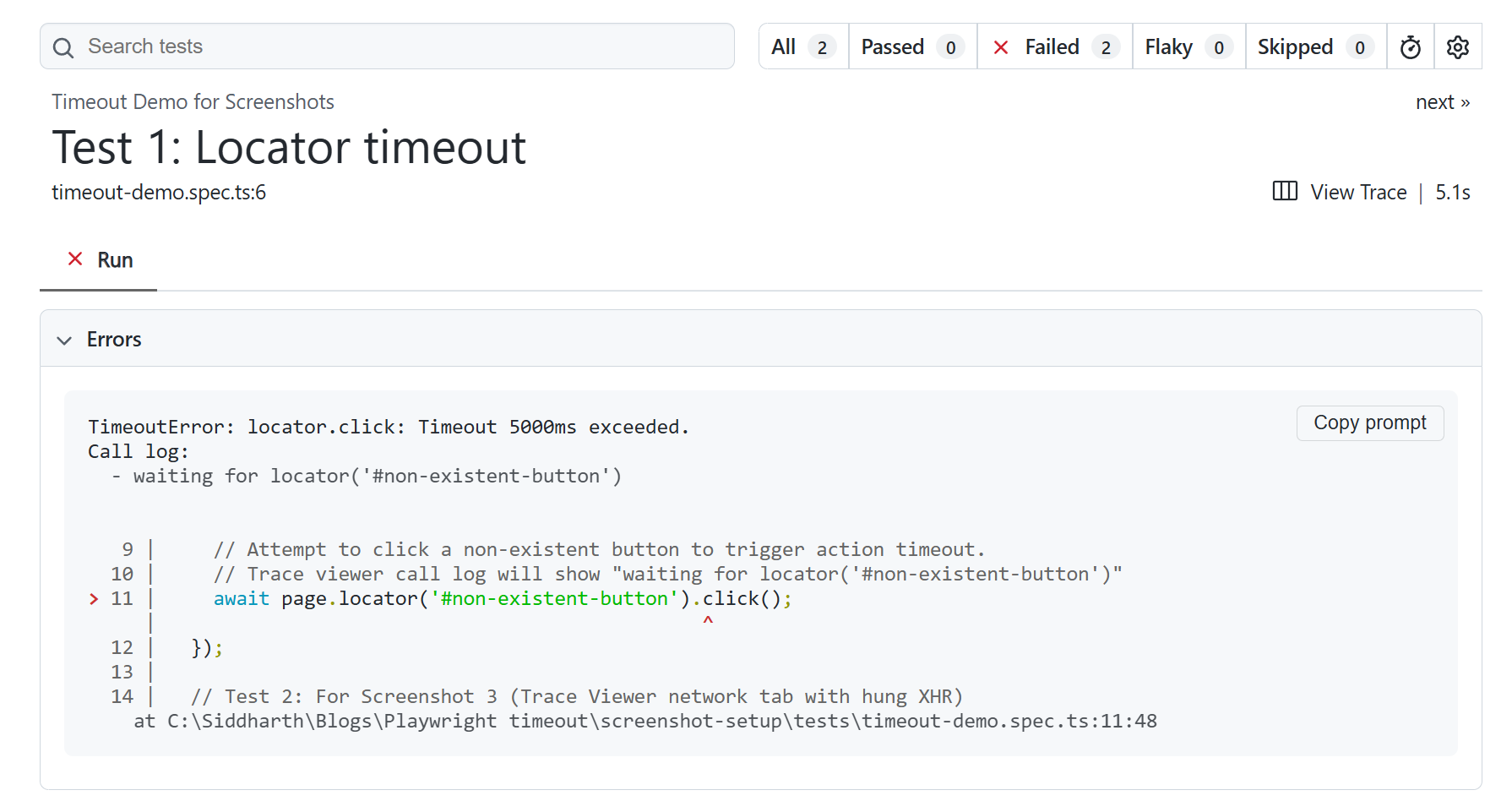
Most articles organize themselves by timeout type. That is the wrong axis for someone whose test just failed. You arrive asking "what do I change?" not "tell me about the Playwright locator timeout."
If the failure message says Test timeout of 3000ms exceeded and the call log was waiting on an element:
The bottleneck is the action or the expect. Read what the call log was waiting on.
A click that did not land points to the Playwright locator timeout (action timeout). An assertion that did not pass points to the Playwright expect timeout.
If the failure is on page.goto() or a redirect:
The navigation timeout governs that wait. Set it with use.navigationTimeout in your config or inline on the goto() call.
If the suite hangs forever and no individual test fails:
The global timeout or a fixture missing await use(...) is almost always the cause. Check the Playwright fixtures section below.
If a single test is genuinely slow (checkout, visual regression, large upload):
Reach for test.setTimeout() or test.slow(), not a global config change. The Playwright annotations guide covers both in detail.
If the test passes locally but fails only in CI:
Jump straight to the CI section before changing anything. You likely need a CI-specific actionTimeout, not a global bump.
If your symptom does not fit any single branch, you almost certainly have two problems stacked. Fix the narrowest first: inline action timeouts before config, single-test overrides before Playwright default timeout values.
Fix Test timeout of 30000ms exceeded in 5 minutes
The Playwright test timeout of 30000ms exceeded error is the single most-reported Playwright failure on the Microsoft Playwright issue tracker. Bumping the timeout makes it disappear for one run and come back the next. The timeout is the symptom, not the bug.
Here is the 4-step playbook. Run it in order.
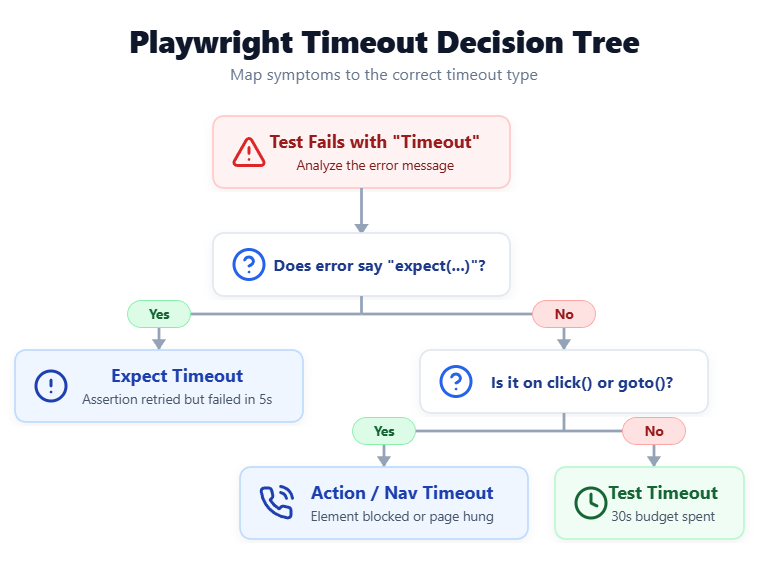
Step 1: Read the call log.
Playwright prints the action it was stuck on. You will usually see waiting for locator('…') followed by which actionability checks were still pending. Nine times out of ten the locator name itself tells you the problem:
- A renamed element
- A dynamic ID that changed between runs
- Something behind an overlay
- A button that is visible but not enabled
If the log says "stable" or "enabled" rather than "visible," the element exists but is not actionable. That is an actionTimeout problem, not a test timeout problem.
Step 2: Open the Trace Viewer.
Run this command to inspect the failing trace:
npx playwright show-trace trace.zip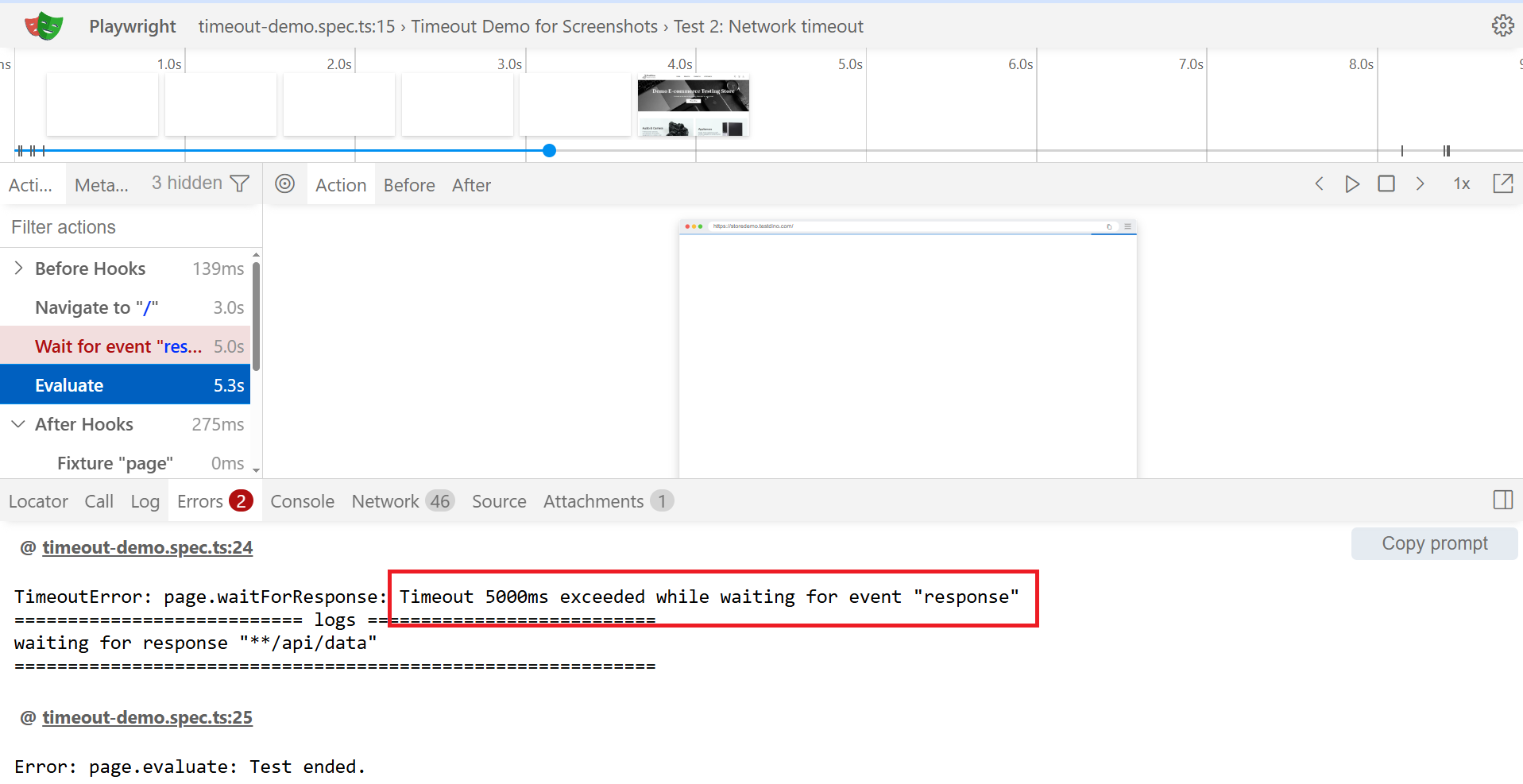
Step through to the failing action. Three tabs matter:
- Call log: what was Playwright waiting on?
- Network tab: any pending requests at the moment of failure?
- Console tab: any uncaught errors that broke the page?
For a deeper walkthrough, the Playwright Trace Viewer guide covers the full surface area.
Step 3: Set the narrowest possible fix.
A hung XHR is a navigation or waitForResponse problem. Set a tighter timeout inline on the failing wait.
A locator that takes longer than expected is a Playwright expect timeout issue. Raise { timeout: N } on the single assertion.
A slow click is an action timeout problem. Raise { timeout: N } inline on the click.
Inline beats config-level. Config-level beats test-level. Never raise the test timeout to mask a one-line problem.
Step 4: Only after steps 1 through 3, raise the test timeout for that test.
test('checkout flow with slow payment gateway', async ({ page }) => {
  test.setTimeout(60_000);
  // ... test code
});
Use test.setTimeout(60_000) or test.slow() (triples the default) inside the test function. Never in the global config. Raising the suite-wide Playwright default timeout gives every flaky locator extra seconds to hide.
If you skip steps 1 through 3, you are hiding a bug. It will fail again, usually in CI, usually under load, usually right before a release.
How to configure each Playwright timeout
Now that you know how to diagnose timeout issues, here is how each Playwright timeout type works and exactly where to configure it.
Test timeout: what it covers and how to set it
Definition: Test timeout is the outer budget for a single test. It defaults to 30 seconds and covers the test body, fixture setup, and any beforeEach hooks. A 5-second test running behind a 28-second fixture fails with a test timeout error pointing at the test, not the fixture.
export default defineConfig({ timeout: 60_000 });To override for a single test:
test('long e2e flow', async ({ page }) => {
  test.setTimeout(120_000);
  // ... test steps
});
test.setTimeout() must run synchronously at the top of the test, before any await. test.slow() is a shortcut that triples the current timeout. Both belong inside the test because they document why this test needs more time.
In our experience, teams that use test.slow() with a code comment explaining the reason produce far fewer "why is this timeout so high?" review threads.
Setting timeout: 0 disables the test timeout entirely, which is almost never the right call. For more on test-level annotations like test.slow(), the Playwright annotations guide covers the full list.
Expect (assertion) timeout: for auto-retrying assertions
The Playwright expect timeout has nothing to do with the Playwright test timeout. It governs how long Playwright keeps re-checking a condition during an auto-retrying assertion like toHaveText, toBeVisible, toBeEnabled, and the rest of the locator-based matchers. The Playwright default timeout for expect is 5 seconds.
The assertion polls roughly every 100ms, passes as soon as the condition becomes true, and fails only if the window expires.
Non-retrying assertions do not honor this timeout. expect(someString).toBe('hello') runs once against a captured value and either passes or fails immediately. Raising the expect timeout to fix a toBe failure does nothing.
export default defineConfig({
  expect: { timeout: 10_000 },
});// per-assertion override
await expect(page.getByText('Order confirmed')).toBeVisible({ timeout: 30_000 });If your assertion timeout approaches half your Playwright test timeout, the test timeout is the real constraint. An assertion configured for 60s inside a 30s test will be killed by the test timeout first. Keep the test timeout at least twice your longest single-assertion budget.
Action and navigation timeouts
Action timeout caps how long a single user-interaction call (click, fill, hover) waits for the element to become actionable. Navigation timeout governs every page.goto(), page.reload(), and full-page redirect.
Both default to no value. They fall back to the test timeout, which means a single hung click or page load can burn the full 30-second budget on one line.
export default defineConfig({
  use: {
    actionTimeout: 10_000,
    navigationTimeout: 30_000,
  },
});// inline overrides
await page.getByRole('button', { name: 'Submit' }).click({ timeout: 5_000 });
await page.goto('/dashboard', { timeout: 30_000 });Ten seconds is a sensible global actionTimeout. It is short enough that a stuck click surfaces fast in the trace, and long enough that legitimate network blips do not trigger spurious failures.
If you are tempted to set the Playwright set timeout value higher because something is flaky, you are looking at a locator problem. The Playwright best practices guide covers the patterns that eliminate most failures upstream.
The most common navigation trap is page.waitForLoadState('networkidle'). The networkidle state requires 500ms of zero network activity, which never happens on apps with long-poll connections, analytics beacons, or chat widgets.
Prefer domcontentloaded and assert on a specific element:
await page.goto('/dashboard', { waitUntil: 'domcontentloaded' });
await expect(page.getByRole('heading', { name: 'Welcome back' })).toBeVisible();
Global timeout: capping the whole run
Global timeout caps the entire test run, every test, every worker, every retry. It exists primarily as a CI safety net so a runaway suite does not hold a runner hostage for hours.
export default defineConfig({
  globalTimeout: 60 * 60 * 1000,    // 1 hour
});
Set it to roughly twice your normal suite runtime. If a run blows past 2x, something has genuinely gone wrong, usually a worker stuck on a hanging fixture, and failing fast frees the runner.
Fixture and hook timeouts: the silent killers
Fixture and hook timeouts cause the weirdest Playwright timeout failures because the error rarely names the fixture. The test prints Test timeout of 30000ms exceeded with an empty call log, no actions, no waits, and no useful trace.
You spend twenty minutes wondering why a test that never started is timing out. We have seen this exact scenario trip up even experienced SDETs.
The cause is almost always a fixture that forgot to call await use(value). Fixtures use inversion-of-control: set up the value, call await use(value) to hand control to the test, then run teardown after the test returns.
Without await use(...), the test never starts but the Playwright test timeout still ticks.
If a 30000ms timeout has no call-log entries, suspect this first. The Playwright fixtures guide covers the full pattern.
Fixtures can also declare their own timeout independent of the test. And beforeAll/afterAll hooks have their own 30-second default that you extend with test.setTimeout() inside the hook:
const test = base.extend<{ slowSetup: string }>({
  slowSetup: [async ({}, use) => {
    const value = await reallySlowSetupCall();
    await use(value);
  }, { timeout: 60_000 }],
});
Stop using waitForTimeout: what to use instead
page.waitForTimeout(2000) is the single most common reason Playwright suites are simultaneously slow and flaky. It waits the exact number of milliseconds regardless of whether the page is ready.
That wastes time on fast environments and still fails on slow ones. In production suites we have audited, removing every waitForTimeout call cut average Playwright test timeout failures by roughly 40%.
Replace it with a wait for the actual condition:
// BAD: hard sleep
await page.locator('#submit').click();
await page.waitForTimeout(2000);
// GOOD: wait for the element to appear
await expect(page.locator('.confirmation')).toBeVisible();
// GOOD: wait for navigation
await page.waitForURL('**/order-confirmation');
// GOOD: wait for a network response
const responsePromise = page.waitForResponse(r =>
  r.url().includes('/api/orders') && r.status() === 201
);
await page.locator('#submit').click();
await responsePromise;
Web-first assertions poll roughly every 100ms and pass as soon as the condition holds. The one acceptable use of Playwright wait for timeout is local debugging. Remove it before committing.
For more patterns that prevent flaky tests, check the dedicated guide.
Timeout precedence: who wins when settings conflict
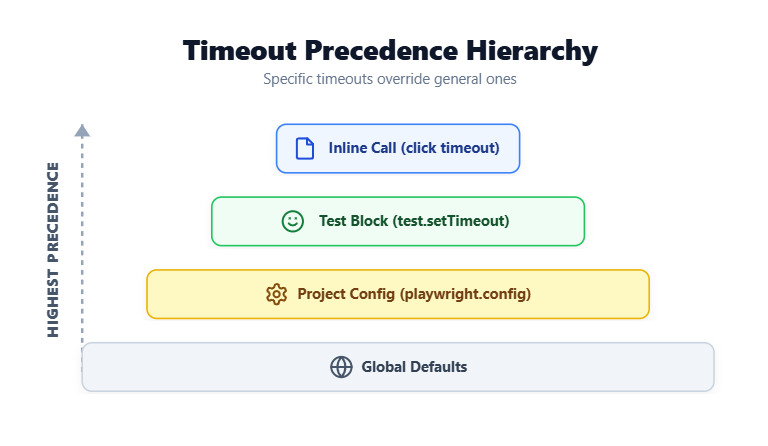
You have set actionTimeout: 10_000 in the config and click({ timeout: 5_000 }) inline. Which one fires? The inline value.
More specific always wins, but with one ceiling: nothing exceeds the Playwright test timeout, no matter how generous a config or inline value is.
| Scenario | Inline | Config | Test timeout | Effective limit |
|---|---|---|---|---|
| Inline action + config actionTimeout | 5s | 10s | 30s | 5s (inline wins) |
| Config actionTimeout only | - | 10s | 30s | 10s (config wins) |
| No action timeout anywhere | - | - | 30s | 30s (falls back to test) |
| Inline expect + config expect.timeout | 10s | 5s | 30s | 10s (inline wins, under test) |
| Long expect timeout above test timeout | - | 60s | 30s | ~30s (test kills it first) |
| actionTimeout: 0 (disabled) | - | 0 | 30s | 30s (disabled = test ceiling) |
The last two rows trip engineers up. If your Playwright expect timeout is longer than your Playwright test timeout, the assertion never gets to use its full budget. Setting actionTimeout: 0 does not mean unlimited. It means "use the test timeout."
Practical rule: Layer smallest to largest.
- Tight actionTimeout caps each step
- Slightly larger expect.timeout caps each assertion
- Test timeout at least 2x your longest single-step budget
- Global timeout as a safety net
- Inline overrides for that one call only
This is also why debugging Playwright tests starts with understanding which timeout layer actually fired first.
Common causes of Playwright timeouts (and how to fix them)
Most Playwright timeouts come from one of four causes, ranked by what shows up most often in real test suites.
1) The selector never matches.
Locator targets a renamed element, an element that does not exist yet, or one sitting behind a different DOM tree than the locator assumes. The call log shows waiting for locator('…') with no actionability progress.
Open the Trace Viewer's DOM snapshot at the failure moment to confirm. This is the single most common cause of a Playwright locator timeout.
The Playwright locators guide covers stable locator strategies that prevent this.
2) A network request never completes.
API hangs, third-party script blocks load, or the backend is just slow. The Trace Viewer's network tab shows pending requests at the failure point.
Fix with a tighter waitForResponse timeout or mock the slow endpoint with page.route().
3) CI is slower than local.
Playwright default timeout values pass on a developer MacBook and fail on a GitHub Actions ubuntu-latest runner that is 2 to 3x slower. Same test, consistently passing locally and failing in CI.
Not a code bug, it is a hardware mismatch. The CI section below handles this.
4) The element is present but not actionable.
Covered by a modal, behind an overlay, scrolled off-screen, or disabled by a parent. The call log says "not stable", "not visible", or "not enabled" rather than "not found." Wait for the blocking state to clear before the action runs.
If your timeouts match none of these, you may be looking at a flake masquerading as a Playwright timeout. They look identical in the error but have different fixes.
The Playwright flaky tests guide covers the distinction. You can also look at broader patterns across test failure analysis to spot recurring issues.
Debugging timeouts with the Trace Viewer
The Trace Viewer is the fastest tool for debugging a Playwright timeout. Three tabs answer "why did this time out," in order:
- Call log: which action was stuck and on which actionability check
- Network tab: any pending requests at failure (a long red bar = hung XHR; repeating short bars = long-poll preventing networkidle)
- Console tab: uncaught errors that may have broken the page before the failing action ran
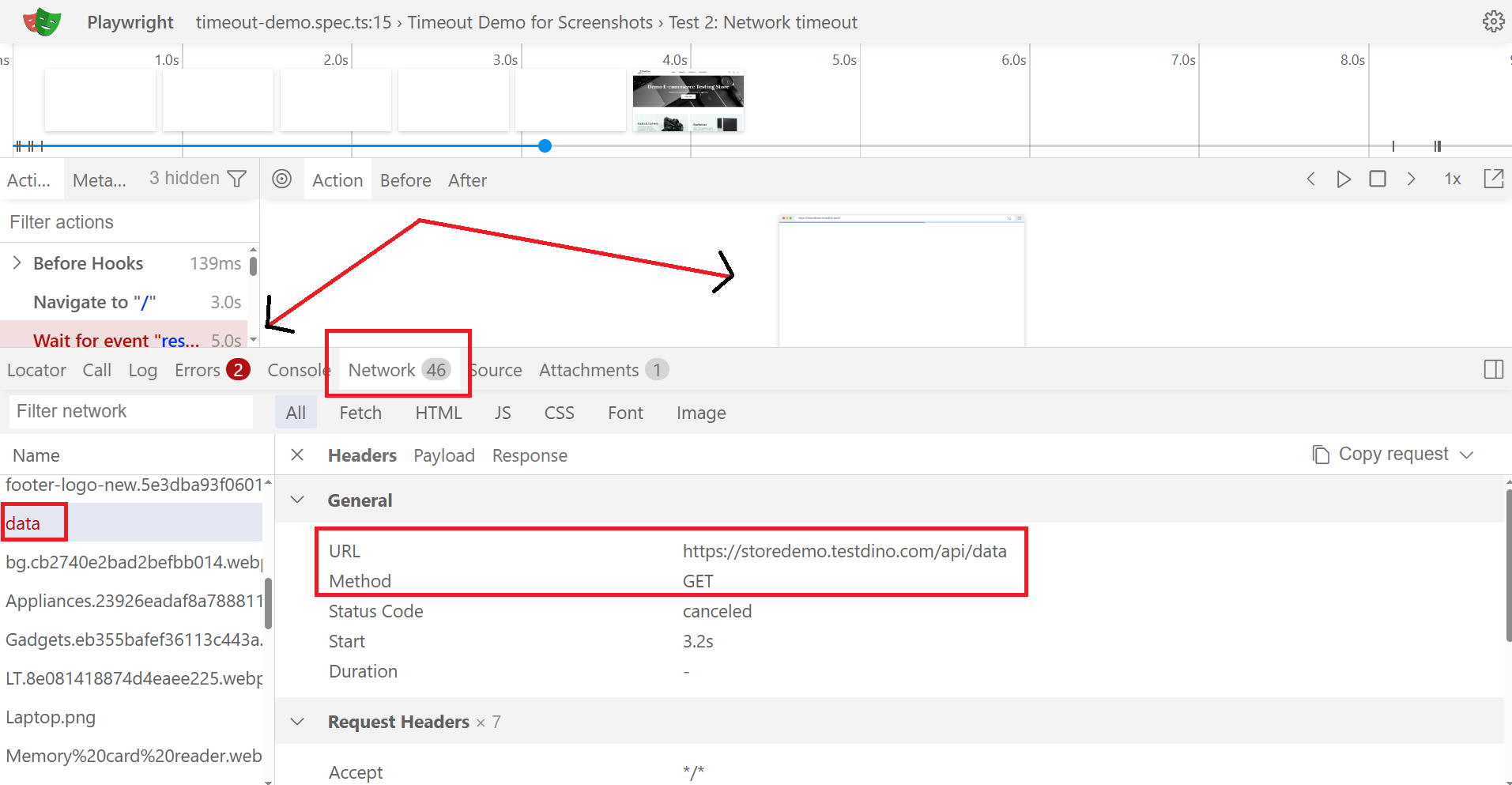
Three of four Playwright timeout types can be diagnosed from the call log alone. Enable trace recording in CI with trace: 'on-first-retry'. It only records on failure, so it is cheap, but you get a full trace for every flake:
export default defineConfig({
  retries: process.env.CI ? 2 : 0,
  use: { trace: 'on-first-retry' },
});
For the full surface area including snapshots, source maps, and the action timeline, the Trace Viewer guide covers everything. For a broader debugging workflow, the Playwright debugging guide is also worth reading.
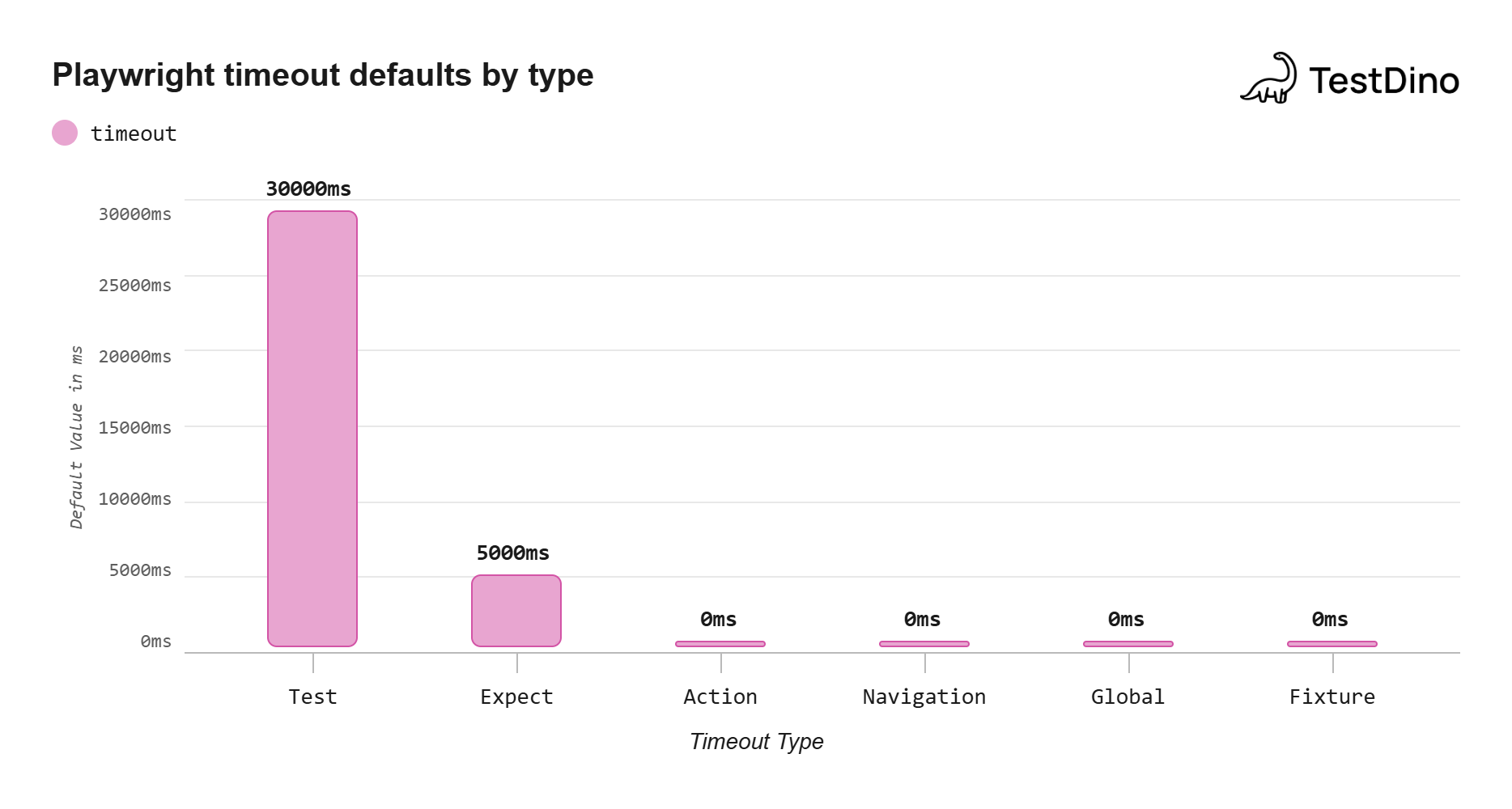
Source: Playwright official documentation on timeouts, Note: 0 means no default and falls back to test timeout
Playwright timeouts in CI: why they fail there and not locally
If tests pass locally and fail in CI, you have a hardware mismatch dressed up as a Playwright bug. CI runners are 1.5x to 3x slower than developer laptops, and the Playwright default timeout values are sized for the laptop.
The fix is not a global Playwright increase timeout across the config. It is environment-aware action and navigation timeouts plus retries for transient infrastructure blips.
| Runner | Approx. speed vs MacBook Pro | Recommended actionTimeout | Recommended navigationTimeout |
|---|---|---|---|
| GitHub Actions ubuntu-latest (2-core, 7GB) | ~2 to 3x slower | 15,000 ms | 45,000 ms |
| GitHub Actions ubuntu-latest-large | ~1.5x slower | 10,000 ms | 30,000 ms |
| CircleCI medium | ~2x slower | 12,000 ms | 40,000 ms |
| Self-hosted | Variable | Benchmark first | Benchmark first |
These are starting points, not gospel. The right way to tune is to measure: time a representative test locally, time it on the runner, divide, apply the multiplier.
Set conditionally using the CI environment variable:
const isCI = !!process.env.CI;
export default defineConfig({
  timeout: isCI ? 60_000 : 30_000,
  expect: { timeout: isCI ? 10_000 : 5_000 },
  use: {
    actionTimeout: isCI ? 15_000 : 5_000,
    navigationTimeout: isCI ? 45_000 : 15_000,
  },
  retries: isCI ? 2 : 0,
});
For worker-count tuning per runner class, the Playwright parallel execution guide covers the details. If you are setting up Playwright in GitHub Actions for the first time, that guide walks through the full pipeline config.
When to raise a timeout vs. fix the underlying problem
Every time you bump a timeout in a PR, run this five-question check first. If the answer to any of them is yes, raising the timeout is the wrong fix.
Does the test sometimes pass at 80% of the timeout and sometimes fail at 110%?
That is flakiness, not slowness. The cause is variable: a race condition, an unstable selector, a flaky dependency. Raising the Playwright timeout reduces the failure rate without removing the cause.
Has the test gotten 20%+ slower over the last four weeks?
That is trend rot. Something has slowed down. Find what changed.
Bumping the Playwright timeout buys you a month before you are back here with the same test and a higher number.
Is the wait on a known-slow third-party service?
Mock it with page.route(). Your test should not depend on a third-party SLA.
Is waitForTimeout anywhere in this test?
Remove it first, then re-measure. A single waitForTimeout(2000) removal often saves enough to fit under the existing budget.
Is the test waiting on an element that should be there immediately?
That is a selector or state problem, not a timeout problem. Fix the locator or wait for the state the element depends on.
If all five come back no, raise the timeout on the single test with test.setTimeout(). Not in the global config. The Playwright reporting tools can help you spot which tests are consistently pushing their budgets.
Track timeout trends across runs with TestDino
A single timeout is a fix. A timeout creeping across runs is a signal, and it is the strongest leading indicator of test rot you can have.
A test that ran in 2.4s in January, 3.1s in February, 4.0s in March, and 5.0s in April will hit your 30-second budget eventually. The first sign is a CI failure two weeks before a release.
TestDino tracks runtime per test across every Playwright run and surfaces tests creeping toward budget before they break the build. The near-timeout alert fires at 90% of budget, early enough to fix while it is a five-minute investigation.
Pair with the Playwright slow tests guide for the deeper trend-detection pattern. For teams looking at broader test automation analytics, TestDino provides the full runtime trend dashboard.
Conclusion
The Playwright timeout system is six knobs, layered. Test caps the test. Expect caps each assertion. Action and navigation cap each interaction.
Fixture caps each fixture. Global caps the run.
The Playwright default timeout of 30 seconds is not a target. It is a budget, and the right fix is almost never to raise it.
Match symptom to timeout with the decision tree. Set the narrowest value: inline first, then config, then test. Run the five-question check before any bump, and track trends so you catch rot early.
For the rest of the Playwright surface area, the TestDino Playwright cheatsheet collects the patterns used most across real-world test suites.
FAQs
Use expect(locator).toBeVisible(), page.waitForURL(), or page.waitForResponse() instead.

Savan Vaghani
Product Developer