How to Reduce Playwright CI Test Runtime
Slow pipelines destroy developer productivity. Learn how to systematically reduce playwright ci time using sharding, optimal workers, and analytics.
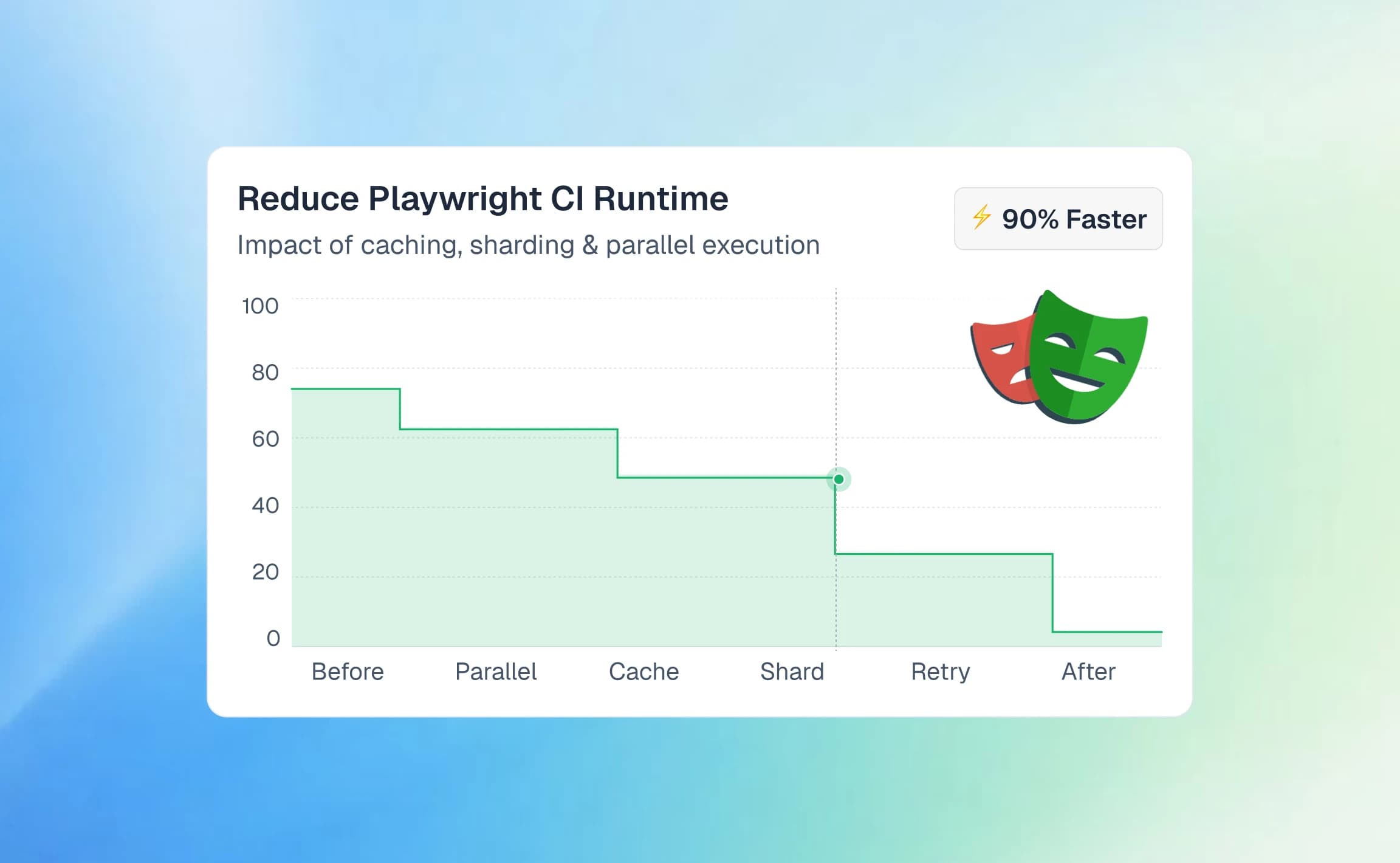
CI pipelines are the backbone of how teams ship software today. They run thousands of automated checks on every commit.
The biggest pain point for engineering teams is waiting endlessly for pull request feedback due to slow tests.
This guide shows you how to reduce playwright ci time step by step. You can cut run time in half and keep the same coverage.
Continuous Integration (CI) runtime is the total time from code commit until automated tests report a pass or fail.
A well-structured approach to Playwright test automation ensures tests remain fast from the start.

Tip: Always time your tests on your own machine first. Use the same environment variables that CI uses.
Maximize efficiency with parallel workers
Playwright is built to run tests in parallel. It uses all your CPU cores out of the box. By default, it spreads tests across several worker processes.
A typical project configuration:
import { defineConfig } from '@playwright/test';
export default defineConfig({
  workers: process.env.CI ? 2 : undefined,
});
More workers cut run time, but only up to a point. If workers fight over a few CPU cores, the whole run slows down.
How to optimize workers effectively:
- Match worker count strictly to available physical CPU cores.
- If using Playwright in GitHub actions, standard runners provide 2 or 4 cores.
- Measure total runtime precisely after each adjustment.
Note: Do not run more workers than you have CPU cores. The CPU keeps switching between them, and tests slow down.
Stick to Playwright best practices, and your tests stay stable even with many workers running at once.
Split execution using suite sharding
Even well-tuned parallel runs hit a hardware limit at some point. Suite sharding solves this for large projects. It splits your big suite across many runners that work at the same time. Each runner handles only a slice of the tests.
This drastically reduces the overall wall clock time of your pipeline delivery.
npx playwright test --shard=1/4
Screenshot of a GitHub Actions Playwright workflow showing tests split across 10 parallel shards, with several shards succeeding and others failing, resulting in a failed CI run
Important rules for sharding:
- Balance test distribution completely evenly across runners.
- Gather all test reports at the end using the Playwright blob reporter.
- Merge results for proper test automation reporting.
Sharding also gets you past memory limits. Those limits often crash one huge test run.
Stop repeating authentication in every test
Repeating the full UI login flow before every single test is a massive waste of CI time. Instead, authenticate exactly once and reuse the session globally across your suite.
Playwright can save the logged-in browser state to a file on disk.
import { chromium, FullConfig } from '@playwright/test';
async function globalSetup(config: FullConfig) {
  const browser = await chromium.launch();
  const page = await browser.newPage();
  await page.goto('https://example.com/login');
  await page.fill('#username', 'admin');
  await page.fill('#password', 'secret');
  await page.click('button[type="submit"]');
  // Save state
  await page.context().storageState({ path: 'playwright/.auth/user.json' });
  await browser.close();
}
export default globalSetup;
Proper Playwright authentication caching easily saves several minutes per test run. Every subsequent test loads the saved state directly instead of repeating the slow UI flow.

This also cuts flaky tests, since your tests never touch the login page.
Tip: If using short-lived JWT tokens, ensure your global setup script actively refreshes them before saving state.
Optimize expensive test fixtures
Fixtures keep tests clean and isolated, but poorly designed ones make suites extremely slow. Stop blindly seeding massive databases from scratch before every single test function.
Create expensive resources exactly once per worker instead of once per test.
import { test as base } from '@playwright/test';
export const test = base.extend({
  database: [async ({}, use) => {
    const connection = await connectToDatabase();
    await use(connection);
    await connection.close();
  }, { scope: 'worker' }],
});
Worker-scoped Playwright fixtures cut run time by a large margin.

A worker scoped fixture is set up once per worker process. Tests share it, so you never rebuild it for each test.
Keep setup steps light and fast where you can. If a test needs a clean, fresh state, mock the backend instead.
Cache browsers and mock dependencies
Downloading big browser binaries on every run wastes minutes. Use your CI cache so the download is skipped.
This strategy is highly effective when running Playwright in GitLab CI.
- uses: actions/cache@v4
  with:
    path: ~/.cache/ms-playwright
    key: playwright-browsers-${{ runner.os }}-${{ hashFiles('package-lock.json') }}
Key caching strategies:
- Cache Playwright browser binaries securely.
- Cache node_modules (npm, pnpm, or Yarn).
- Tie the cache key directly to your lockfile.
Also mock third-party services you cannot control, like payment gateways. Playwright can intercept network calls, so slow outside systems never block a test.
await page.route("**/api/payment", async route => {
  await route.fulfill({ status: 200, body: JSON.stringify({ success: true }) });
});
Mocking makes tests far more reliable, because third-party flakiness goes away for good. Good test failure analysis often shows that unstable APIs are the main cause.
Monitor runtime trends and test analytics
Looking at a single CI run rarely tells the full story of your suite's overall health. The historical trend matters significantly more than any single execution result.
Use Playwright reporting tools to track run times over time.
With that data, your team stops guessing and knows what to fix first:
- Target specific test files with the greatest negative impact on pipelines.
- Analyze your flaky test benchmark to identify tests wasting time on retries.
- Leverage the playwright skill to thoroughly automate bottleneck detection.
Set Playwright timeout settings so a hung browser context never blocks a runner. When a test goes over its time budget, a good Playwright debugging guide helps you fix it fast.
Conclusion
Slow Playwright pipelines usually come from design choices that do not scale. Run more in parallel, split work with sharding, and reuse sessions as much as you can.
Apply these fixes one by one and you can reduce playwright ci time by up to 50 percent. Then keep an eye on past runs and long term trends so you can see the gains.
The goal is fast, reliable feedback so developers can merge code with confidence. Faster pipelines mean more productive teams, quicker releases, and a much better developer experience.
FAQs

Ayush Mania
Forward Development Engineer