Playwright Parallel Execution: Workers & fullyParallel Guide
Playwright has 3 layers of parallelism. Most teams only use one. Learn how workers, fullyParallel, and execution modes actually work together.
Configuring the wrong layer, or flipping fullyParallel without understanding what it actually controls, creates more flakiness than it solves.
This guide covers how Playwright workers distribute tests, what fullyParallel really does, and how to size your CI config without guessing.
How Playwright parallel execution works
Playwright runs tests using worker processes. Each worker is an independent OS process with its own browser instance, memory, and test data.
When you run npx playwright test, the test runner spins up multiple workers and assigns test files to them. Each worker picks up a file, runs all the tests inside it, then grabs the next available file.
Here's what that means in practice:
-
Test files run in parallel across workers
-
Tests inside a single file run sequentially, one after another
-
Workers never share state
That's the default behavior. No config changes needed.
But there are actually 3 layers of parallelism in Playwright. Most teams only know about the first.
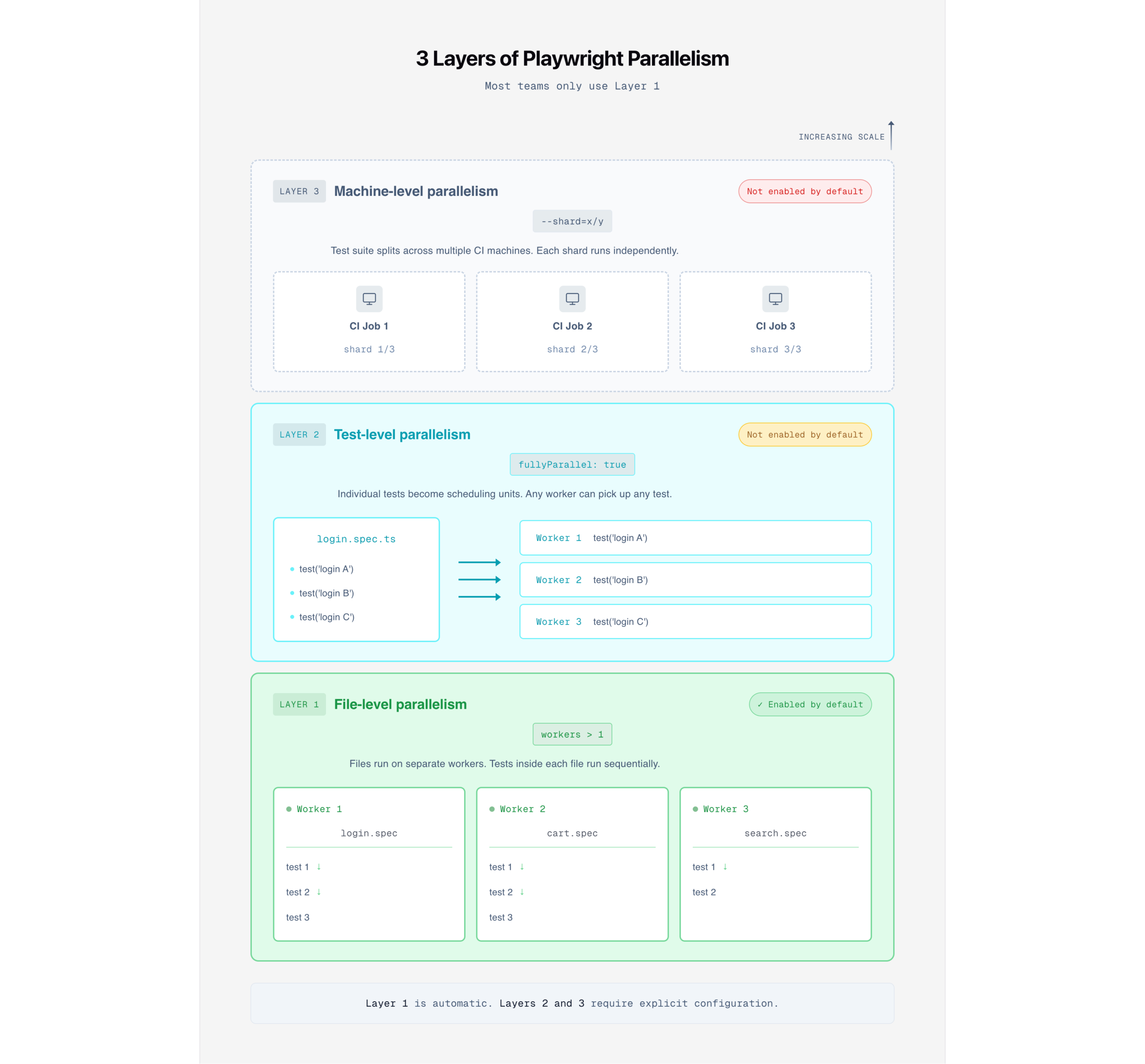
| Layer | What it controls | Enabled by default? | How to enable |
|---|---|---|---|
| File-level | Different test files run on different workers | Automatic with workers > 1 | |
| Test-level | Individual tests within a file run on separate workers | fullyParallel: true or test.describe.configure({ mode: 'parallel' }) | |
| Machine-level | The test suite is split across multiple CI machines | --shard=x/y CLI flag |
Layer 1 is already active. Layer 2 is what fullyParallel controls. Layer 3 is Playwright sharding, which we've covered separately.
The rest of this guide focuses on layers 1 and 2, which run on a single machine.

Tip: Workers scale vertically on one machine. Sharding scales horizontally across multiple machines. Tune workers first, then add sharding when a single machine can't keep up. Read our sharding guide for that step.
Configuring workers in playwright.config.ts
The workers option in your Playwright config controls how many parallel processes run your tests. You can set it as a number, a percentage string, or leave it undefined.
Worker count options
// playwright.config.ts
import { defineConfig } from '@playwright/test';
export default defineConfig({
  // Use 2 workers in CI, default locally
  workers: process.env.CI ? 2 : undefined,
});
You can also override from the command line:
npx playwright test --workers 4The CLI flag always wins over the config file.
| Value | Behavior | Best for |
|---|---|---|
| undefined | Half of the CPU cores | Local development (Playwright default) |
| 1 | Sequential, no parallelism | Debugging, fragile environments |
| 4 | Exactly 4 workers | CI runners with known CPU count |
| '50%' | Half of the available cores | Flexible across different machines |
| '100%' | All CPU cores | Machines dedicated to testing only |
Note: The Playwright CI docs recommend workers: 1 in CI for stability. That's a safe starting point. If your tests are well isolated, you can increase them from there.
How many workers should you use?
Every competitor article says "experiment." That's true, but not helpful when you're starting from zero.
Here's a practical starting point based on suite size and CI resources:
| Suite size | CI environment | Recommended workers | Rationale |
|---|---|---|---|
| Under 50 tests | Any | undefined (default) | Not enough tests to benefit from tuning |
| 50 to 200 tests | 2 vCPU runner | 2 | Matches available cores |
| 50 to 200 tests | 4 vCPU runner | 3 to 4 | Leave some headroom for browser processes |
| 200+ tests | 4+ vCPU runner | 4 to 6, then consider sharding | Single machine starts hitting diminishing returns |
| Flaky tests appearing after increasing workers | Any | Reduce by 1 to 2 and recheck | Resource contention is likely the cause |
The key principle: each worker runs its own browser. A 2 vCPU machine running 4 workers is launching 4 Chrome instances on 2 cores. That's a recipe for timeouts.
Start conservative. Increase by 1. Watch for flakiness. That's the real "experiment."
What fullyParallel actually does (and what it doesn't)
This is the most misunderstood config option in Playwright's parallelism model.
fullyParallel controls whether tests inside a single file get distributed to separate workers. That's it.
fullyParallel at the config level
With fullyParallel: false (the default), Playwright assigns an entire file to one worker. All tests in that file run sequentially, in order, within that worker.
With fullyParallel: true, each test becomes its own task in the scheduler queue. A file with 10 tests now creates 10 separate tasks that any available worker can pick up.
// playwright.config.ts
import { defineConfig } from '@playwright/test';
export default defineConfig({
  fullyParallel: true, // individual tests become the scheduling unit
});
You can also enable it for a single project instead of globally:
// playwright.config.ts
import { defineConfig, devices } from '@playwright/test';
export default defineConfig({
  projects: [
    {
      name: 'chromium',
      use: { ...devices['Desktop Chrome'] },
      fullyParallel: true, // only this project runs tests in parallel
    },
  ],
});
The fullyParallel misconception
Here's where most teams get confused.
Enabling fullyParallel: true does not mean your Chrome and Firefox projects will run simultaneously. Playwright's scheduler assigns the next available task to the next available worker, regardless of the project it belongs to. If all Chrome tests finish first, every worker switches to Firefox.
The "parallelism" here is about task granularity, not project distribution.
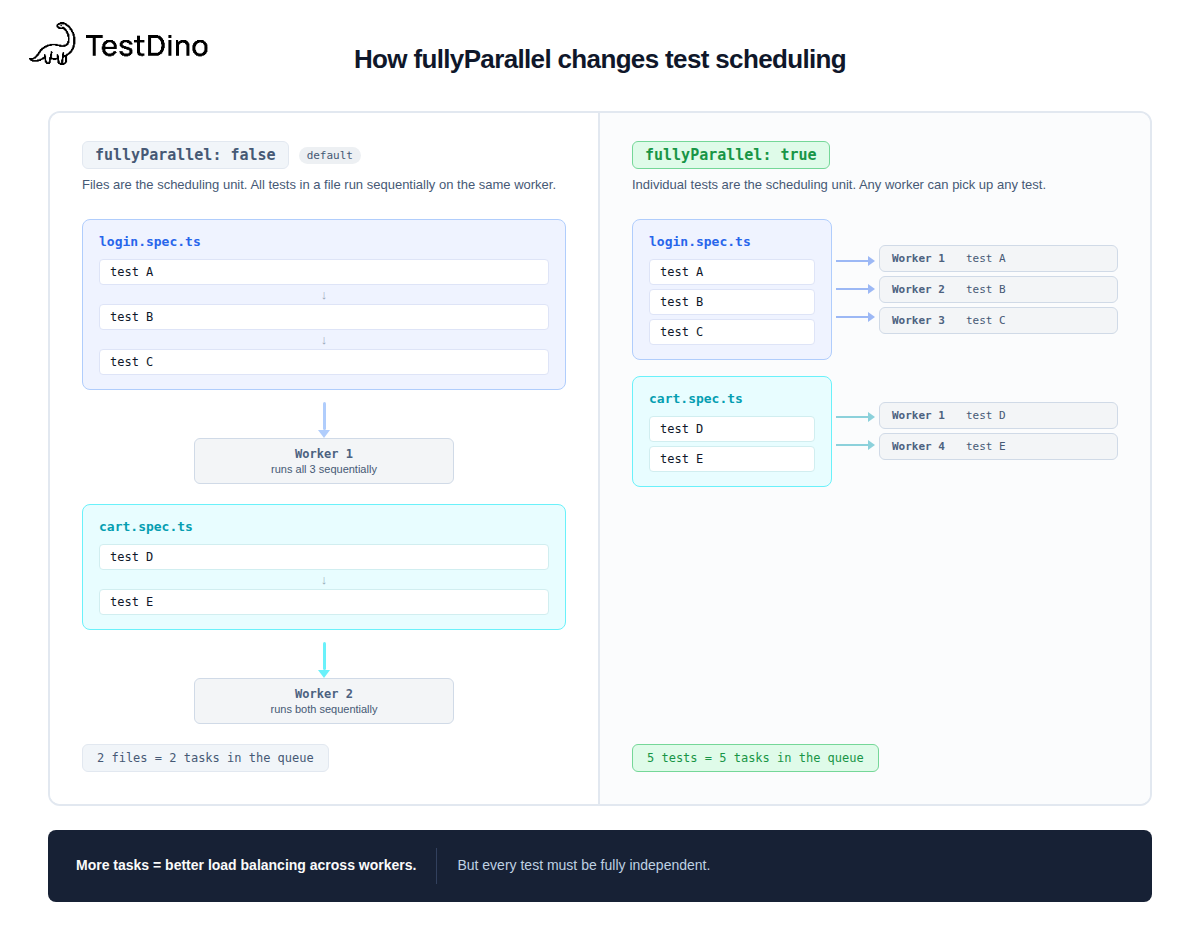
| Aspect | fullyParallel: false | fullyParallel: true |
|---|---|---|
| Scheduling unit | Entire file | Individual test |
| Tests in same file | Run sequentially in one worker | Distributed across any available worker |
| beforeAll / afterAll | Run once per file | Run separately for each test (each gets its own hooks) |
| Best for | Files with tests that depend on order | Files with fully independent tests |
| Risk | Slower if files have many tests | Shared state bugs surface immediately |
| Effect on sharding | Shards split by file count | Shards split by test count (more balanced) |
Tip: The Playwright sharding docs recommend fullyParallel: true when using shards. It creates more granular tasks, resulting in a more even distribution of work across shards.
If you're seeing flaky test failures after enabling fullyParallel, the likely cause is shared state between tests in the same file. Fix the isolation first, then re-enable.
Execution modes: parallel, serial, and default
Beyond the global config, Playwright gives you per-file control with test.describe.configure().
3 modes, each with different behavior.
parallel mode
Forces tests inside a file to run on separate workers, even if fullyParallel is off globally. Use this for files full of independent tests.
// tests/product-search.spec.ts
import { test, expect } from '@playwright/test';
test.describe.configure({ mode: 'parallel' });
test('search by product name', async ({ page }) => {
  await page.goto('https://storedemo.cms.testdino.com/products');
  await page.getByTestId('header-menu-all-products').click();
  // independent search test
});
test('filter by category', async ({ page }) => {
  await page.goto('https://storedemo.cms.testdino.com/products');
  // independent filter test, runs on a separate worker
});
Important: In parallel mode, beforeAll and afterAll run separately for each test, not once for the whole file. If your beforeAll sets up shared state (such as a database connection), parallel mode will create a separate connection for each test.
serial mode
Tests run in sequence. If one fails, all remaining tests in the group are skipped. Playwright explicitly discourages this mode. Use it only when tests genuinely depend on each other.
// tests/checkout-flow.spec.ts
import { test, expect } from '@playwright/test';
test.describe.configure({ mode: 'serial' });
test('register new account', async ({ page }) => {
  await page.goto('https://storedemo.cms.testdino.com/');
  await page.getByTestId('header-user-icon').click();
  await page.getByTestId('login-signup-link').click();
  await page.getByTestId('signup-email-input').fill(`user.${Date.now()}@test.com`);
  // ... complete registration
});
test('login with new account', async ({ page }) => {
  // depends on registration above, skips if registration fails
});
Note: Serial mode often indicates that tests should be combined into a single test. If step 2 can't run without step 1, they're not really separate tests. Splitting them only adds overhead.
default mode (opting out of fullyParallel)
When fullyParallel: true is set globally, specific describe blocks can opt out by setting mode: 'default'. Tests inside revert to sequential execution within their file.
test.describe('checkout flow', () => {
  test.describe.configure({ mode: 'default' });
  test('add to cart', async ({ page }) => {
    await page.goto('https://storedemo.cms.testdino.com/');
    await page.getByTestId('header-menu-all-products').click();
    // runs first
  });
  test('complete checkout', async ({ page }) => {
    // runs second, in the same worker
  });
});
Here's when to use each:
| Mode | On failure | Hooks behavior | Use when |
|---|---|---|---|
| parallel | Other tests keep running | beforeAll/afterAll per test | Tests are fully independent |
| serial | Remaining tests skip | Shared across the group | Multi-step flows with hard dependencies |
| default | Other tests keep running | Shared across the file | Opting out of fullyParallel for specific files |
Need help debugging failures when switching modes? Start with the default, verify that the tests pass, then move to parallel, one file at a time.
Keeping tests isolated across workers
Parallel tests break when they share state. Two workers writing to the same database row, two tests expecting the same user account, two files relying on the same browser cookie. These are the classic parallel testing traps.
workerIndex and parallelIndex
Each Playwright worker gets two IDs:
- workerIndex: Unique, starts at 1 and increments when a worker restarts after a failure. A fresh number every time.
- parallelIndex: Stable, ranges from 0 to workers - 1. Survives worker restarts.
test('worker identity', async ({ page }, testInfo) => {
  console.log(`Worker: ${testInfo.workerIndex}, Parallel: ${testInfo.parallelIndex}`);
  // Use parallelIndex for resource partitioning
  const testUser = `user-${testInfo.parallelIndex}@cms.testdino.com`;
});
Tip: Use parallelIndex for resource partitioning (like picking a database user per slot). Use workerIndex when you need a globally unique identifier that changes on every restart.
Practical isolation patterns
You don't need a complex fixture system to isolate parallel tests. Three strategies cover most cases:
Timestamp-based unique data is the simplest approach. Generate unique values per test run so no two tests collide:
const timestamp = Date.now();
const uniqueEmail = `testuser.${timestamp}@mailtest.com`;
This pattern is used in the TestDino demo store test suite. Each registration creates a unique email address, so parallel runs never compete for the same account.
Worker-scoped fixtures assign a shared resource (such as a database user) to each worker slot using parallelIndex. See the Playwright fixtures docs for the full pattern.
Separate browser contexts give each test its own cookies, localStorage, and session state. Playwright does this automatically when using the page fixture, which is why most tests don't need extra isolation work.
Tools like TestDino track failure patterns across parallel runs, so you can spot if a specific worker configuration is causing more failures than others.
Tuning parallel execution for CI
Getting parallelism right locally is half the job. CI environments have different constraints: fixed CPU counts, shared runners, Docker memory limits, and inconsistent network speeds.
Resource-aware worker config
Instead of hardcoding a worker count, use the machine's actual CPU count:
// playwright.config.ts
import { defineConfig } from '@playwright/test';
import os from 'os';
export default defineConfig({
  workers: process.env.CI
    ? Math.min(4, os.cpus().length) // cap at 4 in CI
    : undefined, // default locally
  // Stop early if too many tests fail
  maxFailures: process.env.CI ? 10 : undefined,
});
The maxFailures option prevents wasting CI time when a build breaks. If 10 tests have already failed, chances are the remaining failures share the same root cause.
Tip: Running Playwright in Docker? Add --disable-dev-shm-usage to your browser launch args. Docker's default shared memory is 64 MB, which isn't enough for Chrome. See the Playwright Docker docs for the recommended container setup.
When workers aren't enough: sharding
If your suite still takes too long after tuning workers, the next step is sharding. Sharding runs separate Playwright processes on separate CI machines, each handling a slice of the test suite.
npx playwright test --shard=1/3
npx playwright test --shard=2/3
npx playwright test --shard=3/3
We've written a complete guide to Playwright sharding covering CI YAML setup, shard balancing, and merge-report workflows. Start there when a single machine isn't cutting it.
Monitoring slow tests
Before adding more workers or shards, find out which tests are actually slow. Playwright has a built-in config for this:
export default defineConfig({
  reportSlowTests: {
    max: 5,        // report the 5 slowest tests
    threshold: 15000, // if they take longer than 15 seconds
  },
});
Slow end-to-end tests are usually the bottleneck. Splitting a 60-second test into 4 independent 15-second tests gives the scheduler more flexibility to distribute work.
TestDino's reporting dashboard shows test duration trends across runs, helping you measure the actual impact of worker tuning over time. Check test analytics to see which tests consistently run the longest.
For a deeper look at CI pipeline optimization and Playwright CI reports, we have dedicated guides.
FAQs

Jashn Jain
Developer Advocate