Playwright Architecture: Complete Visual Guide to How it Works (2026)
Learn how Playwright’s 3-layer architecture controls browsers using WebSocket and Chrome DevTools Protocol.
You write page.click(). The browser clicks a button.
Simple, right? Except between your code and that click, 4 protocol layers fire, 2 communication channels open, and at least 3 separate processes coordinate.
Most Playwright guides explain one of those layers. Maybe two. None traces a real command through the full stack.
Playwright's architecture has 3 core layers and 2 communication protocols. It's what makes Playwright faster than Selenium and architecturally different from Cypress.
But the interesting part isn't the layers themselves. It's how they talk to each other, and what breaks when they don't.
This guide traces a real Playwright command from your test file to the browser engine and back.
Here's what that means in practice.
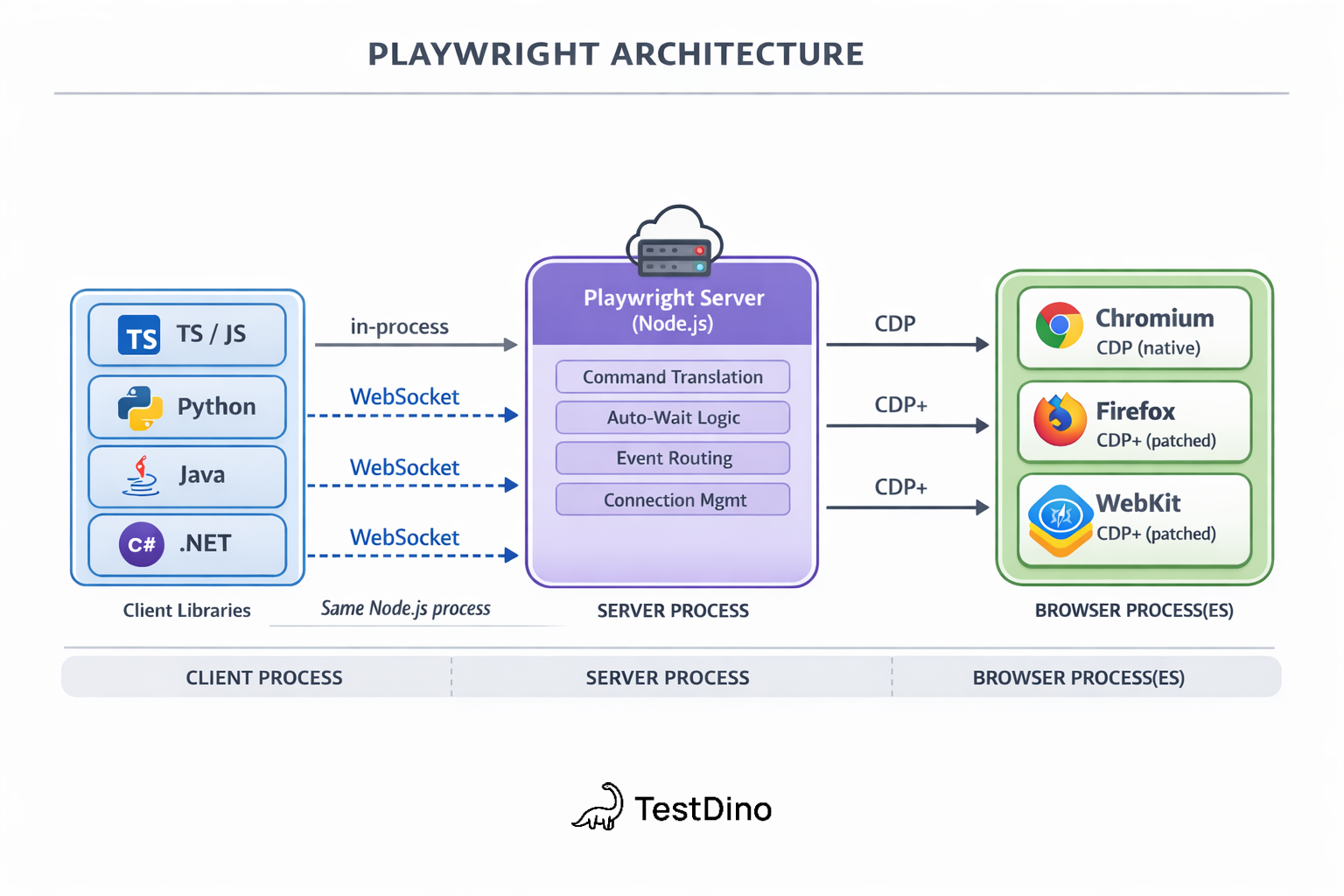
Your test file doesn't talk to the browser directly. It sends instructions to a Playwright Server process over a WebSocket connection. That server then translates your instructions into CDP commands and forwards them to the browser engine.
This is fundamentally different from how Selenium works. Selenium uses HTTP requests for each command. Playwright keeps a persistent WebSocket connection open.
The result? Faster command execution, real-time event streaming, and less overhead per action.

Tip: Think of it like texting vs. making a phone call. Selenium "calls" the browser for every action (connect, speak, hang up, repeat). Playwright keeps an open "text thread" where messages flow both ways instantly.
The 3 core layers of Playwright architecture
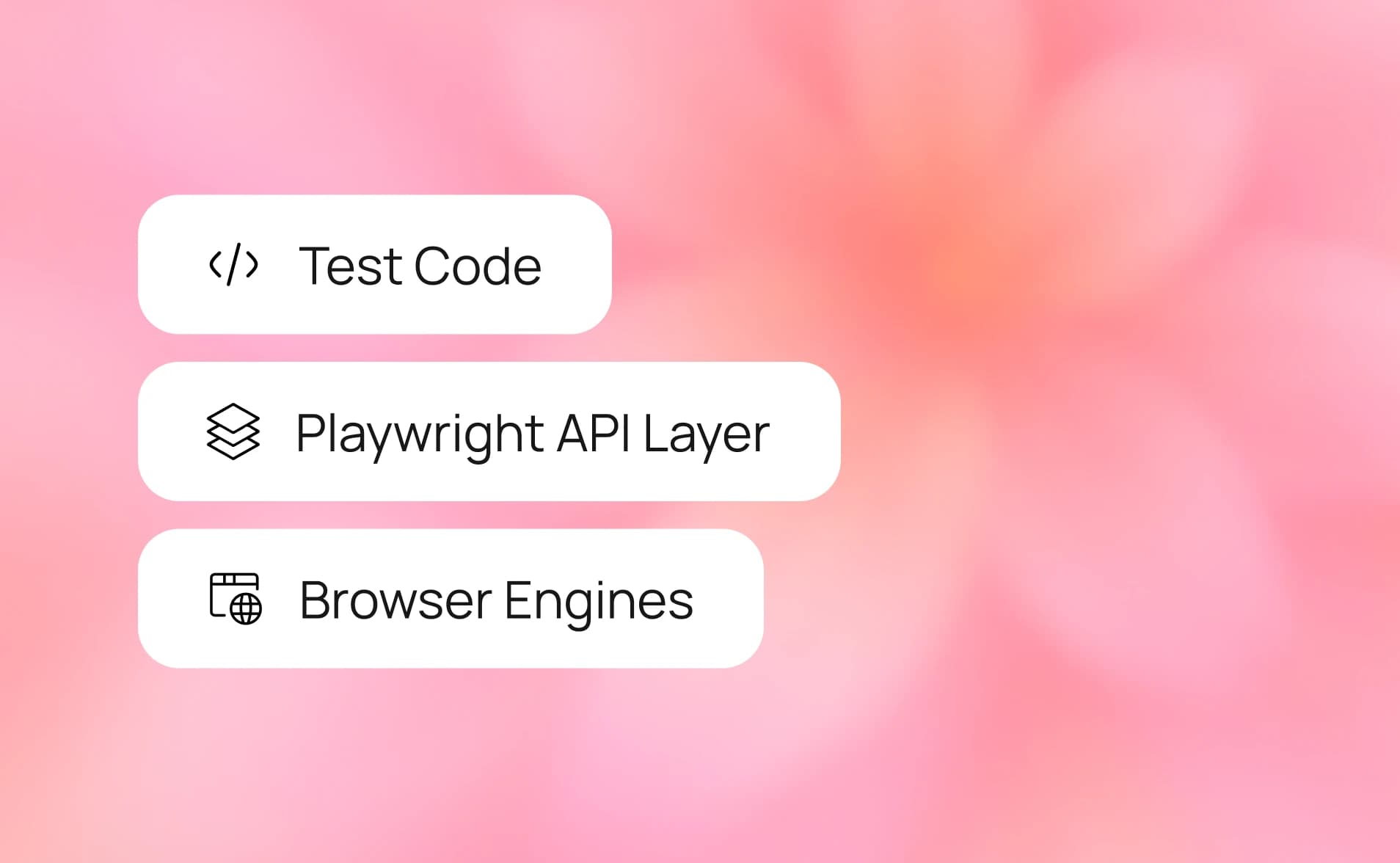
Playwright's architecture is a 3-layer stack. Each layer has a specific job.
| Layer | What it does | Where it runs |
|---|---|---|
| Client libraries | Exposes the API you write tests with (page.click(), expect()) | Your test process (Node.js, Python, Java, .NET) |
| Playwright server | Translates API calls into browser-specific protocol commands | Separate process, same machine |
| Browser engines | Executes commands and renders pages | Chromium, Firefox, or WebKit processes |
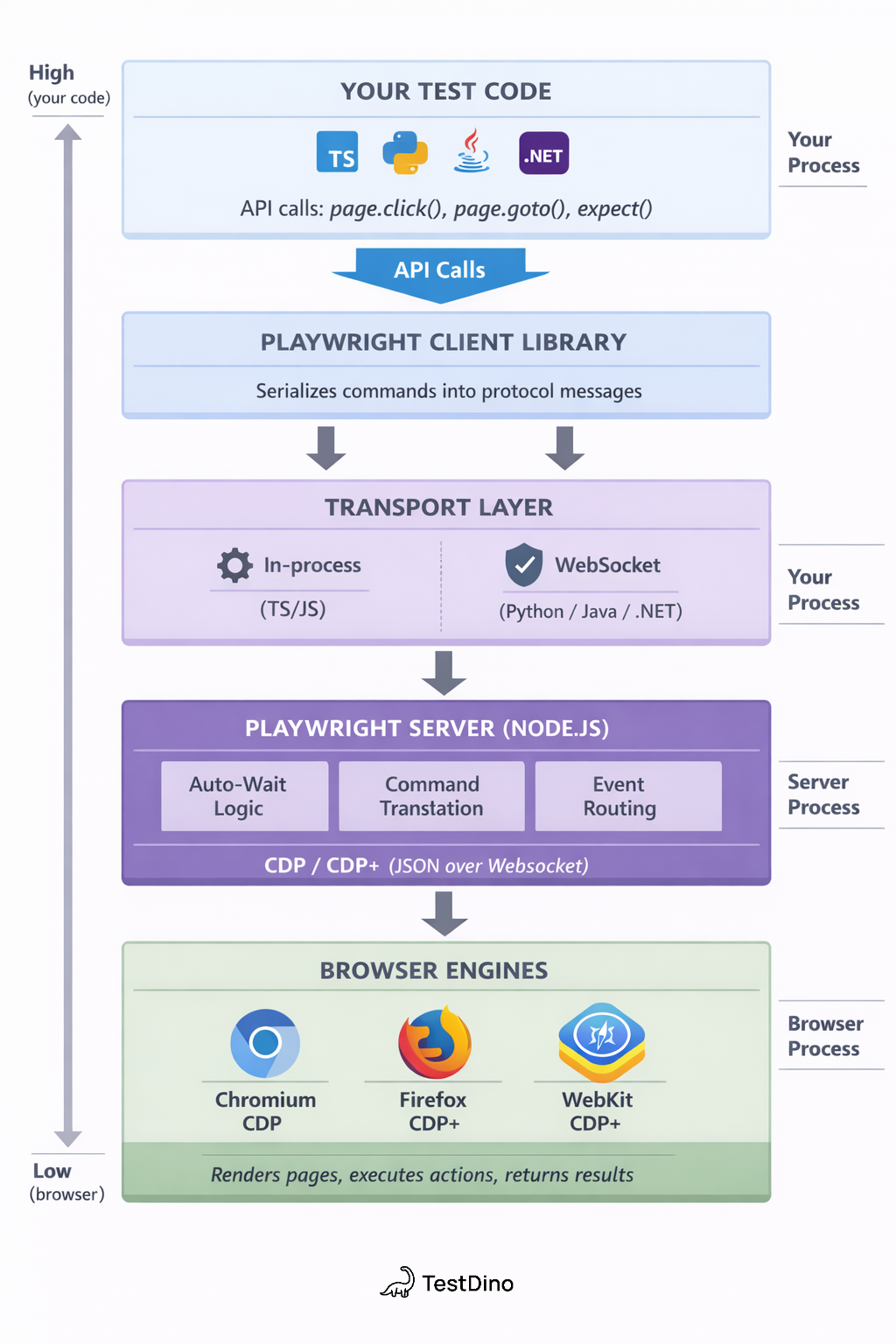
Let's break each one down.
Layer 1: Client libraries (language bindings)
This is the layer you interact with every day. When you write page.goto('https://example.com'), you're calling the Playwright client library.
Playwright supports 4 languages:
-
TypeScript/JavaScript (primary, most features ship here first)
-
Python
-
Java
-
.NET (C#)
Each language binding translates your code into protocol messages that the Playwright Server understands. The TypeScript/JavaScript client communicates in-process with the server. The Python, Java, and .NET clients communicate with the server over a WebSocket transport layer.
Note: The JavaScript client and server run in the same Node.js process by default. For other languages, the server runs as a separate Node.js process that the client connects to. This is why you need Node.js installed even when writing Playwright tests in Python or Java.
Layer 2: Playwright server (core engine)
The server is the brain. It sits between your test code and the browser, handling:
-
Command translation: Converts high-level API calls (like page.click()) into low-level protocol messages
-
Auto-waiting logic: Checks element visibility, stability, and actionability before executing actions
-
Event routing: Streams browser events (console logs, network requests, page loads) back to your test
-
Connection management: Maintains persistent connections to one or more browser instances
This layer is what gives Playwright its speed advantage. Instead of making individual HTTP round-trips like Selenium's WebDriver, the server maintains a persistent bidirectional connection to the browser.
The server also handles Playwright's built-in auto-wait mechanism. Before clicking an element, it automatically verifies that the element is visible, stable, enabled, and not obscured. This happens at the server layer, not in your test code.
Layer 3: Browser engines (Chromium, Firefox, WebKit)
Playwright ships with 3 browser engines. Not browser wrappers. Actual patched browser binaries.
| Engine | What it powers | Playwright modification |
|---|---|---|
| Chromium | Chrome, Edge | Uses CDP natively, minimal patches |
| Firefox | Firefox | Custom protocol patches (CDP-like layer added by Playwright team) |
| WebKit | Safari | Custom protocol patches (CDP-like layer added by Playwright team) |
This is a critical architectural detail. Selenium relies on each browser vendor to build and maintain its own WebDriver implementation. Playwright takes a different approach: the team patches Firefox and WebKit directly to support CDP-style communication.
Tip: This is why Playwright can offer features that work identically across all 3 browsers. The Playwright team controls the protocol layer, not the browser vendors.
Each browser engine runs as its own process (or set of processes). Chromium, for example, runs a main browser process plus separate renderer processes for each tab.
Communication protocols: WebSocket and CDP
The protocols are what make Playwright fast. Two protocols work together.
How WebSocket powers Playwright's speed
WebSocket is the transport layer between your test code and the Playwright Server (for remote connections), and between the server and browser.
Here's why this matters:
| Protocol | Connection type | Overhead per command | Bidirectional? |
|---|---|---|---|
| HTTP (Selenium WebDriver) | New connection with each command | High (TCP handshake + HTTP headers) | No (request-response only) |
| WebSocket (Playwright) | Persistent, always-on | Minimal (small frame header) | Yes (server can push events) |
With HTTP, every click() or goto() requires: open connection → send request → wait for response → close connection. Repeat for the next command.
With WebSocket, the connection opens once and stays open. Commands flow as lightweight frames. The browser can also push events back (like "page loaded" or "console error") without the client asking.
Note: The WebSocket overhead difference is most noticeable in tests with many sequential actions. A test with 50 actions might save 100-200ms in protocol overhead alone compared to an HTTP-based approach.
When you open Chrome DevTools and inspect network traffic, you're using the same protocol. Playwright just uses it programmatically.
Here's what a real CDP message looks like when Playwright navigates to a page:
// Command sent by Playwright Server → Browser
{
"id": 1,
   "method": "Page.navigate",
   "params": {
     "url": "https://example.com"
  }
}
// Response from Browser → Playwright Server
{
"id": 1,
  "result": {
    "frameId": "A1B2C3D4E5",
    "loaderId": "F6G7H8I9J0"
  }
}
Each CDP command has:
-
A unique id for matching responses to requests
-
A method that maps to a specific browser capability
-
params with the action details
Playwright's CDPSession API even lets you send raw CDP commands directly when you need low-level control:
const client = await page.context().newCDPSession(page);await client.send('Animation.enable');
client.on('Animation.animationCreated', () => {
console.log('Animation detected!');
});How Playwright extends CDP for cross-browser support
Here's the part most guides skip.
CDP was built by Google for Chromium. Firefox and WebKit don't natively speak CDP.
So the Playwright team did something unconventional. They contributed patches directly to Firefox and WebKit that add a CDP-compatible protocol layer. This means your test code works identically across all 3 browsers without any framework-level translation.
This is architecturally different from Selenium, where each browser has its own WebDriver implementation with different behaviors and bugs. And it's different from Cypress, which runs inside the browser's JavaScript context and historically only supported Chromium.
Browser contexts: isolation and parallel execution
Think of a context like an incognito window. Each one is completely isolated.
// Create two isolated contexts in the same browser
const context1 = await browser.newContext();
const context2 = await browser.newContext();
// These pages don't share cookies, storage, or state
const page1 = await context1.newPage();
const page2 = await context2.newPage();
This architecture enables:
-
Parallel test execution without shared state contamination
-
Multi-user testing (e.g., testing chat between two users) in a single test
-
Faster test setup because you don't need to launch separate browser instances
Each context gets its own set of pages, cookies, and permissions. But they all share the same browser process, which means less memory and faster creation compared to launching separate browsers.
Tip: Browser contexts are the reason Playwright's parallel test execution works so cleanly. Each worker process gets its own browser context, ensuring complete isolation.
How Playwright executes a test (step-by-step trace)
Let's trace what actually happens when you run this simple test:
import { test, expect } from '@playwright/test';test('check homepage title', async ({ page }) => {
await page.goto('https://storedemo.cms.testdino.com');
await page.click('text=Shop Now');
await expect(page).toHaveTitle(/TestDino/);
});Here's the exact sequence, layer by layer:
Step 1: Test runner starts a worker process. The Playwright Test runner spawns a worker (a separate Node.js process). This worker creates a browser instance and a fresh browser context.
Step 2: page.goto() triggers. Your test calls page.goto('https://storedemo.cms.testdino.com'). The client library serializes this into a protocol message and sends it to the Playwright Server.
Step 3: Server translates to CDP. The server converts the high-level goto call into a CDP Page.navigate command:
{
"method": "Page.navigate",
"params": { "https://storedemo.cms.testdino.com" }
}
Step 4: CDP message sent over WebSocket. The CDP command travels via the persistent WebSocket connection to the Chromium process.
Step 5: Browser navigates. Chromium processes the navigation. Network requests fire. HTML parses. DOM builds. The page renders.
Step 6: Browser confirms navigation. Chromium sends a CDP response back through the WebSocket, including the frame ID and loader ID. The server forwards the confirmation to the client.
Step 7: page.click() triggers auto-wait. Before clicking, the server runs Playwright's actionability checks:
-
Is the element visible?
-
Is it stable (not animating)?
-
Is it enabled?
-
Is it not obscured by other elements?
Only after ALL checks pass does the server issue the CDP click command.
Step 8: expect() assertion runs. The assertion toHaveTitle(/Example/) polls the page title through CDP's Runtime.evaluate domain until it matches or times out.
Step 9: Test passes or fails. The worker reports the result back to the test runner. The runner aggregates results from all workers and produces the report.
Note: This entire sequence, from page.goto() to the assertion passing, typically completes in under 2 seconds for a simple page. The protocol overhead is measured in milliseconds. The browser rendering is where the time goes.
You can inspect this entire flow yourself using Playwright's Trace Viewer, which records every action, network request, and screenshot as your test runs.
Test runner architecture: fixtures, workers, and reporters
This section covers a gap no competitor article addresses: how Playwright's test runner itself is architected.
Workers: OS-level parallelism
The test runner orchestrates everything. It spawns worker processes, which are separate Node.js OS processes.
Key facts about workers:
-
Each worker runs independently with its own browser instance
-
Workers can't communicate with each other
-
A crashed worker doesn't affect other workers
-
The runner reuses workers across test files for speed
-
Default worker count = half your CPU cores
import { defineConfig } from '@playwright/test';export default defineConfig({
workers: process.env.CI ? 4 : undefined,// CI: fixed at 4 workers
// Local: auto-detect based on CPU cores
});Tip: On a CI runner with 4 physical cores, 2-4 workers is the sweet spot. Going beyond that causes CPU contention, where workers fight for CPU time, leading to timeouts and flaky test failures that aren't actual bugs.
Fixtures: dependency injection for tests
Fixtures are Playwright's dependency injection system. They set up what your tests need (browser, page, authentication) and tear it down after.
There are two scopes:
| Fixture scope | Lifecycle | Use case |
|---|---|---|
| test scope | Created fresh for each test, torn down after | page, context, test-specific data |
| worker scope | Created once per worker, shared across tests | browser, authentication state, database connections |
import { test as setup, expect } from '@playwright/test';setup('authenticate', async ({ page }) => { await page.goto('/login');
await page.getByPlaceholder('Your email address').fill('add here');
await page.getByPlaceholder('Your password').fill('add here');
await page.getByRole('button', { name: 'Sign in' }).click();
await page.waitForURL('/');
await page.context().storageState({ path: 'auth.json' });
});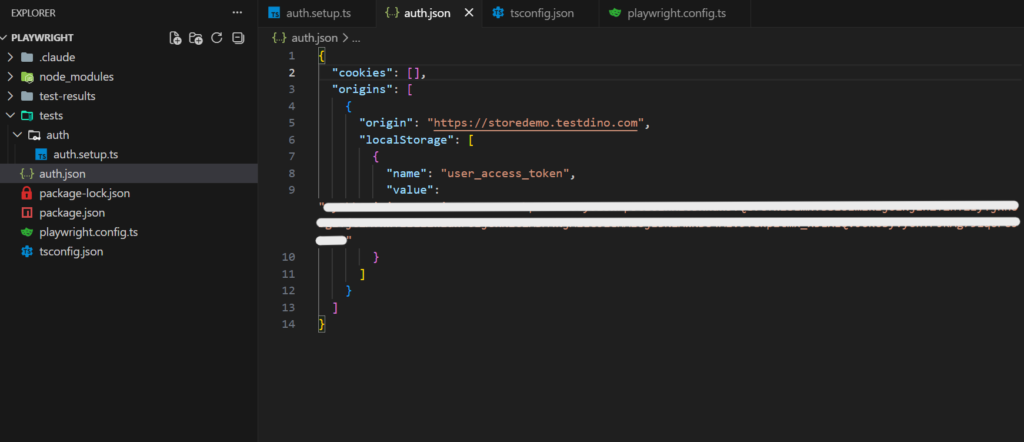
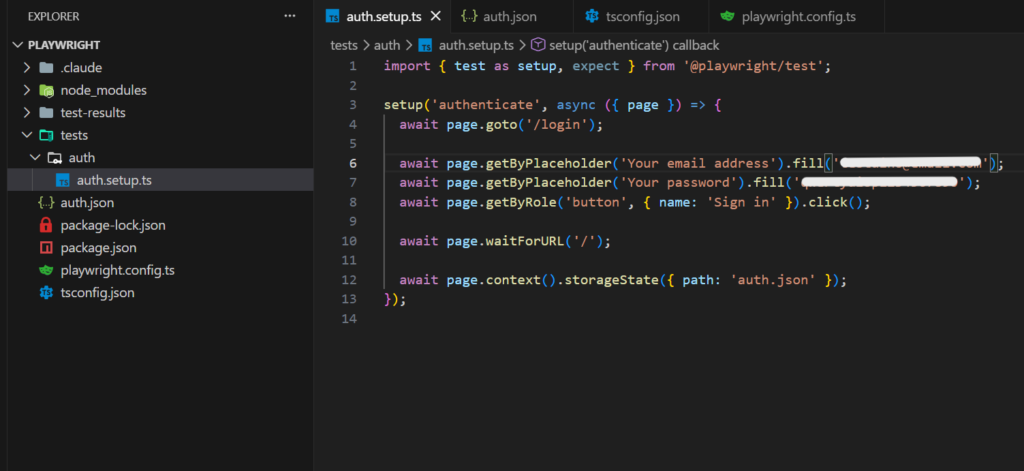
The screenshots above show this in practice. The auth.setup.ts file runs the login flow once and saves the session to auth.json. Every test that needs authentication reuses that saved state instead of logging in again. This is Playwright's storage state approach to authentication: run the setup once, reuse everywhere.
The fixture architecture is what makes Playwright's test isolation so clean. Each test gets exactly the dependencies it needs, with automatic cleanup.
Reporters: the output pipeline
Reporters process test results as they happen. Playwright supports multiple reporters running simultaneously:
-
List reporter (default): Real-time console output
-
HTML reporter: Interactive browser-based report with traces
-
JSON reporter: Machine-readable output for CI pipelines
-
JUnit reporter: XML format for CI tools like Jenkins
-
Blob reporter: Binary format for merging sharded results
export default defineConfig({
reporter: [
    ['list'],
    ['html', { open: 'never' }],
    ['json', { outputFile: 'results.json' }],
  ],
});
Playwright vs Selenium vs Cypress: Architecture comparison
The architectural differences between these 3 frameworks explain most of their behavioral differences.
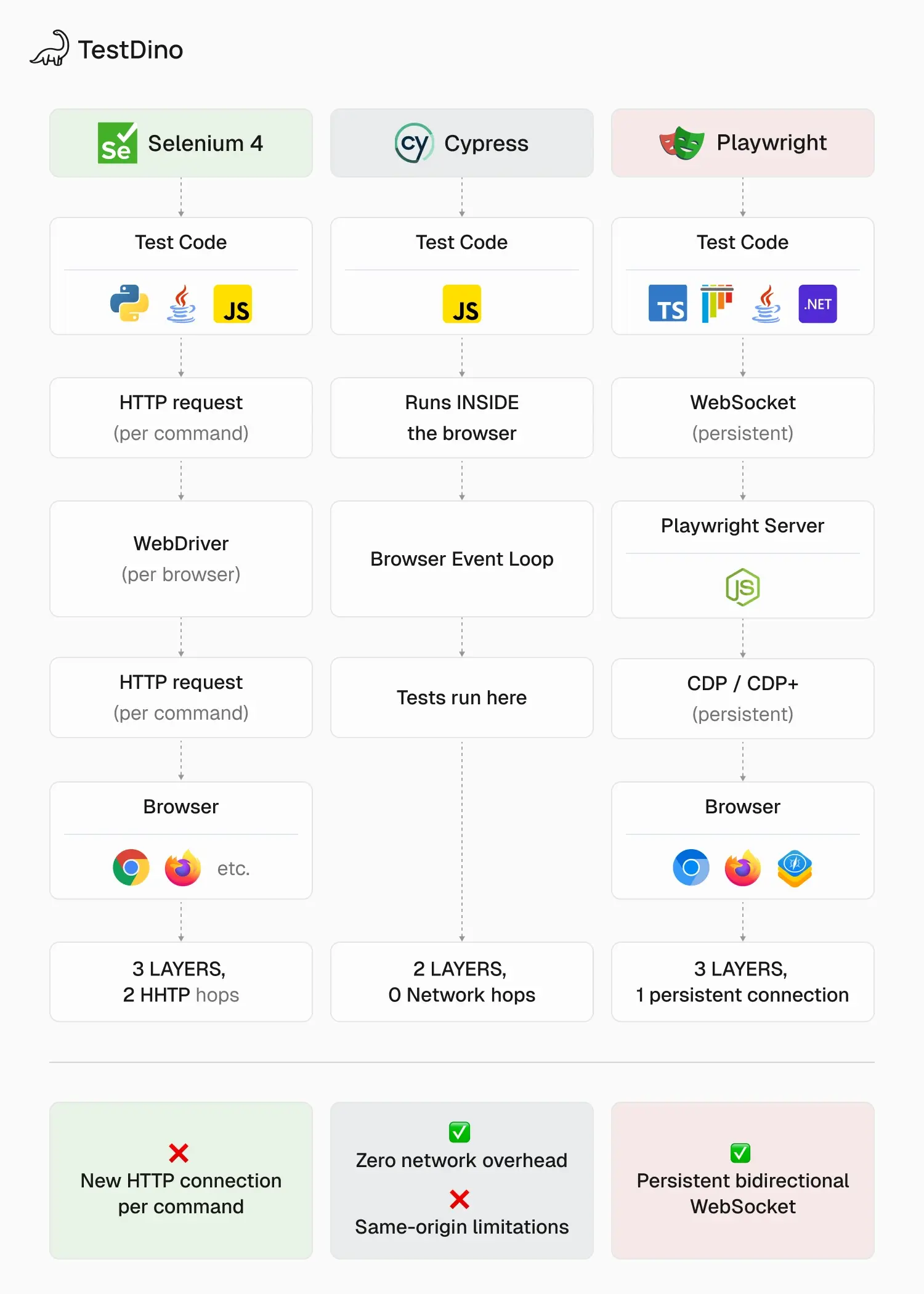
| Aspect | Playwright | Selenium | Cypress |
|---|---|---|---|
| Architecture model | Client → Server → Browser (out-of-process) | Client → WebDriver → Browser (out-of-process) | Runs inside the browser (in-process) |
| Communication protocol | WebSocket + CDP | HTTP + WebDriver protocol | Direct JavaScript execution |
| Browser control | Patches browser engines directly | Relies on vendor-built WebDriver implementations | Injects into browser's JS context |
| Multi-browser support | Chromium, Firefox, WebKit (native) | All major browsers via separate drivers | Chromium, Firefox, WebKit (experimental) |
| Parallel execution | Built-in workers + sharding | Selenium Grid (separate infrastructure) | Paid Dashboard or third-party tools |
| Auto-wait | Built into server layer (actionability checks) | Manual waits required (WebDriverWait) | Automatic retry-ability on assertions |
| Cross-origin support | Full (controls browser at process level) | Full (same) | Limited (runs in-browser, subject to same-origin) |
| Trace recording | Built-in (trace.zip with screenshots, network, DOM) | Third-party tools | Screenshot + video only |
When to choose each framework
Choose Playwright when:
-
You need true cross-browser testing (Chromium + Firefox + WebKit)
-
Fast parallel execution matters (built-in workers + sharding)
-
You want built-in tracing and debugging tools
-
Your team runs tests in CI and needs reliable reporting
Choose Selenium when:
-
You need to test browsers Playwright doesn't support (older IE versions, Opera)
-
Your team already has a large Selenium codebase
-
You need the largest ecosystem of third-party integrations
Choose Cypress when:
-
You're testing a single-browser web app (primarily Chrome)
-
Developer experience during local development is the priority
-
Your team prefers an all-in-one dashboard experience
For a deeper comparison with benchmarks, see the full framework comparison.
How Playwright's architecture has evolved
Playwright was created by the same engineers who built Puppeteer at Google. When they moved to Microsoft, they started Playwright with a clear architectural goal: true cross-browser automation.
Key architectural milestones:
| Version | Change | Impact |
|---|---|---|
| v1.0 (2020) | Initial release with Chromium, Firefox, WebKit | First framework with native 3-browser support |
| v1.8 | Playwright Test runner introduced | Built-in test framework, no need for Jest/Mocha |
| v1.13 | Trace Viewer introduced | Built-in recording and replay for debugging |
| v1.22 | API testing support added | Combined UI and API testing in one framework |
| v1.29 | UI Mode introduced | Interactive test development and debugging |
| v1.40+ | Component testing (experimental) | Test React, Vue, Svelte components in real browsers |
| v1.56 | Test Agents (planner, generator, healer) | AI-assisted test creation and self-healing |
The architecture has remained fundamentally stable (client-server with CDP) since v1.0. What's evolved is the test runner, the debugging tools, and most recently, the AI integration layer.
Note: The Playwright MCP server (Model Context Protocol) is the latest architectural addition. It exposes Playwright's capabilities as structured tools that AI coding assistants can invoke. This represents a shift from "humans write tests" to "AI agents participate in the testing workflow."
Best practices for working with Playwright's architecture
Understanding the architecture changes how you write tests. Here are practices grounded in how the system actually works.
Use browser contexts, not separate browsers. Each new browser launch is expensive (new process, new memory allocation). Contexts are cheap (same process, isolated state). For parallel testing, always use contexts.
Trust auto-wait. Don't add manual sleeps. The server layer handles actionability checks before every action. Adding page.waitForTimeout(2000) works against the architecture, not with it.
Keep test files small for better sharding. Playwright distributes tests at the file level by default. 20 small files shard better than 3 large ones. For sharding strategies, enable fullyParallel: true to distribute at the individual test level.
Configure workers based on your CI hardware. More workers ≠ faster tests. On a 4-core CI runner, 2-4 workers are optimal. Beyond that, CPU contention causes timeouts that look like flaky tests but are actually resource starvation.
Use trace recording on the first retry. The trace captures every layer's activity (DOM snapshots, network requests, console logs). Set trace: 'on-first-retry' in your playwright config to capture traces only when tests fail and retry.
export default defineConfig({
 use: {
   trace: 'on-first-retry',
   screenshot: 'only-on-failure',
   video: 'retain-on-failure',
  },
   retries: process.env.CI ? 2 : 0,
});
Tip: Traces are powerful but heavy. For a team running 500+ tests nightly, consider using TestDino's real-time streaming to centralize trace data instead of storing artifacts in CI. This keeps your CI pipeline lean while retaining full debugging context.
FAQs

Jashn Jain
Developer Advocate