8 Test Generation Strategies That Actually Scale (2026 Guide)
Struggling to scale test creation? This guide covers 8 proven test generation strategies with real examples, code snippets, and a decision framework.

Test suites are growing faster than teams can write them. CI pipelines run thousands of tests, but most of those tests were still authored one by one, by hand, inside a code editor.
That gap between "how many tests we need" and "how fast we can create them" is the core bottleneck for QA teams in 2026. Studies on the cost of bugs show that defects caught late in the cycle cost up to 30x more to fix than ones caught early. Adopting a shift-left testing mindset means generating your test cases earlier, and that requires better test generation strategies.
This guide breaks down 8 proven test generation strategies, from classic test case design techniques like boundary analysis to modern AI-powered approaches. Each one comes with a real example, a code snippet, and clear guidance on when it makes sense for your team.
What are test generation strategies?
Test generation strategies are systematic approaches to creating test cases that maximize code coverage and defect detection while minimizing redundant effort. They range from manual design techniques like equivalence partitioning to fully automated methods like AI-powered generation.
If you search for test generation strategies today, you will often find articles talking broadly about manual vs. automated testing, or methodologies like Behavior-Driven Development (BDD) and TDD.
While moving from manual QA to automated execution is critical, and BDD is fantastic for defining requirements (Given / When / Then), these are not actual test generation strategies. BDD tells you how to format a test, but it does not tell you what variables, edge cases, or negative inputs to actually test.
Real test generation strategies give you a repeatable, mathematical framework for deciding:
-
What inputs to test
-
Where to focus effort (high-risk vs. low-risk areas)
-
How to create tests faster (algorithmically or with AI)
The test generation strategies in this guide go beyond the basics. They span both black-box techniques (where you do not look at the code) and white-box techniques (where you do). Some are fully automated. Others are manual but methodologically rigorous. Together, they form a complete toolkit for scaling test creation without scaling headcount.
Why manual test creation stops scaling
Before diving into the eight strategies, it helps to understand why the default approach of handwriting every test breaks down. Here are the three main failure modes.
1. Combinatorial explosion
A login form with 3 fields, each accepting 5 input types, produces 125 combinations. A checkout flow with 8 variables produces millions. Manual test authoring even inside a mature BDD framework—cannot keep up with this math.
2. Human blind spots
Testers tend to write happy-path tests first. Edge cases like empty strings, negative numbers, or Unicode characters get skipped because they are not obvious to the human mind during test planning.
3. Regression maintenance drag
Every handwritten test is a maintenance liability. When the UI changes, locators break. When APIs shift, assertions fail. As your regression testing suite grows to thousands of tests, teams dealing with flaky tests often spend more time fixing existing automated tests than writing new ones.
These problems compound. As the codebase grows, the cost of manually writing and maintaining tests grows faster. That is the scaling wall.
One engineering team we studied at a mid-size fintech company had 4,200 E2E tests. Their QA team spent 60% of every sprint fixing broken locators and flaky assertions instead of writing new coverage.
After adopting pairwise reduction and risk-based prioritization (strategies 3 and 7 below), they cut their active test count to 2,800 while increasing their defect detection rate by 18%. The math works when you apply the right test generation strategies.
8 test generation strategies that actually work
1. Equivalence partitioning
Definition
Equivalence partitioning divides an input field into groups (called partitions) where every value in the group is expected to behave the same way. You then test one representative value from each group instead of every possible value.
Take an age field that accepts values between 18 and 65:
-
Valid partition: 18–65 (pick 30 as the representative)
-
Invalid partition < 18: 0–17 (pick 10)
-
Invalid partition > 65: 66+ (pick 80)
That turns an infinite input space into 3 test cases.
# test_age_field.py
import pytest

@pytest.mark.parametrize("age, expected", [
    (30, "valid"),     # valid partition
    (10, "invalid"),   # below-range partition
    (80, "invalid"),   # above-range partition
])
def test_age_input(age, expected):
    result = validate_age(age)
    assert result == expected
When to use it: Any form field, API parameter, or configuration option that accepts a range of inputs. It is the most basic test case design technique, and the foundation for every other test generation strategy on this list.
2. Boundary value analysis
Boundary value analysis (BVA) is the natural companion to equivalence partitioning. Instead of picking a value from the middle of each partition, you pick values right at the edges.
For the same age field (18–65), BVA generates these test values:
-
17 (just below minimum)
-
18 (minimum boundary)
-
19 (just above minimum)
-
64 (just below maximum)
-
65 (maximum boundary)
-
66 (just above maximum)
// test_age_boundary.spec.js
const boundaryValues = [
  { age: 17, valid: false },
  { age: 18, valid: true },
  { age: 19, valid: true },
  { age: 64, valid: true },
  { age: 65, valid: true },
  { age: 66, valid: false },
];

boundaryValues.forEach(({ age, valid }) => {
  test(`age ${age} should be ${valid ? 'accepted' : 'rejected'}`, () => {
    expect(validateAge(age)).toBe(valid);
  });
});
Tip: Combine equivalence partitioning and BVA together. EP decides which groups to test. BVA decides which specific values within those groups will catch the most bugs. Off-by-one errors account for a significant portion of field validation bugs.
When to use it: Numeric ranges, date pickers, character-length limits, pagination endpoints. Anywhere there is a defined minimum and maximum.
3. Combinatorial (pairwise) testing
When a system has multiple input variables, testing every possible combination is not practical. Combinatorial testing reduces the number of test cases by ensuring that every pair of input values appears together in at least one test.
Consider a web app that runs on:
-
3 browsers (Chrome, Firefox, Safari)
-
3 OS (Windows, macOS, Linux)
-
2 screen sizes (desktop, mobile)
Full coverage = 3 × 3 × 2 = 18 test cases. Pairwise testing covers all two-way interactions in just 9 test cases while still catching the majority of interaction-related defects.
Note: Research published in the IEEE Transactions on Software Engineering found that most software defects are caused by interactions between 1–2 parameters, not 3 or more. Pairwise testing exploits this pattern to cut test counts dramatically. Tools like PICT (by Microsoft) and AllPairs can generate pairwise test sets automatically.
When to use it: Cross-browser testing, configuration matrices, feature flag combinations. Any scenario where multiple independent variables interact. Teams running Playwright parallel execution across browser matrices benefit heavily from pairwise reduction.
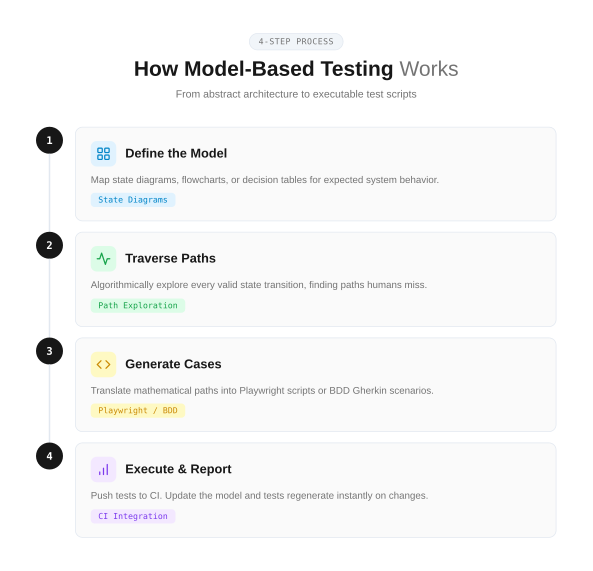
4. Model-based testing
Model-based testing (MBT) generates test cases automatically from a formal model (like a state machine or flow diagram) that describes how the system should behave. The model defines valid states and transitions, and the tool generates paths through the model as test cases.
Think of a shopping cart:
-
States: Empty → Has items → Checkout → Payment → Confirmation
-
Transitions: Add item, Remove item, Apply coupon, Submit payment
A model-based testing tool traverses every valid transition path and produces test cases that cover all reachable states. It can also flag unreachable states in your design.
# cart_model.txt (simplified state model)
States: Empty, HasItems, Checkout, Payment, Confirmation
Transitions:
  Empty -> HasItems [addItem]
  HasItems -> HasItems [addItem]
  HasItems -> Empty [removeLastItem]
  HasItems -> Checkout [proceedToCheckout]
  Checkout -> Payment [enterPaymentDetails]
  Payment -> Confirmation [submitPayment]
  Payment -> Checkout [editCart]
Tools like GraphWalker, Spec Explorer, and Conformiq can ingest models like this and output executable test scripts.
When to use it: Complex workflows (onboarding flows, payment state machines, multi-step forms), embedded systems, and protocol testing. MBT is particularly valuable when the test maintenance burden is high because updating the model automatically regenerates the tests.
5. Property-based testing
Instead of writing individual test cases with specific inputs and expected outputs, property-based testing tells the framework a rule the code must always follow. The framework then generates hundreds of random inputs and checks whether the rule holds for all of them.
# test_sort_property.py
from hypothesis import given
from hypothesis import strategies as st

@given(st.lists(st.integers()))
def test_sorted_list_length_unchanged(input_list):
    """The sort function should never change the list length."""
    assert len(sorted(input_list)) == len(input_list)

@given(st.lists(st.integers(), min_size=1))
def test_sorted_list_is_ordered(input_list):
    """Every element should be <= the next element."""
    result = sorted(input_list)
    for i in range(len(result) - 1):
        assert result[i] <= result[i + 1]
Popular frameworks include Hypothesis (Python), fast-check (JavaScript/TypeScript), and QuickCheck (Haskell, the original).
When to use it: Utility functions, data transformations, serialization/deserialization, API contracts, and test data generation pipelines. Property-based testing excels at finding edge cases that human testers would never think to write. It is also a strong fit for teams doing automated test generation at the unit level.
6. Mutation testing
Definition
Mutation testing evaluates your existing test suite by injecting small, deliberate faults (mutations) into your source code and checking whether your tests catch them. If a test fails after a mutation, the mutant is "killed." If no test catches it, your suite has a gap.
Common mutation operators include:
-
Changing > to >=
-
Replacing true with false
-
Swapping + with -
-
Removing a function call
npx stryker runStryker (JavaScript/TypeScript), PITest (Java), and mutmut (Python) are the most widely used mutation testing tools.
Tip: Your mutation score (percentage of killed mutants) is a far better measure of test suite quality than line coverage. A codebase can have 90% line coverage but still miss critical logic bugs. Mutation testing reveals exactly where those gaps are. Research from multiple empirical studies shows that mutation testing outperforms traditional structural code coverage metrics at predicting real defect detection.
When to use it: After you already have a test suite and want to measure how effective it is. Mutation testing does not generate new tests directly, but it tells you exactly where you need to write them. Teams tracking Playwright test failure root causes can combine mutation analysis with failure analytics for a complete quality picture.
7. Risk-based test generation
Risk-based testing prioritizes test creation around the areas of your application where failure would cause the most damage. Instead of trying to cover everything equally, you focus your highest-quality testing on the highest-risk modules.
The process follows a formula:
Risk Score = Likelihood of Failure × Business Impact
You can score each module on a 1–5 scale for both dimensions:
| Module | Likelihood (1–5) | Impact (1–5) | Risk Score | Test Priority |
|---|---|---|---|---|
| Payment processing | 3 | 5 | 15 | Critical |
| User authentication | 4 | 5 | 20 | Critical |
| Dashboard analytics | 2 | 2 | 4 | Low |
| Profile settings | 2 | 3 | 6 | Medium |
| Search functionality | 3 | 4 | 12 | High |
High-risk areas get extensive testing: boundary analysis, negative testing, security testing, and performance testing. Low-risk areas get basic happy-path checks and standard code coverage verification.
When to use it: Every team should have some form of risk-based prioritization. It is particularly critical when timelines are tight and you cannot test everything. Use it during sprint planning to decide which features need regression testing and which can wait.
8. AI-powered test generation
The newest category. AI test generation uses large language models and code analysis to produce test cases from source code, requirements, or user stories.
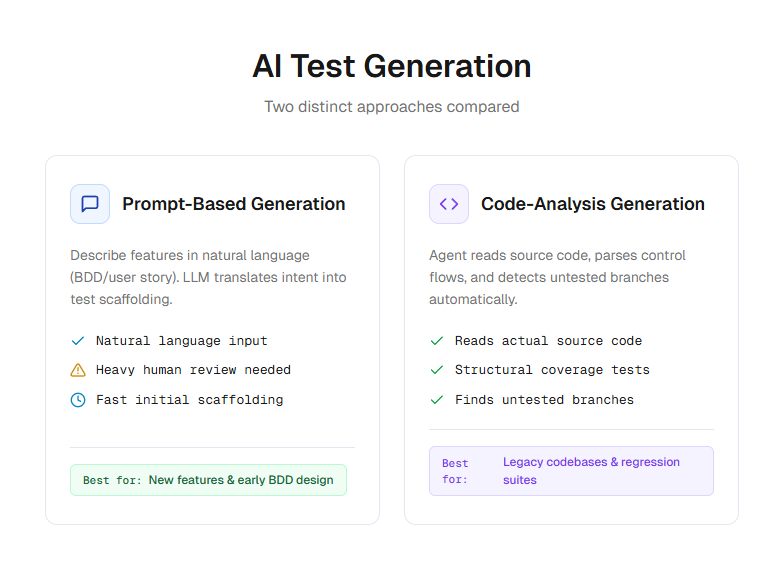
There are 2 main approaches:
-
Prompt-based generation: You describe a feature in natural language and the AI produces test cases. Tools like GitHub Copilot, Cursor, and Claude Code work this way.
-
Code-analysis generation: The AI reads your source code and automatically generates tests based on function signatures, types, and control flow. Playwright AI codegen falls into this category.
npx playwright codegen https://storedemo.cms.testdino.comThis command opens a browser and records your interactions, generating Playwright test code automatically. The Playwright AI ecosystem now includes MCP servers, autonomous agents, and self-healing test frameworks.
Note: AI-generated tests still require human review. The generated code may contain hallucinated selectors, incorrect assertions, or logic that does not match your actual business rules. The consensus among engineering leaders in 2026 is to treat AI as a "digital co-tester" that handles the repetitive scaffolding while humans focus on strategic test design and exploratory testing.
When to use it: Bootstrapping test suites for new projects, generating boilerplate test structures, and augmenting manual test creation for repetitive patterns. Teams using AI test generation tools should pair them with a reporting platform that can track which generated tests are flaky or low-value.
Side-by-side comparison of all 8 strategies
| Strategy | Type | Automation level | Best for | Effort to implement |
|---|---|---|---|---|
| Equivalence partitioning | Black-box | Manual | Input validation, form fields | Low |
| Boundary value analysis | Black-box | Manual | Numeric limits, edge cases | Low |
| Combinatorial/pairwise | Black-box | Tool-assisted | Config matrices, multi-variable inputs | Medium |
| Model-based testing | Behavioral | Automated | Workflows, state machines | High |
| Property-based testing | White-box | Automated | Utility functions, data transforms | Medium |
| Mutation testing | White-box | Automated | Test suite quality assessment | Medium |
| Risk-based testing | Strategic | Manual + data-driven | Sprint planning, test prioritization | Low |
| AI-powered generation | Hybrid | Automated | Bootstrapping, boilerplate, E2E scaffolding | Low to Medium |
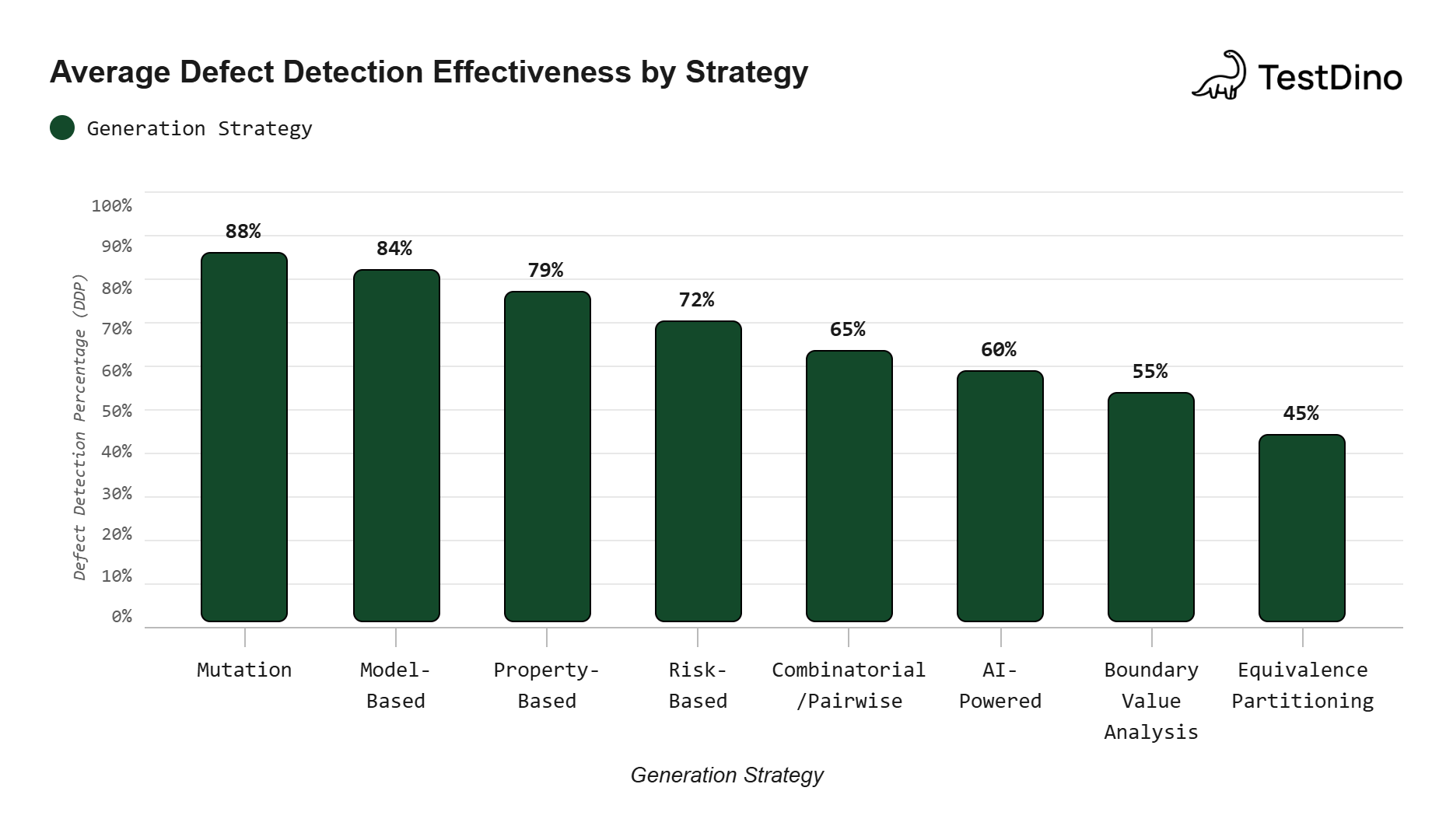
Source: Aggregated from IEEE Transactions on Software Engineering empirical studies on test efficacy.
How to pick the right strategy for your team
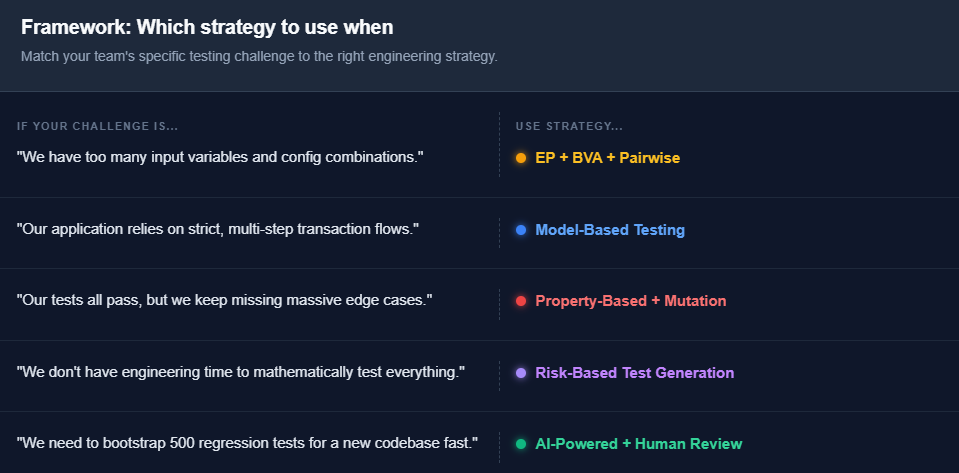
There is no single test generation strategy that fits every situation. Here is a practical decision framework based on the most common testing challenges teams face.
Start with equivalence partitioning and BVA. These require zero tooling investment and immediately improve the quality of any test you write.
Add pairwise testing when your config matrix grows. Once you are testing across multiple browsers, OS, and environments, pairwise testing saves you from the combinatorial explosion. The Playwright annotations guide covers how to tag and filter tests for matrix runs.
Introduce property-based testing for core logic. Any function that transforms data (sort, filter, serialize) benefits from hundreds of random inputs. The bugs it catches are the ones you would never think to write a test for.
Use risk-based prioritization to guide where you invest. Not every module deserves the same test depth. The flaky test benchmark report shows that most test suite failures cluster in a small number of high-risk modules.
Layer AI generation on top. Use AI to generate the initial scaffolding for new features, then refine with human judgment. Pair it with tools that track test quality over time so you can identify which AI-generated tests actually hold value.
What happens after you generate tests
Generating tests is only half the equation. The other half is understanding what those tests tell you after they run.
A common pitfall teams encounter is generating hundreds of new test cases and then drowning in failures they cannot interpret. A test suite that produces 500 failures is not useful if you cannot distinguish real bugs from environment noise. This is where test analytics and failure classification become essential.
Key capabilities to look for in your reporting layer:
-
AI failure classification that separates genuine bugs from flaky tests and UI changes
-
Historical trend tracking to identify which tests fail most often and why
-
CI/CD integration that surfaces test results directly in pull requests
TestDino provides exactly this layer for teams running Playwright and other frameworks. It auto-classifies every failure, tracks flaky test patterns over time, and gives test leads the data they need to decide which generated tests are worth keeping and which are adding noise.
Without a reporting layer, test generation becomes a "more tests, more problems" situation. With one, it becomes a scalable quality system.
Conclusion
Test generation strategies are not about replacing your team. They are about multiplying what your team can cover.
Equivalence partitioning keeps your inputs sane. BVA catches off-by-one errors. Pairwise testing tames the configuration matrix. Model-based testing handles complex workflows. Property-based testing finds edge cases nobody imagined.
Mutation testing tells you if your existing suite actually works. Risk-based prioritization ensures you test what matters first. And AI generation handles the repetitive work so your engineers can focus on the hard problems.
Start with one or two techniques from this guide. Apply them to your next sprint. Measure the results. Then layer in more test generation strategies as your confidence grows.
The teams that scale their test suites in 2026 will not be the ones that write the most tests. They will be the ones that generate the right tests, run them reliably, and understand what the results mean.
FAQs

Dhruv Rai
Product & Growth Engineer