Playwright 1.60: Drop API, HAR Tracing & Diagnostics
Playwright 1.60 ships 6 major features. Here’s what changed, what broke, and how to upgrade, with runnable code examples for every new API.
Playwright 1.60 shipped in May 2026.
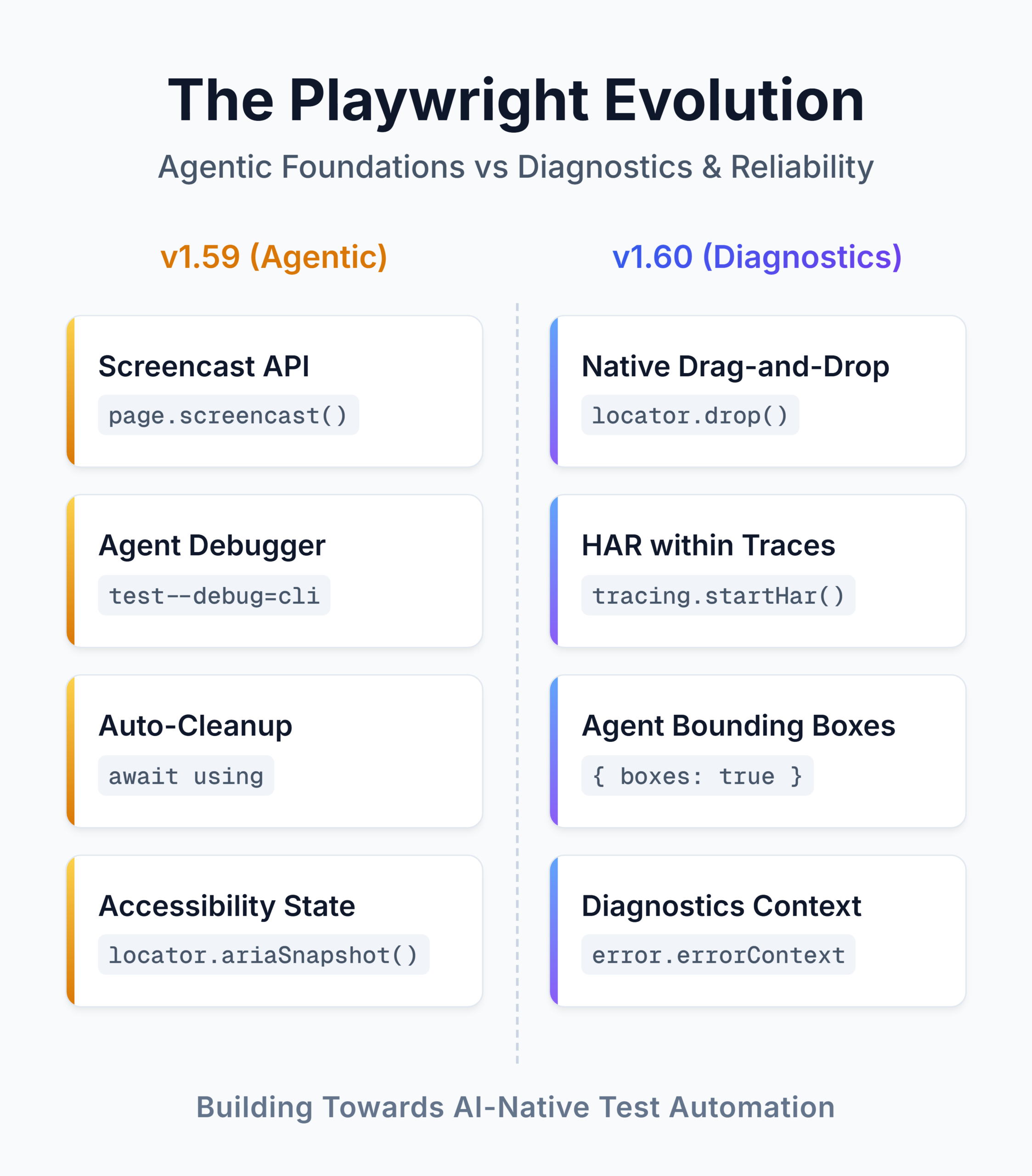
Out of the 6 major additions, these standout:
- locator.drop() finally makes drag-and-drop testing clean across all browsers.
- tracing.startHar()turns HAR recording into a first-class tracing API.
- ARIA snapshots now include bounding boxes, which provide layout coordinates to AI agents alongside the accessibility tree.
- test.abort() gives your test suites an emergency stop button when guardrails are violated.
This guide walks through every 1.60 feature with code you can copy into your Playwright project, plus a worked end-to-end example that ties multiple new features together.
Upgrading from Playwright 1.59 to 1.60
The one-line upgrade
npm install -D @playwright/test@1.60.0
npx playwright install
Browser versions in 1.60
| Browser | Version |
|---|---|
| Chromium | 148.0.7778.96 |
| Mozilla Firefox | 150.0.2 |
| WebKit | 26.4 |
| Google Chrome (stable) | 147 |
| Microsoft Edge (stable) | 147 |
Breaking changes
Four deprecated APIs are removed in 1.60. Handle these before you upgrade:
- Locator.ariaRef() is gone. Use the standard locator.ariaSnapshot() pipeline instead.
- handle option on BrowserContext.exposeBinding and Page.exposeBinding is removed. Remove the option from your calls.
- logger option on BrowserType.connect and BrowserType.connectOverCDP is removed. Use tracing instead.
- Context options videosPath and videoSize are gone. Use recordVideo instead.
If you pinned deprecated APIs in your config or test code, grep for them before upgrading:
grep -rn "ariaRef\|videosPath\|videoSize" tests/ playwright.config.tsEvery other 1.59 script still runs. The screencast API, browser.bind(), and the trace CLI all carry forward unchanged.
 Explore the Code & Architecture
Want to get your hands on the full, runnable examples from this post and see a complete technical breakdown of the 1.60 release?
Check out our Playwright 1.60 Release Repository on GitHub.
It contains all the standalone test scripts used in this guide, alongside a comprehensive README featuring architectural flowcharts, API migration paths, and in-depth release notes.
HAR Recording on Tracing
Before 1.60, capturing HAR files meant configuring recordHar on the BrowserContext separately from your tracing setup. You ended up with two parallel recording configurations, two sets of options, and two separate output artifacts. Network debugging lived in one place, DOM and action history in another.
tracing.startHar() and tracing.stopHar() fold HAR recording into the tracing API. Same content, mode, and urlFilter options you already know from recordHar, but now network captures are part of the same workflow as your Playwright traces.
Before 1.60: recordHar on BrowserContext
// playwright.config.ts (Playwright 1.59 and earlier)
export default defineConfig({
  use: {
    contextOptions: {
      recordHar: {
        path: 'network.har',
        urlFilter: '**/api/**',
      },
    },
  },
});
Separate config block. The HAR file had no connection to your trace files.
After 1.60: tracing.startHar()
import { test } from '@playwright/test';

test('checkout API debugging', async ({ context }) => {
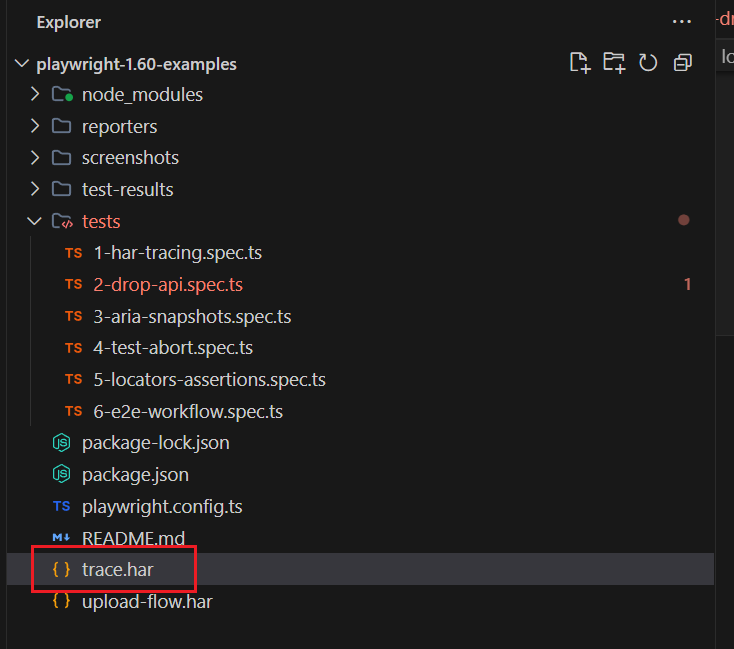
  await using har = await context.tracing.startHar('trace.har', {
    urlFilter: '**/api/**',
  });

  const page = await context.newPage();
  await page.goto('https://storedemo.testdino.com');
  await page.getByTestId('header-menu-all-products').click();

  // HAR is finalized when `har` goes out of scope.
  await expect(page).toHaveURL(/.*products/);
});
The await using syntax from Playwright 1.59 scopes the recording automatically. When har goes out of scope, the file is finalized. No manual stop call needed.
When to use this
If your team debugs flaky tests caused by API/UI timing mismatches, this is the feature that pays off immediately. Instead of opening a HAR file in one tab and a trace file in another, you get both in a single debugging session. Filter with urlFilter to capture only the API calls you care about, and let the trace handle everything else.
The Drop API
locator.drop() is the feature most teams have been waiting for. Before 1.60, testing drag-and-drop file uploads, rich text editors, or any component that listens for drop events meant writing custom JavaScript to synthesize DataTransfer objects and dispatch events manually. The workarounds were brittle and broke across browsers.
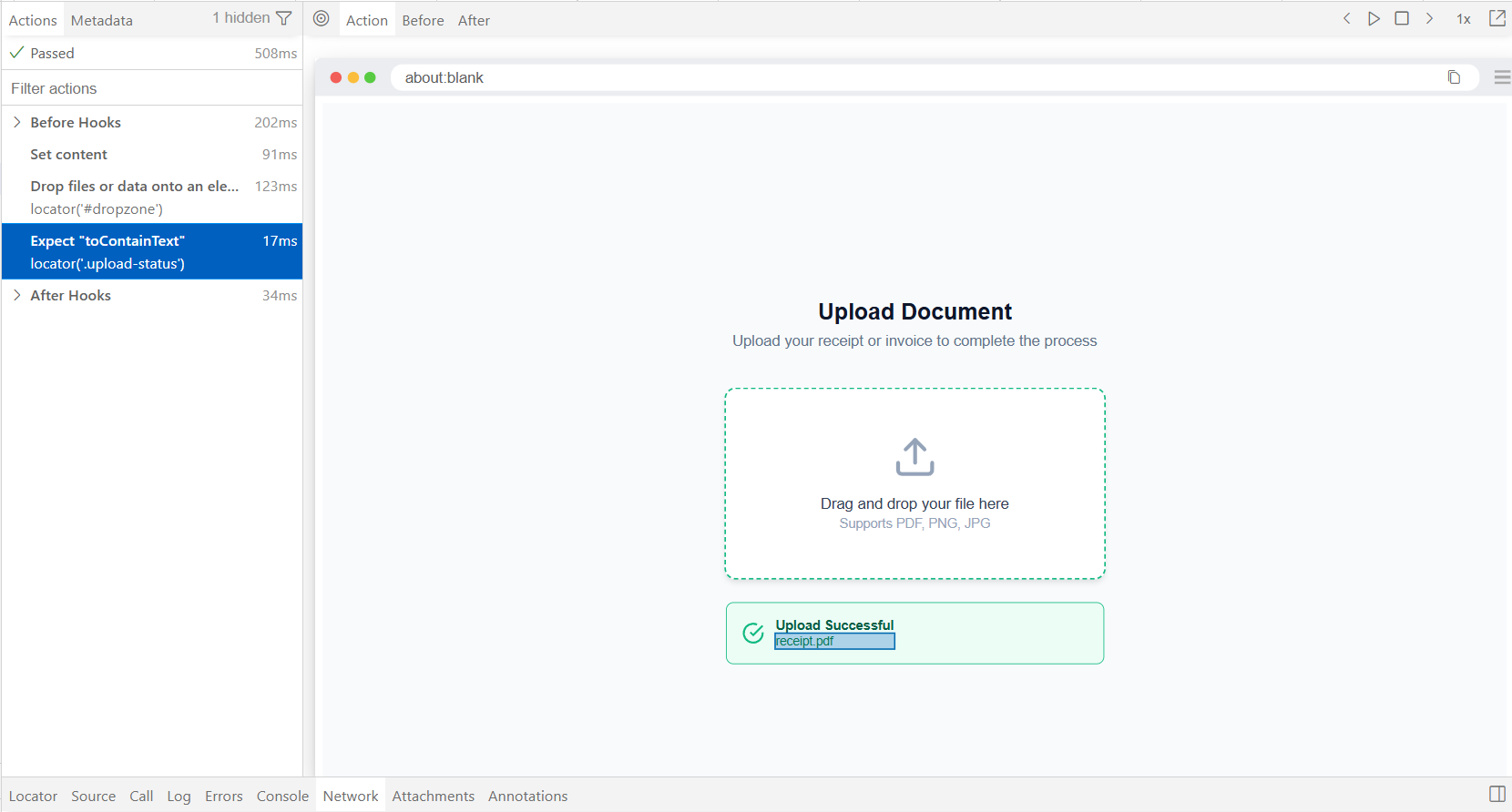
locator.drop() simulates an external drag-and-drop by dispatching dragenter, dragover, and drop with a synthetic DataTransfer object. Works on Chromium, Firefox, and WebKit.
Dropping files onto an upload zone
import { test } from '@playwright/test';

test('upload via drag and drop', async ({ page }) => {
  await page.goto('https://storedemo.testdino.com/upload');

  await page.locator('#dropzone').drop({
    files: {
      name: 'receipt.pdf',
      mimeType: 'application/pdf',
      buffer: Buffer.from('mock pdf content'),
    },
  });

  await expect(page.locator('.upload-status')).toContainText('receipt.pdf');
});
You pass a files object with name, mimeType, and buffer. Playwright handles the DataTransfer construction and event dispatch internally.
Note: Try it yourself: The illustrative snippet above uses page.goto(). If you want to run this immediately without setting up a frontend server, the playwright-1.60-examples repository contains a standalone version of this test that uses page.setContent() to inject a fully working HTML mock of the dropzone.
Dropping clipboard data
test('drop rich text into editor', async ({ page }) => {
  await page.goto('https://storedemo.testdino.com/editor');

  await page.locator('#rich-editor').drop({
    data: {
      'text/plain': 'Hello world',
      'text/uri-list': 'https://storedemo.testdino.com',
    },
  });

  await expect(page.locator('#rich-editor')).toContainText('Hello world');
});
The data option lets you set arbitrary MIME types on the DataTransfer, which is exactly what rich text editors and link-drop components expect.
What this replaces
Before this API, teams working with the pw-agent demo store or similar apps had to inject JavaScript to construct synthetic drop events:
// The old way (pre-1.60) — brittle and browser-specific
await page.evaluate(() => {
  const dt = new DataTransfer();
  dt.items.add(new File(['content'], 'test.txt', { type: 'text/plain' }));
  const dropzone = document.querySelector('#dropzone');
  dropzone.dispatchEvent(new DragEvent('drop', { dataTransfer: dt }));
});
That worked on Chromium, sometimes on Firefox, and rarely on WebKit. locator.drop() handles cross-browser dispatch internally. One API call replaces the whole block.
ARIA Snapshots with Bounding Boxes
Playwright 1.60 extends the ARIA snapshot system introduced in earlier releases with two additions that matter for both accessibility testing and agent-driven workflows.
toMatchAriaSnapshot() on Page
expect(page).toMatchAriaSnapshot() now works directly on a Page object. Previously, you had to write expect(page.locator('body')).toMatchAriaSnapshot(). The shorthand is cleaner for full-page accessibility assertions:
test('full page accessibility check', async ({ page }) => {
  await page.goto('https://storedemo.testdino.com');

  await page.waitForLoadState('networkidle'); // wait for the main content to load
  await expect(page).toMatchAriaSnapshot(`
    - heading "Demo E-commerce Testing Store" [level=1]
    - paragraph: Embark on an electronic journey. Dive into our shop now!
    - heading "Feature Product" [level=1]
    - heading "New Arrivals" [level=1]
  `);
});
The boxes option
The new boxes option appends bounding box coordinates to every element in the snapshot:
test('ARIA snapshot with layout info', async ({ page }) => {
  await page.goto('https://storedemo.testdino.com');

  const snapshot = await page.ariaSnapshot({ boxes: true });
  console.log(snapshot);
  // Output includes [box=x,y,width,height] per element:
  // - heading "Welcome" [level=1] [box=120,80,960,48]
  // - button "Shop Now" [box=520,160,160,44]
});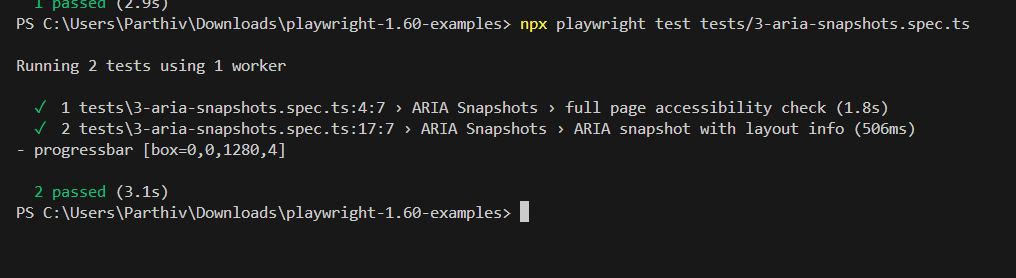
The [box=x,y,width,height] annotation gives every element a position in viewport coordinates. Why does this matter? Because AI agents and visual validation systems can now combine accessibility tree semantics with layout positioning. An agent can read the ARIA snapshot and know not just what an element is, but where it sits on screen, without taking a screenshot and running vision inference.
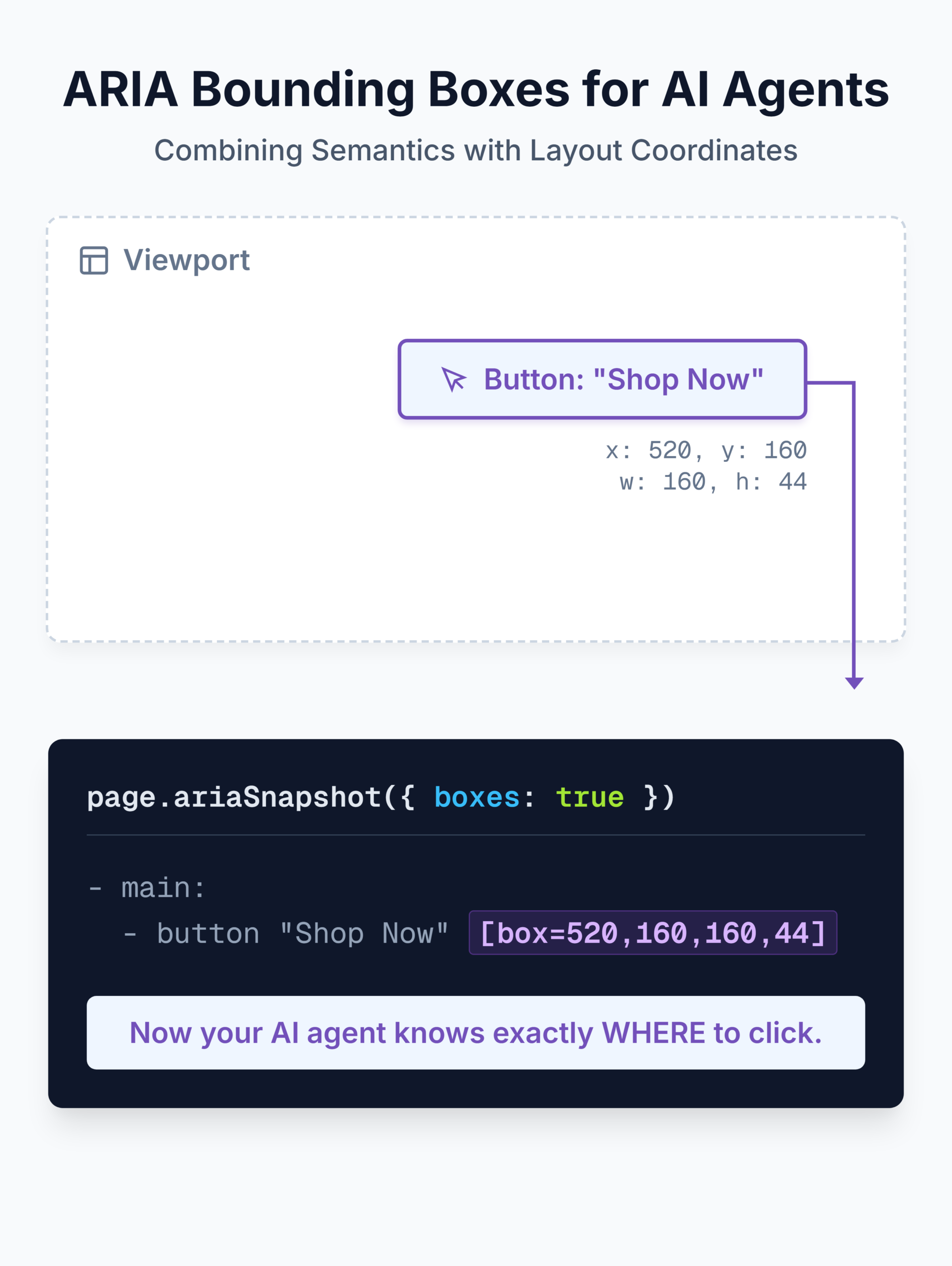
If you're building automation with Playwright MCP or coding agents like Claude Code, the boxes option makes ARIA snapshots a structured, machine-readable alternative to screenshot-based navigation.
test.abort()
test.abort() immediately terminates the running test from a fixture, hook, or route handler. It's different from test.skip() (which marks the test as skipped) and test.fail() (which expects a failure). test.abort() says: "This test hit a condition that should never happen. Stop now."
import { test } from '@playwright/test';

test('blocks writes to shared environment', async ({ page }) => {
  // Setup a route interceptor to catch any requests to the publish endpoint
  await page.route('**/api/publish', route => {
    // If this endpoint is hit, immediately terminate the test suite run.
    // This acts as a strict guardrail preventing accidental data corruption.
    test.abort('Tests must not publish to the shared environment. Use the staging clone.');
    return route.abort();
  });

  await page.goto('https://storedemo.testdino.com');
  // ... test actions that might accidentally trigger a publish
});
When to use it
The value shows up in three places:
- Environment guardrails. Prevent tests from writing to shared staging databases or triggering production webhooks.
- CI governance. If a test detects it's running against the wrong environment, abort instead of contaminating the results.
- Agent workflows. When coding agents write and run tests autonomously, test.abort() acts as a hard stop that prevents the agent from completing an unsafe action.
The API is simple. The pattern it enables, guardrails that fire during test execution rather than during setup, is what makes it useful in agentic testing setups.
New Locator and Assertion Options
Three additions to the locator and assertion APIs that solve specific day-to-day annoyances.
description in getByRole()
A new description option in getByRole() lets you match elements by their accessible description, not just their name. This is useful for components where multiple elements share the same role and name but have different aria-describedby text:
// Match a button by its accessible description (aria-describedby attribute).
// This is perfect for icon-only buttons or elements sharing the same visual name.
await page.getByRole('button', {
  name: 'Delete',
  description: 'Removes the selected item permanently',
}).click();
Works across page.getByRole(), locator.getByRole(), frame.getByRole(), and frameLocator.getByRole().
pseudo in toHaveCSS()
The new pseudo option reads computed styles from ::before or ::after pseudo-elements. Before this, asserting on pseudo-element styles required page.evaluate() calls to read getComputedStyle:
// Assert the ::before pseudo-element has specific styles.
// Previously, you needed page.evaluate() and window.getComputedStyle() to do this.
await expect(page.locator('.required-field')).toHaveCSS(
  'content',
  '"*"',
  { pseudo: '::before' } // Now available as a native assertion option
);
Customizable locator.highlight()
locator.highlight() now accepts a style option for custom inline CSS on the highlight overlay. Pair it with page.hideHighlight() to clear all highlights:
// Highlight an element with custom CSS styling.
// Excellent for visual debugging, or pointing out elements in a screencast recording.
await page.locator('#checkout-button').highlight({
  style: 'outline: 3px solid red; background: rgba(255,0,0,0.1);',
});

// Later, clear all highlights from the page
await page.hideHighlight();
Useful for visual debugging sessions, agent receipts, and demo recordings where you want specific elements called out.
Browser and Context Lifecycle Events
Two additions give you centralized visibility into browser and context activity.
browser.on('context')
Fires whenever a new BrowserContext is created on the browser. Useful for logging, monitoring, or attaching default behavior to every context:
// Attach a global event listener to the browser instance
browser.on('context', context => {
  console.log('New context created');
  // You can now automatically attach default routes, inject storage states,
  // or set up network interceptors to *every* context spawned by this browser.
});
BrowserContext lifecycle mirrors
BrowserContext now mirrors lifecycle events from its pages. Instead of attaching listeners to each page individually, you can listen at the context level:
| Event | Fires when |
|---|---|
| browserContext.on('download') | Any page triggers a download |
| browserContext.on('frameattached') | A frame is attached on any page |
| browserContext.on('framedetached') | A frame is detached on any page |
| browserContext.on('framenavigated') | A frame navigates on any page |
| browserContext.on('pageclose') | Any page in the context closes |
| browserContext.on('pageload') | Any page in the context completes load |
This matters for test suites with dynamic popups, multi-tab flows, or complex iframe architectures. Attach one listener on the context instead of chasing events across pages.
Better Error Diagnostics and Reporting
Five improvements that make test failures easier to diagnose, especially in CI.
testInfoError.errorContext
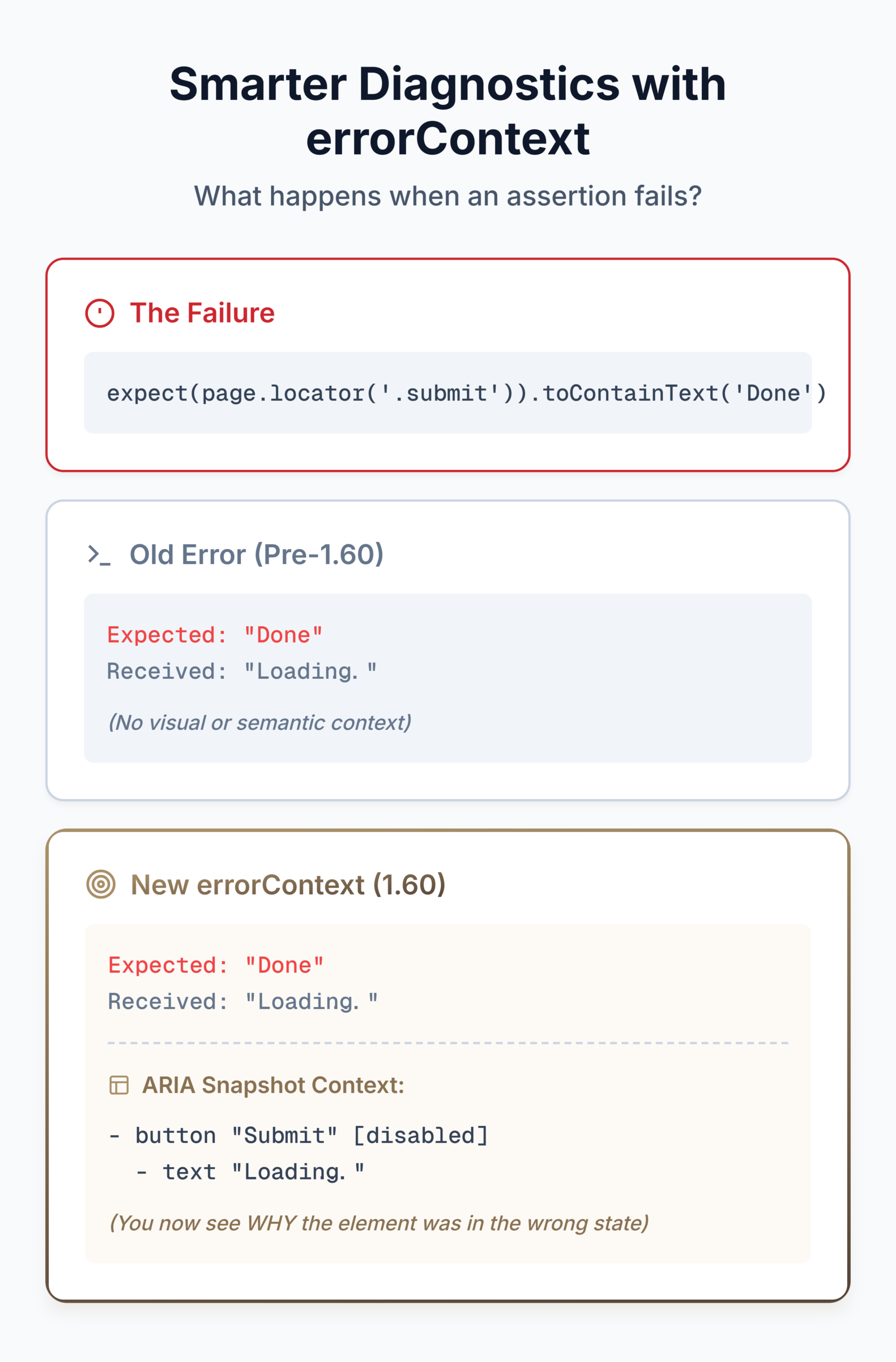
This is the biggest diagnostics win in 1.60. When an expect() assertion fails, testInfoError.errorContext now surfaces additional diagnostic context, including the ARIA snapshot of the element at the time of failure. Your custom reporters can access this:
// In a custom reporter (e.g., inside reporter.ts)
class DiagnosticReporter {
  onTestEnd(test, result) {
    for (const error of result.errors) {
      // Check if the 1.60 errorContext diagnostic is available
      if (error.errorContext) {
        console.log('Diagnostic context:', error.errorContext);
        // Contains the rich ARIA snapshot and precise DOM state of the element
        // at the exact millisecond the expect() assertion failed.
      }
    }
  }
}
Instead of just getting "expected 'Submit' but received 'Loading...'", you get the full accessibility state of the element at the moment the assertion failed. This tells you why the element was in that state, not just what it contained.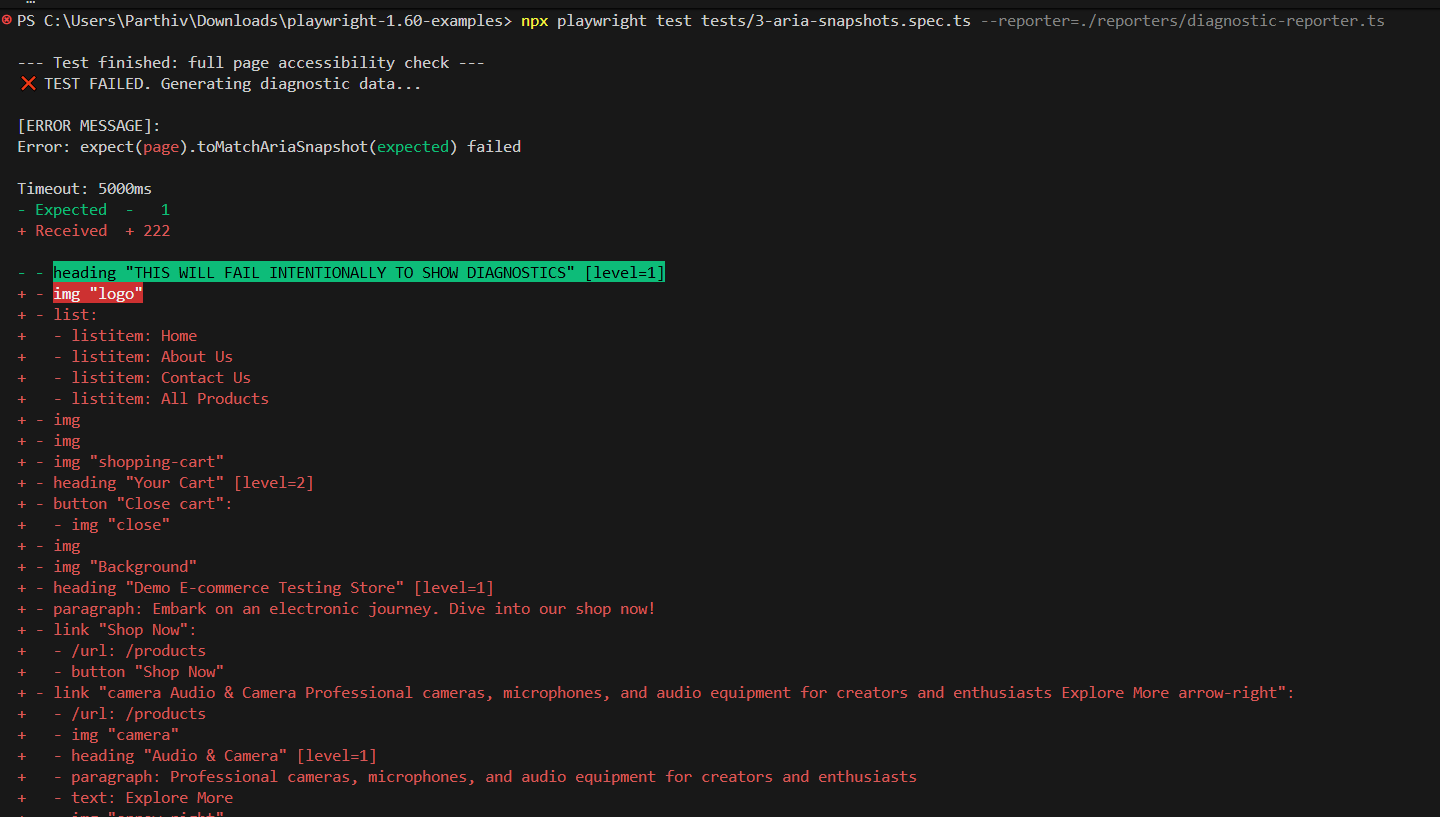
When these diagnostics flow through CI, TestDino's AI groups the enriched failure context across runs, so the same "button stuck in loading state" pattern surfaces as one recurring issue with context, not scattered failures across branches.
webError.location() and consoleMessage.location()
webError.location() now mirrors consoleMessage.location(), giving you file, line, and column for uncaught browser errors. And consoleMessage.location() itself switches to line and column properties (the old lineNumber and columnNumber are deprecated).
reporter.onError() with workerInfo
When a fixture teardown error happens, reporter.onError() now receives a workerInfo argument. You know which worker hit the error, which matters for parallel test suites where isolating the source of teardown failures used to require guesswork.
{testFileBaseName} snapshot template
New {testFileBaseName} token in snapshotPathTemplate gives you the file name without extension. Cleaner snapshot paths when you organize by file:
// playwright.config.ts
export default defineConfig({
  // Use the new {testFileBaseName} token to group snapshots
  // by the test filename (without the .spec.ts extension)
  snapshotPathTemplate: '{testDir}/__snapshots__/{testFileBaseName}/{arg}{ext}',
});
Config validation
The test runner now errors if a config tries to override a non-option fixture, and rejects workers: 0 or negative values. Less room for silent misconfigurations that cause confusing failures later.
Other Improvements
HTML Reporter
npx playwright show-report accepts .zip files directly. No need to unzip first.
Steps that contain attachments inside nested children show an indicator on the parent step.
The repeatEachIndex is shown in the test header when non-zero.
Trace Viewer
Pretty-print toggle for JSON and form request/response bodies in the network details panel. No more squinting at minified JSON in the trace.
Network
webSocketRoute.protocols() returns the WebSocket subprotocols requested by the page, useful for testing apps that negotiate subprotocols during connection setup.
CDP
New noDefaults option in browserType.connectOverCDP() disables Playwright's default overrides on the default context (download behavior, focus emulation, media emulation). When you attach to a user's regular browser for debugging, this prevents Playwright from changing the browser's existing state.
A Complete 1.60 Workflow: Upload, Trace, Diagnose
Here's how the major 1.60 features work together in a single scenario using the pw-agent repo structure.
The test: Upload a receipt file and verify processing
import { test, expect } from '@playwright/test';

test('upload receipt and verify processing', async ({ context, page }) => {
  // 1. Start HAR tracing — captures API calls as part of the trace workflow.
  // The 'await using' syntax ensures the file is finalized automatically on exit.
  await using har = await context.tracing.startHar('upload-flow.har', {
    urlFilter: '**/api/**', // Filter to keep the HAR file size small
  });

  await page.goto('https://storedemo.testdino.com');
  await page.getByTestId('header-user-icon').click();
  await page.getByTestId('login-email-input').fill('testuser@example.com');
  await page.getByTestId('login-password-input').fill('password123');
  await page.getByTestId('login-submit-button').click();

  // 2. Abort if the test accidentally hits the publish endpoint.
  // This is a strict guardrail protecting our staging environment.
  await page.route('**/api/publish', route => {
    test.abort('Upload test must not trigger publish. Check test isolation.');
    return route.abort();
  });

  // 3. Use the new Drop API — no more synthetic DataTransfer hacks.
  await page.getByTestId('header-menu-all-products').click();
  await page.locator('.product-card').first().click();

  // Directly simulate a native OS-level file drop onto the component
  await page.locator('#receipt-upload').drop({
    files: {
      name: 'receipt.pdf',
      mimeType: 'application/pdf',
      buffer: Buffer.from('mock receipt content'),
    },
  });

  // 4. Verify with ARIA snapshot including bounding boxes.
  // AI agents or custom reporters can now see EXACTLY where elements are rendered.
  const snapshot = await page.ariaSnapshot({ boxes: true });
  console.log(snapshot);

  await expect(page.locator('.upload-status')).toContainText('receipt.pdf');
});
What happens when this fails in CI
If the upload API returns a 500, the HAR trace captures the exact request and response. The errorContext on the assertion failure includes the ARIA snapshot of .upload-status at the moment it didn't contain "receipt.pdf". Your custom reporter gets both pieces of context automatically.
When that pattern shows up across three branches this week, TestDino's error grouping clusters them into one recurring issue with a count and a root cause label, not three separate noisy failures. The enriched errorContext from 1.60 gives TestDino richer data to work with, which means sharper groupings.
Should You Upgrade to Playwright 1.60?
Upgrade now if
- You test drag-and-drop or file upload components. locator.drop() replaces every custom workaround you've built.
- You debug flaky tests caused by API timing issues. HAR recording in the tracing API means one artifact, one debugging session.
- You run accessibility assertions. Page-level toMatchAriaSnapshot() and bounding boxes are both useful additions.
- You use agents or MCP workflows. ARIA snapshots with boxes and test.abort() for guardrails are built for autonomous testing.
Wait if
- You use any of the four removed APIs (ariaRef, handle on exposeBinding, logger on connect, videosPath/videoSize) and haven't migrated yet. Grep your codebase first.
- You're mid-release-cycle and the upgrade isn't worth the risk right now. Nothing in 1.60 is urgent enough to justify a mid-sprint switch.
Key Takeaways
Playwright 1.60 is a reliability and diagnostics release.
The 1.59 release rewired the workflow around agents, screencasts, and the trace CLI. 1.60 fills in the gaps: the Drop API removes a chronic testing pain point, HAR tracing unifies network debugging with action traces, ARIA bounding boxes open the door for AI-assisted layout validation, and errorContext makes assertion failures actually informative.
Upgrade on a clean branch, then follow these three steps to get the most value out of this release:
- Test your drag-and-drop flows with the new Drop API.
- Switch your HAR config to tracing.startHar().
- Check your codebase for the four deprecated APIs.
FAQs

Jashn Jain
Developer Advocate