Selenium to Playwright Migration
Selenium accumulates friction until one day your CI takes 50 minutes and half the failures are timing issues. This guide covers the phased approach to migrating your test suite to Playwright without disrupting releases.
Looking for Smart Playwright Reporter?
Selenium works. That's the honest starting point. It's not broken, it just accumulates friction over time. Waits that nobody remembers adding. Driver versions that break when Chrome updates. CI runs that used to take 12 minutes and now take 50. Test failures you rerun twice before believing.
At some point the maintenance load outweighs the coverage value. That's when teams start looking at Playwright seriously.
This guide covers the actual mechanics of migrating from Selenium to Playwright: the phased approach, the infrastructure setup, the code translation, what changes in CI, and what mistakes stall teams for months. It's written for developers and QA engineers doing the migration, not evaluating it.
What is a Selenium to Playwright migration?
A Selenium to Playwright migration is the process of moving an existing automated browser test suite from Selenium WebDriver to Microsoft Playwright. It involves replacing WebDriver-based test code, driver management infrastructure, and Selenium Grid with Playwright's native browser protocols, built-in test runner, and parallel execution model.
Unlike a simple dependency swap, this migration changes how browsers are controlled, how tests wait for elements, how parallel execution works, and how CI pipelines are configured. Most teams run both frameworks in parallel during the transition before fully retiring Selenium.
Why teams are switching in 2026
The data is pretty clear. Playwright crossed 34M+ weekly npm downloads in early 2026. Selenium-webdriver sits at roughly 2.1M on npm (with more on pip and Maven, but the trend is obvious). ThoughtWorks moved Playwright to "Adopt" on their Technology Radar. Adobe, ING Bank, and NASA have migrated.
But download counts don't explain the switch. The actual reasons are technical problems that Selenium can't fix without adding tooling:
| Problem in Selenium | Root cause | How Playwright fixes it |
|---|---|---|
| Flaky tests from timing | WebDriver round-trips add unpredictable latency | Auto-waiting checks actionability before every action |
| Slow parallel execution | 1 browser process per worker, Selenium Grid overhead | Lightweight browser contexts share 1 process, 15-30x concurrent tests on same hardware |
| Driver version hell | ChromeDriver must match browser version exactly | Playwright bundles and manages browser binaries via playwright install |
| Weak CI debugging | Screenshots + logs only | Full trace viewer: every action, DOM snapshot, network call, console error |
| No built-in network mocking | Needs WireMock or separate proxy server | page.route() intercepts and stubs at the protocol level |
| Slow auth setup | Login through UI for every test | storageState saves authenticated session once, all tests start pre-authenticated |
| No built-in test runner | Needs TestNG, JUnit, or Mocha separately | @playwright/test is the built-in runner with fixtures, parallelism, retries |
Real-world result: Zenjob ran 100 Selenium tests in 35 minutes across 8 Jenkins parallel jobs. After migrating to Playwright, the same suite dropped to roughly 7 minutes, an 80% reduction.
We see similar gains consistently in teams migrating from explicit-wait-heavy Selenium suites where the bottleneck was driver latency, not backend speed.
When migration doesn't make sense
Not every team should migrate right now. Be honest about this before planning anything.
Skip migration if your suite is small and stable. 50-100 tests that pass reliably in CI? The migration effort costs more than the benefit. Don't fix what isn't broken.
If you're deep in Java ecosystem tooling, think carefully. TestNG, Maven Surefire, custom reporting pipelines, JUnit integrations: you're not just swapping test libraries, you're rebuilding the whole test infrastructure. Playwright supports Java, but the docs, community, and library ecosystem are strongest in TypeScript. A Java-to-TypeScript migration on top of a framework migration doubles the scope.
Check your actual bottleneck before blaming Selenium. Slow CI because of slow backend responses, heavy test data setup, or network latency doesn't get faster with Playwright. Framework choice fixes timing issues. It doesn't fix slow APIs.
And if you're mid-release with no dedicated bandwidth, wait. A half-finished migration is worse than staying on Selenium. Two frameworks running without clear ownership is a maintenance trap.
Warning: The biggest migration failure pattern is starting without a named owner. "Everyone's responsibility" means nobody's priority. Assign 2-3 engineers to own the migration as actual sprint work, not side project work.
How Playwright is different from Selenium
Understanding the architecture difference explains why Playwright's behavior is different, not just its API.
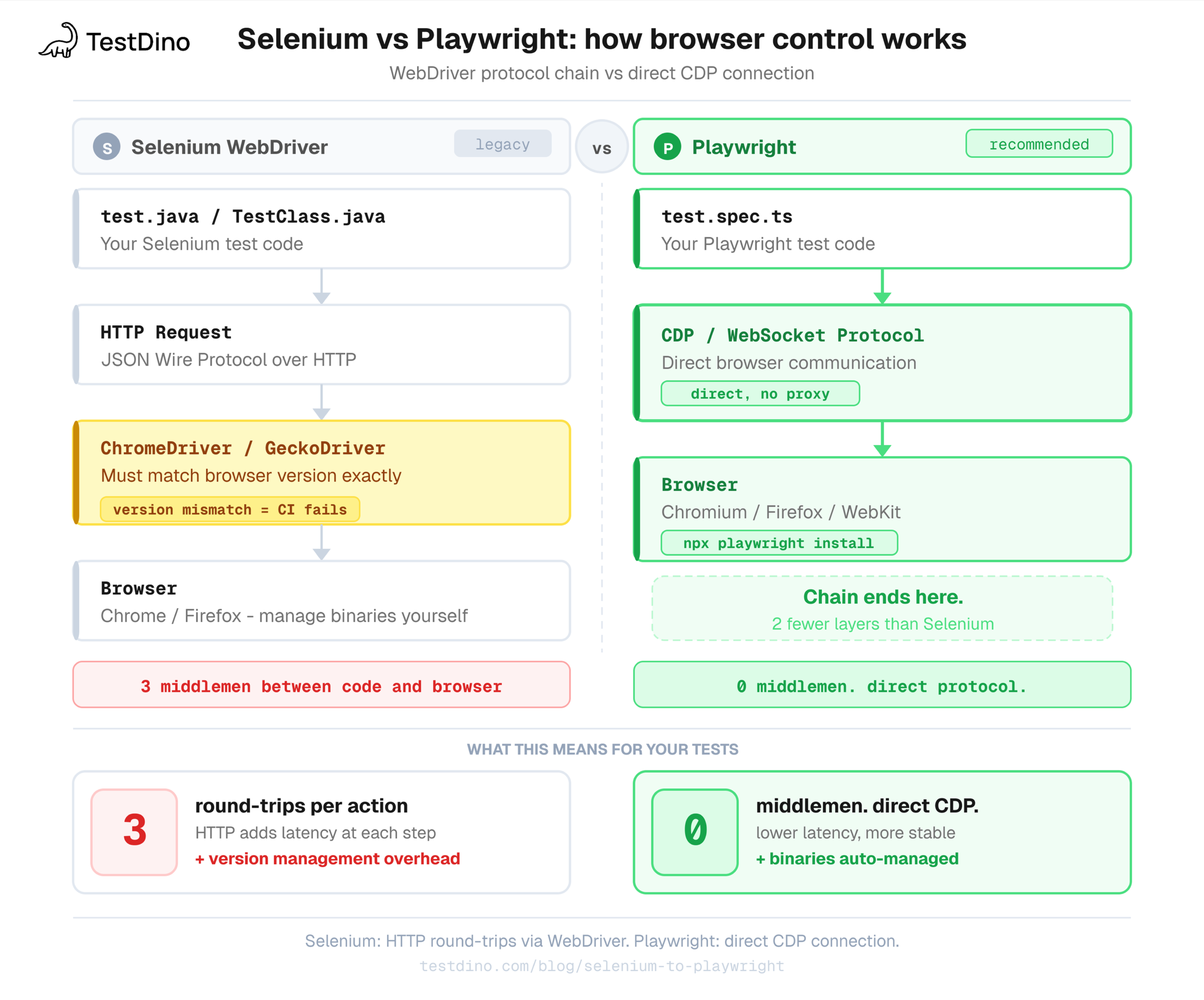
Selenium sends commands via the WebDriver protocol. Your test code makes HTTP requests to a driver (ChromeDriver for Chrome, GeckoDriver for Firefox), which translates those into browser commands. Every interaction is a round-trip through that middleman.
Playwright connects directly to browsers via Chrome DevTools Protocol (CDP) for Chromium, Firefox's debugging protocol, and a WebKit-specific protocol for Safari. No middleman. The result: lower latency, tighter browser control, and no driver version mismatch.
Here's the specific comparison developers ask about:
| Area | Selenium | Playwright |
|---|---|---|
| Wait mechanism | Explicit WebDriverWait + ExpectedConditions or sleep | Auto-waits before every action (attached, visible, stable, enabled) |
| Parallelism | 1 browser process per worker (heavy), needs Selenium Grid for multi-machine | Lightweight browser contexts share 1 process, workers native in config |
| Auth handling | Login via UI per test, or manual cookie injection | storageState saves session once, reused across all tests |
| Network interception | Needs BrowserMob Proxy or WireMock | page.route() built in, intercepts at protocol level |
| Debugging | Screenshots + basic logs | Full trace viewer with DOM snapshots, video, console, network |
| Setup | Install Node/Java + ChromeDriver + match versions | npx playwright install handles everything |
| Browser contexts | 1 browser instance per parallel worker | Multiple isolated contexts share 1 browser process |
| Test runner | External (TestNG, JUnit, Mocha) | @playwright/test built in, with fixtures and parallelism |
Playwright's debugging story deserves its own deep-dive. The trace viewer records every action, network call, and DOM snapshot, which changes how you think about failed tests compared to Selenium's screenshots-and-logs approach.
Phase 1: set up the infrastructure first
This is where most migrations go wrong. We've seen teams skip straight to converting test files and spend 3 weeks untangling problems that 2 days of proper setup would have prevented. Infrastructure first. Tests second.
Install Playwright without removing Selenium
Both frameworks coexist during migration. Don't touch Selenium yet.
npm init playwright@latestThis installs @playwright/test, downloads browser binaries, creates a playwright.config.ts, and generates a sample test. Keep all Playwright files in a separate directory from your existing Selenium tests.
/tests/             # Existing Selenium tests (do not touch yet)
/playwright-tests/   # New Playwright tests (start here)
/playwright-tests/auth.setup.ts
/playwright-tests/pages/       # Playwright page objects
/playwright.config.ts
Write your playwright.config.ts properly
This is the single most important file. Get it right before writing a single test.
import { defineConfig, devices } from "@playwright/test";
export default defineConfig({
  testDir: "./playwright-tests",
  timeout: 30_000,
  expect: { timeout: 5_000 },

  // Run tests in parallel across files
  fullyParallel: true,

  // Fail CI if you accidentally leave test.only() in code
  forbidOnly: !!process.env.CI,

  // 2 retries in CI during migration while you tune locators
  // Drop to 0 once the suite stabilizes
  retries: process.env.CI ? 2 : 0,

  // 4 workers on CI (GitHub Actions ubuntu-latest = 2-core, 7GB RAM)
  // Each Chromium context uses ~150-200MB - 4 workers is the safe ceiling
  workers: process.env.CI ? 4 : 2,

  reporter: [
    ["html"],
    ["junit", { outputFile: "results/junit.xml" }],
    // Stream results to TestDino as the run executes
    ["@testdino/playwright", {
      token: process.env.TESTDINO_TOKEN,
    }],
  ],

  use: {
    baseURL: process.env.BASE_URL ?? "https://staging.your-app.com",
    // Capture trace on first retry only - captures failures without bloating storage
    trace: "on-first-retry",
    screenshot: "only-on-failure",
    video: "retain-on-failure",
  },

  projects: [
    // Auth setup runs first (see below)
    { name: "setup", testMatch: /.*\\.setup\\.ts/ },

    {
      name: "chromium",
      use: {
        ...devices["Desktop Chrome"],
        // Every test starts already authenticated
        storageState: "playwright/.auth/user.json",
      },
      dependencies: ["setup"],
    },
    {
      name: "firefox",
      use: {
        ...devices["Desktop Firefox"],
        storageState: "playwright/.auth/user.json",
      },
      dependencies: ["setup"],
    },
  ],
});
A few things worth knowing about this config:
- fullyParallel: true runs tests within the same file in parallel, not just across files. If any of your tests share state (same DB row, same user account), you'll hit collisions. Check isolation before enabling this.
- retries: 2 during migration is fine. You're still tuning locators. Once the suite is stable, drop it to 0 or 1. Retries that consistently pass on retry = flaky tests in disguise.
- workers: 4 on GitHub Actions. More is not always better. Each Chromium context uses 150-200MB. A 7GB Actions runner comfortably supports 4-6 workers. Beyond that you get OOM kills.
Set up authentication once, share everywhere
In Selenium, the standard pattern is logging in through the UI at the start of each test class. That's slow and fragile. Playwright's storageState logs in once, saves the full session (cookies, localStorage, IndexedDB) to a JSON file, and every test starts already authenticated.
import { test as setup, expect } from "@playwright/test";
import path from "path";

const authFile = path.join(__dirname, "../playwright/.auth/user.json");

setup("authenticate", async ({ page }) => {
  await page.goto("/login");

  // Use getByLabel for accessibility-first locators
  await page.getByLabel("Email").fill(process.env.TEST_USER_EMAIL!);
  await page.getByLabel("Password").fill(process.env.TEST_USER_PASSWORD!);
  await page.getByRole("button", { name: "Sign in" }).click();

  // Wait for redirect to confirm login succeeded
  await page.waitForURL("/dashboard");
  await expect(page.getByTestId("user-menu")).toBeVisible();

  // Save the authenticated state
  await page.context().storageState({ path: authFile });
});
This runs once before your test projects start. All subsequent tests load the saved session without touching the login flow.
Watch this: JWT sessions expire. If your app uses short-lived tokens, auth setup succeeds at the start of a 2-hour CI run but tests fail with 401 errors by the end.
Set your test session expiry longer than your longest CI run, or re-authenticate per worker using testInfo.parallelIndex. We've hit this in long regression suites where nobody noticed until the 90-minute mark.
For admin vs user testing (2 roles), create 2 setup files:
const adminFile = path.join(__dirname, "../playwright/.auth/admin.json");

setup("authenticate as admin", async ({ page }) => {
  await page.goto("/login");
  await page.getByLabel("Email").fill(process.env.ADMIN_EMAIL!);
  await page.getByLabel("Password").fill(process.env.ADMIN_PASSWORD!);
  await page.getByRole("button", { name: "Sign in" }).click();
  await page.waitForURL("/admin");
  await page.context().storageState({ path: adminFile });
});
Then in playwright.config.ts, reference both:
projects: [
  { name: "setup-user", testMatch: /auth\\.setup\\.ts/ },
  { name: "setup-admin", testMatch: /admin\\.setup\\.ts/ },
  {
    name: "chromium-admin",
    use: { storageState: "playwright/.auth/admin.json" },
    dependencies: ["setup-admin"],
  },
  {
    name: "chromium-user",
    use: { storageState: "playwright/.auth/user.json" },
    dependencies: ["setup-user"],
  },
],Phase 2: convert your tests
Don't migrate in file order. Start with the tests that cause the most pain: slow, flaky, frequently failing, or expensive to debug. Those are where Playwright's improvements show up fastest.
The core translation: before and after
Here's a standard Selenium login test in Java with all the boilerplate that accumulates over time:
// Selenium (Java) - what you're replacing
WebDriverWait wait = new WebDriverWait(driver, Duration.ofSeconds(10));

// Wait for element, then interact
WebElement emailField = wait.until(
  ExpectedConditions.elementToBeClickable(By.id("email"))
);
emailField.clear();
emailField.sendKeys("alice@example.com");

// Each element found separately, no reuse
WebElement passwordField = driver.findElement(By.id("password"));
passwordField.sendKeys("s3cr3t!");

// Wait again before clicking
WebElement submitBtn = wait.until(
  ExpectedConditions.elementToBeClickable(By.cssSelector("[data-testid='login-btn']"))
);
submitBtn.click();

// Wait for URL change
wait.until(ExpectedConditions.urlContains("/dashboard"));

// Assert visibility with yet another find
WebElement welcomeBanner = driver.findElement(
  By.cssSelector("[data-testid='welcome']")
);
assertTrue(welcomeBanner.isDisplayed());
The Playwright equivalent:
// Playwright (TypeScript) - what you're moving to
test("user can log in", async ({ page }) => {
  await page.goto("/login");

  // Auto-waits. No explicit waits needed.
  await page.getByLabel("Email").fill("alice@example.com");
  await page.getByLabel("Password").fill("s3cr3t!");
  await page.getByRole("button", { name: "Log in" }).click();

  // Assertion-driven navigation check
  await expect(page).toHaveURL(/.*dashboard/);
  await expect(page.getByTestId("welcome")).toBeVisible();
});
The explicit waits disappear entirely. fill() waits for the input to be editable. click() waits for the button to be attached, visible, stable, and enabled. toBeVisible() polls until the element appears or times out with a clear error.
You don't replace WebDriverWait with page.waitForSelector. You delete the waits.
Migrating Page Object Model
If you have clean POM in Selenium, the migration is mostly mechanical. The structure is identical, only the API changes.
Selenium (Java) POM:
public class LoginPage {
  private final WebDriver driver;
  private final WebDriverWait wait;

  public LoginPage(WebDriver driver) {
    this.driver = driver;
    this.wait = new WebDriverWait(driver, Duration.ofSeconds(10));
  }

  public DashboardPage login(String email, String password) {
    wait.until(ExpectedConditions.visibilityOfElementLocated(By.id("email")))
        .sendKeys(email);
    driver.findElement(By.id("password")).sendKeys(password);
    wait.until(ExpectedConditions.elementToBeClickable(By.id("submit"))).click();
    return new DashboardPage(driver);
  }

  public boolean hasError() {
    return !driver.findElements(By.cssSelector(".alert-error")).isEmpty();
  }
}
Playwright (TypeScript) POM:
import { type Page, expect } from "@playwright/test";

export class LoginPage {
  // Locators defined once, evaluated lazily (no DOM lookup at definition time)
  private readonly emailInput = this.page.getByLabel("Email");
  private readonly passwordInput = this.page.getByLabel("Password");
  private readonly submitButton = this.page.getByRole("button", { name: "Log in" });
  private readonly errorAlert = this.page.getByRole("alert");

  constructor(private readonly page: Page) {}

  async login(email: string, password: string): Promise<void> {
    await this.emailInput.fill(email);
    await this.passwordInput.fill(password);
    await this.submitButton.click();
  }

  async expectDashboard(): Promise<void> {
    await expect(this.page).toHaveURL(/.*dashboard/);
  }

  async expectError(message: string): Promise<void> {
    await expect(this.errorAlert).toContainText(message);
  }
}

// Usage in a test
test("invalid password shows error", async ({ page }) => {
  const loginPage = new LoginPage(page);
  await page.goto("/login");
  await loginPage.login("alice@example.com", "wrongpassword");
  await loginPage.expectError("Invalid credentials");
});
The 40-line Selenium class becomes a 25-line Playwright class. Locators are defined as properties (not constructed on every method call), which makes them more readable and reusable within the class. For teams building a Playwright suite from scratch rather than migrating, our framework setup guide covers project structure, shared fixtures, and scaling across teams.

Tip: A pattern we use in every migration we run: Prefix all Playwright page objects with PW_ during the transition period (e.g., PW_LoginPage). When debugging at 2am, you'll instantly know which version of a page object is in play. Remove the prefix once Selenium is fully retired.
Locator strategy: stop copying Selenium selectors
Selenium suites accumulate brittle locators over time. Migration is the moment to fix them.
| Selenium locator (brittle) | Why it breaks | Playwright replacement (stable) |
|---|---|---|
| By.xpath("//button[@class='btn btn-primary']") | Class changes, DOM restructure | page.getByRole("button", { name: "Submit" }) |
| By.cssSelector(".modal > .content p:first-child") | Any structure change | page.getByText("Confirm your action") |
| By.id("dynamic-uuid-1234") | ID changes per render | page.getByTestId("confirm-dialog") |
| By.xpath("//*[contains(@class,'error')]") | Matches too broadly | page.getByRole("alert") |
| By.cssSelector("input[type='email']") | Breaks if type attribute changes | page.getByLabel("Email address") |
getByRole is the most stable because it queries by ARIA semantics, not DOM structure. UI can change completely as long as interactive elements remain properly labeled.
Fixture scoping: the part that trips people up
Playwright's fixture system replaces Selenium's @Before / @After lifecycle, but it has a scope concept that causes subtle bugs in parallel runs.
import { test as base } from "@playwright/test";

// ----------------------------------------------------------
// TEST-SCOPED fixtures: fresh for every single test
// Use for: page objects, browser context setup, per-test data
// ----------------------------------------------------------
const test = base.extend<{
  loginPage: LoginPage;
  checkoutPage: CheckoutPage;
}>({
  loginPage: async ({ page }, use) => {
    await use(new LoginPage(page));
    // automatic cleanup when test ends
  },

  checkoutPage: async ({ page }, use) => {
    await page.goto("/checkout");
    await use(new CheckoutPage(page));
  },
});

// ----------------------------------------------------------
// WORKER-SCOPED fixtures: shared across tests in same worker
// Use for: expensive setup (DB connections, API clients)
// Safe ONLY if the shared resource has no mutable state per test
// ----------------------------------------------------------
const testWithApiClient = base.extend<{}, { apiClient: APIClient }>({
  apiClient: [
    async ({}, use) => {
      const client = await APIClient.create({
        baseURL: process.env.API_URL!,
        token: process.env.API_TOKEN!,
      });
      await use(client);
      await client.disconnect();
    },
    { scope: "worker" }, // <-- this is the key
  ],
});
The #1 fixture mistake: Marking something worker-scoped when it has per-test mutable state. Two parallel tests modifying the same database record through a shared worker-scoped client will fail intermittently and look like flakiness.
Check: "Can 2 tests run this simultaneously without conflict?" If no, it's test-scoped. We've debugged this exact issue in multiple post-migration support sessions. It always looks random until you map it to worker concurrency.
Network interception (no WireMock needed)
This is the biggest UX improvement for developers. No proxy configuration, no external dependencies, no separate process. Our network mocking guide covers advanced patterns including response modification and request waiting.
test("checkout shows error when payment API fails", async ({ page }) => {
  // Intercept before navigation so the mock is active when the page loads
  await page.route("**/api/v1/payments", (route) =>
    route.fulfill({
      status: 402,
      contentType: "application/json",
      body: JSON.stringify({
        error: "card_declined",
        message: "Your card has insufficient funds.",
      }),
    })
  );

  await page.goto("/checkout");
  await page.getByLabel("Card number").fill("4242424242424242");
  await page.getByLabel("Expiry").fill("12/28");
  await page.getByLabel("CVV").fill("123");
  await page.getByRole("button", { name: "Pay $99.00" }).click();

  await expect(page.getByRole("alert")).toContainText("insufficient funds");
});

// Modify real API responses to test feature flags
test("new checkout UI shows when feature flag is enabled", async ({ page }) => {
  await page.route("**/api/users/me", async (route) => {
    const response = await route.fetch();
    const json = await response.json();
    json.featureFlags.newCheckoutUI = true; // force flag on
    await route.fulfill({ response, body: JSON.stringify(json) });
  });

  await page.goto("/checkout");
  await expect(page.getByTestId("new-checkout-header")).toBeVisible();
});

// Speed up tests by blocking images and analytics
test("form submission works", async ({ page }) => {
  // Block resources that don't affect the behavior under test
  await page.route(/.(png|jpg|gif|webp|woff2)$/, (route) => route.abort());
  await page.route(/analytics|tracking|hotjar/, (route) => route.abort());

  await page.goto("/contact");
  await page.getByLabel("Name").fill("Alice");
  await page.getByLabel("Email").fill("alice@example.com");
  await page.getByRole("button", { name: "Send message" }).click();
  await expect(page.getByText("Message sent")).toBeVisible();
});
Testing 2 users at the same time
In Selenium, testing multi-user interactions means 2 WebDriver instances and lots of boilerplate. In Playwright, browser contexts handle this cleanly:
test("admin announcement is visible to users", async ({ browser }) => {
  // Create 2 isolated sessions from the same browser process
  const adminCtx = await browser.newContext({
    storageState: "playwright/.auth/admin.json",
  });
  const userCtx = await browser.newContext({
    storageState: "playwright/.auth/user.json",
  });

  const adminPage = await adminCtx.newPage();
  const userPage = await userCtx.newPage();

  try {
    // Admin publishes an announcement
    await adminPage.goto("/admin/announcements/new");
    await adminPage.getByLabel("Title").fill("Scheduled maintenance: Sun 2am-4am");
    await adminPage.getByRole("button", { name: "Publish" }).click();
    await expect(adminPage.locator(".status-badge")).toHaveText("Published");

    // User sees it immediately (app uses polling/WebSocket)
    await userPage.goto("/dashboard");
    await expect(
      userPage.getByText("Scheduled maintenance: Sun 2am-4am")
    ).toBeVisible();
  } finally {
    await adminCtx.close();
    await userCtx.close();
  }
});
One test, 2 authenticated sessions, no shared state issues. The browser contexts isolate cookies and localStorage from each other. They don't isolate your database, so make sure the admin's published announcement isn't conflicting with other tests writing to the same table.
Phase 3: update your CI/CD pipeline
CI migration is underestimated in every migration plan. Selenium has years of accumulated CI configuration. Playwright's setup is different enough that you can't just swap the test command.
What changes at the browser level
Selenium requires matching ChromeDriver to Chrome's exact version. CI breaks when Chrome auto-updates and the driver doesn't. You manage this manually or with a wrapper.
Playwright bundles browser binaries. playwright install --with-deps installs the correct browser version for your Playwright version. No version management. Update Playwright in package.json, run install, done.
GitHub Actions with sharding
name: Playwright Tests

on:
  push:
    branches: [main, develop]
  pull_request:
    branches: [main]

jobs:
  playwright-tests:
    name: "Playwright (shard ${{ matrix.shard }}/${{ strategy.job-total }})"
    runs-on: ubuntu-latest
    strategy:
      fail-fast: false  # Don't cancel other shards if one fails
      matrix:
        shard: [1, 2, 3, 4]

    steps:
      - uses: actions/checkout@v4

      - uses: actions/setup-node@v4
        with:
          node-version: "20"
          cache: "npm"

      - name: Install dependencies
        run: npm ci

      # Playwright bundles browsers - this is the equivalent of ChromeDriver management
      # but automated and version-locked
      - name: Install Playwright browsers
        run: npx playwright install --with-deps chromium firefox

      - name: Run Playwright tests (shard ${{ matrix.shard }}/4)
        run: npx playwright test --shard=${{ matrix.shard }}/4
        env:
          BASE_URL: ${{ secrets.STAGING_URL }}
          TEST_USER_EMAIL: ${{ secrets.TEST_USER_EMAIL }}
          TEST_USER_PASSWORD: ${{ secrets.TEST_USER_PASSWORD }}
          TESTDINO_TOKEN: ${{ secrets.TESTDINO_TOKEN }}

      # Always upload even if tests fail - you need the traces to debug
      - name: Upload Playwright report
        if: always()
        uses: actions/upload-artifact@v4
        with:
          name: playwright-report-shard-${{ matrix.shard }}
          path: playwright-report/
          retention-days: 14

      - name: Upload traces on failure
        if: failure()
        uses: actions/upload-artifact@v4
        with:
          name: traces-shard-${{ matrix.shard }}
          path: test-results/
          retention-days: 7
The --shard=1/4 flag splits tests statically across 4 runners. For 200 tests, each runner gets roughly 50. This is simple and works well.
The limitation: static splits don't account for duration variance. If your 10 slowest tests land on shard 1, that shard takes 3x longer than the others. For most teams this is fine. For large suites with high duration variance, our sharding guide covers dynamic distribution strategies.
Running Selenium and Playwright in parallel during transition
Don't merge CI results. Keep them as separate jobs with separate reports.
jobs:
  # Keep your existing Selenium job unchanged during transition
  selenium-tests:
    name: "Selenium suite (legacy)"
    runs-on: ubuntu-latest
    steps:
      - uses: actions/checkout@v4
      - name: Run Selenium tests
        run: mvn test -Dtest.suite=regression
      # ... existing Selenium CI config

  # New Playwright job runs alongside
  playwright-tests:
    name: "Playwright suite (new)"
    runs-on: ubuntu-latest
    strategy:
      matrix:
        shard: [1, 2, 3, 4]
    steps:
      # ... Playwright CI config from above
This lets you compare coverage. If Playwright tests pass but Selenium fails, Playwright found a real fix. If Playwright fails but Selenium passes, tune the Playwright test. Run both for 1-2 quarters before retiring Selenium.
Across CI runs, not just within one: Playwright's built-in HTML reporter shows results for a single run. TestDino's test run dashboard tracks results across every run, shows flaky patterns over time, and surfaces which tests consistently fail after your migration. The embedded trace viewer means you debug failures in the browser instead of downloading trace archives from CI artifacts.
Common mistakes that stall migrations
Treating it as a 1:1 syntax swap
Every Selenium WebDriverWait does NOT become a Playwright wait. That pattern keeps the Selenium mental model and loses all the benefit. Delete the explicit waits. Write assertions. If a test fails because an element isn't visible, a clear assertion timeout message is better than a tuned wait that nobody remembers why it's 5 seconds.
// Wrong: porting Selenium thinking to Playwright
await page.waitForSelector("#submit-btn", { state: "visible", timeout: 10_000 });
await page.click("#submit-btn");

// Right: Playwright's click auto-waits for all actionability checks
await page.getByRole("button", { name: "Submit" }).click();
Parallel state leaks
Selenium suites usually run sequentially within a file. Tests pass because each starts where the last left off. Enable fullyParallel: true in Playwright and those tests fail because 2 of them now modify the same user record simultaneously.
Fix: each test creates isolated data with a unique identifier.
test.beforeEach(async ({ page }, testInfo) => {
  // testInfo.testId is unique per test, even across parallel workers
  const uniqueEmail = `test-${testInfo.testId}@example.com`;

  // Create test user via API (not via UI - faster and more reliable)
  const response = await fetch(`${process.env.API_URL}/test/users`, {
    method: "POST",
    headers: { "Content-Type": "application/json" },
    body: JSON.stringify({ email: uniqueEmail, password: "TestPass123!" }),
  });
  const { userId } = await response.json();

  // Store for use in the test
  testInfo.annotations.push({ type: "userId", description: userId });
});
Running retries: 2 permanently
Retries during migration are fine. Retries as a permanent setting mean your suite has flaky tests you're not fixing. Once locators are stable, drop retries to 0 and fix the root causes. TestDino's flaky test detection identifies which tests pass on retry most often so you know where to look first.
Carrying over flaky tests without investigating
If a test was flaky in Selenium, migrating it doesn't fix the flakiness. Sometimes the cause is timing (Playwright fixes this). Sometimes it's shared test data (still a problem). Sometimes it's an actual bug in the app that surfaces intermittently (definitely still a problem).
Investigate before migrating. A flaky Playwright test is harder to debug than knowing exactly which Selenium tests were flaky and why. Before starting any migration we run, we pull a flakiness report from the existing Selenium suite first. That list becomes the priority order. Migrate the flakiest tests first, because those are the ones that'll show the clearest improvement and validate the decision fastest.
Speed tip: Use npx playwright codegen https://your-app.com to record browser interactions and auto-generate Playwright tests. The output needs cleanup (the locators are often CSS-based) but it saves 40-50% of the mechanical conversion work. Use it as a starting point, then improve locators to getByRole or getByLabel.
Realistic timelines from real teams
Some of these are from migrations we've been directly involved in. Others are from documented case studies we've verified. All of them point to the same pattern.
| Phase | Typical duration | What's happening |
|---|---|---|
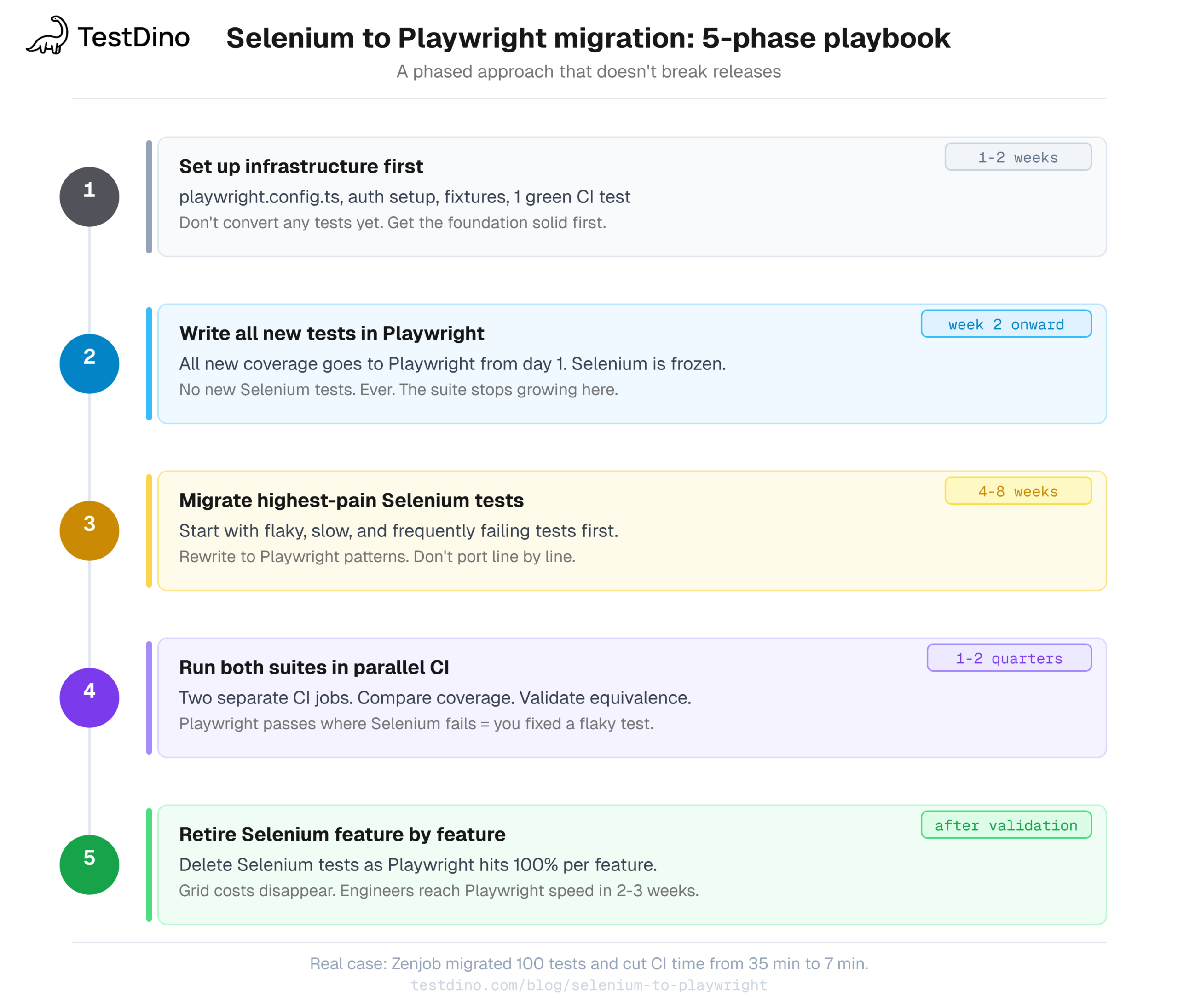
| Infrastructure + 1 green CI test | 1-2 weeks | playwright.config.ts, auth setup, fixture layer, CI pipeline working |
| Write all new tests in Playwright | Ongoing from week 2 | Selenium suite frozen, all new coverage is Playwright |
| Migrate high-pain tests | 4-8 weeks | Flaky, slow, frequently failing Selenium tests converted first |
| Both suites in parallel CI | 6-12 weeks | Compare coverage, validate equivalence |
| Retire Selenium tests | After validation | Delete Selenium coverage as Playwright reaches 100% per feature |
Real examples:
- Zenjob (100 Selenium tests, 8 Jenkins parallel jobs): several months total. Execution time went from 35 minutes to roughly 7 minutes. Source: Zenjob engineering blog.
- Runa (fintech, 30+ countries, Selenium + REST Assured): migrated after hitting manual release bottlenecks and difficulty diagnosing failures. After migration: reduced flakiness, faster releases, better test speed through native parallelism.
- A fintech platform we migrated (Series B, ~80 Selenium tests, Java + TestNG): 4 months total. The first 5 weeks were entirely infrastructure: replacing a legacy Selenium Grid, rebuilding auth helpers in Playwright, and establishing fixture patterns the team could actually follow. Zero test conversion during that period. Once the foundation was solid, 80 tests converted in under 4 weeks. CI dropped from 48 minutes to 13 minutes. Engineers were writing new Playwright tests at full speed within 2-3 weeks of starting.
The biggest factor isn't test count. It's how tangled the existing Selenium architecture is. Clean page objects with minimal custom utilities migrate in weeks. Spaghetti code with hardcoded waits, shared session state, and custom WebDriver wrappers can take months.
In every migration we've been part of, shared ownership is what kills momentum. Every time it stalled, it had the same root cause: nobody owned it outright. One named owner moves 3x faster than "the whole team will help."
Conclusion
Selenium to Playwright migration is worth it when your suite is causing real pain and you have the bandwidth to do it properly. The technical case is clear: faster CI, fewer flaky tests, better debugging, and no driver management overhead.
The part that makes or breaks it is the approach. Infrastructure before tests. One person who owns it. New tests in Playwright from day 1. High-pain tests migrated first. Both suites in CI together until you're confident. Selenium retired feature by feature.
The code translation takes days. The infrastructure, the patience, and the discipline to not rush the parallel running phase take weeks. Teams that skip the parallel phase and retire Selenium too early almost always regret it.
Your Playwright tests need visibility, not just a CI pass/fail. TestDino tracks error patterns, flaky trends, and test history across every run so you know your suite's health post-migration, not just whether the last run passed. Start free with TestDino or read the quick start guide.
FAQs
Yes, and you should during the transition. Run them as separate jobs in the same pipeline with separate reports. Compare coverage. Retire Selenium tests feature by feature as Playwright coverage grows to 100% per feature. Most teams run both for 1-2 quarters before full retirement.
Yes. Playwright has official bindings for JavaScript/TypeScript, Java, Python, and .NET. The TypeScript ecosystem has the most complete documentation, the most active community, and the fastest feature parity with new releases. Java and Python bindings are production-ready but some features lag. If your team is Java-only and a language switch isn't feasible, Playwright Java is still a significant improvement over Selenium Java.
Selenium Grid distributes tests across separate machines, each running a full browser instance. You manage Grid infrastructure, version alignment, and node registration.
Playwright workers run in parallel on a single machine using isolated browser contexts. One browser process spawns multiple contexts. Each context has its own cookies, localStorage, and network state. For most teams, this handles parallelization without any Grid-equivalent infrastructure. For large suites needing true multi-machine distribution, Playwright supports --shard=N/M to split tests across CI jobs.
You don't, and you shouldn't. Test interdependence is a design problem. Each test should set up its own state, run independently, and clean up after itself.
If you genuinely need sequential steps (like an onboarding flow that must go Step 1 → Step 2 → Step 3), use test.describe.serial(). Tests inside it run in order and remaining tests skip if one fails. Use it sparingly. Most flows that seem sequential are actually independent scenarios that can be parallelized with proper test data isolation.
From the first run, in most cases. The typical improvement is 20-40% faster per migrated test assuming the bottleneck was explicit waits and driver overhead. Zenjob saw 80% faster runs. If your main bottleneck is slow backend responses, the gap is smaller.
Most of it does. The architecture sections (auto-waiting, browser contexts, CDP) apply fully. The code examples are TypeScript but the patterns translate directly to Python. The main difference: Playwright Python can run synchronously via the playwright package or asynchronously via async_playwright. The TypeScript async model is async-first and matches the guide exactly. The Python sync API is a wrapper that handles the async underneath, so page.goto("/login") works the same way, just without await.
You phase it out as Playwright coverage grows. During transition, Grid still runs for the Selenium suite. Once Playwright handles full coverage, Grid costs disappear. Most teams find that Playwright's built-in workers config makes Grid unnecessary even for large suites, unless you specifically need multi-machine execution beyond what sharding provides.
Recommended reading
-
Playwright vs Selenium: detailed comparison - Feature by feature, with benchmark data
-
Is Selenium dead in 2026? - Where Selenium still wins and where it doesn't
-
Cypress to Playwright migration - Coming from Cypress instead? Different challenges.
-
Playwright parallel execution guide - Workers, fullyParallel, and sharding explained
-
Playwright flaky tests: detection and fixes - What to do with flaky tests post-migration
-
Playwright CI/CD integrations - GitHub Actions, GitLab, Azure DevOps setup
-
Playwright network mocking - Deep dive on page.route()
-
Playwright locators guide - Locator strategies beyond what's in this post
-
Performance benchmarks: Playwright vs Selenium vs Cypress - Real execution time and memory data
-
TestDino open-source Playwright Skill - 70+ guides to help AI coding agents write better tests during migration

Pratik Patel
Co-founder