Playwright Page Object Model: Pattern Guide with Examples
Wrap every page of your app in a single class so tests call loginPage.signIn() instead of repeating selectors. This guide walks through Playwright POM from scratch page classes, fixtures, and the patterns that scale.




What is the page object model and why does it matter
Definition: The page object model (POM) is a design pattern where each page or major component of your application gets its own class. That class stores every locator and user action for that page, so tests never touch raw selectors directly. POM enforces a single source of truth for UI interactions.
Think of it like a remote control for a TV. You press "volume up" without caring which circuit board signal fires. A page object works the same way for your tests. You call loginPage.signIn(user, pass) and the class handles the three clicks and two fills behind the scenes.
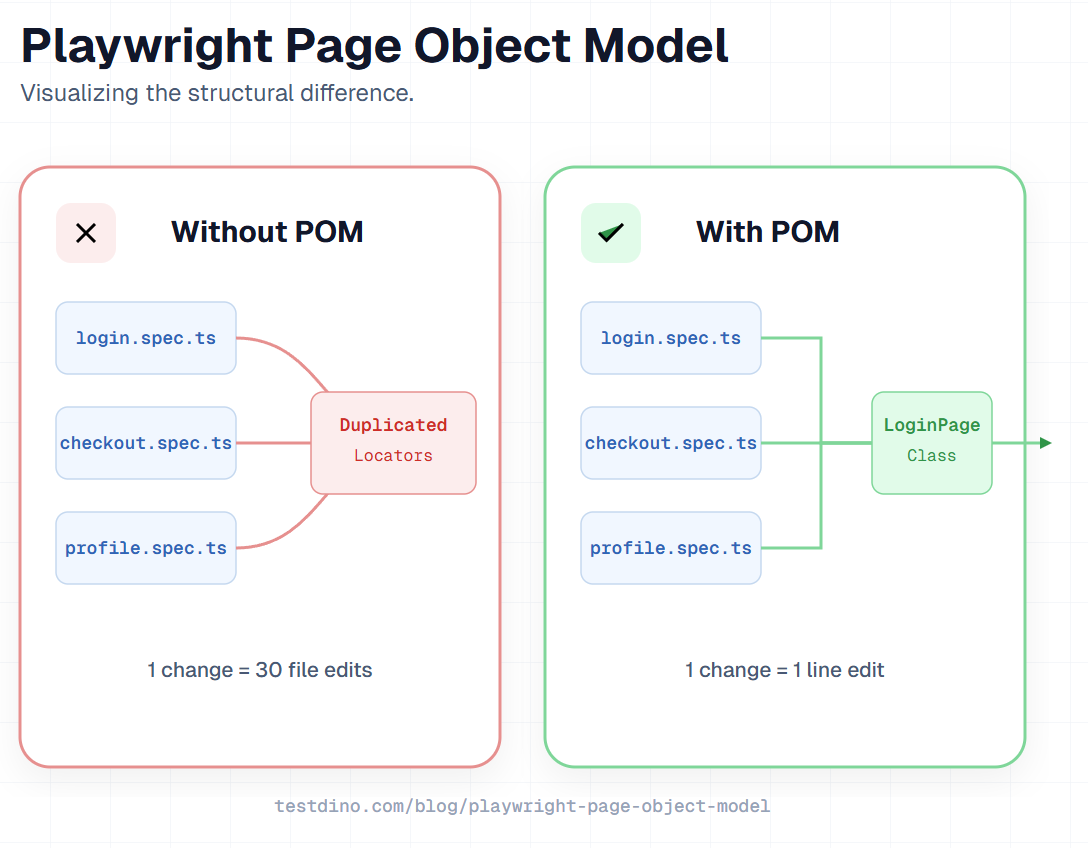
Without POM, a typical Playwright test automation project looks like this after six months:
The same page.locator('#email') scattered across 30 spec files
A renamed CSS class breaks tests in places you did not expect
New team members struggle to understand what each test actually validates
Pull request reviews take longer because reviewers trace selectors instead of reading intent
POM solves all four problems by giving you a single source of truth for each page. When a locator changes, you open one class file, update one line, and every test that depends on it keeps passing.

Tip: POM originated in Selenium but fits Playwright perfectly because locators are lazily evaluated, resolving only during actions.
The Playwright official documentation recommends POM as the go-to approach for structuring large test suites. According to the 2024 State of JS survey, Playwright crossed 50% awareness among JavaScript developers. As adoption grows, structuring code with the page object pattern becomes less of a nice-to-have and more of a baseline expectation for any serious playwright test structure.
Setting up your project for POM
Before writing any page class, you need a clean folder structure. A well-organized project makes it obvious where to add new page objects and where to find existing ones.
Prerequisites
Make sure you have Node.js 18+ installed. Then initialize a new Playwright project:
npm init playwright@latest
The installer asks a few questions. Pick TypeScript when prompted. TypeScript adds type safety to your page objects, which catches locator typos at compile time instead of runtime.
Note: JavaScript works too. TypeScript simply provides the added benefits of autocomplete and compile-time type checking.
Recommended folder structure
Here is a folder layout that scales from 5 tests to 500:
# project-structure
playwright-project/
├── pages/
│   ├── LoginPage.ts
│   ├── DashboardPage.ts
│   ├── CheckoutPage.ts
│   └── components/
│       ├── NavbarComponent.ts
│       └── SearchComponent.ts
├── tests/
│   ├── login.spec.ts
│   ├── dashboard.spec.ts
│   └── checkout.spec.ts
├── fixtures/
│   └── base.ts
├── test-data/
│   └── users.json
├── playwright.config.ts
└── package.json
Three key decisions in this layout:
pages/ is separate from tests/. Page objects are utilities, not tests. Keeping them apart prevents circular imports and makes the purpose of each file clear at a glance.
components/ lives inside pages/. Reusable UI pieces like navbars and modals get their own classes. A NavbarComponent can be imported into DashboardPage, CheckoutPage, or any page that shows the nav.
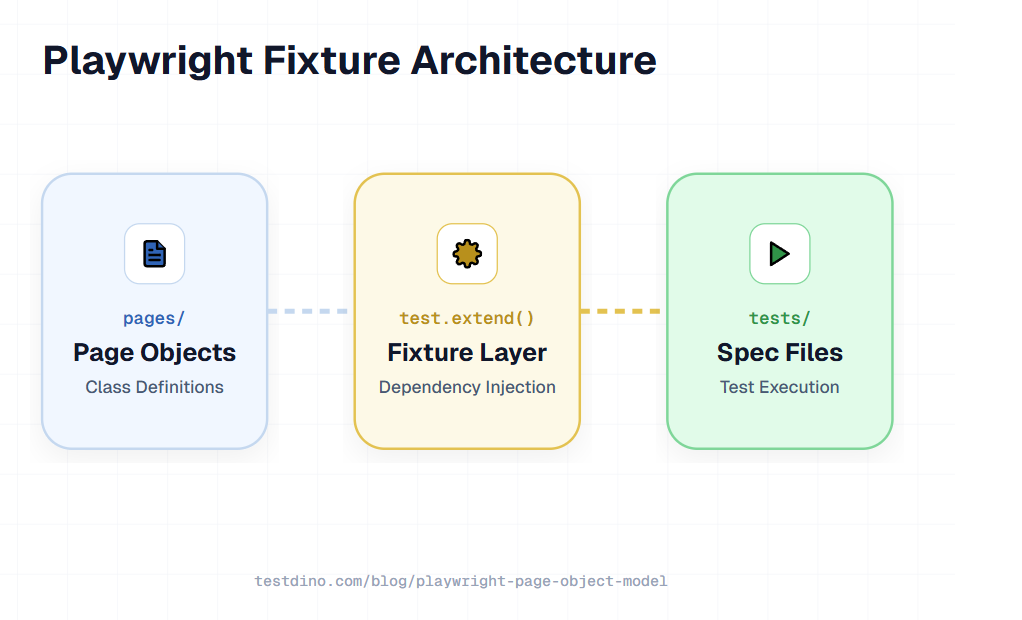
fixtures/ holds your custom fixture file. This is where you wire page objects into the test runner using test.extend(). More on this in a later section.
Configuring playwright.config.ts
Your config file does not need anything POM-specific. But a few settings help when you are building out page objects:
// playwright.config.ts
import { defineConfig } from '@playwright/test';
export default defineConfig({
  testDir: './tests',
  timeout: 30_000,
  retries: 1,
  use: {
    baseURL: 'https://your-app.com',
    trace: 'on-first-retry',
    screenshot: 'only-on-failure',
  },
});
Setting baseURL is important here. Your page objects can use relative URLs like await this.page.goto('/login') instead of hardcoding the full domain. This makes switching between staging and production a single config change.
Project tree at a glance: Keep three root folders: pages/ (classes), tests/ (specs), and fixtures/ (setup). This 1:1 mapping ensures organized scalability.

Building your first Playwright page object class
A page object class has three parts: a constructor that receives the Playwright page instance, locator definitions that point to UI elements, and methods that wrap user actions.
Here is a complete LoginPage class:
// pages/LoginPage.ts
import { type Locator, type Page } from '@playwright/test';
export class LoginPage {
  readonly page: Page;
  readonly emailInput: Locator;
  readonly passwordInput: Locator;
  readonly signInButton: Locator;
  readonly errorMessage: Locator;
  constructor(page: Page) {
    this.page = page;
    this.emailInput = page.getByLabel('Email');
    this.passwordInput = page.getByLabel('Password');
    this.signInButton = page.getByRole('button', { name: 'Sign in' });
    this.errorMessage = page.getByTestId('login-error');
  }
  async goto() {
    await this.page.goto('/login');
  }
  async signIn(email: string, password: string) {
    await this.emailInput.fill(email);
    await this.passwordInput.fill(password);
    await this.signInButton.click();
  }
}
A few things to notice in this code:
Locators use getByRole and getByLabel instead of CSS selectors. These Playwright locators are resilient because they match how real users see the page, not how the DOM is structured.
Every locator is readonly. This prevents tests from accidentally overwriting a locator at runtime.
The signIn method hides implementation details. Tests call loginPage.signIn('[email protected]', 'pass123') without knowing whether the form has two fields or ten.
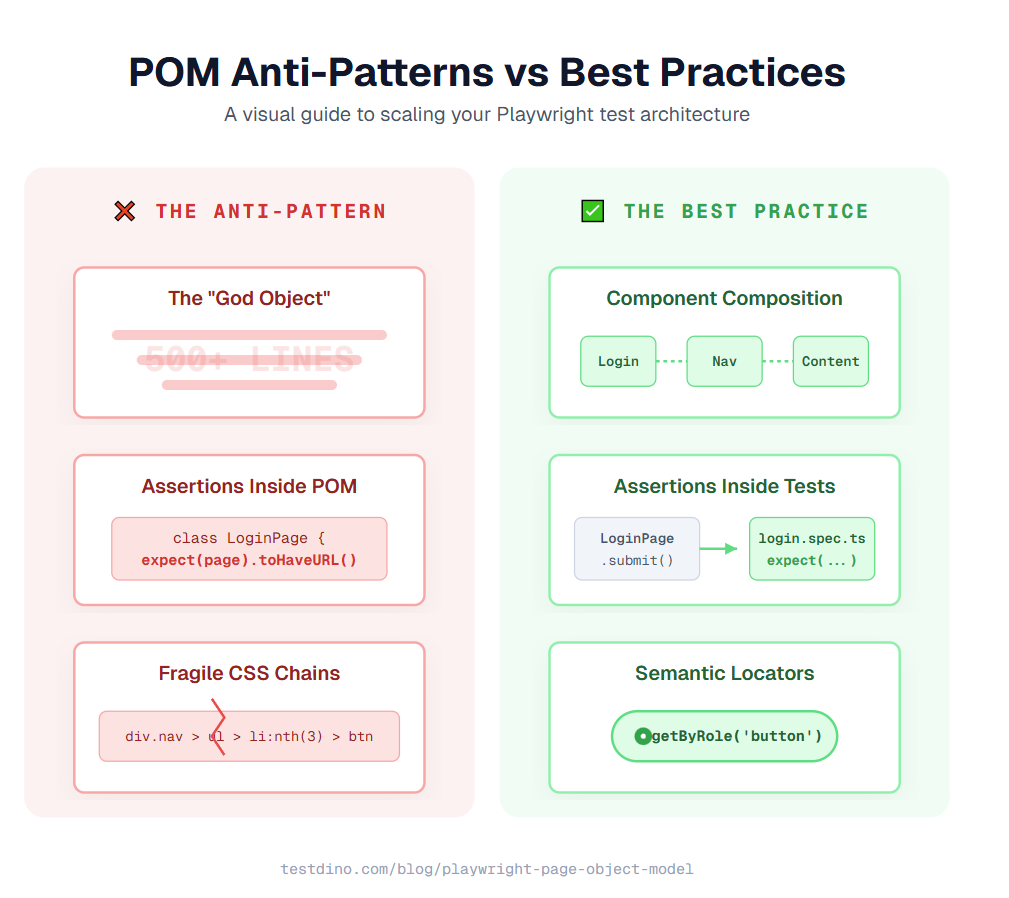
No assertions live in the page object. The page object performs actions. The test file checks results. Mixing both creates tight coupling that makes refactoring harder.
Tip: Prefer getByRole and getByLabel over CSS selectors. They tie to semantics instead of structure, surviving UI changes better.
Building a second page object
After login, users land on a dashboard. Here is a DashboardPage class that models that:
// pages/DashboardPage.ts
import { type Locator, type Page } from '@playwright/test';
export class DashboardPage {
  readonly page: Page;
  readonly welcomeHeading: Locator;
  readonly projectList: Locator;
  readonly createProjectButton: Locator;
  readonly searchInput: Locator;
  constructor(page: Page) {
    this.page = page;
    this.welcomeHeading = page.getByRole('heading', { name: /welcome/i });
    this.projectList = page.getByTestId('project-list');
    this.createProjectButton = page.getByRole('button', { name: 'New project' });
    this.searchInput = page.getByPlaceholder('Search projects');
  }
  async createProject(name: string) {
    await this.createProjectButton.click();
    await this.page.getByLabel('Project name').fill(name);
    await this.page.getByRole('button', { name: 'Create' }).click();
  }
  async searchProject(query: string) {
    await this.searchInput.fill(query);
    await this.searchInput.press('Enter');
  }
}
Notice how createProject combines multiple steps into a single method call. The test does not need to know that creating a project involves clicking a button, filling a modal, and confirming. This is the core advantage of the playwright page object model pattern. In practice, teams that adopt this approach early report spending significantly less time on selector-related maintenance as their suite grows.
Modeling reusable components
Not everything is a full page. Navigation bars, sidebars, and modals appear across multiple pages. Model these as component classes:
// pages/components/NavbarComponent.ts
import { type Locator, type Page } from '@playwright/test';
export class NavbarComponent {
  readonly page: Page;
  readonly profileMenu: Locator;
  readonly logoutButton: Locator;
  readonly notificationBell: Locator;
  constructor(page: Page) {
    this.page = page;
    this.profileMenu = page.getByTestId('profile-menu');
    this.logoutButton = page.getByRole('menuitem', { name: 'Logout' });
    this.notificationBell = page.getByLabel('Notifications');
  }
  async logout() {
    await this.profileMenu.click();
    await this.logoutButton.click();
  }
}
Then import this component into any page that uses the navbar:
// pages/DashboardPage.ts (updated)
import { NavbarComponent } from './components/NavbarComponent';
export class DashboardPage {
  readonly navbar: NavbarComponent;
  // ... other locators
  constructor(page: Page) {
    this.navbar = new NavbarComponent(page);
    // ... other setup
  }
}
Now your test can call dashboardPage.navbar.logout() directly. This composition approach keeps each class focused on one responsibility, which matters a lot when reducing test maintenance across a growing suite.
Writing tests that use page objects
With page classes in place, your test files become short, readable, and focused entirely on what you are verifying.
Basic test using page objects
// tests/login.spec.ts
import { test, expect } from '@playwright/test';
import { LoginPage } from '../pages/LoginPage';
import { DashboardPage } from '../pages/DashboardPage';
test('user can sign in with valid credentials', async ({ page }) => {
  const loginPage = new LoginPage(page);
  const dashboardPage = new DashboardPage(page);
  await loginPage.goto();
  await loginPage.signIn('[email protected]', 'securePass123');
  await expect(dashboardPage.welcomeHeading).toBeVisible();
  await expect(page).toHaveURL(/dashboard/);
});
test('shows error for invalid credentials', async ({ page }) => {
  const loginPage = new LoginPage(page);
  await loginPage.goto();
  await loginPage.signIn('[email protected]', 'wrongPassword');
  await expect(loginPage.errorMessage).toContainText('Invalid email or password');
});
Compare this to a test without POM:
// tests/login-no-pom.spec.ts (without POM - do not copy)
test('user can sign in', async ({ page }) => {
  await page.goto('/login');
  await page.getByLabel('Email').fill('[email protected]');
  await page.getByLabel('Password').fill('securePass123');
  await page.getByRole('button', { name: 'Sign in' }).click();
  await expect(page.getByRole('heading', { name: /welcome/i })).toBeVisible();
});
The non-POM version looks simpler for one test. But multiply it by 50 tests, change one label from "Email" to "Email address", and you are updating every single file. With POM, that fix lives in LoginPage.ts alone.
Note: Keep assertions in test files, never in page objects. This ensures your classes remain reusable across all test scenarios.
Testing multi-page flows
Real user journeys span multiple pages. POM makes these flows read like a story:
// tests/checkout.spec.ts
import { test, expect } from '@playwright/test';
import { LoginPage } from '../pages/LoginPage';
import { DashboardPage } from '../pages/DashboardPage';
import { CheckoutPage } from '../pages/CheckoutPage';
test('complete purchase flow', async ({ page }) => {
  const loginPage = new LoginPage(page);
  const dashboardPage = new DashboardPage(page);
  const checkoutPage = new CheckoutPage(page);
  await loginPage.goto();
  await loginPage.signIn('[email protected]', 'buyerPass');
  await dashboardPage.searchProject('Widget Pro');
  await checkoutPage.addToCart();
  await checkoutPage.applyDiscount('SAVE10');
  await checkoutPage.completePurchase();
  await expect(checkoutPage.confirmationMessage).toContainText('Order confirmed');
});
Each line describes a user action in plain English. Anyone reviewing this PR, even someone who has never touched the codebase, can understand what the test validates. This readability is one of the biggest reasons the playwright POM pattern is the default recommendation for teams running Playwright scripts at scale.
Keeping test data separate
Hardcoded credentials inside tests create maintenance problems. Move test data to JSON files:
// test-data/users.json
{
  "validUser": {
    "email": "[email protected]",
    "password": "securePass123"
  },
  "invalidUser": {
    "email": "[email protected]",
    "password": "wrongPassword"
  }
}
Then import and use them in your tests:
// tests/login.spec.ts (updated)
import users from '../test-data/users.json';
test('user can sign in with valid credentials', async ({ page }) => {
  const loginPage = new LoginPage(page);
  await loginPage.goto();
  await loginPage.signIn(users.validUser.email, users.validUser.password);
  // assertions...
});
This separation means credentials, URLs, and test inputs live outside your page objects and test logic. When you need to update test data for a new environment, you edit one JSON file instead of hunting through dozens of specs.
Terminal Output: Because specs call named methods instead of selectors, your npx playwright test output reads like clear, human-readable sentences.
Using Playwright fixtures with POM
Manually creating page objects with new LoginPage(page) in every test works, but it adds boilerplate. Playwright has a built-in solution for this: fixtures. Fixtures let you pre-configure page objects and inject them directly into your test function signature.
What are fixtures
Definition: Fixtures are reusable setup/teardown blocks that automatically inject resources (like page objects) into tests.
The test.extend() method creates custom fixtures. Here is how to wire your page objects into fixtures:
// fixtures/base.ts
import { test as base } from '@playwright/test';
import { LoginPage } from '../pages/LoginPage';
import { DashboardPage } from '../pages/DashboardPage';
import { CheckoutPage } from '../pages/CheckoutPage';
type PageFixtures = {
  loginPage: LoginPage;
  dashboardPage: DashboardPage;
  checkoutPage: CheckoutPage;
};
export const test = base.extend<PageFixtures>({
  loginPage: async ({ page }, use) => {
    await use(new LoginPage(page));
  },
  dashboardPage: async ({ page }, use) => {
    await use(new DashboardPage(page));
  },
  checkoutPage: async ({ page }, use) => {
    await use(new CheckoutPage(page));
  },
});
export { expect } from '@playwright/test';
Using fixture-based page objects in tests
Now your tests import test from the fixture file instead of from @playwright/test:
// tests/login.spec.ts (with fixtures)
import { test, expect } from '../fixtures/base';
test('user can sign in with valid credentials', async ({ loginPage, dashboardPage }) => {
  await loginPage.goto();
  await loginPage.signIn('[email protected]', 'securePass123');
  await expect(dashboardPage.welcomeHeading).toBeVisible();
});
test('shows error for invalid credentials', async ({ loginPage }) => {
  await loginPage.goto();
  await loginPage.signIn('[email protected]', 'wrongPassword');
  await expect(loginPage.errorMessage).toContainText('Invalid email or password');
});
Notice what changed. There is no new LoginPage(page) anywhere. You just add loginPage to the destructured test arguments and Playwright creates it for you. This eliminates repetitive setup code across every spec file.
Tip: Fixtures support setup steps. You can log in inside the fixture so tests start pre-authenticated, speeding up execution.
Adding setup steps to fixtures
For tests that always need a logged-in user, move the login step into the fixture:
// fixtures/base.ts (with auth fixture)
import { test as base } from '@playwright/test';
import { LoginPage } from '../pages/LoginPage';
import { DashboardPage } from '../pages/DashboardPage';
type AuthFixtures = {
  authenticatedPage: DashboardPage;
};
export const test = base.extend<AuthFixtures>({
  authenticatedPage: async ({ page }, use) => {
    const loginPage = new LoginPage(page);
    await loginPage.goto();
    await loginPage.signIn('[email protected]', 'securePass123');
    await use(new DashboardPage(page));
  },
});
export { expect } from '@playwright/test';
Now any test that needs a logged-in dashboard simply requests authenticatedPage:
// tests/dashboard.spec.ts
import { test, expect } from '../fixtures/base';
test('can create a new project', async ({ authenticatedPage }) => {
  await authenticatedPage.createProject('My New Project');
  await expect(authenticatedPage.projectList).toContainText('My New Project');
});
This keeps authentication logic out of individual tests. If your login flow changes, you update the fixture once, and every test that depends on it adapts automatically. Teams managing Playwright test management workflows at scale rely on this pattern to avoid duplication.
Advanced Playwright POM patterns for production
The basics of POM cover most use cases. But production projects with 200+ tests often need patterns that go beyond single-page classes.
Base page class with shared methods
Most pages share common elements like headers, footers, and loading spinners. A base class avoids repeating these across every page object:
// pages/BasePage.ts
import { type Locator, type Page } from '@playwright/test';
export class BasePage {
  readonly page: Page;
  readonly loadingSpinner: Locator;
  readonly toastNotification: Locator;
  constructor(page: Page) {
    this.page = page;
    this.loadingSpinner = page.getByTestId('loading-spinner');
    this.toastNotification = page.getByRole('alert');
  }
  async waitForPageLoad() {
    await this.loadingSpinner.waitFor({ state: 'hidden' });
  }
  async getToastMessage(): Promise<string> {
    return await this.toastNotification.textContent() ?? '';
  }
}
Then extend it in your specific page objects:
// pages/SettingsPage.ts
import { type Locator, type Page } from '@playwright/test';
import { BasePage } from './BasePage';
export class SettingsPage extends BasePage {
  readonly profileNameInput: Locator;
  readonly saveButton: Locator;
  constructor(page: Page) {
    super(page);
    this.profileNameInput = page.getByLabel('Display name');
    this.saveButton = page.getByRole('button', { name: 'Save changes' });
  }
  async updateDisplayName(name: string) {
    await this.profileNameInput.fill(name);
    await this.saveButton.click();
    await this.waitForPageLoad();
  }
}
The SettingsPage inherits waitForPageLoad() and getToastMessage() from BasePage. Every page in your app gets these methods automatically. This inheritance pattern is one of the reasons the playwright POM approach scales well beyond 100 test files.
Returning page objects from navigation methods
When a method triggers navigation to a different page, return the new page object. This creates a fluent API where the test naturally flows from one page to the next:
// pages/LoginPage.ts (with navigation return)
import { type Locator, type Page } from '@playwright/test';
import { DashboardPage } from './DashboardPage';
export class LoginPage {
  readonly page: Page;
  readonly emailInput: Locator;
  readonly passwordInput: Locator;
  readonly signInButton: Locator;
  constructor(page: Page) {
    this.page = page;
    this.emailInput = page.getByLabel('Email');
    this.passwordInput = page.getByLabel('Password');
    this.signInButton = page.getByRole('button', { name: 'Sign in' });
  }
  async signIn(email: string, password: string): Promise<DashboardPage> {
    await this.emailInput.fill(email);
    await this.passwordInput.fill(password);
    await this.signInButton.click();
    return new DashboardPage(this.page);
  }
}
The test then chains naturally:
// tests/login.spec.ts (with fluent API)
test('user signs in and creates a project', async ({ page }) => {
  const loginPage = new LoginPage(page);
  await loginPage.goto();
  const dashboard = await loginPage.signIn('[email protected]', 'securePass123');
  await dashboard.createProject('Project Alpha');
});
Handling dynamic elements with page object methods
Some pages have elements that appear based on state. For example, a table with dynamic rows. Handle these with parameterized methods:
// pages/ProjectListPage.ts
import { type Locator, type Page } from '@playwright/test';
export class ProjectListPage {
  readonly page: Page;
  readonly projectRows: Locator;
  constructor(page: Page) {
    this.page = page;
    this.projectRows = page.getByTestId('project-row');
  }
  getProjectByName(name: string): Locator {
    return this.projectRows.filter({ hasText: name });
  }
  async deleteProject(name: string) {
    const row = this.getProjectByName(name);
    await row.getByRole('button', { name: 'Delete' }).click();
    await this.page.getByRole('button', { name: 'Confirm' }).click();
  }
  async getProjectCount(): Promise<number> {
    return await this.projectRows.count();
  }
}
This pattern handles dynamic content cleanly without hardcoding row indices or relying on brittle CSS nth-child selectors. It works well alongside Playwright component testing where you need to interact with repeated UI elements. Teams using the playwright pom pattern at scale often rely on parameterized locators like this to keep their page objects flexible.
POM with Playwright test.step for better reporting
Wrapping page object calls in test.step() produces clearer Playwright HTML reports:
// tests/settings.spec.ts
import { test, expect } from '@playwright/test';
import { LoginPage } from '../pages/LoginPage';
import { SettingsPage } from '../pages/SettingsPage';
test('user updates display name', async ({ page }) => {
  const loginPage = new LoginPage(page);
  const settingsPage = new SettingsPage(page);
  await test.step('Sign in', async () => {
    await loginPage.goto();
    await loginPage.signIn('[email protected]', 'securePass123');
  });
  await test.step('Update profile settings', async () => {
    await page.goto('/settings');
    await settingsPage.updateDisplayName('Jane Doe');
  });
  await test.step('Verify success message', async () => {
    const toast = await settingsPage.getToastMessage();
    expect(toast).toContain('Profile updated');
  });
});
Each step appears as a collapsible section in the HTML report. When a test fails, you can see exactly which step broke without reading through every action. Teams using Playwright reporting tools find this structure invaluable for debugging Playwright tests in CI.
| Pattern | When to use | Benefit |
|---|---|---|
| Base page class | Shared elements across pages (loaders, toasts, nav) | Reduces duplication in page objects |
| Navigation return types | Methods that trigger page transitions | Fluent test API, type-safe page transitions |
| Component composition | Reusable UI blocks (navbar, sidebar, modal) | Single responsibility per class |
| Dynamic element methods | Tables, lists, repeating elements | Handles runtime content without brittle selectors |
| test.step() wrapping | Complex multi-action flows | Clear HTML report sections, easier debugging |
HTML Reports: Using test.step() creates collapsible sections in your HTML report, making it instantly clear which part of a flow failed.
Common Playwright POM mistakes and how to fix them
Even experienced teams make these mistakes when adopting the playwright page object model. Catching them early saves hours of refactoring later.
Mistake 1: Putting assertions inside page objects
This is the most common anti-pattern. It looks like this:
// BAD: assertions in page object
async signIn(email: string, password: string) {
  await this.emailInput.fill(email);
  await this.passwordInput.fill(password);
  await this.signInButton.click();
  await expect(this.page).toHaveURL(/dashboard/); // Do not do this
}
The problem is that this signIn method can only be used for successful login tests. If you want to test invalid credentials, you need a separate method. Keep assertions in the test file and keep page objects action-only.
Mistake 2: Creating god objects
A god object is a single class that models your entire application. It has 50 locators, 30 methods, and handles everything from login to checkout. This defeats the purpose of POM entirely.
Follow the single-responsibility principle. One class per page or major component. If a class grows beyond 100 lines, consider breaking it into smaller component classes.
Mistake 3: Using fragile selectors
// BAD: fragile selectors
this.submitBtn = page.locator('div.form-container > button:nth-child(3)');
this.emailField = page.locator('#root > div > form > input.email');
These selectors break the moment a developer adds a wrapper div or reorders elements. Use semantic locators instead:
// GOOD: semantic selectors
this.submitBtn = page.getByRole('button', { name: 'Submit' });
this.emailField = page.getByLabel('Email');
Mistake 4: Ignoring the baseURL config
Hardcoding full URLs in page objects creates environment-switching headaches:
// BAD
async goto() {
  await this.page.goto('https://staging.myapp.com/login');
}
// GOOD
async goto() {
  await this.page.goto('/login');
}
Use the baseURL setting in playwright.config.ts and keep your page objects environment-agnostic.
Mistake 5: Not using TypeScript readonly
Without readonly, a test can accidentally overwrite a locator:
// Accidental overwrite without readonly
loginPage.emailInput = page.locator('.wrong-selector');
TypeScript readonly properties catch this mistake at compile time. It is a small addition that prevents confusing runtime bugs.

Warning: Avoid taking screenshots in every page method. It slows down tests. Use screenshot: 'only-on-failure' in your config instead.
When not to use POM
POM is not always the right choice. For quick prototypes, one-off smoke tests, or suites with fewer than five specs, the overhead of creating separate class files can slow you down more than it helps. In those cases, inline selectors inside the test file are perfectly fine.
The break-even point is usually around 10-15 tests touching the same page. Once you cross that threshold, the maintenance cost of scattered selectors exceeds the upfront cost of writing a page class. If your project is growing toward that number, start with POM from the beginning rather than migrating later.
Conclusion
The playwright page object model turns a growing test suite from a maintenance nightmare into a well-organized codebase. You have seen how to structure your project, build page classes with resilient locators, wire them with fixtures, and apply advanced patterns like base classes, component composition, and fluent navigation returns.
Here are the key takeaways:
Keep locators in page objects, assertions in test files, and shared logic in fixtures.
Use getByRole and getByLabel instead of CSS selectors.
Break large classes into focused components.
Always set readonly on your locator properties.
Use test.extend() to eliminate boilerplate page object creation.
Start with a simple LoginPage class. Once that pattern feels natural, expand to other pages and introduce fixtures. The playwright test structure scales with you. Whether your suite has 10 tests or 1,000, POM keeps the maintenance cost flat.
And when those tests start running in CI/CD pipelines, the real value of POM shows up in pull request reviews where every change is a clear, one-line update to a single class file.
FAQs
Table of content
Flaky tests killing your velocity?
TestDino auto-detects flakiness, categorizes root causes, tracks patterns over time.
Follow Us