How Deriv Debugs ~100,000 Monthly Playwright Test Executions with TestDino
Deriv’s QA team runs ~100,000 Playwright tests a month in GitHub Actions. Here’s how TestDino turns red checks into diagnoses.
Deriv's QA team sends around 100,000 Playwright test executions a month from GitHub Actions to TestDino. Here's how they use run history, git context, and failure artifacts to work out why tests fail.
Deriv's QA team runs its Playwright end-to-end tests in GitHub Actions, roughly 100,000 test executions a month. When one of them fails, the red check in CI says that it failed and not much else. To act on it, the team needs to know where the failure came from, whether the test has failed before, and what the browser showed at the time.
Balakumaran, a QA Lead at Deriv, and about 25 people on the team use TestDino to answer those questions. This case study covers their setup, the features they use most, and the results they reported.
Deriv at a glance
| Company | Deriv |
|---|---|
| Industry | Online trading |
| Test framework | Playwright |
| Primary CI/CD | GitHub Actions |
| CI volume | ~100,000 test executions a month, across multiple projects |
| Active TestDino users | About 25 |
| TestDino customer since | May 2026 |
| Overall satisfaction | 5 / 5 |
Company overview
Deriv is an online trading platform. Its QA team tests the platform end to end with Playwright and keeps stakeholders informed about test health.
Balakumaran overview
Balakumaran is a QA Lead at Deriv. The QA team owns what happens after a CI run finishes: sorting real failures from flaky ones, keeping track of how healthy the suite is, and reporting on it. TestDino is the tool they use for that work.
Deriv's Playwright testing setup
Deriv's end-to-end suites are written in Playwright and run in GitHub Actions. They cover different projects, and together they send around 100,000 test executions a month to TestDino, where about 25 people on the team read the results.
Nobody can open that many jobs one by one, or remember whether a test that failed today also failed last week on another branch. A central place for results fills that gap, and it's how Balakumaran sums up what TestDino does for the team:
 Centralized visibility and debugging for our Playwright CI runs. TestDino gives us the run history with git context (branch, commit, PR, pipeline), pass/fail/flaky breakdowns, and failure artifacts in one place.


Testing and debugging challenges
Teams running Playwright at this scale tend to run into the same problems:
- Volume. Failures come in faster than anyone can review them one job at a time.
- Missing context. A failed check doesn't say which branch, commit, or PR it came from, or whether the same test failed somewhere else.
- Flaky or real. In a single run, a flaky test looks the same as a real regression. You need history to tell them apart.
- Scattered evidence. Debugging a browser test means looking at the screenshot, trace, video, and logs together, and those can end up spread across jobs.
- Reporting. Stakeholders want to know how healthy the suite is, and that's hard to piece together from job logs.
When none of that context is at hand, re-running the job is the quickest option. It just doesn't explain anything.
How TestDino fits into Deriv's workflow
Every run from GitHub Actions reports into TestDino while the Playwright suites execute. Each one arrives with its git context attached: the branch, commit, pull request, and pipeline it came from.
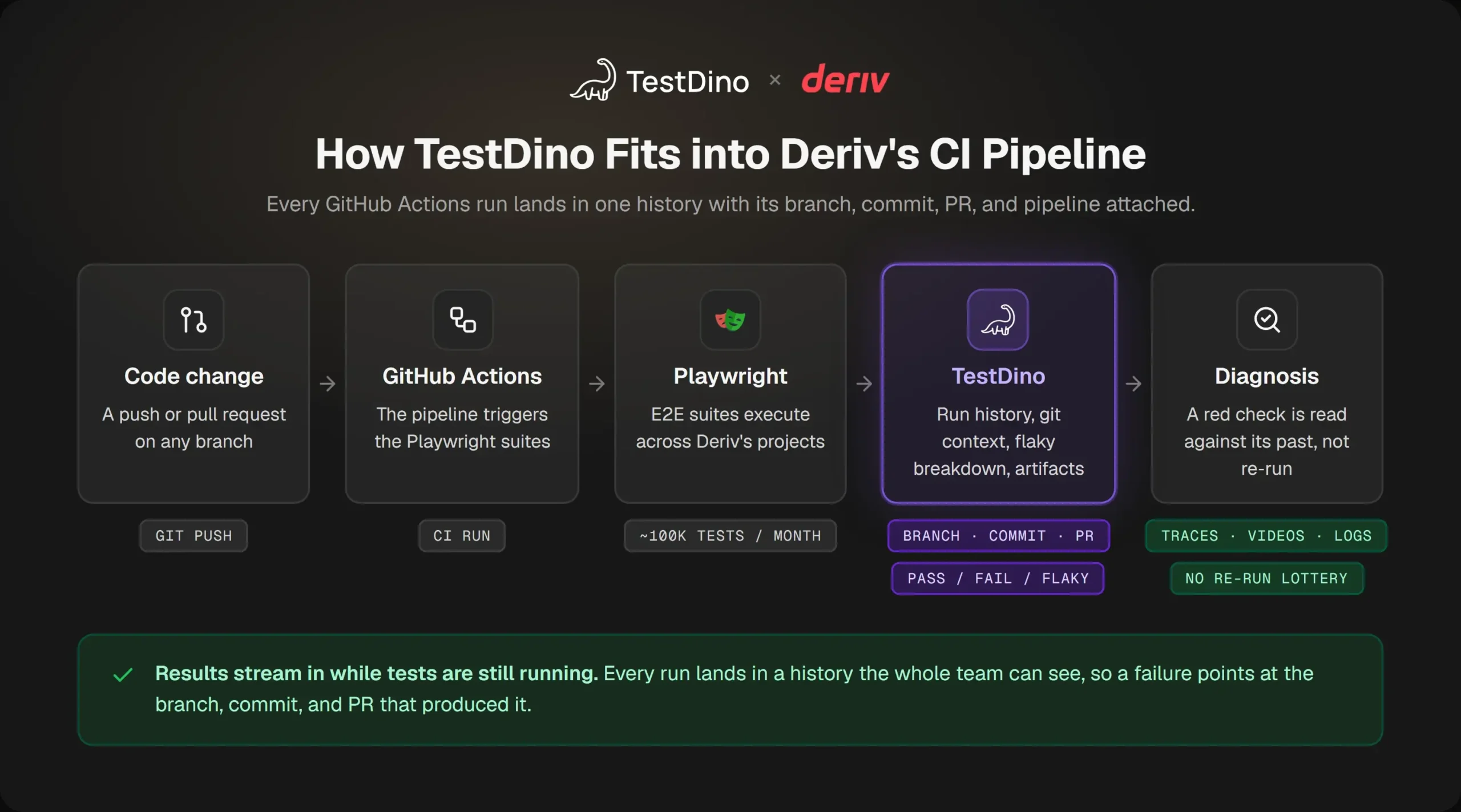
Each Playwright run from GitHub Actions arrives in TestDino with its git context.
So when a check goes red, the team doesn't start from the CI log. The path from a failed run to a cause looks roughly like this:
- Open the run. The git context is already on it.
- Read the breakdown. Pass, fail, and flaky counts show what kind of failure it is.
- Check the test's history. Has it failed before, and on which branches?
- Open the artifacts attached to the failing test.
- Work on the cause, with all of that in front of you.
The historical execution data per test case and being able to see a failure's pattern across past runs and branches, is what turns a red CI check into an actual diagnosis instead of a re-run lottery.
Key capabilities in Deriv's workflow
These are the TestDino features Deriv's team uses regularly.
1. Real-Time Test Reporting and the Test Run Dashboard
Results appear while the suite is still running, so the team can look at failures before the pipeline finishes. The Test Run Dashboard lists every run with its git context and outcome counts, which saves digging through individual GitHub Actions jobs.
2. Historical Trends and Analytics
TestDino keeps execution history for each test case. That history is what lets the team see a failure's pattern across past runs and branches, and it's the feature Balakumaran singles out.
3. Flaky Test Detection
Each run is split into passed, failed, and flaky. A test that keeps flipping between pass and fail shows up as flaky, so it isn't mistaken for one that's actually broken.
4. Debugging artifacts: screenshots, traces, videos, and logs
Playwright's screenshots, traces, videos, and logs are attached to the test that produced them. When something fails, the evidence is on the same page as the failure.
5. CI/CD integration with GitHub Actions
Deriv's runs start in GitHub Actions. TestDino's CI/CD integration collects their results, artifacts, and git metadata, so nobody has to gather them from separate jobs.
6. TestDino MCP and Public APIs
Deriv also uses the TestDino MCP and the Public APIs regularly. They give access to the same run and test data outside the dashboard: the MCP for AI assistants, the APIs for scripts and internal tools.
Before and after: from red check to diagnosis
Here is the same failing check handled two ways.
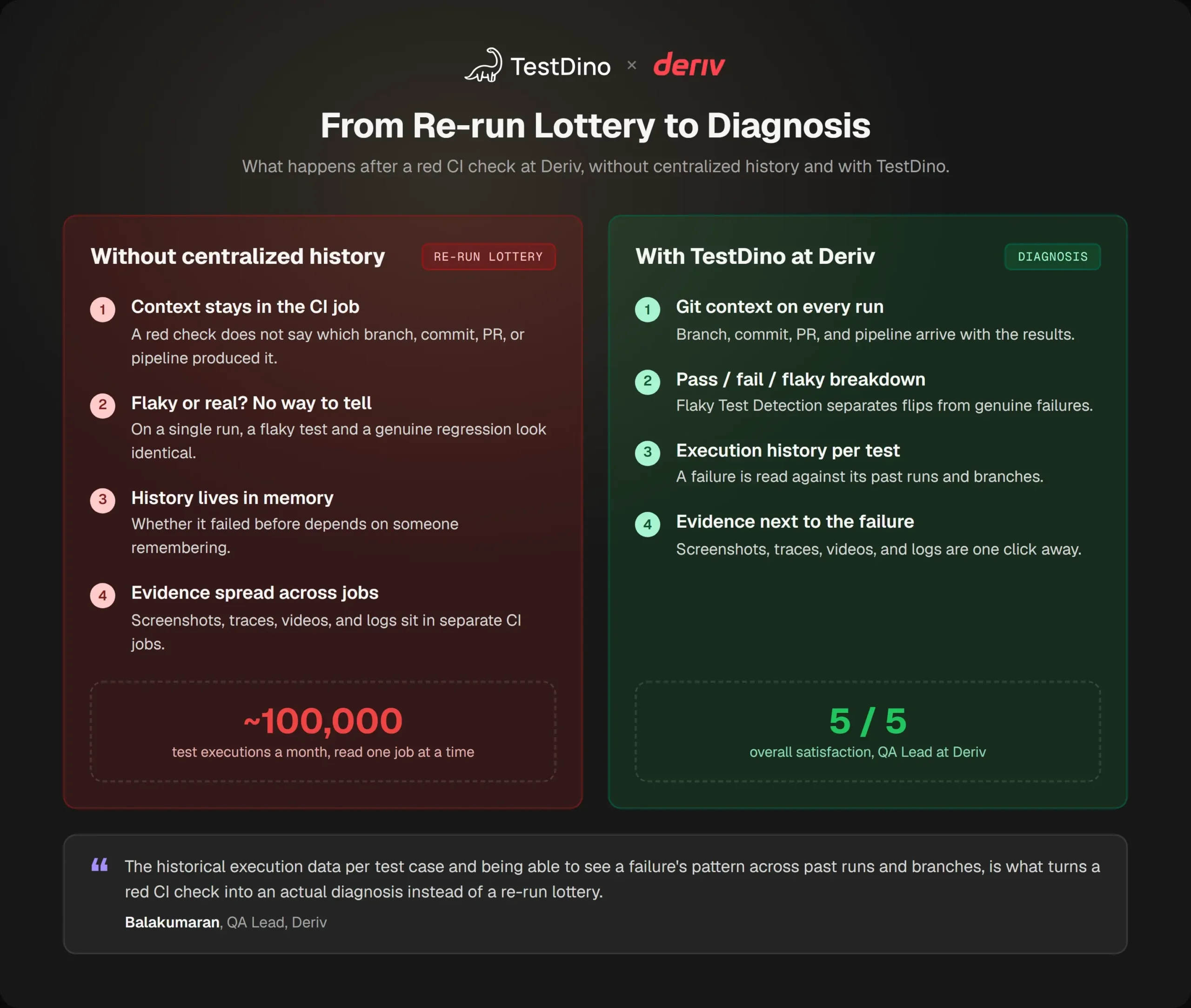
Left: a red check with no history behind it. Right: the same check in TestDino.
| Question after a red check | Without centralized history | With TestDino at Deriv |
|---|---|---|
| Where did it come from? | You dig through the CI job | Git context on every run |
| Is it real or flaky? | Hard to tell from one run | Pass/fail/flaky breakdown and Flaky Test Detection |
| Has it happened before? | Depends on someone remembering | Execution history for each test case |
| What did the browser see? | Evidence spread across jobs | Artifacts attached to the failing test |
| What happens next? | Re-run and see | Work on the cause |
| How healthy is the suite? | Pieced together by hand | Dashboards and historical trends |
Results and benefits
After a few months with TestDino, Balakumaran reported improvements in six areas:
- Faster debugging of test failures. The context for a failure is in one place, not spread across jobs.
- Better visibility into test health. Every run, and how the suite is trending, in one view.
- Easier flaky test identification. Flaky results are marked separately from real failures.
- Faster CI feedback loops. Results show up while the run is still going.
- Less time analyzing results. Outcome breakdowns replace reading through runs one at a time.
- Better reporting to stakeholders. Dashboards and trends are easy to share.
Balakumaran also rated TestDino 5 out of 5 in all four categories:
| Ease of onboarding | Responsiveness and support | Likelihood to recommend | Overall satisfaction |
|---|---|---|---|
| 5/5 | 5/5 | 5/5 | 5/5 |
What would regress if TestDino were removed
Without TestDino, Deriv's results would go back to being separate checks in GitHub Actions. Git context, test history, and artifacts would have to be gathered by hand for each failure, and at around 100,000 executions a month that adds up quickly.
Who benefits from TestDino at Deriv
About 25 people at Deriv use TestDino.
- QA Lead and QA engineers spend the most time with failures, so they get the most out of having history and artifacts in one place.
- Engineers working on branches and PRs can trace a failure to the change behind it, since every run carries its branch, commit, and PR.
- Stakeholders can check test health on a dashboard instead of waiting for a report.
Final takeaways
For other teams running Playwright at high volume, three parts of Deriv's setup are worth copying:
- Keep history for every test case. At this scale, a failure is much easier to read next to its past runs.
- Attach git context to every run, so a failure leads straight to the change that caused it.
- Keep artifacts with the failing test, where the person debugging it will look first.
Turn red CI checks into diagnoses. See run history, git context, flaky breakdowns, and Playwright artifacts for every CI run in one place. Get Started · Book a Demo

Savan Vaghani
Product Developer