Cypress to Playwright migration: A step-by-step guide
Step by step guide to migrate Cypress tests to Playwright, compare architectures, map commands, reduce flakiness, debug faster with traces, and CI speed.

I like how every migration tells a story: a story of evolution, where teams move from comfort to capability. Cypress brought front-end testing within reach, but Playwright pushed it further with performance, scalability, and cross-browser reach.
Whether you're pursuing fast CI runs, reduced flakiness, or a better understanding of failures, this step-by-step guide will help you turn your test suite into a modern, robust automation framework.
Each year brings new frameworks, improved browser coverage, and more advanced debugging tools. Yet one question keeps coming up among QA teams: "Should we migrate from Cypress to Playwright?" If you've ever wondered that, this guide is for you. We'll walk through the Cypress to Playwright migration journey: from understanding their architectures to mapping commands, handling waits, and improving reporting with TestDino.
Prefer a reference you can keep open while you work? We maintain an open-source migration skill with the full command map and gotchas: Cypress-to-Playwright migration skill.
Overview
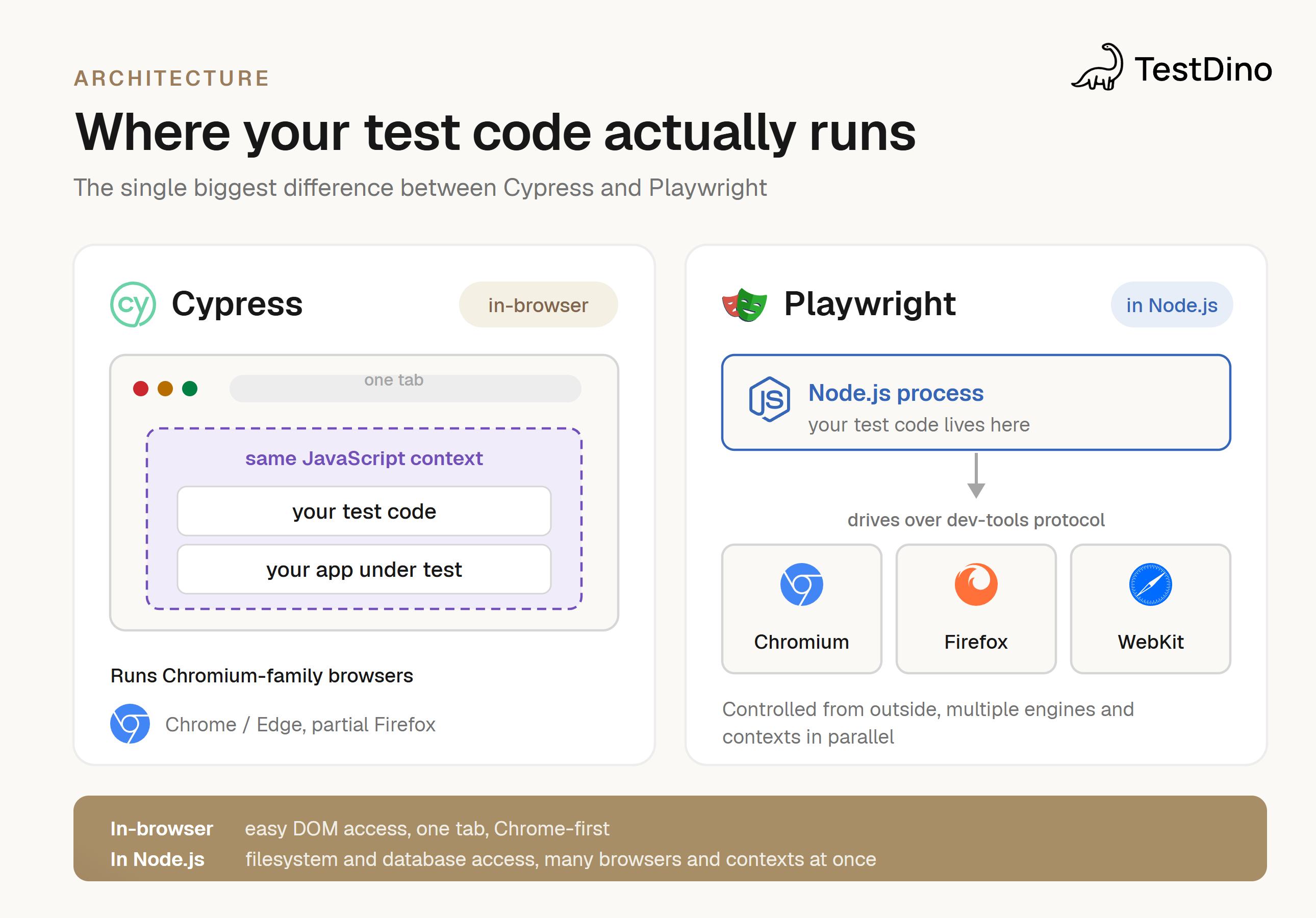
Cypress architecture
Cypress is known for its simplicity and developer-friendly syntax. It runs directly inside the browser, which makes debugging easy but also limits flexibility.
- Single-browser-tab execution is great for speed, but it restricts multi-tab tests.
- Network-layer control: it intercepts requests inside the browser.
- Tight coupling with Chrome-based browsers.
This architecture makes Cypress excellent for small to medium-sized front-end tests but less ideal for cross-browser or large-scale automation setups. For a fuller side-by-side, see our Playwright vs Cypress comparison.
Playwright architecture
Playwright uses a browser-driver model similar to Selenium but with modern APIs and auto-waiting mechanisms. It's designed for multi-browser, multi-context testing at scale.
- Supports Chromium, WebKit, and Firefox.
- Cross-language support: JavaScript, TypeScript, Python, C#, and Java.
- Parallel execution: runs multiple tests across browsers.
- Powerful debugging tools: trace viewer and network monitoring.
Why teams are moving to Playwright
Most teams begin with Cypress due to its ease of use and rapid setup, but as projects expand, they hit the limits of scalability and compatibility. That's where Playwright comes into its own, letting teams push past those boundaries and evolve their frontend automation.
The numbers behind the shift (2026)
-
Playwright pulls ~54M weekly npm downloads vs Cypress's ~6.7M, roughly an 8× gap.
- Playwright natively supports Chromium, Firefox, and WebKit; Cypress's Firefox support has been experimental since 2020, with no WebKit/Safari support.
-
One team reported a ~70% drop in execution time after migrating 200+ tests.
Signs you should move from Cypress to Playwright
- Need for cross-browser or cross-device testing: Playwright supports Chromium, Firefox, and WebKit, enabling true cross-browser testing.
- Struggling with parallel execution: large suites run faster in Playwright thanks to built-in parallelism.
- Want headless, faster CI/CD runs: Playwright optimizes test execution in pipelines.
- Need advanced network mocking and debugging: auto-waits, request interception, and the trace viewer simplify debugging.
- Scaling automation across microservices: Playwright's multi-context architecture handles complex workflows efficiently.
If one or more of these signs sounds familiar, it may be time for a Cypress to Playwright migration. If flakiness is your main driver, see our guide to reducing flaky tests.
Key differences: Cypress vs Playwright
| Feature | Cypress | Playwright |
|---|---|---|
| Browser support | Chromium only, partial Firefox | Chromium, WebKit, Firefox |
| Parallel execution | Limited, slower in CI/CD | Native parallelism, fast CI/CD |
| Test isolation | Single tab, shared state can cause flakiness | Independent browser contexts, better isolation |
| Network stubbing/mocking | Basic support | Advanced, flexible interception and custom mocking |
| Language support | JavaScript/TypeScript | JavaScript, TypeScript, Python, C#, Java |
| Debugging | Built-in GUI, interactive | CLI + trace viewer, step-through, inspect req/res |
| Flakiness handling | Manual waits required | Auto-wait built in, configurable retries |
| CI/CD integration | Works but requires setup | Native, optimized for pipelines |
| Cross-device testing | Limited emulation | Real devices, mobile emulation (iOS/Android) |
| Screenshots/video | Automatic for failed tests | Screenshots, video, detailed traces |
| Test reporting | Basic, plugins for advanced | Built-in detailed reporting, customizable |
| Community & ecosystem | Large and mature, many plugins | Growing ecosystem, first-class Playwright tools |
| Performance | Slower with parallel tests | Fast, optimized for multiple contexts |
| API testing | Limited via workarounds | Native API testing alongside UI |
| Auto-wait for elements | Manual waits needed | Auto-waits for ready elements |
| Learning curve | Beginner-friendly, simpler API | Slightly steeper, more flexible and powerful |
This comparison shows why the Cypress to Playwright migration has become a trend among modern QA teams.
The 5 mindset shifts that make migration click
Most failed Cypress-to-Playwright migrations aren't syntax problems; they're mental-model problems. Get these five shifts and the rest is mechanical.
1. Command chains → async/await
Cypress commands are enqueued and run in a serial chain that looks synchronous but isn't. Playwright uses standard async/await, so you get native if/else, for loops, and try/catch back, with no cy.then() workarounds.
2. Whole-chain retry → lazy locators with auto-wait
Cypress retries the entire command chain until assertions pass or time out. Playwright locators are lazy: they do nothing until an action or assertion runs, at which point auto-waiting handles actionability for that one step.
3. In-browser → Node.js
Cypress test code runs inside the browser. Playwright runs in Node.js and drives browsers over a dev-tools protocol. You gain native filesystem/DB access; you lose direct window/document access (use page.evaluate() when you truly need it).
4. Single tab → multi-tab, multi-context, multi-browser
Playwright handles multiple pages, browser contexts, and engines (Chromium, Firefox, WebKit) in one test, including popups, OAuth flows, and multi-user scenarios. Cypress is one tab.
5. Custom commands → fixtures
Cypress extends behavior via Cypress.Commands.add(), a global mutable registry. Playwright uses test.extend() fixtures with dependency injection, giving you guaranteed teardown and full type safety.
Is Playwright the right choice for your testing needs?
Playwright is an excellent choice if you want to future-proof your test stack and automate easily across browsers, devices, and teams. It provides speed, reliability, and flexibility, all critical to large-scale QA operations. It's especially good when you need:
- End-to-end coverage on Chrome, Safari, and Firefox: Playwright's native multi-browser support validates across top browsers with fewer environment-specific failures.
- Fast headless execution for CI/CD: Playwright runs tests headlessly with low overhead, giving quicker feedback loops and deeper DevOps integration.
- Deep debugging for flaky tests: trace viewer, network logs, and video capture make root-cause analysis fast. You can visually replay test steps and catch problems that otherwise pass undetected.
Step-by-step guide to Cypress to Playwright migration
This is the nine-stage process we recommend. You can keep CI green throughout, because Cypress and Playwright coexist until the final step.
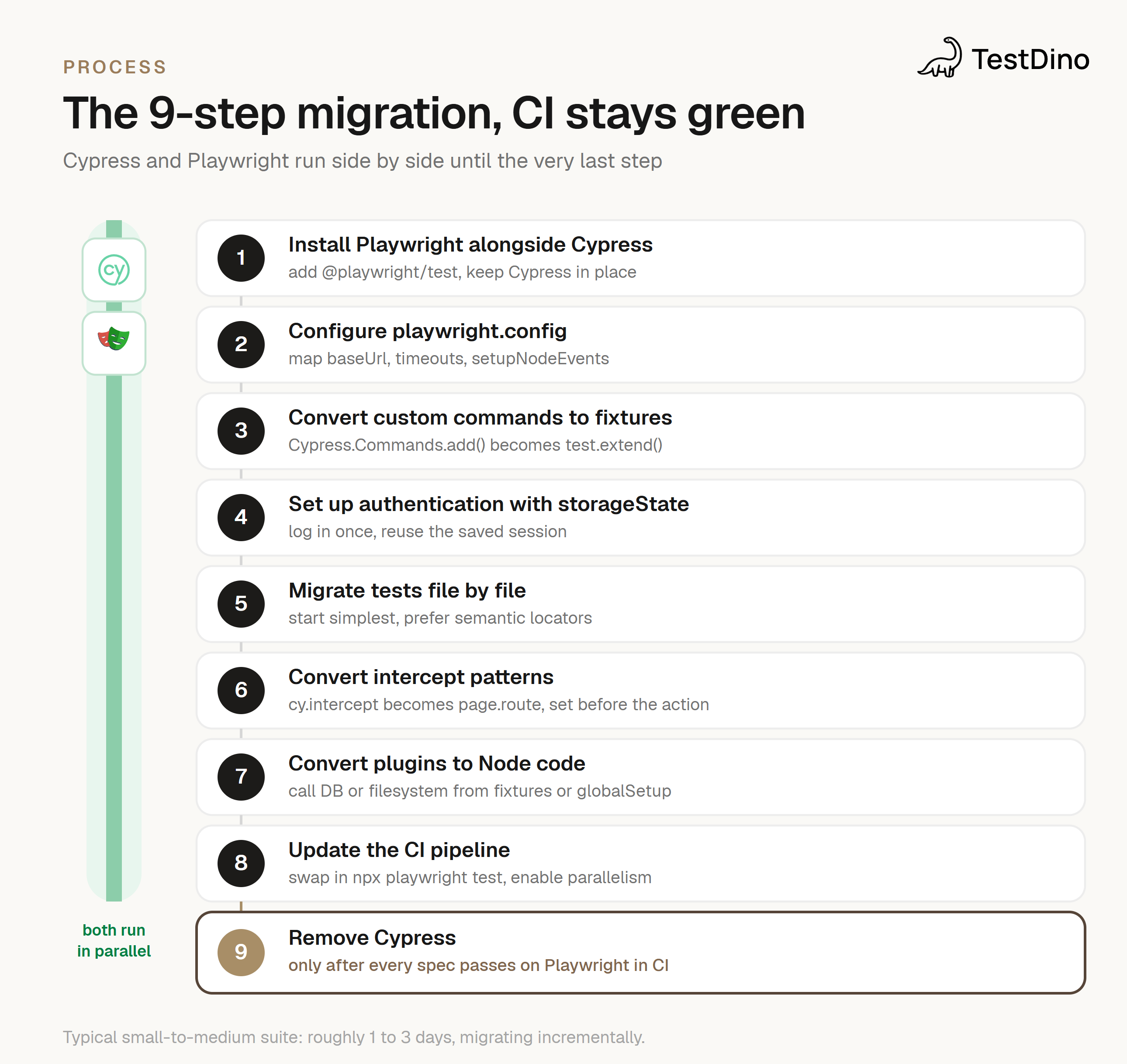
1. Set up Playwright
Install Playwright in your project directory using the recommended initializer:
npm init playwright@latestOr manually:
npm install -D @playwright/test
npx playwright install
Then add a test script to your package.json for easy execution:
"scripts": {
  "test:e2e": "npx playwright test"
}
This sets up Playwright alongside your existing Cypress tests, preparing your project for a smooth migration.
2. Configure playwright.config (map your Cypress settings)
Port your Cypress config keys to their Playwright equivalents:
| Cypress setting | Playwright equivalent |
|---|---|
| baseUrl | use: { baseURL } |
| defaultCommandTimeout | expect: { timeout } |
| requestTimeout | test-level timeout |
| setupNodeEvents | globalSetup / globalTeardown |
| Cypress.env() | process.env or use: {} |
3. Create a basic Playwright test
//  Playwright basic navigation test
import { test, expect } from '@playwright/test';
test('navigate to example.com', async ({ page }) => {
  await page.goto('https://example.com');
  await expect(page).toHaveTitle(/Example/);
});
This mirrors Cypress's it() syntax but with async/await for stability and modern automation practices.
4. Convert custom commands to fixtures
Replace Cypress.Commands.add() with test.extend() fixtures, grouping logic into page objects and API helpers that get guaranteed teardown:
import { test as base } from '@playwright/test';
import { TodosPage } from './TodosPage';
export const test = base.extend<{ todosPage: TodosPage }>({
  todosPage: async ({ page }, use) => {
    await page.goto('/todos');
    await use(new TodosPage(page));
  },
});
// In tests, the fixture is injected by name
test('adds todos', async ({ todosPage }) => {
  await todosPage.createTodo('Buy milk');
  await expect(todosPage.todos).toHaveCount(1);
});
5. Set up authentication with storageState
One of the biggest CI speedups: stop logging in on every test. Move from cy.session() to a setup project that logs in once and saves storageState to a file the tests reuse.
import { test as setup } from '@playwright/test';
const authFile = 'playwright/.auth/user.json';
setup('authenticate', async ({ page }) => {
  await page.goto('/login');
  await page.getByLabel('Email').fill('admin@example.com');
  await page.getByRole('button', { name: 'Sign in' }).click();
  await page.context().storageState({ path: authFile });
});
// Tests reuse the saved session, no login code needed
test('shows admin content', async ({ page }) => {
  await page.goto('/dashboard');
  await expect(page.getByTestId('admin-panel')).toBeVisible();
});
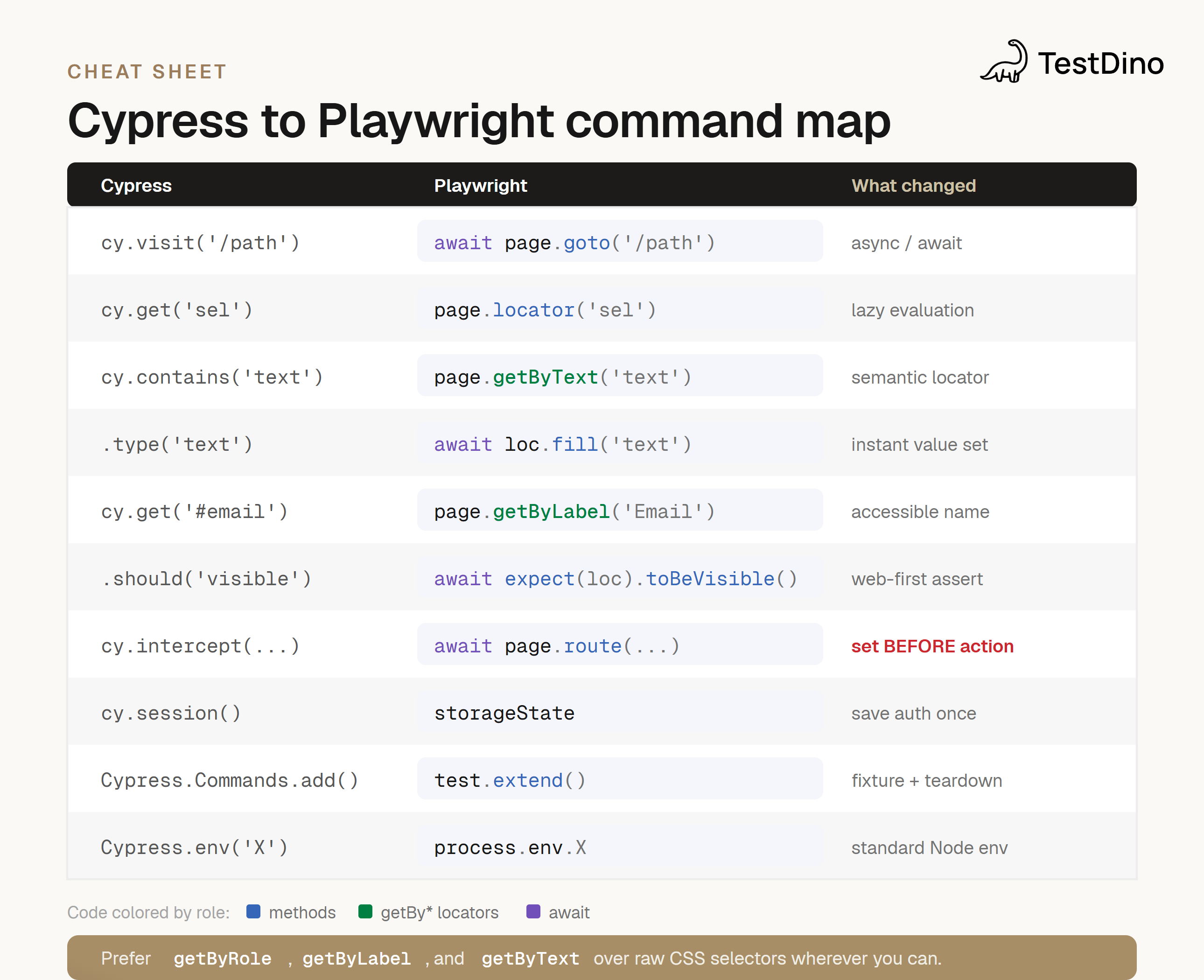
6. Map Cypress commands to Playwright
This is the full command map. Prefer semantic locators (getByRole, getByLabel, getByText) over raw CSS where you can.
| Cypress | Playwright | What changed |
|---|---|---|
| cy.visit('/path') | await page.goto('/path') | Explicit async/await |
| cy.get('sel') | page.locator('sel') | Lazy evaluation |
| cy.contains('text') | page.getByText('text') | Prefer semantic locators |
| cy.get('sel').click() | await locator.click() | Auto-waits for actionability |
| cy.get('sel').type('txt') | await locator.fill('txt') | Instant value set (pressSequentially for keystrokes) |
| cy.get('#email') | page.getByLabel('Email') | Accessible-name locator |
| cy.contains('button','Submit') | page.getByRole('button',{name:'Submit'}) | Role-based locator |
| .should('be.visible') | await expect(loc).toBeVisible() | Web-first assertion, auto-retries |
| .should('have.text','y') | await expect(loc).toHaveText('y') | Independent retrying assertion |
| cy.url().should('include','/x') | await expect(page).toHaveURL(/\/x/) | Page-level assertion |
| cy.intercept(...).as('r') | await page.route('**/api', route => ...) | Set route BEFORE the action |
| cy.wait('@r') | await page.waitForResponse('**/api') | Or just assert on resulting UI |
| cy.session() | storageState (setup project) | Save auth once, reuse |
| Cypress.Commands.add() | test.extend() fixture | DI + guaranteed teardown |
| cy.within(...) | chained locator | Scope by chaining, not nesting |
| Cypress.env('X') | process.env.X | Standard Node env |
| cy.screenshot('n') | await page.screenshot({path:'n.png'}) | Captures screenshots |
| cy.viewport(w,h) | await page.setViewportSize({width,height}) | Simulate screen sizes |
| cy.title() | await page.title() | Get page title |
7. Handle waits and timing
Playwright has auto-waiting built in, which reduces flakiness:
await page.locator('button#submit').click(); // waits automaticallyFor explicit waits:
await page.waitForSelector('#status', { state: 'visible' });8. Convert intercept patterns and explore advanced use cases
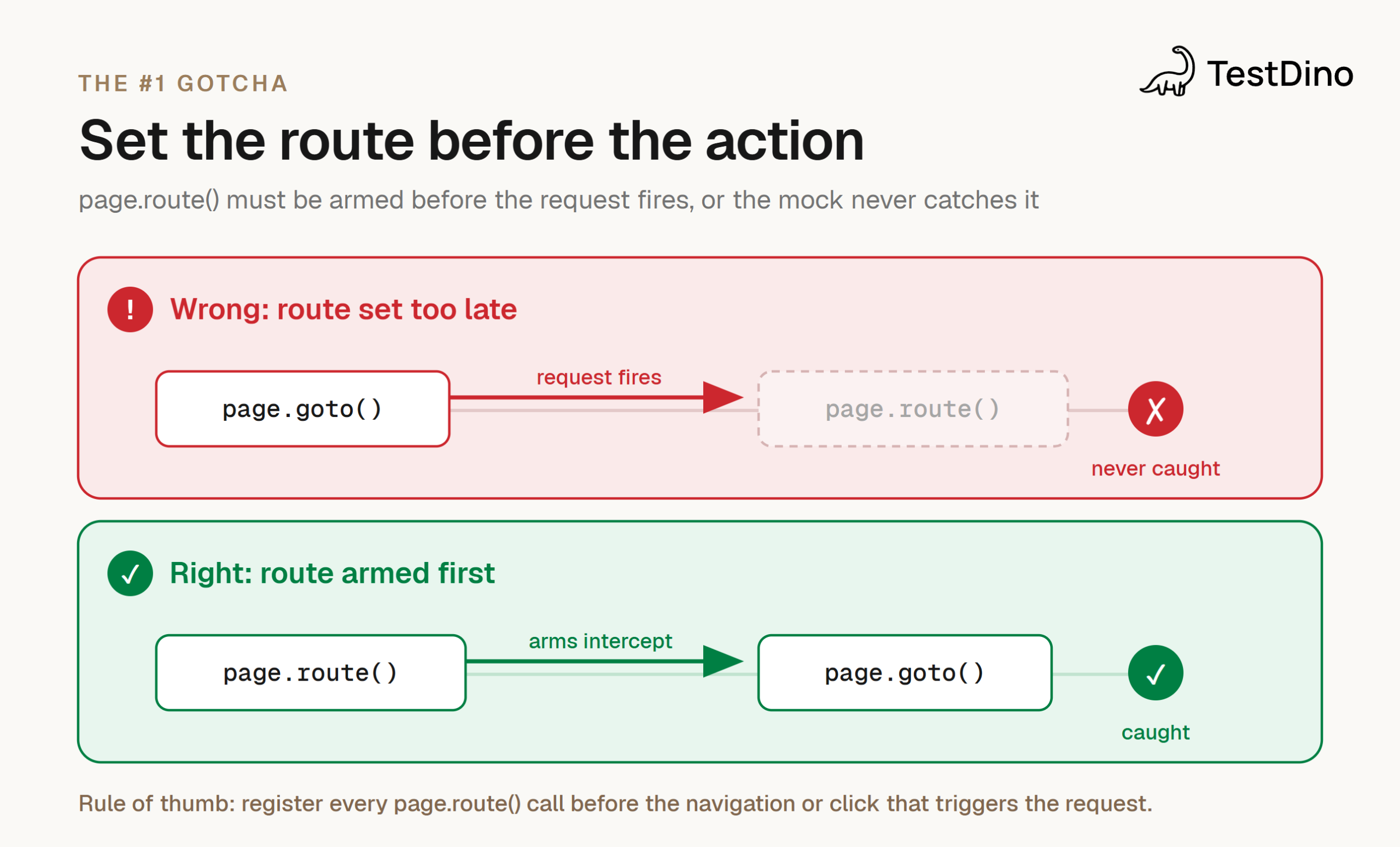
Set up routes before the action that triggers the request. This is the single most common migration bug.
Network interception:
// Register the route BEFORE navigating
await page.route('**/api/products', route =>
  route.fulfill({ body: JSON.stringify([/* ...mock data... */]) }));
await page.goto('/products');
Abort requests:
await page.route('**/api/*', route => route.abort());Multiple browser contexts:
const context = await browser.newContext();
const page = await context.newPage();
This enables parallelism, multi-context testing, and robust strategies that Cypress alone cannot fully support.
9. Run, debug, then remove Cypress
Run tests in debug mode:
npx playwright test --debugUse the trace viewer for step-by-step replay:
npx playwright show-trace trace.zipOnce every spec passes in CI on Playwright, update the CI pipeline to replace the Cypress step with npx playwright test (enable built-in parallelism and upload the HTML report + traces as artifacts), then delete Cypress, its config, and its dependencies.
Migrating a Cypress test to Playwright
It helps to see direct before/after translations. These reduce flakiness and make the migration smoother.
Example 1: Visiting a page and clicking a button
it('visit and click', () => {
  cy.visit('https://example.com');
  cy.get('button#start').click();
});test('visit and click', async ({ page }) => {
await page.goto('https://example.com');
await page.locator('button#start').click();
});Example 2: Filling a form field
it('fill form', () => {
  cy.visit('/login');
  cy.get('#username').type('user');
  cy.get('#password').type('pass');
  cy.get('button[type=submit]').click();
});// Playwright (semantic locators + fill)
test('fill form', async ({ page }) => {
await page.goto('/login');
await page.getByLabel('Username').fill('user');
await page.getByLabel('Password').fill('pass');
await page.getByRole('button', { name: 'Submit' }).click();
});Example 3: Waiting for an element to appear
it('wait for element', () => {
  cy.get('#status', { timeout: 10000 }).should('be.visible');
});// Playwright (web-first assertion auto-waits)
test('wait for element', async ({ page }) => {
await expect(page.locator('#status')).toBeVisible();
});Is Playwright worth the switch?
Teams often start with Cypress because it's simple and intuitive, but as projects grow the limitations become clear. This is where Playwright shows its value, making the migration worthwhile for most modern QA workflows.
Benefits of Playwright vs Cypress limitations
1. Broader browser coverage: unlike Cypress, which is mostly Chrome-focused with limited Firefox and Edge support, Playwright runs on Chromium, WebKit, and Firefox. This enables true cross-browser testing across all major environments.
2. Native parallelism and isolation: Playwright runs multiple tests simultaneously in isolated browser contexts, cutting CI/CD pipeline time and preventing test interference. Cypress runs tests largely in a single tab, limiting scalability.
3. Fewer flaky tests due to auto-wait: Playwright's built-in auto-waiting handles asynchronous behavior automatically, so tests are less likely to fail on timing. Cypress often needs manual waits or retries, which makes large suites brittle.
4. Headless execution by default: Playwright is optimized for headless mode, making runs faster and easier to integrate into CI/CD. Cypress can run headless but sometimes needs extra configuration.
5. Integrated tracing and debugging: Playwright ships a trace viewer, network monitoring, and step-by-step replay, so teams debug flaky tests efficiently.
Switching to Playwright is more than a framework change; it's an investment in scalable, stable, future-proof automation.
When you might still keep Cypress around
1. For smaller single-browser UI tests: if your project targets Chromium-based browsers and the suite is small, Cypress's simplicity makes tests fast to write and maintain.
2. When the team is heavily invested in Cypress syntax: teams fluent in Cypress patterns may stay more productive with it for smaller projects or prototypes.
3. If no multi-browser or CI/CD scalability is required: for lightweight projects, the overhead of migrating might outweigh the benefits.
In short, Cypress remains valid for targeted, small-scale testing, but as soon as you need broader coverage, higher reliability, and CI/CD efficiency, a Cypress to Playwright migration becomes worthwhile.
10 mistakes teams make migrating Cypress to Playwright
Set the route before the action
- Forgetting locators are lazy. page.getByRole('button') queries nothing until you act on it, so don't expect a Cypress-style immediate DOM read.
- Chaining assertions. Each expect() is independent and auto-retries on its own; don't port .should().and() chains literally.
- Using type() everywhere. fill() sets value instantly; reserve pressSequentially() for keystroke-dependent UIs.
- Asserting visibility without scroll. Actions auto-scroll; assertions don't. Call scrollIntoViewIfNeeded() first when needed.
- Looking for cy.wrap(). In async/await, you just use the value directly.
- Setting page.route() too late. It must be registered before the action that triggers the request; after page.goto() is too late.
- Expecting a Cypress "subject." Use textContent(), inputValue(), or a web-first assertion instead of a chained subject.
- Keeping a plugin layer. Tests run in Node, so call DB/filesystem code directly from fixtures or globalSetup.
- Porting cy.within() as nested callbacks. Scope by chaining locators instead.
- Fighting test isolation. Every test gets a fresh context, so there's no manual cleanup, but you can't intentionally leak state between tests.
Leveraging TestDino for post-migration analytics
After your Playwright environment is live, keep improving visibility and control. That's where TestDino comes in, turning raw test data into actionable insight.
AI failure grouping automatically clusters similar failures, so you spot repeated issues instead of scrolling through long failure lists.
Migration health tracking gives a live view of flaky tests, pass-rate trends, and performance changes, so you instantly see whether your new Playwright setup is stabilizing or needs tuning.
Unified Playwright reports combine results, screenshots, and traces in one place, with smart alerts for critical failures so you're not drowning in noise.
With Playwright test reporting in TestDino, your reports become visual, traceable, and data-driven, cutting debugging time and keeping release confidence high.
Conclusion
Migrating from Cypress to Playwright isn't just a technical shift; it's a strategic move toward a scalable, future-ready testing ecosystem. Playwright gives QA teams multi-browser coverage, faster execution, and reduced flakiness, so your automation keeps pace with product demands.
Beyond speed, Playwright's architecture brings depth to debugging and performance tracking: built-in tracing, network analysis, and parallel execution mean less time maintaining flaky tests and more time improving real product quality.
Paired with TestDino, your Playwright migration becomes truly data-driven, with AI-powered analytics, failure grouping, and real-time trend monitoring giving you full visibility into every run.
FAQs

Pratik Patel
Co-founder