Looking to migrate from TestRail? Compare TestRail vs TestDino. TestDino reports Playwright natively, groups errors, embeds traces, and feeds AI coding agents.
TestRail is a test management platform with structured test plan workflows, milestones, and Jira integration. TestDino pushes further. TestDino is a Playwright cloud companion. It records CI runs, detects flakes, and keeps traces and fix workflows ready for teams and AI agents over MCP. Manual and automated cases live in the same workspace, exploratory sessions roll up under date-bound releases, and the entire test record is queryable by Claude Code, Cursor, or any MCP-compatible agent, so your AI coding tools aren't debugging blind.
TestDino goes well past test management. The reporting layer is shaped around how Playwright actually runs. Errors group by root cause across message, stack, and failure location. The Playwright trace viewer renders inline on every failure with DOM snapshots, network panel, and console logs. Each run is linked to its PR via a dedicated Pull Request view that tracks KPI tiles, the latest test run, and a Test Results Trend graph for the branch.
TestRail was designed around test plans and manual execution. TestDino was designed around CI-driven Playwright suites. Here's where that shows.
Modern, Playwright-native interface
The reporter, dashboards, trace viewer, and analytics are built around Playwright's project structure, fixtures, retries, and annotations. Setup takes one npm package and one environment variable. The UI is built around current Playwright workflows.
Inline failure context
Every failed test opens with an embedded trace viewer showing DOM snapshots, network calls, and console logs, plus screenshots, video, and error groups by message, stack trace, and location. Debugging happens in the reporter rather than across CLI uploads, defect references, and external attachments.
MCP-native test access
Cursor, Claude Code, and Claude Desktop connect through the TestDino MCP Server as a first-party install, and ChatGPT or Claude on the web use the remote server at mcp.testdino.com. Agents pull failure context with debug_testcase, query runs by environment, and create manual cases from the IDE.
Predictable pricing without per-seat scaling
$39/month billed annually ($49 monthly) for up to 3 users with 10,000 executions included. Plus role-based access control, MCP Server, AI failure classification, and trace viewer, all on the Pro plan. The Free plan covers 1 user and 5,000 executions a month.

Test-case-centric interface
TestRail's interface is organized around test cases, runs, plans, and milestones. Playwright results are viewed inside that structure rather than in a run-first dashboard.
JUnit XML import, not native reporting
TestRail's Playwright integration uses the trcli command-line tool to upload JUnit XML results after each run. This adds a separate upload step to CI, results appear after the run completes, and Playwright-specific context such as project structure, browser channels, and trace metadata is not carried through JUnit XML.
AI for authoring, not for triage
Sembi IQ generates test cases, but what's missing is AI-powered failure triage. Every Playwright failure that lands in TestRail still needs a developer to read the stack trace and decide what category of problem it is.
Premium pricing with SSO behind Enterprise
Professional starts at $38 per seat per month billed yearly, with no free tier. SSO, OAuth, audit logs, test case versioning, and approvals all sit behind the Enterprise tier at $76 per seat per month. SSO, audit logs, and versioning are Enterprise-tier features on TestRail.
TestDino | TestRail | |
|---|---|---|
| Pricing (starts at) | Pro from $39/month (billed annually) | $37/user/month (Professional)* |
| Best for | Playwright cloud companion & test management | Enterprise test case management & traceability |
| Playwright integration | Native (trace viewer, error grouping, MCP) | Via reporter plugin |
| One-step CI setup | One reporter line, streams live | Via plugins/CLI |
Dashboards & Reporting | ||
| Unified Playwright dashboard | ||
| Multi-tab test run detail | Summary, History, AI Insights & more | Run views (no PW tabs) |
| Pull request insights (per-PR history) | ||
| Test ExplorerBrowse tests as a hierarchy, a flat list, or by tag. | Suites, sections, tags | |
| Real-time streaming | Per-shard/worker | |
| Scheduled PDF reports (email) | Daily/Weekly/Monthly (Team plan) | |
Test Analytics | ||
| Analytics: trends & patterns | ||
| Code coverage, per-file | Istanbul, run-level | |
| Environment analytics | Pass-rate/flaky by env | Via custom fields/configs |
Debugging & Evidence | ||
| Built-in Playwright trace viewer | ||
| Screenshots & video replay | Embedded | Via attachments |
| Console logs (per test) | Node + browser | Via attachments |
| Visual diff comparison | ||
| Smart error grouping | Message/stack/location | |
| Flaky detection (+ stability %) | ||
| Playwright tags & annotations | Priority/owner/links/metrics | |
CI/CD Optimization | ||
| GitHub CI Checks quality gates | Per-env + mandatory tags (Team plan) | |
| Branch → environment mappingMatch each Git branch to the environment it runs against. | Exact/regex | Via configurations |
| Sharded / parallel run support | Per-shard live view | |
| Native CI breadth | GitHub, GitLab, Azure DevOps, Bitbucket, CircleCI, Jenkins, TeamCity, AWS CodeBuild, Buildkite, Harness | Jenkins, GitHub Actions, GitLab CI, CircleCI, Travis, Azure DevOps, Bitbucket |
| Self-managed GitLab | ||
Test Management | ||
| Test case management (suites, ownership) | ||
| Bulk test creation (PRDs/Jira/stories) | via MCP | |
| Release tracking (releases/cycles/sprints) | ||
| Exploratory / manual sessions | ||
| Import / export test cases | JSON/CSV/ZIP (export on Team) | |
AI & Automation | ||
| Local MCP (IDE agents) | Cursor/Claude Code/Copilot | |
| Remote MCP (web AI) | AI summaries | |
| AI test run summary on GitHub PRs | ||
| AI test suite audit (audit score + report) | ||
| AI failure classification | ||
Integrations & Collaboration | ||
| Bug tracking breadth | Jira, Linear, Asana, monday | Jira, Monday, Asana, etc. |
| Slack notifications (run summaries) | App + webhooks | |
Platform & Security | ||
| Public API & CLIs | REST + @testdino/playwright | REST API (180-300 req/min) |
| Project-level AI controls | Per-feature toggles | Admin toggles |
| Compliance & certifications | ISO 27001, SOC 2 Type II, GDPR | SOC 2, ISO, SSO (Ent) |
Plans & Pricing | ||
| Plan tiers | Free · Pro $39 · Team $79 · Enterprise | Professional $37/seat · Enterprise $74/seat* |
| Free executions | 5,000/mo | Free trial (14-30 days) |
| Support | Email (Pro) · Priority (Team) · Slack Connect (Enterprise) | Standard (Pro) · Priority 2-hr SLA (Ent) |
| Start for Free | ||
Feature-by-feature breakdown showing how each tool handles the areas that matter most to testing teams.
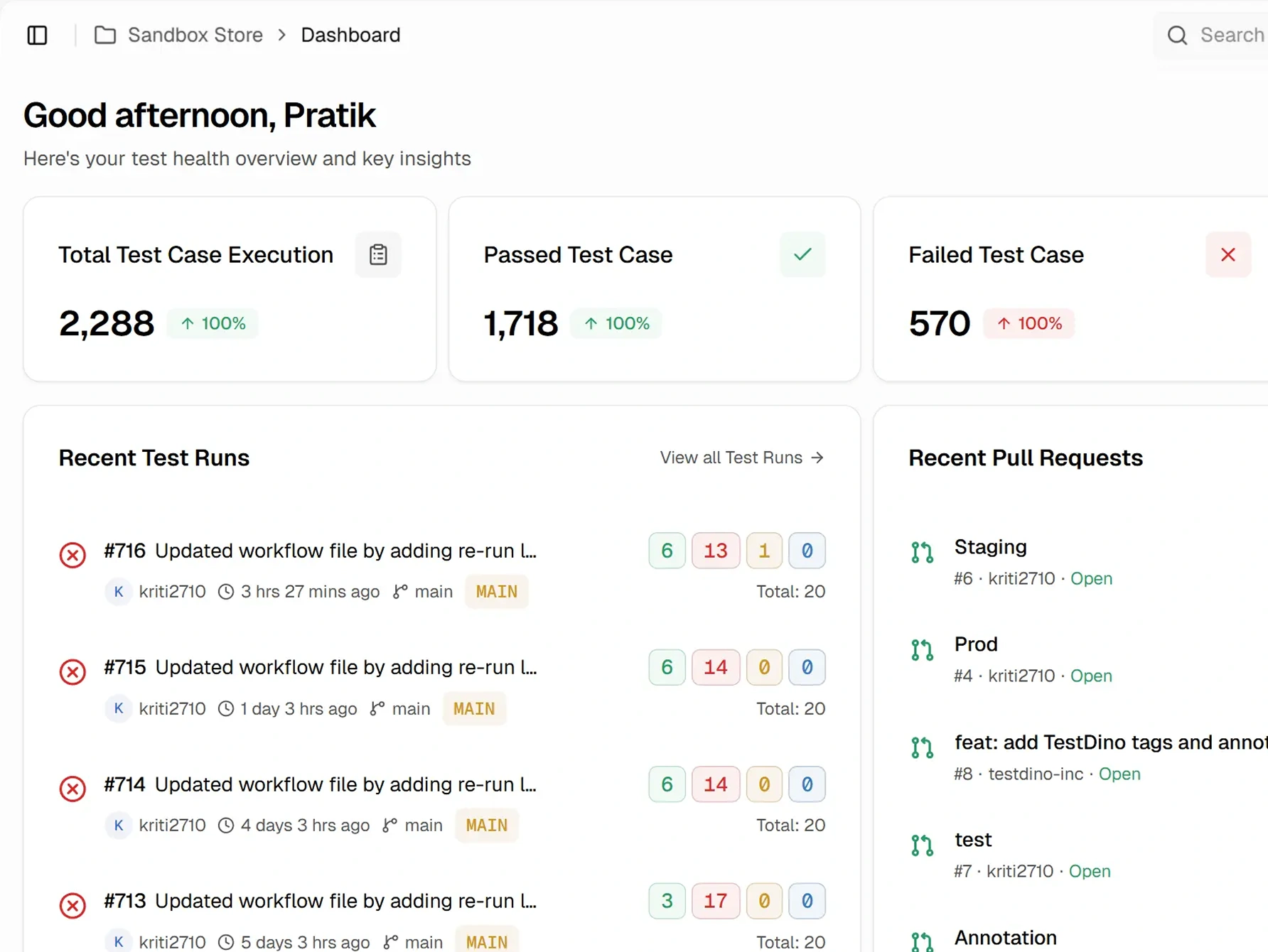
TestRail reporting is built around test case and milestone metrics. There's no dedicated PR view, scheduled PDF exports out of the box, or real-time streaming.
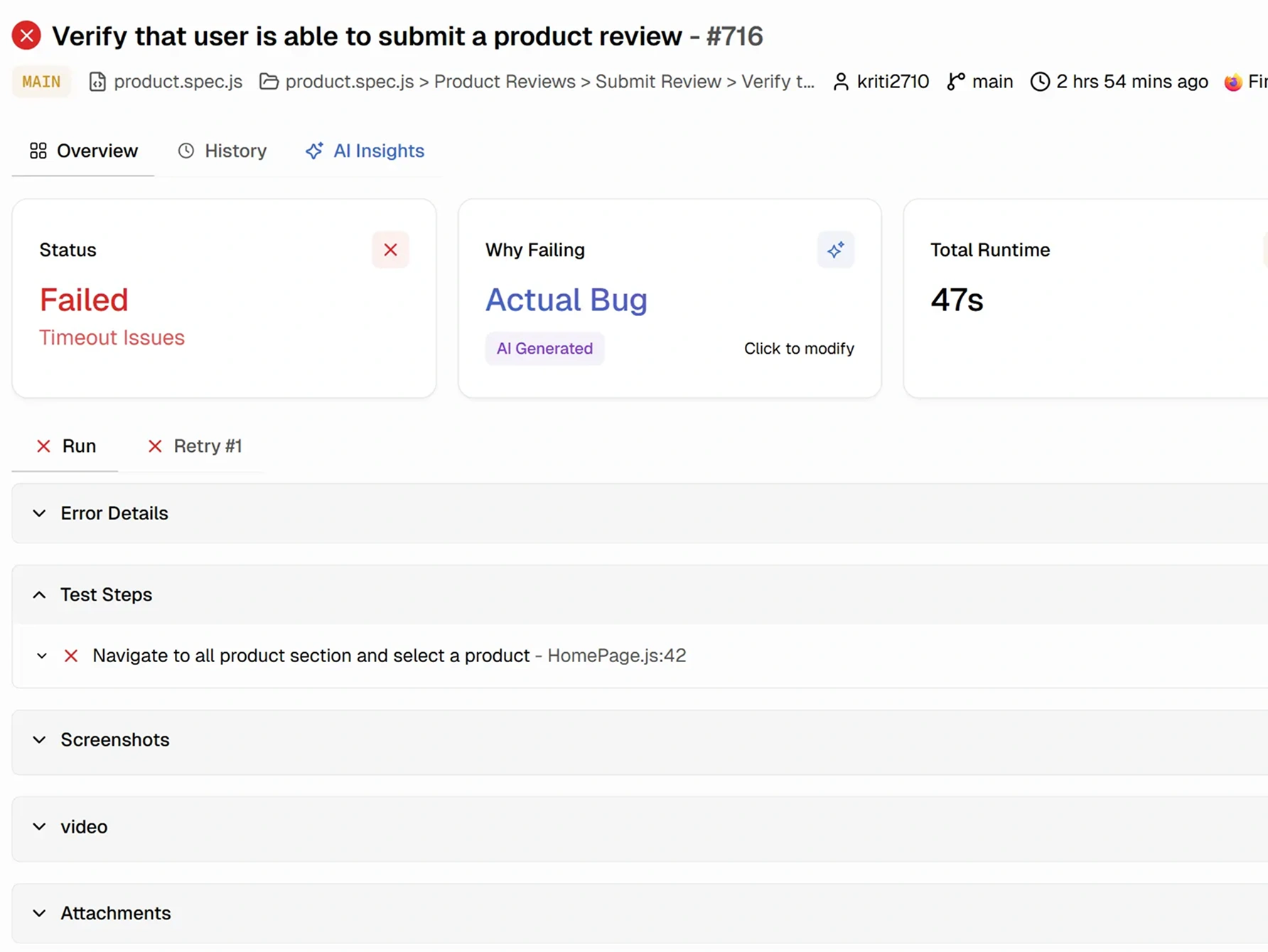
Failed test results display error logs and metadata fields, with screenshots, videos, and trace files stored as attachments rather than rendered inline. There's no Playwright trace viewer, DOM, or network panels. Debugging a Playwright failure means leaving TestRail to view the trace zip in the local viewer.
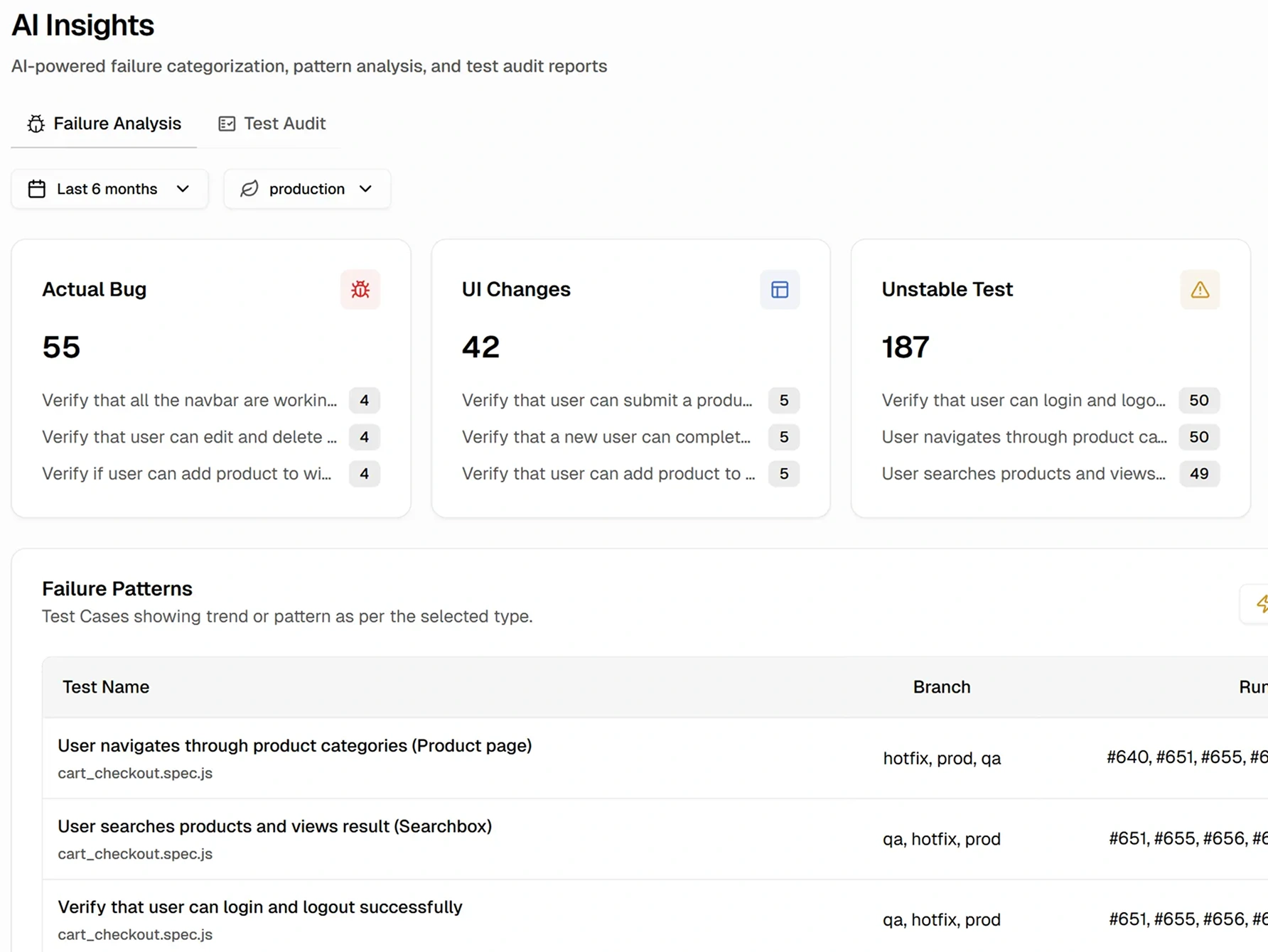
TestRail generates test cases, BDD scenarios, and automation script drafts via Sembi IQ, and AI usage is metered separately from the seat price. Failure classification and flaky detection are not part of the platform.
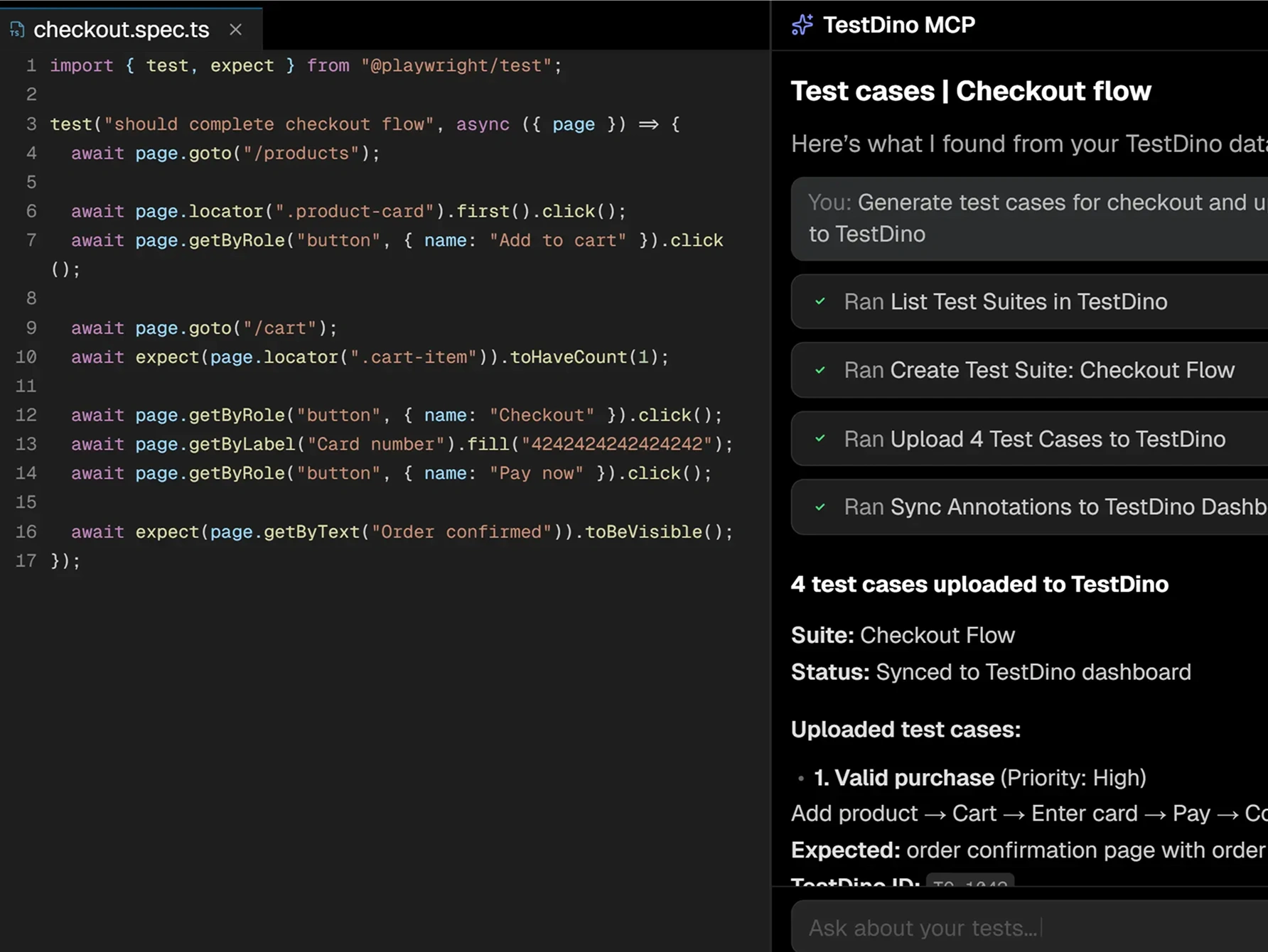
npx -y @testdino/mcp@latest. Agents in Cursor, Claude Code, Claude Desktop, and ChatGPT or Claude on the web (via mcp.testdino.com) query test runs by branch, environment, commit, time, or author through list_testruns, debug failures with full context through debug_testcase, and rank flaky tests through list_testcase.As of September 2026, TestRail does not list an official MCP Server. Community-built MCP servers exist on GitHub.
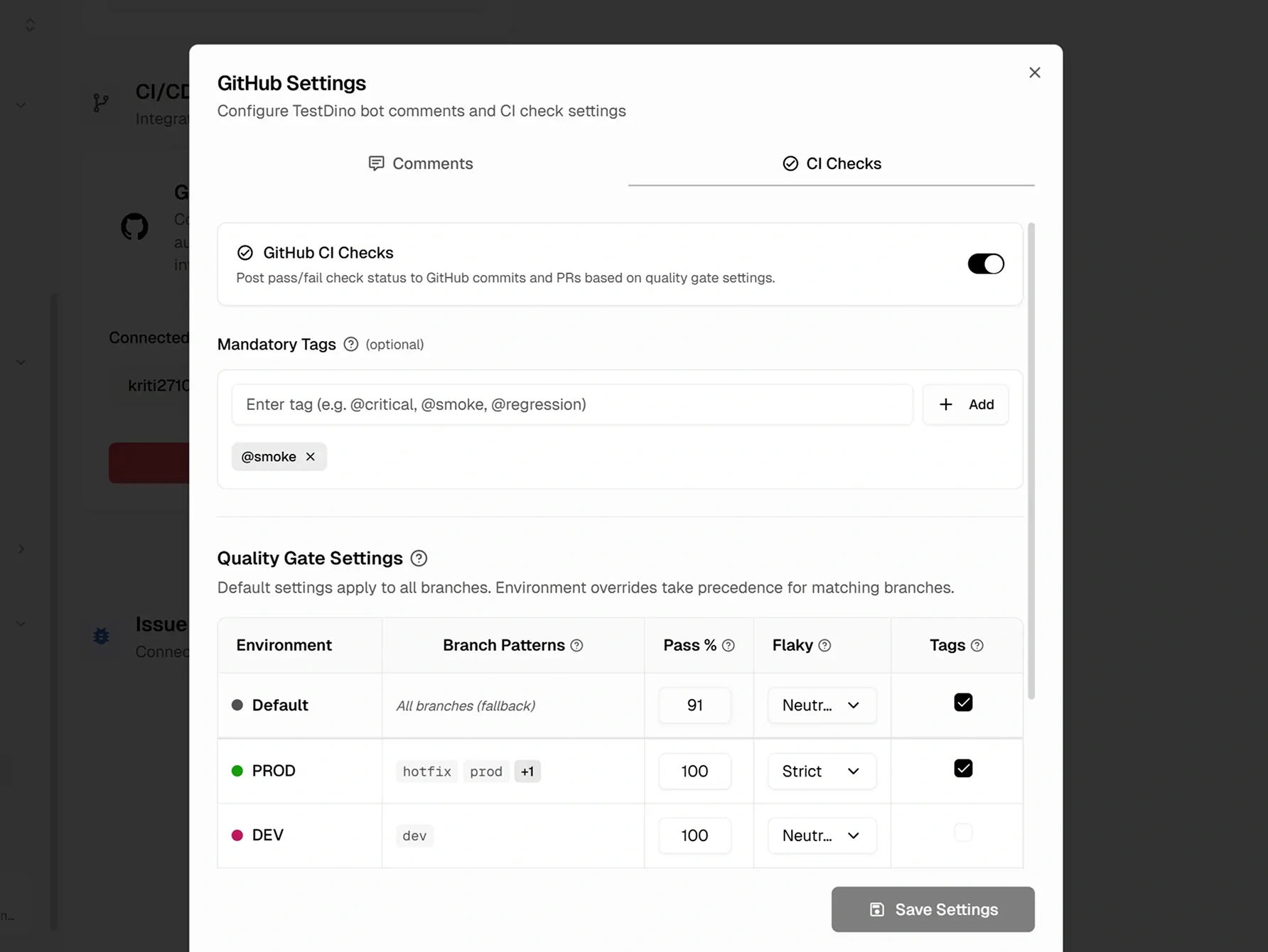
TestRail's CI/CD focus is on reporting automated results back into the case library through the TestRail CLI. Quality gates aren't first-class TestRail features.
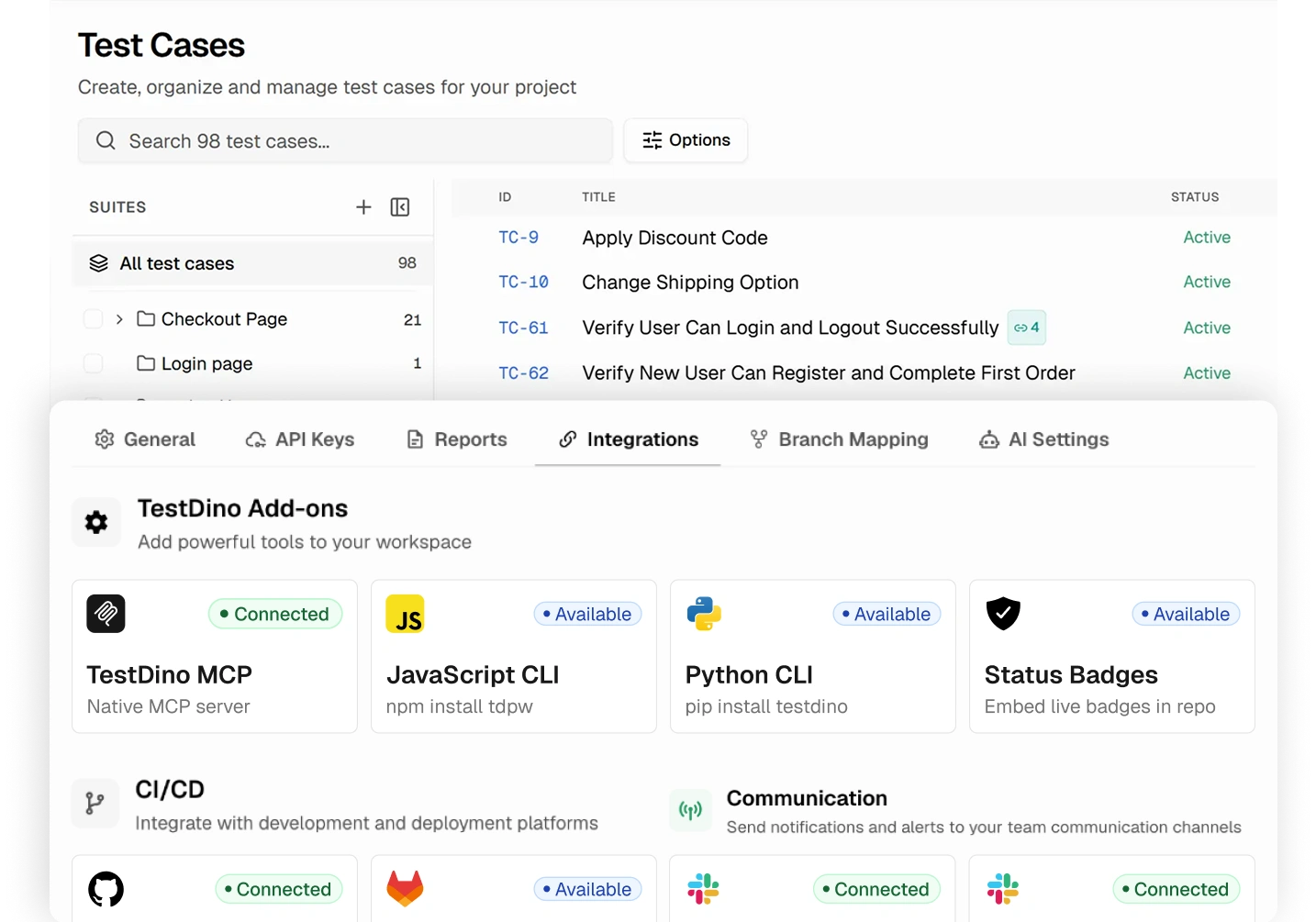
TestRail is built around test case management. The automation reporting and debugging context sits outside the core platform.
Purpose-built capabilities that help Playwright teams ship faster and debug smarter.
Watch test results stream as each test completes. Shard-aware, no refresh needed.
Screenshots, video, and retry-level evidence are attached to every failed test attempt.
Rerun only failed tests with shard and branch awareness. Cut CI retry time.
Where each platform focuses.
TestRail is a test management platform with traceability, compliance reporting, and AI-powered test case generation.
Mature Enterprise TMS
Test case versioning, approvals, parameterization, milestones, traceability matrices, and audit trails.
AI Test Case Generation
Sembi IQ generates test cases, BDD scenarios, and automation script drafts.
Compliance and Governance
Role-based access control, audit logs, SAML SSO, on-premise deployment, and IP allowlisting.
TestDino is a Playwright cloud companion. It records CI runs, detects flakes, and keeps traces and fix workflows ready for teams and AI agents over MCP.
AI-Powered Failure Classification
Every failure is tagged as Actual Bug, UI Change, Unstable Test, or Miscellaneous. Triage starts at the top of the list, not the middle of a log.
Inline Playwright Debugging
Trace viewer, screenshots, video, and console logs all open inline on the failed test: no JUnit XML imports, attachment hunting, or tab switching.
Native Playwright Reporter
Plugs into playwright.config.ts and reports in real time. Project structure, browser channels, retries, and traces all surface as first-class concepts.
TestDino MCP Server
Lets AI coding agents query Playwright test runs, debug failures with full retry and artifact context, detect flaky tests, and manage manual test cases and suites, all from the editor.
Verified reviews from QA and engineering teams running Playwright in production.

Analyzing failed Playwright runs in CI used to eat up a lot of our time. TestDino solved that with a centralized dashboard that pulls in screenshots, logs, and failure trends in one place. What's been most useful is the automatic grouping of failures, since instead of checking each failing test individually, we can immediately see patterns and likely causes. It's made triaging failures, and identifying which tests are simply flaky, dramatically faster.

Lead Software Engineer
We inherited an existing test suite without much context on how it was built, and TestDino gave us a real way to take ownership of it. It shows us clearly which tests are the slowest, the flakiest, and the ones failing most often, which has been essential for knowing where to focus our effort. It's given us the visibility to understand the current state of the code and steadily improve its reliability.

Senior QA Engineer at Penpot by Kaleidos
I monitor everything my tests do, from the full list of tests to detailed error screenshots. The GitHub integration is smooth, so commit hashes, CI runs, and HTML reports open straight from the dashboard. I use TestDino almost every day, and it has improved the quality of our automation code.

Lead QA Automation Engineer
Before TestDino, we were manually digging through raw reports to catch flaky and failing tests, and it took a lot of time. Now everything is stored and analyzed automatically, with no extra setup layers needed. The installation itself was simple, and it's made spotting flaky tests a much faster, cleaner process for our team.
Test Automation Team Lead
TestDino gives us a clean dashboard and reporting setup that's genuinely easy to work with, packed with useful analytics. It's effectively replaced what used to be a custom Power BI dashboard for us, while being far simpler to set up and maintain. The platform makes it easy to centralize and visualize results, so tracking trends and understanding failures no longer takes extra effort.
QA Automation Engineer
Reviewing our Playwright test results used to mean sifting through raw output to figure out what actually broke. TestDino changed that by giving us a clear, structured view of every run. Failed tests are easy to spot right away, and debugging that used to take real effort now moves a lot faster.
Automation Engineer
Enterprise-grade security so your team can focus on shipping instead of worrying about data.
Secure authentication, role-based access control, and data encryption safeguard your test data in transit and at rest.
Persistent analytics with historical tracking deliver reliable insights about test performance, coverage, and release readiness.
Automated backups and retention policies maintain a complete history of test data. Project-scoped access prevents unauthorized changes.
TestRail uses per-seat pricing across two tiers with SSO and audit logs gated to Enterprise. TestDino's Pro plan is $39/month billed annually ($49 monthly) for 3 users, and Team is $79/month billed annually ($99 monthly) for 30 users.
Per-seat pricing billed yearly. Monthly billing is $40/seat. No free tier.
Competitor pricing shown as published on the vendor's website and may vary. Check the vendor's pricing page for current rates.
Per-seat pricing across the team
AI-Generated Test Cases and BDD Scenarios
AI Test Automation generation
Traceability and coverage reporting
Test cases, suites, runs, plans, milestones
TestRail API and CLI
On-cloud or on-premise deployment
Standard email support (SSO requires Enterprise)
For dev teams shipping to production. $49 if billed monthly, with no per-user or per-test overage.
10,000 test executions per month
Up to 3 users
3-month data retention
Error grouping and AI fix suggestions
TestDino MCP Server with test case writes
PR view and CI/CD optimization
Visual diff and debugging features
Slack notifications and PR comments
Competitor pricing shown as published on the vendor's website and may vary. Check the vendor's pricing page for current rates.
Stop wasting time on
flaky tests
Yes. TestDino plugs into playwright.config.ts as a native reporter, so project structure, browser channels, retries, traces, screenshots, and video flow into the dashboard as first-class data on the very first run.
Side-by-side comparisons of features, pricing, and integrations to help you pick the right testing tool.
All product names, logos, and trademarks referenced on this page are the property of their respective owners. TestDino is not affiliated with, endorsed by, or sponsored by any competitor named above. Competitor features and pricing reflect publicly available information as of May 2026 and may have changed since. Check with each vendor for current details.