Browser Compatibility Issues Index: Breaking Features and What to Test First
Browser compatibility issues cost frontend teams hours of debugging. This report covers Interop scores, breaking features, and what to test first in 2026.
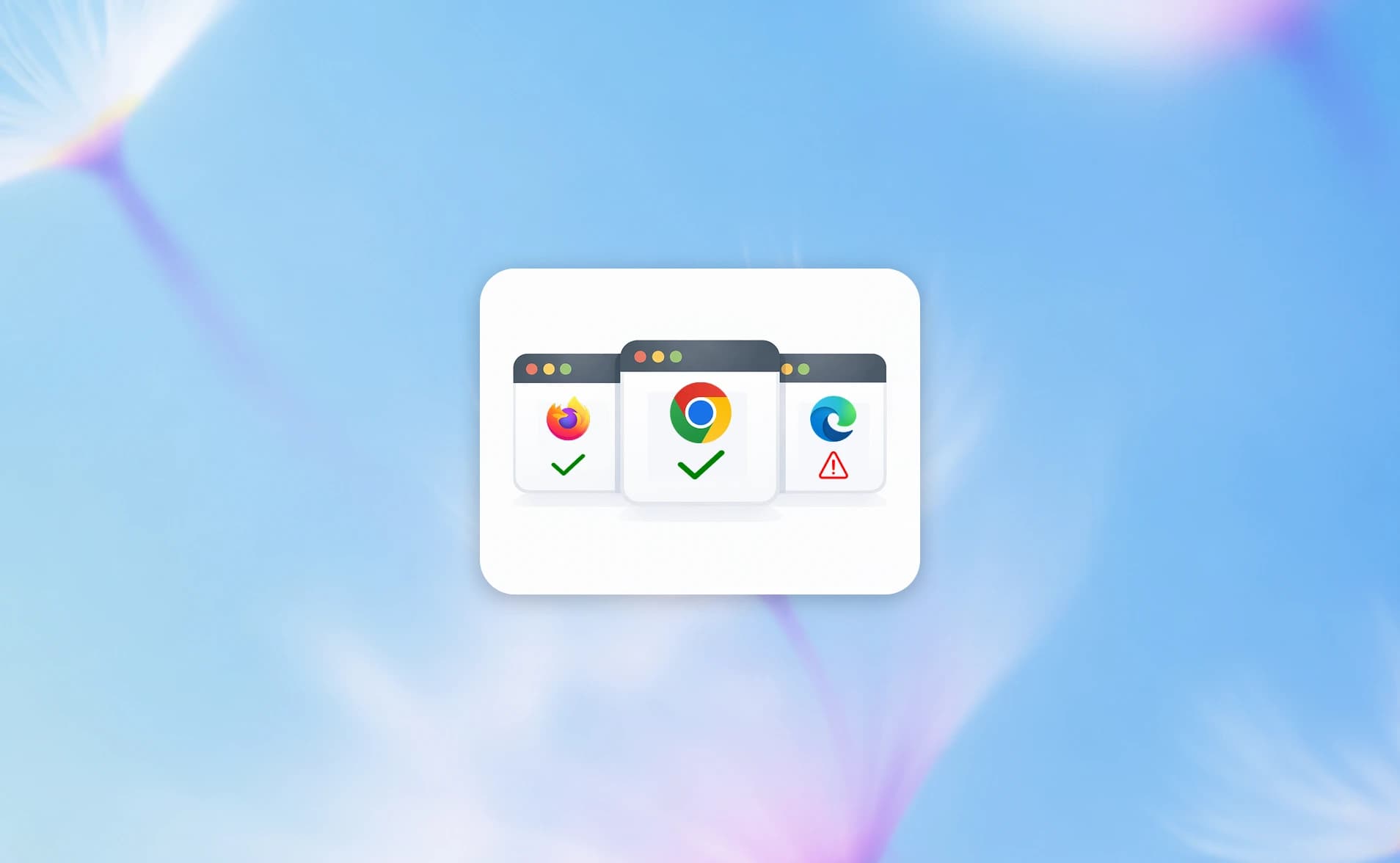
Your CSS works in Chrome. It breaks in Safari. Your dropdown renders fine in Firefox on desktop. It disappears on mobile WebKit.
This happens more often than most teams admit. And it's not random. Specific features break in specific browsers, in predictable patterns.
The good news? Browser compatibility has improved dramatically.
The Interop 2025 project ended with a 97% overall pass rate across all browsers, up from 29% at the start of the year. Safari made the biggest jump, climbing from 43 to 99 in its individual score.
But that 97% headline hides real gaps. Features like CSS Anchor Positioning, View Transitions, and scroll-driven animations still behave differently across engines. And when you're running cross-browser Playwright tests, those gaps show up as flaky tests that are hard to diagnose without the right test reporting setup.
This report breaks down the data on which browsers cause the most compatibility issues, which features break most often, and what your team should prioritize testing.
Think of it like three different chefs following the same recipe. They all use the same ingredients and instructions. But one chef interprets "a pinch of salt" differently, another uses a slightly different oven temperature, and the third skips a step that the recipe left ambiguous. The dish comes out different each time, even though the recipe is identical.
In browser terms:
-
Blink powers Chrome, Edge, Opera, Brave, and most Chromium-based browsers
-
WebKit powers Safari (macOS and iOS) and all iOS browsers (even Chrome on iOS uses WebKit)
-
Gecko powers Firefox
When a CSS property or JavaScript API works differently across these three engines, that's a browser compatibility issue. The Interop project exists specifically to close these gaps.
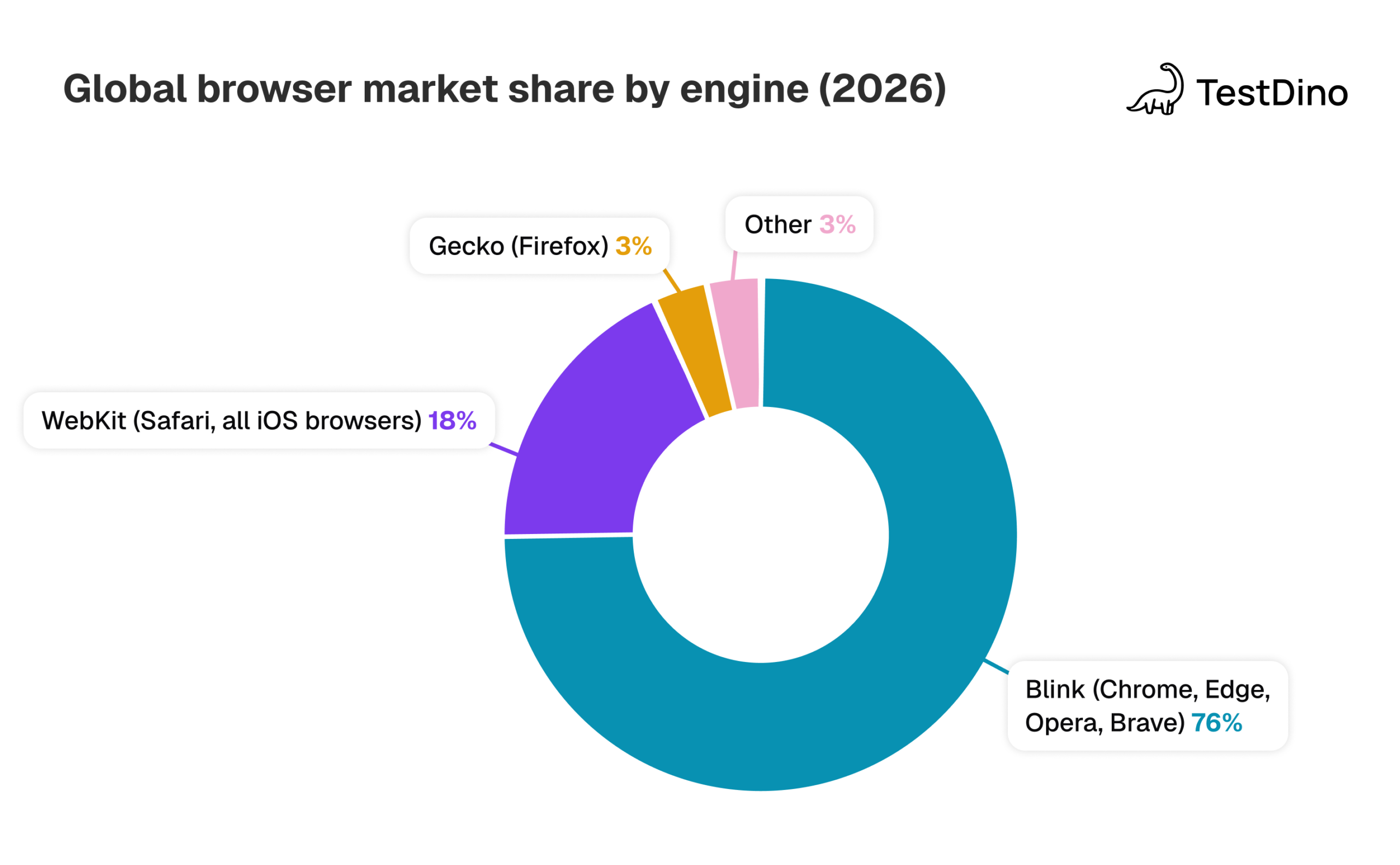
Browser market share context: Why it matters for testing
Before looking at compatibility data, you need to understand who uses what. Market share determines how many users are affected when a specific browser breaks.
| Browser | Global share (2026) | Engine | Key platform |
|---|---|---|---|
| Chrome | ~67-71% | Blink | Windows, Android, macOS |
| Safari | ~15-18% | WebKit | macOS, iOS (all iOS browsers) |
| Edge | ~5% | Blink | Windows |
| Firefox | ~2-3% | Gecko | Cross-platform |
| Samsung Internet | ~2% | Blink | Samsung Android devices |
| Opera | ~2% | Blink | Cross-platform |
Source: StatCounter, 2026. Market share varies significantly by region and device type.
Note: The US market looks very different from the global average. Safari holds roughly 32% in the US because of high iPhone adoption, while Chrome is closer to 49%. If your audience is US-heavy, Safari testing isn't optional. It's your second-largest browser.
Here's what's often missed: Edge, Opera, Brave, and Samsung Internet all use the Blink engine. So from a compatibility perspective, there are really only three engines to worry about: Blink, WebKit, and Gecko.
This is exactly why Playwright tests against Chromium, WebKit, and Firefox by default. It covers the three rendering engines, not just three brand names. When you run cross-browser tests across these three engines, you're covering 99%+ of real-world browser rendering behavior.

Tip: Don't test "Chrome, Edge, and Brave" and call it cross-browser testing. All three use Blink. You're testing one engine three times. Test Chromium + WebKit + Firefox to cover all three engines.
Interop project scores: The definitive compatibility scorecard
The Interop project is the most authoritative source for measuring browser compatibility. Run by Apple, Google, Microsoft, Mozilla, Bocoup, and Igalia, it selects focus areas each year based on developer feedback and measures test pass rates across all browser engines.
Interop 2024 results
| Browser | Stable score | Preview score |
|---|---|---|
| Chrome | 98% | 99% |
| Edge | 98% | 99% |
| Firefox | 98.8% | 99.1% |
| Safari | 98% | 99% |
| Overall interop | 97% |
Source: WebKit, 2025; Mozilla, 2025
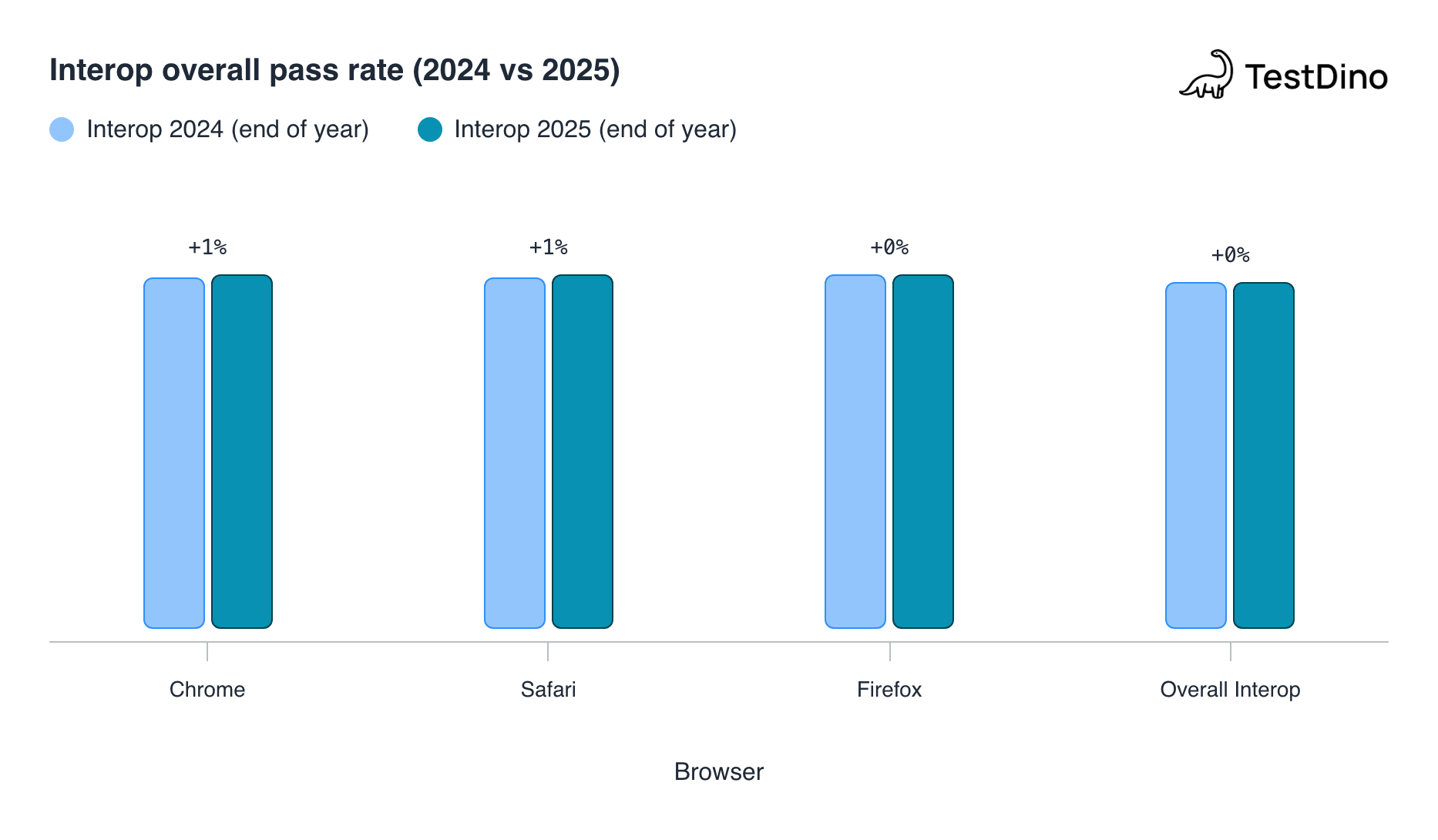
Firefox finished Interop 2024 slightly ahead of other browsers, with 98.8% in stable and 99.1% in Nightly. This was the highest test pass rate in Interop history at that point.
Features that became fully interoperable through Interop 2024 include: requestVideoFrameCallback, Declarative Shadow DOM, Popover, Custom Properties, font-size-adjust, IndexedDB improvements, URL parsing, and scrollbar styling.
Interop 2025 results
The 2025 cycle was even more ambitious: 19 focus areas and 5 investigation areas. The results are striking.
| Metric | Start of 2025 | End of 2025 |
|---|---|---|
| Overall interop score | 25-29% | 95-97% |
| Safari Technology Preview | 43 | 99 |
| Firefox Nightly | 46 | 99 |
| Chrome Canary / Edge Dev | ~65 (estimated from dashboard) | 99 |
Sources: Interop 2025: A year of convergence (WebKit, 2026); Mozilla Hacks, 2026. Note: WebKit reports the overall starting score as 29%, Mozilla reports 25%. The difference is likely due to measurement timing. Chrome/Edge starting scores aren't individually published but were the highest at the start since Blink already supported many of the selected features.
Note: Safari made the largest single-year improvement of any browser, jumping from 43 to 99. This directly challenges the "Safari is the new IE" narrative. Apple invested heavily in WebKit improvements across all 19 focus areas.
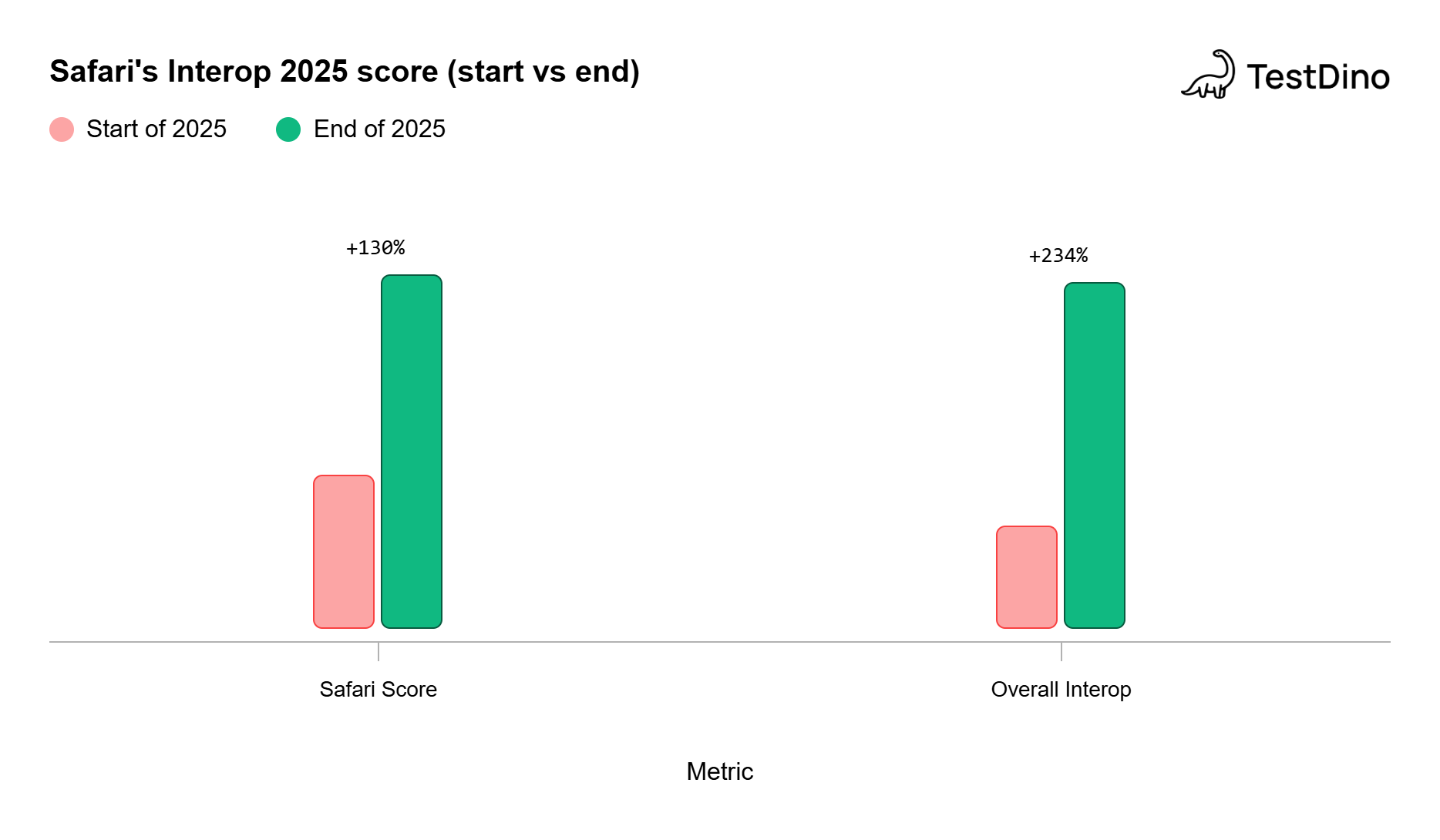
Source: WebKit blog, "Interop 2025: A Year of Convergence" (February 2026)
The 19 Interop 2025 focus areas covered:
-
CSS/UI: Anchor Positioning, View Transitions, @scope, backdrop-filter, text-decoration, Writing Modes, Layout (Flexbox + Grid), <details> element
-
APIs: Navigation API, Storage Access API, URLPattern, Modules, scrollend event, WebRTC, WebAssembly
-
Platform health: Core Web Vitals, Pointer/Mouse Events, Mutation Events removal, Web Compatibility
Which features still cause the most browser compatibility issues
Despite the impressive Interop scores, several CSS and JavaScript features still have significant cross-browser gaps in real-world usage. The State of CSS 2024 survey and Can I Use data reveal where developers still hit walls.
Top CSS features with cross-browser problems
| Feature | Chrome/Blink | Safari/WebKit | Firefox/Gecko | Key issue |
|---|---|---|---|---|
| Anchor Positioning | Full support (since Chrome 125) | Safari 26+ (shipped late 2025) | Firefox Nightly (intent to ship Dec 2025) | Behavioral differences in position-try-fallback and containing block shifting (OddBird, 2025) |
| Scroll-driven Animations | Full support | Not yet shipped | Major gap for Firefox users | |
| Cross-document View Transitions | Full support | Safari 18+ (partial) | Firefox Nightly | Overall interop score is only 90.8% for View Transitions (WebKit, 2026) |
| CSS @scope | Full support | Safari 17.4+ | Full support | Edge cases still being resolved |
| Masonry Layout | Behind flag | Not supported | Behind flag | Not part of any Interop cycle yet |
| CSS Mixins/Functions | Not supported | Not supported | Not supported | Most requested future CSS feature (State of CSS, 2024) |
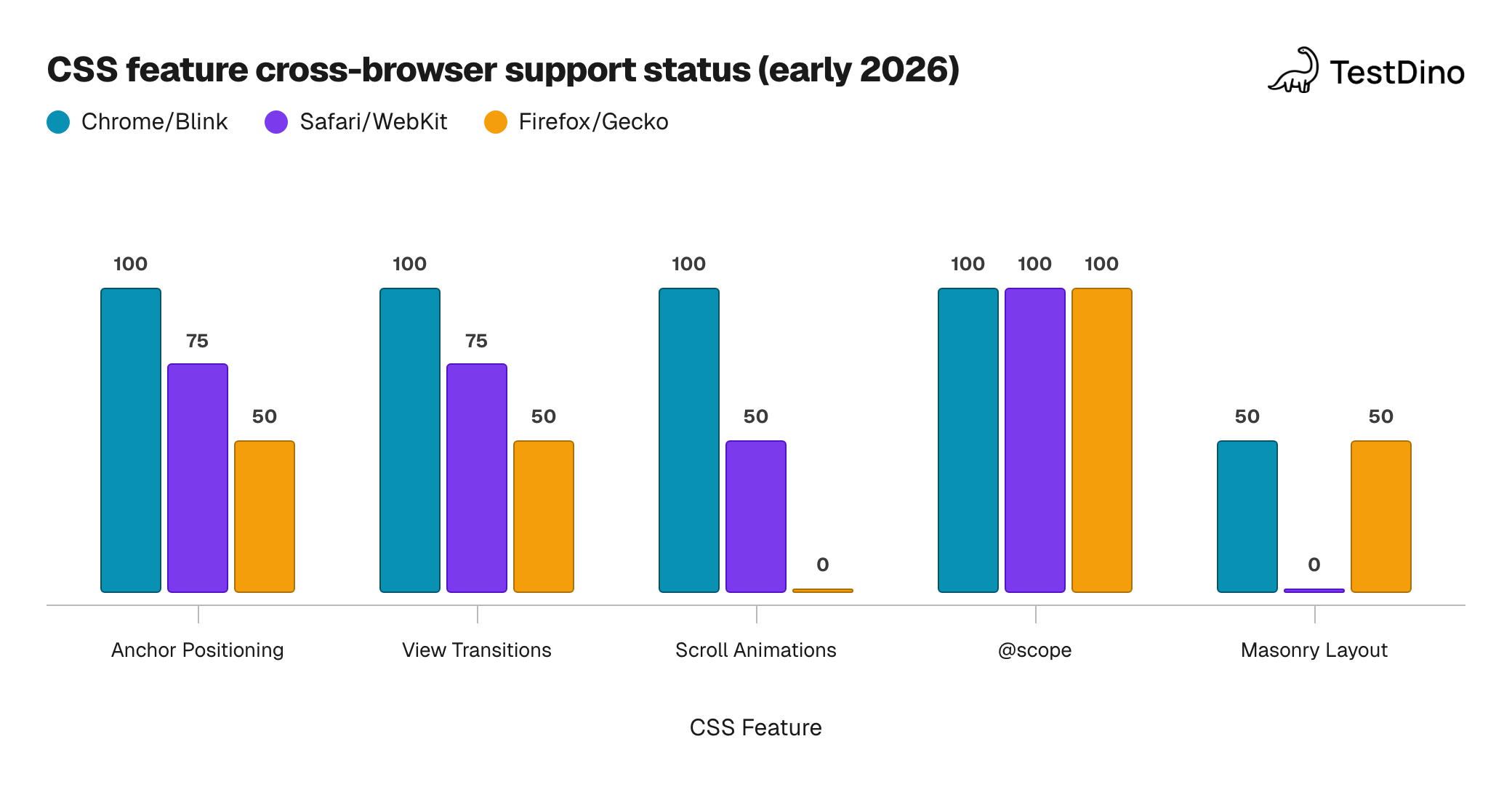
Note: These are approximate support levels, not exact percentages. The numeric values represent a simplified support spectrum:
100 = full, stable support
75 = shipped but with known behavioral differences or edge cases
50 = partial support, behind a flag, or experimental
0 = not supported at all
The developer pain point data
The State of CSS 2024 survey (run by Devographics with input from browser vendors) confirms that lack of cross-browser support is the #1 pain point for CSS developers, year after year (State of CSS, 2024). Safari is often mentioned in comments as the primary source of frustration.
But the data also shows nuance:
-
Anchor Positioning was the most-cited feature that developers couldn't use due to browser support gaps
-
Container Queries are at the Baseline level, but still appeared in many responses, suggesting confusion about support status
-
Some developers reported bugs with :has() despite it being widely supported
-
Several respondents mentioned they're waiting for CSS Nesting's "relaxed syntax" before adopting it
For teams using Playwright, these gaps show up as browser-specific test failures. A tooltip that passes in Chromium might fail in WebKit because anchor positioning behaves differently. TestDino's error grouping helps you filter failures by browser, so you can quickly spot whether a failure is a real bug or a browser compatibility issue.
Tip: Before debugging a test failure, check which browser it fails in. If it only fails in WebKit or Firefox, search Can I Use for the CSS/JS feature involved. You might be hitting a known compatibility gap, not a bug in your code.
Safari: Still the biggest pain point (but improving fast)
The "Safari is the new IE" meme has been popular in frontend circles for years. The data tells a more complicated story.
Where Safari has improved
Safari made massive strides in 2024-2025:
-
Interop 2024: Safari ended at 98% stable, 99% preview (WebKit, 2025)
-
Interop 2025: Safari jumped from 43 to 99, the biggest improvement of any browser (WebKit, 2026)
-
Safari shipped View Transitions in 18.0 and 18.2
-
Safari shipped @scope in 17.4
-
Safari shipped Anchor Positioning in Safari 26
Where Safari still frustrates developers
Despite these improvements, Safari remains the browser that developers complain about most. Here's why:
-
Release cycle: Safari is tied to macOS/iOS updates, meaning users can be stuck on older Safari versions much longer than Chrome or Firefox users who get auto-updates every 4-6 weeks
-
iOS lock-in: Every browser on iOS uses WebKit. Even "Chrome" on iPhone is WebKit under the hood. So Safari compatibility issues affect 100% of your iOS users, not just Safari users
-
Debugging difficulty: Safari's Web Inspector is less capable than Chrome DevTools, making it harder to diagnose issues
-
PWA limitations: Safari has historically lagged on Progressive Web App features, Push API, and background sync
For teams doing visual testing, Safari rendering differences are a common source of screenshot mismatches. For debugging Playwright failures, WebKit failures require different investigative approaches than Chromium failures.
Tip: If you have a US-heavy user base, Safari is ~32% of your traffic. That's not a browser you can skip in your test matrix. Run your Playwright suite against WebKit in CI, not just Chromium.
Firefox: Small market share, high standards compliance
Firefox holds only 2-3% global market share (StatCounter, 2026). But it punches above its weight in standards compliance.
Firefox finished Interop 2024 with the highest individual score (98.8% stable, 99.1% Nightly) (Mozilla, 2025). Mozilla's approach is deliberate: they sometimes delay shipping features to ensure specification accuracy, as they did with CSS Anchor Positioning, where they found that Chrome and Safari had inconsistent behavior that contradicted the spec (Mozilla, 2026).
Firefox's market share is small, but there are practical reasons to still test against it:
-
Gecko is the last independent engine. If Firefox dies, we lose the only non-Chromium, non-WebKit browser engine. That's bad for web standards diversity.
-
Firefox catches spec violations. Issues that Firefox flags often affect all browsers eventually.
-
Enterprise and developer usage is higher. Firefox usage among developers is significantly higher than its 2-3% global share suggests.
Playwright supports Firefox natively, and teams using TestDino can track test health across all three engines to spot which engine causes the most failures over time.
Interop 2026: What's coming next
The Interop project has already launched its 2026 cycle, with 20 focus areas (15 new and 5 carryovers from 2025) and 4 investigation areas.
New features in Interop 2026
| Feature | What it does | Why it matters |
|---|---|---|
| Cross-document View Transitions | Smooth animated transitions between page navigations | Eliminates janky page loads in MPAs |
| Scroll-driven Animations | Drive CSS animations from scroll position | Replaces heavy JS scroll libraries |
| WebTransport | Low-level HTTP/3 API for streaming | Modern alternative to WebSockets |
| CSS Container Style Queries | Style based on container custom properties | Fine-grained responsive components |
| CSS attr() (advanced) | Pull any HTML attribute value into CSS | Dynamic styling without JavaScript |
| CSS Custom Highlight API | Style text ranges without extra DOM elements | Better search highlighting, code editors |
| CSS shape() function | Complex responsive curves in CSS | Replaces SVG workarounds |
Carryovers from Interop 2025
Anchor Positioning, CSS Zoom, View Transitions (expanding to cross-document), Pointer/Mouse Events, and Core Web Vitals are all continuing into 2026 because edge cases remain.
This matters for testing teams because these features will behave increasingly consistently as 2026 progresses. If you're avoiding certain CSS features due to browser inconsistencies, the Interop 2026 focus list tells you which ones will become safe to use within the year.
For teams tracking test automation trends, Interop progress directly affects the number of browser-specific workarounds you need in your test suite. As features become Baseline, you can remove browser-conditional logic from both your application code and your tests.
What to test first? A prioritized browser testing matrix
Based on the data above, here's a practical framework for prioritizing your cross-browser testing effort.
Priority 1: Always test (high market share + known compatibility gaps)
| Engine | Browser | Why |
|---|---|---|
| Blink | Chrome/Chromium | 67-71% of global traffic. Your baseline. |
| WebKit | Safari/WebKit | 15-32% of traffic (higher in US/mobile). Most compatibility complaints. All iOS browsers. |
Priority 2: Test regularly (important for standards accuracy)
| Engine | Browser | Why |
|---|---|---|
| Gecko | Firefox | 2-3% share but the highest Interop score. Catches real spec issues. |
Priority 3: Test on release (Blink variants with minor differences)
| Engine | Browser | Why |
|---|---|---|
| Blink | Edge | 5% share, uses the same engine as Chrome. Test only for Edge-specific UI features. |
| Blink | Samsung Internet | 2% share, relevant for Samsung device-specific layouts. |
Tip: In your playwright.config.ts, test all three engines by default: projects: ['chromium', 'webkit', 'firefox']. This gives you Blink + WebKit + Gecko coverage in every CI run. Use test sharding to keep execution time reasonable when running against multiple browsers.
Features to prioritize in cross-browser testing
Based on the compatibility gap data and the State of CSS 2024 survey results, these are the features most likely to cause cross-browser issues in 2026:
- CSS Anchor Positioning - behavioral differences between Chrome and Safari in position-try-fallback and containing block shifting
- View Transitions - interop score at only 90.8%, expanding to cross-document in 2026
- Scroll-driven Animations - not yet shipped in Firefox
- CSS position: sticky in table headers - longstanding inconsistency across all engines
- Popover API - known Safari iOS issue with dismissing popovers on outside tap
- CSS Nesting (relaxed syntax) - developers waiting for consistent cross-browser support before adopting
For test failure analysis, categorizing failures by browser engine helps you separate "this is a real bug in our code" from "this is a browser compatibility issue we need a workaround for." TestDino's AI failure classification can automatically surface these patterns.
How Playwright handles cross-browser testing
Playwright is built specifically for cross-browser testing. It ships with three browser binaries:
-
Chromium (Blink engine)
-
WebKit (Safari's engine)
-
Firefox (Gecko engine)
This means you can test against all three rendering engines from a single framework, without needing BrowserStack or separate Safari machines. For teams that have struggled with Selenium's cross-browser limitations, this is one of Playwright's strongest advantages.
When you combine Playwright's cross-browser coverage with TestDino's reporting and analytics, you get visibility into:
-
Which browser engine causes the most test failures
-
Whether failures are concentrated in specific features (CSS, JS APIs, rendering)
-
How browser-specific failure rates change over time as Interop work progresses
TestDino's environment analytics let you filter test results by browser, so you can see at a glance whether WebKit is causing more failures than Chromium this week.
FAQs

Jashn Jain
Developer Advocate