Playwright 1.61: Passkey & Web Storage Tests, with Code | TestDino
Playwright 1.61 brings WebAuthn passkeys, a Web Storage API, new video retention modes, and per-error reporting, with no breaking changes.
Playwright 1.61 shipped on June 15, 2026.
2 headline features, plus a run of smaller API and test-runner additions. The 2 that lead the release notes:
-
browserContext.credentials adds a virtual WebAuthn authenticator, so passkey and passwordless login flows finally run in CI without a hardware key.
-
page.localStorage and page.sessionStorage provides a first-class read/write API instead of evaluate() round-trips.
Behind those, the changes most teams will reach for:
-
3 new video modes, led by retain-on-failure-and-retries, let a flaky run keep the footage that matters and discard the rest.
-
testInfo.errors now splits an AggregateError into one entry per failure, so reporters and dashboards see clean, separated results.
-
Smaller wins: expect.soft.poll(), apiResponse.securityDetails(), WebSocket traffic in HAR and trace, and a -G shorthand for --grep-invert.
And the best part: there are no breaking changes. Nothing is deprecated, so the upgrade is a one-liner, and every test that passed on 1.60 still passes.
This guide walks through every 1.61 feature with code you can copy into your Playwright project, plus a worked end-to-end demo that ties the new APIs together.
Playwright 1.61 breaking changes and upgrade guide
The one-line upgrade
npm install -D @playwright/[email protected]
npx playwright install
The second command pulls the browser binaries that ship with this release. Run it or the new browser versions below will not be on disk.
Browser versions in 1.61
| Browser | Version |
|---|---|
| Chromium | 149.0.7827.55 |
| Mozilla Firefox | 151.0 |
| WebKit | 26.5 |
| Google Chrome (stable) | 149 |
| Microsoft Edge (stable) | 149 |
Breaking changes
None. Playwright 1.61 removes no APIs and deprecates nothing. Every test that passed on 1.60 passes on 1.61 without edits. That is rare for this series, so the only real upgrade question is whether the new features are worth adopting now, covered in Should you upgrade to Playwright 1.61? below.
 Explore the Code & Architecture
Want to get your hands on the full, runnable examples from this post and see a complete technical breakdown of the 1.61 release?
Check out our Playwright 1.61 Release Repository on GitHub.
It contains all the standalone test scripts used in this guide, alongside a comprehensive README featuring architectural flowcharts, API migration paths, and in-depth release notes.
How to test WebAuthn passkeys in Playwright (no hardware key)
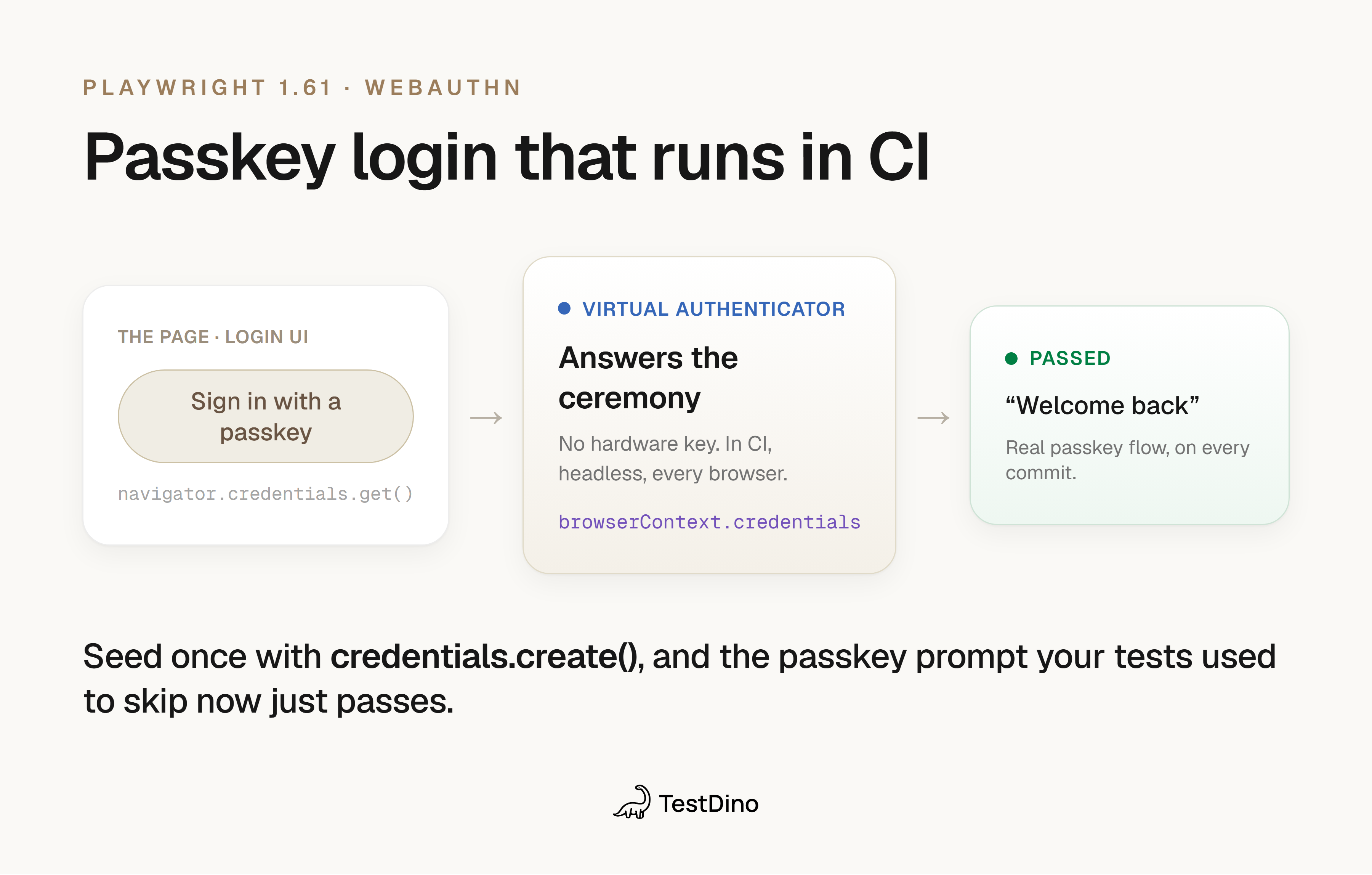
Playwright 1.61 tests passkey logins with a virtual authenticator, so you register a credential and handle the WebAuthn ceremony in CI without a hardware key. Passkeys and WebAuthn rely on a hardware or platform authenticator that responds to navigator.credentials.create() and navigator.credentials.get(). In CI, there is no fingerprint reader or security key, so those flows were either skipped or stubbed at the network layer, which never exercised the real ceremony.
1.61 adds a Credentials virtual authenticator, available on browserContext.credentials. It registers passkeys and handles credential ceremonies on the page, with no real hardware, across browsers.
Registering a passkey before the test runs
// tests/passkey-login.spec.ts
import { test, expect } from '@playwright/test';
test('user logs in with a registered passkey', async ({ browser }) => {
  const context = await browser.newContext();
  // Seed a passkey for the origin under test, then arm the authenticator
  await context.credentials.create('example.com', makePasskey());
  await context.credentials.install();
  const page = await context.newPage();
  await page.goto('https://example.com/login');
  await page.getByRole('button', { name: 'Sign in with a passkey' }).click();
  await expect(page.getByText('Welcome back')).toBeVisible();
});
makePasskey() builds a passkey from an EC P-256 key pair, exporting the keys as base64url DER, which is exactly the shape credentials.create() expects:
import { generateKeyPairSync, randomBytes } from 'crypto';
function makePasskey() {
  const { privateKey, publicKey } = generateKeyPairSync('ec', { namedCurve: 'P-256' });
  return {
    id: randomBytes(16).toString('base64url'),
    userHandle: randomBytes(8).toString('base64url'),
    privateKey: privateKey.export({ type: 'pkcs8', format: 'der' }).toString('base64url'),
    publicKey: publicKey.export({ type: 'spki', format: 'der' }).toString('base64url'),
  };
}
credentials.create() registers the passkey for a given origin, and credentials.install() arms the virtual authenticator so the page sees it. From there, the login button triggers the real navigator.credentials.get() ceremony and the virtual authenticator answers it.
Reading registered passkeys back
credentials.get() returns the passkeys registered on the authenticator, which is useful when one test registers a credential and a later step needs to assert it exists or reuse its handle.
const registered = await context.credentials.get();
expect(registered.length).toBe(1);
When to use it
Any flow that ends in a passkey or WebAuthn prompt: passwordless login, step-up authentication, or device registration. Before 1.61, these were the tests most teams marked test.skip() in CI. Now they run on every commit like any other login test.
Read and write localStorage and sessionStorage in Playwright tests
Reading localStorage or sessionStorage used to mean an evaluate() round-trip into the page, which is verbose and easy to get wrong when values are JSON. 1.61 adds a WebStorage API on page.localStorage and page.sessionStorage that reads and writes the storage for the page's current origin directly.
Before 1.61: evaluate into the page
// Read the demo store's auth token
const token = await page.evaluate(() =>
  localStorage.getItem('user_access_token'));
After 1.61: a first-class API
// tests/storage.spec.ts
import { login } from './helpers';
// Log in for real; the app persists a JWT under `user_access_token`
await login(page);
// Read the token the app set at login, no evaluate() round-trip
const token = await page.localStorage.getItem('user_access_token');
expect(token).toBeTruthy();
// Pull the whole bag of items at once
const all = await page.localStorage.items();
expect(all.some((i) => i.name === 'user_access_token')).toBe(true);
items() returns every key-value pair for the current origin, which is handy for snapshotting the storage state in a fixture or asserting that a feature flag landed where you expect it to.
Running this against the demo store prints the real token the app stored and the list of localStorage keys, with both storage tests passing:
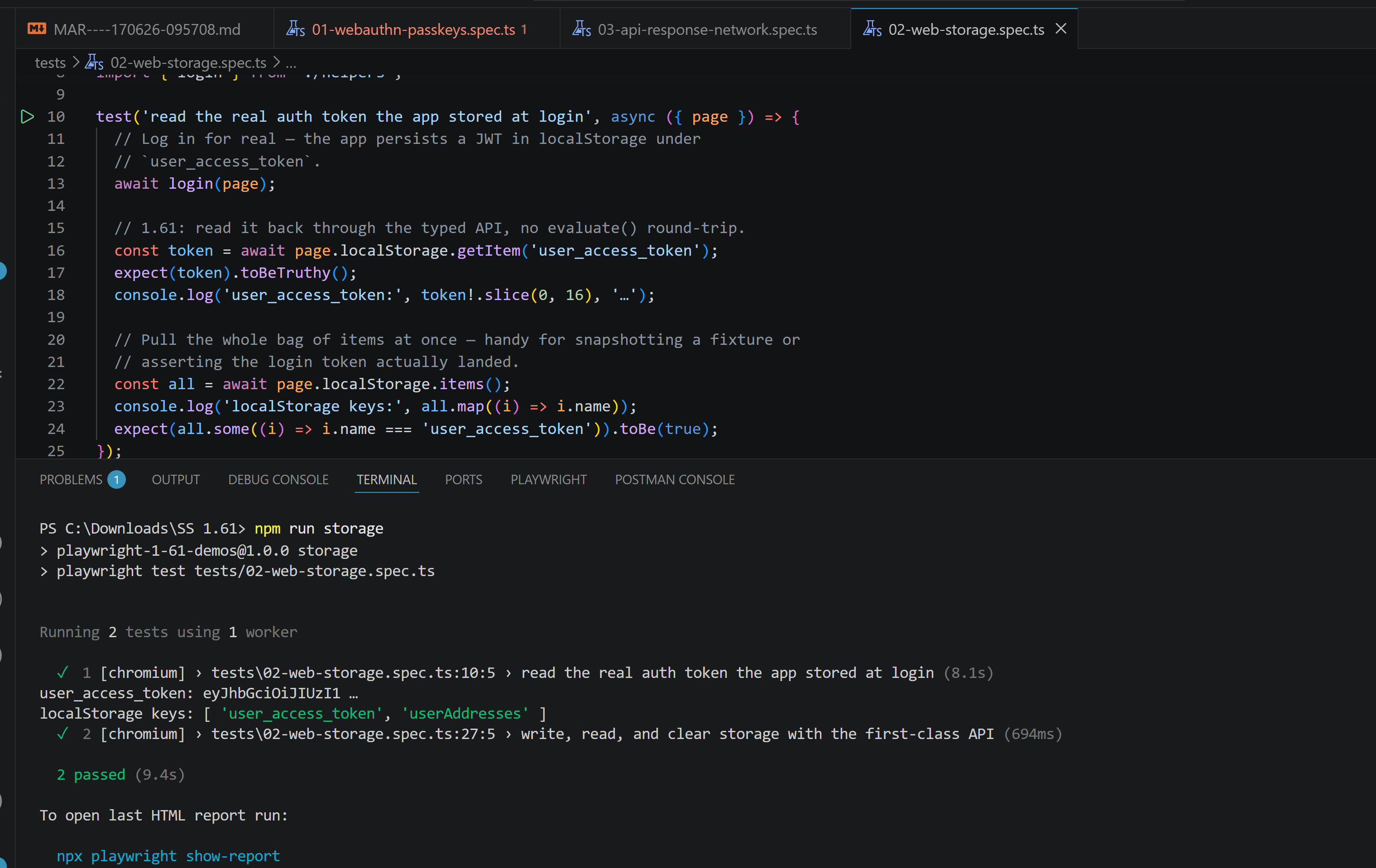
When to use it
Reading the user_access_token the app set at login, asserting that a cart or consent flag persisted, or clearing storage between steps. It reads more cleanly than evaluate() and keeps the test's intent obvious.
Network: Security and address details on API responses
2 methods come into the API request context so that responses fetched through request expose the same low-level details the browser already gave you.
-
apiResponse.securityDetails() returns the TLS/security details of the response, mirroring the browser-side equivalent.
-
apiResponse.serverAddr() returns the server IP address and port the response came from.
// tests/api-response.spec.ts
import { test, expect, request as apiRequest } from '@playwright/test';
test('inspect TLS and server address of an API response', async () => {
  const request = await apiRequest.newContext();
  // Any HTTPS endpoint exposes these; here we hit the demo store
  const response = await request.get('https://storedemo.testdino.com');
  expect(response.ok()).toBeTruthy();
  const security = await response.securityDetails(); // issuer, protocol, validity
  expect(security?.protocol).toBeTruthy();
  const addr = await response.serverAddr();         // { ipAddress, port }
  expect(addr?.port).toBeGreaterThan(0);
  await request.dispose();
});
Run against the demo store, both methods return real data: the TLS securityDetails (issuer, TLSv1.3, validity window) and the serverAddr IP and port.
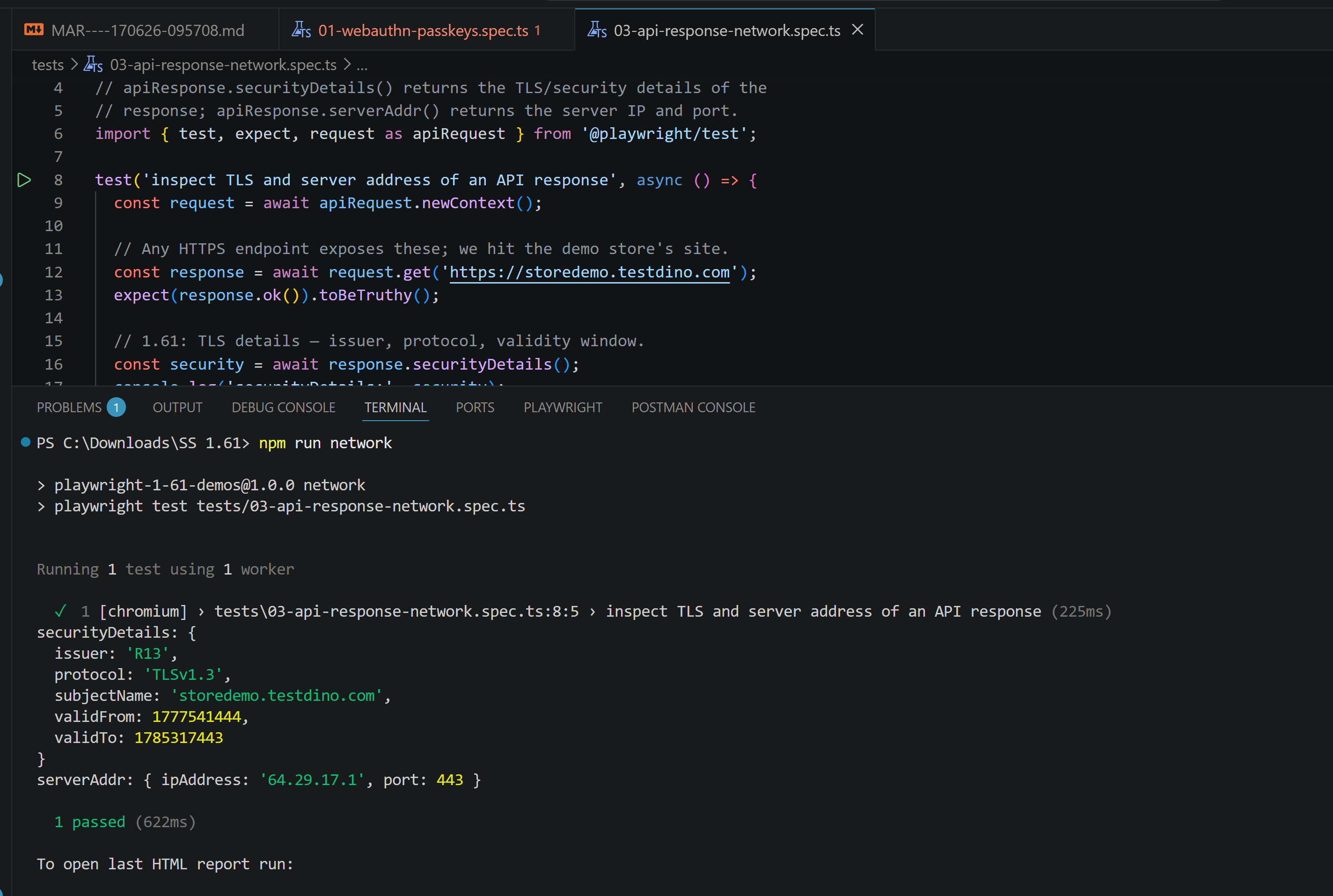
When to use it
Asserting that an API endpoint serves over the expected TLS protocol, that a certificate is the one you provisioned, or that traffic is hitting the right host or port behind a load balancer.
Screencast and CDP improvements
1.59 introduced page.screencast for recording video. 1.61 sharpens it and adds an artifacts option to CDP connections.
-
screencast.showActions() gains a cursor option that controls how the pointer is decorated during recorded actions, so the cursor is clearer in the captured video.
-
screencast.start() now passes a timestamp to its onFrame callback, so each frame is timestamped as it arrives.
-
browserType.connectOverCDP() gains an artifactsDir option that controls where traces and downloads are stored for the connected session.
// tests/screencast.spec.ts
import { test, expect } from '@playwright/test';
test('record a flow with a clearer cursor', async ({ page }) => {
  await page.screencast.start({
    path: 'artifacts/checkout.webm',
    onFrame: (frame) => {
      // frame.timestamp is new in 1.61: align frames to test steps
      console.log('frame at', frame.timestamp, 'ms');
    },
  });
  await page.goto('https://storedemo.testdino.com');
  // Decorate the pointer so actions are obvious in the captured video
  await page.screencast.showActions({ cursor: 'pointer' });
  // Drive a real flow: add a product, open the cart
  await page.getByTestId('add-to-cart-button').click();
  await page.getByTestId('cart-button').click();
  await page.screencast.stop();
});
The onFrame callback now receives the per-frame timestamp, which the run prints for the first frame alongside the total frames captured:
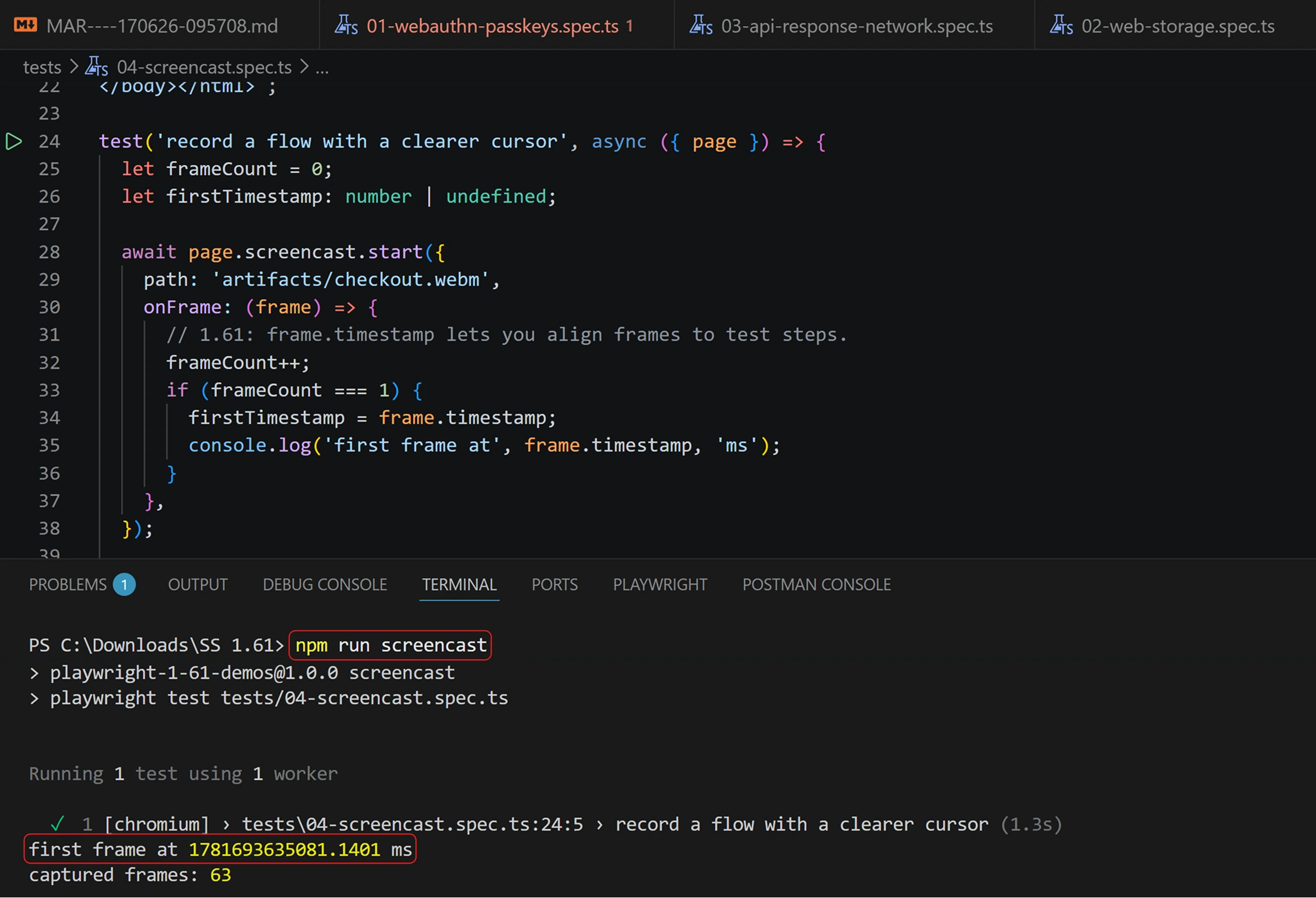
// Connect to a running browser and control where artifacts land
const browser = await chromium.connectOverCDP('http://localhost:9222', {
  artifactsDir: 'cdp-artifacts',
});
When to use it
cursor and the frame timestamp matter when a screencast is the thing a teammate watches to understand a failure. artifactsDir matters when you connect over CDP to a remote or shared browser and need its traces and downloads in a known folder.
Playwright 1.61 test runner: retries, soft polling, and per-error reporting
The largest cluster of changes lands in the test runner, and most of them are about diagnosing flaky and failing tests with less waste.
3 new video retention modes
The video option got finer control over which retries keep their recording. The old setting was effectively all videos or none, which meant either a noisy artifacts folder or no footage of the run that actually failed.
// playwright.config.ts
export default defineConfig({
  use: {
    video: 'retain-on-failure-and-retries',
  },
});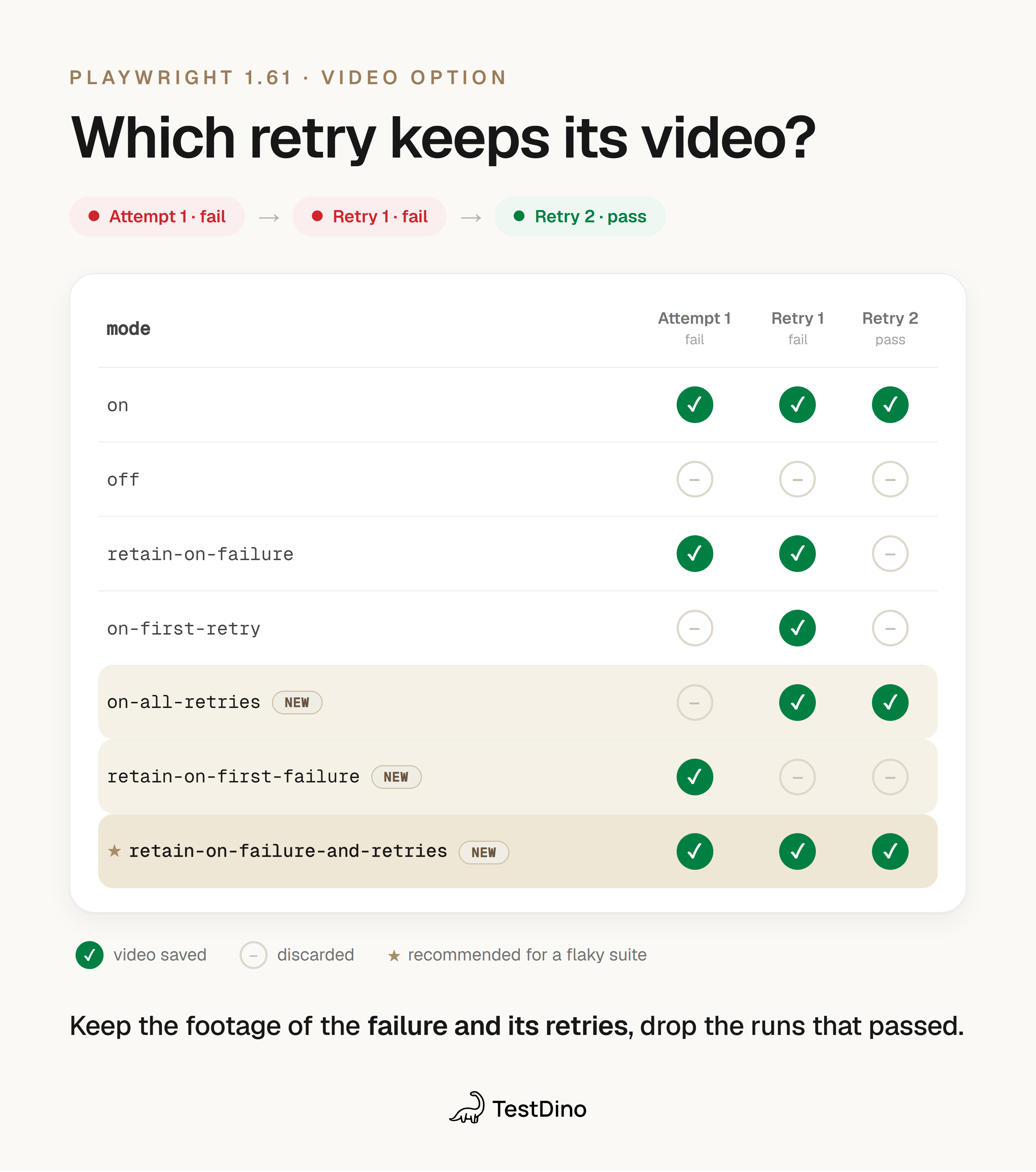
The 3 new modes:
| Mode | Keeps video when |
|---|---|
| on-all-retries | Every retry attempt, not the first run |
| retain-on-first-failure | The first attempt fails, then discards on a passing retry |
| retain-on-failure-and-retries | The run fails, plus all of its retries |
These join the existing on, off, retain-on-failure, and on-first-retry modes. For a flaky suite, retain-on-failure-and-retries is usually the one you want: you get the footage of the failure and every retry that tried to reproduce it, and nothing for the runs that have passed.
Soft polling assertions with expect.soft.poll()
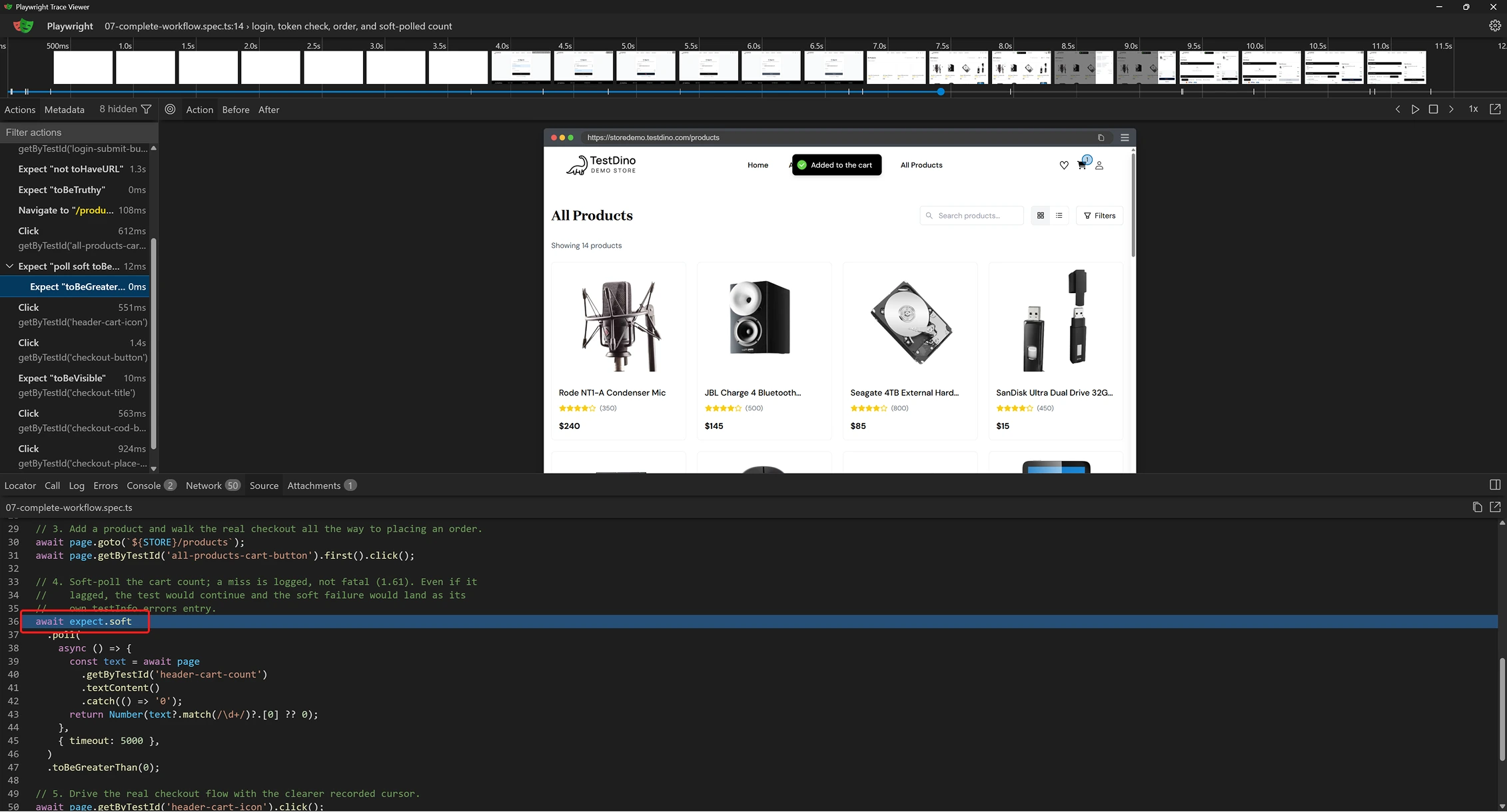
expect.poll() retries a value until it matches; expect.soft() records a failure without stopping the test. 1.61 combines them: expect.soft.poll() polls a value and, if it never matches, logs a soft failure and lets the test keep running.
// tests/cart.spec.ts
// After adding a product, the cart badge may take a moment to update.
// Poll the visible count, but don't abort the test if it lags.
await expect.soft.poll(async () => {
  const text = await page
    .getByTestId('header-cart-count')
    .textContent()
    .catch(() => '0');
  return Number(text?.match(/\d+/)?.[0] ?? 0);
}, { timeout: 5000 }).toBeGreaterThan(0);
// The test continues and can assert other things even if the poll above failed
In the trace, the soft poll retries the cart badge after a product is added and the test carries on past it either way:
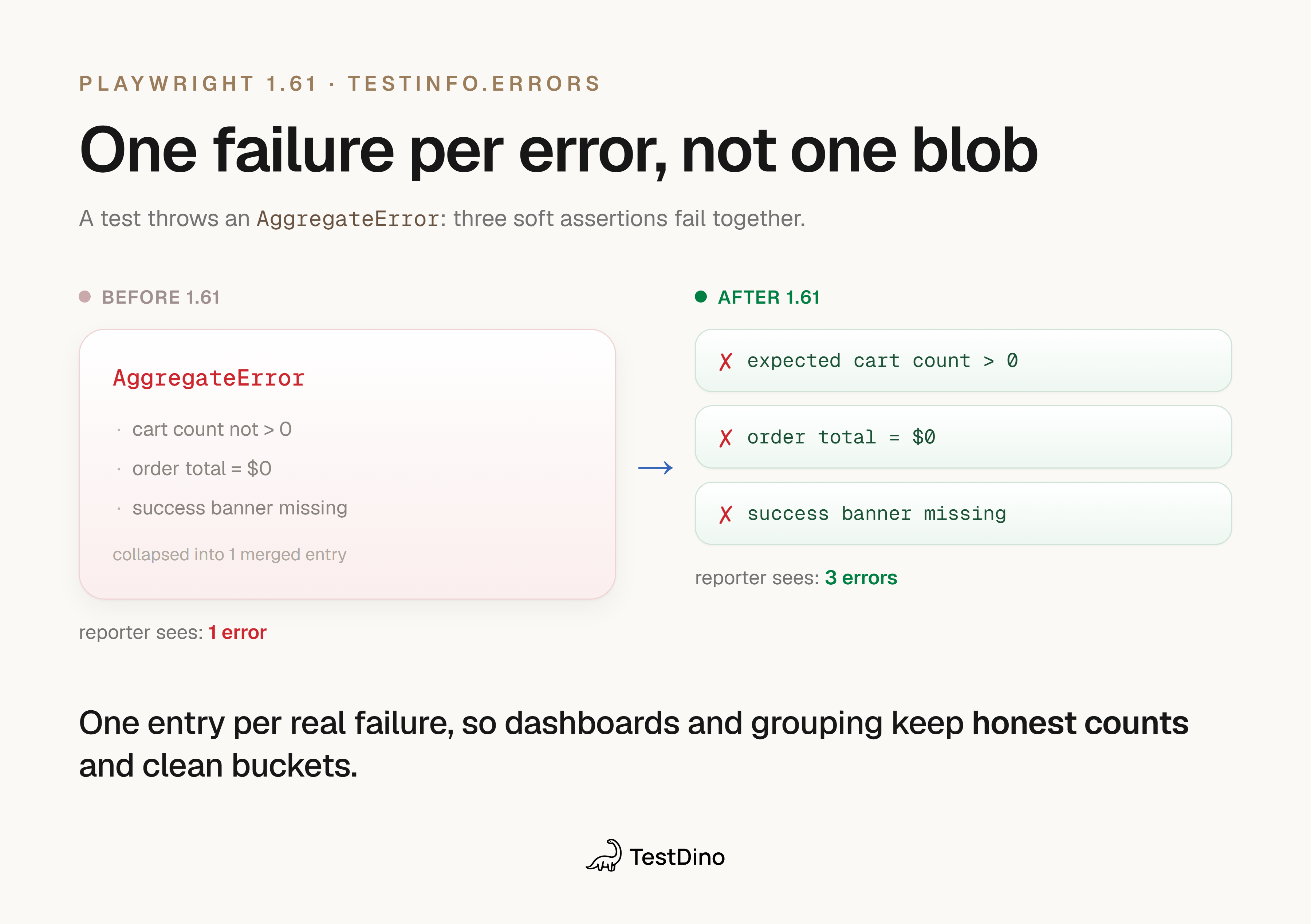
testInfo.errors now splits AggregateError
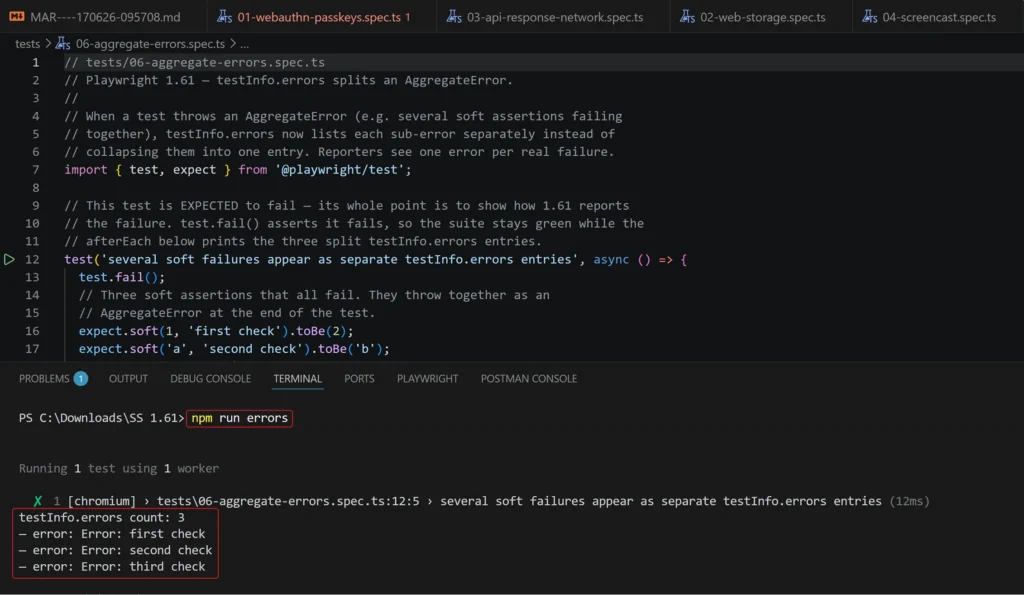
When a test throws an AggregateError, for example several soft assertions failing together, testInfo.errors now lists each sub-error separately instead of collapsing them into one entry. Reporters and post-run tooling see one error per actual failure.
// In a custom reporter or afterEach hook
for (const error of testInfo.errors) {
  // Each soft-assertion failure is now its own entry
  console.log(error.message);
}
With three soft assertions failing together, the afterEach hook prints testInfo.errors count: 3 and one line per failure instead of a single merged entry:
The same split shows up in the HTML report, where each failed soft assertion gets its own error block with its expected and received values:
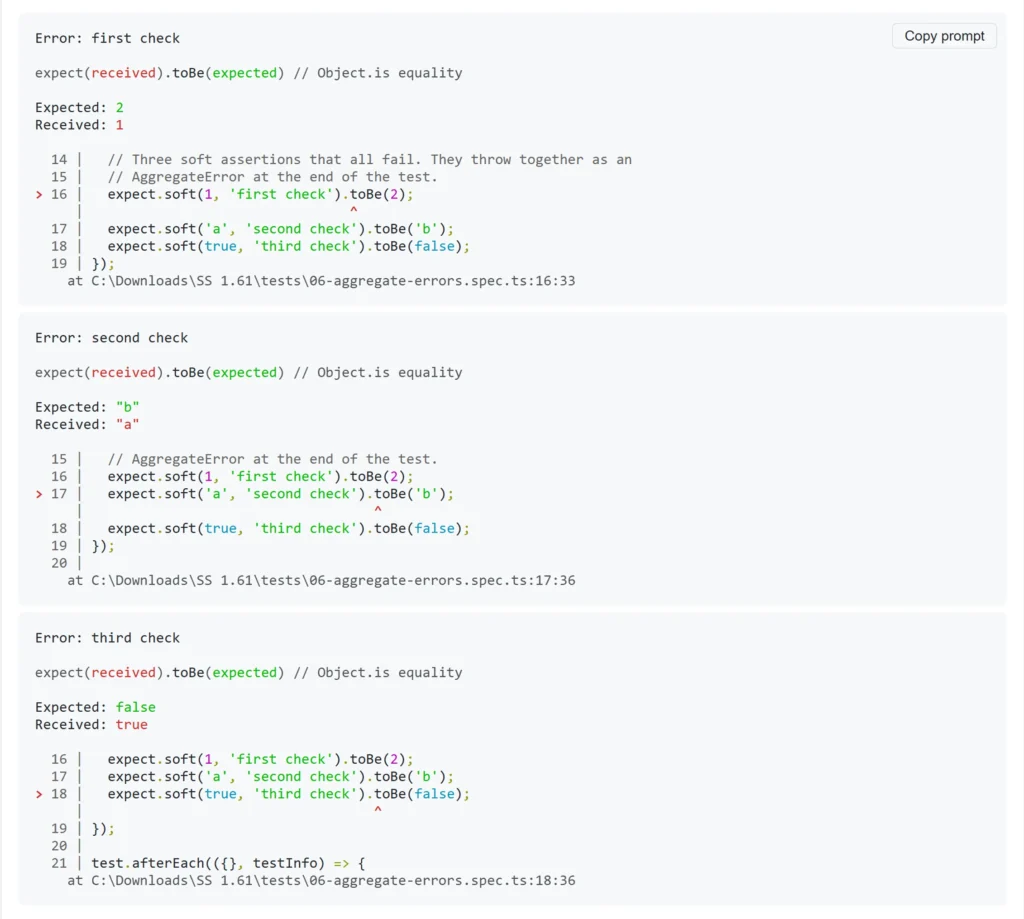
This is the change with the most downstream value. Anything that consumes Playwright's results, whether a custom reporter, a dashboard, or a test intelligence platform, now gets clean, separate failures instead of a single merged blob. If you route results to TestDino, this is what makes per-error grouping accurate when a test fails multiple assertions at once.
Other runner additions
-
fullConfig.failOnFlakyTests mirrors the config option so reporters can read whether the run is set to fail on flaky tests.
-
fullConfig.argv exposes a snapshot of process.argv from the runner process, useful for reporters that need to know how the run was invoked.
-
-G is a new command-line shorthand for --grep-invert so that you can exclude tests by title with one flag.
# Run everything except tests tagged @slow
npx playwright test -G @slow
Other improvements
-
WebSocket requests now appear in HAR and trace recordings. Previously, HAR and trace captured HTTP traffic but not WebSocket frames, which left a blind spot for apps that push data over a socket. Real-time features now show up in the trace alongside everything else.
-
Ubuntu 26.04 is supported. The browser binaries and Docker images now run on the latest Ubuntu LTS.
A complete 1.61 workflow: Login, storage, order, diagnosed failure
Here is a single test against the TestDino demo store that ties several 1.61 features together: log in, read the auth token through the new Web Storage API, place an order with a clearer recorded cursor, and let a soft poll record a diagnostic without aborting the run.
// tests/complete-1-61.spec.ts
import { test, expect } from '@playwright/test';
import { STORE, DEMO_USER, DEMO_PASS } from './helpers';
test.use({ video: 'retain-on-failure-and-retries' });
test('login, token check, order, and soft-polled count', async ({ page }) => {
  // 1. Log in through the real login page
  await page.goto(`${STORE}/login`);
  // Clearer cursor in the recorded video (1.61)
  await page.screencast.showActions({ cursor: 'pointer' });
  await page.getByTestId('login-email-input').fill(DEMO_USER);
  await page.getByTestId('login-password-input').fill(DEMO_PASS);
  await page.getByTestId('login-submit-button').click();
  await expect(page).not.toHaveURL(/\/login$/, { timeout: 15000 });
  // 2. Read the token the app stored, no evaluate() round-trip (1.61)
  const token = await page.localStorage.getItem('user_access_token');
  expect(token).toBeTruthy();
  // 3. Add a product, then soft-poll the cart count; a miss is logged,
  //    not fatal (1.61)
  await page.goto(`${STORE}/products`);
  await page.getByTestId('all-products-cart-button').first().click();
  await expect.soft.poll(async () => {
    const text = await page
      .getByTestId('header-cart-count')
      .textContent()
      .catch(() => '0');
    return Number(text?.match(/\d+/)?.[0] ?? 0);
  }, { timeout: 5000 }).toBeGreaterThan(0);
  // 4. Walk the real checkout all the way to placing an order
  await page.getByTestId('header-cart-icon').click();
  await page.getByTestId('checkout-button').click();
  await expect(page.getByTestId('checkout-title')).toBeVisible();
  await page.getByTestId('checkout-cod-button').click();
  await page.getByTestId('checkout-place-order-button').click();
});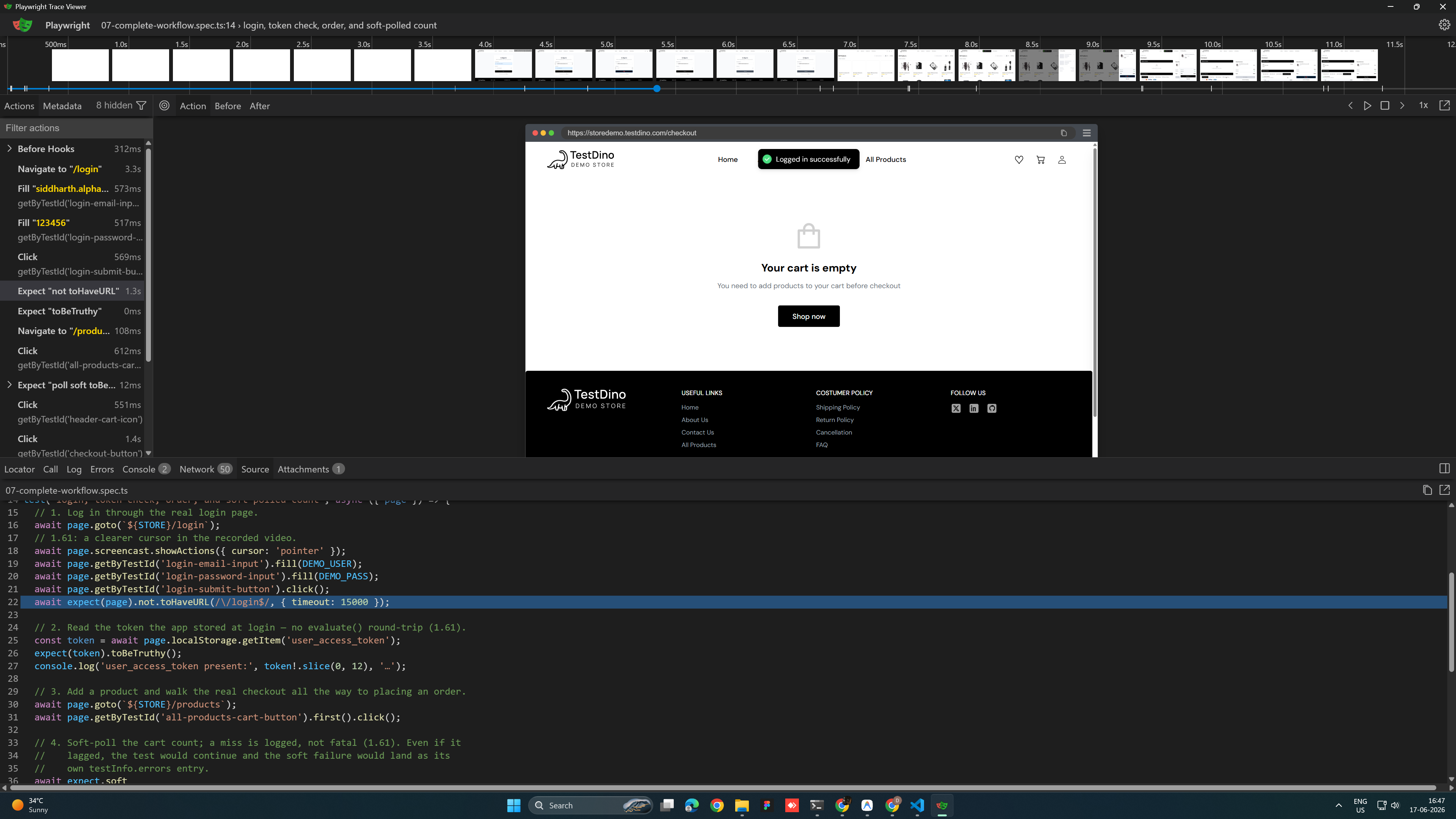
If the soft poll never satisfies, the test still finishes and testInfo.errors reports it as its own entry, separate from any other failure in the run. With retain-on-failure-and-retries set, you keep the video of the failing attempt and every retry, and the WebSocket traffic the page used is now in the trace too.
Should you upgrade to Playwright 1.61?
Upgrade now if any of these describe your suite:
-
You test passkey, WebAuthn, or passwordless login and have been skipping or stubbing it in CI.
-
You read, seed, or assert localStorage / sessionStorage and want it off evaluate().
-
You have a flaky suite and want video for the failure and its retries without keeping everything.
-
You consume Playwright results in a reporter or dashboard and want clean per-error reporting from AggregateError.
-
Your app uses WebSockets, and you have wanted them in the trace.
Wait if none of the above applies and you are mid-sprint. There is no pressure: 1.61 has no breaking changes, so the upgrade is safe whenever you get to it. The decision is purely about whether the new features pay off for you now.
The upgrade itself is the one-liner from the top. Because nothing is deprecated, there is no migration step and no grep to run for removed APIs.
Key takeaways
-
WebAuthn passkeys are now testable in CI through the browserContext.credentials virtual authenticator, with no hardware key and support across all browsers.
-
page.localStorage and page.sessionStorage give storage a first-class read/write API instead of evaluate() calls.
-
3 new video modes let you keep exactly the recordings a flaky run needs, with retain-on-failure-and-retries the safe default for unstable suites.
-
expect.soft.poll() polls without aborting, and testInfo.errors now report each AggregateError sub-error on its own.
-
No breaking changes make 1.61 the lowest-risk upgrade in the recent series.
FAQs

Jashn Jain
Developer Advocate