Playwright AI Ecosystem 2026: MCP, Agents & Self-Healing Tests
Browser compatibility issues still break apps. This report explains Interop scores, browser differences, and the key areas teams should test in 2026.
Every week your test suite breaks, and it's almost never because of a real bug.A button ID changes. A class name gets refactored. A modal loads 200ms slower than before. Your CI pipeline turns red. An engineer spends the next hour fixing tests instead of building features.
This is the maintenance trap that most test automation teams live in. You write tests carefully, structure them well, and within a few sprints, half of them are either flaky or outdated. Traditional automation simply was not built to keep up with how fast modern UIs change.
That is exactly the problem the Playwright AI ecosystem was designed to solve. With the release of MCP, built-in AI agents, and accessibility-tree-first execution in 2026, Playwright now gives AI models a structured way to explore your app, generate tests, and self-heal failures automatically. No screenshots. No guessing. No vendor lock-in.
In this guide, you will learn what each piece of this ecosystem does, how to set it up, and which tools are worth adopting. Whether you are an SDET evaluating AI-assisted testing, or an engineering manager looking to reduce test maintenance costs, this walkthrough covers the full stack from protocol architecture to the best AI testing tools available right now.
What is the Playwright AI ecosystem and how does it work in 2026?
The Playwright AI ecosystem is the integrated stack of protocols, built-in agents, CLI tooling, third-party platforms, and AI-assisted authoring capabilities that let AI models plan, write, execute, and repair Playwright tests using structured browser access instead of guesswork.
Think of it as four layers working together:
The protocol layer : Playwright MCP (Model Context Protocol) gives AI models a controlled, standardised way to interact with a live browser session through structured tools and accessibility snapshots.
The agent layer : Three specialised agents (Planner, Generator, Healer) handle the full test lifecycle from exploration to maintenance.
The authoring layer : Playwright Codegen, CLI with AI Skills, and IDE integrations (GitHub Copilot, Claude Code) provide entry points for both recording-based and prompt-based test creation.
The tooling layer : External platforms like TestDino, ZeroStep, Bug0, Octomind, TestSprite, and AgentQL plug into this foundation for reporting, natural-language querying, analytics, and scale.
None of these layers rely on screenshots or pixel-matching. The entire ecosystem is built on the browser's accessibility tree, a semantic, structured representation of every element on the page.
Here's how each layer of the Playwright AI ecosystem compares to traditional automation:
| Dimension | Traditional automation | Playwright AI ecosystem (2026) |
|---|---|---|
| Test creation | Manual script writing | AI-generated from natural language, Codegen recordings, or app exploration |
| Selector strategy | CSS / XPath (brittle) | Accessibility-tree-first with getByRole() (semantic, stable) |
| Failure recovery | Manual debugging + fix | Healer agent auto-patches selectors and re-runs |
| Maintenance cost | High (selector rot, flakiness) | Significantly reduced via self-healing and MCP-guided fixes |
| AI interaction model | None or screenshot-based (vision models) | Structured MCP tools + accessibility YAML snapshots |
| CI/CD integration | Manual pipeline config | Azure App Testing, Docker images, native CI hooks |
| Skill requirement | Strong coding knowledge | Natural language input supported, coding still valuable for review |
Note: The Playwright AI ecosystem works with LLMs like Claude, GPT, and Gemini through the standardized MCP protocol. It is not locked into any single AI model provider. The framework itself supports Node.js (TypeScript/JavaScript), Python, and Java, all sharing the same underlying automation implementation.
How does Playwright MCP enable AI agents to generate and self-heal tests?
Now that you know what makes up the Playwright AI ecosystem, let's zoom into the protocol layer that powers everything else.
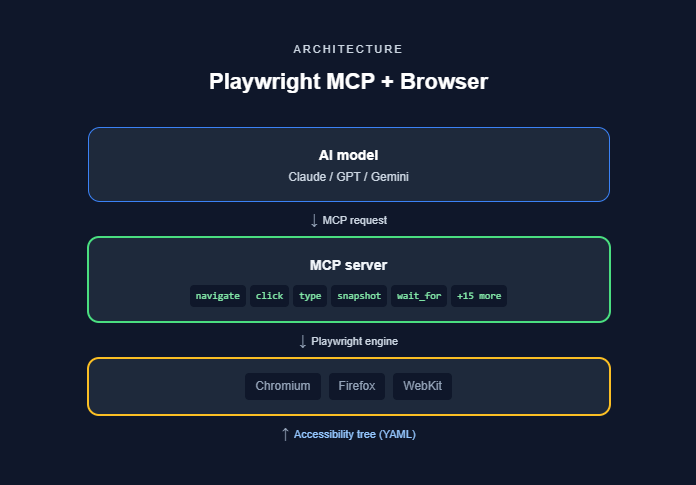
MCP stands for Model Context Protocol. Originally created by Anthropic as an open standard for connecting LLMs to external systems, the Playwright MCP server is a specific implementation that exposes over 20 structured browser-control tools to any AI model that connects via the protocol.
Here's what that means in practice:
- Instead of an AI guessing CSS selectors from a screenshot, MCP gives the model a fixed set of actions: browser_navigate, browser_click, browser_type, browser_snapshot, browser_press_key, browser_hover, browser_drag, browser_file_upload, browser_handle_dialog, browser_tabs, browser_wait_for, and more.
- Every action goes through the real Playwright engine running in a real browser (Chromium, Firefox, or WebKit).
- The AI receives structured YAML snapshots of the browser's accessibility tree, not pixel images.
Playwright MCP is a standardized server that acts as a controlled bridge between large language models and a live Playwright browser session. It constrains AI interactions to a fixed set of tools, making AI-driven automation reproducible, auditable, and less prone to hallucinations.
Snapshot mode vs vision mode
Playwright MCP operates in two modes, and understanding the difference matters:
- Snapshot mode (default) : The AI receives the browser's accessibility tree as structured YAML. It identifies elements by role, label, and state. Fast, lightweight, deterministic, and resistant to UI appearance changes.
- Vision mode (fallback) : Uses browser_screenshot and coordinate-based interaction via browser_move_mouse. Useful for visual-heavy tasks where the accessibility tree alone doesn't capture enough context.
Most AI test generation workflows stick with snapshot mode. Vision mode kicks in only when you need pixel-level verification or when the accessibility tree doesn't expose certain custom components properly.
The four-step MCP workflow
The workflow for AI test generation through MCP follows these steps:
- MCP exposes capabilities: The AI client discovers available tools from the Playwright MCP server at connection time.
- AI invokes browser actions: The model navigates pages, clicks elements, types text, and captures accessibility snapshots to understand the current state.
- Healer agent detects failures: If an action fails (broken selector, timing issue), the healer analyses the accessibility tree to find the root cause.
- Auto-repair executes: The healer generates a corrected interaction and re-runs the test automatically.
This is fundamentally different from older AI testing tools that relied on screenshots. Screenshot-based approaches suffer from visual ambiguity. The AI might see a "Submit" button but not know if it's disabled, hidden behind a modal, or part of a different form. MCP eliminates this by providing semantic context: the role, label, state, and hierarchy of every element.

Tip: The key architectural difference between Playwright CLI and MCP is that CLI is token-efficient for quick, action-driven commands, while MCP provides persistent browser context for deep exploration and complex multi-step flows. Teams often use both: CLI for simple smoke tests, MCP for end-to-end journeys.
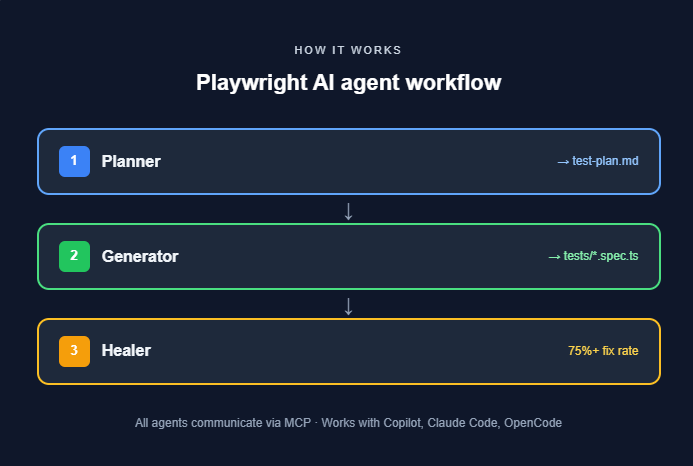
The three Playwright AI agents: planner, generator, and healer
With MCP handling the protocol layer, the next question is: who actually uses those tools to create and maintain tests? That's where the three AI agents come in.
Introduced in Playwright v1.56, Playwright test agents are purpose-built AI agents that handle the full lifecycle of test creation and maintenance. Each agent has a single, well-defined job.
The planner agent
The Planner explores your application and produces a detailed test plan in Markdown format.
- It navigates through your app's pages, identifies user flows, and documents what needs testing.
- The output is a human-readable plan, not code. It lists scenarios, steps, and expected outcomes.
- You review this plan before any test code is generated.
This step matters because it separates "what to test" from "how to test." The Planner doesn't write assertions or pick selectors. It maps the territory so the Generator knows exactly what to build.
The generator agent
The Generator takes the Planner's test plan and translates each scenario into executable Playwright test scripts.
- It interacts with the live application to verify that selectors work and assertions hold.
- Generated tests use Playwright's recommended getByRole() locator strategy (accessibility-tree-first).
- The output is standard TypeScript Playwright test code. Nothing proprietary, no vendor lock-in.
Tip: To keep AI-generated tests maintainable at scale, guide the Generator to follow the Page Object Model (POM) pattern. Without POM, AI-generated tests tend to produce hardcoded selectors, inline test data, and flaky waits. Feed the Generator a sample page object file as context and it will match your project's structure.
The healer agent
The Healer is the maintenance agent. When tests fail, the Healer:
-
Runs the failing test in debug mode.
-
Analyses the failure using MCP accessibility-tree snapshots.
-
Identifies whether the cause is a broken selector, a DOM change, or a timing issue.
-
Generates a corrected test interaction.
-
Re-runs the test to confirm the fix.
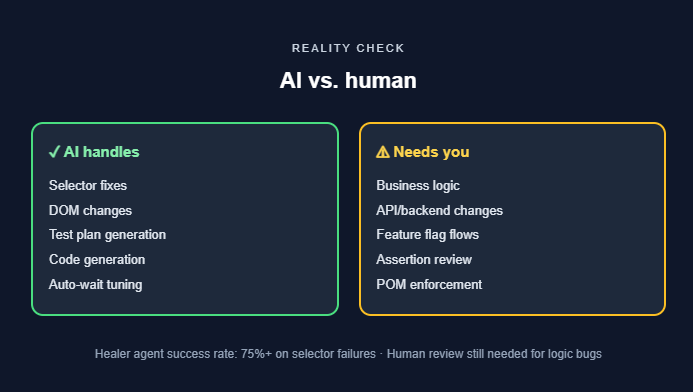
According to Microsoft's published benchmarks, the Healer agent achieves a success rate exceeding 75% on selector-related failures. For complex logic bugs or significant architectural changes, human review is still required.
Note: All three agents communicate using MCP. They work with AI coding assistants like GitHub Copilot, Claude Code, and VS Code's built-in agent mode. You initialise them with npx playwright init-agents and choose your integration loop: vscode, claude, or opencode.
How Playwright Codegen and CLI skills fit into the AI workflow
The agents handle the heavy lifting, but they're not the only way into the Playwright AI ecosystem. Two other entry points play a key supporting role: Codegen for recording-based tests and CLI with Skills for quick, token-efficient commands.
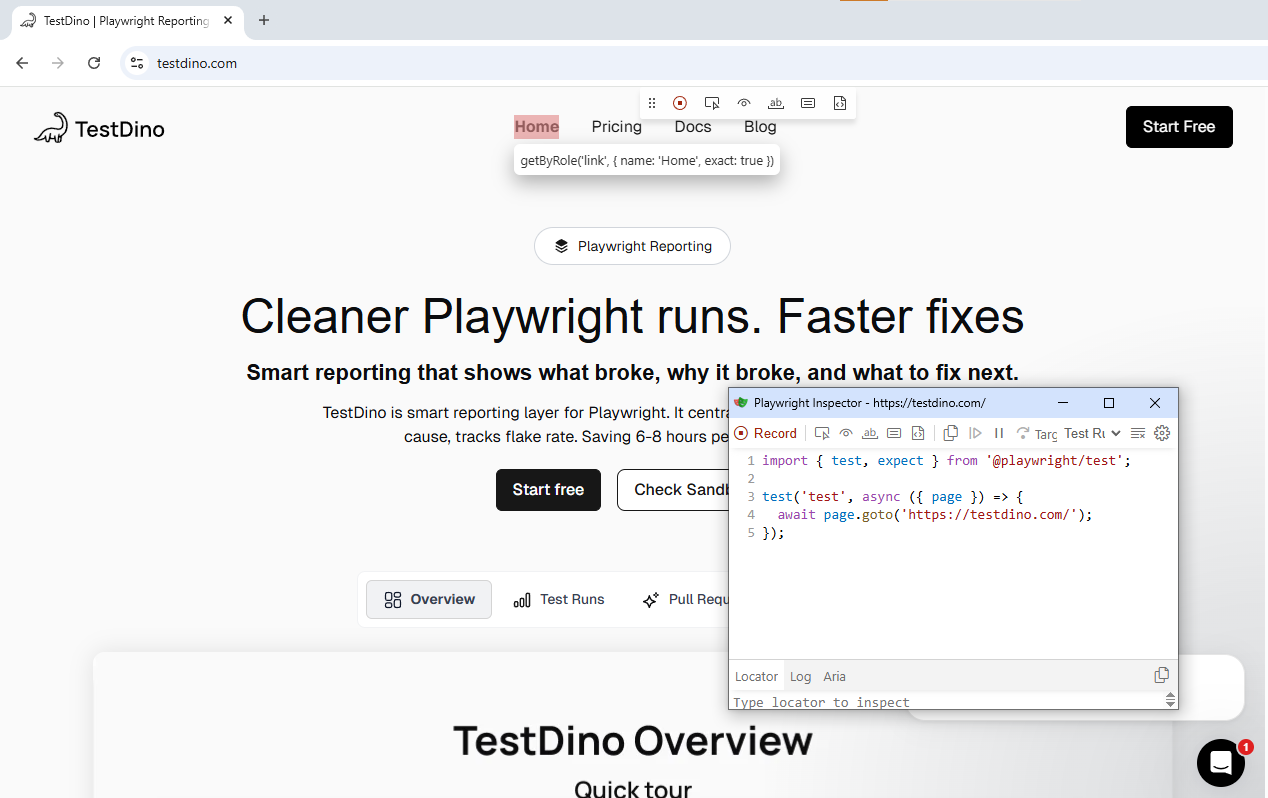
Playwright Codegen as an AI starting point
Playwright Codegen is Playwright's built-in recording tool. You open a browser, interact with the app, and Codegen generates test code by translating your clicks, navigations, and form fills into executable scripts.
Codegen itself is not AI-powered. But it plays a critical role in the AI ecosystem because:
- It captures real UI truths, including actual selectors, actual page state, and actual user flows. AI models that generate tests from source code alone can hallucinate flows that don't exist. Codegen records what actually works.
- Its output serves as a seed for AI refinement. The raw Codegen output often contains extra navigation steps, brittle selectors, or missing assertions. AI coding agents like GitHub Copilot can then clean up this code, align it with your project's Page Object Model, and produce stable, review-ready tests.
- It supports device emulation (e.g., iPhone 14), custom viewport sizes, and dark/light mode toggling during recording. This gives AI agents richer input context when generating responsive test suites.
The practical workflow: record with Codegen first, then pass the output to the Generator agent or an AI coding assistant for refinement. This "record then refine" approach is more reliable than asking AI to imagine flows from scratch.
CLI with AI skills
Playwright's CLI now supports Skills, specialised prompts that teach AI agents best practices for specific frameworks and languages. For example, the Playwright TypeScript skill provides guidance for writing, debugging, and maintaining Playwright tests.
The key difference between CLI Skills and MCP:
- CLI is token-efficient. It issues concise commands and gets results quickly. Best for simple actions, smoke tests, and quick validations.
- MCP provides persistent browser context and deep exploration. Best for complex multi-step flows, test generation from user stories, and the full Planner → Generator → Healer pipeline.
Most teams use both. CLI for quick checks, MCP for thorough end-to-end testing.
The accessibility tree: why Playwright AI skips screenshots
So what makes all of this work reliably? The answer comes down to one core decision: Playwright AI reads the page through the accessibility tree, not through screenshots.
Every browser maintains an accessibility tree, a parallel, structured representation of the page that assistive technologies use. It includes element roles (button, textbox, heading), accessible names, states (checked, disabled), and parent-child relationships.
The entire Playwright AI ecosystem is built on this tree, not on screenshots. Here's why:
- Deterministic interactions : When the AI sees button "Submit" in the accessibility tree, it knows exactly which element to target. No ambiguity from overlapping visuals.
- Resilience to styling changes : CSS refactors, theme switches, and layout adjustments don't break the accessibility tree. The semantic structure stays stable.
- Speed : Processing a YAML snapshot is orders of magnitude faster than sending a screenshot to a vision model.
- Auditability : Every action is logged against a structured element reference (role + name + state), making failures easy to trace.
- Auto-waiting : Playwright auto-waits for the accessibility tree to stabilise in SPAs, eliminating explicit sleep statements.
When you run browser_snapshot through the Playwright MCP server, you get back structured YAML:
- role: navigation
  name: "Main menu"
  children:
    - role: link
      name: "Home"
    - role: link
      name: "Products"
    - role: link
      name: "Pricing"
- role: main
  children:
    - role: heading
      name: "Welcome to the dashboard"
      level: 1
    - role: button
      name: "Create new project"
      state: enabled
Playwright also supports aria snapshots using toMatchAriaSnapshot(). This lets you assert the accessibility tree structure against a predefined shadcn template, ensuring your page's semantic structure stays consistent across deployments.
Tip: Playwright's recommended getByRole() locator strategy already queries the accessibility tree. If your existing tests use role-based locators, they're naturally aligned with how Playwright AI agents work. Migrating from CSS/XPath selectors to role-based locators is the single most impactful step for AI readiness.
Setting up Playwright AI agents in your project
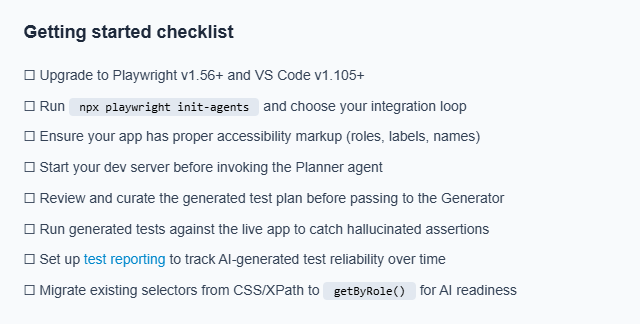
Now that you understand the pieces, here's how to set them up. Getting started with Playwright AI agents requires Playwright v1.56+ and VS Code v1.105+.
Step 1: install or upgrade Playwright
npm init playwright@latest
# or upgrade an existing project
npm install -D @playwright/test@latest
npx playwright install
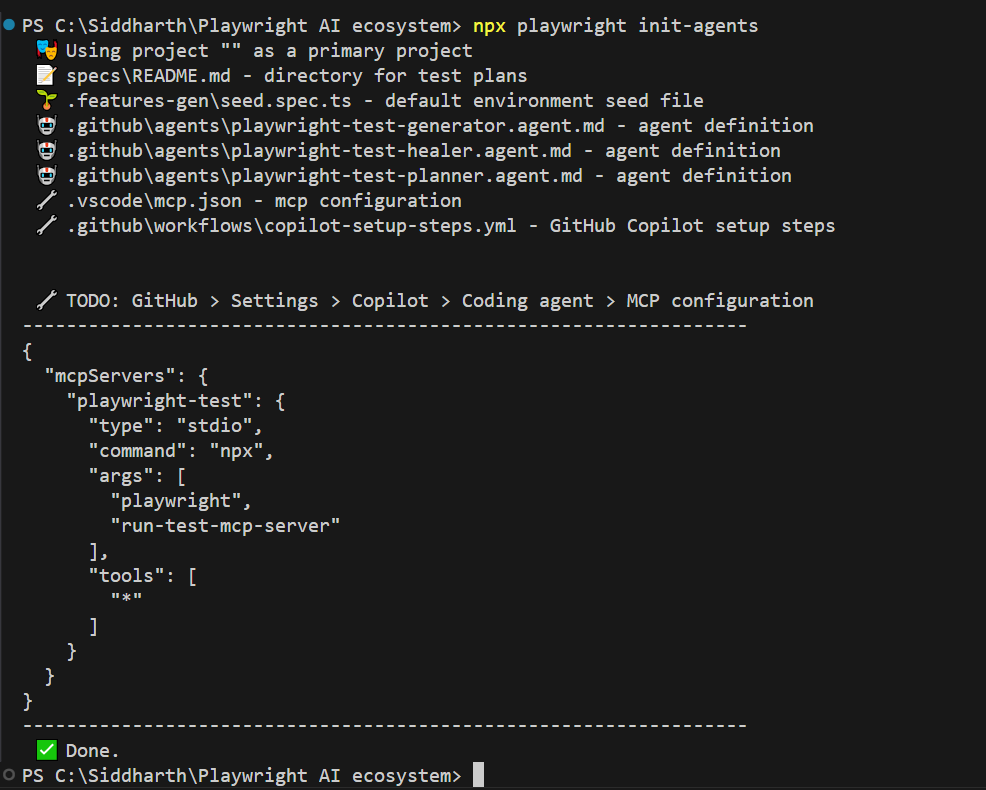
Step 2: initialise the agents
npx playwright init-agentsThis command scaffolds everything you need:
-
specs/README.md for test plans
-
.features-gen/seed.spec.ts as the environment seed file
-
.github/agents/ with planner, generator, and healer agent definitions
-
.vscode/mcp.json with the MCP server configuration
-
.github/workflows/copilot-setup-steps.yml for CI integration
It also outputs the MCP config JSON you need to paste into GitHub > Settings > Copilot > Coding agent > MCP configuration if you want the agents to work with GitHub Copilot's coding agent in pull requests.
Step 3: configure your AI assistant
The generated .vscode/mcp.json file connects VS Code to the Playwright MCP server automatically. If you are using GitHub Copilot, open the Copilot chat panel in VS Code. For Claude Code, ensure the Claude extension is installed. The agent definitions in .github/agents/ will be picked up by any compatible AI assistant.
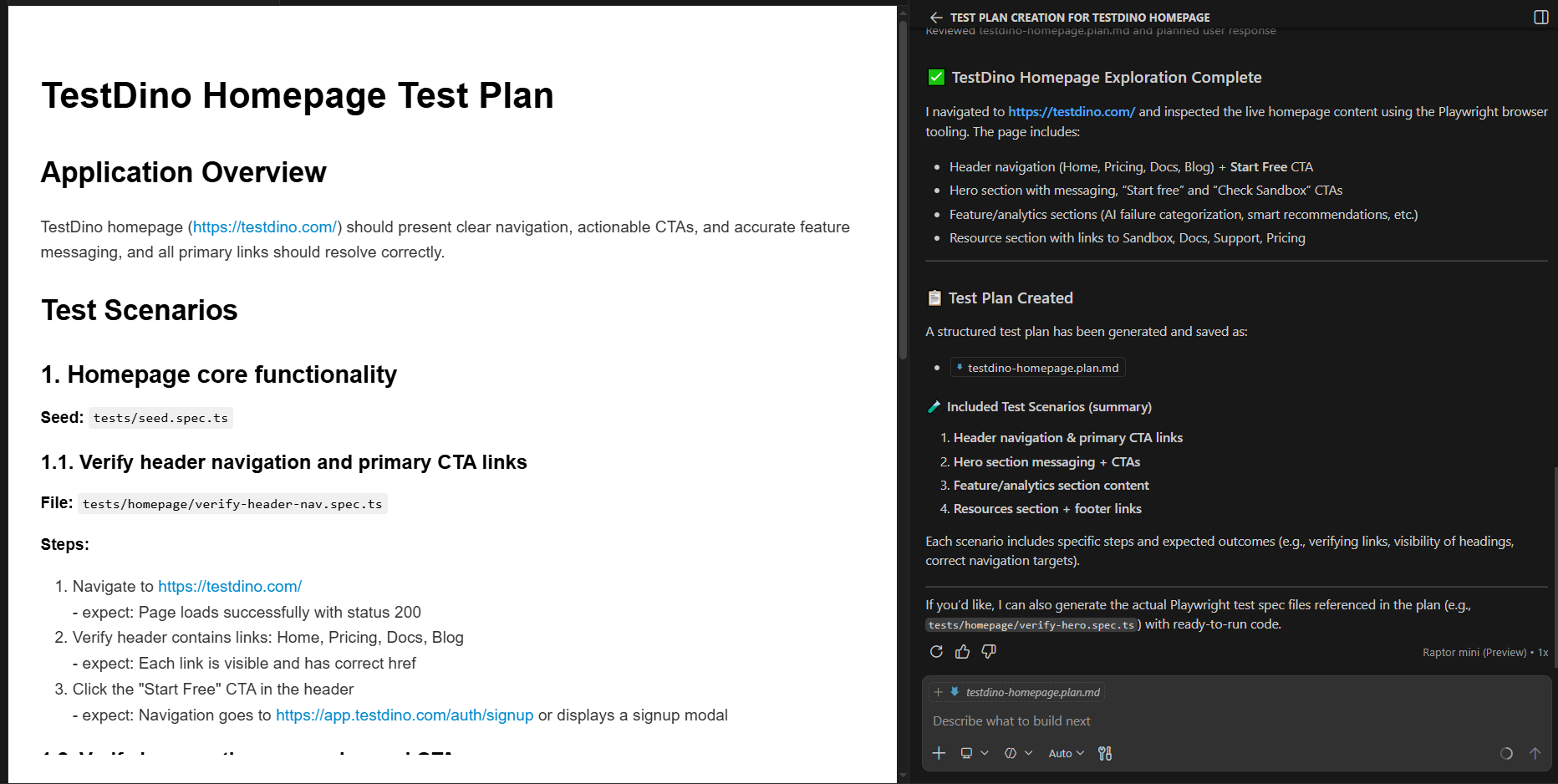
Step 4: run the planner
"Explore the home page of TestDino and create a test plan"
The Planner outputs a testdino-homepage-plan.md file with scenarios, steps, and expected outcomes.
Step 5: generate tests
Pass the test plan to the Generator agent:
"Generate tests from the test plan."
The Generator creates .spec.ts files with real, runnable test code using getByRole() locators.
Step 6: heal failing tests
When a test fails after a UI deployment, run the Healer:
"Fix the failing checkout tests."
The Healer analyses the failure, inspects the current DOM via MCP snapshots, patches the selector or assertion, and re-runs until the test passes.
Note: The generated test code is standard Playwright TypeScript. There's no vendor lock-in, you can run npx playwright test like any other test suite. GitHub Copilot's Coding Agent now uses Playwright MCP to verify its own code changes in a real browser before creating pull requests. Azure App Testing also integrates natively for scalable, cloud-parallel test execution.
Common setup issues
A few things that trip teams up during initial setup:
- npx playwright init-agents fails silently: This usually means you are running a Playwright version older than v1.56. Run npx playwright --version to confirm. If you are below 1.56, upgrade first with npm install -D @playwright/test@latest.
- VS Code doesn't pick up the MCP server: Make sure .vscode/mcp.json was created by init-agents. Open VS Code's Output panel and check the MCP logs. The Copilot or Claude Code extension must be installed and authenticated.
- Planner generates an empty test plan: The Planner needs a running application to explore. If your app is not reachable at the URL you specified, the Planner has nothing to work with. Start your dev server before invoking the agent.
- Generator produces tests that immediately fail: This is often a timing issue. The Generator interacts with the live app, so slow-loading pages or heavy SPAs may cause intermittent failures during generation. Add a baseURL in your Playwright config and ensure the app is fully loaded before starting.
These issues are straightforward but can waste hours if you don't know where to look.
Best AI tools built on top of Playwright in 2026
The native Playwright AI stack covers test creation and self-healing. But the ecosystem around it is just as important for reporting, CI analytics, and natural-language automation.
| Tool | What it does | AI model | Self-healing | Natural language |
|---|---|---|---|---|
| TestDino | AI-native test reporting, flaky test detection, CI visibility, failure triage | Proprietary AI | ✓ | ✓ |
| ZeroStep | Natural language test execution, AI-driven selectors at runtime | GPT-3.5 / GPT-4 | ✓ | ✓ |
| Bug0 | Plain-English test generation, video-based test creation, root-cause analysis | Google Gemini 2.5 Pro | ✓ | ✓ |
| Octomind | Autonomous test flow creation, AI auto-maintenance, cloud parallel execution | Proprietary (multi-model) | ✓ | ✓ |
| TestSprite | MCP-driven planning → generation → debugging loop, flakiness monitoring | Multi-model | ✓ | ✓ |
| AgentQL | AI-powered query language replacing CSS/XPath with natural language via page.get_by_ai | Proprietary | ✓ | ✓ |
| Auto Playwright | Open-source auto() function for plain-text test step descriptions | GPT-4 | ✗ | ✓ |
| GitHub Copilot | In-IDE test generation with built-in Playwright MCP, browser validation during dev | GPT-4 / Claude | Via MCP Healer | ✓ |
For teams that already run Playwright in their CI pipelines and want to understand test health, failure patterns, and automation stability, TestDino integrates directly with Playwright test runners to surface test automation reporting data without changing your test code.
If your focus is on AI-powered test generation, ZeroStep and Bug0 let you describe scenarios in plain English and get executable Playwright code. AgentQL takes a different angle: instead of generating full tests, it replaces fragile CSS/XPath selectors with natural language queries using page.get_by_ai, making existing tests more resilient.
For teams that prefer Playwright's built-in AI codegen, the framework now supports natural-language-to-test workflows natively through the agent system.
What Playwright AI still can't do?
Every blog covers the benefits, so let's focus on the limitations that actually matter in practice.
Test explosion
AI agents can generate tests quickly. Sometimes too quickly. Without clear constraints, the Planner and Generator can produce dozens of overlapping test cases that increase CI run time without improving meaningful coverage.
Curate the Planner's output before handing it to the Generator. Treat the test plan like a pull request, review it, trim duplicates, merge similar scenarios. Force the Generator to follow POM patterns so tests are structured, not scattered.
Hallucinated assertions
LLMs can invent assertions that look correct but don't match the actual application. A model might assert "Order confirmed!" when the real text is "Your order has been placed." It might test a flow that doesn't exist in the app at all.
Mitigation strategies that work:
-
Always run generated tests against the live app (the Generator does this by default).
-
Use verification systems that execute generated code independently before merging.
-
Provide rich, real-time context to the LLM via MCP accessibility snapshots instead of letting it guess from documentation alone.
-
Run adversarial prompt tests to find where the model breaks.
Business logic gaps
The Healer handles selector-related failures well (a button ID changed, an element moved). It struggles with failures caused by backend changes, API contract shifts, feature flags, multi-tenant data models, or multi-step business logic.
AI doesn't understand that clicking "Delete account" in your staging environment requires a different confirmation flow than in production. For testing critical business logic, traditional scripted automation with precise control remains essential. The AI is a maintenance assistant, not a replacement for domain understanding.
Cost, latency, and infrastructure
Every AI interaction costs tokens. Running all three agents on a large test suite can generate significant API costs, especially with GPT-4 or Claude 3.5 Sonnet. MCP interactions are lighter than screenshot-based approaches, but they're not free.
Running an MCP server with a visible browser and multiple concurrent connections also requires infrastructure. Cloud-based solutions help, but add latency.
Consider batching agent runs: run the Healer only on failing tests, not the entire suite. Use CLI for quick smoke checks and reserve MCP for complex journeys.
What adoption actually looks like
To be direct about what teams are experiencing in practice: most teams that adopt the Playwright AI ecosystem do not see overnight results.
The Planner needs well-structured apps with good accessibility markup to produce useful test plans.
The Generator still creates tests that need human review before they belong in a CI pipeline.
And the Healer, while effective on selector-level failures, does not eliminate the need for manual debugging of logic-level issues.
The realistic benefit is time saved on maintenance, not test creation. Teams spending 30-40% of their sprint on fixing broken selectors and updating locators are the ones seeing the most value. If your test suite is small or your UI rarely changes, the overhead of setting up and managing AI agents may not be worth it yet.
Where tools like TestDino fit into this picture is in tracking whether the AI-generated and AI-healed tests are actually reliable over time. Without visibility into flaky patterns and failure trends, you are essentially trusting the AI blindly, which defeats the purpose of structured automation.
Conclusion
The Playwright AI ecosystem in 2026 is a layered architecture: MCP for structured browser access, three agents for the test lifecycle, and Codegen plus CLI Skills as entry points. None of it relies on screenshots. The entire stack runs on the accessibility tree.
This is not a hands-off solution. Test explosion, hallucinated assertions, and business logic gaps still need human oversight. The teams seeing the most value pair AI agents with CI visibility and flaky test tracking.
If you are already running Playwright, start with npx playwright init-agents and connect your preferred AI assistant. Use tools like TestDino to close the feedback loop between AI-generated tests and your CI pipeline. As of 2026, this is the most complete, open, and practical AI testing stack available.
FAQs

Dhruv Rai
Product & Growth Engineer