Local MCP vs Remote MCP: Which One Should Your AI Agent Use?
Local MCP vs remote MCP, explained with official spec rules, real adoption data, and a hands-on TestDino setup for both.
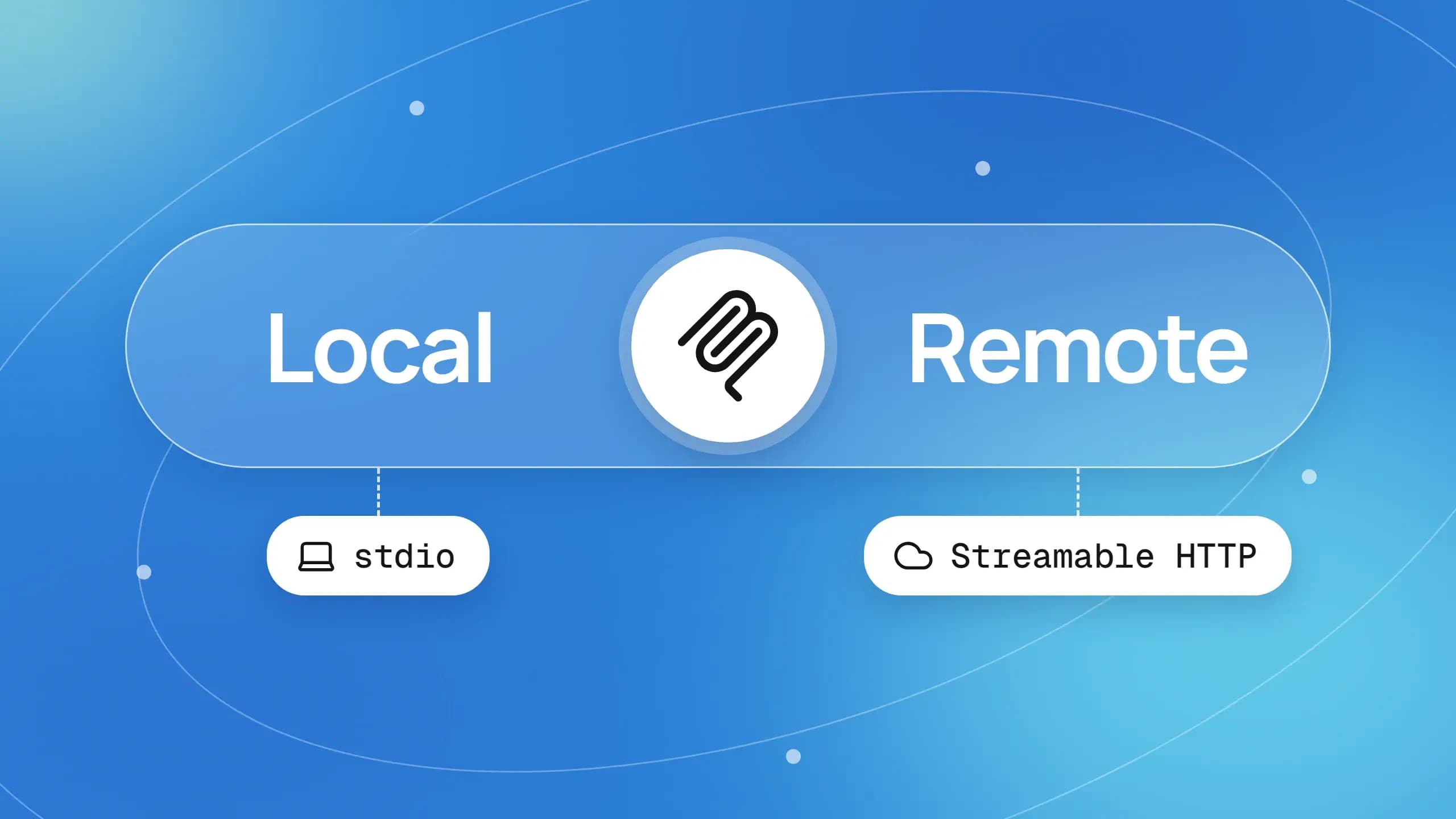
Every AI assistant now wants a door into your test results, tickets, and code, and that door is an MCP server. Where that door lives, your laptop or a hosted service, is the local MCP vs remote MCP question.
Pick wrong and you get tokens pasted into config files on 40 laptops, or a web agent that cannot see the server at all. Teams running Playwright MCP in Cursor hit this the day a teammate on claude.ai wants the same tools.
This guide uses the current MCP specification, Claude Code's docs, and fresh adoption data to show how the two differ, where each is risky, and how to set up both with the TestDino MCP server, which ships both ways.
What local MCP vs remote MCP really means
Local MCP vs remote MCP describes where an MCP server process runs and how your AI client reaches it. A local MCP server is launched by the client as a subprocess on your own machine and talks over stdio. A remote MCP server runs as a hosted service that clients reach over Streamable HTTP at a URL.
The protocol itself does not care. The MCP architecture overview states that an MCP server is "the program that serves context data, regardless of where it runs." The same JSON-RPC messages flow over both transports, so tools, resources, and prompts are identical either way.
What changes is everything around the process: who starts it, what it can touch, how it proves who you are, and which clients can reach it. That is why the question keeps resurfacing as AI testing agents move from one developer's terminal into shared, web-based, and CI-driven workflows.
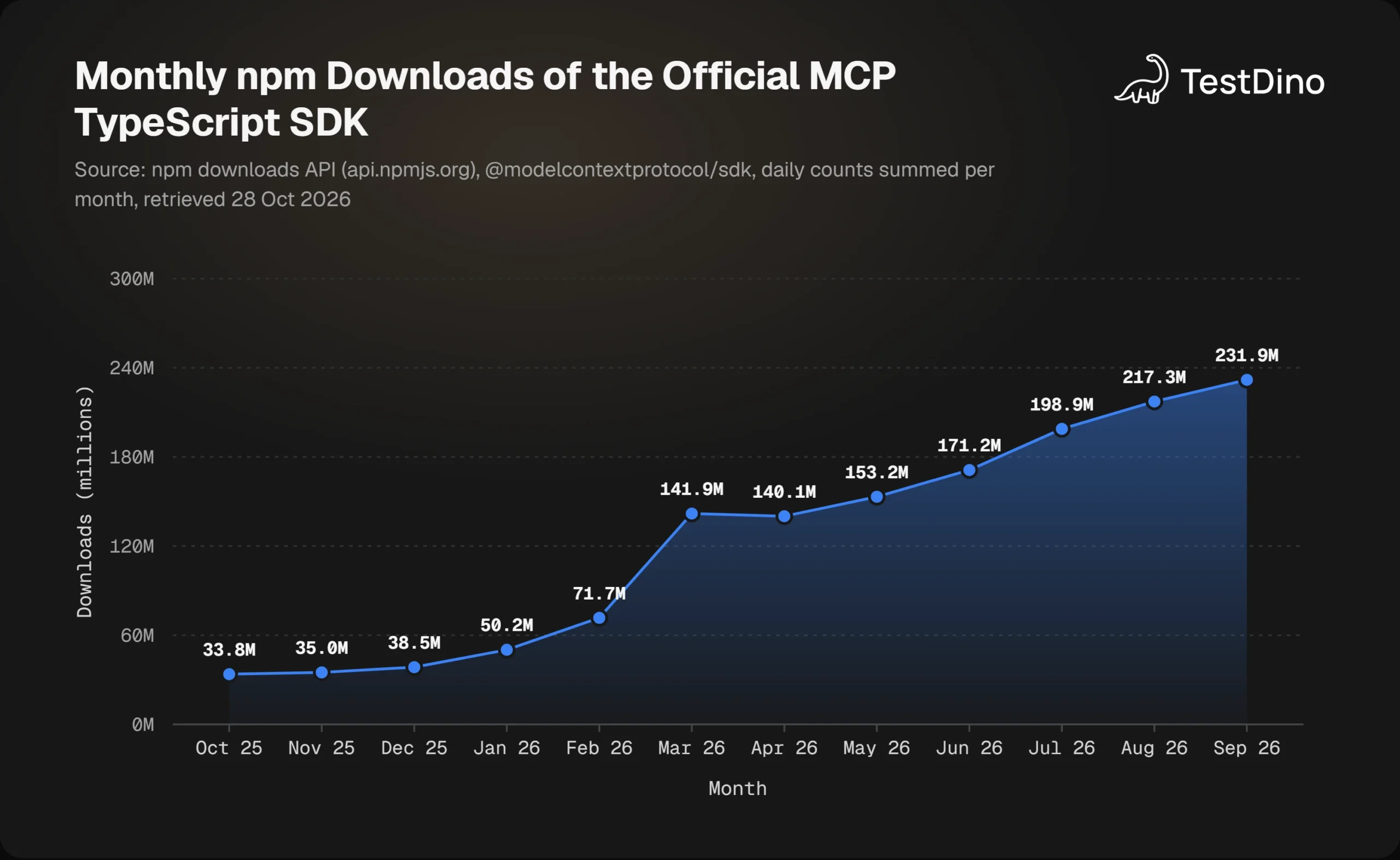
The scale makes the decision urgent. Downloads of the official MCP TypeScript SDK grew from 33.8 million in October 2025 to 231.9 million in September 2026, according to the npm downloads API. Every one of those installs is a client or server that had to pick a side.
How a local MCP server runs
The stdio transport spec is blunt: "the client launches the MCP server as a subprocess." The server reads JSON-RPC from stdin, writes JSON-RPC to stdout, and may log to stderr. Nothing else is allowed to touch those streams.
The canonical example is the filesystem server. Claude Desktop starts it with npx -y @modelcontextprotocol/server-filesystem plus the folders it may touch, as shown in the connect local servers guide. That guide warns that the server "runs with your user account permissions."
When the client exits, it closes stdin, waits, and terminates the process if it lingers. The server lives exactly as long as your session. That lifecycle is the hidden reason local servers feel instant, and also why they cannot be shared.
How a remote MCP server runs
In the Streamable HTTP spec, "the server operates as an independent process that can handle multiple client connections." It exposes one MCP endpoint, such as https://example.com/mcp, and every JSON-RPC message is a fresh HTTP POST.
The architecture overview uses Sentry's hosted server as its example. It runs on Sentry's platform and speaks Streamable HTTP, so clients reach it by URL rather than by launching anything. The connect remote servers guide calls this the key advantage: "available from any MCP client with an internet connection."
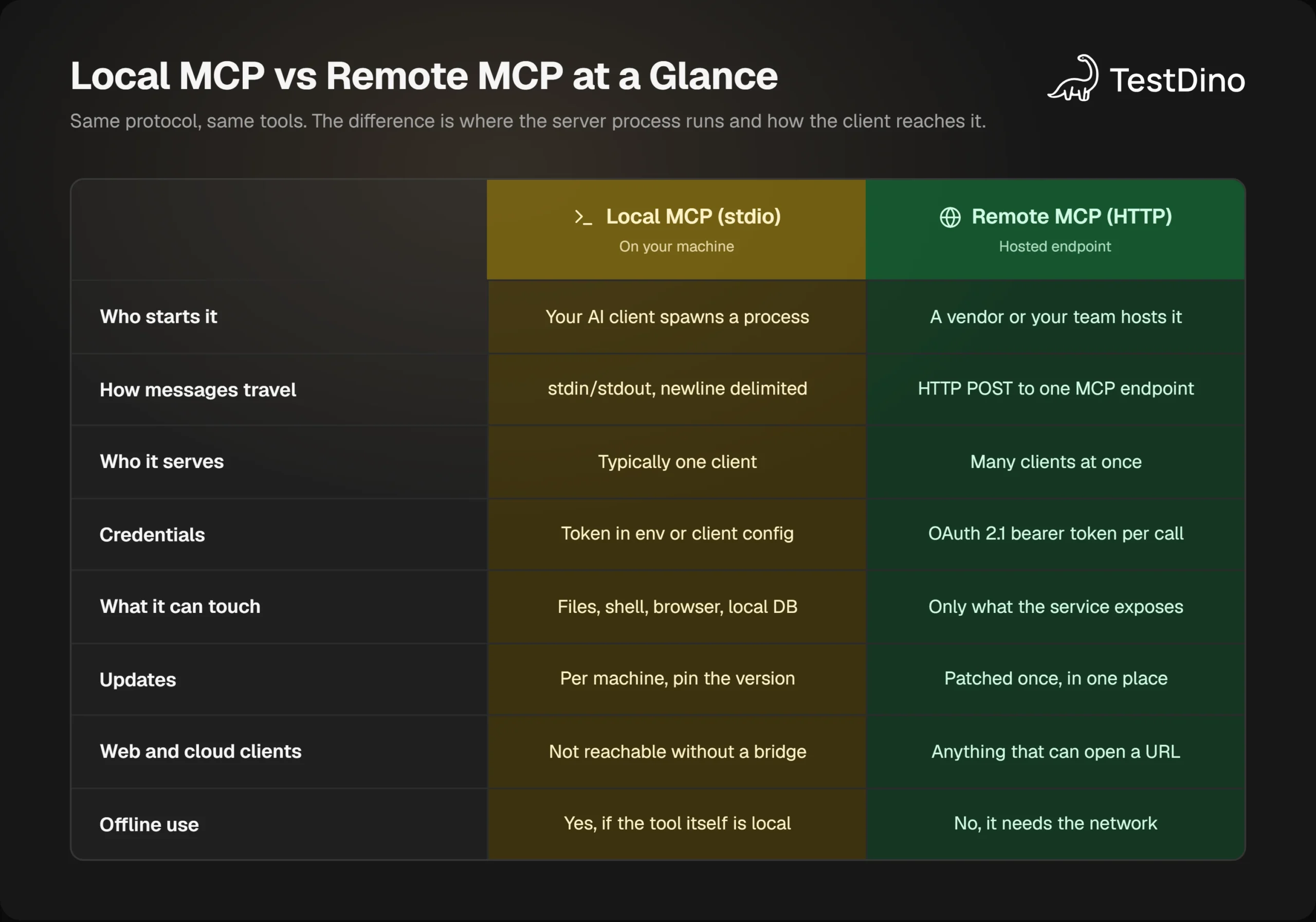
One hosted process serving many clients is also what makes remote the only option for web products. Claude on the web and ChatGPT cannot spawn a subprocess on your laptop, so a URL is the only kind of server they can reach. The infographic below puts the two side by side before we go row by row.
Local MCP vs remote MCP: 8 differences that matter
Below is the comparison most teams actually need, drawn from the specification and from Claude Code's MCP documentation. Each row is expanded in the subsections that follow.
| Dimension | Local MCP server (stdio) | Remote MCP server (Streamable HTTP) |
|---|---|---|
| Where it runs | Subprocess of your AI client, on your machine | Independent process on a host you or a vendor run |
| Transport | stdio, newline-delimited JSON-RPC | HTTP POST to one MCP endpoint, JSON or SSE reply |
| Who starts it | The client, on every session | Nobody per session; it is always on |
| Clients served | Typically one | Many at once |
| Credentials | Environment variables or client config | OAuth 2.1 access token on every request |
| What it can touch | Anything your user account can | Only what the service exposes |
| Updates | Each machine, ideally pinned | Once, server side |
| Reach | Desktop clients on that machine | Any client that can open a URL, including web and CI |
Transport and who starts the process
Local servers exist only while the client runs them. The architecture overview says stdio gives "optimal performance with no network overhead" because it is direct process communication. The trade is that each developer runs their own copy, with their own version, and their own bugs.
Remote servers invert that. The process is always on, so the client only needs a URL. Claude Code's docs call HTTP "the recommended option for connecting to remote MCP servers" and mark the older SSE transport as deprecated. Setting up Playwright MCP in Claude Code shows the local flavor of this in practice.
Authentication and credentials
The MCP authorization spec draws the line explicitly. Implementations on stdio "SHOULD NOT follow this specification, and instead retrieve credentials from the environment." HTTP implementations should follow it, which means OAuth 2.1.
In practice a local server gets a token through an env block or a flag, and that token sits in a file on disk. A remote server returns 401 until the client completes an OAuth flow, and then expects Authorization: Bearer on every single request.
What it can touch
This is the most underrated row. A local process inherits your user account, so it can write files, run shells, and open browsers. A remote server can only do what its operator chose to expose over the API.
TestDino's own server makes this concrete. Its tools reference lists the same 57 tools in both deployments, but the writeMarkdown and outputPath parameters of get_audit_report are marked local package only. Only the local process can write a report onto your disk.
Reach, updates, and offline work
A stdio server is invisible to Claude on the web, ChatGPT, and most CI runners, because none of them can spawn a process on your laptop. A remote server works from all of them, and a bug fix ships once instead of once per machine.
Local wins the moment the network is gone or the data cannot leave the device. If the tool itself is local, such as a repo or a local database, the server keeps working offline and nothing crosses the wire. Those differences all trace back to the transport layer, so it is worth seeing exactly what each transport does.
stdio vs Streamable HTTP: the transport behind each option
Most local MCP vs remote MCP confusion is really transport confusion. The spec defines two standard bindings and says protocol semantics are identical on both. The transport decides framing, delivery, cancellation, and authentication, not what the tools mean.
stdio in 4 rules
- The client launches the server as a subprocess and talks to it over stdin and stdout.
- Each message is one JSON-RPC object on one line, with no embedded newlines.
- The server may log to stderr, but must never write anything except MCP messages to stdout.
- To cancel, the client sends notifications/cancelled. To shut down, it closes stdin and waits for the process to exit.
Rule 3 is the one that bites. A stray console.log in a Node server corrupts the stream and the client drops the connection. If a session dies right after launch, check stdout noise first, then work through the Playwright MCP troubleshooting guide for the client-side symptoms.
Streamable HTTP in 4 rules
- The server exposes a single MCP endpoint that accepts POST, and every request or notification is its own POST.
- The server answers with one JSON object or an SSE stream scoped to that request.
- Every POST must carry MCP-Protocol-Version and Mcp-Method headers, plus Mcp-Name for tool calls, so gateways can route without parsing the body.
- Servers must validate the Origin header, should bind local instances to 127.0.0.1, and should authenticate every connection.

Tip: In Claude Code's JSON config, an entry with a url but no type is read as a stdio server and fails. Set "type": "http" for remote servers, or run claude mcp add --transport http and let the CLI write the entry for you.
What the 2026-07-28 revision changed for remote servers
The 2026-07-28 changelog removed protocol-level sessions and the Mcp-Session-Id header, dropped the initialize handshake, and made every request carry its own protocol version and capabilities. Remote servers are now stateless by design.
That matters more for remote than for local. A stateless server scales behind a load balancer without sticky sessions, and list results now carry a ttlMs hint so clients can cache tool lists. The older HTTP+SSE transport, deprecated since 2025-03-26, is now formally on the deprecated features register.
If you have compared Playwright CLI vs MCP you will recognize the theme. The transport you pick shapes token cost, latency, and failure modes long before any tool does real work. Transport also decides where the security boundary sits, which is where local and remote differ most.
Where the security risk sits in each model
The protocol has two different threat models, and the official docs treat them separately. The local server security guide covers your machine, while the authorization spec covers the network. Treating local MCP vs remote MCP security as one topic is the first mistake.
Local: the process is you
The local security guide is direct. A stdio server inherits your environment variables, "can read anything your account can read," including SSH keys, cloud credentials, and browser profiles, and can open outbound connections anywhere. It adds that "the client and a stdio server share one trust domain."
Its first recommendation is the one most teams skip: ask whether the server needs to run locally at all. In the guide's words, "a server that only talks to a service on the internet gains nothing from running on your laptop." Where a remote version exists, it says to prefer it.
For servers that must be local, the baseline is to pin the version, pass a narrow token per server, run it in a container with no home directory mounted, and skim the tool descriptions. MCP server security walks through the same checks for Playwright MCP specifically.
Remote: OAuth 2.1 does the gatekeeping
A remote server is an OAuth 2.1 resource server. The spec requires clients to use PKCE, to send an RFC 8707 resource parameter so tokens are bound to one server, and to carry the token in the Authorization header on every request, never in the query string.
Servers must verify that each token was issued for them and reject anything else with a 401. That is why a remote server cannot be handed a token minted for a different service, and why it never sees your SSH keys in the first place.
The cost is a dependency. If the host is down or your network blocks it, the tools are gone. When a hosted agent flags a failing run, you still need the test failure analysis data to be reachable, so the remote server's uptime becomes part of your quality pipeline.
The 3 checks that apply to both
- Treat tool names and descriptions as untrusted input. The model reads them as instructions, and the local security guide warns that they can change after you approved the server.
- Keep the roster small. Every configured server shares the model's context, so each new one extends the surface all the others are exposed to.
- If a local server ever listens on a port, bind it to 127.0.0.1 and validate Origin. The guide is explicit that binding to localhost "is not an authentication boundary."
With the trade-offs clear, the next two sections show when each option wins and how to set it up with a server that ships both ways.
When to choose a local MCP server (and how to set one up)
Choose local when the server needs your machine: files in a repo, a local database, a shell, or a browser that Playwright drives. Choose it for offline work and for data that cannot leave the device. Choose it, too, when your client is Claude Code, Cursor, or Claude Desktop and you are the only user.
TestDino's docs make the same split. The local MCP server is for Claude Code, Cursor, and Claude Desktop, with a Personal Access Token in the client config. It runs @testdino/mcp as a stdio process and exposes test runs, AI insights, artifacts, and manual test cases to the agent.
The flow is short. Create the token under User Settings, then Access Tokens, in app.testdino.com. It is shown once, so store it in a password manager. Then register the server in your client, as the docs page below shows.
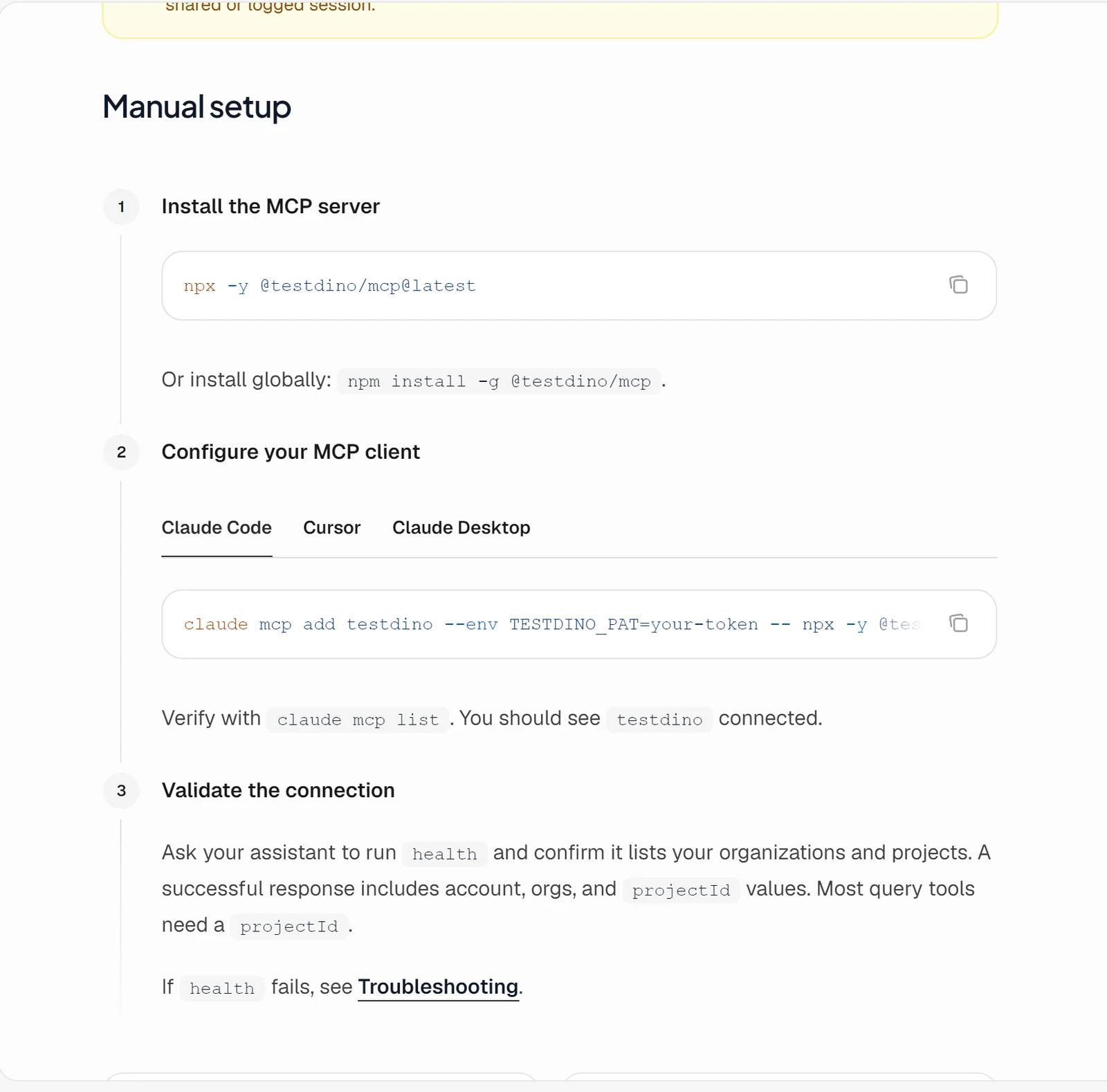
Setting up the TestDino local MCP server in Claude Code
claude mcp add testdino --env TESTDINO_PAT=td_pat_your_token -- npx -y @testdino/mcp@latest
claude mcp list
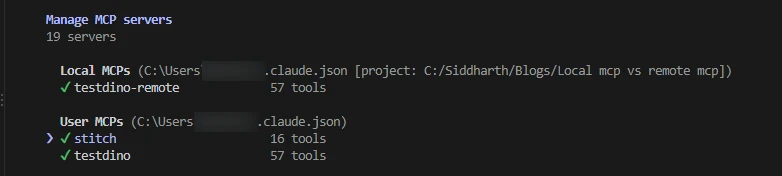
The -- separates Claude's own options from the server command, so everything after it is exactly what Claude Code spawns. Run claude mcp list and testdino should show as connected.
Then ask the assistant to call health. The response lists your organizations and projects with their projectId values, which most other tools need. We ran the package without a token on a Windows machine and it printed "TestDino MCP server running on stdio" immediately, which is the subprocess starting up and waiting for its first message.
Note: The server reads the token from the TESTDINO_PAT environment variable. Passing it as a --pat flag produces a "Missing TESTDINO_PAT" error, according to TestDino's troubleshooting page.
The same server in Cursor, and a team-safe variant
{
  "mcpServers": {
    "TestDino": {
      "command": "npx",
      "args": ["-y", "@testdino/mcp@latest"],
      "env": { "TESTDINO_PAT": "td_pat_your_token" }
    }
  }
}
For a shared repo, use Claude Code's project scope instead of hardcoding the token. A .mcp.json committed to the repo can reference ${TESTDINO_PAT}, and Claude Code expands it from each developer's environment, as documented under environment variable expansion.
{
  "mcpServers": {
    "testdino": {
      "type": "stdio",
      "command": "npx",
      "args": ["-y", "@testdino/mcp@2.2.1"],
      "env": { "TESTDINO_PAT": "${TESTDINO_PAT}" }
    }
  }
}
Pinning 2.2.1 instead of @latest follows the local security guide's provenance advice, and it mirrors how teams already configure Playwright MCP in Cursor. The version is the one on npm at the time of writing, so check for a newer release before you copy it.
If your agent also writes tests, the Playwright skill for Claude Code pairs well with this setup. The skill itself lives at github.com/testdino-hq/playwright-skill and teaches the agent TestDino's reporting conventions alongside Playwright best practices.
When to choose a remote MCP server (and how to connect one)
Choose remote when the server wraps a hosted service, when more than one person needs it, when the client cannot spawn a process, or when you want one place to patch and audit. TestDino's docs point ChatGPT and Claude on the web at the remote MCP server at https://mcp.testdino.com.
The remote server is the same 57 tools over Streamable HTTP, with OAuth through TestDino instead of a token in a file. During authorization you pick which organizations and projects the connection may see, and a token that leaks can be revoked from User Settings.
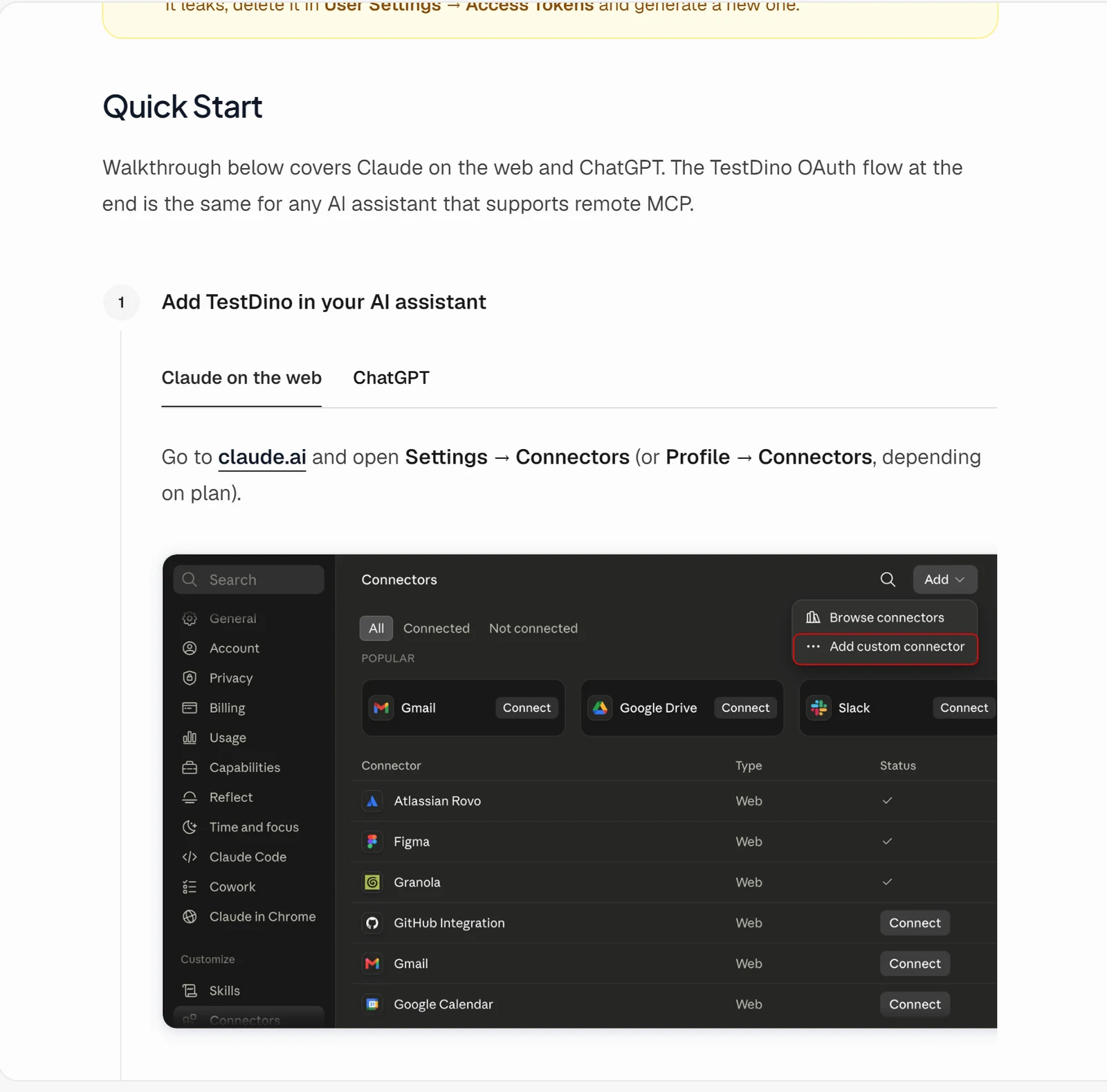
The connect flow in Claude on the web is three steps: open Settings, then Connectors, click Add custom connector, and enter https://mcp.testdino.com as the server URL. ChatGPT uses Settings, then Apps, then Create app, with Authentication left on OAuth.
What actually happens during authorization
You can watch the OAuth discovery the spec describes by sending one unauthenticated request to the endpoint.
curl -i -X POST https://mcp.testdino.com \
  -H "Content-Type: application/json" \
  -H "Accept: application/json, text/event-stream" \
-d '{"jsonrpc":"2.0","id":1,"method":"tools/list"}'HTTP/1.1 401 Unauthorized
www-authenticate: Bearer resource_metadata="https://mcp.testdino.com/.well-known/oauth-protected-resource"That header tells the client where to fetch the protected resource metadata. TestDino's metadata names itself as the authorization server, advertises the mcp scope, and supports the authorization_code grant with S256 PKCE, exactly the shape the spec requires. The client opens a browser, you approve, and every later request carries the bearer token.
The browser side of that flow has 3 screens when Claude Code runs the login command: confirm the account, choose how to connect, and select the access scope.
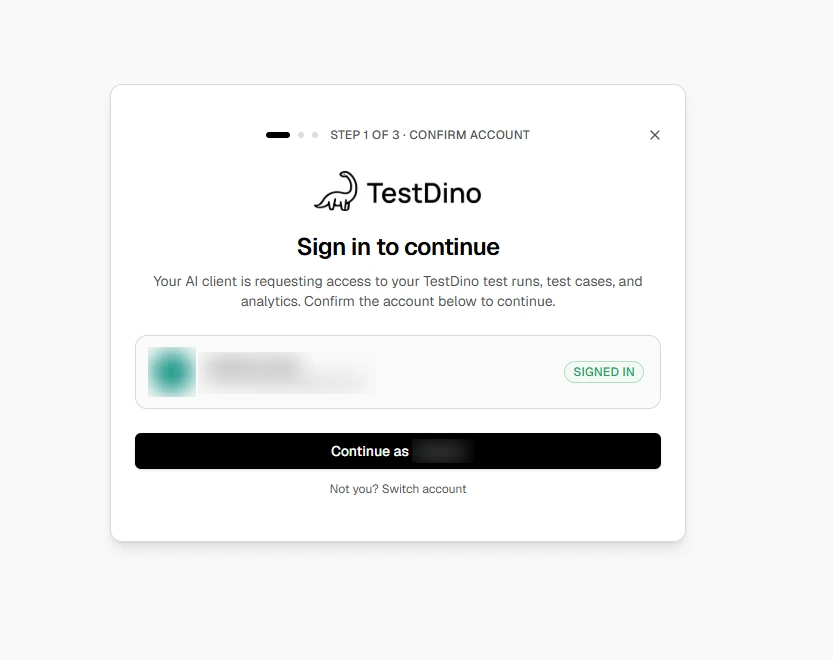
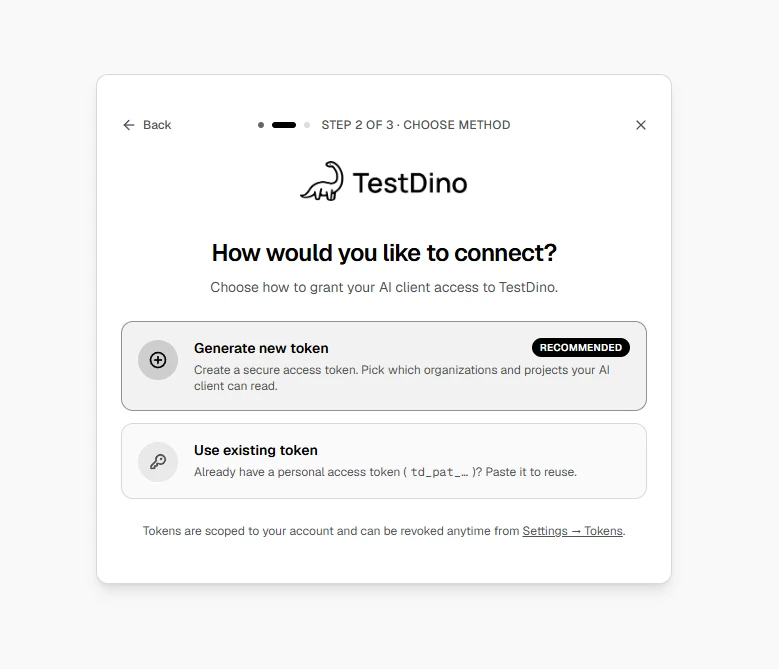
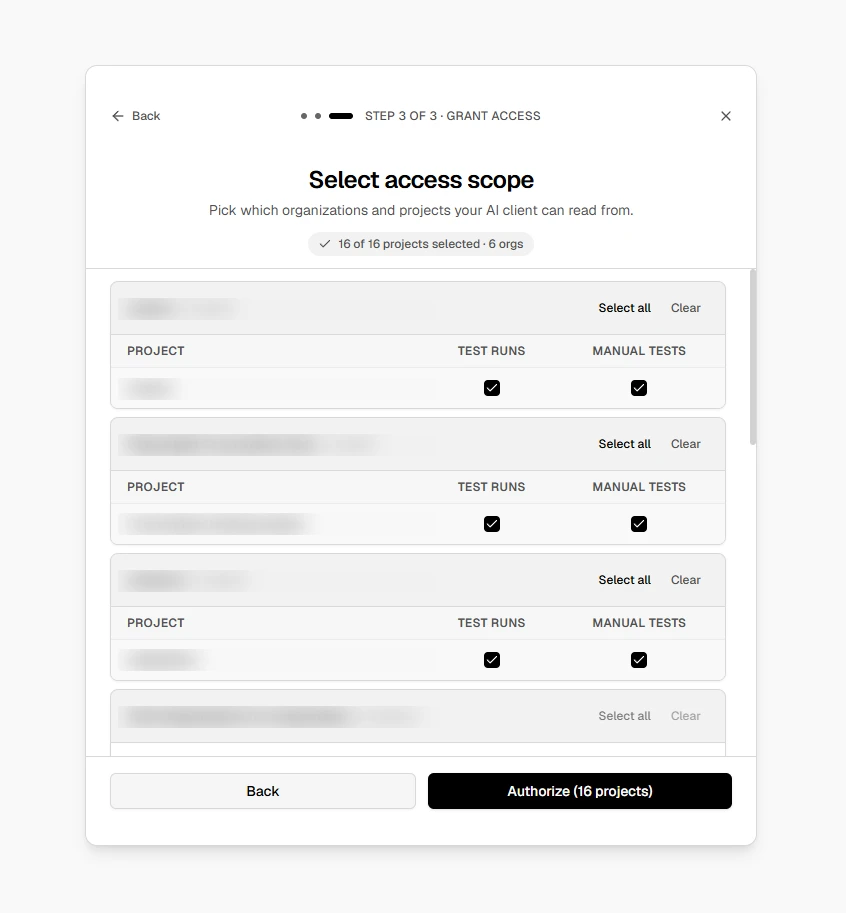
Claude Code can register the hosted endpoint too. Running claude mcp add --transport http testdino-remote https://mcp.testdino.com on our machine listed it as an HTTP server with the status "Needs authentication", and claude mcp login testdino-remote starts the same browser flow. TestDino documents the local package as the primary path for Claude Code, so treat this as an option rather than the default.
Tip: Most clients attach connectors when a chat is created. After authorizing, start a new chat before asking the assistant to call health, or the TestDino tools will not appear in the conversation.
Once connected, the remote server gives a web agent the same Playwright root cause analysis context a local one gives Claude Code: run details, error clusters, flake verdicts, and the artifacts behind them.
That is the payoff of hosting it once. The flaky test detection data is reachable from wherever your team actually works. Many teams do not need to choose at all, and the registry data shows it.
A 4-question decision framework, plus the hybrid most teams land on
Strip the vendor opinions away and the local MCP vs remote MCP decision comes down to 4 questions about what the server must reach. The infographic below is the version we use when a new server request comes in.
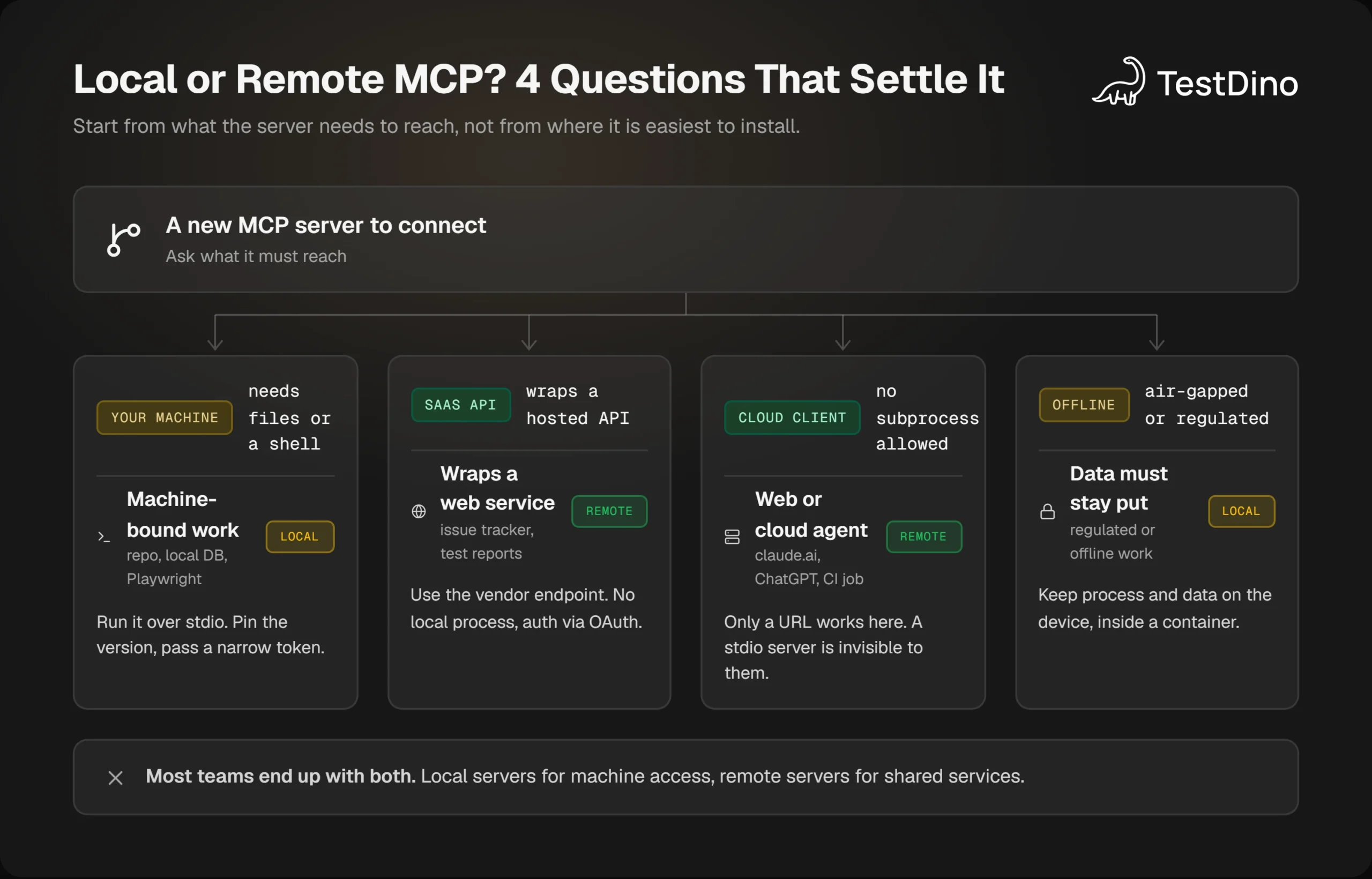
Decision tree with four branches that route an MCP server to local or remote based on what it must reach
Question 1 is the strongest signal. If the server needs your files, your shell, or a browser session on your machine, it has to be local, because no hosted process can see those. Playwright MCP, filesystem servers, and local database servers all land here.
Questions 2 and 3 usually point the other way. If the server only wraps a hosted API, or the client is claude.ai, ChatGPT, or a CI job that cannot spawn processes, remote is the only setup that works everywhere. The Playwright AI ecosystem now spans both kinds of client, which is why this question keeps coming up.
Question 4 is the override. Offline or regulated data forces local even when the service offers a remote option, and in that case the full local security checklist applies.
The hybrid pattern and what the registry shows
The official registry supports both at once. A server.json can list remotes for the hosted endpoint and packages for the stdio install, per the registry publishing docs. TestDino ships both forms, while the reference filesystem server is local only because its whole job is reading your disk.
We counted the latest version of every server in the official MCP registry on 28 October 2026 and found 51,624 entries. Of those, 31,569 publish a remote endpoint only, 16,961 publish a local package only, and 2,444 publish both.
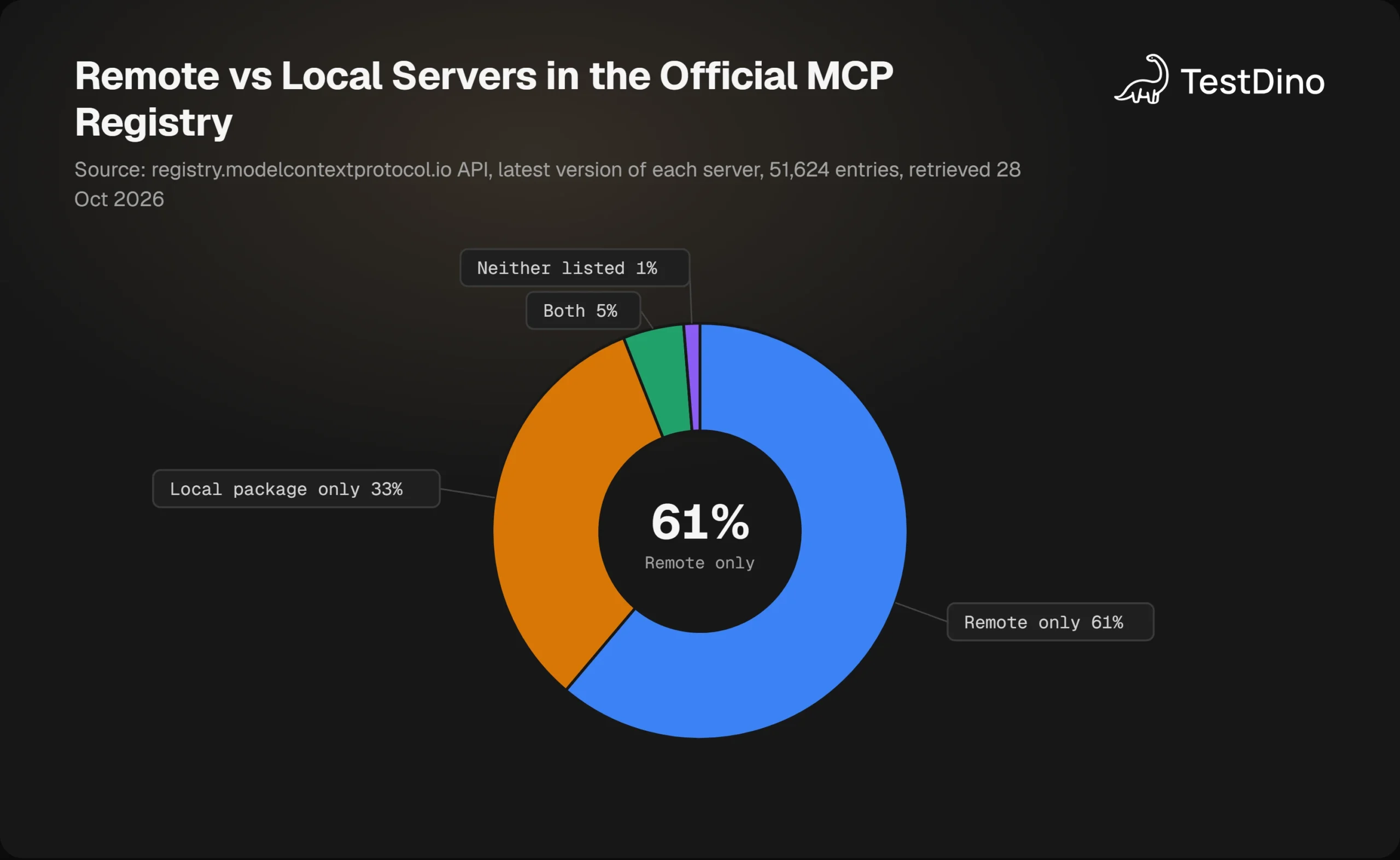
Remote-only entries are the majority at 61 percent. The registry is still in preview and counts registrations rather than usage, so read it as a snapshot of where new servers are being published, not of what developers run day to day.
A second signal is mcp-remote, the npm bridge that lets stdio-only clients talk to remote servers. Its monthly downloads rose from 376,574 in October 2025 to a peak of 5,291,030 in August 2026, per the npm downloads API. That is demand for remote servers arriving from clients that only speak stdio.
In CI the pattern is simplest of all. A workflow that runs Playwright in GitHub Actions uploads results to TestDino, and any agent, local or remote, reads them through the same 57 tools afterward. The server location stops mattering because the data lives in one place.
Note: Bridges are a stopgap. The local server security guide notes that bridges connecting stdio clients to remote servers "have had critical flaws triggered by nothing more than connecting to a malicious endpoint." Prefer a client with native HTTP support, and keep any bridge pinned and updated.
Knowing the pattern is half of it. The other half is avoiding the mistakes that fill support threads once a team runs both kinds of server.
7 mistakes teams make when mixing local and remote MCP
- A url with no type in Claude Code's JSON config. It is parsed as a stdio server and fails, so add "type": "http".
- Passing the TestDino token as --pat. The server reads TESTDINO_PAT from the environment and nothing else.
- Committing a real token in .mcp.json. Use ${TESTDINO_PAT} expansion so the file is safe to share.
- Shipping @latest in a team config. Pin the version, because a compromised release otherwise lands on every laptop at the next launch.
- Expecting a stdio server to appear in Claude on the web or ChatGPT. Those clients need the remote endpoint.
- Asking for tools in an old chat after connecting a remote server. Connectors attach at chat creation, so open a new one.
- Running a local HTTP server on 0.0.0.0 without Origin validation. The spec requires Origin checks precisely because a web page can otherwise reach the server through DNS rebinding.
Most of these surface as "the server is connected but nothing works", and the fix is almost always in the config entry rather than the server. The same fields apply when wiring Playwright MCP in VS Code. When a tool call fails for a real reason, the Playwright debugging guide covers the trace and log side.
One more habit helps. Keep the Playwright config itself boring and generated. TestDino's free tools include a Config Generator and a Trace Configurator, so the agent has fewer moving parts to misread when it reasons about a failed run.
Conclusion
Local MCP vs remote MCP is not a question of which is better. It is a question of what the server must reach and who must reach the server. Local wins for machine access, offline work, and single-user tools. Remote wins for shared services, web clients, and central patching.
The specification backs this up with two transports, two threat models, and a registry built to hold both. TestDino follows the same split: a stdio package for Claude Code, Cursor, and Claude Desktop, and a hosted OAuth endpoint for Claude on the web and ChatGPT, with the same 57 tools behind each.
Start from the 4 questions, pin what runs locally, authorize what runs remotely, and keep both pointed at one source of truth for Playwright test reporting. The agent should never have to care which door it walked through.
FAQs

Vishwas Tiwari
Software Engineer