TesterArmy Pricing Explained: Free e2e vs the Paid Cloud in 2026
TesterArmy pricing in plain terms: the 4 plans, what a run costs, the limits, and what free e2e covers.

TesterArmy now sells one idea in 2 ways: a free tool you run yourself, and a paid cloud that runs your tests for you. The free tool, named e2e, was downloaded 611,995 times from npm in the last week of October 2026, and the question of what TesterArmy pricing actually buys has followed it.
The pricing page sells test runs, and the docs define a run more narrowly than most teams count tests. Neither page says what the free framework includes, so you cannot tell from them whether $99 a month is cheap or $0 would do.
We read the pricing page and the billing docs line by line, worked out what a run really costs, and put the free framework next to the paid cloud, feature by feature. If e2e itself is new to you, our Playwright vs e2e comparison covers how it works.
What TesterArmy pricing looks like in 2026
TesterArmy pricing is a per-run subscription for the hosted TesterArmy platform. Each plan includes a fixed number of test runs per month, and the docs state that "the number of members, projects, or minutes does not change your price". The open source e2e framework is not part of these plans.
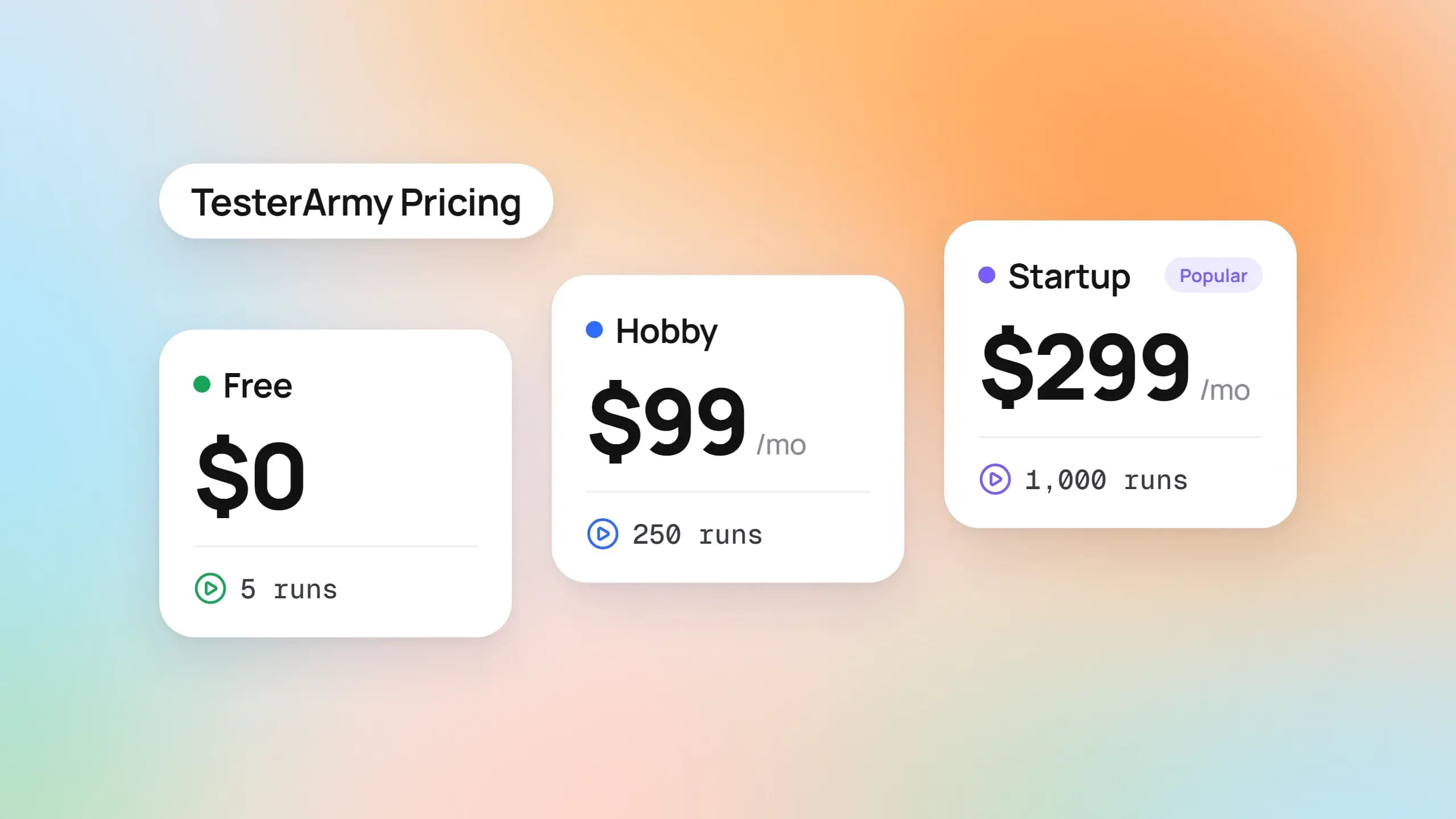
Four plans appear on the TesterArmy pricing page as of November 3, 2026: Free, Hobby, Startup, and Enterprise. Every plan supports web and mobile apps and allows unlimited members.
Below is the live page as it looked that day. Read down the cards and the pattern is plain: tiers differ in runs, concurrency, and project count, and in little else.
The 4 plans side by side
| Plan | Price | Test runs per month | Concurrent runs | Projects | Extras |
|---|---|---|---|---|---|
| Free | N/A | 5 | 1 | 2 | No credit card required |
| Hobby | $99/month or $1,000/year | 250 | 3 | 2 | GitHub, Slack, and webhook integrations |
| Startup | $299/month or $3,000/year | 1,000 | 10 | 5 | "Powered by the best frontier models" |
| Enterprise | Custom | Custom | Custom | Custom | SLA via Slack Connect, white-glove onboarding, SSO/SAML, custom integrations |
The Startup card carries a "most popular" tag, and a founder said the same thing in the Launch HN thread when asked about plans.
Monthly vs yearly billing
The page shows a yearly toggle labelled "Save 15%", and the plans and pricing docs give the exact figures: $1,000 a year for Hobby and $3,000 a year for Startup.
Twelve months of Hobby at the monthly rate would be $1,188, and Startup $3,588, so the yearly prices save $188 and $588. That is slightly more than the 15% the toggle promises.
You switch in the dashboard, and the docs say Stripe invoices the yearly price immediately and starts a new billing period from that day.
What every plan includes
The docs list the same baseline for all 4 tiers: unlimited members, web and mobile testing, and every integration. That covers GitHub, Slack, webhooks, the CLI, the API, and the MCP server.
Enterprise adds SSO and SAML, SLA support through Slack Connect, onboarding help, and custom integrations. The pricing FAQ also names self-hosting as an enterprise conversation.
Every number in that table is a count of test runs, and TesterArmy's definition of a run is narrower than you might assume.
What counts as a test run in TesterArmy pricing
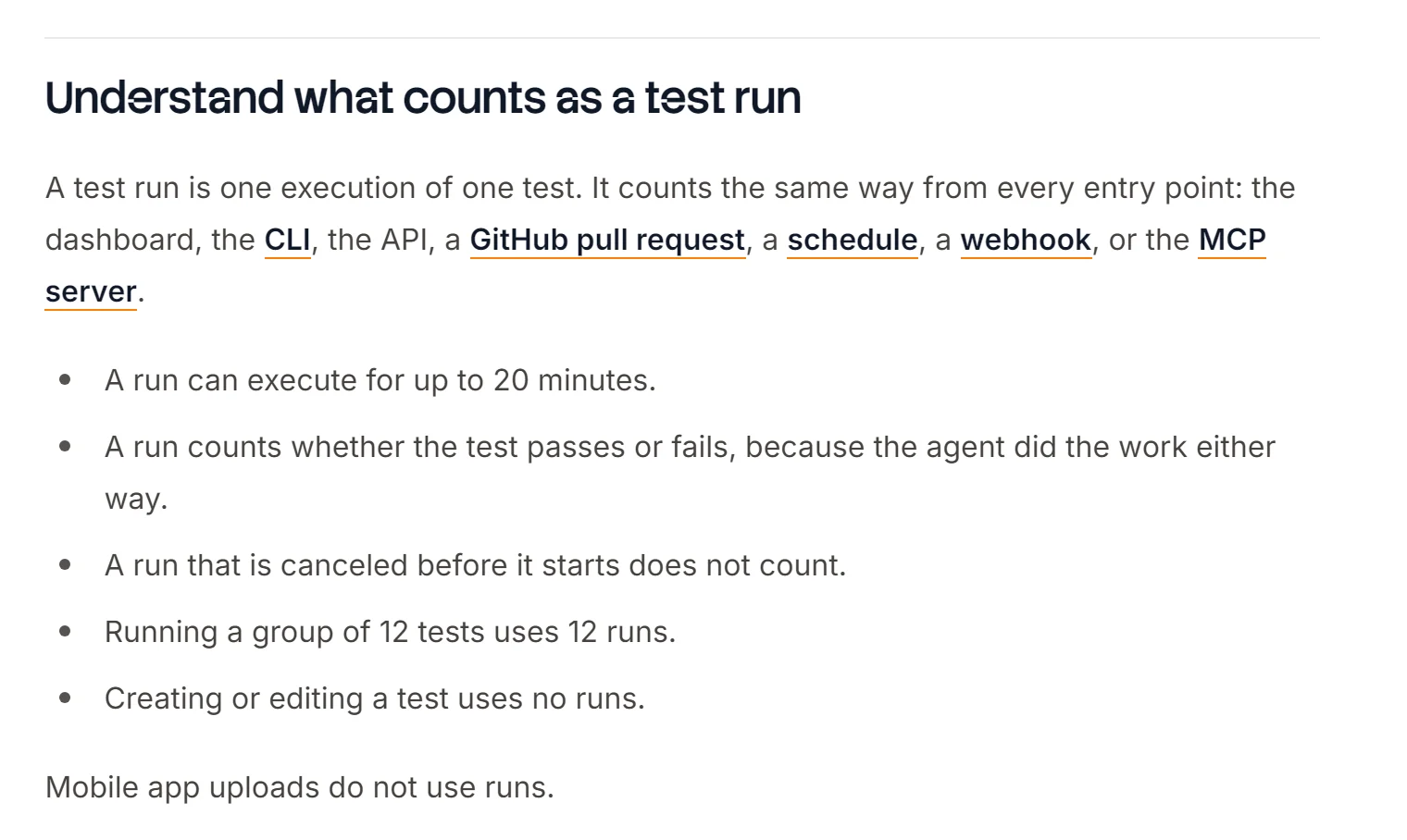
The docs define a run in 1 sentence: "A test run is one execution of one test." It counts the same way from every entry point, including the dashboard, the CLI, the API, a GitHub pull request, a schedule, a webhook, and the MCP server.
Here is the full counting rule from the official docs:
- A run can execute for up to 20 minutes.
- A run counts whether the test passes or fails.
- A run cancelled before it starts does not count.
- Running a group of 12 tests uses 12 runs.
- Creating or editing a test uses no runs.
- Mobile app uploads use no runs.
The second rule is the one that bites. The agent did the work whether the test passed or not, so a broken deploy that fails all 10 tests in a group still spends 10 runs, and the fix pushed an hour later spends 10 more.
A worked example: one pull request
Suppose a project has a regression group of 10 tests that runs on every preview deployment. The pull request testing docs warn that PRs with many quick pushes "can burn through test runs before anyone reads the results".
Say the team pushes twice a day on 22 working days. That one group uses 440 runs a month, which is past Hobby's 250 before anyone schedules a nightly run, and comfortably inside Startup's 1,000.
The Delay setting, on by default at 3 minutes, waits for a quiet period and tests only the latest commit, so a burst of 5 quick pushes costs 1 batch instead of 5. If your count looks high, check that setting before you change plans.
Concurrency is a queue, not a wall
Each plan also caps how many runs execute at once: 1 on Free, 3 on Hobby, and 10 on Startup. Extra runs queue and start when a running one stops.
Queued runs do not fail and do not cost extra. On Hobby, a group of 12 tests runs in 4 waves of 3, so you wait longer for the last result but pay the same 12 runs.
If you are used to choosing your own worker count, as in Playwright parallel execution, this is the part that changes. In the cloud, parallelism comes with the plan, and going from 3 to 10 concurrent runs costs $200 a month.
Once the count reaches the plan's ceiling, the platform's behaviour is strict, and it is worth knowing before a release week.
What happens when you hit the limit
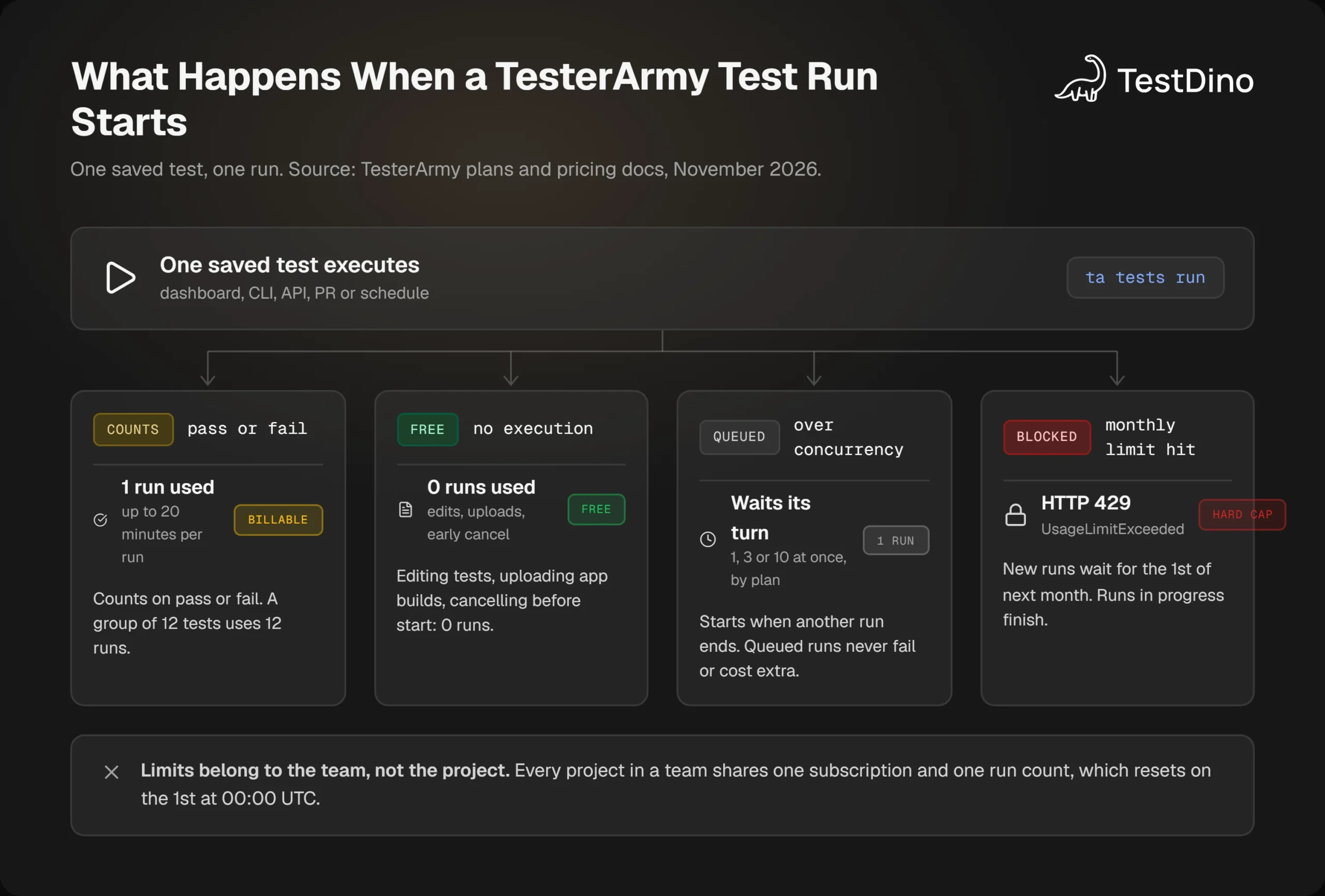
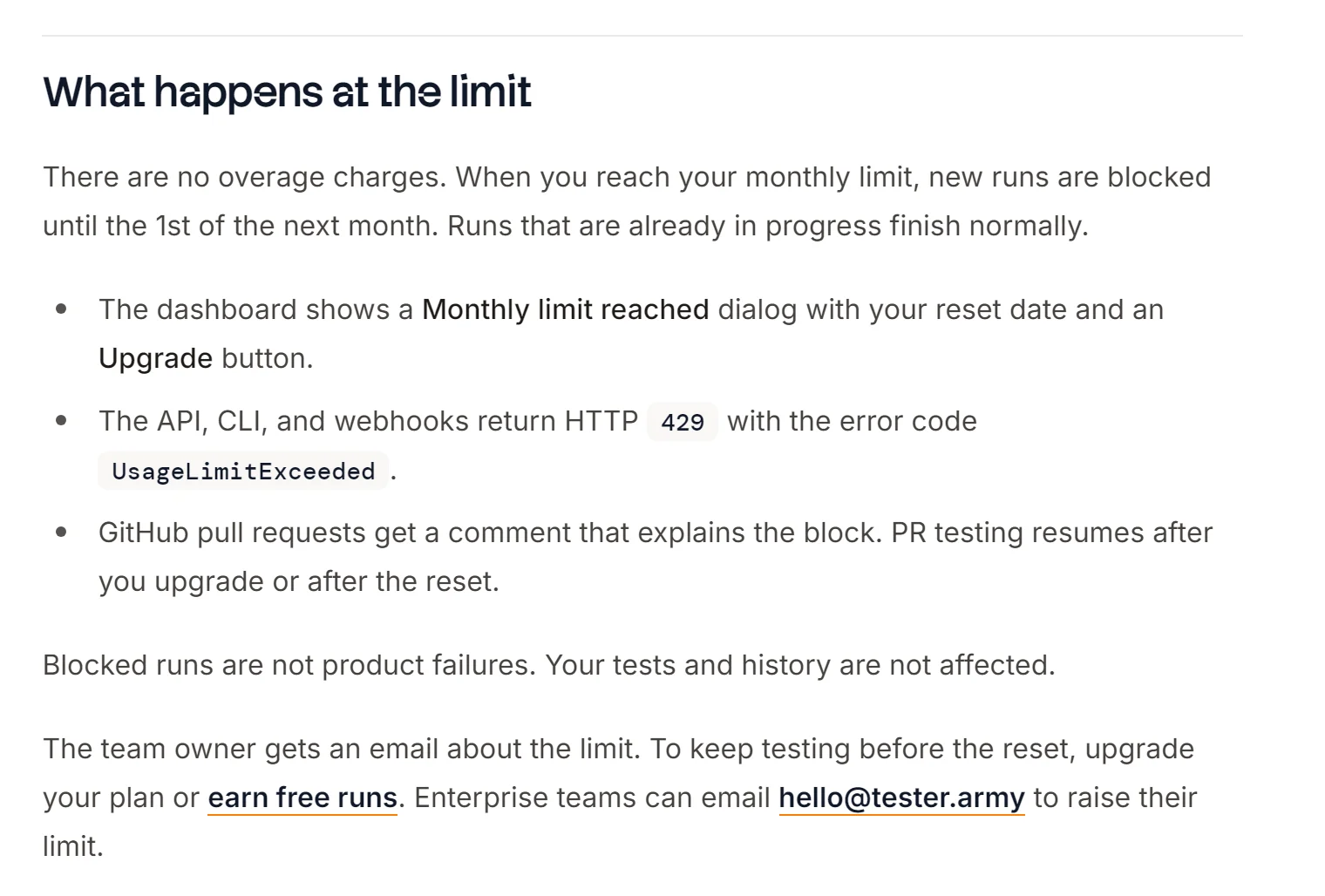
TesterArmy pricing has no overage charges. The docs say that when you reach the monthly limit, "new runs are blocked until the 1st of the next month", while runs already in progress finish normally.
The diagram below follows a single saved test from the moment it starts to the 4 outcomes the docs describe.
No overage, no rollover
A blocked run is visible everywhere. The dashboard shows a "Monthly limit reached" dialog, the API, CLI, and webhooks return HTTP 429 with the error code UsageLimitExceeded, and pull requests get a comment that explains the block.
Unused runs do not carry over. Plan runs reset on the 1st of each month at 00:00 UTC, on monthly and yearly plans alike, so the reset date is not your billing date.
There is no top-up button either. If you run out on the 20th, the documented choices are to upgrade a tier, wait for the 1st, or email the company for a custom limit.
Note: Limits belong to the team, not the project. All projects in a team share 1 subscription and 1 run count, and only your first team gets the Free plan. A second team needs a paid plan before it can run tests.
Referral bonus runs
There is 1 way to add runs without paying. Signing up through a referral link gives 25 bonus runs for 30 days, and when a referred person buys a paid plan, both sides receive 100 bonus runs.
Bonus runs are used after plan runs and expire on their own date instead of resetting on the 1st.
Upgrades, downgrades, and cancelling
Upgrading from Free opens Stripe Checkout, and upgrading from a paid plan charges the prorated difference, with the new limit applied immediately. Only a team owner or admin can change billing.
Downgrades apply from the next billing period. Cancelling keeps the plan active until the paid period ends, after which the team returns to Free with its tests, projects, and run history kept.
Those rules make a per-run price possible to calculate, even though the pricing page never prints one.
TesterArmy pricing per test run: the math
Divide each plan's price by its included runs and you get the lowest a run can cost on that plan, the rate you reach only when you use every run you paid for.
The chart compares that figure for monthly and yearly billing on the 2 self-serve paid plans.
Startup on yearly billing is the cheapest documented rate at $0.25 a run. Hobby on monthly billing is the most expensive at about $0.40, and every unused run in a quiet month pushes the real rate higher.
What a per-run price means for a PR workflow
Take the 440-run example from earlier and add a nightly production group of 10 tests. That adds 300 runs over a 30-day month, for 740 in total, which fits Startup and is nearly 3 times the Hobby allowance.
At Startup's monthly price those 740 runs cost $299, about $0.40 each, because the 260 runs you did not use are paid for anyway. The shape is familiar from Playwright CI cost optimization: fixed capacity, variable usage, and the gap between them is the real price.

Tip: Count a month before you pick a plan. Add up tests per group, groups per trigger, and triggers per day, then keep the 3-minute delay on for PRs. If you also run Playwright, the CI budget calculator in TestDino's free tools models the self-hosted side of the same bill.
What the founders say about the self-serve plans
In the Launch HN thread, a founder wrote that "the self serve options are currently only for lower usage" and that more plans would follow. Higher usage goes through a call, which the pricing FAQ also names for custom limits, self-hosting, and SSO.
Take them at their word. The $99 and $299 plans are sized for solo builders and small teams, which is what the cards say, and a team that already runs 1,000 PR tests a month has no self-serve option above Startup.
Above 1,000 runs a month the price is unpublished, so for a team at that scale the free framework stops being a side experiment and becomes the other quote on the table.
That covers the paid side. The free side has no price list at all, which makes it harder to cost, not easier.
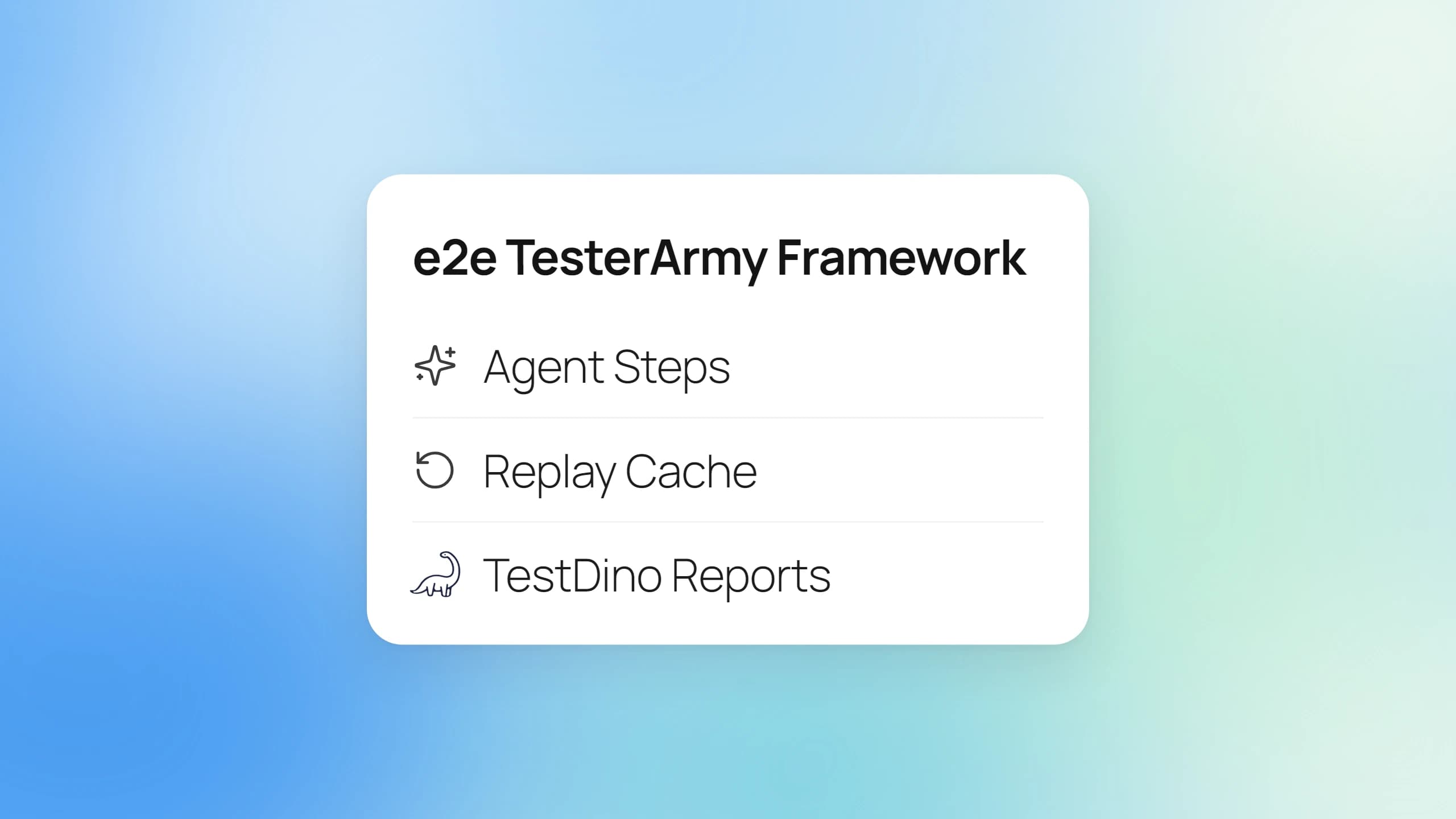
What you get free with e2e by TesterArmy
e2e by TesterArmy is an open source TypeScript framework for web and mobile tests, published on npm under the Apache 2.0 license. It runs on your machine or in your CI, and TesterArmy's own open source page states that it works without a TesterArmy account.
Free: the framework, the runner, and the engines
The free package is the whole framework: SDK, runner, CLI, the Playwright-based web engine, and a mobile engine for iOS simulators and Android emulators. When we pulled the numbers on November 3, 2026, the e2e repository had 12,678 stars and 75 open issues.
There is no usage cap in the framework, no seat count, and no account. The TesterArmy open source page confirms that e2e works without an account, and the launch post puts the model side plainly: "You pay your provider's price for tokens, with no added markup".
npx e2e init     # writes e2e.config.ts, an example test, and a coding-agent skill
npx e2e run      # the example test makes no model calls
Tests that use only locators and expect never touch a model. The docs state that "Tests without agent steps need no model", so a ported Playwright suite can run for nothing beyond CI minutes.
Not free: the model behind agent steps
Any step that asks the agent to act, assert, wait, or extract needs an AI model. You bring 1 of 3 things: an API key, a subscription you already pay for, or a local model.
The subscriptions page lists ChatGPT Plus or Pro, GitHub Copilot, OpenCode Console, and SuperGrok or X Premium+, under the line "Run agent steps on a plan you already pay for". Claude plans have no sign-in for other apps, though Max and Team plans can spend their monthly API credits.
For CI, the same page says to use API keys. The models page adds that any AI SDK provider with tool calls works, and that a local server such as Ollama connects through an OpenAI-compatible provider.
How the replay cache keeps the bill down
What keeps that bill small is replay. Once a later check verifies an agent.act step, e2e records the actions it took, and the next run repeats them without asking the model. The launch post says a replayed step "runs at the speed of a scripted test and uses no tokens".
The exceptions matter. According to the caching docs, agent.assert, agent.waitFor, and agent.extract always run live, and so does any retry: "A retry doesn't replay, so it runs every goal live". A retry policy carried over from Playwright retries puts the model back in the loop on every flaky test.
The expensive failure mode is a stale recording. The docs warn that by default "the agent takes the step over, and every CI run pays for model calls until someone records it again".
CI=1 npx e2e run --strict-cache   # a stale recording fails with REPLAY_STALE and makes no model call
npx e2e run --debug               # per-step table: duration, model calls, tokens, and cost
Note: e2e init adds .e2e/cache/ to .gitignore, so CI starts with no recordings and every agent step runs live. To get replays in CI, commit the cache directory and review its entries like test data, as the docs advise.
Hosted browsers and devices are a separate bill
e2e can run on third-party hosted browsers and devices. The integrations page lists Kernel, Lightpanda, smol machines, EAS Simulators, Limrun, TestMu AI, and BrowserStack.
Each is a separate vendor with a separate invoice. e2e drives them but does not include them, and that gap is the nearest the free framework comes to the infrastructure the paid cloud folds into a plan.
So the free framework's bill is model tokens plus whatever infrastructure you rent, and the cloud's bill is a flat run count. The next section lines the two up feature by feature.
Free e2e vs the paid cloud: a side-by-side
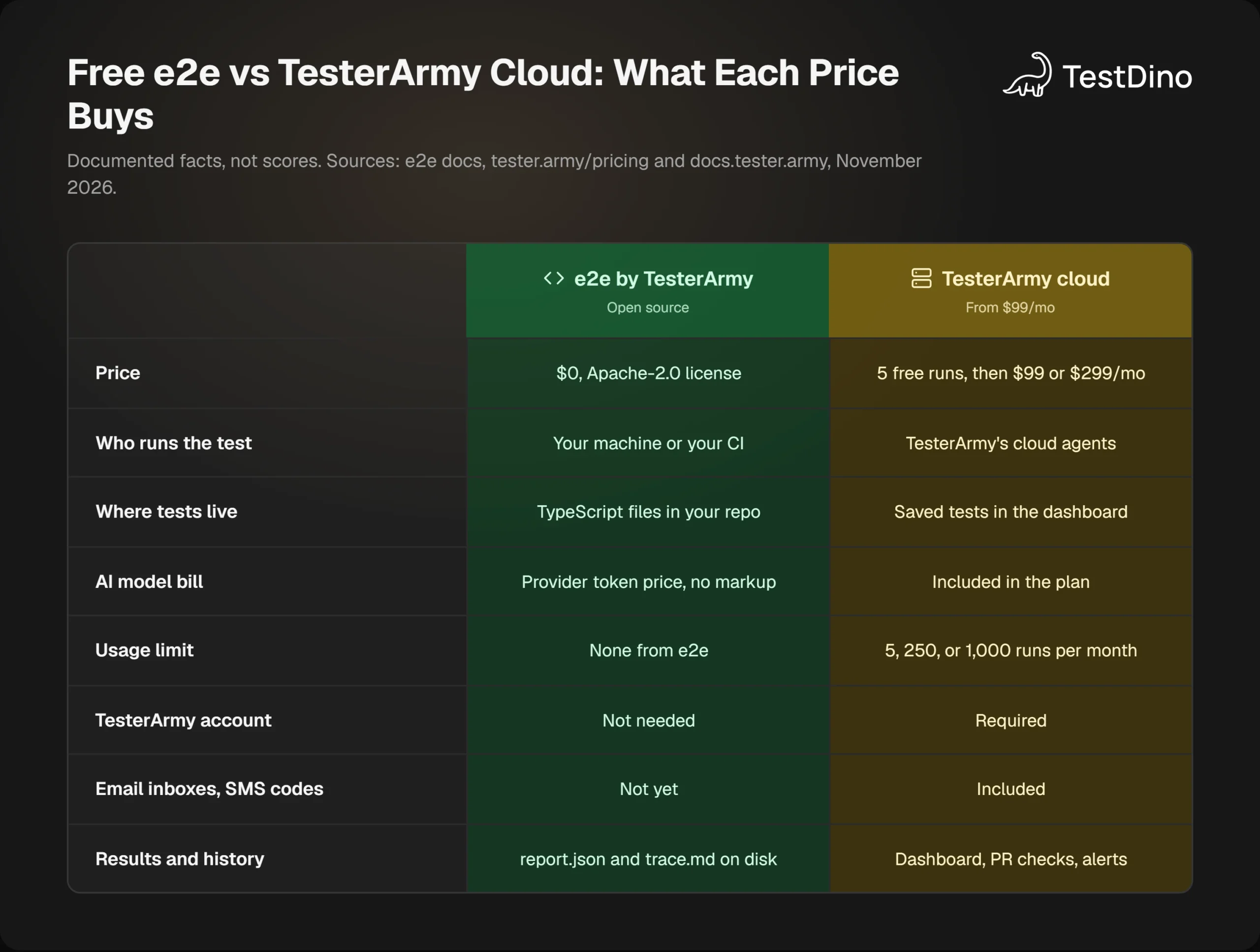
The cloud sells runs on infrastructure it manages. The framework gives away the engine and leaves infrastructure, models, and results to you. Every cell in the matrix below comes from one of the 2 sets of official docs.
One row needs context. "Not yet" for inboxes and SMS codes is the wording of TesterArmy's own guide for moving from the cloud to e2e, which maps each hosted feature to its framework equivalent.
What the paid cloud does that e2e does not
The hosted platform handles the sign-in flows that a self-run framework struggles with. The TesterArmy docs list Google and password auth, email and SMS one-time codes, generated inboxes, real phone numbers, file uploads, and captchas.
It also runs an exploration agent on pull requests, with steps "Generated per PR from the change", monitors production on a schedule, and posts to Slack, Discord, Linear, Jira, and ClickUp. None of that needs a line of code in your repo.
In the migration guide, the hosted inbox credential and temporary email login are marked "Not yet" on the e2e side, browser and simulator regions have "No equivalent", and group schedules map to "a scheduled CI workflow".
What e2e does that the cloud does not
The framework keeps everything in your repository. The guide's summary is direct: "Tests run on your machine or in your CI, not in TesterArmy's cloud".
You can mix scripted locators with agent goals in 1 test, replay verified steps for free, and keep passwords away from the model, since "The model never sees a password". Hosted tests are plain-language steps with no locator path.
| Hosted TesterArmy step | e2e equivalent |
|---|---|
| act | agent.act('...'), or a locator call for a known control |
| assert | agent.assert('...'), plus a locator assertion where a label names the end state |
| screenshot | app.screenshot('label') |
| login | test.setup that calls session.save() |
| group | describe with tags |
| Group schedule | A scheduled CI workflow |
The 2 products are converging
This is not a permanent split. The launch post says the framework "will be the open foundation that powers TesterArmy in the future", and the migration guide already lets a coding agent read your cloud tests through the TesterArmy MCP server and rewrite them as e2e files.
Which means the pricing question is really "who runs it", and whoever runs it also has to keep the results. That is the part the free path leaves open.
Where your e2e results go when you skip the cloud
The paid cloud includes a dashboard, PR checks, run videos, and history. The free framework ships 4 built-in reporters, list, json, junit, and markdown, plus a pull request comment from @e2e-dev/github.
Everything else lands on disk. Each run writes report.json, and failed tests get a trace.md page with the agent's last turns and the screen at failure. There is no built-in HTML report, and the CI docs state that "e2e can't merge shard reports yet".
Teams coming from Playwright notice this first, because Playwright sharding merges reports today and most test reporting tools keep history without being asked. The e2e reporter contract is public, though, so a third-party reporter plugs the gap with 1 line of config.
import type { E2EConfig } from 'e2e';
import { testdino } from '@testdino/e2e';
export default {
  targets: [/* your targets */],
  reporters: ['list', testdino()],
} satisfies E2EConfig;
The TestDino e2e reporter uploads each finished run with its test cases, retries, steps, errors, console output, screenshots, and videos. Set the API key with TESTDINO_TOKEN and run npx e2e run as usual.
What a dashboard adds to a free framework
Sharded runs merge when every machine sets the same TESTDINO_CI_RUN_ID, which closes the gap the e2e docs admit. Web traces from e2e are standard Playwright traces, so they open in the same viewer that Playwright Trace Viewer files use.
History survives reruns, and with e2e that history has a price attached, because every retry runs the agent live. Knowing which tests flip across runs is what flaky test detection tools are for, and on a per-run bill it is the first report you reach for.
Two limits are in the docs: results appear after the run finishes rather than streaming in, and trace.md and MP4 videos are not uploaded yet. TestDino starts with a free plan, so the free-framework path can stay free from the first test to the dashboard.
Tip: On GitHub Actions, build TESTDINO_CI_RUN_ID from the workflow run ID and the run attempt. A re-run of the workflow then gets its own merged run instead of folding into the previous attempt.
That leaves the decision itself, and it is mostly a question of who you want owning the infrastructure.
Which one should you pay for?
TesterArmy pricing makes the most sense when infrastructure is the thing you want to stop owning. The free framework makes the most sense when the repo is where you want tests to live.
The 2 panels below are a fit test, not a verdict, and the deciding line in each is usually the first one.
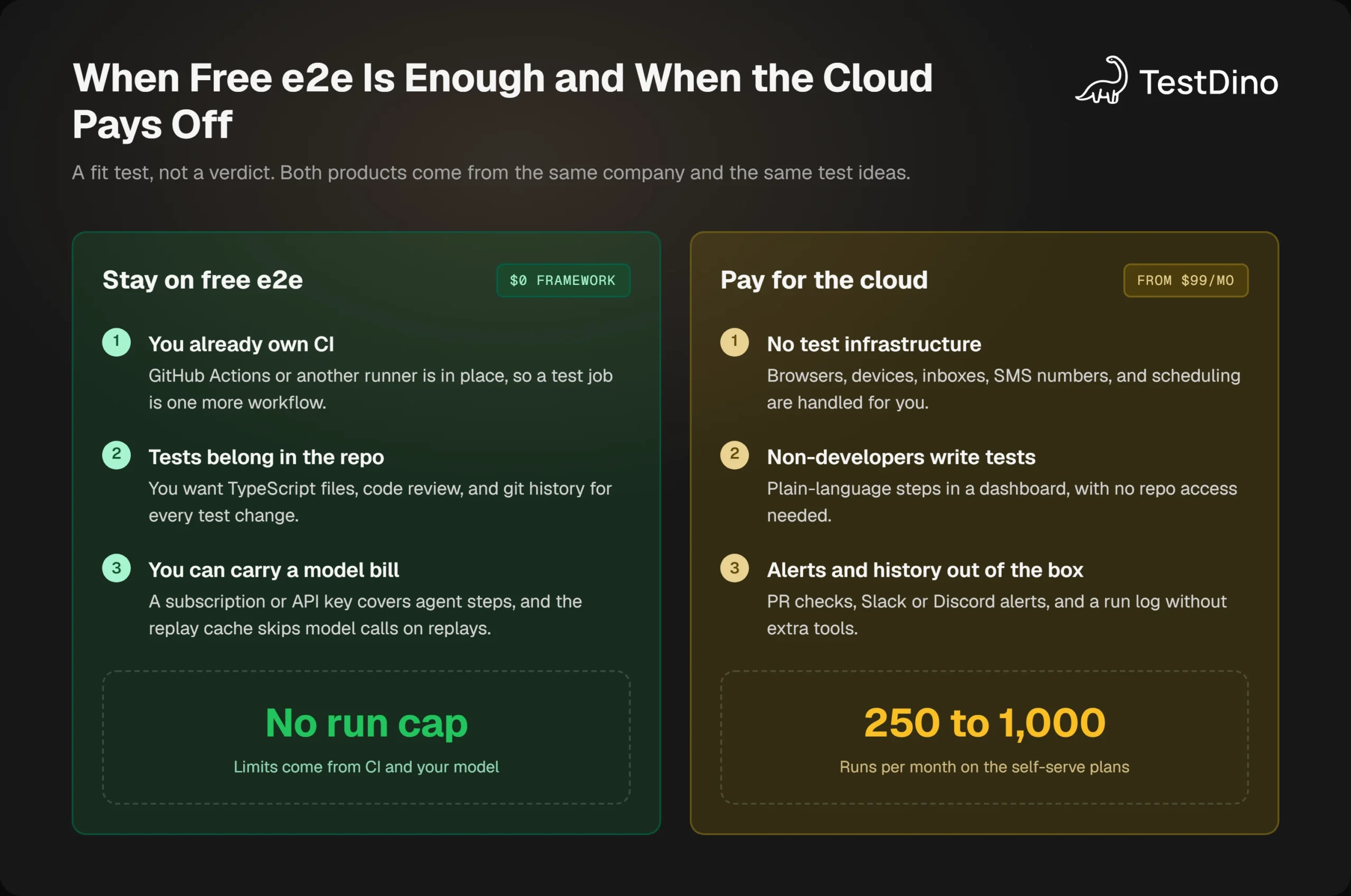
Stay on free e2e when
- You already run CI, such as Playwright in GitHub Actions, and can add 1 more job.
- Your tests should be TypeScript files with code review and git history.
- You have a model subscription or API key, and you will commit the replay cache so CI replays make no model calls.
- You test native mobile apps on simulators or emulators you control, something Playwright mobile testing cannot do.
Pay for the cloud when
- Nobody on the team wants to own browsers, devices, inboxes, SMS numbers, or schedules.
- Product managers or QA analysts write tests in plain language without repo access.
- You want PR checks, Slack alerts, and run history without adding a reporting tool.
- Your sign-in flows need real email inboxes and SMS codes, which the e2e migration guide marks "Not yet".
Use both when
The 2 products share the same test ideas, and the company publishes a guide for moving between them. A team can prototype flows in the cloud, port the stable ones to e2e files, and keep the cloud for exploration runs on PRs.
Coding agents fit either path. Claude Code and Cursor already drive e2e through its MCP server, the same pattern as Playwright MCP, and if an agent writes plain Playwright tests instead, the open source Playwright skill covers that side.
Whichever side you pick, a per-run bill rewards the same habits: fewer redundant triggers, a delay on noisy PRs, and a quick answer to whether a failure is new or flaky. Both bills grow with runs you did not need, in dollars on one side and in tokens and CI minutes on the other.
Conclusion
TesterArmy pricing is a per-run subscription: 5 free runs, 250 for $99 a month, 1,000 for $299, and custom above that, with no overage and a hard block at the limit. A run is 1 execution of 1 test, pass or fail, for up to 20 minutes.
The free e2e framework is the same company's engine without the cloud. It costs nothing to license, charges only what your model provider charges, and replays verified steps without tokens, but it leaves infrastructure, inboxes, and results to you.
Count a real month of runs before choosing. If the count fits a plan and you want zero infrastructure, pay for the cloud. If the repo is home and you already have CI, run e2e free and send its results somewhere that keeps history.
If you are still weighing the wider field, our roundup of agentic testing tools covers the alternatives, and free open source test reporting tools covers the $0 options for results.