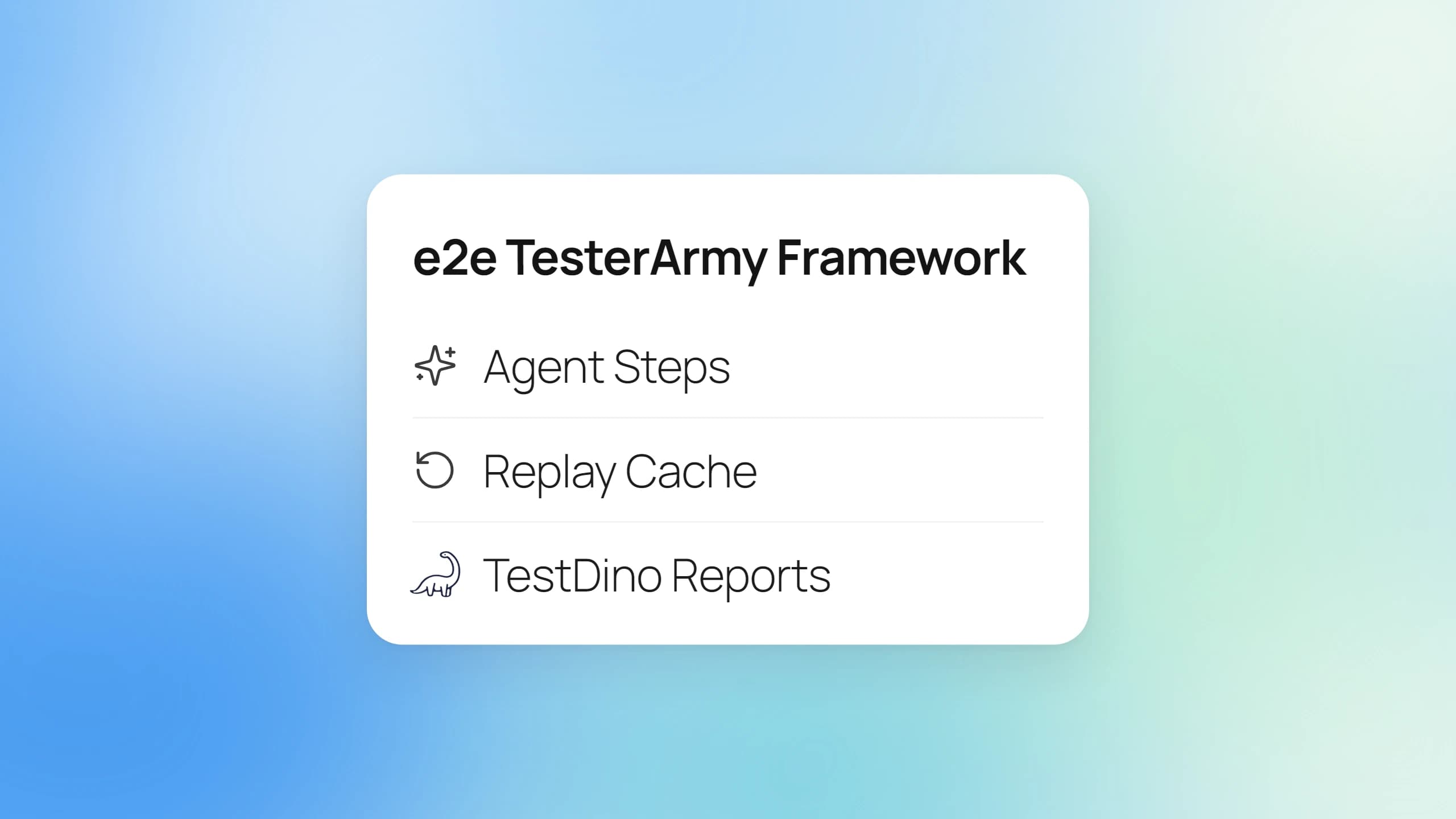
e2e TesterArmy Framework Explained: Agent Steps, Replay Cache, and TestDino Reports
Curious about e2e TesterArmy? This guide covers agent steps, the replay cache, Playwright differences, CI setup, and TestDino reporting.
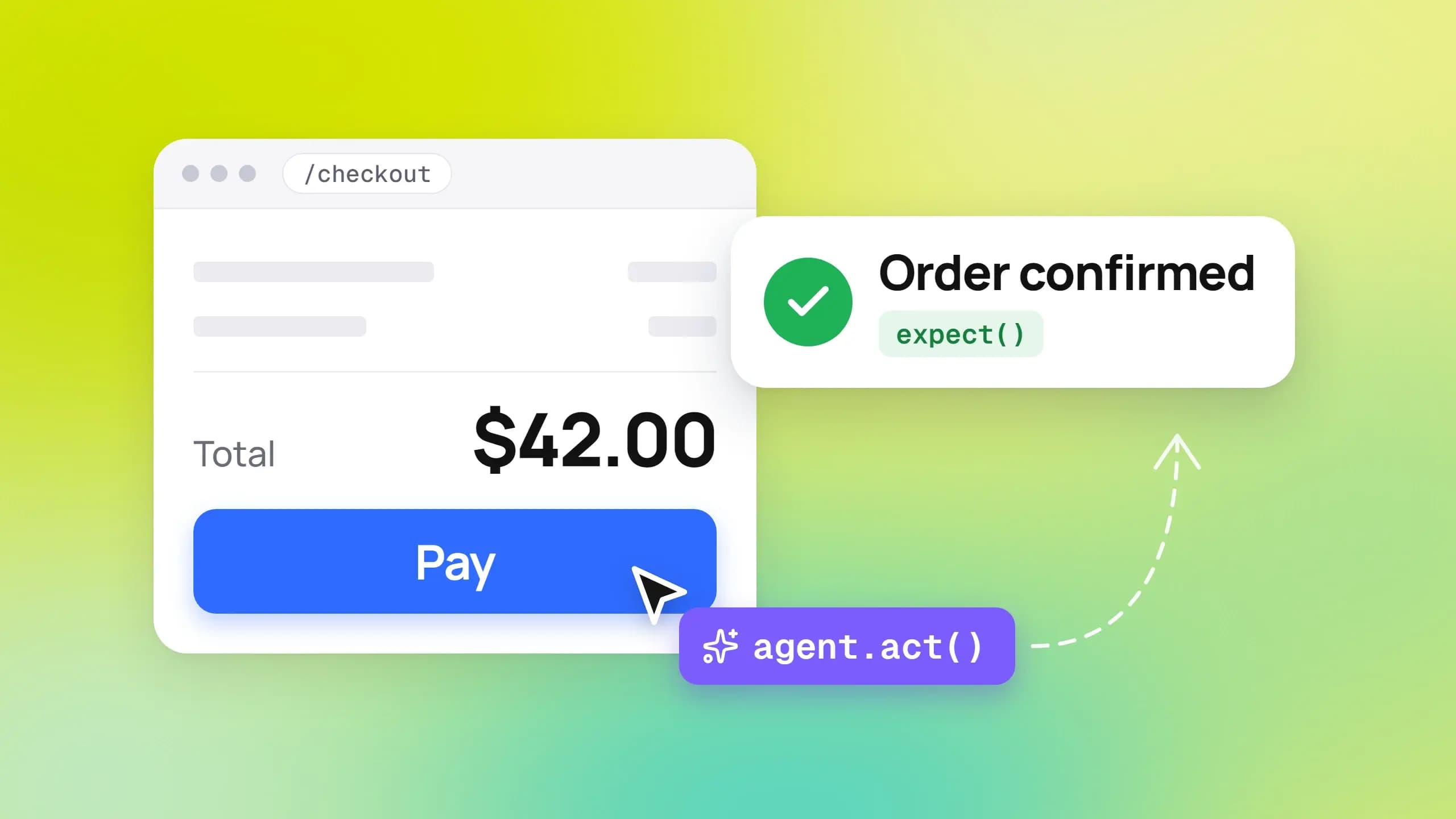
A test step that reads "upgrade the workspace to the Pro plan" is a real line in e2e TesterArmy, and an AI helper clicks through your app to carry it out. The free testing tool went public on October 1, 2026.
The catch is trust and cost. Teams running Playwright end-to-end testing want to know if this replaces their suite, what a model call adds to the CI bill, and where the evidence goes when a test fails.
This guide uses the official docs and registry data to show what e2e is, how its replay cache limits AI spend, how it compares with Playwright and other agentic testing tools, and how TestDino reports every run.
What is the e2e TesterArmy framework?
e2e TesterArmy is an open-source, Apache-2.0 TypeScript testing framework for web, iOS, and Android apps. A test can mix plain-language goals that an AI agent completes with exact locators and assertions, in the same file. Web tests drive browsers through Playwright, and mobile tests run on simulators and emulators.
The name itself needs a disclaimer. For years "e2e" only meant end-to-end testing, the practice of checking a whole user journey. Now it is also the name of a specific package on npm, published from the tester-army/e2e repository.
The npm listing describes it as an SDK, runner, and CLI for agentic end-to-end testing. The README adds that tests without agent steps need no model at all, you bring your own subscription, API key, or local model for the steps that do, and the launch post promises no markup on tokens.
Who builds e2e by TesterArmy and why
TesterArmy is a Y Combinator-backed company that sells an AI QA service, where agents run plain-language tests in its cloud. Its CTO, Oskar Kwasniewski, wrote the official launch post that frames e2e as the open foundation under that service.
The repository was created on July 22, 2026, and launched publicly 10 weeks later. By November 2, 2026, the GitHub API reported 12,475 stars and 646 forks for an AI testing agent project still pre-1.0, against 99,079 stars for Playwright after nearly seven years.
Pre-1.0 is not a formality here. The README warns that APIs and config "can still change between minor releases", and the npm registry shows version 0.22.0 shipped on October 30, 2026, with nightly builds landing daily.
What ships in the box
The project is a set of small packages rather than one dependency. The core package holds the SDK, runner, and CLI, and engines plug in beside it.
| Package | What it does |
|---|---|
| e2e | SDK, test runner, and CLI |
| @e2e-dev/web | Browser engine for Chromium, Firefox, and WebKit through Playwright |
| @e2e-dev/mobile | iOS simulator and Android emulator engine through agent-device |
| @e2e-dev/github | Reporter that posts results as a pull request comment |
| @e2e-dev/decision | Decision-model executors, plus a filter that skips tests a PR is unlikely to affect |
| @e2e-dev/acp | Runs agent steps on your own coding agent (Claude Code or Codex) |
| Hosted integrations | Kernel, Lightpanda, smol, TestMu AI, BrowserStack, Limrun, and EAS packages for hosted browsers and devices |
The mobile side leans on agent-device, an open-source device layer from Callstack that the GitHub API lists at 5,223 stars. One API covers both targets, so a locator written for the web works on a phone simulator.
Knowing what the packages are is one thing. The real difference shows up in how a single test is written and executed.
How an e2e test actually runs
Every step in an e2e test falls into one of 3 groups, and the group decides whether a model gets called. The core concepts page calls them goals, judgments, and locators.
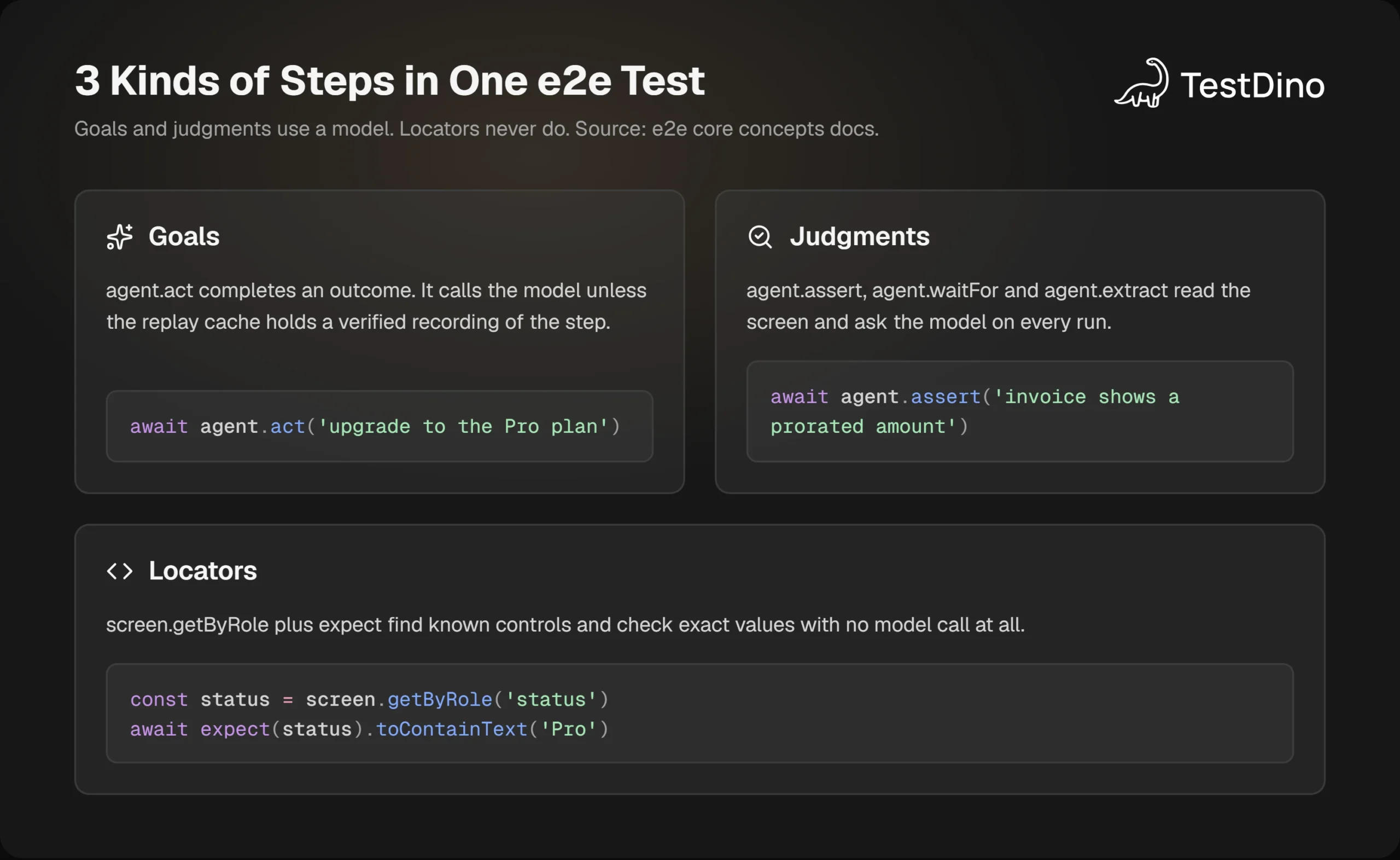
Here is the example test the project uses in its own README. It opens a page, hands one goal to the agent, asks for a semantic check, and finishes with a deterministic assertion.
import { test, expect } from 'e2e';
test('a member upgrades to Pro', async ({ app, agent, screen }) => {
  await app.open('/settings/billing');
  await agent.act('upgrade the workspace to the Pro plan');
  await agent.assert('the invoice preview shows a prorated amount');
  await expect(screen.getByRole('status')).toContainText('Pro');
});
The fixtures replace Playwright's page. You get app for navigation, agent for AI steps, and screen for Playwright locators such as getByRole and getByLabel. Web-only calls live on a browser fixture.
What the agent sees and how a step ends
An agent.act call does not receive your HTML. The agent steps page explains that the model gets a redacted text snapshot of roles, names, text, and states, plus a masked screenshot only when you turn on vision.
The model then acts through a closed set of tools such as tap, type, press, select, and scroll. After 3 failed actions in a row it is told to change approach, and after 5 it must return a verdict of passed, failed, or blocked.
Budgets keep runaway steps in check. By default an act gets 25 model calls, 25 actions, and 120 seconds, while an assert gets 2 calls and 30 seconds, per the agent reference.

Tip: Give each agent.act one outcome, then follow it with an expect on a known control. The check is what fails when the agent takes a wrong turn, and it is also what makes the step eligible for replay caching.
Judgments that cannot be talked into passing
The judge is deliberately kept in the dark. When agent.assert, agent.waitFor, or agent.extract runs, it sees only the instruction, the current screen, and the agent context, never the acting agent's summary of what it did.
If the screen does not show enough evidence, the result is ASSERTION_INCONCLUSIVE rather than a guess. You can even route judgments to a different model with the judge option, and the report names which model made each call.
Secrets stay out of the prompt
Passwords are handled as a Secret handle with no plaintext accessor. The security docs state that every known secret value becomes <secret:name> in model input, reports, and console output, and the runner types the real value itself.
The same rules treat everything the app shows as untrusted. Page content cannot grant the model new tools, credentials, or a larger budget, and a call that breaks policy, such as navigating to a file: URL, fails with POLICY_DENIED.
Those guardrails explain how a step runs safely. The next question is how often it has to run through a model at all.
How the replay cache keeps e2e TesterArmy affordable
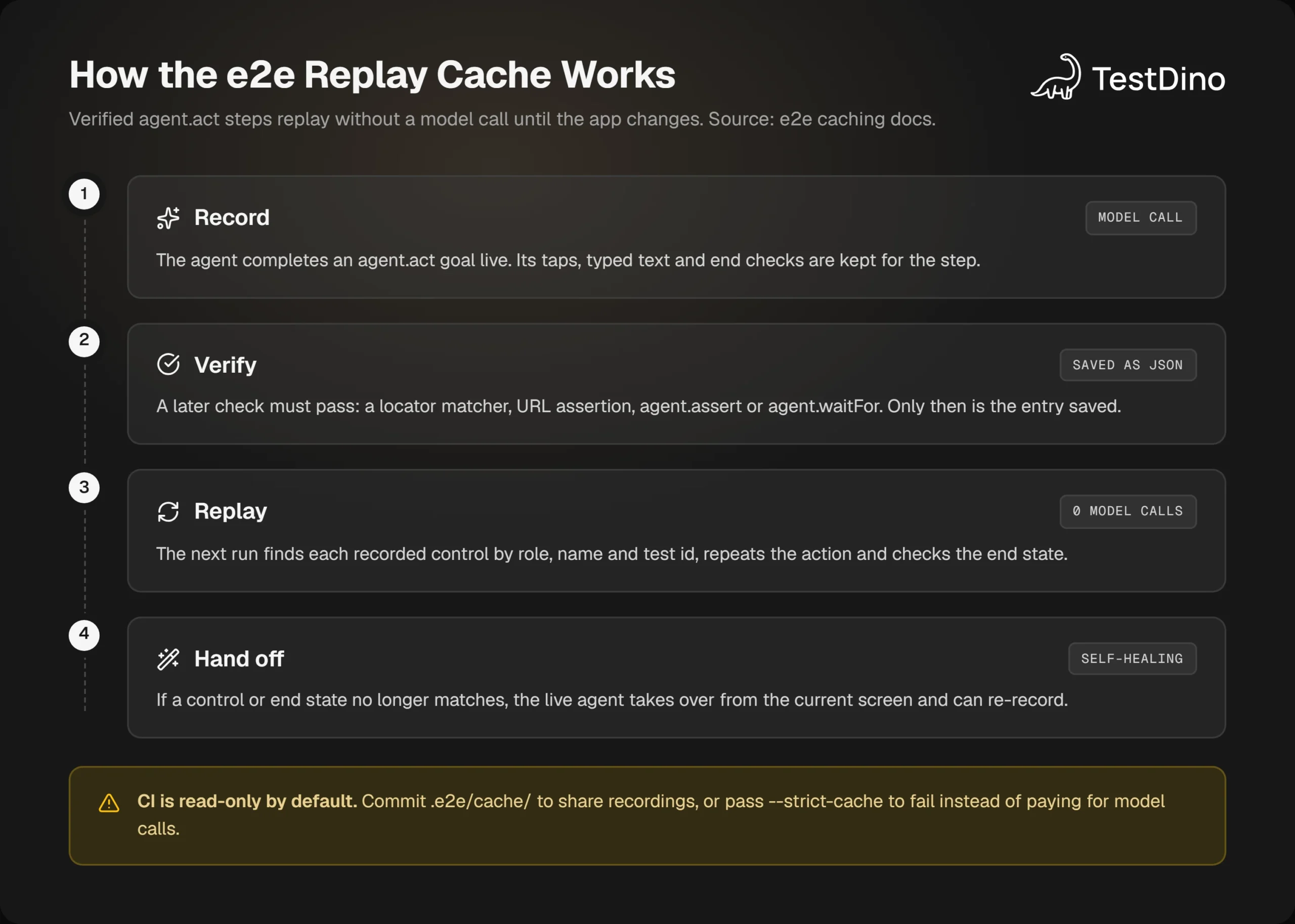
Calling a model on every step of every CI run would be slow and expensive. The replay cache is how the e2e TesterArmy framework avoids that, and it decides most of what you will pay.
What gets recorded, and what never does
A recording is saved only when a check after the act passes. The caching docs count locator matchers like toHaveText, URL assertions, agent.assert, and agent.waitFor as verification. A plain value check, expect.poll, an extract, or the test simply passing do not count.
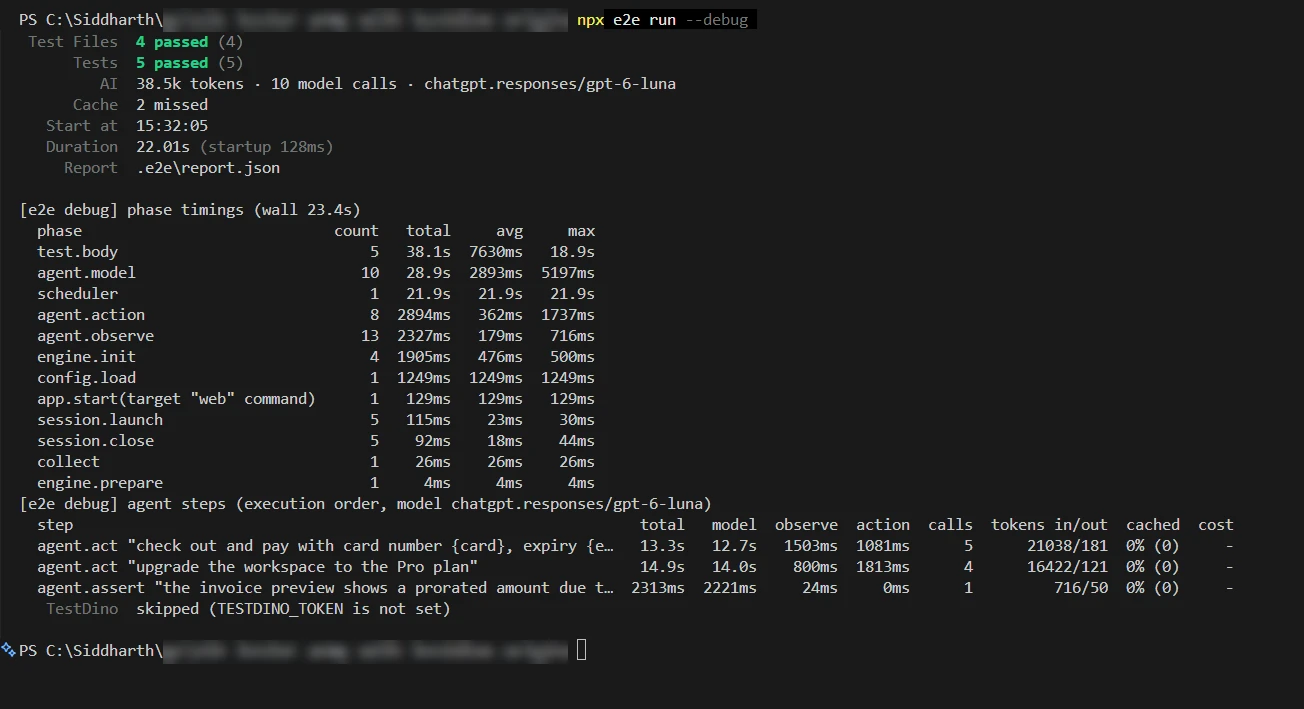
Only agent.act replays. The judgment methods always call the model, so a suite full of agent.assert lines will spend tokens on every run no matter how warm the cache is. Using expect for exact checks is how you keep that bill down.
Entries are JSON files in .e2e/cache/, named by a hash of their key. They hold actions, target descriptions, typed text, and end checks, but no prompts, screenshots, or secret values. Recordings are truncated past 50 actions, and entries over 1 MiB are rejected.
Replay, hand-off, and healing
On the next run, e2e checks that the starting route matches, finds each recorded control by role, name, test id, and context, repeats the action, and checks the end state. The run summary then reports each step as replayed, handed off, or missed.
When a control is gone, replay looks for it for up to 15 seconds and then hands the step to the live agent from the current screen. The self-healing page is explicit that a stale recording is a hand-off, "never a tap on the closest control".
That behavior is closer to a runtime fallback than to the locator-rewriting style of self-healing tests in Playwright. The test file is never edited. What gets updated is the recording, and only after a later check passes again.
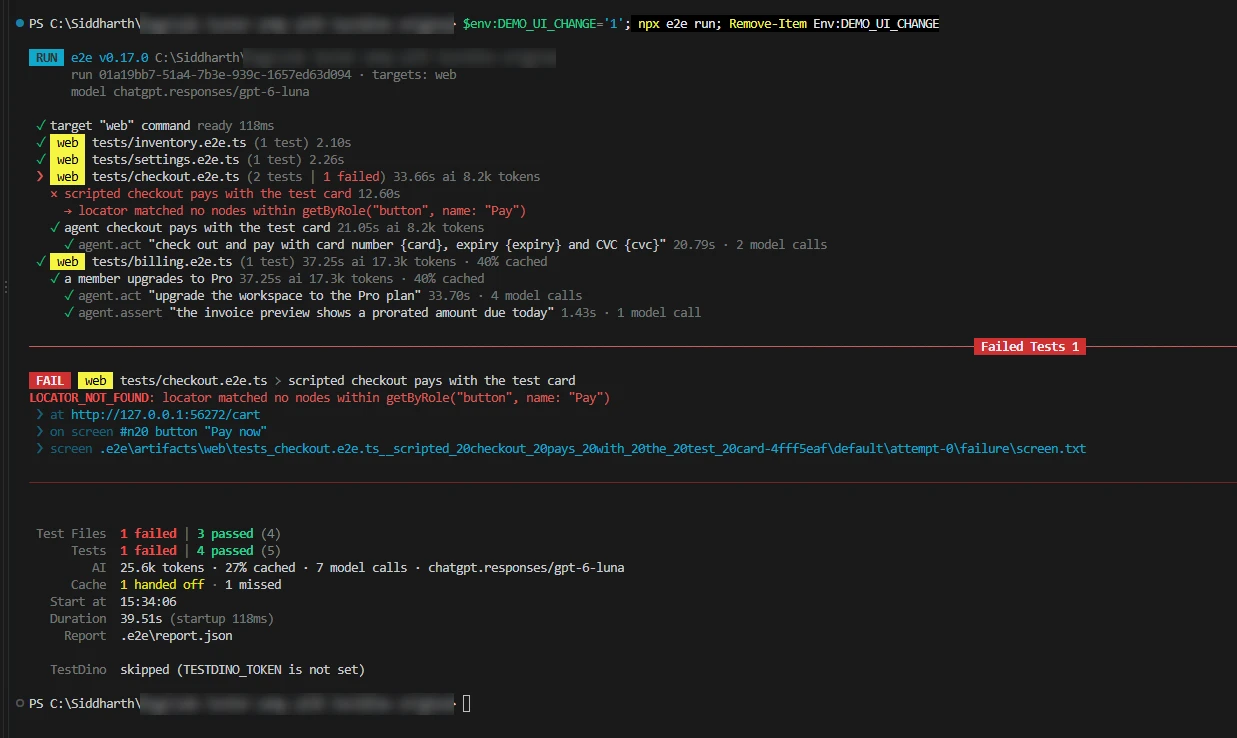
We tried this on a 5-test demo shop. The first live run made 10 model calls and used 38.5k tokens. The second run replayed both agent.act steps with 0 model calls, and the only call left was the agent.assert, about 700 tokens.
Then we renamed the Pay button to Pay now. The scripted checkout failed with LOCATOR_NOT_FOUND, and the error named the button that was on screen instead. The agent version of the same checkout handed off to the live agent, spent 2 model calls, and passed.
Cache modes and the CI budget question
| Mode | Replays | Records | Default |
|---|---|---|---|
| read-write | Local runs | ||
| read-only | CI, when cache is unset | ||
| off | One run with --no-cache |
The init command adds .e2e/cache/ to .gitignore, so CI starts with no recordings and every agent step runs live. To share replays, remove that line, commit the directory, and review entries in pull requests like test data.
npx e2e run --no-cache              # run every agent step live
npx e2e cache stats                 # entry count and store size
CI=1 npx e2e run --strict-cache     # fail with REPLAY_STALE instead of calling the model
The --strict-cache flag is the one to remember for Playwright CI cost optimization habits. Without it, a stale recording quietly hands the step to the agent, and every CI run pays for model calls until someone records it again.
Note: Changing the model does not invalidate a recording. Renaming the test, the describe group, or the target, moving the file, or changing the instruction, params, engine, or app identity does. Retries never replay, so pass --retries 0 while you iterate on a test.
With the cost model clear, the install itself takes a few minutes.
How to set up e2e TesterArmy in 5 steps
The quickstart promises a first passing test in about a minute. These are the steps it describes, with the version requirements that trip people up.
- Check your runtime. You need Node.js 24.8 or newer, or 22.22.3 or newer on Node 22. On Windows, the docs say to run e2e inside WSL. Our demo ran natively on Windows 10 with Node 22.16 and e2e 0.17.0, which worked but is not a supported path.
- Scaffold the project. Run npx e2e init and pick an engine (web or mobile) and a model provider, or none. It writes e2e.config.ts, an example test, the agent skill, and MCP config.
- Point the config at your app. Set the target URL and, if you want agent steps, a model under agents.default.
- Write a test file that matches tests/**/*.e2e.ts.
- Run it with npx e2e run. The generated example makes no model calls, so it needs no API key.
npx e2e init
npx e2e run
The generated config for a web target looks like this. The model line uses the exact example from the docs, which routes through Vercel AI Gateway and reads AI_GATEWAY_API_KEY from your shell.
import type { E2EConfig } from 'e2e';
import { web } from '@e2e-dev/web';
import { gateway } from 'ai';
export default {
  targets: [
    {
      name: 'web',
      engine: web({ browser: 'chromium' }),
      app: { url: process.env.APP_URL ?? 'http://localhost:3000' },
    },
  ],
  agents: { default: { model: gateway('openai/gpt-6-luna-fast') } },
} satisfies E2EConfig;
Choosing a model without a new bill
The models page lists four routes: Vercel AI Gateway, OpenRouter, a direct provider key through an AI SDK package, or a local OpenAI-compatible server such as Ollama. Any provider that supports tool calls works.
Subscriptions are the fifth option. Running npx e2e login openai signs in with a ChatGPT Plus or Pro plan, and GitHub Copilot, OpenCode Console, and SuperGrok are also supported. Claude plans are not, so Anthropic models go through an API key instead.
One trap we hit: with Gemini 2.5 Flash's thinking left on, a single agent.assert call ran past its 30-second budget and failed with STEP_TIMEOUT. Setting the provider's thinking budget to 0 through providerOptions brought the same judgment down to under 2 seconds.
Sign-in and sessions
There is no storageState file. Sign-in moves into a test.setup that saves a named session, which later tests restore, and sessions are encrypted and deleted at cleanup. If you follow the usual Playwright authentication pattern, plan to rewrite that part.
Coding agents get a skill and an MCP server
The init wizard copies an e2e skill into .agents/skills/e2e/ and registers an MCP server in .mcp.json for Claude Code and .cursor/mcp.json for Cursor. Running npx e2e mcp gives the agent a live session to check locators against the real screen before writing them.
Teams that would rather have an agent write plain Playwright tests can use the same workflow with Claude Code with Playwright and the open-source Playwright skill.
Once a test runs locally, the obvious question is what you gain and lose compared with the Playwright suite you already have.
e2e TesterArmy vs Playwright: what changes and what stays
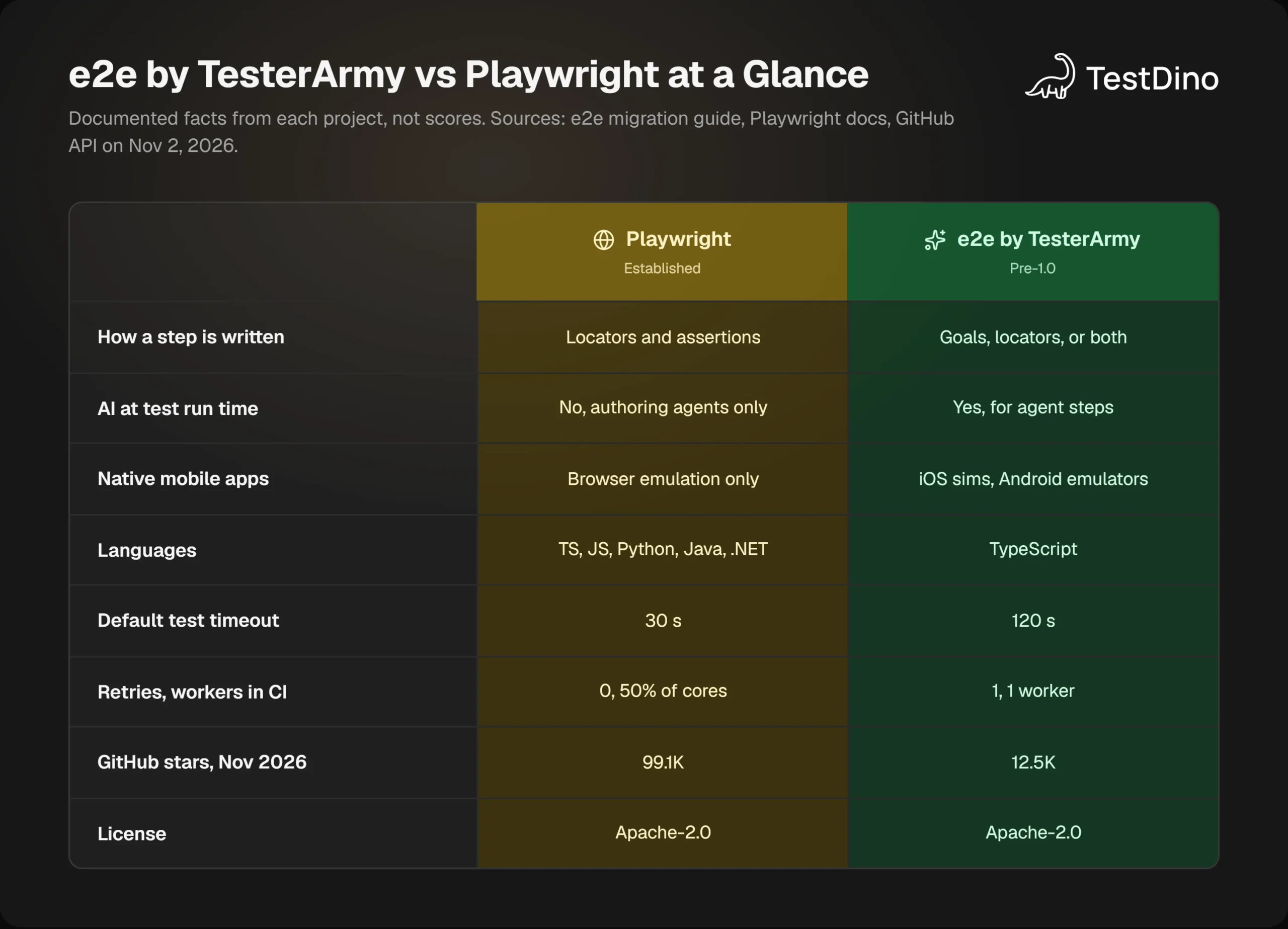
The web engine of e2e is Playwright, so the comparison is about the runner, the API, and the agent, not the browser automation underneath.
Same locator vocabulary, stricter matching
The Playwright migration guide maps getByRole, getByLabel, getByText, getByTestId, and getByPlaceholder directly onto screen. Page objects keep their shape, taking screen and browser instead of page.
Two behaviors change on purpose. String names are exact and case-sensitive, where Playwright matches a case-insensitive substring, and a query that hits several elements throws LOCATOR_AMBIGUOUS instead of silently taking the first match.
Different defaults for a different kind of step
Agent steps need more room than a scripted click, so the defaults move. The Playwright timeouts you tune today will need another look after a migration.
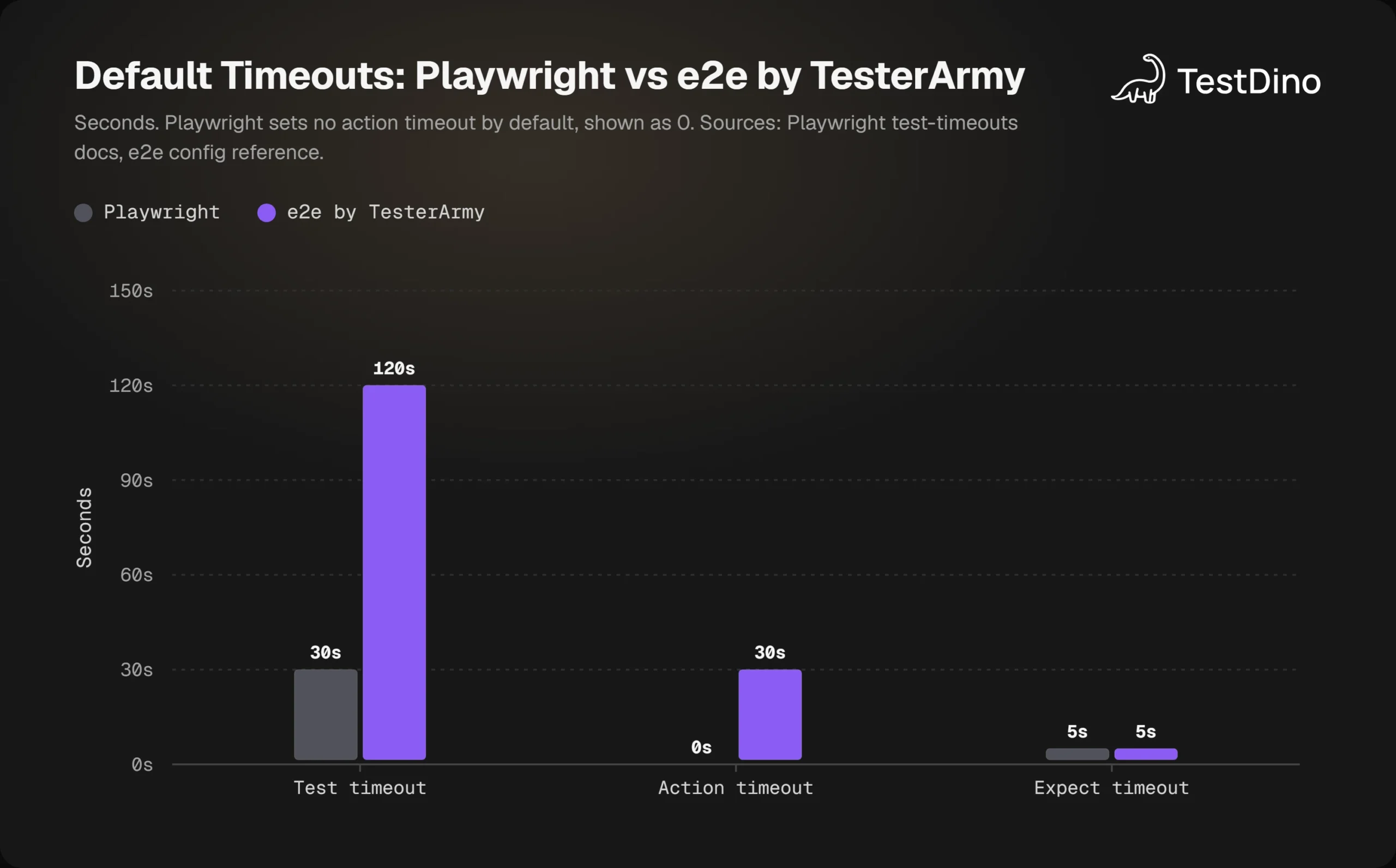
Retries and workers shift too. The Playwright CLI reference defaults to no retries and 50% of logical cores, while e2e uses 1 retry and 1 worker in CI, per its config reference. Trace capture is off in Playwright and set to retain-on-failure in e2e.
Playwright Test Agents vs an agent at run time
Playwright has AI too, but at authoring time. Its Playwright Test Agents, introduced in version 1.56, are a planner, a generator, and a healer that produce or repair ordinary test code, and the test run stays deterministic.
In e2e the agent acts while the test runs. That is the whole trade: fewer brittle lines, in exchange for a model in the loop, a replay cache to manage, and a verdict that can come back blocked.
What Playwright still does that e2e does not
The migration guide marks several Playwright features as missing. The ones most teams will notice are HTML reports, globalSetup and globalTeardown, fullyParallel, worker-scoped fixtures, test.step, toMatchSnapshot, expect.extend, and UI mode.
Playwright also has official bindings for Python, Java, and .NET, while e2e is TypeScript only. For a row-by-row count of the gaps, the Playwright vs e2e comparison walks through the full migration table.
Download counts put the maturity gap in plain numbers. In the week of October 23 to 29, 2026, the npm downloads API counted the following:
| Package | Weekly downloads |
|---|---|
| @playwright/test | 104,208,877 |
| e2e | 587,240 |
| @e2e-dev/web | 508,209 |
Those are large numbers for a month-old project, and tiny next to the Playwright market share that took seven years to build. That is strong interest. It is not yet years of production use.
Tip: You do not have to choose. The web engine ships its own pinned playwright-core, and e2e only reads tests/**/*.e2e.ts, so both runners can live in one project while you move brittle flows one file at a time.
Running one file locally is easy. Running the suite in CI is where sharding, reruns, and reporters come in.
Running e2e in CI: shards, reruns, and reports
CI mode switches on when the CI environment variable is set. The continuous integration docs change four defaults the moment that happens.
| Setting | Local | CI |
|---|---|---|
| retries | 0 | 1 |
| workers | Half your cores | 1 |
| cache, when unset | read-write | read-only |
| test.only | Allowed | Rejected with ONLY_IN_CI |
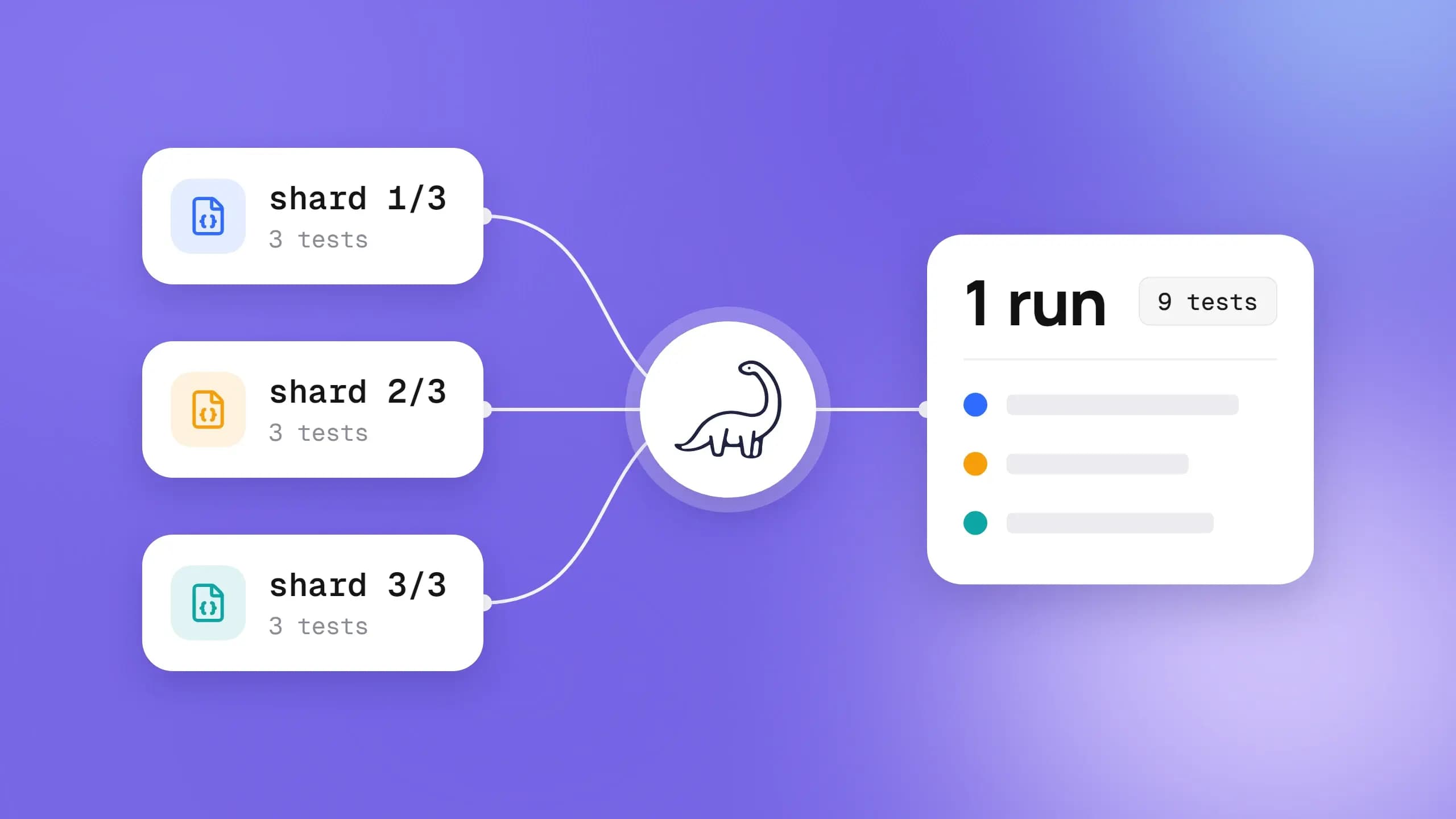
Sharding works the way Playwright sharding users expect, with one job per slice. The difference is at the end, because the docs say e2e cannot merge shard reports yet, so each job uploads its own report.json and junit.xml.
jobs:
  e2e:
    runs-on: ubuntu-latest
    strategy:
      fail-fast: false
      matrix:
        shard: [1, 2, 3]
    env:
      AI_GATEWAY_API_KEY: ${{ secrets.AI_GATEWAY_API_KEY }}
    steps:
      - uses: actions/checkout@v4
      - run: npm ci
      - run: npx @e2e-dev/web install chromium --with-deps
      - run: npx e2e run --shard ${{ matrix.shard }}/3 --reporter list,junit || npx e2e run --last-failed
      - uses: actions/upload-artifact@v4
        if: ${{ !cancelled() }}
        with:
          name: e2e-shard-${{ matrix.shard }}
          path: .e2e
The --last-failed rerun has to run in the same step, because it reads the previous report.json from the output directory. It writes new attempts under rerun-1/ inside each test folder, so one upload covers both passes, which is a neater version of the rerun only failed tests pattern.
Reporters and exit codes
The reporters reference lists four built-ins: list, json, junit, and markdown, plus a github() reporter that posts one pull request comment and updates it on reruns. Custom reporters implement onEvent and onRunFinished.
Exit codes carry meaning. Zero means every selected test passed, 1 is a test failure, 2 is a config or policy error, 3 is an infrastructure failure such as an engine or model provider, and 130 means the run was interrupted.
Keys, forks, and the trust boundary
A job with a model key hands that key to everything it runs. The CI docs advise storing keys as secrets with spending limits, giving them only to trusted branches, and running untrusted pull request code with no secrets at all. GitHub already withholds secrets from fork PRs, which matches that advice.
If you are sizing the shard count for a Playwright in GitHub Actions matrix, the sharding calculator in TestDino's free tools gives a starting number from your suite duration and CI target.
A junit file per shard is enough to make a CI job go red. It is not enough to tell you whether that failure is new, flaky, or the third time this week.
What TestDino adds to e2e TesterArmy runs
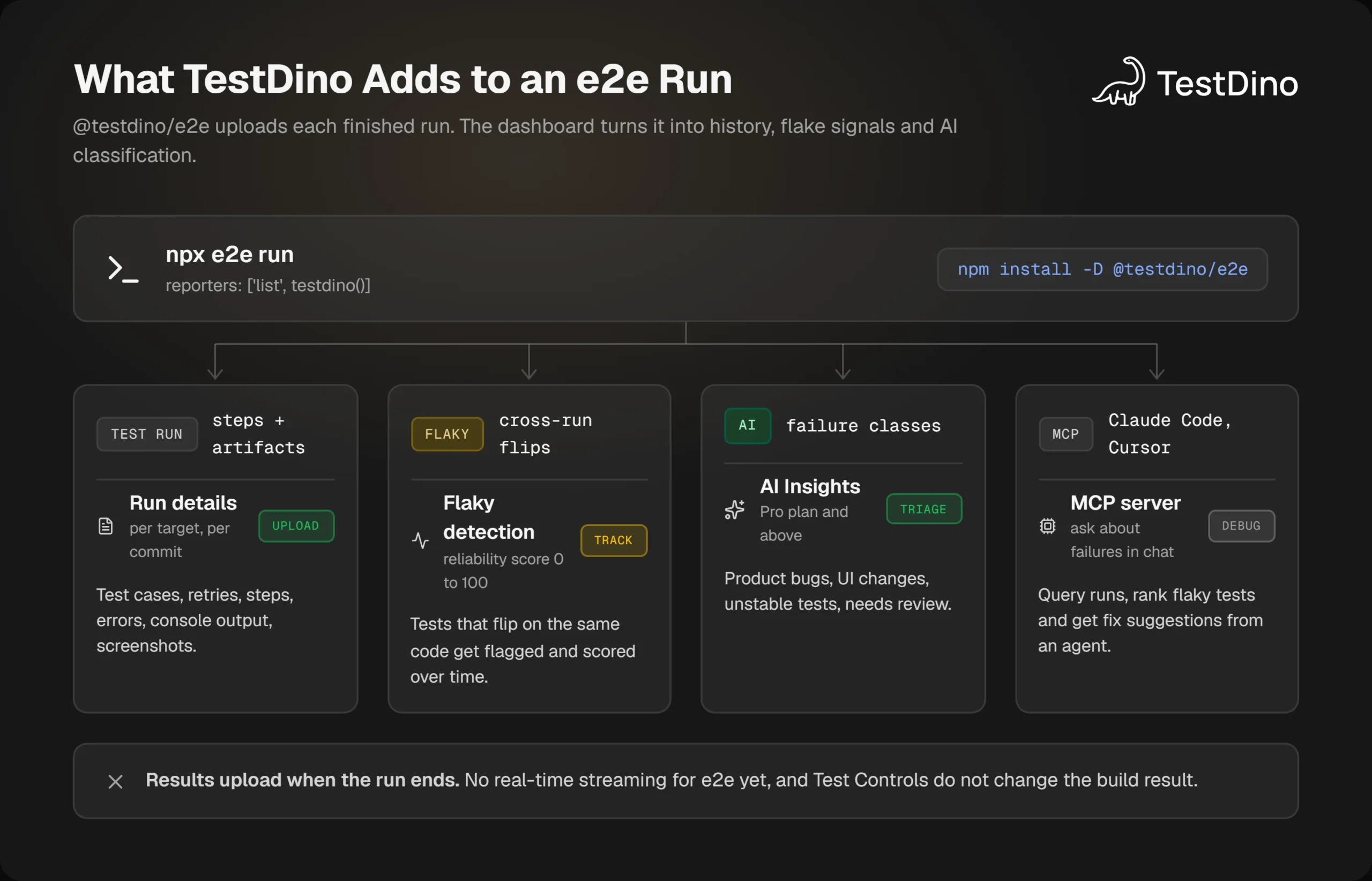
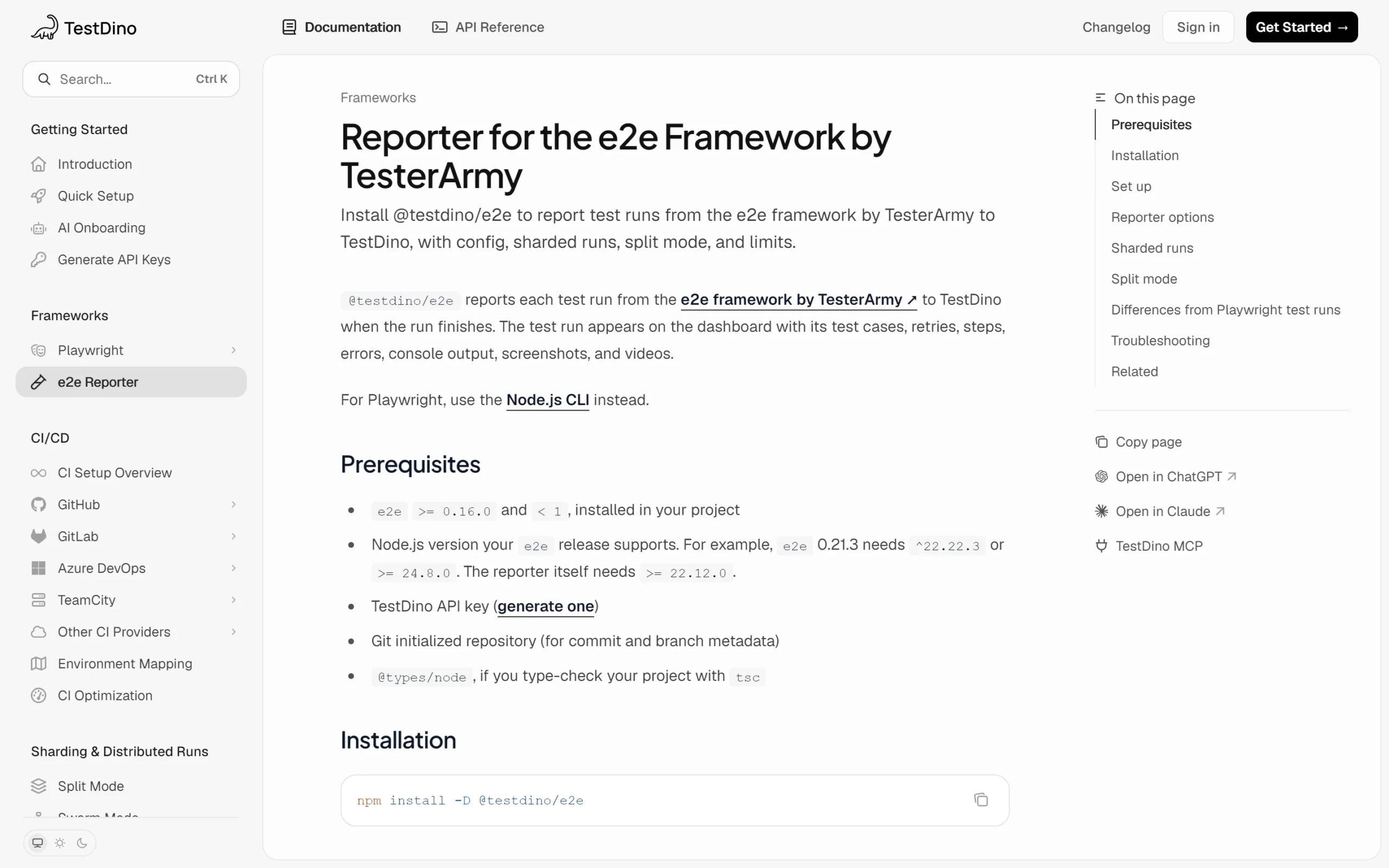
TestDino started as a Playwright companion, and on October 27, 2026, it published a dedicated reporter for the e2e TesterArmy framework. The @testdino/e2e docs describe a reporter that uploads each finished run with its test cases, retries, steps, errors, console output, screenshots, and videos.
Install the reporter in 2 lines
The reporter needs e2e 0.16.0 or newer and below 1.0, Node.js 22.12 or newer, a TestDino API key, and a Git-initialized repository for commit and branch metadata.
npm install -D @testdino/e2eimport type { E2EConfig } from 'e2e';
import { web } from '@e2e-dev/web';
import { testdino } from '@testdino/e2e';
export default {
  targets: [{ name: 'web', engine: web(), app: { url: 'http://localhost:3000' } }],
  reporters: ['list', testdino()],
} satisfies E2EConfig;export TESTDINO_TOKEN="your-api-key"
npx e2e runWithout a token, nothing uploads and the run continues normally. The remaining options cover the CI shapes from the previous section.
| Option | Environment variable | Purpose |
|---|---|---|
| token | TESTDINO_TOKEN | API key for the project |
| ciRunId | TESTDINO_CI_RUN_ID | Merges shards into one test run |
| split, splitId | TESTDINO_SPLIT, TESTDINO_SPLIT_ID | Join jobs that run different files |
| tags | none | Run-level tags such as nightly |
| artifacts | none | Set false to keep screenshots and videos local |
For the sharded workflow above, set the same TESTDINO_CI_RUN_ID on every shard. The docs suggest github.runid−github.runid−{{ github.run_attempt }} on GitHub Actions, which solves the shard-merging gap that e2e itself does not fill yet.
What you see after the upload
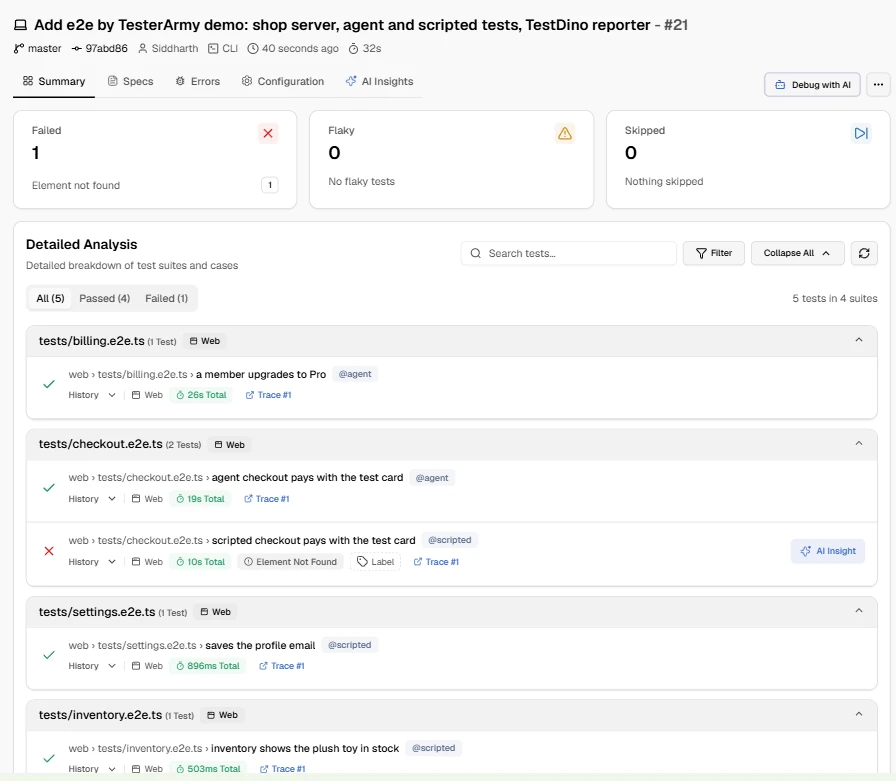
Each e2e target appears as its own project, so a web and an iOS target stay separate in history. Artifacts up to 50 MB upload in PNG, JPEG, WebM, ZIP, JSON, TXT, and Markdown formats, while MP4 device recordings and the trace.md page stay local.
Every run is tied to its commit and branch, which is why the reporter requires a Git-initialized repository. That link is what lets the dashboard answer the question a junit file cannot: did this test fail on this code before?
Flaky detection that looks across runs
The e2e list reporter tells you a test was flaky inside one run. TestDino adds the cross-run view that flaky test detection tools are judged on, flagging tests with inconsistent outcomes on the same code.
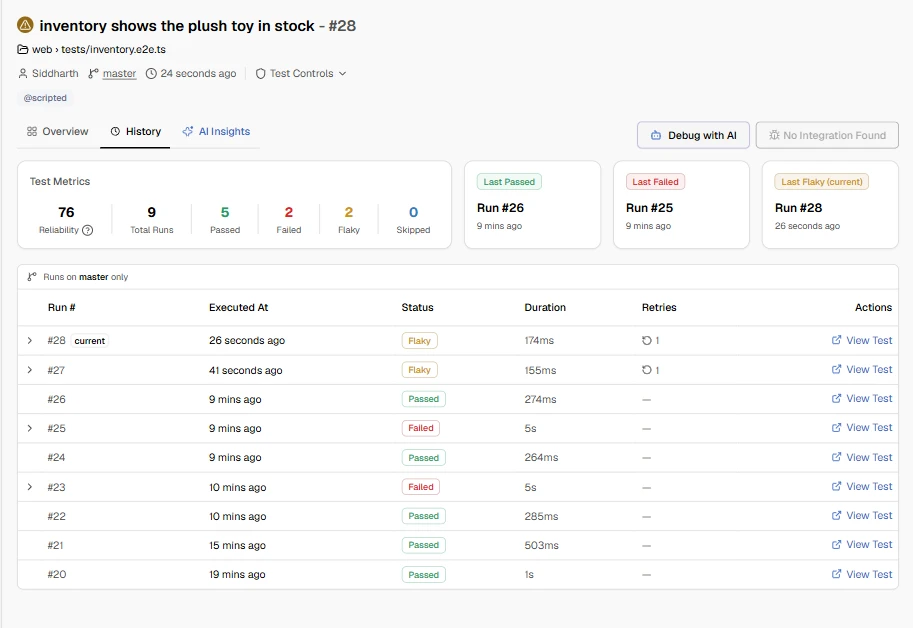
Each test gets a reliability score from 0 to 100. The flaky detection guide treats 80 and above as healthy, 50 to 79 as shaky, and below 50 as unreliable, and a Candidates tab lists tests that were flaky in more than 5% of runs over 30 days.
Our inventory test, pointed at a page that answers Out of stock on its first request, ran 9 times on the same branch. TestDino scored it 76, with 5 passes, 2 failures, and 2 flaky results, and the Last Flaky tile pointed at the newest retry run.
AI Insights and the MCP server
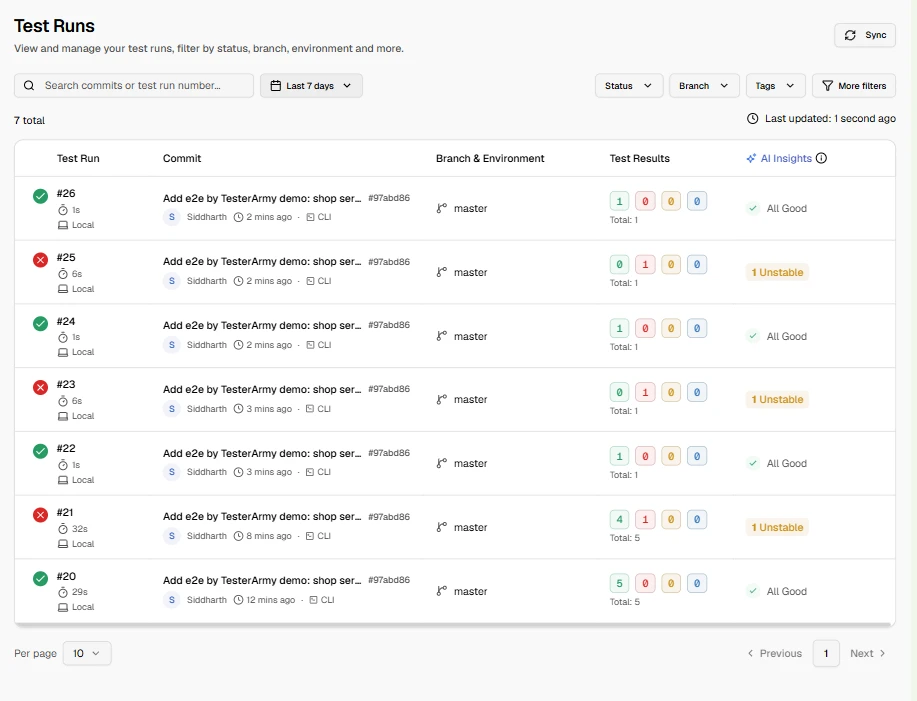
Failures are sorted into four buckets: product bugs, UI changes, unstable tests, and needs review. That classification is what turns test failure analysis from a reading exercise into a queue, and the pricing page places it on the Pro plan and above.
In our project, the two failing inventory runs came back labeled Unstable in the Test Runs list, which matches what the page was doing.
The TestDino MCP server exposes the same data to Claude Code, Cursor, or Claude Desktop with a personal access token, or over OAuth for ChatGPT and Claude on the web.
Typical prompts ask for a root cause and fix for a failure, the flakiest tests in recent runs, or a comparison against the run where a failure first appeared. The answer comes back in the chat where the fix is being written.
Note: Know the limits before you promise them. For e2e, results appear after the run finishes rather than streaming live, Test Controls such as quarantine do not change the build result, and there is no visual comparison because e2e produces no expected and diff images.
That combination of run history, flake scoring, and classification is what a test intelligence platform is supposed to add on top of any runner. Whether the runner should be e2e today is a separate call.
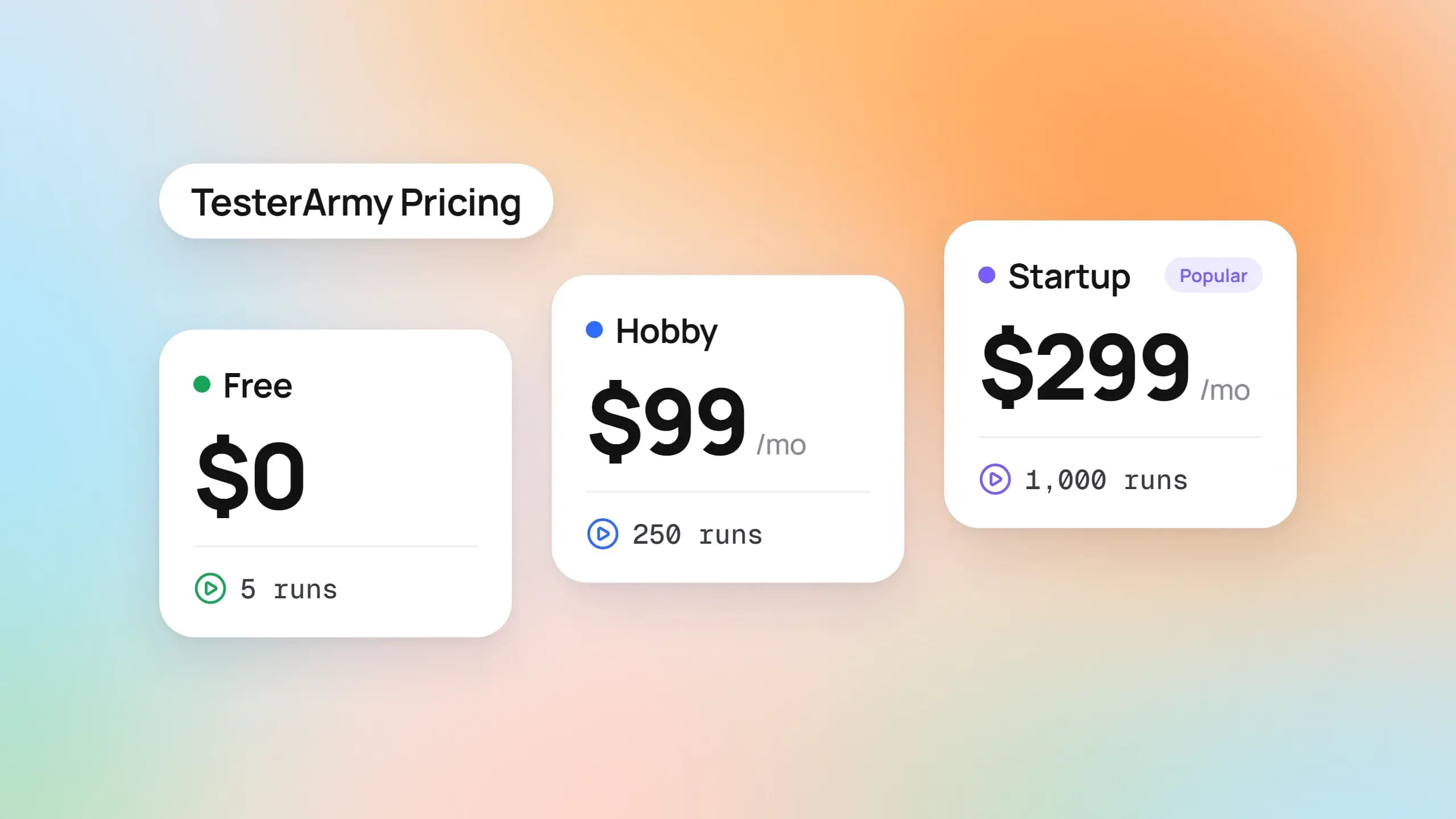
Plan gating matters for a trial. The pricing page puts the dashboard, flaky detection, and Test Controls on the Free plan with 5,000 test executions a month, while AI failure classification and the MCP server start at Pro.
Should your team adopt e2e TesterArmy now?
The right answer depends on what breaks in your suite today. Here is the split the documentation and our demo runs support.
Try it when
- A few flows keep breaking because the UI changes often, such as a wizard, a checkout, or a settings page.
- You want one TypeScript suite that covers the web plus iOS and Android, where Playwright mobile testing stops at browser emulation.
- You already pay for a ChatGPT or GitHub Copilot plan and can reuse it for agent steps.
- Your team accepts a pre-1.0 tool and can absorb API changes between minor releases.
Wait when
- Your tests are written in Python, Java, or .NET.
- You depend on pixel-level Playwright visual testing, an HTML report, or merged shard reports.
- Policy forbids sending screen content to a model provider, or there is no budget for model usage in CI.
- You need an API that will not move under you for the next year.
Run both, and measure
For most Playwright teams the practical path is a trial. Keep the stable suite where it is, move the 2 or 3 most brittle flows to e2e, and compare failure rates, run time, and model cost after a few weeks.
Put a number on the brittle flows first. The flaky cost calculator in TestDino's free tools turns debug hours and CI reruns into a yearly figure, which is the baseline any migration should beat.
Whatever you decide, the evidence should land in one place.
Conclusion
The e2e TesterArmy framework is a well-documented attempt to let agent goals and exact assertions share one test file. Its replay cache ties model spend to how often the UI changes rather than how often tests run.
It sits on Playwright for browsers, adds native mobile targets, and says plainly that it is pre-1.0. That is the reason to trial it on a few flows before betting a suite on it.
Whether you keep Playwright, trial e2e, or run both, failures still need history, a flake score, and a cause. That is the gap Playwright test reporting has always had to fill, and with the @testdino/e2e reporter it now covers TesterArmy e2e runs too.
FAQs

Vishwas Tiwari
Software Engineer