Self-Healing Tests in Playwright: How They Work, Limits & Guardrails
Self-healing tests in Playwright repair renamed buttons, not broken checkouts. Here is how healing works and where it stops.
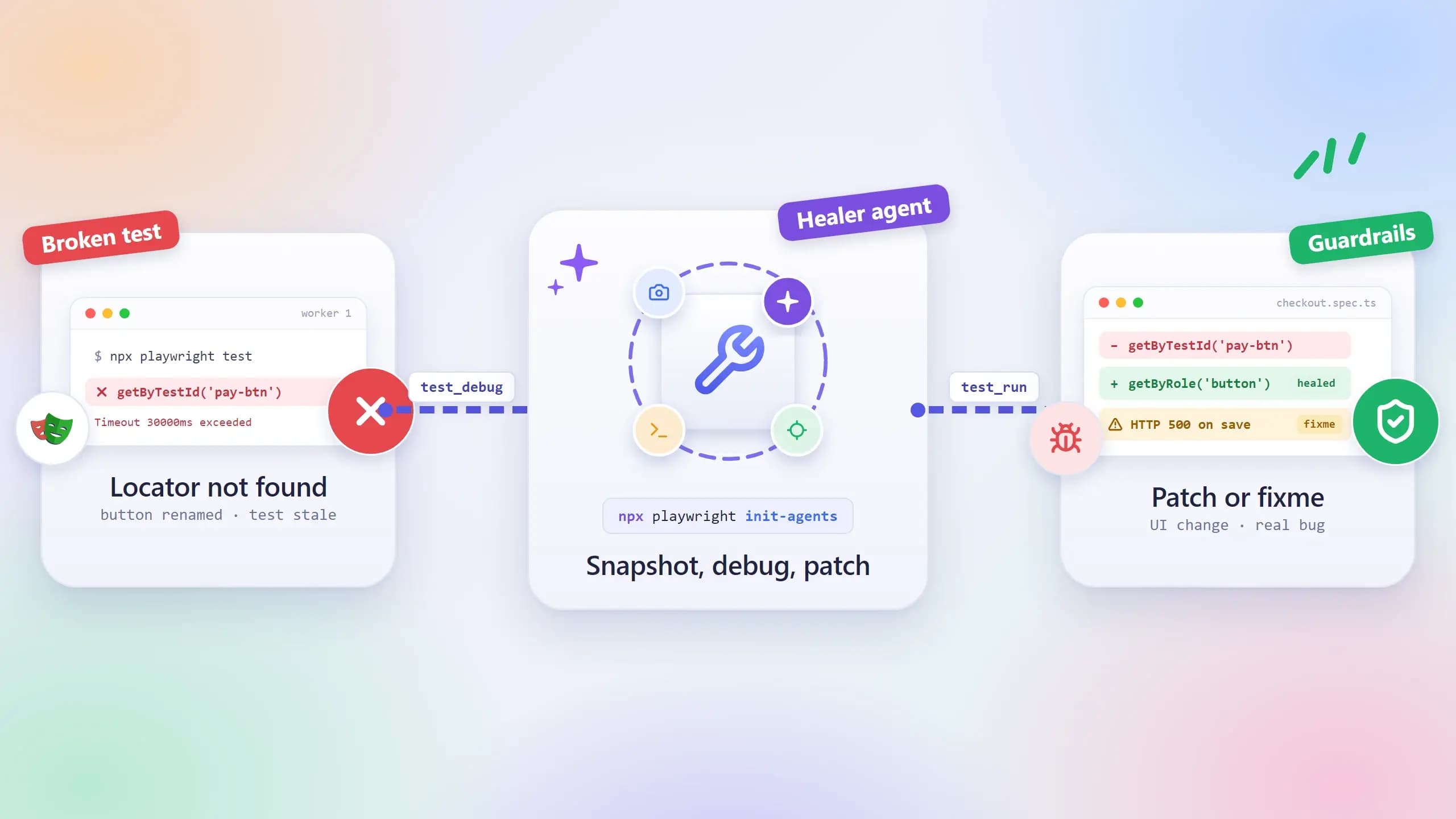
A test can now notice that a button was renamed, find the new one, and patch itself before anyone reads the error. Since Playwright 1.56, self-healing tests in Playwright come with the framework itself.
The catch is that the same red test can also be a real bug. A tool that quietly turns it green has hidden the one thing the suite was there to catch.
This guide explains each healing layer, where the Playwright healer agent stops, and the guardrails that keep an automatic fix honest, including how TestDino separates a UI change from a bug.
What self-healing tests in Playwright actually mean
Self-healing tests in Playwright are tests that recover from a broken locator by finding the intended element another way, or by patching the test after inspecting the live page, and then re-running to confirm the fix. Every repair is logged so a person can review it.
People use "self-healing test automation" for 3 different mechanisms, and most arguments about whether healing is safe come from mixing them up. They run at different moments and change different things, so it helps to name them before going further.
The 3 layers people call self-healing
- Resilient locators. Playwright's built-in getByRole, getByLabel, and getByTestId describe what a user sees, so a lot of markup changes never reach them. Nothing gets repaired here. The test simply had less to break.
- Runtime fallback. When a locator finds nothing mid-run, a helper or a cloud grid tries other candidates and carries on. The test file is untouched.
- Code-level repair. An agent replays the failure, reads the page, edits the test file, and runs it again. This is the healer agent's job inside the Playwright AI ecosystem.
What self-healing is not
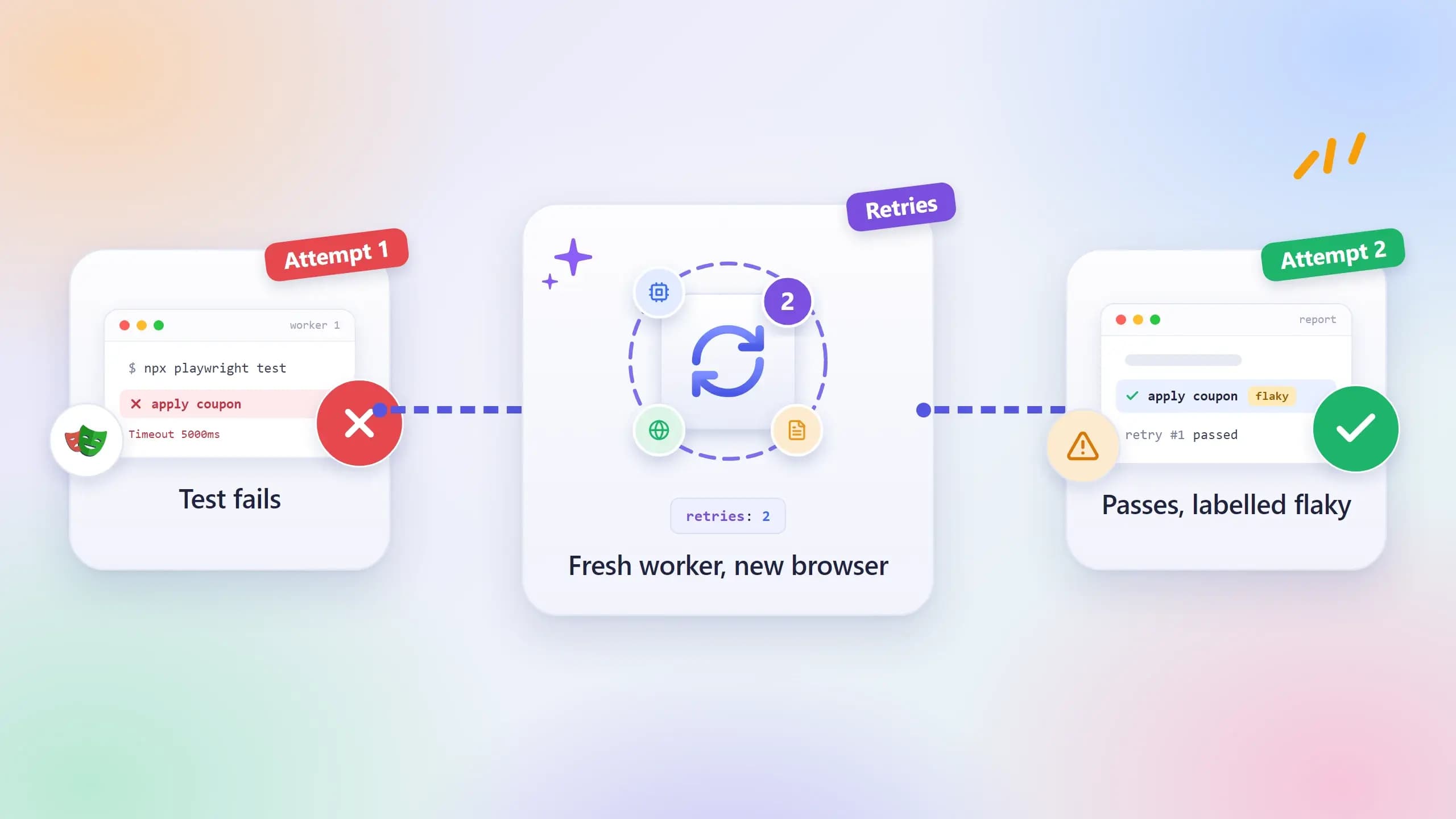
Retries come up first, because from the outside they look like healing. The docs describe them as "Test retries are a way to automatically re-run a test when it fails" (Playwright retries). A retry runs the same locator a second time, which helps when the page was slow and does nothing when the button has a new name.
Auto-waiting is the same story. Playwright waits for an element to be ready before it acts, but it never goes looking for a different element. Loosening an assertion until the test passes sits at the far end of this list: the test goes green and proves less than it did before, which is the outcome healing is supposed to prevent.
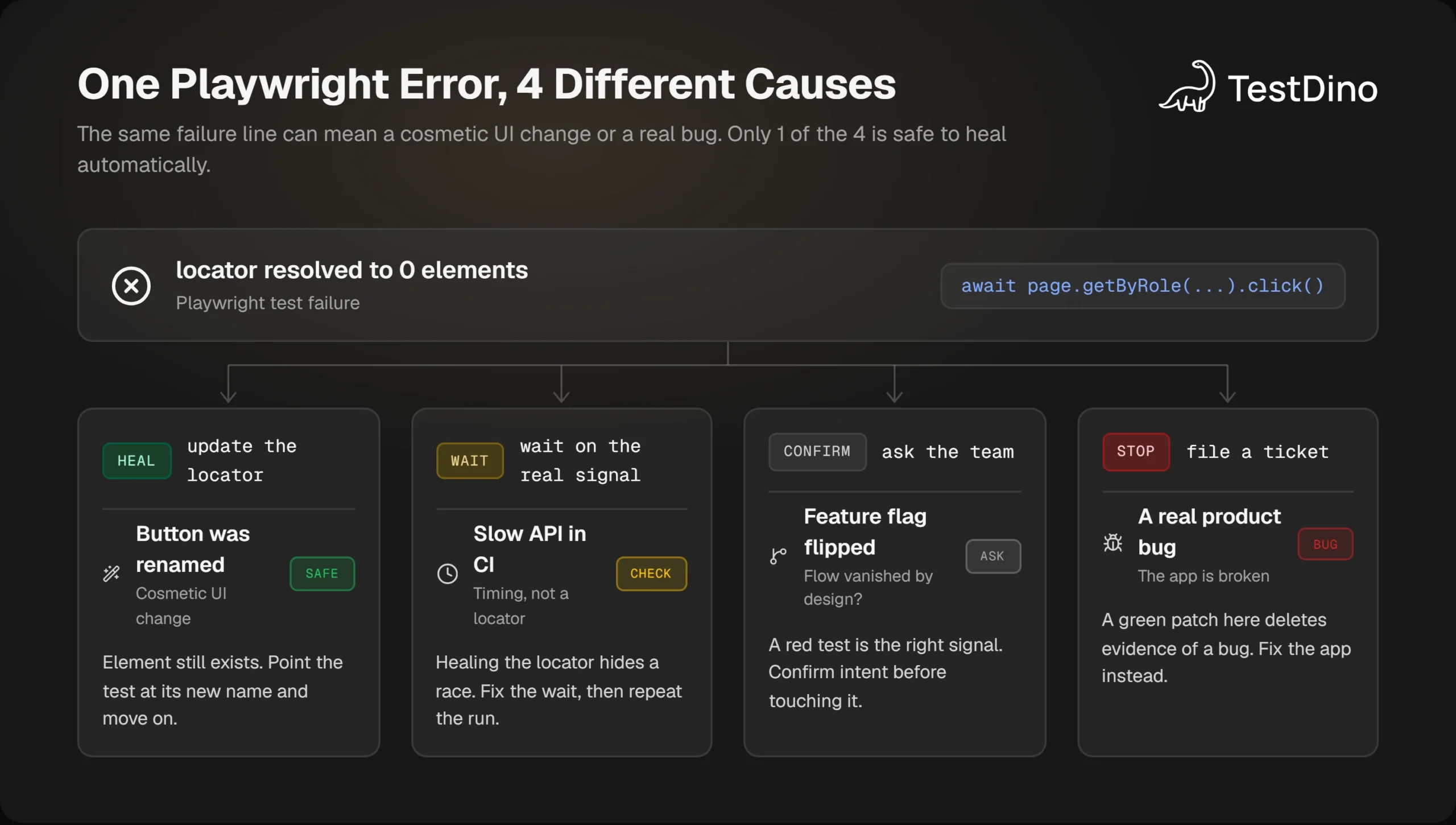
The error text in that picture is identical across all 4 branches, and only the first branch is safe to repair without a person looking. So before deciding how much healing to allow, it is worth being precise about what breaks a Playwright test, and why the message on its own cannot say which kind of break you are looking at.
Why Playwright tests break, and why the error text alone cannot tell you
A Playwright test fails when the page stops matching what the test expects. Either the page is wrong, or the test's description of the page has gone stale while the page itself still works.
The locator docs point at the usual reason for the second case: "CSS and XPath are not recommended as the DOM can often change leading to non resilient tests" (Playwright locators guide).
Locator drift vs real failures
Drift usually looks like one of these:
- A label changed from "Sign in" to "Log in".
- A field changed role, for example from a textbox to a combobox.
- A wrapper element was added, and a CSS path that depended on the old nesting now matches nothing.
- Generated class names or IDs changed after a build.
A real failure has a different shape: the API returns a 500, the checkout total is wrong, or a whole flow has vanished behind a feature flag. The test is doing its job there, and the fix belongs in the product, so file a ticket and leave the test alone.
Telling the two apart takes the error, the trace, and the network log read together, a process laid out step by step in how to read a Playwright test failure.
Why the error message alone cannot tell you
The trouble is that the message is identical in both cases. A renamed button and a deleted feature both end in "locator resolved to 0 elements". A slow API and a broken save both end in a timeout. Playwright is reporting what the test could not do, and it has no way of knowing why.
What separates them is the evidence around the failure, and Playwright already records most of it. The Trace Viewer is "a GUI tool that helps you explore recorded Playwright traces after the script has run", and a trace holds DOM snapshots before, during, and after each action along with console output and network requests (Playwright Trace Viewer).
With trace: 'on-first-retry' in the config, the setting the docs recommend for CI, that evidence exists for every retried test.
The second signal is whether the failure repeats. One that disappears on retry was a timing or state problem. One that repeats on the same commit is either a UI change or a bug, and at that point the trace, the diff, and the run history are the only things that can say which.
The flaky side of that split has a price you can estimate with a flaky test cost calculator, and the debugging side is covered in Playwright flaky test debugging. Each healing layer answers a different slice of this picture, and the order you stack them in decides how much risk you take on.
How self-healing tests in Playwright work: 3 layers
Self-healing tests in Playwright work best when the layers sit in a fixed order: prevent first, fall back second, repair code last. Each layer catches what the one above it missed. Each one also has more freedom to be wrong, which is why the order matters.
Layer 1: self-healing locators you already have
The locator docs put the whole strategy in one line: "we recommend prioritizing user-facing attributes and explicit contracts". A role-based locator survives a CSS refactor because it reads the accessibility tree the way a screen reader does, and class names never reach that tree.
For elements with no stable role or text, the docs add that "Testing by test ids is the most resilient way of testing".
The test ID attribute is configurable, which matters when your frontend already uses a different convention:
import { defineConfig } from '@playwright/test';
export default defineConfig({
  use: { testIdAttribute: 'data-pw' },
});
Playwright has also shipped a native fallback since v1.33. locator.or() "Creates a locator matching all elements that match one or both of the two locators" (locator.or() reference). Chain a role locator with a test ID and the step keeps working as long as either one still resolves:
const placeOrder = page
  .getByRole('button', { name: 'Place order' })
  .or(page.getByTestId('place-order'));
await placeOrder.first().click();
The .first() does real work. When both locators match, the combined locator has 2 matches and Playwright's strictness check refuses the click, which the docs call out on the same page. Ranking and scoping locators properly is its own topic, covered in Playwright locators.

Tip: Test a fallback chain before you commit it. The Locator Playground in TestDino's free Playwright tools shows live match counts for getByRole, getByText, getByLabel, CSS, and XPath, so you can confirm the chain resolves to exactly 1 element.
Layer 2: runtime fallback healing
Runtime healing kicks in when a locator finds nothing during a run. The simplest version is a helper that walks a list of candidates, uses the first one that matches exactly 1 element, and logs when it had to fall back:
import type { Locator } from '@playwright/test';
export async function healed(name: string, candidates: Locator[]): Promise<Locator> {
  for (const [i, candidate] of candidates.entries()) {
    if ((await candidate.count()) === 1) {
      if (i > 0) console.warn(`[heal] ${name}: used fallback #${i}`);
      return candidate;
    }
  }
  throw new Error(`[heal] ${name}: no candidate matched`);
}
Cloud grids sell the same idea as a single switch. On BrowserStack, selfHeal: true turns on a service that stores element context from earlier successful runs and generates a replacement locator when the original stops resolving (BrowserStack self-healing docs).
The same page lists the conditions. Healing needs at least 1 earlier successful run with the same element identifier, it requires the Automate Pro plan, it adds execution overhead, and it cannot heal an element that truly no longer exists.
Some teams put a language model inside this layer. On failure the helper captures the accessibility snapshot, asks the model to pick the closest role and name from the candidates that actually exist on the page, and retries with getByRole. Restricting the model to real candidates is the detail that keeps it from inventing a selector.
Layer 3: code-level repair with the healer agent
The third layer edits the test file. The healer agent replays the failing test, inspects the live page through the Playwright test MCP server, changes the locator or assertion, and runs the test again until it passes or a guardrail stops the loop.
Rewriting code is what makes this layer useful, and it is also why its output needs a reviewer. Where that line sits is the subject of fixing Playwright tests with AI.
The 3 layers, side by side:
| Dimension | Resilient locators | Runtime fallback | Healer agent |
|---|---|---|---|
| When it acts | Before anything breaks | During the run | After a failure |
| What changes | Nothing | Which element is used | The test file |
| Needs review | Review the heal log | Yes, every diff | |
| Can hide a bug | Yes, if a wrong element matches | Yes, if an assertion is loosened | |
| Cost | Free | Helper code or a cloud plan | Model tokens, only on failures |
| Best for | Every suite | Suites with heavy UI churn | Reviewed repair of drifted tests |
Layer 1 is a design choice and layer 2 is a helper of a dozen lines. Layer 3 is a workflow with its own install step, its own tools, and its own exit rule, which is why the rest of the healer story needs more room.
Playwright healer agent guide: setup and the repair loop
Playwright 1.56 introduced "three custom agent definitions": planner, generator, and healer (Playwright release notes). The docs say they "can be used independently, sequentially, or as the chained calls in the agentic loop" (Playwright test agents). The healer is the one that repairs failing tests, and setting up the Playwright self-healing agent takes 1 command.
Step 1: install the agent definitions
npx playwright init-agents --loop=claude
# other targets: --loop=vscode, --loop=codex, --loop=opencode
Running that on Playwright 1.64 creates 3 agent files under .claude/agents/, a seed.spec.ts, a specs/ folder, and an .mcp.json that registers the test MCP server:
{
  "mcpServers": {
    "playwright-test": {
      "command": "npx",
      "args": ["playwright", "run-test-mcp-server"]
    }
  }
}
That server is what gives the agent its tools. The healer definition lists them: test_run, test_debug, test_list, browser_snapshot, browser_console_messages, browser_network_requests, browser_generate_locator, and browser_evaluate, plus file editing.
How those tools map onto the protocol is covered in Playwright MCP. If you run the healer from Claude Code, pairing it with the Playwright skill for Claude Code gives the agent locator and debugging conventions to follow.
Note: Regenerate the definitions after each Playwright upgrade. The docs are explicit: "These definitions should be regenerated whenever Playwright is updated to pick up new tools and instructions." Hand edits to the generated files get overwritten, so keep team rules in your own skill files, such as the open-source testdino-hq/playwright-skill pack.
Step 2: the 7-step repair loop
The healer's behaviour is a plain-English prompt inside playwright-test-healer.md, and reading it is the quickest way to learn what the agent will and will not do. The loop it defines:
- Run every test with test_run to find the failures.
- Re-run each failing test with test_debug, which pauses on the error.
- Capture a page snapshot, console messages, and network requests at the paused step.
- Name the root cause: a changed selector, a timing issue, a data or environment problem, or an app change that broke the test's assumptions.
- Edit the test: update the selector, fix the assertion, or use a regular expression for dynamic data.
- Restart the test after each fix, handling 1 error at a time.
- Repeat until the test passes, or mark it test.fixme() with a comment explaining what happened instead.
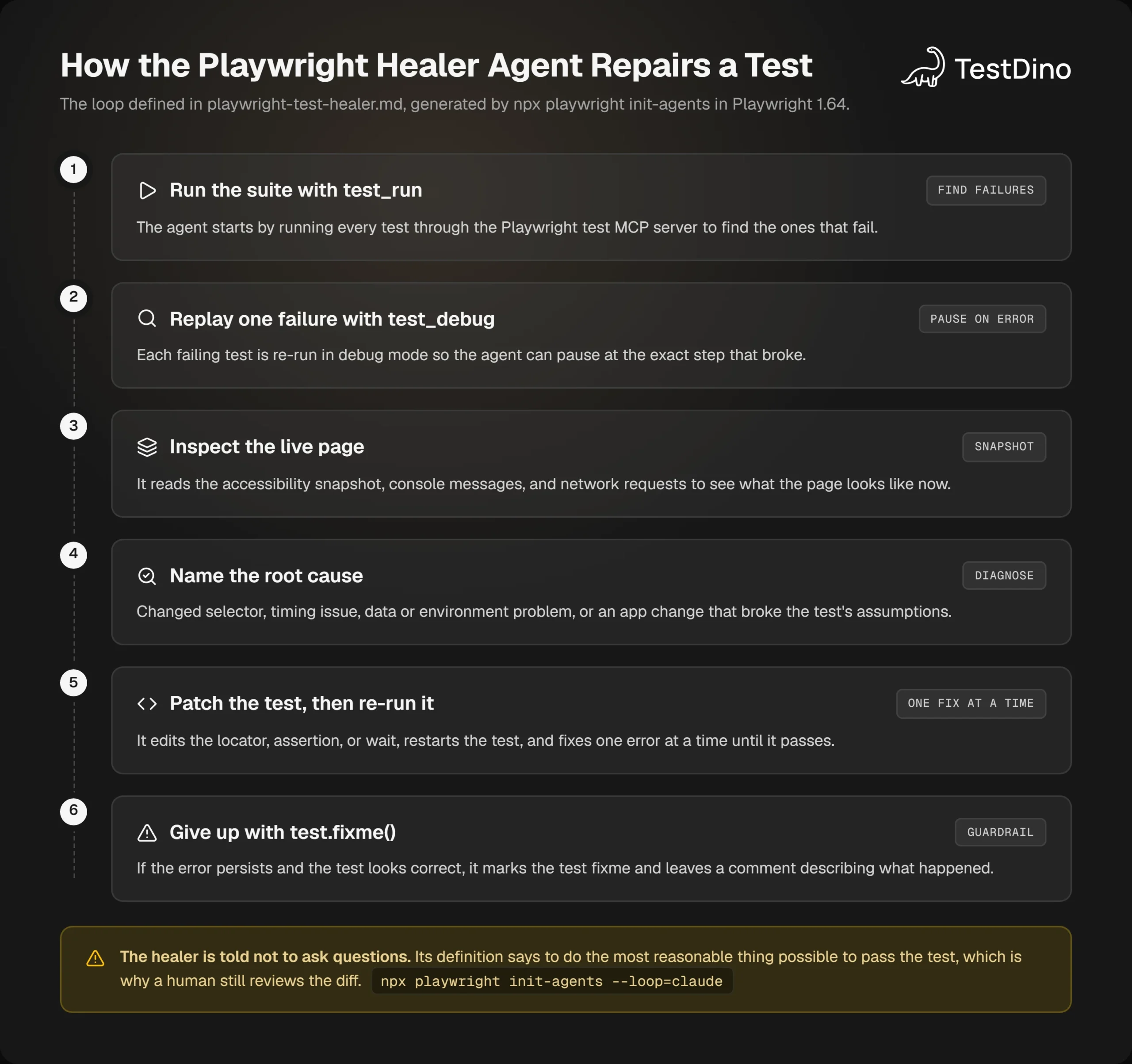
Two lines in that file explain the agent's temperament. It is told "Do not ask user questions, you are not interactive tool, do the most reasonable thing possible to pass the test", and "Never wait for networkidle or use other discouraged or deprecated apis".
The first is why a person has to read the diff: when the agent is unsure, it will choose rather than pause. The second keeps healed code away from the waits Playwright itself discourages.
Step 3: what happens when it cannot fix the test
The most important guardrail is the exit, and it is written into the prompt: "If the error persists and you have high level of confidence that the test is correct, mark this test as test.fixme() so that it is skipped during the execution. Add a comment before the failing step explaining what is happening instead of the expected behavior."
The docs describe the output the same way: "A passing test, or a skipped test if the healer believes that functionality is broken." The choice of fixme over skip carries meaning in Playwright's API, which says "Skipped tests are not supposed to be ever run. If you intend to fix the test, use test.fixme()" (test.fixme() reference).
A healer that marks a test fixme is saying a person still owes this test a fix.
A healed file can therefore carry both outcomes at once:
test('places an order', async ({ page }) => {
  // healer: Country changed from a textbox to a combobox
await page.getByRole('combobox', { name: 'Country' }).selectOption('IN');
  // healer: POST /api/orders returns 500 instead of 201, likely a backend issue
  test.fixme(true, 'Order save fails with HTTP 500');
  await page.getByRole('button', { name: 'Place order' }).click();
});
That exit is honest. It is also a judgement made from 1 run, and a single run cannot answer most of the questions a reviewer would ask next.
The 4 limits of self-healing tests
Limit 1: the healer only sees 1 run
The healer reasons over the page in front of it. Whether this test fails every time or 1 run in 20, whether it started failing after a particular deploy, whether 40 other tests failed on the same error: none of that is in the snapshot. It lives in Playwright test history.
The failure mode this produces is quiet. The healer sees a slow step in an intermittent test, adds a longer wait, watches the run go green, and the flake is now under a patch that reads like a repair.
Limit 2: a healed locator does nothing for timing and shared state
The healer's own definition admits this. It lists "Timing and synchronization issues" and "Data dependencies or test environment problems" as root causes alongside "Element selectors that may have changed", and a new locator addresses only the last of the three.
TestDino's flaky root-cause categories show the same split from the reporting side. Of its 6 categories, only "Element not found" is about locating an element. The rest cover timed out, network error, assertion failed, file system error, and unclassified (TestDino flaky test detection).
A race between the test and a slow response does not care which locator you used. The healer can add a longer wait, which lowers the odds of seeing the race without removing it, and the flake comes back on a busier CI runner.
Limit 3: it can pick the wrong element or weaken the check
Two "Delete" buttons on one page, a modal over the form, a heading that now appears twice: each gives the agent a plausible locator that is not the one the test meant.
The prompt tells it to do the most reasonable thing to make the test pass, and a language model can hand back 2 different patches for 2 runs of the same failure.
The worst case is an assertion rewritten to match whatever the page currently shows, because that test passes while checking nothing. Reading the Playwright trace next to the diff catches this quickly, since the trace shows which element was actually clicked.
Limit 4: it cannot see the backend, flags, or data
The healer sees the frontend through the accessibility tree, the console, and the network log. It cannot tell whether a changed API response was intended, whether a feature flag flipped on purpose, or whether this tenant's seed data is right. Vendor healing shares the blind spot and adds conditions of its own, such as an earlier successful run to compare against.
When the failure is a business rule, every locator resolves and the logic is still wrong. Cutting that class of failure at the source is the theme of reducing test maintenance. None of this argues against healing. It marks out the fence healing has to run inside, and the fence is cheaper to build than it sounds.
6 guardrails for self-healing tests in Playwright
Guardrails for self-healing tests in Playwright have one job, which is to stop a repair from erasing evidence. Most of the 6 below are a line of config or a line of policy.
Guardrails 1 and 2: heal locators only, and propose instead of commit
A locator fix changes the path to an element, and a loosened assertion changes what the test proves. Let the agent edit the first on its own. Require a person to approve the second, every time.
Then route every heal through a pull request instead of the main branch, so the diff gets the same review as product code. The Playwright PR health check on that pull request shows whether the healed test passes on CI and not only on the agent's machine.
Guardrails 3 and 4: gate CI on the unhealed run, and log every heal
The merge check should use the original result. Healing runs afterwards, only when something failed, and only against the tests that failed:
- name: Run Playwright tests
  run: npx playwright test
- name: Propose heals for the failures only
  if: failure()
  run: npm run heal:propose   # re-runs with --last-failed, opens a PR, never pushes to main
The --last-failed flag is documented as "Only re-run the failures" (Playwright CLI reference), which keeps the healing step cheap because it never touches the green tests. The mechanics are in rerun only failed tests in Playwright.
Logging is the fourth rule. Every heal, runtime or code-level, should write the old locator, the new locator, and the test name somewhere that outlives the job, because a heal nobody can see is an unreviewed edit to the suite.
Guardrails 5 and 6: cap the heal rate, and protect critical flows
A spike in heals means a redesign shipped or something broke, and either way a person should look. Fail the job when heals cross a threshold you set.
Finally, tag login, checkout, and payment tests and keep them out of healing altogether. A wrong element in those flows costs money, and strict locators there earn their maintenance.
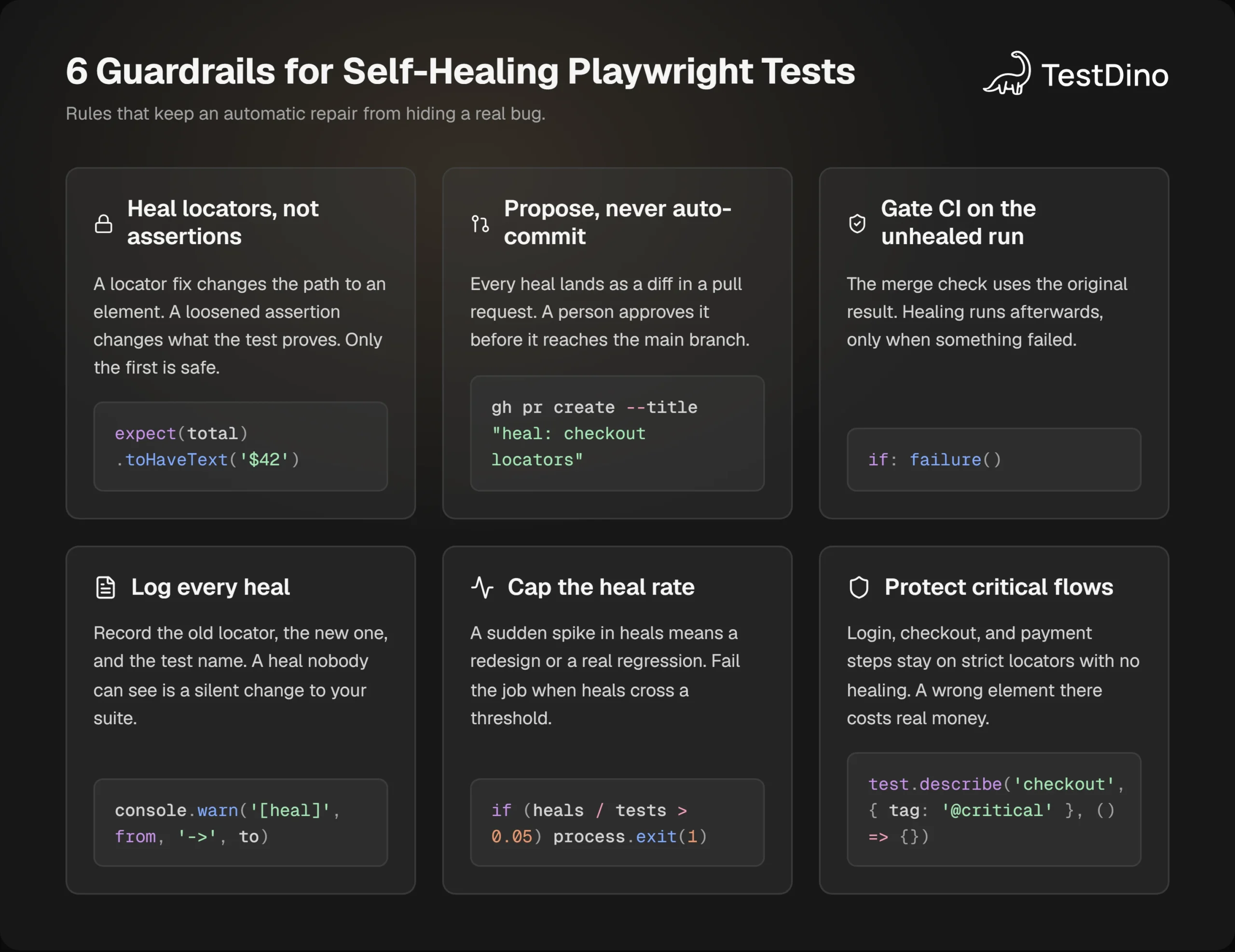
None of these rules slows down a legitimate heal. A renamed button still gets its locator updated by the agent. What changes is that the update arrives as a reviewable diff with a passing re-run attached, so nobody is asked to trust a green check they cannot explain.
Tip: Prove a heal is stable before merging it. Run npx playwright test tests/checkout.spec.ts --repeat-each 10 --fail-on-flaky-tests. The CLI defines --repeat-each as "Run each test N times" and --fail-on-flaky-tests as "Fail if any test is flagged as flaky", so a heal that only works sometimes fails the gate.
Guardrails keep bad heals out of the main branch. They still leave the first question of every red build unanswered: did the UI change, or did the product break?
Telling "the UI changed" apart from a real bug
Why a single snapshot cannot answer it
"Button not found" has at least 4 causes, and the snapshot looks the same for all of them: no button. What separates them is history.
Did this test fail before this commit? Do 30 other tests share the error? Does it pass on retry? Playwright root cause analysis runs on exactly that data, and it is exactly the data a healer does not have.
How TestDino classifies every failure
TestDino sits on top of the Playwright reporter and keeps every run. Its AI failure analysis sorts failures into 4 buckets, each described in the docs in a sentence (TestDino AI failure analysis):
| Category | What the docs say | What to do with a healer |
|---|---|---|
| Product Bugs | "The app is broken. Fix the app." | Block healing. File a ticket. |
| UI Changes | "The app changed on purpose. Update the test." | Let the healer propose a locator fix. |
| Unstable Tests | "The test is unreliable. Stabilize the test." | Fix the wait or the shared state. Do not heal the locator. |
| Needs Review | "Not enough signal to categorize. Check it yourself." | A person decides before any patch. |
Two more signals feed that call. Error grouping clusters failures by the element that failed and the expected value, so "a broken selector that appears in several places shows as several groups" while 1 backend outage shows as 1 group (TestDino error grouping).
Flaky detection watches outcomes across runs, where Playwright's own flaky flag only sees retries within 1 run, and it scores each test's reliability from 0 to 100 (TestDino flaky test detection).
Put together, the 3 signals turn "button not found" into a verdict. Say the failure appears only on this commit, 28 other tests share the error, and none of them was flaky last week: that is a product bug, and the healer should stay away from it. How other platforms approach the same problem is compared in flaky test detection tools.
Closing the loop from the agent's side
The same history is available to the healer through the TestDino MCP server. get_flake_verdict returns deterministic, flaky, or inconclusive for a failing test, get_run_error_clusters groups a run's failures by shared error signature, and verify_fix compares a test's history before and after a baseline run to check whether a fix held (TestDino MCP tools reference).
Note: TestDino's GitHub status check has 2 modes. In Strict mode, "Flaky tests count as failures". In Neutral mode, "Flaky tests excluded from pass rate". Use Strict on branches where a healer has touched tests, so a repair that only works sometimes cannot merge.
An agent that calls those tools before it patches anything is making the decision a healer alone cannot make. That is what AI-native test intelligence means in practice: the agent fixes the test, and the platform shows whether it was the right test to fix.
When to use self-healing tests in Playwright, and when to skip them
Self-healing tests in Playwright pay off under specific conditions, and the conditions are easy to check before you switch any layer on.
Switch healing on when
- Your UI changes often and the failures are mostly renamed labels, moved fields, and role changes.
- Your locators are already role-based or test-ID-based, so a healed locator has something stable to land on.
- Every heal goes through a pull request that someone reads.
- You keep run history, so a heal can be checked against the next 10 runs instead of 1.
Hold off when
- Your flake rate is high. Healing locators will not fix async waits or shared state, and it will hide them.
- The failing flows move money or data. Keep those on strict locators with no fallback.
- Nobody owns the review. An unreviewed heal is a silent edit to your safety net.
- You cannot see history. Without it, every heal is a guess that the cause was a UI change.
The place to start is the locator audit in Playwright best practices, because the better the locators, the less there is to heal. With that done, the healing decision gets smaller, and the only thing left to settle is what the whole setup is for.
Conclusion
Self-healing tests in Playwright are real, and since 1.56 the healer agent is the first-party way to get them. It replays the failure, reads the live page, patches the test, and runs it again. When it decides the test is right and the app is wrong, it stops, marks the test fixme, and leaves the failure visible.
The limits are just as real. The healer sees 1 run, cannot tell a flag from a bug, and can pick a plausible wrong element. The guardrails that contain those limits fit in a sentence: heal locators, propose instead of commit, gate on the unhealed run, log every heal, cap the rate, and fence off critical flows.
What the framework does not supply is the verdict on which failures are UI changes in the first place, and that verdict needs run history. TestDino keeps that history, sorts every failure into product bug, UI change, unstable test, or needs review, and hands the result to your agent over MCP.
That is the job of a test intelligence platform next to a healer: the healer fixes the test, and the platform shows whether that test was the one to fix.
FAQs

Ayush Mania
Forward Development Engineer