Playwright Retries: Config, CLI, Flaky Labels, and When Not to Retry
Playwright retries give a failed test a second chance. Learn config, CLI flags, flaky labels, and when not to retry.
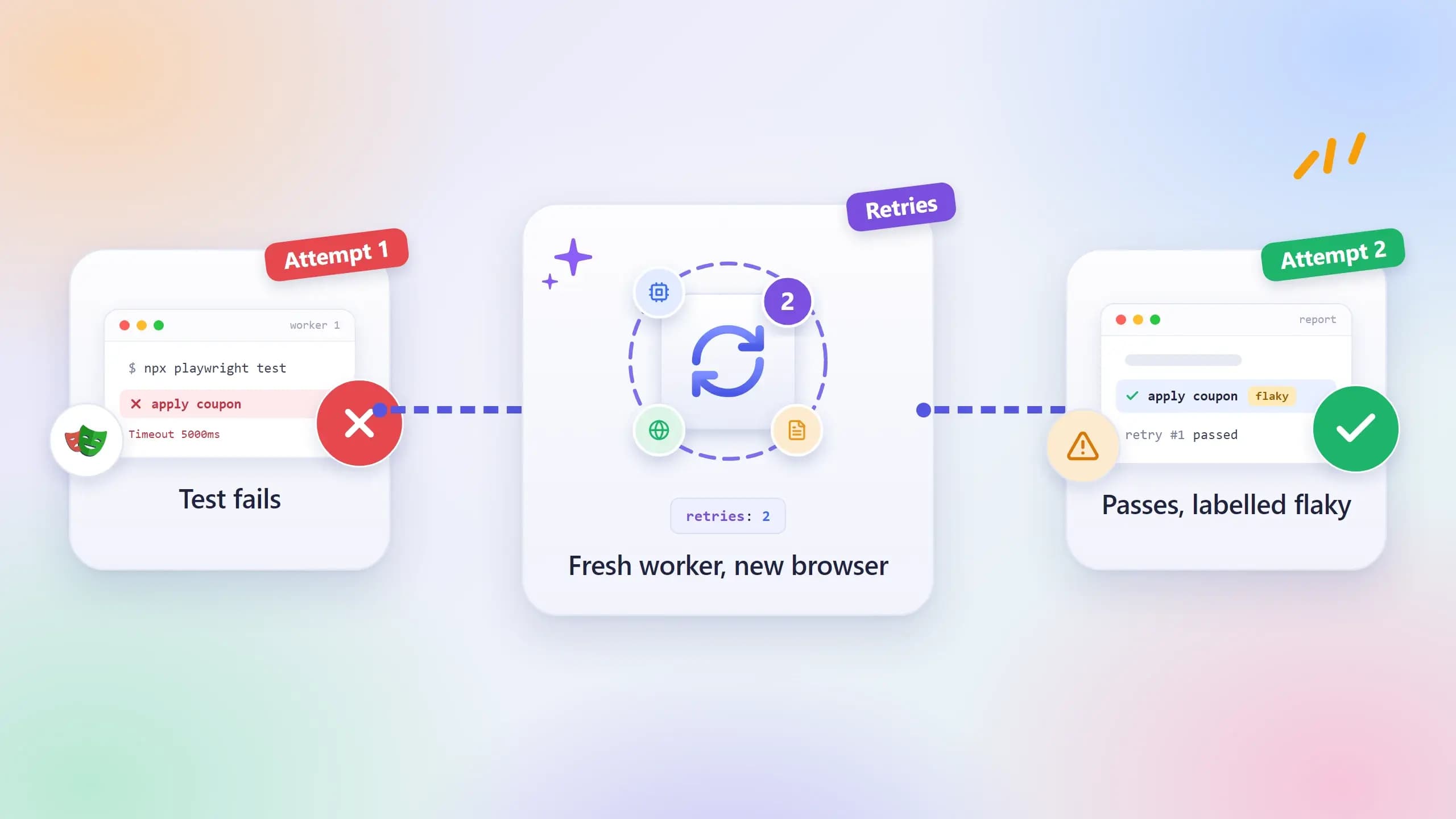
A test that fails, then passes a moment later with no change to the code, has not proven anything. Playwright retries give a failed test that second attempt automatically, and with teams now checking every code change, those second attempts add up fast.
The catch is that a retry can turn a red build green without anyone reading the error. The Playwright flaky tests behind those retries stay in the suite, and every run gets slower and less trusted.
This guide covers every place to set Playwright retries, how reports label a flaky test, how failOnFlakyTests stops a retry from hiding a bug, and
when to quarantine instead of retrying. Every command and output below was run on Playwright 1.64.1.
What are Playwright retries and how do they work?
Playwright retries are extra attempts the test runner gives a test after it fails. Each attempt runs the whole test again from the top in a fresh worker process with a new browser. A test that fails first and then passes is labelled flaky, and a test that fails every attempt is labelled failed.
Retries are off by default. You turn them on with retries: 2 in the config or --retries=2 on the command line, as the Playwright retries docs show.
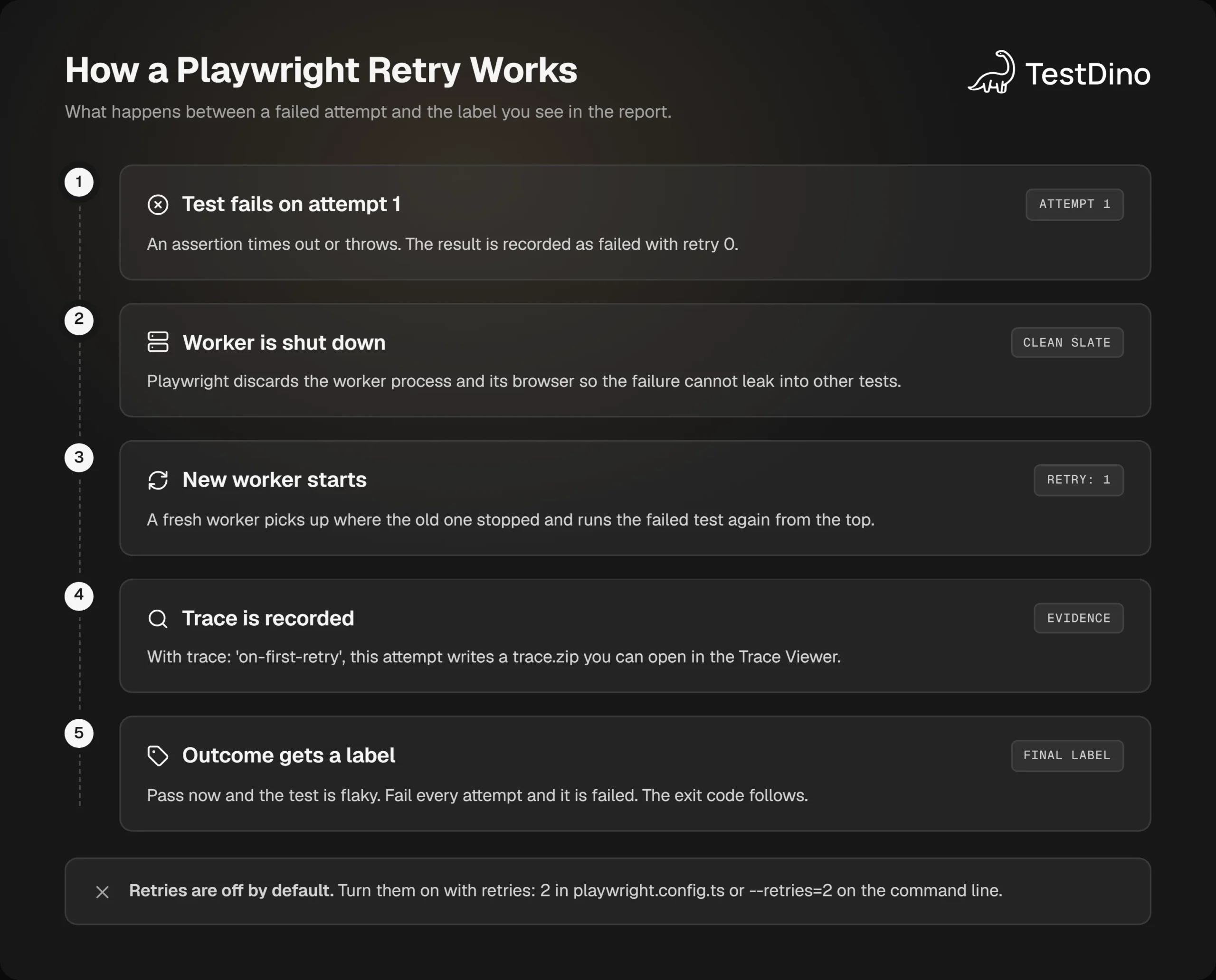
When a test fails, Playwright does not reuse the broken browser. It shuts the worker down, starts a new one, and reruns the failed test there. Because each test gets its own browser context through Playwright fixtures, a retry starts with no cookies, storage, or open pages left over from the failed attempt.
The 3 outcomes: passed, flaky, and failed
With retries on, every test ends in one of 3 states. The exit code only cares about the last row.
| Outcome | What happened | Counts as a failure? | Label in reports |
|---|---|---|---|
| Passed | Passed on the first attempt | Passed, or expected in JSON | |
| Flaky | Failed first, passed on a retry | No, unless failOnFlakyTests is on | Flaky, or flaky in JSON |
| Failed | Failed on every attempt | Failed, or unexpected in JSON |
That middle row is the whole reason this topic matters. A flaky test still exits with code 0, so the build goes green and the instability stays in the suite until someone goes looking for it.
The sequence between the first red attempt and that final label is short, and worth knowing step by step.
Retries are not the same as retrying assertions
Playwright already retries at a smaller level. Web-first Playwright assertions such as toBeVisible() keep checking until they pass or the assertion timeout runs out, which is 5 seconds by default according to the assertions docs.
expect.poll() and expect(async () => { ... }).toPass() do the same for a block of code. Those retry one check inside a test. A test retry starts the entire test again.
If a test only needs a longer wait on one step, fix the Playwright timeout on that step. Retrying the whole test for one slow assertion is the expensive way to wait.
Once that difference is clear, the next question is where the retry count should live.
How to configure Playwright retries in playwright.config.ts
The config file is the right home for retries that apply to every run. Setting them up takes 4 steps:
- Open playwright.config.ts and add a retries value that depends on process.env.CI.
- Set trace: 'on-first-retry' under use so every retry leaves evidence behind.
- Run npx playwright test once with CI=1 set to confirm that retries kick in.
- Check the report for the flaky label and open the trace for each flaky test.
import { defineConfig } from '@playwright/test';
export default defineConfig({
  // Retry on CI only, never on a developer machine.
  retries: process.env.CI ? 2 : 0,
  use: {
    // Record a trace only when a test is retried for the first time.
    trace: 'on-first-retry',
  },
});
This is the exact pattern in the Playwright configuration docs. The 0 for local machines matters: you want to see the first failure while you are writing the test, not have it quietly pass on attempt 2.
Most CI providers set the CI environment variable for you, so the switch happens without any extra setup in the pipeline.

Tip: With trace: 'on-first-retry', the trace lands only in the retry folder. In the run for this post, test-results/checkout-shows-order-total-retry1/trace.zip existed while the first attempt's folder held only the error context. Open it in the Playwright Trace Viewer to see what the failed attempt saw.
Per-project retries
Projects can override the global value. A WebKit project that runs slower on your CI machines can get 2 retries while Chromium gets none, so the noisiest browser does not set the policy for all of them.
import { defineConfig, devices } from '@playwright/test';
export default defineConfig({
  retries: 0,
  projects: [
    { name: 'chromium', use: { ...devices['Desktop Chrome'] } },
    { name: 'webkit', retries: 2, use: { ...devices['Desktop Safari'] } },
  ],
});
Playwright retry failed tests per file or group
test.describe.configure() sets retries for one file or one describe block, as the test API docs describe. It is the most specific level, and in my runs it won even against --retries=0 on the command line.
import { test, expect } from '@playwright/test';
// Only this file gets 2 retries and a 20-second timeout per test.
test.describe.configure({ retries: 2, timeout: 20_000 });
test('exports last month as CSV', async ({ page }) => {
  // ...
});
Use this for a known-slow corner of the app while you fix it, not as a way to sprinkle retries across the suite one file at a time.
Playwright retry strategy: immediate or isolated
Since version 1.62, retryStrategy controls when a retry runs, according to the TestConfig reference. The default, 'immediate', retries a failed test as soon as a worker is free, mixed in with the rest of the run.
import { defineConfig } from '@playwright/test';
export default defineConfig({
  retries: 2,
  retryStrategy: 'isolated',
});
'isolated' holds every retry until all other tests have finished, then runs them one by one in a single worker. The docs say this reduces interference from the rest of the suite at the cost of total run time.
That makes it a useful signal as well as a setting. If a test passes only in isolated mode, it is most likely competing with a neighbour over shared state. The other changes in the Playwright v1.62 release are covered separately.
On a 24-test suite with 3 first-attempt failures and 4 workers, the 2 strategies finished within about 1 second of each other on my machine. The time cost grows with the number of retried tests, not with the size of the suite.
Clean up before a retry with testInfo.retry
testInfo.retry is 0 on the first attempt, 1 on the first retry, and so on. Any hook or fixture can read it, so you can reset server-side state before the second attempt, as the TestInfo docs show.
import { test, expect } from '@playwright/test';
test('places an order', async ({ page, request }, testInfo) => {
  if (testInfo.retry) {
    // The first attempt may have left a half-finished order behind.
    await request.post('/api/test/reset-orders');
  }
  // ...
});
If an AI coding agent maintains your suite, the open-source TestDino Playwright skill gives it guides for flaky tests, CI setup, and trace-based debugging, so it does not reach for a higher retry count as a fix.
Config covers the defaults. For a single run, the command line is faster to change.
Playwright retries from the CLI: --retries, --repeat-each, and --last-failed
Every retry setting in the config has a command-line twin, and the flag wins. In my run, --retries=0 on the CLI switched off retries: 2 from the config, and both unstable tests failed instead of being retried.
npx playwright test --retries=2The Playwright CLI reference lists the flags that matter for retry work:
| Flag | What it does | Typical use |
|---|---|---|
| --retries=N | Maximum retry count for the run, 0 for none | Override the config for one run |
| --repeat-each=N | Runs each test N times | Reproduce a flaky test on purpose |
| --last-failed | Reruns only the tests that failed last time | Check a fix without the full suite |
| --fail-on-flaky-tests | Exit code 1 if any test was flaky | Strict CI gates |
| -x or --max-failures=N | Stops after the first N failures | Fail fast on a broken build |
| --trace on-first-retry | Forces the trace mode for this run | Capture evidence without editing config |
Reproduce a flaky test with --repeat-each
A test that fails 1 time in 4 looks fine in most single runs. --repeat-each runs it many times in one go, with retries off so every failure shows:
npx playwright test tests/search.spec.ts --repeat-each=20 --retries=0 --reporter=lineFor this post, a test rigged to fail about 3 times in 10 was repeated 20 times. The run reported 5 failed and 15 passed, which is a flake rate you can quote in an issue instead of writing "it fails sometimes." The Playwright debugging guide covers what to do with the trace once you have one.
Retry vs rerun: --last-failed
A retry happens inside the same run. A rerun is a new run that includes only what failed, read from test-results/.last-run.json. The 2 solve different problems: retries absorb one-off blips in CI, while rerun only failed tests is how you check a fix quickly on a laptop.
npx playwright test --last-failedAll 3 levels, config, CLI, and file, stack in a fixed order. The Playwright CLI guide covers the remaining flags, and the summary below shows which level wins when they disagree.
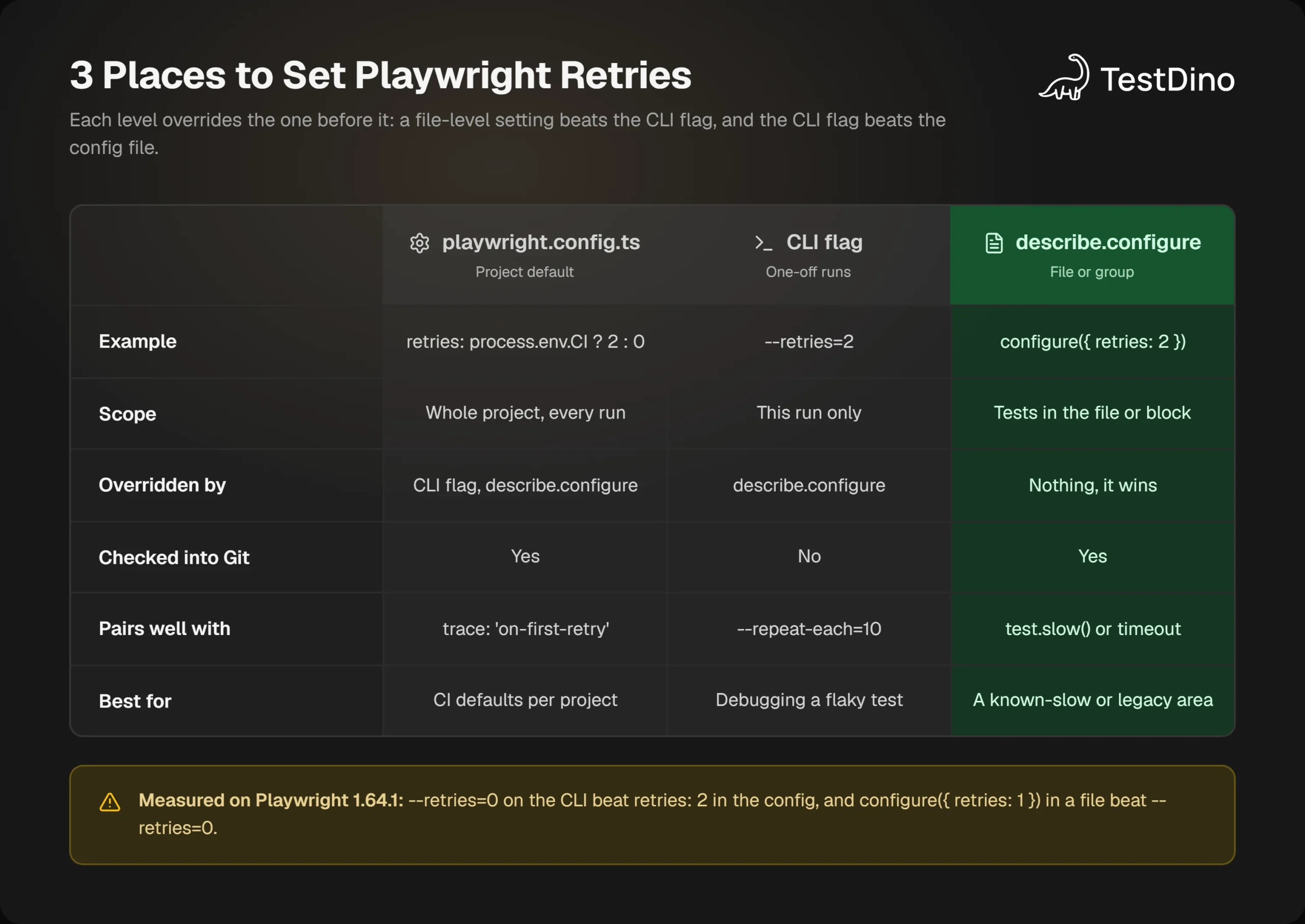
Wherever the retry count comes from, the result shows up in the report with a specific label, and that label is what you should be reading.
How Playwright labels flaky tests in reports
The built-in reporters all mark a flaky test differently from a pass. Here is the list reporter from a 6-test run with retries: 2, where one test was rigged to fail on its first attempt and another had a real bug:
Running 6 tests using 2 workers
  ✓  1 tests\checkout.spec.ts:10:5 › adds item to cart (289ms)
  ✓  2 tests\login.spec.ts:3:5 › shows the login form (315ms)
  ✓  3 tests\checkout.spec.ts:15:5 › applies coupon (183ms)
  ✓  4 tests\login.spec.ts:8:5 › accepts an email address (270ms)
  ✘  5 tests\checkout.spec.ts:21:5 › shows order total (1.1s)
  ✓  6 tests\checkout.spec.ts:21:5 › shows order total (retry #1) (309ms)
  ✘  7 tests\checkout.spec.ts:28:5 › confirms payment (1.1s)
  ✘  8 tests\checkout.spec.ts:28:5 › confirms payment (retry #1) (1.4s)
  ✘  9 tests\checkout.spec.ts:28:5 › confirms payment (retry #2) (1.2s)
  1 failed
    tests\checkout.spec.ts:28:5 › confirms payment
  1 flaky
    tests\checkout.spec.ts:21:5 › shows order total
  4 passed (10.1s)
Each retry gets its own numbered line with (retry #1) after the title, and the summary keeps flaky and failed apart. Six tests needed 9 attempts, and the run took 10.1 s against 5.1 s for the same suite with retries off.
The HTML report adds a Flaky filter in the header and a warning icon next to the test, so you can jump straight to the tests that needed a second attempt.
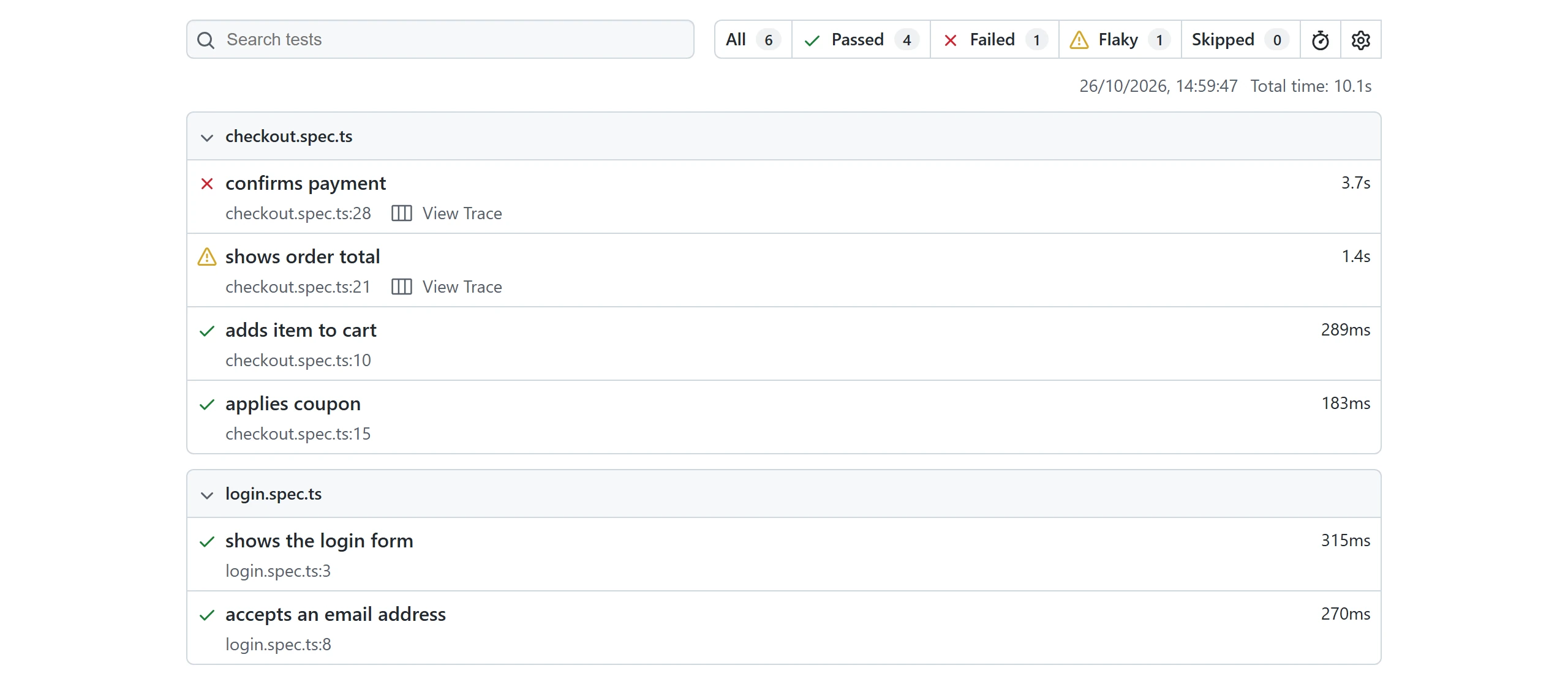
The dot reporter, which is the default on CI, packs the same story into symbols. The run above prints ····×±××F, and the reporters docs define each one:
- · passed on the first attempt.
- × failed or timed out, and will be retried.
- ± passed on retry, which is the flaky marker.
- F failed on every attempt.
Reading that string left to right, you can see 4 clean passes, the flaky test failing and then recovering, and the real bug failing twice before its final F.
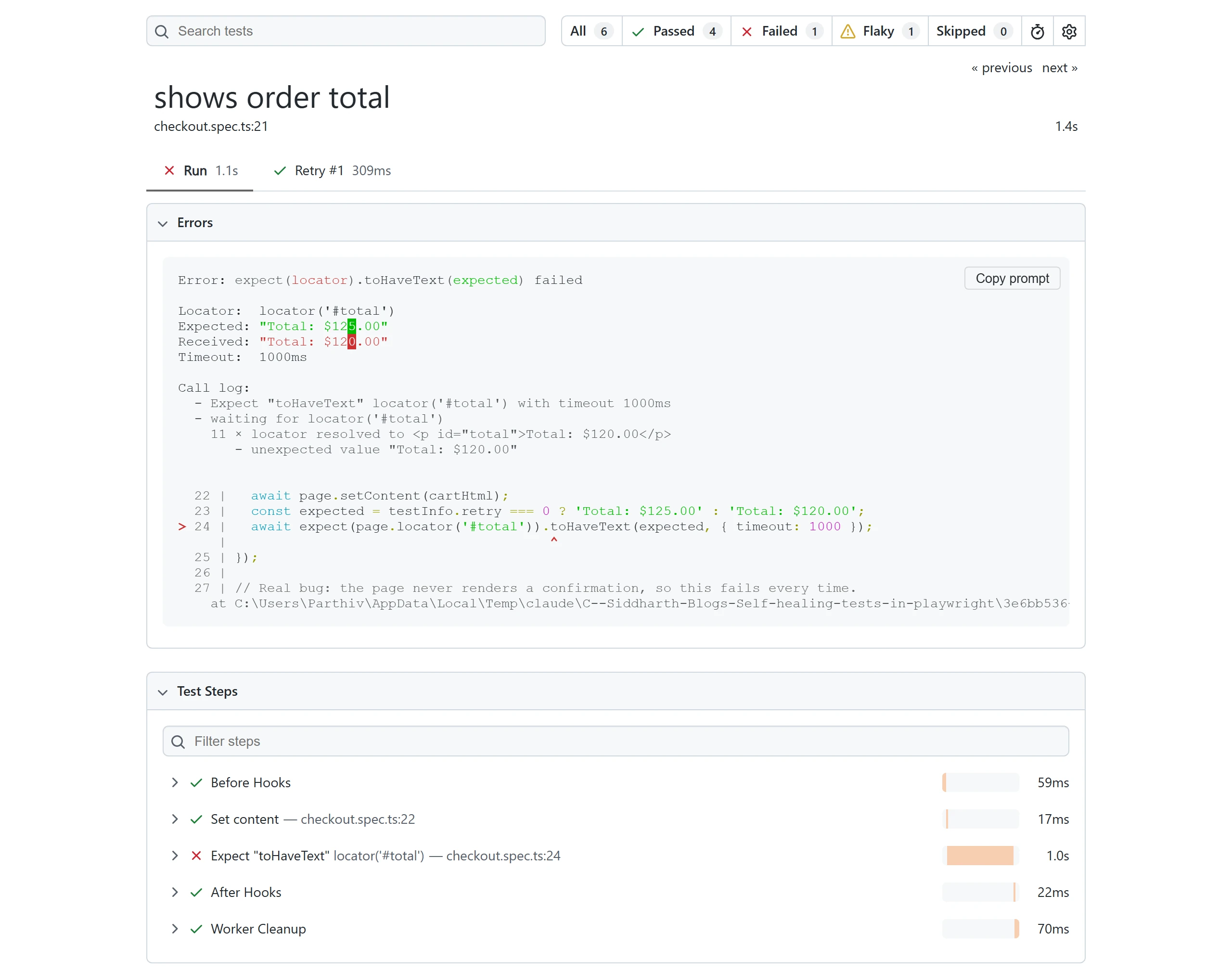
Open a flaky test in the HTML report and each attempt gets its own tab. Here the first run failed in 1.1 s and Retry #1 passed in 309 ms, with the error, the call log, and the trace link kept for the failed attempt. The Playwright HTML reporter guide covers the rest of the layout.
Flaky in JSON output and the reporter API
The JSON reporter counts outcomes in a stats block. The same run produced {"expected": 4, "unexpected": 1, "flaky": 1, "skipped": 0}, and each test lists every attempt with its status and retry number.
If you write a Playwright custom reporter, call testCase.outcome(). It returns 'expected', 'unexpected', 'flaky', or 'skipped', per the TestCase API, which is exactly the split you want to push into a dashboard.
Note: testCase.outcome() is not the same as testResult.status. Status describes one attempt, such as passed, failed, or timedOut. Outcome describes the whole test across attempts, so a flaky test has one failed status, one passed status, and a single flaky outcome.
The label is informative, but by default it changes nothing about the exit code. That is what the next option is for.
Playwright failOnFlakyTests: make flaky tests fail the build
By default, the runner exits with code 0 when every failed test recovers on a retry, as the Playwright release notes for version 1.45 state. That release added --fail-on-flaky-tests, and version 1.52 added the matching failOnFlakyTests config option.
import { defineConfig } from '@playwright/test';
export default defineConfig({
  retries: process.env.CI ? 2 : 0,
  // Flaky tests still retry, but the run exits with code 1 on CI.
  failOnFlakyTests: !!process.env.CI,
});
The command-line form has the same effect for a single run:
npx playwright test --retries=2 --fail-on-flaky-testsThe test still gets retried, and the report still labels it flaky. Only the exit code changes. In the run for this post, 4 tests passed, 1 was flaky, and the process exited with code 1:
  1 flaky
    tests\checkout.spec.ts:21:5 › shows order total
  4 passed (3.0s)
exit code: 1
Since version 1.61, reporters can also read fullConfig.failOnFlakyTests, so a custom reporter can explain why a run with zero failures still failed.
When to turn failOnFlakyTests on
Switching this on in a suite with 30 flaky tests blocks every merge on day 1. A staged rollout works better:
- First 2 weeks: retries on, trace: 'on-first-retry', and a report that lists flaky tests. Measure how many there are.
- Fix or quarantine the tests that show up most often.
- Main branch first: turn it on where a flaky pass is most expensive, and leave feature branches neutral for a while.
- Then everywhere, once a full week passes without a flaky label.
This is also where tests that pass locally but fail in CI get exposed, since that Playwright test failure pattern usually comes down to timing on a slower machine. A Playwright in GitHub Actions setup with the flag on turns those into visible red checks instead of silent retries.
Failing the build on a flaky test assumes the retry was worth having in the first place. Sometimes it is not.
When not to retry Playwright tests
A retry only helps when the second attempt can differ from the first for a reason outside your code: a slow machine, a brief network blip, a third-party service that stumbled. Everything else is a bug in the app or the test, and a retry just delays the news.
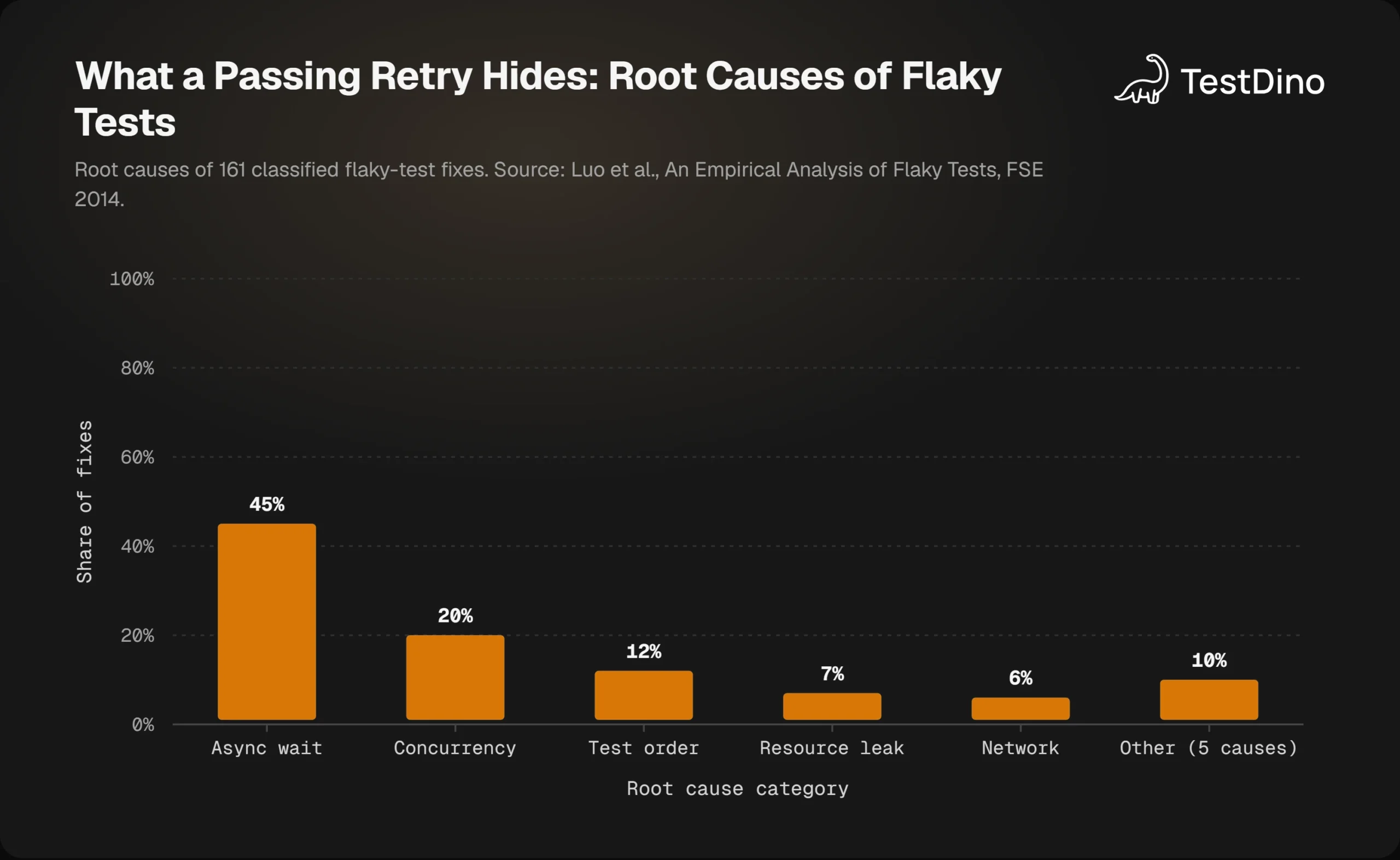
The research on where flaky tests come from backs this up. Researchers at the University of Illinois examined 201 commits that fixed flaky tests across 51 Apache projects in An Empirical Analysis of Flaky Tests. Of the 161 they could classify, 45% were async wait problems and 20% were concurrency problems.
Both of those are timing bugs. A retry changes the timing, so the test passes, and the race condition stays in the code. The same paper found that 78% of flaky tests were flaky from the first commit that added them, so the problem usually starts in the test itself.
Google has published the scale of the same problem. In a 2016 post on the Google Testing Blog, about 1.5% of all test runs reported a flaky result, and almost 16% of its tests showed some level of flakiness.
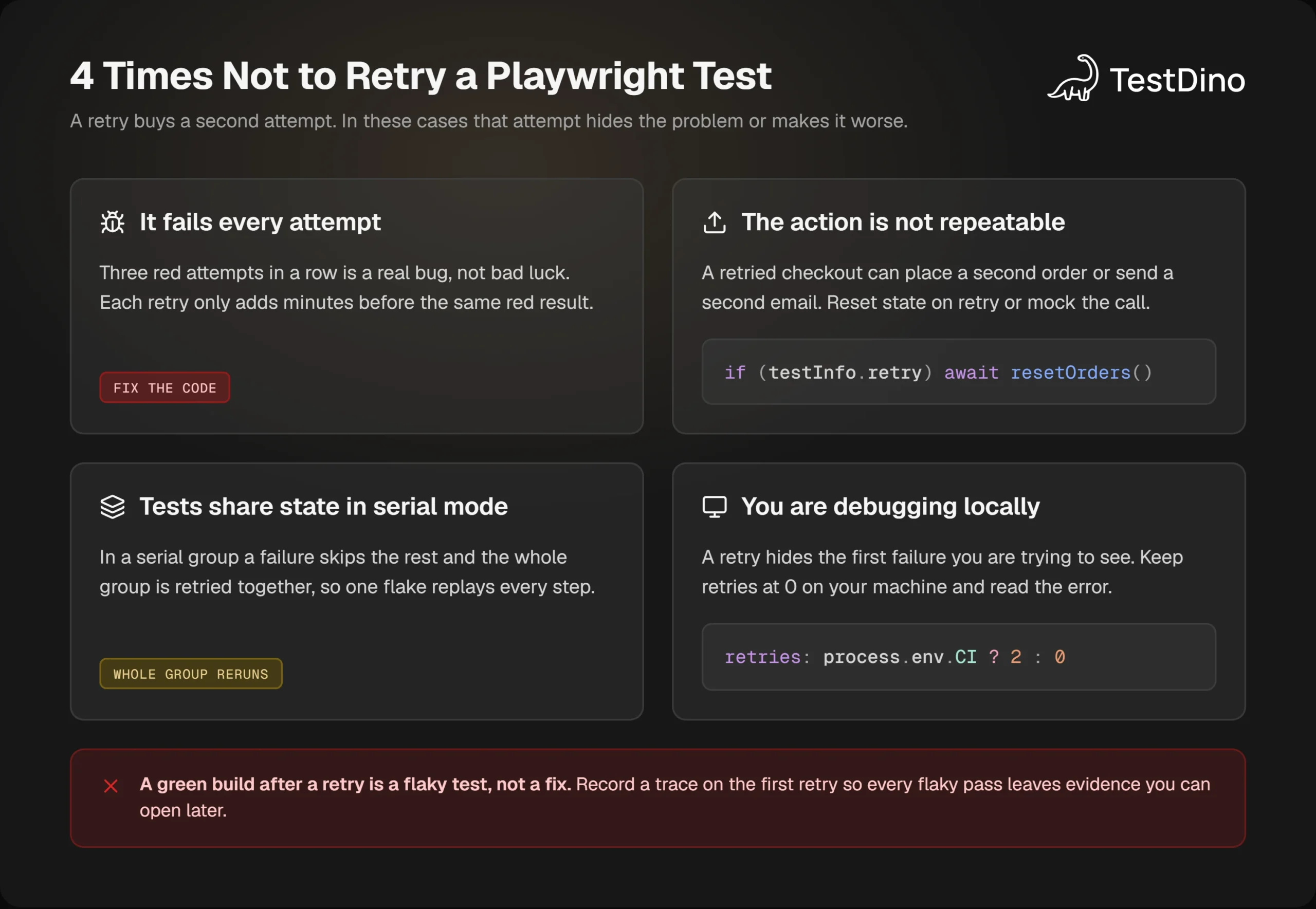
4 situations where a retry does more harm than good
It fails every attempt. Three red attempts in a row is a real failure. Retrying only adds the extra attempts to the run time before you see the same error. In the run above, the test with the real bug spent 2.6 s on retries and still failed.
The action is not safe to repeat. A test that places an order, sends an email, or charges a card can do it twice if the first attempt failed after the side effect. Either reset state when testInfo.retry is above 0, or use Playwright network mocking so a retry never reaches the real service.
The tests share state in serial mode. In a test.describe.configure({ mode: 'serial' }) group, a failure skips every later test and the whole group is retried together, per the parallelism docs. One flaky step replays the entire flow, which multiplies run time and can repeat side effects from earlier steps.
You are debugging on your own machine. Locally, a retry hides the very failure you are trying to see. Keep retries: 0 outside CI so the first red result stops the run and shows you the error.
How many retries is too many?
The Playwright docs use 2 as the CI example, and that is a sensible ceiling. Each retry multiplies attempts for failing tests, so a suite with a real bug and retries: 2 spends 3 attempts on every genuine failure before the build goes red.
If a test needs a third attempt to pass, it is not a blip. Put a number on what those extra attempts cost with the flaky test cost calculator, or model monthly CI spend with TestDino's free tools, which include a Flaky Cost Calculator and a CI Budget Calculator.
Note: Retries also change the maths of sharded runs. Every shard waits for its own slowest test, so a flaky test on each of 3 shards adds retry time to all 3. Playwright CI cost optimization walks through how to calculate what you actually spend.
When a test keeps needing retries and you cannot fix it this week, the answer is not a higher retry count. It is quarantine.
How to quarantine flaky tests in Playwright
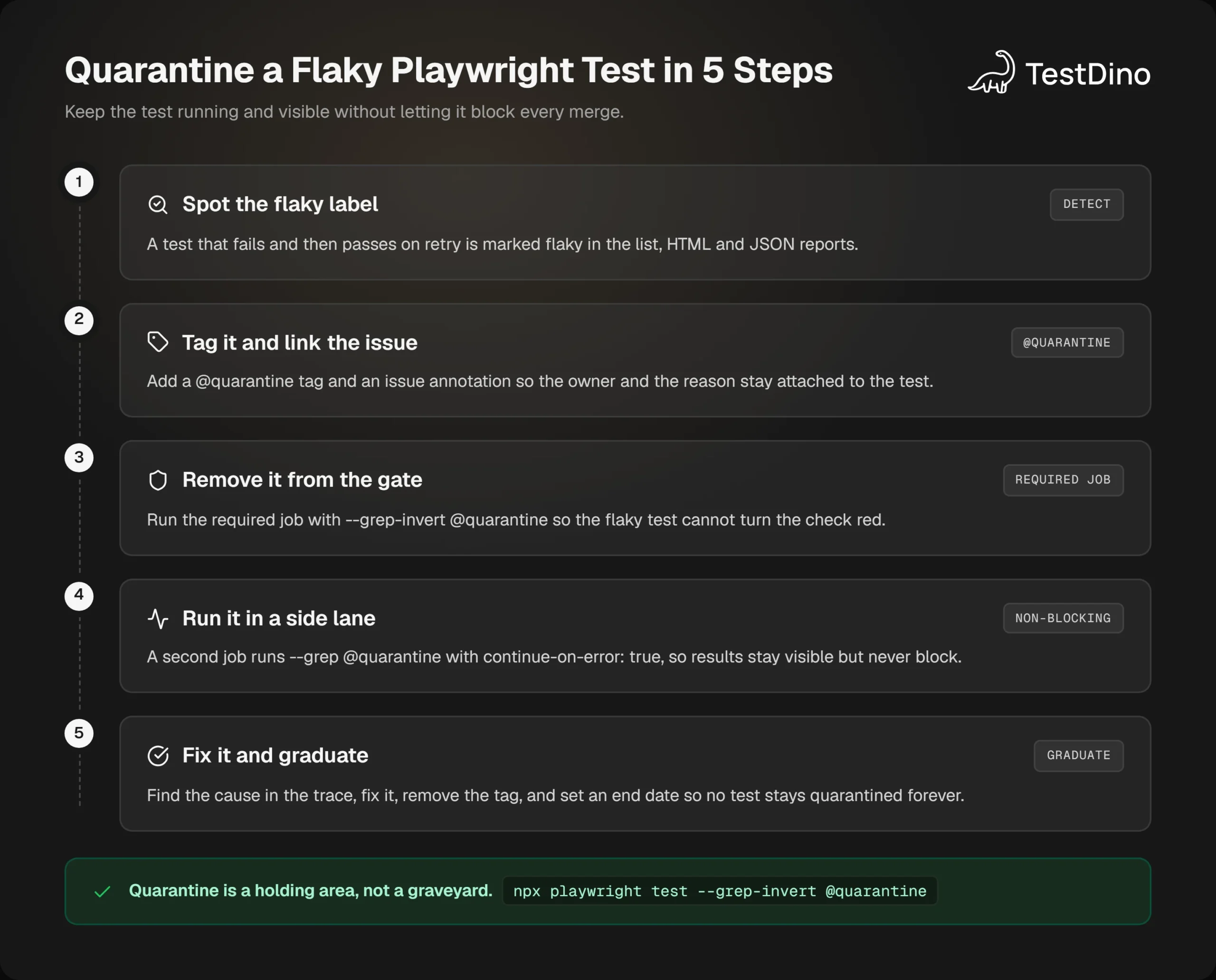
Quarantine means a test keeps running and keeps reporting, but stops blocking merges until it is fixed. Playwright has no quarantine keyword, so you build it from 2 features it does have: tags and --grep-invert.
Skipping is the tempting shortcut, but a skipped test produces no data. The annotations docs describe the options: test.skip() does not run the test, test.fixme() marks it as failing without running it, and test.fail() runs it and expects it to fail. None of those keep collecting results. A tag does.
import { test, expect } from '@playwright/test';
test('shows order total', {
  tag: '@quarantine',
  annotation: { type: 'issue', description: 'https://github.com/your-org/shop/issues/482' },
}, async ({ page }) => {
  // unchanged test body
});
The tag lets you filter, and the annotation shows the issue link in the HTML report, so nobody has to ask why the test is in quarantine. Grouping Playwright tests with tags and Playwright annotations both have more patterns for this.
Then split the CI run in two. The required job excludes the tag, and a second job runs only the quarantined tests and is allowed to fail:
npx playwright test --grep-invert @quarantine   # required check
npx playwright test --grep @quarantine # side lanejobs:
e2e:
runs-on: ubuntu-latest
steps:
- uses: actions/checkout@v4
- uses: actions/setup-node@v4
with:
node-version: 22
- run: npm ci
- run: npx playwright install --with-deps
- run: npx playwright test --grep-invert @quarantine
quarantine:
runs-on: ubuntu-latest
continue-on-error: true
steps:
- uses: actions/checkout@v4
- uses: actions/setup-node@v4
with:
node-version: 22
- run: npm ci
- run: npx playwright install --with-deps
- run: npx playwright test --grep @quarantine --retries=0
- uses: actions/upload-artifact@v4
if: always()
with:
name: quarantine-report
path: playwright-reportThe GitHub Actions workflow syntax defines continue-on-error: true on a job as allowing the workflow run to pass when that job fails. The quarantine job runs with no retries on purpose, so its report shows the true failure rate.
A scheduled nightly run of the same job gives you a failure rate per test over time, and the flaky test GitHub Actions guide extends this setup with that schedule.
skip, fixme, fail, or tag: which one to use
| Option | Runs the test? | Keeps reporting results? | Use it when |
|---|---|---|---|
| test.skip() | The test does not apply to this browser or setup | ||
| test.fixme() | The test crashes or is far too slow to run at all | ||
| test.fail() | Yes, and expects a failure | Yes, but a pass becomes an error | A known bug fails every time and you want to know when it is fixed |
| @quarantine tag | Yes, in a separate job | The test is flaky and you want its history while you fix it |
Each row answers a different question, and only the last one keeps producing results while the test is out of the gate. That is what makes it the right choice for flakiness rather than for a known broken feature.
Put together, the whole process has 5 steps, and the last one is the one teams forget.
Give every quarantined test an exit date
Quarantine without a deadline is just a slower way of deleting the test. Add a second annotation with a date and review the list every week:
test('shows order total', {
  tag: '@quarantine',
  annotation: [
    { type: 'issue', description: 'https://github.com/your-org/shop/issues/482' },
    { type: 'quarantine-until', description: '2026-11-30' },
  ],
}, async ({ page }) => {
  // ...
});
When the fix lands, remove the tag and the annotation together. If the date passes first, either fix the test or delete it, but do not extend the date quietly.
Tip: Fix the quarantined test from its trace, not from memory. Download the quarantine job's artifact, open the trace, and compare the failed attempt with a passing one. An async-wait flake usually shows up as an assertion that ran before the response it needed had arrived.
All of this works with files, tags, and YAML. The part Playwright cannot give you is the history: which tests keep landing in quarantine, and whether retries are trending up or down.
Track Playwright retries and flaky tests with TestDino
A Playwright report describes one run. TestDino stores every attempt of every test across runs, so a test that is flaky once a week shows up as a pattern instead of a one-off. Detection switches on automatically once retries are enabled, according to the TestDino flaky test guide.
import { defineConfig } from '@playwright/test';
export default defineConfig({
  retries: process.env.CI ? 2 : 0,
  reporter: [
    [process.env.CI ? 'dot' : 'list'],
    ['@testdino/playwright', { token: process.env.TESTDINO_TOKEN }],
  ],
});
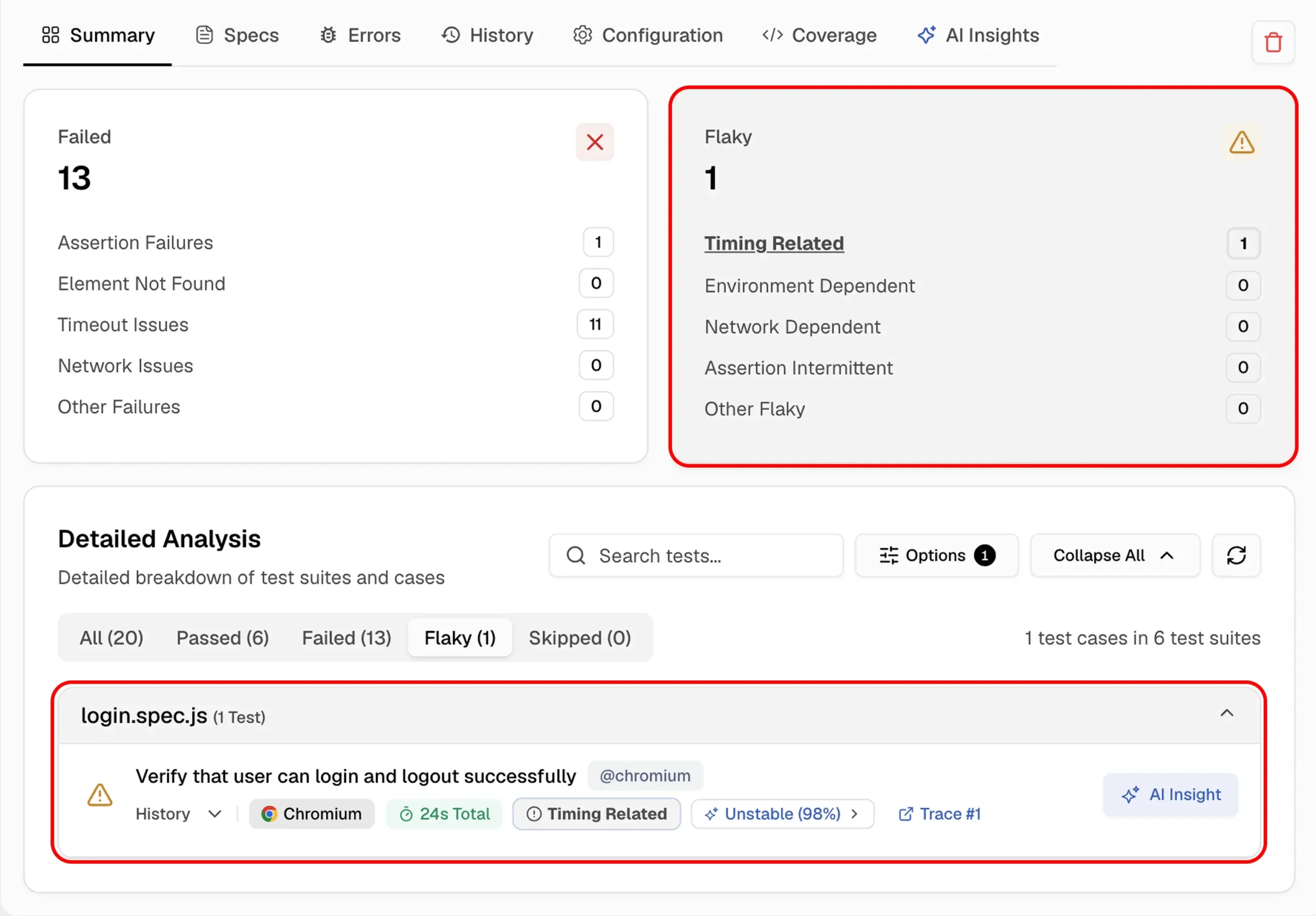
Inside a run, the Summary tab counts flaky tests separately from failures and sorts each one into a cause category, such as timing or network. The flaky test's row carries that category, an Unstable tag, and a link to the trace from the retried attempt, so the evidence sits one click from the label.
Each test gets a Reliability score from 0 to 100, based on how often it passed, how rarely it was flaky, whether retries recovered it, and whether it fails chronically. Scores of 80 and above count as healthy, 50 to 79 as shaky, and below 50 as unreliable.
The dashboard's Most Flaky Tests panel ranks tests by flaky rate for the selected period, and the Test Explorer adds a sortable Flaky % column per spec file. Seeing Playwright test history across runs is what turns a flaky label into a trend you can act on.
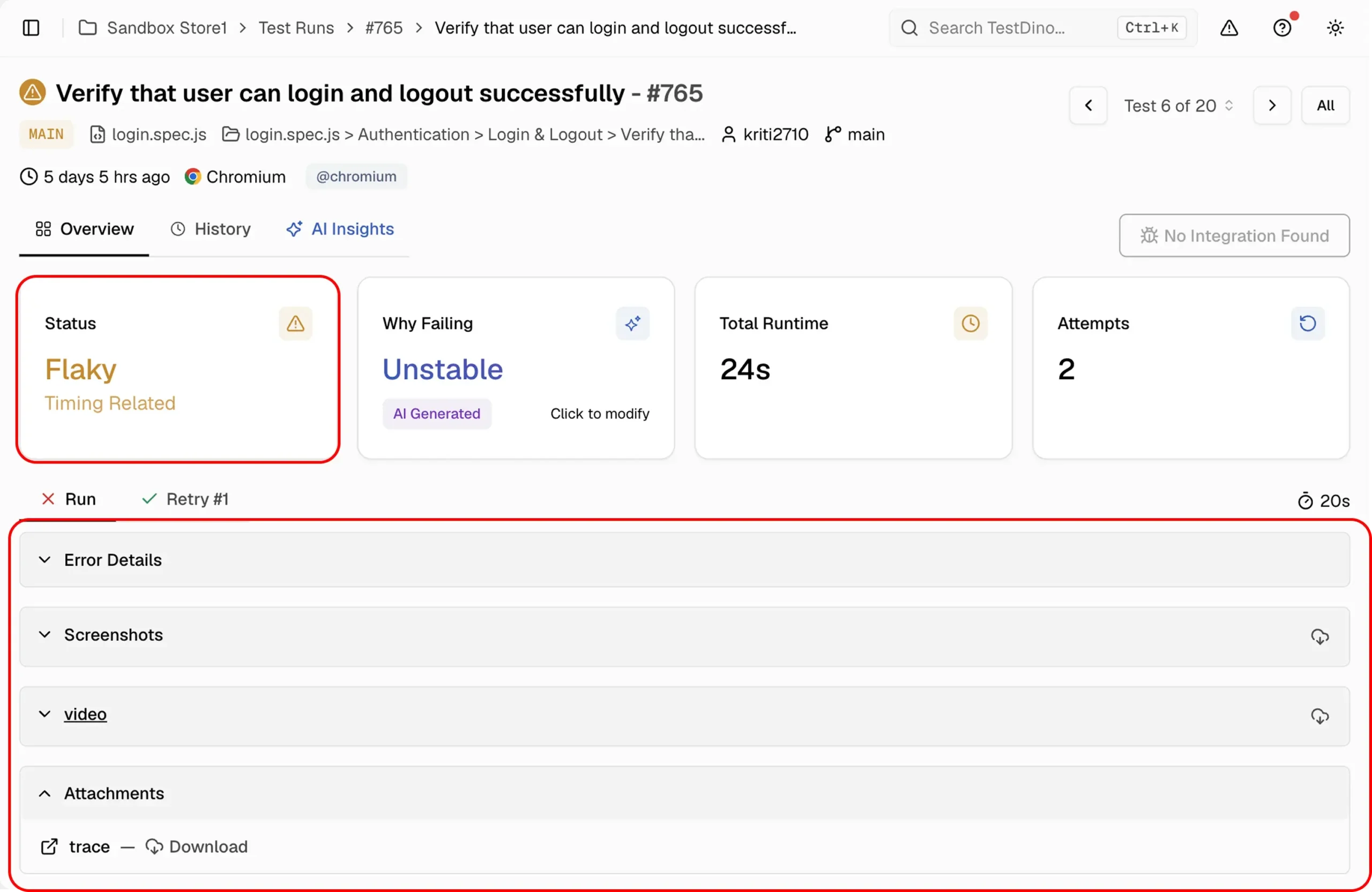
Open the test itself and the page mirrors what Playwright's HTML report showed earlier, with more context around it. Status reads Flaky with its category, the Attempts tile shows 2, and the Run and Retry #1 tabs keep the error details, screenshots, video, and trace from each attempt.
Quarantine from the dashboard
Instead of editing tags, you can quarantine a test with the Test Controls button on its page or in the Test Explorer. A quarantined test keeps running and reporting, but its failures stop failing the build until it is healthy again or its end date arrives.
The Candidates tab suggests which tests to quarantine: anything flaky in more than 5% of its runs over the last 30 days that is not already quarantined or marked critical. That replaces the weekly spreadsheet with a list that keeps itself current.
Strict or neutral: failOnFlakyTests at the pull request level
TestDino's GitHub check has 2 flaky modes, per the CI checks docs. Neutral, the default, leaves flaky tests out of the pass-rate calculation. Strict counts them as failures, which is failOnFlakyTests applied at the pull request instead of the process exit code.
The 2 can differ by environment, such as Neutral on development branches and Strict on production, with a pass-rate threshold that defaults to 90%. Failures of quarantined tests are left out of the pass rate so the check agrees with the build.
Playwright PR health checks and regular flaky test analysis cover how to read those signals week over week, which is where the retry story ends: not in a config value, but in a trend line.
Conclusion
Playwright retries are a tool for absorbing noise you do not control, and a measuring device for noise you do. Set retries: 2 on CI and 0 locally, record a trace on the first retry, and treat the flaky label as a to-do item rather than a pass.
Turn on failOnFlakyTests once the flaky count is near zero, quarantine the tests you cannot fix this week with a tag and a deadline, and keep retries away from tests with side effects or serial dependencies. Those habits feed straight into the work to reduce Playwright CI runtime, because every skipped retry is CI time back.
The cheapest moment to fix a flaky test is the first time it needs a retry. Everything in this guide is about making that moment visible, and the wider Playwright best practices cover the writing habits that stop it from arriving in the first place.
FAQs

Krupa Gandhi
QA Tester