The Complete Guide to Knowledge Graph in Software Testing
Discover how a graph in software testing maps complex app logic, eliminates blind spots, and boosts your automation reliability.
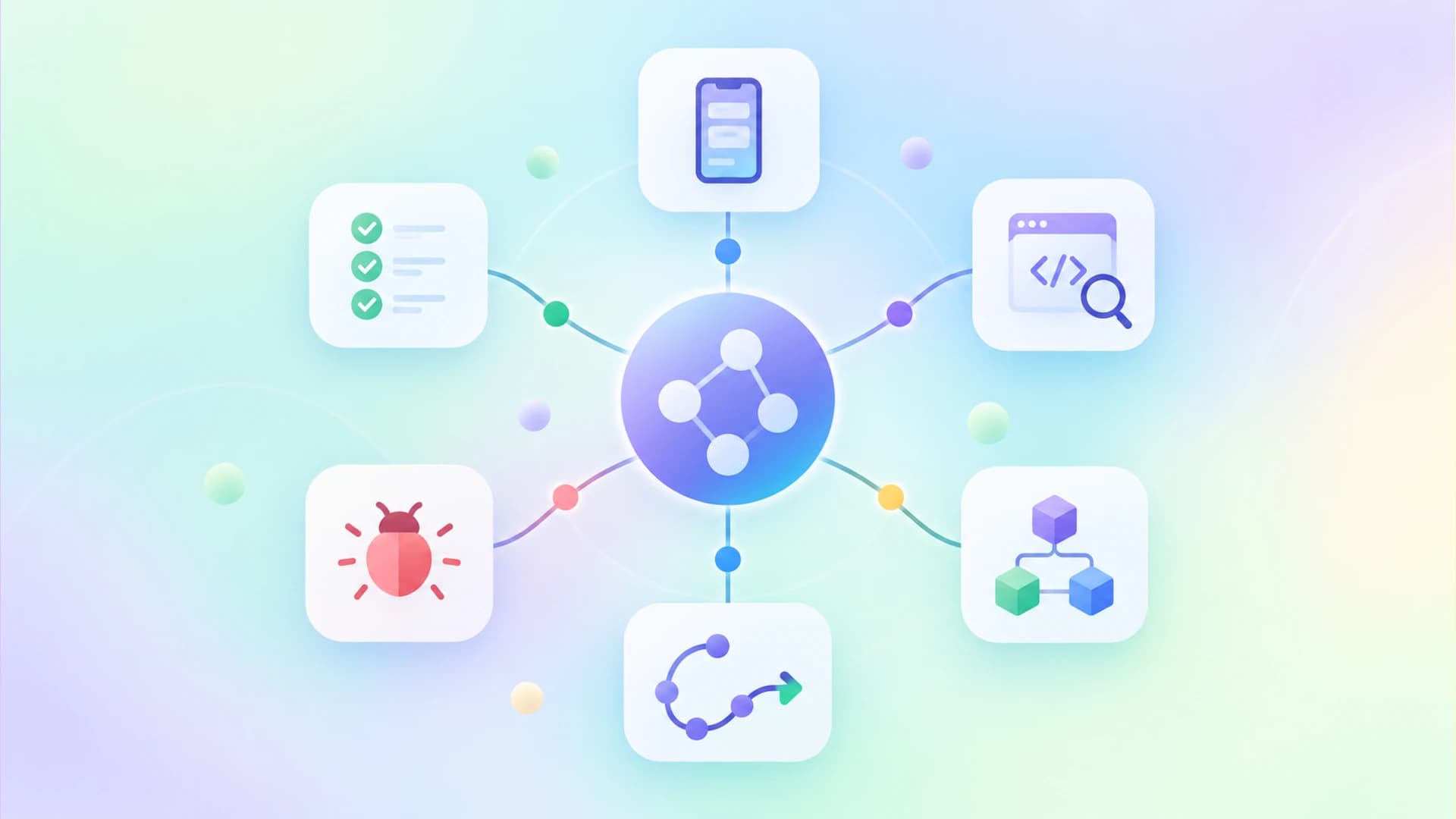
Think of your software application as a massive, sprawling city with thousands of intersecting roads. A knowledge graph in software testing acts exactly like a modern GPS navigation system. It maps out every single street, intersection, and hidden alleyway for you.
The biggest headache for modern QA teams is dealing with blind spots and unexpected system behavior. Traditional testing strategies often miss hidden dependencies and complex state changes. This leaves critical business paths completely untested and highly vulnerable to bugs in production.
This guide helps you fix exactly that problem by mapping your application properly. We will show you how to leverage a graph in software testing to uncover every hidden defect before your users do.
What is a graph in software testing?
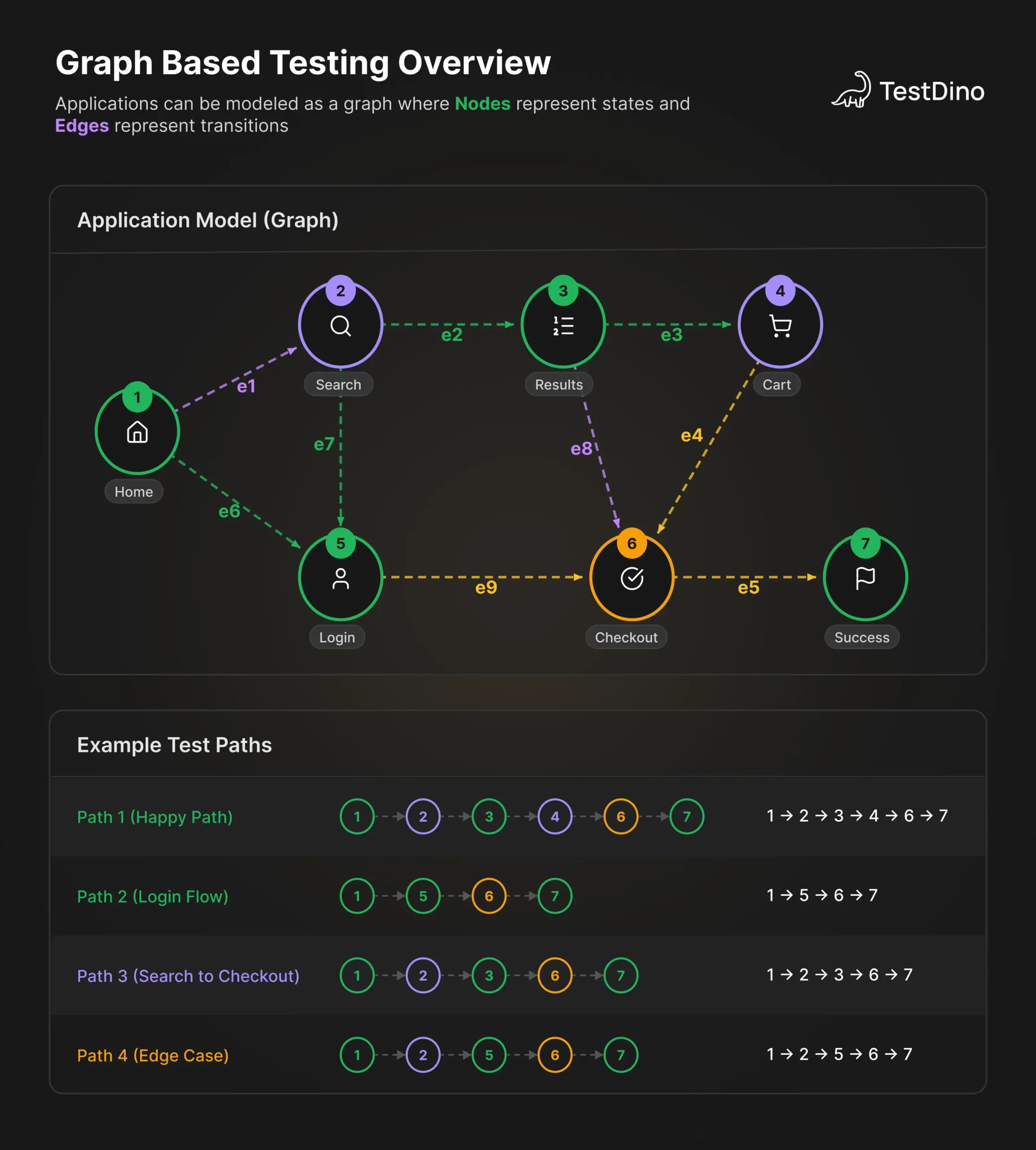
A graph in software testing is a mathematical model that represents the structure and behavior of a system. It abstracts software components into nodes and their relationships into connecting edges.
When we talk about a graph in software testing, we are simply talking about a visual and mathematical representation. It takes your complex source code or application UI and turns it into a map. You can then use this map to systematically walk through different scenarios.
This concept relies on some fundamental elements. Understanding these elements is crucial for building any automated test strategy. Let us break down the core components of any testing graph.
Core components of a testing graph
- Nodes: These represent specific states, program statements, or web pages within your application.
- Edges: These are the transitions, user actions, or logical flow connecting the different nodes.
- Paths: A test path is a specific sequence of nodes and edges that your automated script will traverse.
- Graph matrix: A mathematical representation of the graph used by tools to calculate paths automatically.
By defining these elements, your QA team can easily visualize the entire user journey. This makes it significantly easier to integrate best test automation tools into your workflow.

Tip: Always start by mapping the most critical user journeys first. Do not try to map the entire application on day one, as this leads to analysis paralysis.
The difference between static and dynamic graphs
Static graphs are generated directly from the source code without actually running the application. They are excellent for identifying dead code and logical errors early in the development cycle. Static graphs form the foundation of white box testing strategies.
Dynamic graphs, on the other hand, are built while the application is actively running. They capture the real time state changes and user interactions. Dynamic graphs are highly valuable when you need to test ai generated code because AI logic can sometimes be unpredictable.
Understanding both types allows you to build a comprehensive safety net. You capture both structural flaws and runtime anomalies efficiently.
Why a knowledge graph in software testing changes the game
A knowledge graph in software testing goes far beyond a simple flow chart. It acts as an intelligent database that connects your code, your tests, your requirements, and your historical bugs. This interconnected data provides unprecedented visibility into your software quality.
Most organizations struggle because their testing data lives in isolated silos. Jira tickets, test results, and CI logs exist in separate systems with little or no shared context. A knowledge graph connects this fragmented data into a single source of truth.
When you connect these dots, you unlock powerful capabilities for your engineering team. Let us look at the primary benefits of adopting this approach.
Automated root cause analysis
When a test fails in your CI pipeline, finding the reason can take hours. A knowledge graph instantly traces the failure back to the specific code commit or dependency change. This drastically reduces the time spent debugging broken builds.
By analyzing the relationships in the graph, tools can pinpoint the exact origin of the error. This is a game changer for test failure analysis. It stops developers from wasting time on false positives.
Note: Root cause analysis powered by a knowledge graph is particularly effective in microservice architectures where dependencies are deeply nested.
Intelligent test case generation
Writing test cases manually is slow, error prone, and boring. A knowledge graph can automatically traverse the edges of your system to generate comprehensive test scenarios. It ensures that every logical path is covered without human intervention.
This approach perfectly complements modern playwright ai codegen tools. The graph provides the logical blueprint, and the AI generates the actual automation scripts. Together, they can automate the bulk of your regression suite.
Predictive defect analysis
Because a knowledge graph stores historical bug data, it can predict where future bugs are likely to appear. It highlights the nodes in your application that have the highest failure rates over time.
This predictive capability allows you to focus your testing efforts on the riskiest parts of the application. It is one of the most exciting software testing trends happening right now. Teams can stop guessing and start relying on data driven testing.
Common types of software testing graphs
Not all graphs are created equal, and different testing phases require different models. Depending on your goals, you will need to choose the right graph for the job. Using the wrong model can lead to wasted effort and missed defects.
Let us explore the most widely used graphs in the software testing industry. Each serves a specific purpose in ensuring your application is robust and reliable.
Control flow graphs
Control flow graphs are a core technique in white box testing. They map the exact sequence of statements executed within a single function or module. Nodes represent blocks of code, and edges represent logical branches like if statements or loops.
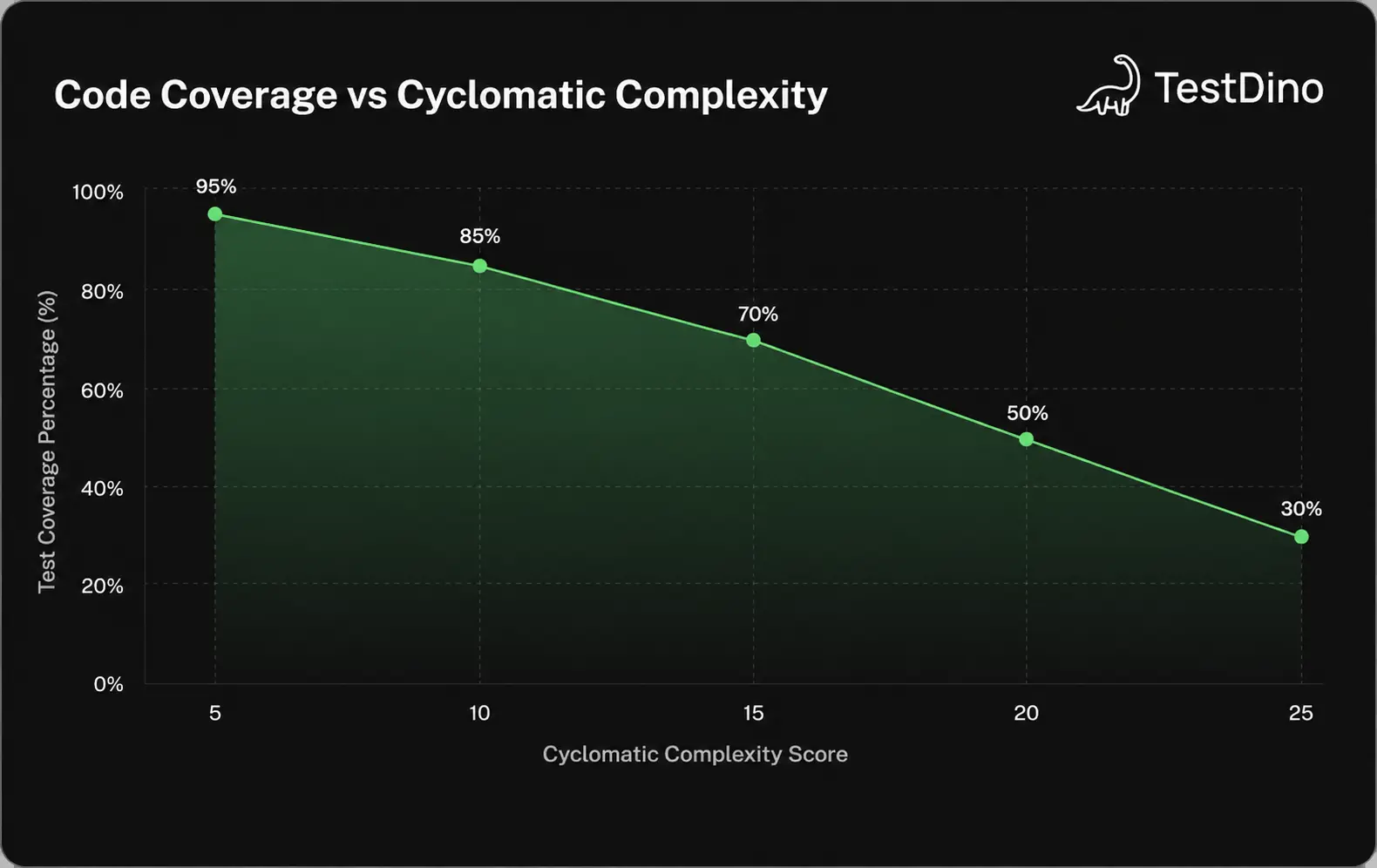
QA engineers use control flow graphs to calculate cyclomatic complexity. This metric helps determine exactly how many test cases are needed to achieve 100 percent branch coverage. It forces you to write tests for every possible outcome.
State transition graphs
State transition graphs model the different states an application can exist in. For example, an ecommerce cart can be empty, filled, or checked out. The edges represent the user actions that trigger these state changes.
These graphs are incredibly useful for UI automation and end to end testing. If you are using robust salesforce testing tools, state graphs help verify complex CRM workflows. They ensure users cannot bypass critical validation steps.
Dependency graphs
Dependency graphs visualize how different modules, microservices, or external APIs interact. They are crucial for integration testing. If one node fails, the graph immediately shows you which other nodes will be impacted.
When a core service goes down, the dependency graph prevents you from running useless tests. This smart execution strategy helps to reduce playwright ci runtime. You only run the tests that actually matter for the specific change.
Step by step guide to graph based testing
Implementing a graph in software testing requires a structured approach. You cannot simply throw tools at the problem and expect a miracle. You need a deliberate process to model your system and generate meaningful tests.
Here is a practical, step by step process to get your team started. Following these steps will ensure your graph based testing initiative is successful.
Step 1: Model the software behavior
The very first step is to abstract your software into a graph format. You must define the boundaries of what you are testing. Identify all the valid states, user inputs, and possible transitions within that scope.
You can do this manually on a whiteboard for simple features. However, for complex enterprise systems, you will want to use automated modeling tools. These tools scan your application and generate the graph structure automatically.
{
  "nodes": [{"id": "login", "type": "state"}, {"id": "dashboard", "type": "state"}],
  "edges": [{"from": "login", "to": "dashboard", "action": "submit_credentials"}]
}
Step 2: Define your coverage criteria
Once you have your graph, you need to decide what level of coverage is acceptable. Do you want to visit every single node at least once? Or do you need to traverse every single edge and branch?
Your coverage criteria will dictate how many test cases you ultimately generate. Node coverage is faster but less thorough, while edge coverage finds more bugs but takes longer to execute. Choose the balance that fits your risk profile.
Step 3: Generate the test paths
With the graph and criteria in place, you can now derive the actual test paths. This involves tracing lines from the starting node to the terminating nodes. Each unique path represents a single test scenario.
For a complex application, the number of paths can explode exponentially. This is where you should leverage ai test management tools to prioritize the most important paths. AI can prune the graph to focus on the highest value scenarios.
Step 4: Execute and analyze
Finally, you translate these abstract paths into executable automation scripts. You provide the necessary input data to force the application down each designated path. Then, you run the suite and collect the results.
When failures occur, you use the graph to trace back to the root cause. This systematic execution is a core pillar of modern spec driven testing. It ensures your software matches the exact specifications.
Path coverage is a testing metric that measures the percentage of all possible routing paths through a given software module that have been executed.
E-commerce checkout flows
Consider a typical online shopping cart. A user can add items, apply promo codes, remove items, or proceed to payment. A state transition graph maps all these actions clearly.
If a user tries to apply a promo code on an empty cart, the graph dictates an error state. By testing every edge in this graph, QA ensures no invalid transactions occur. This prevents massive revenue loss from logical bugs.
Microservice integration testing
In a distributed architecture, dozens of services communicate via APIs. A dependency graph maps these interactions. When the payment service is updated, the graph shows that the order service must also be tested.
This prevents the team from running the entire regression suite unnecessarily. They use test orchestration platforms to trigger only the affected tests. This surgical precision saves compute resources and time.
Identifying flaky tests
Flaky tests are the bane of any QA automation engineer. A knowledge graph can link test execution history with specific environment variables and code changes. This correlation helps identify exactly why a test is flickering.
Instead of just retrying the test blindly, the team can fix the underlying timing issue. Generating a detailed flaky test report becomes a trivial task when your data is graphed. You instantly see the patterns causing the instability.
Best practices for graph test management
Adopting a knowledge graph in software testing is not a silver bullet. If you implement it poorly, you will end up with an unmaintainable mess. You need strict governance and best practices to keep your graphs useful.
Here are the most critical guidelines to follow. They will save you from the common pitfalls that cause graph based initiatives to fail.
Managing state explosion
The biggest risk in graph based testing is state explosion. This happens when you try to map too many variables, resulting in millions of possible paths. No team has the time or resources to execute millions of tests.
To avoid this, you must abstract your models. Group similar states together and use equivalence partitioning. You must keep the graph as simple as possible while still capturing the core business logic.
Tip: Break massive graphs into smaller, modular sub-graphs. Test these modules independently before combining them for end to end validation.
Maintaining graph accuracy
Your software is constantly changing, which means your graphs must change too. An outdated graph is worse than no graph at all, as it leads to false confidence. You must integrate graph updates into your standard development workflow.
Whenever a developer adds a new feature, the corresponding graph must be updated. This is why utilizing fixing playwright tests with ai is so powerful. AI can help automatically adjust your graphs and scripts when the UI changes.
Choosing the right tooling
Do not try to build a custom graph rendering engine from scratch. The market is full of excellent tools designed specifically for this purpose. You want a tool that integrates seamlessly with your existing CI pipeline.
Look for tools that offer strong visual debugging and reporting features. If you are comparing open source test reporting tools, ensure they support graph based visualizations. A good tool makes the abstract math accessible to everyone.
Tools and platforms for graph based QA
You cannot execute a modern graph strategy with just spreadsheets and basic scripts. You need specialized platforms that can handle complex data relationships. Fortunately, the ecosystem has matured significantly in recent years.
Let us review some of the primary categories of tools you will need. Selecting the right stack is critical for your team's success.
Graph databases
At the core of a knowledge graph is the database itself. Relational databases like MySQL struggle with deep, interconnected data. You need a native graph database like Neo4j or Amazon Neptune to store your testing relationships.
These databases allow you to run complex queries in milliseconds. You can ask questions like "which tests are affected by this specific file change?" and get immediate answers. They form the backbone of modern testops platforms.
Automated modeling tools
Drawing graphs by hand is incredibly tedious. Automated modeling tools can crawl your web application and generate the state transition graph for you. They click every link and record every state change automatically.
These tools are essential for maintaining large scale applications. If you want to dive deeper into this automation, you should check out this helpful playwright skill repository. It contains great resources for automating browser interactions efficiently.
Comparison of graph implementation approaches
To help you decide how to implement graph testing, here is a quick comparison. It breaks down the pros and cons of manual versus automated generation.
| Approach | Initial Setup Time | Maintenance Effort | Accuracy |
|---|---|---|---|
| Manual Modeling | Low to Medium | Very High | Prone to human error |
| Automated Crawling | Medium | Low | High for UI, low for backend |
| Source Code Analysis | High | Very Low | Extremely high precision |
Conclusion
Implementing a graph in software testing is no longer just an academic exercise. It is a practical, powerful approach to managing the complexity of modern applications. By mapping your software's nodes and edges, you eliminate blind spots entirely.
A robust knowledge graph in software testing connects your fragmented data into a cohesive story. It allows you to predict defects, automate root cause analysis, and generate smarter test cases. This translates directly to faster release cycles and higher quality software.
Start small by mapping your most critical business flows today. As you build your graph, you will quickly realize how much confidence it brings to your automation strategy.
FAQs

Krupa Gandhi
QA Tester