Running Playwright at Scale on Kubernetes
Learn how to run Playwright at scale on Kubernetes: container setup, sharding, blob reports, resource tuning, and flaky test observability in CI.
Your test suite just kept growing. A hundred tests became five hundred, and five hundred quietly turned into two thousand. Suddenly, what used to finish in eight minutes on your laptop takes forty-five minutes in CI, and everyone is waiting.
That waiting is the real problem. When developers stop trusting the pipeline to give them quick answers, they start merging without checking, skipping re-runs, or ignoring red builds entirely. The test suite becomes noise instead of a safety net.
This guide shows you exactly how to move Playwright test automation onto a distributed playwright kubernetes architecture. You will learn how to transition onto Kubernetes, from containerizing your suite, to sharding it across pods, to merging results into a single report your whole team can use.
Why teams are moving Playwright to Kubernetes
The default answer to "our tests are slow" for a long time was to throw more workers at the problem. Increase the number of workers: 8 in playwright.config.ts, perhaps upgrade the CI runner to a larger machine, and call it a day.
But that approach hits a ceiling fast. You can only run so many browser processes on a single machine before RAM becomes a bottleneck. On GitHub-hosted runners, each machine has a limit of about 7 GB of usable memory. Open ten Chromium instances and you are already pushing it.
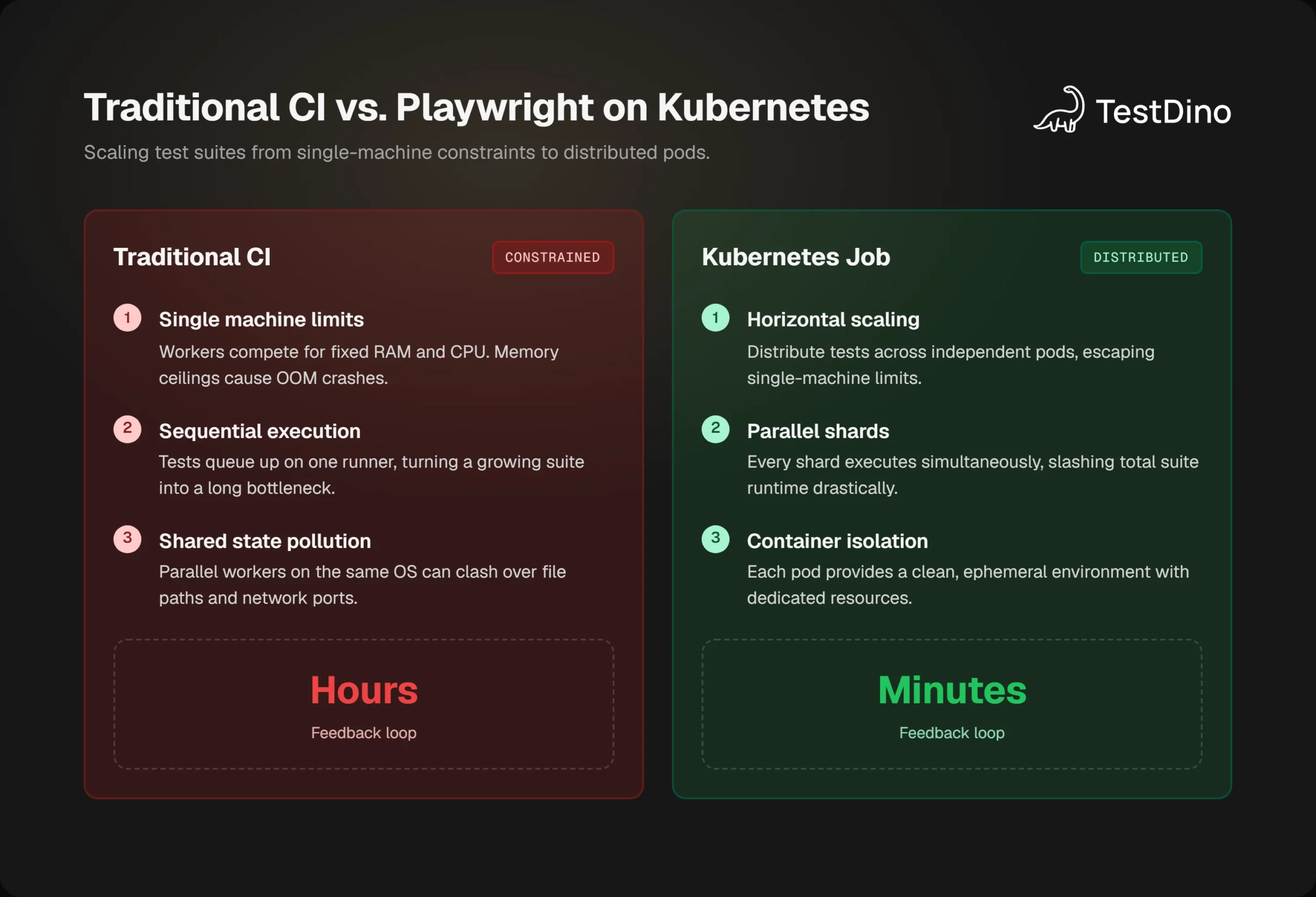
Playwright kubernetes approach changes the model completely. You can't run everything on one machine, you split your test suite into slices, and give each slice its own container. That each pod is isolated , a crash in one pod does not affect the others. When the suite grows, you add more pods rather than upgrading a single machine.
A Kubernetes Job is a workload object that runs one or more Pods until completion. A Job is the right tool for finite tasks such as running a test suite, unlike a Deployment that keeps pods running forever, a Job tracks success and failure counts.
Teams also choose playwright kubernetes infrastructure to control costs. CI runners in the cloud are billed by the minute. Kubernetes clusters on spot or preemptible nodes enable you to run bursty workloads like test suites at a tiny fraction of that cost.
The testing framework adoption trends data shows Playwright's npm weekly downloads crossing 33 million in early 2026 , and a growing share of those teams now run on container-native infrastructure.
How Playwright sharding maps to Playwright Kubernetes pods
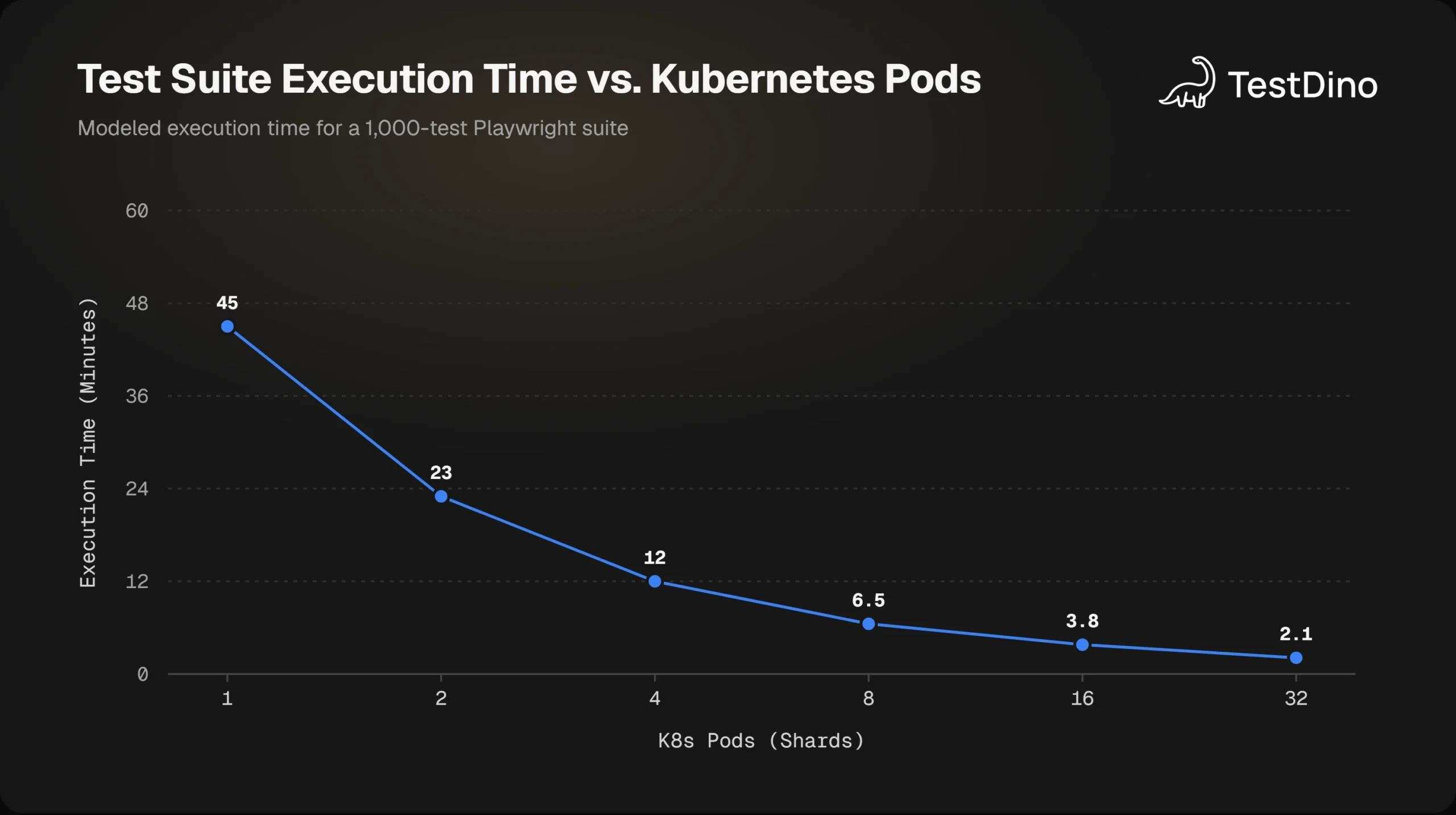
The built-in --shard flag from Playwright distributes your test files across independent runners. You tell it "run shard 2 of 5", and it works out which files are in that slice. Each shard is completely isolated and does not know of the other shards.
This translates directly to Kubernetes. You create a Job with five pod completions, and each pod reads an environment variable telling it what shard number it is. All five pods can run together on separate nodes.
Note: Playwright's --shard flag is by test file, not individual test. If you have 40 test files, and are running 8 shards, each shard will get 5 files. You can also parallelize tests within a single file by setting fullyParallel: true in your config.
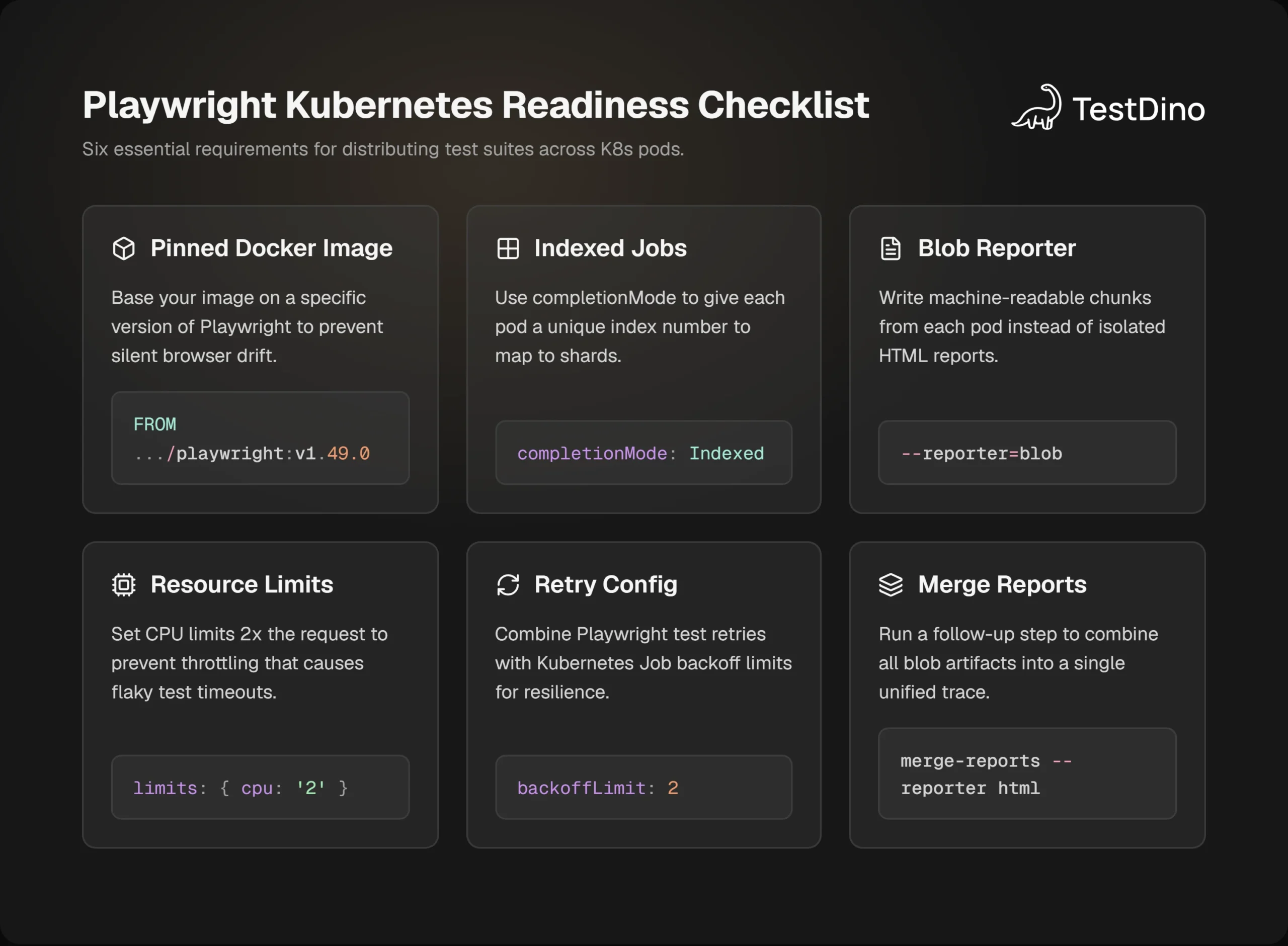
The Kubernetes feature that makes this work cleanly is completionMode: Indexed. When set, Kubernetes gives each pod a unique zero-based index via the annotation batch.kubernetes.io/job-completion-index. You pass that index to the --shard flag with a simple offset calculation.
If your Job has completions: 8, pod index 0 runs --shard=1/8, pod index 1 runs --shard=2/8, and so on. No custom coordination code required.
Playwright sharding in isolation already cuts runtime significantly, but on Kubernetes you also eliminate the memory ceiling of a single machine since each pod has its own allocation.

Tip: Start with a shard count equal to your test file count divided by 5. For 60 test files, start with 12 shards. Monitor actual pod runtimes after your first few runs and tune from there. Uneven runtimes between pods suggest you need more granularity or fullyParallel: true.
Setting up your Docker image for Playwright Kubernetes execution
The first requirement is a container image that has browsers pre-installed. Building this yourself means handling browser binary downloads, system dependency installs, and font packages, all of which vary by OS version and are easy to get wrong.
Microsoft publishes official Playwright Docker images with all three browser families (Chromium, Firefox, WebKit) and their system dependencies already included. Your Dockerfile starts from that base:
FROM mcr.microsoft.com/playwright:v1.49.0-noble
WORKDIR /app
COPY package.json package-lock.json ./
RUN npm ci
COPY . .
Build and push to your registry:
docker build -t my-playwright-tests:v1.49.0 .
docker push my-registry/my-playwright-tests:v1.49.0
A few things to know about the official images:
- They are based on Ubuntu noble (24.04) for recent versions. Always check that the image OS tag matches the Playwright version in your "package.json"ct.
- The image includes all three browser families. If you only use Chromium, you can trim image size by removing Firefox and WebKit in your Dockerfile, but most teams accept the extra size for convenience.
- Always pin to a specific version tag, not latest. Floating tags cause silent version drift that is hard to diagnose in production CI.
Note: Your Playwright version in package.json must match the image version tag. A mismatch causes Playwright to attempt downloading browsers at runtime, which will fail in an air-gapped Kubernetes cluster or one with restricted egress.
Once your image is in a registry accessible by your cluster, you are ready to define the Job.
Creating a Playwright Kubernetes Indexed Job
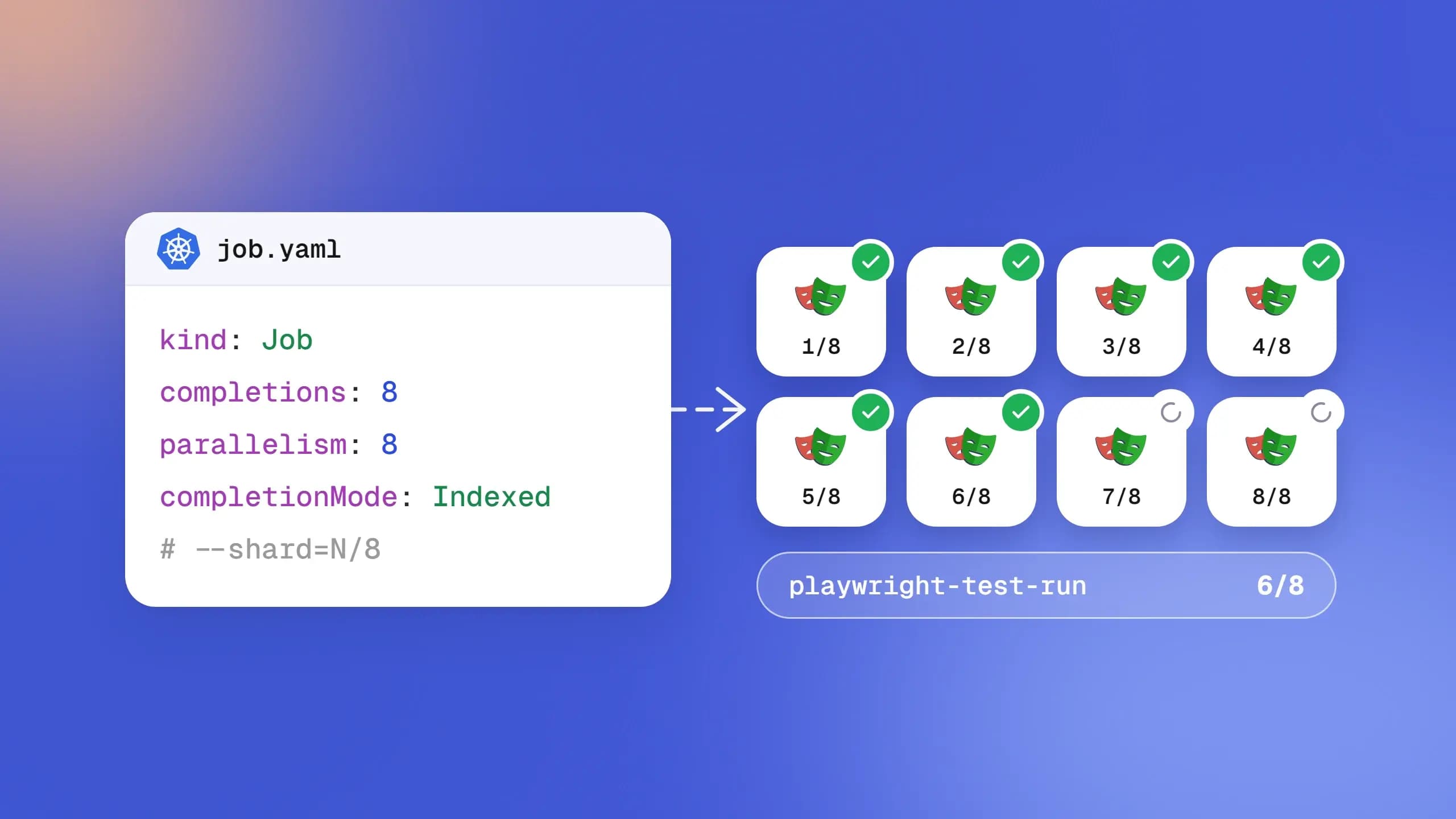
The manifest below creates an Indexed Job that runs 8 shards in parallel, each in its own pod with a shared volume for reports:
apiVersion: batch/v1
kind: Job
metadata:
  name: playwright-test-run
spec:
  completions: 8
  parallelism: 8
  completionMode: Indexed
  backoffLimit: 2
  template:
    spec:
      restartPolicy: Never
      containers:
        - name: playwright
          image: my-registry/my-playwright-tests:v1.49.0
          command:
            - /bin/sh
            - -c
            - |
              SHARD_INDEX=$(( $JOB_COMPLETION_INDEX + 1 ))
              npx playwright test \
                --shard=${SHARD_INDEX}/8 \
                --reporter=blob
          env:
            - name: JOB_COMPLETION_INDEX
              valueFrom:
                fieldRef:
                  fieldPath: metadata.annotations['batch.kubernetes.io/job-completion-index']
          resources:
            requests:
              cpu: "1"
              memory: "1.5Gi"
            limits:
              cpu: "2"
              memory: "2.5Gi"
          volumeMounts:
            - name: reports
              mountPath: /app/blob-report
      volumes:
        - name: reports
          persistentVolumeClaim:
            claimName: playwright-reports-pvc
Walk through the key parts:
completions: 8 and parallelism: 8 -- Both set to 8 means all pods start immediately. Lower parallelism if you want to limit cluster load and queue some pods.
completionMode: Indexed -- Makes each pod aware of its unique index. Without it, every pod runs the same commands with no differentiation.
SHARD_INDEX=$(( $JOB_COMPLETION_INDEX + 1 )) -- Indexed Jobs use zero-based indexing, but Playwright shards are 1-based. The arithmetic corrects the offset.
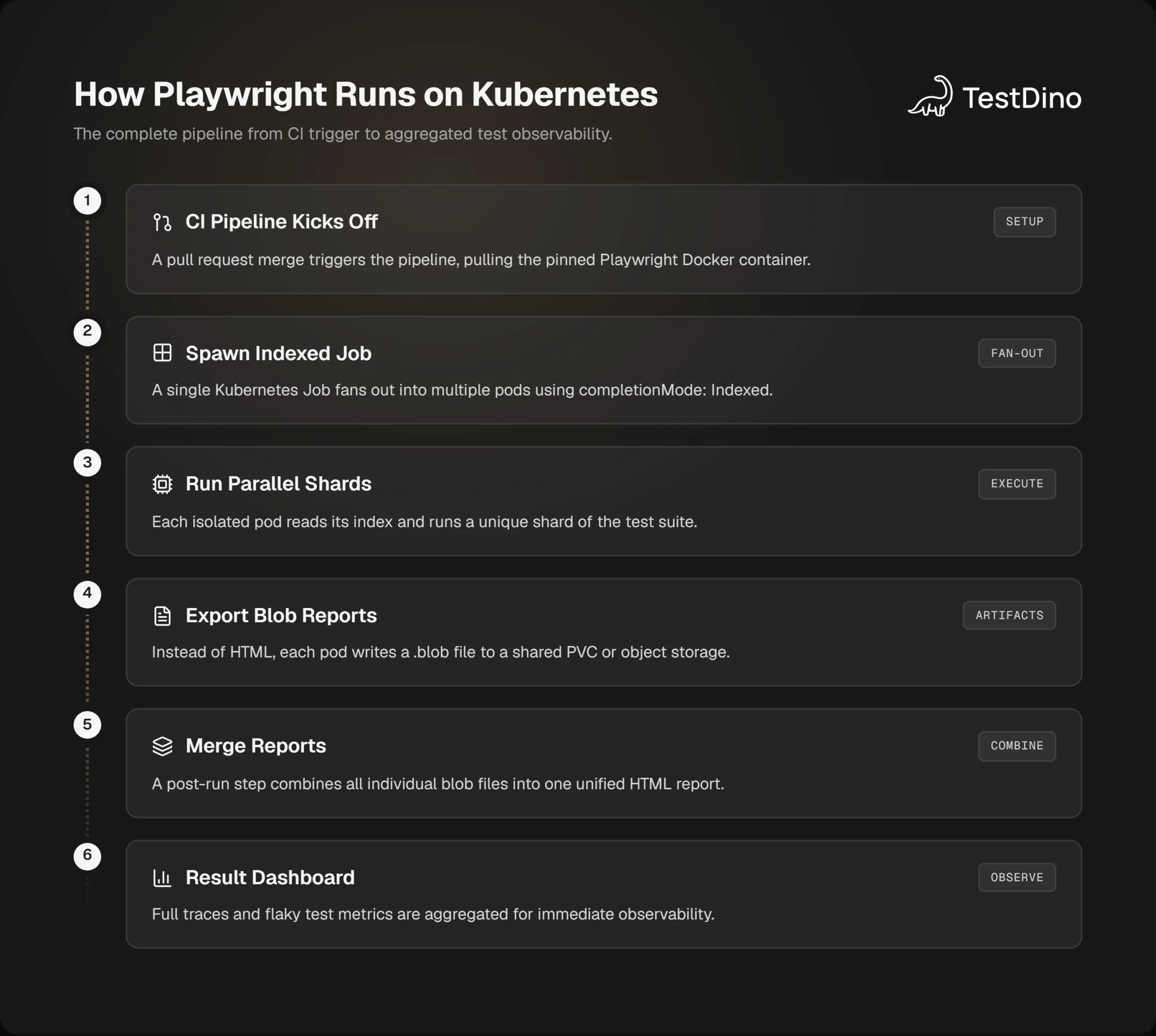
--reporter=blob -- Each pod writes a .blob file rather than a full HTML report. The blobs merge into one unified report after all pods finish. This is critical because eight separate HTML reports are useless for understanding a suite that spans all eight shards.
PersistentVolumeClaim -- Blob files need storage that survives after the pod terminates. A PVC mounted at /app/blob-report is the simplest approach. Teams using cloud storage can instead push blobs to S3 or GCS via a post-test script.
Apply the manifest:
kubectl apply -f playwright-reports-pvc.yaml
kubectl apply -f playwright-k8s-job.yaml
kubectl get jobs playwright-test-run -w
Watch the COMPLETIONS column increment as each pod finishes. When it reads 8/8, all shards are done.
Collecting and merging blob reports across shards
When all pods in your playwright kubernetes cluster finish, you have 8 blob files on your PVC. By themselves they are not readable. Merge them into one unified HTML report using Playwright's CLI:
npx playwright merge-reports --reporter html ./blob-report/This produces a single index.html covering every test across every shard, with traces, screenshots on failure, and a full timeline. Merging 8 shards typically takes under 15 seconds (per Playwright documentation), regardless of total test count.
For CI, trigger the merge as a follow-up step:
- name: Wait for Playwright K8s Job to complete
  run: |
    kubectl wait \
      --for=condition=complete \
      job/playwright-test-run \
      --timeout=30m
- name: Copy blob reports from PVC
  run: |
    kubectl cp \
      playwright-report-copier:/app/blob-report \
./blob-report
- name: Merge reports into HTML
  run: npx playwright merge-reports --reporter html ./blob-report/
- name: Upload merged report
  uses: actions/upload-artifact@v4
  with:
    name: playwright-merged-report
    path: playwright-report/
Tip: If you send results to Playwright test reporting tools like TestDino, blob metadata is rich enough that the platform reconstructs per-test history without requiring the local merge step. You can see pass/fail from each pod as it completes.
For teams who want results streamed in real time rather than waiting for the post-run merge, TestDino's Playwright observability platform connects to Playwright's reporter interface and surfaces results from each pod as they complete.
Tuning resources for your playwright kubernetes deployment
The three most common reasons Playwright pods fail in Kubernetes have nothing to do with test logic. They come from resource misconfiguration.
OOMKilled - Out of Memory
Playwright launches real browser processes. A Chromium instance with a few open pages uses 400-600 MB. Run multiple workers within a shard and memory usage multiplies. If the pod's memory limit is too low, the kernel kills it with OOMKilled.
Safe starting configuration for a shard running one worker:
- Memory request: 1.5Gi
- Memory limit: 2.5Gi
Set workers: 1 in your Playwright config when using K8s sharding. This gives you one test at a time per pod, the clearest mental model for debugging.
CPU Throttle
When a pod's CPU usage exceeds limits.cpu, the kernel throttles it. Browser animations, network timing, and time-sensitive assertions become unreliable under throttle. This looks like a flaky test problem but is actually infrastructure. Set CPU limits at least 2x the request:
resources:
  requests:
    cpu: "1"
    memory: "1.5Gi"
  limits:
    cpu: "2"
    memory: "2.5Gi"
Spot Node Eviction
Spot nodes cost less but can be evicted mid-run. With backoffLimit: 2 on the Job, Kubernetes reschedules the evicted pod up to two times. The other pods continue unaffected. If both retries also fail, only that shard's completions count as failed, not the whole suite.
Here is a comparison of the two infrastructure approaches:
| Factor | Traditional CI Runner | Playwright on Kubernetes |
|---|---|---|
| Execution model | Sequential or single-node parallel | Distributed shards across pods |
| Failure blast radius | Whole suite blocked by one crash | Only the affected shard impacted |
| Memory ceiling | Machine RAM limit | Per-pod limit, scales horizontally |
| Scaling strategy | Upgrade runner size | Add more pods |
| Cost model | Per-minute runner cost | Raw compute, spot-friendly |
| Report aggregation | Single HTML automatically | Blob merge required post-run |
| Debug artifact storage | Tied to runner lifetime | Requires PVC or object storage |
Handling flaky tests in a distributed playwright kubernetes setup
Flaky tests in a Kubernetes setup carry an extra layer of complexity. The same test might pass on shard 3 and fail on shard 7. Without the right observability, you cannot tell whether the failure is a real bug, a resource contention issue, or CPU throttle.
The first step is capturing traces on failure. In your playwright.config.ts:
import { defineConfig } from '@playwright/test';
export default defineConfig({
  retries: process.env.CI ? 2 : 0,
workers: 1,
use: {
trace: 'on-first-retry',
screenshot: 'only-on-failure',
video: 'on-first-retry',
},
reporter: process.env.CI ? 'blob' : 'html',
});With trace: 'on-first-retry', Playwright records a full timeline trace only when a test retries. This keeps storage manageable while still capturing the data you need to debug real failures.
Flaky tests produce different results across runs without any code change. In Kubernetes, they often occur due to timing sensitivity under CPU throttle, shared state between workers, or file path conflicts between parallel tests within the same pod.
Three patterns that are most specific to containerized Playwright runs:
1. Timeout failures in CI, not locally
This almost always means the pod is under CPU throttle. Your local machine has more available CPU than a Kubernetes pod. Fix: increase the pod CPU limit and raise the Playwright global timeout in your config. More detail on all timeout types is in the Playwright timeout guide.
export default defineConfig({
  timeout: 60_000,
  expect: { timeout: 10_000 },
});
2. Auth state bleeding across tests
If tests share a global storageState file and write to it concurrently, session data bleeds across workers. Keep auth state creation in globalSetup and treat each test's browser context as disposable. The Playwright authentication guide covers the five patterns that work reliably in parallel setups.
3. Conflicting file paths in the same pod
Tests writing screenshots or downloads to hardcoded paths like ./screenshots/ will overwrite each other when multiple workers run in the same pod. Use testInfo.outputPath() for a guaranteed unique per-test directory:
import { test } from '@playwright/test';

test('login flow screenshot', async ({ page }, testInfo) => {
  await page.goto('https://example.com/login');
  const screenshotPath = testInfo.outputPath('login-result.png');
  await page.screenshot({ path: screenshotPath });
});
For teams running large distributed suites, Playwright flaky test debugging becomes significantly harder without aggregated visibility. TestDino's flaky test detection classifies each failure across your shards automatically, distinguishing between a genuinely broken test, a throttle-induced timeout, and a consistently flaky test that needs a targeted fix rather than another retry.
For deeper investigation, the playwright reporting runbook covers how to triage CI failures systematically, which is useful when you have 8 shards all potentially generating failures at once.
Conclusion
Running playwright kubernetes at scale starts with one decision: stop treating your test suite like a local script and start treating it like a distributed workload. Pin your image, define your Indexed Job, collect blob reports, and let Kubernetes handle the rest.
For deeper visibility across every shard and pod, TestDino connects directly to your Playwright setup and surfaces per-test failure history, flaky test patterns, and real-time results without changing a single line of test code.
FAQs

Ayush Mania
Forward Development Engineer