AI Evals: 3 Checks Before a Model Label Hits the Queue
A green Playwright job can still ship the wrong ticket label. Grade the model output, then run it again.

A support form you already test can now ask a model for a label. AI evals are the checks that say whether that label is the one a human would have picked.
The page renders whatever came back, so the browser job stays green. The ticket still lands in the wrong queue, and someone spends the afternoon moving it by hand.
This guide walks one support ticket through a case file, a code grader, and repeated runs. Those three checks are what keep a model change from hiding behind a green job.
| Check | What it answers | File in this guide |
|---|---|---|
| Case file | Which label a teammate would pick for this ticket | evals/tickets.jsonl |
| Code grader | Did the model output match the human label | grade-label.ts |
| Repeated trials | Does the label hold on every run, not just one | evals/t-1042-trials.txt |
| Playwright spec, kept alongside | Did the page show the label the app stored | tests/support-label.spec.ts |
What ai evals measure on a live product
AI evals measure one product behavior on examples you already understand. Each case has an input, a grader, and a score. You hand the model a ticket, then you score what came back.
The same ticket can come back worded differently next time. A single equality check, the kind you write for a normal function, is not enough on its own. Name what success means, collect a few real tickets, score them, compare the next run, and keep doing that as the prompt changes.
An AI eval is a saved input, the answer you expect, and a grader that scores what the model returned. For a support labeler that means one ticket, one correct label, and a check that returns 1 or 0.
You already do a version of this for the UI. A Playwright assertion such as toHaveText waits until the node shows the string you named, or it fails when the wait runs out. That wait is separate from the overall test timeout.
That assertion answers a UI question. Did this element show billing? An eval answers a model question. Given this ticket text, did the model choose billing?
Those are different failures. Mix them and you will "fix" the prompt when the button never rendered, or you will chase a Playwright locator when the label was wrong before the page painted it.
Here is the product this post sticks with. A small support tool reads the ticket, calls a model, and stores one of three labels: billing, access, or bug. The page shows that stored label next to the ticket. Your test automation already opens that page in Chromium.
The running case is ticket t-1042:
I was charged twice and now I can't log in.
A human on the team says the label is access, because the lockout is what the user needs fixed today. The charge is real, and it is not the queue.
A model that latches onto "charged" can return billing. The UI then shows billing. If your spec only checks that some label appeared, the job is green. The user is still locked out.
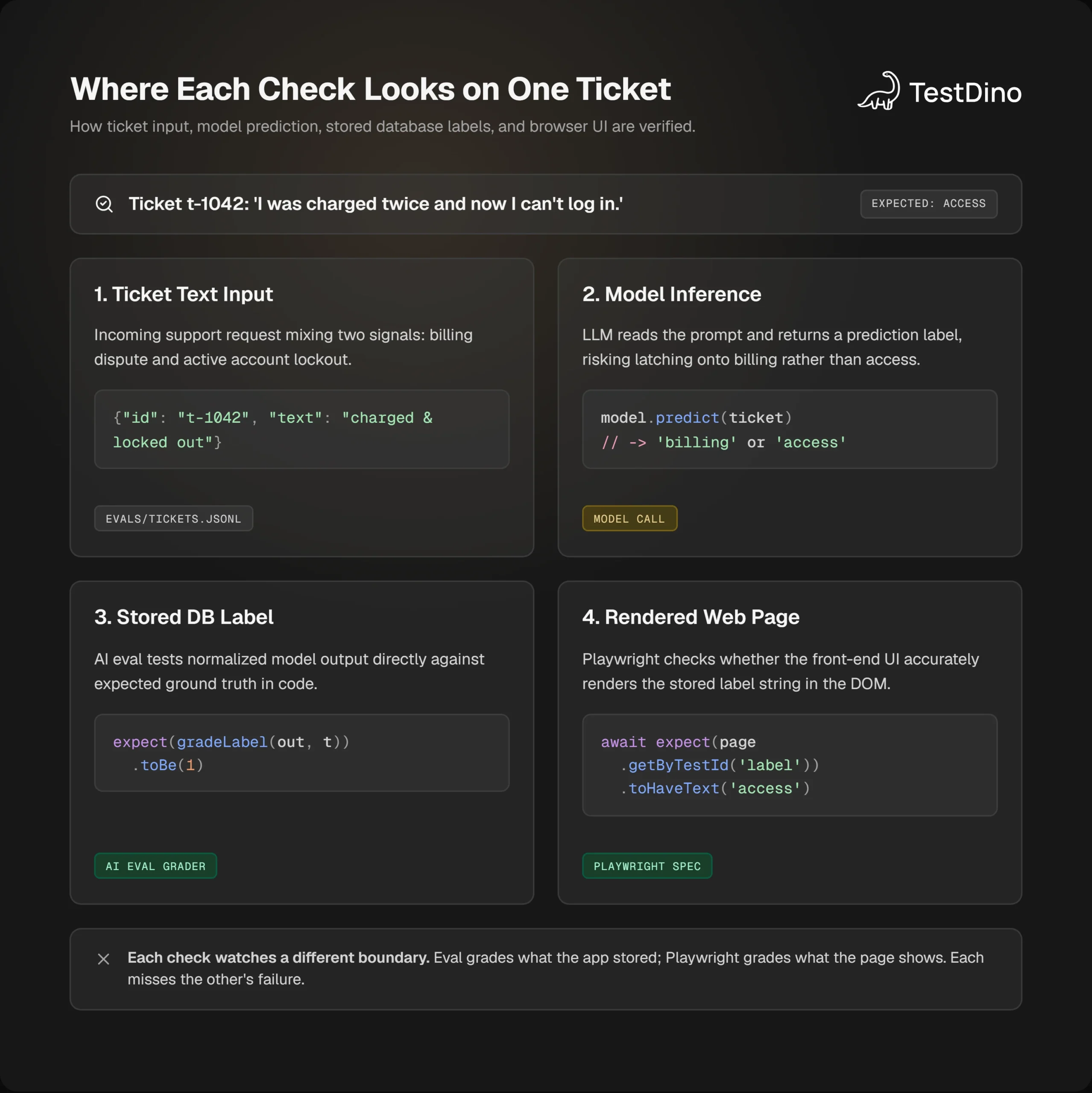
So the first check is not a scoreboard. It is a written case: this text, this label, and the reason a second person would agree.
Write the ticket, the label, and the failure first
Start with the ticket you already argued about in Slack. A small set of real failures is enough to begin. Waiting for a huge set is how teams stay blind. A good case is one where two people on the team would give the same pass or fail.
Put t-1042 in a file you can diff.
{"id":"t-1042","text":"I was charged twice and now I can't log in.","correct_label":"access"}
{"id":"t-1043","text":"I was charged twice for the same seat.","correct_label":"billing"}
{"id":"t-1044","text":"The pay button does nothing after I click it.","correct_label":"bug"}
t-1043 is the easy billing case. t-1044 is a broken control, not a payment dispute. t-1042 is the one that mixes both signals. If your set is only easy billing sentences, the model looks perfect and still fails the lockout ticket.
Each row needs the ticket text and the label a human picked. The grader compares the model text to that label.
Write the failure in the ticket id's notes, in whatever tracker you already use. For t-1042 the failure is: model returned billing, user still could not sign in, queue was payments.
That note is the spec. A high score with no note is a number you cannot act on. You still have to look at the ticket and decide whether you asked the right question.
Before you call a model, check that the case can pass. Save a known-good output, the string access, and run it through the grader in the next section. If that known-good answer cannot pass, the grader is broken. A case that fails every time is often a bad case, not a weak model.
If access cannot pass your grader, stop. The model is not the bug yet.

Tip: Commit the reference output next to the case, for example a line that says the known-good answer for t-1042 is access. When someone edits the grader later, that line should still score 1 before any model call runs.
When the case and the reference output are in place, the file is ready for a grader.
Grade the label in code before you trust a model judge
Grade the stored label with code when the allowed answers are a closed list. Use a plain string check when the answer is one of a few words. Use a model judge only when you need judgment. Use a person to check that the model judge still agrees with the team.
A string check returns 1 when the model text matches the label and 0 when it does not. A raw match is case-sensitive. "Contains" is a looser check, and it is still case-sensitive unless you ask it not to be.
Note: Keep the rows and the grader in the repo. A hosted eval screen can change or go away. The file in git does not.
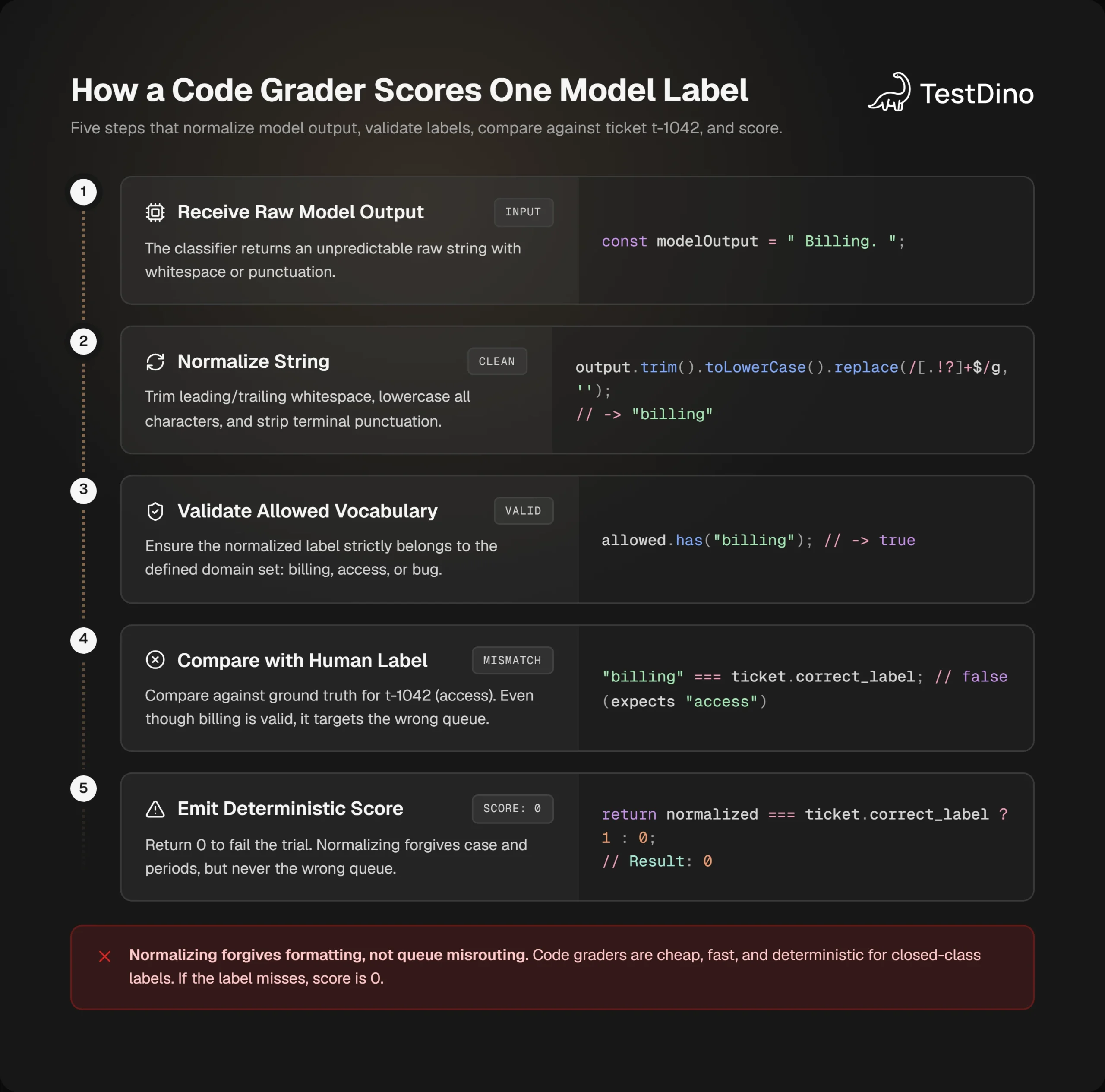
This function is the check I want on t-1042. It trims, lowercases, and strips a trailing period, then demands an allowed label.
type Ticket = {
  id: string;
  text: string;
  correct_label: 'billing' | 'access' | 'bug';
};
const allowed = new Set(['billing', 'access', 'bug']);
export function gradeLabel(modelOutput: string, ticket: Ticket): 0 | 1 {
  const normalized = modelOutput.trim().toLowerCase().replace(/[.!?]+$/g, '');
  if (!allowed.has(normalized)) return 0;
  return normalized === ticket.correct_label ? 1 : 0;
}
Run the reference output first. These commands import a .ts file directly, which current Node can do by stripping the types as it runs. Add "type": "module" to your package.json so the export in grade-label.ts loads. On an older Node, use npx tsx instead.
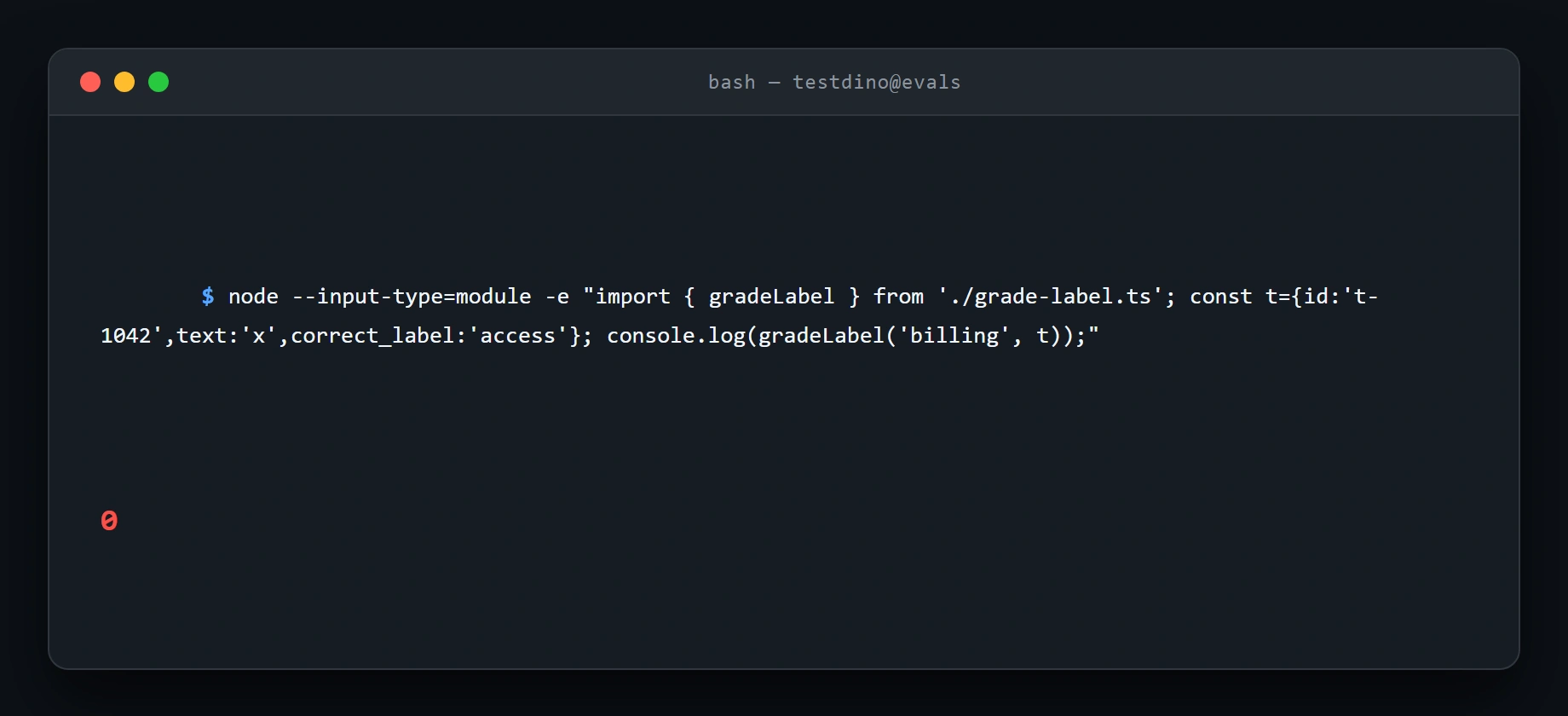
node --input-type=module -e "import { gradeLabel } from './grade-label.ts'; const t={id:'t-1042',text:'x',correct_label:'access'}; console.log(gradeLabel('access', t));"You want 1. Then feed the output that sent the ticket to payments.
node --input-type=module -e "import { gradeLabel } from './grade-label.ts'; const t={id:'t-1042',text:'x',correct_label:'access'}; console.log(gradeLabel('billing', t));"You want 0. Last, check the case a raw string match gets wrong: a correct label with odd formatting on the billing ticket.
node --input-type=module -e "import { gradeLabel } from './grade-label.ts'; const t={id:'t-1043',text:'x',correct_label:'billing'}; console.log(gradeLabel('Billing.', t));"You want 1. With a raw match and no normalize step, that right answer would fail on a capital letter and a period. The answer was fine. The check was picky in a way the task never stated.
Skip the lowercase step if the product contract really is case-sensitive. A label of Billing in the database would then be a defect, and hiding it in the grader would ship it.
Skip a model judge for this label. The good answer is one of three words. A second model scoring "helpfulness" from 1 to 5 will disagree with itself, cost more, and still not tell you the queue was wrong. A model judge wobbles, costs more than code, and needs a person to check it.
Use a model judge later, for a free-text reply, and only after a person has scored a slice of the same rows. If the judge and the person disagree, trust the person and fix the judge.
| Grader | Use it on this support tool when | Skip it when |
|---|---|---|
| Code, after a normalize step | The stored value must be billing, access, or bug | The good reply can be many sentences and still be right |
| Model judge | You have a written rubric and a human-scored slice to compare | The label is a closed list, or nobody has checked the judge |
| Human | You are deciding the correct_label, or checking the judge | You need a pass or fail on every pull request |
Code is cheap and easy to debug, and brittle when a valid answer does not match the pattern. A model judge handles open text and still needs a person in the loop. People are the check on the judge, not the thing you want blocking every merge.
Who should skip the eval entirely: a classifier that is still a rules table, with no model call. Keep the browser test. There is no model behavior to score.
Run the same ticket more than once
One pass on t-1042 does not tell you the label is stable. A trial is one attempt. You run more than one because the output can change. A task can pass once and fail the next time.
A trial is one fresh attempt at the same task. Sending ticket t-1042 to the model three times, from a clean start each time, gives you three trials and three scores.
Two summaries help:
- pass@k: the chance of at least one success in k attempts. It goes up as k grows.
- pass^k: the chance that all k trials succeed. It goes down as k grows.
At k=1 they are the same number. If each try succeeds about 3 times out of 4, the chance that all 3 tries succeed is much lower, around 4 in 10. Use pass@k when one success is enough. Use pass^k when the user needs the behavior every time.
Your labeler is the second kind. The user does not retry the ticket until a label they like appears. If two of three trials on t-1042 return access and one returns billing, you do not have a release. You have a ticket that sometimes hits the wrong queue.
Save the three raw strings next to the case so the argument is about outputs, not about a vibe.
trial 1: access
trial 2: billing
trial 3: access
gradeLabel then returns 1, 0, 1. For this single task, a "any success" reading is a pass, and an "every trial" reading is a fail. Ship the second reading. Extra tries do not help a queue label. The user does not get another shot at the name of the queue.
Isolate the trials. A later run can look better because it saw leftovers from the earlier one, such as a cached label or a row still sitting in the database. Each trial should start clean. For this support tool, that means a fresh process, no cached label from t-1043, and no fixture left from the previous call.
Playwright's retry flag is a different knob. Failing tests are not retried unless you turn retries on. npx playwright test --retries=3 gives failing tests three more attempts.
If CI sets retries and the spec fails, then passes, the HTML report can show a flake while the bad label is still in the product. That is why the eval file stores every trial, and why the Playwright command in the next section uses --retries=0 while you are judging the label.
Playwright reporting will still tell you which spec failed. It will not, by itself, tell you that trial 2 of t-1042 said billing.
Keep the Playwright test next to the eval
The Playwright spec still earns its place. It checks that the page shows the label your app stored. It does not check that the model deserved that label.
toHaveText keeps checking the element until the text matches or the wait ends. A plain expect(value).toBe(...) on a string already in memory does not wait. When the text never arrives, the failure shows the string you expected and the string the page actually had.
import { test, expect } from '@playwright/test';
test('locked-out double charge shows the access label', async ({ page }) => {
  await page.goto('/support/new');
  await page.getByLabel('Ticket').fill(
    "I was charged twice and now I can't log in.",
  );
  await page.getByRole('button', { name: 'Classify' }).click();
  await expect(page.getByTestId('label')).toHaveText('access');
});npx playwright test tests/support-label.spec.ts --retries=0When the model returns billing, the failure is the usual one: expected access, received billing. That is an assertion failure. A hang talking to the model, with the node staying empty, is a different failure. The received string is "" and the log says it waited on the locator.
Do not paper over the empty string by raising the wait first. If the label node is empty, open the trace and see whether the click happened and whether the classify request returned.
import { defineConfig } from '@playwright/test';
export default defineConfig({
  retries: process.env.CI ? 2 : 0,
  use: {
    trace: 'on-first-retry',
  },
});
trace: 'on-first-retry' records a trace when a retry is about to run. With --retries=0 you will not get that trace. For the afternoon you are debugging t-1042, set trace: 'retain-on-failure' on this project, or run the one spec with tracing on, then put CI back to on-first-retry so you are not storing a trace for every green test.
Tip: For a one-off local run you can skip the config change. Run npx playwright test tests/support-label.spec.ts --retries=0 --trace on, and the trace for that spec is saved whether it passes or fails.
The debugging guide is the right place for the viewer steps: action timeline, network, console, and the DOM at the failed expect.
If this CI job already streams into TestDino, the failed spec, the error text, and the trace land on the same run, including when the suite is sharded. The product groups failures into timing, environment, network, assertion, and other. A timeout reaching the model belongs in a different bucket than expected access, received billing.
One trap sits under this spec. If the test stubs the classify response and forces access, the spec goes green while gradeLabel on the live model is still 0 for t-1042. The stub is fine when you are testing layout. It is a false green when you are testing the labeler. Keep the stubbed spec, and name it so nobody treats it as the eval.
import { test, expect } from '@playwright/test';
test('label node renders a stubbed access value', async ({ page }) => {
  await page.route('**/api/classify', (route) =>
    route.fulfill({
      json: { label: 'access' },
    }),
  );
  await page.goto('/support/new');
  await page.getByLabel('Ticket').fill(
    "I was charged twice and now I can't log in.",
  );
  await page.getByRole('button', { name: 'Classify' }).click();
  await expect(page.getByTestId('label')).toHaveText('access');
});
Run the stub when you change markup. Run grade-label.ts when you change the prompt, the model, or the parse step that writes label. Run the unstubbed spec when you need both together, and give it --retries=0.
GitHub Actions can run that spec on the pull request. The eval file should run in the same workflow as a second step, not as a comment in the spec. A red eval with a green stub is the result you want to see, not a result to hide.
The trace answers what the browser saw. The next section is about the other half: what to do when the grader, not the page, is the thing that's wrong.
Fix the grader when the model was actually right
Sometimes the model picks a label a teammate accepts, and the grader still returns 0. Fix the grader or the task before you "improve" the prompt.
Billing. on t-1043 is the easy case. The meaning is billing. Raw eq against billing fails. The normalize step in grade-label.ts is the fix, and the reference output must still score 1 after you change it.
A harder miss is a task you wrote badly. "Charged twice and locked out" with correct_label: billing will train the suite to ignore the lockout. Two people on the team will not agree. If they would not share a verdict, the task is noise. Change t-1042 or split it into two tickets. Do not average the disagreement into a score.
Grade the outcome the product stores, not a script the model happened to follow. Checking a specific sequence of steps is brittle, because a capable model finds paths you did not list. For this app the outcome is the label field in the classify response. If that field is access, the path can be a short reply or a longer one.
Note: Watch for a cheat. If the prompt includes the answer, or the app under test reads correct_label from your case file, the eval passes for the wrong reason. The model should see the ticket text and nothing else.
Partial credit can wait. A support label is pass or fail for the queue. A refund flow that identified the customer and then failed the refund might deserve a partial score. This closed list does not.
When the unstubbed spec fails and the grader says 1, believe the grader about the model and believe Playwright about the page. The parse step between them dropped or rewrote the label. That is application code. Log the raw model string next to the stored label for t-1042 and diff them.
When both fail, the model is wrong on a case you care about. Change the prompt or the model, then rerun the three trials. Do not delete t-1042 to get a clean chart.
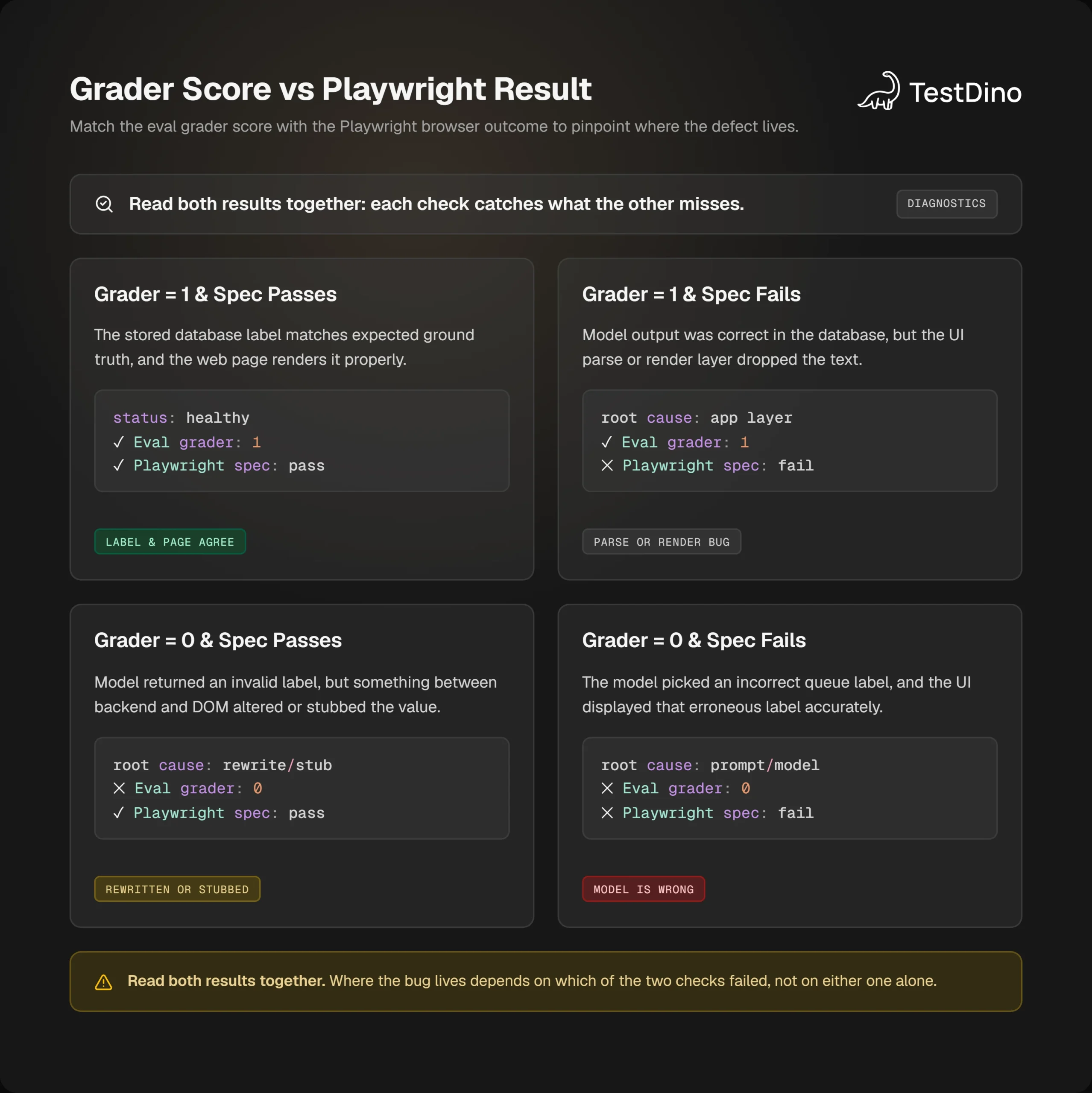
The bottom-left box is the odd one. A live spec should never pass while the grader fails on the same output, so treat it as a sign that something between the model and the page changed the value.
Flaky tests still matter here, and they are a separate pile. A fail on trial 1 and a pass on trial 2 of the same prompt is model instability. A fail, then a pass, of the same Playwright spec on retry is the UI kind of flake Playwright already marks in the report. Mixing those two in one Slack thread is how the prompt gets rewritten for a slow button.
TestDino's flaky signal is the fail-then-pass on a retry, plus unstable results across runs. Use that for the spec. Use the three lines in t-1042-trials.txt for the model. Same idea, different artifact.
If you shard the Playwright job, keep the eval step unsharded until the case file is large. Sharding splits tests across machines. It does not give you three independent model trials. A GitLab CI job can run the grader once, on purpose, with the trial count in the script.
And if the only change in the pull request is a heading in the form, the eval does not need to block. The stubbed spec and a quick look at the accessibility tree for the label node are the right checks. getByTestId will not tell you the accessible name. That is a different bug from t-1042.
What to run before you call the change done
You do not need a new platform to start. You need t-1042 in evals/tickets.jsonl, a grader that returns 1 for the reference string access, and three saved model outputs with a fail if any of them is not access.
Then run the unstubbed spec with --retries=0. If it fails with expected access and received billing, the page and the model agree, and the model is wrong. If the grader says 1 and the spec says otherwise, the bug is in the parse or the render, and the debug steps for that spec are the next hour, not another prompt edit.
Leave a hosted eval screen off the critical path. Those products change, and some of them shut down. The case file in git is the copy that stays.
Add the lockout ticket you already have in your inbox, grade three outputs, and keep the Playwright check beside it. If you want a second pair of eyes on a red run, open the failed spec and ask which string was stored before the page rendered.
FAQs

Ayush Mania
Forward Development Engineer