AI Software Testing: Complete Guide to Tools, Automation, and Intelligent Quality Engineering
Master AI software testing: discover self-healing automation, synthetic test data, visual regression, and automated CI test failure triage.
Engineering teams are building and shipping software faster than ever, using AI tools to write features in minutes.
Testing that software has not kept up, leaving teams stuck fixing broken tests instead of building new things.
This guide shows how AI software testing solves that problem, keeping tests stable without the constant manual cleanup.
What is AI software testing?
AI software testing is the application of machine learning, natural language processing, and generative AI models across the software verification lifecycle.
Rather than relying on static scripts that break whenever a class name changes, AI testing systems observe application state, adapt to cosmetic modifications, and synthesize tests directly from user flows.
AI software testing uses smart tools to help write test cases, fix broken element links when designs change, and identify the root cause of test failures automatically.
In everyday team workflows, AI does not replace human testers.
Instead, it acts like a helpful assistant that writes tests faster, keeps them from breaking over small visual changes, and sorts through error logs for you.
Why quality teams are adopting artificial intelligence
Teams evaluating best test automation tools face three compounding challenges in high-velocity release cycles:
- Test creation lag: Developers write features faster than QA teams can script end-to-end coverage.
- Locator fragility: Minor frontend refactors break CSS selectors and XPath queries even when business logic works correctly.
- Diagnostic fatigue: Sifting through thousands of lines of terminal logs to find one true defect takes hours of manual triage.
AI software testing addresses these bottlenecks by moving verification from hardcoded assertions to dynamic, context-aware validation.
Modern teams combine this foundation with a modern test automation strategy to ensure automation efforts produce reliable signal rather than noisy test failures.
How AI testing differs from traditional test automation
Traditional automated tests break easily because they rely on exact element names. A script opens a page, looks for a specific name like #checkout-btn-v2, and clicks it.
If an engineer renames that button to #checkout-button-primary, the test fails immediately. The website still works fine, but the script gets confused and stops.
AI testing analyzes the screen more like a person would. Instead of depending on one code name, it looks at button text, visual position, and visual labels.
It understands that the green button labeled "Complete Checkout" is still the right button, even if its behind the scenes code name changed.
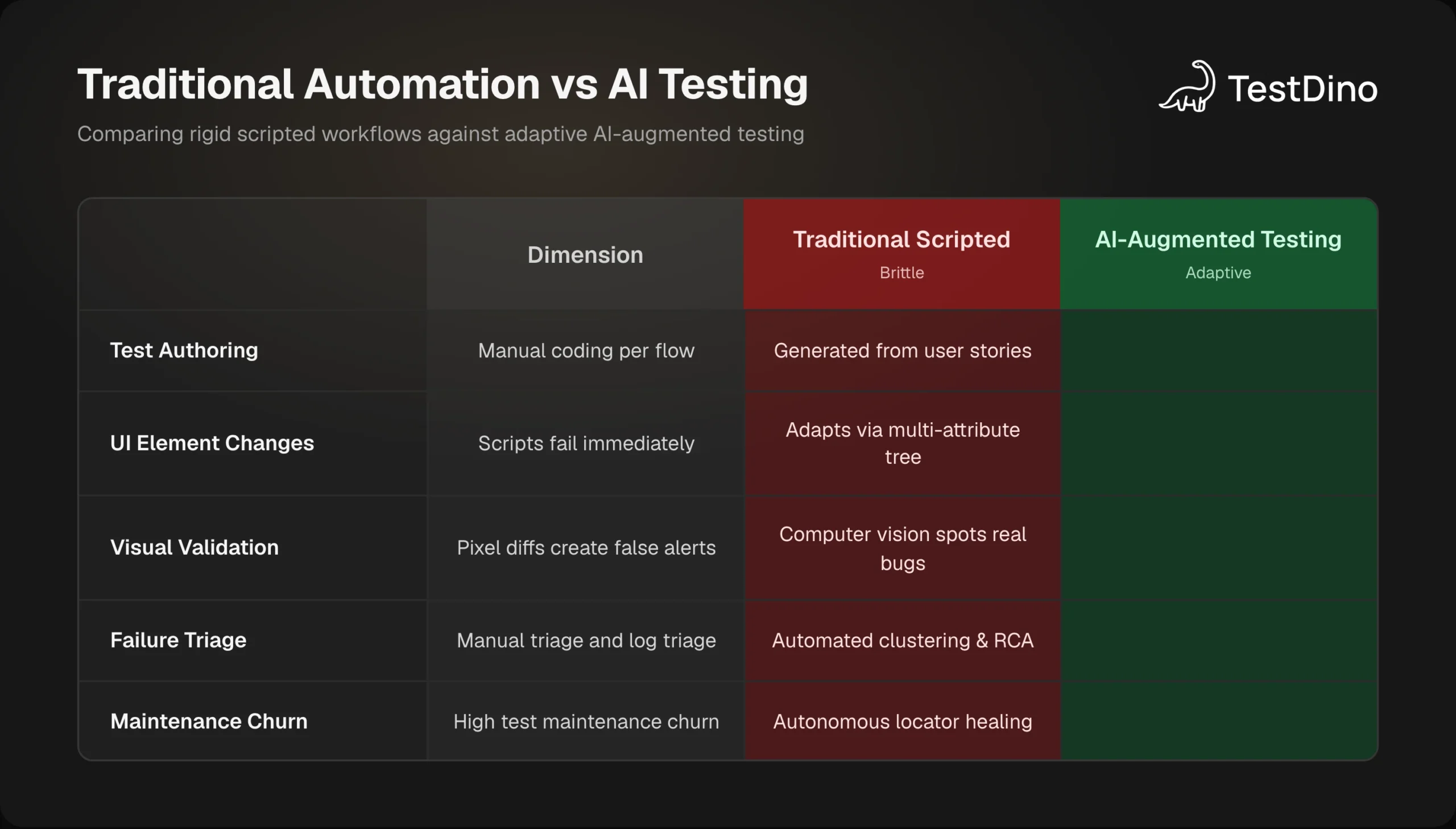
| Dimension | Traditional Scripted Automation | AI-Augmented Software Testing |
|---|---|---|
| Test Creation | Manual scripting in languages like TypeScript, Python, or Java | Synthesized from user stories, OpenAPI specifications, or telemetry |
| Element Selection | Hardcoded CSS selectors, XPath expressions, or data attributes | Semantic multi-attribute scoring and visual bounding box discovery |
| UI Adaptability | Fails immediately when locators or DOM hierarchies change | Self-heals locators at runtime and flags adjustments for review |
| Visual Validation | Strict pixel-by-pixel diffing prone to false positives from rendering shifts | Computer vision models identify meaningful layout anomalies |
| Failure Analysis | Engineers manually parse raw execution logs and stack traces | Automated clustering groups identical root causes across runs |
| Maintenance Cost | Consumes 30% to 50% of total quality engineering time | Significantly reduced through autonomous maintenance and repair |

Tip: Do not discard your existing Playwright or Cypress test suites when adopting AI. Augment your current test code with AI-powered self-healing plugins and automated triage layers to gain immediate stability without rewriting tests.
Understanding these differences across all types of software testing helps teams allocate automation resources where they deliver the highest return.
Core pillars of AI-augmented software testing
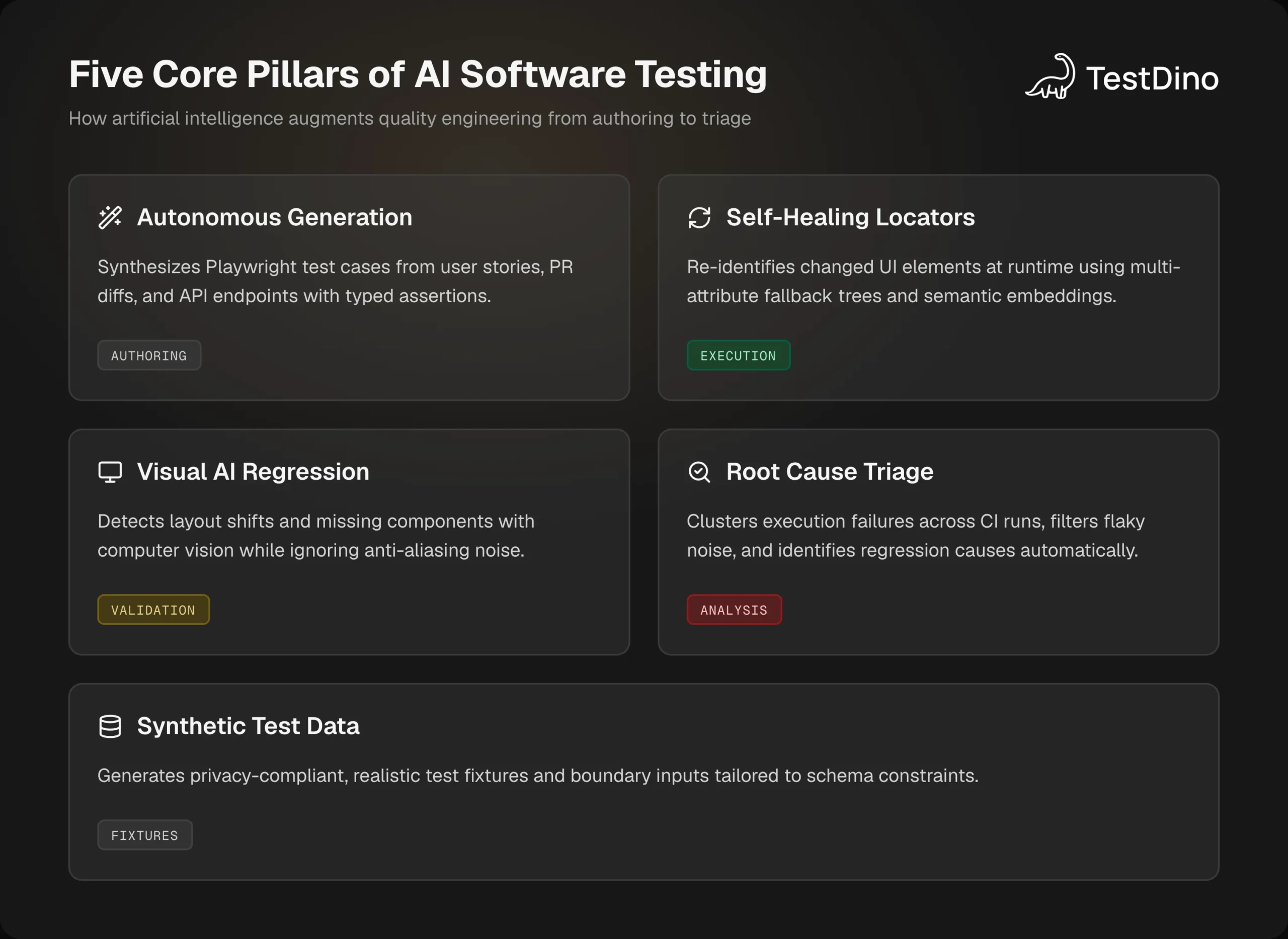
Modern AI testing isn't just one magic tool, it is built on five distinct capabilities across the delivery pipeline:
1. Autonomous test generation
From a user story to runnable code in seconds.
Instead of writing repetitive boilerplate for every checkout or user flow, AI analyzes your specifications and generates complete Playwright test suites that cover edge cases.
- What feeds the AI: User stories and acceptance criteria from Jira or Linear, OpenAPI specifications, and PR git diffs.
- What it outputs: Executable end-to-end specs with boundary condition coverage.
import { test, expect } from '@playwright/test';

test('verifies discount code calculation and tax display', async ({ page }) => {
  await page.goto('/checkout');
  await page.getByPlaceholder(/promo code/i).fill('SUMMER25');
  await page.getByRole('button', { name: /apply/i }).click();
  const discountLabel = page.getByTestId('discount-amount');
  await expect(discountLabel).toBeVisible();
  await expect(discountLabel).toContainText('-$25.00');
});
Drafting specs directly in your code editor using tools for playwright tests with copilot helps teams rapidly expand end-to-end test coverage.
2. Self-healing locators and execution resilience
Zero pipeline crashes from harmless frontend CSS or DOM updates.
When a button class or DOM hierarchy changes, traditional tests instantly crash. Self-healing algorithms prevent false alarms through dynamic runtime adaptation:
- Detects timeout: Intercepts locator failures before aborting the run.
- Scores DOM context: Compares ARIA labels, text position, and tags against past successful executions.
- Auto-heals & reports: If its confidence exceeds 85%, the test completes and the framework opens a pull request with the updated locator.
This drastically reduces broken builds while following to Playwright best practices.
3. AI-powered visual regression testing
Catch genuine design breakages instead of OS font-rendering noise.
| Traditional Pixel Diffing | AI Visual Testing |
|---|---|
| Flags harmless 1px anti-aliasing shifts | Filters out benign rendering noise |
| Hundreds of false alarms per sprint | Catches real UI bugs: clipped bars, overlapping text |
| Hours wasted reviewing safe diffs | Fast, multi-viewport layout validation |
Teams adopting ai visual regression testing validate responsive layouts across dozens of viewports without getting bogged down by false positives.
4. Synthetic test data generation
Never let an expired test account break your nightly CI build.
Staging environments fail constantly because mock accounts expire, get locked, or lack realistic data. AI synthetic generators produce fresh, context-aware fixtures on demand:
- Payment sandboxes: Context-valid test credit cards for each payment gateway.
- Localization: Realistic international addresses that pass strict postal code rules.
- Security edge cases: Unicode and SQL-injection payloads to probe input sanitization.
from faker import Faker
fake = Faker()
def generate_order_payload():
    return {
        "order_id": fake.uuid4(),
        "customer": {"name": fake.name(), "email": fake.company_email()},
        "subtotal": round(fake.pyfloat(left_digits=3, right_digits=2, positive=True), 2),
        "currency": fake.currency_code()
    }
This keeps CI pipelines idempotent and self-contained without risking customer data privacy.
5. Root cause analysis and intelligent failure clustering
Fix one root cause, clear twenty red builds at once.
When an API goes down, CI doesn't show a single failure. Instead, it can trigger failures across dozens of test files.
- The Problem: Engineers waste hours opening twenty separate log files and stack traces.
- The AI Solution: AI correlates stack traces, network payloads, and Playwright traces into a single diagnosis:
"Auth microservice timed out returning 504 on POST /oauth/token."
Diagnosing one card resolves all twenty associated tests instantly, eliminating repetitive triage.
Top AI software testing tools and frameworks compared
The AI software testing tooling ecosystem has matured rapidly, offering dedicated platforms for different testing layers.
| Tool / Platform | Primary Focus | Key AI Capabilities | Best For |
|---|---|---|---|
| Playwright + AI Agents | Developer-centric end-to-end automation | Script synthesis, MCP server integration, CLI debugging | Engineering teams building custom code-first pipelines |
| TestDino | CI/CD test intelligence and failure triage | AI failure clustering, Playwright trace analysis, flaky detection | Teams running large Playwright test suites in CI/CD |
| Applitools Eyes | Visual regression validation | Visual AI computer vision engine, layout difference grouping | Frontend design consistency across browsers and devices |
| Mabl | Low-code cloud testing | Auto-healing tests, performance anomaly detection | Cross-functional agile teams requiring low-code execution |
| Testim (Tricentis) | Fast test authoring | Smart locators, root-cause analytics, AI-assisted authoring | Enterprise applications with frequently shifting UIs |
Note: Selecting an AI testing platform depends heavily on your team culture. Code-first engineering teams generally prefer open-source engines like Playwright paired with specialized AI intelligence layers rather than proprietary locked-in SaaS suites.
When evaluating these platforms, engineering leads consult comprehensive reviews of ai test management tools to ensure seamless integration with GitHub Actions and Jira.
Step-by-step implementation in modern CI/CD pipelines
You do not need to rebuild your testing pipeline from scratch to start using AI.
Modern teams layer AI onto their existing CI/CD runners across four connected stages:
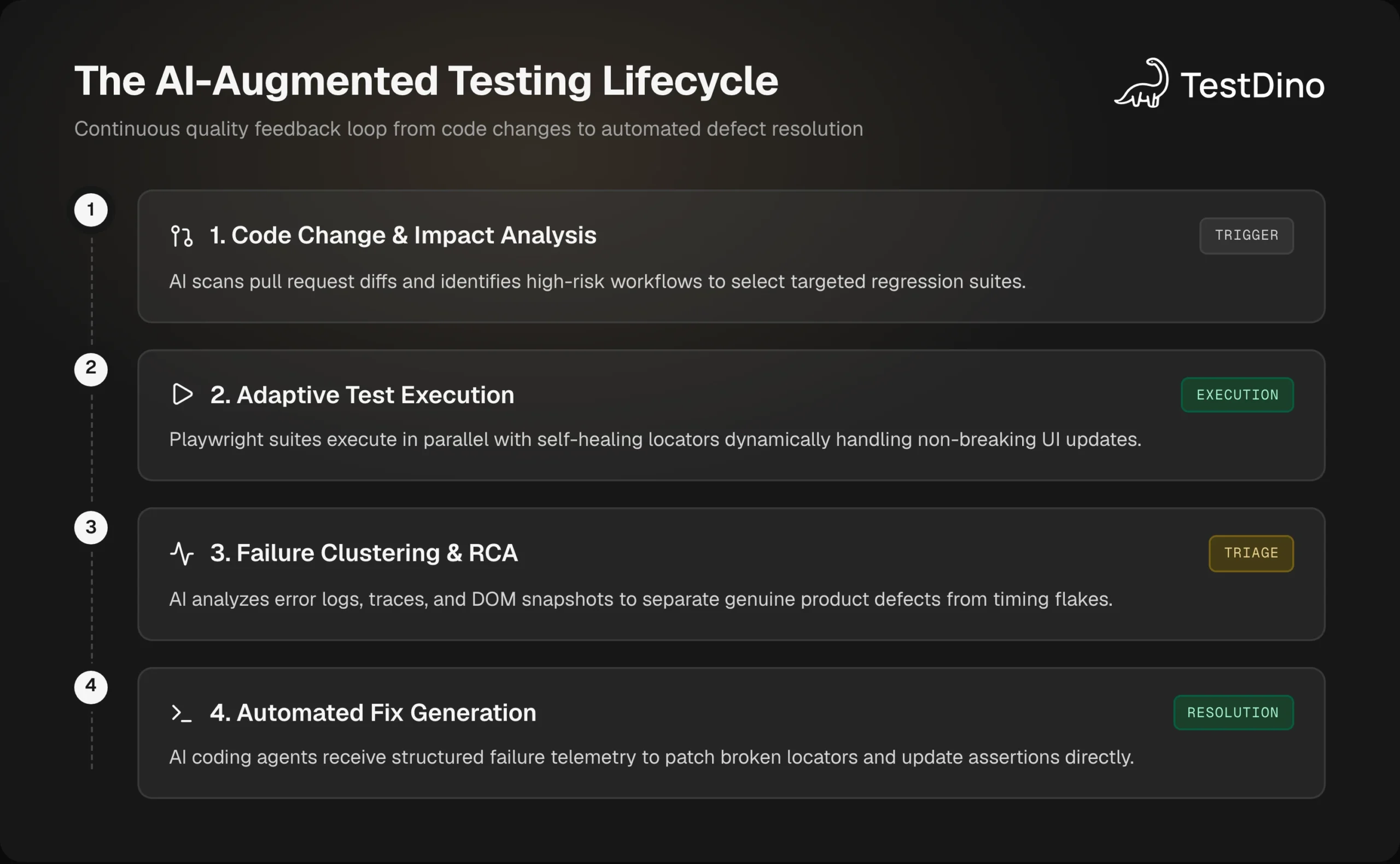
How the four pipeline stages connect
- Impact analysis: Scans pull request diffs to run only the tests affected by the code change.
- Adaptive execution: Runs tests in parallel while self-healing locators adapt to minor UI shifts.
- Failure clustering: Groups test errors by root cause so teams can rerun only failed tests and filter out noise.
- Automated fixes: Sends structured failure data to coding agents and playwright mcp visual testing setups to propose code patches.
Capturing test traces in your workflow
To feed execution data to an AI triage layer, enable trace recording in your test runner:
name: AI Test Suite Quality Gate
on:
  pull_request:
    branches: [main]
jobs:
  test:
    runs-on: ubuntu-latest
    steps:
      - uses: actions/checkout@v4
      - uses: actions/setup-node@v4
        with:
          node-version: 20
      - run: npm ci
      - run: npx playwright install --with-deps
      - name: Run Playwright Tests with Trace Recording
        run: npx playwright test --trace on
      - name: Upload Test Artifacts for AI Triage
        if: always()
        uses: actions/upload-artifact@v4
        with:
          name: playwright-execution-traces
path: test-results/Intelligent test triage and flaky test management
The biggest drain on engineering morale in test automation is flaky tests.
Flaky tests pass on local developer machines, fail in continuous integration, and pass again on an automatic rerun.
Over time, developers learn to ignore red CI builds, defeating the purpose of automated testing entirely.
Teams dealing with unstable suites benefit from dedicated strategies for playwright flaky test debugging and root cause analysis.
How AI categorizes test failure patterns
AI test intelligence analyzes failure telemetry across hundreds of runs to categorize failures into clear buckets:
- Timing and race conditions: Elements were clicked before hydration finished or before animations completed.
- Backend dependency errors: Third-party payment gateways or authentication APIs returned 502 Bad Gateway responses.
- Stale locators: Frontend markup changed, requiring a self-healing selector update.
- Genuine product defects: An assertion failed because the returned business value was factually incorrect.
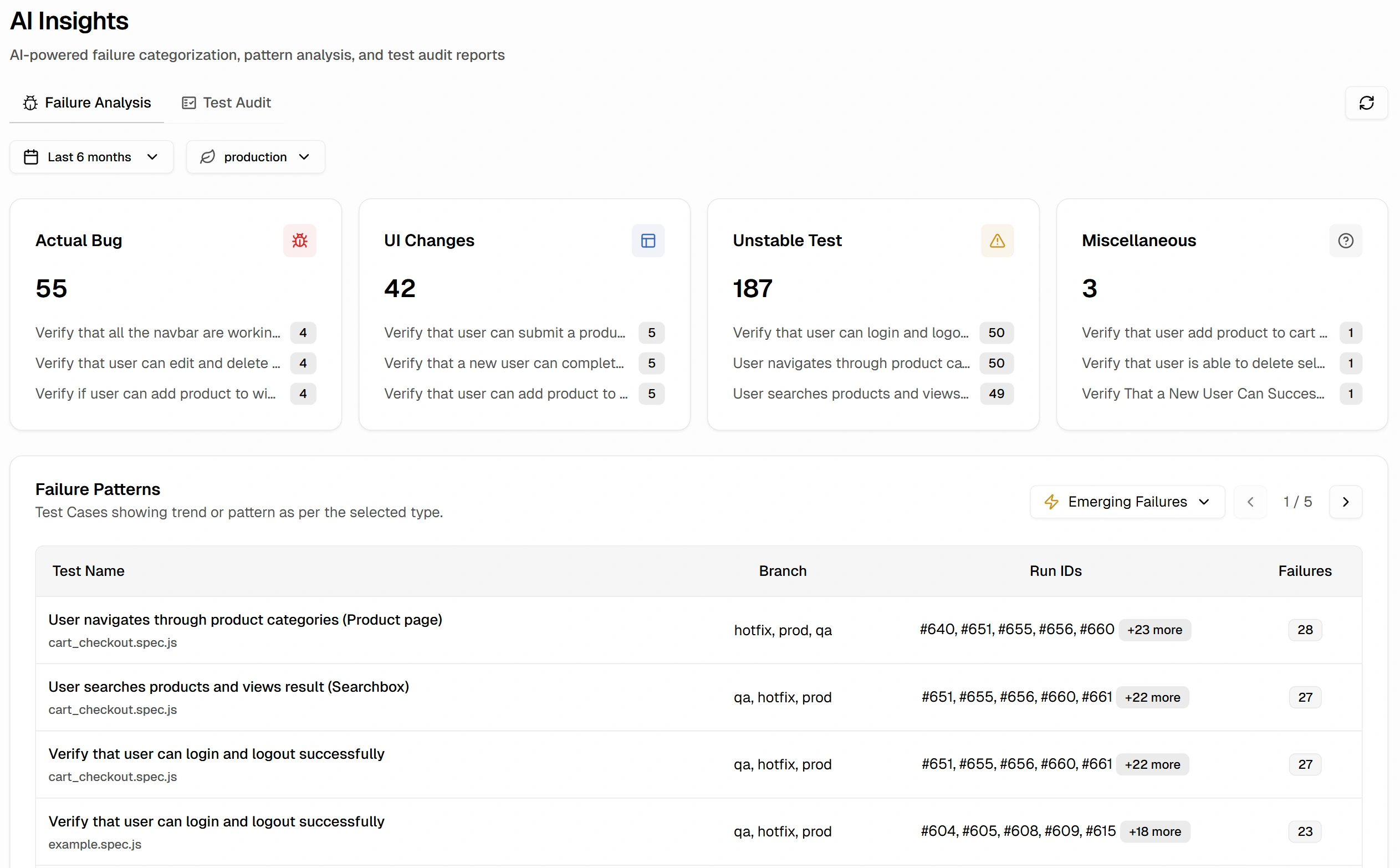
This categorization is central to effective test failure analysis, enabling quality teams to fix underlying architectural issues rather than endlessly retrying tests.
Bridging CI test runs to developer editors
Platforms like TestDino provide automated test analytics and AI-powered failure triage.
When a Playwright suite runs in GitHub Actions, TestDino automatically collects execution traces, groups failures by root cause, and isolates flaky tests.
Through the TestDino MCP server, developers can query these diagnostics directly inside Cursor or Claude Code:
claude mcp add testdino --env TESTDINO_PAT="your-testdino-token" -- npx -y @testdino/mcp@latestOnce connected, an engineer can prompt their assistant: "Show me all failed tests from the latest main build and explain why the checkout button locator failed."
The assistant queries TestDino, retrieves the DOM snapshot at failure time, and modifies the test file with the correct locator.
{
  "quarantinePolicy": {
    "flakyThresholdPercent": 15,
    "consecutiveFailures": 3,
    "action": "auto-quarantine",
    "notifySlackChannel": "#qa-automation-alerts"
  }
}
By tracking test analytics over time, teams pinpoint degrading test suites before they block production releases.
Best practices and risks when adopting AI in quality engineering
Deploying AI in your testing framework requires clear engineering guardrails to avoid creating new points of failure.
Establish strict human-in-the-loop review
Never allow an AI model to commit test changes directly to production without human verification.
While self-healing locators are valuable during runtime execution, all proposed permanent locator updates should be formatted as draft pull requests.
Engineers must verify that a changed element represents an intended UI update rather than an unintended bug.
Protect sensitive data and credentials
When using Large Language Models to generate synthetic data or triage logs, ensure that production database dumps and real customer data are never passed to external model endpoints.
Review security protocols such as mcp server security to sanitize tokens, API keys, and PII before transmitting error traces to external services.
Balance autonomous testing with exploratory quality engineering
AI excels at repetitive verification, boundary checking, and regression execution.
However, AI models cannot evaluate whether an application feels intuitive, delightful, or coherent to human users.
Follow a structured risk based testing guide to divide responsibilities:
- Automate high-volume regression, visual checks, and API validation with AI-assisted tools.
- Reserve human engineering time for exploratory testing, edge-case architecture review, and user experience auditing.
Tip: Track your self-healing locator success rate as a key team metric. If a single locator heals repeatedly across consecutive sprints, the underlying component likely lacks a clean, dedicated test identifier.
Conclusion
AI software testing has shifted from an experimental curiosity into a foundational capability for modern software teams.
By combining autonomous test generation, self-healing locators, intelligent failure clustering, and synthetic test data, engineering teams can eliminate the test maintenance bottleneck.
Rather than spending valuable engineering hours chasing brittle selectors and deciphering obscure stack traces, teams can focus on shipping reliable software with speed.
Start small by introducing AI-driven visual validation and automated failure clustering into your current Playwright pipeline.
As your automation stabilizes, expand into agent-assisted triage and continuous quality intelligence to build a truly resilient testing lifecycle.
FAQs

Vishwas Tiwari
Software Engineer