Risk Based Testing: A 5-Step Guide With a Matrix and Playwright Examples
Stop testing everything equally. Risk based testing scores likelihood and impact, builds a matrix, then gates Playwright CI by tier.
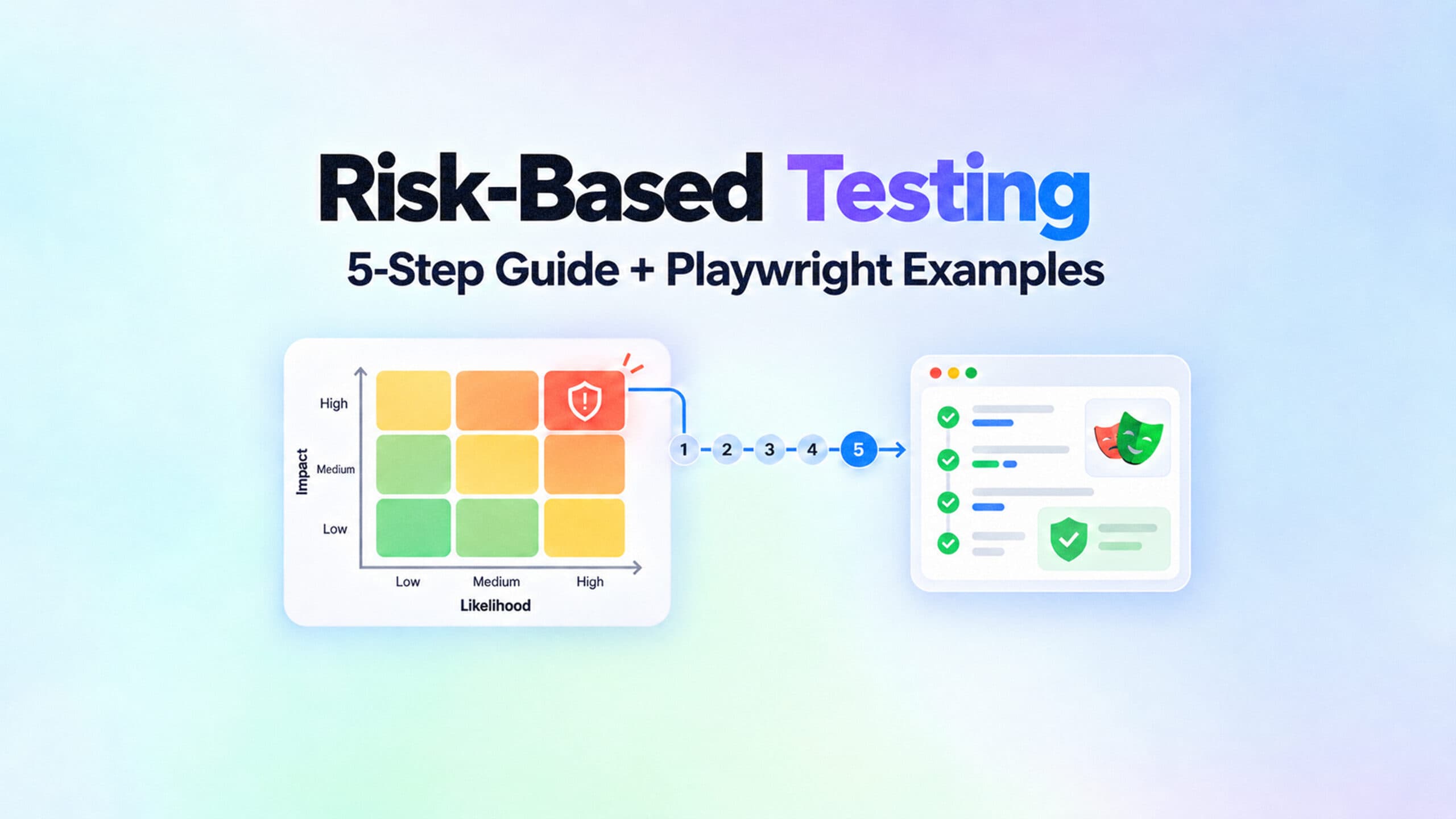
Test suites keep growing and pull request checks keep getting slower, yet nobody feels safer on release day. Risk based testing is the practical fix: rank features and test scenarios by the likelihood of failure and the impact if they break, then let those risk levels decide what gets tested first, deepest, and on every pipeline.
Not all risks deserve the same attention, so the goal is to spend test effort where failure would actually hurt.
If you run a Playwright suite in CI, you already know the symptoms. A 40-minute check on a copy change, flaky tests that everyone just re-runs, and a go or no-go call made on gut feel because nobody ever agreed on what matters.
For developers, QA engineers, and test leads, this is less a theory problem than a coverage, speed, and trust problem: too many low-value checks, not enough signal on critical paths, and feedback that arrives late or misleads.
What follows is the process without the certification-course padding: what risk based testing is, why it matters, how to do it in five steps, how to build a simple risk matrix, and how to wire risk tiers into Playwright and CI gates.
It also compares the approach with regression and change-based testing, shows which metrics prove it is working, and covers the mistakes that make teams give up on test automation.
What is risk based testing?
Risk based testing is a software testing approach where not all risks deserve the same attention, so the selection, order, depth, and resourcing of test activities are driven by risk levels.It uses risk assessment and risk management as part of the testing strategy, and risk based testing focuses on critical areas to balance quality, cost, and delivery speed.
The idea is older than most test frameworks. The ISTQB Foundation Level syllabus v4.0.1 lists "exhaustive testing is impossible" as its second principle of testing. It then names test case prioritization and risk based testing as the tools that should focus test effort instead.
That framing matters because it changes the question you ask. Instead of "did we cover everything?", the question becomes "what would hurt the most if it broke, and how likely is that?"
Risk likelihood and risk impact
ISTQB defines risk with two attributes. In risk based testing, the approach starts with risk analysis and applies risk management to shape the testing strategy. It focuses on the critical areas of the product rather than treating all coverage equally.
Risk likelihood is the probability the failure happens. Risk impact is the harm it causes when it does.
When teams are evaluating risks, they assess risks by weighing likelihood and impact, then rank potential risks by risk severity to decide treatment priority.
Likelihood is where engineering data earns its keep. Change frequency, code complexity, defect history, and how many people touched a module all move the number.
Google's own analysis found that code recently modified by more than 3 developers breaks more often, according to the Taming Google-Scale Continuous Testing paper from 2017.
Impact is where the business earns its keep. Revenue per hour, data sensitivity, regulatory exposure, and the number of users on a path are the inputs. A broken checkout and a broken footer link both fail a test, but only one of them belongs in your test failure analysis at 2 a.m., which is why this software testing approach does not treat every failure or every coverage area the same.
Product risks vs project risks
ISTQB splits risk into two families, and teams assess potential issues during risk analysis by judging the likelihood and impact of the identified risks.
Project risks concern the management of the project: late deliveries, missing skills, poor tooling, supplier failure.
Product risks concern the quality of the product itself: wrong calculations, security holes, slow responses, bad user experience, or a specific failure mode.
Testing directly reduces product risk, so that is what this guide scores and tags. In practice, that means ranking the risks identified by how likely they are and how severe the impact would be, with severity acting as the impact side of the score.
Teams often multiply scores or place them on a grid, and Bob Crews developed a formula for calculating risk probability scores.
Project risks still matter, but they are handled by planning, not by a test suite.
With the vocabulary settled, the next question is why this approach has moved from "nice to have" to "necessary" for teams running large automated suites.
Why risk based testing matters more in 2026
The strongest argument for risk based testing comes from the largest test system ever measured publicly. In the Google paper cited above, engineers looked at the full history of 5.5 million affected test targets over a period.
Only about 63,000 of them ever failed. The rest never failed once.
The numbers below are worth staring at for a moment. Of all test targets, 91.3% passed at least once and never failed. Only 2.07% both passed and failed at some point.
After removing flaky ones, just 1.23% ever caught a real breakage or fix introduced by a developer.

The authors put it plainly: the entire purpose of their regression cycle is to find that tiny percentage of tests developers care about. Your suite is smaller, but the shape is the same.
A handful of tests do almost all of the useful work, so implementing risk based testing starts with test planning and a clear testing process.
You identify the risks that testing can reduce, including some product risks caused by a failure in a workflow, calculation, or integration.
From there, risk prioritization helps teams prioritize risks by impact and likelihood, turn those results into risk priorities, and keep track of the risks identified in the product while project risks stay in planning.
Most tests never fail, and the rest are expensive
Running everything is not free even when it passes, so a simple five-step process for implementing risk based testing helps teams make smarter use of testing resources. Google's testing blog reported in 2016 that about 1.5% of all test runs report a flaky result, and almost 16% of tests have some flakiness, per Flaky Tests at Google and How We Mitigate Them.
On a typical 1,000-test project, that means around 15 tests fail per run for no real reason.
Every one of those failures costs someone a look. Spread across a year, the debugging hours, CI reruns, and lost engineer days add up fast. You can put a dollar figure on that flakiness using TestDino's free tools before you decide which tier a test belongs in, especially when limited resources force harder tradeoffs.
The other side of the ledger is the bug you did not catch. The Consortium for Information and Software Quality estimated the cost of poor software quality in the US at $2.41 trillion in its 2022 report. That is the pool a risk based approach draws from when it uses risk prioritization to focus testing efforts, guide resource allocation, and direct testing efforts before setting thresholds in day-to-day planning.
The cost of bugs rises the later they are found, and the highest-risk paths are where late finds hurt most.
AI made the suite bigger, not smarter
Generated tests changed the volume problem. Capgemini's World Quality Report 2025-26 found that 43% of organizations are experimenting with generative AI in quality assurance, while only 15% have scaled it enterprise-wide.
More tests are arriving from AI test generation tools, and most teams still have no rule for which ones deserve a place on the pull request gate. Indiscriminate runs waste testing resources, inflate testing efforts, and create friction across the development lifecycle.
The counter-example is Facebook. Its engineers published Predictive Test Selection, a strategy that picks a subset of tests per change.
It cut the total infrastructure cost of testing changes by a factor of two. It still reported over 95% of individual test failures and over 99.9% of faulty changes. Selection, done with data, does not mean lower quality, and it reduces debugging hours and reruns caused by poor resource allocation under limited resources. That matters even more in continuous delivery.
That is the case for prioritizing. The next section turns it into a process you can run in a single afternoon with your team, and refine every sprint after that so testing efforts stay focused on higher-value paths first.
How to do risk based testing in 5 steps
A risk based testing approach does not require a new tool or a certification, and the challenge now spans the full development lifecycle, not just late-stage QA. It requires a list, two scores, a threshold, a tag, and a schedule. Here is the whole process in order:
- Identify product risks. List what can go wrong for users, per feature or user journey, to identify potential risks using incidents, support tickets, and reviews.
- Score likelihood and impact. Rate each risk from 1 to 5 on both, using change history and defect data for likelihood and business inputs for impact so teams can spot key risks.
- Build the risk matrix. Multiply the two scores. Set tier thresholds such as 15 and above for critical risks, 8 to 12 for high priority risks, and the rest for medium or low.
- Map tests to risk tiers. Tag every automated test with its tier so the suite can be sliced by risk instead of by folder and prioritize testing based on business exposure.
- Execute by tier, measure, and re-score. Run critical tests on every pull request, high nightly, and the rest weekly to prioritize testing efforts based on current failure patterns. Re-score after incidents, refactors, and new features so teams can perform risk based testing consistently, and remember that this selection does not mean lower quality; it supports faster continuous delivery when teams focus on critical risks.

Step 1: identify product risks
To perform risk based testing, teams identify potential risks first and then prioritize testing efforts based on them. Start from the user's side, not the code's. Ask what would make a customer stop, lose money, or lose data, especially in the critical functionalities and the high risk areas of the product.
Incident post-mortems, support tags, and analytics on the most used paths are better sources than a brainstorm. ISTQB suggests workshops, interviews, and cause-effect diagrams, and all three work.
Keep each risk specific. "Checkout is risky" is a feeling. "Applying a coupon after changing the shipping address charges the wrong total" is a risk you can score and test. If you need a refresher on which types of software testing address which risks, sort that out before scoring. Prioritize testing based on which items are high-priority risks or critical risks.
Step 2: score likelihood and impact
Use a 1 to 5 scale for both attributes and write down what each number means, with the exercise focused on uncovering high risk areas from the user's point of view. For likelihood, pull from data you already have: how often the module changed this quarter, how many bugs it produced, how many people touched it.
Your Playwright test history is a direct likelihood signal. A test that has failed 6 times in 30 runs points at unstable code or an unstable test, and both raise risk.
For impact, ask the product owner and the finance person, not only the engineers. Revenue per hour of downtime, regulatory consequences, and the share of users on the path are the inputs that matter. The goal is to identify risks in critical functionalities, not to brainstorm every possible defect.
If you also use FMEA, a risk priority number can help rank the most critical risks after scoring severity, likelihood, and detectability.

Tip: Score likelihood and impact in separate columns and never average them. A 5 impact with a 1 likelihood (a rare but catastrophic data loss) and a 1 impact with a 5 likelihood (a typo that appears daily) both score 5, but they need completely different tests.
Step 3: build the risk matrix
Multiply the two scores to get a risk level from 1 to 25, then draw tier lines. When teams define the scale clearly, collaborative risk scoring can achieve up to 90% consensus on risk scores. The thresholds are yours to set, but the lines should produce a critical tier small enough to run on every pull request in minutes.
Some teams also use a Risk Priority Number to compare the most critical risks consistently and leave low priority risks for later. The next section shows a complete matrix with a worked example.
Step 4: map tests to risk tiers
Every automated test gets one tier tag, inherited from the risk it covers. Scores at the bottom of the matrix usually become low priority risks unless the context changes. Tests that cover no listed risk are a finding in themselves: either the risk list is incomplete, or the test is not earning its CI minutes.
The grouping Playwright tests guide covers the mechanics of tagging at the describe and test level for test cases. This also makes gaps in test coverage easier to spot across tiers. Teams often use heat maps to communicate the matrix and its priorities visually.
Step 5: run by tier, measure, re-score
Tag every relevant test case with the tier of the risk it covers: critical tests gate every pull request, high-risk items run nightly and on release branches, and medium and low run weekly with the full suite during test execution.
Tests without mapped risk weaken coverage of the risk register or expose unnecessary tests, so use risk monitoring to re-score and confirm risk status before release. Risk is not static, and a module that shipped 12 bug fixes this quarter has a higher likelihood than it had in January.
The matrix in step 3 is where most teams stall, so it deserves a section of its own with real numbers.
The risk based testing matrix, with a worked example
A risk based testing matrix is a grid with likelihood on one axis and impact on the other, used as the test execution phase guide for each tier in risk based software testing.
Each cell holds a score, and each band of scores maps to a tier with its own execution rule, helping teams aim for comprehensive testing where critical areas get the most attention without treating every area the same.
For example, a high-risk tier may require full regression on every change, a medium tier may run on a nightly schedule, and a low tier may run before major releases. Teams should use risk monitoring during execution and review risk status before release decisions. Re-score items when monitored risk status changes.
Choosing a scale
Two scales are common. A 3 by 3 grid rates each attribute low, medium, or high and produces scores from 1 to 9. It is fast to fill in and helps risk based software testing decide where comprehensive testing is necessary and where lighter coverage is enough.
A 5 by 5 grid produces scores from 1 to 25 and separates "high" from "critical". That matters once your suite is large enough that the critical tier needs to stay small.
ISTQB allows either a quantitative approach, where risk level is likelihood multiplied by impact, or a qualitative one using a matrix. The 5 by 5 version below combines both: numeric scores feed qualitative tiers and support risk evaluation after reporting.
| Score (likelihood x impact) | Tier | Tag | When it runs | On failure |
|---|---|---|---|---|
| 15 to 25 | Critical | @risk-critical | Every pull request | Blocks merge |
| 8 to 12 | High | @risk-high | Nightly and release branches | Alerts on-call |
| 4 to 6 | Medium | @risk-medium | Weekly full run | Ticket, fix within sprint |
| 1 to 3 | Low | @risk-low | Weekly full run | Backlog |
A risk based testing example: an e-commerce release
Consider a mid-sized store shipping a redesigned cart. The team lists 7 risks, scores each, and lands on the matrix below. Likelihood came from change frequency and defect counts over the past quarter. Impact came from revenue share and data sensitivity, including the chance of data breaches if login or checkout fail.
| Risk | Likelihood (1-5) | Impact (1-5) | Score | Tier |
|---|---|---|---|---|
| Payment fails or double-charges at checkout | 4 | 5 | 20 | Critical |
| Login rejects valid credentials | 3 | 5 | 15 | Critical |
| Search returns wrong or empty results | 4 | 3 | 12 | High |
| Cart quantity update shows the wrong total | 3 | 3 | 9 | High |
| Order history page loads slowly | 2 | 3 | 6 | Medium |
| Theme switch resets on refresh | 2 | 1 | 2 | Low |
| Footer links open in the same tab | 1 | 1 | 1 | Low |
Two things stand out. The redesigned cart is the feature being shipped, yet its own total-calculation risk lands in high, not critical, because impact is contained.
And login, which nobody touched, still sits in critical, because a likelihood of 3 times an impact of 5 is enough, especially where unresolved security vulnerabilities could lead to account compromise.
Risk is about the product, not the pull request.
The matrix is only useful if the suite can be run by tier, and the grid also makes it easier to compare numeric scores with qualitative tiers during risk evaluation. That is a tooling problem, and in Playwright it is a small one.
Risk based testing in Playwright: tags, projects, and CI gates
Playwright ships everything needed to run a suite by risk tier: tags on tests, projects with their own filters and retry rules, and CLI flags that select by tag. None of it requires a plugin, though many teams pair execution with a test case management tool for better risk identification and clearer tracking.
Tag tests by risk level
Playwright supports tags either in the test title or, since the object-notation form was added, as a tag option on the test details object. Tags must start with @, and a test can carry several. The Playwright annotations guide walks through the full syntax, but the risk tier version looks like this:
import { test, expect } from '@playwright/test';
test.describe('checkout payment', { tag: ['@risk-critical', '@checkout'] }, () => {
  test('charges the card once for a single order', async ({ page }) => {
    await page.goto('/cart');
    await page.getByRole('button', { name: 'Pay now' }).click();
    await expect(page.getByText('Order confirmed')).toBeVisible();
  });
});
test('applies a coupon after a shipping change', {
  tag: '@risk-high',
  annotation: { type: 'risk-score', description: 'L3 x I3 = 9' },
}, async ({ page }) => {
  // ...
});
The annotation is optional but worth the extra line. Playwright's HTML reporter shows custom annotations, so the score travels with the test result instead of living in a spreadsheet nobody opens.
Selecting by tag is a single flag. Playwright's CLI documents --grep as "Only run tests matching this regular expression" and --grep-invert as its opposite:
npx playwright test --grep @risk-critical
npx playwright test --grep "@risk-critical|@risk-high" --grep-invert @quarantine
Split projects by risk tier
Tags decide what runs. Projects decide how it runs. Playwright lets each project set its own grep and retries, which means the critical tier can run with zero retries while the high tier gets two.
import { defineConfig, devices } from '@playwright/test';
export default defineConfig({
  reporter:
Default page  ? 'blob' : 'html',
  projects: [
    {
      name: 'critical',
      grep: /@risk-critical/,
      retries: 0,
      use: { ...devices['Desktop Chrome'] },
    },
    {
      name: 'high',
      grep: /@risk-high/,
      retries: 2,
      use: { ...devices['Desktop Chrome'] },
    },
    {
      name: 'full',
      grepInvert: /@quarantine/,
      retries: 1,
      use: { ...devices['Desktop Chrome'] },
    },
  ],
});
Zero retries on the critical tier is deliberate. A payment test that passes on retry is not a pass. It is a signal that either the test or the checkout has a timing problem, and both deserve a human. Playwright's --fail-on-flaky-tests flag, added in version 1.45, turns that policy into an exit code.
Tip: If you are starting the config from scratch, the Config Generator on TestDino's tools page produces a production-ready playwright.config.ts with browsers, workers, retries, and reporters filled in. Add the tier projects on top of it.
Wire the tiers into CI
The last step maps tiers to triggers. Pull requests run the critical project. A nightly schedule runs critical plus high. A weekly schedule runs the full project, sharded. The Playwright in GitHub Actions guide covers caching and artifacts, so this workflow shows only the tier logic:
name: Risk-tiered Playwright
on:
  pull_request:
  schedule:
    cron: '0 2 * * *'   # nightly
     cron: '0 3 * * 0'   # weekly, Sunday


jobs:
  critical:
    if: github.event_name == 'pull_request'
    runs-on: ubuntu-latest
    steps:
      uses: actions/checkout@v4
        run: npm ci && npx playwright install --with-deps chromium
        run: npx playwright test --project=critical --fail-on-flaky-tests


  nightly:
    if: github.event_name  'schedule' && github.event.schedule  '0 2 * * *'
    runs-on: ubuntu-latest
    steps:
      uses: actions/checkout@v4
        run: npm ci && npx playwright install --with-deps chromium
        run: npx playwright test --project=critical --project=high


  weekly:
    if: github.event_name  'schedule' && github.event.schedule  '0 3 * * 0'
    runs-on: ubuntu-latest
    strategy:
      fail-fast: false
      matrix:
        shard: [1, 2, 3, 4]
    steps:
       uses: actions/checkout@v4
         run: npm ci && npx playwright install --with-deps chromium
         run: npx playwright test --project=full --shard=${{ matrix.shard }}/4
The weekly job uses Playwright's --shard flag, which the docs describe as running "only the selected shard" in the form current over total. The Playwright sharding guide explains how to size the shard count and merge the blob reports back into one HTML report.
If an AI coding agent writes most of your tests, the playwright-skill repository gives Claude Code, Copilot, and Cursor a set of production-tested Playwright guides. Adding a tier tag to every generated test is a one-line rule in that setup, and the Playwright skill post shows how to install it.
With tiers running on their own schedules, the natural question is how this differs from what most teams already do, which is some mix of regression and change-based selection.
Risk based testing vs regression, exhaustive, and change-based testing
Risk based testing is often confused with regression testing, and the two do overlap. Regression testing re-runs existing tests to confirm a change broke nothing. A risk based approach decides which tests are worth re-running, and in what order. One is an activity, the other is a policy for that activity.
Exhaustive testing is the option teams imagine they are doing when they run the whole suite on every pull request. ISTQB is blunt that it is not feasible except in trivial cases. Running all 2,000 tests on a footer copy change is not thoroughness, it is a 40-minute wait for signal that could have arrived in 4.
Where change-based selection fits
Change-based selection runs the tests affected by a diff. Playwright added --only-changed in version 1.46 to run only test files changed since a git ref, and Facebook's predictive selection work showed how far the idea scales.
It is a likelihood signal, not a replacement for risk. A one-line change in a shared pricing helper touches no test file, yet it is the highest-risk change of the week.
The practical combination is layered. Critical-tier tests run on every pull request regardless of the diff. Change-based selection adds the affected high and medium tests on top. The rerun only failed tests pattern then handles the retry loop without re-running the tiers that already passed.
Risk based testing in agile teams
Sprint-based teams worry that risk scoring is a waterfall document. It is not, if the register is small and re-scored in the sprint review. New stories get a likelihood and impact score during refinement, and their tests inherit a tier before they are written. Incidents bump likelihood. A quarter with no defects in a module lowers it.
The output is a shorter pull request check, which is the single biggest lever teams have to reduce Playwright CI runtime without deleting coverage. What you need next is proof that the shorter check is not letting more through.
Metrics that prove risk based testing is working
A tiered suite creates a new question for the team in agile risk based testing: are the tiers right? Four metrics answer it, and all four come from data a reporter already produces.
- Risk coverage. The share of listed risks that have at least one automated test. Anything below 100% in the critical tier is the first thing to fix.
- Escaped defects by tier. Production bugs mapped back to the risk tier they belonged to. A critical-tier escape means the score or the test was wrong.
- Time to first critical signal. Minutes from pull request open to the critical project's result. The whole point is to keep this under 10.
- Residual risk. The sum of scores for risks with no passing test in the current release. It is the number a release manager signs off on.
Note: Data alone does not close the loop. The World Quality Report 2025-26 found that 94% of organizations review production data, yet nearly half struggle to turn those insights into actionable strategies. Re-scoring the register is the action; schedule it or it will not happen.
These numbers need a place to live. Track the risks identified over time as a check on whether coverage is improving and whether mitigation is actually working. The test quality metrics guide covers how to compute them from raw run data, and test analytics dashboards keep them visible across runs instead of buried in one HTML report.
TestDino was built for exactly this loop. It ingests Playwright runs, keeps the history per test, flags flaky and consistently failing tests, and ties failures to the pull request that introduced them. A test intelligence platform like that turns "which tier is leaking?" from a spreadsheet exercise into a filter.
Metrics show whether the tiers are right. The last section covers the ways teams get them wrong in the first place.
5 common risk based testing mistakes and how to fix them
Most failed rollouts of risk based testing share the same handful of causes, and the metrics should show not only whether the tiers work but also whether the risks identified earlier are being covered and reduced. None of them is about the scoring math.
- Scoring once and never again. A register from January is fiction by June. Fix: re-score in every sprint review and after every incident, and version the register next to the tests.
- Letting flaky tests live in the critical tier. A critical gate that fails at random gets bypassed within a month, and then nothing is gated. Fix: quarantine with a tag, run the tier with zero retries, and use the Playwright flaky test debugging workflow to get tests back.
- Never running the low tier. Low is not zero, even in low risk areas. Fix: a weekly full run with sharding costs little and catches the drift.
- Scoring by opinion only. The loudest stakeholder's feature becomes critical. Fix: require a data input for likelihood and a business input for impact, both written down.
- No owner for the register. Everyone's list is nobody's list. Fix: one named owner, usually the test lead, with edit rights and a recurring calendar slot.
Note: Google's 2017 follow-up, Where do our flaky tests come from?, found that when a stable test became flaky and the change could be traced, the cause was a bug in production code about 1 in 6 times. A new flake in the critical tier is worth a real look before it is quarantined.
A tier scheme also exposes tests that cover no risk at all. Those are candidates for deletion, and deleting them is often the cheapest speed-up available. The Playwright best practices guide covers how to tell a redundant test from a badly named one before you remove it.
Conclusion
Risk based testing is not a way to test less. It is a way to stop pretending that every test carries the same weight. Google's data says that roughly 1 in 100 tests ever catches a real breakage.
Your job is to make sure those tests run first, run on every change, and never get ignored because a flaky neighbor cried wolf.
The process fits in an afternoon: list product risks, score likelihood and impact from 1 to 5, multiply, draw tier lines, tag the tests, and give each tier its own schedule. Playwright's tags, per-project retries, and grep flags handle the rest.
Then watch the four metrics. If the critical tier keeps escapes at zero and pull request feedback under 10 minutes, the tiers are right. If not, re-score. Good Playwright test reporting makes that check a glance instead of an audit, and it is where a risk based approach earns its keep sprint after sprint.
FAQs

Krupa Gandhi
QA Tester