Best AI Test Generation Tools for Playwright in 2026
Generated Playwright tests fail in CI. This guide picks a tool, hardens checkout.spec.ts, and proves the run with traces.

AI test generation tools write Playwright tests for you from a recording, a prompt, or a live page.
Teams still paste those drafts into CI the same afternoon. Then tests/checkout.spec.ts fails on the first retry while the PR sits blocked.
This guide walks through AI test generation tools, then the edits and CI checks that keep a generated checkout spec from going flaky.
| Tool | Best for | Quick setup |
|---|---|---|
| Playwright Codegen | Fast drafts from real clicks | npx playwright codegen, record, copy the spec |
| Playwright Test Agents | Plan, generate, then repair | npx playwright init-agents --loop=vscode |
| Playwright CLI | Run and debug the generated spec | npx playwright test, show-report, show-trace |
| Playwright MCP Server | Generation with a live page | npx @playwright/mcp@latest in the MCP client |
| GitHub Copilot | Next spec in your repo style | Open one clean spec, then ask for the next case |
| Cursor | Repo-aware suite growth | Pin conventions, generate one spec, run it |
| Claude | Multi-file checkout refactors | Give 1 or 2 specs, ask for a diff only |
Pick one row. Then generate tests/checkout.spec.ts. Do not open five tools on the same flow.
What AI test generation tools actually produce
They produce a spec file, or a Markdown plan plus a spec file. They do not prove that spec will pass on a Linux CI runner with a cold cache.
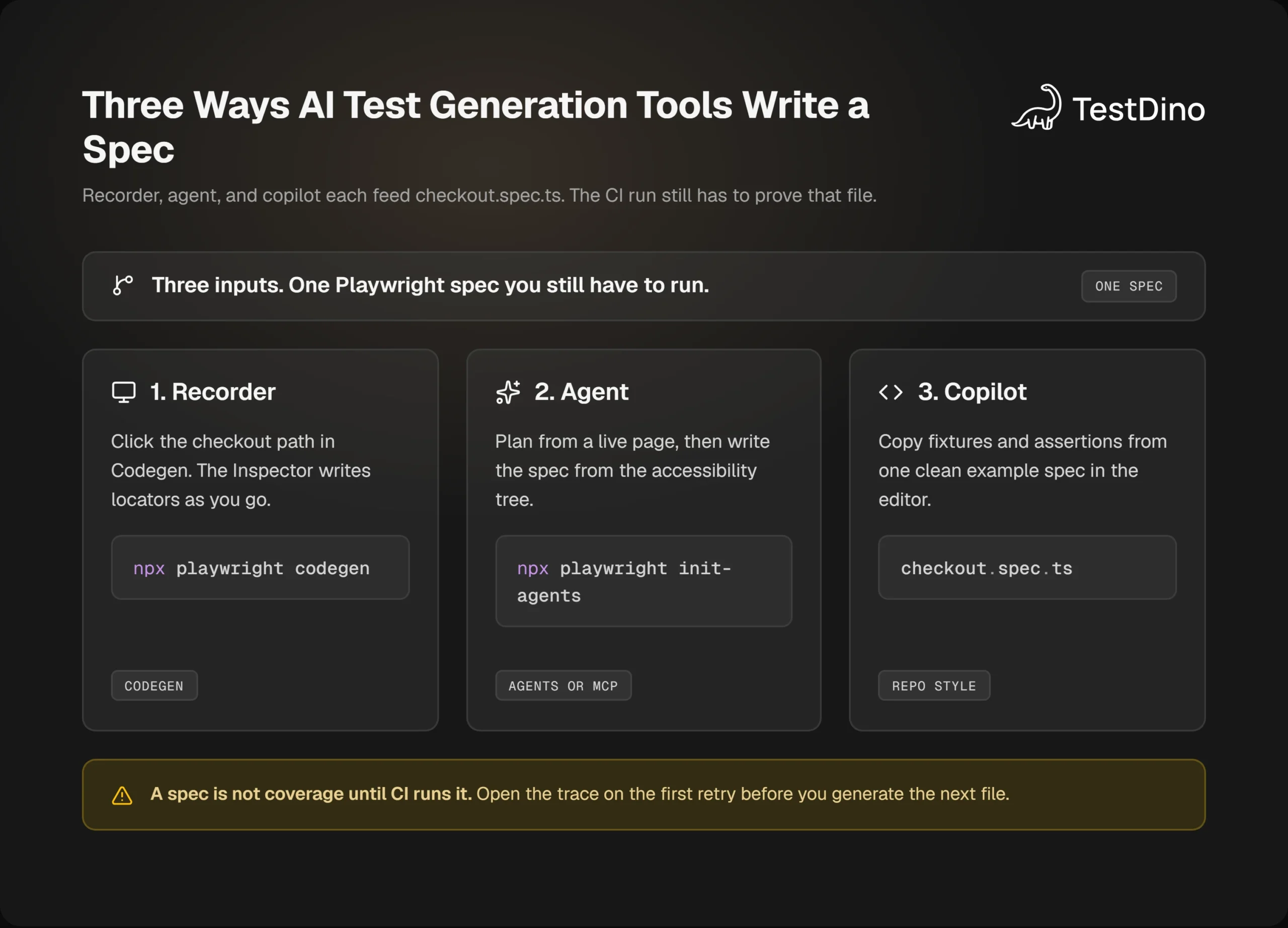
When someone searches for AI test generation tools, they usually want one of three outputs.
A recorder writes clicks as they happen. An agent with browser tools inspects the live page, then writes locators. An IDE copilot copies the style of a spec you already have.
The searcher wants a checkout test they can merge. They also want a short list of AI test generation tools that actually write that spec.
I will use one flow for the whole page: add an item, open checkout, place the order, assert the confirmation heading. You can record that on your own store, or practice the same commands on Playwright's public TodoMVC demo.
Here is what each type of tool actually hands you.
-
Recorder driven: a *.spec.ts file from real clicks. Typical tool: Playwright Codegen. Common miss: clicks with almost no assertions.
-
Agent with browser control: a plan, then specs from a live accessibility tree. Typical tools: Playwright Test Agents, Playwright MCP. Common miss: a flow that only works on the agent's session.
-
IDE copilot: a new spec that matches your fixtures. Typical tools: GitHub Copilot, Cursor, Claude. Common miss: guessed CSS and waitForTimeout.
That last miss shows up in test automation suites that grew overnight. The file looks finished. CI still races the cart drawer.
Most AI test generation tools stop at the file. Playwright's own generator is honest about that job. It watches you click, then picks a locator. Official docs say it prioritizes role, text, and test id locators, and tightens the locator when more than one element matches.
That is generation. Playwright E2E testing still needs a run, an assertion on the outcome, and a trace when the run is red.
AI test generation tools for Playwright, and how each one helps
These seven AI test generation tools are the ones that actually write or run Playwright specs in 2026. Pick by the job in front of you. If checkout.spec.ts is already red, open the failure first. Then generate the smallest patch.
No public dataset supports a chart here. Playwright does not rank generators. Vendor pages quote their own accuracy numbers.
If you have no spec yet, record the path with Codegen. If you have a seed test, use Playwright Test Agents. If you already have one clean spec, ask Copilot, Cursor, or Claude for the next one in the same shape.
| Tool | Best for | How it helps Playwright test generation | Quick setup |
|---|---|---|---|
| Playwright Codegen | Fast drafts from real clicks | Records your checkout clicks and writes locators as you go | npx playwright codegen, copy the spec, then edit |
| Playwright Test Agents | A plan, then specs, then a repair loop | Planner writes Markdown. Generator writes tests. Healer patches failures | npx playwright init-agents --loop=vscode |
| Playwright CLI | Running and iterating the generated spec | Proves the draft with npx playwright test, reports, and traces | npx playwright test tests/checkout.spec.ts |
| Playwright MCP Server | Agent generation with a live page | Lets the model read the accessibility tree before it guesses a selector | npx @playwright/mcp@latest in your MCP client |
| GitHub Copilot | The next spec in your repo style | Clones fixtures, locators, and assertion shape from an open example | Open a clean spec, then ask for the next checkout case |
| Cursor | Repo-aware suite growth | Writes new tests inside your folders and rules, not a new layout | Pin a conventions file, generate one spec, run it, then generate the next |
| Claude | Multi-file refactors | Moves checkout into a page object or fixture without changing intent | Give 1 or 2 example specs and ask for a diff only |
Official best practices still decide the quality of that output. Test what the user sees. Isolate each test. Prefer web-first assertions such as toBeVisible().
Pick one of these AI test generation tools for the job in front of you. Then stay with it for the first checkout spec.
Brittle Playwright locators are why a generated checkout dies in CI. div.cart > button:nth-child(2) worked on your laptop. The Linux job rendered the upsell tile first.
Start at getByRole(), then label, text, and getByTestId(). That is the usual best practices order. Use a tool that can see the page when selectors are the risk. Use a copilot when structure is the risk.
Playwright Codegen
Among AI test generation tools, Codegen is the speedrun. You click Add to cart, Checkout, and Place order. The Inspector writes the spec.
That is the help: a first draft from a real flow, with locators that official docs say prefer role, text, and test id. You still own the refactor. Record an assertion from the toolbar, or the file is only a click log.
Skip Codegen when you cannot click the path, or when you need a written plan before any code.
Playwright Test Agents
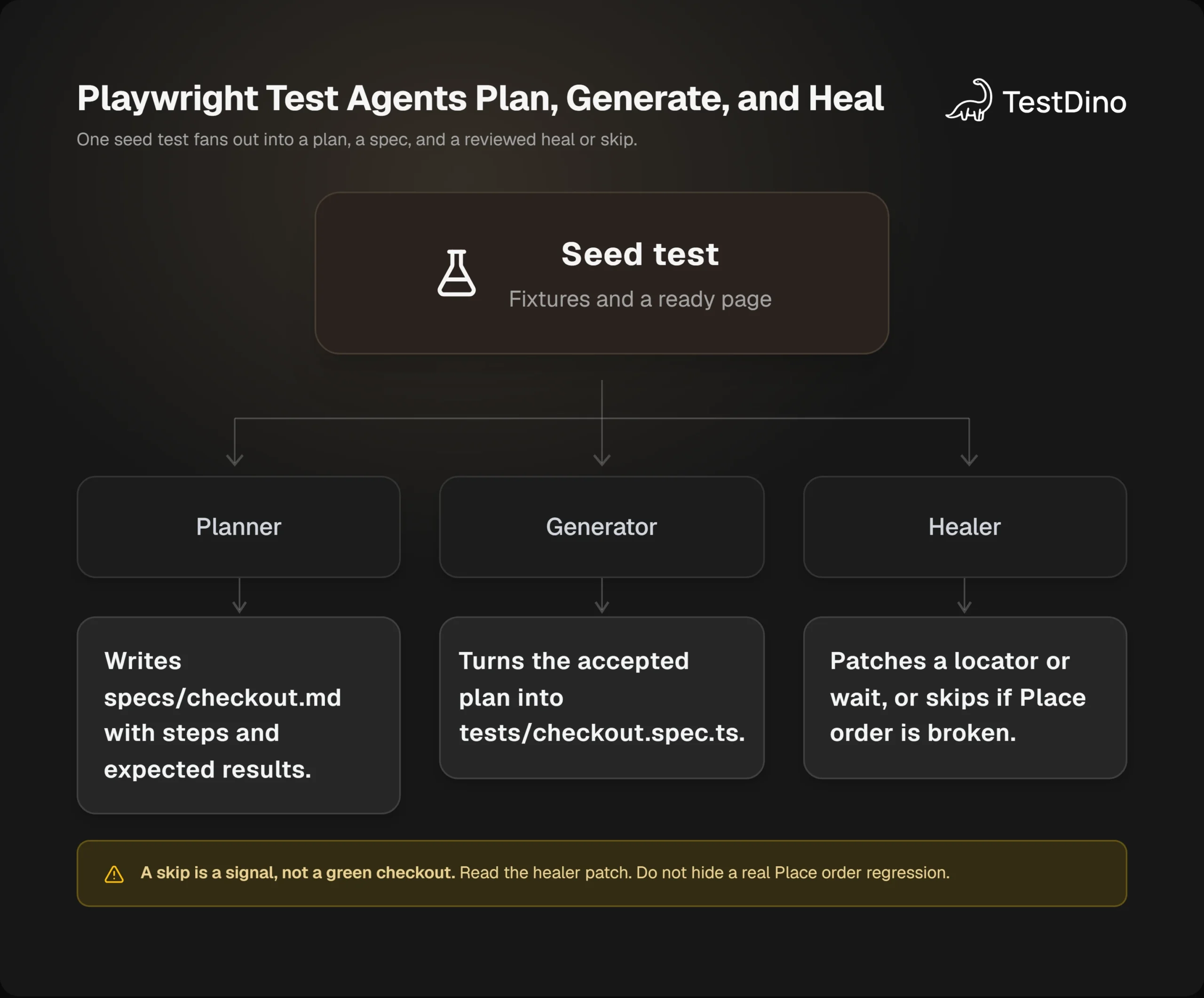
Playwright ships planner, generator, and healer. These sit with the other AI test generation tools, but they live in the repo. The planner explores the app and writes specs/checkout.md. The generator turns that plan into tests/checkout.spec.ts. The healer replays a failure and patches a locator or wait.
That is the help: coverage from a seed test, not from a blank prompt. Official docs say regenerate the agent definitions after you upgrade Playwright.
Skip the healer when you cannot review the patch. A skip from the healer can mean the product is broken, not that the spec is done.
Playwright CLI
The Playwright CLI does not invent the checkout story. AI test generation tools still need it to prove the file is real.
npx playwright test, npx playwright show-report, and npx playwright show-trace are the proof loop. Generated code that never runs in the CLI is still a draft.
Use the CLI after every generator. Skip treating it as a writer. Microsoft also points coding agents at CLI plus SKILLS when MCP is too heavy on tokens.
Playwright MCP Server
Playwright MCP gives an MCP client browser tools and a structured accessibility snapshot. An agent in this set of AI test generation tools can read the Place order button as a role and name, not as a guessed CSS class.
That is the help on dynamic UIs. A text-only prompt will invent #place-order. MCP can read the tree first.
Skip MCP when the agent is already out of context. That is the usual CLI vs MCP tradeoff: CLI for a large repo, MCP for a live walk.
GitHub Copilot
Copilot helps when you already have one honest tests/checkout.spec.ts. It copies the fixture, the locator style, and the assertion pattern onto the next case.
The failure mode is a vague prompt. Then it invents selectors and sneaks in waitForTimeout. Open the example spec first. Ask for a diff. Ask it to extract repeated login into a helper instead of pasting it twice.
Skip Copilot when the editor has no example. It cannot invent your team's conventions from a blank file.
Cursor
Cursor helps when the suite must stay inside tests/, your fixtures, and your locator rules. Pin a short conventions file. Ask for one spec. Run it. Then ask for the next one from what passed.
If you skip the rules, Cursor will invent e2e/ui/store/checkout-flow.spec.ts next to the folder you already use.
Use Cursor to grow the suite. Skip it for a first-ever draft if you can click the flow in Codegen faster.
Claude
Claude helps when the change spans more than one file. Moving checkout into CheckoutPage, rebuilding an auth fixture, or splitting a dumped Codegen file are the jobs.
Ask for a diff. Give one or two example specs. Say do not change test intent. Keep getByRole and no fixed waits in the prompt.
Skip Claude for a single new happy-path spec. Copilot or Cursor will clone that faster. Use Claude when the refactor would be painful by hand.
Playwright codegen and the official test agents
Codegen is still the fastest draft. Playwright Test Agents are the official AI path that plans, writes, and repairs specs inside the repo.
I checked these commands against the current Playwright docs on October 24, 2026. Run npx playwright --version in your repo before you copy flags.
The Playwright CLI is how you run what those tools wrote. Generation and execution are different jobs.
Record a checkout draft with codegen
Install Playwright, then record the checkout.
npm init playwright@latest
npx playwright codegen https://demo.playwright.dev/todomvc
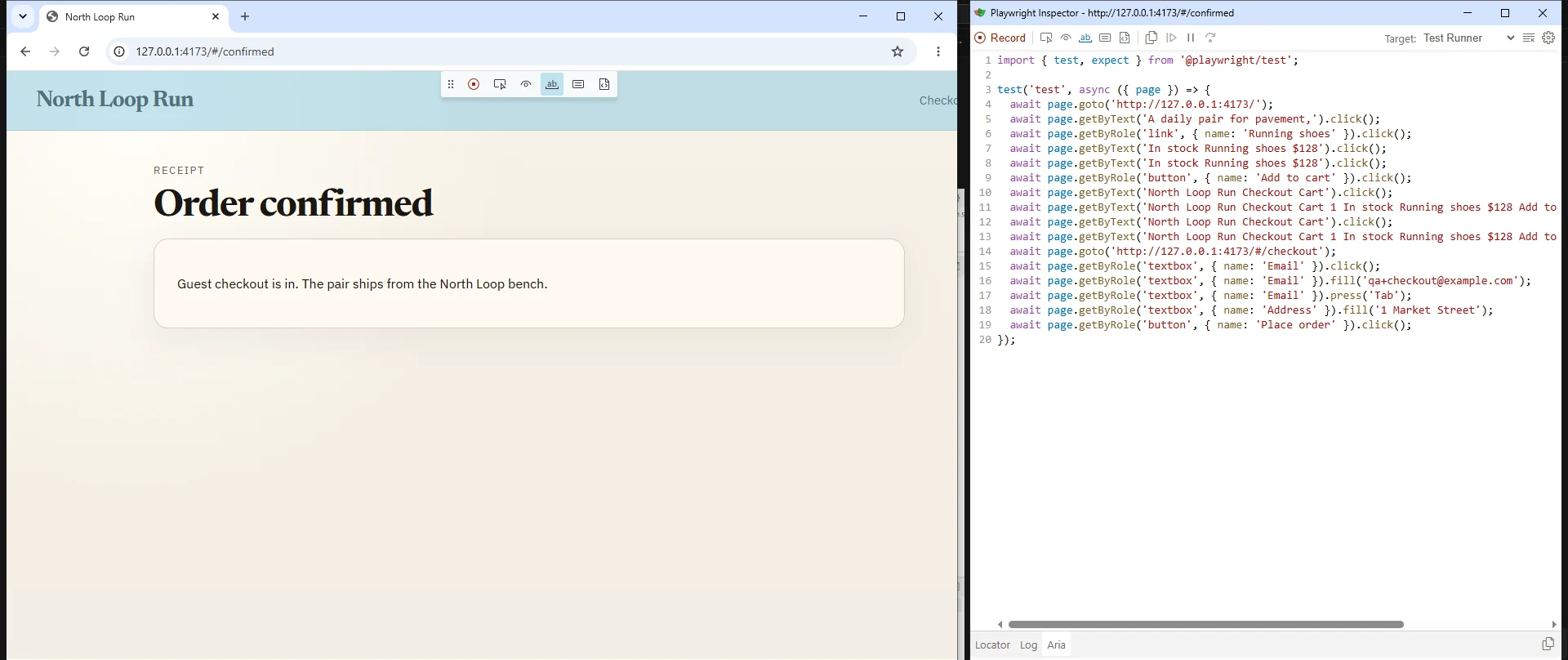
Two windows open. You click in the browser. The Inspector writes the test.
Record assertions while you are there. The official generator can add assert visibility, assert text, and assert value from the toolbar. If you only record clicks, you get a script that drives the UI and never proves the order landed.
Copy the output into tests/checkout.spec.ts. Then stop treating it as done.
A raw recording of checkout often looks like this.
import { test, expect } from '@playwright/test';

test('checkout', async ({ page }) => {
  await page.goto('/');
  await page.locator('.product-card').nth(0).click();
  await page.locator('button.add').click();
  await page.waitForTimeout(2000);
  await page.locator('a[href="/checkout"]').click();
  await page.locator('#email').fill('qa@example.com');
  await page.locator('button.submit').click();
});
That file will fail the first time the catalog order changes. Official docs tell you not to depend on CSS class names for that reason.
Do these three edits before you open a PR.
- Replace the product and button selectors with getByRole or getByTestId.
- Add one assertion on the confirmation heading, not on the click.
- Move login or cart setup into a fixture so the test body stays on the order.
If you cannot explain a waitForTimeout, delete it. Wait on the enabled Place order button, or on the heading that appears after submit.

Tip: Before you merge a Codegen draft, replace one brittle selector with getByRole or getByTestId, add one assertion on the Order confirmed heading, and move login into a fixture.
Those three edits are the whole hardening pass for a first checkout spec. Do them while the Inspector is still open, then run the file.
Plan, generate, and heal with Playwright agents
Playwright ships three Test Agents: planner, generator, and healer. Official docs say you can run them alone, in sequence, or in a loop.
Add the agent definitions to the repo. Regenerate them whenever you upgrade Playwright, because the definitions include tools and instructions that change with the release.
npx playwright init-agents --loop=vscode
npx playwright init-agents --loop=claude
npx playwright init-agents --loop=codex
npx playwright init-agents --loop=opencode
VS Code needs v1.105 or later for the agentic loop. Playwright published that requirement on October 9, 2025.
The planner needs a seed test. Official docs are blunt here. The seed runs your setup, fixtures, and hooks, and it becomes the example for later specs.
import { test } from '@playwright/test';

test('seed', async ({ page }) => {
  await page.goto('/');
});
Definition: A seed test is a tiny spec the planner runs first. It opens the app, applies fixtures, and becomes the example for later checkout tests.
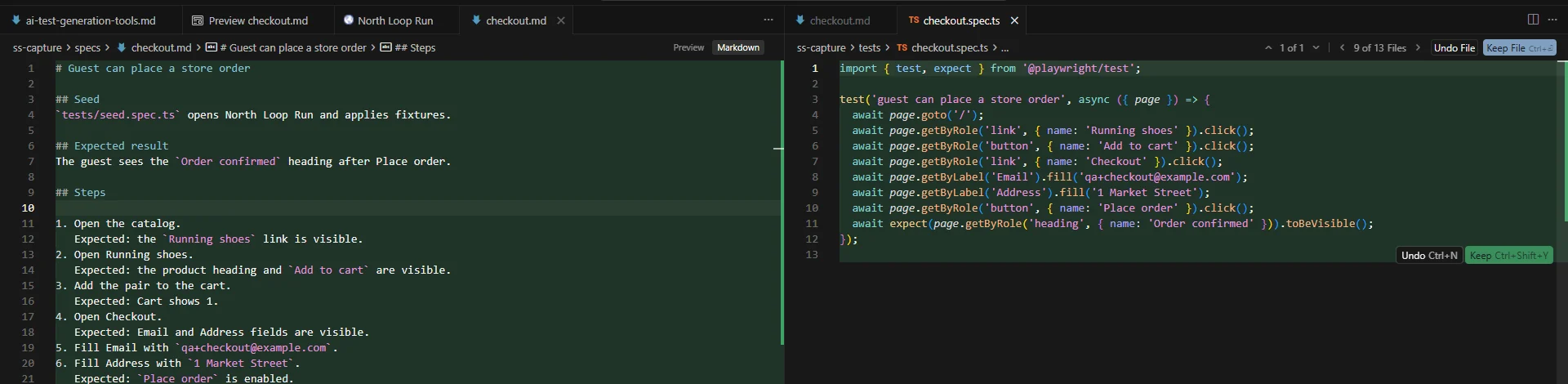
Ask the planner for a guest checkout plan. It writes a Markdown file under specs/, with steps and expected results. Read that plan. Cut any step you do not want in CI.
Then point the generator at that plan. It writes Playwright Test files under tests/ and checks locators live as it walks the flow. Official docs say those first files can still contain errors. That is what the healer is for.
When guest can place a store order fails, the healer replays the failing steps, inspects the current UI, and suggests a locator, wait, or data fix. It re-runs until the test passes, or until guardrails stop the loop.
Here is the part most roundups skip. Official docs say the healer can leave you a passing test, or a skipped test, if it believes the product is broken. A skip is a signal. Do not treat it as a green checkout.
Skip the healer on a suite you do not own, or on a flow you cannot review in the PR. An unreviewed locator patch can hide a real Place order regression.
Read the plan before the generator writes tests/checkout.spec.ts. Cut any step you do not want in CI.
If you are still new to the runner, start with setup, locators, and traces before you turn agents loose. Learn Playwright covers that path.
Let an agent see the page with Playwright MCP
A text-only prompt guesses selectors. Playwright MCP lets an MCP client call Playwright tools and read a structured accessibility snapshot.
The official MCP server uses the accessibility tree, not screenshots. It works with VS Code, Cursor, Claude Desktop, and other MCP clients. Node.js 18 or newer is required.
Standard client config looks like this.
{
  "mcpServers": {
    "playwright": {
      "command": "npx",
      "args": ["@playwright/mcp@latest"]
    }
  }
}
Prompt the agent like a senior SDET, not like a search box.
-
Write Playwright Test specs.
-
Prefer getByRole and getByTestId.
-
Do not add waitForTimeout.
-
Assert stable UI state, such as the Order confirmed heading.
-
Keep the test small. Isolate data per test.
Microsoft's own README now draws a line between MCP and the newer Playwright CLI plus SKILLS. CLI is more token efficient for a coding agent that already has a large repo in context. MCP stays useful when the agent needs a persistent browser and iterative page inspection.
So if Cursor is chewing context on a 400-spec repo, weigh CLI against MCP before you add another server. Use MCP for the checkout walk. Use npx playwright test for the proof.
Copilot, Cursor, and Claude for playwright test generation
Copilot, Cursor, and Claude are AI test generation tools that copy repo style. They are strong when you already have one honest spec. They are weak when you ask for a full checkout suite with an empty editor.
GitHub Copilot copies structure. Cursor stays inside your folders and rules. Claude is useful when the change spans fixtures, a page object, and two spec files.
This section is generation only. Maintenance and triage are a different job. AI agent testing is the usual split.
Open tests/checkout.spec.ts after the codegen hardening pass, plus your fixture file. Then ask for the next spec in the same pattern.
Generate a Playwright test for guest checkout with a saved cart.
Follow tests/checkout.spec.ts and the existing fixtures.
Prefer getByRole and getByTestId.
No waitForTimeout.
Assert the Order confirmed heading.
Return a diff only.
"Return a diff" keeps the change small. You review a patch, not a wall of new files. That prompt works for most AI test generation tools in the editor.
Note: A diff is a patch you can review in the PR. You see what Copilot, Cursor, or Claude actually changed in checkout.spec.ts.
Cursor needs pinned conventions. If you do not say where specs live, it invents e2e/ui/store/checkout-flow.spec.ts next to your tests/ folder. Put folder layout, locator rules, and fixture names in a short repo doc, then attach that file before you generate.
Claude is the one I use for a move to a CheckoutPage helper. Ask it not to change test intent. Ask for a diff. Give it one or two example specs, not the whole tree.
Can these tools write a reliable test? Yes, if the example you fed them is reliable. Official docs still want isolated tests and web-first assertions. A copilot will copy a waitForTimeout(3000) if that is what your last spec did.
Keep locator, assertion, and CI notes next to the prompt. The Playwright testing hub lists those pages in one place.
The hardening pass every generated spec needs
A file from AI test generation tools is a draft until you fix locators, assertions, and shared state. Most CI red on generated checkout tests comes from those three, not from the model name.
You will hit this error more than any other.
TimeoutError: locator.click: Timeout 30000ms exceeded.
Call log:
  - waiting for getByRole('button', { name: 'Place order' })
People then paste await page.waitForTimeout(3000) above the click. The button was disabled until Address had a value. The sleep hides that for one laptop, then flakes on CI. This is the usual failure after AI test generation tools write checkout.
Official docs say use web-first assertions and let Playwright retry until the condition is true. toBeVisible() waits. expect(await locator.isVisible()).toBe(true) does not.
Here is the hardened checkout body I want in the PR.
import { test, expect } from '@playwright/test';

test('guest can place a store order', async ({ page }) => {
  await page.goto('/');
  await page.getByRole('link', { name: 'Running shoes' }).click();
  await page.getByRole('button', { name: 'Add to cart' }).click();
  await page.getByRole('link', { name: 'Checkout' }).click();
  await page.getByLabel('Email').fill('qa+checkout@example.com');
  await page.getByLabel('Address').fill('1 Market Street');
  await page.getByRole('button', { name: 'Place order' }).click();
  await expect(page.getByRole('heading', { name: 'Order confirmed' })).toBeVisible();
});
Scope locators when the page has two Add to cart buttons. Official docs show chaining and filter({ hasText }) for that. Click the button inside the Running shoes row, not the first button in the document.
Seed cart data through API testing when the UI login is not the thing you are proving. Isolate storage, cookies, and data per test. Avoid a third-party widget you do not control.
Watch for shared state. If test A leaves a coupon in localStorage, test B's total assertion will flake. Playwright gives each test its own context by default. Do not fight that with a global storageState you never rotate.
This is also where flaky tests start. A missing await, a CSS nth-child, and a leaked cart are the usual three.
Run the file locally with a trace before you push.
npx playwright test tests/checkout.spec.ts --project=chromium --trace on
npx playwright show-report
Keep a short command list nearby while you edit. The Playwright cheatsheet has launch, locators, and runner flags.
A generated suite that skips this pass becomes noise. Clean data, real assertions, and evidence on every failure are the same idea at team scale for Playwright automation.
Prove the generated test in CI before you merge
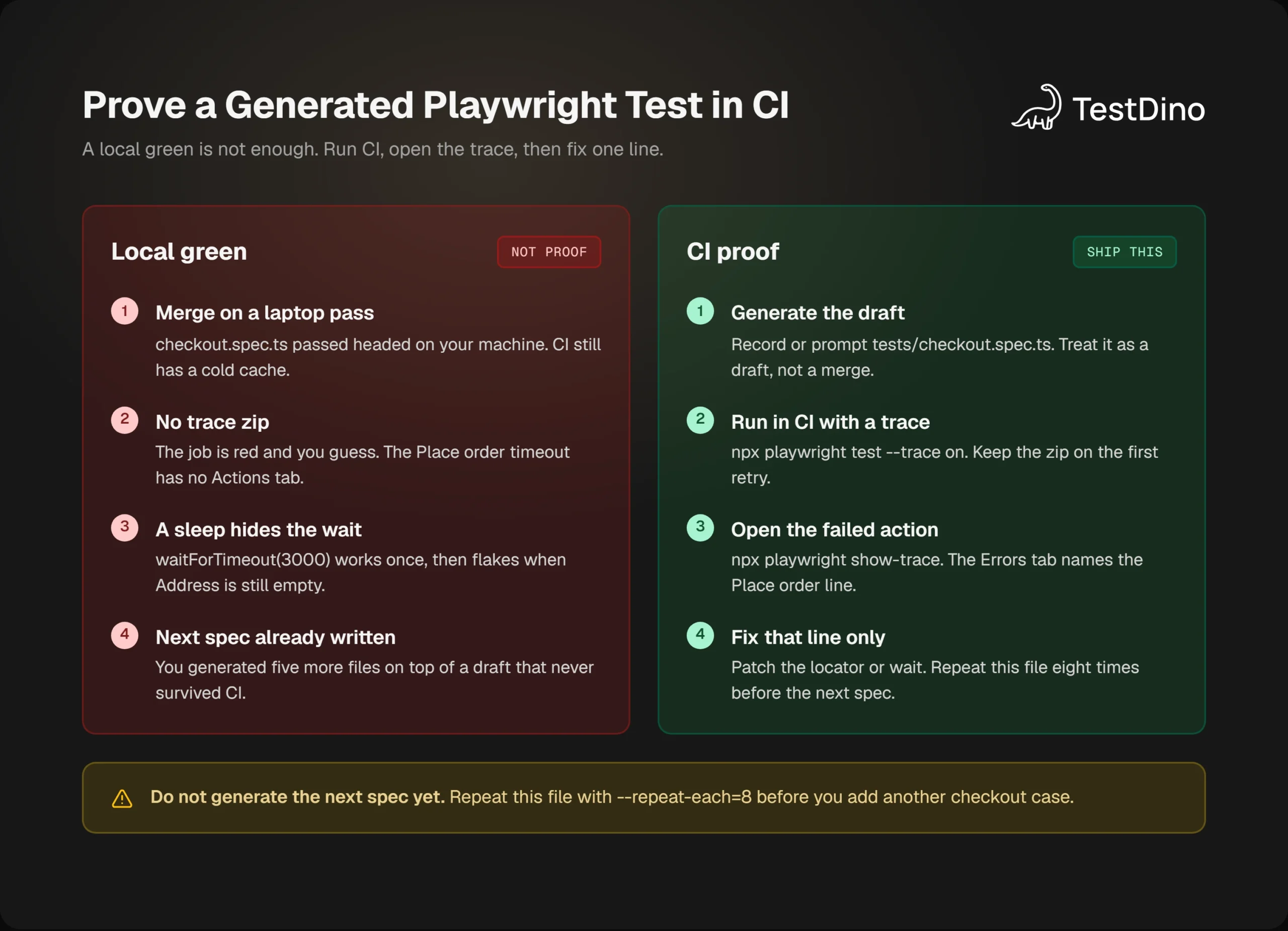
A local green from AI test generation tools is not enough. Run the generated checkout spec in CI with traces on the first retry, then fix the line the trace points at.
Official docs recommend trace: 'on-first-retry' on CI. They warn that trace: 'on' for every test is heavy. That is the setting I use for generated specs.
import { defineConfig } from '@playwright/test';

export default defineConfig({
  retries: process.env.CI ? 1 : 0,
  use: {
    trace: 'on-first-retry',
    screenshot: 'only-on-failure',
  },
});
After the job, open the zip.
npx playwright show-trace test-results/checkout-guest-can-place-a-store-order-retry1/trace.zipThe Actions tab shows the locator and the duration. The Errors tab marks the failed line. The Network tab tells you if /api/orders never returned 200. That is the difference between a bad locator and a down staging API.
Definition: A Playwright trace is a zip of the run: actions, network, console, and DOM snapshots. When CI goes red, the trace shows the disabled Place order button, not a guess.
Open that zip before you rewrite the spec. Fix the line the Errors tab names.
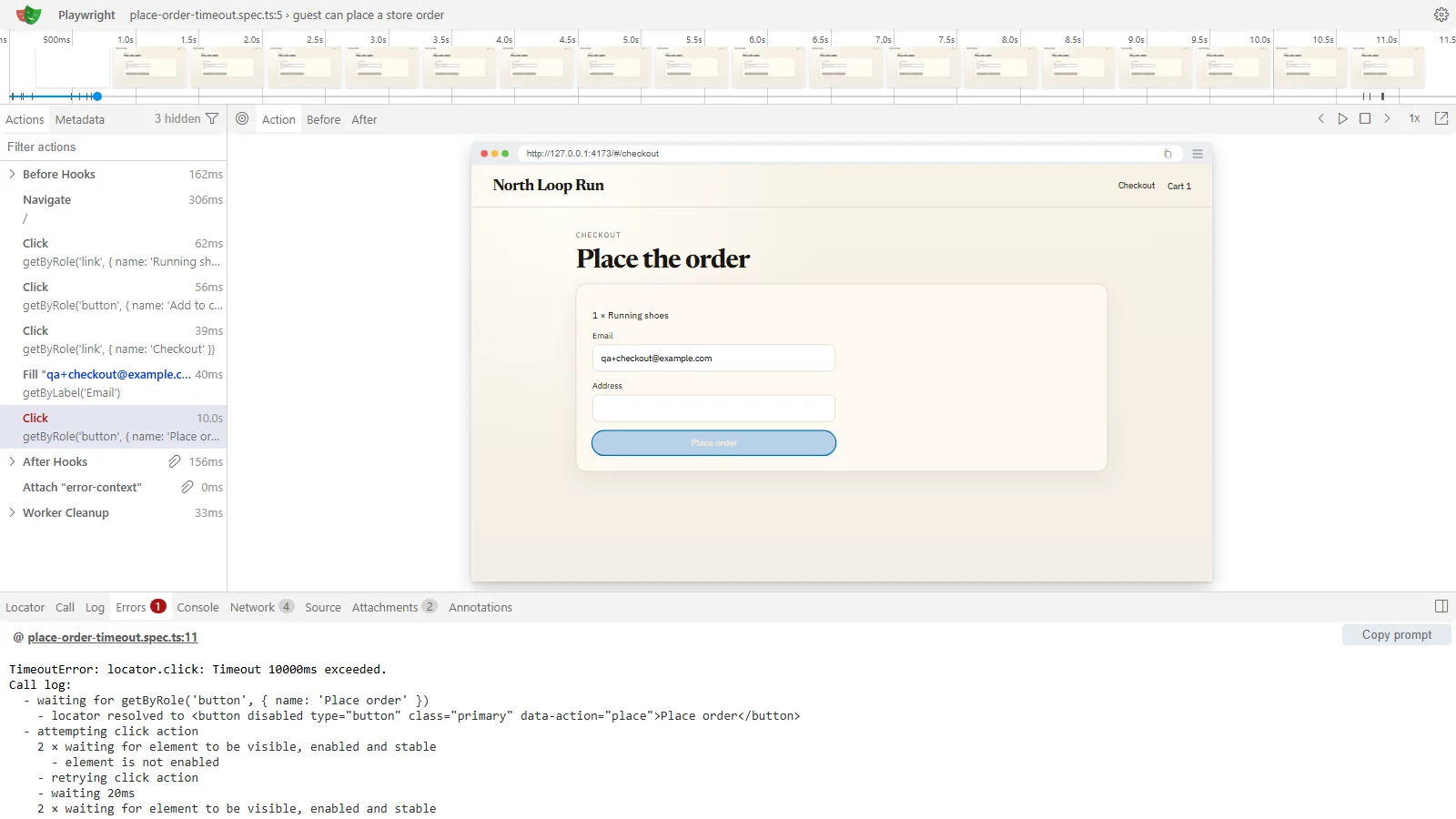
The Playwright Trace Viewer shows the same timeline. Agents that cannot open a GUI can use npx playwright trace instead.
Once results stream to a shared run view, you can open the failed checkout case with its trace instead of downloading a zip from Actions. TestDino records that CI run. It does not write the spec.
Burn the spec in before you generate the next one.
npx playwright test tests/checkout.spec.ts --repeat-each=8 --project=chromiumIf it fails twice in eight runs, you still have a flake. Do not scale generation yet.
Add the reporter when you want the same failure in one place for the PR.
import { defineConfig } from '@playwright/test';

export default defineConfig({
  reporter: [
    [process.env.CI ? 'dot' : 'list'],
    ['@testdino/playwright', { token: process.env.TESTDINO_TOKEN }],
  ],
});
That matches the setup on TestDino docs. Keep your existing reporters. Read the token from the environment. Results stream while npx playwright test runs, including sharded jobs.
Flake detection on that run uses two signals: fail-then-pass on retry, and unstable results across runs. Root-cause buckets are timing, environment, network, assertion, and other. That is how you decide whether Place order needs a locator fix or a staging fix.
Flaky tests with a stability percentage and history are easier to fix than a single red job. Fix the checkout spec you have. Then generate the next one.
If an agent is connected over MCP, ask it for a patch grounded in that run, not a rewrite of the file.
Open the latest failed run on this branch.
Find guest can place a store order.
Read the trace and the screenshot.
Explain the root cause in one paragraph.
Propose a locator or wait fix as a diff.
Do not add waitForTimeout.
When the suite is large, shard it. Official docs support npx playwright test --shard=1/3. Generated tests that share a coupon code will fail only on shard 2. That is isolation, not a bad shard.
Scale AI test generation tools only after this spec holds.
Conclusion
AI test generation tools for Playwright are easy to start and easy to abuse. Codegen, official agents, MCP, Copilot, Cursor, and Claude all write a checkout spec. You still own the locators, the assertion, and the CI proof.
Use Codegen when you can click the path. Use planner, generator, and healer when you have a seed test and a review step. Use an IDE copilot when the next spec should look like the last one.
Then keep the loop boring. Generate. Run in CI. Open the trace. Fix the Place order timeout for the reason it happened. Repeat.
Your next step is one file: record or generate tests/checkout.spec.ts, run it with --trace on, and do not open a second spec until that one survives --repeat-each=8.
FAQ

Vishwas Tiwari
Software Engineer