Playwright Testing Hub: Blogs, Guides, Videos & Resources
A curated hub of Playwright resources organized by topic, helping developers quickly find the best docs, tools, courses, and guides.
You need a Playwright resource. You don't need to sort through 200 of them to find it.
A beginner looking for locator docs doesn't need a conference talk on test agents. A staff engineer debugging sharding doesn't need an installation video.
This hub organizes Playwright resources by topic. Each section collects the best official docs, videos, tutorials, and tools for that subject in one place.
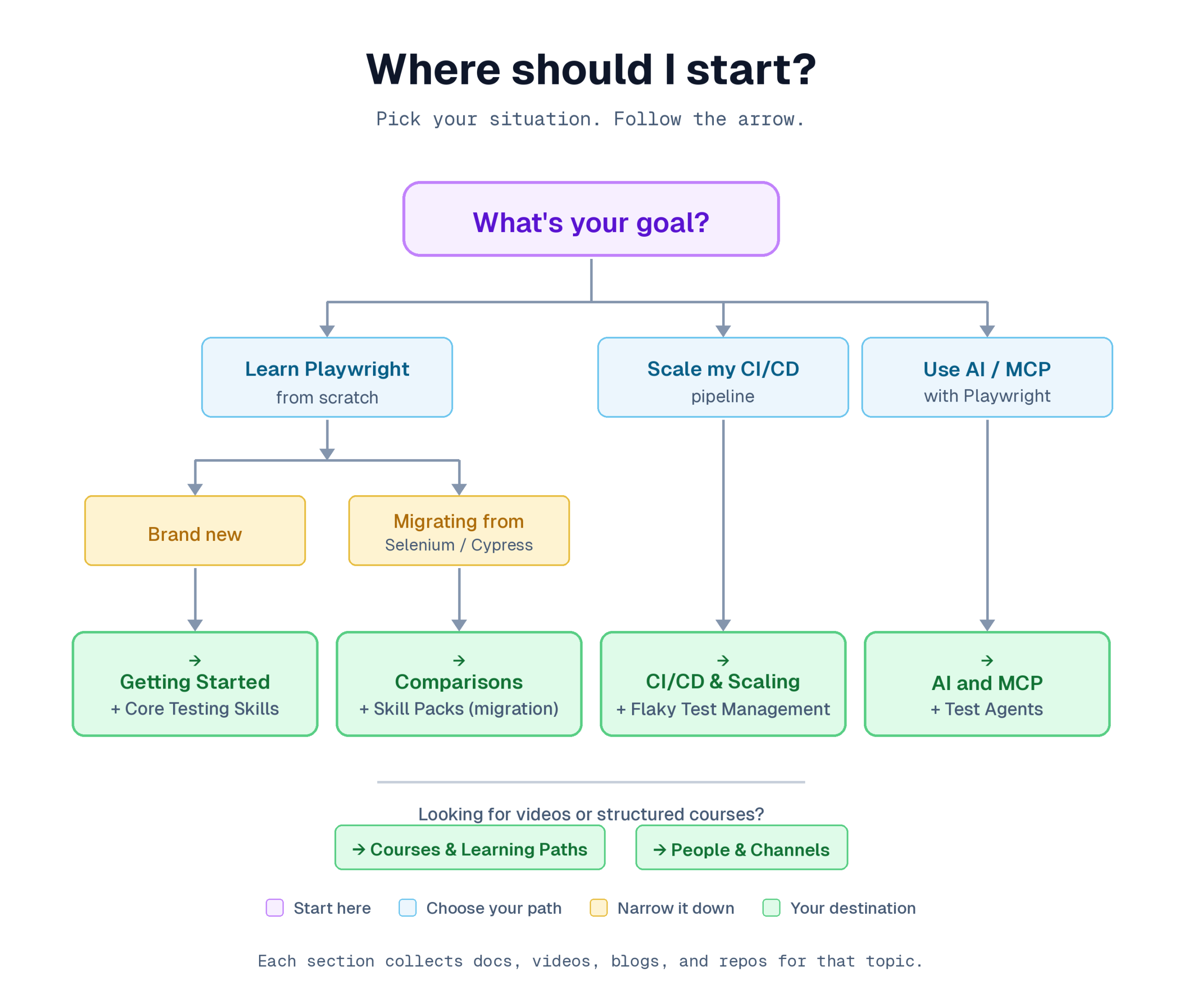
Use the navigator below to find what you need.
Playwright resources
| If you need to... | Go to |
|---|---|
| Install Playwright and write your first test | Getting started |
| Learn locators, assertions, or POM patterns | Core testing skills |
| Set up API testing, network mocking, or accessibility checks | Testing patterns |
| Configure CI/CD, sharding, or parallel execution | CI/CD and scaling |
| Use MCP, test agents, or AI debugging | AI and MCP |
| Take a structured course | Courses and learning paths |
| Find boilerplates, repos, or skill packs | Open-source tools and repositories |
| Compare Playwright to Selenium or Cypress | Framework comparisons |
| Follow Playwright creators and channels | People and channels to follow |
| Join communities or track releases | Community and staying current |
Getting started with Playwright
Playwright is an open-source browser automation framework by Microsoft. It supports Chromium, Firefox, and WebKit with a single API. Available in TypeScript, JavaScript, Python, Java, and .NET.
Note: Since v1.57, Playwright runs on Chrome for Testing builds instead of raw Chromium. Headed mode uses chrome, headless mode uses chrome-headless-shell. Existing tests should continue to work after upgrading.
The official documentation at playwright.dev is the single best starting point. No course or blog replaces it.
Install and scaffold a project:
npm init playwright@latestThis creates a config file, example tests, and a GitHub Actions workflow.
Essential official docs
| Doc | What it covers |
|---|---|
| Getting started guide | Installation, first test, project structure |
| Writing tests | Actions, assertions, test isolation, hooks |
| Best practices | Locator strategy, test isolation, CI setup, debugging |
| Release notes | What changed in each version (ships roughly once a month) |
Playwright docs are available in NodeJS, Python, Java, and .NET variants. Pick the one matching your language.
For a deeper look at project configuration after install, see the Playwright framework setup guide.
Videos for getting started
| Video | What it covers |
|---|---|
| Playwright for Beginners: Install and run tests (official) | Full setup from npm init to first test run and HTML report |
| Getting started with Playwright in VS Code (official) | Playwright VS Code extension: running tests, debugging, recording actions |
Free structured intro
Build your first end-to-end test with Playwright on Microsoft Learn. Covers installation, running tests, viewing reports, and VS Code integration. Takes about 2 hours. No cost.
Microsoft also provides standalone code examples:
| Example | What it teaches |
|---|---|
| Clock | Testing time-dependent features |
| API Mocking | Intercepting and mocking network requests |
| Boxed Steps | Organizing tests with boxed step annotations |

Tip: Try the Playwright online playground to experiment without installing anything locally.
GitHub repo worth reading
The core repo is microsoft/playwright with 84K+ stars.
The part most people miss: the /tests folder inside that repo. It contains thousands of tests written by the core team to validate the framework itself. Reading them is one of the fastest ways to learn how the people who built Playwright actually write tests.
TestDino guides for beginners
Core testing skills
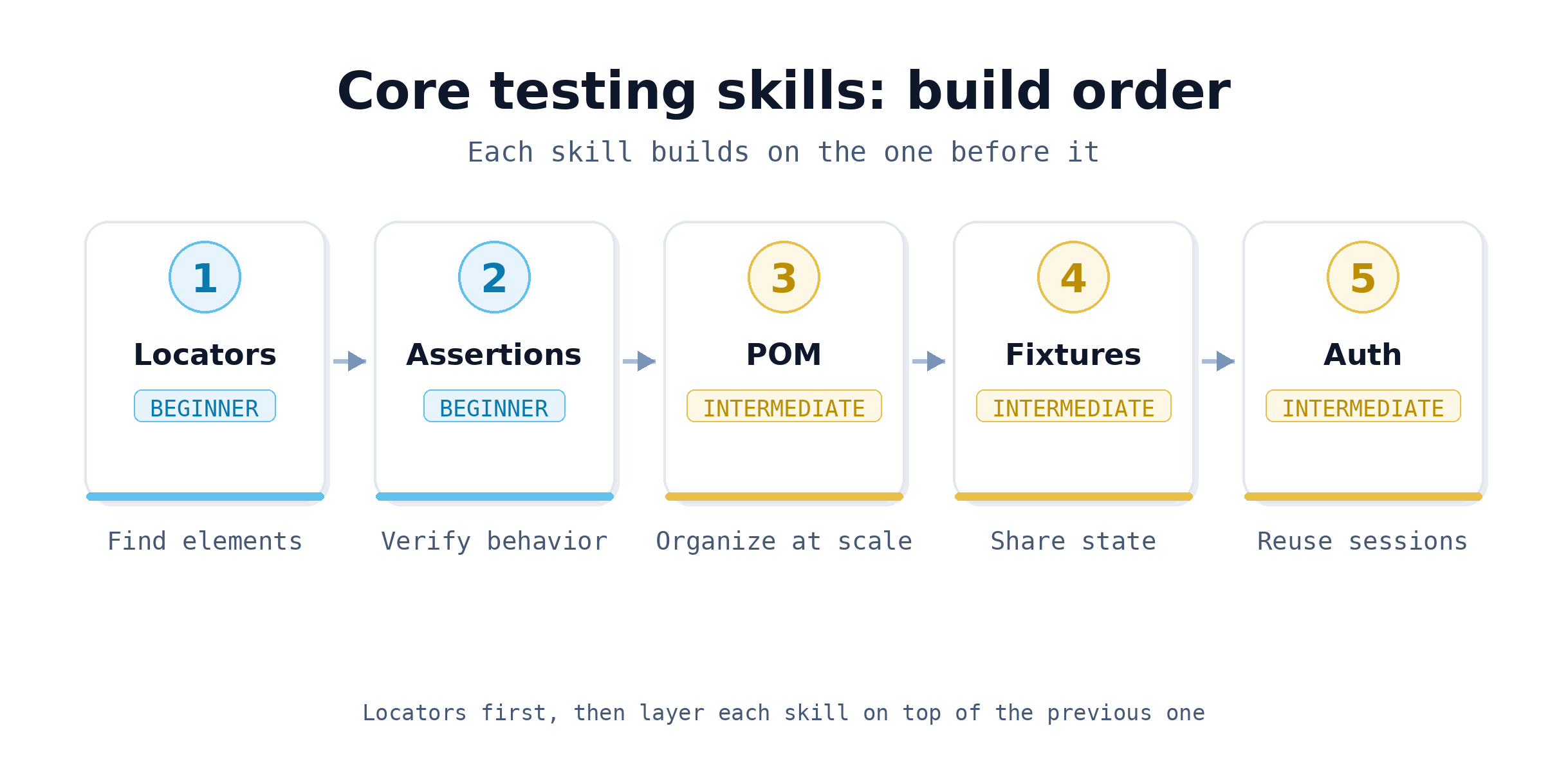
These are the building blocks of every Playwright project: locators, assertions, Page Object Model, authentication, and fixtures.
Locators and assertions
Locators determine how Playwright finds elements. Assertions verify behavior. Getting both right eliminates most flaky tests.
| Resource | What it covers |
|---|---|
| Locators docs | All locator strategies: getByRole, getByText, getByTestId, CSS, XPath |
| Assertions docs | Auto-retrying assertions, web-first assertions, custom matchers |
| Handling Visibility: getByText vs. getByRole (official video) | When to use each locator strategy for visible elements |
| Playwright Assertions: Avoid Race Conditions (official video) | Correct assertion patterns that prevent timing issues |
| Playwright locators guide | Full walkthrough of locator strategies with code examples |
Page Object Model
POM is the standard pattern for organizing test code at scale. Playwright's official docs cover the basics. Microsoft's boxed-steps-pom example shows the pattern in practice.
Resources:
Authentication
Setting up reusable authentication state avoids logging in on every test.
Resource:
Fixtures
Fixtures in Playwright replace traditional setup/teardown. They're how you inject shared state (authenticated pages, test data, custom utilities) into tests.
Resource:
Testing patterns
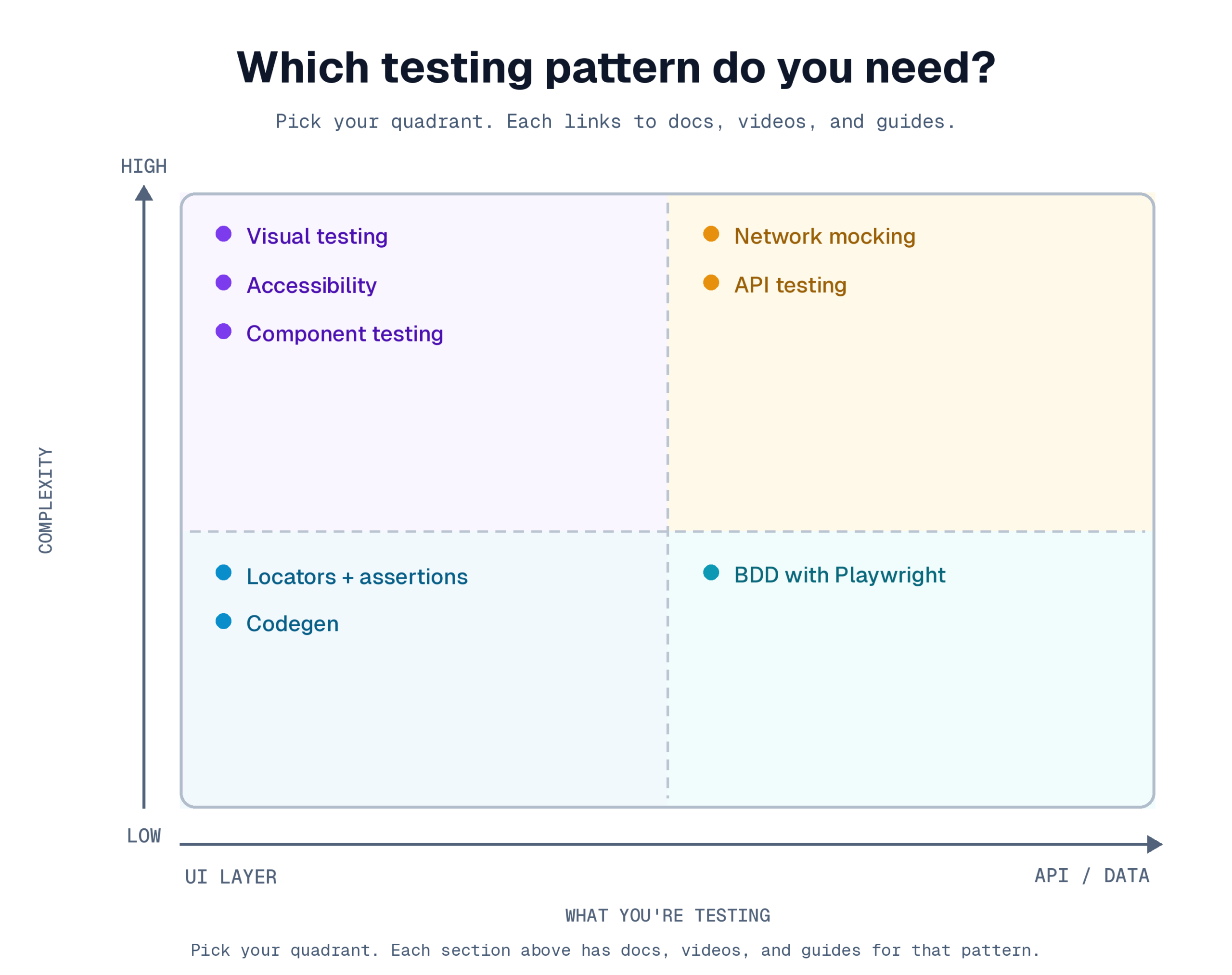
Once the basics are solid, these patterns handle the scenarios that show up in real applications: API calls, mocked responses, accessibility, visual snapshots, and component-level testing.
API testing
Playwright can test APIs directly without a browser. Useful for backend validation, setup, or hybrid tests.
Resources:
Network mocking
Intercept and mock API responses with page.route(). Lets you test loading states, error handling, and edge cases without depending on live backends.
Resources:
-
How to test dynamic content with API mocking (official video)
Accessibility testing
Playwright's ARIA snapshot API captures the accessibility tree as YAML for assertions. Useful for accessibility audits and as an alternative to DOM-based checks.
Resources:
-
Getting started with ARIA Snapshots (official video)
Visual testing
Screenshot comparisons catch unintended UI changes that functional tests miss.
Resources:
Component testing
Test individual components in isolation without a full application.
Resources:
BDD with Playwright
Cucumber + Playwright for teams that write acceptance criteria in Gherkin syntax.
Resource:
CI/CD and scaling
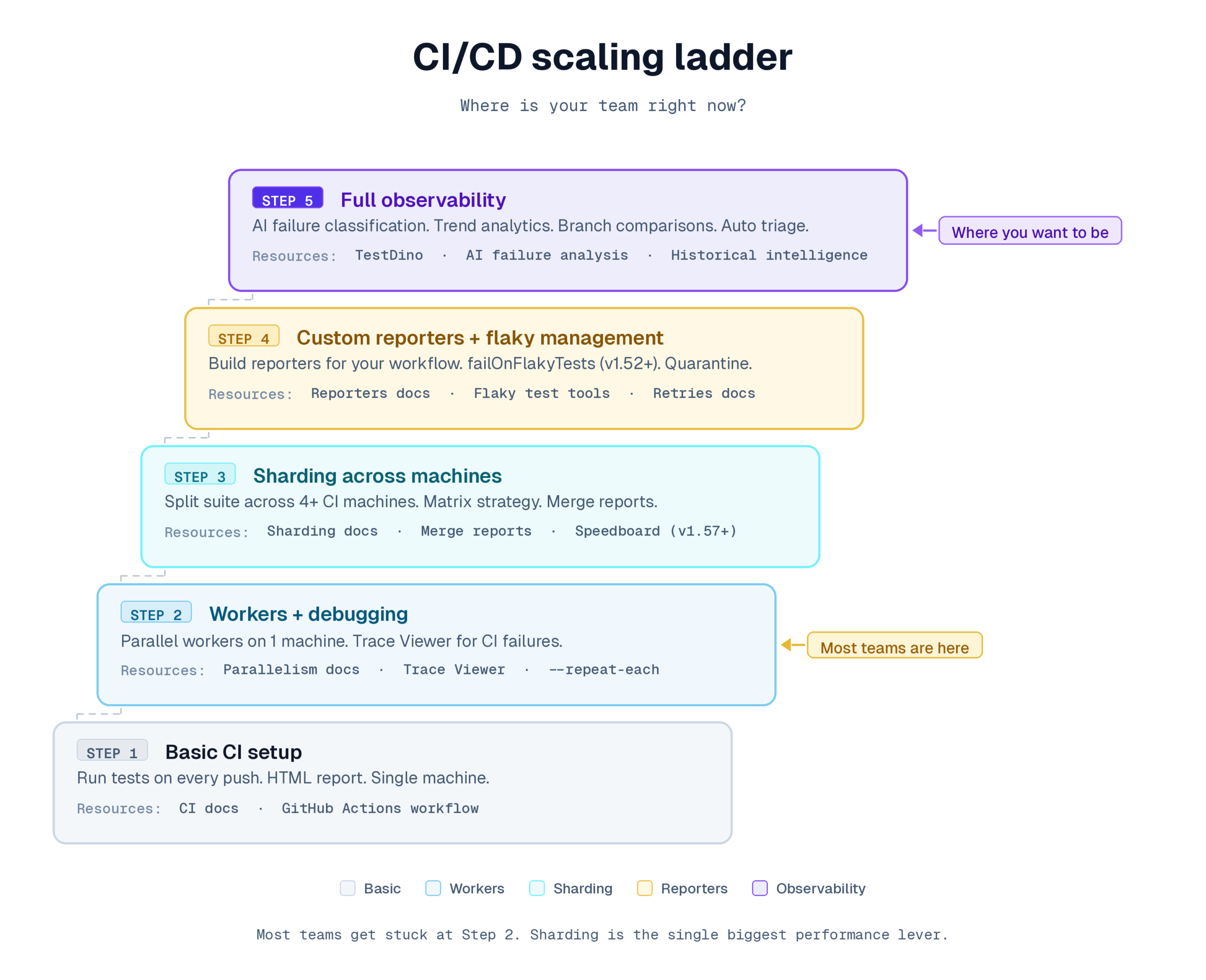
The section for teams running Playwright in CI. Covers pipeline setup, sharding, parallel execution, debugging CI-only failures, Trace Viewer, and custom reporters.
CI/CD setup
Resources:
Sharding
Sharding splits your test suite across multiple CI machines. The single biggest performance lever for large suites.
# Run tests across 4 shards in CI
npx playwright test --shard=1/4
Resources:
Parallel execution
Workers run multiple tests on one machine. Sharding distributes across machines. Most teams need both.
Resources:
Debugging and Trace Viewer
Trace Viewer is Playwright's built-in diagnostic tool. It replays test executions step by step, showing DOM snapshots, network logs, console output, and screenshots for each action. Opens as a local PWA from a trace.zip file.
| Resource | What it covers |
|---|---|
| Trace Viewer docs | How to capture and open trace files |
| Trace Viewer official video | Interactive timeline, DOM snapshots, network tab walkthrough |
| How to trigger flaky tests locally (official video) | Reproduce CI-only failures using --repeat-each and trace recording |
| UI Mode official video | Time-travel debugging with watch mode and live trace viewing |
| Playwright Trace Viewer guide | Full walkthrough of trace capture, viewer features, and CI setup |
The "How to trigger flaky tests locally" video is specifically for developers who see tests pass locally but fail in CI. It explains how to reproduce the failure with --repeat-each and trace recording.
Custom reporters
Build your own reporter to format test output for your team's workflow.
Resources:
Codegen
Record browser actions and generate test code. Useful for bootstrapping tests quickly. Since v1.55, Codegen can also generate automatic toBeVisible() assertions for common UI interactions.
Resources:
Flaky test management
Flaky tests are the most expensive problem in test automation at scale. Understanding detection, root causes, and mitigation strategies saves real CI time.
Since v1.52, Playwright has a native failOnFlakyTests config option that fails the entire test run if any flaky tests are detected. Useful for CI gates where you need all tests stable before deploying.
Resources:
AI and MCP
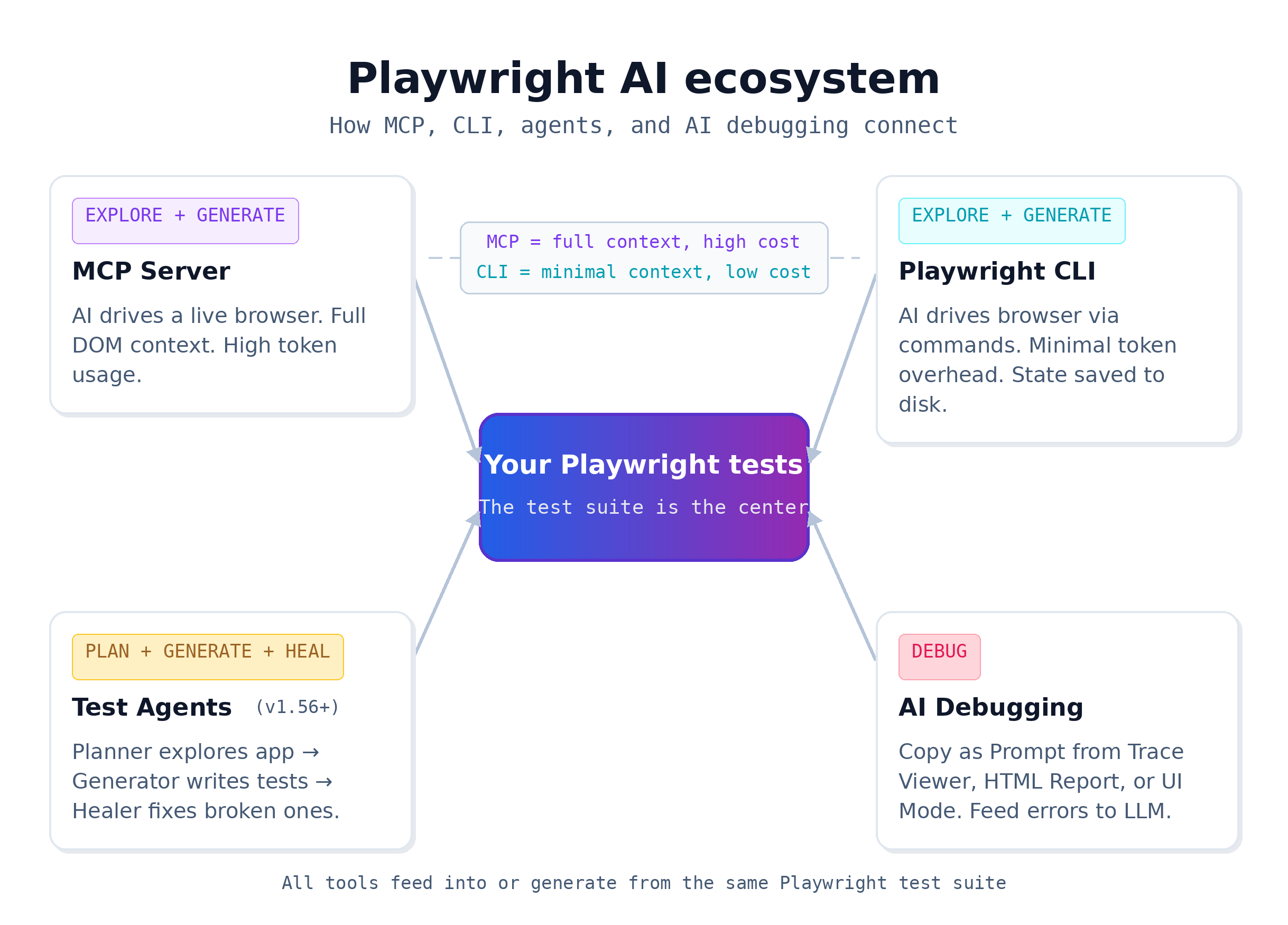
Model Context Protocol (MCP) lets AI agents interact with live browser sessions through Playwright. This is the fastest-moving area of the Playwright ecosystem.
Playwright MCP
MCP connects AI tools (Cursor, VS Code with Copilot, Claude Code) to Playwright's browser automation through a local server. The AI interacts with the actual page state instead of guessing from screenshots.
| Resource | What it covers |
|---|---|
| Playwright MCP: How AI Agents Can Control Your Browser (official video) | Overview of MCP capabilities: clicking, typing, waiting, page snapshots |
| Let AI explore your site and write tests with Playwright MCP (official video) | AI agent exploring a website autonomously and generating test cases |
| How to Generate Playwright Tests using MCP + GitHub Copilot (official video) | Step-by-step MCP setup with GitHub Copilot in VS Code |
| Playwright MCP overview | What MCP is, how it works, and where it fits |
TestDino IDE-specific MCP setup guides:
MCP testing resources:
Playwright CLI (for AI agents)
The Playwright CLI (@playwright/cli) is a separate command-line tool built for AI coding agents. It drives browsers interactively with minimal token overhead, compared to MCP which streams full accessibility trees.
Resources:
Test agents (Planner, Generator, Healer)
Playwright v1.56 introduced test agents that plan, generate, and repair tests automatically.
| Resource | What it covers |
|---|---|
| Playwright Testing Agents: under the hood (official video) | Technical explanation of how agents work: plan, generate, heal |
| Agents: Plan, generate, and fix (official video) | Practical demo of agent-driven test generation and self-healing |
| Playwright test agents guide | Full breakdown of Planner, Generator, and Healer with architecture details |
AI debugging
| Resource | What it covers |
|---|---|
| Debugging with AI (official video) | "Copy as Prompt" from HTML Report, Trace Viewer, or UI Mode for AI tools |
| Playwright AI ecosystem overview | Where MCP, CLI, agents, and AI debugging fit together |
| AI test generation tools for Playwright | Comparing Codegen, MCP, Copilot, Cursor, and Claude for test generation |
Framework comparisons
If you're evaluating Playwright against other frameworks, these resources cover architecture differences, performance benchmarks, and decision criteria.
| Resource | What it compares |
|---|---|
| Playwright vs Selenium | Protocol differences, speed, flakiness, community |
| Selenium vs Cypress vs Playwright | Three-way comparison for 2026 |
| Performance benchmarks | CI build times, memory, parallel throughput, flakiness rates |
| Playwright market share | Adoption stats, GitHub data, Fortune 500 usage |
Courses and structured learning paths
For those who prefer a curriculum over documentation.
Free courses
| Course | Provider | Time | Level |
|---|---|---|---|
| Build with Playwright | Microsoft Learn | ~2 hours | Beginner |
| Introduction to Playwright (Renata Andrade) | Test Automation University | ~4 hours | Beginner |
| Advanced Playwright (Renata Andrade) | Test Automation University | ~4 hours | Intermediate |
| 99-Minute Playwright Workshop (Butch Mayhew) | GitHub (self-paced) | 99 min | Beginner-Intermediate |
| Awesome Playwright Tutorial (Andrew Knight) | GitHub (self-paced) | Self-paced | Beginner (Python) |
Open-source tools and repositories
Core repositories
| Repo | Stars | Language | Purpose |
|---|---|---|---|
| microsoft/playwright | 84K+ | TypeScript | Core framework |
| microsoft/playwright-python | 14K+ | Python | Official Python port |
| microsoft/playwright-java | 1.5K+ | Java | Official Java port |
| microsoft/playwright-dotnet | 2.9K+ | C# | Official .NET port |
For a full analysis of the best Playwright open-source projects, see the Playwright GitHub repositories guide.
AI-ready skill packs
Playwright Skill by TestDino (MIT license) contains 70+ production-tested Playwright guides organized into 5 skill packs: core (46 guides), CLI (11 guides), POM (2 guides), CI (9 guides), and migration (2 guides for moving from Cypress or Selenium).
Works with all AI coding agents: Claude Code, Cursor, Windsurf, and GitHub Copilot.
npx skills add testdino-hq/playwright-skillWatch the installation walkthrough:
How to install Playwright Skill using Claude Code.
For a detailed walkthrough of using this skill to generate 82 E2E tests for an e-commerce site, see Playwright Skill with Claude Code.
Language ports beyond the official four
| Port | Language |
|---|---|
| playwright-go | Go |
| playwright-ruby-client | Ruby |
| playwright-cr | Crystal |
| playwright-rust | Rust |
| playwright-perl | Perl |
Projects that use Playwright
-
VS Code uses Playwright to run cross-browser tests on its web builds
-
TypeScript uses Playwright to test TypeScript.js across browsers
-
playwright-examples (Microsoft) provides various testing scenarios
People and channels to follow
This section consolidates the independent bloggers, publication blogs, and YouTube channels worth following for Playwright content.
Independent writers
| Person | Focus | Where to find them |
|---|---|---|
| Butch Mayhew (PlaywrightSolutions.com) | Curated Playwright problems and solutions, with a focus on TypeScript | Blog, Playwright Ambassador, runs Howdy QA consultancy |
| Debbie O'Brien (debbie.codes) | Previously on Playwright team at Microsoft | Blog, conference talks (see conference videos), YouTube |
| Tim Deschryver (timdeschryver.dev) | Deep Playwright content with Angular integration | Blog, notable post on vibe testing with Playwright MCP |
| Alapan Das (TestersDock) | Scenario-based Playwright walkthroughs | Blog |
| Rahul Yadav (TesterOps) | Playwright alongside QA and DevOps resources | Blog: maintains a Playwright resources directory |
| Ben Fellows (LooP) | Testing consultancy perspective | Blog, YouTube |
| Luc Gagan (ray.run) | Community Q&A for Playwright curates Discord threads | Website |
| Pratik Patel | Playwright reporting, flaky test detection, and MCP integration | TestDino blog, founder of TestDino |
Publication blogs
| Publication | What it covers |
|---|---|
| dev.to/playwright | Official Playwright blog: release announcements, feature explanations, tutorials from the core team |
| Microsoft DevBlog | Major Playwright announcements |
For more articles on automation best practices, debugging strategies, and CI/CD reporting, check the TestDino blog.
YouTube channels
| Channel | Language focus | Best for | Content style |
|---|---|---|---|
| @Playwrightdev (official) | Multi | All levels | Categorized playlists: learn, features, releases, MCP, conferences |
| Automation Step by Step (Raghav Pal) | JS/TS | Beginners | Slow-paced, step-by-step |
| LetCode (Koushik Chatterjee) | TS + Cucumber | BDD teams | Practice-oriented, includes a practice site |
| TestersTalk (Bakkappa N) | JS/TS/Java | Full course learners | Comprehensive, includes Azure DevOps pipeline setup |
| Execute Automation (Karthik KK) | C# .NET | .NET teams | Language-specific, 31-lesson Playwright with C# course |
| TestDino | Multi | MCP, reporting, flaky tests | Playlists on flaky test detection, historical intelligence, MCP integration |
Recommended conference talks
-
"Advanced Playwright Debugging and Test Resilience" (Microsoft Build 2025, Debbie O'Brien & Max Schmitt): debugging workflows and test stability patterns
-
"AI-Powered Debugging & Browser Automation with Playwright MCP" (Frontend Nation 2025, Debbie O'Brien): MCP demo in a conference setting
-
"AI Testing & Browser Automation with Playwright" (AI Driven Development Day 2025, Debbie O'Brien): AI testing + Playwright browser control
Full conference video archive: playwright.dev/community/conference-videos.
Community and staying current
Real-time communities
The Playwright Discord server has over 18,000 members. Key channels:
-
#help-playwright for questions and answers from community members and Playwright Ambassadors
-
#articles and #videos for sharing and finding content
-
Voice channels and live events on the Playwright stage
LinkedIn Playwright Community for professional networking and official news.
Q&A and forums
| Platform | Best for |
|---|---|
| Stack Overflow (playwright tag) | Searchable, long-form Q&A with definitive answers |
| Reddit (r/Playwright) | Informal discussions, project sharing, community feedback |
Social and news
-
X/Twitter: @playwrightweb for release announcements and tips
-
dev.to/playwright: Official blog posts
-
Playwright Weekly: Curated email of Playwright content from around the web
How to stay updated with releases
Playwright ships approximately one release per month.
-
GitHub release notifications: Go to microsoft/playwright, click Watch > Custom > Releases for email alerts on every new version
-
Release videos: playwright.dev/community/release-videos demos new features per version
-
Changelog: playwright.dev/docs/release-notes has the full written changelog
-
Playwright Weekly: Subscribe at playwrightsolutions.com for a weekly curated email
| Recent version | Key features |
|---|---|
| v1.58 (latest) | Timeline in HTML report Speedboard tab, UI Mode/Trace Viewer improvements (system theme, search in code editors, formatted JSON), removed _react/_vue selectors and :light engine |
| v1.57 | Speedboard in HTML reporter, switched from Chromium to Chrome for Testing builds, webserver wait field with regex matching, removed page.accessibility API |
| v1.56 | Test agents (Planner, Generator, Healer), page.consoleMessages(), page.requests(), merged file view in HTML reporter |
| v1.55 | Codegen auto toBeVisible() assertions, dropped Chromium extension manifest v2 support |
| v1.54 | Cookie partitionKey for CHIPS/partitioned cookies, noSnippets option in HTML reporter, --user-data-dir for codegen |
| v1.53 | New Steps view in Trace Viewer and HTML reporter, locator.describe() for labeling locators in traces, HTML report title option |
| v1.52 | toContainClass() assertion, ARIA snapshot /children strict matching and /url for links, failOnFlakyTests config option, per-project workers setting |
| v1.51 | Copy prompt for AI debugging, git info in HTML reports, StorageState for indexedDB (Firebase auth), visible filter for locators |
For a broader context on where Playwright fits in the testing framework market and adoption trends, see Playwright market share and test automation jobs report.
FAQs

Dhruv Rai
Product & Growth Engineer