LLM Evaluation Framework: A Practical 4-Layer Guide to Testing LLM Features in CI
Shipping an LLM feature with no tests on its output? Build an LLM evaluation framework that runs in CI.

An LLM evaluation framework is a repeatable check for an AI feature. You send the same questions every time the prompt changes, and you look at the answers to see if they still do the job. A chat box or a Summarize button needs this the same way a login button needs a test.
Two things go wrong when you skip it. A small prompt edit ships because no test reads what the model said, and a customer finds the bad answer later. Or you demand the exact sentence, the model says the same thing in different words, and every pull request turns red.
This guide builds LLM evals in plain steps. You will see the four parts it needs, a full example with promptfoo and Playwright, and how to stop a slightly different answer from blocking the merge.
What an LLM evaluation framework actually does
An LLM evaluation framework runs a fixed set of inputs through your model or your app, scores each output, and fails the run when scores drop below a line you set. That's the whole job. Teams usually shorten it to LLM evals. Everything else, dashboards, judges, datasets, is in service of that loop.
It helps to split the term in two, because the top search results blur them.
- Model evals grade a raw model against academic benchmarks. The EleutherAI lm-evaluation-harness ships over 60 benchmarks for this and backs the Hugging Face Open LLM Leaderboard. Stanford's HELM adds efficiency, bias, and toxicity metrics on top of accuracy.
- Application evals grade your feature: your prompt, your retrieval, your post-processing, your UI. Tools like promptfoo and DeepEval live here.
If you're a product developer, you want the second kind. You're not choosing a model this quarter. You're trying to stop the "Summarize ticket" button from getting worse without anyone noticing.
An application-level LLM evaluation framework is a golden dataset of inputs, a stack of checks on each output, and a CI gate that fails when checks or scores drop below a threshold you set. Model-level frameworks grade raw models on published benchmarks instead.
So the rest of this post treats an LLM evaluation framework as application-level. It is the same idea as test automation you already run, except one step is a model call you can't fully predict.
Why your existing test suite can't grade an LLM answer
Your current tests assume one input gives one output. An LLM breaks that assumption, so expect(text).toBe('...') either never passes or passes only on the day you wrote it. That gap is what an LLM evaluation framework fills.
Here's the running example for this post. A support dashboard has a ticket page at /tickets/1042 with a "Summarize" button. It calls a model with the ticket thread and shows a short summary. A good summary mentions the order number, states the problem, names the next action, and stays under 60 words.
Three things go wrong when you test that like normal UI:
- Exact matches fail on harmless rewording. "Order #1042" versus "order number 1042" is the same fact to a human and a failure to toBe.
- Loose matches pass garbage. toContain('1042') is happy with "I cannot help with 1042" too.
- Retries hide regressions. If retries: 2 is on and the model is right two times out of three, your pipeline is green while your product is wrong a third of the time.
That third one is the quiet cost. A flaky test on a normal page is usually a timing bug you can fix. A flaky LLM assertion is often a real quality signal, and the retry setting throws it away.
And the cost compounds in CI minutes. Every model call in a test costs money and seconds, so "just rerun it" is a worse habit here than it is for a login test. An LLM evaluation framework replaces that habit with a number you can watch.
The 4 layers of an LLM evaluation framework
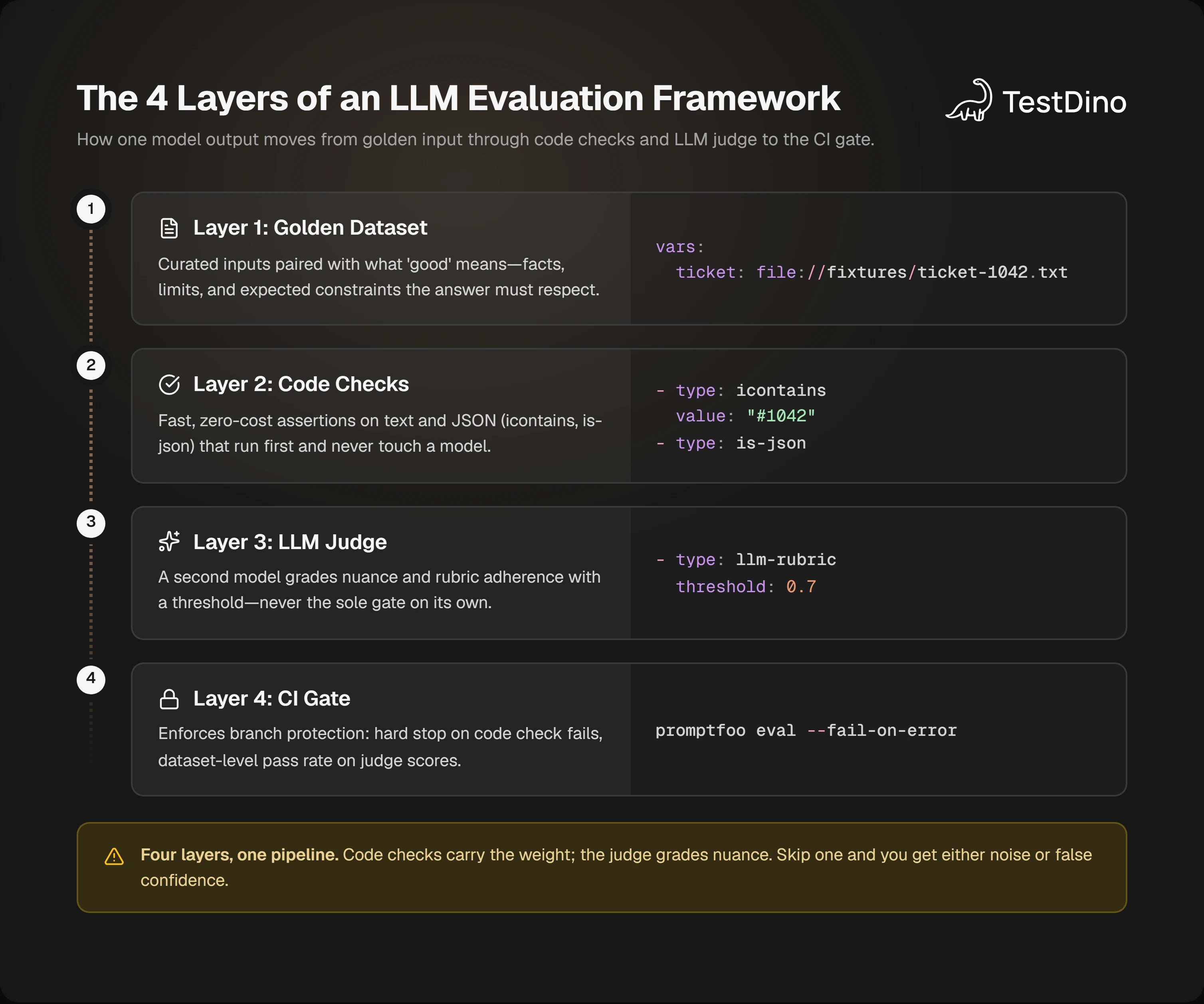
An LLM evaluation framework that holds up in CI has four layers: a golden dataset, deterministic checks, a model-graded check, and a gate with a threshold. Skip one and you get either noise or false confidence.
Layer 1: the golden dataset
A golden is one input plus what "good" looks like for it. Not the exact expected string, but the facts and limits an answer must respect.
For the ticket feature, a golden is fixtures/ticket-1042.txt plus notes: must mention #1042, must state the customer wants a refund, must not invent a refund amount, under 60 words. Start with 10 to 20 of these taken from real tickets with names scrubbed. You'll add one every time production surprises you. The golden set is the part of an LLM evaluation framework you'll edit most.
Layer 2: deterministic checks
These are plain code assertions that never need a model. Cheap, fast, and stable, so they should carry most of the weight in any LLM evaluation framework.
promptfoo's assertion list has the usual set: icontains, is-json, contains-json with optional schema validation, javascript for a custom function, and latency and cost for budget checks. Prefix any of them with not- to invert. In the browser test, these are just expect calls on text you read with a locator such as getByRole or getByTestId.
Layer 3: the model-graded check
Some properties don't fit a regex. "States the next action clearly" is one. For those you ask a second model to grade the first one's output against a rubric. That's LLM-as-a-judge.
A judge model is useful, and it is also easy to trust too much. It often lines up with what a person would say. It also tends to like whichever answer it reads first. So if you are comparing two answers, run the check twice with the order swapped, and only count a win when both runs agree.
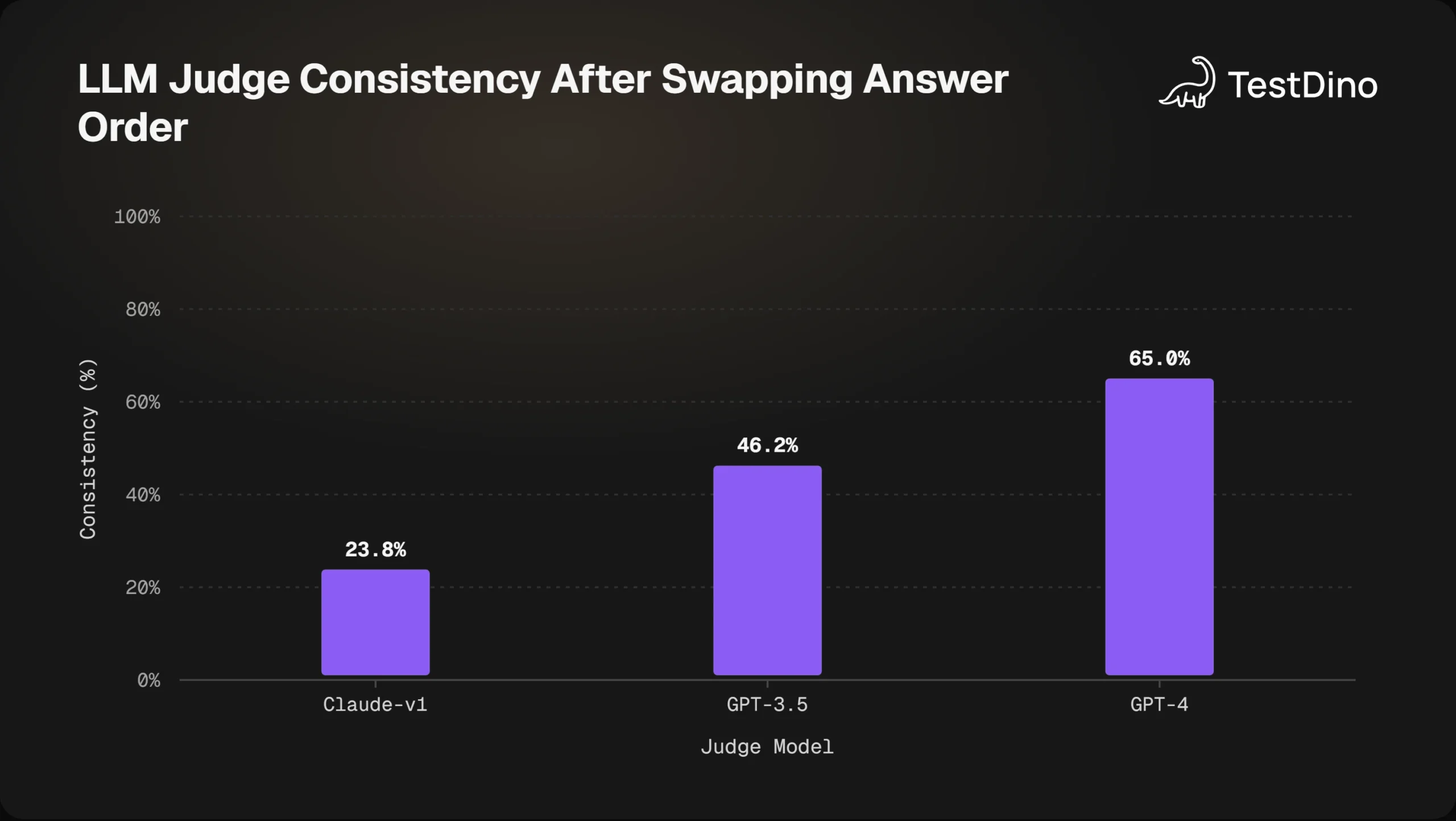
Two rules keep the judge honest. Give it a rubric with concrete criteria, not "is this good". And keep it to one layer among four, never the only check.
Layer 4: the gate
The gate is where an LLM evaluation framework meets branch protection: it decides what turns the CI job red. promptfoo gives you --fail-on-error for "any assertion failed" or a JSON output you can read a pass rate from and compare against your own number. DeepEval plugs into pytest, so a failing metric is a failing test, and it also lets you mark a test case flaky=True so a borderline case warns instead of failing.
Pick the gate per layer. That is how LLM evals decide red or green. Deterministic checks can be hard fails. Judge scores get a threshold and, early on, a pass rate across the dataset rather than per case.
Build one: a worked example with promptfoo and Playwright
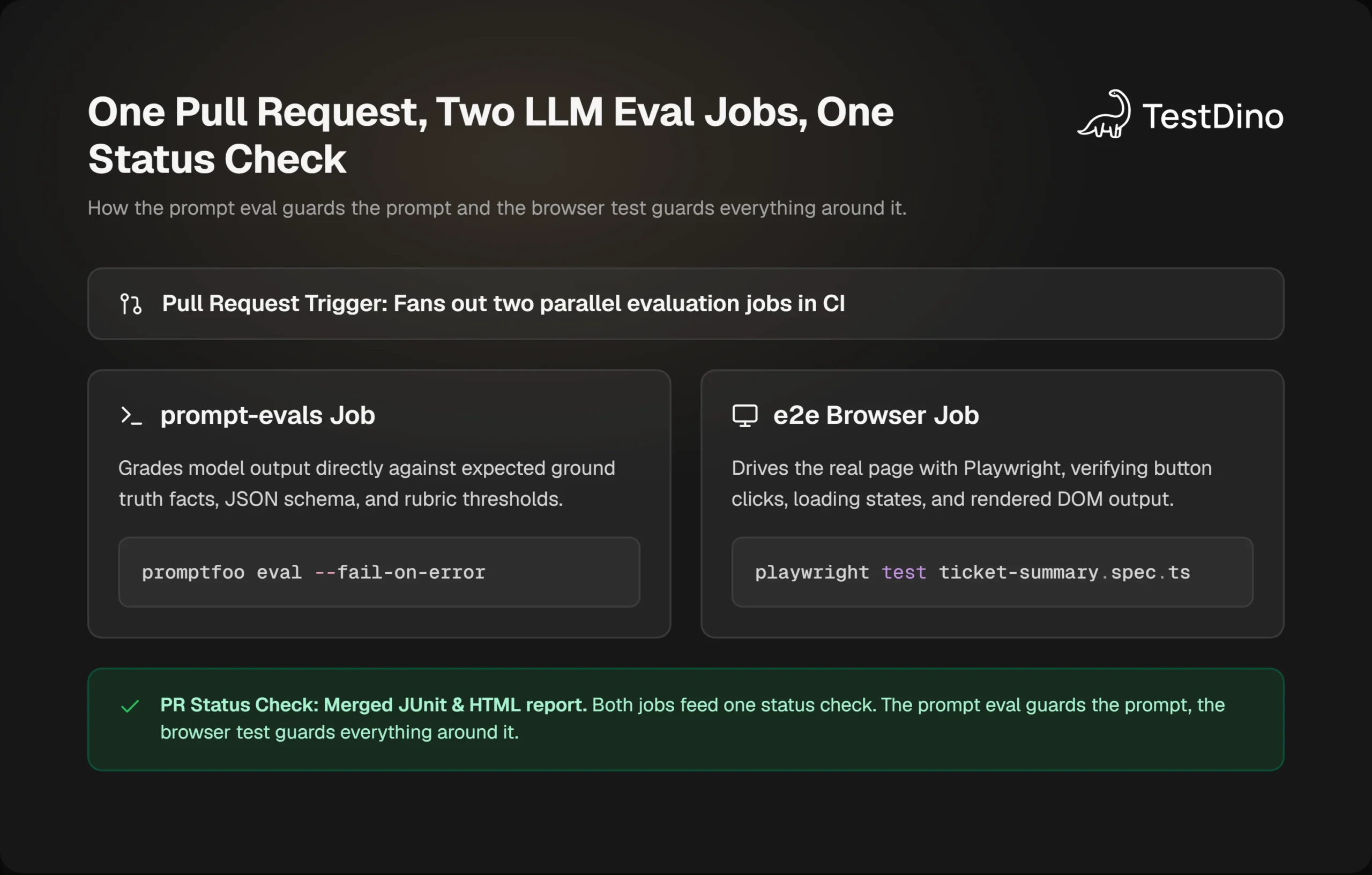
This is the section to keep open. You'll build a small LLM evaluation framework as two jobs: one that grades the prompt directly, and one that drives the real page the way an end-to-end test already does. Both run on every PR. Playwright version checked: 1.64. promptfoo's CI docs ask for Node 22.22.0 or newer, with Node 24 recommended.
Step 1: write the golden set and the prompt eval
Put the ticket text in a fixture and describe the checks in promptfooconfig.yaml.
description: Ticket summary prompt
prompts:
  - file://prompts/ticket-summary.txt
providers:
  - openai:gpt-6-sol # use the model your app actually calls
tests:
  - vars:
      ticket: file://fixtures/ticket-1042.txt
    assert:
      - type: icontains
        value: "#1042"
      - type: javascript
        value: output.split(/\s+/).length <= 60
      - type: not-icontains
        value: "as an AI"
      - type: llm-rubric
        value: >
          States the customer's problem and one clear next action.
          Does not invent a refund amount that is not in the ticket.
        threshold: 0.7
Three deterministic checks, one judge with a threshold. That ratio is deliberate.
Run it locally first:
npx promptfoo@latest eval -c promptfooconfig.yaml -o results.json -o results.junit.xml
npx promptfoo@latest view
The JUnit file is the piece most guides skip. GitHub, GitLab, and Jenkins all render JUnit natively, so your LLM evals show up in the same test tab as everything else.

Tip: Commit the fixtures and set PROMPTFOO_CACHE_PATH in CI. promptfoo caches model responses, so an unchanged prompt plus an unchanged fixture costs nothing on the next run. Only the goldens you touched hit the API.
Step 2: test the feature through the UI
The prompt eval tells you the prompt is fine. It doesn't tell you the button works, the loading state clears, or the summary lands in the right panel. That's a Playwright job, and an LLM evaluation framework that stops at the prompt misses all of it.
import { test, expect } from '@playwright/test';

test('summarizes ticket #1042 with the order number', async ({ page }, testInfo) => {
  await page.goto('/tickets/1042');
  await page.getByRole('button', { name: 'Summarize' }).click();
  const summary = page.getByTestId('ticket-summary');
  await expect(summary).toBeVisible({ timeout: 20_000 });
  const text = await summary.innerText();

  // keep the model output with the test result so a reviewer can read it
  await testInfo.attach('summary.txt', { body: text, contentType: 'text/plain' });

  expect(text).toContain('#1042');
  expect(text.split(/\s+/).length).toBeLessThanOrEqual(60);
  expect(text.toLowerCase()).not.toContain('as an ai');
});
Only deterministic checks live in the browser test. The judge stays in promptfoo where it's cheaper to run against 20 goldens. The testInfo.attach call matters: when this fails in CI, the model output sits next to the error in the HTML report, so nobody has to rerun it to see what the model said.
If your assertions pass locally and fail in CI, open the trace. It shows the page at the moment the text was read.
Step 3: wire both into CI
Two jobs, one workflow. The prompt eval only needs to run when prompt files change; the browser test runs on every PR.
name: LLM evals
on:
  pull_request:
jobs:
  prompt-evals:
    runs-on: ubuntu-latest
    steps:
      - uses: actions/checkout@v4
      - uses: actions/setup-node@v4
        with:
          node-version: '24'
      - name: Grade the prompt against the golden set
        env:
          OPENAI_API_KEY: ${{ secrets.OPENAI_API_KEY }}
          PROMPTFOO_CACHE_PATH: ~/.cache/promptfoo
        run: npx promptfoo@latest eval -c promptfooconfig.yaml -o results.json -o results.junit.xml --fail-on-error
      - uses: actions/upload-artifact@v4
        if: always()
        with:
          name: prompt-eval-results
          path: results.*
  e2e:
    runs-on: ubuntu-latest
    steps:
      - uses: actions/checkout@v4
      - uses: actions/setup-node@v4
        with:
          node-version: '24'
      - run: npm ci
      - run: npx playwright install --with-deps
      - run: npx playwright test tests/ticket-summary.spec.ts
        env:
          OPENAI_API_KEY: ${{ secrets.OPENAI_API_KEY }}
      - uses: actions/upload-artifact@v4
        if: always()
        with:
          name: playwright-report
          path: playwright-report/
The e2e job is a normal GitHub Actions job: checkout, install browsers, run the tests, upload the report. If you already have that, you're adding one job, not rewriting one.
When the suite grows past a few dozen browser tests, sharding spreads that job across runners with --shard=1/4. The eval job stays single because its cost is API calls, not CPU.
A failure you'll actually hit
Here's one from this exact setup. The prompt eval passed. The Playwright test failed with:
Error: expect(received).toBeLessThanOrEqual(expected)
Expected: <= 60
Received:    74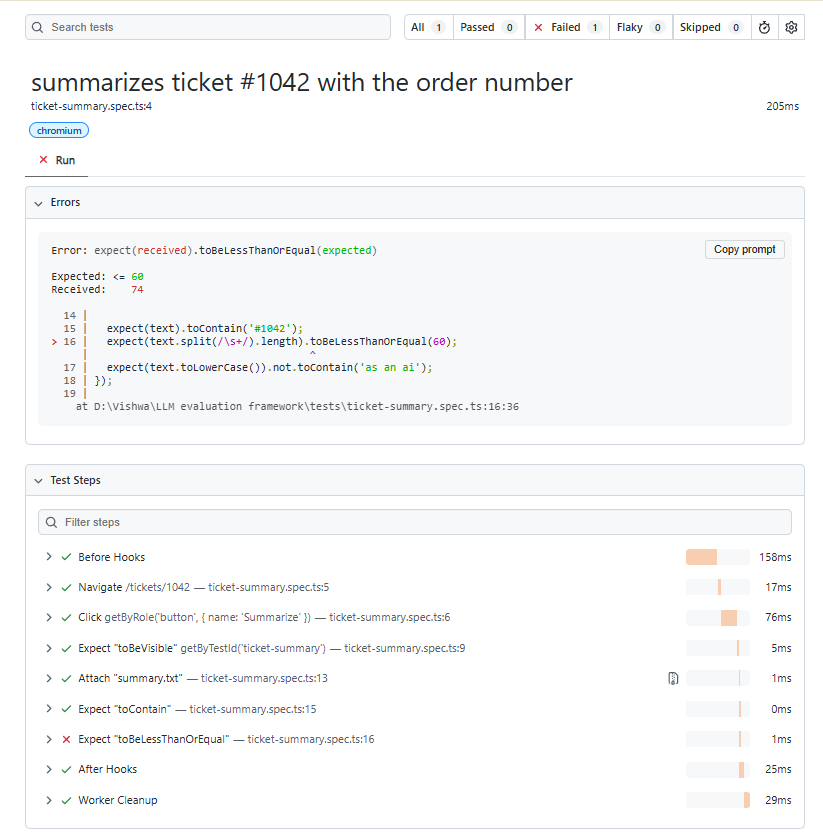
The attachment showed the summary was fine but ended with a bulleted "Next steps" list. Nobody changed the prompt. A teammate had changed the UI to pass the full ticket thread including internal notes, so the model had more to summarize. The LLM evals didn't catch it because they used the fixture, not the app's real input.
That's the reason an LLM evaluation framework needs both layers. The prompt eval guards the prompt. The browser test guards everything around it.
Which LLM evaluation framework fits your stack
Pick an LLM evaluation framework by the language your tests already run in and by what you're evaluating. There's no single winner, and the roundups that claim one usually sell one.
| Framework | Best for | How it runs in CI | Skip it if |
|---|---|---|---|
| promptfoo | Prompt and provider comparison from a YAML file, red teaming | npx promptfoo eval --fail-on-error, JSON and JUnit output | Your checks need deep access to app internals |
| DeepEval | pytest-style evals with RAG and agent metrics, Python or TypeScript | deepeval test run, metrics and test cases can be marked flaky | Your team is not willing to maintain Python or TS test code |
| Ragas | Retrieval metrics: context precision, context recall, faithfulness | Wrap in a script and assert on scores yourself | Your feature is not RAG |
| lm-evaluation-harness / HELM | Comparing raw models on published benchmarks | CLI, heavy, meant for model teams | You are testing a product feature, not choosing a model |
| Playwright | Grading what the user sees after the model call | npx playwright test with retries and traces | You have no UI, only an API |
A few notes the table can't hold.
DeepEval now ships a TypeScript package, so expect(testCase).toPass([new AnswerRelevancyMetric()]) runs in the same Node toolchain as Playwright. If your team is TypeScript-only, that removes the "but we'd need Python" objection to a code-first LLM evaluation framework.
The attachment showed the summary was fine but ended with a bulleted "Next steps" list. Nobody changed the prompt. A teammate had changed the UI to pass the full ticket thread including internal notes, so the model had more to summarize. The LLM evals didn't catch it because they used the fixture, not the app's real input.
Handling nondeterminism: retries, thresholds, and flaky evals
Treat an LLM test that fails then passes as data, not as noise to retry away. An LLM evaluation framework's job is to make that pattern visible and put a number on it.
Three settings do most of the work.
First, keep Playwright retries on in CI but record every attempt. Since Playwright 1.57, trace: 'retain-on-failure-and-retries' keeps the trace from the failed attempt and the passing retry, so you can compare them. You can also open that file from the terminal with npx playwright show-trace trace.zip, which is the trace command you want when the failure only exists in CI.
import { defineConfig } from '@playwright/test';

export default defineConfig({
  retries: process.env.CI ? 2 : 0,
  use: {
    trace: 'retain-on-failure-and-retries',
  },
  reporter: [['list'], ['html'], ['@testdino/playwright']],
});
Note: Keep retries: 0 locally. A developer who sees the summary test fail on their machine should read the attached output, not wait for a retry to paper over it. CI is where retries earn their keep, because that is where the history is recorded.
Second, thresholds over hard gates for judge scores. In promptfoo that's threshold: 0.7 on llm-rubric. In DeepEval that's the threshold argument on the metric, plus LLMTestCase(flaky=True) for the two or three goldens that sit right on the line.
Third, track the pattern across runs, not inside one. One fail-then-pass is nothing. The same test doing it on 6 of the last 20 runs is a prompt problem or a data problem, and you'll only see it with history. This is where a reporter that stores results beyond the current job earns its place in an LLM evaluation framework. TestDino's @testdino/playwright reporter flags fail-then-pass retries and tests that flip across runs, and shows a stability percentage per test, so the ticket-summary test's drift from 100% to 85% is visible before anyone files a bug.
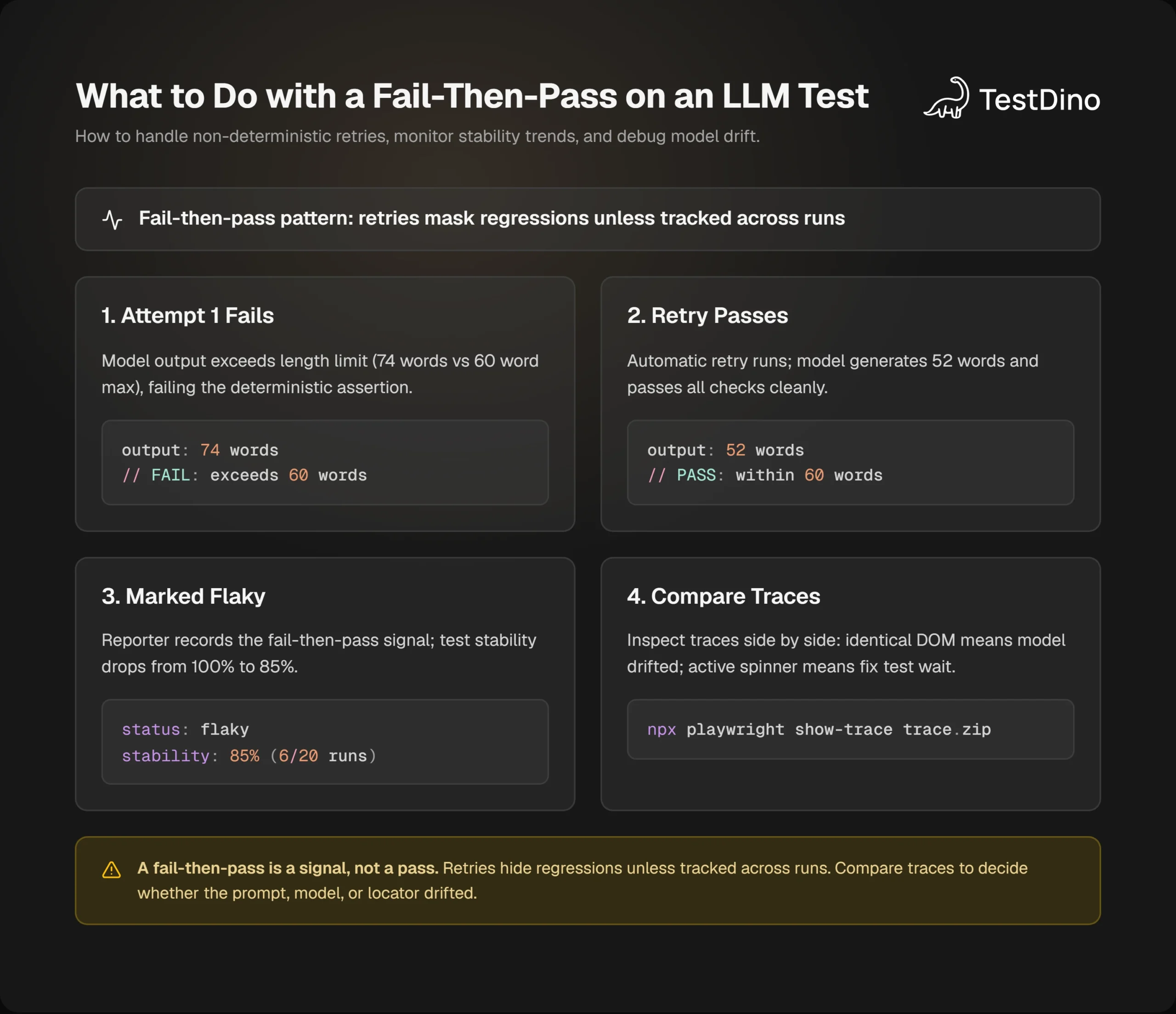
Then back to the lesson: when that percentage drops, open the two traces side by side. If the DOM was identical and only the text differed, it's the model. If the loading spinner was still up in the failed attempt, it's your test. Wait for the summary to be visible before you read the text.
One more habit. Don't lean on temperature 0 as your determinism plan. Lower temperature narrows the spread of outputs; the assertions in Layer 2 are what make a test stable. Assert on structure and facts, and let the words vary.
And if your team runs coding agents against the test suite, that history is reachable over MCP. An agent asked "why is ticket-summary red" can pull the last failing attempt instead of guessing, then retry the test with a proposed fix. If the app itself is broken, leave the test failing.
Conclusion
An LLM evaluation framework is four layers: goldens, deterministic checks, a judge with a threshold, and a gate. You built one in this post with a promptfooconfig.yaml, a Playwright spec that attaches the model's output to the result, and a workflow that runs both on every PR.
The part that keeps it useful is history. Retries will hide an LLM regression unless something records the fail-then-pass and shows you the trend.
Next step: take one real input from production, scrub it, and make it fixtures/ticket-0001.txt. Add the three deterministic checks from Step 1, run npx promptfoo@latest eval, and watch it fail once before you trust it. The browser job stays the usual CI pipeline: install the browsers, run the tests, upload the report.
FAQ

Ayush Mania
Forward Development Engineer