Test Case Design Techniques: The Complete Guide for QA Teams
Struggling to pick the right test case design technique? This guide covers every method with examples so you can test smarter, not harder.

Every week, new functionality is released. Sprints are closed, deployments are made, and somewhere in the process, a bug slips through the testing by the team. Not because the developers intentionally missed it, but because the tests did not cover the necessary points.
The problem is not the lack of tests. The issue is that most often they are written incorrectly. Some teams have too many tests for simple scenarios and too few for complex ones. Others write hundreds of tests covering the same simple cases while neglecting unique edge cases.
This article will introduce all techniques for designing test cases, explain what situations they are applied to, and how these test cases fit into the existing automated test suite that a team may already have. In the end, the reader will be able to design a high-quality test suite that finds more bugs with fewer tests.
What are test case design techniques?
Test case design techniques are sets of documented procedures that define how testing should be performed. They help to systematically determine what and how to test rather than randomly guess what to include in test cases.
Test case design techniques are systematic approaches used to derive a set of test cases from a specification, codebase, or tester's experience. Their goal is to maximize defect detection while minimizing the total number of tests needed.
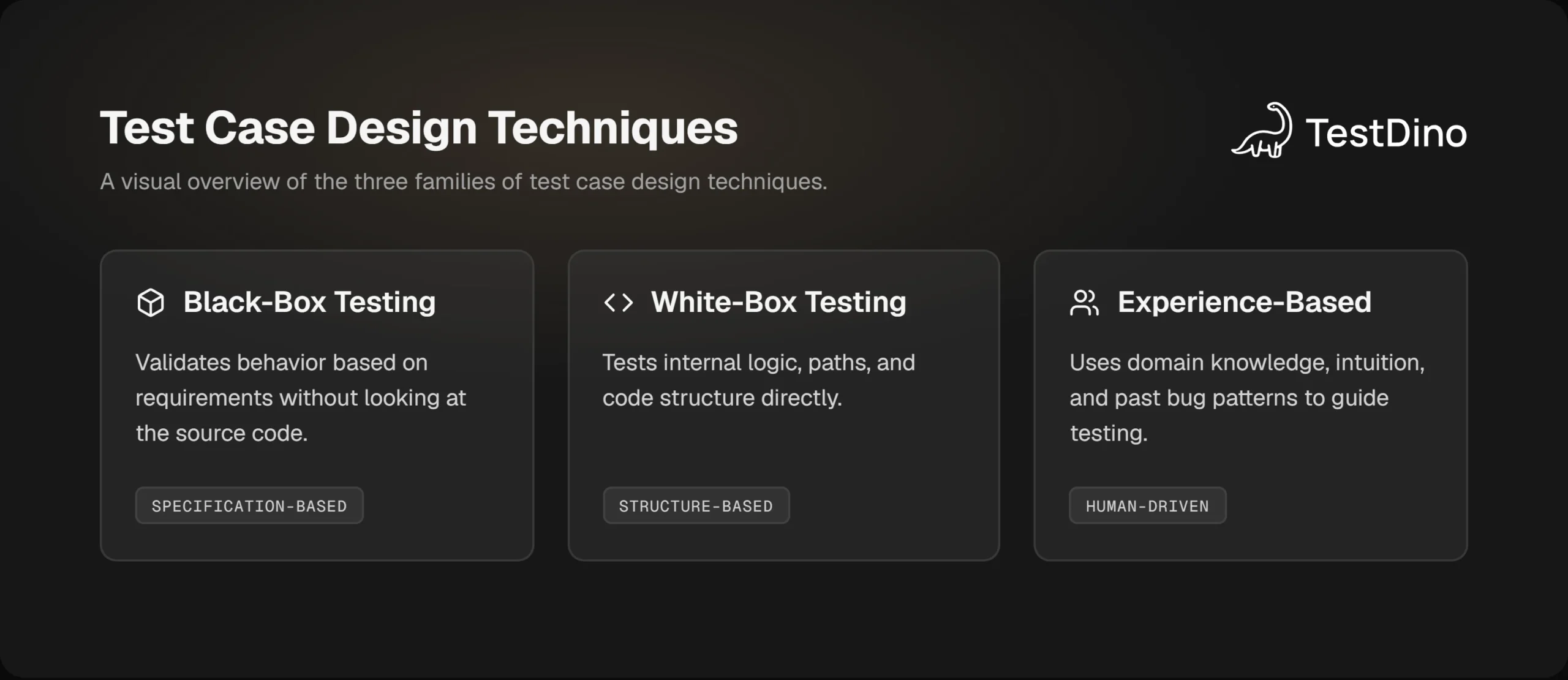
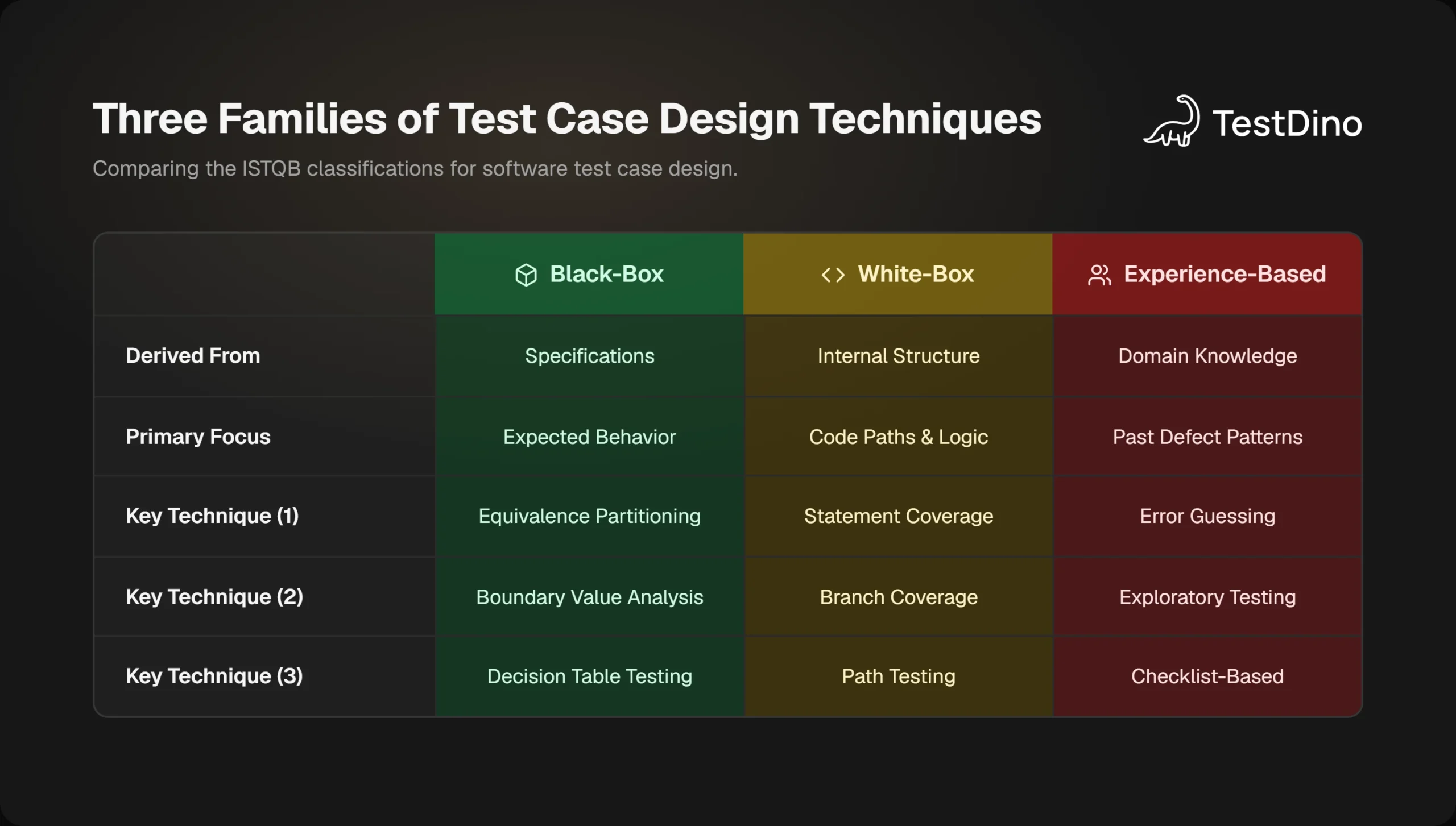
The ISTQB classifies these techniques into three families:
- Black-box (Specification-based): You test behavior based on requirements without looking at the source code.
- White-box (Structure-based): You test internal logic, paths, and code structure directly.
- Experience-based: You use domain knowledge, intuition, and past bug patterns to guide what to test.
None of these is better than the others in isolation. Real test case design mixes all three depending on the feature, the risk level, and the team's familiarity with the system.
Black-box test case design techniques explained
Black-box test case design techniques let you validate behavior without ever opening the code. All you need are the requirements, specifications, or a clear understanding of how the feature is supposed to work. These are the most commonly used techniques in system testing and acceptance testing.
Equivalence partitioning
When a field accepts inputs like "age between 0 and 120," testing every single number would be a waste. Equivalence partitioning (EP) solves this by dividing your input space into groups, called partitions, where every value in a group is expected to behave the same way.
Equivalence Partitioning divides input data into classes where all values within a class are expected to produce the same result. You test one value from each class instead of every possible value. (ISTQB v4.0)
Example: A registration form accepts ages 18 to 65.
- Valid partition: 18-65 (test one value, e.g., 30)
- Invalid partition below: Under 18 (test one value, e.g., 10)
- Invalid partition above: Over 65 (test one value, e.g., 80)
That gives you 3 test cases instead of 48. This is what good test case design looks like.
For teams already using pairwise testing, EP is the natural foundation before you apply pair-combination logic on top of it.
Boundary value analysis
Developers often write off-by-one errors in their conditions. A condition might say age >= 18 but get coded as age > 18 by mistake. Boundary value analysis (BVA) is built specifically to catch this.

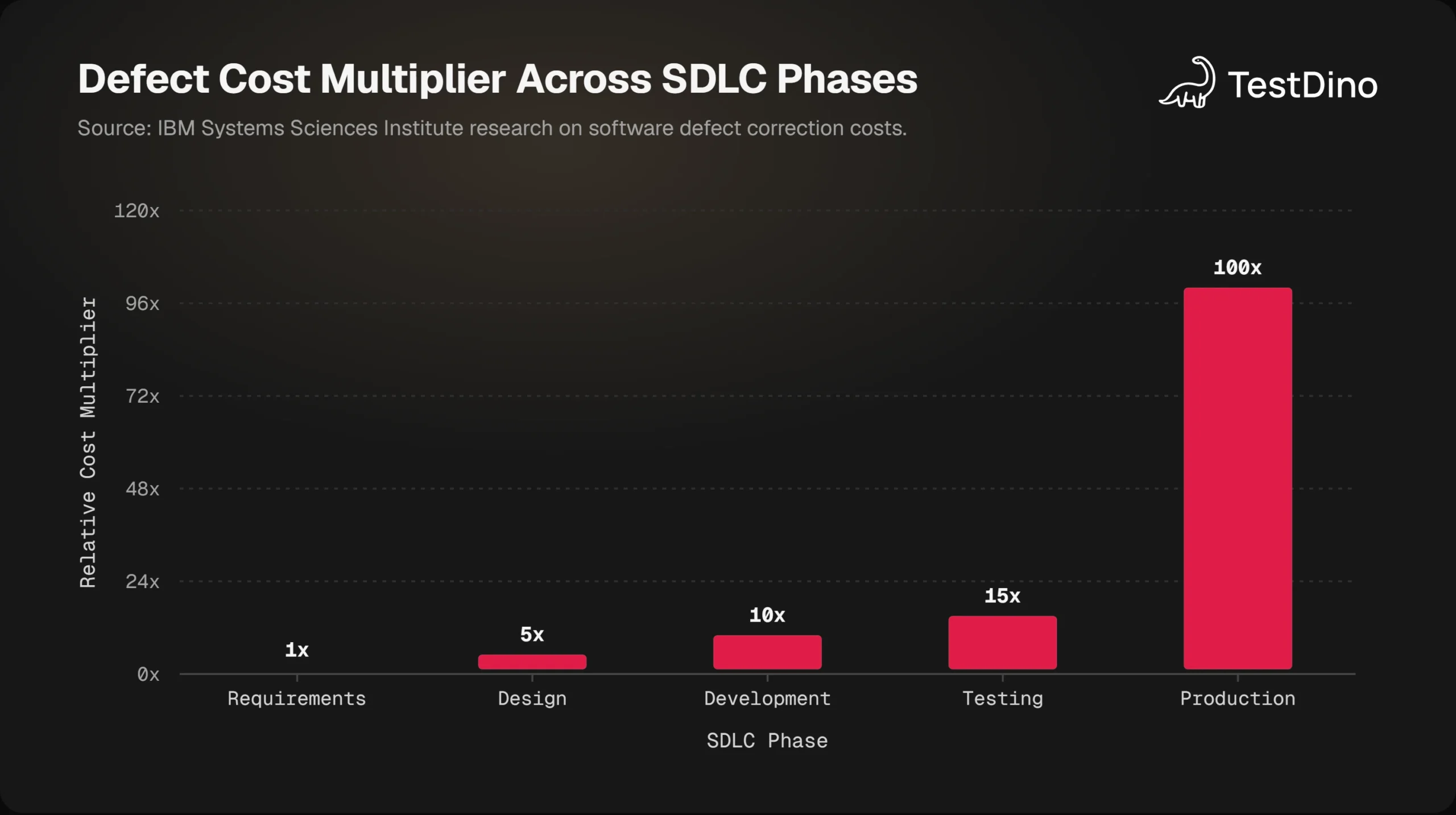
Tip: Always test the exact boundary, one below it, and one above it. For a field that accepts 18-65, test 17, 18, 19, 64, 65, and 66. These six values cover almost every boundary-related bug.
BVA is a refinement of EP. After you identify your partitions, apply BVA to the edges of each one. Together, they form a powerful and efficient test case design technique for any numeric, date, or character-length field.
Decision table testing
Sometimes a feature has multiple conditions that interact. A loan approval might depend on income, credit score, and employment status all at once. Testing each condition independently will miss scenarios where a combination causes unexpected behavior.
Decision table testing maps every meaningful combination of inputs to its expected output in a table format.
Example: Login lockout logic
| Correct Password | Account Active | Too Many Attempts | Result |
|---|---|---|---|
| Login success | |||
| Account suspended message | |||
| Error: wrong password | |||
| Account locked |
Each row becomes a test case. You get complete coverage of the business logic without guessing which combinations matter. This technique pairs well with the bug life cycle process. Bugs found here are typically logic-level and traced directly back to requirements.
State transition testing
Applications that move through different states (an order that goes from "placed" to "confirmed" to "shipped" to "delivered") need state transition testing. You draw a diagram of all possible states and transitions, then write test cases that:
- Move through valid transitions
- Attempt invalid transitions (what happens if someone tries to cancel a delivered order?)
- Hit edge states like timeouts or retries
This technique is especially valuable for e2e testing workflows where a feature spans multiple steps and user actions.
Note: State transition testing works best when the system has a finite, well-documented set of states. If your system has complex concurrent states, combine it with decision table testing to cover multi-condition transitions.
Use case testing
Use case testing derives test cases from user stories or use case documents. Each use case describes a goal a user wants to achieve and the steps taken to get there. You test the main flow, then add alternative flows and exception flows.
Example for an e-commerce checkout:
- Main flow: User adds item, goes to cart, enters payment, confirms order
- Alternative flow: User applies coupon, order total changes
- Exception flow: Payment fails, user gets error and retry option
This is the closest test case design technique to real-user behavior, making it ideal for acceptance testing. Teams doing test automation often translate use cases directly into end-to-end scripts.
Pairwise testing (combinatorial testing)
When a system has many independent variables (operating systems, browsers, languages, subscription plans, screen sizes) exhaustive testing becomes impossible. If you have 5 inputs each with 4 options, that is 4⁵ = 1,024 combinations.
Pairwise testing makes this workable. It ensures that every possible pair of values appears in at least one test case. Research shows that most software defects are triggered by interactions between just one or two variables, so pairwise coverage catches a large proportion of real bugs.
TestDino's detailed guide on pairwise testing covers exactly how to build these matrices and integrate them into your Playwright test suite.
White-box test case design techniques explained
White-box test case design techniques look inside the code. You need access to the implementation to use them, which means they are typically the domain of developers or SDETs writing unit and component-level tests.
White-box techniques derive test cases from the internal structure of the software, including its code paths, branches, and conditions, to ensure that critical logic is fully exercised. (ISO/IEC/IEEE 29119-4)
Statement coverage
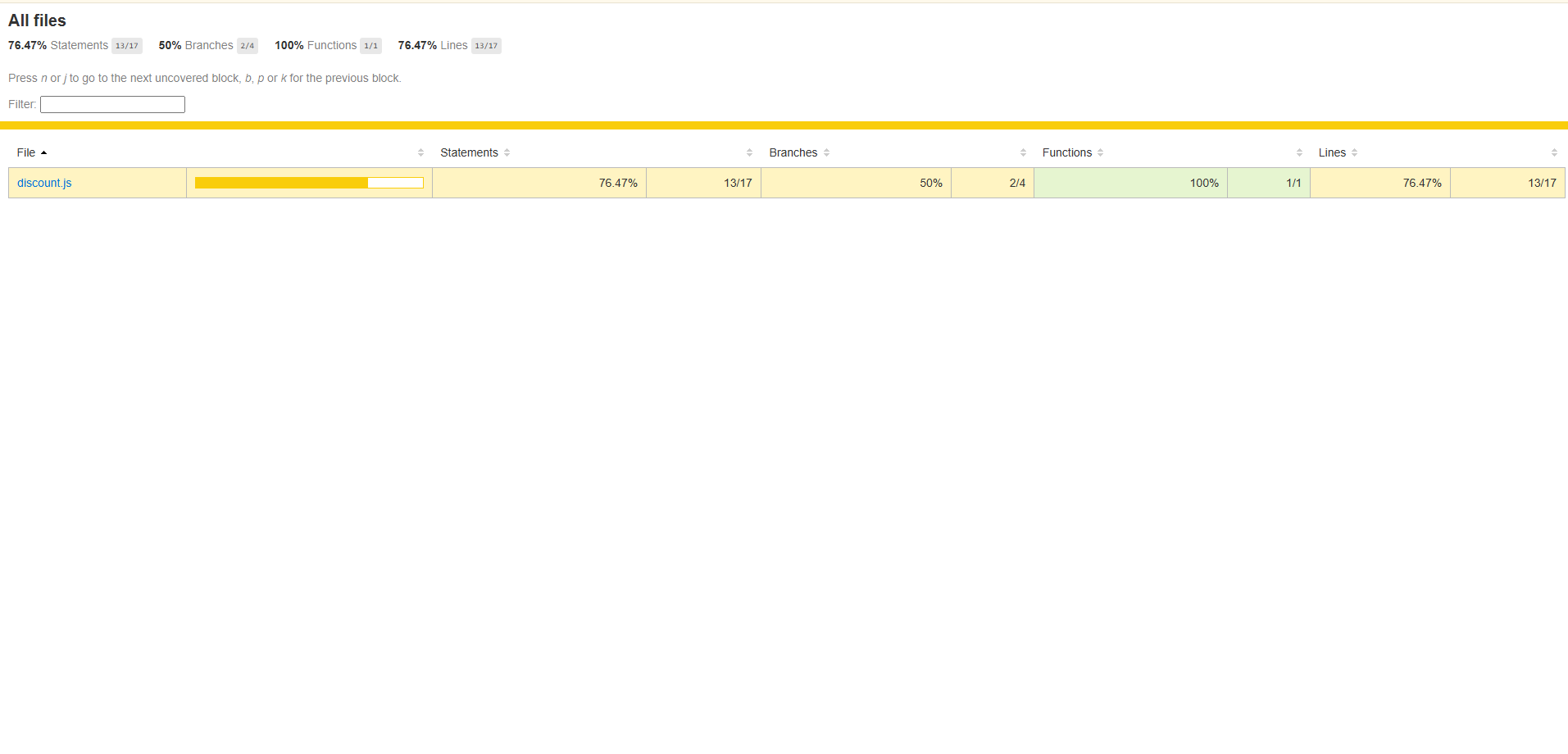
Statement coverage is the most basic white-box metric. A test achieves 100% statement coverage when every line of code has been executed at least once during testing.
It is the starting point, not the finish line. A test can achieve 100% statement coverage and still miss critical bugs caused by logic errors in branches that are technically "executed" but never tested under the wrong condition.
Tip: Use statement coverage as a floor, not a ceiling. If a module has less than 80% statement coverage, it is under-tested. But 100% statement coverage does not mean your logic is correct. Move to branch coverage next.
Branch / decision coverage
Branch coverage goes further than statement coverage. It requires that every possible outcome of every decision point (if-else, switch, ternary) has been tested at least once.
Example:
function getDiscount(age, isPremiumMember) {
  if (age > 60 || isPremiumMember) {
    return 0.20; // 20% discount
  }
  return 0;
}
Statement coverage passes with just one test. Branch coverage requires at least:
- age=70, isPremiumMember=false (true branch via age)
- age=30, isPremiumMember=true (true branch via membership)
- age=30, isPremiumMember=false (false branch, no discount)
This is why teams doing test failure analysis often find that untested branches are the source of production incidents.
Condition coverage and MC/DC
For safety-critical systems (avionics, medical devices, financial calculations) branch coverage alone is not enough. Modified Condition/Decision Coverage (MC/DC) requires that each individual condition within a compound boolean expression independently affects the outcome.
This is a stringent standard required by aviation and medical device regulations (DO-178C), but it is worth knowing even for commercial software when your logic involves several conditions in one expression.
Path testing
Path testing aims to exercise every unique execution path through a function. It is theoretically complete but practically expensive. Even a small function can have dozens of distinct paths once you factor in loops and nested conditions.
Use path testing selectively, on the most business-critical or error-prone modules, rather than as a blanket requirement across your codebase.
Experience-based techniques: the human side of testing
No technique replaces the knowledge of a tester who has worked on a system for months. Experience-based test case design techniques formalize this knowledge and make it repeatable.
Note: Experience-based techniques are not informal or random. Done well, they are disciplined and documented. The key is capturing the tester's reasoning so the tests are repeatable and traceable, not just intuitive guesses.
Error guessing
Error guessing is exactly what it sounds like: you predict where bugs are likely to hide, based on your knowledge of similar systems and past defects. Common targets include:
- Empty inputs and null values
- Very long strings or Unicode characters in text fields
- Concurrent actions (submitting the same form twice)
- Expired session tokens during long workflows
- Network interruption mid-transaction
Teams that track their test failure analysis data over time build a natural error-guessing knowledge base. The more historical defect data you have, the more targeted your error guessing becomes.
Exploratory testing
In exploratory testing, you learn about the feature, design tests, and execute them all at the same time. There is no rigid script. A tester explores the application, forms hypotheses about where it might break, and immediately tests those hypotheses.
This is powerful for:
- New features with incomplete specifications
- Sprint-end sanity checks
- Areas that have had a lot of recent code churn
The types of software testing guide from TestDino covers where exploratory testing fits within a broader test strategy. It is most effective when combined with time-boxing: give yourself 60 or 90 minutes per session and document your findings as you go.
Checklist-based testing
Checklist-based testing uses a pre-defined list of conditions to verify during testing. Unlike a formal test case, checklists are intentionally lightweight; they tell you what to check without prescribing exactly how to check it.
This leaves room for the tester's judgment while still ensuring consistency across team members.
A good checklist for a login feature might include:
- Does the form handle empty email gracefully?
- Does the password field mask input?
- Is there rate limiting on failed login attempts?
- Does "Remember me" persist the session correctly?
- Does logout properly invalidate the session token?
Checklists are widely used in regression passes and release sign-off processes.
How to choose the right technique for your project
This is the question most resources avoid, but it is the most practical one. Here is a clear framework.
Technique selection in test case design is context-driven. The right choice depends on the type of software, the available artifacts (code vs. requirements), the risk level, and the team's expertise. No single technique is universally superior.
Start with these four questions:
- Do you have access to the source code? If yes, white-box techniques are available. If not, stick to black-box or experience-based.
- Is the feature input-heavy or logic-heavy? Input-heavy features (forms, APIs) respond well to EP and BVA. Logic-heavy features (business rules, workflows) need decision tables or state transition testing.
- How many interacting variables exist? Two or fewer: EP and BVA are sufficient. Three or more: add pairwise testing to manage the combinations.
- What is the risk level of this feature? High-risk features benefit from deeper white-box coverage and supplemental error guessing. Low-risk features can rely on use case testing and checklists.
The risk-based testing guide from TestDino maps this decision directly to risk-priority frameworks, which is a natural next step once you understand individual techniques.
Practical technique combinations by feature type:
| Feature Type | Primary Technique | Supplement With |
|---|---|---|
| Form with numeric fields | Equivalence Partitioning + BVA | Error Guessing (null, Unicode) |
| Business rule engine | Decision Table Testing | State Transition (if stateful) |
| Multi-config compatibility | Pairwise Testing | Exploratory (unusual combos) |
| User workflow / journey | Use Case Testing | Exploratory Testing |
| Critical algorithm | Branch/Condition Coverage | Path Testing |
| New or unknown feature | Exploratory Testing | Checklist-Based |
Applying test case design techniques in modern automation
Test case design is not just for manual testing. The same techniques that guide human testers should also guide what gets automated.
The problem many teams run into is this: they automate what is easy to automate, not what is most important to test. The result is a suite with 500 tests, most of which cover the same happy paths, and zero coverage of boundaries or business-rule combinations.
Note: Using test case design techniques as the foundation for your automation backlog prevents "happy path only" test suites. When you design using EP and BVA first, your automated tests naturally include boundary and invalid-partition cases.
Connecting EP and BVA to automated tests
When you automate with Playwright, each partition or boundary from your test design becomes a parameterized test case.
// Boundary Value Analysis - age field (valid range: 18-65)
const { test, expect } = require('@playwright/test');

const ageBVAData = [
  { age: 17, expected: 'Age must be between 18 and 65' },
  { age: 18, expected: 'Registration successful' },
  { age: 19, expected: 'Registration successful' },
  { age: 64, expected: 'Registration successful' },
  { age: 65, expected: 'Registration successful' },
  { age: 66, expected: 'Age must be between 18 and 65' },
];

for (const { age, expected } of ageBVAData) {
  test(`Age field BVA - input: ${age}`, async ({ page }) => {
    await page.goto('/register');
    await page.fill('#age', String(age));
    await page.click('button[type="submit"]');
    await expect(page.locator('.message')).toContainText(expected);
  });
}
This pattern keeps test maintenance simple. When the valid age range changes, you update one data array and all tests regenerate.
Teams building playwright test automation frameworks can use this data-driven approach to translate every EP partition and BVA boundary directly into automated test coverage.
Tip: Use test.describe blocks to group tests by technique type. This makes it easy to run just "BVA tests" or "decision table tests" in CI without running your full suite every time.
Decision table tests in automation
// Decision Table Testing - login lockout logic
const loginScenarios = [
  { password: 'correct', accountActive: true,  tooManyAttempts: false, result: 'success' },
  { password: 'correct', accountActive: false, tooManyAttempts: false, result: 'suspended' },
  { password: 'wrong',   accountActive: true,  tooManyAttempts: false, result: 'error' },
  { password: 'wrong',   accountActive: true,  tooManyAttempts: true,  result: 'locked' },
];

for (const scenario of loginScenarios) {
  test(`Login - ${scenario.result} scenario`, async ({ page }) => {
    // test steps derived directly from decision table row
    await page.goto('/login');
    // ... setup and assertion logic here
  });
}
This directly maps your decision table rows to test cases. Each row is a test. No interpretation needed.
The playwright framework setup guide covers how to organize these test files for scalability, and the playwright page object model pattern can wrap the page interactions to keep your data-driven tests clean.
Handling flaky tests from poor test design
One under-discussed cause of flaky tests is poor test case design. When tests rely on implicit state, random data, or overlapping scenarios, they fail intermittently; not because of the automation framework, but because the test case itself was not designed clearly.
Applying equivalence partitioning before writing automated tests forces you to define explicit, isolated inputs. This alone reduces the flakiness that comes from tests bleeding into each other's state.
Using pairwise tools in your automation pipeline
You can feed the output into your Playwright parameterized tests for browser/OS combination testing. TestDino's pairwise testing guide shows exactly how to do this with real Playwright examples.
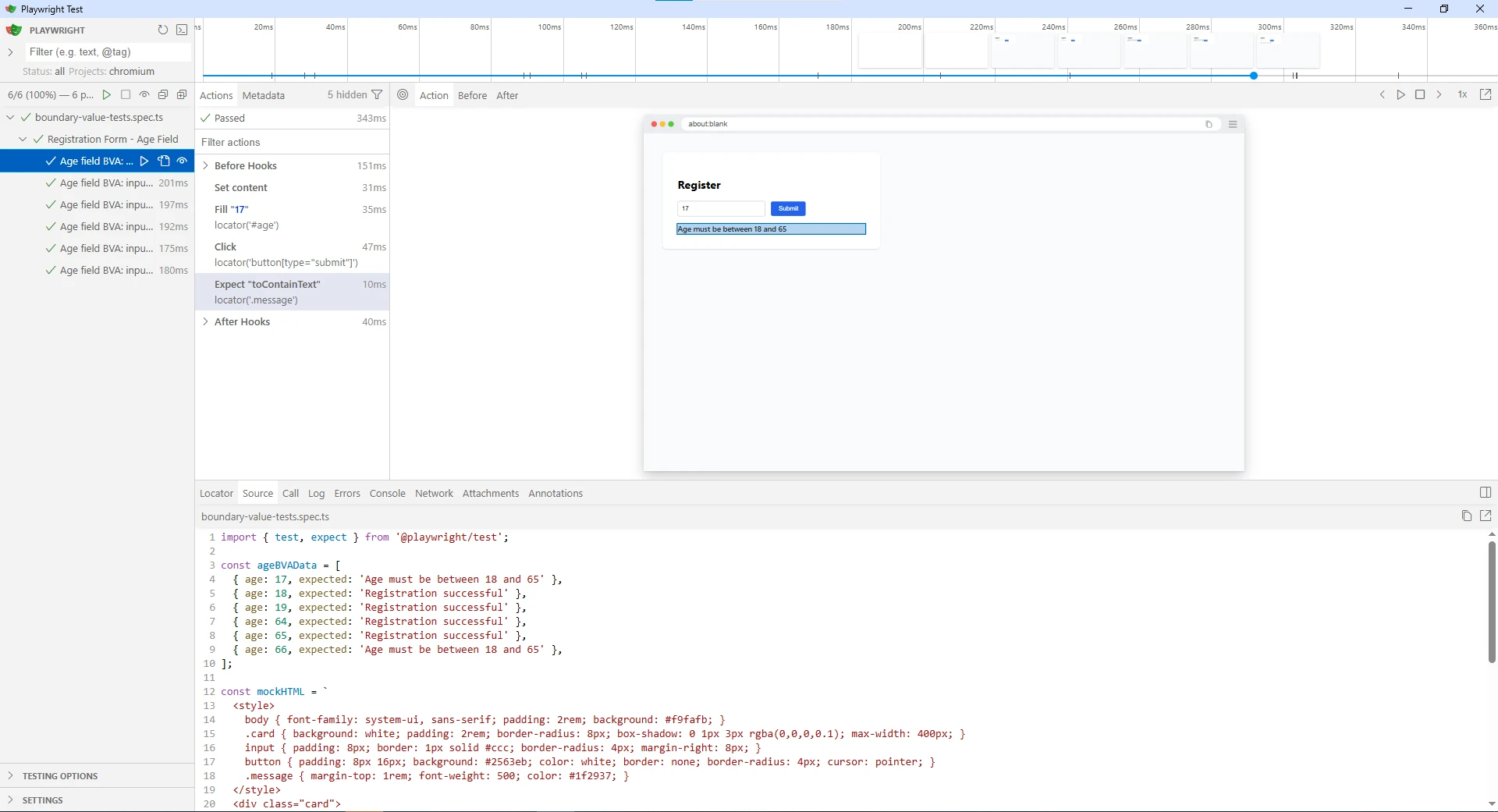
The state of automation data shows that teams with structured test case design report fewer production incidents and faster debugging times. That correlation exists because test case design gives you traceability: when a test fails, you know exactly which requirement or condition it covers.
For teams looking to go deeper on organizing test results and connecting them back to test design, the test management tools guide covers tools that support technique-based test organization.
Conclusion
Test case design techniques are not optional extras for experienced teams. They are the foundation that separates a test suite that finds bugs from one that just runs without failing.
Here is the practical takeaway:
- Start with Equivalence Partitioning to group your inputs and reduce test volume.
- Apply BVA to the edges of every partition where off-by-one bugs hide.
- Use Decision Tables whenever business logic involves two or more interacting conditions.
- Add State Transition testing for any feature that moves through defined states.
- Layer in Pairwise when you have multiple configuration variables.
- Supplement always with Error Guessing and Exploratory Testing formal techniques have blind spots that experience-based approaches catch.
Apply the same logic to your automation backlog. Data-driven tests built on EP and BVA give you better coverage with fewer tests and reduce the flaky tests that come from poorly scoped test scenarios.
When your test case design is solid, your test results become meaningful. TestDino helps teams track those results, surface patterns in failures, and connect test outcomes back to the scenarios that actually matter.