AI Test Data Generation for Playwright: Faker, LLMs, Fixtures
Struggling with stale or hardcoded test data in Playwright? Learn how Faker, LLMs, and smart fixtures make your test data generation fast, reliable, and AI-ready.
Software teams are shipping faster than ever. Deployments that once happened monthly now happen multiple times a day, and test automation has become the backbone holding it all together.
But there is one part that nobody talks about enough: the data behind those tests. Bad test data breaks pipelines just as often as bad code.
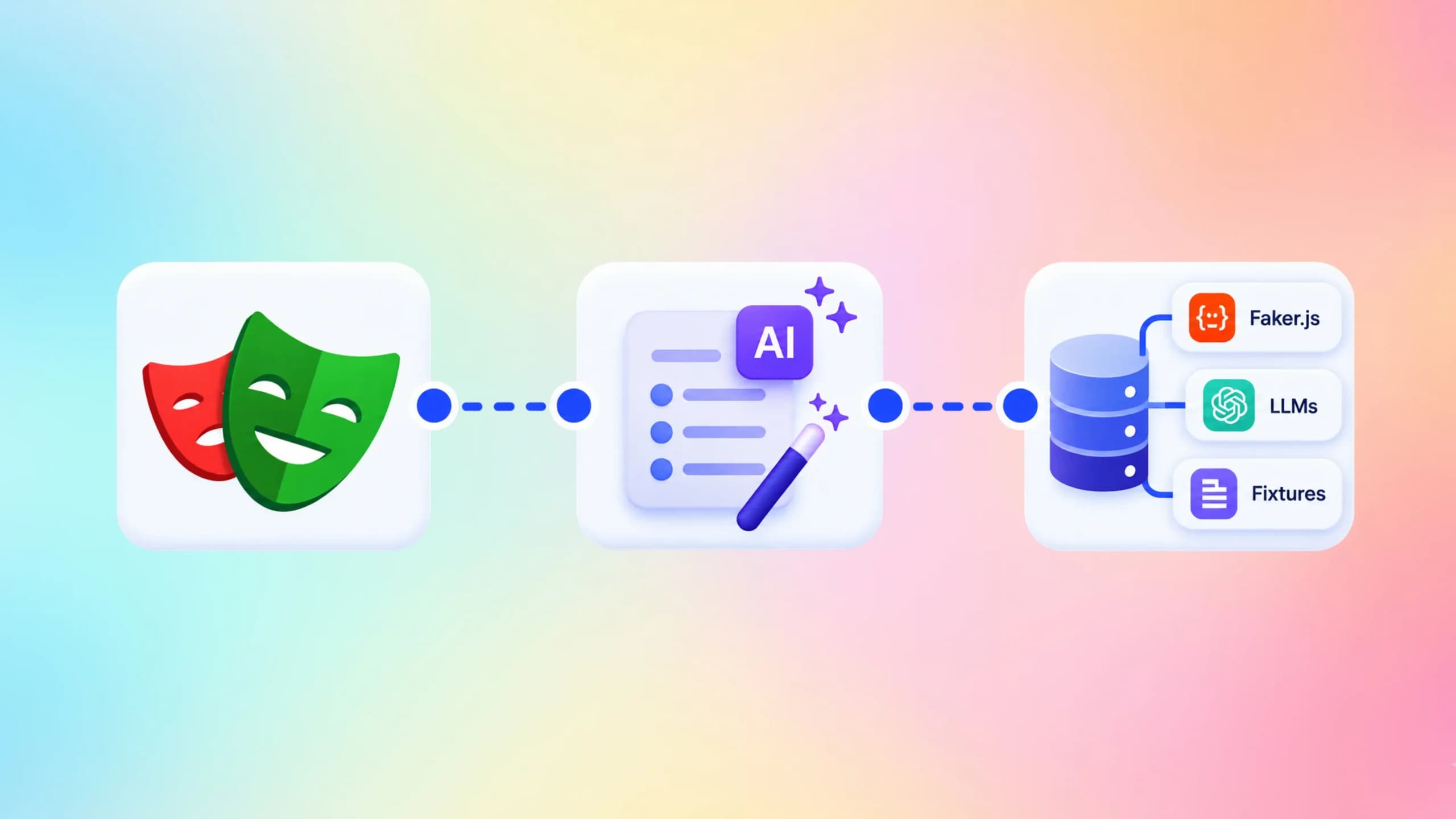
This guide walks you through every practical approach to test data generation in Playwright, from using Faker.js to spinning up AI-generated datasets with LLMs, all tied together cleanly with fixtures.
What test data generation actually means in modern QA
Test data generation is the process of creating input values, records, or datasets that a test uses to simulate real user scenarios. In automated testing, this data is created programmatically rather than hardcoded or pulled from a live database.
In a Playwright test, every time your script fills a form, calls an API, or registers a user, it needs data. That data can come from three places:
- Static values written directly into the test (e.g., "[email protected]")
- Dynamic values generated at runtime (e.g., Faker.js creating a random email)
- AI-generated values produced by a language model based on context or schema
Static data is fine for a handful of tests. But as your test automation suite grows to hundreds of cases, static values create collisions, false failures, and brittle tests that break whenever the app changes validation rules.
The teams getting this right today treat test data generation as a first-class engineering concern, not an afterthought.

Why hardcoded test data quietly breaks your test suite
Here is a scenario that almost every QA team has lived through.
A test that was passing consistently starts failing every few weeks. After an hour of debugging, someone finds the issue: a hardcoded email address was already in the database, and the registration flow rejected the duplicate.
That is data pollution. And it is entirely preventable.
There are four main problems with relying on static or manually maintained test data:
- Parallel test failures: When the same email or username is used in two tests running at the same time, both can fail with confusing errors
- Environment dependency: Data that exists in staging may not exist in CI, causing tests to behave differently across environments
- Test coupling: Tests that assume a specific record exists in the database from a previous test create hidden dependencies
- Maintenance overhead: Every time a field is added or validation rules change, someone has to hunt down every hardcoded value across dozens of files
The types of software testing you run, from unit to end-to-end, all suffer from the same class of data problems if not managed well.
Note: According to Playwright's official documentation, each test runs in an isolated BrowserContext with its own local storage, session storage, and cookies. Test isolation at the browser level is already built in. Your job is to make the data layer equally isolated.
Flaky tests caused by data leakage are one of the most common issues QA teams face. Tools like TestDino are specifically built to surface and analyze this class of test failure, helping teams find the root cause instead of just re-running tests until they pass.
Faker.js: the go-to tool for realistic test data

Faker.js is a well-maintained open-source library that generates realistic-looking fake data. Names, emails, phone numbers, addresses, company names, product descriptions, and much more are all available out of the box.
It is the most widely adopted solution for test data generation in the JavaScript and TypeScript ecosystem, and it integrates with Playwright effortlessly.
Installing Faker.js
npm install @faker-js/faker --save-devBasic usage in a Playwright test
import { test, expect } from '@playwright/test';
import { faker } from '@faker-js/faker';
test('user can register with valid data', async ({ page }) => {
  const email = faker.internet.email();
  const password = faker.internet.password({ length: 12 });
  const firstName = faker.person.firstName();
  const lastName = faker.person.lastName();
  await page.goto('/register');
  await page.fill('#first-name', firstName);
  await page.fill('#last-name', lastName);
  await page.fill('#email', email);
  await page.fill('#password', password);
  await page.click('button[type="submit"]');
  await expect(page).toHaveURL(/.*dashboard/);
});
Every run generates a fresh, unique email. No more duplicate-key database errors.
Reproducible runs with seeding
Sometimes you want to reproduce a specific failure. Faker.js supports seeding, which lets you generate the same "random" data every time.
import { faker } from '@faker-js/faker';
// Use a fixed seed for reproducible output
faker.seed(9876);
const user = {
  name: faker.person.fullName(),
  email: faker.internet.email(),
};
// Always produces the same name and email for seed 9876
Tip: Use a centralized TestDataFactory file instead of calling Faker directly in each test. This keeps your data logic in one place and makes it easy to update field formats when your app changes validation rules.
Building a TestDataFactory
import { faker } from '@faker-js/faker';
export function createUserData() {
  return {
    firstName: faker.person.firstName(),
    lastName: faker.person.lastName(),
    email: faker.internet.email(),
    password: faker.internet.password({ length: 14, memorable: false }),
    phone: faker.phone.number(),
  };
}
export function createProductData() {
  return {
    name: faker.commerce.productName(),
    price: parseFloat(faker.commerce.price({ min: 10, max: 500 })),
    description: faker.commerce.productDescription(),
    sku: faker.string.alphanumeric(8).toUpperCase(),
  };
}
Now your tests just call createUserData() and get a fresh, valid object every time.
This is the same pattern the Playwright Page Object Model relies on for keeping tests clean. Data factories and POMs go hand in hand.

Faker.js locale support
you test with international data, Faker supports locale-specific outputs:
import { faker } from '@faker-js/faker/locale/de';
// Now faker.person.firstName() returns German names
Locales are useful when testing address formats, phone number patterns, or character encoding edge cases.
Playwright fixtures: your data delivery system
A Playwright fixture is a reusable piece of setup logic that gets injected into your tests. It runs before the test starts and can also handle cleanup after the test finishes. Think of it as a smart helper that prepares everything a test needs.
Fixtures are the mechanism Playwright uses to deliver data, authenticated states, and pre-configured page objects to your tests. Learning to combine fixtures with your data factory unlocks a much cleaner architecture.
A simple data fixture
import { test as base } from '@playwright/test';
import { createUserData } from '../helpers/test-data-factory';
type UserFixtures = {
  freshUser: ReturnType<typeof createUserData>;
};
export const test = base.extend<UserFixtures>({
  freshUser: async ({}, use) => {
    const user = createUserData();
    await use(user);
    // Teardown: any cleanup logic goes here
  },
});
export { expect } from '@playwright/test';
Now in your test file:
import { test, expect } from '../fixtures/user-fixtures';
test('user can log in', async ({ page, freshUser }) => {
  // freshUser is already a ready-to-use object with valid, unique data
  await page.goto('/login');
  await page.fill('#email', freshUser.email);
  await page.fill('#password', freshUser.password);
  await page.click('button[type="submit"]');
  await expect(page).toHaveURL(/.*dashboard/);
});
The test does not know or care how the user data was created. That concern is fully separated.
API seeding fixtures
For tests that need a user to actually exist in the database before the test runs, use the request fixture to create that record through your API. This is much faster than going through the UI.
import { test as base, APIRequestContext } from '@playwright/test';
import { createUserData } from '../helpers/test-data-factory';
type ApiFixtures = {
  seededUser: { id: string; email: string; password: string };
};
export const test = base.extend<ApiFixtures>({
  seededUser: async ({ request }, use) => {
    const userData = createUserData();
    // Create user via API
    const response = await request.post('/api/users', {
      data: userData,
    });
    const { id } = await response.json();
    await use({ id, email: userData.email, password: userData.password });
    // Teardown: delete the user after the test
    await request.delete(`/api/users/${id}`);
  },
});
Note: API-seeded fixtures are significantly faster than UI-based setup. They bypass the full browser rendering cycle for setup steps that are not part of what you are actually testing. This directly reduces your overall CI runtime.
If you want to reduce that CI runtime further, the reduce Playwright CI runtime guide on TestDino covers parallelism, sharding, and fixture scope strategies that compound well with good data practices.
Fixture scopes: test vs. worker
Playwright fixtures can be scoped differently depending on how often you need fresh data.
| Scope | When it runs | Best for |
|---|---|---|
| test (default) | Before and after each test | Unique user data, form inputs |
| worker | Once per parallel worker | Shared API clients, DB connections |
| function | Per test function | Lightweight, stateless helpers |
Use test scope for anything that creates database records. Use worker scope for configuration objects that do not mutate between tests.
For larger setups that run before all tests, the Playwright global setup guide shows how to combine global setup with fixture-based teardown to keep environments clean.
Using LLMs for smarter test data generation

Faker.js handles realistic random data extremely well. But it has a ceiling. It cannot understand your business logic, generate contextually coherent edge cases, or produce domain-specific datasets that match your application's schema.
That is where large language models come in.
LLMs are now being used in test automation workflows for several data-related tasks:
- Generating JSON payloads that match complex API schemas
- Creating adversarial inputs that test validation boundaries
- Producing realistic-but-fictional personal information for GDPR-safe testing
- Synthesizing related datasets (e.g., a user, their orders, and their payment history as one coherent dataset)
This is part of the broader shift toward AI native test intelligence, where testing workflows stop relying on manual data creation and start using AI to generate coverage they would otherwise miss.
How LLM-based test data generation works
The basic pattern involves calling an LLM API with a structured prompt and receiving JSON back. You then feed that JSON into your Playwright test directly or through a fixture.
import OpenAI from 'openai';
const client = new OpenAI({ apiKey: process.env.OPENAI_API_KEY });
export async function generateUserDataFromSchema(schema: string) {
  const response = await client.chat.completions.create({
    model: 'gpt-4o',
    messages: [
      {
        role: 'system',
        content:
          'You are a test data generator. Return only valid JSON that matches the schema provided. No explanations.',
      },
      {
        role: 'user',
        content: `Generate a realistic user object matching this schema:\n${schema}`,
      },
    ],
    response_format: { type: 'json_object' },
  });
  return JSON.parse(response.choices[0].message.content ?? '{}');
}import { test as base } from '@playwright/test';
import { generateUserDataFromSchema } from '../helpers/llm-data-generator';
const userSchema = `{
  "firstName": "string, real first name",
  "lastName": "string, real last name",
  "email": "string, valid email format",
  "age": "number between 18 and 75",
  "address": { "city": "string", "country": "string" }
}`;
export const test = base.extend({
  aiGeneratedUser: async ({}, use) => {
    const user = await generateUserDataFromSchema(userSchema);
    await use(user);
  },
});
Tip: Always include response_format: { type: 'json_object' } when calling GPT-4o for test data. This prevents the model from adding explanatory text around the JSON, which would break your JSON.parse call.
What LLMs do well in test data generation
LLMs shine in specific scenarios that Faker.js cannot handle:
- Edge case generation: You can prompt an LLM to generate inputs that test specific boundary conditions, for example, "generate 10 email addresses that are technically valid by RFC 5321 but commonly rejected by web forms."
- Coherent relational data: Faker generates fields independently. An LLM can generate a user, then generate orders for that user with consistent user IDs, product names, and pricing logic.
- Domain-specific data: For industry-specific applications, such as healthcare, legal, or finance, you can provide the LLM with domain context and get realistic test data that includes appropriate terminology, IDs, and formats.
- Adversarial inputs: Prompting an LLM to "generate inputs that would attempt SQL injection, XSS, or Unicode edge cases" produces a richer set of security test cases than any static list.
The agentic testing tools emerging in the QA space increasingly rely on this kind of LLM-driven data synthesis to go beyond what traditional test generation approaches could produce.

What to be careful about with LLMs
LLMs can hallucinate. The model may generate data that looks realistic but violates your schema in subtle ways, such as a phone number that is one digit too long or a date in the wrong format.
Always validate LLM-generated data before using it in a test:
import Joi from 'joi';
const userSchema = Joi.object({
  firstName: Joi.string().required(),
  lastName: Joi.string().required(),
  email: Joi.string().email().required(),
  age: Joi.number().min(18).max(75).required(),
});
export function validateUserData(data: unknown) {
  const { error, value } = userSchema.validate(data);
  if (error) {
    throw new Error(`LLM-generated data failed validation: ${error.message}`);
  }
  return value;
}
Pair this validation step with the data generation call, and you have a reliable LLM-powered fixture that fails loudly if the model produces bad output rather than silently passing garbage data into your tests.
LLMs also add latency. Generating data through an API call is slower than calling faker.person.firstName(). For test suites with hundreds of tests, do not generate LLM data per-test. Generate a batch in your global setup and reuse it through worker-scoped fixtures.
Combining Faker, fixtures, and LLMs into one pipeline
The real power comes from using all three approaches together in a tiered strategy.
- Layer 1 (Faker.js): For all common fields, names, emails, addresses, prices. Fast, local, zero latency.
- Layer 2 (Fixtures): For delivering that data into tests cleanly, with proper setup and teardown.
- Layer 3 (LLMs): For complex, domain-specific, or edge-case datasets generated in global setup and cached.
Here is what a combined pipeline looks like:
import { createUserData } from './helpers/test-data-factory';
import { generateEdgeCaseInputs } from './helpers/llm-data-generator';
import * as fs from 'fs';
async function globalSetup() {
  // Layer 1: Faker-generated standard users (fast)
const standardUsers = Array.from({ length: 20 }, () => createUserData());
  // Layer 3: LLM-generated edge cases (slower, done once)
  const edgeCaseInputs = await generateEdgeCaseInputs();
  // Write to a shared JSON file for fixtures to load
  fs.writeFileSync(
    './test-data/generated-data.json',
    JSON.stringify({ standardUsers, edgeCaseInputs }, null, 2)
  );
}
export default globalSetup;import { test as base } from '@playwright/test';
import { createUserData } from '../helpers/test-data-factory';
import generatedData from '../test-data/generated-data.json';
export const test = base.extend({
  // Per-test fresh user from Faker
  freshUser: async ({}, use) => {
    await use(createUserData());
  },
  // Shared edge cases from LLM (loaded once from file)
  edgeCaseInputs: async ({}, use) => {
    await use(generatedData.edgeCaseInputs);
  },
});
This gives you the speed of Faker for the common path and the intelligence of LLMs for the edge cases, without paying the LLM latency cost on every single test run.
When you wire this into a consistent Playwright test automation workflow, you get a test suite that generates its own data, stays isolated, and rarely produces false failures from data conflicts.
Common mistakes and how to avoid them
Teams building test data generation pipelines make a predictable set of mistakes. Here is what to watch for.
Mistake 1: generating data inside beforeAll hooks
beforeAll hooks share state across tests in the same describe block. If one test mutates the data object, others may see unexpected values.
Use fixtures instead. Fixtures have explicit scope control and automatic teardown.
Mistake 2: reusing the same Faker instance with a global seed
Seeding Faker globally means that every test in the run generates the same sequence of data. The first test gets a unique email, but test number forty gets the same email that test number one created in a previous run.
Only seed Faker when you need to reproduce a specific failure, and reset the seed between tests or use a factory function that does not rely on global state.
Mistake 3: letting LLM-generated data skip validation
LLMs are nondeterministic. The same prompt can produce slightly different output on different runs. Without schema validation, a valid-looking test can pass one day and fail the next because the LLM decided to return an age of 17 when your form requires 18+.
Always validate. The Joi example earlier is one option. Zod works just as well if you are already using it in your project.
Tip: Store your LLM-generated test datasets as committed JSON files in your repository. This gives you reproducible test runs while still having the richness of AI-generated data, without making an API call on every CI run.
Mistake 4: not cleaning up API-seeded data
If your fixture creates a user in the database and your test fails before the teardown runs, that user stays in the database. Over time, test databases fill with orphaned records that cause unpredictable failures.
Use try/finally in your fixture teardown:
seededUser: async ({ request }, use) => {
  const user = await createApiUser(request);
  try {
    await use(user);
  } finally {
    // Cleanup always runs, even if the test fails
    await request.delete(`/api/users/${user.id}`);
  }
},
This pattern is especially important in environments where tests run in parallel. The playwright tips blog goes deeper into parallel execution patterns that affect how fixture teardown needs to be designed.
Mistake 5: generating too much data
Not every test needs a fully generated user with twenty fields. Over-generating data makes tests harder to read and slower to set up. Generate only what the test actually uses.
If a test only checks email validation, only generate an email. Use partial data objects and let TypeScript's type system make the optional fields explicit.

Tools and comparison
Here is a comparison of the main approaches to test data generation in Playwright:
| Approach | Speed | Complexity | Best for |
|---|---|---|---|
| Static / hardcoded | Fast | None | Tiny suites, quick demos |
| Faker.js | Very fast | Low | Most common fields, parallel-safe |
| JSON fixture files | Fast | Low | Stable reference datasets |
| API seeding + Faker | Moderate | Medium | DB-backed integration tests |
| LLM-generated | Slow (once) | Medium-high | Edge cases, domain-specific data |
| Combined pipeline | Fast (cached) | Medium | Large, production-grade suites |
The combined pipeline is what most mature test automation teams converge on, because it gives them the coverage of LLMs without paying the latency cost on every run.
For teams working on predictive QA, where AI is used to identify which tests to run based on code changes, the quality of the underlying test data directly affects prediction accuracy.

Conclusion
Test data generation is one of those things that looks simple at first and reveals its complexity at scale. Starting with Faker.js handles the majority of cases with almost no overhead. Wrapping that in well-scoped Playwright fixtures gives you isolation and teardown. Adding LLMs into global setup gives you edge case coverage that no static dataset can match.
The teams that get this right see fewer flaky tests, faster debugging cycles, and test suites that hold up as the product evolves. The ones that do not end up with brittle suites held together by manually maintained spreadsheets of test data.
If you want to see how your current Playwright tests are behaving across runs, how often data-related failures appear, and which tests are consistently unreliable, TestDino gives you that visibility without adding instrumentation to your test files.
You can also use the TestDino Playwright skill to generate test scaffolding that follows the fixture and data factory patterns covered in this guide, so you are not starting from scratch.
Good test data is not about having more data. It is about having the right data, in the right place, at the right time, without any leftover mess when the test is done.
FAQs

Ayush Mania
Forward Development Engineer