Playwright Global Setup: 2 Ways to Run Code Once Before Your Tests (2026 Guide)
Playwright global setup explained: setup projects vs globalSetup, storageState login, teardown, sharding, UI mode, and the mistakes that break CI.
A Playwright suite with 300 tests and a login step in each one signs in 300 times per run. Playwright global setup does that chore once, before any test starts, and shares the result with all of them.
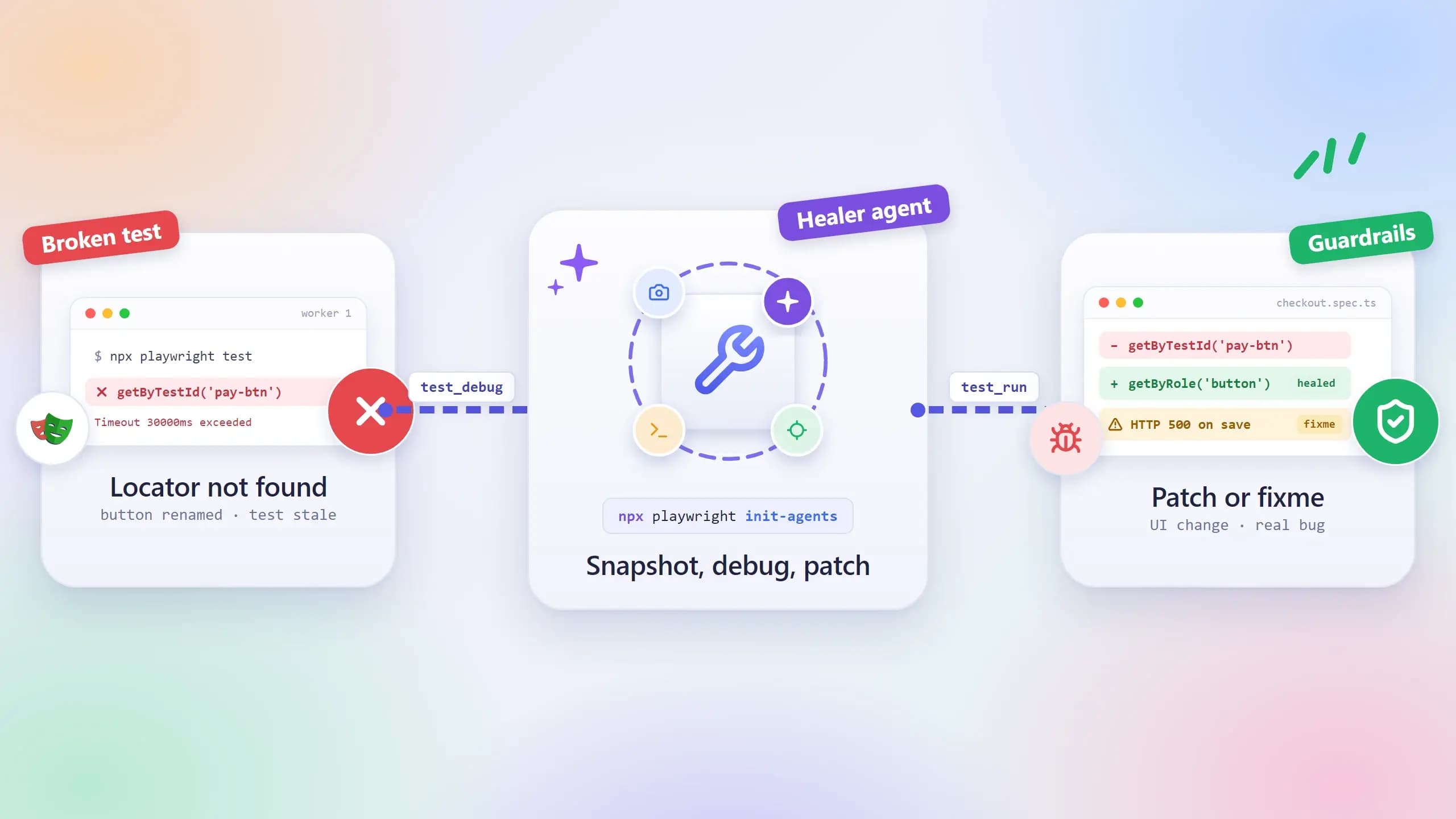
The catch is that Playwright has two ways to do this, and the older one hides your setup from reports and traces. When it breaks in CI, you get a red run and nothing to look at.
This guide shows both options with working code, explains when each fits, and covers the parts that bite in CI: sharding, UI mode, stale sessions, and teardown. It builds on the login patterns in our Playwright authentication guide.
What is Playwright global setup and when do you need it
Playwright global setup is code that runs once per test run, before any test starts, to prepare state that every test shares, such as a signed-in session, seeded records, or a running service. Playwright supports it in two forms: a setup project wired through project dependencies, or the globalSetup option in the config file.
Playwright runs your test files across several worker processes, and every test gets its own fresh browser context. That isolation is why Playwright parallel execution is safe by default. It is also why anything expensive you need before a test, like a login, happens again and again.
Global setup moves that expensive step out of the tests. It runs once, writes its result to disk or to the environment, and every worker reads from there. Your tests start on the dashboard instead of the login form.
Global setup vs beforeAll vs worker fixtures
Three things in Playwright run "before tests", and they are easy to confuse. The difference is scope.
-
test.beforeAll runs once per worker process, not once per run. The Playwright test API docs add that a worker restarts after a test failure, and the hook runs again in the new worker.
-
A worker-scoped fixture also runs once per worker, but it can be shared across files and torn down cleanly. Our Playwright fixtures guide covers that pattern.
-
Global setup runs once per npx playwright test invocation, however many workers or files you have.
If you run 6 workers, a beforeAll login happens at least 6 times, and again whenever a worker restarts. A global setup login happens once. That is the whole reason it exists.
What belongs in global setup and what does not
Put work in global setup when every test needs the same result and that result is safe to share. Logging in with a shared account, seeding reference data, checking that the environment is up, or starting a mock server all fit.
Keep per-test data out of it. When one test edits a record that global setup created, every other test that reads the same record becomes order-dependent. That coupling only shows up when tests run in parallel, which makes it hard to spot from a single run.
The cost of getting this wrong grows with adoption, and adoption is climbing. Our Playwright market share report tracks it in detail. The chart below shows the last 12 months of npm data.
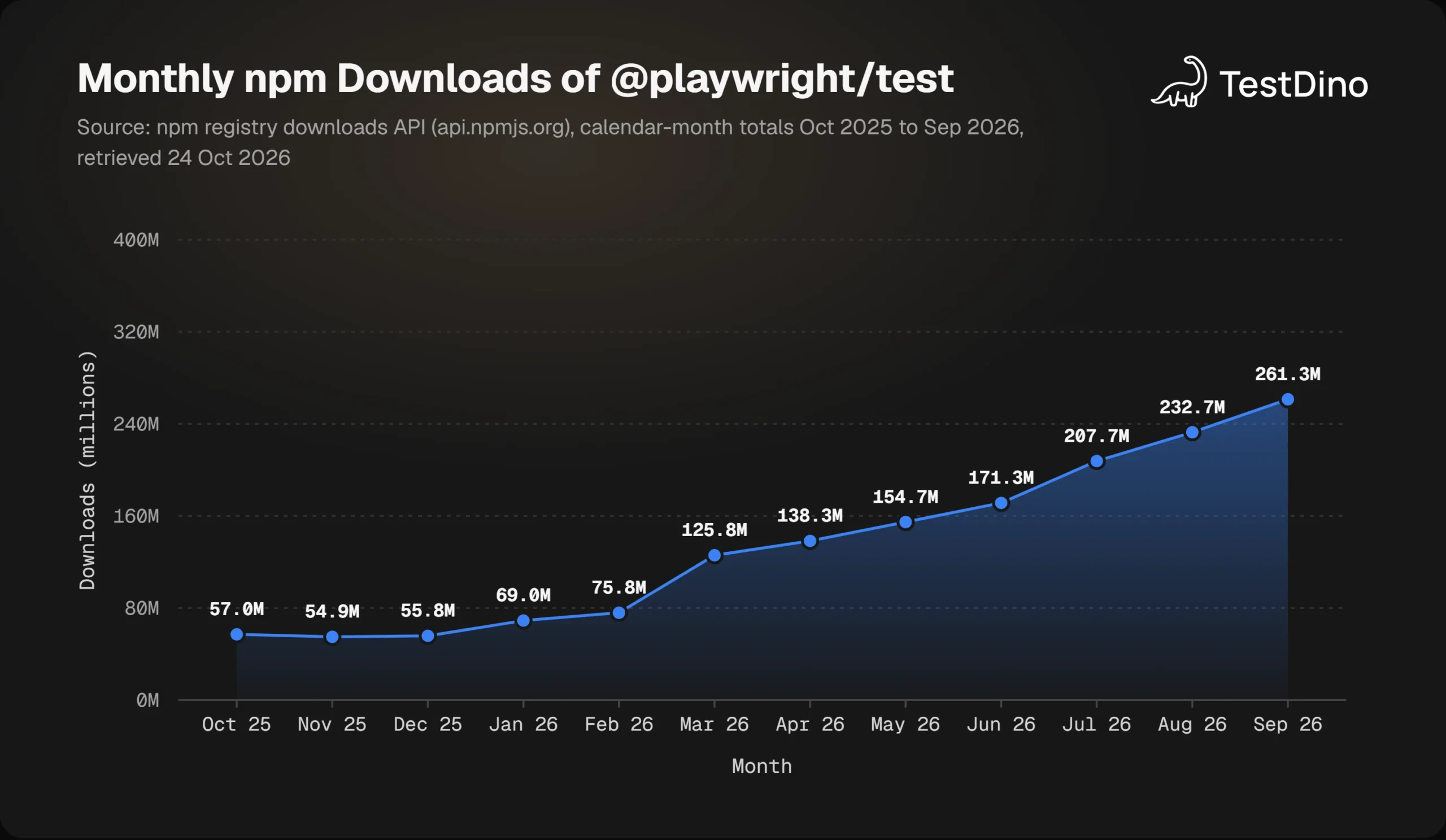
Monthly downloads of @playwright/test rose from 57.0 million in October 2025 to 261.3 million in September 2026, according to the npm registry downloads API. More projects on Playwright means more suites paying the setup cost on every CI run. The mechanism you choose is worth getting right once, and Playwright gives you two.
Setup projects vs globalSetup: the 2 ways to run code once
Playwright's global setup and teardown docs describe both options and recommend project dependencies. The table below follows the feature comparison in those docs, with version numbers from the release notes.
| Feature | Setup project (project dependencies) | globalSetup config option |
|---|---|---|
| Runs before all tests | ||
| Where it runs | Inside a worker, as a normal test | In the runner process, before workers start |
| HTML report | Shown as a separate project | Not shown |
| Trace recording | Full trace available | Not supported, manual tracing only |
| Fixtures (page, request, browser) | Fully supported | Not supported, launch browsers manually |
| Config options such as headless or testIdAttribute | Applied automatically | Ignored |
| Parallelism and retries | Supported through standard config | Not applicable |
| Teardown | teardown project (since v1.34) | globalTeardown, or a function returned from globalSetup |
| Passing data to tests | Write a file | process.env is inherited by workers |
| Skipped by --no-deps | Yes, setup and teardown | |
| Available since | v1.31 | v1.10 |
Both approaches run before every test. The gap is in everything around the run: what you can see when it fails, which fixtures you can use, and how the result reaches your tests.
Why the official docs recommend project dependencies
A setup project is an ordinary Playwright project whose only tests are your setup files. Because the setup code is a normal test(), it gets the page, request, and browser fixtures, plus retries and every use option from your config.
The payoff shows up when setup fails. The setup appears as its own project in the Playwright HTML reporter, and its trace opens in the Playwright trace viewer like any other failing test. You see the exact step that broke, with the page as it looked at that moment.
Project dependencies arrived in v1.31 and the matching teardown property in v1.34, according to the Playwright release notes. The official docs now recommend that path over the older option.
When the legacy globalSetup option still makes sense
The globalSetup option points at a file that exports one async function. Playwright runs it in the runner process before any worker starts and passes it the resolved config. Nothing about it is a test, so there is no report entry, no automatic trace, and no fixtures.
That makes it a poor fit for browser logins and a reasonable fit for plain Node work: seeding a database, calling a health endpoint, or fetching a token over HTTP. Because it runs before workers exist, anything it puts on process.env is inherited by every worker, which a setup project cannot offer.
Since v1.49, both globalSetup and globalTeardown accept an array of paths, so seeding and health checks can live in separate files without a wrapper module.
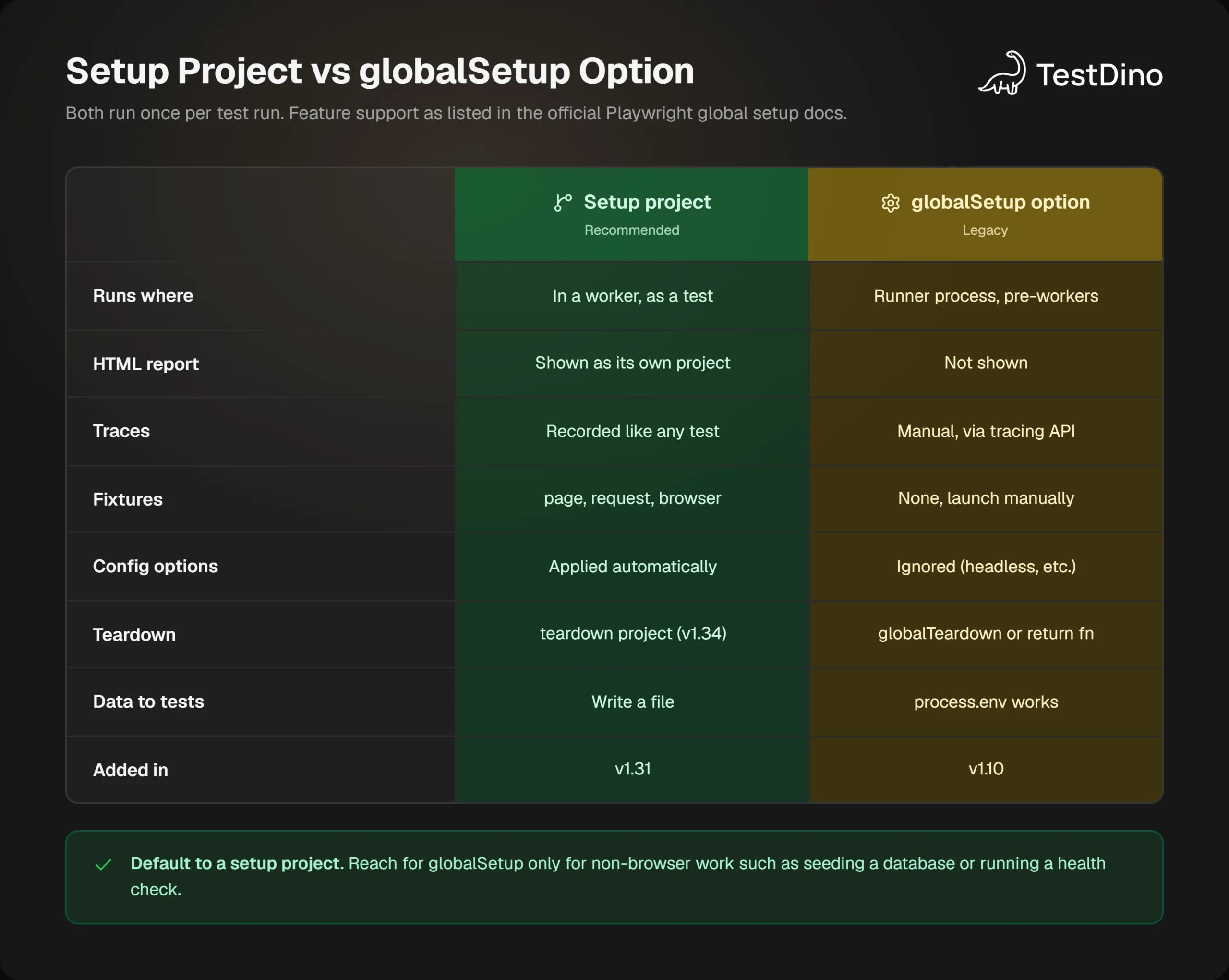
The decision rule is short. If the setup needs a browser, or you want to debug it like a test, use a setup project. If it is pure Node work and tests need its output through environment variables, use globalSetup. The next section builds the recommended version end to end.
How to configure a Playwright global setup project step by step
Here is the whole pattern in 5 steps. The code for each step follows.
- Add a project named setup whose testMatch selects your *.setup.ts files.
- Add dependencies: ['setup'] to every browser project that needs the prepared state.
- In the setup file, sign in, assert that it worked, and save the session with storageState({ path }).
- Point use.storageState in the browser projects at that file so every test starts signed in.
- Add teardown: 'cleanup' to the setup project and a matching project that runs after all tests.
Write the config with a setup project and a teardown project
import { defineConfig, devices } from '@playwright/test';

export const AUTH_FILE = 'playwright/.auth/user.json';

export default defineConfig({
  testDir: './tests',
  use: { baseURL: process.env.BASE_URL ?? 'http://localhost:3000' },
  projects: [
    {
      name: 'setup',
      testMatch: /.*\.setup\.ts/,
      teardown: 'cleanup',
    },
    {
      name: 'cleanup',
      testMatch: /.*\.teardown\.ts/,
    },
    {
      name: 'chromium',
      use: { ...devices['Desktop Chrome'], storageState: AUTH_FILE },
      dependencies: ['setup'],
    },
    {
      name: 'firefox',
      use: { ...devices['Desktop Firefox'], storageState: AUTH_FILE },
      dependencies: ['setup'],
    },
  ],
});
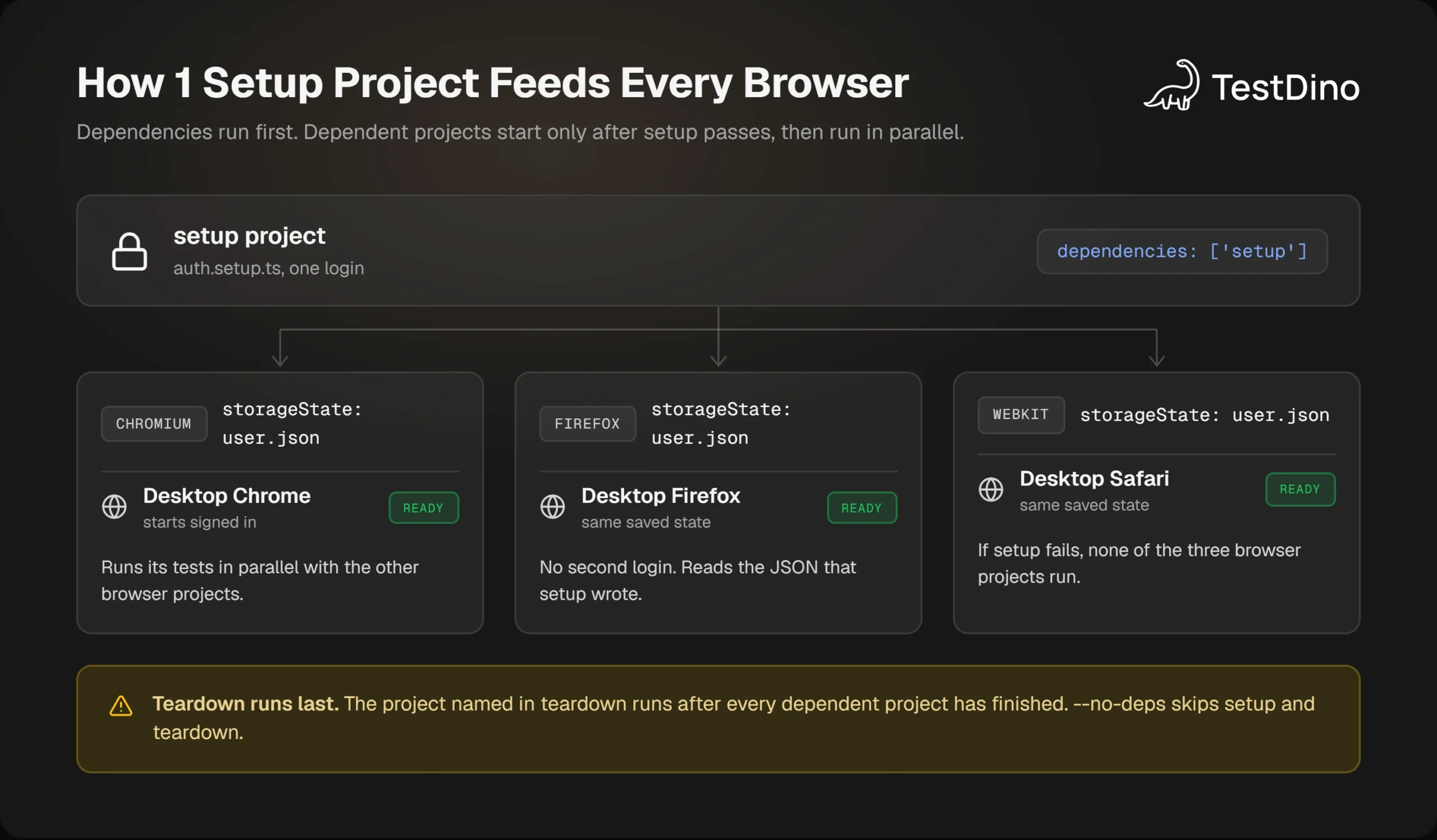
The order of work is fixed by the dependency graph. The Playwright test projects docs put it plainly: once all tests from the setup project pass, the dependent projects start, and if a dependency fails, the tests that rely on it will not run. The cleanup project runs after every dependent project has finished.
Exporting AUTH_FILE from the config lets the setup file import the same constant, so the path that is written and the path that is read cannot drift apart.
Write the auth setup file and save the storage state
import { test as setup, expect } from '@playwright/test';
import { AUTH_FILE } from '../playwright.config';

setup('authenticate', async ({ page }) => {
  await page.goto('/login');
  await page.getByLabel('Email').fill(process.env.TEST_USER_EMAIL!);
  await page.getByLabel('Password').fill(process.env.TEST_USER_PASSWORD!);
  await page.getByRole('button', { name: 'Sign in' }).click();

  // Login flows often set cookies across several redirects.
  // Wait for the final URL so the cookies are really in place.
  await page.waitForURL('/dashboard');
  await expect(page.getByRole('button', { name: 'Account menu' })).toBeVisible();

  await page.context().storageState({ path: AUTH_FILE });
});
The two waits before storageState are not decoration. If you save the state one redirect too early, you capture a half-signed-in session, and every downstream test fails in the same confusing way.

Tip: Assert success before you save. Wait for the post-login URL with page.waitForURL() and check for an element only a signed-in user can see. A storage state captured too early produces the confusing case where a Playwright global setup "logs in" successfully while every test still lands on the login page.
The teardown file is a test too, so it can use the request fixture to call a cleanup endpoint:
import { test as teardown } from '@playwright/test';

teardown('delete seeded data', async ({ request }) => {
  const response = await request.delete('/api/test-data');
  if (!response.ok()) throw new Error(`Cleanup failed: ${response.status()}`);
});
Run it and read the report
Create the state folder, keep it out of git, and run the suite:
mkdir -p playwright/.auth
echo $'\nplaywright/.auth' >> .gitignore
npx playwright test
Playwright's auth docs warn that the state file may contain cookies and headers that could impersonate your test account. That is why the folder goes into .gitignore before the first run, not after.
In the HTML report you now see a setup entry with the authenticate test, then your browser projects, then cleanup. When a run goes red, open that setup entry first, because one failure there explains hundreds of skipped tests. Keeping the login in a single file also follows the Playwright best practices rule of centralizing anything that touches credentials.
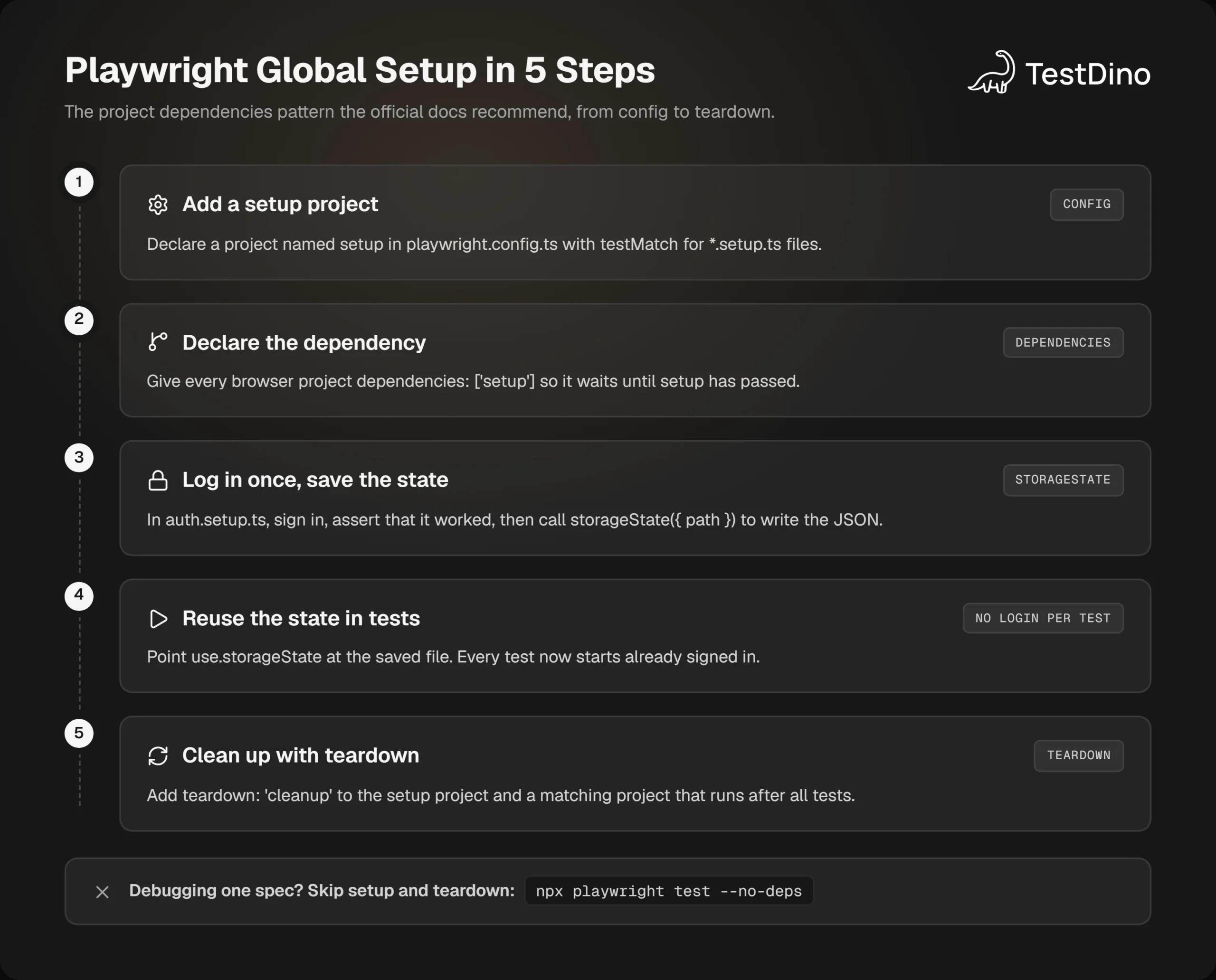
That covers the recommended path. The older option is still worth knowing, because for non-browser work it is the simpler of the two, and it is the only one whose environment variables reach your tests.
Using the globalSetup config option for seeding and health checks
A globalSetup file is a plain module with a default export. It receives the resolved FullConfig, so it can read baseURL and other options without duplicating them.
import type { FullConfig } from '@playwright/test';

async function globalSetup(config: FullConfig) {
  const { baseURL } = config.projects[0].use;

  // Fail fast if the environment is not reachable.
  const health = await fetch(new URL('/health', baseURL));
  if (!health.ok) throw new Error(`App is not up: ${health.status}`);

  // Seed once, then hand the ids to every worker through the environment.
  const seeded = await fetch(new URL('/api/test-data/seed', baseURL), { method: 'POST' });
  process.env.SEEDED_IDS = JSON.stringify(await seeded.json());

  // The returned function runs as the global teardown.
  return async () => {
    await fetch(new URL('/api/test-data/seed', baseURL), { method: 'DELETE' });
  };
}

export default globalSetup;import { defineConfig } from '@playwright/test';
export default defineConfig({
globalSetup: require.resolve('./global-setup'),
use: { baseURL: process.env.BASE_URL ?? 'http://localhost:3000' },
});The returned function is the teardown. Playwright's docs allow either this form or a separate globalTeardown file. Pick one, and keep the two halves next to each other so cleanup never drifts away from the setup it undoes.
Passing data from global setup to tests with process.env
Because globalSetup runs before the workers are spawned, anything you set on process.env is copied into each worker. The official docs show this exact pattern, with JSON for structured data:
import { test, expect } from '@playwright/test';

test('shows the seeded order', async ({ page }) => {
  const ids = JSON.parse(process.env.SEEDED_IDS!);
  await page.goto(`/orders/${ids.orderId}`);
  await expect(page.getByRole('heading', { name: 'Order' })).toBeVisible();
});
Note: This only works from globalSetup. A setup project runs inside a worker process like any other test, so a value it sets on process.env stays in that worker. From a setup project, write the data to a JSON file under the project's outputDir and read it in the tests.
Health checks belong here too. When tests pass locally but fail in CI, an app that had not finished booting is one of the first things to rule out. A 5-line check at the top of globalSetup turns that into one clear error instead of 200 timeouts.
Capturing a trace when globalSetup fails
Nothing records globalSetup for you, so when a browser login inside it fails you get a stack trace and no screenshot. The docs' workaround is manual tracing: call context.tracing.start(), wrap the work in try...catch, and in the catch block stop tracing to a file such as test-results/failed-setup-trace.zip before rethrowing.
That is roughly 10 extra lines, and needing them is a strong hint the work belongs in a setup project.
Two additions in v1.64 made globalSetup more useful for the Node-only case. config.filteredProjects lists the projects selected by --project, so setup can skip seeding for projects that will not run. And default: false keeps a heavy reseed project in the config without running it on every invocation. Our Playwright 1.64 release notes cover both.
Whichever option prepares the state, the login itself is usually the slow part. The next section makes it faster and handles more than one user.
Faster authentication: API login, multiple roles, and 1 account per worker
Logging in through the API instead of the UI
If your app has a login endpoint, call it with the request fixture and save the cookies it returns. There is no page render and no redirect to wait for, and you end up with the same storageState file.
import { test as setup } from '@playwright/test';
import { AUTH_FILE } from '../playwright.config';

setup('authenticate through the API', async ({ request }) => {
  const response = await request.post('/api/login', {
    data: { email: process.env.TEST_USER_EMAIL, password: process.env.TEST_USER_PASSWORD },
  });
  if (!response.ok()) throw new Error(`Login failed: ${response.status()}`);
  await request.storageState({ path: AUTH_FILE });
});
request.storageState() writes the cookies the API set, which is enough for cookie-based sessions. For apps that keep a token in local storage, you still need a browser step to put it there. The Playwright API testing guide covers the request context in depth.
One storage state file per role
Admin, member, and read-only users each get their own setup test and their own file. Then pick the file per spec or per describe block instead of per project:
import { test, expect } from '@playwright/test';

test.use({ storageState: 'playwright/.auth/admin.json' });

test('admin sees the billing tab', async ({ page }) => {
  await page.goto('/settings');
  await expect(page.getByRole('tab', { name: 'Billing' })).toBeVisible();
});
This keeps one setup project and one dependency edge however many roles you add. If you already use a Playwright page object model, the auth docs show a variant where each role becomes a fixture that opens its own context with its own state file.
One account per worker when tests change server state
A shared account breaks the moment two parallel tests edit the same settings page. Playwright's auth docs recommend a different model for that case: authenticate once per worker, each with its own account, through a worker-scoped fixture keyed on parallelIndex.
import { test as base } from '@playwright/test';
import fs from 'fs';
import path from 'path';

export * from '@playwright/test';
export const test = base.extend<{}, { workerStorageState: string }>({
  // Every test in this worker uses the worker's own state file.
  storageState: ({ workerStorageState }, use) => use(workerStorageState),

  workerStorageState: [async ({ browser }, use) => {
    const id = test.info().parallelIndex;
    const fileName = path.resolve(test.info().project.outputDir, `.auth/${id}.json`);

    if (fs.existsSync(fileName)) {
      await use(fileName);
      return;
    }

    const page = await browser.newPage({ storageState: undefined });
    // Sign in here with the account reserved for worker `id`, then save:
    await page.context().storageState({ path: fileName });
    await page.close();
    await use(fileName);
  }, { scope: 'worker' }],
});
Tests import test from this file instead of @playwright/test, and the config does not change. You do need one test account per worker, so settle the worker count before you create accounts. Our guide on how to optimize Playwright workers helps you pick that number.
Once setup is fast and correct on your machine, CI adds three wrinkles of its own: shards, UI mode, and the days you want to skip setup entirely.
Running Playwright global setup in CI: sharding, UI mode, and --no-deps
Every shard runs its own setup project
Sharding splits your files across machines, and each machine is a separate npx playwright test run. The test projects docs state that filters such as --shard select the primary tests, and if those tests belong to a project with dependencies, all tests from those dependencies also run. So 4 shards means 4 logins, one per machine.
That is correct behavior rather than a bug, because a shard cannot read a file written on another runner. Budget for it when you compare shard counts in our Playwright sharding guide. Credentials reach each shard through the CI provider's secrets as environment variables, the standard approach for Playwright in GitHub Actions and GitLab alike.
The per-shard cost is one reason API login pays off more in CI than on a laptop. Suppose an API login takes 2 seconds and a browser login takes 20. Across 8 shards that is 16 seconds of machine time against almost 3 minutes, on every push.
UI mode skips the setup project by default
Run npx playwright test --ui and the setup project stays idle. The auth docs call this a deliberate choice to keep UI mode fast, which is fine until the saved session expires and every test opens on the login page.
The fix is manual. Enable the setup project in the filter panel, run auth.setup.ts once with its play button, then disable it again. The rest of that workflow is in our Playwright UI mode guide.
Skipping dependencies with --no-deps
When you are iterating on one spec and the state file is already fresh, re-running setup is wasted time. The --no-deps flag runs only the projects you selected:
npx playwright test tests/cart.spec.ts --project=chromium --no-depsNote: The --no-deps flag ignores teardown projects as well as setup. If your teardown deletes seeded data, a --no-deps run leaves that data behind. Write setup so that the next full run can clean up whatever a previous run left.
Everything so far is the happy path. The failures below are the ones that show up in real pipelines, often weeks after the setup was first written.
7 Playwright global setup mistakes that break pipelines
- Committing the .auth folder. The state file can impersonate your test account. Add playwright/.auth to .gitignore before the first run, and keep it out of uploaded CI artifacts.
- Saving state before the cookies land. Wait for the final URL and a signed-in element first. Otherwise the file holds a half-finished session.
- Two different paths for the same file. Setup writes to one path and use.storageState reads another, so tests start signed out. Keep the path in one constant that both sides import.
- Expecting env vars from a setup project. They stay in the setup worker. Write a file, or move that step to globalSetup.
- Browser logins inside globalSetup. No trace, no report entry, and your headless and testIdAttribute options are ignored. Use a setup project.
- Reusing a session that expired days ago. The auth docs say you must delete the stored state yourself once it expires. A stale file turns into a wall of identical failures.
- Creating per-test data globally. Tests that mutate shared records collide in parallel, which produces the intermittent flaky tests nobody can reproduce locally.
Tip: If you do not need the session between runs, write the state under the project's outputDir. Playwright cleans that directory before every run, so an expired session can never leak into the next one.
Mistake 3 has a quiet cousin: a spec that should run signed out, such as signup or password reset, inherits the state anyway. Reset it for that file:
import { test } from '@playwright/test';

// Start this file signed out even though the project sets storageState.
test.use({ storageState: { cookies: [], origins: [] } });
Most of these are config slips rather than logic bugs, which is why a debugger rarely finds them. The longer list of Playwright mistakes has the rest. If you would rather not hand-write the projects block, the Config Generator in TestDino's free tools produces a playwright.config.ts with browsers, workers, retries, and reporters already filled in.
A fix list is only useful once it turns into habits, so here is the short version you can paste into a pull request template.
A short checklist for a stable Playwright global setup
-
One setup project, matched by *.setup.ts, listed in dependencies of every browser project.
-
One constant for the state path, imported by both the setup file and the config.
-
Login asserted before storageState is written.
-
playwright/.auth in .gitignore and excluded from CI artifacts.
-
A teardown project paired with the setup project, and setup that tolerates leftovers from a killed run.
-
globalSetup reserved for Node-only work and for values tests must read from process.env.
-
Per-worker accounts when tests change shared server state.
-
The setup project's duration and pass rate tracked across runs, not only inside one report.
That last point is the easiest to skip, because nothing in a single HTML report prompts it. A setup that takes 4 seconds in March and 40 seconds in June is a login endpoint getting slower, and no one report will show you that trend. Playwright test execution history across runs does.
If an AI agent writes or maintains your suite, the same rules live in the playwright-skill repository as a global setup and teardown guide the agent loads on demand. Our Playwright skill post explains how to install it with Claude Code or Cursor.
With the checklist in place, the remaining question is which of the two options to reach for first, and that answer is short.
Conclusion
Playwright global setup is one decision and a few files. Use a setup project with dependencies for anything that touches a browser, because you get fixtures, retries, a report entry, and a trace when it fails. Use the globalSetup option for Node-only work such as seeding and health checks, and for values your tests must read from the environment.
Pair whichever you choose with a teardown, keep the state file out of git, and assert the login before you save it. Those three habits prevent the setup failures that otherwise surface as 200 unrelated test failures.
The payoff is measured in CI minutes, which is why setup is usually the first item on any plan to reduce Playwright CI runtime. When a run still goes red, the setup entry in the report, or the trace it produced, is where to look first, and our Playwright debugging guide picks up from there.
FAQs

Ayush Mania
Forward Development Engineer