Manual Testing vs Automation Testing: Which One Should You Use in 2026?
Manual testing vs automation testing is not either-or: where each wins, what each costs, and how to split your suite.

Most software teams still check their apps by hand, and most of them also run scripts that do some of that checking for them. The manual testing vs automation testing debate is not going away. What has changed in 2026 is where the line between the two sits.
The problem is that teams pick a side for the wrong reasons. They script flows that change every week, keep clicking through checks a machine should own, and then watch the cost of bugs climb anyway.
This guide compares both approaches using cited data, shows exactly where each one wins, and gives you a step-by-step way to decide what to automate first. It fits alongside the broader map of types of software testing if you want the bigger picture.
What is manual testing vs automation testing?
Manual testing vs automation testing comes down to who executes the check. In manual testing, a person works through the application and judges the result. In automation testing, software runs predefined steps and compares the outcome against expected values. ISTQB defines test automation as the use of software to perform or support test activities.
Both approaches share the same goal: finding defects before users do. They differ in speed, consistency, cost profile, and the kinds of bugs they are good at surfacing.
The ISTQB Foundation Level syllabus lists "exhaustive testing is impossible" as one of its 7 testing principles, according to the ISTQB CTFL v4.0 syllabus. That single principle is why the choice matters. You cannot test everything, so you have to decide which checks deserve a human and which deserve a script.
What manual testing looks like day to day
A manual tester opens the product, follows a test case or a loose charter, and records what happens. The value is in the judgment: does this screen make sense, does the error message help, does anything feel off?
A typical exploratory session might start from a short charter like this:
Charter: Explore checkout with an expired coupon on mobile Safari for 45 minutes.
Look for: confusing error text, layout shifts, totals that do not add up.
The charter names a goal and a time box, nothing more. What the tester clicks next depends on what the last screen showed them.
What automation testing looks like day to day
An automation engineer writes code that drives the application, then wires that code into a pipeline so it runs on every change. The value is in repetition: the same 400 checks, every commit, without anyone watching.
Here is a small example of test automation in Playwright:
import { test, expect } from '@playwright/test';

test('guest can add an item to the cart', async ({ page }) => {
  await page.goto('/products/blue-mug');
  await page.getByRole('button', { name: 'Add to cart' }).click();
  await expect(page.getByRole('link', { name: 'Cart (1)' })).toBeVisible();
});
This test does the same thing at 3 a.m. on a CI runner as it does on a laptop. Every difference between the two approaches comes from that one property.
Manual testing vs automation testing: 8 key differences
The difference between manual testing and automation testing is easier to see side by side. The table below covers the questions teams ask most often.
| Aspect | Manual testing | Automation testing |
|---|---|---|
| Who executes | A human tester | A script or tool |
| Speed per run | Minutes to hours | Seconds to minutes |
| Repeatability | Varies by tester and day | Identical every run |
| Upfront cost | Low | High (scripts, framework, CI) |
| Cost per extra run | Same as the first run | Near zero after setup |
| Best at finding | Usability, visual, and unexpected bugs | Regressions in known paths |
| Maintenance | Update checklists and docs | Fix scripts when the UI changes |
| Skills needed | Domain knowledge, curiosity | Programming, framework knowledge |
The two rows that decide most arguments are upfront cost and cost per extra run. Manual testing is cheap to start and expensive to repeat. Automation is expensive to start and almost free to repeat.
That is why the answer changes with how often a check runs. A flow tested once before launch favors a person. A flow tested on every one of 60 pull requests a week favors a script, as long as the script follows sound Playwright best practices so it does not become a maintenance burden of its own.
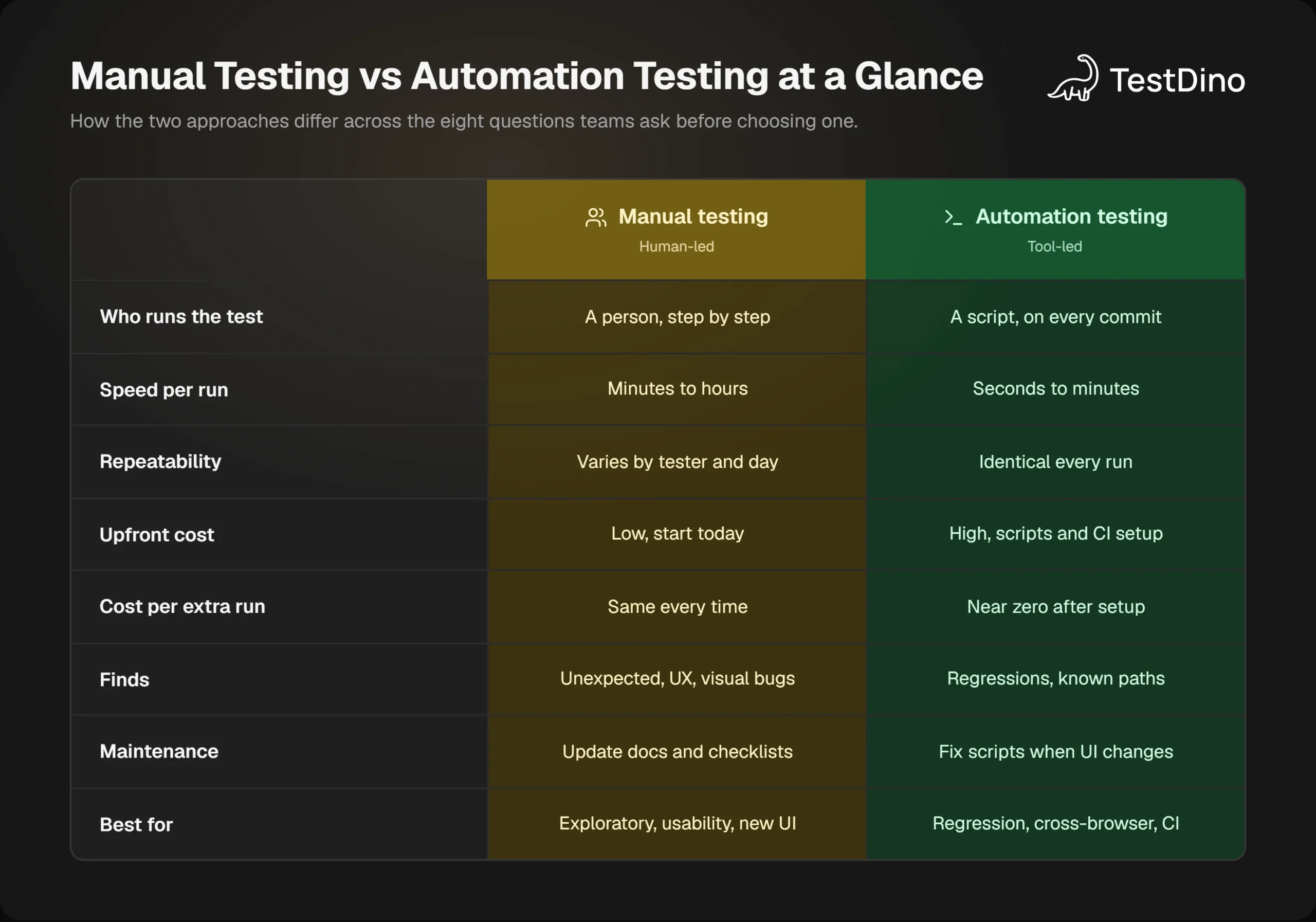
The "best at finding" row deserves a second look. An automated check confirms that yesterday's behavior still holds. It has no way of noticing that yesterday's behavior was wrong to begin with, because it was written to expect it.
ISTQB captures this in its "tests wear out" principle: the same tests repeated many times become less effective at finding new defects. The syllabus notes one exception, automated regression testing, where repetition is the goal. Everything else needs fresh eyes, which is where manual testing keeps its job.
Where manual testing still wins
Manual testing has not gone anywhere. In Katalon's State of Software Quality Report 2025, which surveyed over 1,500 QA professionals, 82% said they still use it. Here is the work that share is doing.
Exploratory testing finds what nobody scripted
The ISTQB syllabus describes exploratory testing as an approach where tests are "simultaneously designed, executed, and evaluated while the tester learns about the test object." It adds that this works best when the tester has experience, domain knowledge, curiosity, and creativity.
A script cannot be curious. It checks exactly what it was told to check, then stops. A human who notices the total is off by 1 cent after a coupon will follow that thread, and that is usually how the bugs nobody wrote a test for turn up.
Usability and accessibility need a human reaction
Whether a page is confusing is a judgment, not an assertion. Automated accessibility testing can flag missing labels and contrast failures, but it cannot tell you a screen reader user got lost in your checkout.
The same goes for visual review. Pixel comparisons and visual testing tools catch layout shifts, but a person decides whether a change looks intentional or broken.
Brand-new and fast-changing features
When a feature is still being redesigned every sprint, automating it means rewriting the script every sprint. The ISTQB list of automation risks includes "using a test tool when manual testing is more appropriate," and this is the textbook case.

Tip: Test new features manually for the first 2 or 3 iterations. Once the flow stops changing and you have run the same manual steps three times, that is your signal to automate it.
Everything above depends on judgment. Plenty of checks need none of it, and those are the ones worth handing to a script.
Where automation testing pays off
Speed per run is the argument people usually make for automation. The bigger one is frequency: a suite can run every time the code changes, and no manual team can afford that.
Regression testing on every commit
Regression is the test type teams automate most. In the same Katalon report, 45% of respondents said they automate regression testing, the highest share for any test type. The ISTQB syllabus lists "time saved by reducing repetitive manual work" as the first benefit of automation, with regression tests as its example.
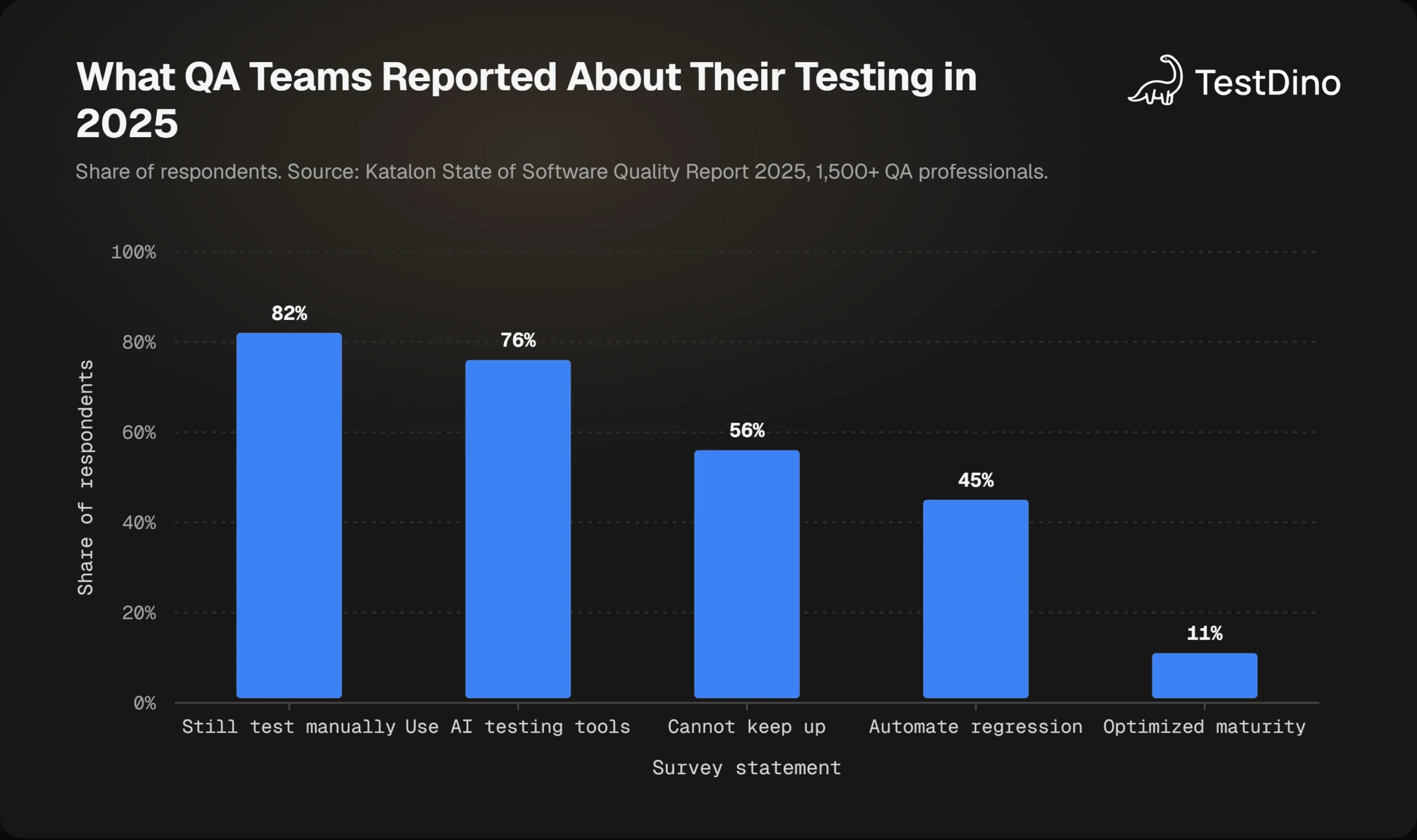
The gap between the 82% who test manually and the 45% who automate regression is the opportunity. The same report found 56% of QA teams still struggle to keep up with testing demand. Regression is the workload that grows with every release, so it is the workload automation should absorb first.
Cross-browser and data-driven checks
Running the same checkout flow in Chromium, Firefox, and WebKit by hand triples the work. In a script, it is a config change. The same holds for data-driven checks: 40 pricing combinations are a loop for a script and an afternoon for a person.
Playwright makes the browser part simple because one test file runs across all three engines. If you are setting that up, cross-browser testing in Playwright is a good starting point, and Playwright sharding keeps the run time flat as the matrix grows.
Fast feedback in CI
DORA, Google's DevOps research program, says developers should get feedback from automated tests in under 10 minutes, on both local machines and CI, according to its test automation capability guidance. It also finds that when developers own the automated suite, delivery performance improves.
Ten-minute feedback is only possible with automation. A manual regression pass that takes a day means every developer waits a day to learn whether their change broke something. Running the suite in Playwright in GitHub Actions on every pull request closes that loop.
None of this is free, though, and the costs are easier to get wrong than the benefits.
The real cost of manual testing vs automation testing
Cost is where the manual testing vs automation testing decision usually goes wrong. Teams compare the price of a tester's hour with the price of a CI minute and stop there. The real comparison has three parts.
Upfront cost vs cost per run
Manual testing costs the same every time it runs. Automation costs a lot once and then very little per run. The break-even point depends on how many times the check will execute over its life.
The ISTQB syllabus warns about "inaccurate estimations of time, costs, effort required to introduce a tool, maintain test scripts and change the existing manual test process." Maintenance is the line item teams forget, and a guide on how to reduce test maintenance covers the patterns that keep it low.
The cost of finding bugs late
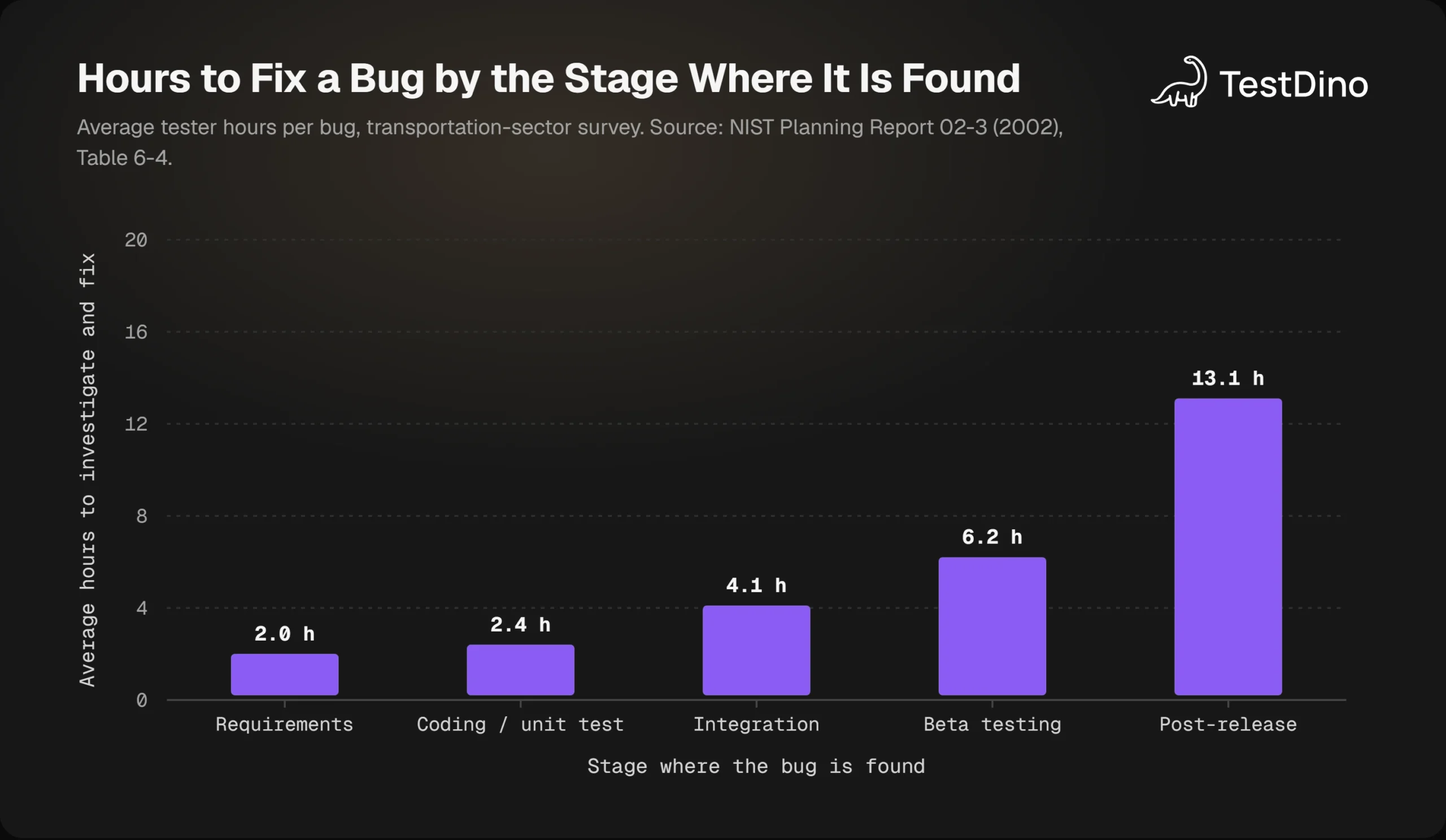
The largest cost rarely shows up in a testing budget. It is the bug that an earlier check would have caught. A NIST study of the transportation sector, Planning Report 02-3, measured how many hours it takes to investigate and fix a bug depending on where it is found.
A bug found during coding or unit testing took 2.4 hours to fix in that survey. The same bug found after release took 13.1 hours. Automated checks that run on every commit find regressions at the cheap end of that curve. A weekly manual pass finds them near the expensive end.
The flaky test tax
Automation has a cost manual testing never pays: tests that fail for no real reason. Playwright's own docs define a flaky test as one that "failed on the first run, but passed when retried," and it reports those separately from real failures, as described in the test retries documentation.
Note: A flaky suite is worse than a slow manual pass, because people stop trusting it. Track flake rate as a first-class metric from the first week of automation, not after the suite has grown to 500 tests.
The engineering hours spent rerunning and debugging flaky tests are real money. You can put a dollar figure on it with TestDino's free Flaky Cost Calculator, which models debug hours, CI reruns, and engineer days lost per year.
With those three costs in view, sorting a test case into one column or the other takes a handful of questions.
When to use manual testing vs automation testing: a decision checklist
Run each test case through these questions in order. The first one that applies decides.
- Would a failure be expensive? Login, payment, and data loss paths get automated first, regardless of anything below.
- Does the check run the same way every release? If yes, automate it. This is the regression bucket.
- Does it need a human judgment call? Looks right, reads well, feels fast. Keep it manual.
- Is the feature still changing every sprint? Test it manually now and automate it once the flow settles.
- Does it cover many data combinations or browsers? Automate it. That is exactly the work a loop is for.
- Is it a one-off check? A migration, a single config change, a launch-day sanity pass. Keep it manual.
Question 1 matters more than the rest because it is a risk decision, not a convenience decision. A risk-based testing approach scores each flow by likelihood and impact, and ISTQB points to exactly that method as the answer to exhaustive testing being impossible.
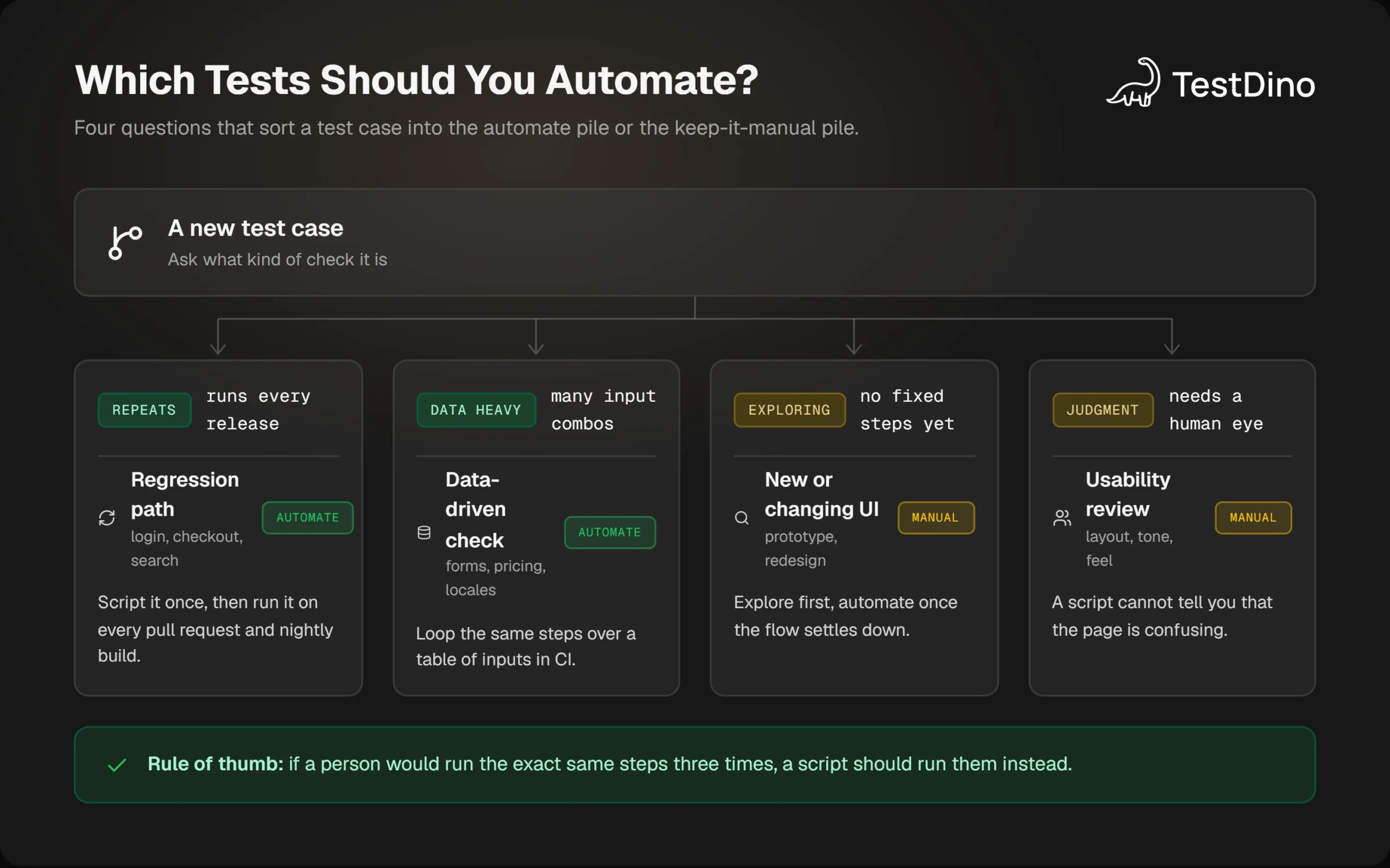
Most teams land somewhere near this split: automated checks guard the paths that must not break, and manual sessions explore everything around them. The split is not fixed. As features stabilize, cases move from the manual column to the automated one.
The structure of the automated suite matters as much as its size. Organizing scripts with a page object model means a UI change touches one file instead of 50 tests, which keeps cases from moving back to manual because the scripts rotted.
Sorting is the easy half. Moving the cases over without losing coverage takes an order of operations.
How to move from manual testing to automation testing in 5 steps
Teams that try to automate everything at once usually end up with a large, untrusted suite. The order below keeps the manual suite running while automation proves itself.

Step 1: audit the manual suite
List every manual test case and tag it with one of three labels: repeated every release, run once, or judgment-based. Be strict about the first bucket, since that is the one you are about to automate.
Step 2: rank by risk and repetition
Score each repeated case on how often it runs and how much a miss would hurt. High on both goes first. This is the same risk matrix from the checklist above, applied to the whole backlog.
Step 3: pick one flow and script it
Start with one critical, stable flow such as login or checkout. If the team is new to the framework, a structured path to learn Playwright shortens this step. Use role-based locators and web-first assertions so the first script sets the pattern for everything after it.
Playwright's actionability checks help here. Before clicking, it waits for the element to be visible, stable, enabled, and receiving events, as documented in the actionability guide. That removes most of the hand-written waits that made older automation brittle.
Step 4: wire it into CI
Run the suite on every pull request and keep the feedback under the 10-minute target DORA recommends. Turn on retries and traces in CI so that a failure comes with evidence:
import { defineConfig } from '@playwright/test';

export default defineConfig({
  retries: process.env.CI ? 2 : 0,
  use: { trace: 'on-first-retry' },
});
The trace: 'on-first-retry' setting records a trace only when a test is retried, which Playwright recommends over recording every run. A trace captures actions, DOM snapshots, network requests, and console logs, and the Playwright trace viewer turns that into a replay of exactly what the test saw.
Step 5: measure and expand
Track pass rate, flake rate, and runtime every week. Add the next flow only when the last one is stable. When a run fails, a structured test failure analysis separates real regressions from environment noise so the team fixes the right thing.
Tip: Do not retire a manual case the day its script goes green. Run both for 2 or 3 releases. If the script catches everything the manual pass catches, retire the manual case. If not, the script is missing an assertion.
The plan itself is old. What changed recently is how much of step 3 a tool can now do for you, and it is worth being precise about which parts.
What AI changes about the manual vs automation debate
AI changes one variable in the manual testing vs automation testing question. The cost of writing and maintaining scripts, which was always the expensive part, is falling.
The World Quality Report 2025-26, a survey of more than 2,000 senior executives across 22 countries, found that 89% of organizations are piloting or deploying generative AI in quality engineering. Only 15% have reached enterprise-wide implementation.
Generating scripts is faster, deciding what to script is not
Tools like AI codegen can turn a plain-language description into a working Playwright test in minutes. That shrinks the upfront cost that made teams hesitate, which pushes more cases across the break-even line into automation.
It does not change the decision checklist. A generated test still needs a human to decide whether the flow is stable, whether the assertion is the right one, and whether the case belonged in automation at all. The same report found 58% of organizations cite challenges adopting AI-powered tools, and 60% struggle with secure, scalable test data.
Manual skills are becoming review skills
The Katalon report found 76% of QA professionals already use AI-powered tools in testing. The manual tester's job is shifting from executing checks to reviewing generated ones, and a guide to how to test AI-generated code covers what that review should look for.
Note: Generated tests inherit the blind spots of their prompt. If nobody describes the edge case, nobody tests it. Exploratory sessions are how those edge cases get discovered in the first place.
If your team uses coding agents, the open source Playwright skill gives Claude Code and similar tools a set of conventions for writing Playwright tests that follow the locator and assertion patterns above. Broader comparisons of AI test generation tools cover the rest of the landscape.
Cheaper scripts move more cases across the break-even line. They do not make judgment any cheaper, so the split above stays where it was.
Conclusion
Manual testing vs automation testing reads like a contest, but in practice it is a sorting job. Repeated, high-risk, data-heavy checks belong in scripts that run on every commit. Exploratory, usability, and fast-changing work belongs with people who can notice what nobody predicted.
The survey numbers point the same way. Most teams still test manually, fewer than half automate regression, and more than half cannot keep up with demand. Automating the regression bucket is the highest-return move available to most of them.
Start with one critical flow, wire it into CI, watch the test quality metrics for a few weeks, and expand only when the suite earns trust. Keep the manual sessions. They are where the next automated test comes from.
FAQs

Savan Vaghani
Product Developer