Playwright MCP Token Cost: What 1 Session Really Costs in 2026
We measured Playwright MCP token cost across 19 releases and real agent runs, then priced it and cut it down.
Every time an AI assistant opens a web page for you, it reads that page as text, and you pay for every piece it reads. That meter is the Playwright MCP token cost, and it keeps running with each click.
The hard part is that the popular numbers no longer match the tool. A figure of 114,000 tokens per task is still quoted widely, yet a page load on the current release returned 79 tokens in our tests.
This guide measures Playwright MCP on real pages across 19 releases, compares it with the CLI on 1 task, converts tokens into dollars at official prices, and lists 6 settings that shrink the bill.
What Playwright MCP token cost actually means
Playwright MCP token cost is the number of LLM tokens a browser session consumes through the Playwright MCP server, and the money those tokens cost at your model provider's rates. It has a fixed part, the tool definitions, and a variable part, the page data each tool call returns.
Playwright MCP itself is free. Microsoft publishes the package under the Apache-2.0 license, and you run it on your own machine with npx @playwright/mcp@latest. Nothing in the server bills you.
The bill comes from the model. Playwright MCP describes each page as an accessibility tree in plain text, and the model reads that text as input tokens. More page text means more tokens.
Why the number matters for test teams
One person exploring 1 page will never notice the cost. A team that points agents at hundreds of flows will, because every flow repeats the same reads.
That is the point where token spend becomes a line in the test automation budget. It also explains why the same question keeps coming up: how much does 1 session cost, and what controls it?
For scale, Anthropic's Claude Code cost documentation reports an average of about $13 per developer per active day across enterprise deployments. Browser work is part of that spend whenever an agent tests a UI.
Tokens in context vs tokens you pay for
Two different numbers get mixed up in most discussions:
- Context size is how many tokens sit in the conversation at one moment. It limits how long a session can run before it fills up.
- Tokens processed is the total the model reads across every request in the session. This is what you are billed for.
They differ because the conversation history is sent again with each request. In one of our runs, the context peaked at 31,674 tokens while the session processed 291,135.
So a small context does not guarantee a small bill. To see why, it helps to look at where the tokens come from in the first place.
Where the tokens go in a Playwright MCP session
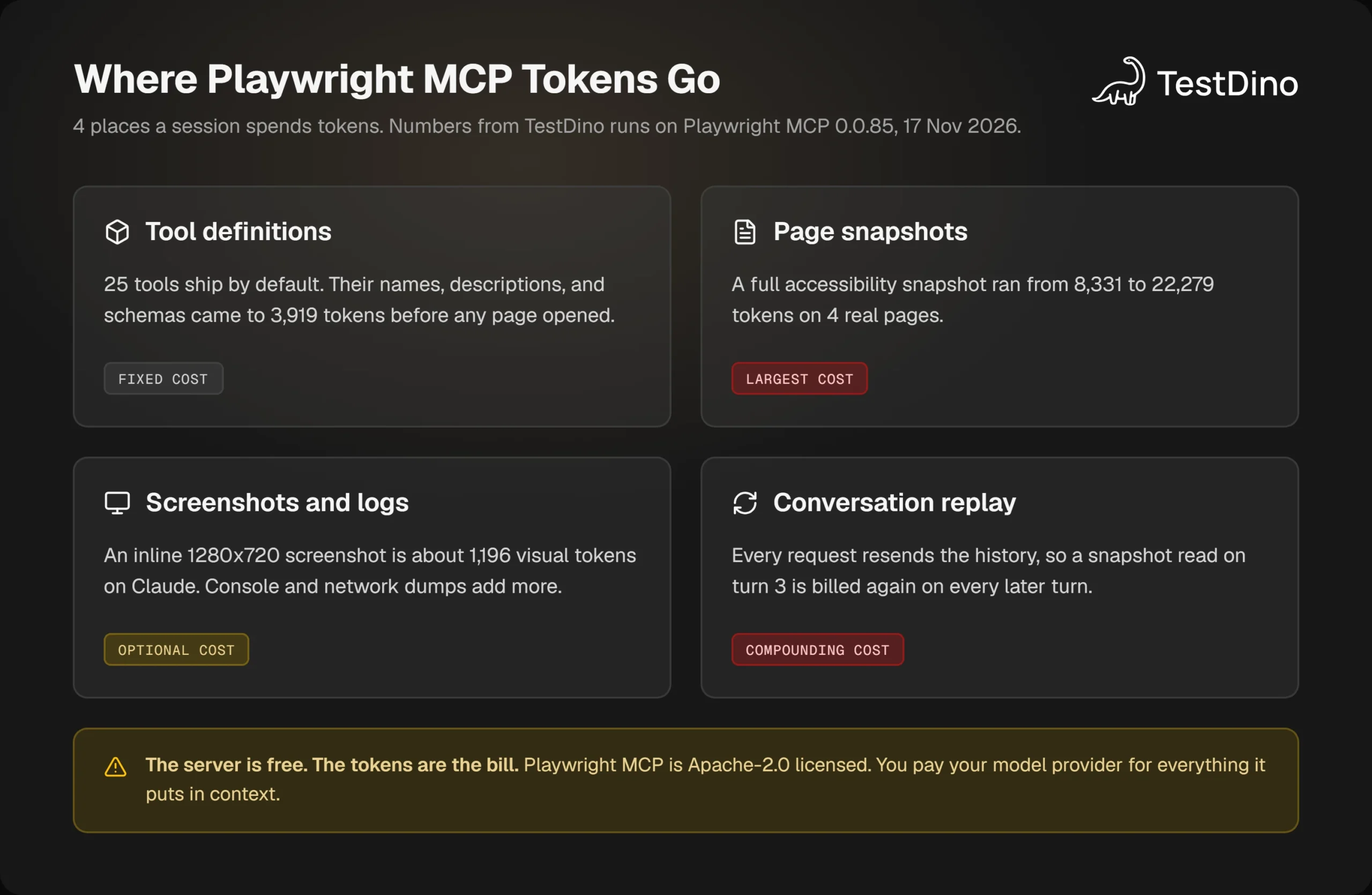
A session spends tokens in 4 places. Two of them are easy to see, and 2 are easy to miss.
- Tool definitions. Anthropic's pricing docs list "tool names, descriptions, and schemas" among the input tokens of any request that uses tools. The default Playwright MCP set is 25 tools, which we measured at 3,919 tokens.
- Page snapshots. A full snapshot of a real page ran from 8,331 to 22,279 tokens in our tests. This is the largest single item.
- Screenshots and logs. Claude's vision docs price an image at ⌈width / 28⌉ × ⌈height / 28⌉ visual tokens. A 1280x720 screenshot works out to 1,196.
- Conversation replay. Every earlier tool result stays in the history and is read again on each later request.
The last item is the one that compounds. Anthropic's docs describe it plainly: "Claude Code sends your full conversation with every request, and each time Claude uses tools it sends another request carrying that batch of tool results."
The fixed cost has grown with the tool list
Tool definitions are a fixed cost, but the amount has not stayed fixed across releases. We listed the tools in several versions and counted the tokens in their names, descriptions, and input schemas.
| Playwright MCP version | Released | Tools | Tokens in definitions |
|---|---|---|---|
| 0.0.41 | October 2025 | 21 | 2,203 |
| 0.0.68 | February 2026 | 22 | 2,506 |
| 0.0.78 | July 2026 | 24 | 3,377 |
| 0.0.85 | November 2026 | 25 | 3,919 |
| 0.0.85 with every capability on | November 2026 | 72 | 8,391 |
The default set grew by 78% between 0.0.41 and 0.0.85. The additions are useful, and 1 of them, browser_find, saves far more than it costs. Still, the fixed part is no longer the 2,000-token footnote it once was.
Clients differ in when they load the definitions
How much of that fixed cost you pay depends on the client. Claude Code defers MCP tool definitions by default. The Claude Code MCP docs say that "only tool names and server instructions load at session start."
Other clients send every definition with every request. In our OpenCode runs, the first request was 4,607 tokens larger with the Playwright MCP server attached than without it, as reported by the model provider.
If you are still choosing a client or a server layout, the Playwright AI ecosystem maps the options. The fixed cost is the small part of the story, though. The variable part is where 2026 changed everything.
How many tokens does Playwright MCP use? We measured 19 releases
The famous figure comes from an official source. In a Playwright CLI vs MCP video published on February 6, 2026, the Playwright team ran 1 task twice in Claude Code. The context showed 114,000 tokens with MCP and 26.8 thousand with the CLI.
The video also explains the gap. The navigate call "replied with the entirety" of the page snapshot, and screenshots sent their image bytes back to the model.
Two details matter when you read that number today. It was a single demo run that reported context size, not a benchmark. And it reflects how the server behaved in February 2026.
What we tested
To check whether the behavior still holds, we installed 19 releases side by side, from 0.0.41 to 0.0.85. Each one opened the same 6 public pages on the same day with 1 browser_navigate call per page.
Every run used headless Chrome at 1280x720. We counted the tokens in the text the server returned, which is what an MCP client passes to the model.
The table lists the 4 content-heavy pages. The other 2, example.com and the TodoMVC demo, are tiny and stayed under 400 tokens on every release.
Note: Token counts in this guide use OpenAI's open-source o200k_base tokenizer, run on November 17, 2026. Other models split text differently, so treat the figures as close estimates. For exact Claude counts, Anthropic offers a token counting endpoint.
| Version | Released | Hacker News | Playwright docs | GitHub repo | Wikipedia |
|---|---|---|---|---|---|
| 0.0.41 | Oct 1, 2025 | 15,219 | 8,634 | 19,727 | 16,670 |
| 0.0.56 | Jan 16, 2026 | 15,215 | 8,629 | 19,727 | 16,672 |
| 0.0.68 | Feb 14, 2026 | 15,317 | 8,633 | 19,729 | 16,295 |
| 0.0.69 | Mar 30, 2026 | 79 | 79 | 97 | 90 |
| 0.0.78 | Jul 9, 2026 | 79 | 79 | 97 | 90 |
| 0.0.85 | Nov 9, 2026 | 79 | 79 | 97 | 90 |
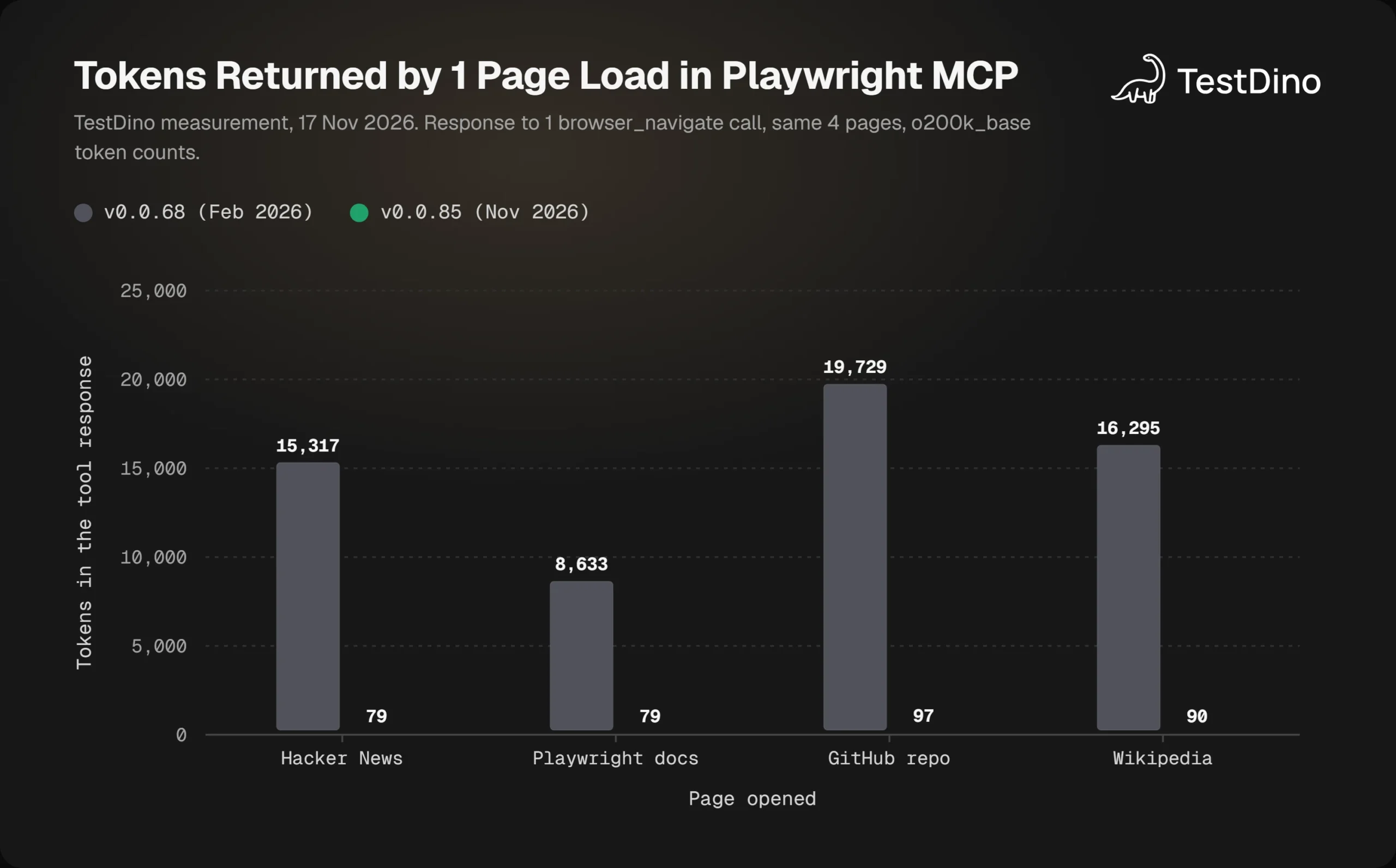
The table shows tokens in the response to 1 page load. All 7 releases we tested up to 0.0.68 returned thousands of tokens. All 12 releases from 0.0.69 onward returned fewer than 135.
The switch happened in 0.0.69
Version 0.0.68 still placed the whole snapshot inside every action response. Version 0.0.69, published on March 30, 2026, writes the snapshot to a .yml file and returns a link to it.
The release notes for 0.0.69 do not call this out, so we found it by testing each version. On the Hacker News front page, the response fell from 15,317 tokens to 79, a drop of 99.5%.
This is what the current response looks like in full:
### Ran Playwright code
```js
await page.goto('https://news.ycombinator.com/');
```
### Page
- Page URL: https://news.ycombinator.com/
- Page Title: Hacker News
### Snapshot
- [Snapshot](.playwright-mcp\page-2026-11-17T05-30-40-834Z.yml)
It is the same design the CLI launched with. The release notes that introduced the CLI in January 2026 said token use would go down "since snapshots are no longer forced into the LLM." Two months later, the MCP server adopted that approach for action responses.
The snapshot itself did not shrink
The page data is still there when the agent asks for it. An explicit browser_snapshot call returns the full tree inline, and that tree is about as large as it was before.
| Full snapshot of | 0.0.68 | 0.0.85 |
|---|---|---|
| Hacker News front page | 15,203 | 13,544 |
| Playwright docs intro | 8,609 | 8,331 |
| GitHub repo page | 20,120 | 22,279 |
| Wikipedia article | 16,646 | 17,098 |
The 0.0.78 release notes say snapshots were "distilled to reduce noise and token usage." We saw an 11% drop on Hacker News. The docs and Wikipedia pages moved by about 3% either way, and the GitHub page changes between loads.
So the Playwright MCP token cost you get today depends on 1 question: does your agent pull the full tree, or only the part it needs? Two situations still force the full tree:
- A client that cannot read local files. A chat app gets no value from a file link, so the agent has to call browser_snapshot. Release 0.0.82 added --file-paths=absolute for clients that have no workspace root.
- An agent that snapshots by habit. If your prompts or rules tell it to take a snapshot before every action, that instruction is now the expensive path.
Connection and tool-visibility problems are a separate topic, covered in Playwright MCP troubleshooting.
Claude Code adds a guard of its own. Its docs state that it warns when an MCP tool output exceeds 10,000 tokens and limits output to 25,000 by default. Three of our 4 full snapshots were above the warning line.
Per-call numbers explain the mechanism. What an agent does with that mechanism over a whole task is a separate question, so we ran one.
Playwright MCP vs CLI token usage on the same task
Microsoft's own README for Playwright MCP recommends the CLI for coding agents. It says CLI invocations "avoid loading large tool schemas and verbose accessibility trees into the model context."
That sentence is still in the README today. To see how it holds up on current versions, we gave 1 agent the same job with 3 different browser tools, including the Playwright CLI.
How we ran it
The setup was the same for every run:
- Agent and model: OpenCode 1.18.35 with the free opencode/big-pickle model.
- Task: open the products page of the TestDino demo store, open the Dell XPS 13 product, add it to the cart, open the cart, and report the name, quantity, and price.
- Tools: Playwright MCP 0.0.68, Playwright MCP 0.0.85, and Playwright CLI 0.1.24 with its skill installed.
- Runs: each tool ran 2 times, for 6 runs in total. All 6 returned the correct cart contents.
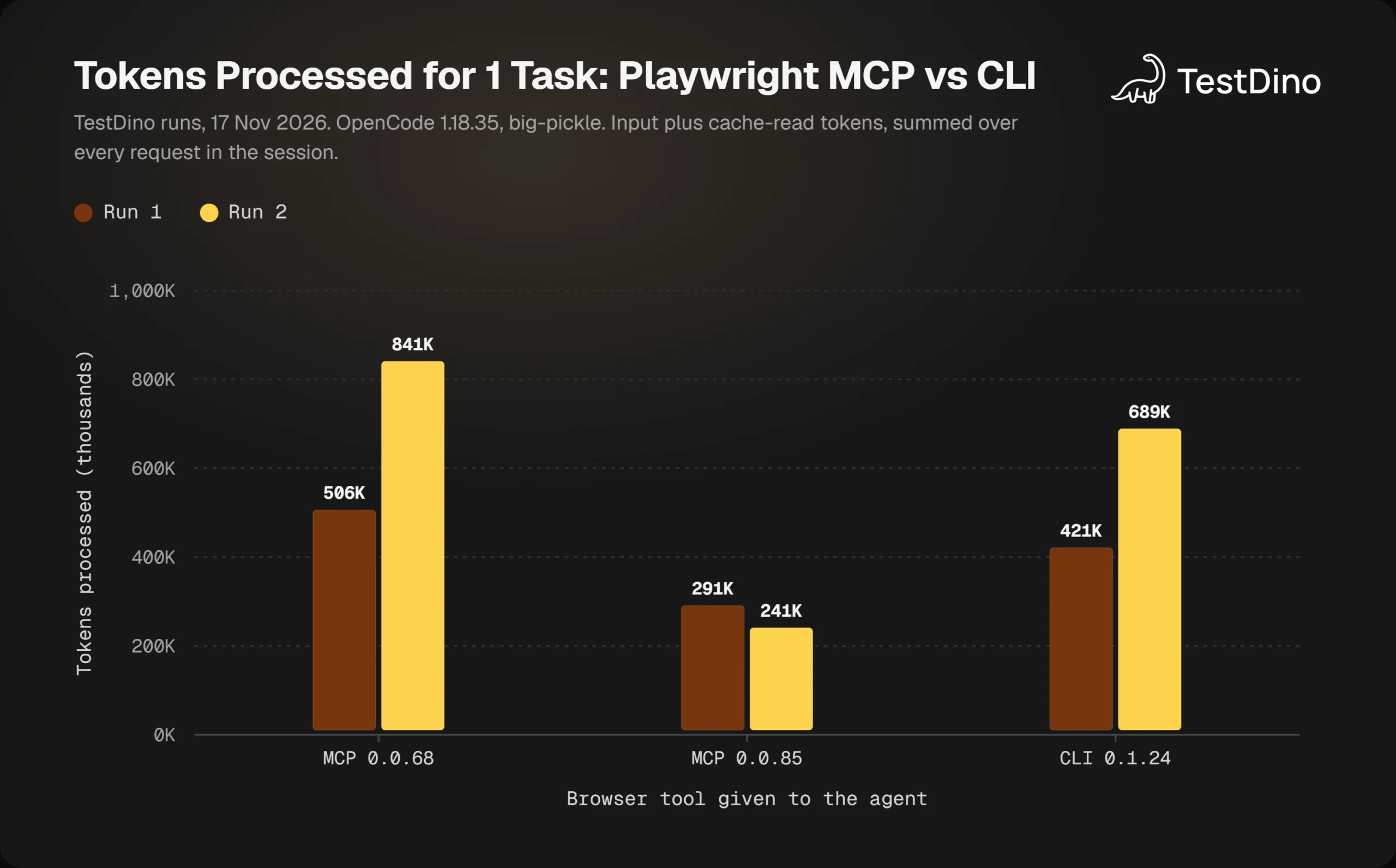
Token counts come from the usage data the model provider reported for each request. "Tokens processed" is fresh input plus cache reads, summed over the session.
| Tool | Run | Requests | First request | Peak context | Tokens processed | Time |
|---|---|---|---|---|---|---|
| MCP 0.0.68 | 1 | 13 | 14,702 | 47,907 | 505,633 | 71 s |
| MCP 0.0.68 | 2 | 22 | 14,702 | 52,512 | 840,872 | 116 s |
| MCP 0.0.85 | 1 | 13 | 16,330 | 31,674 | 291,135 | 48 s |
| MCP 0.0.85 | 2 | 12 | 16,330 | 30,275 | 241,358 | 65 s |
| CLI 0.1.24 | 1 | 20 | 11,723 | 34,236 | 421,118 | 103 s |
| CLI 0.1.24 | 2 | 20 | 11,723 | 45,838 | 688,827 | 107 s |
On average, the current MCP server processed 266,247 tokens per run. The CLI processed 554,973, and the older MCP release processed 673,253.
What the runs showed
Five things stood out in the session data:
- The current MCP server used the fewest tokens in both runs. It called browser_find 3 or 4 times per run and asked for only 2 or 3 snapshots.
- Request count mattered as much as response size. The CLI needed 20 requests each time, against 12 or 13 for MCP 0.0.85. Each request reads the whole history again.
- Inline snapshots built the largest context. MCP 0.0.68 peaked at 47,907 and 52,512 tokens, well above the other 2 tools.
- The fixed costs are closer than they look. The CLI skill file is 3,760 tokens once the agent loads it. The 25 MCP tool definitions are 3,919.
- Variance is large. In its second run, the CLI agent read a 12,471-token snapshot file, and its total rose from 421,118 to 688,827.
The CLI does win at idle. Before the skill loads, only its 47-token header is in context, which is why its first request was 4,607 tokens smaller than with MCP 0.0.85.

Tip: Compare tools by tokens processed per finished task, not by context size after the last step. A tool that keeps each request small can still cost more if it needs many more requests to finish.
How to read this result
This is not a verdict against the CLI. It is 2 runs per tool, 1 free model, and 1 short flow. A different model or a longer session could reorder the results.
The flow itself also played a part. On MCP 0.0.68, the agent needed extra script calls to open the cart drawer in both runs, which added requests on top of the larger responses.
The official guidance also covers a case we did not test. An agent that mostly edits code and opens a browser now and then pays the MCP tool definitions on every request, in clients that do not defer them.
What the runs do show is narrower. The large gap from early 2026 came from inline snapshots, and the older release was the most expensive tool here as well. Version 0.0.69 removed that cause.
The trade-offs beyond tokens are compared in Playwright CLI vs MCP, and skills vs MCP looks at the 2 approaches more broadly. Token counts only become a budget once they are priced, which is the next step.
How to calculate Playwright MCP token cost in dollars
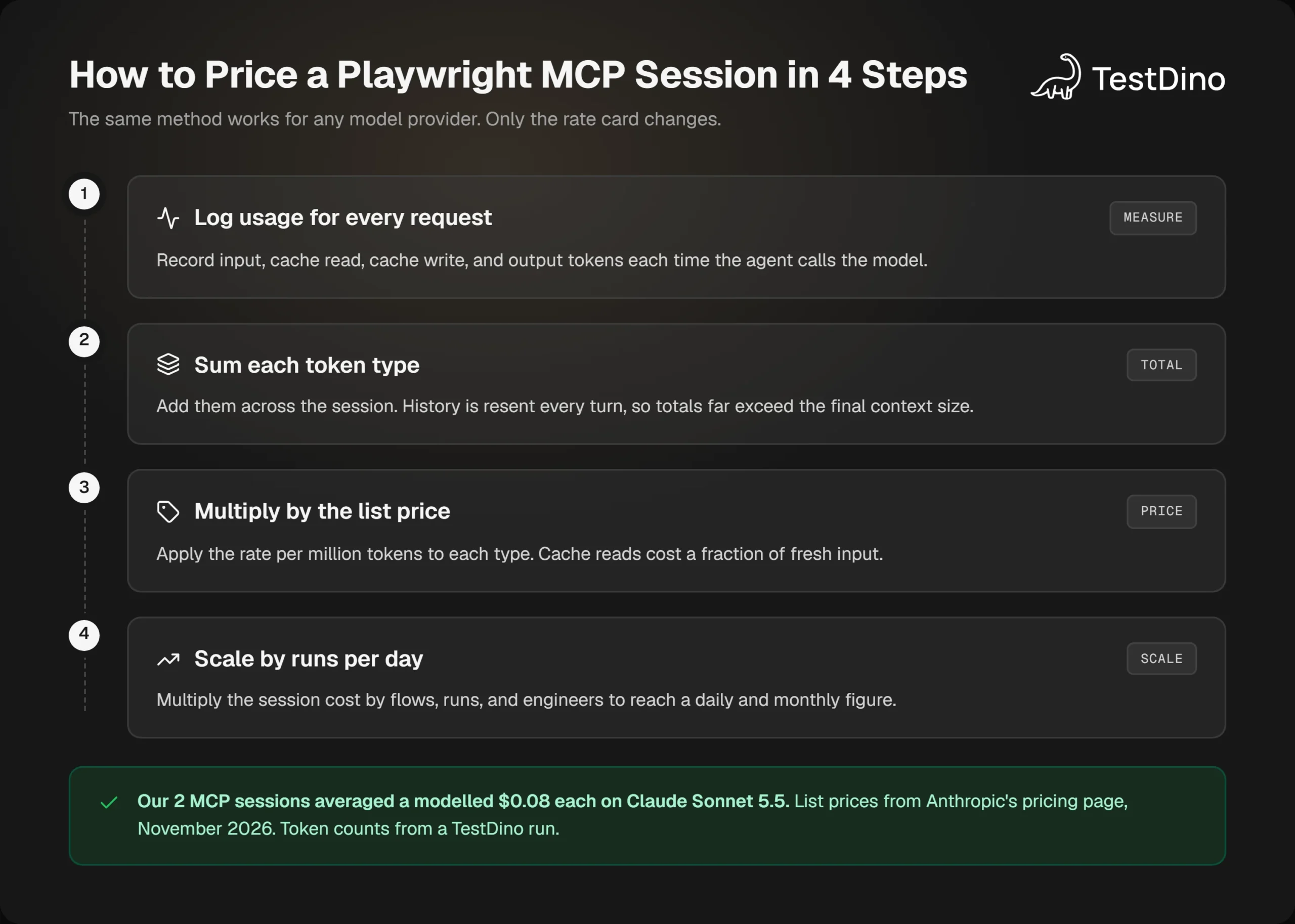
You can price any session in 4 steps:
- Log the usage fields for every model request: fresh input, cache read, cache write, and output tokens.
- Sum each token type across the whole session.
- Multiply each sum by your model's price per million tokens.
- Multiply the session cost by the number of sessions you run per day.
session cost = (fresh input  x input price)
             + (cache read   x cache read price)
             + (cache write  x cache write price)
             + (output       x output price)
The mistake to avoid is pricing the final context size as if it were sent once. History is read again on every request, so the sums in step 2 are much larger than the last context reading.
The official prices we used
The rates below come from Anthropic's pricing page in November 2026. Prices are in USD per million tokens.
| Model | Input | Cache read | 5-minute cache write | Output |
|---|---|---|---|---|
| Claude Haiku 5.5 (prompts up to 100,000 tokens) | $0.10 | $0.01 | $0.125 | $0.50 |
| Claude Sonnet 5.5 | $2 | $0.10 | $2.50 | $10 |
| Claude Opus 5.5 | $4 | $0.20 | $5 | $20 |
| Claude Fable 5.2 | $8 | $0.20 | $10 | $40 |
Look at the cache read column first. On Sonnet 5.5, a cached token costs 5% of a fresh one, and agent sessions are mostly rereads of earlier turns.
What our sessions would cost
We applied those rates to the average usage of each tool from the runs above. Output includes reasoning tokens.
| Tool | Fresh input | Cache read | Output | Haiku 5.5 | Sonnet 5.5 | Opus 5.5 | Fable 5.2 |
|---|---|---|---|---|---|---|---|
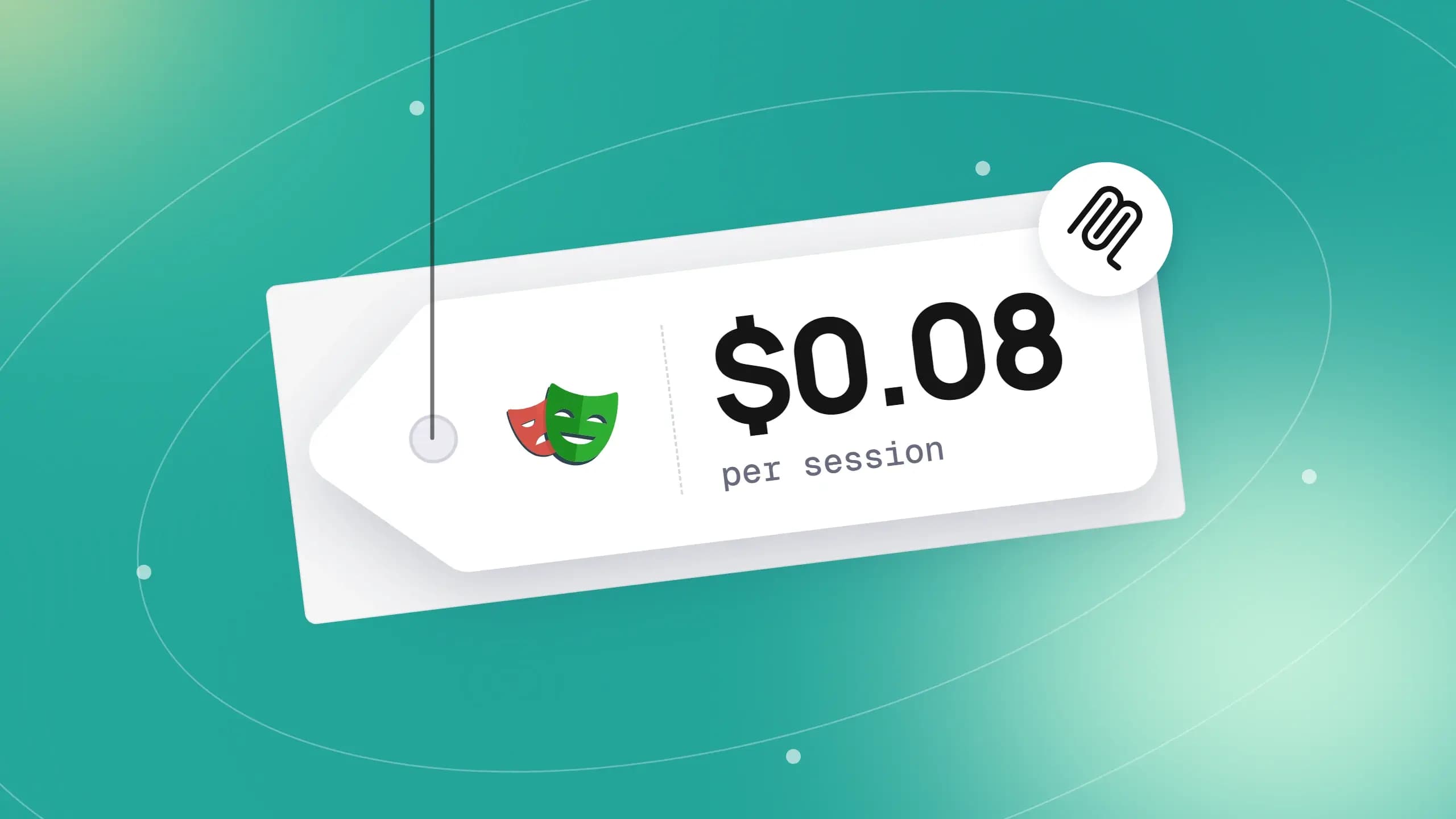
| MCP 0.0.85 | 24,583 | 241,664 | 693 | $0.005 | $0.08 | $0.16 | $0.27 |
| CLI 0.1.24 | 36,061 | 518,912 | 2,136 | $0.010 | $0.15 | $0.29 | $0.48 |
| MCP 0.0.68 | 45,157 | 628,096 | 1,492 | $0.012 | $0.17 | $0.34 | $0.55 |
Note: Read this Playwright MCP token cost as a model, not an invoice. The token counts come from a free model's usage report, Claude would count the same text differently, and we priced uncached input at the base rate. Your own usage logs are the real source.
Caching does most of the work. In the MCP 0.0.85 runs, 90.8% of the processed tokens were cache reads. Priced with no caching at all, the same average session would cost $0.54 on Sonnet 5.5 instead of $0.08.
Single items are easy to price the same way. A 17,226-token snapshot costs about $0.034 on Sonnet 5.5 the first time, then about $0.0017 on each later request that rereads it.
Playwright MCP cost per session at scale
A few cents per flow sounds harmless until you multiply it. Here is the arithmetic for a team that runs 200 agent-driven flows per day at our measured average:
- Per day on Sonnet 5.5: running 200 flows at 0.08eachcomestoabout0.08eachcomestoabout16.
- Per month on Sonnet 5.5: across 22 working days, that is about $353.
- Per month on Opus 5.5: every rate doubles, so the total is about $706.
Real flows are often longer than our 12-request example, and cost grows faster than length because each extra turn rereads everything before it. If Claude Code is your agent, Claude Code with Playwright walks through that setup.
The cheapest token is the one that never enters the context. The next section covers the settings that keep it out.
6 ways to reduce Playwright MCP token usage
Every change below is built into Playwright MCP 0.0.85, and each number is from our own measurements. Together they lower the Playwright MCP token cost without changing tools.
| Change | Before | After |
|---|---|---|
| Full snapshot replaced by browser_find (Wikipedia article) | 17,226 tokens | 397 tokens |
| Full snapshot limited to depth: 3 (Wikipedia article) | 17,226 tokens | 415 tokens |
| Full snapshot saved with filename (Wikipedia article) | 17,226 tokens | 46 tokens |
| Click response with --snapshot-mode none --codegen none | 86 tokens | 27 tokens |
| Screenshot with --image-responses omit | 1 inline image plus 122 text tokens | 122 text tokens |
| Default tools instead of every capability | 8,391 tokens | 3,919 tokens |
1. Find instead of snapshot
The browser_find tool searches the snapshot for text or a regular expression. It returns the matching nodes with their refs and a few lines of context.
The tool's own description calls this "cheaper than capturing the whole snapshot when you only need to locate an element and its ref." On our 4 test pages it returned 168 to 397 tokens, where full snapshots returned 8,584 to 17,226.
2. Scope the snapshot
When the agent does need structure, browser_snapshot accepts 3 parameters that limit it. depth caps the tree depth, target snapshots 1 element, and filename saves the result to disk.
A depth of 3 cut the Wikipedia snapshot from 17,226 tokens to 415. That is enough for an agent to see the page layout and then drill into 1 region.
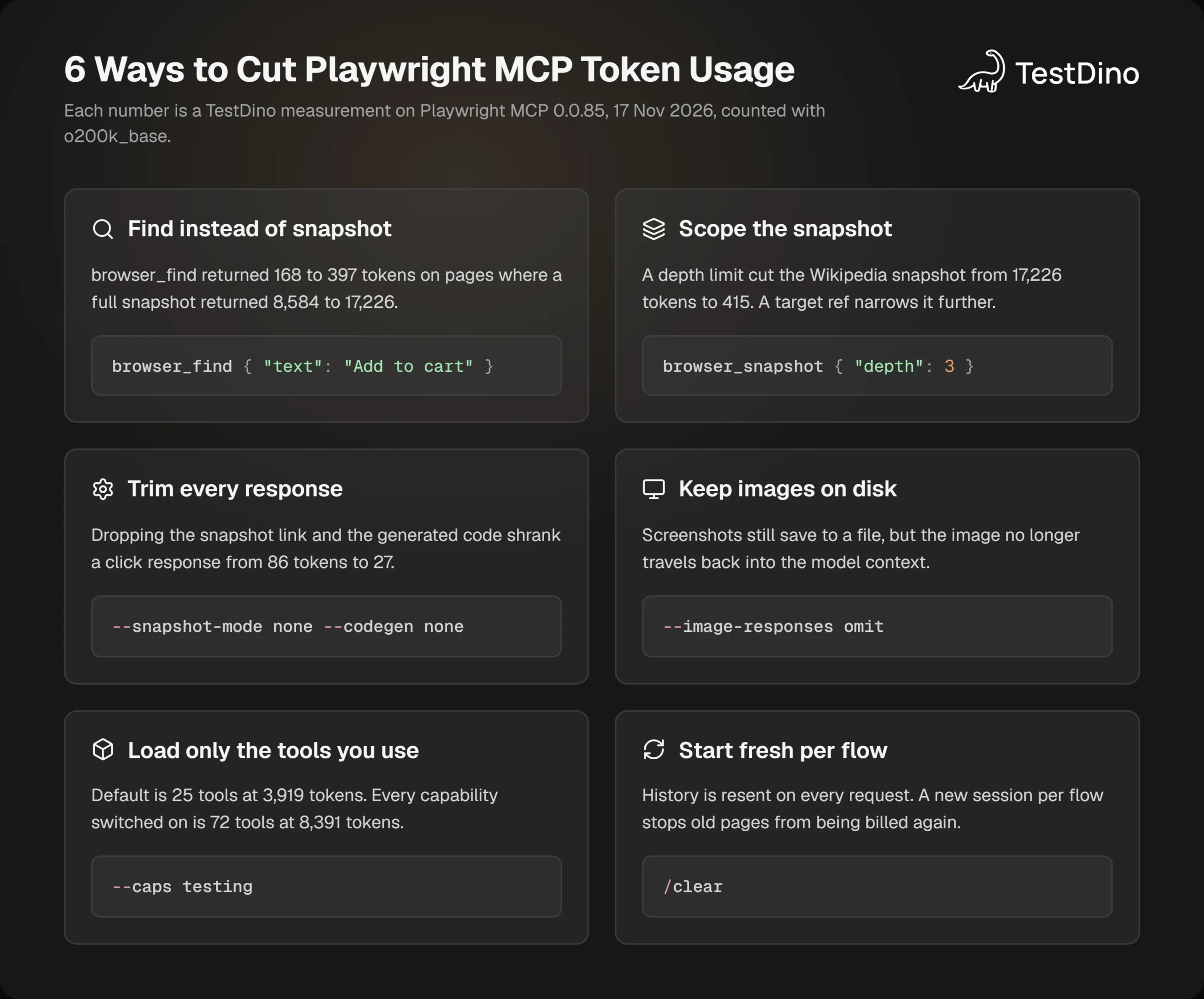
3. Trim every response
Each action response carries a snapshot link, page details, and the Playwright code that ran. Two flags remove most of it:
- --snapshot-mode none drops the snapshot link from action responses.
- --codegen none drops the generated code.
Together they took a click response from 86 tokens to 27. Keep code generation on when the goal is to write a test, because that code is the raw material for the spec.
4. Keep images on disk
By default a screenshot comes back as an inline image, and the image lands in the context. With --image-responses omit, the file is still saved and only the text part returns.
Since release 0.0.74, passing a filename to browser_take_screenshot has the same effect for that call. It is the better choice when you want a screenshot as evidence and do not need the model to look at it.
5. Load only the tools you use
Extra capabilities add tools, and each tool adds definition tokens. Turning on testing alone moves the set from 25 tools to 30, and from 3,919 tokens to 4,503.
Switching on every capability reaches 72 tools and 8,391 tokens. Add a capability when a task needs it, and leave the rest off.
A lean starting config keeps the default tools and stops inline images:
{
  "mcpServers": {
    "playwright": {
      "command": "npx",
      "args": [
        "@playwright/mcp@latest",
        "--headless",
        "--isolated",
        "--image-responses", "omit"
      ]
    }
  }
}
6. Start fresh per flow
History is the cost that compounds, so the simplest fix is to carry less of it. Clear the session between unrelated flows, and old pages stop being reread.
Anthropic's docs recommend the same habit for Claude Code, and they suggest subagents for verbose work so that the output "stays in the subagent's context." A browser flow is a natural fit for that pattern.
Put the rules where the agent will read them
Flags only help if the agent also behaves well. A short rules file does that, and AGENTS.md for Playwright covers how to write one.
# Browser rules
- Use browser_find to locate an element before asking for a snapshot.
- When you need a snapshot, pass depth or target. Do not snapshot the whole page.
- Save screenshots with a filename. Do not read them back unless asked.
- Start a new session for each user flow.
For locator and assertion rules on top of these, the open-source Playwright skill packages them for coding agents. Reusable wording for the tasks themselves is collected in Playwright prompts.
Tip: Test --mobile on your own app before relying on it. The README says mobile pages "are usually lighter, which saves tokens," but only 1 of our 4 test pages got smaller. The Wikipedia snapshot went from 17,226 tokens to 14,018.
Every number in this section came from our pages, and yours will differ. Measuring your own setup takes about 5 minutes.
How to measure token usage in your own setup
Start with what your agent already reports. In Claude Code, the docs point to 2 commands: /context shows what is filling the context window, and /usage shows token totals for the session.
OpenCode keeps the same data per message. Running opencode export with a session ID prints the token usage of every request, which is how we built the tables in this guide.
Count the server's output directly
To measure the server without any model in the loop, connect to it with a small script. This one prints the fixed cost and the size of 1 page load.
npm install @modelcontextprotocol/sdk js-tiktokenimport { Client } from "@modelcontextprotocol/sdk/client/index.js";
import { StdioClientTransport } from "@modelcontextprotocol/sdk/client/stdio.js";
import { getEncoding } from "js-tiktoken";
const enc = getEncoding("o200k_base");const count = (text) => enc.encode(text).length;
const textOf = (result) =>
result.content.filter((part) => part.type === "text").map((part) => part.text).join("\n");
// Extra flags after the file name are passed to the server, for example: --caps testing
const transport = new StdioClientTransport({
  command: "npx",
  args: ["@playwright/mcp@latest", "--headless", "--isolated", ...process.argv.slice(2)],
});
const client = new Client({ name: "token-meter", version: "1.0.0" });
await client.connect(transport);
// Fixed cost: what the client hands the model for every tool.
const { tools } = await client.listTools();
const definitions = tools.map((tool) => ({
  name: tool.name,
  description: tool.description,
  input_schema: tool.inputSchema,
}));
console.log(`${tools.length} tools, ${count(JSON.stringify(definitions))} tokens`);
// Variable cost: one page load, then one full snapshot of the same page.
const url = "https://example.com/";
const navigate = await client.callTool({ name: "browser_navigate", arguments: { url } });
const snapshot = await client.callTool({ name: "browser_snapshot", arguments: {} });
console.log(`navigate: ${count(textOf(navigate))} tokens`);
console.log(`full snapshot: ${count(textOf(snapshot))} tokens`);
await client.close();node count-tools.mjs
# 25 tools, 3919 tokens
# navigate: 71 tokens
# full snapshot: 323 tokens
node count-tools.mjs --caps testing
# 30 tools, 4503 tokensSwap the URL for a page from your own app. The full snapshot line is the number to watch, because it is what an unguided agent will pull into context.
For exact Claude numbers, send the same text to Anthropic's token counting endpoint. The o200k_base count is a quick local estimate.
Watch the Playwright MCP context window, not only the total
The total tells you what a session cost. The context window tells you when it will go wrong.
Check the context after the first few browser steps. If it has already grown by tens of thousands of tokens, the agent is pulling full snapshots, and the rules from the previous section are not being applied.
The setup details differ by client. Playwright MCP in Claude Code and Playwright MCP in Cursor cover 2 of them.
Measuring and trimming lowers the cost of each session. The larger saving comes from not needing the session again.
When the token bill stops: turn sessions into tests
An agent session costs tokens every time it runs. A Playwright test costs none, because it runs in the test runner with no model involved.
That makes the first exploration an investment. The agent finds the flow once, and the output is a spec file that repeats it for free.
Playwright MCP already supports this. Each action response includes the Playwright code that ran, such as the page.goto() line in the response shown earlier. An agent can assemble those lines into a test.
There are 2 common routes from session to spec:
- Test agents. The planner, generator, and healer described in Playwright test agents turn an explored flow into a spec and repair it later.
- Recorded flows. With ai codegen, you record the steps yourself and let a model clean up the result.
Once a flow is a test, its running cost moves from tokens to CI minutes. Playwright CI cost optimization covers that side, and you can model the monthly figure with the CI Budget Calculator in TestDino's free tools.
Note: Tokens are a one-time cost only if the generated test stays stable. A spec that flakes sends you back to the agent to repair it, and every repair is a new session.
That is where tracking matters. TestDino records every Playwright run, flags flaky tests, and groups failures by cause, so you can see which agent-written specs hold up and which ones keep costing you repair sessions.
Repairs can be automated as well, within limits. Self-healing tests in Playwright goes deeper on automated repair.
Conclusion
The Playwright MCP token cost changed in 2026, and most published numbers did not keep up. Since version 0.0.69, an action returns a link in place of the whole page, so a page load fell from thousands of tokens to under 100.
What remains is mostly under your control. The full snapshot is as large as ever, and whether the agent pulls it decides the bill.
Key takeaways:
- Check your version first. Releases up to 0.0.68 send the whole snapshot with every action. Releases from 0.0.69 send a file link.
- Count requests, not only context. In our runs, the tool that finished in the fewest requests also processed the fewest tokens.
- Price it with caching. About 91% of the tokens in our MCP sessions were cache reads, which turned a 0.54sessionintoan0.54sessionintoan0.08 one on Sonnet 5.5.
- Guide the agent. browser_find and scoped snapshots cut a 17,226-token read to about 400.
- Convert flows to tests. A spec file runs with no tokens at all.
If you are choosing how to produce those specs, AI test generation tools compares the options. The prompting side is covered in how to write Playwright tests with AI.
FAQs

Pratik Patel
Co-founder