TDD vs BDD: 7 Key Differences, Examples, and How to Choose
TDD vs BDD explained in plain terms, with runnable examples, a comparison table, research data, and a guide to choosing.

Writing code has never been faster, and being sure it works has never been harder. With 84% of developers using or planning to use AI tools, the TDD vs BDD question matters again.
The trouble is that the two are often treated as rivals, or as the same idea with different tools. Teams pick one for the wrong reason and end up with tests that are slow, unread, or checking the wrong thing.
This guide explains both in plain language and builds 1 feature both ways with code you can run. It also shows how to choose or combine them in your test automation strategy.
What is TDD (test-driven development)?
TDD is a way of writing code in which the test comes first. You describe what a small piece of code should do, watch that check fail, and only then write the code that makes it pass.
Test-driven development (TDD) is a programming practice where you write a failing automated test before the code, write just enough code to pass it, and then clean up the design. The cycle is called red, green, refactor.
Martin Fowler's definition of TDD calls it a technique that "guides software development by writing tests." He credits Kent Beck with developing it in the late 1990s as part of Extreme Programming.
The tests in TDD are unit tests. They sit at the lowest and fastest level among the types of software testing, and each one checks a single function or class.
The red, green, refactor cycle
Kent Beck restated the workflow in 2023 in an essay called Canon TDD. It has 5 steps:
- Write a list of the test scenarios you want to cover.
- Turn exactly 1 item on the list into a real, runnable test.
- Change the code so that this test, and every earlier test, passes.
- Optionally refactor to improve the design.
- Go back to step 2 until the list is empty.
Most people shorten this to 3 colors:
- Red: the new test fails, because the behavior does not exist yet.
- Green: you write the simplest code that makes it pass.
- Refactor: you tidy the code while the tests keep it safe.
Fowler adds a warning that is easy to miss. In his words, the most common way to get TDD wrong is "neglecting the third step." Code that passes but is never cleaned up turns into a mess with a green badge on it.
A TDD example in TypeScript
Take a small feature: a discount code that takes 10% off an order. The example uses Vitest, and Jest follows the same describe, it, and expect style if that is what your project runs.
If you have not picked a runner yet, this comparison of JavaScript testing frameworks covers the main options.
npm install -D vitestRed. Write the test before the function exists:
import { describe, it, expect } from 'vitest';
import { applyDiscount } from './discount';
describe('applyDiscount', () => {
  it('takes 10% off the total for the code SAVE10', () => {
    expect(applyDiscount(200, 'SAVE10')).toBe(180);
  });
});npx vitest runThe run fails with Cannot find module './discount'. That failure is the point. It proves the test can fail, so a later pass means something.
Green. Write the least code that passes:
export function applyDiscount(total: number, code: string): number {
  return total * 0.9;
}
The test passes, even though the function ignores the code it was given. Do not fix that from memory. Add the next item from your list as a test instead:
it('leaves the total unchanged for an unknown code', () => {
  expect(applyDiscount(200, 'EXPIRED')).toBe(200);
});
This one fails with expected 180 to be 200, which is exactly the gap you suspected.
Refactor. Now make the code general and readable:
const DISCOUNTS: Record<string, number> = {
  SAVE10: 10,
};
export function applyDiscount(total: number, code: string): number {
  const percentOff = DISCOUNTS[code] ?? 0;
  return total - (total * percentOff) / 100;
}
Both tests pass. We ran this exact sequence on Vitest 5.1.1 and got the failures and passes described above.

Tip: Keep each step small. Kent Beck lists turning the whole test list into concrete tests up front as a mistake. Write 1 test, make it pass, then pick the next one.
What the research says about TDD
TDD has been measured in real teams. A study in Empirical Software Engineering by researchers from Microsoft, IBM, and North Carolina State University followed 4 industrial teams that adopted it.
The paper reports that pre-release defect density fell by between 40% and 90% compared with similar projects that did not use TDD. Managers estimated that initial development time rose by 15% to 35%.
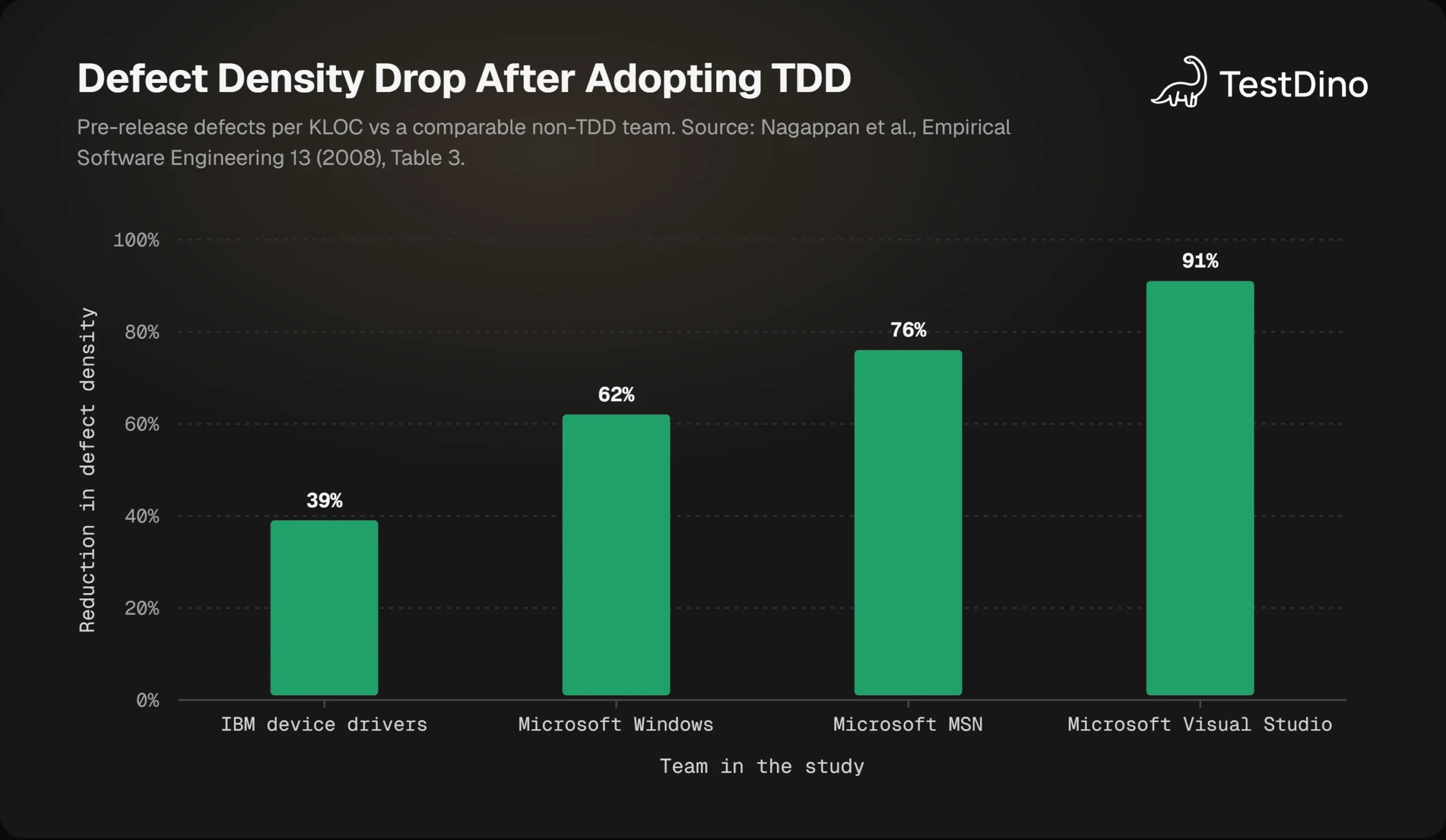
Table 3 of the paper gives the figure for each team. The TDD teams had 0.61, 0.38, 0.24, and 0.09 times the defect density of their comparison teams, which works out to drops of 39%, 62%, 76%, and 91%.
Two cautions keep these numbers honest:
- These are case studies, not controlled experiments. The authors state that comparisons between real projects "can never be perfect."
- Design benefits are less proven. The Agile Alliance glossary notes that empirical research has so far failed to confirm the claim that TDD improves design quality.
Whether 15% to 35% more time up front is a good trade depends on what a defect costs you later, and the cost of bugs differs a lot between a hobby app and a payment system.
TDD tells you the code does what the developer meant. It cannot tell you whether the developer meant the right thing, and that gap is where BDD begins.
What is BDD (behavior-driven development)?
BDD starts one step earlier than TDD, with a conversation. Before anyone writes code, the people who want a feature and the people who build it agree on examples of how it should behave.
Behavior-driven development (BDD) is a way of working in which business people, developers, and testers agree on concrete examples of how a feature should behave, write them in plain language, and then automate them as tests.
The official Cucumber documentation describes BDD as "a way for software teams to work that closes the gap between business people and technical people."
Those examples are written so that a product manager can read them and a computer can run them. One file serves as the requirement, the test, and the documentation.
Where BDD came from
BDD was created by Dan North. In Introducing BDD, first published in Better Software magazine in March 2006, he explains that it came from teaching TDD.
He kept meeting the same confusion. Programmers wanted to know "where to start, what to test and what not to test," and what to call their tests.
His answer was to change one word. He noticed that these misunderstandings "almost always came back to the word 'test'," so he began writing test names as sentences that describe behavior, built around the word "should."
At the end of 2003 he started JBehave, a replacement for JUnit built around that vocabulary. Martin Fowler's note on Given-When-Then credits him and Chris Matts with developing that template as part of BDD.
So BDD is not a rival to TDD. It grew out of TDD, and the Agile Alliance entry on BDD describes it as a "synthesis and refinement" of practices that come from TDD and acceptance testing.
The 3 practices of BDD
Cucumber's docs split BDD into 3 practices that happen in order:
- Discovery, what it could do: the team talks through concrete examples of the new behavior and agrees on the details.
- Formulation, what it should do: those examples are written down in a form that can be automated.
- Automation, what it actually does: the behavior is implemented, starting with an automated test that guides the code.
Discovery often happens in a short meeting called the Three Amigos, with someone from product, development, and testing in the room.
Cucumber's guide to example mapping gives that meeting a structure with 4 card colors: yellow for the story, blue for rules, green for examples, and red for open questions.
Note: Using Cucumber does not mean you are doing BDD. Cucumber's own docs list this as a myth, and say that automating scenarios after the code is written is "a perfectly reasonable way to do test automation, but it's not BDD."
A BDD example with Gherkin and Playwright
Here is the same discount feature, written as behavior. The language is called Gherkin, and the file ends in .feature.
Feature: Discount codes at checkout
  Scenario: Shopper applies a valid discount code
    Given a shopper has items worth $200 in the cart
    When the shopper applies the discount code "SAVE10"
    Then the order total is $180
  Scenario: Shopper applies an unknown discount code
    Given a shopper has items worth $200 in the cart
    When the shopper applies the discount code "EXPIRED"
Then the order total is $200
The Gherkin reference defines the 3 keywords. Given sets the starting context, When describes an action, and Then describes the expected outcome.
Nothing in that file mentions a button, a selector, or a function. That is what lets a non-developer read it and say "no, expired codes should show an error."
To run it, each line needs a step definition. In JavaScript projects, playwright-bdd "transforms feature files into Playwright tests," so scenarios run on the normal Playwright runner.
npm install -D @playwright/test playwright-bddimport { defineConfig } from '@playwright/test';
import { defineBddConfig } from 'playwright-bdd';
const testDir = defineBddConfig({
  features: 'features/*.feature',
  steps: 'features/steps/*.ts',
});
export default defineConfig({
  testDir,
  reporter: 'html',
  use: { baseURL: 'http://localhost:3000' },
});import { expect } from '@playwright/test';
import { createBdd } from 'playwright-bdd';
const { Given, When, Then } = createBdd();
Given('a shopper has items worth ${int} in the cart', async ({ page }, total: number) => {
  await page.goto(`/cart?total=${total}`);
});
When('the shopper applies the discount code {string}', async ({ page }, code: string) => {
  await page.getByLabel('Discount code').fill(code);
  await page.getByRole('button', { name: 'Apply' }).click();
});
Then('the order total is ${int}', async ({ page }, total: number) => {
  await expect(page.getByTestId('order-total')).toHaveText(`$${total}`);
});npx bddgen && npx playwright testThe first command generates test files from the feature file, and the second runs them. We ran both scenarios against a small demo cart page with Playwright 1.65.1 and playwright-bdd 9.2.1, and both passed.
Two notes on the step file. The Given step seeds the cart through a test-only URL, so replace it with whatever setup your app supports. The steps find elements by label and role, the approach explained in this guide to Playwright locators.
For a full project setup with hooks, tags, and data tables, the Playwright BDD walkthrough goes step by step. JVM teams can follow the Playwright Java BDD version with Cucumber.
BDD tools in the JavaScript ecosystem
BDD needs a tool that reads the plain-language file and runs it. Cucumber is the best known, and its docs describe it simply as "a tool that supports Behaviour-Driven Development."
Public npm data shows which JavaScript options see the most activity.
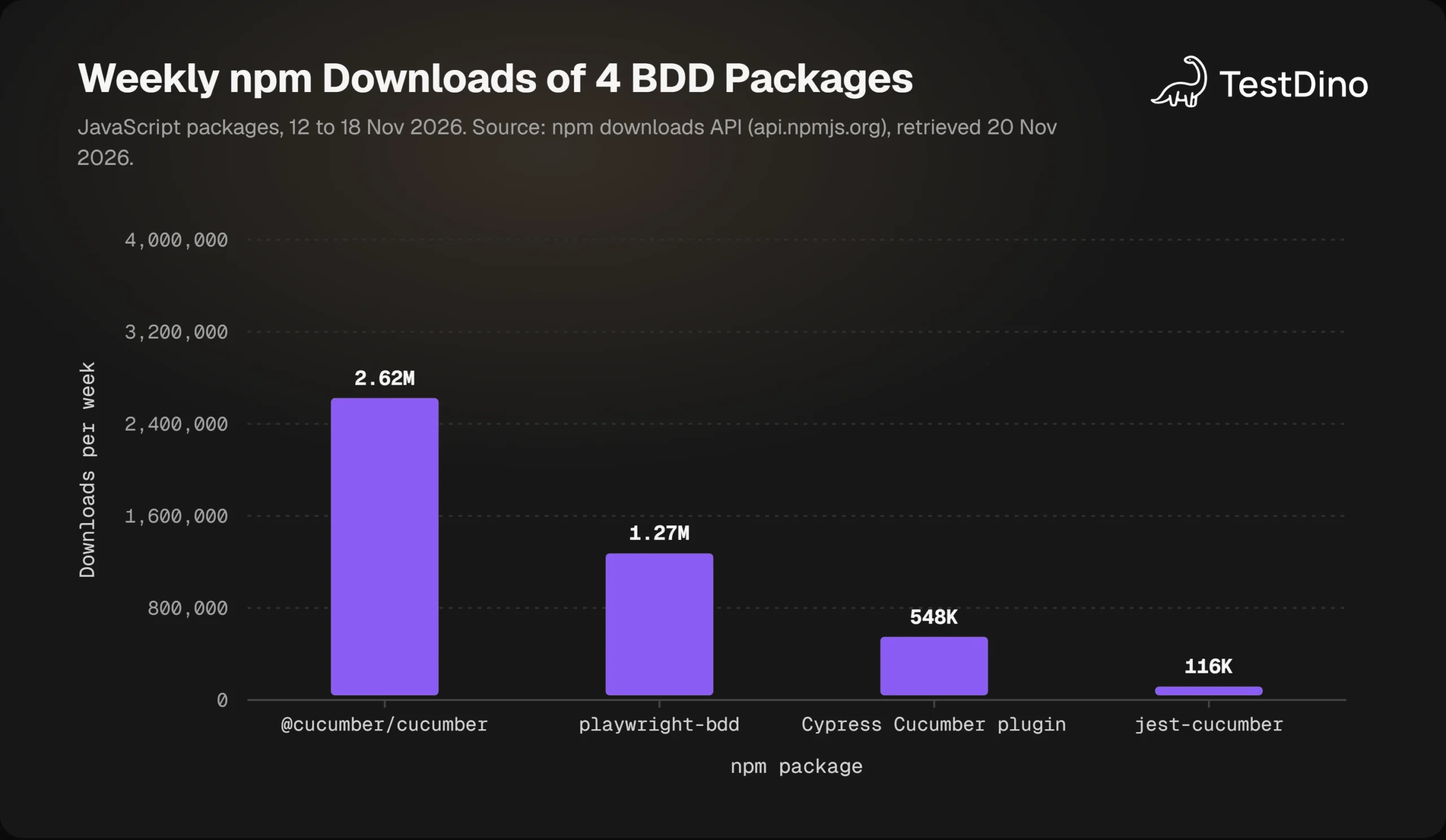
In the week of 12 to 18 November 2026, @cucumber/cucumber had about 2.62 million downloads and playwright-bdd about 1.27 million.
The Cypress plugin @badeball/cypress-cucumber-preprocessor had about 548,000, and jest-cucumber about 116,000. All 4 figures come from the npm downloads API.
Downloads include CI installs, so they show where community activity sits. They do not count how many teams practice BDD.
With both practices defined and running, the differences between them are easier to see side by side.
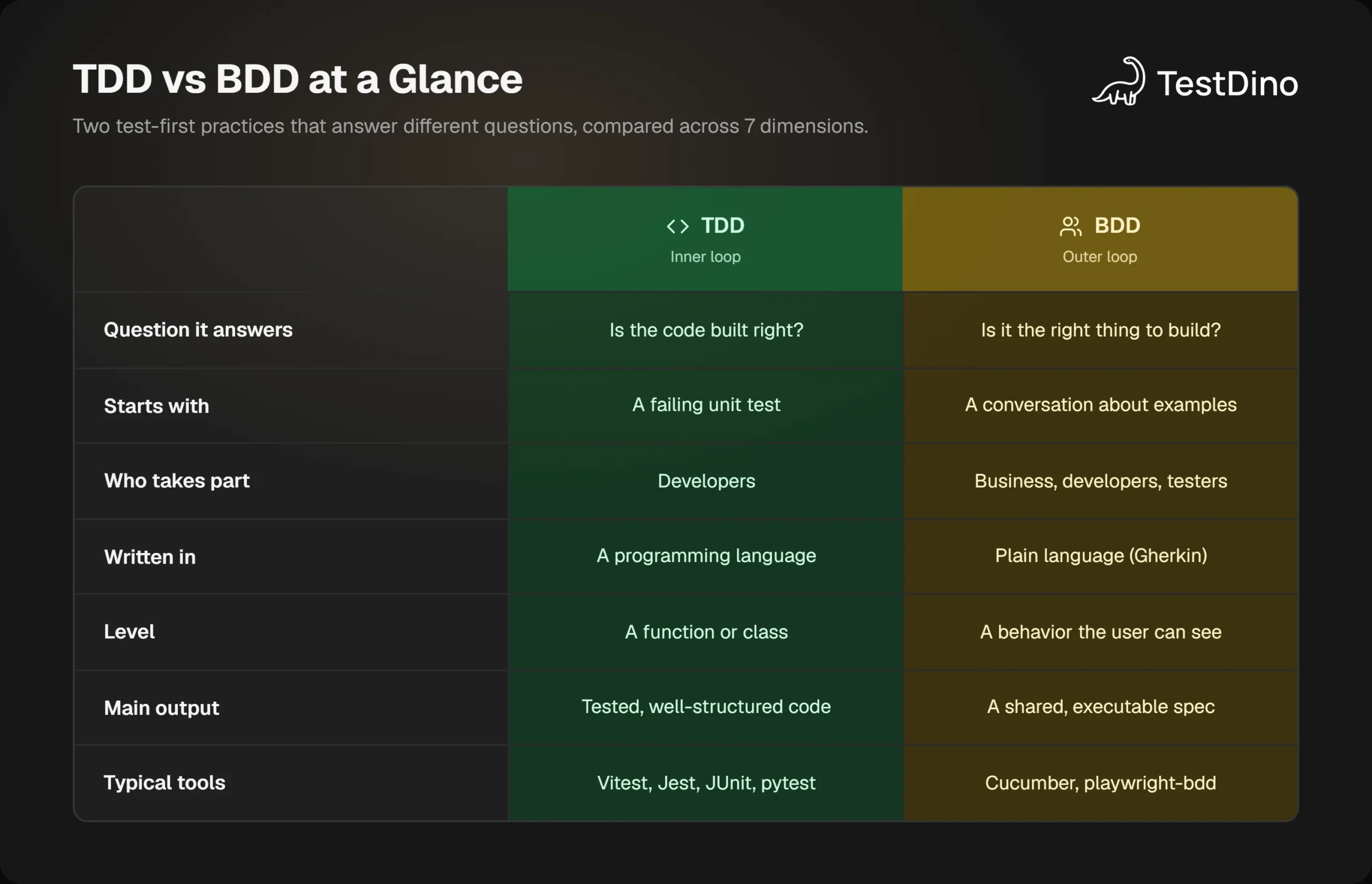
TDD vs BDD: 7 key differences
The difference between TDD and BDD fits in one sentence. TDD checks that the code is built right, and BDD checks that the right thing is being built.
| Aspect | TDD | BDD |
|---|---|---|
| Question it answers | Does this code work as the developer intended? | Does the product behave as the business expects? |
| Starting point | A failing unit test | A conversation about concrete examples |
| Who takes part | Developers | Business people, developers, and testers |
| Language | A programming language | Plain language, usually Gherkin (Given, When, Then) |
| Level | A function or class | A behavior that a user or stakeholder can observe |
| What a failure tells you | A specific unit is wrong | An agreed behavior is broken |
| Typical tools | Vitest, Jest, JUnit, pytest | Cucumber, playwright-bdd, JBehave |
The table gives the outline. Three of these differences shape daily work more than the rest.
Who writes and reads the tests
A TDD test is written by a developer for other developers. Nobody outside the team is expected to read applyDiscount(200, 'SAVE10').
A BDD scenario is written with people outside the team and has to make sense to them. The Agile Alliance lists this as a core benefit: BDD gives "more precise guidance on organizing the conversation between developers, testers, and domain experts."
If nobody outside engineering ever reads your feature files, you are paying for a translation layer that has no reader.
What a failing test tells you
When a TDD test fails, you know which function broke, often down to the line. The feedback is narrow and fast.
When a BDD scenario fails, you know which promise to the user is broken, but not yet where. You still have to trace it through the page, the API, and the logic.
Both signals are useful, and they answer different questions. One says "this unit is wrong." The other says "customers cannot use discount codes."
Note: TDD vs BDD is not an either-or choice. The Agile Alliance says BDD "augments TDD and ATDD," and Cucumber's docs say BDD "does not replace your existing agile process, it enhances it."
Speed and maintenance cost
Unit tests are cheap to run. In our demo, Vitest ran both unit tests in about 0.2 seconds, while the 2 browser scenarios took 3.3 seconds. That is one run on one machine, not a benchmark, but the gap is typical of the 2 levels.
BDD also adds files to maintain: the feature file, the step definitions, and the page code beneath them. The Agile Alliance puts it plainly: "BDD requires familiarity with a greater range of concepts than TDD does."
Keeping steps thin helps. Step definitions that call a page object model change in one place when the UI changes, which is the main way to reduce test maintenance in a growing suite.
None of these differences makes one practice the winner. They show 2 tools built for 2 jobs.
A third acronym usually joins this conversation, and it causes as much confusion as the first 2.
TDD vs BDD vs ATDD: where the third one fits
ATDD stands for acceptance test-driven development. The Agile Alliance definition of ATDD describes team members with different perspectives, customer, development, and testing, "collaborating to write acceptance tests in advance of implementing the corresponding functionality."
That sounds a lot like BDD, and the overlap is real. The same glossary lists Specification by Example and BDD among ATDD's other names.
| Practice | Unit of work | Who defines the test | Usual format |
|---|---|---|---|
| TDD | A function or class | The developer | A unit test in code |
| ATDD | The acceptance criteria of a user story | Customer, developer, and tester together | An acceptance test in any format |
| BDD | A behavior, described by examples | Business, developer, and tester together | A Given, When, Then scenario |
The practical difference is emphasis. ATDD is about agreeing on acceptance tests before coding. BDD keeps that idea and adds a shared vocabulary and what the Agile Alliance calls thinking "from the outside in."
If your team already writes acceptance tests with the customer before building, you are doing most of BDD. The name on the process matters less than whether the conversation happens.
Where spec-driven development fits
A newer relative has appeared alongside AI coding tools. GitHub's open-source Spec Kit sums up spec-driven development in one line: "Define what to build and why, then turn the specification into a plan, tasks, and working code."
The shape is familiar. A written agreement about behavior comes first, and the code has to satisfy it. A good spec plays the role that a feature file plays in BDD, which is why spec-driven testing pairs naturally with both practices.
All of these are forms of the same move: bringing the check forward so it exists before the code. That is the core idea behind shift left testing as well.
Once the labels are clear, the useful question is how the layers work together in a normal sprint.
How to use TDD and BDD together
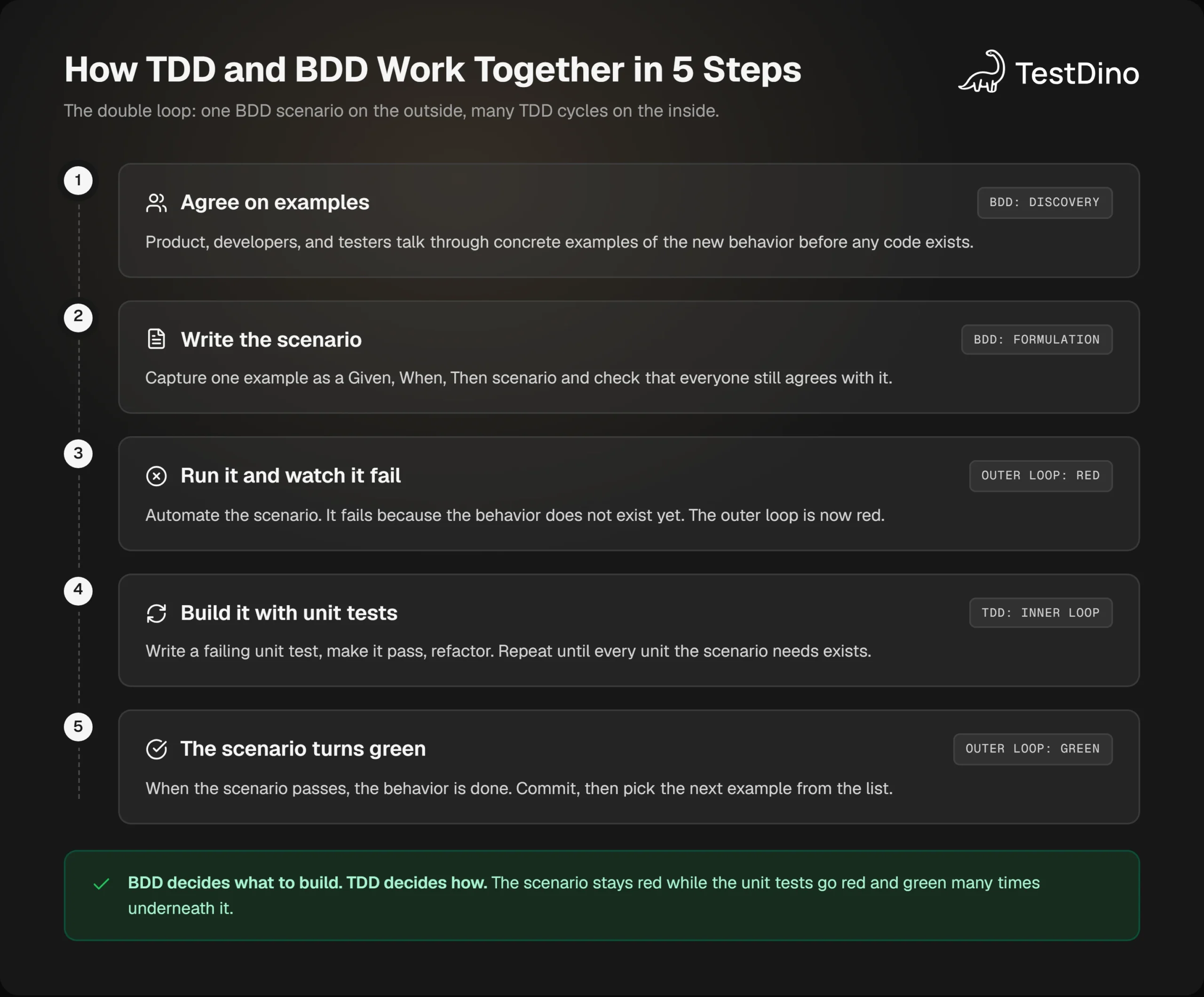
Most TDD vs BDD comparisons stop at a table, as if you had to pick a side. In practice the 2 work at different levels, so they stack.
A BDD scenario defines when a behavior is done, and TDD builds the pieces that make the scenario pass.
This is often called the double loop. To use TDD and BDD together, follow these 5 steps:
- Agree on examples. Product, developers, and testers talk through concrete examples of the new behavior.
- Write the scenario. Capture 1 example in Given, When, Then form and confirm that everyone agrees with it.
- Run it and watch it fail. Automate the scenario. It fails because the behavior does not exist yet.
- Build it with TDD. Write a failing unit test, make it pass, refactor, and repeat until the scenario's needs are met.
- Watch the scenario turn green. When it passes, the behavior is done. Commit and pick the next example.
The scenario is the outer loop, and it may stay red for hours. The unit tests are the inner loop, and they go red and green many times underneath it.
Walking the discount feature through both loops
The 2 examples from earlier are really 1 workflow seen from 2 heights.
- Outer loop, red: the scenario "Shopper applies a valid discount code" fails, because the cart page has no discount field.
- Inner loop: you test-drive applyDiscount with the 2 unit tests, going red, green, and refactor.
- Wiring: you add the field and the button to the page and call the function.
- Outer loop, green: the scenario passes in a real browser, so the behavior is finished.
You end with 2 scenarios that protect what the shopper sees and 2 unit tests that protect the calculation. Neither set can do the other's job.
How many scenarios and how many unit tests
A workable rule is 1 scenario for each business rule a stakeholder would recognize, and unit tests for everything else.
"A valid code reduces the total" is a rule the business cares about, so it earns a scenario. "A code with trailing spaces still works" is an edge case, and it belongs in a fast unit test.
Choosing which examples deserve a test is its own skill. Boundary values and equivalence classes, covered in these test case design techniques, give you a method for it.
Keep the browser-level layer small on purpose. Scenarios are end-to-end tests, so every extra one adds run time and one more thing that can fail for reasons unrelated to your change.
Using both is the ideal, but not every piece of work needs both, and some need neither.
When to use TDD, BDD, or both
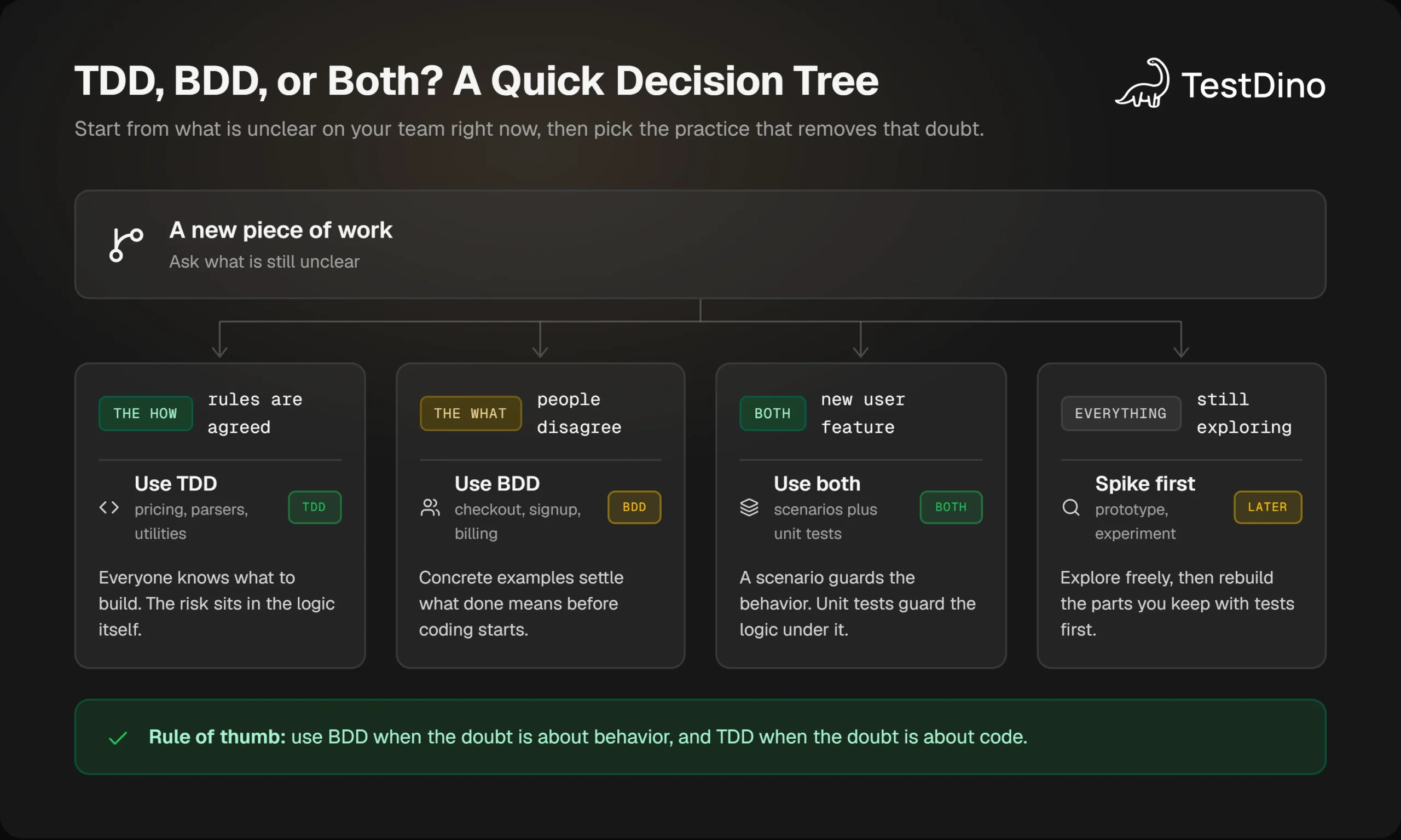
The TDD vs BDD decision gets simpler when you ask what is still unclear. If the doubt is about code, reach for TDD. If the doubt is about behavior, reach for BDD.
Choose TDD when
- The requirement is already clear. Everyone agrees what the function should return, and the risk is in getting the logic right.
- The work is logic-heavy. Pricing rules, parsers, data transforms, and utilities have many cases and no screen.
- The reader is a developer. A library or internal API has no business stakeholder waiting to read scenarios.
- You need fast feedback. Unit tests run in the time it takes to save a file.
Choose BDD when
- People disagree about what done means. Concrete examples expose the disagreement before code is written.
- The rules come from the business. Checkout, billing, permissions, and compliance flows are full of rules developers cannot guess.
- Non-developers will read the scenarios. If product or QA reviews feature files, the plain language pays for itself.
- You need living documentation. Cucumber's docs note that declarative scenarios read better as "living documentation."
Use both when
Customer-facing features with real logic underneath need both layers. The scenario protects the promise to the user, and unit tests protect the calculation behind it.
That covers most product work. The discount example is typical: a behavior that the business defines, built on a function that developers own.
When neither fits yet
Sometimes everything is unclear, and you are exploring whether an idea works at all. A throwaway prototype does not need a test list.
The honest version of this is to treat the prototype as disposable. Once the idea survives, rebuild the parts you keep with tests first.
6 mistakes that make either practice fail
Most complaints about TDD or BDD trace back to a short list of mistakes, and the people who created these practices have named them.
- Skipping the refactor step. Fowler calls this the most common way to get TDD wrong.
- Writing every test up front. Kent Beck's Canon TDD lists converting the whole test list into tests before making any pass as a mistake.
- Editing the test to get green. Beck also warns against deleting assertions or pasting actual values into expected values.
- Writing scenarios after the code. Cucumber's BDD myths page is clear that this is test automation, not BDD.
- Scripting clicks in Gherkin. Steps tied to the UI break whenever the page changes.
- Letting the suite go stale. The Agile Alliance names partial adoption and "the abandoned test suite" as common team-level pitfalls.
The fifth mistake is the easiest to spot in a file:
# Imperative: tied to the page
When the shopper types "SAVE10" into the "Discount code" field
And the shopper clicks the "Apply" button
# Declarative: describes the behavior
When the shopper applies the discount code "SAVE10"
Cucumber's guide to writing better Gherkin says scenarios should describe "what, not how." Imperative steps, it adds, "often require more work to maintain."
These choices used to be about how people write code. They now also decide how safely a machine can write it for you.
TDD vs BDD when AI agents write the code
AI coding tools changed who types the code, not who is responsible for it. The Stack Overflow survey from the intro shows the tension clearly.
More developers distrust the accuracy of AI tools (46%) than trust it (33%). The top frustration, named by 66% of developers, is "AI solutions that are almost right, but not quite."
"Almost right" is exactly what a test written first is built to catch. This is why test-first habits matter more with an agent, not less.
Why a failing test is the best prompt
An agent needs a definition of done that it cannot talk its way around. The Claude Code best practices state the idea directly: "If you give it something that comes back pass or fail, Claude can close that loop itself."
The same page lists what "done" can look like for an agent: "A goal condition, a spec file, or a failing test it has to turn green." A scenario is a goal condition in plain words, and a TDD test is the failing test.
Kent Beck reached the same place from the other side. In his 2025 essay on augmented coding, the instructions he gives his agent include "Always follow the TDD cycle: Red → Green → Refactor."
A practical split between you and the agent
The 2 practices suggest a clean division of work:
- You own the scenario. People agree on the behavior and write or approve the Given, When, Then text.
- The agent writes the failing unit test. You confirm that it fails for the right reason before any code is written.
- The agent makes it pass and refactors. The inner loop is fast, mechanical work that agents handle well with a test to aim at.
- You review the test changes first. A short scenario and a changed assertion are quicker to judge than a long diff.
Beck also names the warning sign to watch for: "Any indication that the genie was cheating, for example by disabling or deleting tests."
Tip: Add one rule to your agent instructions: a test may change only when the requirement changes, never to make it pass. Then check every test diff before you read the code diff.
For browser-level scenarios, the agent also needs to know how good Playwright code looks. TestDino's open-source Playwright Skill is a set of Markdown guides that a coding agent loads on demand when it writes or debugs Playwright tests.
The wider workflow of testing AI-generated code builds on the same principle, and this guide to Claude Code with Playwright shows it in a real project.
A test written first only helps if it keeps running after it is written, and that is a job for your pipeline.
Keeping TDD and BDD suites healthy in CI
Whichever side of the TDD vs BDD choice you land on, you end up with the same asset: a suite that says whether the product still works.
The Agile Alliance warning about the abandoned suite, one that is "seldom or never run," applies to both.
Run the fast loop first
Order the pipeline the same way you order the work:
- Unit tests on every commit. They take seconds and catch most logic errors.
- Scenarios on every pull request. They take longer and prove that the behavior still holds in a browser.
- Fail fast. If the unit tests fail, there is no reason to start the browser.
If your scenarios run on Playwright, the setup is the same as for any other Playwright suite, including in GitHub Actions.
Watch the scenarios for flakiness
Unit tests run in memory and rarely surprise you. Browser scenarios depend on timing, network calls, and test data, so they are where flaky tests tend to appear.
A flaky scenario does more damage in BDD than elsewhere. The promise of a feature file is that green means the behavior works, and one scenario that fails at random teaches the team to ignore red.
Where TestDino fits
TestDino is a reporting and analytics platform for Playwright test runs. Because playwright-bdd turns each scenario into a native Playwright test, your scenarios appear there like any other Playwright test.
In our demo run, the test name was the feature and scenario title, "Discount codes at checkout › Shopper applies a valid discount code," so a failure reads as a broken behavior, not a file path.
For a BDD suite, 3 things matter most in Playwright test reporting:
- History per scenario: you can see whether a scenario started failing with a specific change or has been unstable for weeks.
- Flaky detection across runs: unstable scenarios are flagged, so they can be fixed before they wear down trust.
- Failure classification: TestDino sorts failures into bugs, flaky tests, and UI changes, which is the first step of test failure analysis.
One limit to plan for: TestDino reports Playwright runs, so unit tests from Vitest or Jest stay in your CI logs. The outer loop is what lands in the dashboard.
If you want a quick read on where your suite stands today, the Suite Health Score in TestDino's free tools asks 10 questions and returns a score from 0 to 100 across speed, stability, coverage, and maintainability.
Conclusion
The TDD vs BDD debate fades once you see that they answer different questions. TDD asks whether the code is built right, and BDD asks whether the right thing is being built.
A short way to remember the choice:
- Use TDD when the requirement is clear and the risk is in the logic.
- Use BDD when people need to agree on behavior before anyone builds it.
- Use both for customer-facing features, with 1 scenario on the outside and unit tests on the inside.
Start small. Pick 1 upcoming feature, write a single scenario with the people who asked for it, and test-drive the logic underneath.
Then keep both layers running in CI and watch the test quality metrics that show whether the suite is still earning its keep.