Playwright 1.65 Release: Bun Support, Failure-Only Reports, and 11 Breaking Changes Explained
Playwright 1.65 brings Bun support, failure-only reports, an exclusive test lock, and 11 breaking changes. Check these before upgrading.
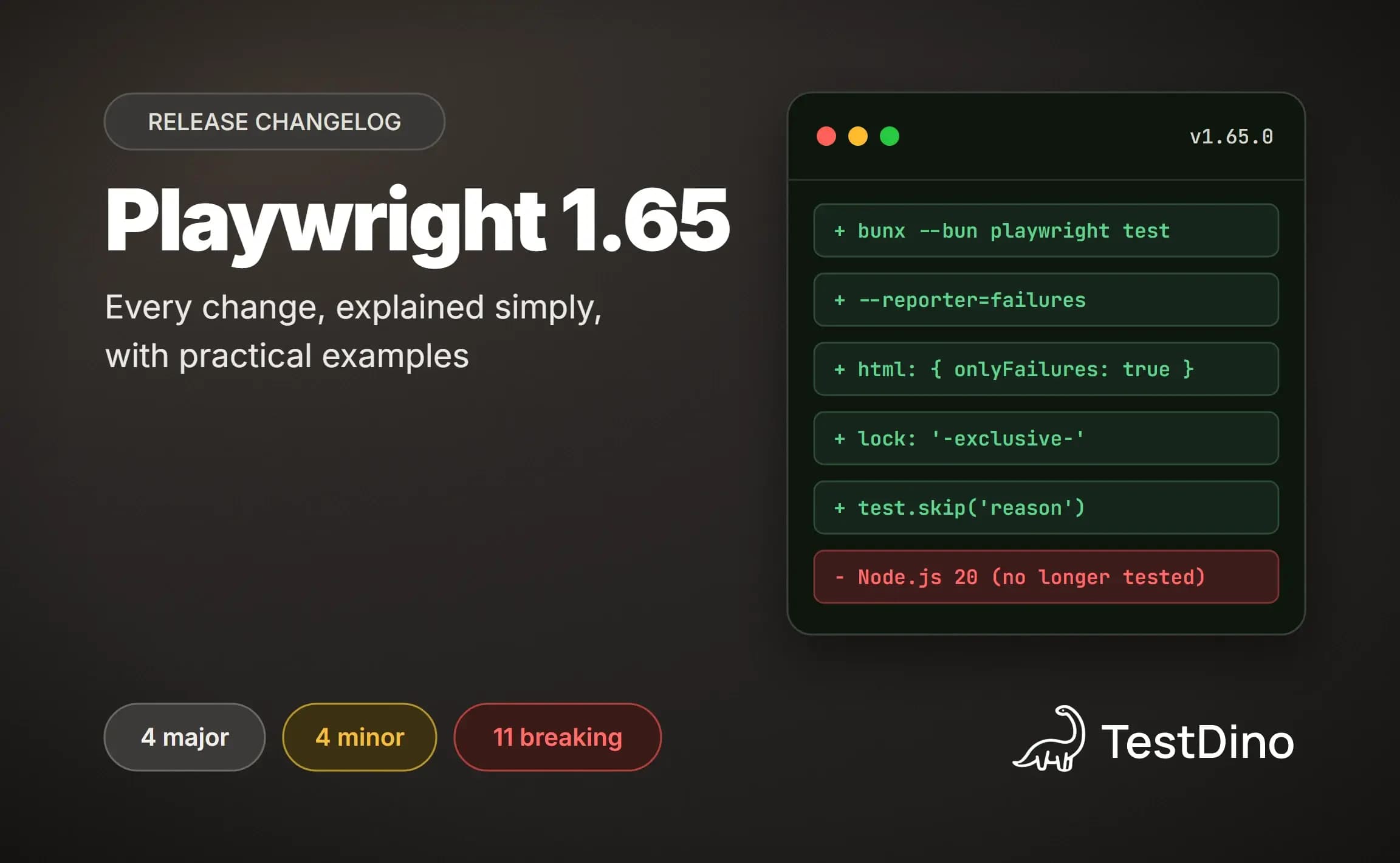
Playwright can now stay quiet about every test that passed and tell you only about the ones that broke. Playwright 1.65 arrived on November 5, 2026, just 29 days after the last version, and it also runs on Bun, an alternative to Node.js.
It also lists 11 behaviour changes, and any of them can turn a healthy test automation suite red. One breaks a familiar way of writing page objects.
This guide walks through every change on 1 real project, the TestDino demo store. You get the exact output we saw, the fix for each break, and a safe order to upgrade in.
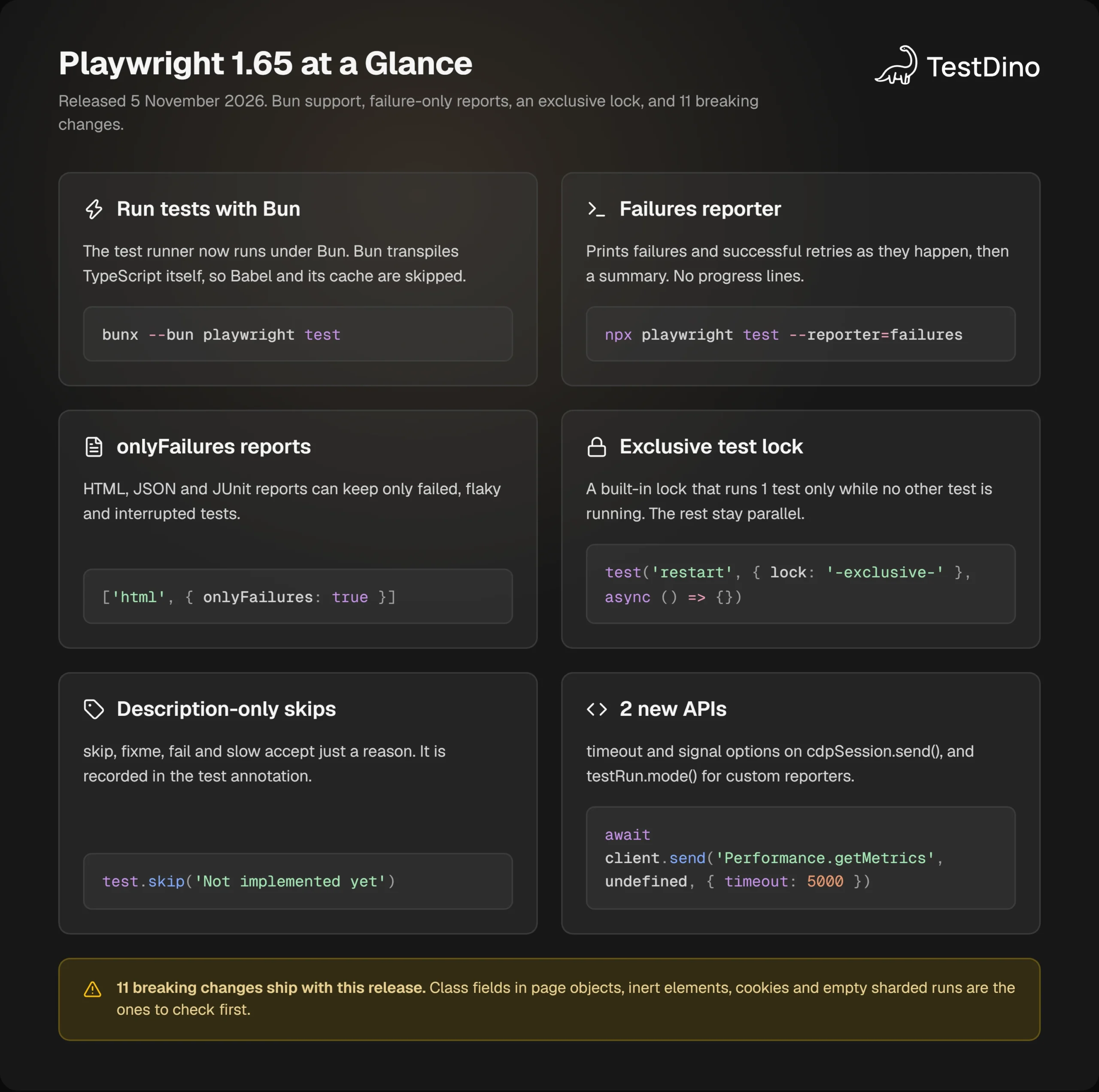
What's new in Playwright 1.65 at a glance
Playwright 1.65 is the November 5, 2026 release of Microsoft's browser testing framework. It adds Bun support for the test runner, a failures reporter, an onlyFailures option for HTML, JSON and JUnit reports, a built-in exclusive test lock, and 11 breaking changes.
The official release notes group the release into 5 areas. The table below maps each one to who should care.
| Area | What changed | Who it affects |
|---|---|---|
| Bun | The test runner runs under Bun with bunx --bun playwright test | Teams that already build or run their app with Bun |
| Reports | New failures reporter, plus onlyFailures for HTML, JSON and JUnit | Anyone who scrolls CI logs or stores report artifacts |
| Test runner | Built-in -exclusive- lock, description-only test.skip(), PLAYWRIGHT_TRANSFORM_CACHE_DIR | Suites with tests that cannot share the machine |
| New APIs | timeout and signal on cdpSession.send(), and testRun.mode() | CDP users and custom reporter authors |
| Breaking changes | 11 behaviour changes, plus Node.js 20 is no longer tested | Every team that upgrades |
Compared with Playwright 1.64, this release adds fewer page-level APIs and spends most of its effort on the runner and on reports. It also carries almost 3 times as many breaking changes: 11 here against 4 last time.
The new features are all opt-in, so you can ignore them for now. The breaking changes are different, because they apply as soon as you bump the version.
When Playwright 1.65 shipped
The npm registry records the publish time of every version, so the timeline is easy to check on the playwright npm page.
| Version | Published to npm (UTC) | Days since previous minor |
|---|---|---|
| 1.63.0 | September 4, 2026 | 42 |
| 1.64.0 | October 7, 2026 | 33 |
| 1.64.1 | October 14, 2026 | Patch |
| 1.65.0 | November 5, 2026 | 29 |
On November 12, 2026, the latest tag on npm still points at 1.65.0. No 1.65.1 patch has been published yet.
The gap between releases has shortened this year. Version 1.59 arrived 68 days after 1.58, while 1.65 took 29 days, so a team that skips upgrades now falls behind faster than it did in spring. For older versions, start from the Playwright release guide.
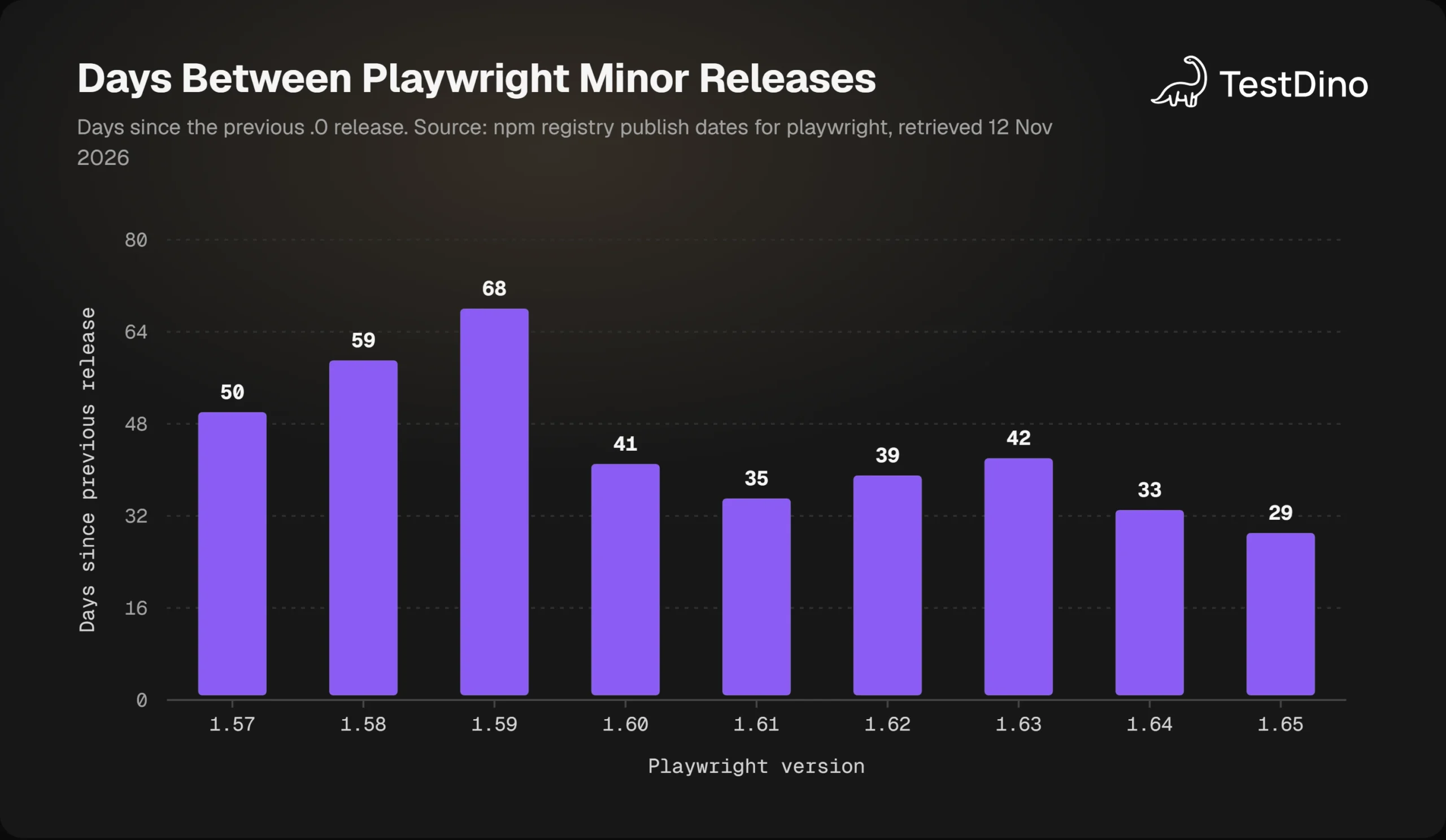
Source: npm registry publish dates for the playwright package, retrieved November 12, 2026.
The demo suite used in this guide
Every example below runs against the same project: a small suite for the TestDino demo store, a public shop with a product list, search, a login form, and a cart drawer.
We ran everything on Playwright 1.65.0 with Chromium 158, Node.js 22.16.0, and Bun 1.4.4 on Windows. All terminal output in this post comes from those runs on November 12, 2026.
import { test, expect } from '@playwright/test';
test('home page shows the hero title', async ({ page }) => {
  await page.goto('/');
  await expect(page.getByTestId('hero-title')).toHaveText('Demo E-commerce Testing Store');
});
test('product list shows 14 products', async ({ page }) => {
  await page.goto('/products');
  await expect(page.getByText('Showing 14 products')).toBeVisible();
});
test('search narrows the product list', async ({ page }) => {
  await page.goto('/products');
  await page.getByPlaceholder('Search products...').fill('JBL');
  await expect(page.getByRole('heading', { name: 'JBL Charge 4 Bluetooth Speaker' })).toBeVisible();
});
// Deliberately wrong: the store lists 14 products, not 15.
test('product count matches the catalogue', async ({ page }) => {
  await page.goto('/products');
  await expect(page.getByText('Showing 15 products')).toBeVisible({ timeout: 3000 });
});
// Deliberately flaky: fails on the first attempt, passes on the retry.
test('cart drawer opens from the header', async ({ page }, testInfo) => {
  await page.goto('/');
  await page.getByTestId('header-cart-icon').click();
  expect(testInfo.retry, 'simulated first-attempt failure').toBeGreaterThan(0);
  await expect(page.getByRole('heading', { name: 'Your Cart' })).toBeVisible();
});
The full file holds 8 tests, and a second file adds 2 more in a serial checkout group. Two of them are broken on purpose, 1 always fails and 1 passes only on retry, so the reporting features have something to show.
If you are new to this style of suite, our Playwright e2e testing walkthrough covers the basics. With the project in place, the first feature to try is the one in the headline: running it all on Bun.
1. Playwright Bun support: run the test runner with bunx --bun
Bun is a JavaScript runtime that also acts as a package manager and bundler. Until now, Playwright's test runner assumed Node.js, even when the rest of a project ran on Bun.
The problem
A team that builds and serves its app with Bun still had to keep Node.js around for 1 job: the end-to-end tests. That means 2 runtimes to install in CI, 2 lockfile habits, and 2 sets of version bumps.
Running bunx playwright test did not help either. That command quietly starts Playwright on Node.js, so the tests never touched Bun at all.
What Playwright 1.65 does
The test runner now runs under Bun when you pass the --bun flag. The release notes state that Bun transpiles your TypeScript test files itself, so Playwright does not use Babel or its compilation cache.
bunx --bun playwright testTo see which runtime really executes the tests, we added a 1-line check to the demo suite.
import { test } from '@playwright/test';
test('print the runtime', async () => {
  console.log(`bun: ${process.versions.bun ?? 'not running under Bun'} | node: ${process.versions.node}`);
});
We ran it twice, once without the flag and once with it.
$ bunx playwright test runtime --reporter=list
bun: not running under Bun | node: 22.16.0
  ✓  1 [chromium] › tests\runtime.spec.ts:4:1 › print the runtime (2ms)
$ bunx --bun playwright test runtime --reporter=list
bun: 1.4.4 | node: 26.3.0
  ✓  1 [chromium] › tests\runtime.spec.ts:4:2 › print the runtime (3ms)
The first run is plain Node.js. The second is Bun 1.4.4, which reports a Node.js compatibility version of its own.
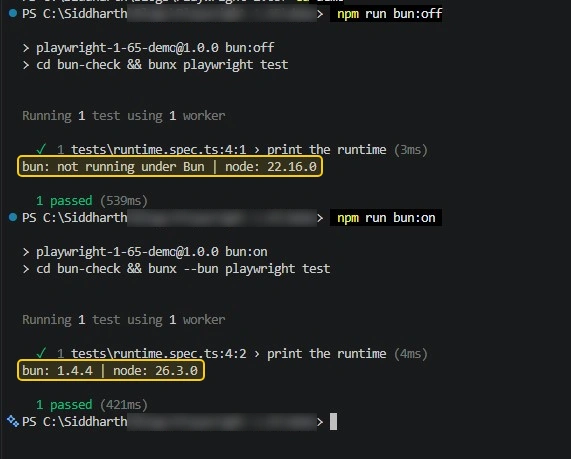

Tip: Add the runtime check above to your suite before you trust a Bun pipeline. Without --bun, the job stays green and still runs on Node.js.
What works differently under Bun
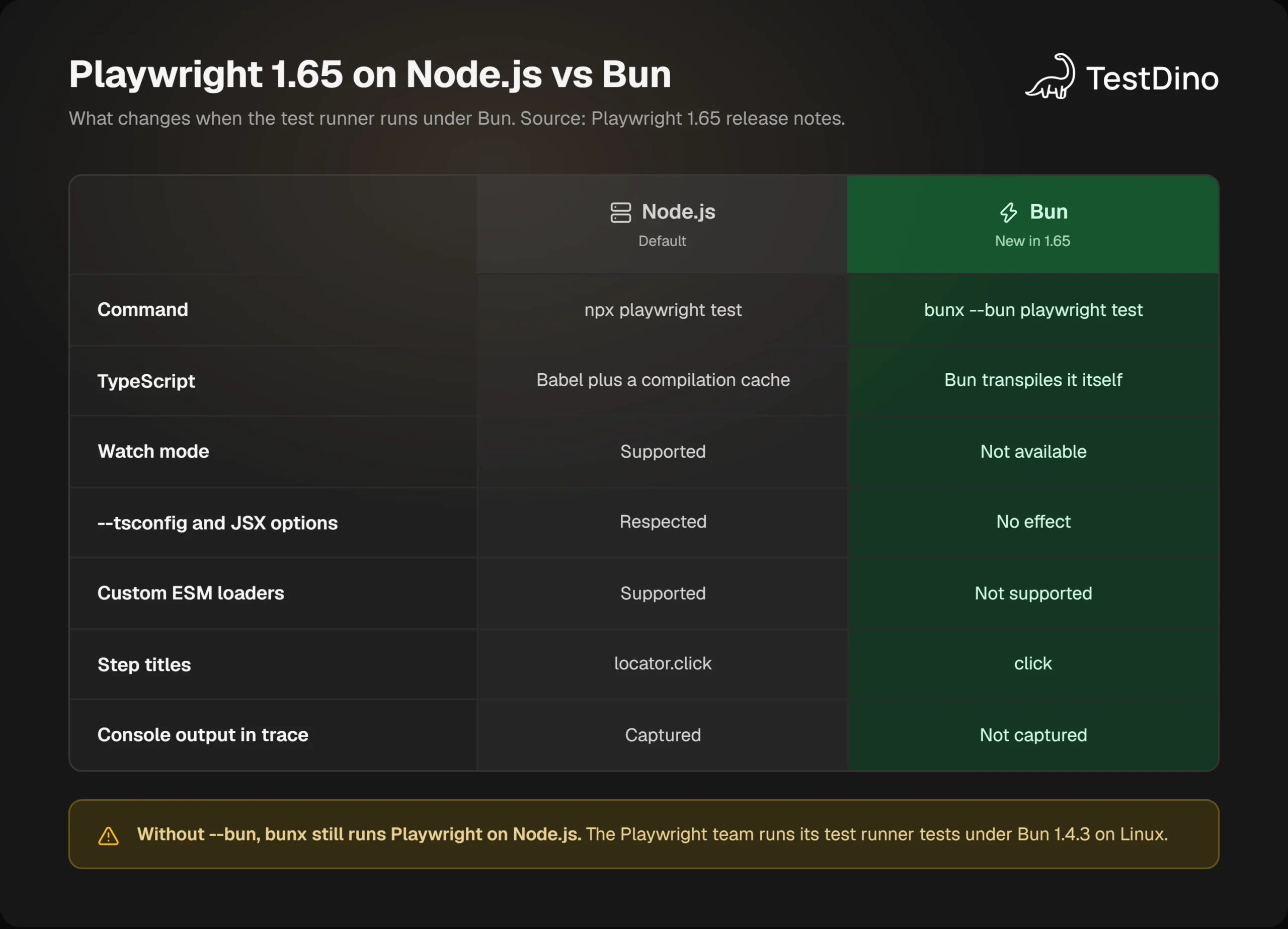
Bun support comes with limits, and the release notes list them plainly. The table puts them next to the Node.js behaviour.
| Feature | Node.js | Bun |
|---|---|---|
| Watch mode | Available | Not available |
| UI mode reruns on file change | ||
| --only-changed | Follows imports | Does not follow imports |
| --tsconfig and JSX options in tsconfig.json | Respected | No effect |
| Custom ESM loaders | Supported | Not supported |
| Stack traces | Include async frames | No async frames |
| API names in steps | locator.click | click |
| Test console output in trace and UI mode | Captured | Not captured |
Two of these showed up in our own run. The test location moved by 1 column, from runtime.spec.ts:4:1 to runtime.spec.ts:4:2, and the stack frame in a failure read at where Node.js printed the file path alone.
Those small shifts matter if anything parses your output. Step titles and locations feed reports, so a tool that matches on locator.click will not find it in a Bun run.
The missing pieces also touch daily debugging. If you lean on Playwright UI mode to rerun on save, or read console output inside the Playwright trace viewer, keep Node.js for local work.
Should you switch to Bun?
Playwright's own CI runs the test runner tests under Bun 1.4.3 on Linux, according to the release notes. That is the tested combination today.
Our 10-test suite passed under Bun 1.4.4 on Windows with the same results as Node.js: 7 passed, 1 failed, 1 flaky, 1 skipped. That is 10 tests on 1 machine, which is enough to try Bun but too little to trust it.
A sensible path looks like this:
- Already on Bun: add a side job with bunx --bun playwright test and compare results with the Node.js job for a week.
- Using JSX options or custom loaders: stay on Node.js, because Bun ignores those settings. This includes most Playwright component testing setups.
- Happy on Node.js: nothing changes for you. Bun support is opt-in.
Bun is a choice you can put off. The reporting changes are harder to ignore, because every run ends in a report.
2. Playwright failures reporter and onlyFailures: reports with only failures
Every Playwright run ends in a report, and most of each report describes tests that passed. Version 1.65 adds 2 separate tools that cut that down: a terminal reporter and a report option.
The problem
The default list reporter prints a line for every test. On CI the default is the dot reporter, which prints a character per test. Both are fine for 50 tests and tiring for 5,000.
Stored reports have the same shape. An HTML report for a large suite carries thousands of green rows around the 3 red ones you opened it for.
What Playwright 1.65 does
The new failures reporter prints failures and successful retries as they happen, followed by a summary. It prints no progress output at all.
npx playwright test --reporter=failuresHere is what it printed for the demo store suite, trimmed to the key lines.
  1) [chromium] › tests\store.spec.ts:38:1 › cart drawer opens from the header
    Error: simulated first-attempt failure
    Expected: > 0
    Received:   0
1) [chromium] › tests\store.spec.ts:38:1 › cart drawer opens from the header
Passed on retry #1 (1.2s).
2) [chromium] › tests\store.spec.ts:32:1 › product count matches the catalogue
Error: expect(locator).toBeVisible() failed
Locator: getByText('Showing 15 products')
Expected: visible
Timeout: 3000ms
1 failed
[chromium] › tests\store.spec.ts:32:1 › product count matches the catalogue
1 flaky
[chromium] › tests\store.spec.ts:38:1 › cart drawer opens from the header
1 skipped
7 passed (13.9s)Errors appear the moment a test fails, without waiting for the run to end. A test that recovers gets its own line, "Passed on retry #1", so a flaky pass cannot slip by unnoticed. The 7 passing tests share 1 line.
The retry line is worth a second look. With Playwright retries turned on, a test that fails once and then passes still ends the run green, which is easy to miss in a long Playwright test reporting log.

The reporter has 1 option of its own. Set omitTags, or the PLAYWRIGHT_FAILURES_OMIT_TAGS variable, to drop test tags from titles. Pair it with the quiet config option if your tests print to stdout.
The onlyFailures option
The second tool works on files. The new onlyFailures option tells the HTML, JSON, or JUnit reporter to keep only the tests worth opening.
According to the docs, that means:
- Tests with unexpected outcomes, including unexpected passes
- Flaky tests, even when they pass on retry
- Interrupted tests
Every attempt of a kept test stays in the report, including the retry that passed.
import { defineConfig, devices } from '@playwright/test';
export default defineConfig({
  testDir: './tests',
  fullyParallel: true,
  retries: 1,
  reporter: [
    ['failures'],
    ['html', { onlyFailures: true, open: 'never' }],
  ],
  use: {
    baseURL: 'https://storedemo.testdino.com',
    trace: 'on-first-retry',
  },
  projects: [{ name: 'chromium', use: { ...devices['Desktop Chrome'] } }],
});
There is no command-line flag for it. You set it in the config, or with an environment variable per reporter.
| Reporter | Config option | Environment variable |
|---|---|---|
| HTML | onlyFailures | PLAYWRIGHT_HTML_ONLY_FAILURES |
| JSON | onlyFailures | PLAYWRIGHT_JSON_ONLY_FAILURES |
| JUnit | onlyFailures | PLAYWRIGHT_JUNIT_ONLY_FAILURES |
What onlyFailures does to your totals
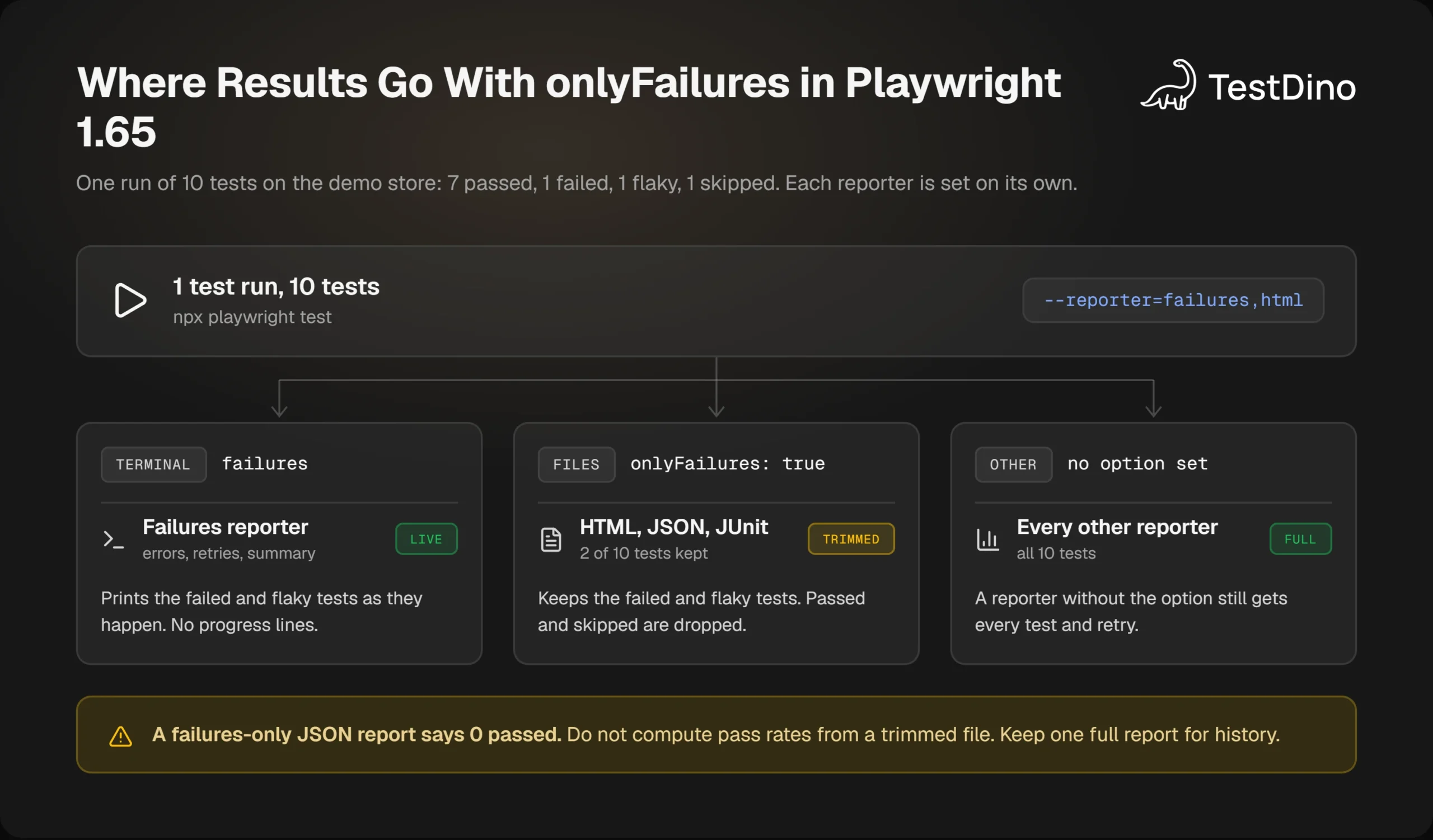
This is the part the release notes do not spell out, so we measured it. We wrote a full report and a failures-only report from the same run of 10 tests and compared them.
| Measure | Full report | With onlyFailures |
|---|---|---|
| Tests in the JSON report | 10 | 2 |
| JSON stats.expected (passed) | 7 | 0 |
| JSON stats.skipped | 1 | 0 |
| JSON stats.unexpected and stats.flaky | 1 and 1 | 1 and 1 |
| JUnit tests attribute | 10 | 2 |
| JSON file size | 32,820 bytes | 21,357 bytes |
The option removes more than rows. The totals shrink with them, so the failures-only JSON file claims 0 passed tests and the JUnit file claims 2 tests in total.
Note: Never calculate a pass rate from a failures-only file. A dashboard that reads this JUnit report would show 1 failure out of 2 tests, a 50% pass rate, for a run where 8 of 10 tests ended green.
File size dropped by about 35% in this tiny suite, because failed tests carry the heavy error details. The saving should grow with the share of passing tests, so measure it on your own suite before you promise anyone a number.
The Playwright HTML reporter output behaves the same way. Open the trimmed report and you land on the failed and flaky tests, with no filter to click first.
onlyFailures with sharded blob reports
Sharded suites write blob reports and merge them later. The blob holds everything, and the trimming happens at merge time through a config file.
import { defineConfig } from '@playwright/test';
export default defineConfig({
  reporter: [['html', { onlyFailures: true }]],
});npx playwright merge-reports --config=merge.config.ts ./blob-reportThis keeps the full data in the blobs while the published HTML stays small. Teams that already merge Playwright CI reports across Playwright sharding jobs only need the extra flag.
Keeping full history with TestDino
Trimmed reports are good for reading and bad for trends. A pass rate, a flaky rate, or a slowest-test list all need the tests that passed.
The docs say to configure onlyFailures independently for each reporter, and that detail solves the problem. A reporter without the option still receives everything.
We confirmed it with a small custom reporter beside the trimmed ones. It received all 12 results: 10 tests plus 2 retries.
TestDino's reporter sits in that same slot. It streams results during the run, so you can trim the local files and still keep the complete record.
import { defineConfig } from '@playwright/test';
export default defineConfig({
  reporter: [
    ['failures'],
    ['html', { onlyFailures: true, open: 'never' }],
    ['@testdino/playwright', { token: process.env.TESTDINO_TOKEN }],
  ],
});
With this setup the terminal shows only what broke, the HTML artifact stays small, and TestDino holds every pass, fail, and retry for playwright test history. A test that passed on retry today is then easy to spot when it fails for real next week.
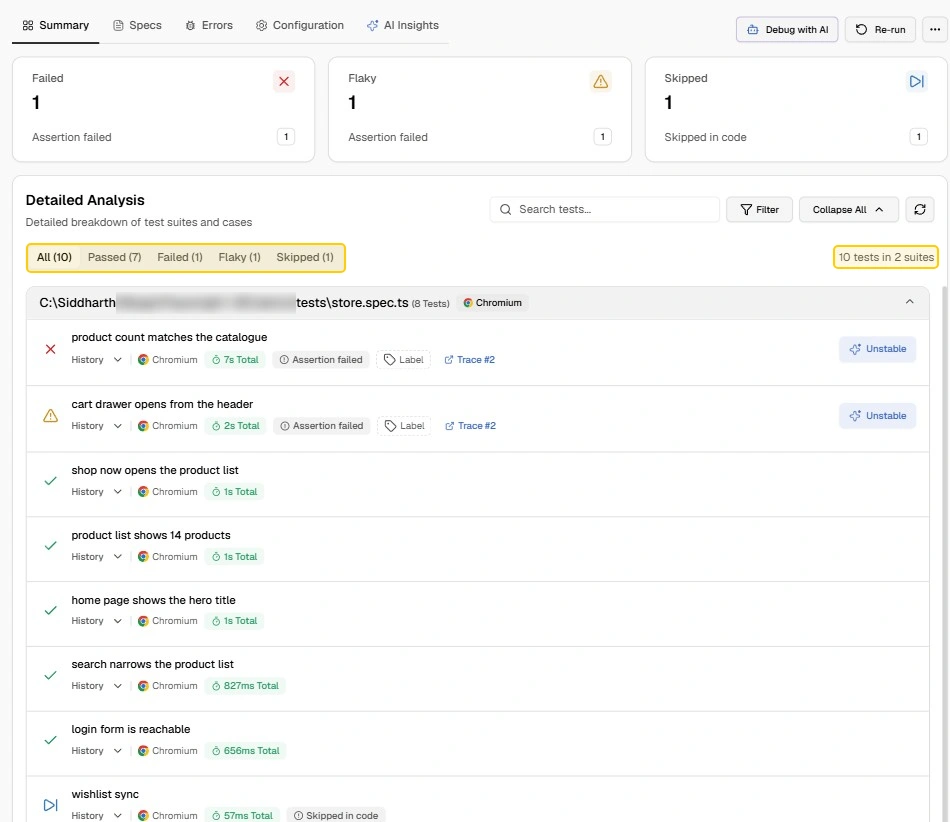
We ran the demo suite this way to check it. The local HTML report held 2 tests, while the TestDino run listed all 10 tests in 2 suites: 7 passed, 1 failed, 1 flaky, and 1 skipped.
From a flaky retry to a fix
The failures reporter told us that the cart drawer test passed on retry. It did not tell us why, and that question is where the time usually goes.
In TestDino, the same test carried an AI Insights tab. It labelled the test "Unstable" with medium confidence (59%) and noted 1 failed attempt and 1 passed retry.
The suggested fix was exact. It pointed at line 41 of store.spec.ts and proposed deleting the simulated first-attempt assertion, which is the flake we planted on purpose.
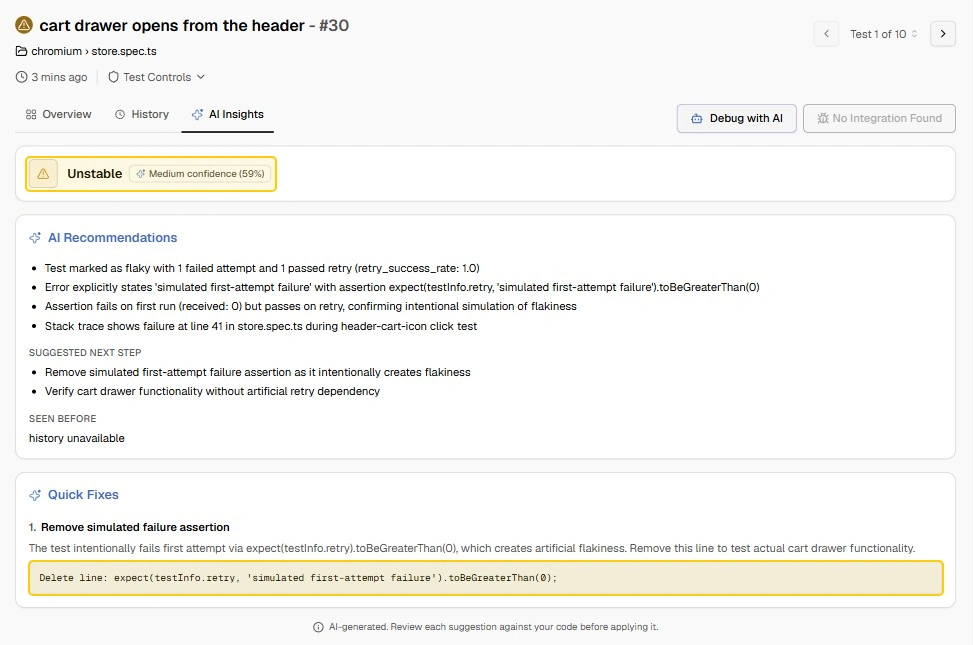
This was the first run of the project, so the "Seen before" field read "history unavailable". That field fills in as runs build up, which is the reason to keep the full record and not a trimmed one.
The same screen has a "Debug with AI" button for cases that need more than a 1-line fix. It hands the failure, its attempts, and what changed since the test last passed to your coding agent.
The flow has 3 steps: pick your AI IDE, connect the TestDino MCP server, and send a prepared prompt. The options shown were Cursor, Claude Code, VS Code Copilot, and the Codex app, in the same spirit as our fixing Playwright tests with AI workflow.
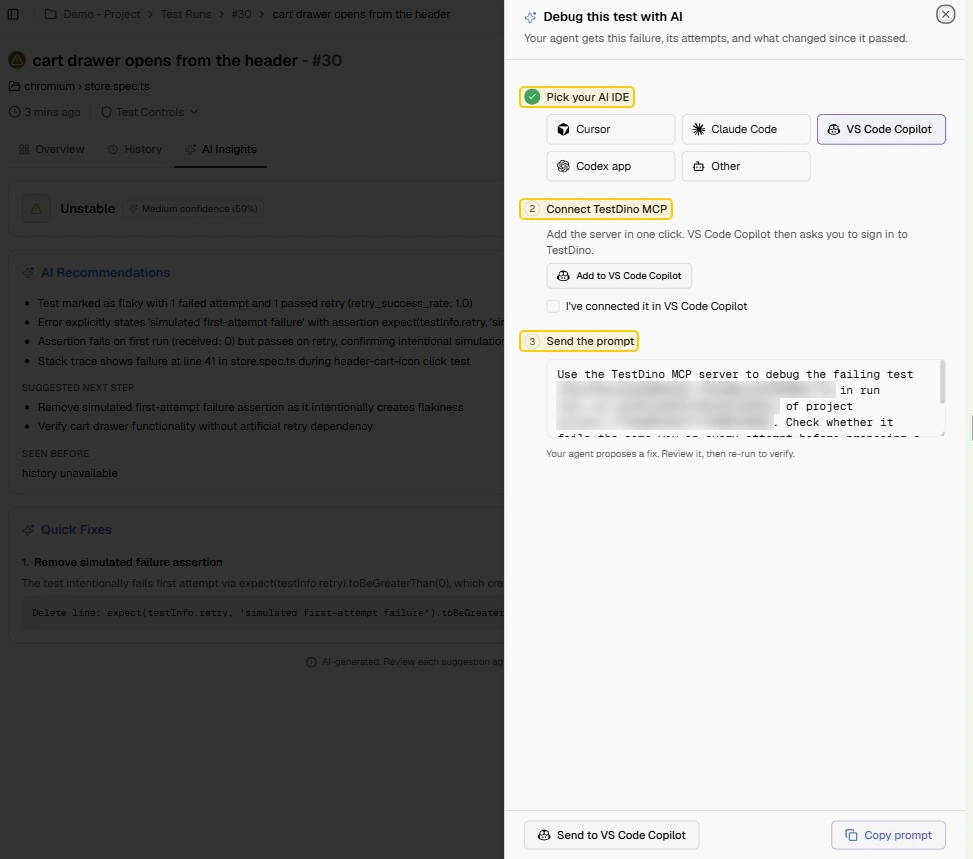
The agent proposes a fix, and you review it and rerun to verify. The review step matters, because the panel itself labels its suggestions as AI-generated.
So the 1.65 reporters told us which test was flaky, and the stored run is what explained why. With more runs recorded, Playwright flaky test debugging can start from the tests that fail most often.
If you want a number for your own suite, the Flaky Cost Calculator on TestDino's free tools turns rerun counts and debug hours into a yearly figure.
Everything so far happens after the tests finish. The next changes affect how they run, starting with tests that need the machine to themselves.
3. Test runner: the -exclusive- lock, description-only skips, and a movable cache
Three smaller runner changes ship in this release. The first replaces a familiar workaround, the separate single-worker job.
The -exclusive- lock
Playwright 1.63 introduced named test locks, so 2 tests that share a resource never overlap. Version 1.65 adds a built-in lock name, -exclusive-, described in the test locks docs.
A test with this lock starts only when no other test is running, and no other test starts until it finishes. Everything else keeps running in parallel with each other.
import { test, expect } from '@playwright/test';
test('measure product list load time', { lock: '-exclusive-' }, async ({ page }) => {
  const started = Date.now();
  await page.goto('/products');
  await expect(page.getByText('Showing 14 products')).toBeVisible();
  console.log(`product list ready in ${Date.now() - started}ms`);
});
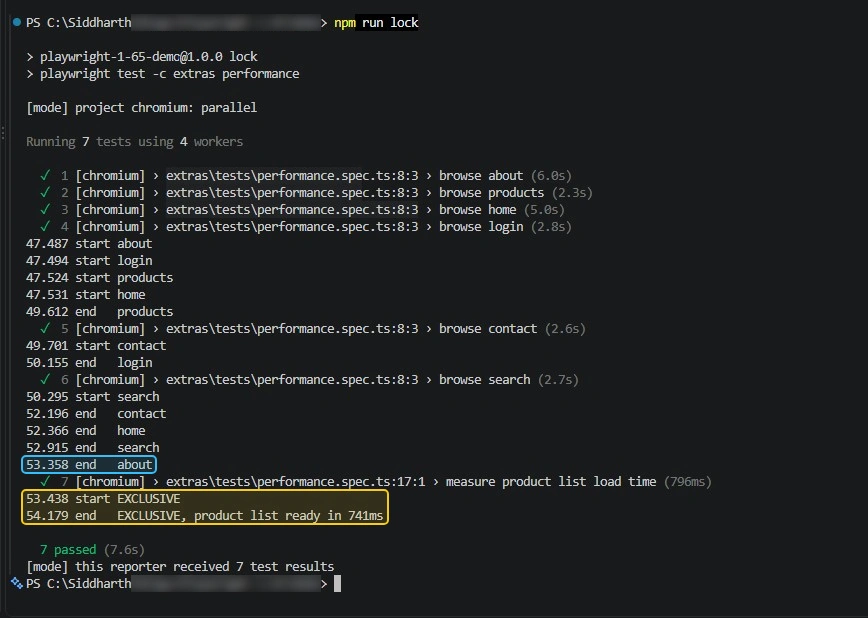
We ran this test beside 6 ordinary browsing tests on 4 workers and logged every start and end.
| Time | Event |
|---|---|
| 0.0s to 0.1s | 4 browsing tests start in parallel |
| 2.2s to 2.8s | First 4 finish, the last 2 browsing tests start |
| 4.9s | Last browsing test ends |
| 4.9s | Exclusive test starts, alone |
| 5.7s | Exclusive test ends after 781ms |
The exclusive test waited until the machine was idle, then ran with nothing beside it. No other test overlapped with it at any point.
A second run of the same file, captured below, followed the same pattern. The last browsing test ended at 53.358 and the exclusive test started at 53.438.
Without this lock, the options were a separate project or a second CI step with --workers=1. Both add a slower path to protect 1 test, which works against Playwright parallel execution.
Good candidates are tests that measure timing, restart a shared service, or change a global setting. Anything in a Playwright performance testing setup is a natural fit, since a busy CPU skews the numbers.
Note: In the default and serial modes, all tests in a file run together in order, so a lock on any test is held for the whole file. Put exclusive tests in their own file, or enable fullyParallel, to keep the lock short.
Description-only skips
Until now, giving a reason for a skip inside a test body meant passing a condition first, as in test.skip(true, 'reason'). The condition was noise when the skip was unconditional.
In 1.65, test.skip(), test.fixme(), test.fail(), and test.slow() accept only a description.
test('wishlist sync', async ({ page }) => {
  test.skip('Wishlist API is not deployed on the demo store yet');
  await page.goto('/');
});
The description is recorded in the test annotation. In our JSON report the skipped test carried the type skip with the full sentence as its description.
That makes skip reasons searchable in any report that shows annotations, next to the tags and other Playwright annotations you already use.
A movable transform cache
On Node.js, Playwright keeps transpiled test files in the system temporary directory. The new PLAYWRIGHT_TRANSFORM_CACHE_DIR variable moves that cache somewhere else.
PLAYWRIGHT_TRANSFORM_CACHE_DIR=~/.cache/playwright-transform npx playwright testThe release notes give the main use case: a Linux machine shared with other users, where a common temp folder causes permission clashes. We set it to a local folder and found the transpiled .js and .map files for each spec inside.
It also gives CI a stable path to cache between jobs. Under Bun the variable has nothing to do, because Bun does not use this cache.
Those are the changes for people who write tests. The 2 new APIs are for people who build tooling around Playwright.
4. New APIs: CDP timeouts and testRun.mode()
The new API list is short this time. There are 2 entries, and both close a gap that previously needed a workaround.
timeout and signal for cdpSession.send()
A raw Chrome DevTools Protocol call could hang forever if the browser never answered. The call had no timeout, so the only limit was the test timeout itself.
Now cdpSession.send() takes a timeout in milliseconds and an abort signal. The default stays at 0, which means no timeout.
import { test } from '@playwright/test';
test('read performance metrics over CDP', async ({ page }) => {
  await page.goto('/products');
  const client = await page.context().newCDPSession(page);
  await client.send('Performance.enable');
  const { metrics } = await client.send('Performance.getMetrics', undefined, { timeout: 5000 });
  console.log(`received ${metrics.length} metrics`);
});
We forced a call that never resolves with a 1-second limit. It failed fast with TimeoutError: cdpSession.send: Timeout 1000ms exceeded., which is far easier to read than a whole-test timeout.
testRun.mode() for reporters
Playwright 1.62 gave reporters a preprocess hook that runs before the tests. The new testRun.mode() method lets that hook ask how a suite will execute: serial, parallel, or default.
import type { Reporter } from '@playwright/test/reporter';
class ModeReporter implements Reporter {
  async preprocess({ suite, testRun }: any) {
    for (const project of suite.suites) {
      for (const file of project.suites) {
        for (const group of file.suites)
          console.log(`${group.title}: ${testRun.mode(group)}`);
      }
    }
  }
}
export default ModeReporter;
On the demo suite this printed checkout flow: serial for our serial group, while the project and the other file reported parallel because the config sets fullyParallel.
This matters for anyone who builds a Playwright custom reporter that plans or splits tests. A serial group must stay together, and now the reporter can know that before the run starts.
The method only works during preprocess. The docs also warn that the mode alone does not describe complete test groups, since worker fixtures and hooks shape them too.
None of the features above can break an existing suite. The 11 changes in the next section can.
Playwright 1.65 breaking changes and how to fix each one
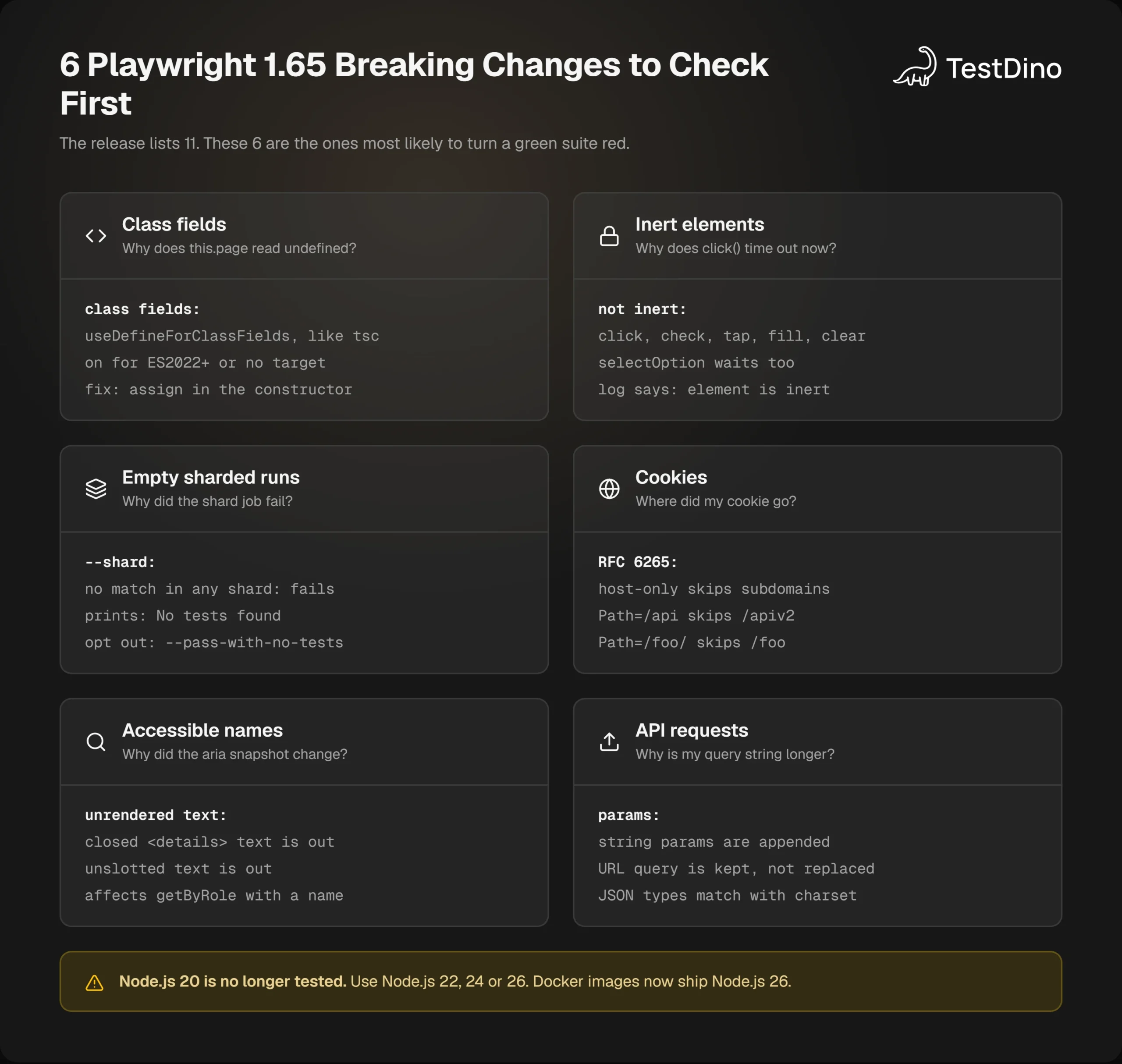
The release notes list 11 breaking changes. How many you meet depends on your suite, and the first one below is the one the release notes illustrate with a page object.
Note: Playwright 1.65 has no patch release yet as of November 12, 2026. Pin the exact version, 1.65.0, so a later patch does not change behaviour in the middle of your upgrade work.
1. Class fields now follow useDefineForClassFields
Playwright now compiles TypeScript class fields the way tsc does, based on useDefineForClassFields in your tsconfig.json. The option is on for ES2022 and later targets, and also when no target is set.
With the option on, field initializers run before the constructor body. A field that reads a constructor parameter property finds it empty.
This is the classic shape of a Playwright page object model class.
import type { Page } from '@playwright/test';
export class LoginPage {
  readonly email = this.page.getByTestId('login-email-input');
  readonly password = this.page.getByTestId('login-password-input');
  readonly submit = this.page.getByTestId('login-submit-button');
  constructor(private readonly page: Page) {}
}
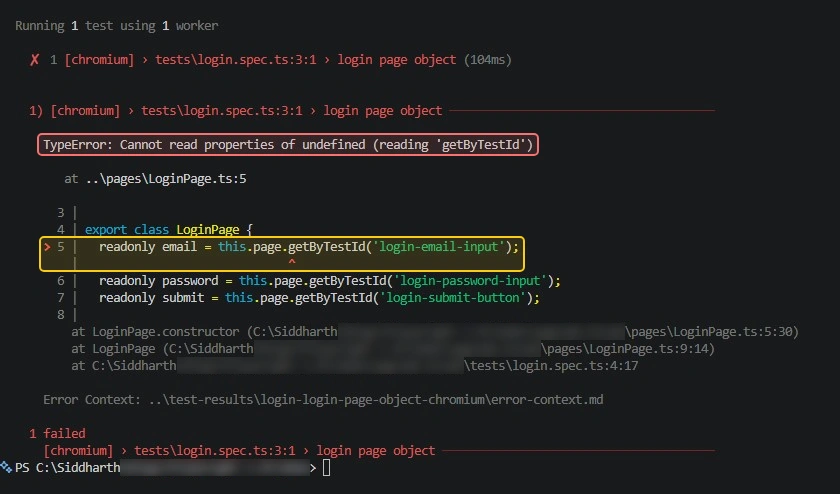
Our demo project had no tsconfig.json, so no target was set. On 1.65 the test failed in 112ms, before the browser did anything.
  1) [chromium] › tests\login.spec.ts:3:1 › login page object
    TypeError: Cannot read properties of undefined (reading 'getByTestId')
       at ..\pages\LoginPage.ts:5
    > 5 |   readonly email = this.page.getByTestId('login-email-input');
        |                              ^
There are 2 fixes. The lasting one is to move the assignments into the constructor.
import type { Locator, Page } from '@playwright/test';
export class LoginPage {
  readonly email: Locator;
  readonly password: Locator;
  readonly submit: Locator;
  constructor(private readonly page: Page) {
    this.email = page.getByTestId('login-email-input');
    this.password = page.getByTestId('login-password-input');
    this.submit = page.getByTestId('login-submit-button');
  }
}
The quick one is a single compiler option, documented under tsconfig class fields.
{
  "compilerOptions": {
    "useDefineForClassFields": false
  }
}
We tested both. The option made the original class pass again, and so did setting "target": "ES2021", because the stricter behaviour only starts at ES2022.
One caution if you use decorators. A regression report, issue #43936, describes a decorated class with a static field failing to load when the option is set to false, so prefer the constructor fix there.
2. Actions wait for elements to be not inert
The inert attribute tells the browser that a part of the page cannot be focused or clicked. Apps often set it on the background while a dialog is open.
Playwright now treats that as an actionability check, listed as not inert. It applies to click, check, tap, fill, clear, and selectOption.
import { test } from '@playwright/test';
test('click inside an inert region', async ({ page }) => {
  await page.setContent(`<main inert><button>Add to cart</button></main>`);
  await page.getByRole('button', { name: 'Add to cart' }).click({ timeout: 3000 });
});
The demo store has no inert regions, so this check uses a tiny inline page. The click timed out, and the call log named the reason on every retry: element is inert.
A failure here means the test was doing something a user cannot. Nobody can click a button inside an inert region, so the fix is to close the dialog first.
3. A sharded run with no tests now fails
A sharded run now fails with "No tests found" when no tests match across all shards. Previously such a run could pass in silence.
We ran a filter that matches nothing with --shard=1/2. The exit code was 1, and adding --pass-with-no-tests brought it back to 0.
npx playwright test --grep "@smoke" --shard=1/2 --pass-with-no-testsAn empty shard still passes when other shards have tests. We checked that too: a filter matching 1 test passed on shard 2 of 2 with exit code 0.
This catches a nasty failure mode, a typo in a tag that makes CI run 0 tests and report success. Use the opt-out flag only for jobs where 0 tests is a valid result.
4. Cookie matching follows RFC 6265
Cookie lookups by URL are now stricter in browserContext.cookies() and apiRequestContext.cookies().
| Cookie | URL you ask for | Returned in 1.65? |
|---|---|---|
| Host-only cookie for example.com | shop.example.com | |
| Path=/api | /apiv2 | |
| Path=/foo/ | /foo |
The API request context also changed how it handles a cookie without a name. It now sends Cookie: x where it used to send Cookie: =x.
Check any test that reads cookies by URL after login. Saved sessions in a Playwright authentication setup are one place where a subdomain lookup can hide.
5. Proxy credentials no longer reach websites
The credentials in the proxy launch option now answer only proxy challenges. They are no longer sent to websites that ask for HTTP authentication.
If a test relied on that side effect to log in to a site, use httpCredentials on the context.
6. Unrendered text leaves accessible names
Text that the browser does not render is no longer part of accessible names and aria snapshots. The release notes give 2 examples: text not assigned to a slot, and text directly inside a closed details element.
The demo store's FAQ uses details elements, so we snapshotted a similar element in both states on 1.65.
import { test } from '@playwright/test';
test('aria snapshot of a details element', async ({ page }) => {
  await page.setContent(`<details><summary>Shipping</summary>Ships in 2 days</details>`);
  console.log(await page.locator('details').ariaSnapshot());   // - group: Shipping
  await page.locator('summary').click();
  console.log(await page.locator('details').ariaSnapshot());   // - group: Shipping Ships in 2 days
});
Closed, the snapshot holds only the summary. Open, it includes the body text.
This can change getByRole() lookups with a name, and any stored toMatchAriaSnapshot() baseline. Our accessibility tree explainer shows how those names are built.
7. API request params are appended
String and URLSearchParams values of the params option are now added to the query the URL already has. Before, they replaced it.
import { test } from '@playwright/test';
test('params are appended to the existing query', async ({ request }) => {
  const response = await request.get('/products?category=audio', { params: 'page=2' });
  console.log(response.url());
});
On 1.65 this printed https://storedemo.testdino.com/products?category=audio&page=2. Both values survive.
Look for tests that build a URL with a query string and then pass params as a string as well. Those requests now carry both sets.
8. JSON content types match more loosely
The API request context now treats application/json;charset=UTF-8, and other case or parameter variants, as JSON when you pass a string as data. Only the exact value application/json did that before.
The catch is a string that is not valid JSON. With these content types it is now JSON-encoded, with quotes and escaping, where it used to be sent as is.
That changes malformed bodies and can break a signature computed over the original string. To send exact bytes, pass data: Buffer.from(body, 'utf8'). Valid JSON strings and buffers are unchanged, so most Playwright API testing suites will not notice.
9, 10 and 11. Style imports, blob output, and CommonJS locations
The last 3 are narrow, and a short table covers them.
| Change | New behaviour | What to do |
|---|---|---|
| .css, .less, .scss imports in test files | Load as empty modules, so the imported file must exist | Remove imports that point at missing files |
| Blob reporter output | Deletes the content of its output directory again before writing. Version 1.64 kept reports with other names | Give each job its own output folder if you rely on leftovers |
| Test locations in CommonJS output | Point to the start of the callee, a.spec.ts:3:7 where it was a.spec.ts:3:11, the same as ESM | Update tools that match tests by column number |
Node.js 20, Docker, and browser versions
Two announcements sit beside the breaking changes. Playwright no longer tests on Node.js 20, and the system requirements now list Node.js 22, 24, or 26.
The package's engines field on npm still reads >=20, so an install on Node.js 20 will not be blocked. It is simply no longer covered by the project's own tests.
Docker images moved as well. They now include Node.js 26 in place of Node.js 24, plus the latest Chromium patch on the same branch. If your app's build needs an older Node.js, a Playwright in Docker pipeline is where that will surface.
| Browser | Version in 1.65 |
|---|---|
| Chromium | 158.0.8127.18 |
| Mozilla Firefox | 159.0 |
| WebKit | 27.2 |
| Also tested against | Google Chrome 157 and Microsoft Edge 156 |
With the full list in hand, the upgrade comes down to doing things in the right order.
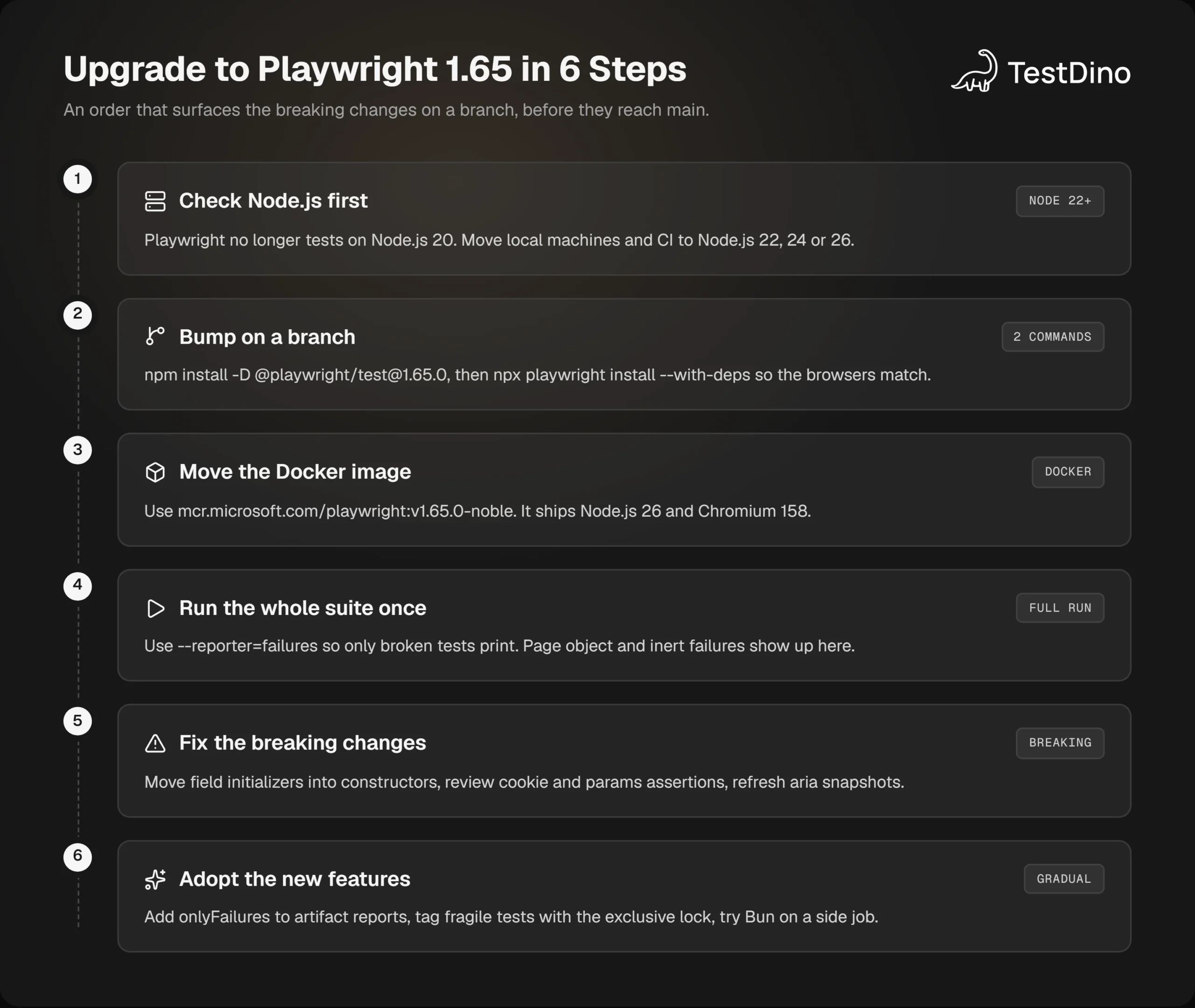
How to upgrade to Playwright 1.65 in 6 steps
The safest upgrade surfaces every breaking change on a branch, in an order where each step explains the next failure. Here is the short version.
- Check your Node.js version and move off Node.js 20.
- Bump Playwright to 1.65.0 on a branch and install the browsers.
- Move the CI Docker image to the matching tag.
- Run the whole suite once with the failures reporter.
- Fix the breaking changes that appear.
- Adopt the new features where they help.
- Steps 1 to 3: runtime, packages, and image
Start with the runtime, because it decides everything after it. Then pin the exact version and install matching browsers.
node --version
npm install -D @playwright/test@1.65.0
npx playwright install --with-deps
The Playwright package and the browser builds are tied together, so never bump one without the other. In containers, change the tag in the same commit.
docker pull mcr.microsoft.com/playwright:v1.65.0-nobleThe same goes for a Playwright in GitHub Actions workflow: the version in package.json and the container tag have to change together.
Tip: Rebuilding a config for the new version? TestDino's free tools include a Config Generator that produces a playwright.config.ts from your browsers, workers, retries, and reporters.
Steps 4 and 5: run once, then fix
Run the full suite on the branch with the new reporter, so only broken tests print.
npx playwright test --reporter=failuresRead the failures in this order, since each has a clear signature:
- Cannot read properties of undefined in a class file: the class fields change. Move initializers into the constructor.
- element is inert in a call log: the new actionability check. Close the overlay before the action.
- No tests found in a sharded job: an empty filter. Fix the tag or add --pass-with-no-tests.
- Aria snapshot mismatches: unrendered text left the snapshot. Review the diff, then update the baseline on purpose.
- Cookie or query string assertions: the RFC 6265 and params changes. Adjust the expectation to the stricter rule.
Fix page objects first. A broken class fails every test that uses it, so 1 fix clears all of them.
Step 6: adopt the new features gradually
Once the branch is green, the new features can come in one at a time.
- Reports: add the failures reporter to CI and set onlyFailures on the HTML artifact. Keep 1 full source of results for trends.
- Locks: find tests that run in a separate single-worker job and move them back with lock: '-exclusive-'.
- Skips: replace test.skip(true, 'reason') with the shorter form as you touch files.
- Bun: try it on a side job only if your project already uses Bun.
If an AI coding agent writes or repairs your tests, give it current rules for these changes. The open-source Playwright skill holds page object and CI guides an agent can load, which helps it avoid the class field pattern that 1.65 breaks.
Why upgrading early costs less
Skipping a release feels safe, but the changes stack. A team that jumps from 1.63 straight to 1.65 has to sort 15 breaking changes from 2 releases in a single red build, with no way to tell which version caused which failure.
Usage is climbing as well. The npm registry counted 517.6 million downloads of the playwright package in October 2026, up from 107.5 million in November 2025.
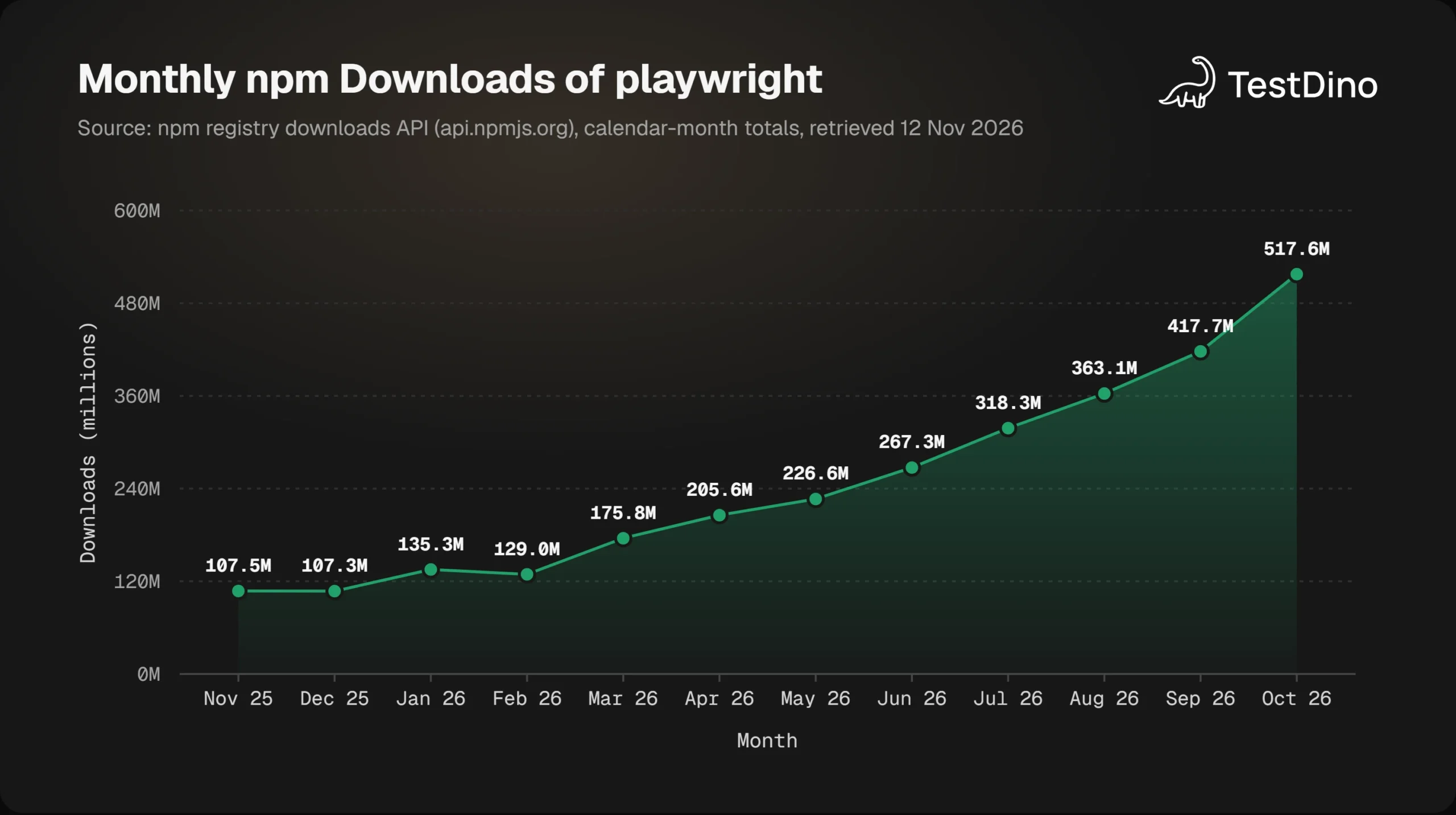
Source: npm registry downloads API (api.npmjs.org), calendar-month totals, retrieved November 12, 2026.
Download counts include CI installs, so they measure activity and not the number of teams. The direction is still clear, and it matches the faster release rhythm shown earlier.
The rule we would follow is to upgrade within the release window, on a branch, with a full run. The habits in our Playwright best practices list help keep each bump small.
Conclusion
Playwright 1.65 changes the runner and the reports far more than it changes the page APIs. Bun support removes a second runtime for teams that already use Bun, and the failures reporter makes long CI logs readable again.
The onlyFailures option is useful with 1 warning attached: it trims the totals along with the rows. Keep a full record somewhere, whether that is an untrimmed report or a reporter such as TestDino's that receives every result.
The 11 breaking changes deserve real attention. Check page objects with field initializers first, then inert regions, cookies, and sharded filters.
Upgrade on a branch, run the whole suite once, and fix what the failures reporter shows you. If you are still on Playwright 1.63, do it before another release lands on top of these 2.
FAQs

Pratik Patel
Co-founder